Last week, author Kameron Hurley tweeted about an article she contributed to FemaleFirst titled “10 Things I Learned From Failure.” I’m currently reading Jack Bickham’s The 38 Most Common Mistakes Fiction Writers Make1 as part of my learning all I can about writing a novel while working on my own, so I wasted no time to read it. Hurley has lots of great advice in there, but this resonated with me in particular:
“I don’t fully understand something unless I fail at it.”
I’ve been very fortunate in my life, but while hard work got me a lot of rewards—better jobs, speaking opportunities, article & book deals—it wasn’t usually doing the hard work that taught me the most important things in life. It was failure.
Winning is a wonderful feeling, but like with privilege, winning has a downside: you’re not forced to learn how to do better. The pressure is off, you won, you “already did things right”…right?
This holds true across disciplines, industries, cultural and societal boundaries. In politics, the Left failed to prevent a backlash against the intersectional privileges we were identifying everywhere and in every thing. That failure should become an object lesson in how to engage in less confrontational communication and education, especially on topics that make people defensive. But while the Conservative nihilists won, there are many lessons for them to learn as well—none that they seem interested in learning, however, but I digress.
I’ve failed in life as much as I’ve succeeded. In my career, in my hobbies, in love and romance, in adventuring and exploring. I cherish useful criticism, unlike many people perhaps, precisely because it helps me identify where I have room to grow. My moments of failure have always resulted in greatly improving myself in the immediate future thereafter.
When my job at Apple ended up not working out, I was too close to it during the last few months to really see how, where and why things were going wrong. Afterwards, everything became crystal clear, like all the answers were being presented to me on a silver platter. A cheat sheet for the next test.
In 2012, I gave a talk about Responsive People at the Interlink Conference in Vancouver. In it, I discuss Rembrandt’s habit of taking a step back to look at his work from afar, to see the big picture. When painting, he was always “too close to the details,” he would explain, and he had to step back to make sure he wasn’t going astray.
The greatest failures in my life have taught me the most important lessons I’ve learned. And what I learned from that, itself, is that there is no reason to fear the challenge ahead of you. The greater that challenge is, the more valuable the lessons you can learn from it if you fail. Or even, if you succeed, provided you are willing to be brutally honest and self-critical in your success.
Courage, and how to find it within myself, is the lesson I never expected to learn from failure.
Kickback link. The book is pretty good so far; some great advice, but also some contrived examples. Full review coming soon.
Kaizen: The Key To Japan’s Competitive Success (kickback link). This book details the Kaizen principle of continuous improvement, and has been one of the most influential books in my life. Highly recommended.
With the city settled on the Puget Sound, surrounded by both islands and mountains: commuters can choose to live in a variety of places and work in the city. This means everyday workers are traveling from far and near by a number of transportation methods. However, as all of these people head to and from the city each day they all experience the same terrible (and sometimes expensive) commute. A growing number of people have found freedom in biking to work, specifically ebiking to work. After all, It makes perfect sense. For the people who are already familiar with biking, they are able to get to their destination quicker and dryer. For those who are not, it's much quicker, cheaper, and less stressful than their typical route.
The Ferries
While ferries and water taxies are useful for transporting people they tend to be more time consuming and expensive than is ideal, especially if a car is involved. Riding an ebike allows you to avoid the high cost of using a car, but still preserving a limited number of removes both of those at once. No more ferry fees and more time for the family.
Traffic
With over 225K people commuting downtown every day, you can imagine the congestion that happens. Yet, commuting can be a stress-free breeze if you have an e-bike to whiz through traffic with. Not to mention, it is also one simple step you can take to reducing your carbon footprint. Just remember your fenders and get to work dryly and quickly!
Bike Infrastructure
With an already thriving bike culture in Seattle, introducing ebikes is a relatively smooth integration. Although the traffic and weather can be an intimidating factor to brave daily, there is a strong enough bike infrastructure in place to help riders feel secure, and it just keeps getting better.
The Hills
The one thing that truly sets ebikes apart when bike commuting in Seattle is the hills. If you're riding around the city you know it takes a certain tenacity to truly take on all the hills. Yet, with a little boost, those hills are no longer a challenge which make bike commuting a more realistic endeavor for a much larger group of people. This is perhaps the biggest reason why ebikes are becoming so popular in Seattle.
Over the last couple of days, a thread on the SIGCSE mailing list
has been revisiting the well-tilled ground of comments in code.
As I told my students at the beginning of class this semester,
some of my colleagues consider me a heretic for not preaching the
Gospel of Comments in Code. Every context seems to have its own
need for, and expectations of, comments. Wherever students end
up working, both while in school and after graduation, their
employers will set a standard and expect them to follow. They
will figure it out.
In most of my courses, I define a few minimal standard, try to
set a good example in the code I give my students, and otherwise
don't worry much about comments. Part of my example is that
different files I give them are commented differently, depending
on the context. A demo of an idea, a library to be reused in the
course, and an application are different enough that they call
for different kinds of comments. In a course such as compiler
development, I require more documentation, both in and out of
the code. Students live with that code for a semester and come
to value some of their own comments many weeks later.
Anyway, the SIGCSE thread included two ideas that I liked, though
they came from competing sides of the argument. One asserted
that comments are harmful, because:
They're something the human reader can see but the computer can't,
and therefore are a source of misunderstanding.
I love the idea of thinking in terms of misunderstandings between
humans and the computer.
The other responded to another poster's suggestion that students
be encouraged to write comments with themselves in mind: What
would you like to know if you open this code six months from now?
The respondent pointed out that this is unreasonable: Answering
that question requires...
... a skill that is at least on par with good programming skills.
Certainly new CS students are unable to make this kind of decision.
The thread has been a lot of fun to read. I remain mostly of
the view that:
It's better to write code that says what it means and thus
needs as few comments as possible. This is a skill
students can and should work on all the time time.
If the code is likely to conflict with the expectations of
the people most likely to read your code, then add a comment.
This part depends a lot on context and experience. Students
are just now earning their experience, and the context in
which they work changes from course to course and job to
job.
Students who care about programming, or who come to care about
it over time, will care (or come to care) about comments, too.
Multi-tasking doesn’t work but our lives demand it anyway. This leaves us with the problem of how to compensate for the productivity and quality losses generated by work environments that demand parallel processing our brains can’t handle.
Why can’t our brains multi-task and what happens when we try? Left brain/right brain discussions aside, we only have one brain and that brain is single-threaded; it’s built to work on one cognitive problem at a time. Most of us can manage to walk and chew gum at the same time, but we can’t read the paper and discuss changes in the day’s schedule with our spouse simultaneously.
The bottleneck is attention. When we pretend to multi-task, what we are doing is cycling focus among the tasks competing for our attention. Each time we switch focus, we have to re-establish where we were in our work when we left off before we can begin moving forward. We also have to set aside the work we were doing along with whatever supporting materials we were using.
This process of redirecting focus is a context switch. Context switching is expensive because complex tasks—writing a blog post, debugging code, analyzing sales data—depend on equally complex mental scaffolding. When writing a blog post, for example, that scaffolding can include notes on the points to be made, memory of relevant previous posts ideas about upcoming blog posts, links and open browser tabs to supporting research, and so on. That scaffolding might be spread across multiple computer screens and program windows. It might also handwritten notes or paper copies of relevant supporting articles. All of that supporting scaffolding, along with the current draft of the blog post, helps you build up the mental structures that eventually lead to a finished draft of your post.
Suppose now that I need to put aside the blog post in progress to take an incoming phone call from my boss. It’s a call about a proposal we are putting together for a client. It might be just a simple call to confirm a detail in the proposal document, or it might be a more complex discussion about whether to rethink and reorganize the entire proposal. Regardless, I need to set aside the work on the blog post and flush my mind of all the details. I then need to call to mind the salient details of the client and the draft proposal as the call unfolds. In the first moments of this call, I’m not likely to be terribly articulate or smart. As the call progresses, I may need to call up various supporting materials and gradually fill in an entirely new context to contribute to the conversation.
Switching tasks means that you have to also break down one context and stand up a new context before you can actually begin to do any meaningful work. When the call is complete, you need to reverse the process to resume work on your blog post. Will you recall the insight that was just coming into focus when you were interrupted by that call from your boss? Or is it lost forever?
How expensive is this context switch? Research from the world of software development (see Jeff Sutherland’s Scrum: The Art of Doing Twice the Work in Half the Time) suggests that switching between two projects can result in productivity losses of 20%. Add a third project to your list and the costs rise to 40%. This means that each project gets no more than 20% of your attention and focus. Is it any wonder then that professionals work the hours that they do?
Step one in solving any problem is recognizing it. Limiting the number of projects you are working on and carving out big blocks of time to focus exclusively on each project helps. This is the core advice of most time management gurus. Few of us, however, have that much control over our responsibilities. A more attractive target then is to think about ways to lower the costs of context switching. We’ll come back to that in the next post.
Admit it, my people: the way of the world is to go wireless.
First phone cords went away, then internet cables, then printer cords; power cords’ extinction is coming soon.
So why, then, are we so upset about losing earbud cords?
Yes, yes, OK: It’s a pain to have yet another battery to charge, and you get much better sound quality for the dollar.
But wireless earbuds have compelling advantages, too—for example, they’re wireless. You don’t have to fish out a wiry mass from your bag, untangle it, avoid catching it on your clothing or furniture, or figure out how to thread it so it doesn’t drive you crazy when you’re working out or running.
Soon enough, the decision will be made for you. Motorola (MSI), LeEco, and Apple (AAPL) have begun eliminating the headphone jacks from their smartphones, and other phone makers are following suit.
When Apple removed the headphone jack from the iPhone 7, a popular cry was, “They just want to force us to buy their $160 AirPod wireless buds!” And yes, Apple would love that, but it’s not mandatory. The world is teeming with wireless earbuds that don’t come from Apple. Many are better, less expensive, or both.
How do I know? Because I’ve tested them out. Forty of them (40). My ear canals are practically bleeding at this point.
I’ll try out 40 pairs of earbuds for you. No problem.
But you know what? You’re worth it.
What to expect from Bluetooth earbuds
Most of today’s earbuds use the Bluetooth 4.1 technology, which is pretty great. It eliminates the lag between the video you’re watching and its audio, and it lets your earbuds remain “paired” (wirelessly connected) to two devices simultaneously, like your phone and your laptop. (You hear sound from only one at a time.)
Almost all of the candidates come with a Micro USB charging cable, which you can connect to your computer or, with a USB “wall wart” (not included), to a power outlet. The earbuds get between 4 and 18 hours of music playback time, and you can wander between 30 and 100 feet from your phone before the music begins to drop out.
The good ones come with cases to protect them and an assortment of rubber or foam ear tips; it’s super important to find the ones that fit you best. Since these are in-the-ear-canal buds, a snug fit blocks outside noise and gives their generally feeble bass a fighting chance to reach your brain.
These days, wireless buds come in all kinds of crazy incarnations; it’s as though you gave some guidelines (“battery, circuit board, two earbuds”) to six different aliens and then watched how many approaches they came up with. In general, they break down like this:
Completely detached. On these, there are no wires—not even between the earbuds. They’re two separate pieces; you can hand one to a friend, if you like, for simul-listening. For about 80% of the population, they stay in place even during running, but it may take you a long time to get over the feeling that you’re going to lose one. Most are kind of heavy, and all of them look bizarre in your ears. Most, like Apple’s AirPods, come with a battery-equipped case that recharges your buds. Controlling volume and skipping tracks can be tricky on these, since there’s no remote, and phone calls generally aren’t great, since the microphone is nowhere near your mouth.
Cord style. The huge majority of Bluetooth earbuds still have one wire—between the buds. That way, you’re a lot less likely to lose one. The good ones offer some way to shorten that wire behind your head so that it doesn’t slap as you run. There’s usually a remote control with three buttons—volume up, volume down, play/pause—that also contains the microphone for calls and Siri/Google Now. Usually, you have to memorize patterns of short, long, double, and triple-clicks of these buttons to perform all the functions of music playback and call management.
Collar style. You’re seeing this style crop up in offices these days: a lightweight plastic collar that hangs around your neck all day long, with thin earbud wires coming out of it. That extra real estate means more buttons for dedicated features, beefier batteries, and a vibration mode that lets you know when a call is coming in. Calls sound great, of course, because now the microphone is positioned right below your mouth. You may not be so crazy about the collar style if you run, though; it’ll bang on your collarbones.
In the endless scrolling pages below, I’ll show you my notes for each of the 40 earbuds I tested. But in the event that you actually have a life, here’s the short version: the winners in each category.
The winner: Detached earbuds
The Apple AirPods ($160) take it. Their design is far slimmer, and somewhat less goofy looking, than their bulky rivals, which look like you’ve jammed wine corks into your head. Each AirPod plays music for five hours on a charge, but when you slip them magnetically back into their little dental-floss box/case, they get a fresh charge—24 hours’ worth in all.
If you’re prepared for the downsides of detached buds, the AirPods are great.
They really don’t fall out, as you’d expect them to, and they sound fantastic, even on phone calls. (The little stem points the microphones at your mouth.) Unfortunately, they have no buttons, so you can’t adjust the volume or skip tracks without speaking Siri commands or picking up your phone.
The AirPods contain what Apple calls the W1 chip, which confers several advantages. First, the “pairing” process with an iPhone is absurdly easy: Just open the case. Instantly, the phone acknowledges their proximity and offers a Connect button. The Beats X and Powerbeats 3 also contain the W1 chip, and the pairing process looks something like this:
(If you have an Android phone, you pair the AirPods the usual way, using your Bluetooth settings.)
The W1 also means that once you’ve introduced the AirPods to your iPhone, it’s automatically listed as available to your Mac or Apple Watch, too. It also boosts the Bluetooth signal considerably; you can walk really deeply into your home without worrying that the sound will cut out.
Important note: Since you have no option to choose different tips, AirPods aren’t comfortable for everyone.
The winners: Corded earbuds
The world offers hundreds of corded Bluetooth earbuds. No-name Chinese corded earbuds fill the pages of Amazon.com like grain in a silo.
I have buddies who don’t care about sweat resistance, Bluetooth range, elegant controls and all that jazz; they just buy super cheapies (you can find ‘em for under $15), good enough for listening to podcasts and YouTube, and don’t care when they die or get lost.
But if you do care about comfort, battery life, music quality, Bluetooth range, looks, sweatproofness, and features, then you can’t get wrong with today’s winner, the Jaybird X3s.
Among the finest of many, many fine corded Bluetooth earbuds.
They come with nine pairs of tips, including Comply foam tips (squish, insert, wait for them to expand) and wingtips, which hook into your cartilage to hold the buds in place. You can thread the cord either over or under your ears; a clip lets you shorten the cord to prevent slapping while running. Eight hours of playback time. All of this for $130.
A nice alternative, by the way, is the Optoma NuForce BE6i. It offers a clone of the Jaybirds’ list of virtues—eight hours, eight pairs of tips, $130—but offers voice prompts with a cute British accent, a flat, tangle-resistant cable, and a little less bass and Bluetooth range.
The winners: Collared
OK, this stunned me: For some reason, Samsung is selling a full-featured collar-style Bluetooth earbud set for $33 on Amazon: the Level U. It sounds fine, it’s got incoming-call vibrations, it has a tremendous Bluetooth range, and it’s $33. What am I missing?
Clearly, it’s not the best collared set you can buy, but it’s by far the best for the money.
At the opposite extreme, there’s the $400, super-deluxe, leather-wrapped, Klipsch x12. I mean, 18 hours of battery life. Splash resistant. Carrying case, six pairs of tips, and ridiculous Bluetooth range. And the sound—holy moly: spectacular clarity, weighty bass, detailed highs, solid midrange. You’ll think you’re listening to fancy wired headphones.
From left: Samsung Level U ($32), Klipsch x12 ($400), LG Tone Infinim ($67).
In a more practical price range, I really liked LG’s line of collars, like the Tone Infinim, the Tone Active+, and the Tone Platinum. They have retractable, spring-loaded earbud wires, which are tidy and brilliant (above, right).
The Tone Active+ collar even has external speakers in addition to the retractable buds. Their power won’t shatter any wine glasses. But since they sit just below your ears, they’re perfectly listenable as you putter around the house, take a call at your desk, or share a song with a couple of friends sitting nearby.
Besides: having nothing in your ears is the most comfortable of all.
Lots of wireless buds offer excellence in one area or another (see below), and very few are outright stinkers. But for most people—especially those for whom money doesn’t grow on trees—the models listed above are the most likely to bring happiness.
I know, because I did the exhausting research and testing for you. You’re welcome.
The 40 contenders
Here are my notes on the 40 wireless earbuds I tested.
The little graphs for price, battery, Bluetooth range, and number of ear tips show you where they fall relative to their competitors.
For example, if you see “Battery hours: 4 ♦♦♦♦♦♦♦♦♦♦♦♦♦♦♦♦♦♦,” then this model can play music for only four hours, whereas the best models last 18 hours (18 diamonds).
Unless otherwise noted, they all sound basically alike: fine for watching videos, making calls, doing Skype or FaceTime—just not so great with bass.
Adv.Sound Model 3. They’re billed as “high-resolution music monitors,” and by golly, they sound fantastic. Putting them on takes some training, though, because one loop of wire goes around your head, and another down your torso.
Adv.Sound Model 3: Exceptional sound, not so great for workouts.
Amazingly, these wireless buds can become wired buds when the battery dies or you want all the quality you can squeeze out—no other buds do that. But they’re not for working out, since they’re not sweat-resistant.
Range, in Poguesteps: 25 ♦♦♦♦♦♦♦♦♦♦♦♦♦♦♦♦♦♦♦♦♦♦♦♦♦♦♦♦♦♦♦♦♦♦♦♦♦♦♦♦♦♦♦♦♦♦♦♦
Ear wings included? No
Case included? Yes
Apple AirPods. No other earbuds have this design, or these pros/cons. Terrific sound, battery life, pairing simplicity, range, as described above. Double-tap to get an immediate, crisp “I’m listening” chime from Siri—and then you talk. Just ridiculous amounts of cool technology packed into tiny space. (Here’s my full review.)
AirPods. Amazing, but not suitable for all ear canals.
Range, in Poguesteps: 48 ♦♦♦♦♦♦♦♦♦♦♦♦♦♦♦♦♦♦♦♦♦♦♦♦♦♦♦♦♦♦♦♦♦♦♦♦♦♦♦♦♦♦♦♦♦♦♦♦
Ear wings included? No
Case included? Yes
Beats Powerbeats 3. Apple owns Beats, so it’s no surprise to find the W1 chip in these corded earbuds—so you get the insta-pairing with an iPhone and the insane range. These are made for working out: they’re sweat-resistant, hook over your ears, and allow ambient sound. These babies aren’t going anywhere. They have unusually good battery life. If you’re rushed, five minutes of charging provides one hour of listening. A clip can shorten the cord.
Range, in Poguesteps: 48 ♦♦♦♦♦♦♦♦♦♦♦♦♦♦♦♦♦♦♦♦♦♦♦♦♦♦♦♦♦♦♦♦♦♦♦♦♦♦♦♦♦♦♦♦♦♦♦♦
Ear wings included? No
Case included? Yes
Beats X. Another Apple-owned product—with that nice W1 chip. A standard earbuds-and-cord design, but there are three pods along the cord instead of the usual one. One has the playback controls, one has the power button, and one’s there just to confuse you. Magnets keep the buds together when you’re not listening. Requires a Lightning cable to recharge (included); five minutes gives you two hours of juice. Not much bass (yes, even though it’s Beats).
Range, in Poguesteps: 48 ♦♦♦♦♦♦♦♦♦♦♦♦♦♦♦♦♦♦♦♦♦♦♦♦♦♦♦♦♦♦♦♦♦♦♦♦♦♦♦♦♦♦♦♦♦♦♦♦
Ear wings included? Yes
Case included? Yes
Bose QuietControl 30. These are the buds you want on a plane; they’ve got Bose’s famous noise cancellation technology, which shuts up the engine roar amazingly well (though not as well as Bose’s wired models). That helps with the sound quality, which is leaps better than the cheapy buds. You can control how much outside noise you want to admit, using either buttons on the controller or a companion app—handy when you’re biking or running. Pairs with NFC, if your Android phone has it. Gorgeous build quality; sweat resistant and pricey.
Bose QuietControl 30: Best noise cancellation you can buy.
Range, in Poguesteps: 20 ♦♦♦♦♦♦♦♦♦♦♦♦♦♦♦♦♦♦♦♦♦♦♦♦♦♦♦♦♦♦♦♦♦♦♦♦♦♦♦♦♦♦♦♦♦♦♦♦
Ear wings included? Yes
Case included? Yes
Bose Soundsport Wireless. Here’s Bose’s take on corded workout buds. Splash/rain resistant, a clothing clip, and terrific bass. The little globules stick way out from your head, though, so you can’t put a helmet on over them, and they look a little goofy.
Range, in Poguesteps: 20 ♦♦♦♦♦♦♦♦♦♦♦♦♦♦♦♦♦♦♦♦♦♦♦♦♦♦♦♦♦♦♦♦♦♦♦♦♦♦♦♦♦♦♦♦♦♦♦♦
Ear wings included? Yes
Case included? Yes
Bragi The Headphone. Totally detached—a followup to the Bragi Dash (a do-it-all in-ear doodad that purports to measure your heart rate). The right earbud contains three tiny control buttons that are no picnic to operate; the left one has only one big button. Sound quality isn’t great, and the real heart-breaker is that the charging case doesn’t also have a battery, as rivals do, so the buds don’t recharge except when the case is plugged in.
Range, in Poguesteps: 30 ♦♦♦♦♦♦♦♦♦♦♦♦♦♦♦♦♦♦♦♦♦♦♦♦♦♦♦♦♦♦♦♦♦♦♦♦♦♦♦♦♦♦♦♦♦♦♦♦
Ear wings included? No
Case included? Yes
Decibullz Custom-Fit Wireless. Cheap, pretty bad earbuds (the shortest battery life, and shortest range, of this roundup)—with a clever gimmick: The earbuds melt into pliable goo when boiled in water. You’re supposed to mash it into your ear as it cools, so that it perfectly fits your nooks and crannies. It really works—it helps out with sound, fit, and comfort, and easily accommodates a helmet—but looks bizarre. (You can also buy the mashable plastic portion separately to use with better earbuds.)
Range, in Poguesteps: 10 ♦♦♦♦♦♦♦♦♦♦♦♦♦♦♦♦♦♦♦♦♦♦♦♦♦♦♦♦♦♦♦♦♦♦♦♦♦♦♦♦♦♦♦♦♦♦♦♦
Ear wings included? Yes
Case included? Yes
Jabra Halo Free. OK cheapo buds. Dedicated button for Siri or Google Now. An app that offers additional features, like a map that shows you the last place you had them turned on, and a voice that can read your messages. Water resistant. The protruding bulb blocks helmets.
Range, in Poguesteps: 18 ♦♦♦♦♦♦♦♦♦♦♦♦♦♦♦♦♦♦♦♦♦♦♦♦♦♦♦♦♦♦♦♦♦♦♦♦♦♦♦♦♦♦♦♦♦♦♦♦
Ear wings included? Yes
Case included? No
Jabra Halo Smart. Amazingly cheap, super lighweight collar-style buds with astonishing battery life (15 hours). Magnets for bud-clicking; vibration for incoming calls; mediocre, bass-free sound. Companion app tracks last known location.
Range, in Poguesteps: 25 ♦♦♦♦♦♦♦♦♦♦♦♦♦♦♦♦♦♦♦♦♦♦♦♦♦♦♦♦♦♦♦♦♦♦♦♦♦♦♦♦♦♦♦♦♦♦♦♦
Ear wings included? No
Case included? No
Jabra Sport Rox Wireless. Nice, steel buds. Magnets on the buds that auto-pause your music (why didn’t anyone think of this before?). Rain, shock, dust resistant. NFC pairing.
Range, in Poguesteps: 18 ♦♦♦♦♦♦♦♦♦♦♦♦♦♦♦♦♦♦♦♦♦♦♦♦♦♦♦♦♦♦♦♦♦♦♦♦♦♦♦♦♦♦♦♦♦♦♦♦
Ear wings included? No
Case included? No
Jaybird Freedom. Tiny, sweat-resistant, metal buds, helmet-friendly; very bright sound. Charges from a tiny cradle that snaps onto the remote on the cord—a blocky, bulky arrangement, but the cradle has a 4-hour booster battery inside. Loaded with features and cord-draping options. App lets you adjust the sound character.
Range, in Poguesteps: 45 ♦♦♦♦♦♦♦♦♦♦♦♦♦♦♦♦♦♦♦♦♦♦♦♦♦♦♦♦♦♦♦♦♦♦♦♦♦♦♦♦♦♦♦♦♦♦♦♦
Ear wings included? Yes
Case included? Yes
JBL Reflect Mini BT. Reflective cables—a great idea for night joggers. Sweat/water resistant. Weak range, no case. They don’t turn off automatically after you stop using them.
Range, in Poguesteps: 26 ♦♦♦♦♦♦♦♦♦♦♦♦♦♦♦♦♦♦♦♦♦♦♦♦♦♦♦♦♦♦♦♦♦♦♦♦♦♦♦♦♦♦♦♦♦♦♦♦
Ear wings included? No
Case included? Yes
Klipsch x12. Almost absurdly overbuilt: leather band, copper accents, black chrome. 18-hour battery life, huge distance range, vibration mode for calls, crazy great sound. Super comfy, thanks to the unique oval-shaped silicone ear-canal plugs. 6 tip pairs, including Comply foam ones.
Range, in Poguesteps: 45 ♦♦♦♦♦♦♦♦♦♦♦♦♦♦♦♦♦♦♦♦♦♦♦♦♦♦♦♦♦♦♦♦♦♦♦♦♦♦♦♦♦♦♦♦♦♦♦♦
Ear wings included? No
Case included? Yes
LG Tone Infinim HBS-910. Inexpensive, likable collar-style. Sturdy yet flexible plastic collar. Press buttons on the inner collar to make the retractable earbuds snap back inside to avoid tangle and clutter. Dedicated buttons for volume, track forward/back, calls, power. No case, not sweat resistant.
Range, in Poguesteps: 39 ♦♦♦♦♦♦♦♦♦♦♦♦♦♦♦♦♦♦♦♦♦♦♦♦♦♦♦♦♦♦♦♦♦♦♦♦♦♦♦♦♦♦♦♦♦♦♦♦
Ear wings included? No
Case included? No
LG Tone Active+. External speakers—not powerful, but very handy (calls, listening to music without anything in your ears). Retractable buds (tug on them rather than pressing a button). Sweat/water resistant. Tone & Talk app can read your notifications and texts, and let you customize the button controls.
Range, in Poguesteps: 39 ♦♦♦♦♦♦♦♦♦♦♦♦♦♦♦♦♦♦♦♦♦♦♦♦♦♦♦♦♦♦♦♦♦♦♦♦♦♦♦♦♦♦♦♦♦♦♦♦
Ear wings included? No
Case included? No
LG Tone Platinum HBS-1100. LG’s top-of-the-line Bluetooth collar. Great dedicated buttons. Earbuds retract with buttons. Tone & Talk app. Not sweat-resistant. (Clearly, LG offers a huge range of these collar-style buds—for help in telling them apart, here’s a chart.)
Range, in Poguesteps: 39 ♦♦♦♦♦♦♦♦♦♦♦♦♦♦♦♦♦♦♦♦♦♦♦♦♦♦♦♦♦♦♦♦♦♦♦♦♦♦♦♦♦♦♦♦♦♦♦♦
Ear wings included? No
Case included? No
LG Force. LG also makes this standard corded earbuds, distinguished by the ear-shaped loops. Takes a little effort to put on, but they stay on. Incredibly light (under an ounce); nice sound. Dedicated power button. Sweat/water resistant.
LG Force. These babies won’t fall off unless your ears do.
Range, in Poguesteps: 35 ♦♦♦♦♦♦♦♦♦♦♦♦♦♦♦♦♦♦♦♦♦♦♦♦♦♦♦♦♦♦♦♦♦♦♦♦♦♦♦♦♦♦♦♦♦♦♦♦
Ear wings included? No
Case included? Yes
Monster iSport Victory. The cable is coated with rubber, for a weird, non-tangling feel. A shortener is built in. It has above-average sound, and the buttons on the remote are much more feel-able than on most. Sweat resistant. Short Bluetooth range.
Monster iSport Victory, with its weird cool rubbery cords.
Range, in Poguesteps: 11 ♦♦♦♦♦♦♦♦♦♦♦♦♦♦♦♦♦♦♦♦♦♦♦♦♦♦♦♦♦♦♦♦♦♦♦♦♦♦♦♦♦♦♦♦♦♦♦♦
Ear wings included? Yes
Case included? Yes
Motorola VerveOnes+. Fully detached, sweat/waterproof earbuds. The bulky outer pod may or may not nestle neatly into your particular ears. You have to learn the meanings of various clicks, double, triple, and long presses on each side. Great sound. Long delay before Siri. Have to pause the music before you can use Siri or Google Now. Case is also a recharger, providing a total of 12 hours of playback.
Moto VerveOnes+, shown in their little recharging cylinder case.
Battery hours: 3 (12 in charging case) ♦♦♦♦♦♦♦♦♦♦♦♦♦♦♦♦♦♦
Ear tip pairs: 3 ♦♦♦♦♦♦♦♦♦
Range, in Poguesteps: 13 ♦♦♦♦♦♦♦♦♦♦♦♦♦♦♦♦♦♦♦♦♦♦♦♦♦♦♦♦♦♦♦♦♦♦♦♦♦♦♦♦♦♦♦♦♦♦♦♦
Ear wings included? NO
Case included? Yes
Motorola VerveLoop+. Super light, waterproof/sweat-proof. Companion app notes the last connected location—a sort of “Find my buds.” Protruding bulge not helmet-friendly.
Range, in Poguesteps: 25 ♦♦♦♦♦♦♦♦♦♦♦♦♦♦♦♦♦♦♦♦♦♦♦♦♦♦♦♦♦♦♦♦♦♦♦♦♦♦♦♦♦♦♦♦♦♦♦♦
Ear wings included? Yes
Case included? No
Motorola VerveRider+. Super light, water/sweat-proof, excellent battery life. Bright orange for visibility. Magnetic tips. Companion app for locating or turning notification vibrations on and off.
Moto VerveRider+, in “don’t hit me with your car” orange.
Range, in Poguesteps: 25 ♦♦♦♦♦♦♦♦♦♦♦♦♦♦♦♦♦♦♦♦♦♦♦♦♦♦♦♦♦♦♦♦♦♦♦♦♦♦♦♦♦♦♦♦♦♦♦♦
Ear wings included? No
Case included? No
Optoma NuForce BE6i. Magnetic, aluminum-construction buds; sweat-proof; voice prompt has a cute British accent. Have to pause music before triggering Siri/Google Now. Flat, no-tangle cable. Everything included. Overall, a superb pair.
Optoma NuForce BE6i: Competent and satisfying all the way around.
Range, in Poguesteps: 25 ♦♦♦♦♦♦♦♦♦♦♦♦♦♦♦♦♦♦♦♦♦♦♦♦♦♦♦♦♦♦♦♦♦♦♦♦♦♦♦♦♦♦♦♦♦♦♦♦
Ear wings included? Yes
Case included? Yes
Phiaton BT 220 NC. Strange design: The wires connect to a control box that dangles on your torso—will drive runners crazy. Supposedly has noise canceling, but it’s very, very weak. Amazing battery, poor range.
Phiaton BT 220 NC: The stethoscope design doesn’t really help.
Range, in Poguesteps: 8 ♦♦♦♦♦♦♦♦♦♦♦♦♦♦♦♦♦♦♦♦♦♦♦♦♦♦♦♦♦♦♦♦♦♦♦♦♦♦♦♦♦♦♦♦♦♦♦♦
Ear wings included? No
Case included? Yes
Plantronics BackBeat Fit Bluetooth. Super minimal and light. No remote on the cord; the buttons are on the buds themselves. Thick rubberized cord wraps over your ear—stays in place. Sweat/waterproof. Reflective armband case. Lets in ambient sound for running/biking safety (plugs don’t seal ear canals). Bluetooth 3.0, alas.
Plantronics BackBeat Fit. Minimalist, waterproof, rugged.
Range, in Poguesteps: 13 ♦♦♦♦♦♦♦♦♦♦♦♦♦♦♦♦♦♦♦♦♦♦♦♦♦♦♦♦♦♦♦♦♦♦♦♦♦♦♦♦♦♦♦♦♦♦♦♦
Ear wings included? No
Case included? Yes
Roam Ropes. Radical, somewhat tangly stethoscope/pendant design, created by the guy who originally developed the Beats headphones. You’re supposed to let it just hang around you when you’re not using the buds. Painful treble when cranked. App lets you adjust the sound signature.
Range, in Poguesteps: 45 ♦♦♦♦♦♦♦♦♦♦♦♦♦♦♦♦♦♦♦♦♦♦♦♦♦♦♦♦♦♦♦♦♦♦♦♦♦♦♦♦♦♦♦♦♦♦♦♦
Ear wings included? Yes
Case included? No
Skullcandy Smokin’ Buds 2 Wireless. Removable rigid neck channel for the wire, to give the neck portion some rigidity (if you like). Super crisp highs.
Range, in Poguesteps: 25 ♦♦♦♦♦♦♦♦♦♦♦♦♦♦♦♦♦♦♦♦♦♦♦♦♦♦♦♦♦♦♦♦♦♦♦♦♦♦♦♦♦♦♦♦♦♦♦♦
Ear wings included? No
Case included? No
Skybuds. Incredibly tiny, detached-style separate buds. You have to turn the right and left buds on separately. There’s an app to find your lost bud, and it has great sound. The case recharges the buds. No way to adjust volume without using your phone.
Range, in Poguesteps: 33 ♦♦♦♦♦♦♦♦♦♦♦♦♦♦♦♦♦♦♦♦♦♦♦♦♦♦♦♦♦♦♦♦♦♦♦♦♦♦♦♦♦♦♦♦♦♦♦♦
Ear wings included? No
Case included? Yes
Sol Republic Shadow Wireless. Great-looking hybrid design: a thickened band around your neck. May bounce out of your ears when running. Water/sweat resistant. Bluetooth 4.0 (not 4.1).
Range, in Poguesteps: 33 ♦♦♦♦♦♦♦♦♦♦♦♦♦♦♦♦♦♦♦♦♦♦♦♦♦♦♦♦♦♦♦♦♦♦♦♦♦♦♦♦♦♦♦♦♦♦♦♦
Ear wings included? No
Case included? No
Sol Republic Amps Air. Detached-style. Entire outside panel is a button—hard to avoid hitting accidentally. The remarkable recharging case is a huge battery: can recharge the buds 15 times, or recharge your phone! Just put buds in case to turn them off; take out to turn them on. Case can charge buds 15 times or be a backup battery for phone! Case has charge LEDs. No volume control or track controls on the buds. Real bass.
Sol Republic Amps Air: Detached, if you’re into that kind of thing.
Range, in Poguesteps: 25 ♦♦♦♦♦♦♦♦♦♦♦♦♦♦♦♦♦♦♦♦♦♦♦♦♦♦♦♦♦♦♦♦♦♦♦♦♦♦♦♦♦♦♦♦♦♦♦♦
Ear wings included? No
Case included? No
You have no shortage of options. Go forth and shopify!
David Pogue, tech columnist for Yahoo Finance, welcomes non-toxic comments in the Comments below. On the web, he’s davidpogue.com. On Twitter, he’s @pogue. On email, he’s poguester@yahoo.com. You can read all his articles here or you can sign up to get his columns by email.
Last year, I singled out nostalgia as one of the key societal trends influencing UX in an essay published ahead of our MEX/16 conference:
“We might interpret this as a failure of imagination and a sign that mid-20th century designers represented a zenith we’re unable to surpass. I favour a different view: this [nostalgia] is experience design at the intersection of commercial creativity, brand development and customer insight.” — from the essay ‘Industrial rhythm, migration, nostalgia: the societal fabric enveloping UX‘
Don’t say I didn’t warn you!
Holly Brockwell, technology journalist and founder of Gadgette, summed up this year’s Mobile World Congress in a tweet:
“The Nokia 3310, casually obliterating all the flagships of #mwc17.”
She accompanied it with a Google Trends graph showing how searches for the 3310 eclipsed those for the LG G6, Huawei P10, Sony XZ Premium and the Samsung Galaxy S8.
However, let’s not carried away. One of the complex virtues of nostalgia is that it is best enjoyed as an emotion rather than an enacted reality.
Nokia’s new 3310 will not tempt significant numbers of users to abandon their smartphones. It will likely be a commercial success for HMD, but it will remain niche.
Alex Guest, in his recent article for the MEX journal, discussed the user experience compromises inherent in retro phones after trying a ‘digital detox’ with the Punkt MP01, a phone with even fewer features than Nokia’s 3310. Suffice to say, basic isn’t always better.
Alcatel TCL’s Blackberry-branded KeyOne will also be niche. The product has rightly garnered praise for its physical keyboard, performance and use of a QWERTY candy bar form factor to stand out amid a sea of generic touchscreen slates, but even with positive reviews, this design will appeal only to a subset of heavy content creators and a dwindling number of Blackberry fans.
Choice, however, is a wonderful thing and the user experience of its innovative keypad – which combines touchpad, fingerprint sensor and traditional keys – hints at a larger appetite for tactile feedback and one-handed ways to navigate content without touching fingertips to screen. While sales volumes of the KeyOne will be limited, the interaction concepts it explores may cause ripples in the market felt in more mainstream models.
The stylus has been re-emerging as a mobile productivity tool for some time, not least in Apple’s iPad Pro models. It speaks to the need among a premium minority of users for better creative options on the move, a trend we explored in our 2015 series on ‘Intersection: the pivot between consumption and creativity‘. This movement accelerated at Mobile World Congress, with stylus options from the likes of Samsung, Lenovo and Porsche Design adding to existing products from Apple and Microsoft. Samsung even continued to indulge the nostalgic desires of users by partnering with Staedtler to develop a digital stylus version of the ubiquitous black and yellow pencil many will remember from school days.
If there is to be a new phase of growth in tablets, it will require even further development of their creative powers.
Perhaps the greatest trip down memory lane was provided by a small British start-up, Planet Computers, which announced Gemini – a spiritual successor to the Psion Series 5. It is an Android-based clamshell mobile computer, with a QWERTY keyboard, 5.7 inch touchscreen and cellular connectivity.
Martin Riddiford of design agency Therefore, who helped design the original Psion product, has been brought in to lead the ID of the Gemini and the heritage shows.
The company easily reached its crowd funding target of $200,000 shortly after launch and as of 1st March 2017 was reporting $228,000 in funding, with a month remaining.
There has been nothing like this on the market for some years, but it speaks to the latent desire for truly pocketable devices suited to content creation rather than simply content consumption. Whether that promise is delivered through the rose-tinted spectacles of nostalgia or something novel, it feels like a positive development to see form factor choice return to the mobile market.
This app demonstrates the use of a custom form component in a basic log in application. The app contains three views: a login form, a registration form, and a user profile form that displays the information entered during registration. These forms are built using a custom form component, which is defined at the end of the program. The form component allows for the concise definition of forms by defining common behavior like form submission and resetting.
You can play with this example in your browser here.
Application Set Up
The app contains the current page, as well as the current user. Initially, though, there is no user, so we just need to specify the current page.
bind @browser
  [#div #app class: "app-wrapper" page: "login" children:
    [#div sort: 0 text: "Jurassic Park System Security Interface"]]
Pages
Log In Form
The log in form contains two input boxes, one for the username and another for a password. We must explicitly sort the fields (using a sort attribute) to display them in a specific order.
A successful login is one where the username and password entered in the login form match some user/password combination stored in the system. For simplicity, passwords are stored as plain text, so we just need to search for a #user with a matching username and password. If one is found, we set it as the user attribute in the #app record.
We need to create a #user from the submission of the registration form. This will only work if every field has an entry, and the two password fields match.
search @browser
  [#form name: "Sign Up" submission: [username password confirm-password full-name department]]
  // The password and the confirmation must match
  password = confirm-password
  app = [#app]

commit @browser
  app.page := "login"

commit
  [#user username password name: full-name department]
Clicking the login button changes the page back to the login screen
The profile page displays information relating to the current user profile. It is accessed after a successful submission of the login form, which creates a user attribute in the #app.
We can specify custom behavior by special casing search conditions and adding new side effects. In this block, we hijack the login process when the username is “dnedry”. Instead of displaying the typical “login failed” message, we give the user a surprise.
Forms have a title and one or more sections. Each section has an optional name, and contains one or more fields. Each field additionally has the input type of that field (input, radio button, drop down list, etc.).
A form starts as a #form record.
search @browser
  form = [#form]

bind @browser
  form += #div
  form.sort := 0
  form.class := "form"
  form.submission := []
Form values are saved as a #submission when the submit button is clicked. This submission has a lifetime equal to that of the #click, so a submission must be committed to a record by the user. This allows the user to implement custom handling logic.
One thing this form component does not handle is form validation. In a future example, we will demonstrate how certain fields can be required, while others are optional. This form will submit any fields that are filled, while omitting any that are not. If a form is handled expecting fields that aren’t submitted, then the submission will simply be ignored.
search @browser @event @session
  click = [#click element: [#submit form]]
  form = [#form submission]
  field-container = [#div field form]
  value = field-container.children.value
  key = field.field
  [#time timestamp: time]

bind @browser
  // When used in a bind or commit. lookup[] creates a record with the give attribute and value. We use it here to create a record with the attribute as the field name.
  //For example, a login form with "username" and "password" fields could be accessed as [#form name: "Login" submission: [username password]]
  lookup[record: submission, attribute: key, value]
  field-container.children.value := none
This is pretty. And expensive. But not more expensive than the Surface Book. Now that I am comfortable with Windows 10, it is also very tempting.
Unlike the Surface Book it is a convertible that folds all the way back. It has dual USB 3.0 Type A and dual USB 3.1 Type C ports. One of the Type C ports is on the clipboard. Using the same technology as the Surface Book you can separate the clipboard from the base.
The clipboard has a 25 Wh battery, the base contains another 45 Wh battery, which also balances the machine in notebook mode. There is no GPU in the base, but there is still a lot of ooomph with a seventh gen Core i7, 16 GB of RAM and 512 GB of storage.
The pen has a AAAA type battery like the Surface Pen and two buttons. You can attach it to the side of the clipboard where a magnet keeps it in place, but there is no in-device storage.
Love the design. There are three caveats: this will feel boxy, since there are no tapered edges. It does not have the fulcrum hinge, so it will be more prone to tip over backwards when using the pen or you touch the screen. And at 1.5 kg it's not the lightest to carry around. But even with these caveats it is the first device that would push the Surface 4 off my table. Porsche Design, you know where I live. If you forget a machine here, you won't get it back.
As the press was flocking to Barcelona for MWC, the biggest news was Nokia with their 3310. And this isn't even Nokia, which does not have their six giant factories anymore. And it also isn't really a 3310. It only looks familiar and it's pretty much a dumbphone.
What does that say about the smartphone? LG announces the very decent G6 with dual camera instead of a stupid modular set, Huawei tries again to get some respect with their Leica badge, Sony is back with a 4k display, BlackBerry Mobile has the KEYone, which only people who forgot the Bold and the Classic see as a BlackBerry and not a chicklet-keyboard Android.
Where is the beef? Is there anything that you really need or want, making you dump your 2014 iPhone 6 Plus? One of our lead editors on mobile is pretty happy with his Samsung Galaxy Note 4 (SM-N910F), which is getting monthly security updates. I think we have reached a stage where we are moving sideways. It is becoming very hard to improve on the status quo. That does not mean we are going back to dumbphones, but the excitement is gone.
Did you notice that "Nokia" announced three inexpensive smartphones with pure Android? No skin, no crapware, just Google Android, promising monthly updates. I hope that this is where we are going, not the Leica-Zeiss-Hasselblads. Wanna buy a Rolex?
Following the release of Workflow 1.7 earlier this month, the Workflow team is debuting a set of tweaks and additions this week that further simplify the creation and management of workflows for both beginners and advanced users.
Run Workflow
Workflow 1.7.1 adds the ability to run a workflow inside another workflow that is currently executing. With this feature, you'll be able to reference an entire workflow as a block of actions that lives outside the current workflow. To embed a workflow inside another one, there's a new 'Run Workflow' action that lets you pick one of your existing workflows displayed in alphabetical order.
The new 'Run Workflow' action and its workflow picker.
It's important to note that what the Workflow team has built isn't support for action presets and templates (something I've long been advocating for), but a way to treat an entire workflow as a single action that takes an input and generates an output. Instead of duplicating frequently used action routines across multiple workflows, you can now embed a workflow and use it as a function that only occupies one slot.
Imagine, for instance, workflows that filter and resize images, or that deal with parsing data returned from a web API; now, instead of recreating their functionality from scratch in other workflows, you can reference them, run them, and get the output they produce without leaving the workflow you're currently executing.
Because an entire workflow becomes an action embedded somewhere else, Magic Variables generated in the external workflow won't be available in the workflow you're running. The 'Run Workflow' action is to be intended as a way to pass data to (or fetch it from) another workflow without having to recreate all of its actions every time. This can be especially useful if you have multiple variations of the same workflow, or if you often use function-type workflows with a specific purpose.
In the 'Run Workflow' action, you're given the option to show the referenced workflow while it's running or stay in the current workflow; if you choose the latter, the action will display a green progress bar while the referenced workflow executes. Personally, I prefer this method as there's no jumping between different UIs; every menu, dialog, or other interaction from the external workflow is displayed when using the 'Run Workflow' action.
Running a workflow inside another one.
In my case, I've been able to reduce the number of workflows I display in the app's action extension – as well as the actions required in my advanced workflows – by creating "launcher workflows" and conditional blocks that either ask me or understand which external workflow needs to be run.
To give you some concrete examples: with the 'Run Workflow' action, I've combined my workflows to stitch screenshots together and upload images to our CDN into a single workflow with a menu. After stitching multiple screenshots together in a single image, the Workflow extension now asks me if I want to save the resulting image to the library or if I want to upload it directly without saving it locally.
The 'Upload' option will stay in the current workflow interface, but run an external one.
If I choose to upload it, a 'Run Workflow' action activates the standalone Upload Image workflow, passing the image variable as input. And because the referenced workflow is based on receiving input from the extension anyway, I didn't have to update anything to make it work with this new system.
Same for my Trello workflows: instead of keeping three separate workflows with similar functionality in the extension, I created a launcher workflow as a starting point with a menu that asks me to pick which sub-workflows to run. Each workflow starts with the same input, and the output is displayed in the extension once it's run.
Four workflows embedded in a single "launcher" one.
By applying this method to dozens of workflows in my library, I'm further reducing the steps required to execute advanced automations. The new 'Run Workflow' action is the perfect complement to Magic Variables: they both make workflows more readable, easier to maintain, and more portable.
Richer Lists
In my coverage of Workflow 1.7, I asked for the ability to generate collections of items of different types:
Finally, with an easier way to convert variables between types as well as fetch details of a variable, it's become clear that Workflow needs a 'Generate Collection' action to combine multiple variables together and pass them to another action.
Think about it: if you want to combine a string of text and an image in a single variable, how would you do that? You'd have to iterate over multiple bits of content and use the 'Add to Variable' action, which is still the only way to create collections of items with different types. A 'Generate Collection' action with an empty field would make it possible to bundle multiple Magic Variables together, enabling shorter workflows that, for example, send an email message containing text and images or tweets with messages and video attachments.
With this week's update, in addition to supporting Magic Variables everywhere, Workflow can also generate a collection of Magic Variables with the 'List' action.
One list, many possibilities.
In Workflow 1.7.1, you can create lists that combine multiple data types in a single collection, which you can then present visually with a 'Choose from List' action or reference programmatically in other actions. The latter is a particularly intriguing concept, as you can now create macro variables where each Magic Variable has a unique index that can be individually extracted.
A collection of multiple items, presented in the same list.
Once again, another way to save on steps and make actions more deeply integrated with each other.
New Glyphs
This isn't a functional change per se, but it'll be immensely appreciated by users who keep lots of workflows in the app.1 Workflow 1.7.1 comes with over 120 new glyphs (plus a redesign of existing ones) to be used as custom icons for your workflows.
After three years of the same set, glyphs in the old Workflow were starting to feel dated and limited. The new set highly increases visual differentiation between workflows, and I'm having fun updating all my existing workflows with new icons. I hope more color options are next.
The Workflow team has started 2017 with a series of major updates aimed at speeding up the creation of workflows and make them easier to assemble and share. Magic Variables and the ability to reference workflows as individual actions are fundamental shifts in the app's visual programming model that dramatically improve upon the app's solid foundation.
Looking ahead at Workflow's future, folders seem like an obvious next step for superior organization, and I also would like to see more filters for the action extension. As always, however, I can't wait to be surprised again by the Workflow team and see how their vision will reshape and improve iOS automation.
Yesterday YouTube announced a forthcoming TV offering called YouTube TV. The streaming service consists of a bundle of over 40 networks, including ABC, CBS, FOX, NBC, and ESPN. YouTube Red Originals are thrown in too. When it launches this spring, the service will cost $35/month with no contracts or other commitments.
Upon launch, YouTube TV will be available as a new app, separate from the standard YouTube app. Yesterday's blog post mentions an iOS app, but there is no reference to an Apple TV app.
You can watch YouTube TV on any screen—mobile, tablet or computer—and you can easily stream to your TV with a Google Chromecast or Chromecast built-in TV. YouTube TV works on both Android and iOS.
While this could be a simple oversight, it appears that watching on the big screen will require a Chromecast device. We'll have to wait until launch to see for sure. Similarly, it's unknown at this point if the iOS app will support Picture in Picture or Split View on iPad. The lack of an Apple TV app or iPad-specific features would make the service much less appealing to someone who watches most video on those devices.
The full channel lineup for YouTube TV.
One of the biggest selling points for YouTube TV is that it includes a cloud DVR with unlimited storage. The freedom to record anything and never worry about storage space is nice. Especially since, unlike many traditional cable or satellite services today, I would expect YouTube's DVR to work flawlessly regardless of whether you're watching on a mobile device or your TV. One small string attached to the DVR is that content gets erased nine months after it's been recorded.
YouTube TV is the latest in a series of TV streaming offerings that bundles together big-name networks in a package resembling a traditional cable bundle. Sling TV was the first major player to dip its toes into the market, followed by PlayStation Vue and DirecTV Now, and Hulu has announced they'll have their own offering available soon. One advantage YouTube TV may have over its current competition is the experience gained from serving a billion hours of video content every day. YouTube should have no trouble scaling the service to reach large numbers of users for things like major sporting events.
Recently I shared in a Club MacStories newsletter how I had cut the cord and ended my satellite service. Because of that, streaming services like YouTube TV are more appealing to me than ever. Though the potential lack of iPad features or an Apple TV app are concerning, YouTube's credentials make its service more appealing in my mind than any of its competition. YouTube knows what it's doing with streaming video, so I'm looking forward to checking this service out.
Support MacStories Directly
Club MacStories offers exclusive access to extra MacStories content, delivered every week; it’s also a way to support us directly.
Club MacStories will help you discover the best apps for your devices and get the most out of your iPhone, iPad, and Mac. Plus, it’s made in Italy.
But the Lightning paragraph–that’s the really puzzling one. At first parsing, it comes across as a flat-out statement that Apple is going to ditch Lightning for the USB-C connector currently found on the MacBook and MacBook Pro. But a second read highlights some of the details–power cord and other peripheral devices?–that make you wonder if this might be a misreading of a decision to replace the USB-A-based cords and power adapters that come in the iPhone box with USB-C models. (I’m also a bit baffled by how the Lightning connector is “original,” unless it means it’s like a Netflix Original.)
Still, the Wall Street Journal would appear to be a more visible and reputable source than an analyst or blog with some sources in Apple’s supply chain. It’s generally considered to be one of the places where Apple has itself tactically leaked information in the past. So let’s take a moment and consider this rumor seriously. What would drive Apple to kill the Lightning connector, and why would it keep it around?
I've been going back and forth on this since yesterday's report on The Wall Street Journal. Like Jason, I see both positive aspects and downsides to replacing Lightning with USB-C on the iPhone, most of which I highlighted on Connected. Jason's article perfectly encapsulates my thoughts and questions.
USB-C represents the dream of a single, small, reversible connector that works with every device, and it's being adopted by the entire tech industry. USB-C isn't as small as Lightning but it's small enough. More importantly, it'd allow users to use one connector for everything; USB-A, while universal on desktop computers, never achieved ubiquity because it wasn't suited for mobile devices. USB-C is.
Conversely, Lightning is under Apple's control and Apple likes the idea of controlling their stack as much as possible (for many different reasons). A transition to USB-C would be costly for users in the short term, and it would be extremely perplexing the year after the iPhone 7 fully embraced Lightning.
Furthermore, unlike the transition from 30-pin to Lightning in 2012, Apple now has a richer, more lucrative ecosystem of accessories and devices based on Lightning, from AirPods and Apple Pencil to keyboards, mice, EarPods, game controllers, Siri remotes, and more. Moving away from Lightning means transitioning several product lines to a standard that Apple doesn't own. It means additional inconsistency across the board.
Like I said, I'm not sure where I stand on this yet. These are discussions that Apple likely has already explored and settled internally. I'm leaning towards USB-C everywhere, but I'm afraid of transition costs and setting a precedent for future standards adopted by other companies (what if mini-USB-C comes out in two years?).
In the meantime, I know this: I'm upgrading to USB-C cables and accessories as much as I can (I just bought this charger and cable; the Nintendo Switch was a good excuse to start early) and I would love to have a USB-C port on the next iPad Pro. If there's one place where Apple could start adopting peripherals typically used with PCs, that'd be the iPad.
Support MacStories Directly
Club MacStories offers exclusive access to extra MacStories content, delivered every week; it’s also a way to support us directly.
Club MacStories will help you discover the best apps for your devices and get the most out of your iPhone, iPad, and Mac. Plus, it’s made in Italy.
Many of my papers can be found in ResearchGate as the company harvested them from various open access repositories. It also sends me regular appears to upload more, which I resist, because it's hard to search and use unless you're logged in. Anyhow, it has received a large investment from various funders (including Wellcome Trust and Gates), which I hope doesn't turn it into another Coursera desperate to monetize open access. "The latest investment is partially going into this effort to store and structure scientific data in ways that help scientists make progress today and in the future." See also Business Insider and New York Times. Worth noting: article asserting more than 50 percent of the articles on ResearchGate violate copyright. Via Richard Poynder, Tom Bishop on GOAL.
This article lists five areas that are 'forbidden to science'. I find it interesting that I am in some way implicated in all five. Here they are (and how I'm implicated):
messing with nature (yet I wear glasses, use a CPAP, and take various drugs)
engineering the climate (yet I do it every time I get in my car)
robot ethics (yet I envision and work on ethical robot tutors)
secure communication technology (yet I encrypt my email and work at a secure lab)
universal access to science (yet I work on that every day)
Now, yes, my involvement isn't exactly what they're talking about. But that's a technical limit, not an administrative limit. I would do all five of those things in a minute if I could (especially the first, so I don't have to die).
The diagram depicted here has been out for quite some time, but it has always bothered me in a way. The central message is correct - you can gerrymander electoral districts to produce a win based on a minority vote. But how can you have 'compact but unfair' distribution? It came back to me today. The real message of this infographic is: 'compact can be unfair'. I puzzled over it a bit, and then I realized: the 'compact' diagram isn't really compact! It shows five districts each 5 wide and two deep. That isn't compact at all! The most compact would be 3x3 grids plus 1. In a 10x5 region you couldn't get that exactly, but still you could keep most squares in a district within 3 of each other, as in my diagram, above. If I haven't lost you yet, the lesson is this: don't take these infographics for granted.
With smartphones moving towards higher resolution displayers, an increasing number of Netflix subscribers consume content on their mobile devices, rather than their television.
As part of his Mobile World Congress 2017 keynote address, Netflix CEO Reed Hastings confirmed that Netflix will soon support HDR video streaming on smartphones, starting with the upcoming LG G6.
Netflix also plans to add video encoding designed specifically for mobile devices, allowing subscribers with slow internet connections to more easily watch content. Netflix says that the new encoding allows smartphone owners to stream 30 hours of Netflix per month with a data cap of just 2GB.
Furthermore, Netflix revealed that original content like House of Cards and Stranger Things, can be viewed with the G6’s unique 16:9 screen ratio.
It’s important to note that HDR content also requires higher data usage, which could be a problem for data strapped Canadian Netflix subscribers. The cost of Netflix’s higher tier 4K service is also slightly higher, coming in at $11.99 CAD.
It’s unclear how many future Android devices will feature HDR displays, but with the technology rising in popularity in the television space, it’s likely smartphones will quickly follow suit.
The most major mobile launches during the first quarter of a year are done at MWC. This year’s MWC was no different, with Samsung being the only notable company that did not announce its new flagship at the event.
Continue reading →
If you’ve been noticing that the internet seems a bit wonky today, it’s because of Amazon.
Amazon Web Services (AWS) S3 is undergoing widespread outages affecting millions of websites, apps and devices for which it offers hosting services.
Those affected include Quora, file-sharing in Slack, Vox.com (the parent company of popular tech site The Verge, which relies on the service for image hosting) and Nest, which has the entire backend of its app hosted on AWS S3. Issues began to arise around 12:35pm EST.
AWS’ ‘Health Service Dashboard’ posted a notice at 2:35pm EST that the service is experiencing “high error rates with S3 in US-EAST-1.” At 3:52pm EST the Health Service Dashboard updated: “We are seeing recovery for S3 object retrievals, listing and deletions. We continue to work on recovery for adding new objects to S3 and expect to start seeing improved error rates within the hour.”
According to SimilarTech, AWS 3 is used by 148,213 websites and 121,761 unique domains.
SoundCloud has become one of the first music-on-demand services to offer an ad-free music streaming subscription for half the price of most competitors.
At $6.99 CAD/month ($4.99 USD), SoundCloud’s bold move may be enough to turn YouTube users into paying customers. SoundCloud just recently introduced its premium subscription model at $13.99 CAD/month ($9.99 CAD), which is on par with other music streaming competitors like Spotify and Apple Music.
Whereas the $9.99/month plan provides access to 150 million songs with no ads, the ability to listen offline and other premium content, the $4.99 /month plan only gives users access to just 120 million songs with no ads and offline listening.
Currently, SoundCloud has approximately 175 million registered users on its platform. Since anyone is allowed to upload music to the platform, SoundCloud’s music library is much larger than that of other competitors, including Apple Music’s 30 million tracks.
SoundCloud said back in January that if it didn’t gain traction with its paid service, the company would run out of money. MobileSyrup previously reported that SoundCloud had been in talks with Spotify about a potential sale, but reports indicate that nothing went through.
Another service that took a similar approach when its financial circumstances looked bleak was Rdio, who introduced a $3.99/month pricing tier just months before selling its core assets to Pandora for $75 million.
There seems to be no end in sight for Uber’s endless parade of PR nightmares, with recent footage sent to Bloomberg showing a heated argument between an Uber driver and the CEO regarding the decreasing price of Uber Black fares.
The argument is captured through a grainy dashboard camera after a ride CEO Travis Kalanick shares with two female friends. At the end of the ride, Kalanick makes to leave, saying “good to see you man” to the driver, Fawzi Kamel, but Kamel presses the CEO into further conversation. At first the two have a good-natured discussion, then eventually Kamel states: “You’re raising the standards, and you’re dropping the prices.”
Kalanick protests that Uber isn’t dropping the prices on black cars, then Kamel returns that the prices are dropping in general.
“We have to; we have competitors; otherwise, we’d go out of business,” says Kalanick, adding later on in the conversation: “We started high-end. We didn’t go low-end because we wanted to. We went low-end because we had to because we’d be out of business.”
Kalanick begins to really lose his temper when Kamel says the fare prices for black cars have indeed dropped, saying “bullshit.”
“We started with $20. How much is the mile now, $2.75?” asks Kamel.
Kalanick responds by slamming the door after saying: “Some people don’t like to take responsibility for their own shit. They blame everything in their life on somebody else. Good luck!”
Google’s senior vice-president of hardware Rick Osterloh told members of the press at Mobile World Congress that there are “no plans for Google-branded laptops,” referring to the Chromebook Pixel line.
The Chromebook Pixel was the first Google product to bear the Pixel name — a name that denotes a deeply integrated hardware and software experience — and to date saw only two iterations, the second of which halted sales in August 2015. Osterloh stated that Google has “no plans to do [a Pixel laptop] right now,” according to TechCrunch, and added that all the existing Pixel laptops have sold out with no plans for further production.
This does not signal that Google is taking a step back from Chrome OS, assured Osterloh: “Chrome OS is a huge initiative in the company. Google hasn’t backed away from laptops. We have the number two market share in the U.S. and U.K. — but we have no plans for Google-branded laptops.”
Currently, the company uses the Pixel brand for its Google Pixel smartphone (which Osterloh says has done well in the market, but struggled with supply and demand issues) and for the 10.2-inch Pixel C tablet.
A virtual reality arcade called ‘Ctrl V‘ based in Waterloo, Ontario, has announced it plans to open 10 new locations across Canada in the next eight months, following a successful launch seven months ago.
So far, the company has two operating locations: its flagship arcade in Waterloo and an arcade in Guelph, Ontario.
Its website shows an arcade opening soon in Red Deer, Alberta and the company’s CFO Robert Bruski says there are more Calgary locations coming, specifically naming Regina, Saskatoon, Lethbridge, Kelowna, Kamloops and Calgary. Bruski didn’t mention whether the remaining arcade locations would also be in Canada’s west.
CTV News reports that the Waterloo location, which has 16 play areas and charges $25 per hour to play games like Job Simulator and Mars Odyssey, is sold out every weekend.
Marking the end of an era, the Samsung Galaxy S6 is now marked as end-of-life (EOL) stock at Bell and its sub-brand Virgin Mobile, according to an internal source. EOL is a carrier industry term that means no additional stock of the S6 is incoming and the company’s aim is to push out its remaining stock.
The source told MobileSyrup that in order to make way for smartphones coming in to Bell and Virgin, some phones need to be discontinued. The S6 is being discontinued in favour of the 2017 Samsung Galaxy A5, which is tipped to cost $499.99 CAD off contract and will likely also launch at Telus and Rogers, along with their sub-brands.
The source also notes that the Galaxy S5 Neo doesn’t have a much longer shelf-life, and that the white S6 has already been discontinued.
All this isn’t surprising, considering the age of the S6 (it launched in April 2015) — however, its EOL tag does mark the passing of a solid Galaxy generation and also signals what could be good sales pricing for those who still want to get their hands on a brand new S6.
What did you think of the S6 — MicroSD exclusion mishap? One of the best mobile shooters around? Let us know in the comments.
Canada’s telecom regulator has ruled that Sugar Mobile, sister company to northern regional carrier Ice Wireless, can no longer access Rogers’ roaming network to provide permanent, rather than incidental, wireless service for customers.
As telecommunications consultant and organizer of the Canadian Telecom Summit Mark Goldberg puts it, the ruling sews up a “backdoor entry model for MVNO,” or mobile virtual network operators.
MVNOs sell mobile phone service by wholesale purchasing the use of another company’s existing infrastructure, then reselling service at generally lower rates. MVNOs are not a market force in Canada for wireless services due to the fact that the CRTC does not compel carriers to sell network use to providers that don’t build their own infrastructure, but there are hundreds of mobile MVNOs in operation in the U.S.
Sugar Mobile is now just over a year old (it was founded in December 2015), and from the beginning it used an interesting loophole to become one of Canada’s few MVNOs. Technically, it relies on Ice Wireless’ network infrastructure, but since Ice only operates in northern Quebec, Yukon, Northwest Territories and Nunavut, Sugar Mobile subscribers use a Rogers-heavy roaming network negotiated by Ice whenever they leave their home network. That’s where the loophole comes in: Sugar Mobile is marketed and sold outside of its home network.
The ruling from the Canadian Radio-television and Telecommunications Commission (CRTC) is the last word on the ongoing struggle between Sugar and Rogers. In February 2016, Sugar filed a complaint with the CRTC against Rogers, stating it was attempting to block the use of its network. Rogers fired back that same month (with Bell’s support) that Ice Wireless was in breach of its roaming agreement because most of Sugar Mobile’s customers may never use Ice Wireless’ home network at all, therefore making the term “roaming” a false statement.
In July 2016, however, the CRTC temporarily ordered Rogers to honour the agreement until a final decision was made, giving the scrappy MVNO a reprieve. Now, that reprieve is over and the young operator’s days are numbered.
“Such an approach renders meaningless the Commission’s decision not to mandate MVNO access to these networks and would require the commission to fundamentally redefine the meaning of wholesale roaming,” stated the CRTC in its decision.
The regulator added that since immediate termination of the agreement would affect Ice Wireless customers using the roaming network legitimately, it’s ordering Ice to confirm that Sugar Mobile will stop making unauthorized use of the network within 50 days instead. If Sugar breaches this deadline, then Rogers will be within its rights to terminate the agreement.
Update: Following the CRTC’s ruling,Sugar Mobile sent MobileSyrup a statement on the decision, the full text of which can be read below:
Wireless competitor Sugar Mobile is disappointed by the decision of the Canadian Radio-television and Telecommunications Commission that allows Rogers Communications Inc.’s to block Sugar Mobile customers who are accessing Rogers network. This even though Sugar Mobile users make very limited use of the Rogers network.
“The Commission’s decision is a blow to competition in mobile telephony,” said Samer Bishay, President and CEO of Sugar Mobile and Ice Wireless. “We’re disappointed, not only for our company, but for ordinary Canadians who pay some of the highest wireless phone rates in the world. I’m sure Rogers, Bell and Telus shareholders are delighted they can continue to charge such exorbitant rates.”
The popular and innovative Sugar service is a made-in-Canada solution that utilizes a combination of Wi-Fi and mobile network roaming to offer customers a cost-effective alternative to some of the world’s highest wireless rates.
“Our technology means customers are using Wi-Fi more than 90 per cent of the time and on the Rogers network less than 10 per cent,” added Mr. Bishay. “There are currently hundreds of thousands of Canadians permanently using U.S. phones in Canada and roaming on Rogers, Bell and Telus networks because it’s cheaper. That is the threat, not a made-in-Canada innovative solution like Sugar.”
Sugar is an MVNO (Mobile Virtual Network Operator) of Ice Wireless, a facilities-based mobile network operator in Canada’s North, with a legal roaming agreement with Rogers.
We will review the ruling in detail before deciding on next steps. Meanwhile, Sugar customers can continue to enjoy the service uninterrupted and we will communicate directly with customers shortly and often.
The proprietary Sugar app, built in partnership between Sugar, Ice Wireless and their parent company Iristel Inc., is an Over-the-top (OTT) product for smartphones just as NetFlix is OTT content for television. Unlike other popular talk and text apps like Skype, WhatsApp and Viber, Sugar customers can keep their existing phone number or pick a new number from a different area code in Canada.
The use of Bluetooth on airplanes has become increasingly important to frequent air travellers, particularly due to the rise in popularity of wireless Bluetooth headsets.
When Apple debuted its iPhone 7 sans headphone jack, it made a decisive proclamation that wired headphones were not long for this world, and it wasn’t the only mobile company to do so — Motorola’s Moto Z also axed the jack in the name of a slimmer form factor. If the much-anticipated Samsung Galaxy S8 series rejects traditional headphone jacks too, the new industry standard will be all but set in stone.
But while the wireless world changes, airlines must now deliberate on how best to update long-held rules about wireless transmissions. Putting your device into ‘airplane mode’ has long been mandated by air operators, automatically turning off cellular data, Wi-Fi and Bluetooth. The purpose of the rule is to make sure that transmissions from your device (automatically boosted due to their distance from towers) do not interfere with an airplane’s sensors and cause issues with navigation equipment. In reality, you may have noticed that even if you forget to turn on airplane mode, nothing disastrous tends to occur, due to the fact that modern airplane equipment is robust and difficult to tamper with.
“Devices carried by passengers have various power levels and may use different frequencies, so their effects are difficult to assess.”
Additionally, while the argument about boosted signals goes for cellular connection, the same doesn’t apply to Wi-Fi or Bluetooth connections, which don’t travel long distances. As a result, Wi-Fi is now enabled in many new planes (at a price) and the newest versions of iOS and Android both allow users to turn on Bluetooth and Wi-Fi while airplane mode is on — at least, in the majority of devices. Ultimately, however, the decision to permit use is up to the individual airlines and the country’s transportation regulator.
In Canada, that situation is more than a little up in the air. One MobileSyrup reader wrote in to tell us that he had experienced varying responses to the use of his Bluetooth headset while in the air — the practice was disallowed by Air Canada but permitted by Porter and WestJet. We decided to delve deeper into the matter and request comments from those three popular Canadian airlines, as well as from Transport Canada itself.
The regulator told MobileSyrup that generally its regulations “prohibit the use of cell phones and transmitting electronic devices on-board, where they might interfere with navigation and communication systems,” but there are exemptions that can be sought by operators that allow the use of those devices during the taxi phase and at other times if in airplane mode, as long as those operators prove there are no adverse effects as a result. Since Bluetooth and Wi-Fi can be used in airplane mode, that means that technically, Bluetooth can be allowed at the operator’s discretion, as long as they are given the correct exemption.
Transport Canada was cautious about the overall safety of using portable electronic devices, however, stating: “Transmitting portable electronic devices such as cell phones, smart phones, and iPads, as well as Bluetooth wireless technology, use high frequency, shortwave radio transmitters and receivers like Wi-Fi to send or receive data. Several international studies have been conducted to assess the use of devices on aircraft. Devices carried by passengers have various power levels and may use different frequencies, so their effects are difficult to assess, given that they are not maintained and controlled using aviation safety standards.”
The responses from the airlines and Transport Canada show a somewhat mixed interpretation of rules as they pertain to Bluetooth.
As for the airlines, Air Canada stated that Bluetooth devices are allowed on Wi-Fi-equipped aircraft only (Wi-Fi is available only on its North American fleet), adding that it was required to go through a certification process with Transport Canada allowing it to receive an exemption for personal electronic devices. The operator says eventually it plans to expand Wi-Fi across its entire fleet, and thus Bluetooth use will eventually be permitted across the fleet.
Porter, which does not offer Wi-Fi services, told MobileSyrup it has no “specific guidance for Bluetooth usage, but personal devices must be in airplane mode (or non-transmitting) from the time the boarding door closes to when the aircraft reaches the taxiway on arrival.” Since Bluetooth can now be turned on in airplane mode, the statement seems like a tacit allowance of use.
WestJet says that on its fleet, which offers Wi-Fi service on all but Q400 models, “wireless headsets are okay, although they are subject to the same rules,” meaning that travellers still have to take off their headsets in order to listen to the safety demonstration, for instance.
The responses from the airlines and Transport Canada show a somewhat mixed interpretation of rules as they pertain to Bluetooth. Air Canada is limiting Bluetooth use to Wi-Fi enabled aircraft, WestJet is allowing Bluetooth use regardless of aircraft and Porter appears to be doing the same, considering the fact that travellers can now use Bluetooth while still in airplane mode, though the statement is less explicit.
What does all this mean for the Canadian traveller with Bluetooth headphones? In practice, they should be able to use their wireless headphones unhindered on any WestJet or Porter flight, but when it comes to AirCanada — unless they’re on a flight that offers Wi-Fi, customers would be best advised to find an alternate way to stream music. At least for now.
Following a detailed render of the Samsung Galaxy S8 leaked by tipster Evan Blass, the new Samsung flagship has been revealed in a series of photos by mobile site BGR, showing barely-there bezels akin to the recently-announced LG G6 and a 3.5mm headphone jack.
The phone pictured is a 5.8-inch Galaxy S8 — not its plus-size sibling, the 6.2-inch Galaxy S8+ — though most elements apart from the size of their Quad HD+ Super AMOLED displays are expected to be nearly identical, according to BGR. Both have curved edges on either side of the phone and rounded sides.
Amidst the pictures, the blog also detailed several specs, stating that it will stock a Snapdragon 835 chipset in the U.S. with a comparable Exynos in ‘international markets’ — whether or not that includes Canada is yet to be seen. Both variants will reportedly get 4GB RAM and 64GB of internal storage, expandable by microSDXC.
As for camera setup, BGR says the device has a 12-megapixel Dual Pixel camera and 8-megapixel front-facing camera. The fingerprint sensor has been moved to the back, in order to offer an almost all-screen design. The device also uses iris-scanning, like the well-reviewed but ill-fated Note 7.
Along the bottom of the device is a USB Type-C charging port, speaker and 3.5mm headphone jack — likely to the relief of Samsung fans with expensive wired headphones. Both devices are also rated IP68 for water and dust resistance.
The Samsung Galaxy S8 and S8+ will be revealed in New York City on March 29th and are expected to launch globally April 21st.





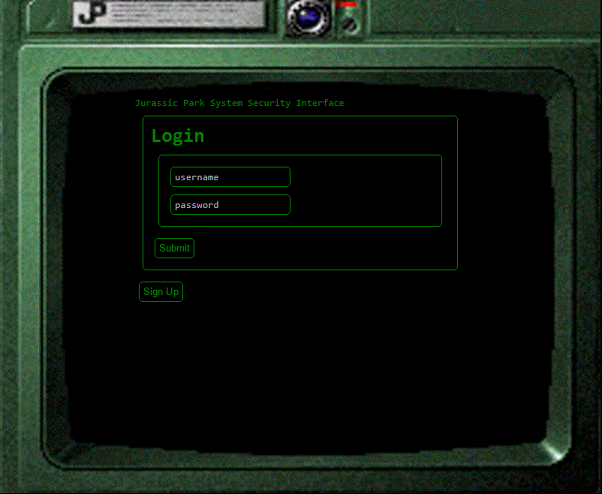
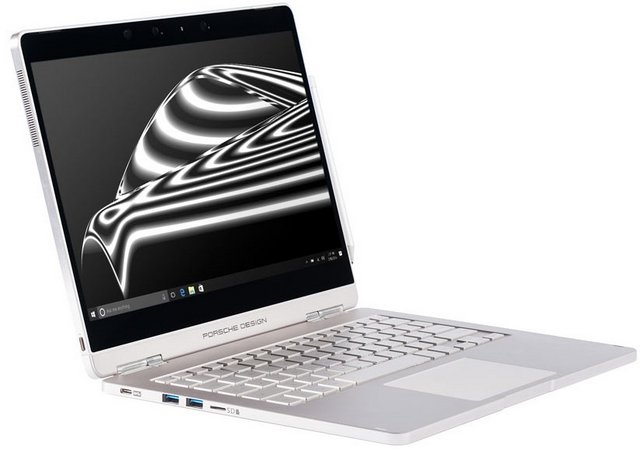
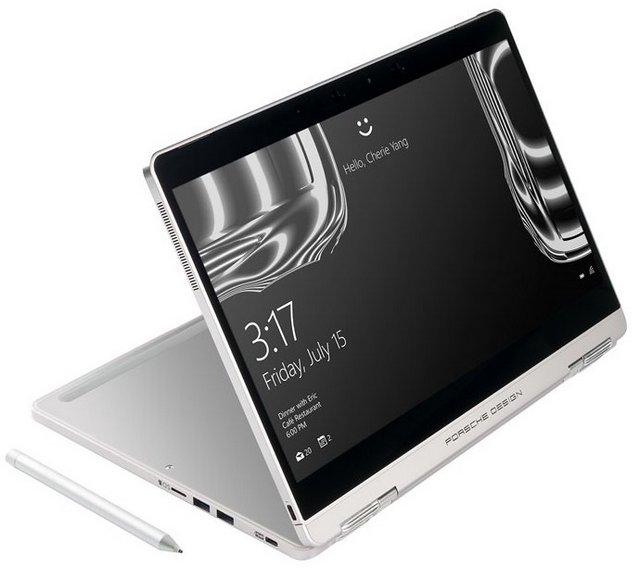
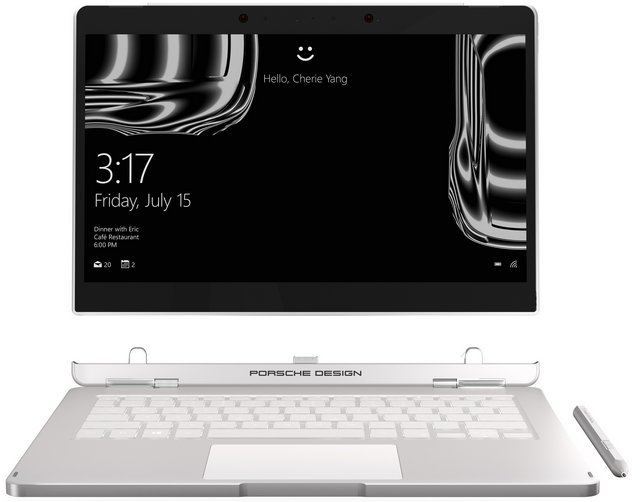


 The diagram depicted here has been out for quite some time, but it has always bothered me in a way. The central message is correct - you can gerrymander electoral districts to produce a win based on a minority vote. But how can you have 'compact but unfair' distribution? It came back to me today. The real message of this infographic is: 'compact can be unfair'. I puzzled over it a bit, and then I realized: the 'compact' diagram isn't really compact! It shows five districts each 5 wide and two deep. That isn't compact at all! The most compact would be 3x3 grids plus 1. In a 10x5 region you couldn't get that exactly, but still you could keep most squares in a district within 3 of each other, as in my diagram, above. If I haven't lost you yet, the lesson is this: don't take these infographics for granted.
 The most major mobile launches during the first quarter of a year are done at MWC. This year’s MWC was no different, with Samsung being the only notable company that did not announce its new flagship at the event.
 Samsung has already confirmed that it will be announcing its next flagship smartphone, the Galaxy S8, on March 29.


