Color partly by some paint company, augmented by
quite a few years of Prairie weather. Isn’t it pretty?
The reason I’m writing this is that it’s the first time in years I’ve had
to put significant work into color repair on a Fujifilm pic.
Because the version above looks just like what I saw. But out of
the camera, it looked like this:
Back in my Pentax days, I got pretty slick with the Lightroom
white-balance apparatus, which is itself pretty slick. But in my four
Fujifilm years I’m not sure I’ve touched them.
Well, I did on that one. It didn’t work; I found another way:
White balance: as shot.
Exposure: -0.25 (fight that glare).
Highlights: -15 (fight some more).
Shadows: +10 (boost the shady side).
Saturation: +33 (the colors weren’t wrong, they were just
washed-out).
Blue: -20 (sky was overexcited).
At this point things were better but still not what I’d seen.
Time for the secret weapon.
Profile: Velvia/VIVID (smiles).
I don’t know who it was at Fujifilm and Adobe that got those film
treatments into Lightroom, but I sure owe them thanks. I don’t use one that
often, but so great to have it.
Most notably, the company has dropped the 9.7-inch iPad Air 2 from its lineup. The company’s marquee tablet device is now once again known simply as iPad.
With the new name comes slightly updated hardware. iPad features the company’s state of the art A9 chipset, replacing the Air’s aging A8X processor. Apple has also slightly lowered the initial asking price for its mainline tablet.
In Canada, the 32GB Wi-Fi model starts at $449, while the Wi-Fi plus cellular model starts at $619. For those that want more storage, there are also 128GB Wi-Fi and Wi-Fi plus cellular models priced at $579 and $749, respectively. For reference, the iPad Air 2 was priced at $549 when it was first released.
The iPad’s Smart Covers, available in ‘White,’ ‘Pink Sand,’ ‘Midnight Blue,’ ‘Charcoal Grey,’ and ‘Red’ are priced at $49.
Canadians can pre-order the new iPad starting on Friday, March 24.
The company has also updated the iPad mini 4. Available in ‘Silver,’ ‘Gold’ and ‘Space Grey,’ the base iPad mini 4, priced at $549 for the Wi-Fi only model and $719 for the Wi-Fi plus cellular variant, now comes with 128GB of internal storage.
Product managers may or may not be the “CEOs of product,” but how do you boss around a bunch of CEOs? Leading a product management organization is a unique role in modern technology companies, and one that was quite uncommon until fairly recently.
As the tech world has gradually embraced the value product management brings to a company to help advance its mission and find success, a new crop of executives are emerging to manage these many-hat-wearing product managers. This largely uncharted territory comes with some unique challenges.
While many roles in an organization are highly measurable—salespeople hitting their quotas, customer support issue turnaround time, system uptime, etc.—there’s really no magic metric for product management. This makes leading a group of these individuals even trickier.
Who are product leaders, anyway?
Contrary to popular belief, you don’t need to be a former engineer to be a product leader. In a survey of 70 top product executives, only 36% had a technical background. But at the same time, product leaders still need to understand technical concepts and be able to talk about them with knowledge and authority.
“To earn the respect of and lead teams of engineers, the product manager must understand the technical underpinnings, how things work and the engineering trade-offs,” says Groupon’s Jeff Holden.
But far more important than their technical chops, product leaders are thinking in business terms and meeting big picture goals for the company, not just an individual product.
“They’re entrepreneurial at heart, think big and want to make their product great because they’re passionate about it” says ex-Googler Jonathan Rosenberg. “That kind of person does well at both ends of the cycle.”
1. Having a plan and a vision, communicating it well and sticking to it
Elon Musk published his initial “Master Plan” for Tesla Motors in 2006, then updated it ten years later. “Part of the reason I wrote the first master plan was to defend against the inevitable attacks Tesla would face accusing us of just caring about making cars for rich people,” Musk wrote. “However, the main reason was to explain how our actions fit into a larger picture, so that they would seem less random.”
Of course, not everyone is thinking quite that far ahead or has much of an audience for their audacious vision. But within their own company, product leaders must deliver similar plans to their colleagues if they want to establish and maintain their position of leadership.
“To develop the vision, PMs have to be creative and imaginative,” says Ameet Ranadive of Twitter, “They have to think differently than others, and imagine a future that others are not yet able to see. Their vision paints a picture of what the world can look like when their products have hit the market. The most compelling visions tackle enormous problems, challenge the status quo, and have transformative impact.”
2. Thinking big picture while sweating the details
Product managers are the Swiss Army knives of the organization, and their leader needs all the bottle openers, toothpicks and tiny scissors that might come in handy.
“You need somebody in the role who is a jack of all trades, who understands the technical details, the customer issues and the industry trends, and can work with the sales force,” says Netscape founder Marc Andreessen.
This ability to take input from various stakeholders, departments and channels and speak their language is essential to establishing themselves as a trusted partner who can get up to speed and provide useful input.
“They’re able to think about business issues, they’re able to think about support issues, they’re able to think about technical issues, and are able to switch disciplines, but also zoom in and zoom out in a really flexible and fluent way,” says Steve Vassallo of Foundation Capital.
And the best product leaders bring a little psychic prowess to the role, not only being able to meet the demands of their current customers, but seeing what current and potential customers want before they realize it themselves.
“Great product leaders have an amazing sense of vision and intuition about where markets are going, how customer preferences will evolve, and how to delight end users with great usability,” says Spark Capital’s Rob Go. “They totally get that relying on customers to tell you what to build has major limits and can yield uninspiring products.”
While narrowing down the metrics and KPIs for individual products and teams is essential for their ability to focus and move quickly, as the executive leading the show, a product leader must be tracking and well-versed in all of these numbers, both how everything is currently performing and what it all means when you put everything together.
“Most great product leaders are metrics obsessed,” Go adds. “They have an unbelievably precise sense of the drivers of product success and have figured out how to measure and optimize against these drivers. Doing each of these well is really difficult in their own rights, and it’s really rare to find an individual who can do both.”
It’s also the product leader’s job to determine if the right metrics are being emphasized as strategies shift and market dynamics evolve.
3. Creating conditions where individual PMs can succeed
One of the most critical tasks a product leader faces is making life easier for their teams. Product managers shouldn’t be individually having to set the tone for their role in the organization; effective product leaders have already laid the groundwork for this in advance.
“We have to get out ahead of the confusion: draw role boundaries; give what-do-product-managers-do presentations at other departments’ staff meetings; push for decisions on strategy and evidence; evangelize the idea of curated products; unclutter roadmaps; relentlessly sell the subtle value of product management,” says product management guru Rich Mironov. “Persuade others that having a strong product team is a net positive for the company.”
Creating a product management-friendly culture might be a product leader’s most essential job. But it’s more than just getting the rest of the company to understand and accept the role of product managers, it’s transforming how the company approaches every decision and putting a product and customer focus at the forefront.
“They understand that they need to make mistakes in order to learn, but they need to make them quickly and mitigate the risks. They understand the need for continuous innovation. They know that great products are the result of true collaboration. They respect and value their designers and engineers,” says Marty Cagan of the Silicon Valley Product Group. “A strong VP Product will understand the importance of a strong product culture, and will be able to give real examples of his own experiences with product culture and have concrete plans for instilling this culture in your company.”
A well-constructed and effective internal organization is also essential for a product leader and his or her team to be successful. When PM teams get too big, it’s time to add a layer of management by introducing group product managers.
“If you have many direct reports, you’re unable to scale insights and communication on a 1:1 basis. The team will start to feel disconnected,” says Pandora’s Jack Krawczyk. “And as a manager, you are effectively setting up roadblocks. A large part of the job is to remove obstacles for your team, not create them.”
4. Embracing leadership while stepping back from the front lines
Transitioning from product manager to a product leader can be difficult. Your day changes drastically from deep diving into the details and working in the trenches with engineers and designers to managing a staff and working with the executive team.
Changing focus upward and outward means your team is making a lot of critical decisions and moves that will determine whether you’re perceived as a success or a failure. This requires a lot of trust in your team and restraint to let them make their own path… mistakes and all.
“They are judged by the success of the team. What I found is great leaders don’t shirk that responsibility. They embrace it, even in failure,” says LinkedIn and eBay veteran Adam Nash. “There is that old saying that success has a thousand fathers and failure is an orphan. Not when there’s a great leader involved.”
Delegation of tasks and ownership also means you’re not the “idea” person anymore. While you play a part in the overall direction, your team members are now calling a lot of the shots on individual product decisions.
“The key to being a strong product leader isn’t coming up with the ideas yourself,” Krawczyk adds. “It’s about listening to your team, identifying what works best and determining how to best apply it across the entire group.”
Of course, management isn’t for everyone. Giving up control of a specific product and taking on the responsibility of managing a staff and mentoring other product managers is a major shift in pretty much every aspect of your day-to-day life. But great product leaders realize that as a lone soldier, you can only accomplish so much. But guiding a team of talented, passionate contributors with clear direction and sound judgment can lead to great things.
The City took the opportunity, at the time it was doing major water-and-sewer pipe upgrades under the street, to reconfigure Burrard Street on top.
In addition to the existing wide sidewalk, there’s now a separate bike lane.
A raised bike lane on a major arterial like Burrard Street, between Burnaby and Pacific, leading to one of the major intersections in downtown, would have been unimaginable a decade or so ago. And not because the concept would have been rejected by council. It would never have gotten that far, having never been seriously considered by staff in the first place.
Clearly the lesson is that such changes need to be part of a larger plan of upgrades, including benefits to drivers, upgrade of utilities, repaving, etc, and introduced at a time when traffic is going to be disrupted in any event, not just for a bike lane. The same thing happened on Dunsmuir Street, when the cycle track went in after the closures for the Olympics. Few complaints. But when the Hornby separated lane was proposed just by itself, all hell broke loose.
More good news: Musette, the cycling-themed cafe, is back.
It already feels like a popular local hangout, as well as a meeting place for pelotons of MAMLs
Apple will reportedly add cellular connectivity to the next iteration of the Watch, but before this happens the company unveiled new band colours.
The new Watch bands are ready for spring and labeled “fresh and bright.” For Apple Watch owners, there are three new colours for the Sport band (Pebble, Azure and Camellia), six new colour options for the Woven Nylon band (Berry, Tahoe Blue, Orange, Red, Pollen and Midnight Blue), and three new colours for the Classic Buckle (Sapphire, Berry and Taupe). The Sport and Woven Nylon bands are $69 (CAD) and the Classic Buckle is $209 (CAD).
In addition, the Nike Sport Bands will now be sold separately in Anthracite/Black, Pure Platinum/White and Volt/Black. The Nike Sport Band is $69 (CAD).
For those looking for a bit more class and luxury, Apple has also added new Hermès bands: • 38mm Double Tour in Bleu Zéphyr Epsom leather for $599 (CAD) • 38mm Double Buckle Cuff in Fauve Barenia leather $879 (CAD) • 42mm Single Tour in Lime Epsom leather for $399 (CAD) • 42mm Single Tour in Colvert Swift leather for $399 (CAD)
You’ll be able to them today from Apple.ca, then it will expand its retail presence to be available at “select Apple Stores, Apple Authorized Resellers and carriers in late March.”
Fancy a new case for your Apple iPhone? Apple has you covered as it has released six new colours for its silicone and leather cases.
The new silicone cases for the iPhone 7 are available in “Azure,” “Camellia,” and “Pebble” with the price set at $45 ($10 higher than the Unites States pricing). The iPhone 7 Plus cases will be $4 more at $49 per case.
As for the leather cases, pricing starts at $59 for the iPhone 7 and $65 for the iPhone 7 Plus. The new colour options are “Sapphire,” “Taupe,” and “Berry.”
In addition, Apple added a new “Saddle brown” leather case for the bumped up iPhone SE for $49 CAD.
Apple announced today that it is launching a new video app called Clips in April. The app lets users combine video, photos, music, and more and then share their creations with Messages, Instagram, Facebook, and other social networks.
lets users create animated captions and titles using just their voice. Fun effects including comic book filters, speech bubbles, shapes and full-screen animated posters help bring out the personality in videos made with Clips.
Apple's press release emphasizes the simplicity of making videos with Clips positioning it as a simple and fun alternative to something like its iMovie app. Videos can feature multiple clips and photos that can be shot live or chosen from a user's Photo Library. Filters, speech bubbles, shapes, emoji, full-screen posters with animated backgrounds, and customizable text are also available to enhance your videos. Soundtracks can be chosen from a library of dozens that come with Clips and automatically adjust to fit the length of users' creations.
Clips is an interesting addition to Apple's lineup of apps. It borrows heavily from a broad cross-section of existing third party apps like Snapchat and Instagram, yet it's not tied to a social network of its own. Even so, Clips complements the iPhone and iPad's camera hardware and involves Apple in the creative side of social networks.
To see the app in action, check out Apple's preview site here.
Support MacStories Directly
Club MacStories offers exclusive access to extra MacStories content, delivered every week; it’s also a way to support us directly.
Club MacStories will help you discover the best apps for your devices and get the most out of your iPhone, iPad, and Mac. Plus, it’s made in Italy.
The New York Times notes that San Francisco, with a population of 865,000 has “ roughly the same number of dogs as children: 120,000. In many areas of the city, pet grooming shops seem more common than schools.” San Francisco’s technology boom has resulted in high prices and families fleeing the city, with the” lowest percentage of children of any of the largest 100 cities in America, according to census data, causing some here to raise an alarm.”
In 1970, about 25 per cent of the population was composed of children, with 90,000 pupils in public schools. Today that figure is 53,000 kids in school, with kids comprise 13 per cent of the population. By comparison, New York’s population of kids is 21 per cent, and Chicago’s is 23 per cent under 18 years of age.
California, which has one of the world’s 10 largest economies, recently released data showing the lowest birthrate since the Great Depression. “Sometimes I’ll be walking through the city and I’ll see a child and think, ‘Hey, wait a second. What are you doing here?’” said Courtney Nam, who works downtown at a tech start-up. “You don’t really see that many kids.” And in an interview in 2016, the co-founder of PayPal Peter Thiel described San Francisco as “structurally hostile to families.”
“A report released on Tuesday by the San Francisco Planning Department said the building boom in the city, which for the most part has introduced more studios and one-bedroom apartments, was unlikely to bring in more families. For every 100 apartments in the city sold at market rates, the San Francisco school district expects to enroll only one additional student, the report said.”
Urbanist Richard Florida notes that as jobs become more specialized and longer hours are required, people are putting off having families. Initiatives such as San Francisco’s requirement to offer six weeks of fully paid leave for new parents, is designed to encourage families with children.
Meanwhile back in Metro Vancouver The Richmond News reports that the City of Richmond has voted down a Girl Guides campsite slated to replace the off-leash dog park at McDonald Beach Park on the Fraser River. As one relieved dog owner stated “This is a great place for socializing,” despite the fact that off-leash Iona Regional Park is nearby. Reasons offered for excluding the children’s camping included airport noise and fire ants.
Apple recently announced that Swift Playgrounds, an iPad app that teaches students to code, is now available in five more languages. These include simplified Chinese, Japanese, French, German and Latin American Spanish.
“The Swift Playgrounds app has helped people of all ages learn the basics of coding, and with more than a million downloads to date, customers and students find it an easy and fun way to get started with Swift. Hundreds of thousands of iPhone and iPad apps, including some of the most popular in the App Store, use Swift — a programming language we designed to be both powerful and easy for anyone to learn,” said Apple CEO Tim Cook in a statement.
Swift Playgrounds is an iPad app designed to teach kids how to code with Apple’s coding language. The app includes programming lessons, puzzles and challenges that teach core coding concepts, along with templates that allow users to express themselves by creating their own programs.
Last year, Agile Tortoise introduced Interact for iOS, a powerful app for managing contacts. One of the most popular features of that app is the scratchpad that parses contact information, making quick work of turning a block of text into a new contact. Agile Tortoise has ported that functionality to the Mac in the form of a menu bar app called Interact Scratchpad.
Adding information to contacts is tedious. Too often I find myself switching back and forth between a webpage and the Contacts app typing information into field after field or copying little bits of text and pasting them into those fields. Scratchpad does the monotonous part for you by automatically recognizing all kinds of contact information.
The key to Scratchpad is that that there are several ways to get data into it. It’s a menu bar app, so one way is to click on the menu bar item and either type or paste text into the app’s text field. The menu bar app can also be opened with a global hot key combination that you assign in preferences. The keyboard shortcut is perfect for those occasions you are on the phone and need to quickly jot down a phone number or address because it instantly pops open the Scratchpad window for typing. Pasting contact information into Scratchpad from an email, text message, website, or other source works equally well.
Almost as soon as you type or paste in contact information, Scratchpad goes to work trying to recognize things like names, addresses, and phone numbers. In my tests, Scratchpad did an excellent job correctly recognizing contact information. When it occasionally couldn’t parse something like a business name, adding it was simple. From anywhere on the unrecognized line, pick a tag from the dropdown list to add the information to that field. You can also manually type the tag information to the beginning of an unrecognized line of text.
When you’re finished, there is a preview button in the app so you can see what the contact card will look like before adding it to the Contacts app. If the information you are adding is for an existing contact or group, you can use the ‘Add to… button instead of the ‘Create’ button. You can also share contacts directly from Scratchpad as .vcf files using the macOS share sheet.
In addition to the menu bar app, Scratchpad is accessible as an extension. From any other app, you can highlight some text, right-click, and choose ‘Share.’ Pick the Scratchpad extension, and the text will be added to the menu bar app for processing. It’s a process that works well when you are using Safari or another browser to research restaurants and other businesses that you want to visit.
Interact’s Scratchpad feature alone is reason enough to buy the iOS version of Agile Tortoise’s app because it bypasses the tedium of adding contacts. It’s no wonder then that Agile Tortoise transformed that iOS app feature into a macOS app. It’s a utility that anyone who deals with a lot of contacts should consider. It has already saved me a lot of time and frustration in the short time I’ve been using it, and I’ve found that it’s made me far more likely to save contact information, which has also made Contacts a more valuable resource.
"Like its close cousin Disruption," says Martin Weller, "unbundling has been a favourite philosophy of the silicon valley start up. It has often been applied to education (even, erm, by me). This piece for example boldly states 'The bundle of knowledge and certification that have long-defined higher education is coming apart'." But in this short item he presses the question. We should be able to point to "solid research that says things like 'unbundling isn’ t really happening on the scale they suggest' or 'unbundling works well for these learners, but has these impact on staff' or 'this model is viable, but has these costs', or even 'you can safely ignore it'." True, but the problem with such research is that it comes after the fact, well past the time you would have needed to act on it.
It's pretty hard to make that case when you're steeped in enterprise learning, but I think it's true: "CBE is indeed a niche market growing much more slowly that many had hoped or predicted." There are reasons for that. Alex Usher touches on the core issue: "we are having trouble figuring out skills and competencies outside narrow professional frameworks?" Even proponents are taking it slow. Here's Brightspace's John Baker: "we look at it as one component of the learning experience,” Baker said. “ What we’ re hoping is you’ ll see more and more courses, programs, universities and colleges making a complete transition to that model of learning. But we recognize that that transformation takes time.” See also: Deconstructing CBE. Image: CompetencyWorks.
The idea of 'eliminativism' is that our common-sense psychological concepts such as 'beliefs', 'desires', etc., don't actually exist. This has important implications for education, since pretty much all of educational theory depends on these concepts. I am an eliminativst philosophically; I don't think you actually find thoughts, beliefs or desires (or signs, symbols, models or representations) in the brain. That doesn't mean we can't use the words, it's just that we need to be very careful about invoking them in explasnations. It's like using the language of 'windows' and 'folders' to talk about a computer. "Clicking on the folder will bring up a menu showing where your saved files are, etc. But it would be a mistake to think that this gave you any idea about how the computer was working. It is not storing little file folders away."
Interesting summary of a publication (I can read it here but it might be blocked where you are) suggesting, as the title says, that peers motivate us more than teachers. It's just one study (of "four sections of an online, introductory-level educational psychology course at a large, public Midwestern university," because there are no other kinds of people on earth) so don't read too much into it. "These findings suggest that what instructors were good at was getting across cold facts, while the peers seemed to be tapping into an identification process,” says Cary Roseth. It would be interesting to see whether the same results would hold in Europe, India and China. It's the age of the internet - can't publications demand that projects like this be global in nature?
Open Data Day is an internationally organised global event to promote awareness and use of open data. This year the non-profit, Open Data British Columbia (OpenDataBC), organised an event in Vancouver March 4th around four key challenges:
Open Research Data,
Tracking Public Money Flows,
Open Data for Environment, and
Open Data for Human Rights.
More than 60 people including representatives from the DataBC Team attended while more than 201 viewers enjoyed the Periscope live feed. The event provided an opportunity for people to come together to find ways to build applications using open data. Vancouver Open Data Day (#VODDAY) continues to grow in size and reach. The event is important because it offered a space for teams to work together, combine ideas with data to make B.C. and beyond better, while at the same time recognising the importance of open data access, policy and transparency in Canada and worldwide.
The DataBC Team was onsite for this event. Greg Lawrance gave a presentation on discovering and accessing B.C. government data assets via the BC Data Catalogue.
Highlights of the Day:
An atmosphere of sharing, collaboration, and learning carried throughout the day in awesome workspace provided by The Tribe.
The day had a definite international flavour, both because there were people from more than 10 countries and a wonderful Syrian cuisine lunch was shared and enjoyed by the participants.
Eleven different projects were developed and presented until late (10:30 p.m.) in the evening.
Mentors from DataBC, City of Surrey, City of Vancouver and OpenDataBC were available throughout the day to listen and guide the various teams. Participants were encouraged to connect with mentors after the day to continue work on their projects.
Participation from different demographics including students, corporate and small business developers, federal, provincial and municipal governments as well as OpenDataBC Society staff.
Excellent feedback and suggestions were received for new datasets and presentation services.
Challenge Winners
DataBC was pleased to be on the judging panel for this event. Overall seven prizes were awarded. The main challenge winners:
City of Vancouver Focus Challenge Winner: Team Meta
Apps based on Vancouver open data should be localized into all the languages in which Vancouver residents want them
Examples: public washrooms and wheel chair accessibility
Thanks to the society for putting together another fantastic event. The DataBC team were impressed with the many ideas from and hard work by the participants.
There are infinite new ways open data can be helpful in finding innovative solutions to the challenges we face and VODDAY is a wonderful incubator for new ideas.
Graffiti by the participants at the end of the day in response to the question, “What was the best part of the day?”
In the aftermath of Apple’s announcements earlier today, it released an update to iTunes with a new feature described as rent once, watch anywhere. The release notes for iTunes 12.6, which is available as a free upgrade on the Mac App Store, say:
Now you can enjoy your iTunes movie rentals across your devices with iOS 10.3 or tvOS 10.2.
With this new feature, you should be able to start a movie rental on an iOS device and finish it at home on an Apple TV for example, which is a welcome change to what was an overly inflexible system.
iOS 10.3 and tvOS 10.2 are currently in beta but are expected to be released soon, at which time this new feature will be available to everyone who upgrades to those versions of the OSes.
Support MacStories Directly
Club MacStories offers exclusive access to extra MacStories content, delivered every week; it’s also a way to support us directly.
Club MacStories will help you discover the best apps for your devices and get the most out of your iPhone, iPad, and Mac. Plus, it’s made in Italy.
Most businesses fail within the first year of opening their doors, and itâ€s often because they failed to invest cash into their new business wisely. Even decades-old businesses can struggle financially from time to time, and the only way to stay afloat is to borrow money from a lender. You might assume banks are your only option when you need a cash injection, but there are other ways to get financing. Plus, if you decide to secure a loan from the bank, how do you know which one you need?
Banks might not always be forthcoming with all your options because they intend to make a safe profit, and other lenders often offer more favorable terms. At least if you know your options, you can turn up to the bank or high-street lender prepared to negotiate, which is why weâ€ve detailed the most popular business loans below.
Finding the Right Business Loan
New ventures may need a cash injection to start operating while seasoned companies may require a loan to build a new office. Lenders offer different loan types for different situations, and they may not provide desirable terms if you canâ€t currently prove business success. From unsecured loans to line-of-credits to unconventional business loans, these are the most popular loans for small and medium-sized businesses.
Line of credit
Itâ€s useful for all business with a variable monthly income to have a line-of-credit, just for when times become tough. Youâ€ll agree on a limit with your bank, and youâ€ll be able to access the money as and when required. Line of credits often have a low interest rate because theyâ€re considered low-risk, and youâ€ll usually return the money promptly. Interest starts to accumulate as soon as you spend money from your line of credit and stops the second you pay it back. You probably wonâ€t open a new location or revamp your office with a line of credit, but itâ€s useful for if you need money quickly to seize an investment opportunity just before you receive your next paycheck.
Secured loan
If youâ€ve just started your business and need a sizeable cash injection, you may have no choice but to obtain a secured loan. While interest rates can be favorable, these loans are a little risky because you need to secure them against your assets, which could be your equipment, premises or vehicles. If you canâ€t afford to repay your loan, the loan provider will claim ownership of your assets to repay all or part of the loan. With a secured loan, you can usually repay the full amount early without paying a penalty, but the initial total cost of interest will be calculated based on the date you agree to repay the full loan amount. Youâ€ll usually make periodic payments for a set number of years until you repay the loan in full. You can use a secured loan to make any purchases you desire.
Unsecured loan
Similar to a secured loan, an unsecured loan includes an interest rate and repayment plan agreement, though you donâ€t have to risk any of your assets as collateral. That means even if you canâ€t afford to meet payments, the lender canâ€t claim ownership of your assets. Itâ€s not always possible for start-ups to obtain unsecured loans because theyâ€re considered high risk, so lenders naturally want to feel confident a business will be successful should they invest their loan wisely. Additionally, interest rates are usually higher on unsecured loans than on secured loans because of the increased risk, but theyâ€re often very flexible, and you might secure favorable terms if your business does well.
Which Loan is Best for Your Business?
You ought to compare loans from a range of providers to secure the best terms and type of loan. Each of the loans above serves different purposes, and many banks and high-street lenders offer them at competitive rates. If youâ€re running a new, small business, you should remember that interest rates will probably be higher than average, but youâ€ll soon see them decrease as your company gains stead. Line of credits are useful for most if not all businesses, secured loans can provide start-ups with the initial investment they need to get off the ground, and unsecured loans are perfect for those who donâ€t want to risk their assets. Itâ€s always good to speak to a financial advisor to find out more about your loan options.
Time for a guest blog post by Seburo – one of our “regulars”, who wanted to share a very personal story about Firefox with all of you. He originally posted in on Mozilla’s Discourse, but the more people it reaches, the better. Thank you for sharing, Seburo! (As always, if you want to post something to our blog about your Mozilla and/or SUMO adventures and experiences, let us know.)
Here we go…
As a Mozillian I like to set myself goals and targets. It helps me to plan what I would like to do and to ensure that I am constantly focusing on activities that help Mozilla as well as maintain a level of contribution. But under these “public” goals are a number of things that are more long term, that are possible and have been done by many Mozillians, but for me just seem a little out of reach. If you were to see the list, it may seem a little odd and possibly a little egotistical, even laughable, but however impossible some of them are, they serve as a reminder of what I may be able to achieve.
This blog entry is about me achieving one of them…
In the time leading up to the London All-Hands, I had been invited by a fellow SUMO contributor to attend a breakfast meeting to learn more about the plans around Nightly. This clashed with another breakfast meeting between SUMO and Sync to continue to work to improve our support for this great and useful feature of Firefox. Not wanting to upset anyone, I went with the first invite, but hoped to catch up with members of the Sync team during the week.
Having spent the morning better understanding how SUMO fits into the larger corporate structure, I made use of the open time in the schedule to visit the Firefox Homeroom which was based in a basement meeting room, home for the week to all the alchemists and magicians that bring Mozilla software to life. It was on the way back up the stairs that I bumped into Mark from the Firefox Desktop team. Expecting to arrange some time for later in the week, Mark was free to have a chat there and then.
Sync is straightforward when used to connect desktop and mobile versions of Firefox but I wanted to better understand how it would work if a third device was included. It was at the end of the conversation that one of us mentioned about how the bookmarks coming to desktop Firefox could be seen in the Mobile Bookmarks folder in the bookmark drop down menus. But it is not there, which can make it look like your bookmarks have disappeared. Sure, you can open the bookmark library, but this is extra mouse clicks to open a separate tool. Mark suggested that this could be easy to fix and that I should file a bug, a task that duly went in the list of things to do on returning from the week.
A key goal for contributors at an All-Hands is to come back with a number of ways to build upon your ability to contribute in the future and I came back with a long list that took time to work through. The bug was also delayed in filing due to natural pessimism about its chances of success. But I realised…what if we all thought like that? All things that we have done started with someone having an idea that was put forward knowing that other ideas had failed, but they still went ahead regardless.
So I wrote a bug and submitted it and nothing much happened. But after a while there was a spark of activity. Thom from the Sync team had decided to resolve it and seemed to fully understand how this could work. The bug was assigned various flags and it soon became clear to me that work was being done on it. Not having any coding ability, I was not able to provide any real help to Thom aside from positive feedback to an early mock up of how the user experience would look. But to be honest, I was too nervous to say much more. A number of projects I had come back from MozLondon with had fallen through and I did not say anything much that could “jinx it” and it not proceed.
A few months passed after which I started getting copied in on bugmail about code needing review with links to systems I barely knew existed. And there, partway down a page were two words:
Ship It.
I know that these words are not unusual for many people at Mozilla, indeed their very existence is one of the reasons that many staff turn on their computers (the other is probably cat gifs), but for me it was the culmination of something that I never thought would happen. The sobriety of this moment increased with the release of Nightly 54 – I could actually see and use what Thom and Mark had spent time and effort crafting. If you use version 54 (which is currently Firefox Developer Edition) and use Firefox Sync, you should now see a “Mobile Bookmarks” folder in the drop down from the menu bar and from the toolbar. This folder is an easier way for you to access the bookmarks that you have saved on the bus, in the pub, on the train or during that really boring meeting you thought would never end.
I never thought that I would be able to influence the Firefox end product, and I had in a very small way. Whilst full credit should go to Thom and Mark and the Sync team for building this and those who herded and QA’d the bug (never forget these people, their work is vital), credit should also go to the SUMO team for enabling me to be a position to understand the user perspective to help make Sync work for more users. Sync is a great feature of Firefox and one that I hope can be improved and enhanced further.
I sincerely hope that you have enjoyed reading this little story, but I hope that you have learned from it and that those learnings will help you as a contributor. In particular:
Have goals, however impossible.
Contribute your ideas. Nobody else in the world has the same idea as you and imagines it in the same way.
Work outside of your own team, build bridges to other areas.
Use Nightly and (if you also use a mobile version of Firefox) use it with Firefox Sync.
Be respectful of Mozilla staff as they are at work and they are busy people, but also be prepared to be in awe of their awesomeness.
Whilst this was (I have been told) a simple piece of code, the result for me was to see a feature in Firefox that I helped make happen. Along the way, I have broadened my understanding of the effort that goes into Firefox but I can also see that some of the bigger goals I have are achievable.
This example demonstrates saving state across different pages, and advanced sorting using the range[] function. On the “control” page, you can set a schedule of army matchups for the day. Click on an army and then click on the slot you want to place that army. This matchup is saved, and displayed on the “broadcast” page.
You can play with this example in your browser here.
Page Layout
Containers
This one’s pretty simple; I want a nav bar at the top to let me manually go to the different pages, and an app window where those pages are rendered.
By abstracting this step out, I can define all the pages I want as in the block before, and then here find those pages and create a button on the nav bar for each of them.
This commits a record called #app-window whose attribute target specifies which page gets rendered. In this case, when the app starts up, I want the landing view to be the Broadcast page.
commit
  [#app-window target:"Broadcast"]
Sci-Fi Font
It’s not the future if there’s not futuristic-looking text.
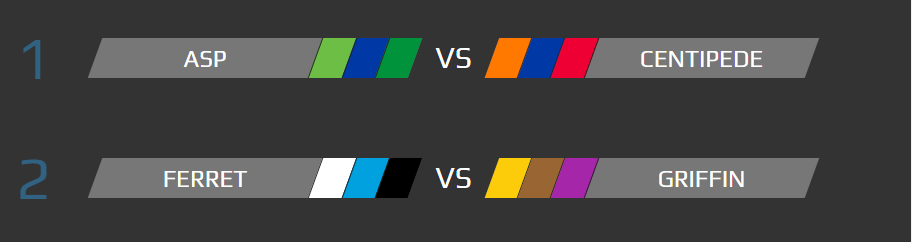
The Broadcast page is meant to serve much like the departures or arrivals screen at an airport - it is purely an informative screen showing which armies have been scheduled in which rooms. There are 9 total battle rooms, so I use the range function to generate 9 rooms, each of which has two sides labeled A and B. There’s also a #versus block whose text will change based on whether or not there are armies scheduled to that room.
This block checks to see if there’s an army assigned to a room and will inject a card for that army into its room slot, but only if there’s another army that has been assigned to the opposing side in that room. Having only an A side or a B side will fail the search. If both sides are accounted for however, the search will pass for both of those armies, and so both cards will get injected.
search @session @browser
  slot = [#room room side]
  army = [#army room side name color1 color2 color3 uniform]
  other-side = if side = "A" then "B"
               else if side = "B" then "A"
  [#army room side:other-side]
  versus = [#versus room]

bind @browser
  slot.class += ("army-card")
  slot <- [#div name children:
    [#div class:"army-name" text:name]
    [#div class:"ribbon" children:
      [#div class:color1]
      [#div class:color2]
      [#div class:color3]]
  ]
If a room has two armies assigned to it, one to each side, then the #versus block becomes just the text “VS” between the two army cards.
search @session @browser
  versus = [#versus room]
  [#army room side:"A"]
  [#army room side:"B"]

bind @browser
  versus <- [#div class:"versus-text" text:"VS"]
If a room is missing either an A or a B side, or both, I want a message to be displayed saying that a battle hasn’t been scheduled yet. Since this comprises a union in set theory, I need two blocks to explicity handle all my possibilities. This first one looks to see if both sides have yet to be assigned, and injects the message into the #versus block if that happens to be the case.
This second block gives us the other half of the union by checking to see if either an A side or a B side has been assigned, but not its complement, and will inject the same message into the #versus block.
search @session @browser
  versus = [#versus room]
  army = [#army room side]
  other-side = if side = "A" then "B"
               else if side = "B" then "A"
  not([#army room side:other-side])

bind @browser
  versus <- [#div class:"empty-room" text:"No battle scheduled"]
Control
Drawing the Page
The Control page is laid out to be displayed on a smaller device - perhaps a smart phone or a tablet - and is used to assign which armies will fight in which rooms. Again, for the nine rooms, the range function is used to identify and number them, and each room is given two sides. A list of all the available armies - that is, those which have not been assigned to a room - is also drawn.
As an addition to main drawing block for the Control page, this block checks to see if there are any armies assigned to a slot in a battle room. If it is, that army has its tab drawn in the corresponding slot in the browser.
In order to be able to assign armies to slots, there needs to be a mechanism to select both elements. I’ve chosen to demonstrate selection in two different ways to cover some of the possibilities of how this might be achieved, and because armies each have a record stored in the session database, I used them to show selection by modifying a session record. The intended workflow here is to click an army to highlight it, then choose a slot to assign them to, or go the other way around and click a battle slot to highlight it, then choose an army to assign there. That means I only want to highlight an element if there’s nothing else already selected - otherwise, I’m probably trying to assign an army. This block searches for a click on an army tab and, as long as that army isn’t already highlighted, nor any battle slots, adds the #highlighted tag to the record of the clicked army.
search @session @event @browser
  [#click element: [#div class:"army-tab" name]]
  army = [#army name not(#highlighted)]
  not([#div #highlighted class:"battle-slot" room])

commit
  army += #highlighted
This block adds the #highlighted tag to a record in browser instead of session. If a battle slot gets clicked and isn’t already highlighted and doesn’t have an army already assigned to it, then that battle slot becomes highlighted.
Once an army is #highlighted, if a battle slot gets clicked, the highlighted army gets assigned to that particular slot, which corresponds to both a room and a side.
A click anywhere deselects anything. This works if you’re just clicking around the page and want to deselect something, or if you click to assign an army somewhere. The assigning workflow still occurs, but the final click deselects everything so that no residual highlights are left over.
When either an army or a battle slot is #highlighted, I want to add a class to it so I can use CSS to add a visual marker to it. Because I add the #highlighted tag to armies and battle slots differently, I need two different blocks to handle those classes. In the case of a highlighted army, the army is highlighted but its corresponding army tab gets the new class apended.
There’s a lot of CSS this time around because of a greater need for media queries on this example, so it’s been split up into the style sheets for each page
Pixure is Louis D'hauwe's excellent pixel art studio app for iOS that lets you create retro-styled illustrations. Pixure was already best suited for the iPad's bigger display, but the latest version 2.2 adds PanelKit – a UI framework created by D'hauwe himself to turn traditional iPad popovers into floating panels.
Popovers are a staple of the iPad's interface, and I was skeptical when I saw the first details of PanelKit in February. After testing Pixure on my 12.9" iPad Pro, though, I think D'hauwe is onto something – when the app is in full-screen, it's nice to be able to re-arrange a palette of tools so it doesn't hide your content. The best part, in my opinion, is that panels can be converted back to sidebars by snapping them to the edge of the display, which is a fantastic use of the iPad Pro's large screen. There's an argument to be made about PanelKit bringing the cognitive load of desktop window management to the iPad, but I believe that, for some apps (such as graphic editors like Pixure), floating controls that you can re-arrange around the canvas are necessary.
I'm testing a few iPad apps that try to optimize for the iPad Pro's screen with additional popovers and sidebars, and none of them feel as flexible or as intuitive as D'hauwe's app. If you're an iPad user, you should check out Pixure.
Google has announced the first developer preview of Android O, which the company promises will deliver “new power and performance optimizations and many new ways to extend your apps.”
In particular, the update brings with it background limits, adaptive icons, wide-gamut colour for apps, background limits, new notification channels and picture-in-picture is expanding from the Android TV to other devices. Mainly, the update brings a robust set of new features to the Android developer community and some intriguing behind-the-scenes improvements. Consumers can’t expect to see many striking changes apart from significant performance enhancements and an overhauled settings app.
Background limits regulate what apps can do in the background in an attempt to conserve battery life and improve performance. Notification channels gives developers more control over the precise notifications they can offer users and users, in turn, can define which notifications they’d like to get from apps that implement the change more easily. For instance, getting notifications only about certain news topics from a news app.
‘Visual grouping’ for notifications is also coming with Android O, which promises to make it easier for users to tell what incoming messages mean at a glance.
Android O also brings ‘picture-in-picture’ display, which (with support from third-party apps) lets users watch a video in a detached window while browsing other apps, along with other new windowing features.
While Android fans may be eager to grab the latest version of Android, the Android O Beta is currently intended just for developers, meaning those who want the update will only be available to flash a limited list of compatible devices (the Nexus 5X, Nexus 6P, Nexus Player, Pixel, Pixel XL and Pixel C) with the factory images of the build, and as usual, there is no guarantee of stability for those concerned about the safety of their device.
Google hasn’t announced when it will release a public beta, but if the company follows last year’s schedule, it will likely release in May 2017.
Now, the only remaining question is, what does “O” stand for? Oreo (as teased below by Google’s senior vice-president of Android)? Oatmeal cookie? Orange? Let us know your thoughts below.
What will happen this summer? Is it conceivable that the Americans under a Trump administration would actually facilitate a mass exit of some of their estimated 11 million undocumented residents as a way to expeditiously encourage ‘voluntary deportation’? ‘Walk north and we won’t get in your way. Let the smug Canadians deal with the arrival of tens of thousands of illegals and see how they like it.’
It would be like a Mariel boatlift, when 125,000 Cubans were allowed to flee to Florida over half a year in 1980.
So what would we do if, say, 10,000 refugees arrived in the Lower Mainland in a week. And another 10,000 the next. And the next.
How would we deal with even the basics: finding accommodation and feeding so many? Would it be a temporary situation or a new reality?
So far, any local official I’ve talked to hasn’t seriously considered the prospect, and as far as I know there is no anticipatory strategies being developed. But then, it’s not likely that would be publicly acknowledged at this point.
Some thoughts:
Having seen the emergence of favelas in South American cities, the best people to call might be Brazilian and Colombian planners.
Would the destabilization of Canada be an acceptable outcome? Would militarization of the northern border be demanded, or even possible?
Would there be a negotiated resolution as there was after half a year in the Mariel boatlift?
One wonders what the American people would think. Would it change their self-image, as it would the world’s, to see so many flee ‘the best and strongest country in the history of the world?’
In what developer Shiny Frog described as its largest update yet, note-taking app Bear today received a version 1.1 update featuring new fonts, importing and exporting features, and more.
There’s a lot to unpack in version 1.1. Here are the highlights:
Bear now includes support for bulk deletion and renaming of tags to better clean up your note organization.
For increased readability, a new High Contrast theme, as well as three new fonts, have been provided for all users of Bear.
Words prefaced with a (-) will be excluded for search, helping you refine your query.
Syntax highlighting for the following programming languages: Perl, Ruby, Scaba, C#, Go, CoffeeScript, SCSS, Tex, R, and MatLab.
More export options, including to TaskPaper, syntax highlighting in exports (Bear Pro only), and cleaner Word DocX exports, have been introduced.
Day One, .TaskPaper, and .webbloc files are supported for importing files into Bear.
Formatting options are available from the TouchBar on the latest MacBook Pros.
Notes can be dragged onto a tag, rather than typing in the tag to each note.
Web pages can be stripped down and formatted into notes through the app’s extension.
Using “Hey, Siri,” you can ask Siri to read your note aloud.
More information on the new features can be found in the app’s release notes or on the app’s page. You can find Bear in the iOS App Store here and the Mac App Store here.
Support MacStories Directly
Club MacStories offers exclusive access to extra MacStories content, delivered every week; it’s also a way to support us directly.
Club MacStories will help you discover the best apps for your devices and get the most out of your iPhone, iPad, and Mac. Plus, it’s made in Italy.
As you may already know, last Friday – March 17th – we held a new Testday event, for Firefox 53 Beta 3.
Thank you all for helping us making Mozilla a better place – Iryna Thompsn, Surentharan and Suren, Jeremy Lam and jaustinlam.
From Bangladesh team: Nazir Ahmed Sabbir | NaSb, Rezaul Huque Nayeem, Md.Majedul islam, Rezwana Islam Ria, Maruf Rahman, Aminul Islam Alvi | AiAlvi, Sayed Mahmud, Mohammad Mosfiqur Rahman, Ridwan, Tanvir Rahman, Anmona Mamun Monisha, Jaber Rahman, Amir Hossain Rhidoy, Ahmed Safa, Humayra Khanum, Sajal Ahmed, Roman Syed, Md Rakibul Islam, Kazi Nuzhat Tasnem, Md. Almas Hossain, Md. Asif Mahmud Apon, Syeda Tanjina Hasan, Saima Sharleen, Nusrat jahan, Sajedul Islam, আল-যুনায়েদ ইসলাম ব্রোহী, Forhad Hossain and Toki Yasir.
From India team: Guna / Skrillex, Subhrajyoti Sen / subhrajyotisen, Pavithra R, Nagaraj.V, karthimdav7, AbiramiSD/@Teens27075637, subash M, Monesh B, Kavipriya.A, Vibhanshu Chaudhary | vibhanshuchaudhary, R.KRITHIKA SOWBARNIKA, HARITHA KAMARAJ and VIGNESH B S.
Results:
– several test cases executed for the WebM Alpha, Compact Themes and Estimated Reading Time features.
A decision on joining the U.S. and the U.K. in banning electronic devices larger than a cellphone on flights from 10 primarily Middle Eastern airports will be made shortly, according to Transport Canada.
“The safety and security of Canadians and of the transportation system are Transport Canada’s top priorities,” Transport Canada told MobileSyrup. “Transport Canada is in close contact with U.S. security officials and is assessing the security concerns. For security reasons, we cannot elaborate on aviation security concerns. Transport Canada continuously assesses our security and makes adjustments whenever needed. A decision on whether to implement a similar ban respecting large electronics on flights to Canada will be made shortly.”
Meanwhile, earlier on Tuesday Transport Minister Marc Garneau told a Reuters reporter that Canada won’t be following the ban for the time being.
Transport Minister Garneau says Canada won't for the time being follow U.S. lead and ban laptops from some flights pic.twitter.com/zsnHkS4m2S
In response to The Globe and Mail, however, an anonymous industry source reported that the Canadian government is considering joining the ban. As the situation currently stands, the Canadian Air Transport Security Authority told The Globe and Mail on Tuesday that it has not been told to screen passengers any differently.
The ban was first reported on by Reuters, who noted it was rolling out in response to an unspecified terrorism threat. A source told the publication that it would cover around eight to 10 foreign airlines (including Jordan and Saudi Arabia), and a separate government official confirmed the Associated Press‘ report that the ban will affect 10 airports in eight countries in the Middle East and North Africa. While electronic devices larger than a cellphone, such as laptops, are banned from the cabin, they are allowed in checked baggage.
Of the nine airlines affected by the ban, eight offer direct routes to Canada, including through Toronto’s Pearson International Airport and the Montréal–Pierre Elliott Trudeau International Airport.
Nowadays, if you can dream it, there’s an advocacy group for it.
Following the recently released regulations surrounding the use of drones in Canada, drone photography leader DJI has launched the drone advocacy group NODE (Network of Drone Enthusiasts).
Canada’s new regulations state that drone flights are prohibited closer than 75 meters from buildings, structures, vehicles, animals and people, or within nine kilometers of any type of airport, without any provision for airport permission, or at night.
However, Canada is just one among many nations that are taking steps towards regulating drone use in their regions.
Node is designed to advocate for the interests of responsible drone pilots in the U.S. and in Canada. The goal of this group and its affiliate organizations is to work with legislators to “encourage drone use while protecting public safety.”
Node currently has active campaigns in Michigan, Florida and California and West Virginia.
BlackBerry is celebrating the spring equinox with a sale that offers over $100 off its first Android phone, the Priv, and 40 percent off of select accessories.
The iconic slider device, debuted in September 2015, has dropped by $134 from $599 t0 $465 CAD on the company’s retail site. Additionally, buyers can stock up on some premium Priv accessories for a significant discount. A Priv leather pocket holder is now $29.99 from $49.99, for instance, and an Incipio PLEX Ultra Clear Screen Protector for the Priv is $23.99 from $39.99.
Accessories for the DTEK50, DTEK60, Passport and Classic are also on sale, from smart flip cases to soft shells. Additionally, the store is selling its WS-510 Premium Stereo headsets in black for $20.99, down from a regular price of $34.99.
For the full sale listings, check out BlackBerry’s retail site here.
They’re dying of what doctors call non-adherence—basically, not following instructions.
And you don’t have to be old and feeble to have trouble. When I was recovering from a kidney stone last year, my doctor told me to take ibuprofen, two pills, four times a day; phenazopyridine, one pill, three times a day; ciprofloxacin, two pills twice a day; docusate sodium, one capsule, three times a day; and solifenacin succinate, one pill, once a day.
Seriously? You’d need a spreadsheet.
Now imagine that you’re on 10 prescriptions. Or 20.
The point is: There should be an app that reminds you of what to take when, and records your adherence. In fact, there is an app like that—at least 47 of them, actually. I know, because I bought, installed, and tested every single one, on a quest for the best.
An app that tracks your meds through the day. Is that so hard?
Here’s the complete list of apps I tried. (I eliminated apps that are over three years old, since they’re usually pretty creaky, so there are fewer than 75 here. Many apps have identical names, so I’ve included the full title as it appears on the app store. They’re free unless noted.)
Care4Today, CareZone, CeyHello, Do not forget your pills, Dose Direct, Dose Organizer ($1), Dosecast, Easy Pill ($3), GenieMD, iCare—Medication Reminder, Mango Health—Medicine Manager, Pill Reminder, Med Helper—Pill Reminder and Medication Tracker, MedBox—Medication Reminder and Rx Tracker, MedCoach Medication Reminder, Medi-Prompt—Medication Reminder and Log ($4), Medisafe Pill Reminder & Medication Tracker, MedOClock—Free Pill Reminder with Health Journal, Meds Alert, Meds Tracker: Medication Daily Reminder and Tracker, Memo Health—Smart pill reminder & meds manager, Memo Pill Reminder, Mr. Pillster—pill reminder & medication tracker ($5), MyMedSchedule Mobile, MyTherapy Meds & Pill Reminder with Health Diary, Pill Alert, Pill Alert—Medicine Reminder, Pill Alert—Med, Prescriptions Reminder & Tracker, Pill Box—Your Pill Reminder, Pill In Time, Pill Monitor, Pill Monitor Pro—Medication Reminders and Logs ($1), Pill Reminder—All in One, Medication Reminders…, Pill Reminder—Drugs.com, Pill Reminder— MedRem, Pill Reminder—Alarm for medicine, contraceptive, Pill Reminder Alarm—Reminder To Take Medication, Pill Tracker Box, Pillbox—Your Pill Reminder, Pillboxie ($2), Pills—Reminder for Daily Taking Medicine and Pills Medication Reminder ($1), PocketNurse—Pill Reminder, Round Health—Medicine Reminder and Pill Tracker, RX2—Meds and Pill Reminder ($3), rxRemind—Free Medicine Pill Reminder and Tracker.
Got it?
Apparently, a pill reminder is what every coder attempts as My Very First App, because most of them are terrible. Some are just bare-bones, but others are aggressively bad. Plenty of them crash on opening. Lots are full of typos and broken English. Many of them make it extremely awkward to enter the pill information. Almost all of them should instantly go into the Great App Trash Bin in the Sky.
Fortunately, there’s one shining exception.
What we want in a pill-reminder app
Dive into a few of these apps, and it rapidly becomes apparent that eight features separate the good stuff from the junk:
Easy to enter the med’s name. In bad apps (most of them), you have to type out the name of the medicine with your finger, carefully glancing back to the drugstore bottle. In better apps, you can type the first few letters and then tap Search—and choose from a list of matches. In the best apps, you get real-time autocomplete: A list of matches appears as you type.
Pictures of the pills. The worst apps don’t even attempt graphics. Better ones let you take a photo of your pills, or choose from a palette of pill shapes and colors. The best ones already know what the meds look like, because they’re plugged into online medicine databases. Compliance is much more likely if the reminders, instead of just saying phenazopyridine,also show a couple of maroon round pills.
Easy to enter the times. The worst apps make you set reminder times manually. If you’re supposed to take a pill 3 times a day, for example, you might input 10 a.m., 6 p.m., and 2 a.m. The better ones let you enter “3x daily,” and the app proposes three evenly spaced times. The best ones do that but also intelligently reset the timer if you’re late taking a pill at one of the three times.
Drug warnings. The worst apps don’t have any actual knowledge of the drugs you’ve listed; it doesn’t know “ibuprofen” from“I love Lucy.” The better apps show you a page of information about each prescription. And the best apps automatically warn you if you’ve entered two drugs that shouldn’t be taken together.
Family monitoring. The worst apps track only your meds. The better ones let you track other family members’ meds on your phone, so that you can also remember when it’s time to dose up your kid or your parent. The best ones also let you know remotely when a loved one has missed a dose. For example, if your grandfather doesn’t tap “Done” when he gets his 6 p.m. reminder to take his heart medicine, your phone lets you know, so you can call him up and bug him.
To Do list. The worst apps just pop up reminders when it’s time to take a medicine. The better ones also show you a tidy timeline of upcoming pills you’ll have to take today. The best apps also keep a history—a handy report of your past pill-taking record—that you can send to, say, your doctor.
Smart rescheduling. The worst apps just remind you when it’s time to take a dose. The better ones let you indicate either Taken or Missed for each reminder. The best ones also offer options to Skip or Postpone a dose. (For example, if you’re on hardcore pain medicine that you’re supposed to take no more often than every four hours, the reminder that pops up says, in effect, “You may take a pill now.” But if you don’t need it, you can hit Skip.)
Lock-screen dismissal. All apps make an alert appear on your iPhone or Android phone’s Lock screen. Usually, in order to indicate that you’ve taken that pill, you have to swipe that alert to open the app. The best ones offer Taken or Skipped buttons right there on the Lock screen, for less disruption and fewer steps.
As it turns out, only one app delivers all of those features. It’s so much more complete than its rivals, with so much more polish, that the others should slink back to the app store in shame.
To make matters even better, this app is free. This winner, by a wide margin, is called Medisafe.
Medisafe
As you can see by the video above, Medisafe wins you over right at the top, by auto-completing your drug names as you enter them and showing you what they look like. It autocompletes both prescription and over-the-counter drug names.
If you get your prescriptions from CVS, Walgreens, RiteAid, or WalMart, the app can even import your complete meds list directly from those drugstore accounts, so you do no data entry at all.
It’s got drug-interaction warnings, and even—get this—videos that offer drug and dosage information. “This is Tamsulosin,” a doctor-looking guy says in one, “and you should take your dose 30 minutes after a meal. You should swallow the capsule whole, and don’t crush or chew it.” He goes on to describe what it’s for and what the side effects can be. (The videos show the drugs representing 85% of all prescriptions.)
MediSafe is smart, simple, complete, and free.
This app makes it incredibly easy to specify when and how many you’re supposed to take. It reminds you to refill your prescription, too.
The app shows your drug regimen as four “pill boxes,” representing morning, afternoon, and so on. To say you’ve taken your dose, you just swipe across the medicine’s name, or (if you take several at once) hit Take All. You can indicate that you’re skipping a dose, or postponing it.
There’s a To Do list, a History report, an Apple Watch app, a built-in tutorial, and notifications if a loved one has missed a dose.
So if Medisafe is free, how does it make money? Kind of clever: Its company makes money from drug companies, health plans, and doctors. Each has a vested interest in your sticking to your prescription routine: health insurers, because keeping you healthy costs them less; doctors, because (a) they want you healthy and (b) sometimes the insurance companies won’t pay them if you get re-admitted for the same ailment within 30 days; and pharma companies, because if you take your meds on time, you’ll have to buy refills from them sooner! Handy, no?
If you or someone you love could use a free, lovely, complete pill-reminder app, go download Medisafe.
The runners-up
Here are a few other apps worth mentioning.
Care4Today. This beautifully simple app is a close second place. It offers a quick visual way to check off doses as you take them, color-coded by urgency (below, left). Offers drug info, interaction warnings, autocomplete, and automatic pill pictures. Better yet, few apps go as far to encourage adherence. For example, it shows weekly graphs of your adherence, including your running percentage score. And get this: For each day that you maintain 100% adherence, the company donates 25 cents to a charity (you can choose from a set of 9).
Care4Today is beautiful and rich, complete with autocomplete (center) and charitable donations for each day you master your meds.
Pill Reminder—All in One, Medication Reminders. Very clean, very attractive, easy to use. Type a few letters, then tap “Search U.S. FDA Database” to autocomplete (although it doesn’t list everything). You can specify either “3 times a day” or specify three exact times. Options to reschedule; auto-snooze. If you have more than two meds, you have to buy the $2 Pro version.
“Pill Reminder – All in One…” looks great and shows simple pill graphics.
Pill Reminder—Drugs.com. Superb, clean layout; the To Do list is also a calendar, so you can look ahead or back to other days. Autocomplete for drug names, option to photograph your pills. Tracks your refills; offers a password for privacy.
“Pill Reminder – Drugs.com” is pretty great. (There are 4 other apps called Pill Reminder, though–don’t get confused.)
Pillboxie. Really simple app, heavy on clear, attractive graphics. For example, you schedule your dose times by dragging a picture of the pill into a time-labeled pill-box on the screen. Lots of help screens. To Do list, History, fun reminder sounds.
Pillboxie’s text and graphics are big and clear enough to see without glasses.
Round Health—Medicine Reminder and Pill Tracker. Shows a round daily graph of your progress; offers a unique but somewhat confusing “time window” system of reminder prompts. Great autocomplete that includes standard pill strengths—alas, no pictures. If you create an account, you can save your med history and sync data between multiple devices.
Round Health shows your progress as a round graph (left). It also has autocomplete (right).
RX2—Meds and Pill Reminder. Super efficient to schedule your doses: If you tap “3x a day,” the app proposes the actual time slots (you can adjust the defaults in Settings, or on the spot). When the time comes, you can tap Take, Skip, or Reschedule. Clear, big design. View by day, week, month. Autocomplete (although doesn’t know all med names). No pill pictures, though.
RX2 has a bold, clear design and a choice of Day, Week, or Month views.
Happy pill taking!
I’ve identified seven extraordinary, well designed apps that remind you to take your meds, and track your adherence; MediSafe and Care4Today, in particular, are spectacular.
Now, technically, I can appreciate that a tech column is more exciting when it’s covering hybrid tablets or automated drones. But this time, I thought maybe the most exciting product is one that can save your life.
Google has provided details of its release schedule for Android O, revealing four different developer previews and a final release in Q3 2017, likely closely coinciding, if history is any indication, with the release of the second generation Google Pixel.
After this initial developer preview, there will be another, likely incremental update in May, then an update with the final APIs and SDK will come out in June and a near-final system image will come out in July before a final release at some point between July and the end of September 2017.
For now, there is no public beta program, though it’s expected that will come with the May release. For now, developers can flash a limited list of compatible devices (the Nexus 5X, Nexus 6P, Nexus Player, Pixel, Pixel XL and Pixel C) with the factory images of the build — which, it should be noted, is potentially unstable and should be installed with caution.




 s often because they failed to
 .gif)