Shared posts

16 Apr 00:17

The “stupid stupid bridge”-Learning from Copenhagen’s Mistakes

by Sandy James Planner

30488229724_7a780b6d91_k

It is a “stupid stupid bridge“. From Arch Daily comes this little gem which shows that even the smart folks in Copenhagen do occasionally mess up. As colleague Elyse Parker with the City of Toronto Engineering department notes, sometimes by building a bad example you know why you won’t repeat the same mistake again. Meet the Inner Harbour Bridge, one of seventeen new bridges and underpasses built for bicycles and opened in July 2016. It has surpassed daily estimates of usage with 16,000 cyclists using it instead of the proposed 3,000 to 7,000. And author Mikael Colville-Andersen, after acknowledging that this bridge does allow people to cross the water (as bridges are inclined to do) eviscerates the designers.

“But it is a cumbersome, beastly thing that is completely and utterly out of place in the delicate urban, historical, and architectural context of its location, and a fantastic overcomplication of the simple, timeless art of bridges that open and close… After millennia with perfectly functional designs to cross water like drawbridges and swing bridges, this architect decided to overcomplicate the concept. The bridge meets in the middle, where the two sides “kiss.” A nice, giggly idea on a distant architecture office desk but quite stupid in practice. It proved incredibly difficult to make the giggly idea work.”

33057040403_22fc6a7ece_z

The bridge includes two sharp turns or chicanes that punt cyclists beyond the threshhold of safety and comfort. “These chicanes pose serious problems that are clearly visible for anyone to see. You can see from the bicycle tracks when it rains that people just cut the corners of them. People crown the bridge in the middle and then speed up, but many people fail to realize that the architect wasn’t capable of a straight line and they slam on the brakes and hit the glass. I don’t know if anyone has gone over the edge into the water, but the physics provide a perfect storm.”

And there is more. The grade to the bridge is too steep, not designed for the average city cyclist. Instead of a simple boom barrier to bar cyclists when the bridge is opened for boats, there are “huge, groaning barriers that rise like creatures from the black lagoon “. There are also no ramps on the pedestrian stairs accessing the bridge, a surprising blunder. “Is using municipal funds to experiment with giggly, freestyle designs really a good idea? The bridge was also funded by a philanthropic fund—but does that mean that we don’t have to be rational when we get free stuff?”

I expect we will be hearing more about the Inner Harbour bridge, its design form and function.


16 Apr 00:17

A Public Secret

by Ken Ohrn

I call it the Yaletown Promenade.  It would be a truly spectacular urban secret, except that there are scads of people using it.  Walking, reading in the sun, listening to the happy chaos of kids at the local school and playground.

Whenever I’m here, I always cogitate as I trudge along.  How much do we owe to elected officials and planning staff who (probably) shed their blood and tears to make this happen.  I shudder to think what could have been:  this land as a motordom’s paradise, with an arterial, parking lots, strip malls and buildings cutting off the shore line to all but property owners.

I also think about what the Arbutus Greenway might become.

Click to expand.

Yaletown.Promenade.1

Extra rewards for those who find:   cherry trees (easy), magnolia blossoms, swoopy cruiser bike, 2 dogs, bike locked to a heart, kid-swarmed playground.

Yaletown.Promenade.2Yaletown.Promenade.3


16 Apr 00:16

Android O Feature Highlight: Support for Wide Color Gamut Modes

by Rajesh Pandey
Android OEMs have been aggressively pushing the display quality in smartphones with their flagship handsets every year. Not only do Android devices feature high-resolution displays, they are also color accurate. However, due to the lack of wide color gamut support in Android, third party apps have been unable to take advantage of these displays in their apps.  Continue reading →
16 Apr 00:16

Bike Build Ideas: Urban Day-Tripper

by noreply@blogger.com (VeloOrange)
by Igor

Road bikes converted to flat bars are gaining a lot of popularity in urban environments. The combination of an upright position and ease of control makes this type of build a great option for those riders who mainly ride in the city and want to be a bit more comfortable on group rides.

This Pass Hunter Disc setup is our interpretation of an urban day-tripper to conquer any road condition that may crop up. We laced up some 650b wheels to be the basis of our build. By using the smaller wheelsize, we could increase the cushion of air the bike rides on. We selected the WTB 47mm Horizon tires, which end up being about the same circumference of a narrow-tired 700c wheel. Cobbles and potholes are vanquished, and hopping on and off curbs poses no threat.


The Postino handlebar is a great bar for converting drop bar road bikes to flat bars or just as an all-around city bar. It's the goldilocks bar for city rides - not too wide, not too narrow.


We opted to go with a wide range gearing because Annapolis and the surrounding area does have some hills. Our 50.4bcd 46/30t up front and 11-36t in the rear - enough to climb a tree.


Clint scrounged up some super clean Campagnolo downtube shifters which we mated to our shifter mounts to make the dangler and pusher move around.


The 7700-series Dura-Ace derailleur was never designed to work with a 36t cassette, so we used a Wolftooth Roadlink to extend the range of the cage. Shifting is fine, but not quite as fast as pairing the same derailleur with a 11-28t cassette. Then again, you're not shifting all that much around town, anyway.


You may have seen this constructeur-style stem that we were thinking about re-making on a previous blog post. After a couple samples, it ended up being far too heavy and expensive. But it looks really cool.


I'm thinking of making the "Bike Build Ideas" a more regular addition to our blog. We have several demo, sample, and show frames around that we look forward to building and re-building to give our readers some ideas for their own projects.

Complete build list:
16 Apr 00:16

These Weeks in Firefox: Issue 14

by mconley

Highlights

Friends of the Firefox team

(Give a shoutout/thanks to people for helping fix and test bugs. Introductions)

Project Updates

Add-ons

Activity Stream

  • 1.8.0 released to Test Pilot with more customization: editing top sites, showing 2 rows
  • Initial Pocket integration discussion targeting 57 as in-addition or replacing highlights
  • Greening of exported system add-on on pine branch to reduce starring efforts
    • Thanks aki for tweaking build configs
  • Progress with mozilla-central patches adding react / redux / reselect with related licenses, data storage / reducer framework, Places query optimizations

Electrolysis (e10s)

  • Still on target to ship e10s-multi (4 content processes) in 55
    • A bunch of work is also being uplifted to 54 to support this. If it turns out that we pass our release criteria on 54 on beta, we may consider turning on e10s-multi to some non-zero segment of our release population in 54. More details here.
  • a11y support currently targeting Firefox 55

Firefox Core Engineering

  • Doug Thayer is also working on porting the Gecko Profiler to a WebExtension! 🎉🎉🎉
  • Client-side stackwalking:
    • The client-side machinery for sending stacks in crash pings (M+C) — and using pingSender to send it right away — has landed in 55. All but two of those bugs have been uplifted to Aurora 54.
    • We’re working on the server-side processing for crash stacks to identify top crashers during 53 release.
  • Updater:
    • The Update Agent is going to begin as just a continuation of the download of the update, targeted for 55.

Form Autofill

Mobile

  • The Fennec team reports better push support for account sign-in verification
  • The Fennec team has also fixed a regression preventing Nightly and Aurora users from syncing history, tabs, etc

Photon

Privacy/Security

Search

  • Not much changed since last meeting: hi-res favicons and one-offs are almost ready to land and search suggestions are soon going to become opt-out.
  • Miscellaneous fixes still happening.

Storage Management

  • Engaging with SV for testing, front-end devs moved to Photon now.

Test Pilot

  • Snooze Tabs did a release last week!
  • Activity Stream, Tab Center and Pulse did releases this week
  • Min Vid playback queues coming next week
  • Test Pilot release going out today which uses mozAddonManager much more, fixing many weird corner case bugs
    • The non-mozAddonManager code path still works for older Firefox, but will be removed soonish
  • Finalized our Q2 OKRs
  • As requested, Brown Bag about Screenshots engineering and product roadmap coming soon

Here are the raw meeting notes that were used to derive this list.

Want to help us build Firefox? Get started here!

Here’s a tool to find some mentored, good first bugs to hack on.

16 Apr 00:16

New Colors :: Pebble

by Volker Weber

cdca8750e900e70b584743520cb7cfbc

16 Apr 00:16

Twitter Favorites: [shawnmicallef] The problem, if you ask me, is the hash tag again. #LetsRISE is as bad as #OurMoment.

Shawn Micallef @shawnmicallef
The problem, if you ask me, is the hash tag again. #LetsRISE is as bad as #OurMoment.
16 Apr 00:16

Recent Developments 8 – The Rize Rises

by pricetags

The controversial tower in Mt. Pleasant begins to define the Main and Broadway intersection on the skyline.

When completed:


16 Apr 00:16

The Marshall London is brought (almost) up to date

by Steve Litchfield
I’ve been a huge fan of the Marshall London smartphone in the last couple of years. The richest front facing stereo speakers on any phone in the world still, in 2017, by quite a margin. (And yes, I’ve used the ZTE Axon 7.) Stereo microphones that can record the loudest band. A grippy and durable outer skin that has never needed a case. Twin headphone jacks with independent volume controls. A high end DAC for powerful headphone output. A replaceable battery, the list goes on. I reviewed the Marshall London here 18 months ago. And, after an eternity, it’s been updated. Continue reading →
16 Apr 00:15

Theft and Loss Recovery for iOS Users

by Fraser Speirs

Recently, I took my family on a trip to France. We had a wonderful time but it was slightly marred by the events of the last evening in Paris when one of our bags was stolen from literally at our feet in a restaurant.

A number of things were lost but the most concerning one was my wife's iPhone. We were able to quickly disable her bank cards and her SIM card, so nothing serious was lost, except photographs, but the incident got me thinking about what I would do if my own devices were lost in this way.

Fortunately, the bag was stolen on the final day of the trip and not the first, otherwise we would have had serious problems throughout the holiday. This is another post for another time, but it's kind of shocking how crippling the loss of a phone is.

Certainly, the loss of the devices themselves is not trivial but the bigger concerns are (a) how to protect the data that is on those devices or accessible through them and (b) how to get back into my accounts and data in order to continue my trip.

My Typical Setup

I use iOS devices and I use 1Password religiously. Every account I have is stored in 1Password and I have memorised none of those passwords. I recently changed my Apple ID password to an unmemorable password (a mistake, as we shall see later), so the only password I have memorised is the one to unlock 1Password.

I use 1Password for Families, so my data is hosted by 1Password itself. I have 2-factor authentication turned on for every account that supports it, including my Apple ID, personal and work Google accounts, Dropbox, Evernote and others.

All my devices have passcodes. I use alphanumeric passcodes on my iOS devices. I have Touch ID enabled. My Apple Watch locks when I take it off. Find My iPhone is turned on for all devices and Activation Lock is enabled.

I'm really doing my best here. Ironically, though, it's this good level of security that makes the recovery trickier.

My Disaster Scenario

Fortunately for us, only one device was lost in the random snatch of a single bag. For this post, though, I'm going to assume the absolute worst case scenario and, if I can work back from that, I can work back from anything less bad than that.

Let's say, for the sake of argument, that I'm walking down the street in a large city somewhere abroad and I'm approached and forcibly relieved of all the valuable possessions on my person. In a typical tech conference scenario, that would be my iPhone, iPad and Apple Watch all gone.

What now? Well, there are two phases to this: damage limitation and disaster recovery.

Damage Limitation

The first concern is to limit the exposure of my data to attackers and Find My iPhone is the first place to go here.

Find My iPhone can be accessed through an app on another iOS device or on the web. Sensibly, you don't need to go through 2-factor authentication to get to this - I mean, you've just lost one of those factors - so you just need your iCloud password.

Here was my first problem: I don't know my iCloud password. It's long, it's random and it's stored in 1Password. So now I have to get into 1Password, just to send an erase command to my devices.

For me, that would take too long so my first task in this security audit is to change my password to something complex and long but still memorable without support.

Assuming I can get into Find My iPhone, the next thing I would do is put all my devices into Lost Mode. Lost Mode does a number of things but most importantly it disconnects any bank cards you have in Apple Pay from being used through any device in Lost Mode.

Lost Mode is actually better than immediately sending a remote wipe to your device. A wipe requires the device to be online to receive the command but Lost Mode will kill your Apple Pay in Apple's payment processing back end so you are immediately protected whether or not the device is online.

If you can see the device, then you might be in good shape to try and get it back. Many criminals, however, know to either turn off the iPhone or remove the SIM card, so it goes dark immediately. In my opinion, iOS devices should have locking SIM trays and require a password to shut down the device to close this loophole.

A point about getting devices back: I do not recommend you just follow the map and try and find your device. Instead, hand this information over to law enforcement and let them chase the bad guys.

Disaster Recovery - iCloud

So, assuming the worst happens and all your devices are gone forever - what now? Well, I need to get back into those accounts.

Let's assume that somehow I can acquire a new device. As a side issue, ask yourself how you would even do that. If everything was gone - how would you call home? How would you get money? Do you even have those numbers written down anywhere that isn't in your phone?

Also bear in mind that to activate an iPhone you might also need a working SIM card. I'm not sure if this is true everywhere on all networks, but I've certainly seen that requirement in the UK.

To sign into a new device, you need your iCloud password and a way to access your 2-factor information. With Apple's current implementation of 2-factor authentication, you can use a number of methods to get that second factor.

First, you can get it from another trusted device. This is when that dialog pops up and tells you that someone is trying to log in from a specific location, you tap OK and then you see a 6-digit code that you can provide.

Except in this scenario, all your trusted devices are gone. So that's out.

The next thing you can do is have a code sent to a trusted phone number. But your phone is gone and the SIM card is gone with it, so no calls or texts to that number.

Here, I discovered the second flaw in my setup. I only had my own devices set up as Trusted Devices and I only had one phone number set up as a Trusted Number - namely, my iPhone's phone number.

So, second task in this security audit: register a few other Trusted Numbers with Apple, and make sure that at least one of them is someone that you're not travelling with. Additionally, make sure you know how to get in touch with that person without access to any devices or iMessage or any social media.

It's also worth noting that, unlike most 2-factor authentication schemes, Apple no longer provides a "recovery key". Recovery keys for 2-factor authentication are like "safety net" keys that you can enter instead of getting a 2-factor authentication code from any of the usual channels. Google, Dropbox, et al. provide these kind of keys but Apple does not. Your only options are Trusted Devices, Trusted Phone Numbers or talking to Apple Support about getting back into your account.

Disaster Recovery - 1Password

The last thing I need to do to get back up and running is to get into my 1Password database. I'm using 1Password for Families and I do know my 1Password master password. However, that's not enough to get into 1Password.

1Password requires two pieces of information to get in: the master password and the account's Secret Key. When you are using 1Password for Families or Teams, you can create what is called a 1Password Emergency Kit. This is a PDF that contains your 1Password Secret Key and your login information (but not your password). I wasn't carrying this, but I had it stored in ... a place that I couldn't get to without access to 1Password!

So, third to-do item in this process: print and carry a copy of my 1Password Recovery Kit. It's probably also wise to create a second copy and leave it with someone you trust and can contact, just in case you are stripped of literally everything.

Wrap Up

With memorable passwords for iCloud and 1Password, and a copy of my 1Password Secret Key, I feel sure that I could get back to a working system from zero.

The to-do items for me that arose form this thought experiment:

  1. Change my iCloud password to something memorable.
  2. Register some additional Trusted Phone Numbers with Apple for my Apple ID.
  3. Create a portable copy of my 1Password Emergency Kit.
  4. Have methods of getting in touch with the owners of my other Trusted Phone Numbers if needed.

Certainly, what I have proposed here is the absolute worst case scenario I can think of that doesn't involve my being personally incapacitated or killed. Digital estate planning is a whole other consideration but the basics will be similar to what I have presented here.

16 Apr 00:15

Wired Wednesday: Max Motor Dreams, Notion & Link AKC Smart Collar

by John

This week on News 1130 radio in Vancouver, I spoke about these tech topics for Wired Wednesday with Ben Wilson:

  • Max Motor Dreams: Ford’s car ride simulating baby crib (source)
  • Notion: Home awareness sensors keep tabs on your home (source)
  • Link AKC Smart Collar: locate your dog anywhere in the world (source)

Listen here

The post Wired Wednesday: Max Motor Dreams, Notion & Link AKC Smart Collar appeared first on johnbiehler.com.

13 Apr 14:32

Canadian carriers offering up to $400 guaranteed trade-in value for the LG G6

by Rose Behar
lg g6 on table

Bell, Rogers and those companies’ respective sub-brands Fido and Virgin are both offering some hefty trade-in credits for the LG G6, signalling a concerted effort to stimulate sales of the new LG flagship.

Bell’s trade-in credit for LG’s brand-new flagship with its 16:9 ratio screen is $300 CAD minimum and Virgin’s is a whopping $400, according to internal documents obtained by MobileSyrup. The documents from Bell state the deal is available to customers who are upgrading or activating a two-year Premium or Premium Plus plan, while on Virgin users need to upgrade or activate on a two-year Platinum or Platinum Light plan to receive the $400 bonus.

Rogers is offering the deal in-store only, on select two-year Share Everything plans, and the fine print on Fido’s offer says it is available to customers in participating retail locations upgrading or activating a two-year plan on a selection of devices.

The internal Virgin documents specify that the trade-in phone must have a minimum base value of $1, be in working condition and be one of the following devices:

  • Samsung Galaxy S4
  • Samsung Galaxy S5
  • Samsung Galaxy S6, S6 Edge and S6 Edge Plus
  • Samsung Galaxy S7 and S7 Edge
  • Apple iPhone 5C, 5S and SE
  • Apple iPhone 6, 6 Plus, 6S, 6S Plus
  • Apple iPhone 7, 7 Plus
  • LG G3
  • LG G4
  • LG G5
  • Google Pixel, Pixel XL
  • HTC One M8
  • HTC One M9
  • HTC 10
  • BlackBerry Priv
  • BlackBerry Passport
  • BlackBerry Classic
  • Sony Xperia Z3
  • Sony Xperia Z5, Z5 Premium
  • Sony Xperia X Performance
  • Sony Xperia XA
  • Motorola Moto X Play
  • Motorola Moto Z

Generally, trade-in bonuses used to incentivize the purchase of new phones tops out at $200, which is the current offer from Telus and Bell MTS for a trade-up to the LG G6.

Meanwhile, the LG G6 is already $0 down on select Freedom Mobile plans and a discounted $839 outright at that carrier. 

The post Canadian carriers offering up to $400 guaranteed trade-in value for the LG G6 appeared first on MobileSyrup.

12 Apr 14:57

How to route Dolby Digital 5.1 from Apple TV through a Samsung TV to Sonos Playbar

by Volker Weber

a5ffdb5bfe29a25dd14969f5730040ca

This was a tough nut to crack, and in the end if was quite easy.

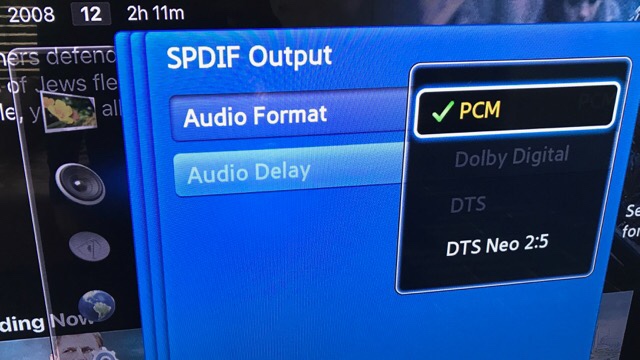
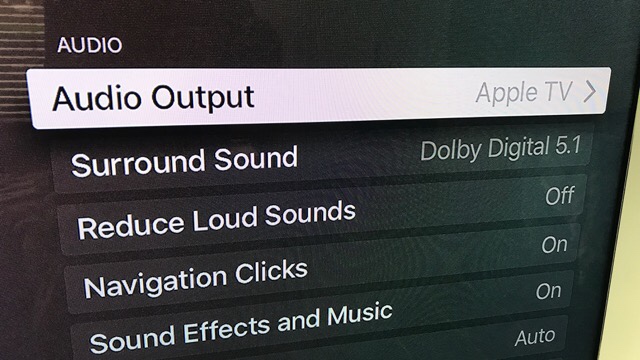
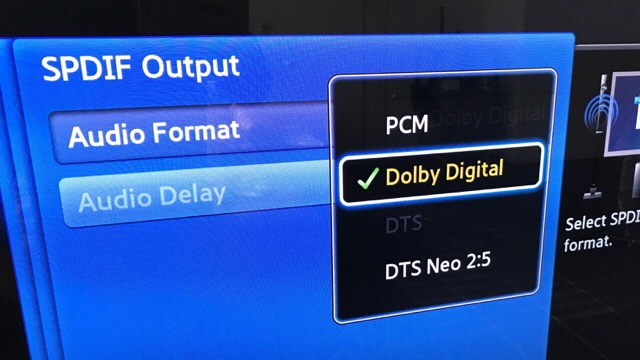
Popular knowledge is that Samsung TVs don't play DD 5.1 from HDMI connected sources. I was this close to solving this with an HDMI splitter connected to HDMI 2 ARC and a Toslink Out to Playbar. As it turns out this is not a problem to solve on the output side but on the link between the Samsung TV and your source, here an Apple TV.

a0db337cbdeac89b64dcc0ffbe3f4ec2

The keyword is Extended Display Identification Data (EDID). Samsung tells the Apple TV to not bother sending anything but PCM Stereo. And here is the trick. You go into the audio settings of Apple TV and tell it to send Dolby Digital 5.1 instead of "best available". Then Apple TV ignores the EDID and just sends DD 5.1. While the video is playing, you go into audio settings on the Samsung TV and suddenly Dolby Digital is available. Select that option.

b7813e3c4af850f85ba019a78bac5785

Problem solved. No hardware required.

I would bet this works for other sources like Xbox or FireTV as well.

12 Apr 14:56

What’s it like on the frontline in the Brexit culture wars? Just ask a comedian | Al Murray

by Al Murray
mkalus shared this story from EU referendum and Brexit | The Guardian.

Comedians are getting it in the neck for a bias against leave supporters. But the normal rules of punching up and down no longer apply

One of the most rewarding things about being a comedian is reading in the papers and in blogs all the time what it’s like, how the industry works, why people have done well, what you’re required to say and do. This goes above and beyond the daily deep shock of someone telling you that you are not funny. It’s amazing what you find out, even in your third decade of being a comedian. It’s never not fascinating to learn that the only reason you are on a 90-date tour is because the BBC have fixed it for you, even though your career is over. And so on.

Lately there has been a disturbance in the comedic force, whereby my noble, misunderstood and sadly undervalued trade has been dragged into the ankle-deep debate of Brexiter/remoaniac chuff. (Don’t panic, we are used to it; all debate about comedy is characterised by its profound shallowness. It’s great to be taking part. That comedians should even have to engage with the annual “are women funny?” thing is our vocation’s journalistic Danegeld.) The debate in the current fetid rock-pool goes as follows: all comedians are liberal London leftie EUSSRBBCLIBLABZIOCON stooges who were desperate to retain their Brussels shackles of serfdom and slavery, and they better get ready for the dole queue because no one likes them and anyway no one ever did, who do they think they are having their own ideas in a landscape of endless opinions? As the deathless phrase goes: stick to comedy, you unfunny bastard.

Continue reading...
12 Apr 14:56

Last gas station in Downtown Vancouver up for sale

mkalus shared this story from Comments on: Last gas station in Downtown Vancouver up for sale.

VICTORIA (NEWS 1130) – The 2017 provincial election campaign has officially begun.

At the Premier’s request, Lieutenant Governor Judith Guichon has dissolved the legislature, beginning the countdown to voting day on May 9.

Moments after wrapping up her conversation at Government House, incumbent BC Liberal leader Christy Clark started making her pitch to voters.

“This time I have a record to run on,” she says. “I think it’s a record that I feel good about, because we’re number one in job growth, have the lowest unemployment compared with the rest of the country… I’m proud of that.”

Clark released what has been described as a modest platform yesterday, suggesting her party’s ability to run a tight fiscal ship.

“Controlling spending is how we will balance the budget… it will allow us to pay off our operating debt so we can invest in families, schools and hospitals, rather than invest in interest payments we send to the banks.”


NDP’s John Horgan: “this is not as good as it gets”

While the BC Liberals are campaigning on the back of a strong economy, NDP Leader John Horgan says most people aren’t seeing the benefits of it.

“Christy Clark’s choices have added costs to you, they’ve reduced services for you, and they’ve made an economy that’s not working for you,” Horgan told a room of supporters, NDP candidates, and media in downtown Vancouver.

While the party has not yet rolled out its official platform, Horgan says one of its pillars will be building an economy that works for everyone, not just “those who are writing the cheques for the BC Liberal party.”

Many of the specifics revealed so far are aimed at making life more affordable: freezing hydro rates, eliminating tolls on the Port Mann and Golden Ears bridges, and working toward a universal $10-per-day childcare program.

Horgan also promised to restore funding to public education, which he says has been “devastated” by the BC Liberals.

The NDP have enjoyed a slight lead over the Liberals in election polls for the last several weeks.


Greens lay out ambitious affordable housing strategy

The message from Green Party leader Andrew Weaver today is similar to Horgan’s: average citizens are not enjoying the benefits of BC’s economic prosperity.

“Many are just barely making enough to pay the bills,” he told reporters at False Creek Community Centre. “The BC Liberals have allowed this to happen on their watch over the last 16 years. They’ve put big money and special interests ahead of British Columbians.”

While Weaver is also campaigning on affordability, his focus so far is on housing.

The Greens are aiming to cool the residential real estate market by working to end money laundering and international property speculation, overhauling property transfer taxes, and expanding the foreign buyers tax to apply province-wide.

Their Affordable Homes Strategy would also commit up to $750 million annually towards new affordable housing units, and expend legal protections for renters and landlords.

Weaver reserved some attacks for the NDP, saying in 16 years of opposition, they have failed to provide a workable alternative to the Liberals.

“The strongest argument for voting for the NDP is they’re better than the BC Liberals. That’s hardly an argument to vote for someone. What we’re offering British Columbians is a candidate team that is second to none.”

12 Apr 14:56

Why Andrew Weaver got into politics

by Stephen Rees
12 Apr 14:56

The myth of managed culture change

by Chris Corrigan

For a long time I have known that the idea that culture change can be managed is a myth.  A culture is emergent and is the result of millions of interactions, behaviours, artifacts and stories that people build up over time. It is unpredictable and results in surprise.  The idea that a “culture change initiative” can be rolled out from the top of an organization is not only a myth, it’s a hidden form of colonization. And worse, the idea that people need to be changed in the way the boss determines if we are to become the kind of place that we all aspire too is cruel and violent.

So what to do when an organization says that its culture needs change? Until I had stumbled over David Snowden’s work, I had few practical tools, principles and practices for doing this work. Since working with the theory that Dave has assembled and translating it into praxis, I have come up with a number o

Here are a few key notes for working with people who ask me to help them with that.

Principles

  • Culture is an emergent set of patterns that are formed from the interactions between people. These patterns cannot be reverse engineered. Once they exist you need to change the interactions between people if you want to change the patterns.
  • Culture includes stories but it is not a story. This is important because simply changing the story of the organization will not change the culture. Instead you need to create ways for people to interact differently and see what comes of it.
  • Cultural evolution is not predictable and cannot be led to a pre-determined character. You can aspire all you want to a particular future culture but it is impossible to script or predict that evolution.

Practices

  • Start by getting clear about the actual work. In my experience people use the term “culture change” as a proxy for the real work that needs to be done: improving employee relations, becoming more risk tolerant, shifting leadership styles…whatever it is, it’s best to start with getting clear what is ACTUALLY going on before assuming that the problem is the “culture.”
  • Look at what actually is. Studying the way things are is important, because that helps you to identify what you are actually doing. It seems simple, but it’s important to do it in a way that doesn’t bring a pre-existing framework to the work.  You have to look at the patterns from the work that you already do, not from how it illuminates a pre-existing model.
  • Work with emergence to understand patterns together. Using tools such as anecdote circles, organizations can discover the patterns that are present in the current environment. Anecdote circles generate small data fragements that describe actual actions and activities. Taken together and worked through, patterns become clear, like the process of generating a Sierpinsky triangle.  Out of large data sets, hidden patterns appear.
  • Identify those patterns and discuss ways to address them with safe to fail experiments. Run a session to create several ideas that are coherent with the patterns, design multiple small experiments to try to shift the patterns.  Institute rigorous monitoring and learning and allow for experiments to fail.
  • Support new ideas with appropriate resources. If you really want to change the interactions between people you need to resource these changes with time, money and attention. The enemy of focused innovation is time. Even allowing employees to work on something a half day a week could be enough to create and implement new things. Butif they have to do it on top of the full workload they have, nothing will get done.
  • Learn as you go. Developmental evaluation is they way to go with new forms of emergent practice. To be strategic about how change is happening, it’s important to design and build in evaluation at the outset.

These are just notes and practices, but are becoming standard operating procedures in my world when working with groups and organizations who are trying to address that elusive idea of “culture change.”


12 Apr 14:55

The Drupal Community Working Group: What it is, what it isn't

by webchick

In recent weeks, I've seen a whole lot of FUD regarding the Drupal Community Working Group, and what it is they do or don't do. While I no longer serve in the CWG (I stepped down from all "extra-curricular" Drupal activities back in 2015 to focus on my family), most of the portrayals I've read are misinformed at best and completely inaccurate at worst. So, as an ex-member, who was uninvolved in recent events and therefore can perhaps speak more freely(?), I’d like to try and clear up a few misconceptions I've seen.

Some have characterized the CWG as some nebulous dark secret court of frothing SJW activists, gleefully acting as judge/jury/executioner, deliberately seeking out “bad apples" in the community to oust, laughing malevolently all the way. This is patently false, and nothing could be further from the truth.

In reality, barring "flash point" incidents like the most recent one, it’s a pretty mundane gig. It mostly involves watching for something to be brought across your "desk" via an incident report, then trying your best as an unpaid volunteer—appointed based on your demonstrated ability to stay neutral and diplomatic in a crisis—to help empower people in the community to solve their own problems.

This takes different forms. A lot of the times it’s simply giving people a safe place to post concerns where they know they’ll be looked at seriously. The CWG provides someone to speak to who will genuinely listen to your concerns, and will give both parties a chance to speak and feel heard. If the situation escalates, the CWG will sometimes suggest neutral third-parties to help mediate, or in the “bigger” cases, get directly involved with mediation themselves. And while the CWG is empowered to oust people from the community in extreme circumstances, a) to-date, they have only done so once, following a harassment incident at DrupalCon, and b) barring "extreme" circumstances such as that, it is only done after a last, *last* resort. All of this is laid out in the Conflict Resolution Policy and Process: https://www.drupal.org/conflict-resolution

If an individual has multiple, *multiple* complaints against them, in many cases driving others to either leave the community entirely or dramatically reduce their involvement in the project, and if every other attempt to resolve the situation has failed, which includes private mediation, one-on-one mentoring, sterner warnings, etc. then as a last-ditch effort something like an Action Plan is developed. This is summarized as:

"The aim of an action plan is to find a path forward that avoids additional harm to the community. Drafting an action plan should help people recognise what triggers these incidents and help them learn to respond differently by using alternative approaches to problem-solving.

However, the action plan may also serve as a "final warning." If further complaints come to the CWG, further action may be necessary. As a group, our authority derives from Dries, and when necessary, we also consult Dries and involve him in the process."

The template includes a summary of complaints (all of which have been already vetted by the CWG for validity), the impact the person's actions have had on members of the community, and a clearly outlined set of steps to perform to prevent future complaints (e.g. if you're feeling frustrated, WALK AWAY instead of engaging in online battles in the heat of the moment). The intent is to wake the person up a bit, to help them understand that their actions — regardless of how justified they feel they are in having taken them — have consequences, often on people they care about, and to give them a clear path to re-engage with the community in a constructive and healthy way.

The CWG will bend over backwards to help people not get to that point, *especially* if they have an extensive contribution record. At a certain point though, if a “body trail” develops of people leaving the community because of an individual's conduct, it becomes something that needs to be addressed, especially if you sit on a governing body with the mandate to keep the community healthy. This is the situation that happened with chx, whose self-ban from the community was widely publicized, and which keeps getting brought up in the context of recent events as somehow related, which it is not.

Some people might respond to this with "Well, then contributors should just grow a thicker skin." That's certainly one approach. However, you lose a lot of great contributors that way (and indeed, we already have), as well as a lot of new blood into your project. I've previously documented my first 5 minutes in the Drupal community. Had I not been "contractually obligated" to remain because of Google Summer of Code, that likely would've been my last 5 minutes in the Drupal community, as well. And there are 1000s of other contributors out there like "past webchick." Food for thought.

So thanks, CWG, for doing your part of the thankless and difficult job that is ensuring that the Drupal community remains a respectful and collaborative place for all of us to do awesome things. <3

Tags: 
12 Apr 14:55

Lightroom CC 2015.10 now available

by Sharad Mangalick

The goal of this release is to provide additional camera raw support, lens profile support and address bugs that were introduced in previous releases of Lightroom.

Today, we also released versions of Lr for iOS and Android that provide updated camera support.  Check them out here.

New Camera Support in Lightroom CC 2015.10 / 6.10

  • Canon EOS M6
  • Canon EOS Digital Rebel T7i (EOS 800D, EOS Kiss X9i)
  • Canon EOS 77D (EOS 9000D)
  • Pentax KP

New Lens Profile Support in Lightroom CC 2015.10 / 6.10

Mount Name
Apple OOWA 15mm Wide-Angle Lens for iPhone 6 (JPEG only)
Apple OOWA 15mm Wide-Angle Lens for iPhone 6s (DNG+JPEG)
Apple OOWA 75mm Telephoto Lens for iPhone 6 (JPEG only)
Apple OOWA 75mm Telephoto Lens for iPhone 6s (DNG+JPEG)
Canon EF SIGMA 100-400mm F5-6.3 DG OS HSM C017
Canon EF SIGMA 135mm F1.8 DG HSM A017
Canon EF Tokina AT-X 24-70mm F2.8 PRO FX (IF)
Canon EF-S Canon EF-S 18-55mm f/3.5-5.6 IS II
Canon EF-S Tokina AT-X 14-20mm F2 PRO DX (IF)
Minolta SR Minolta MC ROKKOR-PF 85mm F1.7
Minolta SR Minolta MD ROKKOR-X 85mm F2
Nikon F Samyang 12mm f/2.8 ED AS NCS Fisheye
Nikon F SIGMA 135mm F1.8 DG HSM A017
Nikon F Tokina AT-X 14-20mm F2 PRO DX (IF)
Nikon F Tokina AT-X 24-70mm F2.8 PRO FX (IF)
Leica M Voigtlander VM HELIAR-HYPER WIDE 10mm F5.6
Leica M Voigtlander VM ULTRA WIDE-HELIAR 12mm F5.6 III
Leica M39 FED Industar-61 52mm f/2.8
M42 Helios MC 44-3 58mm F2
Sigma SIGMA 135mm F1.8 DG HSM A017
Sony FE Sony FE 85mm F1.8
Sony FE Sony FE 100mm F2.8 STF GM OSS

Customer reported issues resolved 

Known Issue

We have made progress in fixing the black panel issue as noted here and have reduced the chances that you will see the issue again.  Please do let us know if you see this issue in CC 2015.10 / 6.10.

Installation Instructions

Please select Help > Updates to use the update mechanism in the Creative Cloud app.

Give us feedback

Once you’ve updated to the latest version of Lightroom, don’t forget to leave us feedback about your experiences. Lightroom wouldn’t be what it is today without our passionate and loyal customers around the world. Giving us regular feedback helps us to find and fix issues that we may otherwise not know about. We are listening.

Here are a few ways that you can send us feedback:

Report bugs and suggest features

Discuss workflow and get help with how-to questions or basic troubleshooting 

Thanks!

12 Apr 14:54

DRM Playback Performance – Chrome vs. Firefox

by Martin

A couple of day ago, I read that Netflix now also supports video streaming in Firefox on Linux via Google’s DRM Plugin. I was delighted because I’ve been using Chrome so far which is by far not my first choice. But how good is it in practice, especially on older hardware?

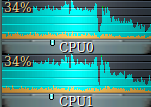
On my 8 year old media notebook sporting an equally old Intel Core 2 Duo processor, both Netflix and Amazon Prime Video playback works just fine in Chrome. In Firefox, both have started to work as well but during fast video sequences, playback is not quite smooth. It’s not totally unusable it’s just not as smooth as in Chrome. The embedded screenshot shows the problem. The first half shows CPU utilization while watching a Netflix HD stream in Firefox. Both cores are over 80% utilization. Watching the same stream in Chrome just utilizes both CPU cores around 35% as shown on the right side of the graph and fast video sequences are smooth. So for whatever reason, Google’s DRM plug-in for Firefox is by far less efficient decoding DRM protected content than whatever they’ve built into Chrome.

Agreed, who still uses a Core 2 Duo CPU, probably playback is smooth on more up to date processors!? Well perhaps, but I still do so I have to stick with Chrome for DRM video playback, at least on my 8 year old media PC.

12 Apr 14:54

Being human vs. rating people

by Doc Searls

rankingstars

I’ve hated rating people ever since I first encountered the practice. That was where everybody else does too: in school.

After all, rating people is what schools do, with tests and teachers’ evaluations. They do it because they need to sort students into castes. What’s school without a bell curve?

As John Taylor Gatto put it in the Seven Lesson Schoolteacher, the job of the educator in our industrialized education system is to teach these things, regardless of curricular aspirations or outcomes:

  1. confusion
  2. class position
  3. indifference
  4. emotional dependency
  5. intellectual dependency
  6. provisional self-esteem
  7. that you can’t hide

It’s no different in machine-run “social sharing” systems such as we get from Uber, Lyft and Airbnb. In all those systems we are asked to rate the people who share their cars and homes, and they are asked to rate us. The hidden agenda behind this practice is the same as the one Gatto describes above.

I bring this up because yesterday my wife and I had our first less-than-ideal shared ride. To spare everyone involved, I won’t say whether it was with Uber or Lyft, or where the ride went. I will say the ride is normally around half an hour, and we’ve taken the same ride dozens of times.

First, the driver didn’t help us load our two heavy bags into the trunk of his car, which had a lot of loose crap in it.(And, to be fair, lots of shared-ride drivers have a collection of their own stuff in the trunk.) Maybe he declined because there was heavy traffic and we all needed to get a move on, or he didn’t see the bags; but let’s just say that wasn’t normal, or what drivers usually do when picking up people with sizable luggage.

Soon as we were on the road, he asked if we’d mind if he stopped at an ATM, because he needed money for tolls. Seems his EZ-Pass transponder had a problem and needed to be sent in and exchanged, so he was operating without it. We said okay and took a slow parallel highway where he hoped an ATM could be found. He eventually found one at a gas station mini-mart, but the machine had a problem that took about 20 minutes, during which we just sat in the car.

After he got the money, we found our way back to the main toll road, and eventually to our destination. At one point on the toll road I reminded him that he should get a receipt for the toll he paid in cash. At our destination he did get out of the car to help with our bags, but I had already removed them from the trunk.

The whole ride took an hour and thirty two minutes, according to the Moves app on my phone. Since it was rush hour, I’d say the ride took about 45 minutes longer than it should have.

So that’s the down side.

The upside was that he seemed to be a genuinely good guy, trying to make a living and dealing with the world. He recently moved into the area to seek work as a recording engineer: a skill he learned recently at a trade school after tiring of an earlier career as a technician for a mobile phone company. His wife is pregnant with their first child, and they are struggling to make ends meet, which is why he was felt he had to work giving rides, even though he lacked two essential conveniences: an EZ-Pass or enough cash.

He had a lot of interesting things to say about working for Uber and Lyft (he drives for both), what makes a good or a bad ride (he’s had both as a passenger), and whether telling the story of their coming baby would make a good YouTube mini-documentary or podcast. We also talked about history, architecture, culture and travel. He speaks Spanish as well as English and would like to go to Spain someday. He also apologized for the delays, and thanked me for understanding his situation. (Or situations.) And I gave him a tip. (Which I always do, at least in the U.S.)

So, while the ride itself wasn’t great, the conversation was one of the better ones I’ve had with a driver. And I wanted to support the guy’s work.

But I couldn’t not rate the guy, or I wouldn’t be able to get a receipt or book the next ride. So I gave him four stars out of five. That’s the first time I’ve given any driver less than five stars. When I clicked on the fourth star, the app said what you see in the screen shot (from my phone) above. “Okay, could be better” was about right. Still, I would much rather have said nothing—or to have sent a note to the company. Anything but giving the guy some number of stars.

And no, I don’t know a better way. I am just sure that rating people is icky, and would rather say nothing than stroke or damn somebody with a star.


12 Apr 14:53

Visualize large datasets with deck.gl

by Nathan Yau

deck.gl is an open source framework developed by Uber to visualize large datasets (mainly geospatial ones, naturally). It started as an internal tool but was released to the public in November last year. Uber just released the next iteration of the package, which handles a bunch more use cases. Bookmarked it.

Tags: JavaScript, Uber, WebGL

12 Apr 14:52

Processing: making art with code

by Matt Richardson

This column is from The MagPi issue 56. You can download a PDF of the full issue for free, or subscribe to receive the print edition in your mailbox or the digital edition on your tablet. All proceeds from the print and digital editions help the Raspberry Pi Foundation achieve its charitable goals.

One way we achieve our mission at the Raspberry Pi Foundation is to find an intersection between someone’s passion and computing. For example, if you’re a young person interested in space, our Astro Pi programme is all about getting your code running on the International Space Station. If you like music, you can use Sonic Pi to compose songs with code. This month, I’d like to introduce you to some interesting work happening at the intersection between computing and the visual arts.

Image of Dead Presidents by Mike Brondbjerg art made with Processing

Mike Brondbjerg’s Dead Presidents uses Processing to generate portraits.

Processing is a programming language and development environment that sits perfectly at that intersection. It enables you to use code to generate still graphics, animations, or interactive applications such as games. It’s based on the Java programming language, and it runs on multiple platforms and operating systems. Thanks to the work of the Processing Foundation, and in particular the efforts of contributor Gottfried Haider, Processing runs like a champ on the Raspberry Pi.

Screenshot of Processing environment

When I want to communicate how cool Processing is while speaking to members of the Raspberry Pi community, I usually make this analogy: with Sonic Pi, you can use one line of code to make one note; with Processing, you can use one line of code to draw one stroke. Once you’ve figured that out, you can use computational tools such as loops, conditions, and variables to make some beautiful art.

And even though Processing is intended for use in the realm of visual arts, its capabilities can go beyond that. You can make applications that interact with the user through keyboard or mouse input. Processing also has libraries for working with network connections, files, and cameras. This means that you don’t just have to create artwork with Processing. You can also use it for almost anything you need to code.

Physical process

Processing is especially cool on the Raspberry Pi because there’s a library for working with the Pi’s GPIO pins. You can therefore have on-screen graphics interacting with buttons, switches, LEDs, relays, and sensors wired up to your Pi. With Processing, you could build a game that uses a custom controller that you’ve built yourself. Or you could create a piece of artwork that interacts with the user by sensing their proximity to it.

Processing screenshot

Best of all, Processing was created with learning to code in mind. It comes with lots of built-in examples, and you can use these to learn about many different programming and drawing concepts. The documentation on Processing’s website is very thorough and – as with Raspberry Pi – there’s a very supportive community around it if you run into any trouble. Additionally, the Processing development environment is powerful but also very simplified. For these reasons, it’s perfect for someone who is just getting started.

To get going with Processing on Raspberry Pi, there’s a one-line install command. You can also go to Processing.org and download pre-built Raspbian images with Processing already installed. To help you on your journey, there’s a resource for getting started with Processing. It includes a walkthrough on how to access the GPIO pins to combine physical computing and visual arts.

When you launch Processing, you will see a blank file where you can start keying in your code. Don’t let that intimidate you! All of the world’s greatest pieces of art started off as a raw slab of marble, a blob of clay, or a blank canvas. It just takes one line of code at a time to generate your own masterpiece.

Become a supporter

After this article appeared in The MagPi, the Processing Foundation put out a call for support:

We want you to be a part of this. Our work is almost entirely supported by individual one-time donations from the community. Right now we are outspending what we earn, and we have bigger plans! We want to continue all the work we’re doing and make it more accessible, more inclusive, and more responsive to the community needs.

To create lasting support for these new directions we’re starting a Membership Program. A membership is an annual donation that supports all this work and signifies your belief in it. You can do this as an individual, a studio, an educational institution, or a corporate partner. We will list your name on our members page along with all the others that help make this mission possible.

The post Processing: making art with code appeared first on Raspberry Pi.

12 Apr 14:49

Ken Schulzke Gears Up for His First Ride to Conquer Cancer

by Average Joe Cyclist

DAY 1 - ROUTE 4 - TheRide to Conquer Cancer in Alberta uphill 353-year-old Ken Schulzke is doing the Enbridge Ride to Conquer Cancer for the very first time this August. He is motivated by a desire to help solve the cancer problem, and believes that if he can do this, almost anyone can! As he says, he has noticed that it is your will, not your body type, that gets you through marathon attempts. I spoke with Ken about his motivation, his training, and his experiences of preparing for his very first Ride to Conquer Cancer.

The post Ken Schulzke Gears Up for His First Ride to Conquer Cancer appeared first on Average Joe Cyclist.

12 Apr 14:49

The 300, 100, 10 Benchmark For New Online Communities

by Richard Millington

Reviewing more data from a batch of communities, we keep seeing a trend with a normal distribution around the 300, 100, 10 mark.

The communities that take off tend to get..

  • 300 monthly posts.
  • From 100 active participants per month.
  • With 10 new registrations/activations per day.

…within 3 months of launch.

Breaking it down, you need 3 posts per day in the first month, 6 in the second, 9 in the third. Very achievable if you focus on the direct, micro, level. It’s less achievable if you jump straight into big gamification or MVP programs.

If you hit this target, you’re usually past the critical mass point. Things begin to grow organically here. If you fall beneath it, you’re usually facing a long, uphill, struggle.

If you’re falling beneath it, this usually means:

1) You don’t have enough awareness and trust. This is by far the most common. The audience doesn’t know you exist. You usually need to build an audience of at least 1k+ people before you launch the community.

2) Your concept isn’t sticking with the audience. You made the community too broad. The concept doesn’t excite anyone. This is usually the ‘community to talk about {sector}’ style communities.

3) You’re making tactical mistakes. Usually in how you welcome and onboard members. Perhaps you don’t have enough interesting activity for people to engage in.

4) Your field is too small. If your total field is less than 10k people (speaking your language), building a community might be a struggle. In this case, use an email list, regular offline meetups, or a Facebook group. Push the community out to where people already visit. Internal communities are an exception here.

If you want to give yourself the best chance of success, build up a big audience before you launch, develop a risky (and innovative) concept that will appeal to a few hundred people, and check how you welcome members compared with others.

12 Apr 14:49

Saturday Morning Breakfast Cereal - Smalltalk

by tech@thehiveworks.com
mkalus shared this story from Saturday Morning Breakfast Cereal.


Click here to go see the bonus panel!

Hovertext:
I wonder what percentage of my comics are just me scolding my younger self.

New comic!
Today's News:
12 Apr 14:45

Telus delays Samsung Galaxy S6 Nougat update to late April

by Igor Bonifacic
Back of Samsung Galaxy S6 smartphone

Just a quick FYI to anyone waiting to get Android Nougat on their Telus Galaxy S6, S6 edge or S6 edge+ smartphone: Telus is delaying its Android Nougat update for those Samsung Galaxy S6 series devices until late April 2017.

Telus originally planned to release the update on April 10th, however, its upgrade schedule has now been updated to inform users they’ll have to wait until later in the month to get Nougat. The carrier didn’t provide any specific reasoning for the delay.

Like most carriers, Telus warns “all dates are approximate and subject to change.” In this case, it turned out to be true.

Source: Telus

The post Telus delays Samsung Galaxy S6 Nougat update to late April appeared first on MobileSyrup.

12 Apr 14:45

Graphene is a durable electrode technology that could revolutionize flexible displays

by Rose Behar
lg display -- graphene flexible display

One of the most significant roadblocks to flexible display technology is the lack of durability that currently exists due to the fragile transparent electrodes that many current flexible OLED screens use — for instance, the display on the Apple Watch — but a new technological breakthrough in South Korea may change that in the near future.

Researchers at South Korea’s Electronics and Telecommunications Research Institute announced on April 11th that they had developed transparent electrodes for OLED displays out of graphene, a material that is considered the thinnest, most flexible and fastest option for transferring heat and electricity. Graphene is also much more flexible and resistant to chipping than the previous transparent electrode technology, indium tin oxide or ITO.

The new, more durable technology could lead to the advent of many more wearable devices entering the market in the near future. The Korean scientists say they hope to commercialize flexible and fordable OLED panels in five years.

“Companies are making similar efforts to develop fordable display panels by minimizing the use of ITO electrodes by applying other materials such as plastics,” a spokesman at LG Display told The Korea Herald. “If commercialized soon, the graphene electrode technology would help the industry achieve fordable panels significantly.”

LG is investing heavily in flexible display technology, and its competitor Samsung also has big plans for the space.

Source: The Korea Herald

Via: Engadget

The post Graphene is a durable electrode technology that could revolutionize flexible displays appeared first on MobileSyrup.

12 Apr 14:45

Google’s new drawing tool helps you doodle better on your phone or laptop

by Rose Behar
google autodraw

Aside from those unique talents who can create Snapchat masterpieces, digital doodling just doesn’t work for most people.

Using a laptop trackpad to draw is almost impossible, but even using a mouse or your finger is hard. Pair the lack of accuracy that still exists in those technologies with a lack of artistic training (as is the case in my situation) and you end up with a bunch of lumpen shapes that don’t represent anything at all.

This issue is the one Google focused on solving with its new AI experiment AutoDraw. The web app is available both on desktop and mobile, allowing users to sketch something out and let the tool guess what object they were attempting to create, then replace it with an artist’s version. For instance, if I draw a cat, I’m given the option to replace my gnarly attempt (kill it with fire) with a more professional looking, but still simple, version of that animal.

google autodraw

It’s an interesting idea, especially given its potential to aid in the team brainstorming process. It can be difficult to prototype or brainstorm ideas when the visuals aren’t communicating ideas properly to teammates, so theoretically this tool could help to get everyone on the same page.

Unfortunately, the library of art isn’t very large as of yet, resulting in a dearth of options for doodle replacements. Sometimes the doodles can also be a bit obscure. When I was drawing a stick person, it gave me several options for people doing yoga poses, but none for a basic drawing of a standing human. That will no doubt improve, though, as artists submit their own drawings and people request more options.

To try out AutoDraw, visit autodraw.com. The tech giant also explains more about the technology behind this tool here.

The post Google’s new drawing tool helps you doodle better on your phone or laptop appeared first on MobileSyrup.

12 Apr 14:44

Dropbox on Android adds document scanning

by Igor Bonifacic
Dropbox and Paper on iOS

On Tuesday, Dropbox issued two major software updates to its suite of cloud-based apps.

On Android, the main Dropbox app now supports document scanning. The feature allows users to use their smartphone’s camera to photograph a document and add it to their Dropbox cloud account. Users can also crop and rotate scans to ensure they’re perfect, as well as scan multiple documents and save them as one file.

The feature arrived on iOS last year. According to Dropbox, it’s one of the most popular features in Dropbox with iOS users.

Meanwhile, with Paper, the company’s recently launched collaborative workspace app, Dropbox has added support for offline editing. The feature is available on both Android and iOS starting today, though PC and Mac users will have to wait before it makes its way to personal computers.

In addition, the app now supports 20 additional languages, including Japanese, Russian and German.

Dropbox launched Paper earlier this year as part of a renewed push toward capturing business customers.

Download Dropbox and Dropbox Paper from the iTunes App Store and Google Play Store.

Source: Dropbox

The post Dropbox on Android adds document scanning appeared first on MobileSyrup.