Rolandt
Shared posts
Iterating over objects and arrays: frequent errors
Susan Crawford, How One Little Cable Company Exposed Telecom’s Achilles’ Heel
In any sensible world, Susan Crawford would be running the FCC. She explores the pivotal role that tiny cable company Cable One. With a tiny market of 700,000 customers in Mississippi, Louisiana, Arizona, Idaho, Kansas, and Nebraska, it’s making a mess for all the bigger players. Why: Crawford quotes Craig Moffett, the cable market analyst, who says Cable One is raising its data transmission prices too quickly. And this exposes the real problem: people are moving to use their cable increasingly just for data and dropping pricy TV bundles. So the companies should be treated as common carriers, like the phone companies, and regulated as such.
She continues,:
See the problem? If people begin noticing that there’s no competition, that Americans are paying too much for too little, and that the entire country is suffering as a result, that’s a big problem for Big Cable.
[…]
The risk to the carriers is that some oversight or uproar will keep them from being able to make this smooth transition from bundled services to higher all-inclusive pricing for data transmission. Real oversight would actually include a hard look at industrial policy supporting reasonably priced fiber data services for everyone, supporting both economic growth and social justice for the country — and the carriers will do anything they can to avoid any step in that direction.
That’s why Comcast and its buddies are angry with Cable One. By using its own little monopoly to raise prices, it’s exposing the unconstrained power of the entire sector over something that feels like a utility to most Americans. The small company is making the case that the telecom industry needs oversight.
That’s why all the smoke and furor about “net neutrality,” all the Verizon statements about “standing by strong open internet principles,” all the Comcast blather about “supporting a free and open internet,” all the Pai nonsense about a “dynamic” internet access market, all the DC Circuit mumbling in dissent about the speech rights of internet access providers, is all completely beside the point.
What really matters is whether, someday, we’ll take on as a country the issue of the dismal state of high-speed internet access in America. If the Title II reclassification holds, it’s more likely that we will take that step sooner. And the carriers know that.
In the meantime, we’re looking to American cities to be brave and take their destinies into their own hands by calling for the installation of “dark air” or “dark fiber”—passive, neutral infrastructure that any retail provider can use competitively to serve all households and businesses. That argument is gaining traction across the country.
So don’t fixate on “net neutrality.” Political talk about high-speed internet access in America is chock full of words like that that have been entirely untethered from their their meanings and history. Even though the state of internet access is an issue that touches the bank accounts and opportunities of hundreds of millions of Americans and gazillions of businesses, very few people understand what’s actually going on. Now you are among them. Do something about it.
Indexing Haskell (book)
I’ve spent the past few weeks trying very hard to get Haskell Programming from First Principles finished up. There were errors to correct, LaTeX tags to standardize, proofreading to do, and an index to make. Indexing turned out to be more interesting and rewarding than I’d thought it would be.
Previously, this book did not have much of an index which was sort of OK because it was only an ebook, and you can search the PDF. We had sprinkled a few index tags about, but not many. It was clear that for the print version, I’d have to add a whole bunch of index tags by hand1, and I planned to do that as I proofread the book. I’m reading it anyway, it should be simple to just put in index tags as necessary, right?
The first problem was that you need a different focus (literally) when you proofread as opposed to when you edit content, and placing index tags is closer to content editing: I had to keep asking myself, we mention this thing in this paragraph, but is this a good place for an index tag for that thing? How essential is this particular information? Is it merely a mention or something substantive? If I were looking up this term in the book, is this likely to be an explanation or example I was looking for?
I also found, though, that indexing that way wasn’t giving me a high-level view of the index and its role in the book. While I have always appreciated a great book index, to the extent that I often wish even fiction were indexed (remember that passage where…? how can I find that again?), I did not know how to make a great index happen.
The Role of the Index
I started thinking about what makes a bad index. So many books have unhelpful ones. In one of my favorite cookbooks, the recipes are mostly indexed by the name the authors gave them, so to look up how to make that soup we like, I have to remember whatever they called it, not just “zucchini soup,” and unfortunately I never can (I used colored pencils to highlight my favorite recipes in the index, but I shouldn’t have had to). Other books seem to point you to just any use of a given term, not necessarily the ones that contain something essential about it. For this book, I don’t want to index literally every mention of the Bool or Maybe type, for example, only the important ones.
I started to think about the role the index plays in the book’s user interface. A book’s UI includes more than the index, of course. The design and layout of the book as a whole are also part of it, a part we’d invested a great deal of effort into. The table of contents, perhaps along with a “how to use this book” section, is also part of the user interface, but that is the authors telling you how they want you to use the book. The index, on the other hand, is there to let the reader use the book how they want to use it.
How would someone who has read the whole book but wants to refer back to something use the index? How would a reader who has just picked it up and maybe only read a chapter or two use it? What kinds of information would people want to know about the book that the index could reveal even if they hadn’t read any of it?
Placing index tags as I went through the book proofreading did a pretty good job at getting important instances of important terms listed in the index – although when I went back to earlier chapters after I’d finished the last chapters, I realized I hadn’t been nearly thorough enough early on. Getting those cross-listed so they are accessible through various terms (e.g., “sectioning” is listed as both “sectioning” and under “infix operators, sectioning”) was the next step. You do not want to force your readers to remember the name of the zucchini soup.
But the more I thought about the index as part of the book’s UI, the less satisfied I was with what I’d done so far. I wondered what other assistance the index could supply, what other lenses into the book, and the language, it could provide.
Helpful lists, I hope
Because of the way the book is laid out, intended to be worked through mostly sequentially, we don’t have a specific place where we cover all the GHCi commands, or all the Stack and Cabal stuff you need to know. That kind of information is sprinkled throughout the book, wherever it came up in the course of teaching Haskell. Making sure those were grouped into lists in the index seemed a good next step.
But why stop there?
We’d made a point to explain GHCi error messages at various points in the book. They can be intimidating and hard to interpret, but they also give useful feedback, so we want to help people see them as part of a dialogue with the compiler. It seemed appropriate, then, to index some of those. If you get an “actual type did not match expected type” message and don’t know or can’t remember which is which, that’s indexed, and the index points at places where we explain what that message is telling you. Wondering why you get a “No instance for Show” when you apply a function to too few arguments – that answer is now easy to find!
Next, I made an entry for “language extension” and cross-listed the ones we cover. Again, coverage of those (not by any means all of the language extensions that exist) is sprinkled throughout the book, but any reader might be in a position where they want to see TypeApplications or InstanceSigs demonstrated, before they reach a point where we do that (I think we probably should encourage more Haskell learners to use those liberally) – or maybe they’ve already started a project that needs OverloadedStrings, as so many projects do, and need a quick way to find explanations and examples of usage. Each language extension we cover is listed both under its own name as well as in the list of language extensions.
It was in the course of doing this that I learned the difference between pragma and language extension so then I also made a list of the pragmas we give at least some coverage, too. Probably not as useful to know as the extensions, but it can’t hurt, right? I, for one, had forgotten we talked about INLINABLE.
Some internet argument about the fact that Haskell is made up of expressions and declarations not just functions made me want to list the varieties of declaration. We do talk about what the difference is in the book but what if you just want to know what all constitutes a declaration? The Haskell Report tells you, of course, but we could offer help, too. Our list isn’t as comprehensive as the Report’s because, again, it only covers what we discussed in the book.
For similar reasons, I decided to do the same thing with keywords – what are the keywords in Haskell and what are they used for? Again, my list doesn’t include all of them, only what we covered in the book.
At the last minute, I decided to use “library” as an index term. There are a few libraries we really delved into – we used the testing libraries QuickCheck, hspec, and checkers a lot. The data structures chapter has solid introductions to criterion, containers, and vector. Those and bytestring and text might seem reasonably obvious to cover. But I think it’s less obvious that we covered scotty, network, random, trifecta, aeson, and sqlite-simple – at least three of those are used in complete projects, even.2
So, now, when you’re ready to start a project, no matter where you are in the book, and you want direct help using random or wreq or time, you can find it.
The library index term does not include every library we mention in the book, by the way, only the ones where I considered the example or explanation substantial enough to bother. I may reconsider what I included there for subsequent editions of the book. It may be worthwhile including every library we mention to help people figure out which Haskell libraries are commonly used for things like streaming (not covered in the book, but mentioned).
I am pleased with my work here. I hope that the index will serve as a good entry point and reference to – well, not just the book, but to Haskell, or GHC Haskell, at least the parts that seemed most relevant to going from unfamiliarity with the language to building projects with it.
1 LaTeX generates the index, but you still have to place the tags telling it to index something.
2 We have a perhaps TMI investigation of scotty’s transformer stacks in the monad transformers chapter, but not a full web app built with it.
Distributed Wikipedia Mirrors in Freenet
There was a recent post about uncensorable Wikipedia mirrors on IPFS. The IPFS project put a snapshot of the Turkish version of Wikipedia on IPFS. This is a great idea and something I've wanted to try on Freenet.
Freenet is an anonymous, secure, distributed datastore that I've written a few posts about. It wasn't too difficult to convert the IPFS process to something that worked on Freenet. For the Freenet keys linked in this post I'm using a proxy that retrieves data directly from Freenet. This uses the SCGIPublisher plugin on a local Freenet node. The list of whitelisted keys usable are at freenet.cd.pn. There is also a gateway available at d6.gnutella2.info. The keys can also be used directly from a Freenet node, which is likely to be more performant than going through my underpowered proxy. Keep in mind that the "distributed, can't be taken down" aspect of the sites on Freenet is only when accessed directly through Freenet. It's quite likely my clearnet proxy won't be able to handle large amounts of traffic.
I started with the Pitkern/Norfuk Wikipedia Snapshot as that was relatively small. Once I got the scripts for that working I converted the Māori Wikipedia Snapshot. The lastest test I did was the Simple English Wikipedia Snapshot. This was much bigger so I did the version without images first. Later I plan to try the version with images when I've resolved some issues with the current process.
The Freenet keys for these mirrors are:
- USK@m79AuzYDr-PLZ9kVaRhrgza45joVCrQmU9Er7ikdeRI,1mtRcpsTNBiIHOtPRLiJKDb1Al4sJn4ulKcZC5qHrFQ,AQACAAE/simple-wikipedia/0/
- USK@jYBa5KmwybC9mQ2QJEuuQhCx9VMr9bb3ul7w1TnyVwE,OMqNMLprCO6ostkdK6oIuL1CxaI3PFNpnHxDZClGCGU,AQACAAE/maori-wikipedia/5/
- USK@HdWqD7afIfjYuqqE74kJDwhYa2eetoPL7cX4TRHtZwc,CeRayXsCZR6qYq5tDmG6r24LrEgaZT9L2iirqa9tIgc,AQACAAE/pitkern-wikipedia/2/
The keys are 'USK' keys. These keys can be updated and have an edition number at the end of them. This number will increase as newer versions of the mirrors are pushed out. The Freenet node will often find the latest edition it knows about, or the latest edition can be searched for using '-1' as the edition number.
The approach I took for the mirroring follows the approach IPFS took. I used the ZIM archives provided by Kiwix and a ZIM extractor written in Rust. The archive was extracted with:
$ extract_zim wikipedia_en_simple_all_nopic.zim
This places the content in an out directory. All HTML files are stored in a single directory, out/A. In the 'simple english' case that's over 170,000 files. This is too many files in a directory for Freenet to insert. I wrote a script in bash to split the directory so that files are stored in '000/filename.html' where '000' is the first three digits of a SHA256 hash of the base filename, computed with:
$ echo "filename.html"|sha256sum|awk '{ print $1 }'|cut -c "1,2,3"
The script then went through and adjusted the article and image links on each page to point to the new location. The script does some other things to remove HTML tags that the Freenet HTML filter doesn't like and to add a footer about the origin of the mirror.
Another issue I faced was that filenames with non-ascii characters would get handled differently by Freenet if the file was inserted as a single file vs being inserted as part of a directory. In the later case the file could not be retrieved later. I worked around this by translating filenames into ascii. A more robust solution would be needed here if I can't track down where the issue is occurring.
This script to do the conversion is in my freenet-wikipedia githib repository. To convert a ZIM archive the steps are:
$ wget http://download.kiwix.org/zim/wikipedia_pih_all.zim
$ extract_zim wikipedia_pih_all.zim
$ ./convert.sh
$ ./putdir.sh result my-mirror index.html
At completion of the insert this will output a list of keys. the uri key is the one that can be shared for others to retrieve the insert. The uskinsert key can be used to insert an updated version of the site:
$ ./putdir.sh result my-mirror index.html <uskinsert key>
The convert.sh script was a quick 'proof of concept' hack and could be improved in many ways. It is also very slow. It took about 24 hours to do the simple english conversion. I welcome patches and better ways of doing things.
The repository includes a bash script, putdir.sh, which will insert the site using the Freenet ClientPutDiskDir API message. This is a useful way to get a directory online quickly but is not an optimal way of inserting something the size of the mirror. The initial request for the site downloads a manifest containing a list of all the files in the site. This can be quite large. It's 12MB for the Simple English mirror with no images. For the Māori mirror it's almost 50MB due to the images. The layout of the files doesn't take into account likely retrieval patterns. So images and scripts that are included in a page are not downloaded as part of the initial page request, but may result in pulling in larger amounts of data depending on how that file was inserted. A good optimisation project would be to analyse the directory to be inserted and create an optimal Freenet insert for faster retrieval. pyFreenet has a utility, freesitemgr, that can do some of this and there are other insertion tools like jSite that may also do a better job.
My goal was to do a proof of concept to see if a Wikipedia mirror on Freenet was viable. This seems to be the case and the Simple English mirror is very usable. Discussion on the FMS forum when I announced the site has been positive. I hope to improve the process over time and welcome any suggestions or enhancements to do that.
What are the differences between this and the IPFS mirror? It's mostly down to how IPFS and Freenet work.
In Freenet content is distributed across all nodes in the network. The node that has inserted the data can turn their node off and the content remains in the network. No single node has all the content. There is redundancy built in so if nodes go offline the content can still be fully retrieved. Node space is limited so as data is inserted into Freenet, data that is not requested often is lost to make room. This means that content that is not popular disappears over time. I suspect this means that some of the wikipedia pages will become inaccessible. This can be fixed by periodically reinserting the content, healing the specific missing content, or using the KeepAlive plugin to keep content around. Freenet is encrypted and anonymous. You can browse Wikipedia pages without an attacker knowing that you are doing so. Your node doesn't share the Wikipedia data, except possibly small encrypted chunks of parts of it in your datastore, and it's difficult for the attacker to identify you as a sharer of that data. The tradeoff of this security is retrievals are slower.
In IPFS a node inserting the content cannot be turned off until that content is pinned by another node on the network and fully retrieved. Nodes that pin the content keep the entire content on their node. If all pinned nodes go offline then the content is lost. All nodes sharing the content advertise that fact. It's easy to obtain the IP address of all nodes that are sharing Wikipedia files. On the positive side IPFS is potentially quite a bit faster to retrieve data.
Both IPFS and Freenet have interesting use cases and tradeoffs. The intent of this experiment is not to present one or the other as a better choice, but to highlight what Freenet can do and make the content available within the Freenet network.
new light box and motto @photojojo

Photo Caption: new light box and motto @photojojo
Instagram filter used: Inkwell

The Psychology Behind Superiority
If you treat your top contributors better than others, they will act better than others.
I’ve seen perfectly functional communities turned into dystopian firestorms by well-intentioned efforts to reward and encourage top contributors.
Top contributors believe their own praise and act condescendingly towards other members. They verbally shut down discussions they disagree with and assume their arguments are beyond reproach of regular members.
This in turn causes anger from regular members towards the community (and the company). It lowers their tendency to participate. Since it’s the regular members most likely to ask questions for top contributors to answer, the overall level of activity starts to creep down.
It’s tempting to overlook bad behavior as long as top contributors keep participating, but this only leads to bigger problems later.
Remember too, how it feels for a regular member to see a small group treated like kings. It’s not good.
Always align rewards with noble appeals to serve and support the community (not vice-versa). Praise members for sharing expertise, not for being experts. Help them increase the skill and knowledge level of regular members. Shut down bad behavior early.
If your top members refuse to do that, they’re probably not members worth rewarding.
In our Psychology of Community course, we’re going to dive deep into the psychology behind top participants and increasing activity from regular members. I think you should join us.
The Case of the Vanishing Log Files
One of the projects I’m tinkering with at work right now is a reporting system written in R. It’s built on Shiny, RStudio’s web application framework, a tool I’ve previously used for both the reasonable (reporting systems!) and nightmarish (mobile-optimised personal website in 40 lines of R).
To make deployment easier, we’ve been wrapping it in Docker, a common containerising system…with some godawful configuration settings that make it hard to debug the apps it encloses. Specifically, logs are (a) not immediately, obviously accessible and (b) just vanish.
After a week of frustrations I’ve finally worked out how to get around it, and thought I’d write it up. So we’ve got two things:
- How to get access to the instance at all, so you can grab the Shiny logs, and;
- How to grab the logs in a way that doesn’t lead to them magically disappearing on you.
Instance access
When you launch a docker image containing Shiny, you end up with a terminal full of the standard Shiny gunk:

This is nice and all but doesn’t let you wander around in the image without terminating the Shiny apps. There are a couple of ways to spin up a new terminal window for this - the easiest is with Kitematic, a (beta) Docker GUI that comes with Docker itself and is accessible via the dropdown menu:
When you load it up you’ll see a menu of current and past docker instances. Tabbing to your current one gets a screen like this:
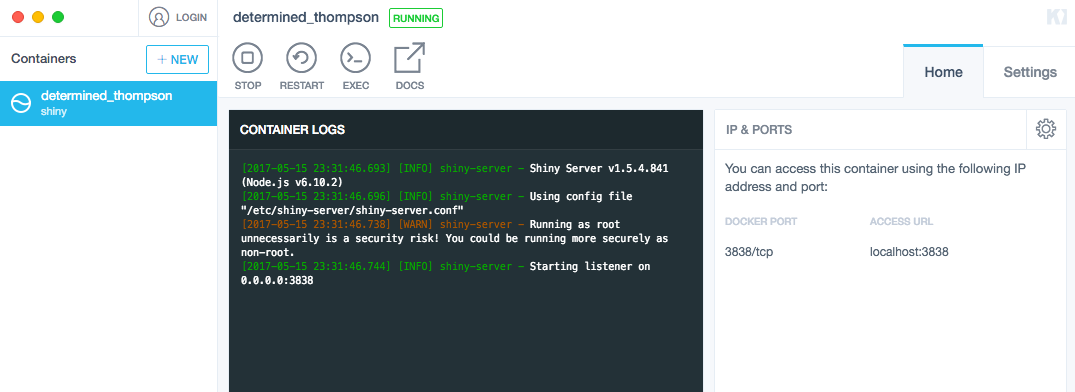
From which you can launch (with the exec button) a terminal! A really crappy terminal. But a terminal!
Log access
Shiny’s application logs end up under /var/log/shiny-server/. So far, so standard. If you go there while a session’s running, you’ll see a file of the form shiny-big-long-uuid-so-long-omg.log. The problem is that when the session ends, the log is instantly removed. In other words, if what you’re tracking down is a bug that causes a session to terminate, your logs will register whatever the issue is and then promptly obliterate themselves.
The answer: instead of using cat or something to look at the log files after the fact, you can use tail (with the -f parameter) to have the logs streaming to you as they’re written. At that point it doesn’t matter if the logs then delete themselves because you already have whatever error you were tracking down. So:
- Spin up the Docker image
- Start a shiny session in your browser
- Open a terminal to the instance through Kitematic
- Navigate to the log directory and
tail -f whatever-file-is-for-your-session.log - Reproduce the bug that causes the session to terminate
- You have error reports!
And now you can track down the bug, a stage it took me to get three days to reach. Yer welcome.
Samsung Galaxy S8’s Camera Ranked Below Google Pixel by DxOMark
 DxOMark has put the Samsung Galaxy S8’s 12MP rear shooter through its comparison and given it a score of 88. This is just a point below the Google Pixel and similar to the Galaxy S7, HTC 10, and the Xperia X Performance.
Continue reading →
DxOMark has put the Samsung Galaxy S8’s 12MP rear shooter through its comparison and given it a score of 88. This is just a point below the Google Pixel and similar to the Galaxy S7, HTC 10, and the Xperia X Performance.
Continue reading →
A16Z AI Playbook: TensorFlow iOS example quickstart
There’s another dimension to the iOS TensorFlow example in the A16Z AI Playbook: it provides a working example that can be used directly with Xcode 8 and Swift 3, which isn’t yet common. What follows is a set of pointers that (hopefully) make it easier for iOS+Swift developers to jump right into it.
1: Clone & Run The Sample App Unmodified
First, clone or download the playbook repository from github and then open the Xcode project found under ai/ios/CueCard. Keep in mind the project requires Xcode 8, and uses Swift 3.
First, open the project. You’ll notice that there’s a file missing:

Don’t panic! The contents of the file are there, just compressed, to get around github’s file size limits without using Git LFS. The TensorFlow static library is also compressed in this way.
To get these files in place, just build the project. There’s a build phase added to it that will check for the files and extract them from archive if they’re not in the correct location:

Now that you’re built the project the file will still appear in red because Xcode doesn’t update group contents dynamically. To have Xcode “see” the file you’ll need to close and open the project back up again.
Run The Project on a Device
With the project built you’re now ready to run it, and because the example uses the device’s camera, you’ll need an iOS device to run the example on.
After launch you should see a screen like this:

After pressing the button to switch to ‘scan mode’ you should see the bars change according to the prediction as you scan different items:

2: Train & Use Your Own Model
Now that you’ve got the app running, you can train your own model to detect different things.
TensorFlow Setup
The TensorFlow setup we use and how to get it up and running is covered in the section “Code Part 1: (Re-)Training a Model”. I suggest that even if you know TensorFlow and have a setup already running on your machine you take a look at this section to make sure that you adjust to any possible idiosyncrasies of the tutorial.
If you haven’t yet installed TensorFlow, I will repeat what’s said in this section of the playbook — as counterintuitive as it may be, you might have an easier time compiling TensorFlow from source than installing it.
Finally — you might be tempted to install and use the GPU extensions (e.g. CUDA) right away. The playbook includes instructions for this but if you are not familiar with TensorFlow and/or GPU extensions I don’t recommend spending time on that until you’ve got the whole setup working.
TensorFlow Model Retraining
Once you’ve got a working setup, the section “Code Part 2: Adding AI to Your Mobile App” takes you through how to retrain the model. The result of that process will be label files and the network graph that you can use to replace those in the iOS app.
Modify the iOS App Code
Once you have a retrained model and have placed it in the Xcode project, you are close to being done. In general, you shouldn’t need to modify code beyond what’s in CueCardViewController.swift. The code in that file is primarily written for simplicity and readability, and changes in interface, labels, and files are managed there.
Additionally, there’s the TensorFlowProcessor class (written in Objective-C) which wraps around the TensorFlow static library. Modifications that have to do lower-level parameters like image dimensions belong there.
By now you should up and running with both a TensorFlow setup that you can retrain and an iOS app that can be used to process images using your own trained network. Hope this is useful! And as always, please feel free to send questions, comments, or fixes my way.
Happy hacking! 
(cross-posted on medium)


The Hitchhiker’s Guide to d3.js

Ian Johnson provides some good direction for those looking to get their feet wet with d3.js.
This guide is meant to prepare you mentally as well as give you some fruitful directions to pursue. There is a lot to learn besides the d3.js API, both technical knowledge around web standards like HTML, SVG, CSS and JavaScript as well as communication concepts and data visualization principles. Chances are you know something about some of those things, so this guide will attempt to give you good starting points for the things you want to learn more about.
Look at that map. I find that a big thing about learning visualization for the web is to set the right expectations. People coming from R or with little programming experience often expect to reach Mount Bostock really fast, but in reality, very few people are up there (if anyone). It’s not a plug-and-play situation. The good news is that you can still accomplish a lot at sea level, and d3.js creator Mike Bostock visits the villages often.
Tags: d3js
Jobs Jar — Editor, The Tyee (Short-term)

The fierce fish wants you.
Fill in for someone on year-long maternity leave, get great experience and a good pump-up for the old CV. Apparently, it’s a PAID position.
Cue the stampede.


Why we’re taking the Port to court
From Kevin Washbrook via FraserVoices
After three years of preparation, Ecojustice goes to Court on behalf of VTACC and Communities and Coal this Wednesday to challenge Port Authority approval of a new coal terminal on the Fraser River. The cities of Surrey and New West will be there with us, making submissions in support of our arguments.
We’re fighting to stop US coal companies that want to run mile-long trains of open coal cars through our communities so they can ship the world’s dirtiest fossil fuel from Metro Vancouver. Similar plans have been repeatedly rejected by communities in the US. A win here in federal court will be another nail in the coffin for west coast thermal coal exports.
This has already been hard fought litigation, with the Vancouver Fraser Port Authority pushing back the entire time. That’s not surprising, as a federal Court decision in our favour could have serious implications for how the Port operates.
In Vancouver? Consider dropping into federal Court to follow some of the proceedings May 17-19, 701 W Georgia, starting at 9:30 a.m. each day.
Read more about the history of this challenge and our concerns about conflicts built into project permitting at the Port in this blog post.
Watch local youth talk about the impacts this project would have on their communities and the climate in this one minute video (at the top of this post).
Learn more about the case, see photos from the last four years and contribute to our legal defense fund here.
Thank you to everyone who has already donated to this challenge, and a huge note of gratitude to Ecojustice for taking on this case — without their tireless effort this work wouldn’t have been possible.
Filed under: Environment, port expansion, Transportation Tagged: coal exports, coal trains, VTACC


The Rise and Fall of Work Media
Users are migrating away from web 2.0-era social tools, and quickly
(Want to get insights into emerging tech on a more regular basis? Sign up for the official Traction Report newsletter here).
I started using the term social tools in 1999 — ‘tools intended to shape culture’ and not just speed up communication or increase productivity — as an effort to make a distinction between the diffuse term collaboration that had grown up from the pre-internet groupware and workflow markets.
Today, the term collaboration has been used for so long, in so many contexts, and to describe so many activities that it’s been totally drained of emotive force and declarative focus. Collaboration just means ‘to work together’, so having a conversation in the cafeteria or sending a fax is collaboration, just like posting a direct message on Slack or creating a task on Trello. Let’s use that omnibus expression in only the most general way, therefore, and when discussing the social tools people use to communicate, coordinate, and cooperate at work we’d be better off with more specific terms. Let me back up a bit, though, before I introduce some.
Today, the term collaboration has been used for so long, in so many contexts, and to describe so many activities that it’s been totally drained of emotive force and declarative focus.
The recent sale of Jive to Aurea, a software consolidator backed by ESW Capital, has motivated me to recapitulate my thoughts about the changing state of social tools at work and their use. Jive came out of the Web 2.0 era, but a lot has changed since then.
Back to Web 2.0
Tim O’Reilly is perhaps the person most responsible for the spread of the idea of Web 2.0, going back to 2004¹. At its core the idea of Web 2.0 was the web as a platform with a variety of new services via APIs that would allow for the more rapid creation of content and applications. These, in turn, would be based on new levels of flexibility and unleash more dynamic experiences and services than ever before.
These capabilities led to the explosion of the social web, which had been slowly growing through blogs, but was accelerated by RSS, tagging, wikis, and the emergence of social networks like Friendster, MySpace, Linkedin, Bebo, and Facebook. In 2005, MySpace was getting as many page hits as Google. By 2005, the term social media was well-established as a catch-all for blogs, social networks, and related or derivative messaging ‘chat’ systems.
The patterns of interaction popularized by social networks led to the creation of enterprise social networks (or, as I call them, work media tools, based on their roots in social media.) Note that the emergence and adoption of work media tools — like Yammer, Jive, Chatter, Podio, Socialcast, and dozens of others — displaced the earlier, pre-web-2.0 social tools like Socialtext, Lotus Notes, and eRoom, which had been based on earlier concepts of social tools for work.
Categories of Social Tools for Work
Here’s a chart that shows different sorts of social tools for work. Note that this is not exhaustive: there are many other sorts of social tools at use in the enterprise. I detail some of these in this post.
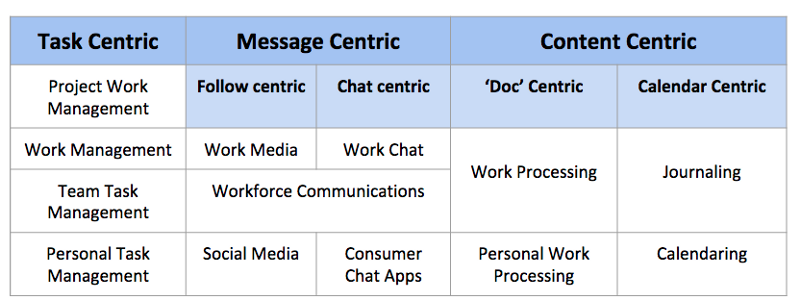
Work media is efficient at broadly distributing information relevant to many (think social media), but not organized around narrowly distributing information relevant to few (think chat rooms).
Let’s look at message centric tools as our starting point. Yammer, Jive, and other work media tools are based on ‘following’ as the central metaphor. A user can follow topics, individuals, or projects, meaning that media posted by followed individuals, topics, and projects show up in the follower’s activity stream, and other’s may follow the individual, or the contexts in which they post content. This is quite similar to the experience that users have in Facebook, Twitter, and other social networks or social media.
The reality is that the work media model is not really geared to the social scale of getting things done in small teams, but is more oriented toward communicating across larger social groups.
I use the term sets for small, team-sized groups (less than a dozen, typically), and scenes for a network of sets (less than 150, typically). Companies can be much larger, comprising a network of scenes, or spheres (with hundreds or thousands of people)².
The reality is that the work media model is not really geared to the social scale of getting things done in small teams, but is more oriented toward communicating across larger social groups.
Work Media is best suited for business divisions (scenes) and whole companies (spheres), because of the nature of follow-centric social patterns, which leans toward asymmetric relationships. Just because you follow me, doesn’t mean I follow you. Work media is efficient at broadly distributing information relevant to many (think social media), but not organized around narrowly distributing information relevant to few (think chat rooms).
We are seeing a migration from work media to work chat (Slack, HipChat, Fleep, etc.) because of the differences in social orientation. Most work is performed at the level of the individual or the small team (the set). So, as workers gain more say in what tools they want to use, they will naturally gravitate to tools that help them where they actually work, in small teams. And they will migrate away from tools more oriented toward distributing information to the many, or broadcasting, which is more the province of management. I wrote about some additional angles of this in Understanding the Failed Promise of ‘Social Collaboration’ and What’s Wrong with Social Collaboration Tools? Everything. In that latter document, I wrote about the mismatch between today’s agile and flexible models of work and earlier approaches:
The Web 2.0 generation of [social] tools were (largely) contrived around an idealized company that may have existed at an earlier time, but certainly doesn’t match today’s work environment.
We are also seeing the migration into work processing tools (which I’ve written about extensively: see Work Processing: Coming soon to a ‘Doc’ near you, and ‘Work Processing’ and the decline of the (Wordish) Document), as well as work management tools (see Work Management in Theory: Context), as those categories of tools have gained broader social communications capabilities similar to those found in work media and work chat applications. This also contributes to the defection from work media tools, as those who feel their work is better managed in modern docs- or task-oriented systems adopt tools like Asana, Trello, Quip, or Notion.
This migration is the proximate cause for the decline in market interest in Jive, which was acquired for $462 million last week, a precipitous drop from its peak of $1.7 billion in 2012. This is also the reason that Microsoft has brought its work chat solution Teams to market, despite acquiring Yammer for $1.2 billion in 2012.
The Future of Social Tools for Work
John F Kennedy once said
Success has many fathers, but failure is an orphan.
Work media has become orphaned by its failure to deliver on the increased productivity that was — implicitly or explicitly — the main theme in the work media narrative. Both former work media users and those that never used or even heard of Yammer, Jive, or other work media solution are buying in on the features and futures of work chat. And this sense of buying into a new vision of how work gets done at the level of the small team, or set, is true to some extent for the more recent attempts at work management and work processing, as well.
And at any rate, we are still awash in other social tools in the enterprise, like the unkillable email, the always-just-about-to-become-ubiquitous video conferencing, the under-appreciated shared calendar, widely-adopted file sync-and-share solutions, and the range of ‘consumer’ tools that people use at work, despite what the IT department would like.
It may be just as likely that an ‘artificial’ agent — meaning an AI smart enough to act as an independent agent — might be as likely to task me to do something as I am to task them. The artificial agent might even be the project lead. That will be a big, big shift to assimilate.
Some thoughts about the future of social tools for work:
- Work chat will continue as the dominant — but not the exclusive — social motif of the next few years, and will pull all other forms of social tools into its gravity well. So video conferencing, for example, will come to be seen as a subsidiary form of communication running alongside today’s mainstream mode of communication, which will be chat text. Likewise services like email, task management, calendaring and so on will increasingly be judged or valued by their integration into and support of a chat-centric, set-centric world of work.
- Augmented reality (via goggles) and AI-enabled voice interfaces will become a prevalent aspect of computing and communications, and will have a serious impact on work social tools. (Imagine bots that listen in on spoken conversations and capture decisions made and tasks assigned, as just the most obvious first-order examples. And display them in AR as we walk in the park.)
- As AI capabilities are developed to augment what humans are doing (and for humans to augment what AI’s are doing), our tools will have to include them more as participants and less like integrations to other tools. A bot of 2018 might be a full-fledged member of my work team, and not an appliance that the humans use. It may be just as likely that an artificial agent³ — meaning an AI smart enough to act as an independent agent— might be as likely to task me to do something as I am to task them. The artificial agent might even be the project lead in my set. That will be a big, big shift to assimilate.
- Although it was coined in 1999 by Dancy DiNucci.
- A team of seven people working on a consulting project ABC at company XYZ are a set, but they are also part of the design consulting group at XYZ, which can be considered a network of sets, or a scene. Note that individuals can be members of many teams, just to make things messy, and sets can be part of more than one scene, as well. The ABC set is also part of the company’s video development scene, for example, which involves groups in many other locations and functions. Note that Scenes can be hundreds or thousands of people in size. The design consulting group is only one scene of many at XYZ’s consulting practice, which can be considered a network of scenes, or a sphere. Spheres can include thousands or even millions of members, and some organizations have networks of spheres in them: for example, consider the US Army (around 2 million, including reserves) or UPS (434,000 workers). The world can be viewed as a network of spheres, too.
- Or artificial, for short.
The Rise and Fall of Work Media was originally published in Traction Report on Medium, where people are continuing the conversation by highlighting and responding to this story.
Apple starting to talk like Nokia’s Kallasvuo? Or Ballmer?
Confronted with a industry-defining innovation, they laughed.
I was at the World Mobile Congress in 2007 when the iPhone had recently been released, as part of the Nokia blogger program. I remember the then CEO, Olli-Pekka Kallasvuo I believe, pooh-poohed the iPhone, saying that Nokia was working on touch screens, but that ‘touch is just another interface’.
Remember Ballmer laughing about the iPhone?
I knew then they were doomed.

M.G. Siegler recounts his impressions of Phil Schiller’s recent comments about the Amazon Echo and Google Home devices. Schiller is Senior Vice President Worldwide Marketing at Apple.
M.G. Siegler, Echo Echoing
Here’s Apple SVP Phil Schiller talking to Gadgets 360:
Gadgets 360: Personally, what are your thoughts on devices like Google Home and Amazon’s Echo?
Phill Schiller: Well, I won’t talk to either one specifically, [I] don’t want to. My mother used to have a saying that if you don’t have something nice to say, say nothing at all. So, instead, let’s abstract the conversation just briefly to some of the general concepts and talk about those, because it’s really interesting.
Just an absurd and asinine thing to say. He has nothing nice to say about the other devices? Nothing?! Even if the current crop of devices aren’t perfect — and I don’t think anyone would argue that they are — it’s foolish not to acknowledge their place in the market right now. Sure, Apple isn’t playing directly in the space (yet), but even compared to Siri, these things are far more compelling.
Moving on:
So there’s many moments where a voice assistant is really beneficial, but that doesn’t mean you’d never want a screen. So the idea of not having a screen, I don’t think suits many situations. For example if I’m looking for directions and I’m using Maps, Siri can tell me those directions by voice and that’s really convenient but it’s even better if I can see that map, and I can see what turns are coming up, and I can see where there is congestion, I understand better my route, and what I’m going to do.
Okay, so this is exactly what Amazon just released today. Ahead of whatever Apple is planning to release. The consensus has long been that Apple doesn’t care about doing something first, they care about doing something right. Per Schiller’s comments above, the Echo Show is clearly what Apple views to be the right approach. So will Apple be able to make a better version of it?
Unknowable right now, of course. But given the state of Siri versus the other assistants, I’m skeptical. Yes, I’m skeptical of Apple. And Schiller’s goofy, aloof snipes certainly don’t help.
More cogently, he sounds like Kallasvuo or Ballmer when confronted by the iPhone.
Originally published at stoweboyd.com.
Apple starting to talk like Nokia’s Kallasvuo? Or Ballmer? was originally published in Next Year’s Words on Medium, where people are continuing the conversation by highlighting and responding to this story.
Samsung Galaxy Note 8 reported to feature 6.3-inch display

Samsung’s Galaxy Note 8, which is expected to arrive later this year, is rumoured to feature a 6.3-inch display. Sources from Weibo, a Korean blogging platform, revealed the phablet will be slightly bigger than the Samsung Galaxy S8+ and 0.8-inches larger than the exploding Note 7.
Previous leaks indicated that the device would feature a 6.4-inch display. The 0.1-inch difference makes the Note 8 tied for the biggest Samsung device ever released, next to the Samsung Mega.
Though the device would only be one inch bigger than the S8+, the difference in size could feel significant to some. This latest leak also confirms that the Note 8 will feature dual rear-facing cameras. It’s worth noting, however, that Weibo leaks can sometimes be unreliable.
Source: Weibo
Via: The Android Soul
The post Samsung Galaxy Note 8 reported to feature 6.3-inch display appeared first on MobileSyrup.
Motorola to reveal nine new phones before end of the year including a new Moto X, says report

The prolific Evan Blass strikes again.
A leaked image of Motorola’s 2017 lineup reveals nine different devices set to be released before the end of the year.
Motorola 2017 [via tip] pic.twitter.com/qahD9PIxrD
— Evan Blass (@evleaks) May 14, 2017
According to the leak, the Moto X will be making a return this year. It’s been two years since we’ve seen a Moto X branded device, since the Moto X Play, Force, and Style were all released in 2015. Though, it’s been three years since we’ve seen a device dubbed with the title of Moto X. The new Moto X is also set to feature a 3D Glass SmartCam, according to the leak.
The lineup also unveils a new device called the Moto GS, although according to Blass the phone is actually the Moto G5S and Moto G5S Plus. Considering the Moto G5 only came out within Q1 of this year it’s odd that Motorola is making another iteration of the G5 in the same year.
Furthermore, the leak points to a new Moto Z2 Play and Z2 Force. Though we have already seen reports about the Moto Z2, this gives us a better look at this upcoming Moto Z device yet. It’s also worth noting that written beside the picture of the Moto Z devices it says ‘mods,’ meaning modulation is likely to be making a return in 2017.
The leaked image also shows off the Moto E and Moto E Plus, a Lenovo smartphone that’s set to feature a 5,000 mAh battery.
Finally, the list indicates that this year we’re getting a new device in the Moto line called the Moto C. The Moto C is reportedly the company’s new like of low-end smartphones.
Source: Evan Blass
The post Motorola to reveal nine new phones before end of the year including a new Moto X, says report appeared first on MobileSyrup.
Patrick Caughill, AI Wrote This Short Sci-Fi Film Starring David Hasselhoff
Much of this concern regarding automation is because of impending job loss. The demographic that these losses will likely hit first, and perhaps the hardest, are lower-skilled positions. However, the automation revolution isn’t likely going to stop with factory work, other professions may soon have to contend with automated competition as well. AI has been used in place of lawyers, to recommend cancer treatments, and to report on major events like the Rio Olympics and the last US election.
Even creative endeavors are starting to be encroached upon by AI. Software has begun to compose music, and even write screenplays. Last year, the first film written by AI debuted, Sunspring, starring Thomas Middleditch (from HBO’s Silicon Valley). The team behind the film has followed it up with a new short called It’s No Game which stars David Hasselhoff and Thomas Payne (from The Walking Dead).
The film was written by Benjamin 2.0 in conjunction with human intelligence Oscar Sharp, and Benjamin 2.0’s writer Ross Goodwin.
Similar to what Sunspring did with X-Files scripts, the film mashes up scripts from a variety of sources including Shakespeare, Knight Rider, Aaron Sorkin, and Baywatch to craft a farcical narrative that asks existential questions about what it means to be an artist in the age of automation.
Yikes.
Justin Fox, The Economy-Changing Power of the LED Bulb
Per-capita electricity use peaked in the U.S. in 2007. With the exception of a post-recession rebound in 2010, it has declined every year since. I already wrote a column about this epochal shift last month, but the chart that went with it is so remarkable that I’m going to recycle it here.
U.S. annual per-capita electricity generation, in kilowatt-hours

Source: U.S. Energy Information Administration
What caused the decline? I offered several possible explanations. One of them was increased efficiency of electrical appliances. Several readers wrote in to suggest that perhaps it was the lightbulb that did it. Thomas Edison’s incandescent bulbs are being pushed aside by energy-efficient light-emitting diodes, aka LEDs, and that had to have had an impact on electricity use.
I’d been meaning to follow up on this. Then, in a blog post Monday, economist Lucas Davis of the University of California at Berkeley’s Haas School of Business beat me to it. The residential portion of the decline in electricity use, at least (my chart above includes commercial and industrial use), can be attributed largely to LEDs and other energy-efficient lighting:Over 450 million LEDs have been installed to date in the United States, up from less than half a million in 2009, and nearly 70% of Americans have purchased at least one LED bulb. Compact fluorescent lightbulbs (CFLs) are even more common, with 70%+ of households owning some CFLs. All told, energy-efficient lighting now accounts for 80% of all U.S. lighting sales.
LEDs use 85 percent less electricity than incandescent bulbs. Going on an estimate of 1 billion LEDs and CFLs now in U.S. homes, operating three hours per day, Davis estimated an energy savings so far of 50 billion kilowatt-hours per year, or 160 kilowatt-hours per capita, which was about equal to the decline in residential consumption he found. The total decline in my chart above comes to 1,161 kilowatt-hours per capita, which still leaves a lot of electricity savings to explain away – but LEDs and CFLs are surely cutting electricity use in commercial and industrial settings, too.
The savings are really just getting started. LED bulbs were in fewer than 30 percent of U.S. homes in 2015, according to the U.S. Energy Information Administration, and constituted the majority of bulbs in fewer than 5 percent. After crunching the numbers from a September government report on the energy impact of solid-state lighting, veteran energy lawyer Steve Huntoon wrote in utility trade publication RTO Insider in Januarythat over the next 20 years, LED lighting would:
reduce annual retail electric sales by 300 billion kWh under a “current path” and by 435 billion kWh under a more aggressive path.
Three hundred billion kilowatt-hours amounts to about 8 percent of 2016 retail electricity sales for all uses; 435 billion kilowatt-hours is almost 12 percent. Rooftop solar, meanwhile, is expected to generate 100 billion kilowatt-hours a year in 20 years. Here’s Huntoon again:
For all the attention given rooftop solar as environmental boon, new age investment and regulatory flashpoint, the LED bulb is three times more significant.
Greg Ip, Robots Aren't Destroying Enough Jobs -- Capital Account
Greg Ip goes all the way to the hypercapitalist endpoint with this piece, arguing to maximum deployment of AI and robots to eliminate as much human labor as possible as soon as possible:
Since 2007, low productivity sectors such as education, health care, social assistance, leisure and hospitality have added nearly 7 million jobs. Meantime, information and finance, where value added per worker is five to 10 times higher, have cut or barely added jobs.
This calls for a change in priorities. Instead of worrying about robots destroying jobs, business leaders need to figure out how to use them more, especially in low-productivity sectors. Someday robots may replace truck drivers, but it’s much more urgent to make existing drivers, who are in short supply, more efficient. Clean energy advocates boast about how many people work in solar power when they should be trying to reduce the labor, and thus cost, involved.
The alternative is a tightening labor market that forces companies to pay ever higher wages that must be passed on as inflation, which usually ends with recession.
That is a more imminent threat than an army of androids.
The question that goes unasked: who benefits?
Apple starting to talk like Nokia’s Kallasvuo? Or Ballmer?
I was at the World Mobile Congress in 2007 when the iPhone had recently been released, as part of the Nokia blogger program. I remember the then CEO, Olli-Pekka Kallasvuo I believe, pooh-poohed the iPhone, saying that Nokia was working on touch screens, but that ‘touch is just another interface’.
Remember Ballmer laughing about the iPhone?
I knew then they were doomed.
M.G. Siegler recounts his impressions of Phil Schiller’s recent comments about the Amazon Echo and Google Home devices. Schiller is Senior Vice President Worldwide Marketing at Apple.
M.G. Siegler, Echo Echoing
Here’s Apple SVP Phil Schiller talking to Gadgets 360:
Gadgets 360: Personally, what are your thoughts on devices like Google Home and Amazon’s Echo?Phill Schiller: Well, I won’t talk to either one specifically, [I] don’t want to. My mother used to have a saying that if you don’t have something nice to say, say nothing at all. So, instead, let’s abstract the conversation just briefly to some of the general concepts and talk about those, because it’s really interesting.Just an absurd and asinine thing to say. He has nothing nice to say about the other devices? Nothing?! Even if the current crop of devices aren’t perfect — and I don’t think anyone would argue that they are — it’s foolish not to acknowledge their place in the market right now. Sure, Apple isn’t playing directly in the space (yet), but even compared to Siri, these things are far more compelling.
Moving on:
So there’s many moments where a voice assistant is really beneficial, but that doesn’t mean you’d never want a screen. So the idea of not having a screen, I don’t think suits many situations. For example if I’m looking for directions and I’m using Maps, Siri can tell me those directions by voice and that’s really convenient but it’s even better if I can see that map, and I can see what turns are coming up, and I can see where there is congestion, I understand better my route, and what I’m going to do.Okay, so this is exactly what Amazon just released today. Ahead of whatever Apple is planning to release. The consensus has long been that Apple doesn’t care about doing something first, they care about doing something right. Per Schiller’s comments above, the Echo Show is clearly what Apple views to be the right approach. So will Apple be able to make a better version of it?
Unknowable right now, of course. But given the state of Siri versus the other assistants, I’m skeptical. Yes, I’m skeptical of Apple. And Schiller’s goofy, aloof snipes certainly don’t help.
More cogently, he sounds like Kallasvuo and Ballmer when confronted by the iPhone.
How we built Tagger News: machine learning on a tight schedule
This weekend three friends (Chris Riederer, Nathan Gould, and my twin brother Dan) and I took part in the 2017 TechCrunch Disrupt Hackathon. We’d all been to several of these hackathons before, and we enjoy the challenge of building a usable application in a short timeframe while learning some new technologies along the way.
Since three of the four of us are data scientists, we knew we were looking for a data-driven project, and since the best hackathon projects tend to be usable apps (as opposed to an analysis or a library) we figured we’d build a machine-learning driven product. We quickly landed on the idea of a classifier for the programmer community Hacker News, which would automatically assign topics to each submitted based on its text.
This project required scraping and downloading data, training a machine learning model, and turning it into a usable website in under 24 hours. Here I’m sharing some of the lessons we learned in the process.
(Note that I’m focusing on the data side since that’s what I worked on, but Nathan and Dan did great work in building and designing the site, as well as scheduling tasks to keep the site synchronized with Hacker News).
Retrieving Hacker News posts and articles
Hacker News collects articles submitted and upvoted by users, generally ones of interest to the programmer community (though not just articles about programming). Our task was to retrieve the text for each article and categorize it into one of a few topics.

We immediately knew we’d need a large amount of training data- perhaps tens of thousands of articles- for an algorithm to successfully identify topics on new stories. To do that we needed to scrape Hacker News for submitted stories and their links, then query each article to retrieve its text.
One mistake we made was relying on the Hacker News API to download submitted stories one at a time, which was a slow process that took hours to get 25,000 links. After the hackathon was over, we learned that there’s Hacker News dataset on Google BigQuery- after about twenty minutes of configuration I was able to download a million links. In the pressure of a hackathon, it’s hard to tell when to keep hunting for easy solutions like that as opposed to implementing something slow that you know will work (but that’s part of the fun).
Once we had the article links, we needed the text of each. This is challenging because these articles come from thousands of different websites in many different formats, but the python-goose package is designed for exactly this purpose. We divided this scraping up among three of our computers, at which point we were able to collect a couple thousand articles each hour. You can find our scraping code and some of our results in this GitHub repository.
Normally with a project like this we’d let a scraper run overnight, but of course that wasn’t an option! As the data started downloading, we split up into two teams: Nathan and Dan building the website, while Chris and I developed the machine learning algorithm on the data as it accumulated.
Developing a supervised training set
To train a supervised classifier you need a labeled set: articles where we knew the correct classification. We didn’t have nearly enough time to manually label examples ourselves (nor would we want to!). So how could we get a set of correctly labeled examples?
Well, if you flip through a few pages of Hacker News, you can realize that some titles tell you almost unambiguously what the topics are, even with simple pattern matching. Looking at the front page, articles like Why Amazon is eating the world is about Amazon, Why do many math books have so much detail and so little enlightenment? is about math, and Don’t tell people to turn off Windows Update is about Microsoft/Windows. We thus decided to create a training set based on regular expressions of article titles.
This process took some experimenting, including some exploratory analysis of common words and clusters in article titles. One of my favorite kinds of figures to create with words is a correlation network (see this chapter of our book Text Mining with R), and this was a good opportunity to better understand the data.
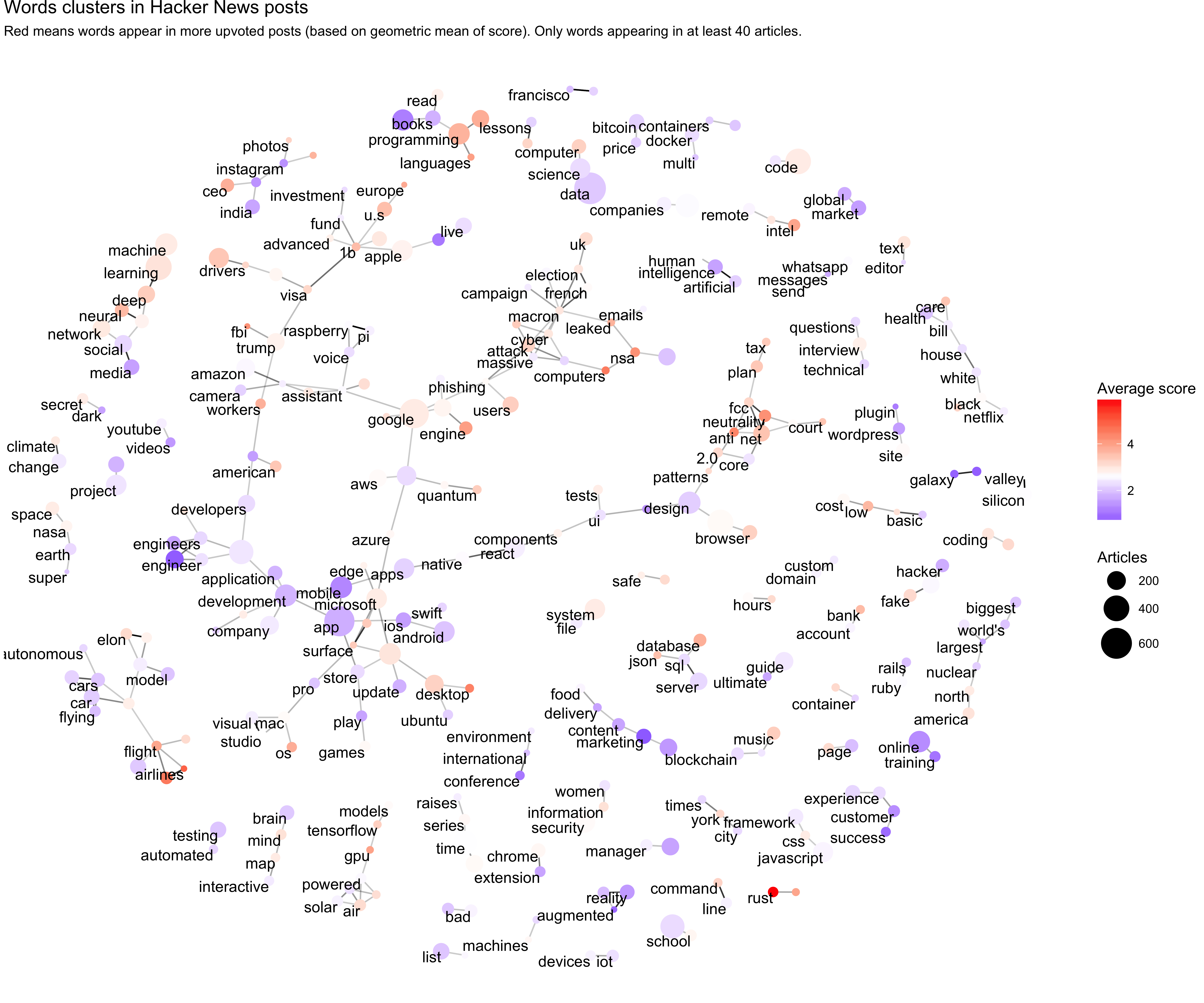
(I’m going to share some Hacker News analyses like this in more depth in future blog posts, especially now that we have much more data than we did during the hackathon). We notice clusters in the words, such as an ML cluster with “machine/deep learning” and various political clusters like “net/neutrality” and “trump/fbi”. This helped us concentrate on usable topics.
Here was the set of regular expressions we landed to train the model. This required a number of iterations and adjustments as we explored the resulting classifications, removing regular expressions that led to clear false positives and adding some that we’d missed.
| topic | regex |
|---|---|
| Python | python|pandas |
| Mobile | mobile|android|iphone|phone |
| Design | design |
| Security | security|worm|ransomware|attack|virus|patch|infosec |
| Blockchain | blockchain|bitcoin|ethereum |
| AI/Machine Learning | \bai\b|artificial intelligence|machine learning|deep learning|tensorflow|machine intelligence |
| Microsoft | microsoft|windows|visual studio |
| Apple | apple|mac\b|os ?x |
| Amazon | amazon |
| Startups | startup|\bvc\b |
| Politics | trump|comey|russian|fbi|snowden|neutrality|white house|government|brexit|nsa |
| Databases | sql|cockroachdb|mongodb|database|\bdb\b |
| Linux | linux|debian|ubuntu|centos |
| Data Science | data scien|big data|data vi|data ?set|data analy|machine learning|pandas|ggplot2 |
| Science | bio|drug|researcher|genomic|physics|scienti|spacex|\\bmoon\\b|nasa|\\bastro|\\bmars\\b |
| Math | math|geome|cryptograph|algebra|calculus |
fuzzyjoin in R makes it easy to match those to titles. You can find the code and some analyis behind it, as well as our machine learning work, in this repository.
We ended up with a training set of about 10,000 labeled documents (note that not all titles match any regular expressions, and some can match multiple). The breakdown of ones that match each regular expression was:

(We originally had a few other topics like “Web development” and “Javascript”, but ended up removing them based on the resulting classifications). Note that this doesn’t mean these are the most popular topics on the site! It’s based entirely on the regular expressions we decided on for each topic- if some topics are more recognizable from their titles than others, or if we made some oversights in coming up with these regular expressions, the article wouldn’t reflect that.
Using regular expressions on titles is a pretty crude way of capturing examples, and there’s no question that this adds biases and will not be entirely accurate (e.g. a title about “resizing windows” would be tagged as Microsoft). But it can be a fast and effective method for building a decently-sized training set, and manual inspection convinced us it was accurate enough.
Once we’d trained the algorithm on these titles, it was able to identify articles that didn’t have any of these telltale patterns in the title. For example, there’s nothing in the title Rejection Letter that suggests its topic, so it wasn’t in our training set. But because it contains words like “security”, “ransomware”, “antivirus”, and “worm”- words often occuring in articles in our training set- the algorithm easily tagged it as “Security”.
Training and productionizing an ML model
After we’d explored the data with R, we did our the machine learning with Python’s scikit-learn package. This took three steps:
- Tokenizing: We turned each article into a collection of words present in it, in a “bag of words” approach (we ignored the order and structure of the words).
- Dimensionality reduction: We used Latent Dirichlet Allocation, implemented by the (gensim Python package), to fit words into a topic model, turning each document into a vector of length 100. Each topic was fit from the d ata, associated with particular clusters of words (e.g. one topic could be highly associated with “trump”, “comey”, “russia” while another focuses on “design”, “photoshop”, “css”).
- Supervised classification: We used a supervised classifier to predict . We tried two: regularized logistic regression and random forests.
I’ve written on topic modeling before (it plays an important role in our text-mining book). Here, rather than using it to make conclusions, we were using it to reduce our tens of thousands of features (“this article contains the word ‘bitcoin’, this one doesn’t”) into a 100-dimensional dataset. Through some experimenting we found that adding this topic modeling step (as opposed to just using the words directly as features) improved our accuracy on the model.
We also saw that random forests beat logistic regression in terms of cross-validated AUC (area under the ROC curve) on our training set:

This fits with the general reputation around those models. Logistic regression is faster to train and a bit more interpretable, but isn’t as good at handling cases where many features interact. For example, it wouldn’t notice that the word “learning” means something different with the word “deep” than it would with “college” or “education.”
Of course, “accuracy” on this training set really just meant “could predict whether the article’s title matched the regular expression we thought it did”, but was our hope that this would translate to realistic predictions on new articles.
Productionizing a model
While Chris and I were building the model, Nathan and Dan had built the site with Django, deployed on Heroku, and registered a domain name. It synchronized with the Hacker News API every ten minutes, but as a placeholder assigned entirely random topics. Around 2 AM, once Chris and I had a trained model, it was time to combine our efforts.
In theory, building both the algorithm and the website in Python meant this would be straightforward, since we could slot it into directly into a function in the site. I’m accustomed to productionizing models by working with my team to convert from R to C#, so the ability to serialize models with pickle and load them directly into the app was certainly convenient, and let us be flexible with the model we implemented.
But this doesn’t mean deployment was painless! Two of the biggest hiccups we ran into were:
Using nltk on Heroku. We originally used the nltk library for tokenization, since it’s the most powerful toolkit for Python natural language processing. But it’s a large and cumbersome library, and we started running into obscure error messages on Heroku about installing and using it. For expediency, we ended up switching to the tokenizer built into gensim (which we already needed for topic modeling), which required retraining the algorithm.
Pickling between Python 2 and 3: We’d fit the model on Python 3, but because Goose, which we use for querying article text, isn’t Python 3 compatible, our production site had to be in Python 2. That was when we ran into this charming bug about pickling between Python 2 and 3.. It was 4 AM by then, and fixing required some pretty inelegant hacks.
We originally considered having the machine learning process as a microservice (a separate server that was passed text by the website and returned classifications). If we’d known the challenges we’d run into, we might have gone through with it. It would have made the handoff of a machine learning algorithm (giving the web team an API endpoint, rather than code and a list of package requirements) more painless.
Speaking and sharing
And with that, we had a live site at taggernews.com. We’ve changed the site a bit since, but when we submitted the project at 4:30 AM here’s what it looked like:

One thing I like about TechCrunch hackathons is that building the project is only part of the experience: we also had to “market” it. Our DevPost submission- required by 9:30 AM- consisted of a pitch for the product, a few images, and a short discussion of some of the challenges.
In the morning the participants all gave a one-minute demonstration of their projects to a crowd of participants. Chris did a great job in this pitch (enough to win us tickets to this week’s Disrupt conference). You can watch the video in the tweet below.
Tagger News automatically tags and sorts Hacker News articles #HackDisrupt pic.twitter.com/2mEbrGXIce
— TechCrunch (@TechCrunch) May 14, 2017
After the talk, TechCrunch interviewed us to write an article about our project, which in these hackathons was a first for us! After the hackathon was over, I decided to complete the circle and submit the TechCrunch article to Hacker News, and we were pleased to see that the community liked it:

We did well on ProductHunt today as well.
According to Google Analytics we got about 6,000 visitors to Tagger News yesterday, and they’re still coming. We were nervous about how the application would do with thousands of people trying it- we’d finished it at 4:30 AM and hadn’t had much time to test it. But outside of a few comments about the design and a couple inadvertently misclassified articles, the feedback was pretty positive! The site kept adding new stories, and for the most part they were correctly classified. It was a proof of concept, but a functional one, and it let us try out an interesting classification problem and put our approach into use.
And when people visited Tagger News, they got to see what kind of product it was:

Nailed it.
Think beyond with Acquia Labs

For most of the history of the web, the website has been the primary means of consuming content. These days, however, with the introduction of new channels each day, the website is increasingly the bare minimum. Digital experiences can mean anything from connected Internet of Things (IoT) devices, smartphones, chatbots, augmented and virtual reality headsets, and even so-called zero user interfaces which lack the traditional interaction patterns we're used to. More and more, brands are trying to reach customers through browserless experiences and push-, not pull-based, content — often by not accessing the website at all.
Last year, we launched a new initiative called Acquia Labs, our research and innovation lab, part of the Office of the CTO. Acquia Labs aims to link together the new realities in our market, our customers' needs in coming years, and the goals of Acquia's products and open-source efforts in the long term. In this blog post, I'll update you on what we're working on at the moment, what motivates our lab, and how to work with us.

Alexa, ask GeorgiaGov
One of the Acquia Labs' most exciting projects is our ongoing collaboration with GeorgiaGov Interactive. Through an Amazon Echo integration with the Georgia.gov Drupal website, citizens can ask their government questions. Georgia residents will be able to find out how to apply for a fishing license, transfer an out-of-state driver's license, and register to vote just by consulting Alexa, which will also respond with sample follow-up questions to help the user move forward. It's a good example of how conversational interfaces can change civic engagement. Our belief is that conversational content and commerce will come to define many of the interactions we have with brands.
The state of Georgia has always been on the forefront of web accessibility. For example, from 2002 until 2006, Georgia piloted a time-limited text-to-speech telephony service which would allow website information and popular services like driver's license renewal to be offered to citizens. Today, it publishes accessibility standards and works hard to make all of its websites accessible for users of assistive devices. This Alexa integration for Georgia will continue that legacy by making important information about working with state government easy for anyone to access.
And as a testament to the benefits of innovation in open source and our commitment to open-source software, Acquia Labs backported the Drupal 8 module for Amazon Echo to Drupal 7.
Here's a demo video showing an initial prototype of the Alexa integration:
Shopping with chatbots
In addition to physical devices like the Amazon Echo, Acquia Labs has also been thinking about what is ahead for chatbots, another important component of the conversational web. Unlike in-home devices, chatbots are versatile because they can be used across multiple channels, whether on a native mobile application or a desktop website.
The Acquia Labs team built a chatbot demonstrating an integration with the inventory system and recipe collection available on the Drupal website of an imaginary grocery store. In this example, a shopper can interact with a branded chatbot named "Freshbot" to accomplish two common tasks when planning an upcoming barbecue.
First, the user can use the chatbot to choose the best recipes from a list of recommendations with consideration for number of attendees, dietary restrictions, and other criteria. Second, the chatbot can present a shopping list with correct quantities of the ingredients she'll need for the barbecue. The ability to interact with a chatbot assistant rather than having to research and plan everything on your own can make hosting a barbecue a much easier and more efficient experience.
Check out our demo video, "Shopping with chatbots", below:
Collaborating with our customers
Many innovation labs are able to work without outside influence or revenue targets by relying on funding from within the organization. But this can potentially create too much distance between the innovation lab and the needs of the organization's customers. Instead, Acquia Labs explores new ideas by working on jointly funded projects for our clients.
I think this model for innovation is a good approach for the next generation of labs. This vision allows us to help our customers stake ground in new territory while also moving our own internal progress forward. For more about our approach, check out this video from a panel discussion with our Acquia Labs lead Preston So, who introduced some of these ideas at SXSW 2017.
If you're looking at possibilities beyond what our current offerings are capable of today, if you're seeking guidance and help to execute on your own innovation priorities, or if you have a potential project that interests you but is too forward-looking right now, Acquia Labs can help.
Special thanks to Preston So for contributions to this blog post and to Nikhil Deshpande (GeorgiaGov Interactive) and ASH Heath for feedback during the writing process.
Dev Diary (April 2017)
(Eve is a new programming language, and this is our development blog. If you’re new to Eve, start here)
In April we continued our effort to release v0.3 of Eve. On April 18th we released a second preview of the v0.3 platform, which included several long-requested features. However, toward the end of the month we shifted focus to revamping documentation and making the “getting started” experience for Eve more accessible to new users. Let’s take a look at each of these.
Platform
We released a second preview of the v0.3 runtime, featuring the ability to embed Eve-rendered elements into an application; and streamlined watchers with built in support for more DOM events and triggers in the HTML watcher. These are covered in detail in the release notes, but I’ll take a moment now to highlight how multiple parent roots work.
Embedding Eve-rendered Elements in Your Application
We’ve received some requests from people who would like to use Eve to render specific elements in an already existing project. To date, you could only attach Eve-rendered elements to the document root. With v0.3, you’ll be able to embed any piece of Eve-rendered UI into your application arbitrarily. First, you add a reference to the parent element into Eve:
import {Program} from "witheve";

let program = new Program("my program");
let htmlWatcher = program.attach("html");

let someElement = document.querySelector("#eve-wrapper");
htmlWatcher.addExternalRoot("my-root", someElement);
From within Eve, you can search for that element and add children to it, as you would any other record:
search
  root = [#my-root]

bind
  root.children += [#ui/text text: "Hello!"]
Eve behaves as expected, updating the embedded element as records change. For new users, this is a nice way to introduce Eve to an existing project; instead of porting an application from scratch, you can dip your toes in the water and build a new component in Eve, then inject it into your project wherever you want. As you get more comfortable with Eve, you can use it in more of you application.
Eve Syntax Returns
When we initially released the v0.3 preview, it notably didn’t include a parser for the Eve syntax. We had planned on eventually adding the syntax back, but it wasn’t our main priority because the Javascript DSL served as an adequate replacement for the time being. However, because we received a number of requests to add it back in, we decided to bump adding the syntax higher up on the list. That work is generally completed, and you’ll see it in the next v0.3 preview.
I’d like to say thanks to everyone who gave their input regarding the syntax. When we released it with v0.2, we didn’t know how it would be received, so we were happy to see that people liked it enough to request it return with v0.3. As always, we’re developing Eve in the open, so your feedback has a big impact on how we prioritize work.
Web Presence
Before we can officially release v0.3, a lot of work needs to be done on the usability and documentation side of things. To this end, we revamped our website to make it more accessible to people unfamiliar but curious about Eve. A big part of this effort was actually coming up with a one-sentence pitch, describing Eve in a nutshell.
A new pitch for Eve
Here’s our new one sentence pitch for Eve:
Eve is a modern relational language for writing data-driven programs without the boilerplate.
The intended audience for this pitch is generally the HackerNews crowd – developers who are curious about languages and likely to try something new to the scene. Eve has even deeper aspirations (such as being a language for non-programmers), but this pitch is directed more toward explaining what Eve is today. We wanted to pack as much information into this one sentence as possible, so you can get a general idea of the concepts important to Eve after reading it. This is actually easier said than done, so I’ll break down how we went about this.
The first thing we did was look at how other languages described themselves. We picked about a half dozen languages and chose our favorite pitches between them. Some, like Python, had very nebulous pitches: “Python is a programming language that lets you work quickly and integrate systems more effectively.” I think for anyone whose used Python, this is an accurate description of the language, but it doesn’t really say how Python lets you work quickly. Others, like Haskell, were very specific: “An advanced, purely functional programming language”. That’s definitely Haskell in a nutshell.
We wanted our pitch to tell the reader what Eve is, what makes it unique, and why one would use it over other languages. From the pitch, you can see we arrived at these traits
Modern - It was important for us to note that Eve is a new take on programming, specifically on “relational languages”. On its own, relational may connote SQL, which is not what we want to do. By claiming that we are “modern” we hope to tell the reader that Eve is an updated approach to things they may have seen in the past.
Relational language - there were several candidates to describe what kind of language Eve is. Pattern matching, logic, declarative. We decided on “relational” because relations are a concept central to programming in Eve, and we wanted to highlight this fact upfront.
Data-driven - data is also a central concept to Eve, so having this word in our pitch was important to us. Of course, data is important in all programs, but claiming the language is “data-driven” gets across the idea that the language paradigm is not imperative.
Without the boilerplate - our central thesis in developing Eve is that current approaches to programming are hampered by incidental complexity. A lot of this complexity is driven by simple boilerplate - code that stands between you and the inherent complexity of your programming task. Boilerplate is a pain point for many developers, something we all understand is frustrating, but that we deal with nonetheless. If you’re not sure about a modern relational language for writing data-driven programs, hopefully you can understand the value of a language without boilerplate.
The Eve Homepage
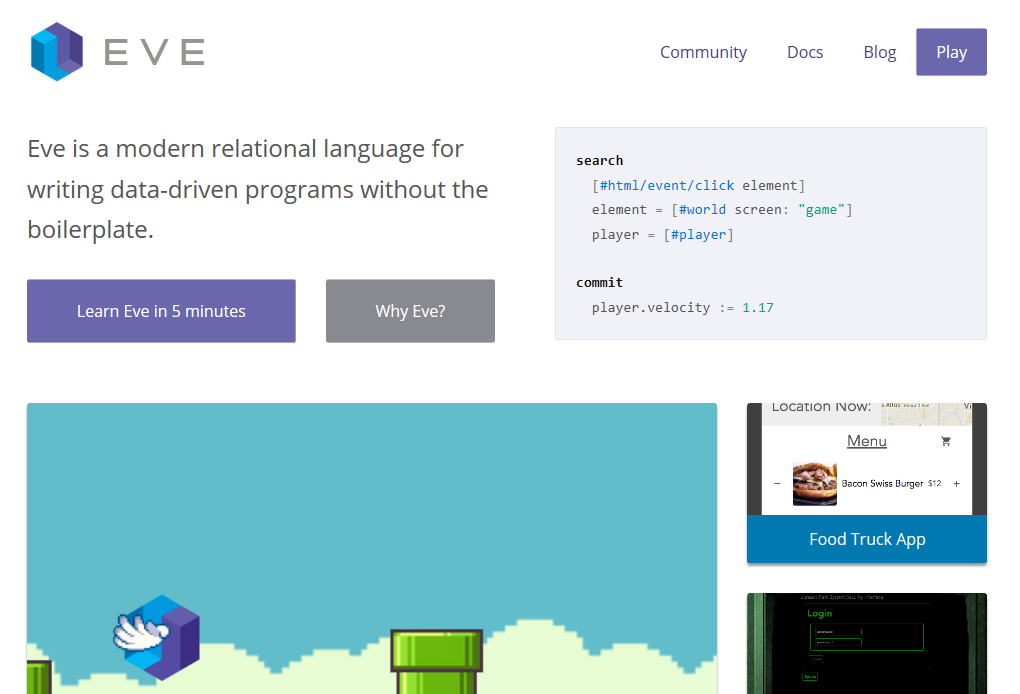
We’re going to be revamping our various web properties (the website, blog, and docs) in the coming weeks. We started the process with the homepage, giving it a fresh coat of paint and some new content. The various links still relate back to v0.2 content, but we’ll be updating those to a consistent look with refreshed content in the coming weeks.
Community
Eve Around the World
Copenhagen, June
Zubair Quraishi is again hosting an Eve meetup in Copenhagen, scheduled for sometime in June. We’ll post another update when he’s set a firm date.
San Francisco, Wednesday May 31 7:00 PM
We’re going to be holding our first official Eve meetup at the Eve office in downtown San Francisco on May 31 at 7:00 PM. If you are interested in attending RSVP on meetup.com, or if you have any ideas of what you’d like to learn, drop me a line via e-mail or Twitter.
Here’s what we know about how WannaCry has affected China
As the world relaxes out of its brace position with few new cases announced, we’ve gathered together what we know about how China was affected by the WannaCry ransomware attack.
An internet security firm reported 29,372 organizations were affected by Sunday. Most notably, colleges and energy companies were hardest hit in the first (and so far only) wave of attacks and the government then announced things were under control and some “self-insepection” was needed.
The ransomware attack known as WannaCry and WannaCrypt (sometimes translated as 想哭) first started infecting Windows computers on Friday morning hitting Telefonica in Spain then users in the UK – most noticeably National Health Service hospitals – then the rest of Europe, Russia and China. It has since spread worldwide reaching the the US, where it affected FedEx.

Map of distribution of WannaCry infections in China by 7pm local time May 13. Credit: Qihoo 360
What makes this piece of ransomware stand out are its strengths and weaknesses. It has been able to spread by its use of a tool called EternalBlue which had been developed by the US National Security Agency then leaked online. But it had a vulnerability or ‘kill switch’ which a British researcher accidentally activated by registering the domain name which the virus looked for when it infected a computer. If it couldn’t access the domain – a long, nonsensical string of characters – it would attack. So the researcher, who wants to remain anonymous but goes by the monicker MalwareTech on social media, registered the domain which meant when the worm subsequently entered computers, it could find the domain and so didn’t activate, as he explained in his blog.
However, the virus has since been amended without this kill switch, as was announced on Sunday in joint agency notice by the Beijing Cyberspace Administration, Beijing Public Security Bureau and the Municipal Commission of Economy and Information Technology. The announcement named the mutation WannaCry 2.0, which was adopted by subsequent coverage.

China National Petroleum Corporation gas station payment terminal displaying WannaCry lock out screen.
According to reports in local media, quoting a report by internet security company Qihoo 360, universities appear to have been hardest hit. Of 28,000 organizations affected by 7pm Saturday, rising to 29,372 by Sunday, 4,341 were educational institutions. Others affected were post offices, government departments, energy firms and train stations.
Zhejiang and Jiangsu, wealthy provinces on the eastern seaboard, were worst affected, according to Qihoo 360. Qihoo 360 has set up a microsite dedicated to coverage of the outbreak with news site Beijing Times.
Social media networks were busy with users re-reporting and disseminating tips and instructions for how to defend computers and servers. In parts of China mobile networks have pushed out texts via the normal service numbers on safety such as this one from Guangdong.

SMS advice to China Mobile users in Guangdong, from the province’s telecoms watchdog. Credit: Carl Joseph DeMarco
There has been relatively little coverage of the attack in China, possibly in part due to the fact that so many column inches and pixels have been given over to coverage of the One Belt One Road forum which took place in Beijing over the weekend. What limited coverage there has been has also been somewhat circumspect, reporting little on the domestic situation and even resorting to hearsay.
But then, in terms of an official response, late Monday morning the Cyberspace Administration of China announced via an interview that there had been a “certain impact on industries and government departments” but that “the rate of spread had clearly slowed.”
The Beijing News reported that its journalist had it confirmed on Sunday that the China Securities Regulatory Commission (CSRC), the China Banking Regulatory Commission (CBRC) as well as other securities and banking organizations that the CSRC and CBRC is issuing a document requiring all regions’ securities and banking inspection bureaux, banking and fund-based organizations etc to “conduct self-inspection and make good their defences.”

Suspected hack attempt on MalwareTech’s registered domain. Credit: Pastebin.
Meanwhile, China National Petroleum Corporation (PetroChina) announced that as of noon on Sunday, 80% of the affected payment machines at its gas stations had been recovered. The attack had meant many consoles were blocked from taking cards or third party payment such as Alipay and drivers had to pay in cash.
MalwareTech, the British researcher has since tweeted that he suspects Chinese hackers of trying to take control of his domain registration and posted the code on Pastebin.
The rumour mill has been equally active with all manner of fake news and Photoshopping of images from ATMs to old Nokia handsets displaying the WannaCry ransom demands.
The A16Z AI Playbook is here!

Today is launch day for the The A16Z AI Playbook! Thanks to everyone that worked on it, in particular Frank Chen and Michael Wee. It was a privilege to be able to contribute and work with them on this project.
It’s an awesome contribution on the part of A16Z. It’s something that’s a bit unusual: different than just a website, or book, or set of samples, it’s all of those combined and more, since the entire thing is also available on githubunder the MIT License.
Late last year Frank asked me to propose a followup to a post+video he had authored: AI, Deep Learning, and Machine Learning: A Primer. The post and related talk have been very successful, for good reason: it’s concise, clear, and to the point.
To expand on that we focused on providing a more clear view of where and how to get started for non-experts as well as enough background knowledge and references to know what the next step should be, mixing in live code, data transferred, and a more complex example in the form of a full iPhone app. As explained on the site:
We’ve met with hundreds of Fortune 500 / Global 2000 companies, startups, and government policy makers asking: “How do I get started with artificial intelligence?” and “What can I do with AI in my own product or company?”
This site is designed as an resource for anyone asking those questions, complete with examples and sample code to help you get started.
While there are dozens of excellent tutorials available on the web (once you’ve figured out what library or API you want to use — we’ve listed a few of our favorites in the Reference section), we felt a pre-tutorial — a “Chapter 0” if you will, was missing: something that would help you survey the landscape broadly; to give you a sense of what’s possible; and help you think about how you might use artificial intelligence techniques to make your software smarter, your users happier, and your business better.
Go read it! I hope it’s useful and that it inspires other similar efforts. And if you find issues, errors, or things that can be improved please let us know.
(cross-posted on medium)


21st-century propaganda: A guide to interpreting and confronting the dark arts of persuasion

Gideon Lichfield,
Quartz,
May 18, 2017

Good article looking at how the internet is being used to support influence and propaganda, with a good helping of George Lakoff (and the theory of frames and metaphors) and a typology of modern media manipulation. None of which, at heart, is new. "What’s changed, of course, is the internet, and the many new ways it
creates for falsehoods to reach us. The power of populism today lies in
its ability to combine 20th-century propaganda techniques with
21st-century technology, putting propaganda on steroids."
[Link] [Comment]
Rooted Android devices can no longer download Netflix from the Google Play Store

Moving forward, rooted Android devices will no longer be able to download Netflix from the Google Play Store.
The restriction effectively prevents those with a rooted device from using the app at all.
Netflix confirmed the policy change over the weekend, telling Android Police that it comes as a result of the app moving to Google’s Widevine digital rights management protocol as a means to prevent content piracy. Any device that is “not Google-certified or [has] been altered” is unable to see the app on Google Play following the release of Version 5 of the Netflix Android app.
The company’s decision to prevent rooted phones from downloading shouldn’t be surprising. Given the fact that Netflix now allows users to download TV shows and movies to their device and rooted devices can more easily circumvent DRM restrictions, it’s likely the company switched to Wildvine to protect itself and rights holders.
Of course, a lot of people root their phone to open up greater customization options on their device. Netflix’s actions hurt those users. The good news, according to Android Police, is that it’s still possible to get the latest version of the app by sideloading the Netflix APKs.
Source: Android Police Via: Engadget
The post Rooted Android devices can no longer download Netflix from the Google Play Store appeared first on MobileSyrup.