Shared posts

02 Jul 16:45

5 Surprising Reasons Ambiverts Can Make Great Salespeople

by Dr. Christopher Croner

When hiring a salesperson, you might automatically assume that you should hire someone who is very extroverted. ambivert sales woman holding sign

After all, you would think that an extrovert’s outgoing nature and social skills would make them a great addition to your sales team.

However, recent studies have shown that ambiverts out-perform both extroverts and introverts in the sales department, generating 24 percent more revenue than introverts and 32 percent more revenue than extroverts.

So what exactly is an ambivert?

An ambivert lies on the spectrum of social interaction somewhere between an introvert and an extrovert.

Typically, they are neither particularly outgoing nor reserved – their personality largely adapts to their situation and environment, helping them connect with customers more easily and close more sales.

To make the hiring process easier, you can administer a sales personality test to your candidates. Once you get the results back, you should strongly consider hiring a candidate who has tested as having high-Drive and also shows signs of being an ambivert.

Here are a few reasons why:

1. Ambiverts can easily adapt to a customer’s needs.

Someone who is very extroverted may be too excitable and talkative to build a relationship with a customer and close a sale. Occasionally, with extroverted salespeople, conversations can end up becoming one-sided, leaving the customer frustrated.

On the other hand, some introverted salespeople may be too reserved and timid when talking to customers, failing to create a sense of urgency and close the sale. Both of these types of salespeople may not possess the flexibility needed to change their sales tactics based on the individual customer’s personality.

Ambiverts have the best of both worlds – instead of being too talkative or too quiet, they are able to strategically alternate between speaking and listening, adapting to the customer’s specific needs throughout the conversation. By doing so, they put customers at ease, gain their trust, and therefore increase their likelihood of closing the sale.

2. They are confident without coming across as cocky.

For very extroverted salespeople, cockiness can occasionally be a pitfall. After all, clients do not want to feel like they are being sold to and taken advantage of by a salesperson who seems arrogant and unlikeable. Instead, they would rather feel informed and work with a salesperson who truly listens.

That is what ambiverts are great at – listening. As a result, a customer who is being helped by an ambivert is more likely to feel like he or she is talking to a trusted advisor instead of a “used car salesman” type, which makes him/her more likely to make a purchase.

3. They can be analytical without coming across as cold.

Many ambiverts are able to easily analyze a customer’s personality, tone of voice, and wants/needs. Then, they use the information they have gathered to adjust their pitch accordingly and close the sale, building a rapport with the customer throughout the process.

Extroverts and introverts, on the other hand, can both struggle with this.

Extroverted salespeople may make their customers feel too rushed and pressured. This can result from a lack of analyzing the customer’s needs, which hinders the extroverted salesperson from thinking of ways to meet those specific needs.

Introverted salespeople may be so analytical that they come across as unfriendly. They may overanalyze and plan the conversation ahead to a fault, which is likely to stop them from seamlessly adjusting the conversation based on the customer’s specific personality and needs.

4. They are persistent without being overly aggressive.

rp_78163499-1024x697.jpgVery extroverted salespeople can occasionally be pushy, turning off buyers.

On the other hand, very introverted salespeople may fear rejection to the point where they are not pushy enough.

Ambiverts tend to find the right balance between informing the customer and pushing the customer to make a purchase. They often possess an intuitive understanding of their customers’ emotions, and this allows them to adjust their aggressiveness based on what approach they feel will work best with each specific customer.

5. They often have the Drive that is needed to get top results.

A successful salesperson is an achievement-oriented salesperson. While ambiverts may not be as outwardly expressive as extroverts, an incredibly Driven person may be hiding behind the ambivert’s calm exterior.

Simply put, Drive is the ultimate determining factor in whether or not the salesperson you hire will be successful. Drive is made up of the following 3 personality traits:

  1. Need for Achievement: Salespeople who possess this trait are self-motivated and seek to do well in all of their endeavors.
  2. Competitiveness: Competitive salespeople seek out every opportunity to outperform their peers and win their customers over.
  3. Optimism: Optimistic salespeople do not take rejection personally and are resilient.

These traits cannot be taught and are absolutely critical when it comes to success as a salesperson. Do not make the mistake of wasting both your time and your money by hiring someone who does not possess Drive. If you do, you are sure to end up disappointed by his or her sales results.

Next time you are hiring a salesperson, have your candidates take an expertly-developed sales personality test, like The DriveTest™, to discover if they possess the Drive needed to generate serious revenue for your business.

By testing your candidates before you hire them, you can minimize the risk of hiring someone who is unable to get the sales results you need. This is especially important since a bad hire can cost your business a lot of money.

By administering a personality test specifically developed for salespeople, next time you are looking to hire a successful salesperson, you can take the guesswork and frustration out of hiring and find the right person for your team.


Is your most successful salesperson an ambivert, an extrovert, or an introvert? Share your story in the comments below!


The post 5 Surprising Reasons Ambiverts Can Make Great Salespeople appeared first on SalesDrive LLC.

02 Jul 16:45

The Power and Promise of a Microcontent Strategy

by Laura E. Peterson

In the not too distant past, companies used a push or traditional strategy to engage buyers at the top of the funnel—and some industries still do. We’re talking print, TV, radio, direct mail, display ads, and the good old fashioned phone call.

And while these marketing components are still useful parts of the mix, they are expensive and can’t deliver the tracked analytics the C-suite now expects from marketers, which we need in order to legitimize our marketing spend.

Plus, our audiences’ needs have radically changed in the past decade. Today’s buyers are online, engaged, empowered, and in full control of their journey. They’re far less responsive to push marketing, and they’re far less likely to give you a second glance unless you appeal to what they need and want—when they need and want it.

This presents a two-fold challenge for marketers.

First, it revives the critical need for you to research and document the personas of your target audiences. Second, it makes it imperative to collaborate with your stakeholders and agree to a content strategy that maps to all the timed needs of your prospects—from the top of the funnel to the bottom. This means an examination of every content touch point: from teasers, to high profile marketing assets, to drip campaigns, to the microcontent that serves as your messaging glue and grease.

Every piece must be vetted and examined for its storyline power and impact. Gone are the days of tossing non-strategic content at audiences because we feel pressure to fill a Tweet or Facebook pipeline, or blog daily, or weekly newsletter. Quality content, authentic content, creative and engaging content—represents the brass ring we all aim to possess.

Here’s an interesting stat:

On average, buyers consume 10 pieces of content before making a purchase. – Google ZMOT Research

If we break down that stat, the power of thoughtfully created and curated microcontent is immediately evident; it’s fast and easy to produce, and can boost the mindshare and brand equity of what we’re selling. These smaller assets fan the flame of our high-value long-form assets like whitepapers and demos—and keep a steady stream of relevant messages circulating through your social channels.

To get a better idea of the power of microcontent, check out some of the samples in this eBook from Visage.

Microcontent: Designed to Be Clever, Memorable, and Personal

As marketers, most of us have learned the hard way—through failed campaigns and wasted budget—that audiences will reject content that does not respect their intelligence or thirst for cleverness, originality, and authenticity. For your strategy planning, here’s a quick reminder about what microcontent is not:

  • It isn’t self-congratulatory messaging that touts the brand for the brand’s sake
  • It isn’t about the hard sell
  • It isn’t solicitously pushed onto audiences
  • It isn’t an overt “pitch” of your products and services

And, for your strategy planning, here’s a quick reminder about what microcontent is:

  • It respects the intelligence of your target audiences
  • It is high impact, real-time content that entertains, educates, and builds awareness
  • It is primed for sharing on social platforms
  • It draws from your larger assets or inspires original creations, all with the goal of meeting the prevailing needs of your target audience

For some companies, creating microcontent as part and parcel of your bigger strategy represents a radical sea-change. But because of its cost-effectiveness and speed to produce and publish, it is the new smart way to meet, head on, the consumption demands of your audiences. And like all your produced content, the goal of microcontent is to successfully riff off your well-vetted themes, customer needs, and business initiatives.

Who doesn’t love that?

02 Jul 16:39

The Essential Sales Metrics For High-Quality Leads And ROI

by Emma Vas

With so many sales metrics available, how do you know which ones to measure and track – and which ones to dismiss and ignore? The answer hasn’t always been clear-cut, until now.

Use These B2B Sales Metrics To Generate High-Quality Leads And Substantial Return On Investment

These definitive, must-have metrics have been proven several times over to result in a more scientifically precise B2B sales process. With greater accuracy and quantitative measures regarding your sales data at your fingertips, you’re able to focus on building the necessary human relationships needed to close every new deal.

Here are some of the major B2B sales metrics your team needs to adopt:

Qualify Your Leads For A More Precise Close

Every revenue team has a different approach to lead scoring, but the specific system isn’t as important as the underlying principle: Lead qualification must be a high priority in order to close deals effectively.

When your sales team isn’t working on high-quality, warm leads, your revenue generation efforts end up stymied. Simply relying on just website forms or landing pages isn’t sufficient enough either, since their qualification capabilities only go so far.

At some point, your sales team must have a personal conversation with each prospect to determine if they’re a good fit for your business and to discover their needs, pains and goals. In addition, your salespeople should determine if a prospect’s answer to your business is “no” (and always going to be “no”), because these leads aren’t worth your time or effort. Some enterprises even allocate a portion of their marketing budget just to outsource this level of lead qualification.

Robust lead qualification involves asking open-ended questions about the prospect’s envisioned solution and avoiding a direct pitch or hard sell. Rather, have your sales team ask prospects a series of questions that lead to no other alternative than your company’s solution. Then, track your sales metrics on which open-ended questions produce the best results with different prospects and harness that information to close future sales faster.

Equate Everything To ROI

While the above metrics are important to a more scientific B2B sales process, none of them outrank the most critical metric of all: Return On Investment.

Your ROI metrics should be broken down along three main categories: individual metrics, team metrics and program-specific KPIs.

Individual Metrics

When it comes to individual sales representatives, you need to track the following metrics to ensure you’re receiving the best ROI possible:

  • Average number of days to first sale
  • Average total sales in the first month
  • Attrition rate

Attrition is a particularly key risk for many organizations, so it’s essential you track performance metrics and help underperforming employees reevaluate their approaches and goals.

Team Metrics

After examining the metrics for individual sales reps, you should also analyze the aggregate results of the entire team, including this key formula:
Activity x Effectiveness = Results.

Activity: For your overall sales team activity, you should be tracking metrics such as:

  • Number of hours on the phone
  • Call quality (as recorded by a sales coach or mentor)

Effectiveness: This measure includes the overall team aggregate of metrics such as:

  • Closing rate (or number of warm leads handed off)
  • Lead quality feedback

Results: Your overall team results should track these two key metrics:

  • Total sales pipeline
  • Total revenue closed

Overall Program KPIs

Finally, you should be tracking the Key Performance Indicators (KPIs) of your entire sales program. Important KPIs to consider include:

    • Leads per agent/rep
    • Revenue per lead
    • Percentage to revenue goal

The B2B sales process isn’t just an art – it’s also a science. In order to reap the returns of a scientific sales approach, it’s essential that you leverage the right sales metrics for success. With these metrics at your fingertips, you’re now able to connect with leads more effectively and turn more opportunities into top-line growth.

Looking for a more reliable way to scale your sales growth? Click below to download this free whitepaper from Invenio Solutions® and discover a proprietary five-step formula to a more scientifically precise B2B sales process.

Invenio_GF_Blog_4 CTAButton

02 Jul 16:39

3 Issues Keeping Sales Leaders Up At Night (And What To Do About It)

by William Tyree

Believe it or not, the average tenure of an inside sales manager is just 18 months. It’s a staggeringly low timeframe considering that Forrester estimates that CMOs – who once had the least job stability in SaaS – stay in their jobs for five years. That began a quest to find out what challenges sales leaders are facing. RingDNA recently asked sales leaders one simple question:

What emerging trends are actually threatening sales success?

The answers were strikingly uniform. Here’s a look at some of the big ones, and you can access the rest in RingDNA’s free ebook below.

1. Difficulty hiring

With venture capital annual investments reaching their highest level in over a decade, startups and early-stage companies are under increasing pressure to demonstrate real revenue, and as a result, it has started an arms race to acquire sales talent, which means more competition than ever.

“The war for sales talent is on, and it’s getting ugly. There are a million tricks to compete, but none of them matter if your sales culture doesn’t close the deal for you. To win, establish, and openly sell, a sales culture must prioritize mutual respect, meaningful professional development, and pay a premium for performance.” – Peter Gracey, CEO, QuotaFactory

Tip: Avoid reps who just started new jobs. Instead, look for reps who have been at their position for at least two years. These reps may have outgrown their current position and feel poised to move forward in their career. After two years, they may have also built up enough equity in their current company to be open to a job change.

2. Increased noise on LinkedIn

While LinkedIn is a fantastic outbound prospecting platform, it has becoming increasingly difficult for sales reps to get responses. The huge increase in spam and sales emails adds up to many more messages, and more noise.

Tip: Writing great sales emails can help cut through the noise and get responses. If you aren’t already, make sure that your LinkedIn emails are highly personalized.

“As more untargeted messages flood our inbox, we’re becoming more numb to these messages. As a result, the open rates of all InMail messages are decreasing, thus decreasing response rates, especially for spammy untargeted messages. If you want even the slightest chance of getting a response you have to create messages that are thoughtful, targeted and highly relevant.” – Heather Morgan, Founder, SalesFolk

3. Poor data quality

Without real-time access to high-quality sales data, it can be difficult to guide your team’s activities and predict reps’ performance.

“Incomplete data is actually the number one reason that salespeople give up on their CRM, and the CRM system fails. Enable salespeople with tools and technologies that will seamlessly move information about prospects into your CRM.” – John Kosturos, VP of Enterprise and Channel Sales, RingLead

Tip: Prevent duplicate leads. Consider using tools that can dedupe leads in your CRM as well as prevent duplicate leads from being entered in your CRM.

Get more sales insights from RingDNA and RingLead with this free ebook.

02 Jul 16:39

6 types of welcome emails – are you exploiting them?

by Robert Allen

Which type of welcome email is best for your business?

Welcome emails are key to establishing a dialogue with new email subscribers whether they are prospects who don't know you, or customers who have already bought a product from you. A well-designed welcome email sequence will keep new subscribers engaged and facilitate selling to them in future.

If no initial welcome message is sent, the open rate can fall by 25% a few weeks after signing up. So clearly welcome emails are amongst the most important you send and design, so are critical for subscriber and customer retention. In fact welcome campaigns tend to have the highest open rates of any type of email campaign, which makes them even more important to get right.

Developing a Welcome email strategy

So, the arguments for putting time into well crafted welcome emails are clear, but where do you start? Given their importance we have created a new guides for Expert members which gives best practices and examples, so they can set up more effective welcome email campaigns.

Download Expert member resource – Email Welcome and Onboarding Guide

This new guide by Email consultant Jordie van Rijn gives you best practices and examples to help you define and develop Welcome Email sequences.

Access the Email Welcome and Onboarding Guide

In this post I will be showcasing the various types of welcome emails used by different types of businesses so readers can get some inspiration for the features of a successful welcome email that could work best for your business. I’ve split welcome emails into 6 general categories, each of which come with their own set of pros and cons.

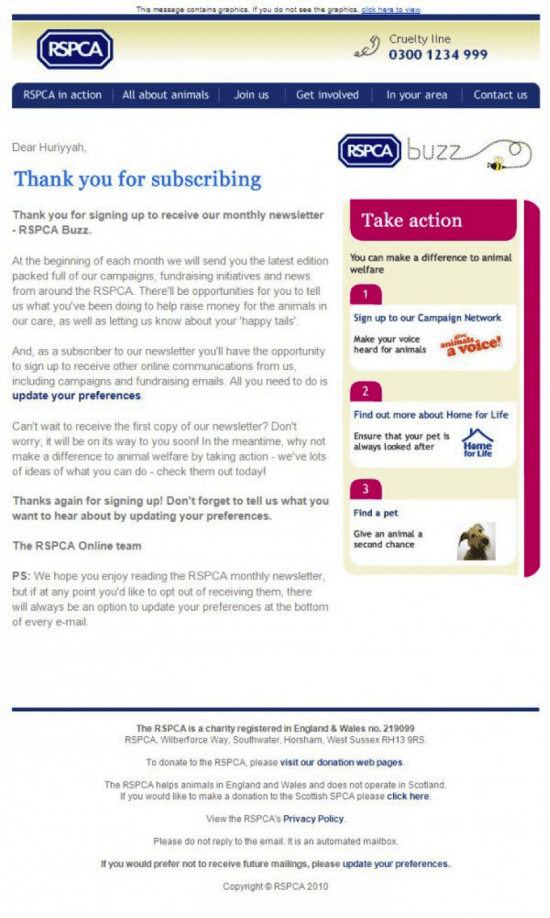
1. "The thank you"

This type of email keeps it simple and sincere. It thanks subscribers for signing up and gives them a bit of detail about what they will be receiving in terms of emails. The advantages of this are establishing trust with your subscribers and making them feel valued. However it may be less effective in driving e-commerce traffic as some of the other forms of emails we will look at.

welcome email

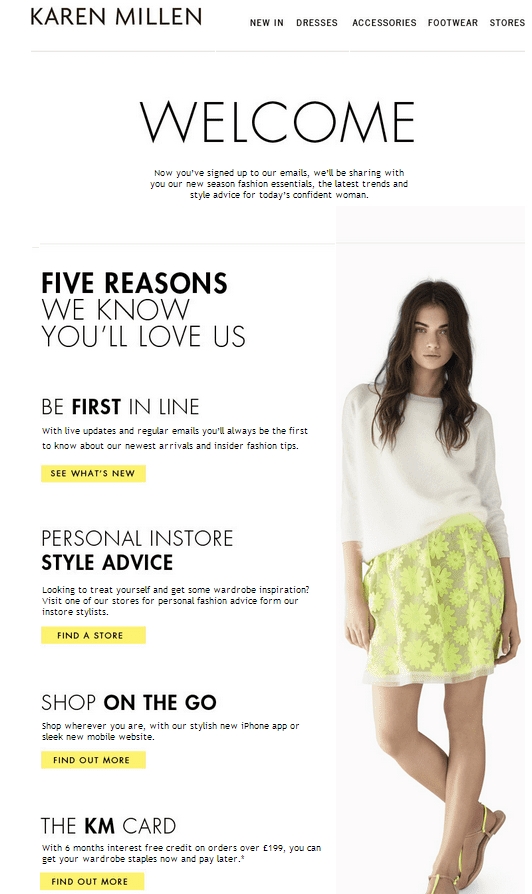
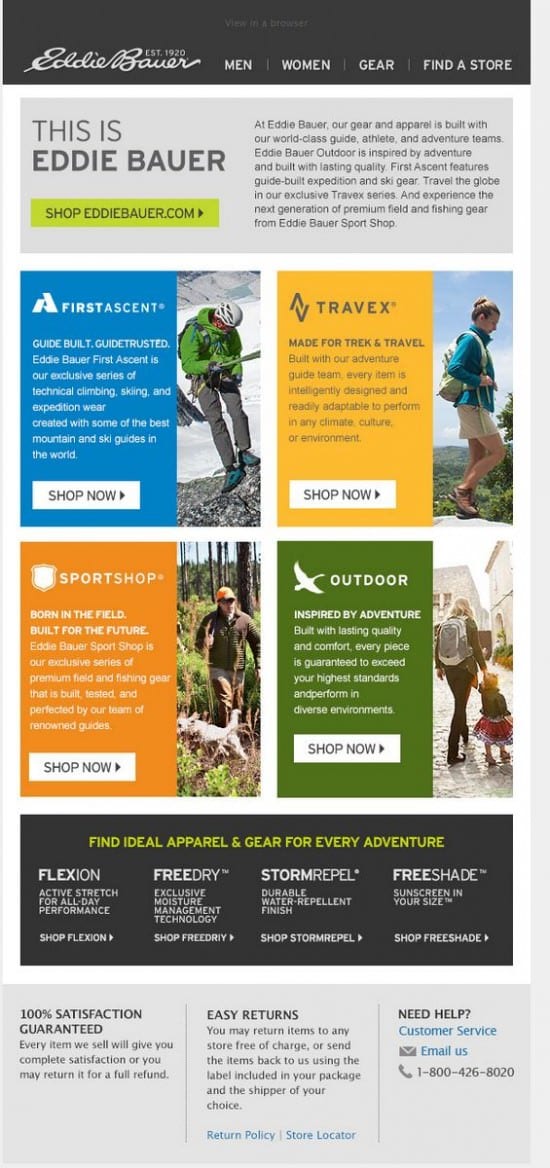
2. "The showcase"

This is a very common form of welcome email, where what the company offers the customer is showcased to the subscriber. This is good for engaging customers who will be happy to see the benefits of signing up, but make sure to keep it relevant. If you are scraping around to find enough good features that your subscribers can access and end up adding features that customers probably won’t be interested in, then I suggest you don’t opt for the “showcase” style of welcome email. Because it is so common, it may be less likely to grab attention that some other forms of welcome email, and sometimes a more minimalist style can be more effective when customers are becoming used to receiving large volumes of promotional emails. We like the way Karen Millen stylishly give their 'wall of benefits' as the psychologists call it.

Showcase welcome email

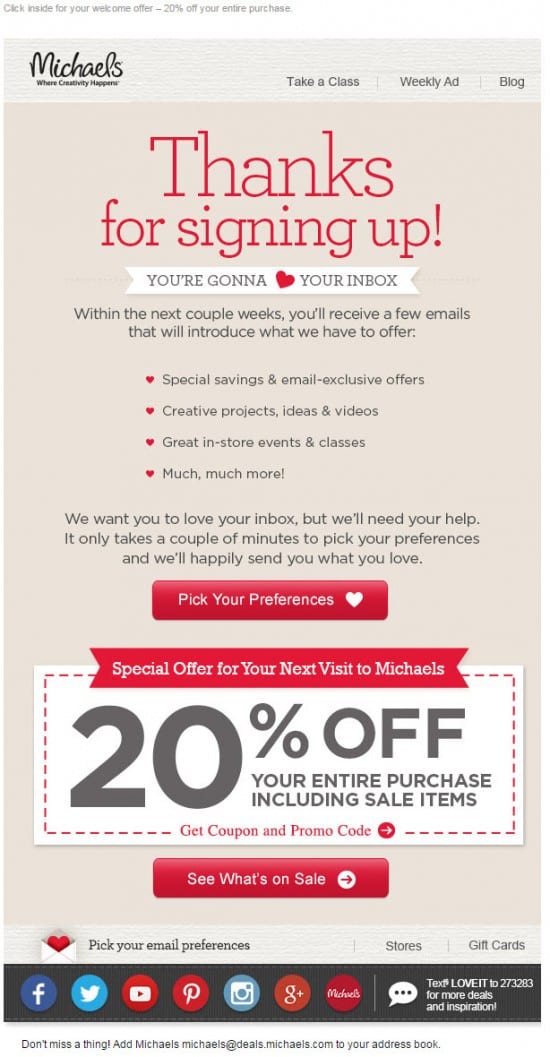
3. "The offer"

Simple but effective, this type of welcome email gives new sign-ups a special offer to try to get them to buy the company's products while they have attention. People like to feel they are getting a good deal, so offering a special discount can be a really good way to increase click rate and conversion rate from your emails. Just make sure your offer is enticing and try not to have it formatted as an image. 60% of email clients block images by default, so if your offer is the centre piece of your welcome email but is blocked on most of the recipients devices, then you are not going to achieve the desired click rate.

Offer welcome email

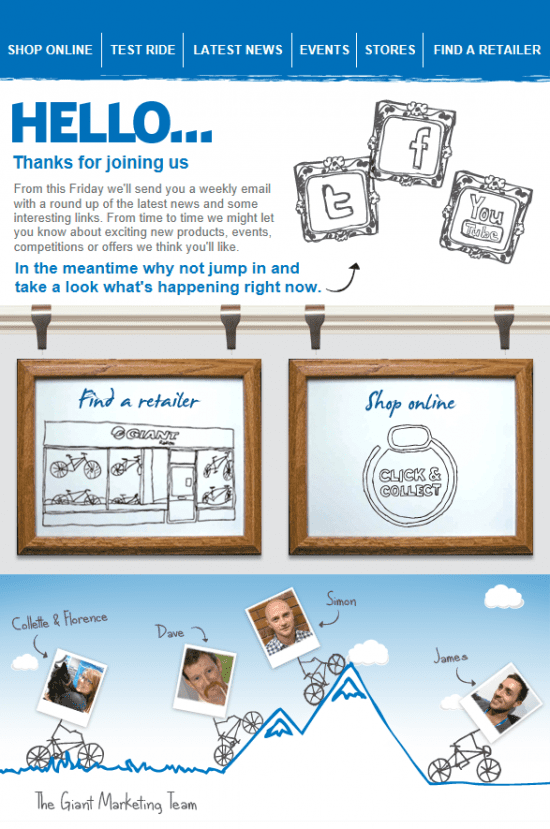
4. "The hello"

It might not always say ‘hello’, but that is the focus of this type of welcome email. It is about acknowledging and engaging with the customer, and giving your email a human touch. The Virgin America email in particular is just about saying hi and introducing how they will be communicating. It is simple and doesn’t bombard the reader with loads of different calls to action. This isn’t the best form of email if click through and conversions straight away is your goal, but if long term retention and engagement of your customers is what you value, then it is a good option.

hello welcome email

virgin hello welcome email

5. "The shopping cart"

Another fairly common form of welcome email, where the goal is clear; to get the customer to buy from you. If done right this can be the most effective way to convert leads into sales and deliver ROI. However because of the frequency of these forms of emails we receive every day, it is also likely to be ignored by a large percentage of recipients.

Shopping cart welcome email

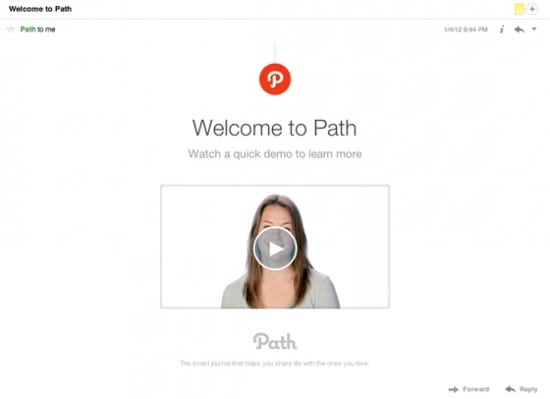
6. "The Video"

Video in email can be effective and engaging or nigh on useless because it is so frequently blocked by email-clients. This impressively minimalist email from Path is beautiful in its simplicity, and so likely to engage users. However, I would advise testing click rates with video emails on a smaller batch of your subscriber list before rolling out as the main welcome email campaign, because blocking by the email clients of your users could leave your lovingly crafted videos unwatched.

video email

Welcome Emails can support the drive for long-term customer engagement

Customer engagement, retention or re-activation are all variations on a simple concept: getting existing customers to buy your products rather than searching for new customers.

Although ‘engagement’ can sometimes seem like a marketing buzzword, it makes cold, hard business sense. Attracting a new customer can cost as much as 15 times more than retaining an existing customer, and although the exact statistic varies between studies, it on average costs between 3 and 5 times more to find new customers than sell to existing ones according to the Chartered Institute of Marketing.

If you want a more in-depth resource to guide you through the creation of your automated email-communications strategy, check out our email sequence contact strategy template developed by Email marketing consultants Dave Chaffey and Tim Watson - it's available to our Expert members and one of our most popular downloads.

01 Jul 17:24

Here’s the thing about free speech: It’s not absolute.

by Emma Teitel
(Robert Galbraith/Reuters)

Ellen Pao, interim CEO of Reddit. (Robert Galbraith/Reuters)

If you Google “common misconceptions,” you’re likely to see one of the following corrections: Napoleon wasn’t actually very short, Marie Antoinette did not say “Let them eat cake,” J.K. Rowling’s Harry Potter books did not inspire the most voracious reading generation in history, and Mozart did not write Twinkle, Twinkle, Little Star. (It turns out, he only wrote variations on the original tune.) But what you’re unlikely to see on such a list is a fallacy far more popular than any involving Harry Potter or French royalty—a fallacy that’s a catalyst for boycotts and political protests of every stripe. That fallacy is the notion that free speech is absolute. It is the belief that freedom of expression does not mean freedom to speak your mind without government interference, but freedom to speak your mind without any interference at all.

When New York rapper Action Bronson’s scheduled public performance at this month’s North by Northeast music festival in Toronto was cancelled on account of his explicit lyrics—some of which feminists believe glorify rape—fans of the rapper were under the impression that a great injustice had taken place. (More than 40,000 people signed a petition asking the festival to cancel Bronson’s performance at Yonge-Dundas Square in the city’s centre; many suggested the performance be moved to a private venue.) What Bronson’s forlorn fans fail to grasp, however, is that while it may be annoying that some people would rather loudly boycott an event than simply quietly not attend, NXNE, a music festival with a reputation to uphold and sponsors to appease, is in no way obligated to allow Action Bronson to shout violent obscenities in the public square.

In fact, nobody is obligated to let another person do so—not even the government, if what that person is saying constitutes hate speech. But a misconception about freedom of speech persists in our culture, and nowhere is this misconception more prevalent than on the Internet. Case in point: Reddit, often referred to as the “bulletin board” of social media websites, shut down a group of popular, highly offensive sub-reddits (conversation threads) this month, because the site’s interim CEO, Ellen Pao, was trying to eliminate harassment on the site. Of course, thousands of Reddit users revolted—branding Pao a servant to political correctness and a dictator. The most popular banned sub-reddit in question, “Fat people hate,” dedicated to humiliating and disparaging overweight people, had 150,000 subscribers. Pao’s reasons for dismantling the offensive sub-reddits weren’t, she argued, ideologically driven. Thousands of racist and homophobic sub-reddits are still in operation on the website; Pao says she eliminated only a handful of them, because they had unique reputations for harassing behaviour that extended beyond the Internet and into the real world. But many users believe Pao’s decision is hypocritical and directly tied to her personal political beliefs. Pao is, in British journalist and pundit Milo Yiannopoulos’s view, a product of “politically correct Silicon Valley culture.” Yiannopoulos understands that freedom of speech laws generally deal with government silencing, but he believes people should take silencing on social media far more seriously.

“Private corporations like Twitter and 4Chan have a significant and chilling effect on speech and discourse in the public square when they shut down discussion.”

Yiannopoulos is right. But his point doesn’t negate the fact that corporations are not governments in the business of protecting fundamental freedoms. They are in the business of turning a profit, something they can’t do with shoddy reputations.

Arthur Chu, the 11-time Jeopardy champion and columnist who writes frequently on tech issues, sees similarities between Pao’s shutting down of offensive sub-reddits and the way traditional media outlets edit their reader feedback. “Print newspapers never felt obligated to print every single profane note someone sent them in the mail,” he says. “Quite the opposite: Letters sections were very heavily edited, and no one called that censorship.” Editing the letters sections, he argues, is necessary, if you want to publish a “readable, responsible newspaper, so why do we think enabling the scrawling of graffiti all over the bathroom wall is now somehow a matter of constitutional principle?”

Perhaps it’s liberating to believe that, no matter our political leanings and prejudices, there’s a place we can say whatever we please, without consequence.

But that place never existed. Even in the Internet age, most of us express ourselves in public squares that are ultimately private spaces, run by corporations.

Those spaces have bottom lines. And lines in the sand.

The post Here’s the thing about free speech: It’s not absolute. appeared first on Macleans.ca.

30 Jun 16:21

Where to get the cheapest beer in the world

by Chris Weller and Skye Gould

Head to Poland if you want cheap beer.

According to the newly released Beer Price Index, which collected prices on beers from supermarkets and bars in 75 cities around the world, Krakow ranks as the cheapest place to buy a cold one. 

The BPI is the end result of extensive data collection from the travel site GoEuro, which puts together price indexes on common goods tourists like to buy.

Researchers at the company visited three supermarkets and three hotels in each of the cities they visited, combining the costs for each, standardizing the quantity of alcohol, and converting the end number into a single currency.

New York, unsurprisingly, ranks near the expensive end of the world's beer-loving cities at $5.20 a pop. It fell behind only Hong Kong and Geneva in terms of cost. 

These price differences are partly reflected in consumption levels. New York's annual per capita consumption of 85 liters pales in comparison with that of Krakow (127 liters) and Bucharest, Romania (133), but it still drowns out that of Cairo (4). 

Average beer prices around the world

SEE ALSO: The best-selling beers in the world aren't what you think

Join the conversation about this story »

NOW WATCH: Watch This Mesmerizing Time-Lapse Of 12,400 Gallons Of Beer Fermenting Over 6 Days

30 Jun 16:21

19+ Free Tools to Start Your Podcast From Scratch

by Aja Frost

“Slack is starting a podcast for some reason.”

That was the headline of a recent Fortune.com article. Author Tom Huddleston, Jr. wondered why Slack, “a hot Silicon Valley company with a fast-growing valuation,” would “make the most of its ever-growing momentum” by launching a podcast.

But to content marketers, Slack’s move isn’t surprising at all.

The podcast world has recently exploded. Since 2008, the number of Americans tuning in each month has doubled—from 9% to 17% in January 2015.

And companies are paying attention. Many sponsor podcasts as part of their efforts to hook new customers; according to the Boston Globe, businesses will soon be spending $100 million on podcast ads.

If you’re thinking of using podcasts to promote your company, there’s another option—following Slack’s lead and creating your own podcast. As Kevan Lee explained in his Podcasting for Beginners post, audio is just another tool in the content marketing toolbox.

podcasting tools

Not only can you establish your company as a thought leader in its industry or field, podcasts can help you create a personal relationship with your audience, enhance your brand visibility, and reinforce your company’s story and mission.

You might be thinking, “Yeah, starting a podcast is great if you’re a big company with a huge advertising budget, but there’s no way I can afford to do it for my own business.”

Not so fast. There are a ton of free resources out there to help you get your podcast off the ground. With this guide, you’ll see how to launch your show with an (almost) zero-dollar budget.

Planning and creation tools

1. Capturing ideas: Evernote

PD 1

It’s probably safe to assume you’ve heard of Evernote. However, you might not have considered using it to jumpstart your podcast. The tool is perfect for jotting down your show ideas while you’re out and about or brainstorming.

In addition, you can use it to take notes while you interview people, which will come in handy during the editing process and when you put together show notes.

2. Script-writing and collaboration: WriterDuet

PD 2

Why might you need a script?

Well, it might not take a village to make a podcast, but it does take at least two people: you, your co-host(s), and hopefully some guests. And the more participants you have, the harder it is to keep your discussion on-topic and within your desired time range. A script will mitigate those problems by giving you some structure.

WriterDuet is an excellent script-writing software. Not only does it let multiple people work on your script at the same time, it logs every user’s edits and even lets you explain your changes with in-line video chats, text messages, and notes. As a result, you and your collaborators will literally be on the same page.

3. Scheduling: Doodle

PD 3

When it comes to planning when you’ll record or live-stream your podcast, Doodle is a great tool. You set up a poll with multiple dates and times and then invite the other people involved with your podcasts to choose when they’re available. Once they do so, you can easily choose the time that works for everyone.

Doodle even connects with your calendar app so you don’t have to manually enter the event in your calendar once the date and time have been set.

In-the-studio tools

4. Sound dampening: soft furniture

As Daniel J. Lewis explains in his excellent article, “25 Free Podcasting Tools as Good as Their Paid Alternatives,” many of the places people commonly record their podcasts—like their basements, offices, or closets—have a lot of reverberation and echoing, which inevitably affects your audio.

If you don’t have access to a sound-proof studio, Lewis recommends putting soft furniture in the room where you’re recording. You can even hang blankets on the walls.

5. Interviewing/co-hosting: Skype

PD 4

Using Skype to podcast is super common, and for good reason: it’s a pretty straightforward process.

While Skyping with your fellow podcasters (whether they’re your co-hosts, your guests, or some combo of the two), you record your conversation via a computer app. Skype Call Recorder and Audio Hijack 3 are free options for Windows and Mac computers, respectively.

After you’ve finished, you can edit what you’ve recorded with an audio editor. (More on that in a bit.)

6. Live-streaming: Google Hangouts On Air

PD 5

Maybe you’d like to live-stream your episode, then convert it to a podcast. With Google Hangouts On Air, you can invite up to 10 people to a video meeting that’s also a live public broadcast.

Your Hangout will automatically be converted into a video after you’re done. To make it a podcast, grab the audio from the video file using software like Pazera Free Audio Extractor or AoA Audio Extractor.

7. Call recording: Google Voice

PD 6

If you’re a really low-budget podcaster, consider using Google Voice to record a conversation between you and your co-host or guest. After you create an account and enable call recording, all of your incoming calls will automatically be converted to MP3 files. Yup, you read that correctly—the app only works for incoming calls. Either arrange to have your co-host use Google Voice to record your call, or ask others to call you.

8. Voicemail service: SimpleVoiceBox

PD 7

Many podcasters play recorded questions or comments from listeners during their show. If you’re interested in doing this, use SimpleVoiceBox to set up a voicemail service with a unique number your listeners can call. The system will hold an unlimited number of messages—plus, those messages can easily be downloaded into .WAV format.

Editing and post-production tools

9. Recording and editing: Audacity and GarageBand

Editing your podcast is as simple or as complex as you make it. Daniel Lewis recommends only editing out distractions—in other words, you don’t have to get rid of “ums, “ahhs,” or long pauses, as long as those mistakes don’t detract from what you’re saying.

Even if you’re a minimalist editor, you’ll probably still want to trim the ends and add in other audio, such as theme music, songs, or sound effects.

Audacity is a solid option if you’re on a budget. Its interface isn’t super intuitive, but you’ll find many step-by-step guides for using it (like this one or this one.)

Mac users can take advantage of Garageband. “Garageband is free with most Macs, and it’s an incredibly capable audio editor with everything a podcaster could need,” explains MakeUseOf writer James Bruce.

Audacity and Garageband also both offer recording options. If you’re going to be the only person talking for the entire episode, than you can skip the Skype or Google Hangouts step and simply record directly into your editing program.

10. Audio post-production: Auphonic

You can use Audacity or Garage Band to clean up your audio, but when you want it done professionally, take advantage of Auphonic’s free two hours of processed audio per month. The software will balance the levels between speakers, music and speech; normalize volume to broadcast standards; balance multiple tracks (for example, your recording with your co-host’s recording); encode your files, and more.

11. Music and sound effects: Freesound, Free Music Archive

PD 8

Wondering where you’ll get that theme song or bleep noise? Freesound has a huge database of audio snippets, samples, and recordings.

The Free Music Archive also offers a wide selection; plus, you can browse by genre, so if you already know a blues song would be just perfect for your intro, it’ll be that much easier to find the perfect one. (Just make sure it’s labeled as available for commercial use.)

MP3s, tagging and transcribing

12. MP3 encoding: iTunes

After you’ve finished editing your podcast and adding sound effects, you’ll need to turn it into an MP3. There’s online software for MP3 conversions, but iTunes can do the same thing—and for free.

After exporting your file into iTunes, all you have to do is right-click on it and choose “Create MP3 version.”

(This article will walk you through the process.)

13. ID3 Tagging: EasyTAG, Podcast Tag Editor

ID3 tags allow you to embed important information in your audio files, including episode name, podcast name, episode content, and cover art.

Not only do iTunes and Windows Media Player use these tags to organize your podcasts, but having tags ensures even people who download your audio file from random places on the internet will know what they’re listening to.

In addition, maybe you’d like to include show notes—the text that pops up when you click the “Information” icon in the Apple podcast app.

To make these, just write the text of your choice in the “Comments” section of the ID3 tagging software you use.

14. Transcribing: Express Scribe Free

PD 9

There are a couple different reasons to transcribe your podcasts.

First, transcriptions are SEO gold-mines. Search engines can crawl and pick up your podcast’s title, description, and tags—but not your audio. A transcript, on the other hand, is easily searchable.

Second, having a transcript gives you more than one way to disseminate your material. Maybe you want to turn your podcast into a blog post, or a SlideShare, or even an infographic. All of those will be easier if you’ve got a written version of each episode.

The free version of Express Scribe helps you transcribe audio files with its customizable playback speed, “Hotkeys” (which make a mouse unnecessary), and speech recognition software.

You can also add hyperlinks to your transcript and post it on your blog or site, which will appeal to the people who would rather read than listen (they exist!)

Finally, you can use your transcript to keep track of important moments. Many podcasters label these milestones in their show notes.

Marketing and promotion

15. Getting into the iTunes store: WordPress

It’s pretty simple to get your podcasts in the iTunes store via WordPress. Using a WordPress site you already have or one you’ve created, create a category for your podcasts—like “Podcasts.” Then copy the URL for the Podcasts category. You’ve just created an RSS feed: a technology that announces updates to a website. Apple uses this RSS feed to create a collection of your podcast episodes. To submit the feed to Apple, paste the URL into the “Submit a Podcast” Podcast Quick Links in the Podcast section of iTunes.

Then, each time you complete an episode, upload the MP3 into a new post on WordPress, assign it to the Podcasts category, then publish it.

Once you’ve submitted the RSS feed URL to iTunes, all of the posts marked “Podcast” will automatically be submitted for review by the iTunes staff and then uploaded to the iTunes store.

(For a more detailed version of these instructions, check out the WordPress tutorial.)

16. Checking your RSS feed: Feed Validator

PD 10

But before you can submit that RSS feed link, you need to check and make sure it’s working. This is simple to do: just enter the URL into Feed Validator.

17. Social media scheduling: Buffer

PD 11

After all the hard work that goes into creating a podcast, you’ll definitely want to attract as many listeners as possible. Buffer’s Individual Plan lets you connect your Twitter, Facebook, Google+, and LinkedIn accounts (for a total of four), and schedule 10 posts at a time for each.

So let’s say you’re releasing your podcast on Thursday at noon. You could use Buffer to post three “teaser” posts on each social media platform leading up to the launch, a post with the link to the podcast once it goes live on Thursday, and then four or five posts over the weekend reminding your followers to listen and give feedback.

Not only does this save you a ton of time, but you can see analytics for each channel. That’ll give you valuable insight into how many podcast listeners you’re getting from, say, LinkedIn versus Facebook.

18. Emailing: MailChimp

PD 12

Many podcasters use a regular newsletter to deepen their relationship with listeners. Not only can you promote new episodes, but you can gather audience feedback, direct people to relevant links (say, your site or sponsor sites), and even give away exclusive content.

With MailChimp’s free plan, you can send up to 12,000 emails to 2,000 subscribers.

19. Analytics and stats: Blubrry

To get some basic statistics on your podcast, sign up for Blubrry’s free service. All you have to do is add your podcast to Blubrry’s directory—which has the added bonus of exposing your program to more potential listeners. There’s only one caveat, however: your podcast can’t advertise a competing podcast service.

Where to spend money on your podcast

1. A mic

As Ryan Imel explained on WPCandy, “Technically you can use your computer’s default microphone to record your podcasts. And by technically I mean your voice will travel through the air, collide with your computer and be recorded into a file.”

According to Imel, virtually any microphone you buy will be better than the one on your computer.

The Rhode Procaster ($229) is a popular choice, as is the Blue Yeti ($129).

2. Podcast cover art

Unless you’re a graphic designer, you may want to consider hiring a professional for your artwork.

Not only will amateur-looking cover art turn off potential subscribers, Apple won’t feature your podcast in its “New & Noteworthy” section if it doesn’t have an attractive image. Apple recommends including a title, brand, or source name.

There are also some size and resolution guidelines you should be aware of, courtesy of Libsyn:

  • iTunes Podcast- 1400×1400 at 300 dpi
  • iPhone Display – 160 dpi
  • iPhone App Image requirement – 512×512 pixels at 160 dpi
  • iPad Display – 132 dpi

If the initial artwork you create is large (1400 x 1400 at 300 dpi), it can easily be scaled down to fit all these mediums.

To find a designer, check out Fiverr, 99 Designs, Elance, or LogoMaker.

3. Podcast hosting service

There are three main ways to get your podcast online.

Host it yourself for free

You can use WordPress to host your podcast for free as I describe above. Here’s the problem with this approach: if you solely use WordPress, your audience is almost guaranteed to have a sub-par experience. Not only will the site take forever to load, but downloading the audio files will be time-consuming as well.

Use WordPress to set up your RSS feed and submit your podcasts to the iTunes Store, but if customers want to directly download your podcasts, it’s great to provide a different option.

Why not host your podcast on your own site? Well, web hosts aren’t designed for files with unpredictable downloading behavior. Your site has a limit on how much data can be transferred at any given time; if you have a bunch of people trying to download your podcast in the day or two after it’s released, they may crash your server.

Purchase a hosting service

The second option is to purchase a web hosting service, like BlueHost or HostGator. If you get the basic version of BlueHost, it’s $3.50 a month. Your Amazon S3 rates will change depending on how much bandwidth and storage you use every moth, but in general, it’s pretty inexpensive.

These services aren’t designed for hosting media files, so if you’re getting more than 100 downloads per episode, you’ll also need to purchase a media hosting service, such as Amazon S3. You’ll also need to configure the software yourself.

Pay for podcast hosting

The third and most straightforward option is paying for a podcast hosting service.

Both Libsyn and SoundCloud have a lot of reach—which means lots of listeners—a factor that might weigh heavily in your podcast hosting decision.

Libsyn hosts more podcasts than any other service in the world. For $5 a month, you’ll get 50 megabytes of storage; for $15, you’ll get 250. In addition, it’ll automatically create a RSS feed for you (so you can skip the WordPress process.) The HTML5 Media Player is another cool feature–it allows you to embed your podcast anywhere on the web.

Particularly if podcasting is going to be a big part of your marketing strategy, SoundCloud is worth looking into. Every time you upload an episode of your podcast to SoundCloud, it’ll be pushed out to iTunes as well. SoundCloud’s Pro plan, which offers six hours of upload time per month, is $55 a year. For $135 a year, you can upload as much audio as you’d like.

Libsyn, SoundCloud, and most other podcast hosts include download and audience statistics in their services. Knowing how many downloads you’re getting and from what media sources, what part of the world your listeners are coming from, and even which web pages or apps your podcasts are being played from will help you tailor your podcast to your listeners.

Do you have any free resources to add to this list? What about paid tools that are worth their price tags? I’d love to hear your picks in the comments!


30 Jun 16:19

The 10 Most Important Things You Need To Know About The Internet Of Things [Video]

by Shelly Dutton

The Internet of Things (IoT) is becoming a hot-button issue for the C-suite. Many senior SAP SapphireNOW 2015, Orlando, USAleaders are concerned whether implementing IoT-based technology and processes is worth the time, money, and effort involved. Others worry they risk being left behind and losing their customers to competitors if they avoid it altogether.

In fact, Gartner found that 64% of large enterprises plan to implement big data projects. Sounds promising, right? Not really – considering 85% of them will be unsuccessful.

All of this data needs to go somewhere – but where?

During the America’ SAP Users Group (ASUG) IoT webcast “Operationalizing IoT Data for Predictive Analytics, Dave Roberts, OSIsoft fellow specializing in cities and industrial clusters, observed that complexity in the IoT is attributed to technologies that support a wide variety of standards that seem to be emerging in the IoT space. “There’s AllJoyn, Thread, IEEE, Open Internet Consortium (OIC), Industrial Internet Consortium (IIC), among others, that are promoting different standards on how sensors and assets will communicate with gateways and routers,” he explained.

As a result, businesses are spending 50%–80% of their development time just prepping their data – collecting, cleansing, shaping, backfilling, and timestamping all of this information. Some are even going as far as creating a new job title –“data engineer”– responsible for getting this data together and shaping it so data scientists can accurately answer critical business questions with this information.

10 things you should consider when operationalizing the Internet of Things

If so many companies understand the value of the IoT and are investing considerable time, money, and effort to realize its potential, why are so many still failing to achieve it? Dave Roberts sheds some light on why they are missing the mark by offering his Top Ten list of what every company should know about successfully operationalizing the IoT.

  1. The value of the IoT is not technology. The real value lies in the creation of new value propositions and potential revenue streams. The key is taking this technology and using it to move toward new business models and services that will help realize them. According to leading analysts and thought leaders, the growth potential is significant. IDC believes the IoT market will hit $7.1 trillion in revenue by 2020. Gartner foresees the IoT install base growing to 26 billion units by 2020. And Cisco predicts that the IoT is poised to become a $19 trillion market.
  1. IoT data will be more democratic than SCADA data. Historically, SCADA data has been locked away in somebody’s process control network. To access this information, update it, and revalidate it, people needed a miracle. With IoT, you can freely and quickly bring up this information when and where you need it. This one aspect is revolutionizing business models, allowing businesses to enhance their services in real time.
  1. Businesses outside of your industry may know something you don’t. For example, highly powerful tools developed for clickstream analysis, fraud detection, cyber security, and genome sequencing are now coming to process industries. Don’t snub other industries, thinking that you are different from them. They may have a few tricks in their pocket that you need.
  1. Standardization leads to repeatability. The more comparable assets are in your organization, the better your forecasts will be. Machine learning is better with more, similar data. Anything less leads to misconstrued information and inefficiency.
  1. IT and OT are converging – deal with it. Data engineering can take significant time and resources. However, it shouldn’t stop you from moving forward with IoT initiatives. Instrumentation and controls engineers from the world of operational technology (OT) have to bridge the gap between the analytics and IT communities.
  1. Sensors will not live forever. In other words, cheap sensors are not going to be 100% reliable, 100% of the time. Physical damage during normal maintenance and operation in hostile industrial environments (such as dust, vibration, water, and caustic materials) will occur. Even sensor batteries can discharge. Ultimately, all sensors fail either instantaneously or slowly degrade. Processes must be established to make sure sensors are fully operational and deliver correct data.
  1. Your information is as good as your sensors. Reliability of predictions is only as good as the data feeding them. If you are going to run analytics based on sensor data, you better make sure that the sensor is in good working order. At times, you even have to go as far as validate the sensor data before it is reported or analyzed to answer critical business questions.
  1. Data needs context. To develop a model that forecasts behavior, data scientists require context and time-series data. Otherwise it becomes very difficult to consume this information and truly see what happening now and in the future. People need real-time data to make the best possible decisions. With pervasive monitoring, this information is captured and delivered for business intelligence analysis.
  1. The IoT brings a tsunami of data. IoT rollouts bring a proliferation of cheap, distributed sensors – resulting in a huge volume of data in a short amount of time. Is your infrastructure ready to support it?
  1. Don’t forget what powers the IoT. Data integration and actionable information are the heart of collection and analysis of IoT data. Invest in the technologies, expertise, and processes that support integration, reporting, decision making, and action – and maintain them well.

Start making the Internet of Things a reality for your business

Watch the entire Webcast series “Internet of Things (IoT) Community Webcast Series” presented by ASUG and SAP. Topics include:

Replay available: Making the Internet of Things Real
Replay available: Transform Business Operations and Reimagine Business
Replay available: From Big Data to Smart Data (IoT)
Replay available: IoT and Industrie 4.0 – European Perspective, Examples, and Business Models
Replay available: Operationalizing IoT Data for Predictive Analytics
Replay available: IoT – From Vision to Value
June 30: Transforming Your Business with IoT – SAP Partner Perspectives
July 9: Accelerating IoT in your Organization: Introducing SAP’s IoT Development Platform

Want more insight on how IoT will impact your business’s future? See Big Data, The Internet Of Things, And The Fourth V.

30 Jun 16:19

5 Inexpensive Benefits Millennials Value More Than Health Insurance

by Heather R. Huhman
Younger workers, unsurprisingly, are less likely to demand health insurance than older workers but don't overlook their birthdays.
30 Jun 16:19

The Economics of Lean Communication

by Jack Malcolm

In a free market, companies create profits for themselves by creating value that others are willing to pay for, in excess of their costs of production. If they want to generate more profits, they must either increase the value or reduce their costs, and this focus on the bottom-line forces a customer-centered discipline. Before introducing a new product, they have to think carefully about whether customers will buy it, and whether they can produce it profitably. To help them, many companies have adopted the lean production as a framework for constantly looking for ways to maximize value and minimize waste.

When their customers consider whether to buy their products, they measure the value they receive in terms of ROI, which simply is a division problem, with Return on top and Investment on the bottom. While there is always a lot of gray area in deciding what results and costs to include in the calculation, it’s still a reasonably straightforward way of prioritizing how to invest their limited capital.

We all take this for granted when it comes to business, but is it possible that we forget it when we communicate? Just as companies don’t pump out products unless they think they’ll sell, we should not just pump out words without thinking about whether they are worth listening to. Will listeners be willing to pay the price in time and effort to hear what you have to say?

It may seem like a no-brainer, but if you’ve ever sat through an interminable and unproductive meeting, and calculated the total opportunity cost of everyone in that room, if you’ve had to wade through hundreds of emails to glean actionable information, if you’ve worked hard to decode what someone is really saying, if you’ve had to tolerate a chatty co-worker when you’re in a hurry, you know how rarely people think about communication in this way.

Maybe one reason is that we don’t consider the costs of communication. In a world where it is so easy to communicate instantly and electronically, it would seem that talk is cheaper than ever. But the real cost is the hidden opportunity cost: what is the combined value of the time that is used by speaker and audience, including all the process steps from composing the thoughts, writing/speaking, transmitting and discussing?

Return on Time and Effort

Is there an economic value to business communication, and if so, can it be calculated?

It’s much more slippery to pin down the return on communication, but we can at least try to measure the unmeasurable by applying the same thought process as ROI. I call it RoTE, or Return on Time and Effort.

Return: What value does your audience receive from listening to you? We measure value in lean communication in terms of outcomes and results. When the information shared improves a decision or leads to effective action that generates measurable outcomes, you could theoretically put an actual dollar value on that conversation or presentation. Of course, that’s tough to measure, especially since most decisions are the results of not just one single communication, but of countless conversations, presentations, messages going back and forth, etc. But still, it’s one of those things that people know when they see it or hear it. It’s also important to note that value is defined by the listener, not the speaker.

Practically and mathematically, R is the most important factor in the equation. If it’s zero or negative, no amount of brevity or clarity will make the communication worthwhile, and if it’s high enough, almost any amount of time and effort will be worth devoting to it.

That said, it’s still important to concentrate on the denominator of the equation. Unlike ROI, in which the investment is only calculated in dollars, communication requires the investment of two costly currencies: attention and cognitive effort.

Time is of course the most easily measurable factor. How much time do you take in getting your message across? Do you get right to the point, or do you overload your listeners with information they already know, do you hold back vital information out of fear of offending, do you have trouble resisting interesting but irrelevant snippets and trivia?

The paradox of brevity is that it takes time to produce. When Mark Twain received this telegram from a publisher:

NEED 2-PAGE SHORT STORY TWO DAYS

He sent back this reply:

NO CAN DO 2 PAGES TWO DAYS. CAN DO 30 PAGES 2 DAYS. NEED 30 DAYS TO DO 2 PAGES

So, there is a cost/benefit analysis you have to run through your mind: is there any net value added when you invest your time to save time for the listener? The answer is almost always yes, first because when you are presenting to audiences of more than one person, it’s easy to see that an extra hour of preparation to shorten your presentation can pay off in multiples, especially when you are presenting to higher-level people whose opportunity cost of listening can quickly add up to big numbers. Second, the thinking you put into effort of making things brief carries over to the next part of the equation, effort.

Effort is harder to measure but no less important than time. The simple truth is that thinking is hard work, and we generally avoid doing any more than is absolutely necessary. As with brevity, you work hard so they don’t have to. The harder you make people work to understand what you’re saying, the more of their time you take and the less value you add to them.

By making it easy for them to understand, you also do yourself a favor, because they will be much more likely to repay you by accepting your logic. Make your “product” user-friendly by making your reasoning transparent, using plain language that all can understand, and illustrating your reasoning with stories, analogies, visuals and concrete examples.

Building equity

When companies create profits, they build equity which strengthens their balance sheets and provides resources to generate future profits. It’s the same way with personal communication. As you build a reputation for delivering good value through lean communication, you are building personal equity in the form of credibility.

Credibility can lead to the Matthew Effect, the idea that the rich get richer. By consistently delivering a Return, at low cost in time and effort, you will generate greater trust, with more decision makers who will require less verification of your arguments and facts, and accordingly save time over the long run—for yourself and for others. That is priceless, whether you can put a dollar value on it or not.

30 Jun 16:18

Get Personal: 3 Essential Tips for Customer Retention

by Stephen Tucker

Personalization is no longer a luxury reserved for the big players in e-commerce. While Amazon continues to lead the way, a personalized shopping experience has now become an expectation for the savvy customer. And, with a plethora of automated tools  available, it has never been easier for retailers to employ big data in their quest to deliver personalized content.

There is overwhelming evidence to suggest that personalization is now a crucial component of an effective digital marketing strategy. Websites employing personalization are likely to see higher numbers of conversions, raised average order values, and improved customer loyalty. And yet, there is still a large number of retailers who are stuck in the personalization slow lane, who are yet to fully explore the opportunities offered by targeted data segmentation.

In particular, there is one often overlooked area in which personalization can be incredibly effective – customer retention.

Retention marketing often trails behind acquisition efforts. Marketing budgets generally prioritize the latter – an odd decision, I believe, considering 80% of your future revenue will come from 20% of your existing customers. 40% of marketers focus on finding new customers, while not doing enough to keep their existing customers happy. Furthermore, 82% of companies agree that retention strategies work out more cost-effective in the long run.

Personalization, I believe, is now a crucial element of effectively retaining customers. In this article I’ll run through some ideas and tips for employing personalization to keep your customers happy, engaged and converting.

1. Use data to segment your most valuable customers

It is crucial to know your customers. With retention in mind, who are your most valuable customers?

After plugging in a personalization tool, a wealth of invaluable data will follow. Analyze it and use it. This will allow you to segment customers according to characteristics which are relevant and pertinent to your business. When considering retention, look at transactional and behavioral metrics such as their browsing history, average order number or value, and purchase history.

Screenshot

Snapshot of customer data. Taken from Bunting personalization software dashboard https://getbunting.com

An effective way of using this data is to segment your visitors according to when they last purchased. Customers can then be targeted in various ways, depending on how long ago they converted. If a customer is approaching the end life of a previously purchased product then target that user for product replenishment, or try to re-engage a user who has been inactive for a while with personalized content.

The data will show you who your most valuable customers are – these guys should be rewarded and enticed to stay loyal.

2. Keep them engaged

Keep in mind the objective of retention marketing – to keep your customers engaged and interested in your brand and products. Using your behavioral metrics, keep your customers informed about offers pertaining to the products they love, and make sure they’re quick to know about new releases. Recent research shows that for 78% 0f customers, offers and promotions are only effective when tied into how the customer has previously interacted with the brand. Show them the ‘trending’ (ie. the most viewed or purchased that day/week) products of their favorite brands.

Determine where your customers will interact with your content, and target accordingly. The landing page is a great space to do this – engaging users with relevant content and personalized product recommendations as soon as they land on your site should ensure a more satisfied customer more likely to return. Remind them of what they previously viewed on their last visit. Seriously consider how the space on each page they visit is used – split test to see what works.

Tailored content on home page - taken from Bunting personalization software

Tailored content on home page – taken from Bunting personalization software

When it comes to re-engaging customers, segment customers by their last visit. A great way to re-engage these valuable customers is by email. A ‘we miss you’ email or a tailored version of your newsletter with a personalized message and recommendations is a great incentive for users to return. In addition, give customers the option to have their abandoned carts saved and emailed to them – a great way to re-target customers later, as well as collect email addresses for users without an account. Research repeatedly shows that segmented emails can seriously increase revenue when compared to generic messages.

3. Reward

Do you know who your VIP customers are? If not, analyse your data to find out. As mentioned, these guys should be regularly rewarded. However you choose to do this, the trick is to make these customers feel special – they need to know they are valued, and personalized behavioral targeting is one of the most effective means of doing this.

Targeted offers, of course, are very effective, but consider other options, too. Free delivery is a great way to reward as it is an area of importance to customers – abandoned shopping carts are often attributed to unexpected delivery costs. Free delivery has shown to entice customers to remain loyal.

Free delivery lightbox - screen shot of Bunting personalization

Free delivery lightbox – screen shot of Bunting personalization

Be creative when thinking of other ways to reward customers. Previews of new product lines relevant to their preferences are a great way to make shoppers feel valued. Consider what works well with your business – examples being invitations to events, free samples or tutorials.

In conclusion, retention marketing is often overlooked, however, since the advent of personalization, it is easier than ever to effectively retain customers through a targeted approach. The opportunities afforded to the digital marketer by personalization are endless. Experiment – an effective personalization tool will allow you to run multiple tests and see what works well. Get to know your users through data analysis, then engage, target and reward – you might be surprised by the results.

30 Jun 16:18

Your Sales Metrics Are Imperfect

by S. Anthony Iannarino

The numbers of calls you make is an imperfect measurement. It tells you what kind of effort you made today. And it might give you some indication of how effective you might be on the telephone. But it doesn’t tell you much more than that.

Counting up the number of meetings you had today—or last week—is another imperfect metric. It gives you some information about how much time you spent with clients or prospects. But it doesn’t give you any indication as to the quality of those interactions or real commitments gained.

Adding up the revenue for all of the new opportunities you’ve created isn’t a perfect metric either. If the opportunities are real, the revenue might be some indication as to how you will fare in the future. But there are far too many variables for this metric to do much by itself.

Your win rate isn’t a perfect metric. It tells you how you’ve done in the past. But it doesn’t say anything about the value of the deals you won, how competitive they were, or whether or not they were bluebirds (a gimme, or an account won with no real effort).

I’m not really sure what meaningful conversations are. It sounds to me like the salesperson made calls without gaining the commitment they needed. They might tell you something about how many conversations you had with decision-makers or decision-influencers. But it doesn’t tell you anything about the value of those conversations to the prospective client.

Even won business is imperfect. So you made your number? That’s great, but is that what you were really capable of?

Pick the metric you like. It’s imperfect. It only tells some small part of a larger story. Even the most objective metrics have a lot of subjective assumptions behind them.

By itself, one metric doesn’t tell you enough that you can afford to rely on it alone. Activity metrics are important. Outcomes are also important. A careful and thoughtful mix of the two can you give some objective measurement from which you can ask subjective questions to determine how to achieve the results you need.

The post Your Sales Metrics Are Imperfect appeared first on The Sales Blog.

30 Jun 16:18

SlideShare Secrets to Stack the Decks in Your Favor

by Jodi Harris

Slideshare-squared-cover

SlideShare is a popular, business-friendly social site – one that you probably already use to enhance the life span of your company’s PowerPoint slide decks and other presentation materials. But could you be overlooking some of the most powerful features and functionalities the platform offers for greater content marketing success? 

Acquired by LinkedIn in 2012, SlideShare has expanded its capabilities to incorporate additional design options, functionality, and media formats – such as audio, HD video, and more. Content marketers who understand how to take full advantage of these enhancements can tap into a world of possibilities for creating engaging multi-platform experiences and lasting brand value.

If you are looking to expand your use of SlideShare beyond the basic slide deck, or you just want to get stronger results from any presentation you create, check out CMI’s latest e-book, How to Get More From SlideShare: Super-Simple Tips for Content Marketing.

Here are a few ideas and examples to start you off:

Plan your use of SlideShare wisely

Before you create content on SlideShare, make sure your presentations will be aligned with your overall content marketing strategy. This will help you ensure that each presentation you publish will support your marketing goals and contribute to the business results you want to achieve.

The easiest way to do this is to be intentional with your audience and your content marketing objectives:

  • Know whom you intend to target with your content, as well as what their relevant needs and interests are.
  • Be able to identify where that audience will likely be in their purchase process as they engage with your content.
  • Know what action you want them to take after they read your SlideShare content.
RECOMMENDED FOR YOU: Don’t have a documented content marketing strategy to work off of? Learn how to create one.

Cover the SlideShare basics

Though there are plenty of bells, whistles, and creative enhancements to tap into to make your presentations unique, let’s start with some simple best practices to ensure that your SlideShare posts communicate in a clear, meaningful, and strategically sound way:

Fit the format: Like a PowerPoint slide deck, SlideShare’s default layout is in landscape view, so make sure you size and format your content accordingly.

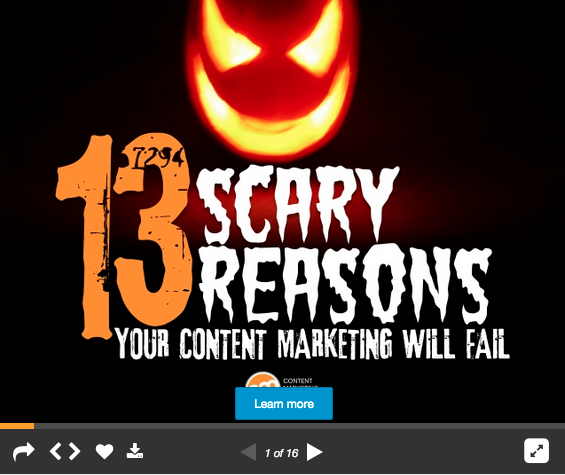
Grab attention right off the bat: The SlideShare home page is a sea of headlines and cover thumbnails. If you want to catch visitors’ eyes as they scan the goods and get them to click on your content, you better have a compelling cover image and powerful headline.

scary-reasons content-fails copy-image 1

Headline helpers

What can you do to help your headlines stand out? Try a few of these tips:

  • Ask, “Would my target audience want to read this?” If you don’t focus on your readers, it will be nearly impossible to grab their attention.
  • Entice, but don’t exaggerate. It’s better to offer useful, honest information with real value than risk angering readers because your presentation doesn’t deliver on the promise of its headline.
  • It’s OK to be a bit of a tease: If you give away all the important information in the headline, people won’t feel the need to read more.
  • Use numbers and lists: Using numbers in your headline gives the audience an idea of how quickly they’ll get the information they want.
  • Check out the competition: Get a sense for how other businesses are positioning their SlideShare offerings, so you can identify potential opportunities to distinguish your content.
  • Ask and you shall receive: Use titles that take the form of a question to pique readers’ curiosity (and ignite their desire to satisfy it).

Present a simple discussion: Often, the best SlideShare presentations are those that create interesting conversations and do so in a way that’s easy for viewers to understand and follow. Keep your story simple and concise so readers don’t lose interest before they reach the last page.

logical-visual-story-image 2

Appeal visually: Memorable presentations often tell a compelling story in a few words. Whenever possible, emphasize imagery over text by incorporating video, infographics, photos, and other static images.

  • Tip: SlideShare has partnered with Haiku Deck to help users create eye-catching visual decks – even if they don’t have a professional designer. You can access this directly in your SlideShare account by connecting to Haiku Deck in your User Settings under Apps.

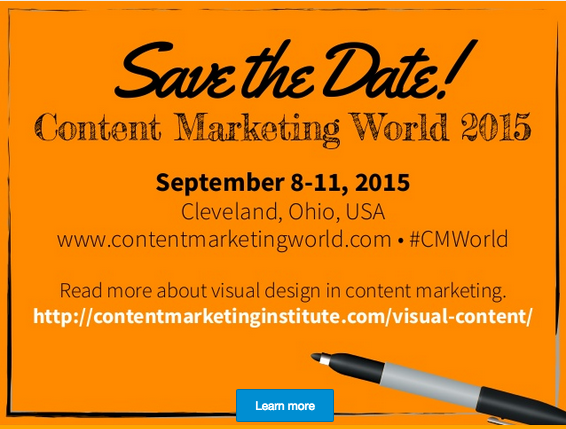
Include a call to action: Insert a clickable link in your slides to make it easy for the user to take the next desired step. For example, we used the final page of one of our recent SlideShare presentations to draw attention to our upcoming Content Marketing World conference.

slideshare-call-to-action-image 3

Publish consistently: SlideShare rewards presentations that are recently created and uploaded. The more often you post, the greater your chance of getting featured on the SlideShare home page and on its Top Content lists.

Share every presentation: It won’t be enough to just grab people as they pass through the SlideShare home page. You will want to share your presentations as far and wide as possible – including posting them on your social media pages, embedding them in your site content, and linking to them within your other content efforts. And don’t forget to enable others to help you spread the word so that the presentation trends and gains viral visibility.

Proof it for perfection: No matter what content you publish on SlideShare, you will want to make sure it shines a positive light on your business. This means it should have error-free copy and a well-designed look; feel consistent with your branding; and have hyperlinks, videos, and lead forms that are working properly.

  • Tip: In his post, 22 To-dos for SlideShare Success, Roger C. Parker shares a handy proofreading checklist you can use to make sure your presentations uphold your company values and quality standards.

Take your efforts to the next level

Once you’ve mastered the basics, a wide range of options can help make your SlideShare content more immersive and engaging, and extend the platform’s practical value as a content marketing tool.

Here are just a few ideas:

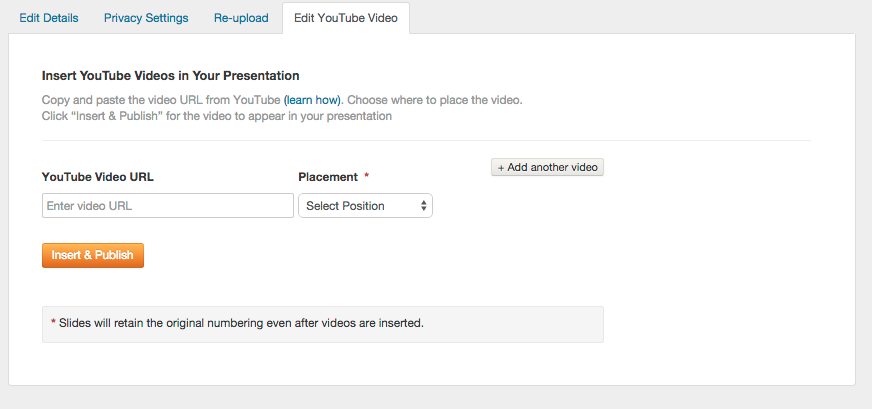
Insert a YouTube video: SlideShare is no longer a static, text-only medium, it now enables users to insert HD video in presentations. This can be handy when you want to add detail, explanations, or demonstrations to the stories you craft in SlideShare.

Youtube-instructions-image 4

Click to enlarge

Add audio narration: Record and embed audio in your presentations to enable them to function as a slidecast. (Check out this tutorial to see the full technical process.)

Incorporate third-party apps: Apps can enhance your use of SlideShare for content marketing – for example, you can synchronize your SlideShare presentations with videos using Zentation, or share your decks in-screen with the participants of your video conferences using Tokbox. And, if you have developer skills, you can even build your own apps using SlideShare’s API.

Use it for content repurposing: Extend the value of your existing content – such as Twitter chats, archived webinars, infographics, or your favorite blog posts – by curating them into anthologies or visual scrapbooks of topic-specific information.

Branded cartoon anthology-image 5

Image source: The Cartoon Agency

Use it as an education tool: The SlideShare platform is well-suited for creating step-by-step product demos, team training exercises, or tutorials on specific processes and procedures. And because you can make your SlideShare presentations private, you can control who has access to this content.

paper box tutorial

Image source: Simona Opris

For more tips, read the complete e-book, How to Get More From SlideShare: Super-Simple Tips for Content Marketing.

Cover image by Joseph Kalinowski/Content Marketing Institute

The post SlideShare Secrets to Stack the Decks in Your Favor appeared first on Content Marketing Institute.

30 Jun 16:17

9 Step Social Media Audit for Improving LinkedIn Business Page Results

by Emily Bacheller

LinkedIn Company Page

It’s undeniable that LinkedIn is leading the pack for professional social networks. In fact, more than half of all of the business in the world have created a business page on LinkedIn. With over 4 million business pages on LinkedIn, the competition for the attention of potential clients and job seekers is at an all-time high.

One way to take a critical look at your LinkedIn business page is to conduct a social media audit and identify areas for improvement. Understanding the elements that will help you build trust with your audience and provide a seamless brand experience for visitors navigating between your website and LinkedIn business page are incredibly important in creating a cohesive strategy.

If you know that your LinkedIn Business Page could be better, but you don’t know where to start, this guide is for you. The social media audit below identifies nine important elements of LinkedIn business profiles that can be improved in order to get more engagement from your audience, and referral traffic back to your website. Ready to see how many of these items you’re executing successfully and how many are an opportunity for improvement?

9 Step LinkedIn Company Page Audit

#1 – Identify the Right Content Mix
“Content mix” refers to the different types of content posted on your LinkedIn Company page. The first step is to analyze what types of content are published to your business page on a regular basis.

Content types can include:

  • Promotional content
  • Industry news
  • Images
  • Videos
  • Links to helpful articles

Ideally, all of these content types should be present in your content mix. Posting only one or two types of content will bore your audience. Engage your audience by posting a variety of content to your LinkedIn business page. Don’t forget to include visual content in your mix: posting images on LinkedIn can increase engagement and comments by as much as  98%!

eb image 1

#2 – Establish a Cadence
How often does your brand post on LinkedIn? Are your updates posted regularly, or do days or weeks pass by with no updates? Aim to post at least one message a day on your LinkedIn business page in order to begin engaging your audience and create the expectation that visitors can discover new content on a daily basis. Posting intermittently can cause visitors to think that your LinkedIn page is unmaintained or out of date.

#3 – Post at Optimal Times of Day
Now that you know how often you’re posting, consider what time of day updates are typically posted. Do you use a social media management tool to schedule updates at specific times, or do you post updates whenever you can find the time? Scheduling your updates to post at a time of day when the majority of your followers are on LinkedIn is a great way to increase engagement with your content.

According to Fannit, the best times to post updates on LinkedIn are between 7-8 am and 5-6 pm. That’s because many LinkedIn users check their profile at the beginning or end of their work day. 

Image courtesy of QuickSprout

Image courtesy of QuickSprout

#4 – Create Consistency with Your Company Name
This seems like an easy one, but it can have a huge impact on how visitors find and perceive your LinkedIn Company page. First, search for your company’s name on LinkedIn. How many results appear? Some brands have multiple pages on LinkedIn, which can make it very difficult for visitors to know which page is the “correct” LinkedIn business page to visit. If your brand has multiple LinkedIn business pages, consider consolidating into one just one page. If your brand has multiple markets, products, or business units, create showcase pages to speak to those different segments.

Finally, ensure that the spelling on your LinkedIn business page matches the branding on your website. This will provide a consistent experience for visitors, and help them understand that this page is the “official” LinkedIn page for your brand.

eb image 3

#5 – Find the Perfect Profile Picture
Take a critical look at the profile picture on your LinkedIn company page. It should be a clear, well-cropped image that showcases what your brand is all about. What’s most important is to ensure that your audience can easily recognize the profile image. Most companies opt to use the brand logo for their LinkedIn profile. This is a great way to improve brand recognition.

The image should be high resolution, and perfectly cropped. Grainy, off-centered images may give your business page an unprofessional or sloppy appearance. The size of LinkedIn profile pictures is 50×50 pixels.

eb image 4

#6 – Use a Banner Image to Create Continuity
The banner image should in some way indicate what your company does. If you work for a healthcare organization, an image of a hospital may be appropriate. They say that one image is worth 1,000 words, so use an image that speaks to your company’s area of expertise. Create a custom image that overlays text over an image in order to include a message, or information about your brand in the banner image. LinkedIn banner images should be a minimum of 646×220  .

Consider changing the banner image on your LinkedIn business page on a quarterly basis to give your page a fresh, updated appearance. The banner image may correspond to a season, event, or important product offering.

eb image 5

#7 – Provide a Detailed Description
Use the description section of your profile to explain what your company does. Avoid vague, industry jargon in favor of precise language and keywords that explain how your company provides value to your customers. Don’t forget that LinkedIn business page descriptions are crawled by Google, which means that you should include keywords in the description section. You should also fill out the sections provided for specialties, website, industry, type of business, address, and company size.

eb image 6

#8 – Include a URL in the First Sentence of the Description
When you visit LinkedIn company pages, you’ll notice that only the first one or two sentences of the description appear, unless you click “see more.” If you’d like to drive more referral traffic to your website, either include your brand’s URL in the first sentence of the description, or keep the description short enough that visitors won’t have to click “see more” to find your website URL .

#9 – Dive Into LinkedIn Analytics
LinkedIn business page administrators should take advantage of the data collected within LinkedIn analytics. Get insight into which updates are performing best by viewing impression, click, and engagement metrics for each update. You can also see how much reach and engagement your updates receive over time. LinkedIn’s unique demographic data can show you what industries your fans and visitors are from, what their job functions are, what their seniority level is, and what size company they work for. This information can help you understand more about your audience, and their interests.

eb image 7

Know When to Call in the Professionals

If you’re overwhelmed by how much time and effort it takes to conduct a social media audit, or to optimize your LinkedIn company page, it may be a sign that it’s time to call in the reinforcements. Do you feel that your LinkedIn company page could be better, but don’t have the time it takes to update and maintain it? Do you crave more expert insights and tips for improving your brand’s social media profiles? Contact TopRank Online Marketing to learn more about our social media audit services .

What are some examples of LinkedIn Company Profiles that you think are well optimized and have followed the checklist above?

Disclosure: LinkedIn, Innovatech and Uponor are all TopRank Online Marketing clients.

Header Image: Shutterstock


Email Newsletter Gain a competitive advantage by subscribing to the
TopRank® Online Marketing Newsletter.

© Online Marketing Blog - TopRank®, 2015. | 9 Step Social Media Audit for Improving LinkedIn Business Page Results | http://www.toprankblog.com

The post 9 Step Social Media Audit for Improving LinkedIn Business Page Results appeared first on Online Marketing Blog - TopRank®.

30 Jun 16:17

Improve Your Offer Strategies By Learning To Let Go

by Britt Skrabanek

So, you came up with the perfect email campaign for a targeted list. You created an irresistible Creating Offerssubject line, snappy content, and a dynamic call to action (CTA).

Your eyes lit up when you saw the glorious open rates. Then, your heart fell when you saw the dreadful click-through results.

I’m sorry to be the one to tell you this. The culprit is the offer.

But there is one thing we marketers don’t do … quit.

When something isn’t going right, we look at the data and find out where it all went wrong. Then we dust ourselves off and make our emails better than before.

A recent survey by Act-On and Ascend2 asked marketing leaders how they were driving email marketing success. And, look what the clear winner for the most effective strategy is…

Act-On Ascend2

…a meaningful call-to-action offer.

Making the Offer

We should never get tired of hearing this—the most important thing is to provide value to your audience. A relevant offer doesn’t feel pushy or sales-y; if it’s truly relevant, then it’s useful – and welcome.

Naturally the content you use for the offer should resonate with your audience, but it also needs to be aligned with their stage in the buying cycle.

There are many names for these stages, but we’re fans of the A.C.T. (Awareness, Consideration, Transaction) model.

Sending a live demo to a list of new leads that have never heard of your company would fall flat, as that is content suited to someone deeper in the cycle. But helping them get to know you through engaging content is a win-win.

  • Awareness (identify a new possibility or outline a problem)
    • Blog
    • eBook
    • Infographic
    • Webinar
  • Consideration (help solve the problem and provide in-depth education)
    • Case study
    • Comparison white paper
    • Expert guide
    • Video
  • Transaction (Confirm the decision and aid the purchasing process)
    • Demo
    • Implementation guide
    • Pricing bundles/options
    • Trial download

Testing the Offer

Rather than shooting off emails to your entire list, test with small batches to see how people respond. Then if your results are not The ABCs of A/B Testingaligned with the forecast, you can make a change before sending to your entire audience

You’re probably using A/B testing for subject lines, email design, and call-to-action text already, and you can use it for offers as well. Experiment with different offers in your emails and see which are most effective.

With those results in hand, the next time you try an email campaign, you’ll have an arsenal of insight to shape your content.

Improving the Offer

Once you learn what isn’t working, it doesn’t mean that you failed. Now you can focus your energy on making the offer even better.

Here are two examples of offers that missed and how we turned things around.

SLA Template vs. Sales and Marketing Alignment Template

Every company’s lead generation efforts can benefit greatly when the sales and marketing team is on the same page. So we created a tool that had a Service Level Agreement (SLA) and lead scoring model all in one place.

We thought it would be a big hit on our website and we had future plans for email campaigns with the SLA template as the main offer. While a decent number of landing page visits were happening for our new release, the download numbers weren’t great.

We decided a name change was in order.

The name may seem like a small thing. But just like an email subject line or the title of a novel or film, you have to grab their attention right then with a title, or you will lose them.

It’s all too easy to think that everyone speaks the lingo of your industry, but sometimes that isn’t the case. We’re in the business of B2B marketing, and we work with marketers inside our client companies, but the fact that they’re marketers doesn’t mean that they’re as conversant with esoteric marketing terms and acronyms as we are. An SLA can be a really useful tool for sales and marketing teams, but a technical name used in an offer can get lost in translation with a glance. Also, “SLA Template” doesn’t speak to the lead scoring benefit at all, so it under-promises the benefit.

Enter the Sales and Marketing Alignment Template. It makes sense and it’s broader, so that it encompasses both the SLA and the lead scoring model. It also skips any insider jargon, so it’s more easily understandable by a wider audience, more quickly.

We’re still in the very early stages of this big revision, but you can bet we’ll be monitoring and comparing the results as they roll in.

Since we changed the offer’s title only two weeks ago, we have already seen positive changes with the landing page visits, which are up 13%.

landing page visits

Marketing Automation Scorecard vs. Marketing Strategy Calendar/Demand Map

The scorecard is an older tool of ours, but it’s a goodie. It helps marketers evaluate their marketing automation systems, so they can learn what they’re doing well and where they can improve based on their score.

We thought it would be the perfect offer for an email list of marketing automation users. It seemed like a no-brainer.

But as the campaign was in motion, the results weren’t good, with a 1.15% CTR.

It’s not the scorecard’s fault. It’s just not the right offer for this audience.

Luckily, we had our list divided into smaller batches, so we could improve the offer for the remaining emails. We paused our marketing automation programs, swapped out the offer, and began again.

But we didn’t just bring in a pinch hitter; we brought in our most popular tool, the one that always hits home runs: The Marketing Strategy Calendar.

However, we didn’t stop there.

To find the most enticing option for this audience, we knew A/B testing the offers was a must. So we decided to test our second most popular offer, The Demand Map.

During our first round of emails with the offer testing, encouraging results are showing:

ClickThrougRates

When an offer isn’t working, feel free to switch it. Just because you thought it was right for that audience and for that stage in the buying cycle, doesn’t mean that it is truly the best option.

And: There’s nothing wrong with recycling an offer that has proven itself as a crowd pleaser.

As marketers, it’s easy to get caught up in click-through results, the unending search for quality leads, or the fear that we will lose our client or customer because we didn’t do enough.

We absolutely have the power to change our mindset. Think of each email as a magnificent opportunity to present an offer that will guide them where you hope they will go.

Share with us…what offer strategies have worked for you?

4 Steps to Content CTA

30 Jun 16:17

5 Effective Twitter Tools That Will Make You A B2B Social Media Marketing Pro

by Sarah Greesonbach

5 Effective Twitter Tools That Will Make You A B2B Social Media Marketing ProWhile it might seem like Twitter is just for teenagers and tech-savvy adults, it’s actually an incredibly powerful B2B social media marketing tool. In a world where 75 percent of purchase decisions are made before a customer talks to a supplier, the information available to your customer online becomes very important. And since Twitter has more than 288 million active monthly users, that certainly explains why 85 percent of B2B companies actively participate on Twitter.

Since there’s some evidence that Twitter is important, your next step is to figure out how to use the platform to achieve your goals more effectively. Some businesses are great at utilizing Twitter, but not everyone is; in fact, 81 percent of B2B marketers find online marketing moderately to extremely challenging. It takes time and focus to create a plan for how to use Twitter and then to put that plan in motion.

Of course, you need to start by investing time in a quick beginner’s tutorial that offers video, images and text to explain the platform in detail. Then you can tap into a secret world of apps that will allow you make the most of your time on Twitter.

Here are five apps that allow you to use Twitter like a pro:

HubSpot Social Inbox

When it comes to all-in-one B2B social media marketing solutions, we can’t overlook HubSpot’s Social Inbox tool. This platform helps you organize Twitter (in addition to any other social media sites you might be using, such as Facebook, LinkedIn, or Google+) onto one dashboard and review analytics, scheduled posts, and even color-coded reports. The Social Inbox is particularly helpful with developing relationships with B2B customers that you connect with on Twitter because it tracks your conversations across platforms.

SocialBro

SocialBro is a Twitter tool that allows you analyze, engage, and monetize your Twitter audience. It’s most useful in that it allows you to capture a quick understanding of the status of your Twitter account. Some of SocialBro’s most time-saving features include the following:

  • Look at the analytics of your Twitter account in one view
  • Understand the best time to Tweet
  • View a list of users who have followed and unfollowed your profile
  • Segment your community so that you know who you are looking at

If you’re seeing results from Twitter and you want to take it to the next level, use a free trial on SocialBro to see how you could further target your B2B social media marketing efforts.

Followerwonk

Followerwonk allows you to use Twitter analytics to find, analyze and optimize your Twitter account to grow your profile with more like-minded clients. The platform accomplishes this by allowing you to look at your followers and their information in a wide variety of different formats from charts to lists to infographics.

Followerwonk also allows you to act more proactively than simply searching your industry hashtags using the Twitter search tool. For instance, you can search bios on Twitter to find people who would most likely wish to connect with you, or identify new followers by location, bio, or contacts you have in common.

Tweriod

Tweriod is the best tool to help you time your Tweets for maximum impact according to your customized list of followers. Once you’ve been networking for a while, the platform evaluates the Tweets you send in addition to the Tweets sent by your followers to determine the times at which your audience is the most active. This allows you to target your tweets for times when your followers are most likely to retweet, engage, or follow up. You can also maximize the value of your tweets by rescheduling tweets you would otherwise send during slow times.

Trends24

If you’re well known in your B2B circle for providing commentary on breaking news and ideas within your industry, then you need to check out Trends24. Trends24 takes the Twitter capability of looking at trending topics a step farther. The platform lets you look at which terms have been trending at specific times and in different countries all around the world. With this information, you can identify valuable and re-tweet-friendly terms you need to include in your Tweets to get the attention of your customers.

Twitter is already a B2B social media marketing powerhouse. With a small time investment and a few of these pro Twitter tools, you will be able to shape it into an even more effective way to engage and interact with your customers.

30 Jun 16:16

This shopping street in Greece used to be the 10th most expensive in the world — take a look at it now

by Mike Bird, Business Insider
Mike Bird / Business Insider
Mike Bird / Business InsiderThere's a lot of graffiti.

When you think of the world’s most prosperous shopping streets, you probably don’t think of Greece.

But before the double whammy of the 2008 financial crisis and 2010-2012 eurozone crisis, Athens was home to some of the most prime retail space on the planet.

In 2012, Joe Weisenthal wrote a post about Ermou, which real estate firm Cushman & Wakefield said was the the world’s 10th most expensive retail space in 2007.

Three years later, I’m staying in a hotel on the exact same street, and like Weisenthal, I never would have guessed this was once such a prosperous area.

The price of retail space in the area has fallen by nearly half since 2007 and it’s lost a lot of its former glory — take a look.

I started on the western end of the street, near my hotel — it doesn’t look like this was ever part of the prime retail space.

Mike Bird / Business Insider

There’s a lot of graffiti.

Mike Bird / Business Insider

The places at this end of the road certainly weren’t selling high-end goods.

Mike Bird / Business Insider

But the bars and restaurants on the side streets seem like they’re still doing OK.

Mike Bird / Business Insider

Some places are shuttered, and look like they have been closed for quite a long time.

Mike Bird / Business Insider

This is a typical view of one of the side streets without any shops or places to eat on it.

Mike Bird / Business Insider

Monastiraki, a square on the site of a 10th-century monastery, had a great view of the Acropolis.

Mike Bird / Business Insider

Even further up the street, toward the prime shopping area, there were buildings that looked like they’d been left alone for a long time.

Mike Bird / Business Insider

Some looked like they had some sort of renovation work being done at some point, but there wasn’t much sign of that when I visited.

Mike Bird / Business Insider

I passed a small ATM queue of Greeks trying to reclaim their deposits too.

Mike Bird / Business Insider

The Church of Panagia Kapnikarea is in the middle of the street — it’s an intact Byzantine church built in 1050, one of Athens’ oldest.

Mike Bird / Business Insider

There was clearly more activity further up the road, but some stores were still shuttered.

Mike Bird / Business Insider

Weisenthal was shooed away from this Foot Locker in 2012 —but there were a few customers on the day I visited.

Mike Bird / Business Insider

Sprider, a chain of Greek value fashion stores, closed down in 2013. Nothing had replaced this large outlet since then.

Mike Bird / Business Insider

This Adidas store looked a little more full than when Weisenthal visited, but not much more full.

Mike Bird / Business Insider

At the very end of the street you can see Syntagma Square, the focal point of the protests (and sometimes riots) of the last six years.

Mike Bird / Business Insider

Plenty of the stores remaining at the most eastern part of the street would be recognisable to people from other countries.

Mike Bird / Business Insider

A Greek business lobby group says that without a bailout deal, 59 businesses are closing each day in the country.

Mike Bird / Business Insider

Back in 2007, it cost about $450 per square foot to rent retail space on Ermou, according to Cushman and Wakefield.

Mike Bird / Business Insider

In their latest report, Ermou costs just $253 per square foot, a decline of nearly 50% from its heyday.

Mike Bird / Business Insider

On a side street at the very eastern end of Ermou, I saw cleaners protesting against low wages.

Mike Bird / Business Insider

30 Jun 16:15

Have LinkedIn and Medium Killed the Old-Fashioned Blog?

by Alexandra Samuel
JUN15_30_155293242

I didn’t start my business: my blog did.

When I started blogging in 2004, I had just finished graduate school and I was trying to figure out what I was going to be when I grew up. I knew I wasn’t going to pursue a traditional academic career, but I wasn’t sure what else a Ph.D. had prepared me for.

But the emergence of the social web meant there was an ever-expanding set of websites and tools that were driven by the same kind of online participation I’d researched for my dissertation. Sites like Delicious, Flickr and 43Things were ushering in the new phenomenon of “user-generated content,” and technologies like RSS and tagging were providing new ways for regular web users to organize and share content. Suddenly my core research question—what drives online participation?—was something a lot of organizations cared about.

The still-newish phenomenon of blogging gave me a way of exploring what we then called “Web 2.0”, and sharing my thoughts about what it meant for online politics and nonprofit organizers. Pretty soon, people started calling me for advice about the kinds of tools I was blogging about, and that advice turned into a few gigs building participatory websites. Before I knew it, I had started what we’d now call a social media agency.

My experience wasn’t atypical in the early days of the social web. As recently as three or four years ago, establishing a blog was still the obvious way for a professional to showcase expertise and build a platform and professional reputation. Blogging your way into a career wasn’t just for social media professionals: Ricky Shetty transformed himself from an ESL teacher to a full-time blogger and online community organizer—beginning with his own DaddyBlogger.com. Former broadcaster Amy Bronee started blogging her cooking experiments while at home with her kids—and now has a thriving business as a cookbook author and cooking teacher. And of course Nate Silver blogged his way from indie statistician to New York Times bestselling author.

Stories like theirs are why, whenever someone asked me how social media could help them shift their career path, I used to say: start a blog.

Is that still the right advice in 2015? Twitter has made it possible to demonstrate expertise by sharing links and short insights, 140 characters at a time. If you’re in a visual field—whether that’s fashion, design or even real estate—sites like Pinterest, Instagram, and Houzz may offer the fastest route to establishing a vision, following and clientele. For folks who like to talk or shoot more than write, creating a podcast or YouTube channel can be a better fit than a blog, and just as effective at sharing your ideas.

But the real blog-killer isn’t any of these alternatives: it’s the hosted publishing that’s emerged on sites like LinkedIn and Medium, where anyone can just log in and start posting. In a world where you can now showcase your ideas on the site where you’re hosting your virtual résumé—LinkedIn—do you really need to have your own independent publishing platform?

Publishing exclusively on LinkedIn or Medium is indeed the right choice for some people, particular if you are a new or intermittent writer. If you’ve already invested time in building a LinkedIn network, you’re going to find an audience a lot more quickly than if you start a site from scratch. And unlike an independent blog, there’s no need to commit to a regular posting frequency on LinkedIn: you can write a post whenever you have something to share or say, and even if that’s only a few times a year, you’re extending your professional credibility and voice in a context where it can be discovered. It’s also a great way to try out posting without investing in setup or making a long-term commitment: you can write a few posts, develop your own voice, and then decide if you want to commit to running your own site.

For people who are already blogging, however, the right path is less obvious. Indeed, even though I’ve been blogging for more than ten years, I’ve found myself questioning the role of my own site, particularly in recent months. Since rebooting my consulting practice at the beginning of this year, I’ve once again picked up the pace on my blog—but as soon as I started posting more frequently on my own site, a few friends asked me why I was wasting my time on an independent blog when I could reach so many more people through LinkedIn, Medium, or my posts here at HBR.

But there are still good reasons to write on your own site, even if you’re also contributing to another site. First, if you’re an established blogger—even one with a modest following—there’s no reason to throw away any readership you’ve built up by abandoning your own site in favor of LinkedIn. Far better to post on your own site, and then cross-post to LinkedIn (for professional content) or Medium (for personal thought pieces) to extend your audience.

Second, if you maintain a website to showcase your professional work, business or consultancy, a blog can drive valuable traffic to that site—particularly if you use it in conjunction with LinkedIn. Occasional posts that reflect your interests or expertise act as proof points for the implicit or explicit claims you make on your website; even occasional stories are a nice way of offering a wider range of content and letting colleagues or clients see the person behind the résumé. Selecting highlights to share on LinkedIn can bring readers back to your site for additional insights; when they get to your site, you can use your sidebar to tout your related services or additional content.

Third, a blog on your own site allows you to shape the context and curation of your posts in a way you simply can’t achieve on LinkedIn. For example, you can organize past posts around a key theme all in one place; the theme or themes you select will help you define and demonstrate your specific areas of expertise. You can decide which posts to highlight on your site, and which posts should disappear into your archives after their moment in the sun.

Last but by no means least, blogging on your own site may allow you to take more risks than you’re ready to take on LinkedIn. It’s the difference between singing at a karaoke bar and performing at Carnegie Hall: while it may be great to have the largest possible audience for a major performance, sometimes you just want to cut loose and have fun. An independent blog is a place you can test out your ideas and hone your writing skills without necessarily hitting the radar of everyone you’ve ever met at a conference. Then you can choose just the best items to post and share more widely.

All of these are great reasons for independent blogging to continue even in the era of LinkedIn-enabled publishing. Yet the rise of LinkedIn, and its ever-stronger hold on our professional conversations and identity, means that more and more people are embracing established platforms rather than setting up (or maintaining) their own independent online presences.

That’s regrettable, because the value of blogging goes beyond the way it can help us build a professional reputation or clear personal brand: it’s also a tremendous tool for personal expression, and for the kind of exploratory writing and thinking that can help people discover new interests, new relationships and even new careers. (I often advise people to write their way into figuring out what they actually want to do with their working lives: write about what interests you, and share the ideas that get you fired up, without thinking about what is strategic or “on brand.” Do that for a few weeks or months, and then look at what you’ve written: are there a few key themes, topics or approaches that you keep revisiting? That’s a great clue about what you find so interesting that you’d pursue it even if nobody paid you…and what you might therefore love to do for a living.)

When you have a clear set of career goals and a set of blog posts that are designed to support those goals, LinkedIn blogging is a terrific way to help those posts find an audience. If we allow blogging on LinkedIn, Medium, and other hosted sites to crowd out independent blogging, we’ll lose an important way of finding those goals in the first place.

30 Jun 16:14

4 ways the Smartwatch will impact email marketers in 2016

by eliot mannoia

Email marketing is still highly effective, but the smartwatch brings with it a new challenge for marketing strategists

I've recently upgraded my watch to a Sony Smartwatch 3, but the Smartwatch 2, depicted below, is often cited by technology bloggers as being one of the devices that kicked off the wearables trend in a big way back in 2013. Life with a smartwatch isn't as difficult to get used to as I thought it might be, instead adding a lot of value to my day in ways I could never have imagined. As a copywriter I've penned many an email for many a marketing campaign, so the way the smartwatch began to change my behaviour as a consumer was of particular interest to me.Smart Watch

The smart watch will impact email marketers

I seldom read full emails or messages on my smartwatch (possible though it is with plain text versions - more on this in a moment), but it does act as a very nifty buffer between me and my phone, allowing me to glance at my wrist whenever an email pops through to see who it's from, what it's about and whether or not it's worth my time. With a swift swipe I can mark it as read or delete it, which means that if the smartwatch does take off (and the new Apple Watch has all but sealed the deal here), email marketers will have a potentially unwelcome challenge on their hands.
Email on smartwatch
The Apple Watch will in all likelihood herald a new age of wearable technology. One look at the how the iPhone kick-started the smartphone revolution and it's hard to disagree, particularly when you've experienced the form, function and sheer convenience of a smartwatch first hand. If you buy anything other than an Apple Watch, the likelihood is that you'll be using Android's rival operating system, Android Wear, which, after its latest update, has won over its critics and become the best of the bunch, for now.
Regardless of which smartwatch dominates the market, here are just 4 ways they're likely to change the way digital marketers think about their email campaigns in the coming year.

Short content will rule

While the smartwatch can already pack some serious punch when it comes to features and usability, tapping on links and browsing web content is a long way off and will probably never be considered practical. So it's important that the content you deliver provides immediate value and a clear indication of what's next. Long form content will most likely get discarded, marked as read and left to gather dust in a user's inbox if they're skimming through their emails while waiting to hop on a train. Make it short, pithy and engaging. Not always easy but always worth the effort.

Plain text will make a surprising comeback

Just because your subject, pre-header and opening message need to be short and concise for viewing on a smartwatch, doesn't mean that you have to dumb your emails down and put creativity back in its box. Plain text versions of emails are still best practice, and they're about to come back in a huge way thanks to wearable tech. Currently all smartwatches, to my knowledge, display plain text alternatives of your emails where possible. This means that pretty images and media content aren't going to make it through to your audience - at least not at the smartwatch 'buffer' stage. So make sure your plain text alternatives are just that - plain text and to the point - and you might just earn some screen time on a user's phone if they deem it relevant enough to reach into their pocket and take a closer look.
Make your emails too 'content rich' without a plain text alternative, and you risk zero engagement and a one way swipe to the junk folder.

smart watch email

Open rates will likely decline, but don't panic!

If the Apple Watch takes off and smartwatches become the new smartphone, open rates are going to take a hit. The problem is, as email marketers we might not know why. The previous two points give some obvious rationale behind the decline of open rates - we're going to have to get through what is essentially an additional 'checkpoint' before we get some serious screen time from the user - but it goes deeper than that. Most email clients tend to track opens with images, and because the smartwatch will only show HTML emails in their plain text alternative, tracking becomes a bit of a problem. Someone could read and digest your content without every 'opening' the email on their phone or computer. Combine that with the fact that you can't tap links or engage with content in any meaningful way on your wrist, and marketers have a real brainteaser on their hands.

So what's the answer? "Visit website | view on your phone" is a start...

view online
We've all seen that at the top of our emails. If an email doesn't render properly in Outlook or Thunderbird or any email client the user happens to be reading on, there's almost always the option to ‘view online’ at the top somewhere. If smartwatches become as ubiquitous as smartphones, then 'view on your phone’ could be the next big thing. If it's something that engages the user they would simply click the link to make it load in their mobile's browser - sort of a rudimentary bookmark to remind themselves to read it later. Either that or some more refined bookmarking system will take hold, perhaps making way for a new wave of apps that filter emails from your watch and queue them up for viewing on your phone at more convenient times.
If smartphones changed the rules for email, then smartwatches will change the game entirely. Watch this space.

Thanks to Darren Thackeray for sharing his advice and opinions in this post. Darren is a digital marketing copywriter at Yell. You can follow him on Twitter or connect on LinkedIn.
30 Jun 16:13

When You Should NOT Sell To The C-Suite

by Ago Cluytens

Ask a room full of “old hands” in sales for sales advice, and pretty soon one of them is bound to shout “sell to the c-suite !”. Selling high up is one of the “unquestionable truths” in sales.

Unfortunately, in some cases, it’s also really, really bad advice.

I spent a fair chunk of my career walking the hallways of Fortune-100 corporations – and a lot of that was spent as a senior executive, or working closely with other senior executives. And I’m going to give you some contrarian advice: in some cases, trying to sell to the c-suite is the worst thing you can do to advance your sale.

Where, generally speaking, selling to folks who have a budget and decision-making authority is good advice, selling too high up may well backfire.

And unfortunately, once you blew your shot with the senior guys, you almost always blow up the entire account. So, in no particular order of importance, here are ten situations in which you don’t want to be caught trying to sell to senior executives.

1. It’s not a strategic issue

Senior guys are big picture guys – they don’t care about details (much). If what you’re selling does not impact their strategy, they won’t care – and you’re better off finding someone a few levels down who does.

If you’re selling paperclips, photocopiers, car leases or scanning software – chances are you want to be speaking to someone outside of the c-suite.

2. It’s not on their radar

At any point, senior executives don’t simply care about the big picture – they care about specific aspects of that picture. Their mind may be on growth, or cost containment. International expansion, or shoring up in home markets. Launching new products, or improving relationships with existing customers.

Many times, I’ve seen vendors shut down simply because they weren’t selling anything that related directly to the senior guys’ agenda.

3. You have no track record/credibility

In spite of popular belief, (most) senior executives are not “visionary risk takers”. They’re more like stewards of an oil tanker, making gradual corrections in course until they get to their chosen destination (or alter the destination, but that’s another story).

Unless you have some kind of proof that you can do what you say you’ll do, you may find yourself ushered out the door faster than you can say “groundbreaking technology” (that is, if you even got in in the first place).

4. You don’t have the necessary gravitas

I had to learn this one the hard way – as a young management consultant with one of the Big-4 firms, I thought I had a thing or two to contribute (unfortunately, most of it came from what I’d read in other people’s white papers).

Imagine my frustration when I was asked to sit in on boardroom meetings and asked to “observe”. Imagine my even larger frustration when – once I couldn’t contain myself any longer and decided to speak up – nobody seemed to listen. I might as well have been speaking another language, or dressed up as a mime. People barely acknowledged my presence, let alone listen to my ideas.

The problem wasn’t that I was young per se – it was that I hadn’t yet learned how to project gravitas and present my ideas clearly, concisely and with impact. Unless you’re comfortable doing that, you’ll never be able to successfully sell to the c-suite.

5. You’re not career relevant

I have a category of clients who never, ever have trouble getting through to senior decision makers. When they call, executive assistants rush to put through their calls, and senior executives interrupt meetings on the spot to pick up their phones.

Who are they ? Headhunters.

Why ? Because they are career relevant. If you’re not in some way able to contribute to what senior executives like to call “their legacy”, chances are you’ll have a hard time selling to them.

6.You’re small fry (or selling small fry)

Senior guys don’t make decisions around whether to serve vegetarian snacks in the company restaurants or cover the roof of their corporate headquarters with edible moss.

If what you’re selling is insignificant in terms of impact or investment – you’re better off selling lower into the organization.

7. You’re too cheap

The c-suite looks at things in terms of value – not cost. And if things are too cheap, that raises questions. A few years ago, I stumbled into a major project with a prospect – something that could have been a game changer for my fledgling new practice.

At some point, I submitted a first estimative bid. The next day, I received a phone call from my internal champion. His question ? “Before I send this through to my boss: are you sure you’ve included everything in your estimate ?” Turns out we were roughly 40% cheaper than all the other bids.

In this case, I got lucky and things turned out OK – we revised the bid (there were indeed a few misgivings on our side regarding scope), and moved on. But you may not be so lucky.

Where most buyers will try and get you to come down on price, consider yourself lucky on this aspect: senior executives will almost always look at value first, and cost second.

8. You sell a commodity

If you’re selling a commodity, don’t sell to senior folks. For all the reasons outlined above, you’re much better off selling to the person who has “corporate jurisdiction”.

9. You don’t have internal allies

Up until the 1990s, senior executives made decisions without much interference from anyone else. Sure, they may have asked a trusty lieutenant for their thoughts, but generally speaking they made up their minds, walked out of their office and informed everyone of what they decided.

No more. Large corporations are more democratic than ever, and their decision making processes reflect that fact. No one (not even senior executives) makes decisions in a bubble anymore – and if you don’t have internal allies to lobby on your behalf, your efforts to sell to the c-suite will prove to be that much more difficult.

10. You’re “the outsider”

Let’s imagine your typical senior executive. Highly educated, with 20 years or more of experience, having worked in roughly 3-4 corporations. What are the chances that, over those 20 years, they’ve not worked with, hired or come across someone who does what you do –and liked what they saw ?

That’s right. Most senior executives already have a firmly established pool of preferred vendors, which they tend to take with them on their corporate journey.  That’s not to say they’re not open to change (52% of B2B buyers would consider switching vendors), but it is something to be aware of.

There is one exception – one circumstance that overrules everything I’ve outlined above. You can be the outsider, with no proven track record who’s selling commodity items, and still come out ahead. What’s the exception ? The strength of your personal relationship.

In the end, people buy from people they like. And that includes senior executives. If your relationship is strong enough to give you a real shot, go for it.

The post When You Should NOT Sell To The C-Suite appeared first on Sales Hacker.

30 Jun 16:13

Is Social Selling Creepy? [Infographic]

by esnider@hubspot.com (Emma Snider)

scared_cats.jpg

What makes you feel more uneasy: Receiving a cold call where the caller knows nothing about you, or everything about you?

Kinda makes you think, doesn't it? While buyers want salespeople to research them on social media networks before picking up the phone, researching a little too much might cross the line into stalker territory. And no one likes to feel as if they're being stalked.

The fear that they'll come off as creepy often prevents salespeople from adopting social selling tactics. At every social selling conference session I've been to, an attendee invariably asks some form of the question "But isn't this all a little ... creepy?"

Good question. To get the answer, HubSpot surveyed buyers and consumers in Q4 2014 - Q1 2015. A handful of the most critical survey findings are summarized in the infographic below (download this ebook to access the full results).

Instead of a firm "yes" or "no" answer, the creepy factor seems to fluctuate on the situation. Find out if social selling interactions on LinkedIn, Twitter, and Facebook weird prospects out, and if so, discover tactics on how to sell without being creepy on these networks. 

Share this Image On Your Site

<p><strong>Please include attribution to http://blog.hubspot.com/sales with this graphic.</strong><br /><br /><a href='http://blog.hubspot.com/sales/is-social-selling-creepy-infographic'><img src='http://cdn2.hubspot.net/hubfs/53/SocialSelling_Final.png' alt='Social Selling Creepy Infographic' width='669px' border='0' /></a></p>


SocialSelling_Final.png

Is Social Selling Creepy?

Let us know what you think.

Yes

No

It depends on the situation

Is Social Selling Creepy?

Let us know what you think.

Yes

No

It depends on the situation

Is Social Selling Creepy?

Let us know what you think.

Yes

No

It depends on the situation

30 Jun 16:11

The Secret To A Successful Career In Marketing

by Tony Zambito

secret

For many marketing professionals today, the world of marketing they entered just a few short years ago, or many years ago, most likely does not fit what they expected.

On-the-job learning has become the norm. Different industries and markets can take marketers down different career paths. Depending on their experiences in consumer marketing or business marketing, marketers find themselves living in cultures with their own set of norms and lingo. Jumping to a completely different industry or market then can become a scary thing to do.

Role Definition Is Limitless

If you never heard of marketing and you find yourself at a party with a hundred marketers, you are bound to get fifty different answers to the question of “what do you do in marketing?” The possible answers can seem limitless.

Think about it: product marketer, content marketer, campaign marketer, marketing copywriter, social media marketing specialist, marketing analyst, field marketing, public relations specialists, and solutions marketer – to name just a few. As technology invades marketing, we will see even more possible answers, such as marketing technologists, marketing data scientist, and marketing automation specialist.

The possible degrees of specialization can make for marketing professionals a dizzying array of choices yet finding roles in “general marketing” becoming scarcer.

Losing Sight

One of the consequences of specialization is marketers can become knee-deep in processes, technology, data, automation, and other areas of specialties. Failing to draw connections to the dots that bind them.

Losing sight of the bigger picture can be a real problem. What is the bigger picture? The bigger picture relates to understanding customers. Marketers can find themselves living in a world of deadlines, tasks, campaigns, and the likes. Becoming consumed in an area of specialty with little opportunity to engage in the bigger picture.

The Secret

In the ever-changing world of marketing, one of the best things marketers can do to advance their careers is this: have a relentless focus on understanding customers and buyers. This is what pulls you out of the quicksand of your specialty.

Yes, jobs can become like quicksand. Struggling to stay afloat. Never really getting the chance to pull yourself up and out so you can see the world where customers and buyers live. This applies to whether you are a marketing manager or the Chief Marketing Officer. You have to find a way to pull yourself up and out of the quicksand.

What a relentless focus on understanding customers and buyers can do for your marketing career is be the spark of creativity, which I am sure drew you to marketing in the first place. What marketers need to be wary of is expending all this creative energy on making process or automation better but it draws no connection to customers.

When you focus in on the customer relentlessly, then this pent-upped creative energy is focused on how to meet the goals of customers and buyers. The creative energy then is spent on how to draw closer to customers. This is where all the good ideas and suggestions live. Want to get noticed and contribute? Find ways to suggest and recommend how your company can draw closer to the customer. Draw the connection of what you do to how it draws the organization closer to customers.

Whether you are just starting out or you are leading the marketing organization, leading with putting customers first makes for a successful career.

This then is the secret to a successful career in marketing – to be relentlessly focused on customers and buyers.

30 Jun 16:10

Best Practices for Successful Lead Generation Through Social Media

by Daniel Kushner

If we can say two things with certainty about B2B marketing organizations, it would be that:

  1. Lead generation is among their primary goals
  2. They are active users of social media

It’s somewhat ironic then that more than half of B2B organizations fail to generate leads through social media. While other channels can prove successful – conferences, paid advertisements, email lists, etc. – social media remains an untapped resource in the eyes of most marketers. But it doesn’t have to be this way. Any brand can generate leads through social media, and here are a few tips on how to do it successfully.

#1 – Capture leads through contentOktopost_Lead_2015

The biggest misstep for generating leads through social media has nothing to do with the medium being used (Facebook, Twitter, LinkedIn, etc.) or the audience being targeted. Rather, the problem resides with the asset used to capture a lead. Here’s a better way to think about it;

Let’s say that a brand is interested in generating leads for its IT security software. They have come up with two potential assets that will be used to capture these leads. The first is a detailed whitepaper about current IT security trends. The second is a free trial of their software.

If the brand decides to promote and share the whitepaper, they will attract a wide range of people interested in IT security trends – presumably, because it is an area of concern for them. The audience will learn some useful tips and get an introduction to the brand in a way that isn’t overtly “salesy.” In doing so, they become a lead to be nurtured.

If the brand decides to promote the free trial, they will be seen as pushy and promotional. This will most likely defer traffic that could otherwise convert to great prospects. After all, who wants a free trial from a brand one hardly knows anything about?

Do you see the difference in approach? Do you see how leading with content increases your odds of lead generation? Do you see how, if the brand decided to go with the whitepaper, they could then follow-up with the free trial, making that offer more effective?

In the realm of B2B, social media cannot be expected to generate sales on its own. The best you can hope for is to generate a qualified lead for your sales department – and the best way to do that is by creating and sharing unique content.

#2 – Focus (and fine-tune) your effortsOktopost_Dashboard_2015

Not all social media channels are created equal. For some brands, LinkedIn knocks it out of the park. Other brands find that Twitter reigns supreme. On average, B2B marketers use 6 different social networking platforms. The problem with many B2B organizations is that they don’t really know which social platform is the most effective, because they are not measuring the ROI of their social media efforts. And because they don’t know, they cannot focus on the ones that offer the biggest return. It’s a vicious cycle.

Let’s go back to our hypothetical IT security software company to illustrate:

For months now, their marketing department has been sharing the exact same content, at the exact same time, on each of their social media channels. In other words, the same message that was posted to Facebook was also posted to Twitter, LinkedIn, Google+ and other places. They are tracking enough to know that each channel is generating a decent amount of leads, so they continue with this approach.

What they are not seeing – because they are not really measuring ROI – is that the leads being generated by LinkedIn are 75% more likely to become a paying customer than those from Twitter and Facebook combined. If they could see this, then they would surely readjust their game-plan. Sure, they would still be active on Twitter and Facebook, but perhaps they would adopt a different approach and share different content. Perhaps they decide to make Twitter and Facebook more social and casual, while LinkedIn becomes the main vehicle for serious lead generation.

Of course this is just a hypothetical example, but believe me, it’s happening a lot more than you might think. The bottom line is this: Successfully generating leads via social media requires focus, which is dependent on the ability to track the specific ROI of each social channel and campaign.

#3 – Know Your Followers

Buyer personas are a key asset for almost every B2B marketing organization. It’s how they know who to target and what message to use. While the contents of these assets vary, they generally include social demographics, goals, challenges and buying “triggers.” Moreover, they place these personas into one of two groups: decision-makers and influencers.

A part of increasing the effectiveness of a brand’s sales and marketing strategy, it’s not hard to see how this information could also be vital to the success of its social lead generation efforts. Unfortunately, this type of information is routinely ignored.

For example, let’s say that a product being marketed has two distinct benefits. The first is that it saves money. The second is that it saves time. The key decision-makers are concerned with saving money, while the influencers are interested in saving time. If the majority of a brand’s social followers fall into the category of influencers, then the brand would want to highlight content that relates to the time-saving benefits of the product. Make sense?

In other words, without truly knowing who your followers are, you run the risk of publishing and sharing the right content for the wrong audience.

So what are some other ways to know more about your social followers? Here are a few suggestions:

  • Track Clicks, Comments & Conversions: There can often be a significant gap between content that generates buzz and content that generates leads. While both are great by themselves, you ideally want content that achieves both. By actively tracking these metrics, you’ll get a better sense of where the disconnect is among your users – i.e. the missing piece of the puzzle.
  • Become an Active Listener: Another great way to determine what type of social content is likely to generate leads is by listening to what your followers are saying in instances that have nothing to do with your brand. For example, what keywords are your followers referencing on a regular basis? What other brands are they mentioning and following? By actively listening to what your followers are saying (and doing), you increase your odds of capturing them as a lead.

Oktopost_Streams_2015

Summary

We’re well beyond the novelty phase of B2B social media, where brands simply wanted to amass a list of followers and build brand awareness. Although still important, it’s far more critical for B2B marketers to generate leads from these channels. With the amount of money being invested in social media today, marketing leaders should expect a clear and demonstrable ROI. While your current strategy may have been effective at growing followers, it won’t necessarily work for turning those followers into leads. If your current social media goal is to increase lead generation, study the audience you do have, adjust your content accordingly and continuously measure the results.

30 Jun 16:09

The 6 C’s of B2B Lead Generation

by Jeremy Boudinet

My father once passed me a sage piece of advice  – “Jeremy, there are two sides to every story. And the truth is somewhere in the middle.”

And sure as hell, that slice of wisdom has held up particularly well for me over the years. Latest example: The furious battle for the hearts and minds of Sales Executives over lead generation strategy.

The 6 C’s of B2B Lead Generation

Sales 1.0 vs. Sales 2.0. Field Sales vs. Inside Sales. Solution Selling vs. the Challenger Sale. Which to deploy? And how?

Don’t let the semantics fool you, these are very serious wars being waged on multiple fronts in sales bullpens. At stake: only the future revenue prospects and potential viability of the decision maker and/or company.

Which is why I thought of my father’s advice when I came across Vorsight VP of Sales Steve Richard’s brilliant takedown of Predictable Revenue as a one-size-fits-all sales model.

Like Steve, I’m a huge fan of Aaron Ross and his #1 bestseller. I’ve written a 30 page ebook (Check out the Ambition Guide to Predictable Revenue) on Ross’s “Sales 2.0″ model. And I agree with Steve — it’s not for everyone.

Here at Ambition, we’re huge advocates of the data-driven B2B sales process. Tangible results always trump intangible theory – so with that said, here’s a theory-free synopsis of what’s worked best for us in terms of lead generation.

Lead Generation Strategies Set #1: Rambo

The name is somewhat of a misnomer – we call this form of lead generation the ‘Rambo Approach’ because it typically involves no one outside of the company.

These forms of lead generation take little time to launch, but a lifetime to master.

Rambo Lead Generation Strategy A) Cold Calls/Emails

Is there a phone or computer somewhere in your office? Good. You have everything you need to start cold calling and cold emailing prospects.

Now here’s the bad news: Much of your indefinite future must be focused on optimizing your cold outreach strategy, skills and tactics.

Let me show you a very important piece of information from HubSpot CMO Mike Volpe. Here, he answers the question, “What are good benchmarks for B2B sales cycle?

The subject here is sales cycle length, but let me clue you into something else — the more applicable each point is to you, the harder inbounding new leads becomes and the more worthwhile cold outreach will be.

Here at Ambition, our sales team is held to daily outbound call and email benchmarks. While our inbound leads tend to close much more quickly, cold outreach efforts have proven extremely fruitful in generating new leads that eventually close.

Think of it this way – in cold outreach, three things can happen, two of which are good.

The negative: You don’t break through. The positives: You break through and a) create a new, viable warm lead, or, b) establish contact and bring a prospect into your marketing orbit.

That’s how we operate here at Ambition. Using Salesforce and Pardot, we make contact, assess interest and viability, then strategically place the prospect into the sales and marketing machine we created to expediently progress him or her through the funnel.

Whether it’s receiving weekly marketing content, engaging on social media, or receiving follow-ups to schedule a demo, the viable prospects we acquire from cold outreach are never discarded.

We utilize our best sales and marketing assets to keep them in the loop. Which brings me to the 2nd “C” in our lead generation strategy.

Rambo Lead Generation Strategy B) Content

I define content as all of the following:

  • Everything on the company website.
  • Blog posts and guest editorials.
  • Press.
  • Case Studies, White Papers and eBooks.
  • Videos, podcasts and other multi-media.
  • Social media pages and updates.
  • Customer Reviews.
  • Sales Assets.
  • Paid Ads such as AdWords or trade show.

And at present, we deploy all but Pay-Per-Click advertising to generate new leads. Content truly is the focus of our marketing.

No surprise, right? So why does content matter so much to your sales team’s lead generation efforts?

Because it’s much more effective to send a 45 second product video in a cold email than a wall of text. And It’s much more effective to send the decision maker at an eCommerce company a compelling case study on how your product or service has dramatically impacted others in his or her space.

Those are just 2 examples. You want your sales team to be smarter prospectors? Have them do a Twitter search of key phrases related to your product/service’s unique value-adds (Ambition favorite: sales contest). That’s a great way to find decision makers who are potentially in the market for your product.

Once you find those people, tweet at them, shoot them an email, call them — whatever will get their attention in a positive way.

And beyond lead generation, adhere to the wise words of PeopleLinx CMO Michael Idinopolous and remember that content isn’t just about inbound, it’s about the entire sales process.

Final note: Content isn’t fully Rambo, in the sense that you are working with outsiders to write press on you, host guest blog posts, partner on webinars, etc.

With that said, content definitely belongs under the ‘Rambo’ approach to lead generation because it’s largely under your control. It’s up to you to be the strategic decision maker about how to wield it in your lead generation efforts.

Rambo Lead Generation Strategy C) Competitors

Hearkening back to Mike Volpe’s comment about sales cycle length — the newer your market, the wiser it is to go after your competitors’ customers.

Seem counterintuitive? It’s the right strategy, and here’s why.

If you’re selling a newer type of product (think Marketing Automation 8 years ago, or Predictive Analytics 3 years ago), you must educate and sell the mainstream consumer not just on the product, but on the concept behind the product.

Whether you’re selling 3-D printing, beacon technology, gamification, or some other new wave concept, you’re going to find it much easier to sell into someone who’s already bought into the concept, rather than someone having no prior experience with a product from your market.

Second important condition here – the more robust and proven your actual product and/or service, the easier it will be to sell into a competitor’s client.

You need to have some competitive advantage(s) over your competitors, be it engineering, pricing, or consumer trust, in order to successfully storm the beaches of your competitors’ and capture their clientele.

Lead Generation Strategies Set #2: Allied

Speaking of storming beaches — No man is an island, and no successful B2B business team is only invoking Rambo tactics to generate leads.

Often less heralded (and discussed) than the lead generation methods mentioned above, the following 3 lead generation strategies should be deployed in tandem with your Rambo tactics.

These are your X-Factor lead generation ops.

Allied Lead Generation Strategy A) Customer Referrals

One month into my job as Marketing Director, I got briefly connected with Mark Cuban in an extreme stroke of good fortune.

In a single, epic text over his new app, Cyberdust, he answered my question – “What advice do your have for a new B2B marketer?” as follows.

Nothing else. (The message self-destructed after 30 seconds, too).

But the point was clear. Cuban removed everything else there is to B2B marketing — getting great press, publishing viral content, social media, the entire concept of “growth hacking” — and laser-focused on one thing: Customer Referrals.

But don’t take Cuban’s word for it. Check the stats on referral conversion rate. Talk to any Account Executive who’s killing it. You don’t need marketing, just make your existing clients love you and then tactfully request referrals. You’ll get them.

Bonus for those in the SaaS realm: Check out this post from Referral SaaSquatch – cool insights and great real-life examples of creating and executing a referral machine.

Allied Lead Generation Strategy B) Conferences

Much like your high school flirtation with that cute guy/girl on MySpace who unfortunately lived in Sioux Falls, your digital relationship with your prospects will be that much stronger if you actually meet in person.

As I discussed in my most recent post on employee engagement, our brains are programmed to provoke stronger reactions when conversations are held in person, and we can see the other person respond to our communication.

Conferences are where deep prospect and channel partner relationships can begin. Combined with the opportunity for mass showcase your product/service, your company mission and not least of all yourself to decision makers, conference sponsorship and attendance is a moral imperative for your lead generation efforts.

Beyond showcasing your product, conferences also give you the ability to let your hair back, a little bit.

The Ambition Booth at Dreamforce 2014 turned into a World Series watch party around nightfall for the home team San Francisco Giants.

The 2015 AA-ISP Leadership Summit saw us hold a contest — using our own software — that rewarded points to booth visitors who referred prospects to our station.

The conference was also an prime opportunity to showcase the two lifelong passions of our sales team — physical fitness and creating inventive new ways to measure, score and reward employee performance.

Conferences are your opportunity to go big, and do so in person. There’s always one catch, though: Cost.

We’re working on our plan for Dreamforce 2015 as we speak and if all hell breaks loose and the lead generation floodgates fail to open, well, we’re out a lot of money.

But then again, no one generated an epic amount of conference leads by painting by the numbers.

Conferences are where you make an impression, folks.  Find your inner Erlich Bachmann and, as he would put it, release the Kraken.

Allied Lead Generation Strategy C) Channel Partners

Watch “Game of Thrones?” I don’t, but judging by everyone I know there’s a 75 percent chance that you probably do.

So I’m going to put this in terms you’ll find much more compelling than mere “channel partnerships.” Think about strategic alliances. Warring tribes. World War II.

Let’s take WWII as a metaphor. The U.S. and Great Britain were channel partners — both were selling a similar value add (Saving humanity from Hell on Earth/Democracy), facing a mutual enemy (The Axis Powers/Fascism), and fighting to capture the same embattled territories (France, the Netherlands, etc.).

Who are the Britains to your U.S.? The Tyrells to your Lannisters?

They’re going to take two forms, most likely.

  1. A company whose product/service fits hand-in-hand with yours, without the potential for one eventually rendering the other obsolete.
  2. The ultimate mercenaries of lead generation — consultants.

Beyond the SaaS industry, B2B channel partnerships are used liberally and effectively. Fusion Marketing Partners goes to town on the key factors of a successful B2B channel partnership program here, and it’s worth a read.

In the SaaS realm, Lincoln Murphy sets forth that “there has always been a HUGE opportunity for SaaS in the channel that only a few companies are really taking advantage of.”

How does that work? Check out this excerpt from the article:

Look at a company like Xero, with their SaaS accounting package, and how ~50% of their business is via channels; specifically CPA and Accounting firms. They work through the trusted advisors to get to the end-customers they want to use their products. But Xero isn’t just giving spiffs or a cut of revenue to those professional firms; that would be misaligned with the business of their channel partners.

Xero actually helps the trusted advisors do more of their CORE business by giving them tools, insight, visibility, etc. into their end-customers’ activity, data, and operations. This is far more valuable to Xero’s partners than some cut of monthly revenue and much more aligned with the business model of their partners.

Would CPAs or Accounting firms want to touch installed software? Some have in the past, including affiliations with products like QuickBooks, Great Plains, etc. because it made sense on paper; they shared the same end-customer.

But the logistics didn’t work. Few non-technical companies want to get involved in “software;” so Xero simply provides a service. And everyone in the value-chain wins.

In the tech-centric world of SaaS, it might seem archaic to go through a “Big Consulting” middle man, but those middle man consultants may end up being your Judge, Jury and Executioner if you’re not playing the game.

For a quick, real life example of effective channel partner usage in action, let me share a recent experience from a colleague that’s an Account Executive for an Enterprise SaaS company:

He had all but closed a deal with a huge new account. The decision-maker was ready to sign, or so my friend thought, until a phone call out of the blue.

Decision Maker: “We spoke with our consultant and we have a call with her tomorrow to discuss some other options we should probably explore before we commit to a deal.”

Account Exec: “Well I understand due diligence, but trust me, we’re the best option on the market for you. If you don’t mind me asking, which firm are you guys using?”

Decision Maker: [Names firm the Account Executive has no connection with].

Account Exec: “Very reputable firm. Let me know how the conversation goes and we’ll go from there.”

[Hangs up. Immediately dials the Consulting firm’s local office].

“Yes, I need to speak with the consultant in charge of (decision maker’s company’s) account. [Pause]. Hey there, my name’s [redacted] and I’m with [company]. I’ve been working with your client at [prospect] and I understand you have a call tomorrow. This deal is effectively done if you sign off on us – if you do, I’d love to offer you a percentage and open up a relationship – my CRM has literally thousands of contacts just like [prospect] in it that might be a fit for you.”

24 hours later – deal closed. That’s how far-reaching channel partnerships  go – from the first lead generation seed to the final judgment on a prospective deal.

A final critical note on channel sales — the more mature your company, the more fruitful channel partnerships will be. In the words of Joel York, “don’t invest in channel partners too early.”

Shore up the other 5 C’s first — the more buy-in from your channel partners that you’re a legitimate industry power player, the more you’ll be for Channel Partnerships.

B2B Lead Generation Strategy Done Right

There you have it – our treatise on the six C’s of B2B Lead Generation.

If you oversee B2B sales and/or marketing efforts at your company, now is a great time to conduct an audit of your performance in all 6 of these areas, and assess where there are the most pressing needs for improvement and the biggest room for growth.

Also free to check out our Sales-Marketing Alignment Playbook, co-written with Docurated and covering the Rambo strategies listed above in exhaustive fashion.

30 Jun 16:09

Text Marketing Vs. Email Marketing: Which One Packs a Bigger Punch? [Infographic]

by Matt Baglia

Text message marketing and email marketing both cater to business owners looking for an affordable mass communication method. Both marketing methods encourage brands to send out valuable information and exclusive offers. On the surface, they appear extremely similar, but if you dig deeper, you’ll realize the benefits to each method. While email marketing has been around for a while and built up a noteworthy fan base, text marketing is new to the arena. In this infographic, you will see a comparison between open rates, click through rates and overall effectiveness of the two methods.

The average open rate of a text message sits at about 99%, while email ranges from 28-33%. Next to this, the click through rates are vastly different. Include a link in your text message, and you will observe a CTR of about 36%. For email marketing, the CTR usually sits between 6-7%.

With email marketing, research shows that the more messages, the better. On the contrary, text message marketing preaches exclusivity. Most successful users send between 4-6 campaigns a month, while email marketing finds better response and engagement rates with up to 30 campaigns a month.

Although text message marketing isn’t the end all be all, these numbers speak to the high level of effectiveness. Never center your marketing strategy around one method. Instead, create cohesive campaigns with several high performing tactics. At the end of the day, it’s all about ROI. Pick the methods that give you the most bang for your buck. Set goals around each campaign. Go into it knowing what you want. Are you looking to directly increase sales, or do you want to gather hundreds of qualified leads? Maybe you’re just trying to increase brand awareness, and that’s completely acceptable.

Use this infographic to help you decide how email marketing and text message marketing can help you grow your business.

Text Message MarketingThe original infographic can be found on the SlickText.com blog.

30 Jun 16:09

7 Ways to Encourage Sales Accountability

by jmahtani@hubspot.com (Jeetu Mahtani)

For any growing company, the speed at which you hire means continuously tweaking your sales training playbook to find a balance between group sessions and one-on-one coaching. You need a sales training process that will equip each salesperson with a certain baseline of knowledge, and empower them to implement what they’ve learned.

One of the ways to ensure that salespeople can retain their knowledge and successfully move on from the training period is by teaching them to take ownership of their processes. This ownership, sometimes called sales accountability, is how sales managers prepare their teams for success by giving them all the information, tools, and training they need to succeed and meet quotas.

This piece will outline sales accountability as a means of teaching salespeople to take ownership of their processes, and give sales managers tips on how to create and encourage accountability within their teams and individual representatives. 

Download Now: Sales Training & Onboarding Template [Free Tool]

Accountability drives success because it ensures that salespeople stay on track, own their progress, and develop their skills. Although it is sometimes synonymous with penalties, sales accountability is meant to produce positive results that inspire and motivate employees to become independent and take control of their sales process.

How to Create and Encourage Sales Accountability

Creating accountability plans with your team can help representatives feel confident in their knowledge and inspire them to succeed in their day-to-day tasks. Considering the benefits that accountability can bring, let’s go over seven principles to consider that can create and encourage accountability within your sales teams.

1. Make goals transparent.

Transparency drives accountability. From their first day on the job, sales hires need to be informed of exactly what they’ll be responsible for learning during the next few months.

One way to accomplish this might be to design certifications to help reps master your sales process, and giving them a timeline to complete it. By the time they complete the certification, sales reps should be able to independently execute the sales process from start to finish.

You can also create a qualitative rubric to provide to salespeople, which outlines each step in your sales process and the corresponding skills they'll need to master. For example, in the discovery phase, reps are expected to establish themselves as trusted advisors.

Because new reps understand exactly what they’re being measured against, the responsibility to follow through on training criteria comes naturally. Being transparent with your expectations is the key to accountability.

In short, transparency is a key pillar of sales accountability because if reps don’t know what is expected of them, it can be difficult for them to perform to your expectations.

2. Enable salespeople to take ownership.

We all know the expression, “Give someone a fish and you feed them for a day, but teach them to fish and you’ll feed them for life.” This saying holds true for sales coaching as well. When managers and leaders simply tell their direct reports what to do instead of enabling reps to solve problems, they’re undercutting reps’ ability to take ownership of their processes.

To help reps take ownership and accountability for their tasks, consider doing role plays or having discussions about difficult sales calls instead of feeding them a script or set of instructions. Ask them questions and have them ask questions like “What went well?”, “What could have gone better?” or  “How do you think you can improve in future conversations?” You’re helping reps assess their performance and showing them that they can develop their skills as a means of taking ownership and accountability.

Urging your sales reps to come to the answers themselves also helps them internalize the lessons they’ll need in the long run. Truly understanding the principles behind their actions will help them successfully handle future situations and hold themselves accountable.

3. Give your salespeople relevant data.

If you’re coaching a rep on how to convert prospects through product demonstrations, show them how their demo-to-customer conversion rates have changed over time. This helps establish your rep’s baseline performance and gives them a touchstone as they work on improving the metric. They should be tracking their own progress, too — performance reviews and one-on-ones should hold no surprises.

Having this data allows them to hold themselves accountable, right now and in the future. They know what their performance looks like, and they know that future performance should be better or consistently at the same level that it is now. If a rep looks at their metrics one month and realizes they’ve fallen short in relation to past performance, they can hold themselves accountable for working harder to achieve the same numbers.

4. Define measures of accountability.

With all this talk of taking accountability, it’s important to also define what accountability means to you and what it will mean to your reps.

For example, maybe accountability means you want reps to approach you when they’ve fallen short on a task rather than you coming to them. Or, maybe it means that you want salespeople to develop their own plans for how they’ll approach tasks and troubleshoot on their own before approaching you for assistance.

Defining measures of accountability ahead of time can also help assuage the fears that your reps may have of being placed on probation if they aren’t performing as expected. For example, continuing with the previous example, they’ll know that if they run into any roadblocks, they’re expected to analyze their performance and think critically about how to improve, rather than being subjected to a lecture from their manager.

5. Use different strategies to motivate your reps.

Since accountability often comes with increased independence, sales representatives may be nervous about being in charge of their day-to-day tasks. They may not feel like they can succeed without your guidance, so devising strategies to motivate them and show them that they can succeed is worth considering.

Gamifier is a tool you can use to engage your teams and motivate them to embark on their journey. You can create custom quests (displayed in the image below) for the metrics your team is meant to meet, like the target number of closed deals, and create leaderboards for reps to track their progress and be proud of their achievements.

sales team engagement leaderboard demo

Your entire team can also get a sense of how their achievements contribute to team performance, which can in turn motivate them to work harder and hold themselves accountable where they’re falling short.

6. Hold yourself accountable.

Just like you want your reps to hold themselves accountable, they also want you to hold yourself accountable. That means being upfront with reps about expectations and giving them the resources they need to meet your expectations and hold themselves accountable.

Most importantly, you need to hold yourself accountable for letting your reps hold themselves accountable. Yes, that’s a somewhat convoluted sentence, but it means this: give your representatives the space they need to take ownership of their processes. If you hover over them daily to make sure that they’re following the plans they laid out, you’re not giving them the opportunity to be independent and in charge of their own success. Let them catch their own mistakes and follow through with the plans they’ve made.

7. Follow through on the processes you’ve laid out.

Training and coaching require a feedback loop throughout a rep’s tenure at your company. Let them know once formal training is over that you’ll be meeting regularly to check in on progress.

In one-on-ones with your reps, look for them to take ownership of their activity. Ideally, your reps will be saying, “You coached me on X, and I changed my behavior in Y and Z situations using that coaching.”

Ask reps to explain an improvement in their numbers or a situation where they’ve needed to hold themselves accountable and apply changes to their process. This will also reinforce to your reps that they should be self-aware and intentional in their actions.

Use Accountability to Create a Culture of Success

Coaching salespeople to help them become the type of employees that are aware of their strengths and how they can improve is one of the most valuable things a sales manager can do for their company.

If you’re upfront about your expectations and give salespeople the means to succeed, you’ll likely find yourself managing a group of salespeople that hold themselves accountable for helping your business meet their goals and take ownership of their day-to-day processes.

sales training

30 Jun 16:09

How Salespeople Can Do Their Jobs For Free

by esnider@hubspot.com (Emma Snider)

two_piggy_banks-2.jpg

The highway was clogged with cars during your commute, your morning was packed with meetings, and you just dropped $20 on a pretty mediocre lunch. Do you ever find yourself wishing your day was a bit more free? 

We're all taught from a young age that "there's no such thing as a free lunch." But turns out, there is such a thing as free web conferencing software, free nights at hotels, free sales training, and even free leads. All it takes is a little digging.

For salespeople who long to make their days a bit more free in every sense of the word, here's a guide to doing a sales job for free.

Free Prospecting

Forget about purchasing lead lists. Who needs them when you can find qualified leads free for the calling with these tools?

1) LinkedIn Saved Search

The vast majority of reps know the power of LinkedIn for finding targeted prospects. But did you know that with a few simple steps, you can bypass the "finding" part altogether? 

The image below shows how salespeople can use LinkedIn's saved search function to get leads delivered straight to their inbox on a daily or weekly basis:

Linkedin_prospecting.png  

(P.S. -- For 21 more hidden LinkedIn hacks, check out this SlideShare.)

2) Google Alerts

For reps hip to the power of trigger events in sales, Google alerts can save ample time and effort. All you have to do is save a few relevant search terms as alerts, and Google will email you news links that match your search criteria. This is especially handy if you're trying to break into a particular account or company.

For more information on how Google alerts can boost your sales prospecting, read this article.

3) HubSpot CRM

HubSpot's free CRM isn't just a contact information repository -- it can also help speed up your prospecting. By pressing the "Find Companies" button, users can search a comprehensive company database for new leads based on location, number of employees, and industry. 

HubSpot_CRM_prospects.png

4) Referrals

Referrals are possibly the most overlooked and underused lead source, which is a shame because they're 100% free. If your pipeline is looking a little sparse, reach out to your best clients and ask if they know of any companies that might benefit from your product or service. Then use this free email template to get referred. It doesn't get any easier than that.

5) Templates 

Maybe you'd like to free up your brain power to work on closing a large deal, but you still want to prospect for an hour or two to ensure your pipeline isn't empty at the end of the month. These nine free templates -- from initial contact to follow up -- can take some of the work out of emailing new prospects.

6) Charlie

Need to research someone fast? Ask Charlie. The free app crawls the web for information about a specific person and consolidates the essentials into a digestible one-pager. The time you once spent going to various sites for research is now freed up.

Free Connecting

Once you've rounded up a list of prospects, it's time to start calling, emailing, and interacting with them on social media. Here are eight tips to introduce a bit more freedom into your connecting.

1) You Can Book Me

I'm willing to guess the below interaction rings true for just about everyone:

"Does Friday at 3 work for a call?"

"No, I'm busy. How about Monday at 1?"

"I have a team meeting then. Wednesday at 11?"

"I'm out of the office on Wednesday. Thursday at 4?"

And so on. Email exchanges like this are productivity black holes.

To avoid this annoying back and forth, download You Can Book Me, a free scheduling app that syncs with Gmail. Prospects can then view the open slots on your calendar and choose the one that works best for them. Once they've selected a slot, both meeting host and attendee's calendars automatically update to reflect the time and details.

2) FreeConferenceCall.com

Don't want to pay for an enterprise phone conferencing system? No problem. FreeConferenceCall.com allows users to get their own conference call numbers, and talk for an unlimited amount of time. 

3) Google Hangout 

Or maybe you'd like to see the person you're virtually meeting with in addition to hearing them. In that case, send a Google Hangout invite for free, and wave to your prospect in real time in no time.

4) LinkedIn Messaging Workaround 

InMails are useful ... but they're not free. Fortunately, there's a workaround that allows members to message anyone, anytime -- no InMail required. Just click the number of members in a group you're a part of, then hit the "send message" link under the person's name you'd like to contact. Voila!

5) Sidekick

One of the best times to check in with a prospect is the moment they open your email. Free email productivity app Sidekick notifies you the minute a prospect is reading your email, so you can swoop in "serendipitously" and talk options.

6) Buffer

Social selling isn't just interacting with prospects on social media sites. It's also about sharing relevant content that your buyers would be interested in to become known as an industry thought leader.

But who has time to monitor the vast internet and share articles throughout the day? To maintain your social presence while freeing yourself up to do other things, get social scheduling app Buffer. A few minutes each morning is all it takes to slot your posts for the day, and prospects will be none the wiser.

7) Feedly

Again, keeping up with blogs all day long is tough. Employing the help of a free RSS reader like Feedly is necessary if you want to stay on top of the latest industry trends without cluttering up your day. 

8) Handsfree Headset

Okay, so a phone headset isn't monetarily free, but it does free up your hands to take notes while you're talking to a prospect or client. (You could look for a totally free headset from Craigslist, but I wouldn't recommend it.) Plus, since you're not shackled to a phone with a cord, you're free to walk around -- a trick that actually increases your effectiveness, according to Max Altschuler.

Free Presenting 

If the prospect has agreed to an initial meeting, you'll probably want to include a visual presentation component. Look to these tools to refine, beautify, and present your pitch deck for free.

1) Inkscape

A free alternative to Illustrator. Make your graphics pop.

2) GIMP

A free alternative to Photoshop. Make your images pop.

3) AnyMeeting

A free alternative to enterprise screen sharing platforms. Show off those gorgeous slides.

Free Traveling

Even if you're not in field sales, most reps spend some time on the road. Travel a bit more freely with these tips.

1) Fuel Rewards Card

If you're driving to a client's office, you're going to need gas. With Shell's fuel rewards card, you earn points for purchases which can save you money at the pump. You might also consider signing up for a credit card that accumulates gas rewards.

2) Frequent Flier Programs

Is flying more your speed? Pick an airline to give the majority of your business to, and sign up for their frequent flier program. Racking up points could earn you a free flight or two.

3) Hotel Booking Sites

Instead of booking your room directly through the hotel itself, try a travel site like Priceline or Orbitz. Not only do they feature deals on hotels and promo codes, they'll occasionally offer a free night's stay based on the number of nights you reserve.

Free Closing

When the prospect is ready to become a customer, it's in the salesperson's best interest to make it as easy as possible for them to do so. These tools can take the stress out of the closing process.

1) DigiSigner

E-signature software enables prospects to sign a contract electronically instead of bothering with a printer and scanner that may or may not be working at the moment. Some e-signature tools will cost you, but DigiSigner offers the same basic capabilities for free. Alternatively, you could sign up for a free trial of Adobe EchoSign or DocuSign in a pinch. 

2) Doc Scan

Maybe you already have the signature on a physical paper. Now to digitize it. Instead of tracking down the nearest functional scanner, use Doc Scan to snap a picture of the contract and send around digital copies from your phone.

Free Work Space 

I'm betting you have a desk provided to you by your company. But just in case you'd like to get out of the office every once in a while, here's how to find a free office-away-from-the-office.

1) Yelp

There's nothing quite like a good coffee shop for getting work done, is there? Consult Yelp to find out which coffee shops in your area are work-friendly and WiFi enabled.

2) WiFi Finder

But why limit yourself to a coffee shop? If you have to make calls, the fellow patrons might not regard you so kindly. The whole world can be your oyster (er, office) with the WiFi Finder app. Discover any and all WiFi hotspots around you, wherever you may be.

Free Training

Salespeople should never stop learning and refining their craft, and the plethora of free educational courses and resources on the market means money isn't an issue. 

1) Introduction to Consultative Selling

Portland Community College offers a free course on consultative selling for the novice sales rep. Find out why "always be helping" is replacing "always be selling."

2) Udemy

Udemy offers a range of free virtual sales classes. A few for your consideration: How to Upgrade Your Sales Skills and Boost Your Income, Sales Hacking: An Introduction, and Closing the Gap Between Marketing and Sales

3) Sales Books

Get a collection of free sales books for the online reading and/or downloading here

4) Sales Videos

Do you prefer to learn through watching instead of reading? A handful of sales experts offer free training tips on YouTube. Some of our favorite channels include Jill Konrath's, Colleen Francis', and Jeffrey Gitomer's.

Free Stress Relief

The life of a sales rep is exhilarating, yet stressful. Here are a few stress relievers that won't stress your wallet.

1) Make Your Own Stress Ball

Much easier than you'd think.

2) A Free Facial

Find out how to get pampered for free at Origins.

3) Stress Reducing Video Games

If you're not in a real field full of wildflowers or near a physical piano, these games are the next best thing.

4) Go Outside

But there's really no replacement for the great outdoors, is there? According to a study cited in Drunk Tank Pink, hospital patients recovered more quickly when their rooms provided a view outside. Nature is more therapeutic than you might think.

Free CRM

You know what's liberating? Having a CRM that does your data entry for you. The totally free HubSpot CRM can free up your day in a big way. Sign up today and liberate yourself from the shackles of data entry.

get HubSpot's CRM for free

30 Jun 16:08

There is a Goldman Sachs partner behind the world's most popular ballerina

by Portia Crowe

Misty Copeland

When the American Ballet Theatre's Misty Copeland hits the stage, there's more than meets the eye.

To get to her position – as one of the country's most popular ballerinas, a lead in the current production of Swan Lake, and a hopeful principal dancer for the company – Copeland has networked, campaigned, and even used the services of a Goldman Sachs partner.

Bloomberg's Amanda Gordon detailed the relationship between Copeland and Valentino Carlotti, who leads an institutional client group in Goldman's sales and trading division, and who's played an important role in the ballerina's ascent to fame.

Carlotti is a "part adviser, part benefactor" to Copeland, according to the report. When they met, he began inviting her to galas and social events, and introducing her to important people in New York City's cultural and financial worlds.

He likened the ballerina to a banker, and commended her "physical and mental toughness, the poise, the preparation" – qualities you need to be successful on Wall Street.

Both Carlotti and Copeland are black, and Carlotti acknowledged the barriers that Copeland might face in an industry that, like Wall Street, is dominated by white people.

"When pursuits of excellence comes in the form of someone like Misty, a black woman, it might just change perspective on what pursuits are for whom," he told Bloomberg.

Read the full story over at Bloomberg »

Join the conversation about this story »

NOW WATCH: 'Nutcracker' Soloist Misty Copeland On What It Takes To Survive In The Ballet World

30 Jun 16:08

LinkedIn Sales Navigator Is Not Enough For Most B2B Sales & Marketing Teams

by Kristina Jaramillo

I understand why organizations are jumping on-board with the new LinkedIn Sales Navigator. I completely agree that sales teams need to invest in LinkedIn Sales Navigator as:

  • LinkedIn is steadily restricting functionality (that sales leaders need) from the free version. For example, with the free version, you get a limited view of prospects inside targeted companies. You do not see everyone that you should be connecting with and engaging with them. So LinkedIn Sales Navigator is helping with buyer identification and prospect research.
  • Sales Navigator can help sales and marketing leaders engage with decision markers more effectively as it provides real “insights” on what their prospects care about. It even provides real-time alerts for engagement opportunities. This is important because reach without engagement means nothing (no matter what other social media companies may tell you.) You even get news about the company so you can create messaging around trigger events. For example, for one of our clients, we took advantage of JetBlue’s IT outage to try to engage in sales conversation with tech leaders who want to learn about a new approach and a rising technology to keep it from happening again.
  • Sales Navigator is not just a prospecting tool, it’s also an account management tool as it allows you see exactly what’s happening with key decision makers in targeted accounts. Because of LinkedIn Sales Navigators “insights” capabilities, LinkedIn becomes a powerful CRM tool especially when you integrate it with Salesforce or other CRM tools.
  • LinkedIn’s Sales Navigator helps you focus on the right prospects – It even provides you with customized lead suggestions based on the accounts in your CRM and your previous searches.

But LinkedIn Sales Navigator Alone is Not the Answer

Unfortunately, too many organizations think that LinkedIn Sales Navigator alone, will lead their sales and marketing teams toward more leads, sales conversations and revenues. In fact, one of the world’s largest software companies called LinkedIn Sales Navigator and the training they provide their “social selling strategy.”

But, all the “lead suggestions” and insights won’t help if you don’t have the right messages, the right content and the right approach to enable sales using LinkedIn. If you don’t have a customer development strategy or process – then you can’t have revenue performance management where you optimize your LinkedIn marketing and social selling efforts to meet sales opportunity and revenue objectives.

You see, LinkedIn Sales Navigator is a great platform that’s worth the investment because it can make your sales and marketing teams more effective. But it’s still just a tool (one piece of the puzzle.)  You cannot just give your sales team LinkedIn Sales Navigator (and the training they provide) and expect to get anything more than just reach.

You Need to Focus on the Right People…

Now, I know you’re thinking – “I already know we need the right people – that is management 101.” Not only do you need the right people, but you need them in the right roles. There needs to be defined roles in the LinkedIn marketing and social selling program to create a sales enablement environment where prospects are easily transitioned through the different phases of the buying cycle. This is the only way you’ll move from lead to revenue using what we call a “social product/solution marketing program.”

You Need to Focus on the Right Product/Solution Value…

Many times, organizations and their sales and marketing leaders assume that prospects will view their product the same way they do – and see the same value. But quite often, as my clients have seen it first hand, this is not the case. For example, a data integration company was focusing their content and messaging on “XX% more sales leads” – a promise that is being discussed by other data integration companies as well as lead generation companies. It’s a message that was becoming unbelievable to prospects.

By focusing on how their solutions can help sales leaders become more customer-centric and engage with B2B buyers in a different way throughout the sales process, my client was able to make more connections, build a LinkedIn community that’s filled with Fortune 1000 sales and marketing leaders from companies like Cisco, HP, Dell, Staples, Iron Mountain, Comcast and get more sales conversations.

If your sales and marketing team’s profiles do not communicate their business value which is relevant to prospects and your solutions value the right way, your social selling success will be limited no matter how much you use LinkedIn Sales Navigator.

Most Importantly You Need to Focus on the Process – Your LinkedIn Marketing and Social Selling Strategy

Jay Baer from ConvinceandConvert.com says that many sales and marketing executives are falling into the trap of thinking about LinkedIn (and social media in general) through a tactical prism instead of a strategic one. He’s alarmed at the number of B2B organizations and agencies that are jumping into social media platforms like LinkedIn and investing in LinkedIn Sales Navigator to take “advantage” of audience acquisition and engagement without having an actual strategy. This is why they’re not generating many leads using LinkedIn – and the ones they’re getting are cold.

Strategy is the biggest difference between a B2B sales and marketing team that drives demand and enjoys consistent sales leads and revenue opportunities and one that just has a presence and lots of connections. And, I’m sorry to say – but I’ve also found that most sales and marketing leaders on LinkedIn do not have a strategy. They have a shopping list of tactics that need to be completed. But, there’s no cohesive strategy and that’s why most sales and marketing leaders that we talk to say that have lots of connections but very few sales opportunities.

To effectively drive demand and generate leads on LinkedIn, you need a LinkedIn presence strategy, a thought leadership strategy, a content strategy, an intelligent prospecting strategy, a community building and community engagement strategy, a lead generation strategy, a lead engagement strategy and a strategy for how you’ll integrate LinkedIn with other sales and marketing initiatives. You can read this post to see how you should be taking a more strategic approach on LinkedIn.

What are your thoughts about LinkedIn Sales Navigator? Comment below and keep in mind, while LinkedIn Sales Navigator is a great tool, it’s just a tool. You need to put all of the pieces of the puzzle together if you want to find, attract, engage and convert “connections” to revenue opportunities.