Shared posts

10 Aug 17:24

The worst is yet to come for copper

by Marvin G. Perez, Bloomberg News

Hedge funds are betting that the worst is yet to come for copper.

Prices for the metal used in everything from homes to cars to appliances are stuck in the worst slump in more than two years. Stockpiles jumped 11 per cent in Shanghai last week. With China’s economy showing little signs of recovery, money managers are increasing wagers that copper will fall further, pushing their net-short position to the most bearish since April 2013, U.S. government data show.

China accounts for about 40 per cent of global demand, and consumption is slowing at the same time that supplies are becoming more plentiful. Morgan Stanley predicts that while mine production was stagnant in 2014, output will rise almost 5 per cent this year and keep growing through 2018.

“Copper is very oversupplied,” said Dan Heckman, national investment consultant at U.S. Bank Wealth Management, which oversees about US$127 billion in Kansas City, Missouri. “Until you get more balanced supply and demand, I think copper continues to have a very challenging time.”

Futures in New York dropped 1.3 per cent last week, a sixth straight loss and the longest slide since June 2013. Prices touched US$2.313 a pound on Friday, the lowest since July 2009.

Speculators held a net-short position in copper of 33,547 futures and options contracts as of Aug. 4, according to Commodity Futures Trading Commission data released three days later. That compares with 25,746 a week earlier.

The money managers’ outlook for copper could be a bad omen for commodity bulls, because the metal has historically been used as an indicator for what’s to come in raw materials and as a gauge of global expansion. The Bloomberg Commodity Index dropped 1.4 per cent last week, a fifth straight loss and the longest slide since January. Eighteen of the 22 products tracked by the gauge are stuck in bear markets.

Disruptions at mines could help stem the plunge for copper.

In Chile, the world’s largest source of the metal, protests by employees of companies hired by Codelco stretched into a third week. Workers who stormed the miner’s Salvador operation on July 22 took over its Hales mine last week. The state-owned company estimated damages at US$15 million.

Freeport-McMoRan Inc., the biggest publicly traded producer, said July 28 it will review its mine plans and may cut output of copper and molybdenum to preserve supplies for when market conditions improve.

“The base-metals producers perhaps have done a lot more than the energy sector in terms of cutting capex to get ahead of the game,” said Frances Hudson, Edinburgh-based global thematic strategist at Standard Life Investments, which oversees US$383 billion. “In the copper market, we’ve seen some supply disruptions, which perhaps give an inkling that there’s light at the end of the tunnel.”

Ample inventories can help to cushion supplies even amid mine stoppages. Stockpiles tracked by the London Metal Exchange rose for a sixth week to 352,325 metric tons, the highest since January 2014. In warehouses monitored by the Shanghai Futures Exchange, inventories climbed 11 per cent to 114,000 tons last week, the biggest gain since Feb. 26.

Production is rising after prices more than quadrupled from 2000 through the end of 2012, as miners struggled to keep up with China’s booming economy. Futures in New York are heading for a third straight annual loss, with increased output coming to market amid slowing consumption from Asia.

There are more signs of abundant supplies. The costs to treat and refine ore concentrate in China climbed about 5 per cent in July from a month earlier, the first gain in 10 months, Bloomberg Intelligence estimates. The fees usually rise when production outstrips demand.

“The pattern of lower prices is likely to continue until we see some signs of stability in the Chinese economy and see some signs of a bottoming,” said Alan Gayle, senior strategist for Atlanta-based Ridgeworth Investments, which has about US$42.5 billion in assets. “The bears have a stranglehold on the market.”

Bloomberg News

10 Aug 17:23

Airbnb gives Paris luxury hoteliers a fright

by Pascale Denis and Tommaso Mazzanti, Reuters

PARIS — Nowhere in the world has more accommodation available on Airbnb than Paris. Now the home-sharing website that has transformed budget travel to the French capital is giving its super-deluxe hotels a fright too.

“The Paris market is going to get very difficult,” said Didier le Calvez, managing director of the Bristol Hotel. Along with bosses of the city’s other “palaces”, he denounces Airbnb as a menace that enjoys an unfair advantage.

A trawl of the Paris region’s 50,000 Airbnb offerings – there were only 7,000 across the whole of France in 2012 -suggests le Calvez and his colleagues have reason to worry.

Airbnb offers between 380 and 400 Paris properties at over 500 euros a night. Of those, about 40 charge over 1,000 euros (US$1,090).

Add in the attraction of individuality, anonymity and in some cases extra beds, and that puts them potentially in competition with the 1,000 euro a night Bristol and half a dozen other high-end Paris hotels, which have about 1,500 rooms to offer in total.

The Paris luxury sector is already worried about a surge in competition from newly opening hotels. Consultants JLL Hotels & Hospitality reckon that capacity will be 60 per cent greater in 2018 than a decade earlier.

A downturn in visits from wealthy Russians and Brazilians as the economies there falter, and fears among U.S. visitors of rising anti-semitism in France, are also a factor.

The Bristol suffered a 20 per cent drop in revenue in the first half of this year and an occupancy rate that fell to 61.2 per cent from 69.2. The Four Seasons George V saw a 5 percentage point drop in occupancy to 66 per cent in the same period. The Plaza Athenee cut its prices by 20 per cent last winter.

At the same time, maid and concierge services and other extras are all available along with some seriously swanky real estate on Airbnb, the U.S.-based firm which has been valued at around US$10 billion.

Host owners “Maxime and Fanny” present a flat they say was once the home of film star Brigitte Bardot, and whose “140 meter square terrace offers you a breathtaking 360 degree view of the capital city” – all for 1,200 pounds (US$1,860) a night.

Another similarly-priced flat has a view of the Eiffel Tower from its luxurious-looking bathroom.

American actress Judith Freiha gets rave reviews for her one bedroom apartment on the Ile Saint Louis, an island in the Seine river near the heart of the city whose buildings date mostly from the 17th Century.

At 900 euros a night her bijou 54 square meter penthouse – with its two terraces facing south to a secluded courtyard and north onto the main street – attracts silicon valley professionals, supermodels and wealthy courting couples. One romantically inclined client proposed to his girlfriend there.

Included in the price is a “meet and greet” service from Freiha herself, who has family in Paris with whom she can stay.

Not included is the 150 euro cleaning fee. “I do that myself. I get a team to clean, but then I go over in detail the things other people don’t do,” she told Reuters.

“I really try to make my schedule to get there before the people get there. Then I get to meet them, and I enjoy that because I love them to see who I am, to live in my world.”

She lets her flat around six weeks a year, for stays ranging mainly from two nights to a week.

Airbnb says it is not in competition with the palaces.

“It’s a totally different thing,” said Nicolas Ferrary, director of the company’s operation in France. A spokeswoman added: “These residences are chosen for the unique experience they offer, but which remain very different from what a luxury hotel can propose.”

The super-luxury hotels are not so sure.

A recent change in the law, which was previously unclear about sub-letting homes, gave French people the right to do so with their main residence for four months of the year.

Although they should declare any income for tax purposes, they do not face the other tax and social charges that a business such as a hotel has to pay.

“It’s a tax attack,” said Francois Delahaye, managing director of the Plaza Athenee. Jose Silva, who runs the Four Seasons George V, said: “It’s obvious that a large part of our clientele, especially the families, will abandon the palaces.”

Valerie Bodocco, CEO of My Paris Agency which acts as an intermediary between owners and booking web sites, believes Airbnb is seeing off competitors at the top end of the market.

“We have also been using Wimdu and HouseTrip, but Airbnb is definitely the most important platform for us now as the others have had ups and downs,” she said.

Of course Paris is Paris, and for some people being seen there is as important as seeing it.

“The month of June has been pretty good,” said the Plaza Athenee’s Delahaye. The surge in super-luxury hotel capacity that began in 2008, just before the financial crisis struck, was aimed at satisfying demand for the ultimate pampering city break, he noted.

For Silva at the George V, the industry just needs to keep raising its game. The refurbished Ritz, opening at the end of this year, and the updated Crillon, which will be bookable in 2017, are testament to that.

“Wealth and world demand is going to grow,” he said. “Hotels should continue to offer a radically different experience.”

Reuters

10 Aug 17:16

Beyond safety: Why Congress needs to think of connected cars as a trillion-dollar market

by Leland Key, NXP
connected cars

GUEST:

It’s one of the most important debates in Congress that the general public isn’t paying attention to: How much spectrum should the FCC set aside for connected cars?

At stake: a sweeping impact to hundreds of billions of dollars of government and private investment, the future of the trillion-dollar Internet of things (IoT) marketplace, and thousands of American lives.

In 1999, the Federal Communications Commission allocated 75 MHz of spectrum in the 5.9 GHz band to the automotive industry for the purpose of bolstering public safety through deployment of intelligent transportation systems. Senate legislation introduced last year by Senators Marco Rubio and Cory Booker could open up this spectrum to non-automotive companies and users. While automotive trade groups, including the Association of Global Automakers and the Alliance of Automobile Manufacturers, are not opposed to a safely shared spectrum, studies determining the feasibility of a shared band are far from complete. Until such studies are complete, should we prioritize these frequencies for connected cars using vehicle-to-vehicle (V2V) and vehicle-to-infrastructure (V2I) technology or for broadband access?


Sponsored by VB
Join us at GrowthBeat where thought leaders from the biggest brands will share winning growth strategies on August 17-18 in San Francisco. Sign up now!

Using V2V connected technology, cars broadcast short-range wireless signals to other cars with information about everything from traveling speed to location. This data gives other cars a better idea of situations that may arise on the road and can serve as an early warning. For example, if you’re driving on a crowded highway behind a truck and your view of other vehicles in front of this truck is obstructed, you may not be able to stop in time if one of these vehicles suddenly slams on its brakes. But with vehicle-to-vehicle communication technology, your car can warn you to brake the second one of the vehicles in front of you touches the brake, helping you avoid an accident.

With over 30,000 fatalities from motor vehicle crashes each year on U.S. roads, the National Highway Traffic Safety Administration estimates connected car technology — for which the 5.9 GHz spectrum is essential — could eliminate 80 percent of traffic accidents not involving an impaired driver. NHTSA has estimated that two technologies alone, Intersection Movement Assist and Left Turn Assist, could prevent 1,083 deaths and nearly 600,000 crashes each year. The vision of the future is even more dramatic for some companies: Volvo envisions that by 2020, no person will be killed or seriously injured while driving a new Volvo, and GM has already announced it will debut the industry’s first V2V technology in its 2017 Cadillac CTS. (Disclosure: GM is an indirect NXP customer).

All this shows how sharing the spectrum that has been allocated for V2V communication could negatively impact the ability of vehicles to deliver safety-critical messages in a timely manner.

Some view the spectrum debate as similar to the question of who can use an emergency lane on a freeway. Restricting the lane to emergency vehicles can improve safety, while opening it up to the public can improve commerce.

Advocates of spectrum sharing note that opening the 5.9 GHz range to commercial and other uses addresses congestion in Wi-Fi, particularly in crowded areas like transit hubs and event spaces. The White House, which in 2010 authorized a memorandum to incentivize the sharing of airwaves, reported that Internet access contributed an average of $34 billion annually to the U.S. economy between 2002 and 2013 — a number likely to rise. Clearly, there are major economic incentives for increasing broadband nationwide.

So, should broadband access come at the expense of connected vehicle technology? Spectrum sharing introduces complex, yet-to-be-understood economic and public safety variables. First and foremost, there is the potentially unquantifiable potential for vehicle-to-vehicle technology to save lives. Additionally, V2V and V2I technologies are forecasted to have wide implications to markets and government investments valued in the trillions — from the global Internet of things market to the upkeep of transportation infrastructure across America.

Consider the potential impact of connected vehicles on some of our most costly (and under-reported) domestic issues.

  • The trillion-dollar infrastructure investment challenge: In 2013, The American Society of Civil Engineers graded the nation’s roads and bridges at D and C+, respectively, citing a need to modernize our transit systems and address a growing backlog of overdue maintenance. The price tag? Potentially $1.6 trillion by 2020. Connected cars will surely shape the direction of this investment, whether overhauling how urban planners analyze traffic patterns or applying newly available data to infrastructure upgrades. Moreover, no matter where political winds blow with regards to funding road improvements — taxes, tolls, or “smart road pricing” — connected cars are likely to be a central component of any funding proposal.
  • The economic and societal inefficiencies of traffic congestion and human error: Putting aside the estimated $871 billion annual cost to society of highway crashes, traffic congestion alone costs the U.S. $121 billion each year. While connected cars may not completely eliminate traffic, emerging technologies can optimize the commuting habits that presently cost the average American 38 hours each year stuck in traffic. Connected vehicles’ impact on traffic could further address the excess 2.9 billion gallons of fuel and 56 billion pounds of carbon dioxide attributed every year to unnecessary traffic.

Connected car technology may be a bigger leap forward in transportation safety than seatbelts and airbags — both of which are credited with saving tens of thousands of lives over the past 30 years, especially when used together with other Advanced Driver Assistance Systems such as radar and camera based sensors. Safety technologies, traffic optimization algorithms, and the promise of self-driving vehicles make the broadband discussion a complex one.

With the rapid pace of technological advancement, a shared spectrum solution may well be feasible. The economic benefits of such a solution are without question. However, the burden of proof should be on the ability to share this spectrum without jeopardizing the safety benefits the 5.9 GHz spectrum was originally set aside to protect. Congress must allow for further research before re-allocating the connected car spectrum. With potentially trillions of dollars on the line and life-saving technologies in the balance, we need the debate — and more research into the issue.

For more information, please visit these sites: NHTSA, USDOT, FCC, ITS America, and Wireless Innovation Alliance.

Leland Key is senior director of automotive marketing and sales at NXP.


VB's research team is studying mobile user acquisition... Chime in here, and we’ll share the results.


10 Aug 17:12

Smartphones Influence Buying Decisions, More than You Ever Thought

by Stacey Rudolph

The latest statistics show that smartphone plays a very important role when it comes to making buying decisions.

Just what is the extent of smartphones’ influence in e-commerce? Let us look at the latest infographic by invesp on how smartphones influence shopping behavior.

Consulting Mobile Commerce Survey released interesting findings showing that more than 80% of smartphone and tablet owners use their smartphones to make a purchase decision.

How smartphones Influence Shopping Behavior

Did you know that 15.4% of total digital ad spend went to mobile advertising? A 2015 study by eMarketer into mobile ad budgets shows that global mobile ad spends will increase from $28 billion in 2015 to $40.5 billion in 2016. This is because almost half of all web traffic in the United States comes through mobile devices and the trend is expected to grow by at least 40% year over year.

In-store product research

The infographic also shows that 55% of in-store shoppers have used their smartphones to make a buying decision. A point of note to the marketers is that 71% of all shoppers use their smartphones to conduct in-store research of products with a majority of them aged between 30-44 years (72%) followed by the 18-29 age bracket (65%).

The following are the top retail shopping activities used by smartphone users while doing product research:

  • Finding contact information—43.3%
  • Finding the location of the store—23.3%
  • Purchasing goods or searvices—22.6%
  • Comparing product prices—20.2%
  • Researching product features—19.7%
  • Making shopping lists—18%
  • Checking product availability—17.6%

Others are

  • Finding coupons and deals
  • Using mobile payments as in point of sale and
  • Group shopping

According to the statistics, 60% of mobile shoppers bought electronics, 55% bought groceries and 47% apparel. other top products include shoes and health products which were bout by 45% and 39% respectively.

Shoppers think information gathered via smartphones is more beneficial

62% of shoppers say that the information they gather through their smartphones is more beneficial than the information displayed in-store through product displays or brochures.

Smartphone Vs Tablets

The other take-home point from the infographic is that the average order value from by smartphone and tablet users are $92. 37 and $98.56 respectively. Smartphone accounts for 33.7% while tablets account for 12.4% of total online traffic.

It is now no longer a question of asking whether smartphones and tablets play any role in e-commerce, because clearly they do. It is now a matter of using the statistics and trends to better lay our marketing strategies.

10 Aug 17:12

Emerging markets suffer in Greece's shadow

by Aurélia End

China's stock exchange has been in free fall since mid-June, undergoing a 30-percent correction after having posted a dizzying 150 percent rise the previous 12 months

Paris (AFP) - Greece has been hogging headlines lately, but emerging markets have also had their share of tribulations with the Chinese stock market in convulsions and the Brazilian economy and currency hitting the skids.

China's stock exchange has been in free fall since mid-June, undergoing a 30-percent correction after having posted a dizzying 150 percent rise the previous 12 months.

Failure to stop the slide has crushed small investors -- who account for most of the market -- and rattled confidence in Beijing's government.

But it has transpired as China's economic growth has slowed and manufacturing surveys show contraction, rippling across the globe as more and more companies depend on the world's number two economy.

The powerful Federation of German Industries recently noted that "German companies were definitely prepared for a slowdown in Chinese growth but were nevertheless surprised by the extreme jolts on the stock market."

Both Volkswagen and BMW have warned the slowdown in China -- the world's top auto market and key source of growth for Western automakers in recent years -- could undermine sales this year.

The Chinese slowdown has also hammered commodity prices, weighing on the fortunes of countries which produce and export key raw materials.

That has complicated the situation for Brazil, which not so long ago had been hoping to ride the commodities boom to top rank economic status, but has instead found itself stuck in a seven-year stretch of zero or negative growth.

The Brazilian real has tumbled to a 12-year low against the dollar, forcing the country's central bank to jack interest rates up to 14.25 percent to stabilise the currency and curb inflation. The government, meantime, has had to scale back its fiscal savings plans in order to prop up the economy.

Standard and Poor's last month switched the outlook on Brazil's 'BBB-' rating to negative, which means the country's investment-grade ranking is at risk.

- Sub(e)merging currencies -

Brazil is in good company in having its money pummelled, with fellow emerging markets like Mexico, South Africa, Colombia and Turkey also witnessing their currencies slide to multi-year lows.

Russia's central bank has stopped its controversial purchases of foreign currencies to expand its reserves due to a renewed decline of the ruble in recent weeks.

The slump in the value of emerging market currencies is in large part due to falling prices of commodities -- affecting oil and metals alike -- which figure heavily in the exports of many emerging market nations.

Mining groups Anglo American and Lonmin announced plans to reduce their headcounts by a combined 12,000 employees owing to falling metals prices in a weak global economy.

For economist Christopher Dembik at Saxo Banque, most emerging market economies "have not undertaken the necessary structural reforms, (and) don't have the diversified industry or real consumer market" to absorb external shocks.

He sees deeper problems than the withdrawal of investment funds from emerging markets by investors seeking higher returns in dollar-denominated ventures expected to materialise with a looming rise in US interest rates.

While industrialised nations benefited from long periods of prosperity to adjust and consolidate their economic models, Dembik does not believe today's emerging markets will be so fortunate. 

Volatility in financial markets has compressed business cycles, making it impossible for emerging markets to adopt a similar model.

However, Dembik considers China to be a special case, and he is "optimistic for the medium- to long-term" for the country, thanks to its large accumulated private savings and its interventionist government.

International Monetary Fund chief Christine Lagarde also voiced confidence recently that China could weather the current turmoil battering its stock exchanges.

"We believe that the Chinese economy is resilient and strong enough to withstand that kind of significant variation in the markets," she said in an online press conference last month.

- China effect -

Still, Natixis investment bank economist Patrick Artus believes "the significant reduction of China's growth potential (from eight percent annually between 2000-2010 to three percent in the 2020s) will have considerable effects" beyond its national economy by reducing the global growth rate by one percentage point per year.

Meanwhile global trade growth has disappointed, as have efforts to reach global and regional free trade deals.

Ludovic Subran, an economist at insurer Euler Hermes, notes the emergence of an "anti-globalisation" trend with growing economic patriotism in the European Union and the United States.

"European and American consumers won't save the world, economic and financial patriotism is on the rise," he said.

While US President Barack Obama recently received critical authority to negotiate new free trade agreements, it is unclear whether accords with Asia-Pacific nations and the EU will be concluded amid considerable popular opposition.

Subran noted that the public in several emerging markets were becoming more concerned about inequality, plundering natural resources and economic reforms, and they are changing the game for governments and investors -- including in China.

"You can't import capital, have foreign-trained managers, without importing a little bit of democracy as well," he said.

Join the conversation about this story »

10 Aug 17:12

The Worst Advice We Have Ever Heard About Mobile Apps

by Kimber Johnson

You’ve probably received lots of advice from friends, developers and online sources concerning mobile apps. However, not all advice is good advice. Some is good while some is bad. We choose to share with you some of the worst advice we’ve ever heard about mobile apps to make sure you are able to avoid these mistakes.

The Worst Advice We Have Ever Heard About Mobile Apps

1. You have to make it grand

Many people are told that their app must appear splendid in order to draw the attention of users. While part of a good marketing strategy is to make your product eye-catching, you also have to remember that customers prefer efficiency over aesthetics. Users would not want to download an app just because it is beautiful. They would want to download it because it is useful. Create a simple but effective app. Too much decoration on your application, with complex presentation and crazy designs, will not add anything to it. Present your application in such a way that it creates a buzz without making it appear attention-seeking.

2. Mobile apps become obsolete quickly because of the rapid changes in technology

You may love it or you may hate it, but the truth is that mobile applications are here to stay. The mobile app revolution has changed the way people do business and the way business organizations work both internally and externally. Despite the steady growth of apps, most people have been deceived that mobile apps are about to become obsolete, but that seems quite unlikely. Mobile-centric strategies are the future of the business. And while technology is progressing quickly, it will be foolish to say that mobile apps will become irrelevant over the next few years. The truth for now is that phone applications will remain relevant for the years to come.

3. A mobile app costs a fortune

A mobile app for a small business does not have to cost hundreds of thousands of dollars. However, one time-proven saying remains true – you get what you pay for. Mobile apps for bigger organizations or gaming apps require a top-notch talent, good planning, and conceptual foundation. Economize on any of these fundamentals and you risk the ROI and value of your finished product. Experienced developers may charge a bit more as they can keep bugs and unnecessary delays to a minimum – saving you thousands of dollars in the long run. Despite that, high quality apps for any small business should not cost you an arm and a leg.

4. Presentation does not matter

It was previously mentioned that your app does not have to be overly splendid in order to attract customers, but it does not have to be boring either. This means that you need to create an attractive app to catch the eyes of users. And this will depend on your target audience. For example, if it’s a game for children, use the best colors that can attract them. From the graphics, down to the color, to the text font you are going to use, every element must have a purpose. You do not need to add every possible extra, fancy add-on or decorations. Just make sure it does what it is supposed to do – efficiently. User experience is one of the most important factors in the success of an application as users continue to use apps with good user experiences and abandon those that do not.

5. Once the mobile app development is completed, your job is done

People who are not familiar with mobile application development are often deceived that once the app is developed, their job is done. Getting your app developed and approved is only half the battle. The truth is that getting your app created does not mean it will get noticed right away. After your app is built, there is a marketing job that needs to be done in order to give yourself a chance to get noticed. Also, because Google Play Store and Apple iTunes Store are actually search engines, keywords are important to optimize. Furthermore, you should check comments from users who have already downloaded and used your application to look for feedback.

6. It takes two to three days to create an app

Nothing could be further from the truth than believing that you can have your app created in less than a week. Developing an app can be a lengthy process, but if you hire experienced developers, it does not have to take any longer than necessary. So how long will it take to build an app? When you ask a developer this question, you will almost certainly get this response; “it depends”. It depends on quite a lot of factors, some of which they won’t even be able to mention until they have an idea of what type of an app you want.

7. iPhone shouldn’t be taken into account since nearly everyone has Android

You might see lots of Android smartphones around you, in the hands of your clients, friends, coworkers, etc. Nevertheless, if we take a look at the recent statistics, there is an important difference when it comes to iPhone apps. While Android is dominant in total sales, the key strength of iOS is revenue as it leads in this category. To cut a long story short, both platforms are winners, and neither can completely replace the other one.

8. Mobile apps are less expensive than computer applications

Many people have ended up believing this. We are often told that mobile applications are smaller in size than computer applications. For this reason, the former should cost less money to develop than the latter. This is, unfortunately, not true. Fact is, money is required to hire the expertise of mobile application development experts just the same as desktop software developers. The cost is largely dependent on the type of project you wish to complete. Apps that are designed to complete one specific purpose like flashlights are typically very cheap. On the other hand, gaming apps are normally among the most expensive products as they involve a lot of complex coding and extensive design.

10 Aug 17:12

7 Sins of the Speaker

by Marc Jadoul

“Don’ go burdenin’ other people with your sins. That ain’t decent.” – John Steinbeck in The Grapes of Wrath

One of my favorite publications about presentation skills is Scott Berkun’s “Confessions of a Public Speaker.”  In his book, Scott tells about his life as a professional presenter and testifies about embarrassments and triumphs he has experienced when speaking to crowds of all sizes.

Over the past two decades, I have crafted and delivered many public and private presentations. In this article, I’d like to share some best and worst practices with you. Below is my list of the seven cardinal sins that every presenter should try to avoid. I confess that I have repeatedly committed all of them. But no speaker is perfect. Let him or her who is without sin cast the first stone…

1st sin: Too long

The former Cuban leader Fidel Castro, who is famous for delivering long-winded speeches, addressed the 1986 communist party congress in Havana for 7 hours and 10 minutes.

And still, El Comandante’s listenership may have called itself lucky because PowerPoint was only launched officially in May 1990. By extrapolating the slideware generating habits of some of my colleagues at work, I estimate that El Caballo’s oration might have been good for, say, 750 slides. As some sources claim that you need at least one hour of preparation time for each minute of presentation (which IMHO sounds a bit overdone,) this would have taken El Jefe Maximo a mere 430 hours (or almost 54 working days) of crafting. Maybe in Cuba, time isn’t (or wasn’t) money at all?

Your audience may be spending valuable time and money to attend a presentation too. Don’t waste it. No single speech should take longer than necessary.

So, how long should the ideal slideshow take?

  • There’s actually a very simple prescription for that, formulated by author and Canva evangelist Guy Kawasaki who called it the “The 10/20/30 Rule of PowerPoint”, which says that a PowerPoint presentation should have ten slides, last no more than twenty minutes, and contain no font smaller than thirty

And if the time slot that has been reserved for you happens to be longer or shorter than these mere 20 minutes, here’s another easy-to-use formula for calculating the number of visuals you can afford to put on:

  • Always begin by deducting 1/5th from your speaking time, and reserve it for interruptions, questions, and answers. Then — assuming that the average presenter spends between 2 and 3 minutes per slide — divide the remaining minutes by 2 and by 3. The results of this simple calculation will give you an upper and lower limit for the number of visuals you can comfortably run through.

number-of-slides

2nd sin: Too much detail

Some time ago, I went shopping for a new wristwatch. Although I am working in the digital industry, for this kind of stuff I’m still pretty much into analog, and I don’t have the intention to buy a smartwatch anytime soon – at least not as long as the device’s battery life is comparable to my smartphone’s.

Trying to convince me about the superiority of his merchandise, the jeweler tried to explain me that the oscillator in a quartz clock functions as a small tuning fork, and is laser-trimmed to vibrate at 32,768 Hz. Huh?  Didn’t I enter his boutique for simply buying a new timepiece? Why did I need to know about all the internal mechanism of a watch? And was this guy really that smart that he knew all these nitty-gritty detail, or did he just try to impress, persuade or mislead me by dropping numbers and citing trivia?

Here’s some advice for the jeweler. As well as for every sales person, or anyone delivering a product presentation:

  • Not every person is interested in the nitty-gritty of your product. Keep your presentation short, sweet and to the point. Limit your content to the essential.
  • Even if you are the expert in the room, you don’t have to overload your audience with all your explicit knowledge. Don’t spread the jam by giving superfluous details!
  • Try to stay within your comfort zone. Don’t introduce topics that you hardly know anything about. If your public has a bad day, they might start asking you more difficult questions – for which you may not have a good answer ready.
  • Don’t present eeeverything you know about a single topic. As a rule of thumb, make sure that for every minute you talk, you have about three minutes of ‘backup material’ (more information, related topics, anecdotes, …) available.
  • Always be prepared for detailed questions and discussions. And if you don’t have the right answer on hand, don’t be afraid to say “I don’t know” or “let me look this up and get back to you.”
  • Know your audience. Be able to change your style, your presentation flow and your level of detail. With the right tone of voice and a good story, you will certainly convince them that you’re a person of interest, that you are an authority on the topic you present, and that you have the “right to speak” (or to sell quartz wristwatches).

3rd sin: No story

Recently, I attended a presentation given by a famous researcher. Although his research topic was very interesting and his slides were loaded with stunning facts and figures, I noticed many people in the auditorium playing with their phones and tablets. I’m also almost sure that many of them (including me) left the room with a “so what?” feeling.

As a computer scientist who started his career in R&I, I know that it’s not obvious for an engineer to present a complex research topic, and to cover the necessary technical details while keeping the undivided attention of an (often mixed) audience. This is why I have embraced (and started blogging about) the practice of storytelling.

Telling stories is a way to create a tension with the audience, get them engaged beyond the rational and make them connect emotionally and/or ethically. Stories produce mental images. They are a means to stimulate higher level thinking and let the audience come to a conclusion on their own. A good story enables individuals to make a leap in understanding complex products, services, and solutions.

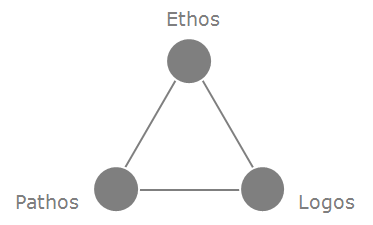
Already in the 4th century B.C., the Greek philosopher Aristotle formulated his theory on the three persuasive appeals: ethos, pathos, and logos.

ethos-pathos-logos

Since then, Aristotle’s rhetoric has become one of the foundations of public speaking and, as such, an equilibrated mix of the 3 ingredients should be considered a prerequisite for any well told story.

  • Ethos means ethical appeal. We tend to believe people whom we respect. We trust in products with a good reputation. We go to places that were recommended on Yelp or Tripadvisor
  • Pathos translates to emotion. We all like stories about the good vs. the bad. We prefer presenters that speak passionate about their topic. We (too) often make decisions motivated by love, admiration, fear or disgust.
  • Logos stands for reasoning and argumentation. We believe in what we can see and what we can touch. We want statements supported by facts and figures. If not, we keep asking for the Why, the What and the How.

If you think about it, ethos, pathos and logos are present in almost every area of our daily lives. And more than we realize, they determine how we (and our audience) experience situations, interact with people and make decisions. And, as for so many other things in life, the whole of Aristotle’s rhetoric is greater than the sum of its three parts: it’s neither about ethos OR pathos OR logos, but all about ethos AND pathos AND logos.

4th sin: No call to action

In web design, a banner, button, graphic or text often prompts a user to enter a conversion funnel. By clicking on it, he/she confirms his/her interest in the content and (on an e-commerce site) may enter into a next step towards buying a product or service.

As the primary purpose of most business presentations is to move the audience to action, you should make sure that you have similar mechanisms included in your talk.

So, never end your presentation with just a “thank you for your attention” or a Looney Tunes inspired “that’s all folks!” Dismiss all these men and women with clear directions. Tell them what you want them to remember, what they need to do, and how they can get there.

  • Leave ample time for questions. As a rule of thumb you should reserve around 20% of your time budget for Q&A and discussion. Make sure you are prepared for provocative or even weird questions from the room, and remember that a poor Q&A at the end may ruin the whole of your performance.
  • Summarize your main ideas and key points. Make sure you end in agreement with (the majority of) the audience and that they are ready for taking a next step with you.
  • Invite your listeners to engage in a next step. Always end your speech with a call to action or a call to application. Give them a bit of homework (like visiting your webpage, or reading a handout), make them agree on having a follow-up meeting (don’t forget to supply them with your contact details), or simply encourage them to use the products or apply the material you presented (such as the tips I am sharing in this post.)
  • Finish your presentation in a memorable way. Take the occasion to leave a final impression on your audience. Don’t stop cold, but try to surprise them one last time before you quit the stage.

5th sin: Unclear message

Even worse than a bad closing is when you let your audience go home with a “what has this guy been talking about for more than an hour” feeling.

The way you present may either help or hurt to make your point. Make your message(s) strong and memorable, and deliver it (them) in a catchy and captivating way.

In his MacWorld 2008 keynote, the late Steve Jobs presented the world’s thinnest notebook, the MacBook Air.  The Apple CEO introduced the new product with a photo of an envelope, told the audience that the new device was “so thin that it even fits inside one of those envelopes you see floating around the office,” and then pulled up and opened a real envelope that contained the new, ultra-thin laptop computer (watch the video on YouTube.) Sometimes there’s a thin line between a good and a great presenter. Steve Jobs has always been on the right side of it.

Finding the right pitch for your presentation often boils down to pinpointing a sticky story to tell. With the right mix of ethos, pathos and logos you can appeal to the hearts and the minds of those listening to you.

  • A good story has to be compelling, credible, concrete, clear, consistent, customized and conversational. If you remember these seven C-words, you’re already one step closer to a great pitch.
  • When defining your value proposition, never forget that value is in the perception of the beholder. Adapt your pitch to address the WIIFM (What’s In It For Me) concern(s) of your audience. And give them something in return for listening to you.
  • Building a message house is a great and simple means for defining, simplifying and structuring your messages, and to make sure your audience will remember them. When properly constructed, it is almost straightforward to transform this message house into a skeleton for your presentation.

message-house

  • A good way to validate your pitch is putting it to the elevator test. Can you ‘sell’ your message(s) in 30 seconds? Can you summarize your story on the back of a napkin? Can it be understood by your mother in law?
  • Finally, as shown in the MacBook Air example above, a strong opening can make a real difference. Most people decide within the first few seconds of a presentation whether a speaker is worth listening to. So make sure to grab the audience’s attention by surprising, intriguing, or provoking them.

6th sin: Boring slides

It’s tempting to rely upon material that others have created before you. Nothing as easy as making a slide deck by cutting and pasting slides from existing PowerPoint into yours. But there’s a consequence: 99% of these cut‘n’paste slideshows look like chameleons, that change colors, fonts and layout with every slide transition.

Look and feel do matter! If you want your audience to perceive you as a professional, then never compromise on the layout of your slides!

  • Real estate: Don’t overdo. Beware of creating slideuments. Apply the same template to all slides. Use plenty of white space. Limit the amount of bulleted slides as well as bullets per page.
  • Colors should contrast with the background. Don’t put together too many colors on one screen. Avoid using red text on a white or black background.
  • Fonts must be readable from the back of the room. Be consistent in style throughout the whole deck. Don’t mix too many typefaces. Avoid script fonts. Bold and italic are good to emphasize text, underline isn’t.
  • Images: use visuals that complement or accentuate your message instead of standard clipart or crapart, that adds no extra value (we all hate screen beans or know the man climbing a bar chart, don’t we?) Avoid mixing line art and photos.
  • Vocabulary: Consequently use the same terminology everywhere. Beware of acronyms and abbreviations. Don’t use jargon or slang.

So next time you need to build a business presentation, don’t feed the chameleons! Start well in advance and take your time to tune each slide. Don’t take existing material for granted. Be creative. Be consistent. Be professional.

7th sin: Wrong pitch

Even the most beautiful slides may be irrelevant to your listeners. It’s extremely important that you have a good understanding of who will be in the room. Doing some upfront research will certainly help you to tailor your pitch and (later) customize your presentation to your audience’s specific knowledge, beliefs, feelings, needs and expectations – and establish an emotional connection with them.

  • Make yourself familiar with Robert Cialdini’s principles of persuasion: reciprocity, liking, authority, social proof, commitment, and scarcity. These will help you to appear convincing, credible and trusty in front of your listeners.
  • Creating personas and asking questions about them like: “What is their role in the organization?”, “What does an average day in their job/life look like?”, “What do they value most?”, “How do they get motivated?”, and “What could be their most common objections to your product or service?” may be good means for tuning your content

This article is a slightly reworked compilation of posts that I published earlier on my B2B Storytelling blog (link below in profile), and a video recording of me presenting the 7 Sins is available on Campus in the Cloud

10 Aug 17:11

Your 6 Step Guide to Making Your Number in 2016

by john.staples@salesbenchmarkindex.com (John Staples)

The research we conducted for our 2016 annual report resulted in an undeniable verdict. Strategic alignment is the only way to systematize revenue growth.

In past weeks we’ve discussed some important steps in the process:

  1. Understanding strategic alignment.
  2. Creating functional strategies around the revenue growth value chain.
  3. Understanding the difference between strategy and tactics.
  4. Developing both internal and external alignment.
  5. Using market research to fuel strategy.

You now understand that strategy is about making choices. It’s about increasing the odds of success, and combining rigor and creativity. Your strategy is your operating plan.

And strategic alignment makes sure all the functional strategies operate in harmony.

Now it’s time to go a little bit deeper.

There are six steps to achieving alignment with your revenue growth strategy.

10 Aug 17:03

6 Pinterest Marketing Tips You Can Use Today

by Zack Fagan

6 Pinterest Marketing TipsInterested in a new marketing outlet? How about a social network that drives sales with an average order value of $123.50?

I hope that I have your attention at this point!

Good. In case you didn’t guess it already (or the title of this post didn’t give it away) I am of course talking about Pinterest.

Ready for some more good news about Pinterest?

83% of Pinterest users would rather follow a brand than a celebrity, plus only 5% of U.S. small businesses maintain a presence on Pinterest, meaning there is high demand and low competition!

So, with that introduction to the obvious power of selling on Pinterest, let’s get into some killer Pinterest marketing tips.

Going Back to the Basics

For those of you that have not already read our intro to Pinterest marketing, here’s a quick refresher of the 9 basics of Pinterest marketing:

Now let’s take a look at some more advanced tips!

1. Build your Community on Pinterest through Networking

Ok, so just like with any other social network you have to work on…well, networking.

So you should be sure to – post engaging pictures with awesome captions, respond to any comments that are left on your pics, and comment or like pictures by people who comment on your pics, etc.

What else can you do?

Find Influencers

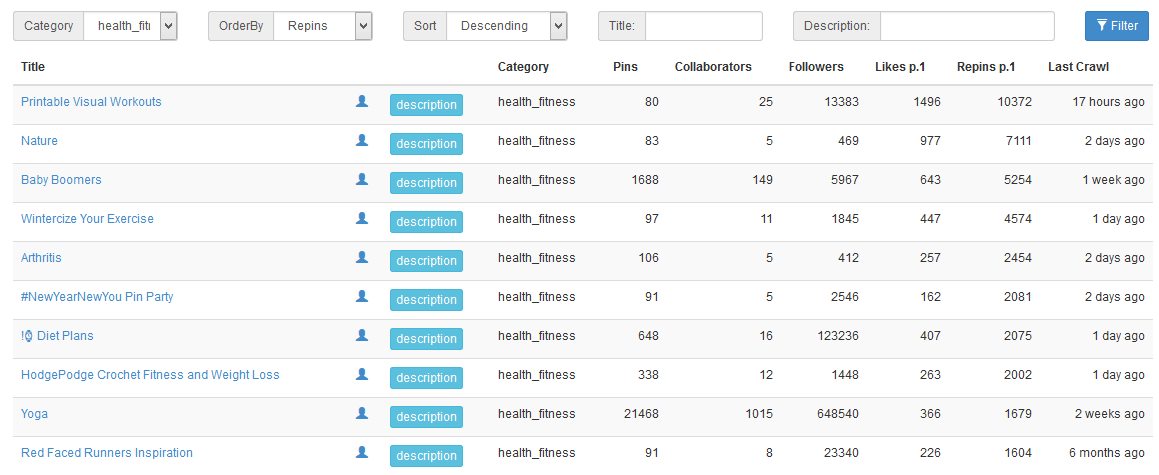
You can search for influencers within your brand’s niche by looking up a strong keyword and finding the people with the most “repins” in that search:

finding pinterest influencers

In the example above I’d consider reaching out to StyleCaster, because their content has seen quite a bit of interaction.

Post in Group Boards

Group boards are a brilliant little aspect of Pinterest which enable more than one contributor to add pins to a board.

The question is, how do you find the right group board for your business needs?

The answer is PinGroupie.com – an easily searchable and filterable directory of all group boards on Pinterest.

All you need to do is run a search and BAM you have a long list of potential boards for you to get involved with!

pingroupie group boards

Remember, not all group boards will let just anyone join as a contributor, so you might have to look around a bit until you find a good board, but once you find it, you will be happy you put in the effort!

2. Drive Traffic to your Pinterest Boards with Other Channels

Obviously you will do everything you can to grow your presence on Pinterest organically, but that doesn’t mean that you can’t give things a bit of boost via other channels.

Share Pinterest Pins and Boards on Other Social Networks

This might seem counter intuitive – if you have fans on Facebook, why would you try to send them to Pinterest?

It actually makes a lot of sense.

Think about it like this, by reaching your fans in more places you have the ability to expose them to different types of messages and to be in contact with them more frequently, therefore you have a higher chance of converting those fans into customers.

promote pinterest on social networks

H&M had good success sharing Pinterest on Twitter.

Promote your Pinterest Boards via Email

If you’re sending out weekly or monthly newsletters then why not promote your Pinterest Boards there?

It’s super easy. All you need to do is take a screen shot of a few of your best boards and add that to the email with a link back to your Pinterest page. Throw in a call to action and you’re bound to pick up some new Pinterest followers!

Import your Pinterest Boards to Facebook

Following the same logic as before, if you have a lot of active traffic on your Facebook page, then you can definitely drive some of that traffic to your Pinterest page by actually putting your Pinterest boards onto your Facebook page!

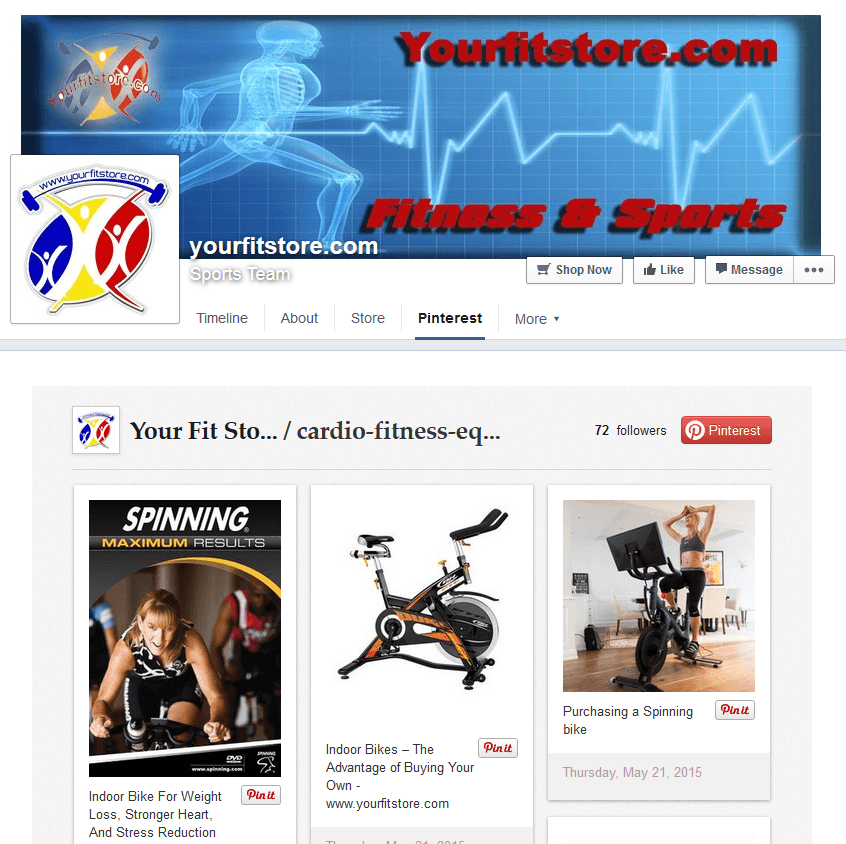
And lucky for you, it’s actually quite easy (and free) to import your Pinterest boards to Facebook with StoreYa’s Pinterest Tab!

Once you have your Pinterest tab set up your fans will be able to repin your pins and follow you on Pinterest straight from Facebook.

storeya pinterest tab

As you can see, the Pinterest Tab is clearly displayed on the Facebook Page’s tab bar and will certainly grab your visitors’ attention.

3. Create Rich Pins (More Info = Better)

Rich Pins are pretty cool, and super handy. Basically with rich pins Pinterest is able to pull additional info about the stuff that you pin which makes your pins much better!

There are a few different types of rich pins available (product, movie, recipe, place, or article), but the most relevant to you will definitely be the product rich pin.

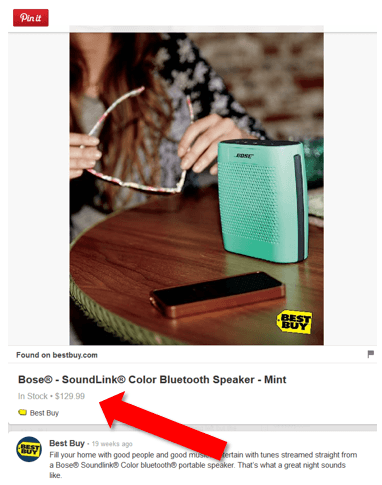
With this type of rich pin enabled when you post a link to a product of yours on Pinterest, not only will you be able to display the product, but Pinterest will display the price, availability, and a link to buy the product.

rich pins

With rich pins like this your chances of making a sale on Pinterest goes up by a whole lot!

Oh, and I almost forgot to mention the coolest feature.

If a user pins a rich pin, and then you lower the price of that product, that user will get a notification to their email that the price has been lowered, and will be prompted to make a purchase!

How awesome is that?

rich pin price change reminder

To set up rich pins follow Pinterest’s instructions here. It is a bit complicated so you might need the help of your tech team (but it is totally worth the effort).

If you don’t want to set it up manually though there are options available to you.

First of all, Shopify merchants actually already have this ability built in on their sites due to a partnership between Shopify and Pinterest.

But for all of you non-Shopify merchants there are simple plugins available for most major eCommerce platforms that make enabling rich pins simpler. For example, if you use Yoast for WordPress here are the instructions for enabling rich pins.

Pinterest Buy Buttons

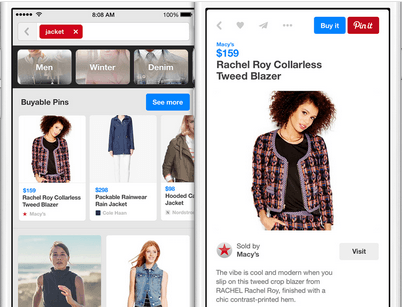
Possibly even more exciting than the rich pin is the buy button which Pinterest is in the process of rolling out. A buy button on your pins will enable your fans to actually make a purchase from you straight from Pinterest!

buyable pins

Unfortunately this feature is not yet available to everyone. Shopify merchants, once again you lucked out, because you have access to this. For the non-Shopify merchants – get your name on the waiting list!

4. Cash in on Popular Pinterest Topics

Let’s be honest for a second, no matter how amazing Pinterest is for your brand, DIY projects, crazy food, cute animals, etc. will always be more popular on Pinterest than your merchandise.

And that’s fine.

Because it doesn’t mean that you can’t piggy back on the popularity of other topics for your own good. For example, let’s say you sell sporting gear, why not have a board for “Sporty Animals” where you will post pictures of animals playing sports/using sporting gear.

(And by the way, there is definitely a demand for sporty animal pins!)

ridiculous pinterest

This strategy can help you reach out to your customers in a new and creative way.

So go find good topics, find a way to connect it to your brand, and start pinning!

5. Make the Connection Between your Site and Pinterest

You have a website, you have a Pinterest account, and they are both great individually, but you can make them work together to make them both even better!

Use your Site to Grow your Pinterest Presence

Not to repeat myself from the last post on Pinterest tips, but it is super important that you have pin it buttons on your website!

Anywhere that you post pictures on your site, give your site visitors the ability to pin the pictures to Pinterest – that means most specifically on your product pages and on your blog posts!

pin it buttons for websites

By adding these buttons to your website you will encourage your users to share you pictures on Pinterest which could be amazing for your brand exposure.

Pro tip: Always include one “action shot” on your product pages that’s a bit more eye catching, and therefore would have a greater chance of being shared.

action shot product page

Use your Pinterest Page to Boost your Website

Remember how I just said you should use an action shot on your product pages? Cool. Wonder what the best way of finding a good, and shareable action shot is?

You guessed it – test it out on Pinterest first!

Let me explain. Let’s say you’re debating between three or four different pictures and you’re not sure which to use, why not kill two birds with one stone?

Put the pics up on Pinterest (that gives you more content for Pinterest to engage your audience), and then sit back and see which picture gets the most engagement. The winner of this little experiment will be the new action shot on your product page!

Brilliant, no? Let your fans choose the picture that is most shareable, by testing which picture they actually share!

6. Don’t Forget About Men

Sure, 70% of Pinterest users are women, but don’t forget to look at that percentage in the opposite direction – 30% of Pinterest users are men!

There are 72.8 million users on Pinterest, and 21.9 million of them are men (Mashable).

This has two implications – 1st, if you sell products for men don’t you dare think that you can skip out on Pinterest! In fact, because so many businesses think that way, you will probably face less competition on Pinterest than on other social networks.

2nd, you can post content that appeals to men as well (not that there aren’t women who enjoy the same content as men and vice versa. So don’t forget to mix up your content (if you sell unisex products, or products for both men and women)!

men on pinterest

Clearly men are on Pinterest and they are active!

Get your Pinterest Marketing Rolling!

You learned the basics, now you’ve learned some more advanced stuff. I’d say it’s about time for you to become a Pinterest marketing master!

Got any Pinterest tips we didn’t mention? Share them or any other comments you have with the StoreYa community in the comments below!

10 Aug 17:02

Infographics: Are They Still Effective?

by Ritu Pant

Infographics are the fastest growing digital marketing strategy in the U.S. 62% of companies surveyed by Content Marketing Institute used infographics in 2014 (compared to just half in 2013), with another 26% expressing intentions of using infographics for the first time in 2015.

There is no question infographics are definitely not going away anytime soon. But, whether you’re a marketing expert or just someone who enjoys (or hates) infographics, there is a significant question very much in debate: do infographics still work?

Now, we’re a company who specializes in creating, researching, and designing infographics, so obviously we’re a bit biased when it comes to answering that question. Should you use infographics? Before we answer that officially, let’s take a look at some data so we can arrive at an answer driven by facts rather than our personal feelings.

Who uses infographics

Some Infographics are Unbearable, Let Alone Ineffective

Many naysayers have grown sick of infographics, and for good reason. Not all infographics are worth the virtual paper they’re not printed on. That isn’t just graphic design elitism talking, it’s scientific fact. MIT conducted an extensive study on the way the human brain processes visual information, particularly the way an image appears in a user’s peripheral vision and how the brain includes that information into a “mongrel” image. It revealed that many poorly designed infographics are virtually useless to the human brain, regardless of how interesting the subject matter might seem.

Takeaway: Your infographic needs to be designed well in order to be effective. Skimp on design, and you’ll potentially waste every ounce of effort in producing an infographic.

Color Works

Now let’s take a look at the other side of the effectiveness spectrum. One of the most powerful aspects of an infographic is the way it can use color to help readers (viewers, really) understand information more quickly and efficiently. It is a proven scientific fact: color helps us process information. It actually helps us read better. Content incorporating color into the design has been shown to increase reader attention span by up to 82%. But readers don’t just pay attention longer (which, in and of itself, is a huge hurdle to leap in today’s culture), they also comprehend what they’re reading up to 73% better with the assistance of color.

Bring pictures and symbols into the scenario, and the learning efficiency goes through the roof. A study of prescription users showed that people are 25 times more likely to maintain high adherence to instructions when the prescription labels include pictograms compared to patients receiving text-only instructions. With that in mind, infographics have the potential to save lives. (You may have to squint really hard to see it like that, but you can if you try.)

color works in content

Keep in mind, most brands are publishing information that isn’t life-or-death important. Whatever message you may craft, you’ll be hard pressed to come up with a topic as urgent to your audience as taking prescription medication in the right method and dosage. When readers approach most copy (the copy their health doesn’t rely on) they read an average of 20% of the text they see. The attention-gaining power of infographics is absolutely critical to delivering your message to an audience that demands something more interesting than text.

The point is, infographics are, by nature, designed to communicate more effectively and efficiently than text alone or even text and images functioning as different components. Infographics combine graphics and copy (and loads of relevant, interesting information) in a perfect marriage of communication elements . . . when they are executed properly. A poorly done infographic is a nuisance, but an infographic professionally designed by an authority in the industry can get a message—your message—to an audience virtually instantaneously.

Case in Point

Don’t think infographics can deliver the traction your brand needs? Here’s an example from January 2015 that hit all the right notes. Building on the exploding popularity of the NFL and one of the most exciting matchups of the season, this infographic created for Dallas Cowboys made an instant impression, yielding over 35,000 Facebook likes, over 4,100 shares, 236 tweets, and 479 Google+ shares. It helped fuel the excitement heading into the playoff game while channeling that excitement into traffic on the Cowboys home page.

2014 infographic use stats

The facts show that infographics can still work as a powerful tool for generating massive amounts of interest in a very quick period of time. They have the potential, when done right, to trigger significant engagement and capture the attention of hundreds of thousands of people. In 2014 alone, 5 infographics topped the 100,000 share plateau—that’s not views, that’s shares. Nineteen infographics had 50,000 shares or more, and over fifty were shared more than 25,000 times. When you consider the possibilities and the value of the exposure an infographic can generate, you start to realize how critical (and relatively minuscule) the initial investment is.

The Answer

So, do we think you should use infographics? Not necessarily. Infographics should be used responsibly. If you’re willing to make the investment of considerable time, research, and expert professionals, the answer is a resounding yes.

This article was originally published on Infographic World.

10 Aug 17:02

5 Five Minute Tips on What to do After You Send a Follow-Up

by Rachel Silver

You have read a ton of posts and articles on following up with leads. You have become a master of the follow-up…

After Follow Up Master

Now what?

Following up with your leads is a huge step towards sales success, but many people don’t know what to do after their initial message.

Getting a response or closing a sale are the best outcomes from a first follow-up email. Frequently, though, your follow-up email will be sent to the trash and deemed unworthy of a response. Properly engaging your leads gets them filtered into your sales cycle and potentially turns leads to a sale. With so many people telling you how to follow-up, you need to learn what to do when your follow-up works and when it fails, and next steps to consider.

5 Tips for What to do After You Send a Follow-Up

1. Answer Questions

Customer responses shows engagement and that they are interested in what you have to offer. Industry research shows that between 45-50% of all inbound sales are not followed up with after the original point of contact. Based on their response, you can better gage the customer’s needs and set up a plan of progress towards sale. Setting up times for calls, video meetings, or a way to further discuss the product would be a logical next step for sales. Well informed clients will feel more confident in their purchases.

According to the Harvard Business Review, companies that respond to queries were 7 times more likely to have meaningful conversations, but most companies are very slow to respond or will not respond at all. It was found that companies that responded within the first hour to questions were sixty times more likely to qualify a lead than if they waited 24 hours.

2. Engage

If your follow-up was aimed more towards making a connection rather than a sale, then continue the conversation. Now that you have snagged the attention of your contact, don’t let the relationship fizzle out before it has the chance to grow.

Nurture this relationship as you would any other: respond within an appropriate time frame, learn what you can about the contact, and keep the conversation flowing. If you have a CRM program, use it daily in order to see the best results and hold the interest of your leads to make a lasting relationship for the future. Stay ahead of your competition by engaging with customers immediately when they reach back out. The first person to respond to a lead builds trust, credibility, and greatly increases the chances of qualifying the lead.

The Short Life of Online Sales Leads

Via HBR

3. Create a Program

An open line of communication leads the way to the future success with your customers, so keep up your efforts and develop a strategy for the future. Even if the first follow-up you send doesn’t warrant a response, be persistent. But note, there is a fine line between pushing your sales and being overly aggressive and obnoxious.

The first email you sent might not have gotten your point across as clearly as you had hoped. In a second cold follow-up message, acknowledge the first one you sent. You can make it funny and call out the customer for not being responsive, or you can focus on more subtle ways of mentioning that you noticed they had not responded. Give new information on your product or yourself to draw in the lead.

In later follow-ups you can also mention common questions and points of confusion other clients have found with your product. This method cultivates social proof of your product and shows the lead that they are not alone in having reservations or questions.

With your new follow-up cadence, assign leads to parts of your team and have them reach out. Delegating leads to team members lightens your workload as well as gives your leads more personalized attention.

Via KISSmetrics

4. Measure

With every response you receive, or follow-up left without an action, make a note of it. If your leads respond within an average of two days, then make a plan for what to do if there is no response after two days. Have a message ready to go in order to stay top of mind with your leads. If most people tend to respond after your second email, then know that your first follow-up is not very likely to get a response.

Along with the response metrics, you should also track which leads became customers. Based on these measurements you can determine what sales you are likely to gain and which ones are not worth your efforts from fairly early on. For instance, if all of your qualifying leads previously responded to either your first or second email, then a third email might not be necessary for your follow-up plan.

If you begin to lose track of the data you want to measure, it is likely that you are not successfully implementing the plan you had in place to generate more sales. Inconsistent measurements give you incorrect results that you might end up applying. If you apply results created from bad data, then your attempts to improve your post follow-up strategy will be pointless.

5. Offer Something New

You can try and re-sell your product to the client by adding value to your previous offer. If your original pitch seems to be less effective, offer a limited time deal of your main product with something added onto the purchase.

Place a time frame on the deal to make it more enticing. Leverage the scarcity and limited decision time since it puts pressure on the lead to make them feel the need to jump on your offer sooner rather than later to avoid missing out on a deal.

Even if there was no response to your first or second offer it is possible that the problem your product would fix has not been met for the lead. Presenting your product with a new twist to shift the lead’s paradigm can give them a view of your product that is more in line with their perception of what they need. If at first you don’t make the sale, keep present different options until you find what they need.

Your perception determines your reality.

Your perception determines your reality.

The way you are perceived by your leads is their reality. One lead could need an extra push towards sale, while another might find more than three points of contact to be overbearing. As much as you plan for a sale, there is no specific number that will convert a lead to a sale. Each lead is different and you will likely need to feel out how your plan is going. You want to draw people into your emails with a noteworthy subject line and quality content in the body of the email. If you don’t give your full effort to engage your leads, then they will not give you a response. All of your points of contact after the initial follow-up should aim to create a solid future relationship.

10 Aug 17:00

Deep linking’s big, untapped potential

by Matt Thomson, Bitly
Google Maps deep-links to Uber.

GUEST:

This past quarter we saw major deep linking announcements from some of the industry’s biggest players, including Google at I/O and Apple at WWDC, highlighting the importance of deep linking.

With 70 percent of mobile commerce taking place in-app, marketers need deep links in order to take control of app re-engagement. Similarly, deep links make it easier to move users app-to-app. A classic example: Google Maps not only provides driving times but also offers Ubers, redirecting users right into the Uber app. The promise of integration is huge, but this is a one-off example. The question going forward is, how can we enable these customer experiences all the time?

Moving Beyond Implementation

A majority of initial and current hype around deep linking comes from the investment side. VCs hope indexing app content will be monumentally different than indexing web content. As a result, the unindexed content within mobile apps could end up breaking Google’s current dominance in search and digital discovery.

The current problem: Deep links are being used for plumbing and in many cases aren’t even implemented yet. An even bigger issue is that many app developers and product pros are looking at deep linking as an afterthought. According to URX, only 28 percent of the top 100 apps even have deep linking tags in place.


Sponsored by VB
Join us at GrowthBeat where thought leaders from the biggest brands will share winning growth strategies on August 17-18 in San Francisco. Sign up now!

So while we’ve seen the deep link market make some strides, it’s still nascent. For startups offering deep link solutions, that means a lot of their VC money will go toward educating the market, while the opportunity to capture the market is either too far out or could be dominated by a larger player.

In order to push the market forward, startups need to showcase strong use cases so the industry can move beyond deep linking implementation details and into how deep links improve the customer experience.

The Emerging Frontier

Deep linking adoption got a massive boost when Google and Apple made it more enticing for all apps to name, expose, and index deep links. At I/O this past May, Google announced Now on Tap and unveiled ways for locations inside of apps to surface in search results via App Indexing. Apple announced Spotlight for iOS, and it’s expected that 70 percent of all iOS devices will have the new deep linking capabilities within five months of the planned fall 2015 rollout.

Apple and Google are giving developers more incentive to create deep link locations in their apps, while simultaneously educating the market.

Beyond search, there are many other ways for the industry to locate hidden content within apps. For example, mobile web-to-app or app-to-app. The latter is particularly interesting given that users spend 84 percent of mobile time in-app.

The app-to-app experience is the market many power startups are pursuing. URX, Button, and Quixey are attempting to enable app discovery and engagement from within other apps. Like Google and Apple, they’ve built robust search and ad serving technologies by scouring deep links to understand what inside an app is worth surfacing to users. These companies will have long lives, but the company that combines its technology with an ad form factor that feels more native will prosper.

Additionally, a huge opportunity exists for marketers to leverage other digital channels to drive app engagement. As many as 52 percent of consumers discover apps via social media — so deep linking within social media posts and other content is imperative to capitalize on that massive opportunity, both through word-of-mouth and experience.

When it comes to customer experience, it ultimately falls to marketers to give customers the best ways to move in and out of a product, including enticing users into apps. Yet deep linking is rarely implemented within direct marketing channels such as email, SMS, or even paid media. This has to change because these channels are the channels that are key to re-engaging customers over long periods of time on the web.

Given the increasing need to trace the customer journey in and out of apps and solving problems such as sustaining app engagement, locking in LTV (lifetime value) users and making the app’s value clear, there’s a huge opportunity for the deep linking industry.

Matt Thomson is chief product officer at Bitly.


VB's research team is studying mobile user acquisition... Chime in here, and we’ll share the results.


10 Aug 16:59

7 Tests For Your Value Proposition

by Infobrandz
10 Aug 16:55

How To Ask Great Drill Down Questions

by John Fakatselis

Open-ended questions that connect and get buyers talking are essential. And they have to be asked in a skillful way, with good framing and value statements embedded to have the greatest effect. But drill down or follow-up questions are where the true art of great questioning begins. They separate the great sales people from the good ones.

Drill down questions require a higher skill level than open ended questions. You have to listen carefully to what the buyer is saying, and then be quick on your feet to ask good, relevant follow-up questions that demonstrate understanding, convey insight and deepen the conversation.

When it’s done right

When drill downs are asked effectively by a salesperson with the right skills, it’s a beautiful thing to watch. The conversation flows with the buyer pouring out critical information needed by the seller to help the buyer move forward. Buyers feel completely understood and respected, and the relationship strengthens.

When it’s done wrong

On the other hand, and I’ve seen this far too often, drill down questions asked by under skilled or poorly trained sales people are hard to watch. It’s painful. Abrupt changes in conversation direction, awkward silences as sellers check their notes and mounting buyer impatience damage rapport and stifle dialogue. It usually doesn’t end well.

How to become good at drill down questioning quickly

First, what not to do.

The biggest, most misguided complaint I hear from sales people struggling to become good at drill down questions is:

“I need more product knowledge. I don’t know enough about our products to ask good drill down questions.”

This is absolutely wrong. Product knowledge is not the key—it’s understanding the buyer: their situation, their goals, their fears and challenges, and their aspirations.

Is product knowledge important? Yes, but it pales in comparison to demonstrating understanding to your buyer. Understanding your buyer and the outcomes your products bring is far, far more important. In fact, if you start spouting product related questions and statements, the dialogue will go right to the weeds before you’ve ever had the chance to convey understanding and value.

Now, let’s discuss a quick path to better drill down questioning.

1. Focus on buyer personas

Come prepared to the discussion knowing your buyer’s persona: their key business drivers, goals and objectives, main challenges, common obstacles to change, etc. Every prospective company and buyer is different, but there is much common ground you can leverage to ask very relevant questions, convey insight and demonstrate understanding.

2. Create a drill down question map

Around each of your open ended questions, map high level drill down questions that relate to the overall topic. Don’t get too detailed, just add keywords and phrases to the map that prompt your follow on questions. A great technique is to use one PowerPoint slide per topic, with the open-ended question in the center, and drill down phrases and keywords surrounding the main question.

3. Practice using role play

The best sales training for just about any situation is role play. This is especially true for questioning skills. Nothing can replace role play practice.

Practice by starting with an open-ended question, and then see how well you can keep the role play partner engaged with good follow up questions.

Here’s an example of a good drill down question:

“Jill, you mentioned you’re worried about how limited your team’s visibility is into how sales is using your marketing materials in the field. This is something we hear quite a bit and can definitely help you improve. Could you talk about some of the specific areas or scenarios that concern you the most?”

Practice this technique and you’ll be amazed at how a little improvement in drill down questioning dramatically deepens conversations and improves your understanding. Once you becoming really good at questioning, B2B sales becomes a lot easier, and a lot more productive. It’s one of the main reasons why great sales people are great.

Hope you have your best year ever.

10 Aug 16:53

How To Boost Conversions With Voice Of Customer Research [Case Study]

by Jennifer Havice

“Give people what they want, when they want it, in the form they want it in…” said Kevin Spacey in a speech at the Edinburgh Television Festival in 2013 about the recent success of his series, House of Cards.

Though he was referring to Netflix and the film industry, he just as easily could have been talking about optimizing websites.

Figure Out The Why

Knowing what your customers want, when they want it, and how they’d like it served up to them is not just at the heart of game changing television shows. It’s also the core of developing winning test hypotheses. It’s the why behind the quantitative data – Behind the ‘what’ of quantitative data there is a ‘why’ that informs your copy and gives your visitors an easily navigable path to becoming a customer.

When you understand the motivations driving your prospects and customers, you can reflect their feelings back to them (in their own words, I might add). That way, you’re way more likely to convince them buying from you is the right call.

So, how do you figure out that all important why? And, what’s the best way to capitalize on it when you do?

That’s where tapping into the power of your Voice of Customer Research comes in. Follow along as I walk you step by step through the process. You’ll learn how to pull out the key messages from your prospects and customers and use them to boost conversions. Later, I’ll show you a real life example from the trenches.

What Is Voice Of Customer Research?

Voice of Customer (VOC) refers to the process of discovering the wants and needs of customers through qualitative and quantitative research. Initially created as a way to link customer needs to performance measures in Japanese product development, VOC has jumped into the mainstream of market research.

In a landmark paper by Griffin and Hauser in Marketing Science (1993), they defined four aspects to take into consideration when conducting voice of customer research.

  1. Customer needs described in the customer’s own words
  2. Hierarchical grouping of needs
  3. Prioritization of needs
  4. Segmentation of needs and perceived benefits by audience

For the purposes of this post, I’ll be discussing voice of customer research in terms of employing customer (and prospect) feedback about a product or service to develop more persuasive copy specifically.

You’ll find out how to gather qualitative insights to understand the wants, needs, pain points, and hesitations of your target audience so that the most critical messages can be identified and used to:

  • Help your customers reach their goals faster and easier, i.e. improve the customer journey
  • Increase conversions
  • Drive more leads, sales, and revenue

There are loads of methods for pulling together Voice of Customer Data. From interviews to surveys and forums to onsite reviews, you can pick out the recurring messages and verbiage that most resonates with your prospects and customers then identify their order of importance.

One of the most reliable and easy to tackle ways of getting highly usable bits of customer insights (and what I’ll cover in this post) is through surveys. Whether you use onsite popup surveys or ones you email to your subscriber list, the key is to ask the questions that will get you the answers you need to optimize your copy and site.

The 3 step process for turning what your customers are saying into website copy that converts

Developing test worthy copy relies on following three basic steps:

  1. Ask
  2. Mine
  3. Analyze

Sounds pretty simple? Yes and no. While it’s not rocket science, the process takes some time, thought, and organization. Your first step involves compiling the research.

Step 1: Ask the right questions

As Avinash Kaushik of Google writes, “…for the fastest way to understanding customer problems there is nothing like asking the customer herself/himself.” The challenge is knowing the best questions to ask when and where.

There are countless questions you can ask your prospects and customers. However, the best way to narrow the options down is by knowing what your end goal is. What pages on your site are you looking to optimize with your copy and what do you need to learn in order to do that most effectively?

For instance, if you’ve discovered from your analytics that you’re losing a high percentage of people on your checkout page you may want to ask those visitors who have completed a purchase a single question before leaving your site.

qualaroo

Or, you may be tasked with reworking an entire home page and corresponding sales funnel. In that case, sending out a survey by email to both your prospects and recent customers asking them a series of questions that gives you the best chance of understanding what they see as the benefits of your solution along with their biggest pain points.

Here are 4 questions that have always served me well when it comes to pulling out voice of customer for copy:

  • “When did you realize you needed a product/service like ours?” – This is a question that will help you find out what the trigger events are going on in a person’s life that motivate him to seek out your solution.
  • “What problem does our product/service lessen or fix for you?”- Here you’ll be able to find out what your customers consider the problem to be. You may find there are problems you’re solving that you didn’t know about.
  • “Did you consider any alternatives to buying/working from/with us?” – It’s always a good idea to know who your customers see as your competition. This will help you build a case as to why they should buy from you.
  • “What concerns or hesitations did you have before you decided to buy/work with us?” – Being able to address any sources of friction in your copy is incredibly important. You can reflect your customers’ concerns back to them in terms of how you or your business will alleviate them.

Step 2: Mine the answers

Now that you’ve asked your questions and gotten your answers, it’s time to pull out phrases and sentences written by your respondents that will give you the best insights into developing your copy.

Go through your survey responses one by one (yes, don’t skip any because you never know when you might come across a golden nugget you can drop into your copy verbatim.) You’re looking for the following to highlight:

  • Phrases that tap into the respondent’s needs/wants
  • Phrases that reference the respondent’s biggest pain points
  • Phrases that key into their hesitations or concerns about purchasing

message mining

You can either download the document I created (instructions below), or simply open up your own Google document and start copying and pasting any responses that fit into each category. Place an asterisk next to anything you pull out that seems particularly well said.

To download the template, share the article using one of the buttons below. Once you have access, just click File > Make a Copy, then you’ll have one to keep.

The power of inserting verbatims into your copy

At this point if you’re wondering how important taking out the actual words your prospects and customers are using, think again. Joanna Wiebe of CopyHackers who trained me in conversion copywriting and has taught this uber helpful technique of message mining to countless others, A/B tested a headline for a rehab center in which she swiped the copy directly from a book review on addiction.

While not taken from a survey response, the premise was the same: find out what your ideal target audience needs to hear and the language those people need to hear it in to trip their triggers.

beachaway

Joanna tested the control headline, “Your addiction ends here,” with the headline “If you think you need rehab, you do.” The new headline generated >400% more clicks on the main call to action button and >20% more lead generation form submissions on the next page.

Step 3: Analyze and find the gaps in your copy

Start analyzing all the voice of customer data you pulled out from your survey responses by going back through each column and making note of the recurring themes. Chances are you’ll start to find a pattern.

Let’s say you’re finding over and over again under your Hesitations/Anxieties column that respondents almost didn’t purchase your product because they couldn’t see how it would positively impact their business.

Since that concern loomed large in your recent customers’ minds, you can bet it’s a concern for those visitors who left without buying. And, you’ll want to make sure you address it on your site (see the example coming up for how to do this.)

Keep a tally going for your columns. Then, grab the top 3 or 4 messages from each and either drop them into a new document or grab this Google doc I created. available for download.

To find the gaps in your existing copy, it’s time to compare what’s on the page with what your visitors are saying.

Go back to the pages on your site you plan to rework and take a mini copy audit of sorts. You’ll want to pull out the key messages that answer these questions:

  • How is your product/solution solving your customers’ problems?
  • What are the benefits of your product/solution?
  • How is your copy alleviating potential sources of friction? i.e. are you giving your visitors reasons to believe your product or solution will do what you say it will (testimonials, data, social proof)

Compare your copy to what you’ve mined. If the majority of your prospects and/or customers tell you that they can’t live without your app because of it’s great interface, reliability, and easy integration with your software and all you’re talking about is price…you’ve created a communication gap.

And…gaps lead to big wide holes in conversions.

How we used Voice of Customer Research to lift conversions on Learn Visual Studio

It’s all well and good to have a process spelled out for you, but it’s even better when you’ve got an example to see how someone else has put the pieces together.

So, let’s look at how my colleague Dustin Drees – CRO pro – and I set about using voice of customer research to optimize the LearnVisualStudio.NET home page.

Low hanging fruit: getting a quick win and learnings

Dustin conducted two surveys before bringing me onto the project:

  • Onsite Qualaroo survey to determine how visitors identified themselves (beginner, intermediate, or experienced programmer) and their primary goal when joining
  • Email survey to recent customers to find out why they decided to join, their hesitations to joining, any questions not answered before joining, and what their biggest challenge was in finding the right solution

From the 200 responses on the Qualaroo survey, respondents segmented themselves as:

  • 59% Beginners
  • 25.5% Intermediate
  • 15.5% Advanced

In addition, 69.74% of those who responded to the second question (119 responses), said they were Most interested in finding their first developer job.

He took that information to run a simple copy test to determine if there was in fact a disconnect between the value proposition presented on the home page and LVS’s target audience. The goal was to increase site engagement – moving more of the right people further into the site.

Here’s the control:

lvs original

As you can see, the headline and sub-headline don’t speak directly to beginners or match their expectations of what they would like to achieve. Now, take a look at the variation:

First VariationVariation that became the control for the next test discussed below

Simply by telling visitors who these lessons are specifically designed for and the end result of taking them, conversions increased on the Courses (+9.2%), Plans and Pricing (+24%), and Curriculum (+23.9%) after three weeks and reaching statistical significance.

What happened when we dug deeper into the surveys

I was tasked with going through the second survey to see where the copy might be missing the mark.

Before coming to any conclusions, I went about the same process outlined in the 3 step process above. I copied and pasted relevant pieces of survey responses under each category, ranked them, and then created a hierarchy of needs, wants, and friction points.

In the case of LVS, here’s what the open ended questions told us in order of importance:

hierarchy

What we realized after teasing apart the voice of customer data was twofold: visitors were having a difficult time understanding how much value the courses could provide and encountering friction by not having their primary concerns addressed.

How we translated our findings to the screen

Given the data, we hypothesized that better priming visitors with enough information to make an informed decision before they landed on the offer would improve sign up numbers. So, here’s what we did with the copy:

Amped up the value proposition

By tweaking the headline to include C# and .NET, we highlighted the specificity and unique quality of the courses. The sub-headline makes use of words used over and over again by customers in the survey responses – “practical exercises” and “step by step roadmap.”

LVS above the fold

Keyed into the benefits customers were getting from the course while simultaneously addressing the biggest anxieties

With the copy below the fold, we did this in two different ways. First, we framed their anxieties in the form of solutions the courses could provide for them.

choose lvs

Then, we reiterated the top 3 benefits uncovered in the survey responses and rounded them out with additional copy making sure to include some of the most heavily used words straight from the customers’ mouths.

Changed CTA to send visitors to the next most logical place in the sales funnel

Instead of continuing to send visitors straight to the Plans and Pricing page, we directed them to the Curriculum page where they could get a better idea of what was included in the courses. One of the biggest sources of friction for visitors was being unsure if joining LVS would fit their needs.

Wrapped it all up in a neat little bow with a video

One of the biggest selling points of the program is the founder of LVS and teacher of all the video courses, Bob Tabor. The most recent customer survey showed overwhelmingly that people were drawn to Bob’s style and personality in his videos. So, our aim was to get him seen as soon as people landed on the home page.

Since video can be highly persuasive and effective at increasing conversions, we had Bob talk about his courses within the context of what’s in it for potential students while addressing the biggest concerns found in our research.

Results, questions, and eventually more tests…

Our variation outperformed the original on the main call to action button above the fold by 66.3%. Significantly more people were choosing to check out the Curriculum page over the Plans and Pricing page.

In fact, we saw a rise in visits to the Curriculum page overall without the call to action traffic factored in – meaning even if visitors chose not to click on the main button they were still more likely to visit that page.

No surprise, visits to the Plans and Pricing Page were down by 14.6% on the variation.

But…we found something interesting happening.

While less people were making it to the Plans and Pricing page, more people were signing up for the yearly membership plan with the lifetime plan remaining flat. (Sign ups have yet to reach statistical significance so no firm conclusions can be drawn as of yet.)

What does this all mean?

Our changes based on the voice of customer research proved visitors want more information before making the leap to becoming a paying customer. By increasing engagement with more motivated visitors and getting them on the right path, we saw positive movement where it counted (even without having optimized the rest of the sales funnel.)

Conclusion

The big takeaway: By taking the time to diligently go through our voice of customer research in tandem with the quantitative, hypothesize based on the data, and test, we discovered the journey customers need to take on the site in order to make a buying decision. Now we have a better idea going into optimizing the rest of that journey.

Now it’s your turn

Start communicating with your customers and gathering your own voice of customer research. Sure, it takes some work but there’s the potential for a big payoff in learnings and conversions.

…And you might just find that once you know what your customers want, when they want it, and the form they want it in, the copy will write itself.

10 Aug 16:53

The Perfect Sales Pitch For The Admin, The Champion, And The Decision-Maker

by Cara Hogan

Every Closed-Won deal requires not one sales pitch, but many.

Reps have to convince an administrator, a team lead, a manager, a CFO and a few more people in order to close every deal. In fact, in today’s market a B2B buying decision involves an average of 5.4 people, according to research from CEB. Reps need to reach a consensus across multiple tiers of the organization, often including the C-Suite.

If even one person doesn’t agree to purchase your product, you could lose the deal. Because of this, sales reps must navigate the account effectively and sell to prospects across multiple roles. However, each prospect has their own unique priorities and goals in mind during the buying process.

Sales reps can’t use the same talk tracks and selling points when working with the admin as they do with the CFO. Here’s how to target and personalize your sales pitch exactly to your audience, winning over prospects in every role and every level of business.

The Line-Of-Business Employee

An administrator or other lower-level employee is often the first person you’re able to reach during a sales engagement. This employee will become one of the core users of your product and often immediately sees the value in your pitch. However, a line-of-business employee is often busy and overwhelmed, and unable to do real work because of the time-consuming processes he has to follow.

In this case, you should emphasize the personal benefits the prospect will see from using your product. For example:

  • How much time your product will save
  • How easy your product is to use
  • How quickly the prospect will get solid results
  • How impressed their boss will be

A line-of-business employee isn’t selfish, but he’s often too deep in the weeds to see the bigger picture. Appeal to the personal benefits the prospect will experience with your product, and he’ll be enthused and happy to refer you to someone else at the company with authority.

The Internal Champion

Unlike a line-of-business employee, a champion has more power and influence within the organization. She isn’t the one who will sign your PO, however, she can offer inside information and help you sell the product internally. If you can win over an internal sales champion, you have a much higher chance of closing the deal.

For this role, you want to emphasize both the benefits to the prospect personally, and the potential to change the business for the better. For example:

  • Your product’s compatibility with other technology
  • The ease of training and implementation
  • The problem your product will solve for entire business
  • The value it will offer to executive leadership

With this information in hand, the champion can help introduce you to power, and set the buying process in motion. Because leadership at the company trusts the champion’s judgment, you will be fast-tracked to the top once she’s on board.

The Decision-Maker

You usually only have one chance to pitch a decision-maker, so you better make it good. If you’re talking to a CEO, VP, or another C-Suite level prospect, your pitch should really be all about the ROI.

For example, every decision-maker wants to know:

  • How much your product costs with quantifiable ROI
  • Competitive analysis
  • The key business value your product offers
  • How your product will drive substantial improvements in their business

As you move up the chain to the decision-maker, each pitch gets a little more difficult and a little less forgiving of mistakes. If you reach the decision-maker, make sure you’re prepared and have the right pitch customized to their specific needs and priorities.

Every sales prospect has varying needs, and before you get on a call, make sure you’ve customized your pitch to their role. An administrator, a champion and a decision-maker all have different priorities and therefore want different things from your product. Make sure you can win them all over, and close the deal.

Great Reps

10 Aug 16:52

Email Strategy – Getting The Basics In Place

by Mike Parry

Creating a strategy for email marketing will keep you in the race for customers. Continuity is key – both in terms of implementation and in identifying and reacting to change.

Outlook (Hotmail), Gmail, Yahoo, et al have been employing user interaction (or lack thereof) to determine whether emails are delivered in the inbox or junk folder for some time now but engaging users should, of course, be a marketing fundamental.

Email is the mainstay of online marketing – commercial tools for sending mass marketing emails have been available in the UK since 1999. Every year since has shown double digit growth in email marketing spend despite the decline in the cost of email volume. Why? Because people like emails. Well, they like the ones they want anyway!

So, attention should be paid to how email marketing is done. Even today, many companies create a generic sales led offer or newsletter and send it to their email list with predictable regularity. The message is often the same which quickly leads to email fatigue – as consumers, we expect more than this now and quickly tune out of the same old emails pushing the same old stuff.

A strategy is required – and one that covers every aspect of email marketing communications. Here are a few areas to look at when formulating a strategy – and they start before you have collected your first email address.

Sign me up

Set up a two stage sign-up process – the first is a quick and easy ‘add me to your email list’ where you ask for an email address only (and maybe a first name). This makes it an easy decision for people to sign up and, on submission, invite your new registrants to submit more information so they can receive emails about the things they like and want to hear about. However, don’t make this a compulsory step. You may also want to consider offering people the chance to choose email frequency if you are likely to be sending lots of campaigns.

I’m new here

Once you have the addresses, begin a nursery programme. Starting with an instantly triggered welcome email, set up a sequence of emails that encourage new registrants to do the thing you want them to do and explain the types of emails they’ll recieve and their frequency to set expectations. This sequence needs to be reactive, so subsequent emails in the sequence are tailored based on how people interact with earlier ones. Statistics consistently show that new data is responsive, so don’t just add them to your main database to receive the next newsletter.

Trigger happy

Send emails triggered by actions on your website, dates or other events. Done well, triggered emails are a win-win – people get emails when they do something (sign up, purchase, don’t purchase, on they birthday etc.) and they get them at the right time so are still in a receptive frame of mind. Don’t forget about these emails though – ‘review and renew’ not ‘set and forget!’.

I’m not like all the others

Like the estate agent mantra ‘location, location, location, a marketers mantra should be ‘targeting, targeting, targeting.’ Segment your list based on the things you know about the people on it – from website actions, purchasing history, geo-demographics and email open and click data. Most good email systems allow content to be served into emails dynamically, so you shouldn’t have to build multiple creatives for multiple segments.

Testing times

Another marketing mantra is ‘test, test, test’ – and it’s quick and generally easy to run tests with email and you get the results fast. Test different subject lines, creatives, offers and send dates and times (but not all at the same time!) Here’s a handy list of some of the things you can test.

Upwardly mobile

Design and code emails that work on mobile devices – and not just to make them fit a ‘phone screen. Think, portrait not landscape, tap not click, use strong original images and keep messages clear and concise. Think about the environment in which people may see these emails, create a short subject line, remember the pre-header and have an easy to understand compelling call to action.

Dead wood

Inactive users? Act now! Look at your email analytics to see who isn’t opening emails. Anyone who hasn’t opened one in six months or more probably never will. Continuing to mail them will ultimately cause delivery issues as well as you paying to send emails people won’t read. Removing the data is the best option – even though there was a cost and time element to build up the database. By all means put together a reactivation program (similar in process to a nursery program), but don’t expect miracles as most addresses are likely to remain inactive.

Social climber

Integrate social media into emails, giving your users the chance to share your emails with their friends. If your email marketing is done well and you have affinity with your users they are more likely to share your content and an audience of one becomes an audience of tens or hundreds.

Peer-to-peer

People trust what other people say over what companies say – so real reviews on a product or service can go a long way in helping customers feel confident about making a purchase decision. Include positive reviews in your emails to build trust in your brand.

Adapt or die

The Internet is constantly evolving and so is the way in which we use it. Any good digital strategy needs to evolve too and the wealth of information you can collect on how your data interacts with emails you send, pages they visit on your site, devices they use and purchases they make should be used to shape your email marketing activity. Review your email practices constantly and hold in-depth quarterly reviews with all stakeholders to ensure everything you are doing is geared towards what you list is doing.

I’ll leave you with an email that gets things right on many levels – even if you don’t appreciate the subject matter, the way it’s put together and approach it takes is highly engaging (and, no, it wasn’t sent to me, although I’m inclined to make a purchase anyway!)ExplodingKittens

10 Aug 16:52

Errors To Avoid And Communication Consistency Will Fuel Sales

by Elinor Stutz

shutterstock_210860854Nothing is more distressing than to try to work with someone who is inconsistent throughout all of their communications. This includes verbal, written, and behavior in addition to body language and facial expressions.

The inconsistency is troubling because it raises the question of whether the person may be trusted. As a business professional, it is important to recognize that when trust is in doubt business is lost.

You may recognize some of these irritants:

  • Denial of what was previously said
  • Showing up late without warning
  • Pushing the sale without thought given to the client’s purpose

Favorite Traits

Take time to list your favorite traits found in your friends and those of your favorite clientele. Next to the words in the bulleted list, add a sentence of why you like it.

For example:

Helpful – developed a closer relationship

Humor – have fun together

Knowledgeable – may always be counted on to provide the best answer

Stress Situations

Next, consider previous poor experiences. Make a second bulleted list of factors contributing to the stressful situations. Put a star next to the inconsistencies that included promises made.

Favorites

Your third list is to reflect the companies you turn to when their type of service is needed. Did you ever consider they aren’t alone in their space but have competitors? What is it about these frequented services that have you as a devoted customer? List out their consistencies.

Analyze Lists

Check for your own consistencies in what you most prefer and least admire. Then take note of lessons to be learned from the lists. What may you take away to add to your repertoire?

Revise

Review what you listed as your consistencies to see what might be refined or added to the list. These may well become your differentiators to be communicated to prospective clientele and earn you increased business.

My Observations For Improvement:

Call ahead to be certain you connect with the person to let them know you will be late. Then ask if the later time still works.

Sales Strategy: Agreement tells you everything is still good.

Pick up and drop off clients next to the curb.

Do not have your car sticking out in the middle of the street to have other drivers honking at you. It’s unnerving for the clients plus puts a question mark as to whether you actually do perform on your client’s behalf.

Sales Strategy: Thoughtfulness on all levels encourages business.

We are all guilty of making errors like these from time to time. Therefore, there is no shame but one does need to take ownership of having done so. Most people are forgiving. Apologize to move forward.

Sales Strategy: Demonstrated honesty encourages a long-term relationship.

Importance

The importance of these lessons lies in the fact this is the starting point for conducting business. When your preferred habits are faithfully followed, the collection becomes known as your personal brand.

Your unique trait ensemble may easily be transferred into the brief story you share with prospective clients to reveal the unique way in which you conduct business.

Sales Strategy: This produces the emotional connection that influences sales. The above suggestions will enhance client loyalty that leads to the Smooth Sale!

07 Aug 16:07

17 Mutual Funds to Ride the Tech Wave

by Christina Lavingia

Shutterstock

Technological innovation is shaping the world we live in more than ever before. It’s affecting nearly every industry and is only anticipated to accelerate.

Innovation presents big opportunities for growth, which is why tech stocks have the potential to be such great investments. Consider Apple Inc.’s stock performance over the last 10 years. It experienced an increase in stock price of 1,647 percent since the introduction of the iPhone, iPad and Apple Watch, among other popular products.

This is a best-case scenario, as stocks can swing the other way with performance, as well. For instance, the once high-flying Twitter stock is down over 62 percent since its high in December 2014.

For those interested in investing in tech, but not wanting to gamble on the next big winner (or loser) in the space, a diversified mutual fund, which holds a basket of stocks rather than just one or two, can be a better choice. Credio has compiled a list of the 17 best-performing tech mutual funds based on 10-year, load adjusted returns to consider.

#17. FSPTX – Fidelity Select Technology Portfolio

Current value of $10,000 invested in 2005: $27,156
Ten-Year Annualized Return: 10.51%
Net Assets: $2.87 Billion
Expense Ratio: 0.78%
Share Class: No Load
Investment Style: Technology

#16. MATFX – Matthews Asia Science and Tech

Current value of $10,000 invested in 2005: $27,556
Ten-Year Annualized Return: 10.67%
Net Assets: $182 Million
Expense Ratio: 1.16%
Share Class: Investor
Investment Style: Technology

#15. STPAX – Saratoga Technology & Communications

Current value of $10,000 invested in 2005: $28,306
Ten-Year Annualized Return: 10.97%
Net Assets: $43 Million
Expense Ratio: 2.25%
Share Class: A
Investment Style: Technology

#14. CTHRX – Columbia Global Technology Growth

Current value of $10,000 invested in 2005: $28,611
Ten-Year Annualized Return: 11.08%
Net Assets: $352 Million
Expense Ratio: 1.03%
Share Class: Retirement
Investment Style: Technology

#13. ARTPX – AllianzGI Technology

Current value of $10,000 invested in 2005: $28,635
Ten-Year Annualized Return: 11.09%
Net Assets: $1.37 Billion
Expense Ratio: 1.34%
Share Class: Other
Investment Style: Technology

#12. USSCX – USAA Science & Technology

Current value of $10,000 invested in 2005: $29,468
Ten-Year Annualized Return: 11.41%
Net Assets: $916 Million
Expense Ratio: 1.24%
Share Class: No Load
Investment Style: Technology

#11. WFTDX – Wells Fargo Advantage Specialized Tech

Current value of $10,000 invested in 2005: $30,057
Ten-Year Annualized Return: 11.63%
Net Assets: $341 Million
Expense Ratio: 1.35%
Share Class: Other
Investment Style: Technology

#10. UNSCX – Waddell & Reed Science & Tech

Current value of $10,000 invested in 2005: $30,673
Ten-Year Annualized Return: 11.86%
Net Assets: $3.81 Billion
Expense Ratio: 1.26%
Share Class: A
Investment Style: Technology

#9. MTCJX – MFS Technology

Current value of $10,000 invested in 2005: $30,890
Ten-Year Annualized Return: 11.94%
Net Assets: $348 Million
Expense Ratio: 1.07%
Share Class: Retirement
Investment Style: Technology

#8. SGTTX – Columbia Seligman Global Technology

Current value of $10,000 invested in 2005: $30,973
Ten-Year Annualized Return: 11.97%
Net Assets: $610 Million
Expense Ratio: 1.04%
Share Class: Retirement
Investment Style: Technology

#7. WSTRX – Ivy Science & Technology

Current value of $10,000 invested in 2005: $32,627
Ten-Year Annualized Return: 12.55%
Net Assets: $6.5 Billion
Expense Ratio: 1.57%
Share Class: Retirement
Investment Style: Technology

#6. SCMIX – Columbia Seligman Communications & Information

Current value of $10,000 invested in 2005: $32,962
Ten-Year Annualized Return: 12.67%
Net Assets: $4.11 Billion
Expense Ratio: 1.03%
Share Class: Retirement
Investment Style: Technology

#5. TEFQX – Firsthand Technology Opportunities

Current value of $10,000 invested in 2005: $33,627
Ten-Year Annualized Return: 12.89%
Net Assets: $132 Million
Expense Ratio: 1.85%
Share Class: No Load
Investment Style: Technology

#4. FSCSX – Fidelity Select Software & Computer Portfolio

Current value of $10,000 invested in 2005: $36,346
Ten-Year Annualized Return: 13.77%
Net Assets: $2.8 Billion
Expense Ratio: 0.77%
Share Class: No Load
Investment Style: Technology

#3. PRGTX – T. Rowe Price Global Technology

Current value of $10,000 invested in 2005: $37,664
Ten-Year Annualized Return: 14.18%
Net Assets: $2.03 Billion
Expense Ratio: 0.91%
Share Class: No Load
Investment Style: Technology

#2. BFOCX – Berkshire Focus

Current value of $10,000 invested in 2005: $37,777
Ten-Year Annualized Return: 14.21%
Net Assets: $65.7 Million
Expense Ratio: 1.98%
Share Class: No Load
Investment Style: Technology

#1. FBSOX – Fidelity Select IT Services Portfolio

Current value of $10,000 invested in 2005: $39,808
Ten-Year Annualized Return: 14.81%
Net Assets: $1.27 Billion
Expense Ratio: 0.81%
Share Class: No Load
Investment Style: Technology

07 Aug 16:06

Quit Selling Price and Start Selling You

by TheSalesHunter
  The believability a customer has in you will only be equal to or less than the credibility you’ve established in their mind. The believability a customer has will determine their belief in the outcomes they expect to receive. The price they are willing to pay will never be more than the value / benefits […]
07 Aug 16:05

Reps Running For the Door? 3 Tips to Stop the Bleeding

by leslieye@hubspot.com (Leslie Ye)

Hiring is top-of-mind for any organization, but it's an especially hot topic for sales recruiters, according to the 2015 CSO Insights Sales Performance Optimization Report.

Only a tiny fraction of sales organizations aren’t thinking about hiring this year. A whopping 96.8% of respondents are focused on growing or maintaining their sales organizations, according to the data.

Why? Salespeople aren’t exactly making it easy for recruiters to maintain good-sized teams. The average sales force loses one-third of its reps each year due to both voluntary and involuntary turnover. 

But with so many salespeople looking for a new position and so many sales organizations looking to hire, there shouldn’t be any problem, right?

Wrong.

It generally takes seven months for a sales rep to become productive, and the cost of getting a new hire up to speed is no small change.

So what can you do?

1) Be deliberate about who you hire.

It’s worth it to spend ample time upfront qualifying your candidates. You’re far more likely to miss red flags if you rush through the interview process, and these will create problem in the long run. Check out our picks for the 25 best interview questions to recruit superstar reps.

2) Offer actionable training and coaching.

Take a close look at your training program. Is it actually useful? Do you offer ongoing product training and professional development for reps? 

Around $20 billion is spent on sales training each year, but only about 7% of this budget goes toward skills-based coaching, according to research from Value Shift and BigTinCan. You might be tempted to shrug this off, but companies that offer ongoing sales training have 50% higher net sales per employee than those that don’t.

3) Provide clear promotion paths.

It’s not rocket science -- people have little incentive to stay at a company that offers them no way to achieve their career goals.

Identify the reps who would be great sales managers and encourage their development. Offer guidance on how they can position themselves for a promotion and establish your expectations early on in the rep's tenure.

Ultimately, turnover is inevitable in any organization. But by carefully recruiting good-fit sales candidates and investing in their professional development, you’ll be able to cut down on the number of employees who leave -- and set your sales force up for consistent success.

get the free hubspot crm

07 Aug 16:04

The Ultimate Guide to Sales Demos That Close Prospects [+Expert Tips]

by nshah@hubspot.com (Niti Shah)

Whenever I want to buy a new product or sign up for a new service, I’m always drawn to options that offer a sales demo. Maybe because I can’t afford to waste money. Or I just need to see the product or service in action first. And a sales demo has convinced me to buy faster once the offer is a good fit.

Download Now: How to Perfect Your Sales Pitch

So, if you’re a sales rep or sales manager looking for strategies to close deals quickly, always do your homework and deliver fantastic sales demos.

In this post, I’m going to explain what a sales demonstration is, its importance and purpose, how to give one, and the best practices for a successful sales demo process.

Table of Contents

But before we dive in, let‘s look at the difference between a sales demo and a product demo, as they’re often confused terms.

Sales Demo vs. Product Demo

To reiterate, a sales demo is the process of providing a prospect with a demonstration of your product or service. A product demo is the same process, but it involves a current customer.

The point of a sales demo is to create a sale, whereas the point of a product demo is to show an existing client how to use the product or service they have already invested their time and money in.

Why Sales Demos are Important

Sales demos are important because they provide benefits that can shorten the sales cycle and close deals faster. Here are some of those benefits.

why sales demos are important

1. Showcasing Personalized Value

You can use a sales demo to explain key features of your products and services, clearly demonstrating the benefits. Instead of doing this in a generic manner, personalize the demo for each prospect. This way, you’ll address their specific problems and pain points, grab their attention, hold their interest longer, and stand a better chance of closing the deal.

Will Yang is the head of growth and marketing at Instrumentl. Previously, he led the sales, marketing, and customer success team at an Edtech company from zero to several million ARR. Here’s his take on the importance of sales demos.

“Sales demos are crucial because they transform abstract product descriptions into tangible experiences. They allow potential customers to see firsthand how the product can solve their specific problems. These demos build trust, showcase value, and differentiate your offering from the competition,” Yang says.

2. Establishing Credibility and Building Trust

A personalized sales demo can give prospects a good impression of you plus your products or services, boost your credibility, encourage them to trust you and your offers, increase their engagement, and further convince them to buy from you.

Here’s what Phil Strazzulla, founder of Select Software Reviews, has to say.

“Sales demos are pivotal in establishing trust and credibility. They provide a platform for potential clients to engage with the product, ask questions, and see firsthand how it can address their specific needs. For us, these demos are not just about showcasing features but also about demonstrating our expertise and understanding of the HR tech landscape,” Strazzulla notes.

3. Addressing Questions and Objections

It’s normal for prospects to have concerns, objections, and questions, like a lot of buyers. A sales demo is a timely opportunity for you to quickly answer all their questions and address all their objections and concerns without delay.

4. Increasing Conversions and Sales

When done right, sales demos can effectively communicate the features and benefits of your products or services, help you establish credibility and build trust with your prospects, and also make it easier to address their objections, answer their questions, and convince them to buy. Of course, all these can add up and increase your conversions and sales.

Sales demos create a personal connection with potential customers. By showcasing products in action that address their specific needs, they help prospects understand their value and functionality. They build trust and credibility by providing tangible evidence of the product's benefits,” says Sergey Taver, a marketing manager at Precision Watches.

Taver also notes that demos also shorten the sales cycle as they can answer questions in real-time, speeding up decision-making. “Ultimately, they increase conversion rates by giving prospects a clear reason to choose your product over competitors,” Taver says.

5. Developing Profitable Long-Term Relationships

Even when a prospect doesn’t buy immediately, you can follow up after a sales demo and ensure your products or services remain top of mind. And don’t be surprised if prospects also share their sales demo experience with others and constantly refer people to you. In fact, according to research:

  • 82% of sales professionals see building strong relationships as the most crucial and rewarding aspect of the sales process.
  • 36% of sales managers think follow-ups sent to high-quality leads are the most important tracking metric.

Sales Demo Basics

Next, I’m going to answer some questions that may come up as you think about your business's process and prepare to deliver demos to prospective customers.

Use HubSpot's Sales Hub to organize and manage all aspects of your sales processes, including your demos.

Who delivers a sales demo?

At virtually every company, a sales rep will deliver a demo to the prospective customer.

Why deliver a sales demo?

You deliver a sales demo to close a deal. With a sales demo, you‘re showing a prospect exactly how your product or service meets their specific needs and can mitigate any pain points and issues they’re experiencing. This makes your prospect want to buy your product or service (or at least want to learn more about it so they can convert later on).

When do you deliver a sales demo?

Sales demos typically occur after a visitor becomes a lead. Depending on where a prospect is in the buyer's journey, there are a few specific points in time when you might deliver a sales demo (or ask if your prospect is interested in a demo).

  • When a visitor completes a micro conversion (signs up for your newsletter or requests more information).
  • When a lead contacts a member of your sales team to learn more about your product or service.
  • When a lead requests a consultation.

How do you deliver a sales demo?

There are a number of channels through which you can deliver your sales demos. You might offer your prospects different options to be flexible and meet their needs.

Ensure you have all the tools needed to offer these sales demo delivery methods. For example, if you decide to deliver a sales demo via video chat, make sure you have access to software like GoToMeeting or Zoom, which allows easy screen sharing, face-to-face video chat, messaging, call features, and more.

Here are some more examples of common sales demo delivery channels:

  • Phone call.
  • Email.
  • In-person.
  • Automated/pre-recorded video.
  • Live video chat.

And still speaking of videos, take a look at these interesting statistics:

  • Over one-third of sales pros who use custom-recorded video report that it has shortened their sales cycle, and nearly half report that it has increased close rates.
  • Videos for outbound prospecting, demos, and follow-ups to an initial outreach are account management professionals’ top three video messaging use cases.
  • 64% of account managers and executives report they are satisfied or very satisfied with the results they are getting from the use of video messaging.

Since you now have a better understanding of the basics behind the sales demo process, next I’m going to share important steps on how to actually deliver a sales demo.

And get this, successful demo calls last 30.5% longer than unsuccessful ones, according to statistics. So, make sure you deliver targeted and engaging presentations during demos to enhance the possibility of closing deals.

How to Run a Sales Demo

how to run a sales demo

1. Research your prospect.

The first step in the sales demo process is to research your prospect. As the rep who‘s delivering the demo, you should have a deep understanding of the prospect’s needs and pain points as well as what it is the company they work for does.

This will allow you to tailor and customize the demo to the prospect's specific needs and situation, which is a critical component of a successful sales demo.

With years of experience in SaaS, Axel Lavergne is the founder of Review Flowz. On prepping and delivering a sales demo, he says,

According to Lavergne, his team encourages clients to participate in a 45-minute demo session. Prior to the demo, clients are asked to complete a quick form with details such as their company name, size, specific service needs, and the review platforms most important to them. This information helps tailor the demo to their unique requirements.

“During the demo, we focus on demonstrating how Review Flowz can address their specific challenges and ensure the demo is highly relevant and engaging. This personalized approach not only enhances the client’s understanding of our platform but also builds trust and credibility,” Lavergne says.

2. Confirm the sales demo.

A sales demo is something that's almost always planned in advance — so it‘s important to remember to confirm the demo prior to it happening. Make sure the planned time of the demo still works for the prospect and give them a window to postpone if they’ve accidentally double-booked or if something else came up.

Send a calendar invite as soon as you‘ve confirmed the date and time of the demo (don’t forget to include any dial-in information if needed). Ask if anyone other than the person (or people) you listed on the invite will be attending so you can add them. Then, follow up with a confirmation email the day before, or a few hours prior to, the demo.

Use free scheduling software to efficiently plan, organize, and manage all of your meetings.

3. Plan your sales demo before the meeting.

There are many ways to plan your sales demo in a way that will enhance it and make it more engaging, depending on the channel you choose to present through.

For example, share your screen during the call with tools like the ones we mentioned above. Create a personalized slide deck (with a tool like Canva), and have any relevant links loaded in tabs on your browser for reference, so you can easily incorporate them throughout the presentation.

Examples of these resources include a customer case study, an informative infographic, and any other web pages, like your testimonial web page, that you think may come in handy during the demo.

You should also prepare statements around each tool or service you plan to show your prospects. As well as any tie down questions — which spark agreement and invite the prospect to better define the value of a given tool or solution for their business — to ensure your prospect is following along and understanding the given information.

Plan tie-down questions for each tool or section in your demo to ensure your prospect is following along, understanding your descriptions, and grasping how these tools can help them solve their problems. You want to lay out a clear path from A to B so they can envision the way your product or service can resolve their challenge.

4. Humanize the sales demo.

If you start the demo with, “Hi. I'm Kristen ... Let's start the sales demo now!” you officially sound like a sales zombie.

To avoid coming off as pushy, untrustworthy, and possibly unpleasant, ensure you‘re personable and show your caring, human side at the beginning of the call. After all, at this stage in the sales cycle, you and the prospect probably don’t know each other that well.

You might ask the prospect how they've been, how their latest project went, if their dog is finally potty trained, whatever. Time is precious, but so is rapport.

And rapport does not stop here. Build it at the beginning of the call and ensure it's continually injected throughout all other parts of the sales demo to establish a human and trusting relationship.

5. Set an agenda for the demo.

Your sales demos should always follow an agenda. Prospects should be informed of this agenda prior to the demo beginning and can also be reminded of which stage of the agenda they're actually in throughout the demo. This sets expectations and keeps everyone organized and on task. Knowing what will happen during the demo will put the prospect at ease.

Emphasize that there will be time at the end of the demo for the prospect to ask detailed questions (but you can also stress that questions are welcome at any time).

6. Summarize past conversations.

As you begin presenting the demo, mention any past conversations you've had with this specific prospect. This will remind them why they needed your assistance to begin with, why they considered doing business with you in the past, and how you determined you can help them during any previous conversations.

One way to neatly do this is by outlining the prospect's goals, plans, challenges, and timeline (GPCT). Once they confirm this information is right, you can use this presentation slide (or brief discussion) as a springboard to jump into the meat of the demo.

On prepping and delivery, Yang says, “It’s essential to understand the prospect’s pain points. Tailoring the demo to address those directly makes it more impactful. During delivery, keep it engaging by asking questions and encouraging interaction. Don’t just talk at the prospect; involve them in the process to ensure they see the potential for their own use case.”

7. Provide background.

As a rep, gaining the trust of the prospect is a critical component of closing any deal. To do this, provide some background information about your company. This will establish your company as a reputable and innovative potential partner for the prospect.

For instance, let’s say a prospect shows interest in the free and paid HubSpot tools available for businesses. This is a good reason to share about the HubSpot CRM, the Blog Ideas Generator, the Sales Software, the Campaign Assistant, and much more.

The ticket here is avoiding generic babble and incorporating specific facts about your company and its products/ services that align with the needs of the prospect and their company.

8. Explain the product or service.

Now, it‘s time to explain your product or service. When doing this, you’ll want to ensure the explanation is both specific and tactful.

Start with an overview of the product and its basic features. Explain why this product exists, and link it to the prospect’s needs (which you already confirmed with the GPCT). Each feature being presented in the demo should tie back to why the product is the best solution for the prospect's challenge.

Next, bring in the “wow” factors. This should answer the question, "What unique value does the product offer?"

This is where personalization is key. For example, if a HubSpot prospect mentions they want to improve their blog's SEO, you could feature the SEO, Content Strategy, and Keywords tool. You can also always refer back to any previous conversations and plans you worked on with the prospect during earlier conversations and ask a tie-down question to ensure you're all on the same page at this time as well.

Furthermore, if your company provides excellent customer service to help with the onboarding process and beyond, include that information in this part of the demo. Knowing help will be available when needed does wonders to reassure a doubtful prospect.

9. Address any questions the prospect has.

As mentioned, you‘ll want to ensure every demo has time for Q&A at the end. Throughout the demo, try to anticipate possible objections the prospect might have by listening to their tone and even watching their facial expressions (if they’re on a video call or meeting in person).

By picking up on these emotions and concerns, you can frame your responses and answers in a more personalized way. You can also determine whether or not you should pull out that extra infographic or show an example of a customer successfully solving the same problem using the tools being referenced. This builds social proof, credibility, and shows the prospect that others have succeeded by partnering with you.

10. Set expectations for next steps.

Whew! You’ve officially completed the sales process. Now, the big question: Is the prospect interested in moving this conversation forward to possibly make a deal?

Let the prospect know upfront what's required on their end for the solution to be successful. For example, show a final slide to summarize the discussion in terms of the prospect’s necessary commitment, skills, time, willingness to learn, and budget for the solution to be a worthwhile investment for them.

If they're interested in learning more or keeping the conversation going, you can set up a follow-up conversation. Or — even better — if the demo was highly effective in convincing the prospect, it might be time to begin a closing sequence to complete the deal (yay!).

Teresha Aird is the co-founder and CMO of Offices.net, where she has led marketing and sales strategies for 20 years. Here’s her take on prepping and delivering a successful sales demo.

Understand who exactly will be watching your demo. Tailor your presentation to address their specific concerns and needs. In essence, do your homework to understand the prospect’s industry, role, and pain points, so you can highlight features most relevant to them,” Aird says.

From there, Aird suggests that teams make demos interactive, encourage questions and let prospects participate in the demonstration so they can experience the benefits firsthand. “And always follow up after a demo. Timely follow-up keeps the momentum going and shows that you value their time and interest,” Aird says.

Sales Demo Best Practices

While working on your sales demo, you need to consider and follow some best practices. I’m sharing these next because they will help you meet the needs of your clients and develop a consistent, effective, and repeatable process for you and your fellow reps.

sales demo best practices

Personalize the sales demo.

Personalize the sales demo to fit the needs of the specific prospect you‘re speaking with. You always want to distill your demo down and customize it to your audience’s situation with only the essential information they need.

To do this, make sure your demo demonstrates the ways your product is suited to address their pain points and meet their needs. Prospects and customers only care about the features that impact them in a positive way, so you'll want your demo to highlight those.

Also, Strazzulla has this to say on sales demo prepping and delivery:

“We emphasize thorough preparation for our demos. We begin by understanding the unique challenges and requirements of our clients through one-on-one consultations. This allows us to tailor the demo to highlight the most relevant features and solutions.

“During the demo, we focus on showcasing how our recommended products can solve the client’s problems and uncovering the right questions. We ensure that clients leave the demo with a clear understanding of how the product can benefit their organization, which significantly enhances their confidence in our recommendations.”

Always explain “why.”

With everything you present and share throughout the demo, you must explain the “why” behind it. Why is your product better than your competitor‘s products? Why is your product or service ideal for managing the prospect’s issue? Why should your prospect want to do business with you? Why do your current customers love your product?

These are the types of points and comments that may just move your prospect from an interested lead to a new and loyal customer — they differentiate you from other companies and make your demo significantly more convincing.

Remember to be adaptable.

The sales demo steps are a bit like an adaptable script you can refer to and pull from to ensure you’re providing all prospects with an on-brand, consistent, and professional experience.

Also, make sure you run through various situations with your sales manager regarding the reasons why prospects might need your product or service and how it can help them, so you’re ready for all scenarios.

Additionally, you might choose to review some possible questions the majority of prospects currently ask the rest of your team so you’re ready to provide quick, helpful, and impactful responses on the fly.

And remember, every interaction, prospect, company, and situation is unique, so prepare to adapt the demo as needed. Your job is to meet your prospects where they are to show your support, flexibility, and commitment to their success.

Listen.

Prior to, during, and after the delivery of any sales demo, it's critical you listen to both the prospect and your fellow reps.

You need to listen to your prospect's needs, pain points, concerns, questions, hesitations, and positive or negative feedback. This will allow you to customize the demo and all future conversations to fit their needs and tailor the points you make during the demo to highlight the ways your product can resolve their challenges.

In fact, nearly nine out of ten sales professionals say sales today is more about listening to the customer than talking to the customer.

Additionally, you need to listen to your fellow reps. Your demo process is ever-changing and you're the group of people who are actually working with prospects, conversing with them about their issues and needs, and delivering the demos every day.

So, who better to ask for feedback on the current demo process (what should stay the same and what could be improved) than the other members of your team? Maybe they’ve uncovered something you’ve never thought about or encountered (and vice versa).

Include real data.

Data speaks volumes about your products, services, and ability to positively impact your customers. As we mentioned earlier, in your demos, don‘t be afraid to include real data about your company’s success, the percentage of current customers who have solved problems similar to those of your prospects with your product or service, and more.

If a prospect asks for specific information about one of your product's capabilities, you can also pull in real data about the ways in which your solution works and functions.

Begin Creating Your Sales Demo Process

You can close more deals at a faster rate if you consistently deliver sales demos that provide value. I compare the demo in sales to the climax in a movie — this is the part where all the action has built up and resulted in one big moment where everything comes together.

Not only has a sales demo helped me to learn more about new products and services as a prospect but it has also encouraged me to buy or sign up faster, like I mentioned earlier.

And most likely, this is also true for many others.

So, whether you’re a sales rep or a sales manager or anyone charged with the responsibility of delivering sales demos, it‘s so important to get it right. Take the time to prep, understand your prospects, and determine how to tie your product back to the prospect’s needs and challenges. This way, you’ll greatly improve the likelihood of closing a deal.
Sales Pitch

07 Aug 16:04

Leveraging LinkedIn

by Brian Basilico

Have you ever been to a networking event only to be cornered by one of these three types of people…the Sniper, the Schmoozer, or the Time Hog?

A tricky businessman winking and thinking of a plan

The Sniper – This guy or gal runs into the room, shakes your hand, tells you their name and business and then asks you for a business card and gives you one in return. The next thing you know you are getting a barrage of emails, social media connections, and more. You try to escape, but now they have you dead in their sights!

The Schmoozer – This person has the gift of gab. You shake their hand, and now they have your full attention to listen to their half hour or hour-long webinar in person. They have every feature and benefit of their product or service locked and loaded and ready to do point-counterpoint with every objection you may have to their better bread slicer!

The Time Hog – “You have a dog? I have a dog!” This person is starving for your attention. They have something to sell but can’t remember why, and will dribble-drabble until you want to poke you eardrums out with glass. When you look away, they talk louder and change the subject just to maintain your full attention!

LinkedIn – Your Online Business Networking

SearchLinkedIn is the 3rd most used of the social networking sites (1-Facebook, 2-Twitter). With over 400+ million people worldwide, you would think you could find a good lead or prospect there, but power users spend less than 10 minutes per day using it and most people spend 3-5 minutes per week. Only one-third of the users are in the US and of those, one-quarter are active regularly (educated guess). So, why should you care?

LinkedIn is the Google for business people. It is one of the best search engines on the Internet (although limited to its own data). It is indexed by Google, so your information is easily found. People use it to research you and your business (and you can do the same for them).

What NOT To Do?

Retro pitch man in black and white from a 1950

Don’t ignore LinkedIn just because you don’t use it or don’t feel the need to. Anything on the internet is up for grabs, and people may claim your name and use it for evil! Make sure you have control of your name, business and brand. The last thing you want is a scammer posting as you to make a quick million. An ounce of prevention is worth a pound of cure.

Don’t use this to be a Sniper, Schmoozer, or Time Hog. LinkedIn is an extension of face-to-face networking. Just because you have someones business card does not give you the right to sell them your crap (not that what you’re selling is crap, but it may feel like that to people who don’t KNOW, LIKE, and TRUST you). If you want to connect, give them a reason to connect and ultimately call you. Shoving yourself down someone’s throat will only lead to choking!

Don’t ignore people. You have no idea whether that connection request is someone trying to sell you something or someone wanting to give you $1,000,000 for your product and knowledge. When you get a request – research them. Just because they are in Mumbai India does not immediately disqualify them. Just because they are from your hometown does not immediately qualify them. Give their profile the once over before accepting or rejecting the request.

5 Tips

Here are five tips that can help you leverage the most out of your LinkedIn account…

  1. Master Your Profile – Create a cool headline. If you just put “President or Salesperson (your company), who cares? Give a description that says more about what you do to help people or solve their pain. Use a professional profile picture. Your book and your logo are not you. If I am meeting you at a local business or Starbucks, unless you have a book to hold up or a logo on your shirt, I will have no idea who you are. Make your summary about your value proposition. Tell people how you can help them make more money (that is what business is about right?). Make it in the third person to prevent sounding all I, I, I, me, me, me.
  2. Utilize All Information – Add past jobs to your profile. When I added Arthur Anderson, I was connected to 168,000 people. Which one of them could be your next $1,000,00 client? Link content – websites, video, PDFs and more. LinkedIn is an excellent tool to share content on your profile. Make sure you take advantage of every opportunity for people to find you! Fill out interests -those can be a great ice breaker. If you post that you are into golf, music or soccer, that may defuse tension by giving the person you are meeting with the option to discuss personal things first…then business or visa-versa.
  3. Get Recommendations – Endorsements are a waste of time. This is my personal opinion, but I have been endorsed for “Cat Herding and Basket Weaving.” Anyone can endorse you for anything, so it has less street cred! Giving a recommendation will hopefully get you one in return. If you recommend someone first, then you have a 50-75% chance of getting a recommendation back People tend to reciprocate even better. They feel energized by your recommendation and want to one up it by giving you an even better testimonial…try it!
  4. Join Groups – Find groups that your customers learn from. Join groups where you can learn in return. Be the active one in the room – be careful not to sell. Working in groups is unpredictable, but can reap HUGE rewards. Be active and comment on other people’s information and you WILL get noticed!
  5. Post Good Stuff – Start off by posting original content to the wall (share an update). This only works for people who are connected to you. If you don’t have any original content (stuff that you produce) then this is your sandbox. If you find great articles that make sense to share to a group(s), then start here. Publish a Post to Pulse. This needs to be an ORIGINAL article or blog post. That is content marketing at its best. If you fit the bill, LinkedIn will share to influencers via “Featured In” Pulse posts. I just posted one that was seen by over 1000 people (I was not connected to most of them). Teach don’t Sell.

Final Thoughts

LinkedIn is an awesome tool to connect and draw people into your business. Make sure you research people before you connect to avoid predatory sellers. If they are not directly in your industry, that does not mean “Don’t Connect,” because you never know when an obscure connection can lead to your next $1,000,000 deal!

Give and receive. The more great information you provide, the better the chance that people will equate you and that info as one and the same. Teach people and they will want to learn more. Sell people and they will turn away from another ad!

Think of this as digital Face-to-Face marketing and you and your audience will be much happier!

I would love to hear your comments, feedback and experiences, so share away! Also Check out our Free Video on Creating A Profitable LinkedIn Strategy.

07 Aug 16:04

Why Your Content Plan Must Include Interactive Content

by Julie Wingerter

56412892_thumbnail

From Demand Gen Report to Marketing Profs to Content Marketing Institute, leaders in the content marketing field are touting the benefits of incorporating interactive content—content that encourages prospects to engage and respond—into the modern marketing mix.

Through interactive assessments, calculators, infographics, benchmarking tests, or a combination of all the above, marketers can expand their brand, generate leads, build better prospect profiles and enhance lead scoring across all marketing programs.

However, even if you’re fully on board with using interactive content, your boss will still want to know the value of adding interactive content into the mix. So, here are some of the key questions—and answers!—to help fuel that conversation:

1. Do our buyers want to see interactive content?

Short answer: Yes, B2B buyers crave interactive content.

According to Demand Gen Report’s 2015 Content Preferences survey, 91% of buyers prefer content that is visual and has an element of interactivity.

Meanwhile, more than 20% of respondents report using assessments, one of the most popular types of interactive content, for researching B2B purchase decisions, and those numbers are increasing every year.

Just think of the popularity of quizzes in your personal life: from BuzzFeed to The New York Times, media venues that put out quizzes are wildly popular and incredibly effective at engaging audiences. If your customers are people (hint: they are), chances are they’ll interact with a quiz that speaks to them!

2. OK, but does interactive content work?

A study by DemandMetric found that interactive content in general converts two times better than its static counterpart. At SnapApp in particular, we see average click rates of 50%, question completion rates of 80%, and 40% lead conversion rates.

3. How will this show marketing ROI?

More, higher quality leads equal more revenue. Period.

Here are examples of companies that used interactive content and could directly attribute increases in sales pipeline to the content:

  • Blackbaud achieved 133% of its sales quota by using interactive content to tailor the sales conversation to the prospect.
  • Unitrends used a superhero themed assessment as part of a lead gen campaign that generated more than 700 leads and $1 million in sales pipeline in just 4 months.
  • CEB (Corporate Executive Board) saw a 54% increase in click rate when they added an interactive call to action to its LinkedIn ad.

Interactive content also enables you to measure and quantify engagement at a very detailed level. The data points allow you to refine and tailor your content to make it even more effective. If something isn’t performing, it is easy to identify where the fall-off is and make adjustments.

Meanwhile if you aren’t creating interactive content, how you aren’t able to test it against your current ads and email campaigns to see what converts at a higher rate.

4. IT doesn’t have the bandwidth to create interactive content right now. So I think we need to wait on this, right?

If you choose to build from scratch, then chances are you will need some help from the IT department.

However, the emergence of interactive content creation platforms, software, and apps, like those of SnapApp, enable marketers to be self-sufficient—and give IT a much needed break. Even sophisticated content like assessments that branch down different paths based on responses, interactive infographics, and interactive videos, can be created by marketers that have the right software platform at their disposal.

And, yes, this includes integration. Using existing APIs, data can flow from your content into your CRM or marketing automation system without any special coding. That’s right—you, the marketer, can hook an interactive content marketing platform up, design and publish content, and pull data without involving the IT department AT ALL (I’m sure they’ll thank you for that.)

5. What will it cost?

It depends: how much content do you want to create, and what kind of content do you want to create? Also, how important is branding vs. templated solutions? All of this impacts pricing.

The good news is that you can get started with interactive content via a simple free polling solution (think Facebook polls.) But for a sophisticated platform that includes white labeling, customizable look and feel, a range of content types, and the ability to publish across channels, you will need to allot about $1000-$3000 per month. And a custom development job can easily cost you $10,000-$15,000 per piece of content.

As a starting point, spend some time mapping out your vision for interactive content so you can offer your manager a realistic estimate.

6. Will this work with our marketing automation system?

All of this new content and the data and leads you collect does not have be cut and pasted from Excel spreadsheets and .csv files. Instead, the data should flow seamlessly into your marketing automation platform. This makes all of the data immediately actionable. And there’s a bonus—it helps you get more out of your marketing automation investment. Cha-ching! By introducing more high quality content, you now have more content for nurture streams and landing pages, more leads to nurture, and more data to score those leads.

7. Do you have a few ideas that you plan to start with?

It’s always good to have your ideas organized so that you can jump in and get going (Bonus: It’s also what every manager likes to see)! A list of “here’s what I am going to produce in the first 90 days” shows initiative and that you really have thought this through. Here are some interactive content ideas to get you thinking:

  • An assessment that enables prospects to test their knowledge of “best practices”
  • A calculator allowing your prospects to understand how purchasing your product will result in a positive ROI for their organization
  • An interactive whitepaper derived from your current planned paper
  • A user-generated photo (or other) contest designed to boost community engagement and generate a positive emotional association
  • A pre, during, and post-event survey to help you get more out of your big tradeshow, driving traffic and leads

Overall, interactive content is delivering solid results for B2B marketers across industries. So don’t get left behind—jump on board this trend now! As a start, click here to take a short quiz to see how much you know about interactive content. Enjoy!

07 Aug 16:04

Energize Your Content Strategy With Buyer Personas

by Tukan Das

Are you the type of marketer who dreams up a spectacular campaign and dives right in, writing creative blog posts and tweets to support it? Or are you more concerned with scrutinizing the data, crunching the numbers, and shedding light on what to create based on content that performed best in the past?

Both of these approaches are valid. After all, some marketers favor their right brain (creative and intuitive) while others take a left brain (logical and analytical) approach.

Developing a truly great content strategy, however, requires a balance between the two. It must combine creativity with data to be successful. And leveraging your buyer personas – profiles of specific, fictional individuals that represent the exact center of your target audience – is a valuable, yet often overlooked, method of energizing your content strategy.

Your audience is sending signals right now about what type of content they want to see from your brand. And if you can tap into those audience signals, you can create compelling, out-of-the-box content that will get noticed.

Here are just a few examples of how your buyer persona can spice up your content:

Demographics

  • If your buyer persona is a young adult (18-29 years old), consider using Instagram, as half of this audience uses the platform.
  • Since 42 percent of online women use Pinterest, this could be the platform of choice for a female buyer persona.
  • Different income levels will indicate how much your content should focus on your product’s price and what promotions or discounts you should advertise.

Psychographics

  • What does your persona value? If she cares about the environment, or healthcare, or supporting local businesses, develop content that shows that your business does, too.
  • Is your persona highly organized? Give him organizational tips related to your industry. Is he adventurous? Show him how to use your product in his travels. Craft content that reflects his personality.

Interests

  • Knowing the entertainment that your persona enjoys can inspire your content. Think about running a short-term campaign with prizes related to your persona’s favorite movie, or creating memes and light-hearted content about her guilty pleasure reality show.
  • If your persona reads business news in the mornings, why not share breakfast-time industry tips? If he watches sports in the evening, how about live tweeting during the big game?

Buying signals

  • Knowing that your buyer persona is highly motivated to make a purchase in the near future, you can create content with strong calls-to-action and time-sensitive discounts to encourage them to buy.
  • If your persona is in the discovery phase, just realizing that they might have a need for your product, your content should be focused more on providing information and value, not closing a sale.
  • Personas who are comparing your product to your competitor’s may want to see content that explains how your product will benefit them, and its points of differentiation.

Your buyer persona is more than just a sketch of your audience – it is a key component of your content strategy. If you’re scratching your head trying to figure out how to build a buyer persona, let alone how to use one to inform your content, try answering some of these 55 data-driven questions. Once you have your persona in place, targeted and effective content will follow.

07 Aug 15:59

One look at this ridiculous diagram tells you why the Android business is such a disaster right now

by Jim Edwards and Jim Edwards

GalaxyS6EdgeNotificationsOfficial.JPG

HTC stock crashed overnight and trading in its shares was halted after it declared a staggering 48% decline in revenue to NT$33.0 billion (about US$100 million) for Q2 2015.

This feels like a surprise: We're in the middle of the greatest bull market for smartphones ever, and HTC makes a really nice high-end Android called the HTC One M9, which has gotten across-the-board good reviews.

But HTC can't sell phones!

Weirdly, Samsung has the exact same problem.

The Galaxy S6 (and S6Edge) and its upcoming Note 5 look like some of the best phones ever made. Yet its Q2 results looked like this: Sales dropped 7% from 52.35 trillion won in Q2 2014 to 48.54 trillion won today.

Part of the problem is that a lot of customers were simply waiting for Apple to make a big-size phone, the iPhone 6. Once that came out last September, it sucked a lot of buyers out of the Android market.

But that is not the whole problem. The Android market is still growing overall, and in some countries faster than iPhone. In the US, Spain and France, Android added several points of market share while iPhone declined despite the iPhone 6 launch.

So again, what the hell is wrong with Android?

It's this:

Android represented by number of different devices 

android

That is a ridiculous number of different Android devices. (Apple, by comparison, has about four different iPhones for sale at any one time.) Nobody needs that level of choice. If you go to OpenSignal, the site that published this chart, you'll find it is interactive. Wave your mouse over the little squares and it will tell you which device each square represents. Samsung has about half the market here by SKU, but some of these units are bonkers. What is the Samsung SM-T211? Nobody knows. But you can buy one if you prefer it over the Samsung Galaxy Grand 2 SM-G7105, another Android no one cares about. HTC has the same problem — it is selling dozens of brands instead of concentrating on just a few that are really good.  

Here's the same data but ranked by size of device:

Android represented by difference in size of devices

android

Again, the Android makers seem to think that the best way to succeed is just to make as many different types of slightly incrementally different devices as possible and hope for the best.

Meanwhile, Apple makes one device at a time (or two if you count the iPhone 6 and iPhone 6 Plus separately). And there's no confusion about how good they are.

So one way to interpret Samsung and HTC's fortunes is to say that there is an obvious level of over-capacity in the Android business and it is time to see some consolidation. Some of these companies need to die. About 90% of all their brands need to be killed. Android companies need to concentrate on making one or two really excellent phones and tablets and let the devil take the hindmost.

Because the current strategy ‚ throwing crap at the wall and seeing what sticks — is obviously failing.

Join the conversation about this story »

NOW WATCH: How to clear out a ton of space on your iPhone superfast

07 Aug 15:59

10 Signs Your Business Should Invest In Social Selling

by Dan Westmoreland

Social selling is a hot topic right now. I think in someways it’s viewed as a buzzword. My VP of Sales, Ray Carroll, thinks it’s time to just drop the social prefix and call it “selling” because it’s now an integral part of the sales process. One thing is for sure though, not everyone is bought in. Especially at the executive level. A lot of Small businesses still have questions about what social selling is or the results it brings to the table. Notice I used the word “invest” in the title? I believe any new way of doing business or of practicing your profession with a different approach requires investment. Investment in your people, investment in yourself, an investment in time, maybe an investment in software, etc… With that said, it can be hard to know when the right time to invest is. If you were to ask me, I would say the time to make a change or invest is if you see the following 10 signs:

  1. The value in utilizing sales reps as brand advocates does not elude you or you see the value in it after reading this.
  2. You want leads coming from channels other than a feet on the street method, referrals or your website.
  3. You want to add value to the buyer decision and beat the competition via avenues that are traditionally unused. (72% of B2B buyers used social media to research their purchase decision in 2014 -DemandGen)
  4. You want your current sales team to add more to the bottom line. (79% of salespeople who use social media outsell their peers. -Forbes)
  5. You as a business owner or your company have a LinkedIn profile. If you’re there, don’t you think your potential customers might be? (277% of LinkedIn traffic converts into leads. -Hubspot)
  6. Your clients, customers, leads or prospects are not answering your cold calls, emails or direct mail. (82% of prospects are active on social media –source)
  7. You want to get to leads or customers before they decide who they will buy from. (36% of buyers say they don’t engage with sales reps until a shortlist of preferred vendors is established -DemandGen)
  8. It seems your competitors are winning deals you never known about. (See stat above)
  9. Your business has been stagnant in growth for 3+ years.
  10. You have done business the same way since the company was founded.

Always happy to chat about this in more depth and of course I can’t wait to hear some original thoughts in the comments!

07 Aug 15:30

More Than Personas: How to Know What Your Audience Really Wants

by Ann Gynn

personas-audience-wants-cover

Your content marketing only works when your audience responds to it. That’s a “no-duh” statement – we all know that. So beyond buyer personas, how can you really, really understand what your audience wants and how you can help them?

We asked the presenters for Content Marketing World 2015 and some friends of CMI to share how they truly focus on their audiences (besides creating personas). Almost all their answers fall into a few broad categories – connect in real life, monitor social, and dig deeper with data. Read on for some of their insightful comments to help tune into your audience with razor-like precision.

Walk out the door

Get out of your office and make sure your marketing team is always meeting with customers. Marketing managers should set aggressive, quarterly goals for meaningful customer discussions (standing in a trade show booth doesn’t count). Just like you may have targets for content production and marketing qualified leads, make sure you have targets for customer engagement.

Steve Rotter, chief marketing officer, Acrolinx | @sjrotter

Talk, watch, think

I’m actually not a big fan of personas. But, I do love spending a lot of time with real customers, hearing their frustrations, talking to them about the industry and its challenges, seeing what speakers are talking about on stages, watching the blogosphere and social media to see what’s resonating and being discussed, and generally being part of our customers’ world. I also love doing the work myself – being my own customer and feeling the same pain our customers feel. Those experiences give me a much better sense of the field than a persona.

Rand Fishkin, co-author, The Art of SEO, co-founder, Inbound.org and Moz | @randfish

Ask and track

Two words: Ask them! We’re always asking our customers what we’re doing well, and what we can do to improve. We engage with our prospects via online chat, outbound calling efforts, and targeted campaigns to understand the challenges they are facing, and how our software can help.

We keep track of these insights in tools like Marketo and Salesforce – and share the information via Chatter and internal wikis so everyone in the company is updated and informed.

Mickey Mencin, director of corporate communications, Hyland | @mmencin

Don’t make this error

Messaging segmented by responsibility and role (personas) reminds me of a behavioral science term, fundamental attribution error. This is a calculation in which humans overestimate the effect of a person’s disposition on their behaviors, good or bad, while underestimating the influence of situational factors.

Think about when someone cuts you off on the freeway. You might immediately assume the person did so because he or she is a jerk. But a host of situational factors could be behind the hazardous driving, right? In all likelihood, the situation is dictating the behavior, not the disposition.

With persona-based messaging, you’re maintaining that role and responsibility matter more than the pain stemming from the status-quo situation.

To truly get decision-makers to rally around the prospect of change, your messaging should take aim at the situational factors that, if left unresolved, threaten a company’s most important business goals.

Tim Riesterer, chief strategy and marketing officer, Corporate Visions Inc. | @TRiesterer

Look inside

It’s a simple litmus test: Would I read/watch this? If the answer is “no,” then I know some serious aspect of it is out of alignment with the audience.

Joey Hall, vice president of client services, EnVeritas Group | @JKHallJr

Pull up a digital seat

I’m a big fan of social listening. Get as close as possible to what your audience is doing behaviorally and learn from it. The internet is a gigantic ethnography. It’s our job to pay attention.

Julie Fleischer, senior director, data + content + media, The Kraft Heinz Company | @jfly

Dig deeper into data

Learn from your metrics. Don’t just glance at your open and click-through rates, figure out the click-to-view ratio for each article in your newsletter or offer in your promotional campaign. Of those who opened, how many of them clicked on article A? Article B? What if you sent the same or a similar topic to those who clicked on article A? Were they more likely to click through on the matched topic or on another topic in your next email?

Dig in almost at the individual level to find out what your subscribers want from you. And don’t forget to watch the negative metrics, too. A bump in unsubscribe rates could mean that you’re off track, either with too much frequency or not enough value (relevance).

Jessica Best, digital marketing evangelist, emfluence | @bestofjess

Filter keyword research

I think most marketers have it backwards with personas. Businesses need to understand their consumer. But starting with some profile can limit the perspective of what the audience is interested in. My suggestion is to start with what keywords people use to search for solutions, what questions they are asking, what content they are sharing, what sites they use as sources of information, and which influencers they listen to. THEN, filter those insights past your personas to see if there is a fit.

Michael Brenner, head of strategy, NewsCred | @BrennerMichael

Go on calls

Make calls with your sales reps. Not only will you find out what is really important to your audience, but you’ll also better understand what the sales person goes through and what materials work and don’t work. It is really (really) that simple!

Jeannine Rossignol, vice president, global marketing for large enterprise operations, Xerox Corporation | @j9rossignol

Connect anywhere and everywhere

Find a way to actually talk to customers whenever, wherever, and however you can. Call them. Buy them coffee. Go on ride-alongs with the sales team. Take customer service calls. Understanding your customer isn’t hard, it’s just that most marketers either don’t want to put in the effort or don’t feel empowered to actually interact with customers in the real world.

Jay Baer, president, Convince & Convert | @jaybaer

Do the work

Personas are great, but you need to put in the research work to create the relevant personas. For example:

  • Create a regular survey with your audience using a tool such as SurveyMonkey. Assess the common issues that keep appearing on your survey.
  • Split-test different options on your website to see what resonates with your audience.
  • Monitor your analytics. What content gets the most shares, the most visits, the most subscribers? You should be producing more of the content that is working for you.

Ian Cleary, founder, RazorSocial | @IanCleary

Follow the journey

Map and understand your customer’s buying or engagement journey. Customer journeys allow you to prioritize your content investment by not only figuring out what your audience wants, but also what they need to get them closer to a buying decision. By honing in on your audiences’ initial point of potential need or inquiry, and their moments of research and validation to the end point of a buying decision, you can begin to understand what content to focus on. Combine this journey with your audience’s functional, rational, and emotional needs along that journey, layer in content consumption preferences in terms of types and channels, and you’ll understand the why and the when needed to make content truly work as a strategic asset.

Georgia Galanoudis, managing director, Imprint | @Imprint_Georgia

Coffee anyone?

Put down the persona doc, go out and meet your prospects in person. Frequently. Buy them a frappuccino. Pick their brains. Soak up the way they describe their world.

Doug Kessler, co-founder and creative director, Velocity Partners | @dougkessler

Wear their shoes

Be the audience – empathize and put yourself in the shoes of that audience. Talk to them and gain first-hand perspective in what they’re experiencing every day.

David Germano, vice president, Magnetic Content Studios | @david_germano

Pick your topics

Determine your topics of expertise, then do keyword research to pick the right words.

Christoph Trappe, director of content marketing, MedTouch | @CTrappe

Open your ears

You need to listen to them. I know that it sounds like marketing 101, but you’d be surprised at how many companies don’t realize how open their customers really are. People today are much more willing to give helpful feedback to brands and marketers. When you reach out to them to initiate a conversation, that act alone is the first step in establishing a relationship that will make them feel like their opinions matter. This can be done through surveys, focus groups, or just phone interviews.

In addition to a direct approach, you also have to listen to what sales [people] are saying. I just completed an extensive listening tour with our sales team and this helps me determine key sales blockers and trends. This information is going to dictate our content marketing strategy for the rest of the year.

Ben Plomion, SVP marketing, GumGum | @benplomion

Explore online behavior

To really understand your audience, go beyond demographics and personas to figure out what it is your audience is searching online. We must figure out how to be on the end of that search. Start with topic ideation and ask yourself:

  • What are the questions people are searching for that would land them on my website?
  • What are the questions people are searching for that I’m not even answering?

Your next step is to research keyword phrases and questions to see their search volume and competitiveness. You may find gaps that are ready to be filled, so come up with dozens of topic ideas and create content around them. This way, you are becoming the answer they can land on.

Arnie Kuenn, CEO, Vertical Measures | @ArnieK

Talk a walk on the wild side

Go watch your target audiences in their native environments. Spend time talking to them. When I started as a hospital content writer, I would hang out in the waiting rooms and ask patients questions about what types of content they would like to see on the website. Even now, I set aside time every month to talk to clients to understand where the marketplace is going. If you don’t keep in touch with your target audience, you’re shouting at everyone, which means you’re shouting at no one.

Ahava Leibtag, president and founder, Aha Media Group | @ahaval

Want to hear more about understanding your audience? Register today to attend Content Marketing World 2015 this September in Cleveland and use code CMI100 to save $100.

Cover image by Joseph Kalinowski/Content Marketing Institute

Please note:  All tools included in our blog posts are suggested by authors, not the CMI editorial team.  No one post can provide all relevant tools in the space. Feel free to include additional tools in the comments (from your company or ones that you have used).

The post More Than Personas: How to Know What Your Audience Really Wants appeared first on Content Marketing Institute.

07 Aug 15:30

5 Sales Tools Evevery Sales Professional Needs

by Dan Westmoreland

Noticed I said sales professional and not, “sales rep, sales guy, etc…” That’s because I believe a lot of what separates a good sales rep from a great sales professional are the sales tools he or she puts in his or her arsenal and how efficiently he or she works. Sometimes the difference between busting quota and just missing it is one deal and you may have missed that one deal because of a single insight missed or one follow up not made. Here are five sales tools I have been using to help me understand my customers, relate, stay engaged and ultimately help me close more business.

1) LinkedIn – This is as good as it gets. This is a very accurate database because the people and companies you are prospecting are updating the data themselves. You do not have to wonder if a prospect still works at the company, if the company size or location is right or if the data quality is good in general. Now granted, a lot of times “contact info” is not readily available but we’ll address that with the next tool. What LinkedIn is great for is finding the right leads from function, title and seniority level within relevant companies that are in your territory, vertical and company size. Opt for the premium account or sales navigator. They are worth their weight in gold. Focus on the right prospects, follow leads and companies, gather relevant info, interact with their news and posts and build relationships. Social selling is the key here!

2) SalesLoft – SalesLoft is a sales tool that fills in gaps LinkedIn leaves behind. It allows you to add the prospect to your SalesLoft account from a Google search or from your social networks like LinkedIn. The key difference is that it scrapes contact info from Google including email and phone. Typically they aren’t direct dials but I have found that it almost always gets the email and corporate headquarter number correct. On top of that you can import these prospects into Salesforce seamlessly. A very big feature that is missing from LinkedIn Sales Navigator in my opinion. This brings us to our next tool: CRM. Salesloft’s new tool calle Cadence is pretty sweet as well!

3) CRM – You have to have a good CRM tool to be a great account manager. Here’s a list that spans the major players as well as some niche offerings for one man shows or SMB’s. The ability to manage contacts, opportunity data, collaborate with other sales reps, integrate email, share and sync files, gain insights into your business with dashboards as well as forecast and manage your territory are all crucial to be a successful rep. The biggest thing here is what you put in you get out. Keep it up to date and current to get the most out of your CRM. This is a must have sales tool for your tool belt.

4) Sales Search – Is a nifty chrome plugin that allows you to just highlight a word or phrase, right click and choose to search Salesforce, LinkedIn, Google and Google images. There’s not much else to say about this sales tool. Simple and to the point. The best sales tools often are.

5) Launchy – I am throwing in this sales tool as a darkhorse. Launchy is a keystroke launcher that allows you to pull up files, folders, bookmarks and applications quickly and efficiently. On a presentation with a prospect and they want info on ABC subject matter? Pull it up in a few key strokes with Launchy. Need to quickly pull up a quote without searching through windows folder hierarchy? It will be available to you in seconds thanks to Launchy. Essentially, you can forget about your start menu with this tool installed. It takes a minute to get used to it and set it up but I couldn’t live without it now.

I know there are a ton more! I am sure there are companies out there who would like to throw their tools into the ring and of course sales professionals that could offer some valuable insight as well. So bring it on, leave them in the comments!

07 Aug 15:29

Why Sales Teams Should Reexamine Territory Design

by Andris A. Zoltners, PK Sinha, and Sally E. Lorimer
AUG15_07_200555140-001

Companies are using more analytics to enable better sales force decisions, yet one area that is still too frequently undervalued is sales territory design, or the way in which the responsibility for accounts is assigned to salespeople or sales teams.

The distribution of customer workload and opportunity across the sales force has a direct impact on salespeople’s ability to meet customer needs, realize opportunities, and achieve sales goals. Our research shows that optimizing territory design can increase sales by 2 to 7%, without any change in total resources or sales strategy.

So why do companies so often underestimate the value of territory design? Quite often, the symptoms of poor design are misdiagnosed and attributed to other causes. For example:

1. Is the sales force targeting the wrong accounts? If a sales force has some salespeople who don’t follow up on good leads, and others who spend too much time with low-potential prospects, it could be that salespeople can benefit from better targeting data and coaching. But it could also be the symptom of a territory design issue. If some salespeople don’t have enough good accounts to stay fully busy, they may over-cover low-potential prospects. And if other salespeople have too many accounts, they will ignore good leads because they are too busy to follow up and can make their quota by focusing on “easy” accounts. The solution to better targeting may be to redistribute account workload more equitably among salespeople.

2. Is there a hiring and retention problem? If there is constant turnover of salespeople in a particular sales territory, it could suggest a need to improve the hiring process or the programs for developing and retaining salespeople. But high turnover in select territories could also be the symptom of a territory design problem. Salespeople could be leaving because they don’t have enough opportunity in their assigned accounts. There is a strong correlation between sales and opportunity; typically much stronger than the correlation between sales and factors reflecting salesperson effort and ability. Salespeople who have too little opportunity will quickly become discouraged, especially if they see other salespeople making lots of easy money milking territories with many large-opportunity accounts. By giving more accounts to salespeople who have low opportunity, those salespeople have a greater chance of generating sales and being successful. This could address a retention problem.

3. Is something wrong with the incentive compensation plan? If the same salespeople consistently get the highest incentive pay, even though other salespeople work harder and/or have stronger capabilities, it could suggest a need to change the incentive plan. But the situation could also be a symptom of unfair territory design. If opportunity is not equitably distributed among salespeople, the metrics that are commonly used as the basis for determining incentive pay (e.g. sales or market share), are likely impacted by the territory more so than by the salesperson. For example, a sales metric favors salespeople with many large-opportunity accounts, while a market share metric favors those with a smaller base of opportunity and fewer accounts. A change in territory design that gives salespeople more equitable opportunity increases the odds that such metrics will reflect true performance differences, leading to fairer incentive pay and a more motivated sales force. Better territory design also enables improved selection of salespeople for rewards and recognitions such as President’s Club, while reinforcing a “pay for performance” culture.

Sales forces that have not recently evaluated and adapted their territory design to current business needs likely have misalignments that are keeping the sales force from achieving maximum effectiveness. In today’s dynamic marketplace, many factors can cause alignments to get out of synch, including a new product launch, entry into a new market, a revised company strategy, and a new sales force size or structure. To stay current with market needs, alignments need to be re-evaluated at a minimum every two years.

Fortunately, today’s data-rich environment provides access to all kinds of information for helping sales forces address the problem. A first step is creating a database that captures profitable account workload. Then, by analyzing that data by salesperson, it’s possible to identify territories with gaps in customer coverage, as well as territories where sales talent is underutilized. Using a structured territory design process and mapping software, local sales managers can make informed account reassignment decisions that close coverage gaps and better utilize sales talent. In the end, more customers get the attention they deserve, salespeople all get a fair challenge, and it becomes easier to identify and reward the true top performers.

There is no longer any reason that companies should undervalue territory design as a key driver of sales force productivity and performance.