If you aren’t clear on what product marketing is, how it’s different from product management, and what the responsibilities of a product marketer are, you’re not alone. You’ve come to the right place, though—in this post, product consultant Saeed Khan explains how companies should and should not define this important role. Note: This post was originally published in January 2016 and was updated in June 2021.
Anyone who’s ever worked at a startup knows it’s a “get the job done” environment where your title means little and what you do means a lot.
Engineering manages IT. CEOs “hit the streets” and sell. Hiring managers take on HR responsibilities. Everyone answers the phone and supports the day-to-day business operations when needed. With the right people, it’s a great experience where everyone pitches in where they can to help the business grow.
In a startup’s early days, that kind of “get the job done” environment is necessary to cover supporting roles, but the core functions of the company are generally only performed by those trained and skilled in those areas.
For example, only Finance manages the books, and only Engineering actually writes the code for the product. And why should it be any other way? Nevertheless, there are typically a few grey areas where key roles aren’t well-defined. As a result, the right people aren’t always assigned to those jobs.
Specifically, I’m talking about product management and product marketing.
Unlike functions such as sales, engineering, or finance—where the roles, responsibilities, and outcomes are clearly understood (and measurable)—product management and product marketing can’t always make those claims, particularly in early-stage companies.
As the company grows, it’s critical to understand these functions and to define and staff these roles appropriately. Doing so will sharpen the focus on the responsibilities and enable scalability for the roles within the organization as it grows.
Unfortunately, that’s not always easy.
Product management vs. product marketing: What’s the difference?
I make a clear distinction between each of these two functions below, but note that I’m not claiming these are the only precise definitions. Given my experience and understanding of these roles across a number of technology companies, both of the following definitions are clear, implementable, and successful in real-world scenarios.
Product management is the comprehensive function in the company that oversees product success over the entire lifecycle of the product. Product management is responsible for understanding market needs, driving product strategy and plans (that align with company strategy), and ensuring product alignment across company departments and teams (e.g., pricing, channel, and marketing readiness, etc.). In short, it is cross-functional business, market, and technical management at the product or product-line level.
Product marketing also focuses on understanding the market and market needs, but with an emphasis on understanding the buyer of the company’s products and services. Product marketing is responsible for developing positioning, messaging, competitive differentiation, and enabling the sales and marketing teams to ensure they’re aligned so they can work efficiently to generate and close opportunities. Product marketing is strategic marketing at the product or product-line level. Product marketing, as an overall function, is in fact a part of the overall function of product management.
This might not sit well with some folks because it seems to imply that product marketing is subservient to product management—or, more personally, that product marketers are subservient to product managers. This isn’t the case.
An example: In a software company, the relationship between Product Management and Product Marketing is similar to the relationship between Engineering and Quality Assurance (QA). Engineering is a function that is responsible for building a product that meets functional and quality requirements within a given timeframe.
But within the engineering department, there are usually at least two groups: Development and QA. They have different but related roles, and they must work together to deliver what’s needed. Tiny companies might not have a formal QA function, so Development will take on both responsibilities. But as the company grows, the QA role is defined and staffed accordingly. Likewise for Product Management and Product Marketing—one is a natural (and necessary) specialization of the other.
How NOT to define product marketing in your company
Once you have an understanding of these roles, it’s time to start answering questions like:
How do you define these functions as your company grows?
How should responsibilities be defined and assigned?
What are the objectives of these roles?
What kind of reporting structure is best?
The final question is probably the most important, and it’s also the best place to start. Unfortunately, many companies don’t start with objectives and instead focus on creating simple descriptions.
For example, many define them in terms of complementary opposites. You’ve probably encountered at least one of these definitions:
Product management is “inbound” and product marketing is “outbound”
Product management listens to the market, and product marketing speaks to the market
Product management focuses on putting product “on the shelf,” and product marketing focuses on getting product “off the shelf”
Product management primarily works with the engineering team, and product marketing primarily works with the sales team
A lot of problems start here. All of these statements are somewhat correct, but they’re overly simplistic definitions that don’t really help people understand how to properly implement these functions.
Alternatively, some startups resort to defining the roles by their deliverables. For example: Product managers are responsible for requirements, while product marketers deliver data sheets, white papers, web content, etc.). Again, this can cause problems, as it also serves to separate the two roles and ignore both the strategic nature of the work as well as the need to properly integrate the two.
The broad cross-functional nature of the roles can also make them difficult to define. More than any other part of the company, product managers and product marketers must work across teams to be effective.
How to implement product marketing in your company
It’s more important than ever to have a team solely dedicated to understanding market and buyer needs so they can use that knowledge to execute compelling marketing and sales strategies.
That’s why it’s crucial for you to define and incorporate a product marketing role into your organization. Again, product marketing is part of overall product management, but with the primary goal of understanding the market and buyer (their needs, alternatives, buying process, etc.) in relation to the company’s products and services.
Along with developing an understanding of the buyer, product marketers need to utilize knowledge of the market, product, product strategy, and competition in order for marketing and sales organizations to be effective.
From a deliverables perspective, what this usually means is developing documents defining positioning, messaging, competitive differentiation, and go-to-market strategy, and ensuring senior management is aligned with these.
On a more tactical level, product marketing also usually works with internal teams on product launches. This includes training and educating the sales and marketing teams on the go-to-market, positioning, messaging, differentiation, etc. And finally, particularly in smaller companies, product marketing often creates data sheets, white papers, copy, and other collateral.
I can’t stress enough that although this collateral and some of the tactical activities may be the most visible deliverables product marketing produces, they aren’t the primary focus. The strategic work—positioning, messaging, and understanding the buyer and market dynamics—is the foundation for virtually all other activities. Once defined, it can support other groups such as corporate marketing in creating consistent, highly effective collateral.
When should you hire a product marketer?
For a young company, every new hire is critical. There’s often no shortage of needs to fill, so it’s common that formal product marketing headcount is typically added when a company reaches an inflection point.
But that inflection point is usually reached because some person or small team—either product management or marketing—becomes so overloaded they can’t scale. A product marketer is then hired to take some of the load off that group.
This is the wrong way to hire, because the product marketer will immediately be defined by the responsibilities and deliverables handed off to them by the overloaded team.
Instead, think of product marketing as a role that helps both product management and the company scale. That way, the reason to hire isn’t simply to reduce the burden of another team—it’s to bring a better understanding of the buyers and market into the company and optimize how the company markets and sells to those buyers.
“Think of product marketing as a role that helps both product management and the company scale.”
Over time, as a startup introduces more products or product variations, and attacks new use cases, market segments, verticals, or geographies, product marketing (as part of overall product management) should grow in some reasonable proportion. From that initial hire, the company should grow a team or teams of product marketers who work alongside product managers to best address strategic and market needs for the company.
In today’s market where technology makes it easy for companies to compete with one another on a global scale, it’s more important than ever to have a team dedicated to understanding the market and buyer needs in order to use that knowledge to ensure the company executes on compelling marketing and sales strategies.
Product marketing talks to and listens to the market. It’s both inbound and outbound, but it exists with a specific focus. By incorporating product marketing into product management, your startup will achieve full end-to-end alignment—from company and product strategy to product development, product launch, and go-to-market strategy and tactics.
The saga of BlackBerry Ltd.’s hardware business, which is losing subscribers and money, will come to a “critical juncture” sometime this year, say Scotia Capital Inc. analysts.
In a research note Wednesday, they outlined a trio of strategic options the Waterloo, Ont.-based company can assess: exiting for a one-time cost of about US$100 million; license the BlackBerry brand or operating system to another equipment manufacturer; or, if the hardware segment reaches profitability, continue operations.
Much of this depends on the sales success of BlackBerry’s Priv, a slider device that’s powered by Android.
As it continues to evolve into an enterprise software provider, BlackBerry could spend up to US$1 billion to acquire companies during the next two years and still maintain a net cash balance of roughly US$500 million. It has purchased six companies in the past couple of years for US$866 million, the largest being the acquisition of former foe Good Technology Inc. for US$425 million in cash in November.
BlackBerry is trying to fend off an onslaught of competitors in the software space, which has seen a wave of consolidation and is dealing with pricing pressures. “A key risk is management’s ability to execute and integrate acquisitions, which could negatively affect the firm’s financial performance,” the analysts said.
Scotia suspects BlackBerry will explore additional cost-cutting initiatives, which it has already done by slashing its headcount to 6,225 employees, as of fiscal 2015, from a peak of 17,500 employees in 2011.
Without knowing the best tools to use for your different blogging processes, you risk both expense and time on the wrong ones. With blogging research tools, you can find investing in tools both paid and free to be a research process of its own. However, it’s important to seek out the right ones that will work best for you or your business.
I’d be negligent if I didn’t mention this key point:
Have you heard of the saying: “Different strokes for different folks?” It basically means, in this case, that what tools work for some people might not work for others, and the same applies the other way around.
This article is part 1 of a 6-part series discussing blogging tools, including their features, limitations, and cost.
This is the schedule:
January 18th: The 5 Best Tools for the Blog Research Process (this article)
February 1st: The 5 Best Tools for Blog Content Creation
February 15th: The 5 Best Tools for Blog Content Optimization
February 29th: The 5 Best Tools for Blog Content Distribution
March 14th: The 5 Best Tools for Blog Content Social Sharing
March 28th: The 5 Best Tools for Blog Content Measurement
In between each article, I will provide what I call “Intermission Posts” to discuss other topics, such as social media marketing, email marketing, personal branding, and more.
———
Now, let’s get started.
Before you get to writing your blog content, you need to do some research on a few things, such as:
Trending topics
Competition’s activity
Content relevance
Current tips and techniques
With your typical blogging research tools, look for the ones that provide as many features as you need for your purposes. You don’t want to invest in multiple tools when you can find the 1 or 2 that provide it all.
This can apply to the tools of any category.
I’ve done some research and experimentation of my own to find the 5 tools that can potentially help the most for both businesses and individuals.
These are what I recommend:
Buzzsumo
Feedly
Google Trends
Email subscriptions
Impact’s BlogAbout
* = that feature is best for blog research purposes.
This is one of those multi-feature tools I was talking about earlier. Buzzsumo is a place for researching and monitoring content and influencers online. Its purpose is to help you create optimal content for your blog and social media via keywords, insights, and more.
Features:
Find optimal content via keywords and competitive research*
See what type(s) of content your audience prefers*
Search social media for content ideas*
Create alerts based on custom parameters
Influencer outreach
Content curation services
See more about Buzzsumo features in this RazorSocial review article:
Feedly is an RSS aggregation service that collects blog articles, YouTube videos, and other online content for users to access in one place. Bloggers use it to look for new content ideas or find popular content types.
Features:
Easily organize your favorite feeds with “collections”
Customize how you view your feeds
Quickly share content to your social media accounts
Find new ideas for your own blog content*
Use the service everywhere with mobile apps
Limitation:
Some of the blogs and sites collected do not allow you to read the article in full. You’ll have to leave the website or app and go to the source’s website instead. This is especially inconvenient when using the mobile app.
Cost:
Free for the most part (recommended)
$65/yr for the Pro version, which offers 3rd-party integrations, Dropbox backup, and more
$145/yr per user for the Team version, which offers everything in the Pro version plus curation tools and more.
It might seem more inconvenient than not, but signing up to receive blog articles and newsletters by email can be quite helpful when you do it correctly.
If you’re worried about your inbox, never fear. I recommend setting up a filter and have all subscription emails go straight into their own folder without notifications to bug you.
To sign up for emails, go to the blog homepage, a landing page, or a post, and add your email address and any other contact information wherever they ask for it. Many times, the business or individual will give you a free gift in return for your information, such as an eBook or other resource.
Features:
Get content ideas straight to your email*
Stay informed of popular content*
See what content is trending*
Keep tabs on your competition
Limitations:
Some blogs email too often
Some blogs send emails about content you didn’t sign up to receive (Example: if you sign up for their blog content and get sales promotions)
It may take time to find the right blogs to follow, including both subscribing and unsubscribing when necessary
Setting up the separate folder and filter might take a bit of learning, depending on your email provider
Are you interested in finding content that is currently trending either in your industry or as a whole? Do you want to create content that’s relevant and timely? Of course you do.
Google Trends is the tool for you no matter how you approach blogging. Google Search is the most popular and powerful search engine, so its trends service can be of high value.
Features:
Hot searches: the most popular Google searches in real-time
Top charts: top searches per month, divided by category
Add your own search terms*
Limitations:
Data interpretation can be flawed if you incorrectly analyze it – Google doesn’t interpret it for you
Everyone has access to the same data, so competitive advantage is basically nonexistent
You can get overwhelmed by the mass amounts of data if you’re too generalized in your search terms
Cost:
100% free
Learn more about how to use Google Trends in this CoSchedule article:
(Please note that this article is from before Google published its most recent, massive update to Trends. To see more about this update, visit the Official Google Blog.)
Out of all the blogging research tools I’ve mentioned, this one has to be my favorite. This tool gives you the resources to create the best content ideas via prompts and brainstorming.
If you want to let your own creativity guide your blogging for more unique content development, Impact’s BlogAbout is the tool for you.
Features:
Headline ideas via fill-in-the-blank*
Writing prompts with content suggestions*
Doodle page for more creative brainstorming
Limitations:
As of the last time I checked, the tool makes it hard to export your saved ideas. They add them in the body of an email with no option to export via PDF or Excel.
I’ve suggested they change this, so maybe they will soon.
The headline prompts repeat themselves a bit too often, or I just use the tool too much.
Cost:
100% free
Learn more about this tool and 2 other alternatives in my past article:
I have fun helping start-ups and after years of seeing plans and pitches, I am starting to see some common mistakes emerge.
If you want to build a hedge of protection around your baby and make it soar, spend some time thinking about how well your new business is prepared to handle these issues. Here are five ways to boost your start-up business idea:
1) Are you easy to copy?
If your idea depends on massive scale (especially if it’s digital), what’s keeping somebody from stealing it and scaling it faster than you? Do you own a patent? Do you have the resources and financing to fend off the attack? If not, this is a BIG red flag.
Being bought — a good end game. Being copied by a tech giant and crushed? Not a good thing. How are you going to sustain your idea?
Can you patent your idea? Can you attract funding to scale quickly? Are you focused on a niche that is under the radar? Do you have access to unique people and resources that will give you time to succeed? Are you able to dominate a market by a geographic location?
Make your business future-ready by having an honest assessment of your situation.
2) The marketing priority
By far, the most common error among start-ups is that founder is so in love with the product that they overlook their marketing plan.
“This idea is so cool it will sell itself.” NO. It won’t.
“Marketing? I’ll do that later.” This is a critical function that should be built into the product from the start.
“Marketing isn’t that big of a deal. I can do it myself.”
I have been in the marketing field for more than 30 years and let me tell you unequivocally that this is the hardest time to be successful in marketing. You are going to need help, at least to get you pointed in the right direction.
I’ll let you in on a little secret. When I was creating the business plan for my first business many years ago, the section that remained blank until the end was “marketing.” And I’m a marketer! This is hard work.
If you have no customers, you have no business. Build marketing into the fabric of your business from the start to give yourself the best chance for success.
3) Define your market fit
Can you succinctly describe how you differ from your competitors? What unmet or under-served customer need or want does your new product uniquely fulfill?
I understand that sometimes you don’t know the true value of a product until you get it out there and research can be difficult when you’re boot-strapping. You might even have a product after 24 hours of coding, so why not just get it out there?
But if you’re at the point where you are ready to go to market, you should be able to articulate at least a direction and a theory of how the idea will eventually make money.
How do you fit in the market eco-system? How do you avoid competition that can crush you before you have a chance to become established?
4) Focus on the customer, not yourself
Are you starting a business, or fulfilling a personal dream? There’s a difference.
Yes, a business can be the result of a dream, but don’t let the dream get in the way of logic.
I once mentored (for about one minute) an entrepreneur who had a company name nobody could pronounce, spell, or remember. I think it was something like Mqexiro (but of course I can’t remember it for sure). I told him the name had to go. He went on to explain that it was an ancient Greek term for hope and that this word “nourished” him.
Well, he would be better served buying a quart of Greek yogurt and some granola because his idea isn’t going to be nourishing him for long if nobody knows how to find or even pronounce that stupid name.
My point is that this person was in love with an idea more than he was in love with his customers. I’ll pass. Put the customer at the center of everything you do.
5) Be ready for a marathon, not a sprint
Are you prepared to be broke for two years?
That’s the question I usually ask in the first 10 minutes of meeting with somebody who is ready to risk it all and make a leap into the world of start-ups.
One of the mistakes I made last year was following my heart instead of my head on this piece of advice. I was helping a young entrepreneur and I fell in love with his idea and his passion. He was going to leave a secure job and devote everything to his dream.
This was an excellent business proposition except for one thing. He did not have savings to rely on, he had a young family to feed, and the sales cycle for his product was a long one. He only had the financial resources to run sprint when the race he was facing was a marathon.
I KNEW this was a problem but invested anyway. Sure enough, after nine months he had to take a job again, more or less abandoning everything he built because he had no financial buffer. Lesson learned: Listen to your head, not your heart!
There are LOTS of reasons start-ups fail when they get to the execution phase but these four concepts represent sure-fire failure points I seem to see all the time in the early stages.
What would you add? Why have you failed in the past?
Tips for Increasing Engagement with Your Email Contacts
How many times have you prepared an email, meticulously composed and edited it, scheduled it to send and waited for the results to roll in? And waited…and waited…
When click-thrus and conversions are low, it could be because your email open rates are low to begin with.
How can you expect to get results from an email that isn’t being opened in the first place?
Sure, brilliant content and calls-to-action can boost conversion rates, but if your customers aren’t opening your emails, your brilliant content can’t be appreciated. Improving the success of your email marketing campaigns doesn’t just hinge on content—first you have to get people to open your emails.
How to Improve Your Email Open Rates
If you’ve experienced less-than-ideal open rates, you may need to take another approach to continue to nurture your list toward engagement.
We’ve compiled 4 strategies that will help you boost open rates in your next email marketing campaign:
1. Cut your losses
If you are struggling to get your contact list to open your emails, it could be because your contact list is too large. You could have dead weight taking up space on your contact list. If your contacts are not engaged with your content, or haven’t been responding to your emails in awhile, perhaps it’s time to reevaluate those contacts.
If your existing contacts are not providing value, why are they on your contact list to begin with? Consider cleaning up your existing contact list and removing those contacts that have been unengaged with your content for the past 12 months or longer. (Before you delete these contacts from your database entirely, you will want to create a backup of this list.)
Think of this: A 25% open rate on a list of 10,000 contacts results in about 2,500 contacts opening your mail on a consistent basis. While you may think that those other 7,500 contacts hold potential for business, if these contacts are not opening your emails, how do you plan to reach them with your product or service?
Now think: if you cut out those 7,500 contacts who have not engaged with your business and reduce your list to your active contacts, you’ll still have about 2,500 contacts who are excited about your product and services.
And while a 25% open rate on 2,500 contacts is only 625 people, those 625 engaged and active people are much more likely to purchase from you than the 7,500 contacts on your list who are not engaged. And, at the end of the day, it’s better to have more valuable contacts than inflated numbers, right?
2. Resend original email to unopens
Sometimes, a lackluster subject line can be the reason your open rates are lower than desired. If you haven’t A/B tested your subject lines with your original send, consider segmenting your original list and resending a few days later to those who didn’t open your first email.
Revamping the subject line to something relevant or zingy can increase your chances of your email getting opened the second time around.
Be careful not to abuse this; you want to be careful not to over-send and risk being seen as spammy. Start by just sending the same email one additional time to avoid becoming obnoxious.
3. Segment your list and prioritize by engagement levels
If you do have a large contact list and you aren’t comfortable with deleting unengaged contacts, you need to nurture those on your list to your desired levels of engagement.
Start by segmenting your existing database by engagement levels. Continue to send to your engaged contacts on a consistent basis; don’t change what is already working!
Prioritize the remaining segments contacts by levels of engagement. Those who stand the best chance of responding should be put onto a more advanced nurturing track. By providing information that is most relevant to these groups at their phase of the buying cycle, your chances of inciting action become greater.
If these contacts still do not engage, move them to a lost contact track or consider removing them from your database, as outlined in point 1.
4. Set expectations of communications
When you are re-engaging lost contacts, you will need to set clear expectations of the types and frequency of communications you plan to send. Sometimes, especially if your contacts have not engaged in awhile, a sudden influx of emails from you can cause your list to disengage.
When you put your lost contacts into a nurturing funnel, you may need to send an initial communication to reset the expectation of the how often you will be sending emails and what types of communication you will sending.
This can give your contacts a better understanding of why you are contacting them. With this information, they can then make a more informed choice about whether or not to engage in your emails.
When you are experiencing low email open rates, it may be a result of the quality of your list, not the quality of your content. Try one of these strategies to reengage your existing contacts to boost the success of your email communication.
Social media is so simple anyone can do it wrong. Let’s look at how you can stay in front of a social media blunder and create the kind of social media presence that can actually help your audience while promoting your brand.
19 Ways to Boost Your Social Media ROI
Google tips on effective social media marketing and you’ll find a long, long list of listicles like “X Time-Tested Twitter Tips” and “Y Facebook Hacks To Boost Your Inbound Marketing!” But before you start following the advice, remember one simple rule:
1. Check the Expiration Date!
Some of the top ranking social media marketing guides were written all the way back in 2012, or even 2011. That’s at least five decades in Internet Years.
What’s worse — there’s something no other inbound marketing agency is going to warn you about. Unless you know how to read the metrics, there’s no way to know whether you’re actually seeing a Return on Investment for all that time you sink into social media marketing.
Today, we can show you how to not only optimize your social media marketing for 2016, but how to stop wasting your time and boost the ROI you get from social media. If you follow our advice, you can actually spend less time on social media but increase your ROI. We’ll walk you through it…
2. Press the Reset Button
Just how useless is the average social media marketing guide? About as useful as Facebook is to the average Do It Yourself marketer – so not very useful at all…
Unless you already know what you’re doing, many social media guides are likely going to send you chasing dead ends. In 2014, digital marketers panicked when their content — all those gifs and videos and blog posts — disappeared from their fans’ feeds. Suddenly, they now had to pay to “Boost” or “Promote” those posts. That means any social media marketing guide written before Spring 2014 is completely and totally useless when it comes to marketing on Facebook.
And that’s just one of the myriad changes that the social media giant has made since then. Now, we hear this all the time: “I’m not seeing results from my social media marketing efforts, what gives?”
3. Narrow It Down
The average inbound marketing agency also moonlights as Silicon Valley’s unofficial cheerleading squad. While it can be worthwhile to set up accounts on various social media platforms (Linkedin, Facebook, Twitter, Pinterest, YouTube, Yelp, etc), you shouldn’t try and reach your customers on all of them.
By all means, make profiles on every site you can, but to be an effective marketer, you need a laser-like focus. That means going where your customers already are. For younger crowds, that likely means Twitter. For 30-something professionals, LinkedIn.
Hold Up.
How do you know which social media sites your customers use? Wait for it… Try asking them! Remember that? Face-to-face interactions? Talk to your customers or ask them to fill out a survey. Then come up with a short list of the most important social media networks to target.
Let’s start with Facebook. In 2015, the digital marketing world has been buzzing about a case study promising you can “dominate Facebook” with just a $5 ad buy. How does it work?
4. The $5 Facebook Marketing Strategy
First off: unlike social media marketing guru, Rebecca Coleman, we aren’t going to promise that this strategy will boost your ROI on Facebook. But we are confident it can help turn around a stalled strategy.
Remember: Without great content or promotions to share, it doesn’t matter how much money you spend boosting your post. So, let’s say you have the content (and if not, keep reading). How do you actually boost your reach with just $5?
Unsurprisingly, Facebook makes it pretty easy for you to give them money.
This is the important bit — you have to decide who to target with your purchase. Coleman suggests:
“FB gives you a choice of three audiences to target: people who already like your page (who are important to me, but they probably already know about the show, so I don’t need to heavily target them), People who like the page and their friends (better–we’re reaching out to “warm leads”), or a target audience that I define…My reach to just people on my page was estimated at 370-870, to people who like the page and their friends, 2,100-5,600, and to a target audience I define, 1,800-4,700, so always choose the second or third options.”
So are you ready to boost? Before you go live with your very first Facebook ad – wait. There’s one more thing you have to do first.
5. Analyze Your Analytics
Go over your numbers and determine which past posts had the highest reach. Facebook’s “Insights” tab has tons of useful information, but you want to focus on the three main info boxes, Likes, Reach and Engagement.
Go over your past posts and determine which type of content most successfully reached your existing customers and followers. Chances are, posts like this will work well with new customers, too. Then…
6. Give the People What They Want
Business2Community ran a post with some crucial caveats to the famous $5 marketing plan. Most importantly:
“Be judicious. It’s dumb to try to boost every single Facebook post, or to sink money into the most minor or trivial status update. Part of maximizing your ad spend is not spending on too many superfluous ads…Original media is key. You’re not going to get traction on a post that uses a stock photo or some other generic media — no matter how much money you invest in it. Make sure to always use original, compelling photos and videos that unmistakably reflect your brand and your voice.”
What if you don’t have compelling content like original photos or infographics to share?
Well, you’ve just pinpointed the reason your social media marketing plan is stuck in the mud. Stock photos are useful, and every marketer uses them to some degree. There’s just a limit to the number of inbound clicks you’ll get with a generic stock photo like, “Multiracial Group of People Jumping at Beach.” Or just look at this inspiring stock photo depicting a multi-ethnic group of generically attractive workplace acquaintances in the middle of a super casual brainstorming sesh hashtag crushing it hashtag cool idea, Steve! It’s a fine photo (and yes, we did pay for it), but will it get people to click?
7. Visualize It
We could throw a bunch of stats at you explaining exactly why our inbound marketing agency plans to increase our use of visual assets this year, but all you have to do is spend a few minutes scrolling through Facebook and Twitter to see that it’s true.
This is usually when people panic. What if you don’t have the resources for video production or highly detailed infographics? That doesn’t mean you’re off the hook. If you want to boost your reach on any social media app, you’ll need to find a way to visualize your content. This doesn’t have to be high-tech. New media upstarts like Vox.com have a knack for taking simple quotes and turning them into bite-sized infographics, like so:
It’s the modern day soundbyte, and it’s the perfect way to get started with visual assets.
8. Provide “Value-Added Content” to Your Followers
Too many small business owners agonize over their disappointing traffic.
They rail against Facebook and self-obsessed Millennials. But if your content marketing isn’t working, make better content. This is a trick we call “value-added content.”
The prevailing wisdom among inbound marketing agencies today — whether they’re content pros, search marketing gurus, or social media hacks — is this: if you make great content, people will share it. Which is probably true, so long as your name is Jimmy Fallon and you have 8.5 million YouTube subscribers. For the rest of us mortals, you need a backup plan.
If your posts still aren’t getting any traction, then it’s time to give your users something of real value. That means your social media posts have to offer something customers can actually use. You can even do this just by highlighting your existing promotions. Many small businesses already have a discount for seniors, students, or veterans. Before Veteran’s Day, spend $5 promoting a post advertising your incredible discount for veterans. And don’t just throw up a stock photo, either.
9. Encourage Engagement
It’s not enough to make your pitch. Convince your fans to actually engage with your post. In the example above we suggested boosting a post about a veterans’ discount ahead of Veteran’s Day. So what now?
Encourage people to tag or share the post with veterans they know. If it’s a senior discount, tell people to tag their grandparents or neighbors to automatically qualify them for the promotion.
Remember: you can’t force your employees to Like, Share, and Retweet your social media posts, but you can incentivize them with coffee and donuts.
10. The Vanity Post
Another great way to encourage engagement? The Vanity Post.
The veterinarian where I take my dogs has monthly content called “Pet of the Month!” Each week, the vet posts an adorable photo of an animal and then tags its owner. At the end of the month, whichever post has the most likes gets a discount on their next visit. People are so happy to see their furry best friend on the Internet that they ask friends and family to like the post.
Of course, veterinarians don’t know how good they have it when it comes to social media and inbound marketing. Try being a trench-less sewer company…
11. Make Connections
So far we’ve been concentrating on Facebook, but many of these strategies apply to other social networks as well. And that goes double for this: Every post cannot be an advertisement.
For every promotion, call to action, or ad, you need four information posts. No one is going to click on your timeline or Twitter feed and spend their time reading a list of advertisements. And if you want people to follow you, you have to be willing to follow back.
At our inbound marketing agency, we’ve found one of the best ways to earn links is to give links. And while it’s not actually better to give a link than to receive one — not even close — you have to start building connections. If you see a post you like, “Like” it. If you see a Tweet you think your followers might like, “Retweet” it. And so on.
12. Check Your Reach, Again
Even if this boosted post doesn’t work, you’ve only spent $5. If your business can’t survive that loss, then you’ve got bigger problems than your social media campaign.
Now, we’re going to suggest something completely insane, something so crazy you might just stop reading right now… You’ve already spent $5. Now, spend $15 more… We know, that’s a lot of money. You’re practically funding Mark Zuckerberg’s new San Francisco mansion… but you need to do some A/B testing.
Once you’ve identified the kinds of posts your fans and followers like, start building up similar content. Over the course of two or three months, boost three or four more posts. Set a firm schedule to check in on your social media analytics. Trust us, you don’t want to get in the habit of obsessively, compulsively, addictively checking every hour (there’s a popular real-time analytics program called Chartbeat, and there’s a reason some online marketing agencies call it Crackbeat).
Pick a day of the week, pick a time, and go over the numbers. Is it working yet? If it’s working, then wait a few weeks and try, try again. If it’s not working, then…
13. It May Be Time To Move On
So you’ve spent months trying to optimize your Facebook marketing strategy and it’s just not working. Now what?
That’s right, it’s time for Twitter. On a good day, Twitter can be an incredible tool for making new connections. On a bad day, it can feel like wading into a swimming pool full of sewage. Twitter originally became famous as a “micro-blogging” site, with its tiny 140-character posts. It helped popularize the hashtag — which we used to call the pound sign back in the day — and terms like “trending.”
It’s important to spend some time on Twitter, or whichever social media site you choose to target, to get the feel of things. Pay attention to the language people use, the hashtags they use, and so on. But just remember, don’t do this:
14. You Are Not Bae
Wait a second… a brand tweeted this? But it says "on fleek" – that's not something a brand would normally tweet! pic.twitter.com/6nf5u5tEMA
We get it, we all want to be bae. We all want to be on fleek sometimes. And some brands have successfully incorporated teen slang into their social media, either ironically or naturally.
But on social media, as in the middle school cafeteria, young consumers are incredibly savvy.You might want to settle for a nice emoji instead. People can tell when brands are trying too hard, and there’s no better way to make people click on that block button than the smell of desperation.
Twitter is full of Trending Topics, and you’ll want to engage with them carefully when promoting your business. If your social media account is primarily about inbound marketing, you shouldn’t be using it to support many hashtags that start with “#PrayFor…”
Just look at this famous example from the annals of social media history, posted (and quickly deleted) following the Boston Marathon bombing. Like all hastily deleted tweets, it’s gone but not forgotten:
SMDH. See, now that’s how you use the cool teen slang. If there’s a cause your business has supported in the past, by all means promote it, just don’t promote yourself at the same time. Now it’s time to start posting your content and links, like you did on Facebook. The better your content, the more engagement you’ll see.
15. Direct Messages
Remember when we told you to start reaching out to make connections? To start following and liking other posts?
Twitter truly can be an incredible resource for making genuine connections, so long as you don’t try too hard. Reaching out directly to customers through direct messaging is almost always a bad idea, unless the customer initiates the conversation, but Twitter can be a great way to build connections with others in your industry.
If there’s a popular social media account about your industry, consider sending them a direct message. Pretend you’re networking in real life, and just start with, “Hello.” If customers contact your business through Twitter, respond directly and promptly.
16. Checking Analytics, Again
Whether you select Twitter, Instagram, or Pinterest as a site to target, virtually every one of these apps has a dashboard or “Insights” section where you can check your analytics.
On Twitter, you can find the analytics dashboard here, and there’s a wealth of information for checking your reach. Just like you did with Facebook, set a fixed time to go over your posts and check the numbers.
Remember: Social media marketing is like SEO. It’s a long-term strategy. If you still aren’t seeing results month after month, then maybe your time is better spent on another social networking app.
17. Play To Your Strengths
If you’re a trench-less plumber, chances are you don’t have tons of visual content that would play well on Pinterest or Instagram. However, the people you need to meet to gain those lucrative municipal contracts probably spend their cyber-loafing time cruising LinkedIn.
A home renovator could post photos of his or her creations on Instagram. Likewise a wedding hall will likely have a major leg up on Pinterest. Remember when we talked about the vanity post? Think strategically about where else your company can play to your strengths online and interact with existing customers.
18. Remember: It’s Called Social Media Marketing, Not Advertising
Anyone who’s worked at an inbound marketing agency will be familiar with this conversation: You’re advising a client on social media marketing strategies, and they aren’t happy. Where’s the post about “10 Reasons You Should Definitely Buy Hose Clamps from Hose Clamps Direct Because Hose Clamps are Awesome”?
You can’t simply post a list of advertisements. You have to give the people what they want. On Pinterest, that means “pinning” other users’ content to your board. It means building up followers over time with all your great content.
Ask yourself: “Would this post actually be of interest to the average user, or is it just an advertisement they’ll ignore?” Eventually, people will start pinning your original, branded content to their walls. And that’s your way in…
19. Boost ROI or Bust
Here’s what no other social media guide will tell you: If you try everything on this page, and you still aren’t seeing any results from social media marketing, then it’s okay to quit.
Yes, you read that right. We’re giving you permission to quit social media. BUT only if you’ve tried everything on this page (and then tried it again).
Here’s the deal: your local veterinary office really does have the social media jackpot barking and meowing in their waiting room every morning. A major corporation can spend a million dollars throwing junk at the social media wall to see what sticks.
Here’s a classic example of when social media doesn’t work. Imagine you’re the administrator of a mental health and addiction treatment center. By law, you absolutely cannot reveal who your patients are, and clients aren’t exactly lining up to “Like” your Facebook page. Although you shouldn’t delete your Facebook or Twitter profiles altogether, perhaps your time would be better spent on a PPC campaign. And that’s what it comes down to.
Once you’ve tested out these different approaches and carefully check the numbers. If your reach isn’t increasing, if no new inbound leads are coming in, then the ROI you’re getting might actually be negative.
This article originally appeared on the Leap Clixx Blog and has been republished with permission.
Not long ago, in speaking with a top executive, he expressed great frustration with all of the sales people trying to sell a major new system for his team.
Shaking his head, he said, “Dave, they just don’t understand what they are trying to do. All they keep talking about is how much money they are going to save me. I really don’t care about that, I want to know how they are going to help drive my revenue growth!”
It was an interesting situation. The team was an extremely high-performance team. Every performance metric showed performance far ahead of competitors and the organizations they benchmarked the performance against.
I asked him, “Don’t you care about saving money?”
He said, “Well, yes and no. Our spending is under control. Our people are very productive, there isn’t a lot of overspending in the system. In fact, I’m not adverse to spending more. My biggest challenge is driving revenue growth. None of the sales people we are seeing will talk about how they will help our team grow and produce more revenue. All they talk about is how much they can save us at current performance levels! I care but I don’t care—revenue growth is my most important business driver!”
Reflecting on our conversation, it struck me that most “value propositions” and business justifications sales people develop focus on what the customer will save. Stated differently, they are almost all focused on expense reduction. That’s important in any organization, but sometimes it’s not the most critical strategy driver for the organization. As a result, our value propositions aren’t really aligned with what’s most important to the customer.
It’s critical to understand the key strategic priorities of the enterprises our customers work for, as well as the consequent priorities in their functions. Some organizations are driven by revenue growth, some by expense control/reduction, some by improved asset utilization, some by improved cash flow, some by improved shareholder value…….
Presenting an expense control/reduction business justification to an organization focused on driving growth is less impactful than changing your argument to demonstrate the growth your solution can drive. Expense control/reduction over the long term may not be as important to short-term cashflow–particularly if there is a long/costly implementation cycle or long timeframes to results.
Sometimes the customer will have multiple priorities–grow revenue, cut costs. We need to understand what’s most important and how we present our value in the context of what they care about most.
So few sales people understand value, communicate and deliver value effectively. So few do rigorous business justifications as part of articulating the value the customer will derive from the solution. As a result it might seem crazy to critique anything a sales person might do in terms of presenting quantified savings, investments, ROI’s and so forth.
However to have the most impact, we have to understand the strategic priorities of the organization. We have to connect our value propositions and business justification directly to how we help the customer achieve their objectives.
Moody's is taking a look at the finances of all these companies to see if they're still worthy of their credit rating. A rating downgrade means that borrowing is more difficult and more expensive for companies.
As first reported by the Financial Times, the firm — which, along with Standard & Poors and Fitch, carry out the bulk of credit ratings — has warned that the continuing slump in the price of oil and the slowdown in Chinese growth means that things are going to get even worse for the world's resource companies.
“Lower oil prices will further weaken cash flows for E & P (exploration and production) companies and the upstream portion of integrated oil and gas companies. This will cause further deterioration in financial ratios, including deeper negative free cash flow,” Moody's said on its website.
The continued oil price slump is going to make oil companies less profitable, and less able to generate revenues and raise funds.
China is the epicentre of the problem: "Slowing growth in China, which consumes and produces at least half of base metals, and is a material player in the precious metals, iron ore and metallurgical coal markets is weakening demand for these commodities and driving prices to multi-year lows," David Staples, Moody's Managing Director said.
"China's outsized influence on the commodities market, coupled with the need for significant recalibration of supply to bring the industry back into balance indicates that this is not a normal cyclical downturn, but a fundamental shift that will place an unprecedented level of stress on mining companies" Staples added.
While Moody's list is largely made up of smaller, less powerful firms, some of the world's biggest resource companies are also at risk of a downgrade. Here are some of the biggest:
Your order confirmation email is often the very first email your customers will receive from you after completing a transaction, so you have to make it count! These emails have a very high open rate (in the area of 70%!). The most successful eCommerce businesses capitalize on this opportunity to solidify their brand image, start a relationship with their customers, build engagement, and increase sales.
Successful eCommerce businesses understand that it typically costs between 6 and 7 times more to acquire new customers. Unfortunately, some businesses treat the order confirmation email as nothing more than a necessary transactional email. Receiptful strives to change that, and to help you out, here’s a list of what makes a great order confirmation email.
Order Confirmation Emails for Business Growth
1. Beautiful
No matter what industry you’re in, your emails should look visually appealing. Never underestimate the power of beautiful things. Most online vendor emails are in plain text, unattractively designed, and don’t reflect their sender’s brand.
What you should try instead is a clean, minimalist design with a personalized thank-you note, a brief description of what the customer purchased, and what is normally expected from a receipt. The smartest business people capitalize on this opportunity to upsell and cross-sell tastefully, by showing products the customer may be interested in. Offering a discount coupon to encourage the next purchase is also a wise next move.
At the top, your logo should be displayed, and all throughout your receipt, colors, fonts, and the general language should reflect your brand powerfully.
Speaking of your brand…
2. Consistent Brand Look
Your order confirmation, just like any email your customers receive from you, should reflect your brand consistently. We trust and respect businesses that maintain a clean, consistent brand look, and assume they will handle our business better than their “messier looking” counterparts.
Picture this: Your staff uniform is black pants and blue t-shirts. It’s Monday, and one of your favorite employees arrives in a Hawaiian floral shirt over neon-green shorts. You wouldn’t get caught letting them talk to your customers, no matter how eloquent they are. So why wouldn’t you do the same with your order confirmation email?
To give you an example of how important this is, let’s think of the colors and font associated with the Coca Cola brand logo. Go ahead!
Have you guessed the colors? Do you recall the logo?
Chances are, you wouldn’t trust these products or their sellers, if their brand images weren’t so consistent.
3. Mobile Friendly
This goes without a saying: with nearly 40% of receipt emails opened on a mobile device, it’s crucial that your emails are not only mobile friendly, but optimized to virtually any device.
You may ask: How exactly do I make my email mobile friendly?
A typical desktop title displays approximately 60 characters, while on mobile devices, only about 25-30 characters will show. So be brief, and make your first words the catchiest. You don’t have to rigidly restrict yourself to that number though, as most titles around 35-40 characters will do fine.
Make the content concise. Ask yourself: “How would I feel reading this on a small screen?” Is the information digestible? Is it in small paragraphs, or containing bullet points? Whenever possible, demonstrate your point with images as they tend to be easier to digest (and often more fun) than text.
Don’t make your email too crowded either, and be mindful of the links and clickable buttons, they too must lead to mobile friendly pages. Finally, be sure to test your emails on different mobile devices.
4. Speak like a Person
No business is excused from this rule, even if you are in a conservative industry such as finance or healthcare. Speaking like a human, or using non-technical terminology becomes even more important when you’re running an eCommerce store.
Avoid clichés and “big business” jargon, even if you are truly a big business. In fact, the bigger your store, the more you should strive to maintain a personal touch in your emails!
Here are some examples of overused phrases, and a better way to say them:
“Your order is processed.” – How about thanking them first?: “Thank you for your purchase! Your order has been processed.”
“We appreciate your business”: “Thanks so much for shopping with us today”
Similarly, if you’re going to break any bad news, such as delayed shipping due to some special circumstances, do not remove yourself from the situation.
“We apologize for any inconvenience” sounds insincere. A better way to say it is: “We’re really sorry about this.”
“We appreciate your valuable feedback.”: “We would love to hear your thoughts.”
If you have an interesting story, about what inspired you to start this shop, your team, your business hopes and aspirations, mention them in 2-3 lines. If you can immediately connect with your customer by giving your business brand a personality, all future communications will be that much easier.
Another great thing is to add your (friendlily smiling) picture and name or signature to the email. Putting a face to the company immediately makes it more personable and inspires trust. Would you rather get an email from a team member, such as Robert, or an email from the company?
5. Add Value
We mentioned above that you are more likely to generate sales from existing customers, and that it costs almost 7 times less to do so, than to acquire new ones, so why not start from the order confirmation? Just be careful not to overdo it. We recommend following the Pareto Principle, also known as the 80/20 rule. 80% of your order confirmation email should be transactional, and only 20% should be promotional content.
A simple discount coupon or product suggestions as products that complement their previous purchase, without being too pushy, can be highly effective.
6. Don’t Use a “No Reply” Email Address
Gone are the days when marketers and business owners funneled information in a one-way direction. Today, email marketing is your opportunity to encourage feedback, and all types of interactions. That starts by allowing your customers to reply.
Enabling customers to reply to emails is especially important in preventing customer support issues getting out of control. An example scenario would be a customer who receives an incorrect tracking number. Your order confirmation says the product has been shipped, but when they check, it says that the product hasn’t left your facility. They send a reply to the email, but it comes back as a failed delivery. They try to reach out to you somewhere else, but it’s kind of difficult to find out which email to send their inquiry to. Next thing you know, your company name is hashtagged with an angry statement, or your wall has a negative comment warning other customers against shopping from you because “you are a dishonest business”.
Customers aren’t always going to be patient enough to know your intentions. Give them a chance to vent, and give yourself an opportunity to fix mistakes before they get out of hand.
7. Success Leaves Clues
To know the way, ask those coming back – Chinese proverb.
We analyzed for you different emails from the some of the best eCommerce merchants.
To start, all the emails that made it to our hall of fame are clean, short, and have a minimalist design. It’s important to remember that your email communication with customers should be fun and to the point. No one likes to read an essay when the purpose is to simply extract information. Let’s take a look at what makes some of these examples great.
Amazon: A clear and minimal email isn’t itself unless the call to action is also fitting. Amazon emails only contain a few links, and a big, visible call to action. If you’re going to insert a call to action in your order confirmation, make the purpose clear. Don’t let your customers guess what exactly you’re asking them to do.
Another lesson we learned from Amazon is to use the right words. Avoid “pushy” sales terms, people are generally resistant when they feel like you’re forcing something on them. Amazon uses a smarter strategy: it gains intelligence about its customers, understanding what they want, and then offers the promotion in an appealing manner.
Everbrite: Everbrite emails give customers what they look for immediately. If your customers are expecting a tracking number, be sure to make it clearly visible in the order confirmation. Show the shipping status and estimated arrival dates, especially if your customer is in a rush to get their item. If the purchased product is digital, such as a ticket to a show, or a downloadable song, give it to them right away, or give them the confidence that it’s coming within a clear and reasonable time frame.
Creative Market: Aside from brevity and the aesthetically pleasing design, Creative Market used a personal message. Albeit nothing too fancy, the simple “Thank You John for your purchase” note, is better appreciated by your customer than the generic (and painfully impersonal) “Your order has been processed”. This also drives home the point we mentioned above, of speaking like a human.
And a final tip that is true for everything you do…
Test Everything
Once you have implemented your new, superpowered order confirmation email, send it to yourself and a couple of people you trust, and ask for their feedback. See what it looks like on different devices, and try to think of it from the customer’s perspective (one who has never done any business with you). A basic checklist to test the quality of the order confirmation email should include questions that cover all seven of the above elements:
Is my order confirmation visually appealing? Does it portray my brand image?
What will it look like on mobile and different devices?
Is my information concise, clear, and easily located?
Do I sound authentic?
Does my email offer value, whether it be an important piece of information (shipping tracking number), an upsell (product recommendations), or at least a “Thank You, we really appreciate having you as a customer”?
Can they reply to the email address in use?
Is the email from a person on my team or from the company?
Like all things related to marketing and promotions, there is no hard science to follow. It is impossible to predict how your customers will react to your communication attempts. The key is to test, see what works and what doesn’t, and adjust along the way.
How’s your experience with order confirmation emails? Are you getting fantastic results, or is there tons of room for improvement? Are you going to use these tips? Let us know all that and more in the comments!
The S&P 500 just broke below the 1,820 low hit back in October 2014.
And this means the stock market's trend is officially down.
The S&P's closing low — which analysts at Bespoke Investment Group called the "Ebola Low" — of 1,862 was already breached earlier Wednesday, signaling an end to the long-term flattish-to-up trend that had been in place over the last 16 months.
But with this further breach of the absolute low hit during the Treasury "flash crash" day of October 15, 2014 stocks have lost what market technicians called a key level of "support."
(The most basic way to explain "support" is that it's a market price which, in the past, saw a lot of buyers — in this case the S&P's big level was around 1,820. When support is broken or when markets fall below that level, those buyers become sellers as their long-term winning position becomes a loser. "Resistance" is basically the opposite of this, but for up-trending markets.)
Here's Bespoke on what happens now that the market's trend has been broken (all emphasis ours):
So what does this mean? First off, never panic sell. Investing in stocks comes with risk, and long-term investing means you’re going to go through periods of ups and downs. Yes, it’s painful to see declines in your portfolio, but this too shall pass. As painful as the 2008/2009 crisis was, we had regained the 2007 market highs already by the end of 2012.
Hopefully you’ve raised some cash at this point by honoring stops on individual positions ... From a psychological standpoint, the less you look at the market, the better. This doesn't mean that you shouldn't be monitoring your portfolio, but looking at red on the screen over and over again only makes it likelier that you’re going to let your emotions get the best of you.
Other than that, just wait. The market is in a downtrend now, but we guarantee you that there will be an uptrend again. When that uptrend forms, whether it’s a few weeks from now, a few months from now, or a few years from now, that will be the time to aggressively play the market from the long side again.
Research has shown that 96% of website visitors are not ready to buy, and that only 2% (on average) convert on the first visit. They land on your site, click around (hopefully), see something they like—and then something draws them away. Opportunity lost? Maybe not.
Retargeting, or remarketing, is an online marketing strategy that keeps your brand in front of users who have bounced out of your site. By placing a tracking pixel on your website, you can follow them when they leave and place an ad on another, unrelated website, just to remind them of how awesome your products or services are—and persuade them to come back over.
Users leave websites for all sorts of reasons: a toddler came screaming into the room, their boss walked up to their desk, the waiter brought dinner, etc. It doesn’t always mean they changed their mind about you, so sending some strategic reminders at a more convenient time can be a powerful marketing weapon. In fact, 90% of marketers say retargeted ads perform as well or better than search, email, or display advertising, according to AdRoll’s State of the Industry report.
When visitors bounce from your site, retargeting is a way to keep in touch, and keep your company’s product or service top-of-mind to get them back. But retargeting can be tricky. There’s a fine line between effective retargeting and internet stalking, and you certainly don’t want to wear out your welcome. The key to successful retargeting is to reach the right audience and engage them at the right time with the right message. Let’s take a look at how you can do this:
Retarget the Right Audience
Segmenting your audience is the first step to a successful retargeting strategy. Your ideal customer should not be “anyone who visited the site this month.” Here are some specific audiences you should consider targeting with customized messages:
Cart abandoners: These are likely your hottest prospective customers. They loved your products so much that they put them in their cart, but then they left your site without purchasing. Maybe they changed their mind, but chances are good that they were just distracted with a work deadline or cat video.
First-time visitors: These people were interested enough in something you offer to visit your site. Figure out where they came from and where they landed, and you may be able to draw them back. For considered purchases, it may take a few visits for a visitor to be convinced.
Repeat customers: These people already know and love you. If they haven’t purchased in a while, they might just need a reminder.
Recent visitors: These may be recent visitors shopping around for the best deal or on a time crunch. Grab their attention before it’s too late.
Other opportunities—older visitors (less recent visitors), for example—are not a lost cause. Some audiences are easier or more time sensitive than others, but good timing and the right message can speak to any type of audience.
Find the Right Time to Retarget
No matter how well you know your audience, your retargeting efforts won’t succeed unless you capture their attention at the right time. Nailing down the timing of your retargeting effort will depend on the type of audience member you are targeting and the type of product you are offering. Here are timing options to consider:
Quickly: For most audiences, your first retargeting ad should show up fairly quickly. Catch cart abandoners before they really do change their minds, the first-time visitors before they forget about you, and the recent visitors before they go with your competition.
Around occasions: For repeat customers or old visitors, you can time your ads around a new product launch, service upgrade, or an event or holiday. Occasions are a great way for marketers to reactivate their audience without seeming too intrusive. With Valentine’s day coming up next month, jewelry stores can start retargeting consumers with relevant ads. Or if you’re a B2B marketer, retarget them with a registration discount before your next tradeshow.
Before customers restock: If your product is perishable, retarget existing customers around the time their last purchase is due to wear out. For example, you can monitor how often a business reorders printer cartridges or how long it takes the average runner to wear out a pair of sneakers. In other cases, however, you may need to retarget much faster—before the show leaves Broadway or the customer’s software contract is over.
Considerately: As you space out subsequent retargeting ads, don’t wear out your welcome. Create a “frequency cap,” to ensure your retargeting dies a natural death by controlling how often and how long your ad displays to your customized audience. And don’t be the nasty telemarketer who continues to harass someone even after they’ve bought in: if someone successfully converts, make sure you have controls in place to remove the ad and/or replace it with an updated one.
Based on behavior: There are tools such as Marketo’s AdBridge that also enable you to retarget buyers or potential buyers based on key behaviors like visits to a particular page, a lead score, or recent purchase.
Send the Right Message
Once you put together whom you are retargeting and when, the final step is to craft the right message, one that resonates with your audience. There are five things to keep in mind when creating a retargeting message:
Design: Believe it or not, your ad may not be instantly recognizable—especially to a first-time visitor or a repeat customer who hasn’t been to your site recently. Make sure that your logo stands out and that the look of your ad is consistent with the look of your website. Use big, eye-catching images, and make sure the CTA is visually distinct.
Language: Convey your message without being wordy so your audience can absorb it at a glance. Use simple language and an active (start with a verb), direct call to action. Focus your appeal on the benefit to the user, not the characteristics of the product.
Feature: This is where segmenting your audience really comes in handy. Cart abandoners and recent visitors should see the items they left in their carts, while first-time visitors might need a special offer like free shipping. Repeat customers should see something that complements their last purchase or reminds them it’s time to replace a consumable.
Link: Don’t automatically send them to your home page and expect them to click around to find what they want. Send the user directly to the product or service page, or to a complementary page, for the image or CTA they respond to.
Demographics: You can also leverage a solution, like Marketo, to retarget key buyers based on who they are. This is critical because it enables you to have a more tailored message and offer, which increases the likelihood of conversions.
If you’re unsure about any element of the ad, use A/B testing to test and try out your options.
Ready, Set, Retarget!
Now it’s time to put it all together. Use this checklist to get your retargeting program started today:
Segment your audience: Determine which audiences you are going to reach and with what messages, based on your budget.
Schedule your ads: To schedule the timing and frequency of your ads, consider the type of audience member you are retargeting and the product or service you are offering.
Design a strategic ad: Keep your brand identity consistent, use direct language, and send them directly to what they want.
Track your responses: Try A/B testing to see if it’s a specific headline, a visual, or an offer that helps convert.
Retargeting is a proven method for increasing conversion and reaching new and returning customers. The key is to find the balance between efficacy and overreaching so that your retargeting will sell, rather than repel.
Have you started integrating retargeting into your digital marketing efforts? I’d love to hear how it’s going in the comments below!
So, you know how to identify your product, how to extrapolate a picture of your ideal customer archetypes and how to determine how strong the competition is in the particular niche you are trying to compete in. But how do you give yourself an advantage over all of those other people competing for the dollars being spent in your niche? That’s actually not as complicated as you might think and it’s not that difficult either. Plus, you’d be surprised how many eCommerce businesses out there actually fail to take this one important step.
Instead, these companies create “cookie cutter” or “clone” businesses that look like a pale imitation of whatever site they are trying to emulate. There’s nothing wrong with trying to be successful like your favorite store, but there is something wrong with creating a website that looks almost exactly the same and sells the same products. You don’t want to be a clone of a website that is selling; you want to be unique in the midst of these successful websites which will also make you successful. In other words, don’t be a follower. Make your business into a trendsetting – a leader in the field and don’t be afraid to take some chances. If you want to make your business stand out among the competition here are some ways to do exactly that.
Go Above & Beyond
If you want to make your company stand out among all of the others out there then you need to work harder than they are willing to work and that means giving more to your customers than other companies are willing to give. Whether that means manning your Twitter until the wee hours of the morning to do customer support, or paying for options that make the customer experience better, you’ll find that companies that are willing to go the extra mile for their customers will end up with loyal buyers who will rarely go elsewhere, even if someone else has a better price. Whatever you do, don’t be ordinary. There are many ‘average’ companies out there that have nothing to make them stand out above the rest; be a mediocre company and you’ll get mediocre sales.
Create a Winning Brand
If you want staying power in a competitive market, you need to make your brand stand out above all else. You want to make sure that you are the company that someone thinks about when they think about a product that you sell. Think about some of the most successful companies in the world for various products and services. Who do you think of when you think of fried chicken? Church’s? KFC? What about when you think of tools and hardware? ACE is probably pretty high on your list. That’s because these companies have created a winning brand. They have used advertising, marketing and plain old hard work to make themselves one of the top companies in the nation for that niche.
Make Your Marketing Memorable
You’ve heard of viral videos? Well, that’s one of the most effective ways that people make their marketing memorable. Superbowl commercials are another way. The plan here is to create a marketing effort that is so successful at sticking in people’s minds that they think of your brand later on, hopefully when they are in a position to buy a product or service that you offer. You don’t necessarily have to create a viral video to make your marketing memorable (although if you can pull it off, that’s an extremely effective method of getting your name out there) but you do need to make sure that every marketing effort you make is as memorable as you can design it.
Create a Compelling Blog
You’ve probably heard that a blog is one of the best ways to market your business. That is true for several reasons. First, the more content you have on your website, and particularly if you are publishing fresh content each week, the more authoritative your site becomes. Second, with each blog post that you create you target more keywords and if you can find a way to funnel the traffic that comes in via your blog posts over to your sales page, you will be turning those blog posts into cold, hard cash.
However, creating a blog isn’t enough. You need to create a blog that people actually want to read. Publishing a boring blog post might get you some traffic to your blog with the keywords that you create, but it isn’t going to make people stick around and read that blog post, nor is it going to make them want to head on over to your store and actually buy something. Also, a high bounce rate will make your credibility with Google and the other search engines go downhill.
Make Your Company an Expert in Your Field
If you want people to buy from your, make yourself an expert in the field you are in. For example, NAPA Auto Parts sells a lot of auto parts because people can go into any one of their parts stores and get expert advice on everything from which part they actually need to how to install it. If you are an expert in your niche, people will buy from you.
Develop a Unique Value Proposition
Having expertise in a field is important as is creating marketing that people will remember and a brand that they can put their trust in. But all of that is simply a precarious house of cards if you don’t have anything of value to offer them. You want people to see the value in the products that you have, and that goes back to what we discussed in the first chapter – solving a problem for them.
Think of it this way: Imagine that you were sitting at your desk, with a ton of work to complete. Lunchtime rolled around and you were starving, but you didn’t have time to go out and get something. Along comes a vendor selling a sandwich for $15. Sure, that’s a pretty hefty price to pay for a sandwich, even a 12-inch sub sandwich, but you’ve got the money in your pocket and you’re hungry, so you make the purchase. That’s a unique value proposition. The vendor offered you something valuable that no one else was offering you.
Now imagine the same vendor coming along after you had ordered Chinese food delivery. You have already eaten and he comes along with his $15 sandwich. Not only do you not find value in his proposition, it is no longer unique, because another company has already met your need.
Cultivate Your “X-Factor”
Finally, you’ve heard of the “X-Factor.” It is an indefinable quality that some companies have that makes people want to buy from them. There is no logic behind it like there are for more of the other items on this list. In fact, people often buy from an “X-Factor” company despite the lack of a good reason. Although cultivating that particular quality is difficult – because there are no instructions on how to do it, if you can pull it off you will be in a much more effective position to be successful at ecommerce.
Let’s begin with an answer to the question “What is marketing strategy?’. This popular expression tends to be mistaken with promotion or advertising strategy. Marketing strategy shows how you’re going to use your 4 Ps – product, promotion, price and place, to improve your business results. Your marketing strategy should answer these 4 questions: what you are going to sell, how you are going to price it, where potential customers will be able to find your products and how you are going to promote it. On the top of that, it should contain goals you want to achieve so that you’re able to see how effective your strategy is.
So how to build a good marketing strategy? I’ll walk you through all 4 elements of marketing mix, show you best practices and give a few tips. Following these guidelines will help you create a strong and effective marketing strategy with little effort.
4 Ps
1. Product
The first step is to define your product (or services). What do you sell? If you’ve been around for some time, look at the structure of your revenue. What do people buy the most frequently? Pareto rule probably works well and 20% of products secure 80% of revenue. Identifying them will help you promote them better.
Also, you can consider adding new products. Doing it blindly can be dangerous, this is why you can ask your visitors or customer what they would like you to offer.
Tip: take a look at this case study to learn how RaveNectar used surveys to find out what visitors want him to sell.
2. Price
Now you know what you’re selling. How to set prices to maximize your profit? Some would say ‘Rise prices – you will grow your margins!’, some would say ‘Cut prices – you will attract more customers!’. I won’t tell you which solution is the best for you. What you should do to find it out is to test. You can raise or cut prices of some products by a few percent and observe what happens.
It’s more difficult when you’re about to start a new business – you don’t have data to compare. What you can do is to analyze pricing strategies of your competitors and conduct a small market research.
Tip: if you want to know more about setting prices, take a look at this guide based on experience with pricing experiments.
3. Place
How are you going to reach buyers? It’s a tough question even for brick and mortar stores – there are hundreds of ways you can arrange products on shelves, you can even consider going online. You can also sell your products in your own store or offer it to resellers. There are many options you to consider.
If you already sell products in your online store, you can consider selling products on platforms like eBay or Amazon to reach even more customers.
4.Promotion
Products rarely sell themselves and promotion is a key to a successful business. You can offer great products for low prices in a fantastic store but you will quickly go broke if you have 0 customers. This can be the most complicated issue due to a number of possible options. You can advertise your business on social media, run AdWords or display campaigns, try marketing or content marketing, retargeting and a number of other online marketing techniques. On the top of that, there are all the techniques of offline and local marketing you can consider.
To make your marketing strategy strong, you should focus on all points because only then they will fulfill each other. Example: cutting prices won’t bring satisfying results if you don’t promote discounts. On the other hand, raising prices won’t help neither if you don’t upgrade your store or a website to make it look more high-end or offer additional services.
Don’t forget about setting goals
Before you implement your marketing strategy, think about metrics you will use to track progress. It can be profit, revenue, a number of sold items or any other metric that will clearly show your progress. The next step is to prepare a detailed action plan. What and when are you going to do and what are the expected results? To make planning easier, you can use a technique of setting SMART goals. It means they should be Specific, Measurable, Achievable, Relevant, and Time-bounding. More on this topic and a free template.
After implementing your marketing strategy, keep track of your progress. Did you want to double your revenue in 12 months but after 6 months there’s only 10% increase? Then you should go back to sketching board. Check which actions brought expected results and which didn’t work. Then think why it happened and how you can improve your performance. Implementing results of such analysis can lead you to significant gains and thus make goals more likely to be achieved.
Lucjan Kierczak is an inbound marketer at Survicate– an app that makes collecting feedback from customers easy and quick. Collected answers will show you what your visitors expect from you, what problems they face or what’s preventing them from buying. You can find Lucjan on Twitter or LinkedIn.
Sales reps are trained to ask prospects questions. It’s how reps learn about their prospects, qualify them, and build rapport.
Potential buyers, however, might not be trained -- or interested, frankly -- to ask questions to sales reps. Instead, prospects spend their time on the internet looking for answers on their own.
According to CEB, prospects are going through nearly 60% of their buying journey before talking to a salesperson. For sales reps, this can either be helpful or hurtful. On one hand, prospects often come to the sales process with a significant amount of information about the rep’s product, which means salespeople don’t have to spend as much time educating. But on the other hand, prospects can also misunderstand the value of the product and how it can help their business.
By the time sales reps talk with a prospect on the phone, that prospect likely already has a vision of how the product can either be helpful or hurtful to their business. For the potential buyer, this call is simply about clarifying the information they’ve gathered. How can a salesperson have an impact against the buyer’s confirmation bias?
In this situation, reps can ask a powerful question to gauge how much research the prospect has done, and potentially make them reconsider an established opinion: What is it you think we do?
By asking this question, the rep can grasp the prospect’s thinking and their level of understanding of the product. Below are four benefits for reps when they ask this powerful question:
They get a handle on the product’s online presence.
When a salesperson poses this question, the prospect will tell the rep, based on what they’ve read, what they think the product does. The prospect’s answer allows the rep to determine whether their online materials need to be improved or clarified for a better understanding. If the prospect is unclear about what the product does after a significant amount of research, it might be time to plot a new path and change the product’s marketing presence.
They get an understanding of what the prospect thinks of the product.
This question also prompts the prospect’s opinion of the product. The prospect will ideally dive into how they think the product can help solve a pain point or bring them one step closer to their goals, and how they imagine it fitting into their business. For the sales rep, this is incredibly valuable information. By reading between the lines, the prospect can learn two critical pieces of information with one simple question.
They can correct or confirm the buyer's assumptions.
Based on what the prospect has told you, the rep is now in a position to either correct the assumptions the prospect has made about the rep’s product or confirm them. In the event the prospect has gathered unreliable information, the sales rep can step in and correct the inaccuracies so the prospect can gain a better understanding.
They can paint a clearer picture.
Finally, after gathering a significant amount of information from the prospect, the rep is now in a position to paint a clearer picture for the prospect of the value of their product. Armed with pain points and goals, the rep can create a tailored message to fit what the prospect is looking for in a solution.
In the age of the internet, prospects now spend more time researching and less time with sales reps. When the prospect finally does reach out to Sales, reps need to be ready. A simple question can go a long way in correcting false assumptions or changing skeptical minds.
“Try inbound,” they said. “It really works,” they said.
But now you’re wondering why you don’t have more leads than you did before you started inbound marketing. Why did your strategy fail?
While it may not feel like it when you’re not seeing desired results, inbound marketing actually does work. In fact, 93% of companies who have tried it say that they have been successful at bringing in new leads because of inbound marketing.
Once you understand it, inbound marketing makes perfect sense and so it often gets interpreted as being simple to execute – and it seems this is where things start to go downhill. Not only that, but the misconception of simplicity paired with unrealistic expectations and incorrect executions can mean huge disappointments when you don’t see results.
Let’s break down why your inbound strategy is failing to work for you so we can find a solution.
You didn’t give it enough time.
Did you give your campaign enough time to work? On average, it takes 6 months for results from inbound marketing to be seen. It takes time for search engines to find all those blog posts, and it takes time for your social accounts to grow. Giving up on inbound before you hit that 6 month milestone can be like kryptonite to your campaign.
Your expectations were faulty.
Not only can you not expect to see results immediately, but you have to know that not every lead that comes through will be qualified. When you put an offer out to the internet, some contacts who fill out your forms will just be casual browsers, and some may even be competitors.
Nurturing leads with automated emails and additional offers helps turn those casual browsers to buyers, and knowing when to reach out to those who are interested in buying right now can be critical to success. It helps to understand the difference between TOFU, MOFU, and BOFU leads.
You struggled with quality vs quantity.
With inbound marketing, you have to create a balance between quality and quantity. Blog posts are an important part of many inbound strategies, and it’s important to know what to publish – a lot of okay blogs, or a few great blogs.
Putting out a lot of blogs will help you reach a wider audience, but with Google ranking quality sites higher it pays to make sure you’re putting out good information. Fortunately, studies tell us that B2B companies who blog just 1 or 2 times a month are gaining 70% more leads than those who don’t blog at all. At that rate, it’s not hard to put out a few great posts.
You don’t have enough experience.
After reading a few articles on inbound marketing, you may think of yourself as an expert. But do you really know what you’re doing? You can put a landing page on your site, but just having one doesn’t matter if the doesn’t have the necessary items to do it’s job.
Did you know that you shouldn’t have any other links on your landing page? Or that landing pages without site navigation do better than those with site navigation? These are just a few of the many ways the amount of leads you bring in can be affected, and a true expert understands this. Either hire someone who knows what they’re doing, or getting busy doing a lot more research and learning.
You couldn’t maintain it.
Successful inbound marketing campaigns require continuous maintenance. Not only do you have to continue filtering leads, but you also have to stay current on your social media accounts and continue posting new blogs.
Maintenance is also a matter of making sure things are still working. A landing page you saw great success with at first may soon lose its luster. Continually checking your analytics and conversion rates is a must to succeed at inbound.
You may have recognized your problem with one of these, or maybe you spotted your problem in many of them. Depending on your situation, sometimes the best solution is hiring an in-house inbound marketer or partnering with an agency to do the work for you. Of course, taking it slow and focusing on doing what you can helps.
In the meantime, you’re invited to improve your marketing by taking a look at a tip sheet that highlights the digital marketing tasks you should never skip!
“Out of 50,000 MUVs, the Primary Conversion is an impressive 27.3%, but the Secondary Conversion is just 14.6%.“
Change the numbers according to the size and performance of a company and you get the language your CRO guy or your Marketer speaks. It makes sense to keep metrics on fingertips and refer to data when it comes to deciding what converts and what doesn’t. What doesn’t make sense is –
Your customers are not just a metric in your funnel, they also have a personality.
They have traits such as age, location, hobbies, income and many others that influence almost everything they do on your website and elsewhere. It is impossible to understand individual user personality, given the massive customer base of consumer-facing companies. The hack to achieve it is building buyer personas.
What is a Buyer Persona?
Buyer personas are research-based, modeled representations of:
Have you ever tried to download a resource from HubSpot? The flurry of questions they ask presents a complete profile of a prospect (you) even before they look at their analytics dashboard. The emails and pitches you receive after that are tailored according to the persona you helped them create by answering those questions.
Have a look at their list of questions:
There are 12 questions and a checkbox – 13 in total. The comprehensive questionnaire helps build a detailed persona overall, but it does have a big catch. A tiny percentage of people are comfortable answering survey questions and talk about a 13-question long one!
Similar is the case with any other enterprise level companies or even the mid-level B2B guys. For SMEs in general and consumer-centric SMEs in particular, making your visitors asking a 10 question long survey is the sure shot to them bouncing off.
For the big guys in the market, they can bear losing a few leads to get more qualified ones. The question is, can YOU?
You obviously can’t!
So, when almost all the literature around creating buyer personas exert on asking your users certain questions and make them fill-up forms, how is this post or the ‘hack’ (as mentioned in the title) going to help you?
There is this thing to remember before you delve down in anticipation of building buyer personas efficiently than ever. Forgive me for the Job’s reference but,
Design is not how the survey looks, but how it makes the user fill it, without being irritated.
How should you do it?
All of this brings us to the ‘hack’ that I was talking about. It is nothing but making your questionnaire fun to fill. Easier said than done, right? Indeed. So, I will take you through some examples and tips on how to make your persona quiz (surveys are boring, remember?) to a whole different level.
Use visuals to the maximum.
A picture is worth a thousand words. So, why use just five words instead? Use a thousand! The use of images not only enhances the look of your questionnaire but also diminishes the effort needed from the user, in answering the questionnaire.
Get rid of unnecessary fields.
If you are a B2B firm, asking your user about his position in the company makes sense but asking his income doesn’t. On the contrary, if you are a B2C e-commerce business, his income matters more than his position. Choose the parameters that matter to you and minimize the length of your questionnaire.
Don’t make them type.
Using visuals will naturally reduce the efforts needed by the user. Additionally, you can employ checkboxes and drop-downs to reduce the typing effort required even further. Remember, the easier it is to fill, the more respondents you get for your questionnaire.
Make it fun.
There is no science to it anyways. Plus, nobody can actually give you a guideline of how to make anything fun. However, the thumb rule that I follow, while designing it for our clients, we focus on quirky copy, vibrant imagery and also, the above 3 points.
To illustrate all that has been said in this post till now, I have included one of the most innovative questionnaires I have come across. I hope it helps.
How can you do it?
One of our notable e-commerce clients wanted us to help them creating buyer personas for them, through the tools we pioneer in. We figured out the challenges they and the industry at large was facing and our customer success team, came out with something like this:
The small questionnaire was designed kept in mind all the previously mentioned points. It is a treat to the eyes, with beautiful imagery. It’s easy for the user as he is not forced to type, at all and with the Superheroes coming to your rescue, it is fun as well.
At the end of the survey, you not only get a rough sketch of your buyer persona but also a user who happily gave his details without being bored out of his guts.
Obviously, there are more than one way of implementing this. The easiest and most effective way is through WebEngage, as it needs no code changes nor any specific landing pages. Having said that, even if you are not a user of WebEngage and still the trick excites you, you can create a landing page with the survey hard-coded and promote the link through different marketing channels you possess.
Since it introduced Sponsored Updates in 2013, LinkedIn has been considered a premier place for B2B advertisements. However, behind every business is a collection of consumers that have a favorite brand, need a new car, are in search of a new job, or are looking into grad school. LinkedIn’s audience includes senior-decision makers at work and people with high levels of education and financial net worth who are already engaging on LinkedIn. For instance, LinkedIn members are 93% more likely to have a college degree than the average online adult. In addition, LinkedIn’s audience has 2x the buying power of the average web audience and 4 out of 5 LinkedIn members impact business decisions in their company
Tips for Success as a B2C Brand Advertising on LinkedIn
Use rich targeting capabilities to gain the high quality engagement you’re looking for. Sponsored posts offer the opportunity for brands to target based on educational institution, seniority within a company, and various LinkedIn groups a user may belong to get more valuable clicks per post. UQ Business School, an Australian business school known for it’s top MBA program, used LinkedIn to deepen engagement with business professionals and reinforce their position as a thought leader and as a research intensive Business School. The school’s Dean, Professor Andrew Griffiths, said “LinkedIn was integral to our campaign to target exactly the right audience in an entertaining and engaging way.”
But don’t get too granular in targeting to the point of missing out on a large population of potential new followers. For example, a global bank and financial services provider recruited the help of Social.com to acquire new highly influential and wealthy LinkedIn followers that would be more likely to engage with the brands in the future. The bank found the most success targeting job title seniority (Senior, Manager, Director, and VP levels), across all a major target country who weren’t currently following the bank on LinkedIn. By using seniority as the only targeting filter (other than geography), they were able to fulfill budgets whilst still ensuring the new followers they acquired were relevant.
Take advantage of the highly affluent and educated user base. LinkedIn, above other digital platforms, is known for attracting highly-educated and earning professionals. B2C brands whose target consumer falls in line with those criteria should be especially interested in advertising on LinkedIn. Luxury and lifestyle brands or brands with high-end products have the ability to target the exact customer they’re looking for all on one platform. For example, Callaway, a high-end golf brand, launched a LinkedIn advertising campaign prior to the 2013 U.S. Open. Its goal was to re-energize their brand presence among digitally-connected professionals who golf, and to take advantage of the sport’s value for networking to build deeper relationships with customers. Callaway developed “Hit the Links,” an interactive app that let LinkedIn members create their “ultimate foursome” using their own network connections. In the end, they reached 8,270 foursomes created, 1,500 new followers for Callaway Golf Company Page, and 83% lift in positive sentiment on social networks.
Don’t forget the top motives driving users to LinkedIn in the first place. The majority of LinkedIn users use the platform for professional development and job searches, so that better be apart of your campaign strategy. For example, Holiday Inn Express knew they needed to set themselves apart from the competition by raising brand awareness and encouraging potential customers to find out more about the business. They launched Sponsored Updates targeting LinkedIn members in sales and business consulting (likely to be traveling for business), highlighting useful content from around the web, like a BuzzFeed article on packing tips.
If you’ve read this blog – or really anything about inbound or content marketing strategies before – you’ve probably heard about the importance of mapping content to the buyer’s journey at least 100 times. And guess what? You’re likely to hear about it at least another 100 times in 2016. Why? Because knowing who your buyer personas are and where they are in their buyer’s journey really is just that important when it comes to creating successful inbound strategies.
If you want to read about the basics of buyer personas, the buyer’s journey, or coming up with snappy content ideas, then you’re in the wrong place. Check out these great posts instead:
If you want to read about an actionable, concrete strategy for actually taking existing or not-yet-created content ideas and mapping them to where they are in the buyer’s journey, then you’re in the right place.
The three-part strategy outlined below will help you identify what characteristics of a piece of content classify it as being relevant for a particular stage of the buyer’s journey. This strategy can be used when performing a content inventory and trying to identify where existing pieces fit in, as well as to serve as inspiration for what you should create next to ensure you have well-rounded content coverage for every persona in every stage.
Content Mapping:
The three key content qualities that determine buyer’s journey stage
Below are the three key qualities of a piece of content that will determine where in the buyer’s journey it falls or will be applicable. They are:
The persona pain points, goals, and questions it addresses (and how)
The type or format of the piece of content
Buzzwords and relevant terms used in the title and/or overarching content premise
By identifying how a piece of content (or content idea) stacks up on these three qualities, you’ll be able to bring into focus exactly what stage of the buyer’s journey it falls into. Let’s look in a bit more detail at each one:
1. Persona pain points, goals, and questions
Each one of your personas will have a slightly different buyer’s journey leading up to making a purchase or investment with your organization. As such, the questions each of those personas ask throughout the process will differ between them – and will also be different across the three stages of the buyer’s journey, as well.
In the awareness stage, personas are seeking educational, vendor-neutral content that’s focused around a particular problem at hand or potential opportunity. People’s goal when in the awareness stage (and what you should assist with via the content you create) is to research and decide if their problem at hand is solvable or an opportunity really exists, as well as to start to identify what criteria are important for them in a solution to that problem or means to that opportunity. In the consideration stage, users (your personas) have identified their problems or opportunities are real and have clearly defined them. Now, they’re looking for specific solutions. They’re exploring all avenues and all options across all vendors, as well as starting to hone in on specific solution sets. In the decision stage, personas have chosen a p solution and are now investigating solution vendors – effectively, what product or service they’ll use to deliver or obtain their desired solution.
What does all of this have to do with content mapping? Well, the ways that a piece of content talks about (or, if it hasn’t yet been created, could talk about) the issue at hand can (and should be) be a good indication of where that piece of content falls in the buyer’s journey. For example if you’re a social media scheduling software company (think Buffer App or Hootsuite), the overarching problem your personas have is that they’re looking for more ROI from their social endeavors and to make message scheduling and social interaction easier. For you, a piece that talks about comparing different social publishing software tools is likely decision stage, whereas a piece comparing hiring a social media consultant versus automating publishing may be more consideration stage. Both pieces are talking about the same overarching issue, but are approaching it from different angles and thus would likely fall into different stages of the buyer’s journey.
2. Content type or format
Generally speaking, content in specific stages of the buyer’s journey tends to perform best – or at least more often be found as – specific content types or formats. Thinking back to specifically what defines each stage of the buyer’s journey, this shouldn’t be surprising. In the awareness stage, people are interested in high-level education. As such, content formats like eBooks, guides, and tip sheets tend to be more common in this stage and generally perform well. In the consideration stage, personas have identified their problem and are now interested in more detailed information about specific solutions. Here, things like expert webinars, checklists, or even solution comparison whitepapers (i.e. things that allow people do dig deeper into those solutions) tend to stand out as winners. Product and vendor comparisons come into play in the decision stage, so it’s not until this final stage of the buyer’s journey when things like product spec sheets and line cards tend to be used to greatest effect.
In terms of mapping content, you can use the general link between certain formats and buyer’s journey stages to get an idea for where a piece of existing content may fall, or to serve as a spark of inspiration when you’re wondering what to create to fill in a content gap in a particular stage. While the link between content format and buyer’s journey stage isn’t as hard and fast as that between buyer persona pain point, goal, or question (since precisely where something falls isn’t about what shape it takes but instead what it talks about), using format as a benchmark for determining where something falls can be very useful.
3. Buzzwords or relevant terms used in the content title or premise
What are the main terms you’re talking about in this piece of content? Buzzwords like “versus,” “troubleshoot,” “compare,” and so on tend to pop up in content in specific stages of the buyer’s journey. Now that can be useful if we’re trying to figure out what stage an existing piece of content fits in, but its also useful when creating new ones because it gives you an easy place to start talking about a certain topic.
Generally speaking, content that uses terms like “learn,” “identify,” and the like – or talks about those topics – is likely awareness stage content since those terms encompass personas’ goals at the beginning of the buyer’s journey. The same goes for content that discusses “choosing” or “selecting” “solutions” or “providers:” again, these terms harken back to the core definition of the consideration stage (i.e. researching potential solutions to a now-identified problem or opportunity).
While using buzzwords to identify what stage of the buyer’s journey a piece of existing content falls into isn’t foolproof (you should use criteria one and two listed above, as well), it is a great way to get ideas for new content you may want to create. Need to create an awareness stage piece of content for a persona currently underrepresented on your content bookshelf? Just combine one of the awareness stage buzzwords listed above with the topic you’re interested in talking about, and voila: a ready-made content idea.
Content Mapping in Action
Let’s take a look at an example of how the three content fundamentals – persona pain points, goals, or questions discussed; content type or format; and the use of buzzwords or relevant terms a title or overarching premise – can be used to identify what stage of the buyer’s journey a piece of unknown content falls into:
As we can see in the above example, by identifying where a piece of unknown content falls on each of the three fundamental content criteria, we can easily map it to the buyer’s journey. Use this technique when auditing your existing content, as well as to create new pieces of content moving forward.
The slides in this post were part of a presentation given to the Orange County HubSpot User Group (HUG) in October 2015. Want to download the whole deck? Click here. If you’re located in the Orange County, California area and interested in attending a future meetup or want to learn more about the OC HUG, click here.
Humans have an inherent negative bias, meaning we tend to register negative stimuli more readily and dwell on those experiences more often. The same phenomenon applies to customers and their pain points.
Although it is important to talk about all the benefits and outstanding features of your product, customers are more likely to move toward a purchase decision if they feel your product can alleviate the discomfort of their persistent pain points.
By identifying and addressing customer pain points in your marketing and sales efforts, you can create a more compelling strategy that will make your company invaluable in the eyes of your customers.
Pain points are persistent problems with a product or service that can inconvenience customers and their businesses. Or to simply put it, they’re unmet needs waiting to be satisfied.
Customer pain can be related to their personal or professional lives and can be physical, emotional, or logistical.
Some prospects may not even be aware of the pain points they are experiencing. You must convince them they have a problem and that your company has the solution to fix it.
How to Identify Customer Pain Points
We know that pain points are problems that customers and prospects experience, but how do you identify them?
Pain points can be as diverse and unique as the people who experience them, so it’s important to conduct qualitative research to uncover the nature of your customer’s pain points. Only then can you understand where you fit in to fix them.
Here are some steps to discover those pain points.
1. Engage with customers.
The best way to discover your customer’s pain points is to let them tell you directly. Conduct customer research, such as surveys, focus groups, and interviews.
By asking targeted questions and listening intently to customer responses, you can better understand and solve their problems. You should also implement live chat on your site so customers and prospects can contact you with questions and issues.
2. Ask your sales team.
Your company’s sales team speaks with prospects and customers regularly. They’re a valuable source of information on your customers’ persistent pain points and how you can step up to solve them.
Your sales team will also have a different perspective on customer pain points that can help you discover underlying trends and even pain points unknown to some customers.
However, you should be wary to ensure you are differentiating between customer pain points and pain points your sales team may be experiencing if they are having difficulty closing deals.
3. Analyze customer feedback.
Your customers and potential customers are likely airing out their pain points online. If you know where to look, you can turn those areas of discomfort into powerful selling points for your business.
Analyze your customer support tickets to learn about your customers’ pain points, and keep an ear out on social media and online reviews to find out where people in your industry are feeling pain. Consider social listening software to help with this task.
Looking for more info on how to identify customer pain points? Check out the video below.
Pain Point Examples
We’ll break down more specific scenarios further in this article, but for starters, here are a few general types of pain points you may come across.
A customer needs a service above their budget. Financial limitations stop customers from working efficiently and lead them to search for more cost-effective alternatives.
A business with too many redundant steps in its strategy. Too much process lead time costs money and reveals a need to reduce it.
Unclear communication between departments. Teams need to find a way to communicate information properly to reduce errors in the process.
These are all situations that cause “pain" or stifle productivity. The first step in addressing these pains is knowing how to identify and eliminate them, so let’s discuss how to do it for your customers.
Addressing Customer Pain Points
Whether it’s a complaint about customer service, dissatisfaction with a product or service, or an idea for an innovation that you have yet to discover — your customer can fill you in.
There are many different ways to identify and treat customer pain points. The best way to do it is to hear what they have to say.
Customers are your bread and butter. They’re a priority whether they purchase an end product or a service to help run their operations. So now let's segue into what it means to have pain points as a business.
Because they affect the bottom line, businesses must solve them for the organization to function successfully. Business pain points keep the company from functioning and must be addressed urgently.
Business Pain Point Examples
Business pain points are issues that affect a business’s bottom line severely, and there’s a lot more where that came from.
Pain is the first thing top salespeople look for in their prospects because pain starts potential customers on their buyer’s journey to find a solution.
Here are the most common types of business pain points your prospects might be facing, along with examples of each.
1. Positioning Pain Points
Positioning pain refers to the challenges businesses face in positioning themselves in the market. These pain points can arise when businesses struggle to differentiate themselves from competitors or to reach and connect with their target audience.
Here are some examples of what you might hear from prospects who have positioning pains:
“No one knows who our company is."
“Our competitors are outspending us."
“The market is changing, leaving us behind."
“Until now, we haven’t considered digital marketing, so we’re behind."
“Our competitor has more green space on most channels."
Suppose you can identify prospects experiencing positioning pain and offer them a solution for creating a niche and making them known to customers. In that case, your product or service is sure to be valuable in their eyes.
2. Financial Pain Points
Business is all about money. Not having enough of it is a problem, and most difficulties become more manageable when you have more. Every company benefits from improving its financial standing.
Here are some examples of financial pain points that require serious solutions:
“We’re not selling enough to keep the lights on."
“Revenue is up, but profitability is low."
“We don’t have enough visibility to know if we’re making good financial decisions."
“We may be overpaying for equipment and tools, but we don’t know what to cut."
“We have signups, but they bounce."
When working with prospects experiencing financial pain points, emphasizing your lower price point (if applicable) will help. If your solutions can help manage cash flow and reduce spending, you may have luck with prospects feeling this variety of business pain.
3. People Pain Points
People are at the heart of every business, often constituting any organization's greatest expense and most significant asset.
If there are people problems such as the following, it can cause issues in other areas of the business:
“Employee morale is low."
"We lose our best employees to higher paying positions elsewhere."
“Our lack of diversity leads to lack of innovation."
“We can’t trust our middle managers to train and motivate."
“Our actual company culture doesn’t align with what we declared."
If your product or service helps organizations manage, incentivize, or delight employees, you’ll be a hero, and the sale will be a done deal.
4. Process Pain Points
With people problems come operational problems (or the other way around). Your prospects know the best way to achieve repeatable success is by implementing repeatable processes. The question is, “how?"
They may be facing hurdles such as:
“Our hiring process is unwieldy, and we struggle with finding highly qualified candidates."
“Customer churn is high because our service department is inundated and can’t keep up."
“We have no system in place to qualify leads."
“There are inconsistencies in each employee’s workflow, which leads to disorganization and varying performance."
“The current software we operate in is outdated, but we fear transitioning to a new one will be hard."
If you unearth process pain points, ask your prospect to envision what a smoothly running company, department, or system would feel like and what kind of difference it would make.
5. Productivity Pain Points
A manager’s job is to remove roadblocks for the team so that things get done, productivity remains high, and profits increase. That said, it’s easy to get stuck in the weeds of the business and fall victim to time-wasting inefficiencies.
Here are some examples of productivity pain points in business:
“We keep missing client deadlines."
“We spend way too much time in meetings."
“Our administrative work is out of hand."
“Quality issues with our product have led to costly recalls and customer churn."
“Our employees aren’t supported enough to complete their assigned tasks."
If something prohibits a company and its employees from working efficiently, you can position your solution as a time, money, and headache saver.
6. Small Business Pain Points
Pain points left unsolved when working in a small business can potentially halt operations altogether.
If your customer is a small business, you need to ask questions addressing the many tasks a small team has to complete, unlike a large corporation where people don’t need to wear as many hats.
Some examples of small business pain points are as follows:
“Orders consistently ship late, and our team is already so stressed trying to keep up."
“Sourcing talent best fit for the business hasn’t been easy."
“Posting across all of our social media channels is tedious."
“In my business, managing a team is intimidating because I already wear many hats."
“Keeping up with accounting grows more complicated as time progresses."
Many of these issues can be addressed with a product or service offering grounded in current technology and consulting. Small businesses could benefit from workflow automation and proper guidance from experienced professionals.
4 Tips for Addressing Business Pain
Once you identify pain, you can determine how to solve it for your prospect. Business pain points are an incredible tool to leverage as a salesperson. You can become a solution provider rather than a product seller.
Here are four tips to start positioning in this way.
1. Use your prospect’s language when talking about pain.
This psychological technique can go a long way in building trust with your prospect. Instead of trying to appear impressive by relying on jargon only your colleagues would understand, show your prospect you take them seriously by leveling with them and using their language and terminology.
2. Find out who’s empowered to solve the pain.
Find the economic buyer as quickly as possible. Ask your prospect whose budget a purchase would come out of and what teams need to be involved in a buying decision.
There’s little point in spending hours with someone who can’t ink a deal.
3. Identify additional key stakeholders as early as possible.
If you’re selling to multiple teams and one team has completely different priorities than another, you need to know early on. If you have to go through a two-month legal review process before you can close a deal, you also need to know in advance.
Prospects are sometimes worried they’ll appear less authoritative if they tell you they’re not the sole decision-maker, so I like to use the following questions to avoid that impression:
Who besides yourself needs to be involved in this decision?
Who else would want to know that we had this conversation?
4. Frame your offering to reflect the prospect’s dilemma.
As you build trust with the prospect and listen to different perspectives, you must personalize the solution to their specific needs. For example, tell them which features solve their problems if your product serves multiple purposes.
Listen and affirm your prospect’s pain points while asking for information. It’ll be easier to make your pitch meet everybody’s requirements.
Understanding Pain Points
Inbound sales is all about empathy. To close more deals and become as helpful as possible, start asking the right questions to the right prospects. Soon, you’ll know their biggest challenges and how you can offer a solution.
Referrals are among the top ways sellers get leads and new business, but many struggle with generating them consistently.
We know our buyers rely on colleagues, associates, and friends to recommend providers. So when a prospect comes to us via this route, some of the work is already done for us. Referrals build a seller's trustworthiness and credibility—two cornerstones of effective selling.
While most professionals recognize this, they don't know how to tap into their networks to proactively generate sales referrals.
That's why we put together this list of 15 tactical tips for generating more referrals.
Tactical marketers are everywhere – cloaked in their favorite colors from the branding guidelines, blasting the database while crouched behind a promising mission statement. I know how to spot them because I used to be one of them before joining ANNUITAS (don’t tell my boss). The problem with being a tactical marketer is that it doesn’t typically drive perpetual revenue. B2B marketers need to understand how to approach demand generation strategically, and the first step is identifying the aspects of your demand generation efforts that aren’t delivering meaningful business outcomes. Some of the most common habits of tactical marketers are as follows:
#1: Tactical marketers are focused on the wrong metrics
According to a 2014 study by the Fournaise Marketing Group, 64% of marketers use brand awareness as their top return on investment (ROI) key performance indicator (KPI) and 58% include clicks, likes, and tweets in the top five metrics. Likewise, the primary goal of many marketing teams is to deliver a certain number of top-of-funnel leads, and then sales’ job is to turn those leads into customers.The problem with these measurements is that none of them add value to the business.They aren’t metrics that matter.
In his book Driving Demand, Carlos Hidalgo defines strategic demand generation as “a perpetual process that is both operationalized and optimized to Engage, Nurture, and Convert both prospects and customers along their buying process. A process that is designed to educate and qualify through the collaboration of marketing and sales activities with the goal of driving revenue and maximizing customer lifetime value.”
The marketing contribution should be examined beyond simply the number of new leads added to the funnel – in fact, how many of those leads are qualified (and would sales agree with your definition of qualified)? What is your conversion rate at each lead management stage? How many leads actually become customers? How long do those customers stick around? These are the questions a strategic marketer asks.
#2: Tactical marketers aren’t operating off a strong foundation of buyer insight
I’ve seen some pretty fluffy buyer personas in my career. What does a cheesy stock photo and marital status have to do with understanding a buyers’ decision making process, business pain points, and content consumption preferences? Usually not much, which causes misguided content creation and a flawed lead management strategy. Developing truly effective buyer personas requires an in-depth exploration of each of those driving forces through interviews and third party research. If you don’t have the time to do it properly, hire someone who does.
The situation is even worse when marketing departments consider the sales team to be their customers rather than prospects. Sales tells marketing, “We need this campaign next week” and off marketing goes to make it happen as quickly as possible. Sales certainly can certainly offer extremely valuable insight into optimizing buyer engagement, but in order to develop a truly effective, sustainable program, marketing must work alongside sales to create a demand generation program that will keep sales so busy they won’t have time to put in one-off requests.
#3: Tactical marketers operate on a campaign-by-campaign basis
Here is a very common scenario for marketing teams: a new eBook gets created, an email goes out; a new white paper is procured, an email goes out, and on and on. Even if the sequence occurs on a consistent basis, it’s documented in a well-organized spreadsheet, and it feels strategic. However, it’s unlikely to Engage, Nurture, and Convert your buyers at a consistently high rate. Eliminate one-off campaigns that revolve around a specific content asset and focus on developing a perpetual program aligned with each stage of your buyer journey.
We all have a little tactical marketer in us tempting us to just report on the easy numbers and roll out campaigns as quickly as possible. But if your department wants to generate real business results, it’s time to kick those habits and become a strategic marketer and focus on the metrics that matter and drive perpetual programs based on buyer insights.
I’m going to offer you some LinkedIn advice you can’t refuse.
If you’ve never read the bestselling book or seen the movies, The Godfather is one of the all-time great fictional characters in American pop culture. Famously played by Marlon Brando in the movie version, Don Corleone (aka The Godfather) was an Italian mob boss who built his entire empire around doing other people favors.
Don Corleone knew that when he helped people out of jams or gave them something they really needed at just the right time – food, money, whatever it was – they were going to owe him something huge in return.
And when the time was right, The Godfather would call those favors in.
Give, Then Ask
If you take the same approach on LinkedIn – giving value first, and doing favors for others – you’re going to have more sales leads, clients and revenue than you can handle.
Allow me to explain.
In today’s business environment, it’s not enough to simply ask for someone’s time and attention.
Instead, you must earn it.
The way to earn the time and attention of your ideal prospects on LinkedIn is by doing favors for them.
Depending on what you’re selling (a product, service, or maybe even yourself as a consultant or potential employee), it will look different.
It Worked On Me
Let me share an example of how someone “earned” my time and attention … and how I’ve given him tens of thousands of dollars in business as a result.
About a decade ago, I had self-published some books and novels with a Christian theme. I tried to do all the design work myself, and I had these unappealing, ugly book covers as a result.
This guy came up to me at an area church where I was doing a book signing.
“Hey, I’ve design books for a living,” he told me. “I’d be happy to help you with your book covers. It looks like you kind of do it yourself, but I’d be happy to help you. I do books for all these famous people in the industry.”
And I was like, “That’s great, but I don’t have any money for that. I’m self-publishing, I’m bootstrapping.”
“No, no, no,” he said. “I’m just going to do it for free. I believe in your mission and what you’re trying to do. I’m a Christian, too, and I’m going to help you out. Long-term, maybe something will benefit me or you’ll bring me a client or whatever.”
I’m still working with that guy 10 years later. Not only have I given him thousands of dollars of my own money for graphics, I’ve referred him tens of thousands of dollars worth of clients because he came to me first. I didn’t know him. He didn’t ask for a penny. He gave me free book covers and interior designs. That was a HUGE risk he took.
But for him, over the next 10 years, I’ve paid that back 10x or 20x. And I’m going to be loyal to that guy, to a fault, because I feel indebted and obligated, like he gave me a shot when nobody else did.
An Obligation
We are wired as humans to feel a social obligation to others to repay a favor or kind act – especially when it’s unsolicited and unexpected. And the bigger the favor someone gives us first, the bigger the debt we feel like we owe that person moving forward.
Now, obviously you want to be strategic about this. You can’t go around doing unsolicited favors for all 400 million members on LinkedIn.
But you can use LinkedIn’s incredible analytics to figure out who your ideal prospects are – be it a potential employer, partner or customer – and then do those people the types of favors I’m talking about.
Give them a free analysis of some aspect of their business. Write up a plan that shows them how to achieve one of their goals using your product or service. Make it specific to them and their business. (This is key – the more specific and personal you are, the more a person feels appreciated and important.)
Do this, and it will pay off 10x, 20x or even more in the long run.
Now, can I promise you this will work every single time with every single person?
Of course not.
But if you do the work, and hone your craft, and help others, it’s going to build momentum and connections that will result in more sales leads, clients and revenue than banging your head against the wall with cold calls, blast emails or other outdated lead generation methods.
Best of all, you can save the work you do for these prospects and repurpose it later on when approaching a new customer. Never waste your effort. You can always learn something new when you help someone else or try a certain type of approach.
So don’t ignore Don Corleone. Instead, take The Godfather’s advice. Start making your ideal prospects or customers an offer they can’t refuse – and watch what happens as a result!
Free Webinar: Generate Nonstop Sales Leads, Clients and Revenue with LinkedIn!
The database is the salesperson’s best friend, but it needs to receive the appropriate care and attention before it can prove its true worth as a B2B sales lead generation resource. But it’s not just a matter of dumping data wholesale into the system; you must also know which data matters most, how to find it, and what it might mean for your success. Here are items to consider when building your database and tips to make the process more efficient.
Geographic Data
Sometimes geography can play a role in helping you figure out whom to emphasize in your B2B sales lead generation efforts, so you may as well go ahead and track this information accordingly in your CRM database. Perhaps the most important single geographic trend to watch for is a company’s success rate in a particular market. While you might assume that a market leader might be a hotter prospect because they’re more flush with money to invest in your products or services, you may find that the companies struggling against their competitors have a greater, more urgent need for your solutions. Run a quick periodic search for telling details such as local hiring listings and other signs of healthy growth (or lack thereof).
Employment Data
Who is your ideal prospect? As we’ve mentioned previously, constructing a buyer persona involves the use of all sorts of details, not just job data — but don’t discount what that job data can tell you in terms of B2B sales lead generation. Of course, you want to start by isolating the exact job title(s) best suited for your purposes, but unless you happen to possess a full directory of each company you contact, that might prove a bit tricky. Don’t count on each target company to post every member of the core team’s email address on its corporate website, either. Your best bet is to turn to that tremendously useful, absolutely free online business directory known to the world as LinkedIn. Simply search by company and job title to pinpoint those individuals you want to contact
Email Data
Obviously you’ll also need the email addresses of those relevant decision makers who represent potential leads (unless you relish the thought of cold-calling your way past the skilled gatekeepers determined to keep you out). But spamming every possible mail address within a domain is neither efficient nor sensible, since your goal is to procure qualified leads worthy of further cultivation. Asking for these email addresses one by one can eat up huge amounts of your time and reward you with relatively few positive responses. Even LinkedIn profiles can be shockingly incomplete regarding this vital detail. If you want that email data, chances are that you’ll have to dredge it up without any cooperation from your potential leads.
The good news is that a variety of ways exist that can make it easy for you to do just that. If you want to make your best guess at the possible email address, you can type into a program called MailTester to see if it’s valid. If you have no clue as to the email address, you can enter the lead’s name and workplace domain into Thrust.io and get a likely answer. Sell Hack has a program that can find email addresses based on social media profiles. You may even find an email address guessing app to be a handy timesaver.
Today’s apps can cull email addresses from social media and other sources.
You can also search “The usual suspects” for online sources that are most likely to contain the email address you seek. Better Business Bureau listings and other professional directory listings often include specific email addresses for the individuals mentioned therein. Press releases regarding specific products, services, announcements or issues related to your ideal prospect’s work may include that prospect’s email address as a point of contact. Having a few standard search tricks up your sleeve will help you avoid those endless slogs for scraps of information.
Becoming a Database Master
Even the most powerful and efficiently-garnered data is of little use to you if you can’t access it in the most intelligent, targeted ways possible. Fortunately, today’s CRM resources allow for some very sophisticated search techniques to aid you in your B2B sales lead generation efforts. Some of the most notable features are available through Hubspot’s free CRM platform. Once you’ve entered your data into this system, you can gain access to every scrap of that information more quickly and cunningly that you’d even imaged. For instance, you don’t have had to click on each link in the Hubspot CRM list to go sniff out the data you need on the prospect’s website. Instead, you can click on any un-linked bit of white space on that line and open a hidden panel toward the right side of the screen. This panel gives you an instant thumbnail view of all your collected data on that client. This remarkable but little-recognized feature can be a tremendous time saver in your quest to identify the most qualified leads.
This example to the right is the result of a search for pharmaceutical companies in Massachusetts and then selecting Cubist Pharmaceuticals and then the connections tab. It shows a number of contacts at the company and their titles, more are shown when scrolling down the tab.
The Hubspot CRM Prospects tool is another handy device to help you cull the maximum amount of useful data about your website’s incoming B2B traffic. For instance, many companies may have a legitimate interest in the offerings promoted on your website, but don’t want to tip their hand by volunteering their contact information. The Prospects tool can match up the IP address of a visitor with the associated company name and location — while also tallying the number of visits the company has made on each of your web pages. If you’re seeing a lot of interest from a commercial IP address that appears to be clustered around a particular product or service, then you’ve potentially got a hot opportunity on your hands.
At this point you may decide that it’s time to make that introductory sales call, or you may choose to watch for additional behavioral cues from that prospect to hone your approach even more finely. For instance:
Does the spike in interest correspond to procedural changes or improved performance in a particular sales region? This is valuable information because it can help you steer your marketing efforts toward success and away from entropy.
Is this fresh display of interest coming from an existing lead in the aftermath of a bid or meeting? These reactions can help you understand the lead’s degree of engagement and current position in your sales funnel.
Is the interested party already making use of other products and services from your company? If so, a cluster of views concerning a different item altogether can alert you to an up selling opportunity.
The better you are at drawing the right leads to your business, the more easily you can collect the juiciest nuggets of information for your growing database. Learn more by downloading this White Paper: 8 Steps to Attract Qualified Leads for your Business.
Social media has provided a convenient low-cost marketing platform for many small businesses in recent years, and has quickly become one of the top forms of internet marketing. Unfortunately, for many businesses, social feels like more of a burden than a boon.
Businesses today need to maintain a social presence to be seen as active, “real” businesses. This can be a problem if their social campaigns aren’t converting new leads, which is increasingly common for businesses that don’t want to participate in the various new pay-to-play advertising models used by these platforms.
The reason social is so mandatory is that people expect to be able to find all the information they need about any business easily on the internet. This same expectation, however, is also what redeems social accounts that aren’t visibly generating leads, because they serves your business in a number of other ways.
It’s How Your Business Meets People
Businesses today operate in a digital age, and that means they need to be ready to make their first impression digitally. Social is the most accessible interface available for businesses to make contact with laypeople on the internet. SEO, traditional content marketing, PPC, and other advertising methods are designed to target people who are already looking for your product.
Educating laypeople about your industry, and exposing them to your product or service for the first time, is something that’s much easier to do over social media. A sponsored Facebook post can target people very high up in your marketing funnel, and bring them one step closer, even if they don’t convert right then.
It Amplifies Your Site Content & Grows Traffic
While your social accounts won’t necessarily generate many sales (depending on your industry), a well-run account will inevitably attract relevant followers. Those followers aren’t always customers, but they’re an important part of your well-integrated digital strategy.
They are the ones who will read and share your blog updates, and show interest in your work. They are the core of the traffic and social shares that will indicate to search engines that your content is relevant, and should rank well in the SERPs.
It Protects Your Reputation
No matter what kind of business you run, you’ll have to deal with your share of unsatisfied customers. An employee might have had an off day, there could have been an honest mistake, or the customer could just be in a bad mood.
Regardless, a dissatisfied customer has a few choices about where they can voice their displeasure on the internet. They could get on Yelp, Ripoffreport, or another review site, or they could complain to the business directly on Twitter or Facebook.
The primary audience on a social account is the owner of the account, while Yelp and other review sites primarily target other potential customers. Keeping a maintained social presence is important to help businesses attract as many of those complaints there as possible. This way it’s easier to address and resolve them directly and reduce the amount of negative attention you have to deal with on those third party review sites.
With the start of the New Year, achieving quota is always top of mind for sales leaders. Before you know it, it will be Q2 and – if you go by the standard research – 40% of your team will have missed their quota.
In talking recently with B2B sales teams, I’ve been getting many questions about making quota based on my years of inside sales experience. To help kick off the quarter, I thought I’d share a few of my top tips and practices.
Monitor your numbers
For a high velocity sales model – typical of an inside sales team – you need to be monitoring your pipeline and sales closure rate on a weekly, if not daily, basis. With high velocity models, if you’re not at 50-60% of your quarterly number by the end of the second month, it’s a big red flag.
Coach your team
While it’s important to focus on the numbers, one of the biggest mistakes that sales leaders make is doing so at the expense of coaching sales reps. Under pressure to make sure they do all the right metrics and satisfy management, sales leaders – especially new sales leaders – often miss important coaching opportunities with reps throughout a quarter.
Engagement analytics can make it easier for sales leaders to coach reps. With LiveHive’s sales acceleration platform, for example, I can see in real-time how my reps interact with prospects and compare behaviors across the team. I can quickly see how many emails and how many calls have been made – and the level of engagement that has resulted. If I see that one rep isn’t getting the same level of engagement, I can look at the behaviors, spot the missing pieces, and step in to coach before it’s too late.
Establish a clearly defined sales process
Identify your organization’s key buying stages – from prospecting to lead conversion to opportunity to close. What customer actions signify that a prospect has moved from one stage to the next? What sales activities does your team require for the different stages? How long does it typically take your team to move prospects through the funnel? What are the exit criteria at each stage?
To answer these questions, you need insight into buyer-side behaviors. Sales analytics give you visibility into customer interactions from the top to the bottom of the funnel – so you understand what’s needed to help speed the process for your team.
With analytics, your reps can see which prospects are most engaged (and which ones aren’t) – so they can focus only on the best leads.
You can also see how your reps are engaging with prospects. Are they doing the right level of sales activities that you’ve pre-defined for a particular stage of your sales process?
With sales analytics, you can see what’s working and what’s not, so you can correct your team’s course before it’s too late in the quarter to avoid missing your numbers.
Align with marketing to build pipeline
Sales leaders need to continually fill the pipeline. This necessitates a close relationship with marketing.
Sales goals must align with marketing goals. Is the number of leads that marketing is charged with generating high enough for you to make your numbers? Are they delivering good leads, i.e. do you have an agreed-upon definition for a marketing qualified lead?
Are you meeting with your marketing counterpart regularly? A weekly or bi-weekly meeting is key to the success of both organizations. Having clearly-defined metrics, such as the number of meetings each rep needs on a monthly basis, can also help keep the funnel full.
Simplify and speed follow-up with automation
Lastly, to help hit those numbers, be sure that your team has the time that they need to sell! It’s hard enough for inside sales reps to connect with today’s B2B buyers. Make sure that they’re not bogged down by time-consuming tasks that don’t contribute to the bottom line. Use email templates, automated email and call scheduling and offload the grunt work!
Try this quick ROI calculator to measure your team’s success and help hit your numbers in Q1 2016.
The grand opening of Target Canada was set to begin in one month, and Tony Fisher needed to know whether the company was actually ready. In February 2013, about a dozen senior-level employees gathered at the company’s Mississauga, Ont., headquarters to offer updates on the state of their departments. Fisher, Target Canada’s president, was holding these meetings every day as the launch date crept closer. The news was rarely good. The company was having trouble moving products from its cavernous distribution centres and onto store shelves, which would leave Target outlets poorly stocked. The checkout system was glitchy and didn’t process transactions properly. Worse, the technology governing inventory and sales was new to the organization; no one seemed to fully understand how it all worked. The 750 employees at the Mississauga head office had worked furiously for a year to get up and running, and nerves were beginning to fray. Three test stores were slated to open at the beginning of March, followed shortly by another 21. A decision had to be made.
Fisher, 38 years old at the time, was regarded as a wunderkind who had quickly risen through the ranks at Target’s American command post in Minneapolis, from a lowly business analyst to leader of a team of 400 people across multiple divisions. Launching the Target brand in a new country was his biggest task to date. The news he received from his group that February afternoon should have been worrying, but if he was unnerved, Fisher didn’t let on. He listened patiently as two people in the room strongly expressed reticence about opening stores on the existing timetable. Their concern was that with severe supply chain problems and stores facing the prospect of patchy or empty shelves, Target would blow its first date with Canadian consumers. Still, neither one outright advocated that the company push back its plans. “Nobody wanted to be the one to say, ‘This is a disaster,’” says a former employee. But by highlighting the risks of opening now, the senior employees’ hope was that Fisher would tell his boss back in Minneapolis, Target CEO Gregg Steinhafel, that they needed more time.
The magnitude of what was at stake began weighing on some of those senior officials. “I remember wanting to vomit,” recalls one participant. Nobody disagreed with the negative assessment—everyone was well aware of Target’s operational problems—but there was still a strong sense of optimism among the leaders, many of whom were U.S. expats. The mentality, according to one former employee, was, “If there’s any team in retail that can turn this thing around, it’s us.” The group was riding a wave of momentum, in fact. They had overcome seemingly endless hurdles and worked gruelling hours to get to this point, and they knew there were costs to delaying. The former employee says the meeting ultimately concerned much more than when to open the first few stores; it was about the entirety of Target’s Canadian launch. Postponement would mean pushing back even more store openings. Everyone else in attendance expressed confidence in sticking to the schedule, and by the time the meeting concluded, it was clear the doors would open as promised. “That was the biggest mistake we could have made,” says the former employee.
Roughly two years from that date, Target Canada filed for creditor protection, marking the end of its first international foray and one of the most confounding sagas in Canadian corporate history. The debacle cost the parent company billions of dollars, sullied its reputation and put roughly 17,600 people out of work. Target’s arrival was highly anticipated by consumers and feared by rival retailers. The chain, whose roots stretch back to 1902, had perfected its retail strategy and grown into a US$70-billion titan in its home country. Target was a careful, analytical and efficient organization with a highly admired corporate culture. The corporation’s entry into Canada was uncharacteristically bold—not just for Target, but for any retailer. Under Steinhafel, the company paid $1.8 billion for the leases to the entire Zellers chain in 2011 and formulated a plan to open 124 locations by the end of 2013. Not only that, but the chain expected to be profitable within its first year of operations.
Why Target Canada collapsed has been endlessly dissected by analysts, pundits and journalists. But the people who know what happened best are the employees who lived through the experience. On the first anniversary of the company’s bankruptcy filing, Canadian Business spoke to close to 30 former employees in Canada and the U.S. to find out how Target, one of the best retailers in North America, got it so wrong in Canada. (Target declined to comment on specific issues, pointing to previous statements it has made on its Canadian venture. The former employees interviewed for this story requested anonymity to preserve relationships in the industry.) Even those employees remain baffled by how Target Canada collapsed. But what emerged is a story of a company trapped by an overly ambitious launch schedule, an inexperienced leadership team expected to deal with the biggest crisis in the firm’s history, and a sophisticated retail giant felled by the most mundane, basic and embarrassing of errors.
(Vince Talotta/Toronto Star/Getty Images)
In the fall of 2013, hundreds of Target Canada head office staff piled into the auditorium at the Mississauga Living Arts Centre for a state-of-the-union address from their leaders. The employees were weary and frustrated by this point. The bulk of the 124 stores had opened, and it was clear the launch had gone seriously awry. Consumers were frustrated when confronted with empty shelves, and the media and financial analysts were hammering the company for it. On stage, Fisher stated his conviction that Target Canada was making progress and that 2014 would be a greatly improved year. A Q&A session followed; one employee bravely asked Fisher what he would do differently if he could do the launch over again. A man in the front row stood up and offered to field the question. Taking the microphone, Steinhafel, Target’s CEO, didn’t hesitate with his answer: He would renegotiate the real estate deal that facilitated the company coming to Canada in the first place.
That deal started with Richard Baker, the executive chairman of Hudson’s Bay Co. Although Baker is a retail executive, he is, at heart, a real estate man. His maternal grandfather started buying and selling real estate in New York City in 1932 and helped pioneer the concept of shopping malls. Baker’s greatest business insight was to recognize the value of the property developed by both his grandfather and father. In the 1990s, he started selling some of it off to various companies, including Walmart. That relationship proved fortuitous in late 2010, when Walmart approached him and offered to buy the Zellers chain from HBC. Baker realized there was more value to Zellers’ real estate than to the operation itself, since Walmart had soundly beaten the brand. An astute deal maker, Baker and his team reached out to Target to stoke the company’s interest. (Baker, through a spokesperson, declined to comment.)
It was an open secret that Target was interested in the Canadian market. But the company had previously decided it wanted to grow as quickly as possible if it were to enter Canada, rather than pursue a slow, piecemeal expansion. The challenge was in acquiring enough real estate to make that possible. The Zellers sale provided just such an opportunity. After Baker’s team let Target know Zellers was on the block—and Walmart was interested—the American company acted quickly to finalize its own offer.
Walmart would eventually back out, but Target put down $1.8 billion. Steinhafel bought everything, essentially committing the company to opening stores as quickly as possible to avoid paying rent on stores that weren’t operational and leaving landlords without anchor tenants. The price Steinhafel paid raised eyebrows. “When the numbers got up as high as they did, we found that pretty surprising,” says Mark Foote, the CEO of Zellers at the time.
But Steinhafel may have felt justified in making such a bold move. In the three years since he was appointed CEO, he’d boosted revenue 8.3%—not a huge number, but an impressive one, considering the U.S. was experiencing the worst recession since the Great Depression. Steinhafel had joined Target in 1979, and his entire professional career had been spent with the company. Target experienced steady growth during that time, and Steinhafel had simply become accustomed to succeeding. “The company had never really failed before,” says a former employee who worked in both the U.S. and Canada. There was no reason to think Target wouldn’t be able to pull this off.
Almost immediately, employees in Minneapolis were seconded to work on the Canadian launch. It was considered a privilege to be recruited. “The company was pouring in resources left, right and sideways, so it was palpably exciting in Minneapolis,” says a former employee. But there was also immense pressure. “From the very beginning, there was a clock that was ticking,” says the former employee. “And that clock was absurd.” The company did everything it could to remove barriers that might slow progress and to ensure decisions could be made quickly. Timelines were hugely compressed. Building a new distribution centre from scratch, for example, might take a few years. Target was going to do it in less than two years—and it planned to construct three of them.
One of the most important decisions concerned technology—the systems that allow the company to order products from vendors, process goods through warehouses and get them onto store shelves promptly. In the U.S., Target used custom technology that had been fine-tuned over the years to meet its exacting needs, and the corporation had developed a deep well of knowledge around how these systems functioned. Target faced a choice: Was it better to extend that existing technology to Canada or buy a completely new, off-the-shelf system?
Finding an answer was tricky. By using Target’s existing technology, employees in Canada could draw on the large amount of expertise in the U.S. That plan had shortcomings as well. The technology was not set up to deal with a foreign country, and it would have to be customized to take into account the Canadian dollar and even French-language characters. Those changes would take time—which Target did not have. A ready-made solution could be implemented faster, even if the company had little expertise in actually using it.
The team responsible for the decision went with a system known as SAP, made by the German enterprise software company of the same name. Considered the gold standard in retail, SAP is used by many companies around the world, from Indigo in Canada to Denmark’s Dansk supermarket chain. It essentially serves as a retailer’s brain, storing huge amounts of data related to every single product in stores. That data would be fed by SAP into Target’s other crucial systems: software to forecast demand for products and replenish stocks, and a separate program for managing the distribution centres. After implementing SAP in Canada, Target wanted to eventually switch the U.S. operations over as well, aligning the two countries and ensuring the entire company benefited from the latest technology.
While SAP might be considered best in class, it’s an ornery, unforgiving beast. Sobeys introduced a version of SAP in 1996 and abandoned the effort by 2000. (It wasn’t until 2004 that the grocery chain tried again.) Similarly, Loblaws started moving to SAP in 2007 and projected three to five years to get it done. The implementation took two years longer than expected because of unreliable data in the system. Target was again seeking to do the impossible: It was going to set up and run SAP in roughly two years. The company wasn’t doing it alone, however, and hired Accenture (which also worked on Loblaws’ integration) as the lead consultant on the project. Target believed the problems other retailers faced were due to errors in data conversion. Those companies were essentially taking information from their existing systems and translating it for SAP, a messy process in which it’s easy to make mistakes. Target, on the other hand, was starting fresh. There was no data to convert, only new information to input.
By early 2012, with the planned opening still a year away, the nerve centre for the Canadian launch had moved from Minneapolis to Mississauga, and waves of American expats settled up north. Hiring was a top priority. Target has a unique, well-established corporate culture in the U.S., which the company views as one of the reasons for its success, and leaders sought to replicate that environment here. Target describes itself as “fast, fun and friendly,” to work for and it’s a place where attitude and soft skills are of equal—if not more—importance to experience. “Target’s motto was they could train you for the job, but they couldn’t train culture,” says a former employee.
In the U.S., the company prides itself on its development programs for even junior positions like business analysts, who help co-ordinate the flow of product, and merchandising assistants, who work with buyers to choose which products to stock and negotiate costs with vendors. Target typically recruits candidates for these positions straight out of school and prepares them for a career in retail. That’s how Tony Fisher got his start—he joined the company as an analyst in 1999, after he was drafted by the Texas Rangers baseball organization and played for two years in the minor leagues. Young employees receive months of instruction and are paired with a mentor. Hiring for culture over experience works, essentially, because Target in the U.S. provides ample training.
In Canada, the company succeeded in hiring people with the right personalities, but young staff received only a few weeks of training, according to former employees who worked at Target in both countries. The Canadian team lacked the institutional knowledge and time to properly mentor the new hires. “Everyone was stretched thin. We didn’t have the manpower to get everything done in the time frame that was laid out,” says a former employee. Another was surprised to see how green his colleagues were. “I was one of the older people there, and I was in my mid-30s,” he says.
Target Canada would eventually learn what happens when inexperienced employees working under a tight timeline are expected to launch a retailer using technology that nobody—not even at the U.S. headquarters—really understood.
(CNW Group/Target Canada)
Strange things started happening in 2012, once ordering began for the pending launch. Items with long lead times coming from overseas were stalled—products weren’t fitting into shipping containers as expected, or tariff codes were missing or incomplete. Merchandise that made it to a distribution centre couldn’t be processed for shipping to a store. Other items weren’t able to fit properly onto store shelves. What appeared to be isolated fires quickly became a raging inferno threatening to destroy the company’s supply chain.
It didn’t take long for Target to figure out the underlying cause of the breakdown: The data contained within the company’s supply chain software, which governs the movement of inventory, was riddled with flaws. At the very start, an untold number of mistakes were made, and the company spent months trying to recover from them. In order to stock products, the company had to enter information about each item into SAP. There could be dozens of fields for a single product. For a single product, such as a blender, there might be fields for the manufacturer, the model, the UPC, the dimensions, the weight, how many can fit into a case for shipping and so on. Typically, this information is retrieved from vendors before Target employees put it into SAP. The system requires correct data to function properly and ensure products move as anticipated.
A team assigned to investigate the problem discovered an astounding number of errors. Product dimensions would be in inches, not centimetres or entered in the wrong order: width by height by length, instead of, say, length by width by height. Sometimes the wrong currency was used. Item descriptions were vague. Important information was missing. There were myriad typos. “You name it, it was wrong,” says a former employee. “It was a disaster.”
It was also something the company should have seen coming. The rush to launch meant merchandisers were under pressure to enter information for roughly 75,000 different products into SAP according to a rigid implementation schedule. Getting the details from suppliers largely fell on the young merchandising assistants. In the industry, information from vendors is notoriously unreliable, but merchandising assistants were often not experienced enough to challenge vendors on the accuracy of the product information they provided. (The staff were also working against the countdown to opening.) “There was never any talk about accuracy,” says a former employee. “You had these people we hired, straight out of school, pressured to do this insane amount of data entry, and nobody told them it had to be right.” Worse, the company hadn’t built a safety net into SAP at this point; the system couldn’t notify users about data entry errors. The investigative team estimated information in the system was accurate about 30% of the time. In the U.S., it’s between 98% and 99%. (Accenture, which Target hired as a consultant on SAP, said in a statement: “Accenture completed a successful SAP implementation for Target in Canada. The project was reviewed independently and such review concluded that there is no Accenture connection with the issues you refer to.”)
The investigating team went to Fisher and John Morioka, the senior vice-president of merchandising, with a drastic proposal: Shut down the entire merchandising division so everyone could comb through and verify every single piece of data in the system—manually. The team stressed there was simply no other way to get it done. Hiring an external consultant would take too long, and it was impossible to expect the employees to do such a painstaking, arduous task and their regular jobs at the same time. Fisher immediately gave the green light.
Thus, “data week” was held in the fall of 2012. Merchandisers essentially had to confirm every data point for every product with their vendors. A buyer might have 1,500 products and 50 to 80 fields to check for each one. The more experienced employees had the foresight to keep records of verified information (dubbed “sources of truth”), which made the task a little easier. Others weren’t so lucky. Complicating matters was the dummy information entered into the system when SAP was set up. That dummy data was still there, confusing the system, and it had to be expunged. “We actually sat there and went through every line of data manually,” says a former employee. “It was terrible.” Target anticipated how awful it would be and designed the week to help keep employees sane. To kick it off and rally spirits, a few employees performed a hip-hop song-and-dance routine on the first day. Ice cream and pizza flooded in to keep employees fuelled up, some of whom stayed well past midnight that week, squinting at screens through bleary eyes.
There was an entirely different process to ensure the correct data actually made it into SAP. The employees in Mississauga couldn’t do so directly. Instead, the information was sent to a Target office in India, where staff would load it into SAP. Extra contractors had to be hired in India, too. “Sometimes even when we had the data correct, it got mixed up by the contractors in Target India,” says a former employee. (Another former employee disputes this: “Sometimes the quality of their work wasn’t so great, but for the most part they did a good job.”) In any event, uploading took longer than expected, and data week stretched into two. Periodic data blitzes in individual departments became common into the following year.
But data week was successful on a number of fronts. It weeded out the worst of the errors and forced Target Canada to realize the importance of accurate data. It was also a bonding experience—as terrible as it was. “The company came together that week,” says a former employee. “We were all in the trenches doing this unglamorous work.”
(David Cooper/Toronto Star/Getty Images)
On March 4, 2013, Tony Fisher led a gaggle of reporters through a new Target location in Guelph, Ont. The store officially opened the next day, along with two others in the province.
The company had been teasing consumers for a year at this point, starting with a pop-up shop in Toronto featuring designer Jason Wu. There had also been a high-profile ad during the Academy Awards to hype the Canadian launch, and actors Sarah Jessica Parker and Blake Lively were lined up to appear at the grand opening.
Workers were still stocking shelves at the time, and signs throughout the store read, “We’re open (mostly).” The three Ontario stores were part of Target’s soft launch, and the company explained in a press release that the goal was to use them to iron out kinks and “determine operational readiness” before opening 21 more locations as part of its official launch that month.
At the Guelph store, Fisher, wearing a red checkered shirt and a red tie, pointed out the bright lighting and wide aisles, and promised a quick, convenient checkout experience. “Not only have we brought that same Target brand experience,” he said, referring to the U.S., “but we’ve actually enhanced it and made it better.” Fisher sported a head of thick dark hair and could flash a camera-ready smile when he needed to. Some of his former employees dismiss him as just a media-friendly face, but others describe him as whip-smart, detail oriented and incredibly dedicated to Target. More than a few people say Fisher “bled Target red.” When he wasn’t talking to reporters about the pending launch, he could have a stern, imposing demeanour (a defence mechanism to compensate for his young age, perhaps), so much so that employees would warn prospective hires about to interview with him not to be put off. It wasn’t until Fisher got to know people that he warmed up.
His tour of the first store was breathlessly covered by media, and consumer anticipation was running high. In Guelph, customers lined up before the store opened at 8 a.m., and when they were finally let in, floor staff cheered and offered them high-fives. News crews were ready to snag customers as they left and cajole them into showing off their purchases. (The first items bought at Target Canada? A Tarzan DVD and a Michael Bolton CD.)
The foot traffic in the early days was more than expected, which was encouraging, but it didn’t take long for consumers to start complaining on social media about empty shelves. “Target in Guelph, please stock up and fill the shelves,” wrote one aggrieved shopper on Facebook. “How can I or anyone purchase if there is nothing left for me to buy?” Target told the media that it was overwhelmed by demand and made assurances that it was improving the accuracy of product deliveries. The reality was that Target was still struggling with data quality problems that were hampering the supply chain, and it didn’t have time to address the root causes before opening another wave of stores. Problems multiplied, and the public mood continued to turn against Target. Consumers soured on the brand when confronted with empty shelves—the exact scenario some senior employees warned of earlier in the year.
Ironically, even as consumers encountered barely stocked stores, Target’s distribution centres were bursting with products. Target Canada had ordered way more stock than it could actually sell. The company had purchased a sophisticated forecasting and replenishment system made by a firm called JDA Software, but it wasn’t particularly useful at the outset, requiring years of historical data to actually provide meaningful sales forecasts. When the buying team was preparing for store openings, it instead relied on wildly optimistic projections developed at U.S. headquarters. According to someone with knowledge of the forecasting process in Minneapolis, the company treated Canadian locations the same way they did operational stores in the U.S. and not as newcomers that would have to draw competitors away from rival retailers. Even if the stores were in out-of-the-way spots—and some of the locations in the Zellers portfolio certainly were—the company assumed the strength of the Target brand would lure customers. There was another element at play, too. “Once you signed up to do 124 Zellers locations, it felt like there was a point where it’s like we have to assume sales will be good,” says the former employee. “It’s very backwards.”
In Canada, some buyers also relied on vendors for guidance, but vendors fell under the Target spell like everyone else. “They would say, ‘Because it’s Target, they’ll sell double what Zellers was selling.’ And that would be what we put in that initial forecast,” says a former buyer. In consequence, Target ordered too much product that first year. It all hit the distribution centres at the same time, creating a severe bottleneck.
The depots were hampered by other factors, caused by lingering data problems and the learning curve associated with the new systems. Manhattan, the company’s warehouse software, and SAP weren’t communicating properly. Sometimes, the issues concerned dimensions and quantities. An employee at headquarters might have ordered 1,000 toothbrushes and mistakenly entered into SAP that the shipment would arrive in a case pack containing 10 boxes of 100 toothbrushes each. But the shipment might actually be configured differently—four larger boxes of 250 toothbrushes, for example. As a result, that shipment wouldn’t exist within the distribution centre’s software and couldn’t be processed. It would get set aside in what was designated as the “problem area.” These sorts of hang-ups happen at any warehouse, but at Target Canada, they happened with alarming frequency. Warehouse workers got so desperate to move shipments they would sometimes slice open a crate that was supposed to contain, say, a dozen boxes of paper towels but only had 10, stuff in two more boxes, tape it shut and send it to a store that way.
(David Cooper/Toronto Star/Getty Images)
By fall of 2013, Target’s three distribution centres—approximately four million square feet in all—were overflowing with goods. Tractor-trailers sat idling in the yards, waiting to be unloaded. The situation got so bad that Target scrambled to rent a handful of storage facilities to accommodate all of the inventory flooding in. The process of determining which goods to send to these rented facilities was haphazard, making it difficult to track things down later. “It was like a massive black hole,” says a former employee. Another recalls feeling shocked when visiting the rental warehouse in Vancouver. “It was the most rickety, Podunk thing you can imagine,” says the former employee, likening it to the treacherous labyrinthine underworld in Indiana Jones and the Temple of Doom. American expats, accustomed to the efficiency of the U.S. operations, were flabbergasted. Waves of senior staff were flown in from Minneapolis, but because they were unfamiliar with the technology Target Canada used, there wasn’t much they could do.
The issues at the distribution centres caused havoc downstream. Stores might end up with an abundance of some products and a dearth of others. The auto-replenishment system, which keeps track of what a store has in stock, wasn’t functioning properly, either. Like many other parts of retail, replenishment is an exacting science that can go haywire without correct data. At Target Canada, the technology relied on having the exact dimensions of every product and every shelf in order to calculate whether employees need to pull more products to fill an empty rack. Much of that data was still incorrect, and therefore the system couldn’t be relied upon to make accurate calculations. The problem became immediately apparent when Target opened its first three test stores. Fisher made the call to shut off the system and replenish manually. That meant store employees had to literally walk the floor and check each shelf—a laborious, error-laden process. (Auto-replenishment wasn’t switched back on until later that year.)
The Mississauga head office, meanwhile, didn’t have a clear picture of how bad the situation was inside stores. The merchandising department’s software often indicated items were in stock, but then the team would field confused and angry phone calls from employees responsible for store operations, demanding to know why they didn’t have products. “We almost didn’t see what the customer was seeing,” says a former employee. “We’d look on paper and think we’re OK. Then we’d go to the store, and it’s like, ‘Oh my god.’”
To add even more headaches, the point-of-sale system was malfunctioning. The self-checkouts gave incorrect change. The cash terminals took unusually long to boot up and sometimes froze. Items wouldn’t scan, or the POS returned the incorrect price. Sometimes a transaction would appear to complete, and the customer would leave the store—but the payment never actually went through. The POS package was purchased from an Israeli company called Retalix, which worked closely with Target Canada to address the issues. Progress was maddeningly slow. In 2014, a Retalix team flew to Toronto to see first-hand what Target was dealing with. After touring a store, one of the Retalix executives remarked, “I don’t understand how you’re using this,” apparently baffled the retailer managed to keep going with so many bugs. But Target didn’t have time to find a new vendor and deploy another technology. “We were bound to this one bad decision,” says a former employee. (Retalix was purchased in 2012 by NCR Corp., the American global payment transaction firm.) “When entering a new country, it is normal for retail software systems to require updates to tailor the solution to market needs and processes,” NCR said in a statement in response to questions about Target’s experience. “NCR was making progress to customize the solution for the market and Target’s new operations until their decision to exit the country.”
Unlike SAP, Retalix is not an industry standard, and why Target chose it isn’t entirely clear. Former employees suggest that Retalix sold itself on its omnichannel capabilities, meaning it would be able to process payments on mobile devices. Time may have been another factor. “In the U.S., this never would have made it off the launching pad,” says a former employee. “There would have been a robust process for testing.”
Meanwhile, after a few rounds of store openings, the status update meetings Fisher held at headquarters had turned darkly comic. After the regular rundown of crippling operational problems, the president still ended each gathering with a pep talk of sorts, reiterating how proud he was of the team and all they had accomplished. Despite his stubborn optimism, those meetings had grown more tense too. Everyone knew the launch was a disaster and the company had to stop opening stores so it could fix its operational problems, but no one actually said so. “Nobody wanted to be the one person who stopped the Canadian venture,” says a former employee. “It wound up just being a constant elephant in the room.” There was also a sense of powerlessness. The Canadian expansion was ultimately driven by Minneapolis, and because of the real estate deal hatched by CEO Gregg Steinhafel, the company was committed to opening these stores. Speaking up wouldn’t have changed much. “That’s why, in the end, nobody fell on a sword. Because of the leases, it had to move forward.”
The entire organization started to crack under the pressure. John Morioka, Target’s head of merchandising, became emotional during meetings on more than one occasion. “I don’t remember being brought to tears,” he told Canadian Business but declined to elaborate. Tensions grew between Morioka and Bryan Berg, the senior vice-president of stores, and both leaders’ direct reports attempted to sort out issues among themselves rather than involving their respective bosses. (Morioka says he “maintained respectful relations with my peers.” Berg declined to comment.) Stress caused another former employee to crack a tooth from grinding his teeth during sleep. It took a toll on personal lives as well. “I was just so exhausted all the time,” says yet another former employee. “When I came home, I was no one. I was a shell.”
Tony Fisher felt it too. He was open about telling employees that he’d never managed through such a challenging situation before. Former employees say his background—primarily in merchandising—was ill-suited to helping him deal with the severe operational and technological problems Target Canada faced. Those close to Fisher say he took the company’s troubles personally. In the early days, he was a constant sight on the floor of Target Canada’s open-concept office, chatting with employees at all levels. But he and some of his leadership team became less visible as problems mounted. “For leaders who have experience with failure, that would be the last thing you do,” says a former employee. “You would be front and centre, give confidence and reinforce the direction. That didn’t happen.” Others contend Fisher’s schedule didn’t allow him to be as visible. As the situation worsened, he was frequently in meetings, participating in conference calls, visiting stores or flying to Minneapolis. (Fisher declined to comment.)
In February 2014, Target headquarters released its annual results, revealing a US$941-million loss in Canada. The company attributed the shortfall to growing pains, expansion costs and—because of all that excess inventory sitting in warehouses—significant markdowns. “As we enter 2014 with a much cleaner inventory position, the team’s number one operation focus is on in-stocks—ensuring we have the right quantity of each item in the right place at the right time,” Steinhafel said on the earnings call. It was his last as Target CEO. A month prior, Target had disclosed a massive security breach in which hackers stole the personal information of 70 million customers in the U.S. Combined with the bleeding operations in Target Canada, Steinhafel’s position was untenable, and he stepped down in May. (He walked away with US$61 million in compensation.) Fisher—hand-picked by Steinhafel—left the company two weeks later.
By the end, Fisher was practically a ghost. “He gave every last ounce of himself. He was just done. He had nothing left,” says a former employee. His departure wasn’t surprising, but it was deeply felt. “I loved Tony. He’s probably one of the smartest people I’ve met,” says someone who worked with him closely. “He absolutely took the fall for Target Canada.” The reality is the odds were stacked against him from the start, given the extremely tight timeline and the thin margin for error. “Everyone was trying to execute Gregg Steinhafel’s deal,” says a former employee, “and once one thing went wrong, it was an impossible achievement.”
But someone else now had to try.
It was Mark Schindele who took over as head of Target Canada. He was a 15-year company veteran and previously served as a senior vice-president of merchandising operations in Minneapolis. At one point, Target Canada had printed a weekly flyer in which nearly every single item featured on the front cover was out of stock, a situation that would have been unheard of in Minneapolis. When Schindele learned of it, according to a former employee, he remarked, “I can’t believe it’s as bad as it actually is.”
A new crop of senior leaders arrived from U.S. HQ with Schindele, replacing some of the exhausted execs who handled the launch. The biggest difference between the two groups was attitude: The new team had energy. Decisions were made faster as well. Under Fisher, the company had trouble making tough calls. “We had so much faith we could solve any problem. If we just work a little harder, we’ll get to the resolution,” says a former employee. “But then the thing in front of you explodes.” For example, inventory started piling up in Target’s distribution centres again in early 2014, and it became clear the company needed to rent additional storage sites. Discussions dragged on for months. The new leadership, however, quickly implemented a plan to rent more space.
Schindele brought increased focus to the company too. He prioritized what he called “mom’s shopping list,” which consisted of basic household items such as toilet paper, toothpaste and detergent. Employees at all points along the supply chain were to ensure those items made it to stores and stayed in stock. Those particular products were important because Target Canada needed to change people’s shopping habits and lure them away from Shoppers Drug Mart and Loblaws. But it didn’t stand a chance if it couldn’t offer the basics that bring people back to stores. Even so, the company planned to reduce its emphasis on groceries. Target used groceries as a traffic driver in the U.S. and attempted to replicate that strategy here, failing to fully realize how competitive the category is in Canada. To further differentiate from other retailers, Schindele wanted to promote apparel and accessories, emphasizing Target’s “cheap chic” image, in direct contrast to Walmart. A massive product revamp was planned for the fall.
Discussion about marketing and when it was appropriate to invite the consumer back into the stores after making a terrible first impression intensified. Those conversations started when Fisher was still in place. Around Target’s first anniversary, the marketing team proposed an “apology” campaign of sorts—something to acknowledge that the company had learned a lot about Canadians during its year of operation, and that it was seeking to improve the shopping experience. Fisher was not in favour of the idea, according to two former employees. “Tony wouldn’t allow the marketing team to say to the Canadian public that we made a mistake,” says one. “I was in a meeting where he said, ‘That’s not who we are.’” Another former employee suggests the reluctance wasn’t Fisher’s alone; all public relations decisions had to be vetted by headquarters in the U.S. at the time. Regardless, the idea was only hatched very shortly before Fisher left the company.
In June 2014, however, Target Canada released its apology on YouTube, which featured employees and executives reflecting on the challenges of the first year and confessing to their sins. “Maybe we didn’t put our best foot forward when we entered into Canada,” said Damien Liddle, the company’s senior corporate counsel. “Certainly we know we’ve disappointed our Canadian guests.” The video was remarkably candid as far as corporate mea culpas go but maintained an optimistic note. “We’re headed in the right direction now,” said another employee in the video. “For sure.”
By that time, the stores were indeed functioning better. For one thing, Target had a year of sales history from Canada. The company segmented stores based on performance, too, and focused intently on stocking up its top 25 locations, rather than treating all stores in the same manner.
A small group of employees also made an alarming discovery that helped explain why certain items appeared to be in stock at headquarters but were actually missing from stores. Within the chain’s replenishment system was a feature that notified the distribution centres to ship more product when a store runs out. Some of the business analysts responsible for this function, however, were turning it off—purposely. Business analysts (who were young and fresh out of school, remember) were judged based on the percentage of their products that were in stock at any given time, and a low percentage would result in a phone call from a vice-president demanding an explanation. But by flipping the auto-replenishment switch off, the system wouldn’t report an item as out of stock, so the analyst’s numbers would look good on paper. “They figured out how to game the system,” says a former employee. “They didn’t want to get in trouble and they didn’t really understand the implications.” Two people involved in the discovery allow that human error may have been a component, too. Like SAP, the replenishment software was brand new to Target, and the company didn’t fully understand how to use it. When Schindele was told of the problem, he ordered the function to be fully activated, which revealed for the first time the company’s pitifully low in-stock percentages. From there, a team built a tool that reported when the system was turned on or off, and determined whether there was a legitimate reason for it to be turned off, such as if the item was seasonal. Access to the controls was taken away from the analysts, depending on the product.
The company had also been learning more about using SAP correctly. Former employees describe decoding SAP as like peeling an onion—it had multiple layers and made you want to cry. One initiative in particular greatly improved Target’s data quality. A technology team was finally able to install an automatic verification feature to catch bad data before it could enter SAP and wreak havoc. If an employee entered a UPC that was short one digit, for example, the system wouldn’t allow that purchase order to proceed until the code was correct. The technology Target used in the U.S. has these checks and balances, as do other retailers who use SAP. Target Canada finally implemented a verification tool in 2014, according to a former employee who was involved, owing to time constraints. “This happened very late in the game.”
There was yet another basic error Target Canada didn’t discover until 2014. According to one former employee, there was a misunderstanding about shipping dates. What Target thought was the “in-DC date,” meaning the date on which product would arrive at a distribution centre, was interpreted by some of its larger vendor partners as the day on which they would actually ship the product to Target. As a result, stock was constantly arriving late from Target’s perspective but on time according to vendors. “It was like, ‘Holy crap, how did we possibly not know this?’” says the former employee. (Others dispute this characterization and say the impact of the mix-up was limited.)
All of these improvements meant that by the latter half of 2014, Target could finally have some confidence that the right products would arrive at the right times, greatly improving the in-stock position of the stores—particularly during the all-important holiday season. Indeed, during December and January 2015, Target employees were beginning to feel like there was a light at the end of the tunnel. The company had a much better handle on its technology, its data and the supply chain, and every day no longer felt like a crisis. Target Canada was at last transitioning into a functional—almost normal—retailer. There were even big plans for 2015, such as implementing online shopping at Target.ca.
Despite the optimism, there was an undercurrent of unease. The parent company installed a new CEO to replace Gregg Steinhafel in 2014. The new head, Brian Cornell, was the first outsider to lead the company. Cornell had spent his career as an executive at PepsiCo and Walmart, where he ran the Sam’s Club warehouse chain. With no existing ties to Target, he was free to make sweeping changes if needed. The retailer was still suffering from the fallout of the data breach months prior and accusations that it had lost its way in the U.S., where same-store sales were declining. Cornell cast a skeptical eye on the Canadian operations. “To succeed in Canada, we will need a major step-change in performance,” he said on a conference call in November. “We need to see improved financial performance from every Target store in Canada over time.”
There were more worrying signs in January. Schindele was suddenly nowhere to be seen. Meetings that had been scheduled with him were cancelled. Paralysis gripped the upper ranks in Canada, as executives had either disappeared in mysteriously long meetings or were busy speculating on what was going to happen. Cornell came to Canada that month to tour stores in Ontario. He noted that the shelves were stocked, but he was perturbed by the lack of actual customers, according to a report by Reuters. At Mississauga headquarters, employees were bracing themselves for a wave of layoffs and a massive number of store closings.
The news on Jan. 15 was much worse: Target Canada was filing for bankruptcy protection. It had spent $7 billion on the expansion so far, and it didn’t project turning a profit until at least 2021. Early that morning, Schindele’s direct reports broke the news to their teams, who then informed their own departments. One of these leaders recalls moving through a fog and hyperventilating while struggling to remember how to dial in to a conference call. After running through the prepared script he was given, he broke down, crying. “These were people I’d hired. I’d impacted their lives. I’d become friends with them. So that was horrible,” says the former employee. A press release went out at 8 a.m. By then, the entire company knew.
An all-employee meeting was held later that morning, and an emotional Schindele reiterated the reasons for the decision, choking up as he addressed employees. Shock permeated the building. “It’s heartbreaking for me, because I never, ever thought this would happen,” says a former employee who uprooted his life in Minneapolis to move to Mississauga. Representatives for the bankruptcy monitor and the liquidators were in the building that day, and started meeting with employees, who were still trying to process the news, to discuss dismantling the operations. “They wanted advice on how to cut apart not only a corpse but my corpse,” says a former employee. For others, there was a sense of relief that the endless marathon that was Target Canada was finally over. “All these insane projects we were working on simply didn’t matter anymore,” says another former employee. Investors were pleased Target had finally broken free of the black hole of the Canadian operations and gave the stock a 2% bump that day.
All 133 stores closed by April. Schindele soon returned to Target in Minneapolis, where he’s now senior vice-president of Target properties. Fisher later resurfaced as a senior vice-president at a consumer health-care company also in Minneapolis. Steinhafel, the one who put the entire operation in motion and set it on a path toward self-destruction, has kept his head down. His LinkedIn profile simply lists him as a “retail professional.” (He did not respond to requests for comment.)
Curiously, the U.S. retailer has not abandoned the country entirely. In October, Target launched a small pilot project to ship goods ordered online to Canadians. The company that lost billions, suffered a humiliating defeat here and endured an ordeal that left its employees drained, exhausted and ultimately jobless, titled the website for Canuck shoppers “Target loves Canada.”
Twitter is a social platform that lets you have a live conversation with your audience. But how can you find out whether your marketing tactics are working?
Even if you are not a social media manager, it is important that you monitor your activities on Twitter everyday to figure out what is working and what is not.
Twitter Analytics let you monitor your metrics everyday, which in turn will help improve Twitter engagement and growth.
Let’s take a look at some of the Key Performance Indicators (KPIs) that will help in measuring the success of your Twitter marketing:
Retweets
Retweet is reposting tweets you find interesting. When you get a lot of retweets, it indicates that your tweets are resonating with your audience. This in turn can help you learn more about the kind of tweets and hashtags that work with your followers.
Retweets are also important because your followers retweet your content to their followers who are not a part of your network, and there are chances of a new network of people following your account.
Mentions
Tweets by other people that include your Twitter handle are called mentions. When the number of mentions on your Twitter account is high, it means that a lot of people are engaging with you.
Likes
Your followers can also like your tweet instead of retweeting it. The tweets that have been liked get added to the users’ ‘liked tweets’, which can be seen by their followers. You can conclude from the number of likes whether your tweets are working with your audience or not.
Link Clicks
Just getting a number of retweets and likes doesn’t mean that your tweets are doing well if no one is reading what you are tweeting. Link clicks will let you know how many people clicked on the URL you shared. It would also give you insights into the type of content that is drawing traffic from your followers.
Follower Growth
If you need to make an impact on Twitter, you will need a good following, A larger following ensures your tweets reach a larger number of people. Hence, monitoring your follower count is very important.
Make a note of how many followers you gain every day. This will help you track your follower growth over a length of time.
The mistake most brands make is just focusing on the follower growth and missing out on the other metrics.
If your objective is to create brand awareness and increase visibility, follower growth, mentions and link clicks are the metrics you should focus on. In case of engagement, you should be looking at retweets and likes. Understand what your objectives are and start monitoring your metrics on a daily basis so that you can improve your marketing tactics.
I recently read several excellent books on how to increase your learning ability and become an expert in your field of study. The first two books were, “So Good They Can’t Ignore You” and “Deep Work” by Cal Newport. In these books he studies a number of people who have achieved the pinnacle of excellence […]
If you’re the family tech support, you probably have to record the occasional screencast to show people how to troubleshoot. Chances are, you don’t need special screencasting software just for that. Digital Inspiration shows a clever way to just use YouTube.
by Emma O’Brien and Stephen Kirkland, Bloomberg News
Dow Jones — 15,766.95 -249.07 (-1.56%)
S&P 500 — 1,859.35 -21.98 (1.17%)
Nasdaq — 4471.69 -5.26 (-0.12%)
TSX — 11,843.11 -159.13 (-1.33%)
U.S. stocks surged back to pare the biggest one-day selloff in five months, with the Dow Jones Industrial Average cutting a loss of 550 points by two-thirds as investors speculated the rout that’s wiped more than US$15 trillion from global equities has gone too far too fast. A plunge that took oil past US$27 a barrel sparked earlier selling that brought global equities near a bear market and fuelled haven demand.
The Nasdaq Composite Index and the Standard & Poor’s 500 Index shaved losses of more than 3.5 percent as chip shares and those with the most short interest rallied. The afternoon surge wasn’t enough to push either into the green at the close, and both ended at the lowest levels in at least 15 months.
“Everybody has been perched on the edge of their chair waiting to see a capitulation day, in which you get a really steep flush in equities,” said Mark Luschini, chief investment strategist in Philadelphia at Janney, which oversees about $68 billion. “That’s usually indicative of a point where a market may stage a reversal, and we had that today.”
MSCI Inc.’s gauge of global equities fell to 19 per cent below its May record, clawing back from the precipice of a bear market. Emerging shares remained 3 per cent lower, while Russia’s ruble and Mexico’s peso fell to records. Yields on 10-year Treasuries dropped below 2 percent and the yen jumped to a one-year high.
“There are a lot of things behind” the selloff, said Stephen Schwarzman, the chief executive officer of Blackstone Group LP, in an interview Wednesday with Bloomberg Television’s Erik Schatzker from Davos, Switzerland. “You have economic things such as the slowing of the U.S. economy which has been pretty gradual. You’ve got energy going down so quickly that you can almost get windburn. You’ve got China as an issue which is is probably overdone. So when you put those factors together you have an unattractive brew along with the concern the Federal Reserve will raise rates and slow the economy further.”
Equities markets buffeted by everything from China to oil and rising interest rates are off to the worst start to a year on record at the same time the Federal Reserve and other central banks have signaled a higher threshold before they’ll provide relief. The rout in the oil patch is rippling through markets amid growing signs that credit quality is worsening. U.S. bonds now predict the slowest inflation since May 2009 as investors pile into haven assets.
The Toronto Stock Exchange’s S&P/TSX composite index ended the day down 159.13 points at 11,843.11, the latest lost in a post-Christmas slump that has seen the index lose more than 10 per cent of its value.
The MSCI All-Country World Index fell 2 per cent at 4 p.m. in New York, bringing its drop from a May record to 19.3 per cent. The index tumbled more than 3 per cent and for most of the session was poised to close in a bear market.
The S&P 500 slid 1.2 per cent, paring a drop of 3.7 per cent that was the steepest since the height of the August selloff. The index closed at 1,859.33, the lowest level since April 2014, and is now down 9 per cent this year.
Energy shares fell 2.9 per cent, reversing a slide that was deeper than 5 per cent. Indexes of chipmakers and consumer durables producers climbed as investors bought shares of some of the most shorted companies.
The S&P 500’s plunge triggered a technical signal that indicates it’s oversold. The gauge’s relative strength index, which measures whether gains or losses have been too fast to sustain, dipped below 30, a threshold that indicates a rebound may materialize. The RSI last fell below 30 on Jan. 13. The prior time it was that low was on Aug. 25, when the S&P 500 hit a bottom and rallied 6.5 per cent over the next three days.
“We were oversold and we didn’t keep falling off the table,” said Walter “Bucky” Hellwig, who helps manage US$17 billion as a senior vice president at BB&T Wealth Management in Birmingham, Alabama. “The last-hour strength is positive and I think it’s due to the fact that investors are saying, ‘this thing is oversold, I’m going to put some money to work.”’
The equities selloff had lowered valuation metrics, leaving the S&P 500 trading at 14.9 times the forecast earnings of its members, in line with the index’s average of the past five years. It’s still more expensive than developed markets in Europe, where the Stoxx 600 Index trades for 13.8 times estimated earnings.
Investors are keeping close watch on progress in the economy as the markets tumble. Data today showed the cost of living in the U.S. dropped in December, led by a slump in commodities. A separate report showed new-home construction unexpectedly fell last month, indicating the industry lost some momentum entering 2016.
“I’d suspect we had a technical bounce where people who are index-centric are recommitting capital,” said Mark Travis, chief investment officer of Jacksonville Beach, Florida-based Intrepid Capital Management Inc., which manages US$900 million. “There also could be short covering, but don’t be shocked to wake up to being off by 300 points tomorrow.”
Commodities
While U.S. equities recouped losses, crude settled near its lowest level of the day. West Texas Intermediate tumbled the most in more than four months as oil executives turned gloomier on the prospect of a recovery this year. Futures fell 6.7 per cent to the lowest since May 2003, settling at US$26.55 a barrel on the New York Mercantile Exchange.
Markets could “drown in oversupply,” sending prices even lower as oil demand growth slows and Iran boosts exports, the International Energy Agency said Tuesday. A “lower-for-even- longer” scenario is forcing companies’ budget planners to trim spending even further.
Mining stocks plumbed a 12-year low and metals resumed their slump on prospects for slower economic growth in China and sustained low oil prices. Copper fell as much as 1.1 per cent. The Bloomberg World Mining Index dropped as much as 2.4 per cent to its lowest since September 2003, with the world’s biggest miner, BHP Billiton Ltd., losing 6.9 per cent in London.
Gold rose as renewed losses in equities spurred demand for less risky assets, with Citigroup Inc. saying bullion’s rationale as a haven was now back in vogue and prices may be supported over the first quarter.
Emerging Markets
The MSCI Emerging Markets Index dropped the most in two weeks, sinking 2.8 per cent to the lowest since May 2009. The gauge is down 13 per cent this year, the worst start since records began in 1988.
The ruble weakened as much as 3.1 per cent to a record 81.0490 against the dollar. The Mexican peso fell to a record 18.4775 per dollar and is down 6.4 per cent this year, making it Latin America’s worst performing major currency.
Currencies
The yen strengthened 0.6 per cent to 116.98 per dollar, and touched 115.98, the strongest level since Jan. 16, 2015. Japan’s currency appreciated 0.9 per cent to 127.19 per euro. The euro was little changed at US$1.0897.
The Canadian dollar rose for the first time this year after the Bank of Canada kept their benchmark interest rate unchanged and said stronger U.S. demand, a weaker currency and last year’s rate cuts are leading the economy out of an oil slump.
Bonds
Treasuries climbed, pushing 10-year yields to the lowest since October, as investors sought the safety of sovereign debt. The benchmark 10-year note yield fell seven basis points to 1.99 percent, according to Bloomberg Bond Trader data.
The risk premium on the Markit CDX North American Investment Grade Yield Index, a credit-default swaps benchmark tied to the debt of 100 of the safest companies, surged to 112.47 basis points, the most in more than three years. The premium on the Markit CDX North American High Yield Index, rose to 569 basis points, the highest mark since 2012.
— With assistance from Cordell Eddings, Joseph Ciolli, Oliver Renick, Mark Shenk and Anna-Louise Jackson.
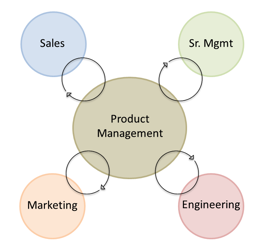
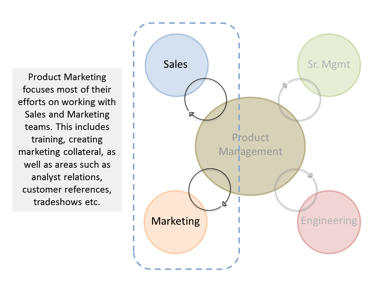
 Product Marketing 101 with VTEX’s Astha Malik



 Lucjan Kierczak is an inbound marketer at



![Free Download: 101 Sales Qualification Questions [Access Now]](https://no-cache.hubspot.com/cta/default/53/e97d6603-b40e-4085-ad55-0074b7351ead.png)
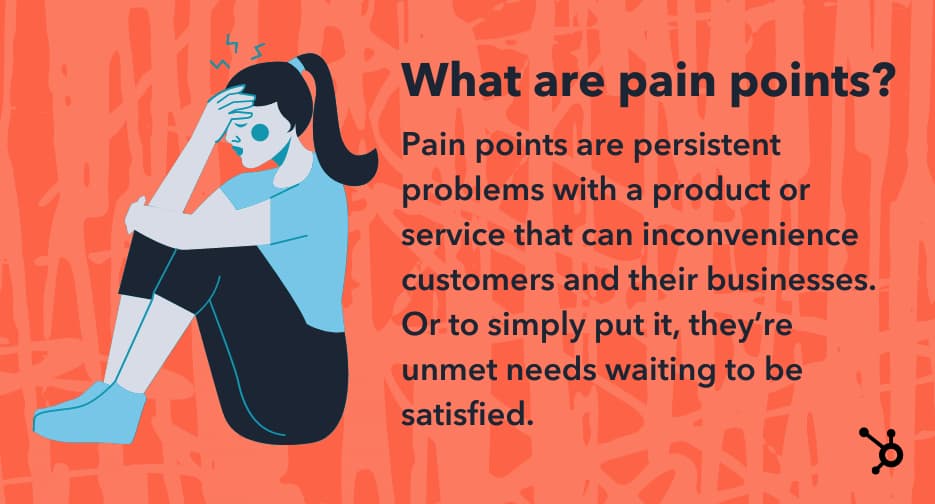
-jpg.jpeg)
-jpg.jpeg)
-jpg.jpeg)



 I’m going to offer you some LinkedIn advice you can’t refuse.


 Social media has provided a convenient low-cost marketing platform for many small businesses in recent years, and has quickly become one of the top forms of internet marketing. Unfortunately, for many businesses, social feels like more of a burden than a boon.