Shared posts

09 Jul 19:01

Data Proves Sales Coaching is Weak

by Lori Richardson

After reading a recent post from Dave Kurlan about The Latest Data Shows that Sales Managers Are Even Worse Than I Thought made me want to immediately publish a plea to company leaders and heads of sales to enable sales managers to do more and better coaching. Using research from 9,000 sales managers and their sales teams, the findings are grim.

18 Jun 16:01

Is AI Coming for Your Job?

by Zach Heller

automate.jpg

When you read anything about artificial intelligence or machine learning these days, you can sort it into one of two buckets: either it’s the greatest innovation ever and will make all of your dreams come true, or it’s the end of work as we know it.

The truth is, it’s probably a little bit of both, and a little bit of neither.

We already wrote a few months back about how machine learning will impact marketers from a process and performance standpoint. But what about jobs? Everyone wants to know – is AI going to make me obsolete?

Like so many other things, the answer is that it depends.

It depends on what role(s) you are playing in your company today. It depends what systems or processes you use. It depends how willing you are to learn and to grow your skillset. And it depends how willing your company will be to invest in both the technology and your career.

Let’s break those each down a bit further.

Your Role(s)

AI and machine learning have the potential to do many of the tasks that human beings do today. And depending on who you ask, that potential is either right around the corner or a decade or two away. Both scenarios are scary, because it means that the tasks we train for today might not exist in ten years’ time.

So the key to understanding how to proceed is to learn as much as you can about what role AI will play. We already know that computers can do simple tasks better than we can, whether it be straightforward data entry, normal mathematical calculations, etc. AI and machine learning will quickly become good at more complex processes, like statistical analysis and prediction.

In the marketing world, roles like media planning and buying, campaign management, pricing, promotions, content, and more will be threatened. If nothing else, the nature of those roles will change.

Human beings will still be necessary, at least in the near term, for strategic planning, as well as the development, installation, and maintenance of those systems that will be set up to improve marketing processes.

Systems and Processes

The roles that are most likely to be eliminated in your organization depend a lot on the types of systems that get developed. Until marketing programs are designed and trained on how to take over your role, your role is safe. And unless you work at a large organization with a huge R&D budget, odds are you are going to have to wait for another company to create the systems that your company will end up adopting.

So the reality is, the smaller your company, the less likely it is that AI is coming for your job anytime soon. Because the systems that get created in these early days of AI adoption are likely to be more expensive, and more complex than what will come later.

Learn and Grow

Either way, the time to adapt is now. Stop thinking about your job, and start thinking about your role. Each of our jobs is made up of a number of different tasks. AI will eliminate certain tasks, but it will also create new ones.

Start training now for the new tasks that your company is going to need you to work on. You can make yourself indispensable by learning the skills that no one else in your company is capable of.

Learn how to work with and manage data. Learn how to design the formulas and train the programs that are going to be used to implement these new technologies. And learn soft skills like people management, strategy, and communication that will always be in demand.

Your Company

Much of what comes next will rely as much on your company as it will on you. Some companies will invest in new technology early because they feel that it will give them a competitive advantage. Others will wait for the technology to prove its effects before they take the time to deploy it themselves.

Similarly, some companies will invest in retraining and preparing their workforce for the coming change. Others will be eager to downsize their teams and take advantage of the promised savings and efficiency that the next technology revolution will bring.

You can get a head start on that future reality by talking to your manager today about what it will mean for your organization. And the choice will be yours to either take the necessary steps to solidify your role in your current organization or prepare for a new role at the next organization.

18 Jun 16:01

Humanize Your Brand: Marketing Your Technology Business With Human Touch

by Judy Caroll

Everything is evolving, including the way how technology companies market themselves.

Technology companies in the B2B sector are doing everything they can to get the attention of decision-makers, a feat that is becoming more challenging with the increased competition on different digital channels. Connecting to these decision makers has a significant impact on the success of their companies.

Despite all the competition, however, some companies manage to rise and do the unexpected. This article will look at various practices that made these companies a success.

Manage your expectations

Most, if not all companies, know how important managing the expectations of their customers are. It makes customers happy which, in turn, increases sales. The sad reality, however, is all the strategies for management expectation barely gets done.

Are they difficult? No, but they can be challenging because it requires a change in whatever wrong you’re doing in your marketing strategies.

Managing expectations has primarily three essential components – provide more solutions, be transparent, and provide clear timelines. These simple components are what give your marketing solution a human touch.

Now, expectation management does not start when you negotiate the purchase. It begins at the very touchpoint – on your landing page, when you reach out to your clients first, and even when clients are talking to your customer service support.

When everything is evident at the beginning, especially the pricing, your customer will trust you. And that can translate into sales.

Tell better stories

Stories are an integral part of culture and society. People connect through stories. People relate to stories. In other words, stories give your marketing a human touch.

Stories are abundant, even clickbait advertising has a story. Your competitors also have their stories to tell. Your challenge, therefore, is to create better stories. Observe great and long-lasting brands – what kind of stories do they show?

These stories usually provide a solution to their target audience’s pain point, an idea that impacts the lives of their clients, or simply showing your client an exciting side of your business or company.

What kind of story do you want to tell? Better yet, how do you want to consume information? Use this to tell a compelling story packed with emotion.

Create a contrast

What makes an exciting story? One which has conflict or contrast.

Not only are these stories exciting but they also stick to your brain. That’s because it affirms what people are already thinking in their minds. Your clients or customers might have liked your product already, but they still have reservations in their minds. Contrast allows you to reframe any objectionable element in your product, such as price or product features that might be unclear to them, so that your audience will proceed to purchase your product.

If you don’t believe that, consider this example:

A person who has plans to go on vacation to a tropical island might be dreaming of getting a tan and reclining on a lounge chair, sipping some piña colada, and reading their favorite book. However, that might change if he or she learns the statistic saying that falling coconuts kill 150 people each year than shark attacks.

One SaaS company that has nailed this strategy is Miva. They created contrast by talking how downtimes happen every time there’s a software update. They used that pain point and created a difference by saying that they don’t break on upgrades.

By creating contrast, they show their difference from their competitors.

Make your product appeal to humans

Even if you are a tech company, you are still selling and talking to humans. Thus, it makes sense to give your marketing solution a human touch. You might be offering to solve a technical problem, but you don’t need to sound like a robot.

Humanizing your brand is very simple – think about how you interact or talk to your friends. If you notice, each of you has their unique voice. The same goes true when you communicate with your customer. Find your unique voice and maintain it when talking to your customers and prospects.

Another way of creating a human touch to your strategy is by putting a spotlight on your employees. It tells your audience that they are dealing with humans, who grow the brand. Do this by sharing stories with your employees or sharing the story of an employee on social media. Not only will it humanize your company but it will also boost the morale of your employees.

It’s not easy to market your product

The tips given above should guide you towards making a more thoughtful marketing campaign.

Why thoughtful and not successful?

A thoughtful marketing campaign builds trust as people realize you understand them and their pain points.

Eventually, you will increase your ROI rate as they trust you more and more.

This article originally posted at The Savvy Marketer.

18 Jun 15:56

Easy Hacks to Get Exposure For Your Business

by Elijah Masek-Kelly

Yup – we all know about marketing.

Sounds great, but it takes time and money to get it right.

Sure – there’s advertising.

Pretty straightforward, but again it’s time and money.

But what if your business is totally bootstrapped, a side project to your day job, or you just don’t have the funding to sink into marketing and advertising?

If only there was a way to get some exposure for your business that doesn’t break the bank…

Well, if you at least have a little bit of time to spare – here are a few hacks that you can use to get your business out into the wild, world of the internet!

Respond to Press Queries!

Let’s face it.

Most fledgling businesses simply cannot afford to shell out the big bucks for a PR agency.

However, there’s no doubt that they would still benefit from a few good press mentions.

Luckily, there are actually services that will connect you directly with journalists – and it doesn’t cost a penny.

If you have never heard of any of these – you are in for a treat.

Here are a few highly recommended services:

Help A Reporter Out

OnePitch.co

The Source Bottle

JournoRequests

Each of these services basically facilitates the relationship between Journalists (the press!) and sources (your biz!) to help writers find the supporting resources that they need to create an amazing article.

This doesn’t mean instant access to huge media mentions – but it can result in some really great press that only requires a bit of time on your end.

Basically, all you need to do is tune in to these channels and listen for opportunities that are related to what you do.

However, you should be aware that these journalists aren’t desperate for responses. In fact, most queries get upwards of 50 responses (depending on industry) and usually only 2 or 3 will actually make it into the article.

That being said, here are a few tips to help your success:

  • Demonstrate your authority to speak on the subject right away. Journalists want to use reputable sources for their work.
  • Respond directly to their query. If you are off-topic or just offer to provide insight at a later time – you are making their job more difficult.
  • Give them something quotable – most of these journalists are on a deadline so save them the back and forth!

Leverage Online Directories

Another incredibly easy way to get more exposure for your business is by simply listing your company on business directories.

This is a great opportunity to get your business in front of an audience on a website that has already done the work on building an engaged audience.

This hack becomes even more appealing from an SEO perspective for two reasons:

  1. New companies and websites will unlikely have a strong SEO foundation that helps them actually appear in search engine results.
  2. Google-compliant directories are an awesome way to score a backlink for your website, which will contribute to your overall DA and search engine rankings.

There are literally hundreds of online directory opportunities for this hack – but let’s look at an example from an SEO perspective.

Jasmine Directory is a perfect example of an online directory that has been around since 2009, which aims to list educational resources and businesses for easy public access. It is based out of Valley Cottage, NY, and they manually add websites to their directory, as well as accept submissions for review.

However, what’s important to note here is that it is a Google-compliant directory.

Essentially, this means that they use editorial discretion to permit or deny which businesses they allow in their directory listings.

This is important from an SEO perspective because it means that your backlinks will not be penalized and will actually provide the SEO juice that implies value from a backlink.

So before you go running out and listing your business on every directory you can find – it is important to use your own discretion to only backlink from reputable directories. Otherwise, you may actually be penalized, which could hurt your overall DA and search engine rankings.

Start Guest Posting

Another clever hack to boost exposure for your business can be to guest post on important topics related to what you do.

Guest posting is a fairly easy process that really only requires a bit of outreach and some time creating awesome content.

The most important element of success for guest posting is leading with value for your audience.

If you do it right – it creates a win-win-win situation.

Win for the publication because it gets to publish free top-quality content.

Win for the audience because they get useful and interesting content.

Win for your business because you get exposure to an engaged audience.

However, if you do it wrong – your content will seem spammy, self-promotional, and probably never accepted by an editor.

I wrote a guide on everything you need to know about guest posting, but the single most important element of doing it well is to always focus on creating awesome content as your primary goal.

Exposure for your business will be implicit in those efforts.

If you create great content – people will be more inclined to check you out and see what you do.

It will also help you establish your expertise and authority within your industry.

Nobody wants to read an advertisement disguised as an article.

Instead, focus on sharing something useful and you will enjoy all of the benefits of guest posting!

18 Jun 15:49

Content Types: Case Studies

by Jessica Mehring

Content Type_casestudies_blogimage

Selling is hard.

Even for natural-born salespeople, it’s not easy to turn skeptics into believers.

Especially today, when your customers have more information than ever before — so they’re more skeptical of salespeople (and sales tactics in general) than ever before.

What if your salespeople had some help … from your customers?

There’s a reason case studies (aka customer success stories) are one of the top three marketing tactics for B2B businesses:

A case study is a medium for letting your happy customers tell other potential customers why they should buy from you.

It communicates trustworthiness.

It’s unpretentious — it gets right to the point: that your product or service is proven, and the reader should seriously consider buying it.

And when done right, it’s compelling and highly targeted.

Why are case studies so effective?

You can’t just tell people to trust you. You have to give them a reason to trust you. That’s just human nature at work.

In the B2B space, and for higher-dollar offerings in general, however, you not only have to earn a customer’s trust — you have to demonstrate your ability to deliver. No one is going to buy your $2,000/month software on a hope and a prayer.

A case study communicates to the reader that you’ve got a track record of success solving a problem. It reveals the positive impact you’re making … and it does it with a story.

The human brain retains and remembers information better when it’s delivered in story format.

Think about how this applies to your offering. You and your sales team could tell prospects about the features and benefits until the cows come home. They go in one ear and out the other.

But tell a story around how those features and benefits changed a customer’s life, and you’ll capture their attention and connect.

Take a look at how OptinMonster told the story of online education company Crush Empire’s huge boost in sales.

How Case Studies Benefit Your Business — No Matter What Industry You’re In

Some say social proof was born when e-commerce became an everyday part of our lives.

I disagree.

Think back to when you were a kid. Before you were doing research online prior to making a purchase. What made you want to beg your parents for something?

A TV commercial? Maybe.

More likely, though, you wanted something because your friends had it and loved it. That toy, that scooter, that pair of Converse All Stars sneakers — you begged your parents to buy that thing for you because your friends said it was cool.

That was social proof in action.

In the grown-up world of B2B marketing, a case study is powerful social proof. It not only tells the story of how a customer benefitted from your offering, but it gives you the opportunity to share the details of the offering right within the story.

Master case-study writers weave features and benefits right into the narrative — and it works. A whopping 78% of B2B buyers use case studies when researching purchases, and a recent LinkedIn Technology Marketing Group study found that case studies dominate the #1 spot as the most effective content format for B2B marketers.

Another great thing about case studies? Readers expect a call-to-action.

The person who is motivated enough to solve their problem that they want to read a case study about how someone else solved the same problem — that person is also going to be more motivated to reach out for more information. They expect information about how to take the next step at the end of the case study.

In the realm of content types, a case study is one of the straightest paths to the sale.

Take a look at how Fractl handled this in their case study about … themselves! I like this example because it boosts the trust even more by revealing to the reader that the company follows their own advice to great effect.

When Case Studies Work Best

It should be pretty obvious by now that case studies are powerful bottom-of-the-funnel assets. Most case-study readers are going to be familiar enough with their problem and motivated enough to solve it that they’re pretty close to pulling the trigger on a solution. Your case study might just be the last bit of encouragement they need to hit the buy button on your offering.

But believe it or not, case studies can be effective in earlier stages of awareness as well.

By their very nature, case studies have targeted keywords and audience-specific copy that work really well to help your target audience find you organically (e.g. in search engines and even through social media — so make sure you’re publishing your case studies as webpages or blog posts in addition to PDFs, and include compelling headlines!). This makes them effective for getting customer attention at the very top of the sales funnel.

A case study can also help people in the Solution Aware stage learn why your solution is the best. Simply mention in the case study some of the other solutions your customer explored or tried before finally solving their problem with your offering.

Here’s a robust example from Apptio — and the end result of saving HP Enterprise $330 million is pretty darn compelling, too.

Supercharging the Case Study Formula

The standard case study formula is 5 simple parts:

  1. Client/customer/relationship background
  2. Challenge
  3. Solution
  4. Results
  5. Call to action

This is a standard formula for a reason: It works.

But you can make it work even harder for your business with a few tweaks.

1. Write it as an interesting story

Don’t just rattle off the details of how things went down. Craft a narrative around it.

Here’s a great example from Showcase Workshop.

2. Highlight compelling details and quotes in callouts and sidebars

Make it easy for the reader to get the most important information quickly.

See how Cisco did this.

3. Lead with the numbers

Did you help your customer earn 400% more website traffic? Or cut their sales cycle in half? Or reduce pollutants by 25%? Include these numbers in your case study — and add them to the headline if at all possible.

Here’s how Certona did itand notice that they don’t even share the customer’s name (likely an NDA issue — but a good example of how you can still write a case study, even if your customer isn’t making it easy).

Case Studies Are Your Secret Weapons

Publishing your case study is only the first step. There are myriad ways to promote, extend, cut and repurpose your case study to maximize its value.

Here’s a post I wrote on the subject over at Case Study Buddy.

Build trust. Demonstrate the benefits of buying your offering. Increase your authority. Move the prospect to action. The ROI of case studies is more than monetary.

It’s a content type I recommend for any B2B company, or anyone selling higher-dollar offerings.

18 Jun 15:36

Ready, Set, Convert – 7 Digital Marketing Strategies for 2018

by Jaime Nacach

Ready, Set, Convert - 7 Digital Marketing Strategies for 2018

Digital marketing gets better every day. Because marketers are always looking for better means to convince and convert customers. They are looking for new strategies and refining the old ones so that they can have a competitive advantage in business.

You know that this “advantage” would mean more customers, which results in more profits and a better business. Isn’t that what you want?

As exciting as this may sound, a study by SmartInsights found that 49% of organizations have no clear digital marketing strategy. Furthermore, HubSpot reveals 39% of marketers think their organization’s marketing strategy isn’t effective.

This is why you need to improve upon your strategies in 2018 to get your business ahead of the tough competition.

That being said, I want to show you some of the proven digital marketing strategies that will bring real results this year.

1. Integrate On Demand video into the customer journey

It’s seemingly hard to gain people’s attention today with the traditional written content. No matter the social media platform you use to reach your target audience, you need videos to connect with them emotionally and keep their attention.

Coupled with that, the human brain processes visual content 60,000 times faster than text and draws 94% more views. Furthermore, having videos on your landing page could raise average page conversion rates by 86%.

94%25 more views
According to video marketing statistics from wyzowl, 76% of businesses said videos helped them increase sales. How can you increase conversion on your website and your social media pages with video content?

Well, it starts with understanding your customers’ pain points. What problems do you know your customers have that your product can solve? How will your product solve it?

Vidyard improved their conversion rate by 100% when they incorporated a video on their homepage.

Vineyard

Essentially, you have to personalize your video. Each viewer needs to feel you’re connecting with them on a personal level. When you have a buyer persona, this helps you to connect better with your potential customers.

Your videos need to be short and using an attractive thumbnail would lead to more views.

2. Prioritizing customer needs above everything else

When Harry Selfridge said “customers are always right,” this statement shows the importance of adapting your business to the customer’s needs. If you fail at this, you lose business and your competitors gain.

What are your business goals? What are your customers’ goals for using your service or product? You must align these two goals to satisfy your customers.

You can use personalization to attract and convert more customers. When a customer believes your product is tailored to them, they’re more open to doing business with you. For your current customers, recommend products to them according to their buying patterns. Companies like Amazon and eBay do this to get more sales and satisfy their customers.

Amazon Fire
Marketo conducted an experiment and found that 78% of consumers will check offers that are personalized to their previous experiences with the brand.

Often times, people want to minimize risks as much as possible. This is why you must convince them with user reviews and testimonials.

Potential buyers want to see what past and present users of your product/service think about it. Reviews of your product could be on your website or another site. Either way, it’s important.

The key to reviews is honesty. Always receive negative reviews with open minds because they’re equally important. Having only positive reviews for your product can be suspicious. Hammacher Schlemmer recorded a 380% increase in conversion of items that had reviews.

Conversion Impact

Testimonials show potential users that you have satisfied many customers in the past. Case studies highlight the problems your customers had before using your product, and how your product solved these problems for them.

Make it easy for your customers to reach out to you via live chat on your website, contact form, interactive social media pages, etc.

3. Hosting live events and webinars

A webinar is a seminar that’s hosted online. The seminar is delivered to an audience and there is an interactive section which makes it possible for the presenter/host and attendees to communicate through Live Chat.

Webinar Jam

If you’re hosting a webinar, you’re asking for 45 minutes to 2 hours of your customers’ time. You must decide on a topic that your customers are struggling with and solve this problem in an interesting manner.

You must educate and engage your viewers so that they can have a feel of a two-way communication. That’s the essence of a webinar anyways.

Hosting a webinar can help you acquire more leads and close the deal. For example, BuzzSumo converts 20% of its webinar attendees to paid customers. This is 1 in 5!

Buzzsum
Des Traynor, co-founder of Intercom says customers should leave a webinar knowing how to kick ass at their job, not how just knowing how to use an interface.

When you host a webinar, you must also make the recording available so that attendees can rewatch whenever they want.

4. Pay attention to Millennials

The Millennials market has grown to a $200 billion market. This is a big market you can’t afford to ignore.

How do you get the best out of the millennials market?

Make your website mobile responsive. This is because most millennials use their mobile to do most things online, including shopping.

This audience dislikes research papers and your content must be a light conversation with the usual terms they use in their conversations.

Your website must be easy to navigate. Because they’re least likely to go through the stress of looking for your sales page. You have to make your most important pages easy to access.

Let your content be shareable as most millennials spend a lot of time on social media. SocialTimes estimates that 71% of millennials check social media daily.

Allow users to generate content for your business. The study by SocialTimes found that user-generated content (UGC) is 35% more memorable and 50% more trusted than other media.

Urban Outfitters has a board on Pinterest which has pins of people who wear their clothes. It found that 20% of users who view this board click the ‘shop it’ button.

Pinterest to sale
Attract millennials with discount and other offers. Statistics from Yahoo! show that 63% of millennials on social media don’t mind checking in to businesses on their social media channels if they’ll get a discount for it.

5. Get a clear mobile marketing strategy

According to Shopify, mobile now accounts for more e-commerce traffic than the desktop with a share of 50.3%.

Ecommerce traffic

If your website is not optimized for mobile with a responsive design, you’re actually wasting half of the visits to your website. Below is an example of a responsive design.

Macy´s
Another option is to launch a mobile app to deliver experiences that are unique to mobile users.

You can use data like Location, Device type, and other user demographics to serve mobile users. You can offer discounts to users on mobile to encourage more users to purchase your product.

There are many users you can reach through channels like Instagram and Snapchat that are mainly mobile. You can also advertise your service through these channels.

Airline company, KLM, launched a mobile-only campaign to convince customers that mobile booking is simple, fast, and reliable. Through this campaign, they generated 34% more bookings and 38% more mobile revenue.

KLM Launch

6. Integrate Chatbots in your strategy

If you aim to improve your customer service in 2018, then you must use chatbots.

There are many reasons to use chatbots.

It delivers a quick response to both site users and customers. When you consider that 75% of customers believe that live agents are too slow to reply their messages, then a chatbot will provide a satisfactory experience to most of your customers who value their time.

The Takeaway

Chatbots train as they gain access to more data to upsell and cross-sell to customers. This improves customer experience dramatically. This is so crucial in your business — after all, a Walker study predicts customer experience will be the key brand differentiator by 2020.

Survey
This is an example of eBay using its ShopBots to provide product listings for customers.

Messenger Shop

Winnie, a Chatbot on Facebook Messenger which helps people choose a hosting provider for their website achieved a 72% CTR from users clicking through to affiliate hosting providers.

Winnie

7. Using data-driven content marketing

Many times, marketers follow their guts in providing content to their potential customers. They ‘feel’ they know what their potential customers want. Most times, they are wrong.

It is important to gather data about what users really want because this is the best way you can satisfy them. For instance, when you want to advertise your business, do you use the ad template that has performed over the years? Or the one you like?

You can carry out A/B tests to determine your content that performs best. HuffingtonPost tested two headlines and chose the one that had the highest performance.

Huffington Post

When Curata decided to use a data-driven approach to their content, they generated 67 times more revenue compared to when they just used ‘guts’.

Curata

Conclusion

To excel in your digital marketing operations this year, you have to approach it with the aim of providing a robust experience for potential customers and be determined to meet their specific needs in real-time.

When your strategies are centered around your customers, and how you can satisfy them, you’re bound to achieve your business goals this year. After all, when your customers are happy, it snowballs on your business.

18 Jun 15:36

The Leadership Playbook: Accountability and Consequences

by Anthony Iannarino

Recently, I had a conversation with a person who told me that one of the leaders in her company led “with the stick.” His view was that a leader leads with something negative instead of positive. It would go too far to suggest that he was saying that this leader chose force, or manipulation because neither of those comes close to the truth. What this person was saying about the leader was that he holds people accountable.

Accountability means that you are responsible for producing some outcome. In order for accountability to work, there must be consequences. The consequences don’t need to be dire, like losing your job, but there must be consequences, otherwise, there is no accountability.

Leaders are accountable. It is part of the role and one that cannot be avoided. The best leaders embrace accountability, recognizing that the responsibility to produce a result is what empowers them to take actions that produce that result. What leaders are accountable for is a better future state. There may not be a greater responsibility.

The accountability for producing a result creates a cascade of accountabilities that reach lower levels of responsibility within a company. Because the leader is accountable, they hold their executive level team members accountable for producing results, empowering them to take action. But also empowering them to hold the people that work for them accountable for producing results necessary for moving the organization forward or producing some outcome. Because the leader cannot avoid accountability, no one at the lower levels can either.

Lately,  I’ve been listening to a lot of commentary on the problems with hierarchies. But there are two kinds of hierarchies, dominator hierarchies, and growth hierarchies. A dominator hierarchy will use force and manipulation to achieve the results, and the accountability for producing those results will not likely be a pleasant experience, nor will it likely occur in a culture that provides meaning or purpose in work. Accountability will feel completely different in a growth hierarchy. Instead of using power or force, the leaders will instead use inspiration and influence. They will care deeply about ensuring that the people they hold accountable have everything they need to succeed, including their continued support in their concern about the people they hold accountable individually.

One of the primary things a growth hierarchy expects in the way of accountability is personal and professional growth. It’s a nurturing environment where people have the opportunity to become the best version of themselves. But even in a growth hierarchy, accountability means consequences. In this case, it may mean retraining or reassignment. Growth hierarchies tend to care about individuals and take care of them. This allows them to create greater accountability because people have the psychological safety to accept responsibility-in whatever consequences come with them.

The post The Leadership Playbook: Accountability and Consequences appeared first on The Sales Blog.

18 Jun 15:36

How to Develop a Successful Marketing Automation Strategy

by Nicole Kohler

One of the worst things about marketing — aside from the endless supply of ill-fitting t-shirts at conferences — is the pressure to keep up with new trends, even if you don’t understand how they benefit your business or its customers.

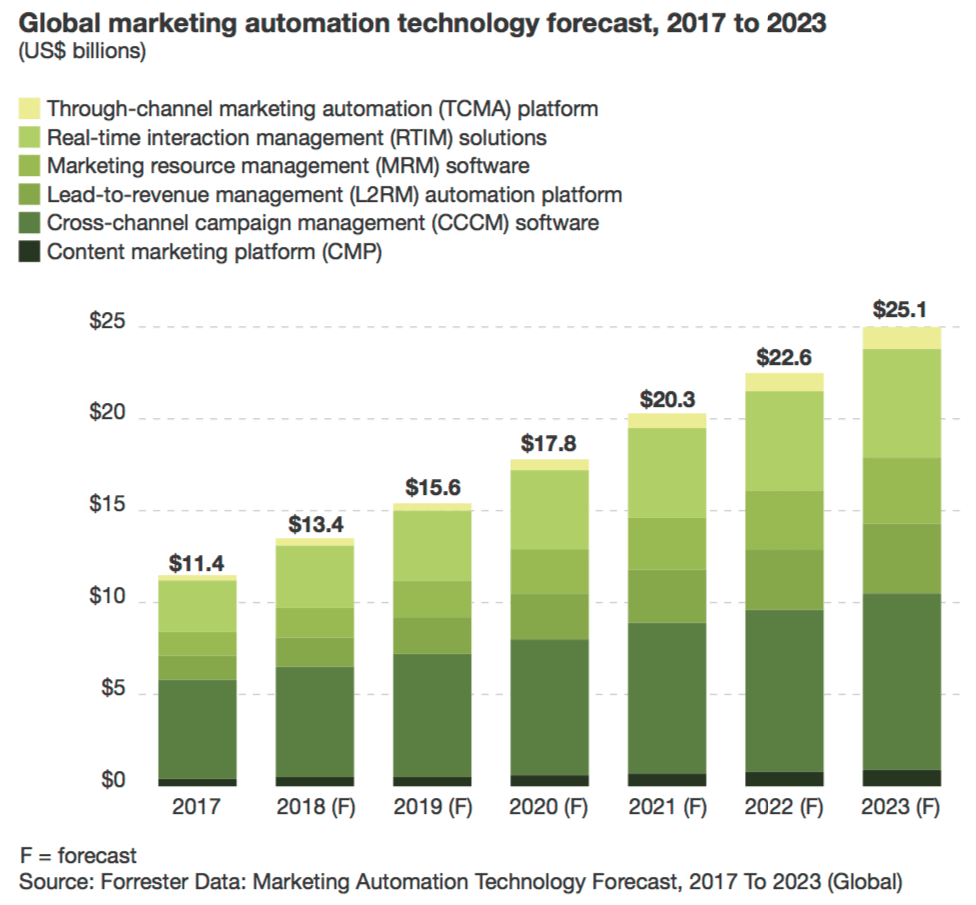
Case in point: Forrester’s first marketing automation forecast predicts that spend on automation technology will grow from $11.4 billion USD to $25.1 billion USD by the year 2023, saying marketers are still “in the early innings” of adopting the practice:

But in another survey, 58% of marketers polled said that they were having trouble finding success with these tools due to “lack of an effective strategy.”

Basically: marketers know automation is important and plan to spend more money on it very soon… but they don’t know how to create a strategy around it.

If this sounds familiar, don’t panic. Developing an automation strategy isn’t easy, but it is worthwhile. By asking yourself the right questions about who you want to reach and what you want to provide before, during, and after the decision-making process, you can get a strategy in place that will put those expensive automation platforms to work and start making a dent in your ROI.

Let’s start working on your own strategy by clearing the air about what you should be using automation tools for in the first place.

What marketing automation is good for — and more importantly, what it’s not

While automating your marketing definitely tends to bring in positive results, it’s not meant to replace traditional marketing tools or campaigns. It won’t replace your seasonal emails, write content for you, or intervene when you need a human touch from sales or customer service.

Marketing automation really shines when it’s used to:

  • Deliver messages to website visitors, leads, or customers at critical points before, during, or after the purchasing process.
  • Provide crucial information to these same individuals.
  • Automate check-ins, follow-ups, or reminders you might otherwise have to delegate to customer service or sales teams.

A survey by Liana Technologies showed that most marketing professionals recognize the top benefits of automation as exactly this: improving message targeting, making the experience better, and bringing in more qualified leads.

In short, marketing automation is best used as a way to deliver the right messages to the right people before, during, and after they’ve converted into a customer. And it’s this idea that you should keep in mind while deciding what to automate.

What’s most realistic to automate

There are some marketing tasks that absolutely make sense to automate.

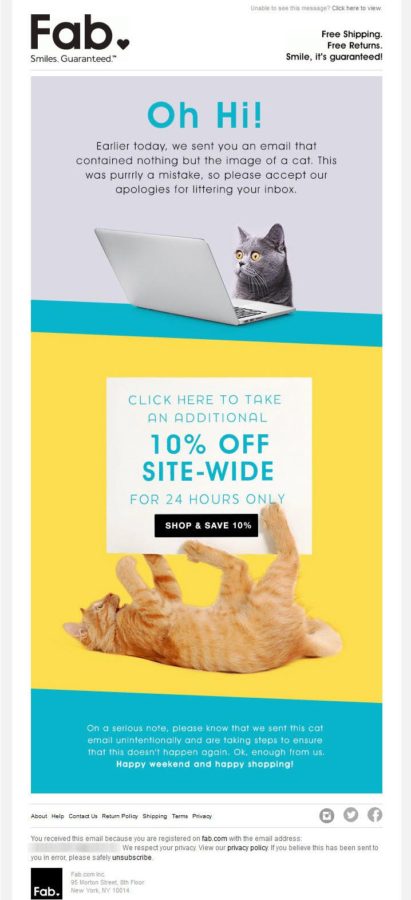
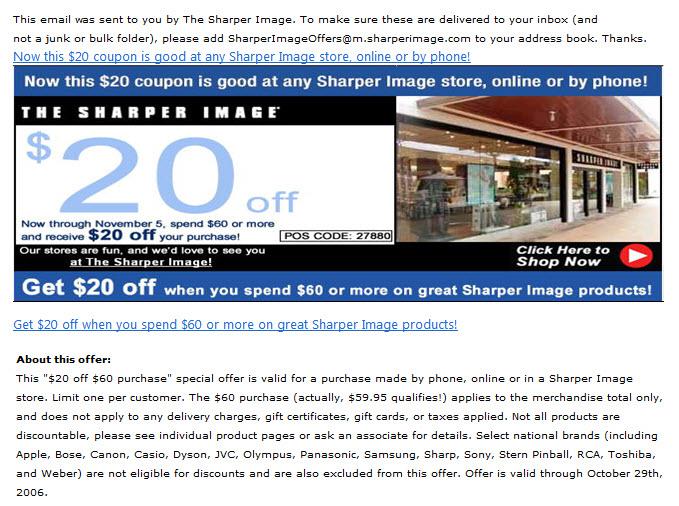
Most marketers start with simple pre-sales or post-sales emails. You’ve probably received hundreds of these — messages like “get 20% off by buying now,” “you left something in your cart,” or “review our service and share it with your friends.”

The logic on these emails can be created quickly. They can also be ridiculously successful with the right subject lines, offers, and timing. It’s no wonder they’re so popular.

But you can also use email automation to add a lot more value to the overall experience your customers have with your product or service, not just to ask them for something. This may come by way of sending reminders, post-purchase education, or simple “happy birthday” messages. I’ll show you a few examples of messages like these in just a bit.

Beyond email, you should think about automation for anything your business uses to interact with customers in a highly repeatable manner. For your business, that might be direct mail coupons sent after someone buys a specific product they’re likely to want again. Or maybe it’s an automated telephone call reminding them to vote for your candidate in an upcoming election. Maybe it’s more advanced scoring of leads, and passing that information to a member of the sales team so they can follow up.

Basically, if it’s predictable and repeatable, marketing automation can handle it.

What requires a human touch

On the other hand, if it’s not predictable — like a human being — or repeatable — like interactions with human beings — don’t automate it.

For example: if you manufacture cell phone accessories and use your Twitter account for customer service, an automated response to every mention of “thanks for your tweet, we’ll reply soon!” would work up until the moment someone claims their device caught fire.

When you’re creating your strategy, you should think about automating touch points with your customers that will, first and foremost, increase the value you provide as a business. Yes, automation should also save you time (and it will), but don’t automate something just because it’s time-consuming. That’s the fastest way to apologizing for a job well done:

Another consideration: with the added rules of the General Data Protection Regulation (GDPR) in the EU, you can potentially get your business into hot water by sending unexpected — and let’s face it, unwanted — sales messages to visitors who have never contacted you or explicitly opted in to communication.

So be careful about scoring and contacting leads who haven’t ticked a “I’m interested in hearing from you” box. They may show promise, but citizens of the EU now have to give explicit consent to allowing such communication.

Developing a cohesive strategy: think about opportunities before, during, and after conversion

It’s time to start thinking about the kind of strategy you want to develop for your business.

A good way to make the development of a cohesive marketing automation strategy more approachable is to break it down into three groups:

  1. Automation sent to potential leads or customers pre-conversion to make them aware of your products or service, convince them to follow you, and eventually convert;
  2. Automation sent to leads and customers actively engaged in the decision-making process to convince them to finalize their conversion to a customer; and
  3. Automation sent post-conversion to check in on the experience, offer guidance, provide links to information, or encourage repeat purchases.

As you keep reading, you’ll see examples of automation from each of these three groups. They show how real businesses have automated touch points with their leads or customers to increase sales, help lessen the load on their support team, or provide a better experience.

The following examples are meant to provide you with ideas for your own strategy. Depending on your business size or model, some of these examples may not be practical. But they will hopefully get you thinking about what you’re currently automating and when, and the immediate opportunities you can take advantage of.

#1 Capturing the attention of potential leads or customers

Before a conversion takes place, automation can be used in a few ways to make potential leads or purchasers aware of who you are, what you’re offering, and why you’re better than the competition.

Although automation may not seem as useful at this early stage compared to its place during the actual decision-making process (which is where abandoned cart emails, one common form, show up), there are still plenty of time-saving opportunities here to explore.

Automate a demo or tutorial in exchange for an email

Early on in the decision-making process, potential customers want to learn more about you. Similarly, you want to know more about them… and probably want to find some way to get their email address so you can take the conversation past your landing page or blog post.

Infusionsoft does a really good idea of offering potential leads some highly desired content — in this case, a demo of their marketing software — in exchange for contact information. Visitors to their demo page can choose from three options, including a pre-recorded demo:

If the visitor chooses the “Online demo” option, they’re asked to fill out a form with their contact information first.

After the form is completed and the demo begins, the visitor is sent the first email in a series of automated messages. Infusionsoft starts out particularly strong by sending a piece of downloadable content in this first email:

… then following up with a message from a sales representative within five minutes.

The biggest win for a potential lead is the ability to view a demo on their on time, at their own pace, by choosing the online option. But for this company, they win by automating follow-ups to the demo. This way, it doesn’t matter when someone is learning about their service — they can stay in touch with them at any time, and immediately put messages in their inbox that keep the lead engaged and interested in finding out more from a sales rep.

Respond to social users seeking an item or service you provide

Social media automation can be helpful some tools can help you flag groups of people talking about a specific subject related to your business — for example, a product that’s highly desired, or a service you offer that folks may not even know exists.

You can save time by crafting a message that encourages everyone talking about a relevant subject to take action, like Freewallet did here:

In this case, Freewallet — a cryptocurrency mobile app — collected the Twitter handles of everyone who tweeted about a specific feature being unavailable. Then, when the feature returned, they used automation to send a message about its availability to the users.

In this case, the users likely had some level of awareness of Freewallet’s service or the feature that was unavailable. But it would be very easy to monitor for users saying “I wish I had x” or “why can’t I find y” and automating responses directing them to what you offer.

As a general note, it would probably be more desirable to send individual messages (one message per user) instead of batches (one message per multiple users) as shown here. That way your customers won’t feel like they’re on the receiving end of communication from a robot.

For those instances where dozens or even hundreds of people are asking the same question about the same subject, you can respond quickly with the right tool and a carefully crafted message. But tread carefully, and when in doubt about looking like a human, ask an expert for advice.

#2 Turning captivation into a conversion

There is really no better audience than a captive one. Especially in this new era of GDPR.

If you’ve already done the legwork to educate a visitor about your company, automation can now play a pivotal role in convincing them to convert. It’s at this stage that you’ll see common options like cart abandonment emails… but there are also a few new ideas you may want to explore.

Use well-timed email automation to send enticing offers

If someone opts in to your email list because they’re legitimately interested, these are the first people you should be sending automated campaigns to. If you’re not already sending messages to people who have explicitly said “I like you and what you do and I want to hear from you,” that is a gap you should be filing with automation.

Hungryroot recently did a really good job of making me, well, hungry. I see a meal kit as a big lifestyle change, so I’ve been going back and forth on it for an embarrassingly long time. While I’ve been weighing my options, they took the liberty of sending me increasingly delicious-looking recipes and offers.

A recent email took things to a new level with a discount:

It’s hard to say no to $20 off, free shipping, and curry. It’s also worth noting that these pre-sales emails all arrived around 11 AM, around the time I start to think about lunch. Clever.

If you have qualified leads, automation like this can help you close the sale. Coupons or other increasingly better offers are hard to ignore, especially if a lead is already interested in making a purchase, which is why this campaign works so well.

Bring shoppers with abandoned carts back to finish their purchase

Shopping carts are abandoned for lots of reasons. Among the top reasons are an unexpected shipping cost, or the shopper simply conducting research to find the best product for the best price:

If you’re willing to do something to combat these causes of abandonment, like offering a coupon code, automation can help you reach these potential customers quickly, and potentially bring back a substantial amount of revenue you might have otherwise lost.

A Brand Growth Experts client who implemented abandoned cart emails found that this was a highly profitable form of automation. Their automation includes an email reminding the potential customer that they left something in their cart, and then sends messages offering a percentage off their purchase as an incentive to finish the transaction.

In July 2017, the month this automation was established, the abandoned cart flow brought in $5990. By the next month, revenue from the flow had nearly tripled, bringing in $14,923.

As of April 2018, the abandoned cart messages brought in $24,417 (an increase of 64%). This particular client has continued to see this rate of success month over month.

It’s also worth noting that the first email in this automated campaign has a 39% open rate and a 4.6% conversion rate, while a typical (non-automated) campaign for this client has an open rate of around 18% and drives about $3000 in revenue. For this particular client, automated flows are opened significantly more, and bring in more revenue.

Here’s the client’s total email marketing revenue in the first month they added automation, July 2017:

This includes both the abandoned cart messaging described above, as well as a welcome campaign sent to new email subscribers.

Here is the total email revenue from this same client two months later in September 2017:

The amount of additional revenue that this Brand Growth Experts client was able to add with two automations, including a series of abandoned cart emails, is substantial — and it’s still growing. As your other marketing activities attract more leads, subscribers, or potential customers, these automations also have the potential to grow and generate more revenue, just as they have for this client.

#3 Adding value — and encouraging repeat visits — post-conversion

There’s a lot to be said about automating messages after the sale. Post-purchase automation may not seem as worthwhile because, well, you already have their money. But automation can be incredibly useful here.

Here are some examples of how automation can help keep current customers happy with you, and potentially even encourage them to come back to you again.

Keep customers on track and reduce the strain on support

SmileDirectClub does one of the best jobs I’ve seen with post-purchase automation, which in their case is designed to reduce the amount of support needed from customer service. Their automation comes in the form of very carefully timed emails to customers who have purchased their invisible aligners.

SmileDirectClub sends automatic bi-weekly reminders to change aligners:

These emails are incredibly beneficial for customers wearing invisible aligners. I can attest to this: it’s easy to get busy and forget exactly how long you’ve been wearing a pair. Each time a new email appears, I can’t help but thank them for this small detail.

This isn’t just good for me and my fellow teeth-straighteners, of course. These emails reduce the chance of a customer forgetting to switch aligners — or switching too early — and interrupting their treatment. Without these emails, there would be more calls to customer service, more requests for replacement aligners, and probably also some very unhappy dentists.

Another great automation bonus: if something happens during the course of your treatment and you do get off schedule, your reminder email takes you right to a page where you can make corrections.

This lets the customer course-correct the automation on their own. With a new start date for an aligner set, the next reminder won’t come through until two weeks have passed, and you’ll never get off track.

Similar to this example, a local optometrist might choose to schedule emails when a patient is approaching a year without a checkup:

For even further customization, employees at this optometry office might want to check each patient’s insurance to see how often they can get new glasses, contacts, or other items covered by their plan. They can then send schedule automated messages only when they’re eligible for something new — but not too soon.

There’s also even simpler options here, like appointment reminders sent via text, that can make you look like you seriously have your act together. Even if all you did was put a customer’s name and time in a database, they’ll appreciate your thoughtfulness.

If you have a product or service that requires periodic updates such as this one, these examples offer a good model to follow. Think about sending messages reminding folks when it’s time to make an appointment, buy new filters, replace parts, or extend a warranty. And if you offer any sort of timed reminders, giving the customer the power to delay or reschedule those reminders can keep them dedicated to you, no matter what their schedule currently looks like.

Make use of your existing content

If you’re already producing content for your site — documentation, guides, blog posts, videos, etc. — sending it to your customers after they convert can reduce stress while helping them make the most of their new purchase without any additional work needed on your part.

One simple example of this comes from Google, and how they automate messaging after the purchase of a Google Home product. They send emails from “Your Google Assistant” or “Google Home Mini,” as if the product itself is literally following up with you. Each email contains some quick tips to help you get more use out of the item as you become more familiar with it:

These “pro tips” aren’t just entertaining — they’re actually useful. They can help customers avoid feeling like they wasted money on a product that is too complex for them, or (depending on the item in question) too limited.

Any sort of product or service that requires education to use properly could benefit from automation like this. If you already have a lot of content prepared, make use of it!

Request feedback, too — but only when appropriate

Finally, don’t forget about requests for feedback. They’re easy to automate, they get much needed social proof on your site, and they can also remind customers to contact you about a nagging issue they might have.

One practical example: after a user has been signed up for a specific period of time, send them an NPS survey. If they give you a high score (an 8 or above), you can then automate another email asking for a review, because you know they’re most likely to give you positive social proof.

Here’s how Clearbit handled one such request, automating a follow-up to customers who provided positive feedback in a customer survey:

They also automated a second and third email when no review was left after the first request:

However, you may want to treat lightly with automated requests for feedback or reviews. If a customer returns something or has a complaint, you need to have a system in place to take them off a “how did we do?” automation. Don’t be tone-deaf. Asking reviews from folks who gave you 8 or more for NPS is a good way to do that.

If you aren’t careful about who you solicit feedback from, you may end up sending something like this to a customer whose internet has been down for days and is pretty mad about it:

Ill-timed, fake-cheerful follow-ups like this are just going to rub salt in the wound. Plus you’re probably not going to like what they have to say, either.

Tracking your results and testing for improvement

Obviously, a large part of creating your strategy is going to involve deciding who you want to reach, when to send your messages, and how. But the remaining parts, which are just as important as deciding what to automate in the first place, involve tracking your results and performing A/B tests.

Long-term, you should be keeping an eye on how your automations are performing and actively planning ways to potentially improve them.

Let’s first review what you should be doing as far as tracking and analytics are concerned.

Ask yourself in-depth questions while reviewing the results

The automation platform(s) you use will obviously have some analytics or performance tracking built in, but don’t just look at your reports and get mislead by positive numbers.

When you review the performance of your automations, ask yourself these questions about each one:

    • Are leads or customers engaging with your messages? What’s being opened? What’s being acted on? Are the calls to action actually being acted on?
    • Are messages being delivered at the right time? If you’re sending reminders, are they being delivered in enough time to be acted on? Is your post-purchase education arriving early enough to prevent messages to customer service?
    • What’s working well? Is directing users to your content increasing sales or decreasing your refund rate? Use successful automation as a model for future tests and campaigns.
    • What’s not working? Has anyone complained about a message’s timing? Are unsubscribe rates on the rise? Is your support team now doing more work instead of less? Dig in deep and look for opportunities to improve.

Again, these are questions you should ask yourself about every automation you start running. Don’t be misguided by a flood of new clicks or revenue that wasn’t there before — there are always opportunities to improve.

A/B test potential changes for increased growth

Once you’ve identified a potential opportunity — a lackluster response rate, an issue for your support team — the best approach you can take is A/B testing a new version against the original.

As you would with any other A/B test, for each automation, you should be asking yourself:

  • Will this test be measurable? You should be testing changes that result in hard data (CTR, sales, response etc).
  • Will this test include big enough changes? Changing a single sentence in the middle of your email copy wouldn’t likely be significant. Changing the timing of a text message or a subject line, however, would potentially have a big impact on the results.
  • Do you have a specific goal? Perhaps the worst thing you can do is start an A/B test intending to see “better results.” What should be better? Pick something specific and optimize around it — for example, if you want a higher open rate, focus on testing the subject line, timing, or segmentation.
  • How long will you wait to review and act on the results? You don’t want to act too quickly, but you also don’t want to let the test drag out for weeks — especially if there’s any risk of the test reducing clicks or conversions. Plan on at least an initial review, and ideally schedule some follow-ups prior to the time or point (like number of sends/opens) at which you’ll call it good.
  • Who’s going to be in charge of implementing the changes, if any need to be made? Don’t make the mistake of running tons of tests without planning for implementation. If you identify a huge opportunity but your developer has a month’s backlog in front of them, that’s an issue. Loop everyone in beforehand and consider scheduling implementation in advance if you’re really busy.

You will probably never finish optimizing your automations, and that’s okay. The goal isn’t to create campaigns that are “successful enough” or “save a little time.” Accept the fact that even automated messaging takes hard work and multiple iterations, and you’ll start to see every weak text message campaign or low-results email as an opportunity.

Questions to ask before developing your own strategy

There are a lot of examples of marketing automation in this post, but not all of them will work for you.

If your experience with automation is limited, it’s best to develop a strategy that starts small and fills an immediate gap — like cart abandonment or post-purchase emails.

If you’re a more experienced user trying to create a comprehensive, all-encompassing strategy across multiple channels, think about how you can better support your customers and internal teams.

There are four key questions you can ask yourself right now to decide what and how much to automate. They are:

  1. How could I better supplement my sales funnel? Are you collecting emails from your blog but not doing anything with them? Having customers opt-in for texts but not following up? These are the opportunities you need to jump on — and automate.
  2. How could I be supporting my customers and team? This might be by directing customers to educational material after they’ve made a purchase or checking in with them after they’ve had a product for a little while. This might also involve sending reminders to patients or follow-ups to leads so your support team or sales reps aren’t overwhelmed.
  3. What don’t I want to automate? Any channels where you may communicate directly with customers should be handled with care. Tread lightly with those Twitter auto-DMs and Facebook chatbots, folks.
  4. How am I going to track all this? Part of this will involve the platform(s) you’ve chosen for automation, but you also need to evaluate the results yourself. Decide what you want to look at (specific pages, products, leads…) and what constitutes success.

Conclusion

Doing marketing automation is easy. Developing a strategy around it, not so much.

But creating your automation strategy all boils down to asking the right questions. As soon as you can confidently say who you want to reach and what you want to provide before, during, and after conversion, you can start fitting the puzzle pieces together.

If you have automation in place already, take a look at what you’re sending and how it’s performing. Look for the opportunities to improve — the low CTRs, the poor quality leads — and start there. Consider starting some email drip A/B tests right now.

If you’re new to automation, look for the immediate gaps. What have you always wanted to put in place? Messages to your blog subscribers? Post-purchase education? Automated phone calls? Get out and do it.

18 Jun 15:36

How to Turn Ordinary Social Media Conversations into Actionable Sales Leads

by kniemisto

While having thousands upon thousands of social followers is certainly something to brag about, the number means little if those followers largely ignore your brand. Engagement is the key to success for social media marketing—brands that drive more engagement from their audience are generally rewarded with better visibility and organic reach.

All of these things—a large number of followers, an engaged audience, and a boost in organic visibility—are lofty achievements in today’s tough social media climate, but they’re not the end goal. Ultimately, the blood, sweat, and tears you put into your social media campaigns should translate to leads and sales.

The good news is that if you’ve already mastered social media engagement, you’re partway to the finish line. But how do you translate ordinary social media conversations into actionable sales leads?

STEP 1: Dive Into Your Data

Dig into your data to find out what social media platform generates the most sales leads for your business. Start there. Then, find out what your audience is talking about on social media and how it relates to your brand.

Don’t stick to the conversations happening on your social media pages and profiles, though. Instead, branch out into relevant groups and topic pages where people are engaging in real conversations (although, hopefully, that’s happening on your pages, too). While tapping into the search capabilities (#searches, for instance) of social networks like Facebook and Twitter is an easy way to discover these conversations, social media listening tools make it easy for you to stay on top of hot topics.

STEP 2: Use Conversations to Uncover Hidden Objections and Customer Pain Points

Social media users aren’t shy about sharing their real opinions, so dig into the conversations your target customers are having to glean valuable insights about the struggles they’re facing and what stops them from buying. Start engaging in these conversations and asking questions—on your brand’s social media profiles and off.

Followers who feel ignored don’t often turn into regular customers and raving fans, so once you’ve engaged them in conversation, you must follow through. Use a social media management platform to leave no comment unrecognized and no question unanswered.

STEP 3: Create Offers That Deliver More Value

It’s easy to get your followers to sign up for freebies, which generates engagement. But to keep them coming back for more and move them through the sales funnel, you have to deliver real value every step of the way. That means going beyond, “Here’s a free ebook. Buy my stuff!”

Use the insights you gained from conversation and data mining to develop targeted offers and valuable content that answers questions and helps to overcome buying objections. What does your target customer need the most? If costs are a common objection, use case studies and storytelling to showcase how your products or services can help them increase ROI. Or, bundle value-added packages and services to create an irresistible offer. How about a discount or a chance to win a free product or free six-month subscription?

STEP 4: Make Sharing Simple

When you need to get more eyes on your content and offers, your followers are the best marketing tool in your arsenal. When you offer compelling content and valuable experiences, make it simple for followers to share. Incentivize sharing for a bigger boost in reach.

Most users know how to share a social media post within a social network, but what about people who click through and read content before deeming it worthy of a share? Make sharing a no-brainer by strategically placing social media share buttons on your site. Not only do they serve as a reminder to share, but they make sharing practically effortless. With conveniently located, prominent share buttons, you’ll lower the risk of losing out on a potential social share because someone doesn’t want to bother with copying and pasting the URL to create a new social media post.

STEP 5: Incorporate a Call-to-Action

If you don’t ask for what you want, you’re not going to get it—so don’t shy away from incorporating a clear call to action in your social media posts. Even something as simple as “Learn more” can get users to your landing pages. The key to effective calls to action on social media?

Actionable words, such as:

  • Secure your spot
  • Download
  • Click here to…
  • Learn more
  • Get your copy

Build a sense of urgency by using phrases such as:

  • Last day
  • Last call
  • Only 2 spots left

Remember to be authentic and not too promotional. If your followers know full well that you have half a million products in your warehouse, they might find the claim that there are only five left in stock a bit hard to swallow. Never sacrifice trust, but do leverage the knowledge you gained from conversation mining with messaging such as, “Back by popular demand,” or “You asked for it, so we delivered,” to make it clear not only that you’re listening to your audience, but you actually care what they have to say.

STEP 5: Build Social Media Platform-Specific Landing Pages

Make sure the messaging is perfectly in sync with your calls-to-action and offer messaging in the social media content that drives users to each landing page.

This is where the magic happens. Once you’ve earned that coveted click, you’ve gotten their attention—but now you have to keep it. Landing pages should be concise and compelling, offering a value substantial enough to earn the prospect’s email address or other contact information. Once you’ve crossed that hurdle, you’ve successfully converted a social media follower into a bonafide prospect. From there, you can qualify them, kick off automated, personalized drip campaigns, and implement the other lead nurturing measures to continue moving them through the sales funnel.

Although this process will help you turn social media conversations into actionable sales leads, it’s not a once-and-done initiative. Like all things marketing, doing this right means constantly monitoring conversations to stay in-tune with your audience, testing and optimizing your messaging, and targeting your offers to their current and most pressing needs and wants.

The post How to Turn Ordinary Social Media Conversations into Actionable Sales Leads appeared first on Marketo Marketing Blog - Best Practices and Thought Leadership.

18 Jun 15:36

Sales Benchmarks: The 30/50 rule for cold emailing & cold calling

by steli@close.io (Steli Efti)
Wallstreet - metrics-min

One of the hardest things about being a sales rep is knowing if you’re doing a good enough job. But what is “good enough?” You might feel like you’re crushing it with your cold email campaigns only to find out your competition is getting double your response rate.

In sales, knowledge is power. And while you might not be able to get your competition’s exact metrics, knowing industry benchmarks can tell you where your sales efforts are working, and where they’re lacking and need your attention.

If you’re in the B2B space, these are the benchmarks you should be hitting at every step of your cold email and cold calling sales funnels.

Sales benchmarks for cold emailing: The 30/30/50 rule

A basic cold email sales funnel looks something like this:

  • Open rate: How many people opened your email?
  • Response rate: How many people responded to your email?
  • Conversion rate: How many people took the action you wanted them to take (i.e. schedule a demo, sign up for a trial, download a whitepaper)?

First off, if you’re not able to track these numbers, then you’re already in trouble. You can’t fix what you don’t know is broken. And the only way you can improve your sales funnels (and your entire sales process) is by knowing how you’re doing at each stage.

Once you have your tracking in place, there are specific benchmarks you should be hitting to know if you’ve got a healthy funnel.

Opening rate: Minimum 30%

If less than 30% of the people you send cold emails to are opening them, this is a problem you need to deal with. An open rate below 30% makes every other part of your sales process harder. Try writing better subject lines, experimenting with sending your emails at different times, or making sure you’re only messaging your ideal customer.

Response rate: Minimum 30%

You don’t just want prospects to open your sales emails. You want them to read and respond to them. Again, if less than 30% of people who opened your email are responding, this is an area that needs improvement.

Ideally, your response rate should be closer to 50%. But if it’s lower than 30% that means something is fundamentally broken in the body copy of your email and won’t be fixed just by doing more outreach.

To fix your response rate, you might try experimenting with:

  • Your pitch: Is it short, clear, exciting, and compelling?
  • The person you’re pitching to: Did you properly qualify the lead? Are they your ideal customer profile?
  • What you’re asking them to do (your CTA): Is it super clear what their next step is? (i.e. hit reply, schedule a time for a call or demo, etc…) Remove as much effort as possible for the prospect to maximize response rates—one way to do so is the 1, 2, 3 email hack.

Conversion rate: Minimum 50%

At this point of your cold email funnel, you should only be dealing with highly qualified and engaged prospect. They’ve opened, read, and responded to your emails. And you should be able to convert at least 50% of them.

As always, you want to aim to be above this number. But less than a 50% conversion rate is a major red flag.

Sales benchmarks for cold calling: The 30/50/50 rule

When it comes to cold calling, your funnel looks quite similar to cold emailing, but with a few small differences in what you should be tracking:

  • Reach rate: How many times did you reach the person you intended to?
  • Qualify rate: How many of the people you spoke to did you qualify?
  • Conversion rate: How many of those leads took the action you wanted them to?

Again, you need to be able to track all of these metrics to know where your cold calling funnel is working or not.

Close.io's powerful reporting feature allows you to get a high-level overview of your calling activity, for the entire team, or broken down by individual rep. You can slice and dice the data based on the specific criteria that matter to you, so that you get metrics that matter, and ultimately lead to meaningful insights.

reporting-screenshot-3

Reach rate: Minimum 30%

If less than 30% of your cold calls turn into a conversation with a decision maker, your cold calling campaign is dead in the water. Ideally, your reach rate should be closer to 40-50%. And if you can’t fix this number, nothing else really matters in your cold calling funnel.

Qualify rate: Minimum 50%

Here’s where we see a bit of difference from your cold emailing benchmarks. Of the people you get in touch with, you want to qualify at least 50% of them.

This number might seem high. But you need to think about the context. If you did your job, then you’re already researched and qualified this lead before they even picked up the phone.

Once you get in touch with these pre-qualified leads, at least half of them should confirm they’re a good fit for your product. Otherwise, you’re wasting tons of time, energy, and money calling people you never should have reached out to in the first place.

Conversion rate: Minimum 50%

By now, you’re probably starting to see a pattern emerge. But it’s just simple logic. If you’ve done your research, called and spoken with qualified leads, at least 50% of them should do what you’re asking them to do. If you’re not hitting this number, we’ve written about lots of ways you can increase your cold calling conversion rate.

These benchmarks are just a starting point

Benchmarks like these are a great way to know if you’re doing the right things with your cold calling and emailing campaigns. But no one can tell you exactly what numbers your business needs to hit to be successful other than you. So when you're comparing your own numbers to these metrics, there's a few things to consider:

  1. Benchmarks are minimums: Hitting a 30% open rate or 50% conversion rate isn’t a cause for celebration. But it does mean that you’re going down the right path and don’t need to make serious changes.
  2. Context is everything: Every business, market, and industry is different. And there’s a chance your metrics might be completely different and you can make the math work hitting vastly lower numbers. But that is a rarity. In 99% of cases, these benchmarks make sense.
  3. If you’re close to a benchmark you don’t need to rebuild your entire funnel: If your numbers are wildly off, you’ll want to make some drastic changes to your funnels. But, if you’re only slightly below them, it’s better to focus on incremental growth. Track your metrics month-on-month and use experiments to get your numbers up.

Even if you’re hitting (or above) these benchmarks your work isn’t done

These benchmarks are just guides, not goals. They’re the minimum you need to be hitting to know that you’re at least going in the right direction.

In sales, the work is never over and there’s always room for improvement. Track your metrics through every step of your sales funnel, measure them against these benchmarks, and always be looking for places to get better. If you sit back and say “we’re hitting 50% so we’re all good!” someone will come and knock you off the throne.

Good sales teams hit their numbers and are happy. But great ones are never satisfied.

Want to drastically improve your outbound sales? Grab your free copy of my book, "Your Growth Hacks Aren't Working. Now Pick Up The Phone And Get Customers!" which is packed with actionable advice on cold emailing and calling prospects and turning them into paying customers

Get my book on cold emailing and calling"

18 Jun 15:35

Lead Generation and the Robot Takeover

by Oliver Turner

We’re all aware of the impending robot takeover. Machine-learning is changing life as we know it. It seems like just yesterday I was on MSN talking to Smarterchild, back in the day when AI couldn’t do much more than craft a playlist. Fast forward a few years and cashiers are facing competition from self-checkouts. Roomba’s are cleaning the carpets. It’s not exactly the takeover I was imagining.

For a second, it felt like the AI uprising was gonna take awhile. But then Google did this:

So do you think the future will be more like the Matrix or iRobot?

How amazing is that!? Not only could this talk me into getting a haircut, but it could be the next evolutionary step in conversational marketing.

So what is conversational marketing?

At its core, conversational marketing is a one-to-one sales conversation between businesses and leads. It is defined as a feedback-oriented approach used to drive engagement and develop customer loyalty. It’s also the area of marketing most currently poised to be redefined by AI.

Say you head to the Apple Store to grab an iPad. The second you walk in, you’re approached by some sales associate named Mark, who probably can’t help you, but directs you to someone who can. You side-step customers and wonder, “How is it always this busy?” before finding Garrett near the Genius Bar.

“Nice to meet you, Oliver,” he says, somehow knowing your name. “Why are you interested in an iPad over a MacBook?”

Garrett doesn’t try to sell as much as he tries to listen. He asks questions to put himself in your shoes and empathize with your situation. It’s a personal, one-on-one communication built to not only inform, but establish rapport.

Conversational marketing – AI style

With advancements in AI technology, these sorts of Apple Store conversations can be brought to your website. With improvements in chatbot intelligence, platforms like Drift’s LeadBot and Intercom’s Operator Bot are allowing companies to instantly engage with traffic and triage leads. This means you can say goodbye to Mark. When it comes to online communications, we’ll use a chatbot to qualify shoppers before sending them to Garrett in iPads.

As it stands, sales teams have about 5 minutes to effectively engage a new lead. Through Drift’s LeadBot, visitors are immediately addressed and filtered using AI and preconfigured playbooks to determine next steps. Based on the customer’s answers, LeadBot can sign them up for a webinar, direct them to a case study, or connect them with the appropriate human sales rep.

Through instant engagement with traffic and the resulting triage of vetted leads, we see the real benefits of these tools.

Guide your leads

I’ve already explained how a chatbot can act as your first point of contact with web leads, guiding users to resources and pages based on their answer to a few playbook questions. It sounds great, but does it work?

You can check out Drift’s Rapidminer case study and see for yourself. They show nearly two thirds of the Rapidminer’s 1000 monthly inquiries were managed by Drift’s LeadBot. The remaining one third were vetted and transferred to a member of the sales team. Furthermore, Rapidminder saw increased engagement metrics across the board.

We call that a smooth lead flow. Think about it the next time tech support transfers you four times. Think about it the next time you’re on hold for a half hour with your phone provider. Think about it the next time you get disconnected from your phone provider because of bad signal – the very reason you were calling in the first place!

These sorts of customer service pitfalls add up and make for a brutal user experience. Through the use of a chatbot, you’ll help leads get where they need to go.

Quality over quantity

When I was in sales, a huge part of my time was spent eliminating bad leads from the funnel. Even when the marketing team gave me qualified leads, I’d find myself questioning what the “Q” in MQL stood for. Between the tire-kickers and spam clicks, I’d finish the day with a handful of promising leads and a lot of dead ends.

Sure, the marketing team was using the tools they had to qualify leads before handing them off, but they were painting with a broad brush. The alternative – personally vetting each lead – is a time management nightmare. For Rapidminer, LeadBot was the two-birds-with-one-stone solution, using AI to “personally” qualify each lead without taking time away from the sales team. Not only did it take the heavy lifting off sales, but it redefined the “Q” in MQL – no tire kickers allowed.

Shooting fish in a barrel

For those in sales, imagine starting each day with a list of warm leads? It’s like listening to a greatest hits album, just banger after banger with no filler or skipping. By trusting your chatbot to vet users and warm leads, you’re giving sales more time to do what they do best – close.

Not only did MongoDB’s chatbot increase net new leads by 70%, but it helped sales generate 170% more opportunities. The SalesRabbit sales team was 84% more productive thanks to their chatbot. These are real businesses showing real benefits and there are plenty more success stories out there.

Get in on the conversation

If you’re in the business of increasing leads, sales, and saving time and resources, it’s time to embrace the robot takeover. Sure, Skynet is still on the table, but for now, AI is on our side. Check out Drift and the other bots out there and find out which is best for you.

16 Jun 16:47

How to Apologize After an Email Marketing Snafu

by Grace Carter

Things don’t always go as planned, and as a marketer, you’ll likely find yourself needing to apologize for mistakes. Email is no exception. It’s easy to send out a broken link, get a date wrong, or send an email to the wrong segment.

Most of us have been there. While it’s difficult to own up to a mistake, the best bet is always to mitigate the situation and apologize. Your subscribers are human, too. They know that mistakes happen, and if they’re happy with what you offer, they’ll usually give you the benefit of the doubt.

So, when you make a mistake in an email, how can you apologize? We’re here with tips for how to apologize after an email marketing blunder.

Stay cool and react as promptly as possible

You might be a little stressed from all the complaints you’ve received. Plus, you’re likely beating yourself up. Before you get to writing your apology email, center yourself and calm down. You want to be calm and rational when you write your email.

But as soon as you feel you’re in a proper state of mind, it’s time to get to work. Not sending out a timely response can cause even more confusion and frustration for your customers. For example, Fab sent out a casual and friendly apology email on the same day they made the mistake, pairing the message with a promo code.

fab-time-sensitive-apology-email

Don’t play the blame game

It can be tempting to put the blame on someone, and maybe there is really is an individual person or specific entity that is responsible. But whatever you do, do not blame an individual or another company. It reflects poorly on your organization.

Focus your apology on how the incident should never have happened. You want to be seen as taking ownership, not trying to dodge responsibility. Your customers will respect you accepting responsibility much more than making excuses or finding a scapegoat for what happened.

For example, The Sharper Image made a mistake by sending a coupon available only in San Antonio to every subscriber nationwide. They quickly realized it was a mistake, but they didn’t play the blame game and they sent a coupon to everyone as a way to apologize.

sharper-image-no-blame

Personalize your messages

You want your customers to know they are receiving an apology from a real person. Ideally, send it out from a personal inbox, but you can also send it out from your team inbox as long as you sign it with an actual name.

“Never send out an apology email from an unattended email box. Never send out an apology from a ‘no-reply.’ Your customer is already unhappy, and an impersonal email they cannot even respond to will only make it worse,” advises Gary Mulligan, email marketer at BoomEssays.

For example, after Shutterfly sent an email congratulating new moms to everyone on their list, they sent out an apology using the subscriber’s first name and wrote the apology from John Boris, the Chief Marketing Officer.

shutterfly-personal-apology-email

Put yourself in your subscriber’s shoes

Empathizing with your customer is key to writing a proper apology email. Ask yourself, if you were the customer, what would you want to hear? What kind of information and updates are you looking for?

Also, think about how you would want the company to make things up to you. Your customer could be wondering why the incident happened, how it affects them, if it will affect them in the future, etc.

Accidents happen. Emphasize that it was not your intention to hurt anyone by your actions. Maybe the offense was preventable, and maybe it wasn’t. But it’s in the past now and what matters is your apology and letting your customers know you did not mean to offend them.

Give them a reason to forgive you

You’ve apologized for your offense, but now what will you do to make it up to them? Show your customers you care about upsetting them by providing them with a gift or, at the very least, explaining how you will avoid future mishaps.

You could offer them a coupon or a discount code. Reiterate your company values and why their business is important to you. Show them a little love by offering free shipping on their next purchase. Get that bad taste out of their mouth and remind them why they loved your business to begin with.

For example, Lucky Brand sent the following email after a technical glitch caused a poor web experience. The brand offered up a generous 30% discount to give subscribers a reason to forgive and forget.

lucky-brand-discount-email

Use humor if appropriate

Be careful with this one, as a poorly thought-out joke may be the reason for your apology in the first place. However, using humor can help lighten the mood after a gaffe.

When it comes to humor, consider your brand’s tone. Is it out of character for your brand to be humorous, or does it fit with who you are? Brand consistency is important when you are conducting damage control.

Before you engage with humor, consider the degree of seriousness of your offense. If the mistake was not terribly serious or if it was out of your control then humor may be a good tool for you. It shows your human side.

For example, Wistia sent an apology email after sending the wrong link with a familiar face — the company dog. Wistia made light of the situation with a joke and fun image.

wistia-apology-with-humor

Wrap up

Mistakes are going to happen; what’s important is how you react. Remember to keep your cool, respond promptly, avoid blaming, and personalize your messages. If you’re thoughtful, keep your cool, and have fun, mistakes will be easily forgotten and forgiven by your subscribers.

16 Jun 16:47

Stand Out With These 4 Top Personal Branding Tools

by Susan Gilbert

Improve Your Personal Branding with These 4 Great Resources

Stand Out With These 4 Top Personal Branding Tools

Building a loyal following is not difficult when you know which tools to use. Connecting with the right people can help you spread word and find new clients. There are several resources that can improve your networking with better results. Would you like to increase your brand awareness? Take advantage of these resources, and let me know how these work for you!

1) Become the knowledge source – Passle

Build relationships with experts who will recommend your brand. Passle helps by focusing and engaging with your community who can then experience your own expertise in your industry. Find targeted articles to re-purpose on your blog, announce the latest events and news for your brand, find relevant content for your audience, and more.

2) Connect with quality industry leaders – Xing

Would you like to engage in a smaller social network for more targeted connections? Newer on the networking scene from Germany is a website similar to LinkedIn called, Xing, but with more of a simplified format. This is a good resource resource for employers and job seekers alike with access to high level professionals in both business and the media.

3) Online reputation management – Brand Yourself

Want your blog to appear in Google search results? Then you will enjoy Brand Yourself, which gives you an opportunity to submit three profiles such as a website, social media profile, ect. for free. This is one worth checking out especially if your personal brand is newer.

4) Create an online business profile in minutes – Strikingly

Would you like to showcase your brand but don’t have a website up yet? A good service to use in place of a blog is called, Strikingly. Brands and businesses can set up a page showcasing a biography, expertise, and connected networks. Use the free version or purchase a domain name that can be moved later to a WordPress installation.

Hopefully you will find these personal branding tools useful to your online marketing strategy. Are there any that you would like to add as well?

16 Jun 16:39

How to Boost Your B2B Lead Generation with Content Marketing

by Wendy Marx

How to Boost Your B2B Lead Generation with Content Marketing (1)

A lot of hard work and thought goes into converting someone into a lead — from an irresistible offer, to an enticing CTA, and a killer landing page. But even before someone notices your offer, there’s a lot you can do to prime the wheels of the B2B lead generation machine — and content marketing plays a big part!

The Relationship Between Lead Gen and B2B Content Marketing

Many people think of lead generation and content marketing as two completely separate areas. But how you plan your content marketing can have a direct bearing on the number of leads you generate.

First let’s establish a concrete definition of B2B content marketing. According to the content gurus over at Content Marketing Institute, “Content marketing is a strategic marketing approach focused on creating and distributing valuable, relevant, and consistent content.”

While many people like to sum up content marketing as “blogging,” we would be short changing ourselves if that’s the only content marketing we did. While blogging definitely plays a part in content marketing, we also need to include other content, such as infographics, ebooks, white papers, website pages, and more in this list.

Before we get ahead of ourselves, let’s clearly define lead generation so we understand the relationship between content marketing and lead generation. Hubspot, which has earned a reputation for its lead gen expertise, defines lead generation as “the process of attracting and converting strangers and prospects into someone who has indicated interest in you company’s product or service.”

High quality content attacts B2B leads

That is, a key part of the lead generation process is attracting people that you then convert. Contexualize this to your website. What attracts visitors? Content — the written and visual part of your site. If your site only contained your contact information, for example, it would be about as interesting as a blank piece of paper.

Your content is what starts your lead generation ball rolling. From professional photos of you and your team, to well-written and enticing product information, to educational blogs, and offers like ebooks, infographics, videos and webinars, your content is the magnet that attracts and woos your audience.

You can see how content, in its many forms, plays a large role in lead generation. But a lot of sites have content. How can you create content that truly attracts your audience? Or, put another way, how do you get B2B leads with your content marketing?

Let’s look into a few of the most effective ways you can improve your content marketing and ultimately boost your lead generation strategy.

5 Effective Ways to Use Content Marketing for B2B Lead Generation

1. Tell Stories that Engage Your Audience

Content marketing isn’t just about flashy presentations and informational content — great content needs to tell a story. Think of the last piece of content you read and enjoyed, whether it be a blog post, ebook, or some other piece of content. Most likely, it wasn’t a technical manual. Unless you are the ultimate nerd. It probably used some elements of storytelling with an interesting voice to hold your interest.

Storytelling is an effective way to engage your audience on an emotional level. While studies show that the most effective B2B content is educational, it also need to tap into people’s passions.

How can you incorporate storytelling into your content marketing? You might try one or more of the following suggestions:

  • Hook them at the beginning with a surprising or eye-opening statistic.
  • Introduce a situation that will illustrate your point and be easy to relate to
  • Use visuals (images, graphs, videos) to draw people in
  • Add personality to your content — whether it’s a personal anecdote, expressing your feelings or opinion.

Storytelling is an effective way to engage your audience on an emotional level.

2. Target Every Level of Your Audience

Instead of focusing on just the senior level executives of a company, balance your attention among every level of the company. This means creating content that speaks to both senior and junior level members.

Why should you care about the lower level members of a company? Sure, they’re most likely not the ones directly involved in the decision-making process, but they can affect it. It is likely that senior level executives rely on the advice of the members of their team when making a large purchase decision.

And we definitely can’t ignore the long-term positive impact. Think ahead. While junior members of a company’s team may not have a big say in purchase decisions now, it is those individuals who will eventually climb up the company ladder and may very well be the people in authority a few years down the road.


3. Create a Webinar

A webinar is a great way to provide value to your audience while asking for very little effort on their part. Compared to in-person events, where your audience is often weighed down with the pressure of getting there and rubbing shoulders with other companies, digital events like webinars create a refreshing contrast. Your attendees can essentially accomplish the same thing on their own time and in a place and manner where they’re comfortable.

Another advantage of digital events like webinars is that participants equate the knowledge and expertise they gain directly with your brand — without outside speakers diluting the impact. They get the sense of the value that brand is adding to their company.

4. Bury the Hatchet Between Marketing and Sales

Marketing and sales are known to point daggers at each other. On the one hand, marketing usually blames sales when leads don’t pan out, while sales teams often complain that marketing doesn’t hand them quality leads.

Content marketing can help quash this.

Previously, sales teams used content, such as brochures and videos, to give to leads once they were ready to make a purchase decision. But with content marketing, a company can deliver better, more valuable content over a long period of time. This nurtures prospects and builds confidence in your brand as a reliable solution.

After a period of time sampling your online content offerings, a prospect is more likely to become a lead. But this isn’t just any lead. This is a highly valuable, sales-qualified lead. The lead through your content has been nurtured from a small seedling into a fully mature and ready-to-go entity. It makes the whole transition from marketing to sales easier, and improves the relationship between these two teams.

5. Analyze and Adapt

In the end, content marketing is not about you. Remember, it is about providing valuable content in the eyes of your audience.

How can you know what people will like? That’s where it gets tricky. You can’t know right off the bat what’s going to appeal to different folks. What you can do is analyze their behaviors with your content — page visits, bounce rates, downloads — and adapt your approach based on your findings.

For instance, if you find that you’re having a hard time generating conversions with an ebook, you might create more top-of-the-funnel content offers, such as checklists and short videos. Or if you find that lead generation offers on your how-to blogs aren’t getting the results you’d like, you might instead try those offers on more list-oriented and trend-focused blogs.

Analytics should be a constant feature of your B2B content marketing strategy. Audiences (and your audience’s tastes and preferences) change, and you need to change with them.

In review…

5 Effective Ways to Boost Your B2B Lead Generation with Content Marketing
Lead generation is no longer just about creating an offer and leaving it out like bait. To be successful in modern lead generation, especially for B2B businesses, you need to incorporate content marketing into your strategy.

16 Jun 16:39

The Email Sequence That Earned Us $100,000 in 30 Days

by mscott@feedtheagency.com (Matthew Scott)

Struggling to grow your client base without breaking the bank? Email marketing delivers up to 3600% ROI — $36 for every $1 spent. Automated workflows drive results even further, generating 320% more revenue than standard email campaigns.

At FEED.The Agency, we relied on referrals for 90% of our clients. But with a tight budget and no room for pricey ads, our growth hit a wall. We needed a fast, cost-effective solution — so we turned to automated follow-up email workflows.

That shift paid off. Our automated sequence brought in $100,000 in just 30 days. Best of all, we did it with free HubSpot tools, which is proof that you don’t need deep pockets to drive big results. Now, I’m sharing the process and tools that worked for us so you can build your own high-converting email workflows and start closing more deals today.

Download Now: 50 Sales Email Templates  [Free Access]

Table of Contents

What is an email sequence?

An email sequence is a set of automated emails that you send to prospects, users, or customers through automation software.

Specific actions or time-based conditions trigger each email in your sequence. Common sequences include welcome emails, onboarding sequences, and lead nurturing campaigns.

Why create an email sequence?

Email sequences combine automation and personalization, allowing you to scale meaningful relationships while optimizing time and resources. Here are four more reasons why you need to create an email sequence.

1. You can build stronger relationships with potential customers.

I’ve learned that strong customer relationships happen because you show up. Regular emails keep your brand front and center because people buy from brands they remember. But visibility alone won’t cut it.

You need trust. And trust comes from consistent, valuable communication.

Share useful content, tips, and resources tailored to their needs. When your audience sees you as a source of value, you’re no longer just another brand in their inbox.

2. You improve conversions and sales.

Sales don’t happen overnight. You have to warm up cold leads, turning skepticism into curiosity, then curiosity into action. Educational emails, case studies, and customer stories make your product feel real because nothing convinces like proof.

When the timing is right, send out behavior-based email promotions. Abandoned cart? Nudge them with a reminder and maybe a discount.

3. You can segment and personalize outreach.

Not every customer wants the same thing. So why send everyone the same email? Segment your audience by behavior, preferences, or purchase history. Because when people get emails that feel like they were written just for them, they engage.

Trigger personalized follow-ups: “Since you rocked our winter jackets, here’s 20% off the scarves that complete your look.”

I’ve seen how even small personal touches like referencing their past purchase can transform a cold lead into a loyal customer.

4. You can gather insights and improve marketing.

You can’t improve what you don’t measure. Track open rates, clicks, and conversions not just for numbers but for answers. What’s working? What’s falling flat? A/B testing helps you find out.

Try two subject lines: Which one gets more clicks? Change your CTA: Which one drives action? I always remind myself: Data isn’t the goal, it’s the guide.

The real power is in what you do next. If open rates drop, I rethink the hook. If clicks lag, I tweak the offer.

Why are automated email sequences so powerful?

When you write your emails beforehand and set them up with email marketing automation to reach your email list, you can follow up with prospects automatically. Automation drives timely follow-ups, keeps leads warm, and eliminates extra manual effort. Plus, you can personalize sequences at scale to boost engagement and conversions.

This is not just theory. Automated email sequences drive real results. Here is how we proved it at FEED.

We built a follow-up sequence using HubSpot’s free Email Templates tool. In 30 days, it generated $100,000 and drove a 215% revenue increase.

How? Short emails. Clear CTAs. Follow-ups every three days. Engagement soared, and conversions followed.

The results were clear. Structured sequences, timely follow-ups, and strong CTAs are not just best practices — they are revenue drivers. You can replicate this success with your own sequences.

Tools you need to create an effective email sequence:

  • Lead Generation Form. Capture leads with a form that matches your offer — like “Download our guide” — to ensure a qualified audience. Start by deciding how you will collect information, working backward from your goal of sending the email.
  • Email Builder. Segment your lists and tailor sequences to user behavior. For example, create different flows for cold leads and warm prospects. Look for a tool with list-segmenting capabilities, an intuitive design interface, and a reasonable send limit for your pipeline.
  • Subject Line Checker. A/B test subject lines to maximize open rates. Use a subject line testing tool to fine-tune your subject lines before you hit send. If your subject line flops, nobody reads the email, no matter how good it is.
  • HubSpot Email Marketing Tool. Build sequences with HubSpot’s free templates and automate your outreach with ease.

Get started with HubSpot. HubSpot’s Email Marketing Tool is a great place to begin building personalized email sequences for your prospects or customers. Start using their free templates and customize your first sequence for a specific audience segment.

hubspot’s free email marketing tool, email sequence

Source

How long should an email sequence be?

When we set out to design an automated email sequence, we quickly realized there was no magic number.

The length depends entirely on who you’re talking to, where they are in their buying journey, and how long your typical sales cycle runs. But here’s what mattered most to us: every email needed a job.

Defining Our Goals: What We Focused On

Here’s how we approached our nurturing sequence:

  • Educate prospects along their path to purchase. We started with emails that shared customer success stories and practical tips.
  • Handle objections before they arise. We addressed common concerns upfront, using FAQs and a comparison guide that highlighted our unique edge.
  • Establish our authority and build trust. Our welcome email shared industry insights and a free resource, positioning us as experts from day one.
  • Stay top-of-mind until they’re ready to buy. We followed up with value-packed newsletters. No hard sells, just helpful insights.

As we refined our sequence, we looked to successful examples in the field. Take food photographer Regan Baroni. She mastered the art of nurturing leads while positioning herself as an industry expert. Here’s how her approach inspired us:

  • She used free resources — like “5 Tips for Better Food Photos” — to educate and engage her audience.
  • She addressed objections (“Can I afford professional photos?”) with case studies that showed how her work boosted her clients’ bookings.
  • She built trust by sharing her process upfront and highlighting testimonials from happy clients.
  • She stayed top-of-mind with a monthly newsletter offering photography tips and behind-the-scenes content.

how long should an email sequence be - example, email sequence

Source

Key Takeaways for Your Next Email Sequence

In the end, it wasn’t about how many emails we sent — it was about how well each one guided prospects toward a decision. Here’s what we learned:

  • Make every email count. Focus on education, trust, and consistent value.
  • Address objections head-on. FAQs, comparisons, and testimonials help prospects move forward.
  • Stay helpful, not pushy. Nurture your audience with insights, not just offers.

The takeaway? Build sequences that nurture, not nag. Give value, answer objections, and stay helpful every step of the way.

How to Create an Email Sequence

So, we’ve covered what email sequences are, when to use them, and how long they should be. Now, let’s dive into how we create personalized sequences tailored to our audience and how you can do the same.

1. Determine the sequence’s purpose.

Before building our automated workflows, we got crystal clear on why each sequence existed. Every sequence needs a job. Are you:

  • Driving a direct action? (e.g., booking a demo)
  • Nurturing a lead? (e.g., turning ebook downloads into SQLs)
  • Re-engaging cold contacts? (e.g., reviving dormant leads)

When you define the goal upfront, you can measure success and guide prospects toward the next step in their journey. Here’s how we approached it.

Follow-up Sequence: Converting Conversations Into Demos

Prospects are most engaged right after a conversation. This is your moment to drive action.

How we structured ours:

  • Email 1. Recap the conversation and share promised resources. (Sent immediately)
  • Email 2. Follow up with a client success story or testimonial. (Day 3)
  • Email 3. Send a friendly nudge with a calendar link. (Day 5)

Here, our KPI was a prospect booking a meeting through our scheduling software.

Nurturing Sequence: Turning Content Leads Into SQLs

Not every lead is ready to buy, but they are ready to learn. Educational touchpoints build trust and keep you top-of-mind until they are ready to engage.

How we built ours:

  • Email 1. Provide a resource aligned with the ebook they downloaded.
  • Email 2. Share a webinar invite or a case study tackling their pain point.
  • Email 3. Softly introduce your solution with a CTA like “Ready to explore how this could work for your business?”

Our nurturing campaign didn’t just educate. It converted leads into sales-qualified leads (SQLs) and primed our pipeline for success.

Whether you’re following up, nurturing, or re-engaging, every sequence should have a clear outcome.

2. Identify the enrollment criteria (or trigger) for the sequence.

You’ve built your email sequence. Now what? Without the right triggers, it just sits there, waiting. Triggers are what launch your automation at the perfect moment, turning clicks, downloads, and meetings into real opportunities.

When we set up our automated workflows, enrollment criteria were everything. They’re your automation’s “on switch,” the rules that decide who gets your emails and when.

Set them right, and your workflows run smoothly, delivering emails when they’re most effective. Set them wrong or skip them, and you risk losing leads before they even reach your inbox.

Common Enrollment Triggers (and When to Use Them)

Different triggers serve different goals. Choose the ones that match your sequence’s purpose.

Lead Capture Triggers: Start nurturing sequences when a lead takes action.

  • When a contact submits a form (e.g., downloads an ebook).
  • When a contact subscribes to your newsletter.

Behavioral Triggers: Follow up based on what a contact does.

  • When they visit a high-intent page (like pricing or case studies).
  • When they click a key link in an email.

Lifecycle Stage Triggers: Automate sales outreach based on lead qualification.

  • When a contact moves from MQL to SQL.
  • When they engage with a specific sales pipeline deal stage.

Event-Based Triggers: Respond immediately to key moments.

  • When they book a meeting (send a confirmation and pre-call resources).
  • When they miss a meeting (trigger a re-engagement sequence).

How We Used Triggers

Here’s how we applied these triggers with our automated workflows:

  • Sales Follow-Ups. We manually enrolled qualified leads after discovery calls using our CRM. No hot lead got left behind.
  • Content Nurturing. A simple ebook download triggered a three-step nurturing sequence that moved leads from interest to SQL.
  • Demo No-Shows. A missed meeting auto-triggered a follow-up sequence with a new calendar link and a friendly re-invite.

Each trigger ensured our automation reached leads at exactly the right time — when engagement was highest.

Pro tip: No matter which triggers you use, your automation is only as good as your data. We learned this the hard way — one misconfigured property caused us to email old leads with the wrong offers (ouch). Now, we regularly audit our CRM to ensure every trigger is accurate and every workflow fires as expected.

If you’re using HubSpot (like we did), you can create triggers using properties like page views, form submissions, or lifecycle stages.

Bonus: HubSpot’s built-in filters help ensure only qualified leads enter your sequences — so you send the right emails to the right people. Learn more about HubSpot’s enrollment criteria here.

3. Determine the duration of the sequence and the number of emails required.

Your prospects’ inboxes are crowded. Hundreds of emails compete for their attention every day. So, how do you make yours the one they actually open, read, and act on? It starts with getting your timing and touchpoints just right.

When we built our automated workflows, we didn’t guess how many emails to send or when to send them.

We built our cadence around the buyer’s journey. The length and frequency of the sequence had one job: Move leads step-by-step toward conversion without overwhelming them.

Here’s how we planned our sequence and how you can, too.

Sales Follow-Up Sequence: Matching the Sales Cycle

Since our average sales cycle was about 30 days, we planned twice-a-week touchpoints, enough to stay top-of-mind without spamming. That meant:

  • 8 emails over 30 days. We spaced them out to nurture interest, answer objections, and drive action.
  • Each email had a purpose. From recapping the conversation to sharing success stories and offering a clear path to book a demo.

The result? Higher engagement and more meetings without adding more manual follow-ups to our workload.

Nurture Sequence: Pacing for Long-Term Engagement

When leads downloaded our ebook, we knew they weren’t ready to buy yet. Instead of rushing, we built a slower, value-driven sequence:

  • Five emails over 45 days, delivered weekly.
  • Each touchpoint delivered actionable insights, case studies, or resources to educate. By the time we introduced a soft CTA, our leads already trusted us, which made conversions easier.

Short Follow-Up Sequence: Timing for Warmer Leads

Not every sequence needs eight emails. For follow-ups after face-to-face meetings, we kept it short and personal:

  • Three emails over seven days, then a task to follow up by phone (automated through our CRM).
  • Short, friendly reminders plus a “just checking in” note kept the conversation going without feeling pushy.

Our Framework for Sequence Planning

When mapping your sequence, start with your goal and work backward:

Sequence Type

Typical Length

Best For

Sales Follow-Up

6–8 emails over 30 days

Shorter sales cycles, demo conversion

Nurture Campaign

4–7 emails over 45 days

Longer buying journeys, content leads

Post-Meeting Follow-Up

2–3 emails over 7 days

Warm leads from calls or events

It’s not about how many emails you send. It’s about when and why you send them. The best sequences meet prospects where they are — with the right message at the right time.

4. Write the emails for the sequence.

Once we had our sequence mapped, it was time to write emails that didn’t just land in inboxes. They hit a nerve. Forget generic “just checking in” emails.

We built every email around a pain point our prospects were already feeling, then showed them how to fix it.

Here’s how we approached email copywriting and how you can, too.

1. Every email had a job built on pain, not a pitch.

We refused to write “just following up” emails. Every email attacked a frustration, showed what it was costing them, and then offered a way out. Our emails did one of three things:

  • Expose a pain. Call out a problem they already know is killing their progress.
  • Agitate the cost. Show them what happens if they don’t fix it without fear-mongering.
  • Offer a path forward. Position the call-to-action (CTA) as relief from their frustration.

2. We wrote evergreen emails but made them feel personal.

To scale, we kept emails evergreen, but every line felt like it was written just for them. We did this by:

  • Behavior-based hooks. We started every email with why they were getting it.
  • “I noticed you downloaded [resource], so you might be hitting this roadblock…”
  • “You visited our pricing page, so I’m guessing [common hesitation] might be on your mind.”
  • Sharp personalization. We went beyond personalization tokens and referenced their role, problem, and industry.

3. Our proven pain-point email structure.

We used a simple structure that kept every email short and impossible to ignore.

  • Subject: Name the problem or consequence (“How long can you afford this?”).
  • Opening: Go straight to the pain. Skip the small talk.
  • Agitate: Show what it’s costing them.
  • Solution: Offer a way out. Keep it short.
  • CTA: Simple, low-commitment action (“Want to see how this could work for you?”).

Example 1: “Silent Killer” Email

Sent: When they downloaded a resource.

Subject: [First Name], is [pain point] quietly killing your pipeline?

Hi [First Name],

You downloaded [resource], which tells me you’re trying to fix [problem]. But here’s the thing:

The biggest killer of pipeline deals isn’t a bad product. It’s silence.

And that silence usually happens because:

  • Your follow-ups come too late or not at all.
  • Your emails blend into a sea of “just checking in.”
  • You stop reaching out after two touchpoints (when most conversions happen after five).

The cost? More lost deals. More ghosted demos. And more “we went with someone else” emails.

Want to see how [Company X] fixed this and booked 35% more demos without manual follow-up?

Here’s a quick link to chat: [Calendar Link]

[Your Name]

Example 2: “Stop Wasting Warm Leads”

Sent: To pricing page visitors

Subject: [First Name], how many warm leads are you losing like this?

Hi [First Name],

Saw you checked out our pricing page, so I’m guessing you’re weighing your options. But here’s the real cost to consider:

How many warm leads are you losing before they even decide?

Most teams don’t lose deals at the pitch; they lose them in the follow-up gap. Here’s why it happens:

  • Your fastest competitor responds first (and wins the deal).
  • Leads go cold when they don’t hear from you quickly enough.
  • You give up too soon. Most conversions happen after 5+ touchpoints, but most teams quit after 2.

We built an automated workflow that fixes this, and it helped [Company Y] increase conversions by 40%. Want to see how it works? Here’s a time: [Calendar Link]

Best,[Your Name]

Example 3: “They Chose Someone Else”

Sent: To handle objections

Subject: [First Name], here’s why they went with your competitor.

Hi [First Name],

Ever lost a deal to a competitor and thought: “But we were the better fit”?

It wasn’t your solution. It was your timing. Here’s why most teams lose deals they should win:

  • They reply too slowly: By the time they follow up, the prospect’s moved on.
  • Their follow-ups sound like templates. Zero relevance, Zero replies.
  • They stop too soon. 80% of deals need 5+ touchpoints, but most teams quit after 2.

[Company X] fixed this with an automated follow-up sequence that:

  • Replied to new leads within 5 minutes — automatically.
  • Sent 6 touchpoints over 21 days — without adding manual work.
  • Increased demo bookings by 40% — without hiring more reps.

Want to see how this could work for your team? Let’s find 15 minutes: [Calendar Link]

Best,[Your Name]

Pro tip: The highest-converting emails don’t “sell.” They expose the pain your lead is already feeling and make your solution the obvious way out.

5. Build the emails using email software.

With our emails written and ready to convert, it was time to bring them to life in our email software. This is where strategy meets execution because even the best emails won’t drive results if you build them poorly or send them at the wrong time.

Here’s how we built our emails.

Sales vs. Marketing Emails: Matching the Build to the Goal

We didn’t treat every email the same. We matched how we built the emails to what they needed to do.

  • Sales Sequence Emails. Plain-text, no heavy formatting because personal, one-to-one emails from a rep drive more replies.
  • Marketing Nurture Emails. Structured layouts with headers, CTA buttons, and visuals because these emails needed to educate, nurture, and drive clicks.

Here’s how we build out emails:

  1. Copy the text into the Email Builder. Paste directly. No fancy formatting that breaks on mobile.
  2. Match the email to its goal.
  • Sales emails: Plain-text with a clear reply prompt.
  • Marketing emails: CTA buttons, headers, and scannable sections.
  1. Add personalization tokens. [First Name], [Company], or [Last Action] — small touches that make a big impact.
  2. Embed tracking links. Add UTM parameters to every CTA to measure performance.
  3. Set previews and snippets. Write preview text that complements your subject line — don’t leave it to default.
  4. Check mobile view. Test button sizes, font spacing, and load times.
  5. Test deliverability. Run a spam check to catch issues before hitting “send.”

Pro tips:

  • Use plain-text for sales and visuals for nurture. Sales emails should feel like personal outreach, nurture emails should guide clicks.
  • Keep emails under 125 words. Short emails are less overwhelming and get more replies.
  • Be sure all images have ALT text. If images fail to load, your message still gets through.
  • Over half of your leads will open on their phone — make it easy to read and reply on mobile.

Great copy without clean, mobile-optimized delivery is like a billboard in the desert. Make sure your emails don’t just say the right thing. They should show up the right way, too.

6. Set up the automation.

This is where everything came together. With our emails ready, it was time to automate — because a sequence only works if it reaches the right lead with the right message at the right time.

Here’s how we set it up — and how you can, too.

Sequence Structure

When building automation workflows, every sequence followed this simple structure:

  1. Trigger (When). What action starts the sequence? (e.g., Downloading a guide).
  2. Action (What). What happens next? (e.g., Send Email 1).
  3. Timing (Pacing). How long between each email? (e.g., Wait 3 days).
  4. Logic (If/Then). What happens based on their behavior? (e.g., If they reply, exit the sequence).

Example: Our Sales Follow-up Workflow

Scenario: Following up with leads who booked a discovery call but didn’t convert.

  • Trigger. Contact books a discovery call but doesn’t move forward.
  • Email 1 (Day 1). Thank-you email + case study link.
  • Wait 3 days. If no response …
  • Email 2 (Day 4). Share a customer success story with a clear outcome.
  • If they click the link, create a task for a sales rep to follow up personally.
  • If no click after 5 days, Send a final “door closing” email.

Here are some resources for working with HubSpot’s automation tool:

Pro tips:

  • I recommend starting simple triggers + follow-ups first — then adding conditions as you learn.
  • Use delays wisely. A “Wait 2 days” delay outperforms immediate sends — less pressure, more response.
  • Score your leads automatically. Add points for clicks, replies, or bookings — then notify sales when they’re hot.
  • Add exit conditions. Stop the sequence if they convert — no one likes “Did you get my email?” after they booked.

7. Test the sequence.

We learned this the hard way: One broken link can kill a campaign, and one personalization error can kill trust. Testing isn’t a checkbox — it’s how we made sure every email worked before it reached a prospect’s inbox.

Here’s how we tested our sequences:

  1. Proofread for clarity and errors. Triple-check spelling, links, and personalization tokens. If there’s a typo, readers will see it.
  2. Test across devices. Don’t lose conversions to bad formatting or poor rendering on different devices.
  3. Check deliverability. Run the email through a tool like GlockApps or MailTester — because emails that land in spam never convert.
  4. Verify personalization tokens. Send a test email to yourself. If you see “[First Name],” so will your leads.
  5. Test timing and triggers. Preview the automation and run a test contact through the sequence — broken triggers mean broken campaigns.

In one of our early sequences, we missed a personalization token, and every email opened with:

“Hi [First Name],”

The result? A 20% drop in replies. Worse, some leads replied just to point out the error which is not great for trust. Since then, testing personalization has been our first checkpoint — every time.

Email Sequence Examples

You’ve sent follow-up emails, but what other sequences can drive engagement?

7 Email Sequence Examples

Let’s explore seven powerful email sequences you can use to captivate your prospects.

1. Nurturing Email Sequences

A nurturing sequence introduces the prospect to you, your company, and your offerings. It’s often called a welcome sequence. Subscribers may have downloaded an ebook or opted into a content offer, but that doesn’t mean they’re sales-ready.

A nurturing sequence builds trust by showing social proof, handling objections, and demonstrating value.

Here’s an example from Moment:

nurturing email example from moment, email sequence

Source

This type of sequence is ideal for companies with short sales cycles, such as consumer packaged goods or simple B2B digital tools.

To get the best results from a nurturing sequence, I recommend focusing on educating your prospects, not selling to them. Share valuable tips, resources, or insights. Build trust, and when they’re ready to buy, you’ll be top-of-mind.

What I like: Moment uses its nurturing email to stay educational rather than salesy. It feels warm and authentic. The email builds trust by showing the value upfront without pushing the product.

If I were receiving it, I’d appreciate the helpful tips that make me feel like the company understands me as a customer. Plus, it’s short and sweet, just right for a nurturing email.

Pro tip: Keep these emails simple and value-focused. A short story, a testimonial, or a quick resource can work wonders.

2. Onboarding Email Sequences

After you sign up for a service, what’s the first thing you want? Clear direction. That’s where onboarding email sequences come in.

An onboarding email can be as simple as a welcome message or a straightforward outline of the next steps.

These sequences can be plain text and direct — you don’t need fancy designs. Since new customers expect to hear from you, open rates are usually high.

Here’s an example of an onboarding email from Writing From Nowhere:

onboarding email sequence example from writing from nowhere

What I like: I like how Writing From Nowhere keeps its onboarding email direct and approachable. It’s plain text, which feels personal — almost like a message from a friend.

The email offers a clear next step. No overload, just what I need. Because it’s simple and fluff-free, it sets the tone for a smooth working relationship: direct, fast, and trust-building.

Pro tip: Make the first email fast, friendly, and useful. Include a single, unmistakable action they can take immediately to get started.

3. Engagement Email Sequences

An engagement email sequence uses email to build rapport with prospects. The goal is to get them to click, reply, or share your content so you stay top-of-mind.

Here’s an example of an email in an engagement sequence from A Kids Book About:

engagement email example, email sequence

Source

In this email, A Kids Book About promotes upcoming events with clear dates and titles, making it easy for readers to decide which ones to attend. The layout is clean, with event details front and center. No hunting for information. Plus, the subject line builds excitement without being clickbaity.

This type of sequence is perfect for brands with frequent events, launches, or content updates.

Engagement emails work best once you’ve already built some relationship — when recipients look forward to your emails.

What I like: This email gets straight to the point, with dates, titles, and why the reader should care. It feels organized but not overwhelming. The design makes each event easy to skim, which I’d appreciate if I were busy but curious.

What really stands out to me is how they balance promotion with value. They aren’t just saying, “Come to our event.” They’re making it easy for me to choose which event is right for me. If I were a subscriber, I’d feel like they respect my time by keeping it brief but useful.

Also, I love how they build anticipation without shouting. There is no over-the-top urgency; it is just, “Here’s what’s happening; we’d love to see you.”

That approach feels more authentic and community-driven, which perfectly fits their brand.

4. Conversion Email Sequences

A conversion email sequence is designed to drive action, whether it’s booking a meeting, scheduling a demo, or claiming an offer.

Unlike nurturing or engagement emails, conversion emails are direct: the goal is to turn interest into commitment. These emails should be clear, concise, and centered around a single CTA.

Great conversion emails often use these strategies:

  • Identify the reader’s persona or archetype. Call out their pain points to show you understand their needs.
  • Focus on a specific problem. Position your solution clearly and tie it to their goals.
  • Keep one clear CTA. Don’t confuse the reader: one button, one action.
  • Add social proof. Use testimonials or results to remove doubt.

Here’s an example from Yokel Local:

conversion email sequence example from yokel local

In this email, Yokel Local opens by addressing the different roles a reader plays in their business, immediately making them feel seen.

They zero in on a common pain point: struggling to generate leads. The email quickly shifts to a solution: Book a meeting to solve your lead generation challenges.

The layout is clean and purposeful: one bold CTA button, “Book a 30-minute free strategy session,” so there’s no confusion about the next step. Plus, they use customer results to build trust — letting outcomes, not promises, do the selling.

What I like: I really like how Yokel Local structures this email. It feels personal and targeted.

I also like how they identify the problem (too much work to do, taking their focus away from lead generation) and tie it directly to their solution (book a meeting for help). No jargon, no fluff.

5. Follow-up Email Sequences

A follow-up email sequence is designed to reconnect with prospects who haven’t responded to your initial outreach. Just because someone didn’t reply doesn’t mean they’re not interested.

They may be busy, unsure, or need a reminder. Follow-up emails are crucial for keeping the conversation alive without being pushy.

Great follow-up emails often:

  • Keep it short and polite. Respect their time. Brevity is key.
  • Acknowledge the silence. A soft nudge works better than a hard sell.
  • Re-state the value or offer. Quickly remind them why they should care.
  • Have one clear CTA. Make it easy for them to take action.

Here’s an example of a follow-up email:

follow-up email example, email sequence

Source

What I like: This follow-up email is simple but effective. It opens by politely checking in. No pressure, just a quick “Following up” to stay on their radar.

Then, it restates the value: solving their productivity problems. Finally, it closes with a clear, easy CTA, “Schedule a call,” making it effortless to respond.

The value reminder is quick but sharp. There is no long pitch, just a clear solution to their pain point (productivity). If I were on the fence, this email would remind me why I reached out without overwhelming me.

6. Re-Engagement Email Sequence

A re-engagement email sequence is designed to win back subscribers who have gone cold. People who stopped opening your emails or engaging with your content. The goal is to remind them why they signed up and rekindle their interest.

Great re-engagement emails often:

  • Acknowledge the inactivity. Be direct. Let them know you’ve noticed they’ve been quiet.
  • Offer value or an incentive. A free resource, discount, or exclusive content can re-spark interest.
  • Make it easy to stay connected. One-click options to update preferences or re-subscribe.
  • Give them an opt-out option. It’s better to clean your list than keep disinterested contacts.

Here’s one of our account deletion re-engagement emails:

re-engagement email sequence example from hubpsot

What I like: I like how this email gets straight to the point. The subject line alone, “Your HubSpot account will be deactivated in 30 days,” grabs my attention because it’s specific and urgent. If I were disengaged, this would make me pause and consider taking action.

The design is minimal and effective: no clutter, no unnecessary images. Just a clear warning and a big, easy-to-spot “Sign in” button. I love this because there’s zero friction. One-click, problem solved.

Plus, they give me a deadline (30 days) but without panic-inducing language. The balance is perfect: firm but friendly.

7. Reminder Email Sequences

A webinar reminder email sequence is designed to ensure registrants don’t forget the event. Even if someone signs up, life gets busy, and reminders boost attendance rates.

Great webinar reminder emails often:

  • Keep the subject line clear and time-sensitive. Simple lines like “[Webinar Name] starts tomorrow!” or “Don’t miss us at 2 PM!” drive urgency.
  • Reinforce the key details. The time, date, and webinar link should be instantly visible.
  • Offer an easy calendar add. A quick “Add to Calendar” button reduces no-shows.
  • Build excitement with value. Briefly remind attendees what they’ll gain by attending.

Here’s an example from Dyspatch:

reminder email example, email sequence

Source

In this email, Dyspatch does a great job of making the details crystal clear: the webinar title and time are right at the top.

What I like: I like how well-designed this email is. It’s straight to the point and easy on the eyes. The clean layout and bold headings make the essential details impossible to miss. I’d know exactly when and where to join the webinar within seconds of opening the email.

The best part is the direct “Join Webinar” button, which is clickable and right up front. If I were rushing between meetings, this would be a lifesaver. I hate when webinar reminders bury the link halfway down the page.

The Email Sequence That Made Us $100,000

What if you could turn a simple email sequence into $100,000 in 30 days? That’s exactly what we did — without paid ads, a huge list, or complex funnels. And now, we’re breaking down every step so you can do the same.

This sequence worked because it tapped into three powerful emotions that drive action:

  • Recognition (Pride). People love being acknowledged as it grabs attention instantly.
  • FOMO (Regret). If they don’t act, they’ll lose out on an opportunity their competitors might seize.
  • Reciprocity (Gratitude). Provide value, insights, or tools, and they’ll feel compelled to engage.

Here’s exactly how we built this sequence, from finding the right leads to sending the perfect follow-ups. Every step, every email, and every insight that made this work.

Step 1. Find prospects who are mentioned in the news.

As a branding agency in the healthcare industry, the majority of our clients are doctors or dentists. To hit $100K in 30 days, we needed the right leads.

Our target? The doctors and dentists featured in the news. These professionals were getting attention but didn’t always know how to capitalize on it. That’s where we came in. Most businesses chase cold leads. We focused on warm prospects: professionals already being talked about who just needed help leveraging that visibility.

And the best part? These leads weren’t just warm — they were likely to reply because we weren’t selling, we were congratulating.

How We Found Them

1. Set Up Google Alerts to automate lead discovery.

  • Go to Google Alerts.
  • Enter industry-specific keywords (e.g., “orthopedic surgery” or “cosmetic dentistry”).
  • Click Create Alert to get email notifications whenever relevant articles are published.

2. Use Feedly for Industry News (Curated Lead List)

  • Sign up for Feedly and create a new feed.
  • Add high-authority industry websites (e.g., KevinMD.com, TEDmed.com, AdWeek).
  • Check the feed daily for doctors or dentists who are getting media coverage.

In the example below, we track the keyword “orthopedic surgery” in Google Alerts. After entering the keyword and my email address, I click “Create Alert.” Now, I will receive an alert any time the news mentions orthopedic surgeries or orthopedic surgeons.

sales email sequence

Feedly is another tool to use when monitoring news topics. It is a space where you can privately organize and research topics relevant to you. It is an alternate tool Feed the Agency uses to discover doctors mentioned in the news.

To use the platform, add websites to your “feed.” When a website you’re monitoring publishes a new article, you’ll receive an alert within the platform.

For example, a website we follow in our industry is KevinMD.com. To add it to our feed, I:

  • Click “+Add Content.”
  • Enter the URL in the search bar: KevinMD.com.
  • Click the green “+Feedly” button.
  • Click “Add.”

sales email sequence example

In those four steps, we added KevinMD to our feed. TEDmed.com, AdWeek, and Advertising Age are other websites we’ve used to acquire new customers. They are examples of other websites I have added to my Feedly account.

To view the content from these websites, I click on the “Health” tab, where all the content appears at once.

sales email sequence example

Step 2. Send an email congratulating them on their news coverage.

Finding the right prospects is only half the battle. The first email determines whether they engage or ignore you. Our goal? A warm, non-sales introduction that stands out from the dozens of emails cluttering their inbox.

Using the free email templates builder from Sales Hub, here’s one of the emails we sent in our first outreach:

Subject: Dr. [Last Name], saw your feature — quick question

Hi Dr. [Last Name],

I saw your feature in [Publication]. Congratulations — great to see your expertise getting recognized.

Many doctors we’ve worked with tell us that after a big media feature, patient inquiries spike — but so do branding challenges. Suddenly, you’re more visible, but are the right patients finding you?

We recently helped Dr. [Similar Name] turn their media exposure into a 30% increase in patient inquiries — without relying on expensive ad campaigns or generic marketing.

If you’d like to learn how we did it, let’s set up a quick call. Please schedule 15 minutes on my calendar.

Best,

Matthew

Why this works:

  • There’s recognition first. Opens with genuine congratulations, making the email feel personal.
  • We use the pain point hook. Taps into a challenge they may not have considered yet.
  • There’s a soft CTA. No “hard sell” or meeting request — just an offer to help.

If they don’t respond within 24 hours, we follow up with Email 2: A personalized and valuable offer.

Step 3. Send a follow-up email with helpful content personalized to their industry.

Not every prospect responds to the first email, and that’s normal. The key to a great follow-up isn’t just “checking in”; it’s offering something so valuable they can’t ignore it. This email shifts the conversation from a simple introduction to real value, positioning us as a trusted resource, not just another pitch.

Email Template – Follow-Up with a Personalized Tool

Subject: Dr. [Last Name], I made this for you

Hi Dr. [Last Name],

I know you’re busy, so I’ll keep this quick. I reached out earlier about your recent feature in [Publication] — and I put something together that might help you make the most of that momentum.

It’s a Physician Brand Differentiation Survey that reveals how your practice stands out, or doesn’t, compared to other top doctors in [City]. Most doctors are surprised by what they find.

See how your brand compares. Take the 3-minute survey here. [Insert Link]

When we speak, I’ll compare your results to those of the top physician brands nationwide. If you’d like to discuss your results, please schedule a time here: [Calendar Link].

Best,

Matthew

Add names whenever possible. Adding a doctor’s name to the survey increased our response rates.

Although it was a small tweak, personalization is a powerful tool. If this email fails to drive prospects to reply or book time on my calendar, I’ll send a second follow-up email using the “Trying to Connect” email template.

Step 4. Handling No response (The “Trying to Connect” Email)

At this point, we’ve sent two emails with no response. That doesn’t mean they’re not interested — it means they’re busy or undecided. This email keeps the conversation alive by removing pressure, offering flexibility, and making it easy to say “yes.”

Email Template – The “Trying to Connect” Email

Subject: Still interested? I can make this easy.

Hi Dr. [Last Name],

I know your schedule is packed, and I want to make this as easy as possible for you.

Many physicians tell me they’re too busy to think about branding — until patient inquiries slow down or competitors start taking market share. I’d hate to see that happen when a simple shift could keep you top-of-mind with the right patients.

I’m happy to accommodate your schedule, including early mornings or weekends.

Let me know what works, or schedule a time here: [Calendar Link]. If now isn’t the right time, just reply “later,” and I’ll follow up in a few weeks.

Best,

Matthew

Why this works:

  • The message has a confident but low-pressure tone. No apologies, just an easy way forward.
  • The writer reintroduces the pain point subtly. Reminds them why this matters.
  • The writer gives them an easy out. “Reply later” reduces friction and keeps the door open.

If there’s still no response, we move to Email 5, the “Permission to Close” Email, where we introduce scarcity and force a decision.

This single email had the highest response rate of all the templates. Why? Offering extended hours could be the key.

Without mentioning explicit hours, prospects might automatically assume that scheduling times are during their business hours. Offering times outside of regular “9 to 5” hours can push prospects to take action.

Step 5. The Final Follow-Up (“Permission to Close Your File?”)

Silence doesn’t always mean “no” — sometimes, it just means “not yet.” But instead of chasing unresponsive leads, we shift the power dynamic. This email works because it gives them two options: engage now or lose the opportunity forever. The fear of missing out does the rest.

Email Template – The “Permission to Close” Email

Subject: Dr. [Last Name], should I take you off the list?

Hi Dr. [Last Name],

I wanted to follow up one last time. We’re finalizing our client list for the month, and I wasn’t sure if you still wanted to explore how to turn your recent media coverage into a patient growth strategy.

I don’t want to clutter your inbox if this isn’t a priority. But if you’re still considering it, now is the time — we won’t be reopening spots for another few months.

Just reply “yes” if you’d like to schedule a call or “close” if now isn’t the right time. Either way, I’ll take care of the next steps.

Best,

Matthew

Why this works:

  • The message applies subtle scarcity. Frames this as a now-or-never decision.
  • The email keeps it effortless to respond. A one-word reply makes it easy to act.
  • The writer maintains authority. No begging, just a professional close-out.

If they don’t respond? We move on. The worst thing you can do is keep chasing dead leads.

Step 6. Improve your email sequence templates by measuring their performance.

A sequence is only as good as its results. Even a well-written email can fail if it’s sent at the wrong time, to the wrong person, or with the wrong message. That’s why tracking performance isn’t optional.

HubSpot’s free email templates tool allows you to measure open rates and click rates. These templates give you the potential to get similar results. Try it out. Create a free HubSpot account, open the email templates tool, and click send.

track your sales email sequence with hubspot’s email tool

At Feed.The Agency, we measured email performance and made improvements as we saw fit.

We didn’t just track numbers. We used them to make strategic changes. Here’s what we measured:

  • Open Rate. Did our subject lines work? (Target: 50% or higher)
  • Reply Rate. Did the email drive engagement? (Target: 10% or higher)
  • CTA Click Rate. Were people taking action? (Target: 15% or higher)
  • Conversion Rate. How many leads booked a call? (Target: 5–10%)

Key insight from our testing:

One small tweak made a huge difference: We changed the subject line of Email #1 from “Free to chat?” to “Dr. [Last Name], saw your feature — quick question.” That alone increased open rates from 42% to 58%.

Our Email Optimization Framework

We didn’t guess our way to better results. We tested systematically by:

  1. Identifying the weakest link. We identified the underperforming metrics: Open rate, replies, clicks, or conversions.
  2. A/B testing. When running an A/B Test, we changed only one variable at a time: the subject line, CTA, or timing.
  3. Tracking and comparing. We measured results over 7–14 days. Keep what works, discard what doesn’t.
  4. Refining and scaling. We applied winning changes across the entire sequence.

If you don’t track and refine, you’re wasting money. The only way to build a high-performing email sequence is to test, tweak, and optimize it repeatedly.

Email Sequence Best Practices

No matter the kind of email sequence you’re creating, there are some best practices you have to keep in mind to ensure that you get the best results possible.

1. Set SMART goals.

Ever feel like your email sequences are just shots in the dark? That’s where SMART goals come in.

Before starting an email sequence, ask yourself: What do I want to achieve with this?

All email sequences have goals, but only SMART goals make success measurable. For example, a lead nurturing sequence might aim to gain 100 webinar signups in 14 days, while an abandoned cart sequence could target a 10% recovery rate within a week.

When setting goals for your sequences, make sure they’re SMART — Specific, Measurable, Achievable, Relevant, and Time-Bound. This framework ensures that you set realistic goals and achieve them on or before the deadline you set.

Here’s how to apply SMART goals in action:

For a welcome sequence, a goal could be: “Convert 5% of new subscribers to customers within 30 days by offering a limited-time discount.”

Without clear targets, your email sequence becomes guesswork. That’s why I think SMART goals are essential — they help you track success and adjust when needed.

Before you draft your first email, write down your SMART goal and how you’ll measure success.

2. Create an outline for your email sequence.

Ever stare at a blank page, unsure where to start your email sequence? That’s where an outline saves the day.

Creating an outline will help you determine how many emails will be in each sequence. Write down everything you want to include in your emails. When you’re done writing out your ideas, group similar topics into categories.

When grouping your ideas into categories, think about your sequence’s purpose. For example:

  • If you’re launching a product, group emails into categories like ‘Product Benefits,’ ‘Customer Stories,’ and ‘Limited-Time Offers.’
  • If you’re teaching a skill, outline categories like ‘Getting Started,’ ‘Common Mistakes,’ and ‘Pro Tips.’

Once your outline feels solid, work backward from your main goal. For example, if you’re teaching your subscribers how to start a podcast, your outline might include categories like:

  • Choosing Equipment
  • Recording Your First Episode
  • Promoting Your Show

Outlines aren’t meant to be perfect. They’re roadmaps. Expect to adjust them as you write and refine your emails.

So, grab a notebook or open a doc and start writing down ideas for your next email sequence.

3. Write evergreen content.

Here’s the beauty of automated email sequences: You can write them once, and they’ll keep working for you day after day. Make your email content evergreen and relevant to everyone in the customer segment that’ll receive the sequence.

I recommend avoiding trendy jokes or information that won’t be relevant in the next couple of months. If you include these, you’ll have to constantly edit your email sequence, which defeats the purpose of saving time and providing your customers with a personalized experience.

Instead, write content that centers on your audience’s long-term goals or pain points, such as onboarding guides, case studies, or how-to resources.

For example, Asana sets up new enterprise users with a quick start guide that won’t need updates, which saves them time and resources:

sales email sequence onboarding example from asana

4. Write effective subject lines.

No opens, no results. It’s that simple. The key? Writing irresistible email subject lines.

Consider running A/B tests within your email automation software. A/B tests don’t just boost open rates. They reveal what language, tone, and topics connect with your audience. Test, analyze, and refine so you can consistently craft subject lines that drive higher open rates.

Preview how your subject lines look using a subject line tester, like CoSchedule’s Headline Analyzer, to spot length issues and improve readability before you hit send.

subject line tester, email sequence

Source

5. Include a CTA.

No matter the kind of email sequence you send out, you should always include a CTA to help your readers know what to do next if they decide to act. A clear CTA prevents confusion, drives action, and increases conversions — because without direction, most readers won’t act.

For example, if you’re sending out an abandoned cart email sequence, include a CTA such as “Continue shopping” or “Return to cart” to guide customers back to your website to complete the purchase.

If you don’t include this CTA, they'll close the email and forget about the cart completely.

So, before you hit send, ask yourself: Is my CTA clear, actionable, and easy to find? If not — fix it. If you’re unsure, test it: Could a reader act without reading anything else? If not, make it bolder, shorter, or more urgent.

6. Test all aspects of your email sequence.

Testing your subject line boosts open rates, but why stop there? Every element, from CTAs to design, can impact engagement, clicks, and conversions, so I believe it’s worth testing beyond the subject line. Test every aspect of your email sequence, including CTAs, design elements, email body copy, and the number of emails in a sequence.

Start with one variable at a time, such as testing two subject lines or different CTA placements, to identify what moves the needle.

For example, test subject lines over a week to gather statistically significant data or alternate CTA placements across two email campaigns to identify performance differences. Running split tests on these email elements will help you know which ones resonate most with your audience and encourage them to take action.

When you have this data, you’ll be able to increase open rates, boost click-throughs, and drive more conversions. With 38% of brands increasing their email budget, testing and optimizing your sequences isn’t optional. It’s how you stay competitive. Are your budget and testing strategy ready to keep up?

7. Personalize beyond their first name.

Make your emails feel like they’re written for the reader, not at them. True personalization goes beyond adding a name to the subject line. Tailor emails based on behavior, preferences, and purchase history because personalization isn’t just a tactic. It’s a trust-builder.

For example, you can send follow-ups based on clicks, downloads, or purchases to meet subscribers with exactly what they need when they need it. If someone downloaded a free guide on marathon training, follow up with a discount on running shoes or an invite to a virtual coaching session.

“Hey Jamie, still thinking about those running shoes? Lace up with 10% off — because your next mile is waiting.”

If you’re not using behavior-based triggers, you’re leaving money on the table. I’ve found even one personalized follow-up can drive conversions.

8. Build trust before, during, and after the sequence.

The relationship doesn’t end when the sequence does. Focus on clarity, consent, and follow-through — because trust is earned in every inbox interaction.

Trust me, nobody wants to hunt for the unsubscribe button or, worse, log into some forgotten account. And nothing kills trust faster than unsubscribing and still getting emails. (You know the ones: “You’ll stop receiving emails... in 7-10 business days.”) Why is it so hard to just leave?

Make unsubscribing human and easy. No guilt trips. No hoops. No delays.

Try this: “Not loving our emails? Tell us what you’d rather see or unsubscribe — no hard feelings.”

People come back to brands that let them leave without a fight. If you want to reduce your unsubscribe rate, let subscribers choose how often they hear from you.

Here’s what you can add to your next welcome email sequence:

“Get emails your way. Choose ‘weekly updates,’ ‘just the big news,’ or even ‘email-free vacations.’”

Let them stay on their terms. That’s how you build trust because trust isn’t what you say. It’s being considerate enough to respect their time and preferences.

From Theory to Practice: Implementing Your Email Strategy

Our journey started with a simple goal: Find a cost-effective way to grow without relying on referrals. What surprised me most was that it wasn’t just about earning $100,000 in 30 days.

It was discovering that the most powerful emails weren’t the ones with fancy designs or complex automation. They were the ones that felt human, celebrating others’ success before asking for anything in return.

Remember how we started with the ROI stats — email marketing’s 3600% return and automated workflows generating 320% more revenue?

Our experience proved these weren’t just numbers. But here’s what really matters: You don’t need a massive budget or complex tools to get started. Whether you’re a solo practitioner or running an agency, the same principles apply: lead with value, stay consistent, and make every email count.

Ready to write your own success story? Your next breakthrough might be just one sequence away.

Editor's note: This post was originally published in November 2015 and has been updated for comprehensiveness.


16 Jun 16:38

Five Ways to Grow Revenue (and Lower Cost)

by dan.mcdade@pointclear.com (Dan McDade)


Increase the top line while reducing expense—it’s what every CEO wants—and what their sales and marketing leaders are looking for as well. Many execs are realizing that meeting this goal involves increasing investment in sales and marketing with a renewed focus on gaining market share instead of just stabilizing it.

Companies that execute this strategy more effectively than the competition will grow faster, more profitably—and individuals responsible for these achievements will be rewarded.

What’s it take? Mastery of the five key elements of sales and marketing effectiveness:

  1. Market focus
  2. Defined offer and message delivery through appropriate media
  3. Marketing measurement
  4. Leverage of the sales force’s strengths
  5. Accountability from pipeline through forecast

We’ll take a deep dive into each in just a minute but first let me make a couple of observations:

Revenue is driven by coordinated and focused sales and marketing activities that can be measured and continuously improved. Lowering the cost of driving that revenue means finding new and better ways of getting the sales and marketing work needed done.

For companies to transition from where they’ve been to where they need to be, they must understand three truths:

  • Sales lead management (SLM) is a fundamental business process. It’s not a campaign. It’s not a sales-only process, and it’s not a marketing-only process. It’s a critical corporate function that should be integrated into everything a company does.
  • SLM is not a process technology can solve. Tools like CRM or marketing automation or project management software provide no clear vision for enabling disparate departments in busy companies to work in concert toward the main objectives—being efficient about increasing revenue.
  • It’s virtually impossible for a company to execute SLM as effectively (and cost-effectively) as an outsourced business processor with concentrated domain expertise—especially as the work force becomes more dispersed, buyers become better educated, and online information is prolific. See how the numbers stack up.

A Closer Look

1. Market Focus

Let’s say you’ve decided that the Fortune 500 is your target market … well, that puts you and your team in the position of confused competition with a bunch of other guys. And which industry within the Fortune 500: banking, telecommunications, automotive? The Fortune lists only include U.S.-based, public companies—what about large private companies? Are you really selling to the Fortune 500, or do you sell or desire to sell to the 3,000-plus companies that are large sub-headquarters, subsidiaries or large divisions of the Fortune 500?

Three problems plague companies today in market focus: Failure to accurately profile and define the target; the gap between the market identified and the whole market; and confusion surrounding the mission of CRM versus the mission of developing robust prospect databases and providing a steady pipeline of new business opportunities.

Of all the keys to revenue growth, the single most important one is rethinking the prospect database. A single, precisely defined prospect database is critical to the success of your sales and marketing efforts.

The ability to communicate your value proposition (in a meaningful way) to these potential prospects, measure their response and continue to incubate identified opportunities is equally important. Yet, companies waste thousands on poorly targeted activities they can neither track nor measure.

2. Defined Offer and Message Delivery Through Appropriate Media

Messages and offers are testable. Single media campaigns waste an enormous amount of money. Millions are squandered on marketing automation with no real way to engage prospects.

Integrated, multi-media campaigns directed toward focused audience groups work best. Multiple media (such as email, voice mail, even handwritten notes interspersed with a proper cadence of telephone calls) will, absolutely, produce the highest return as compared to any other method.

3. Marketing Measurement

If you’re using a single prospect database, capturing touch and response metrics is relatively simple; however, it takes database marketing expertise, a centralized approach and discipline in planning, campaign development and lead handling to substantially increase visibility into results and ROI. For example, a pre-populated prospect database, including event information at the contact level, enhances result reporting, aids in segmentation and decreases time to market with successful programs.

Centralized inbound voice and email response handling pay off in two ways: First, careful response handling is a key to the success of any future business relationship. Prompt inquiry handling and fulfillment is considered “the first chance to make the best impression.” Second, touch and response data can be captured and reported on immediately. This eliminates the inaccurate and time consuming hit-or-miss process of consolidating information and trying to guess at actual results from weeks- or months-old partial data.

4. Leverage the Sales Force’s Strengths

There are three kinds of sales people: beaters, hunters and farmers. Beaters can’t hunt. Hunters don’t like to beat or farm. And farmers think they’re hunters, making them the most dangerous sales people of all.

Carefully assess how you are deploying your team and make sure that you follow the number one rule of deployment: send your best rep to the best prospect in the best place at the best time. Notice, this does not say to deploy demographically, by vertical or by any other arbitrary assignment of territories.

Here are the tell-tale signs your hunters are actually farmers (which means you’re not optimizing revenue generation):

  • You observe they do little new business prospecting and secure just enough business from current accounts or a few referrals from current accounts to keep their job.
  • You hear comments, in response to a sales manager’s questions about cold calling or appointments with new business opportunities, such as, “If I don’t keep on top of my current customers, they’ll go elsewhere.”
  • You note they complain less about having to “beat” than the hunters do. They won’t do the beating, but a sure sign that you have a farmer in a beater’s role is the lack of complaints about beating requirements.
  • You sense a lack of understanding of the steps required to move and track new business or a lack of desire to communicate regarding these steps.

5. Accountability From Pipeline Through Forecast

Let’s say your forecast process includes 10 steps with “1” equal to a sales accepted lead and “10” equal to win/loss. Chances are your forecast looks more like a black diamond ski slope than a healthy pipeline—with lots of 1s and a handful of 10s but very little visibility into those prospects in stages 2 through 9.

There are psychological reasons for the “ski-slope” syndrome.

First and foremost, sales people don’t like to lose deals. What they dislike even more is losing their jobs. By accepting leads and having to report on each step in the sales process, sales risks that as many as four out of five opportunities will be lost (based on a 20% close rate). This represents an unacceptable level of accountability and risk to a sales person.

There are ways to overcome this propensity sales has, and it’s important that you do so. Management’s philosophy regarding win percentages and the reward system for following procedure on leads are two important ways to overcome this pervasive and debilitating problem.

Second, sales people are driven by the three C’s: control, credit and compensation. Having to report is not part of sales people’s nature. They feel threatened on all three Cs. And, indeed, the three C’s are responsible for most sales accountability ills.

There is a sales management rule to remember: sales people do what you pay them to do, not what you want them to do. If they close business that has been on the forecast as a 1 (accepted lead) for more than 30 days and there is no other movement noted in the forecast, they should not be paid full commission. Why? Because a sales person who does not forecast accurately does not allow your company to plan resources in support of new client needs. The rule is simple: Record progress, get full commission. Leave us guessing, get partial commission. You choose.

As contentious as this might seem, it is the only process that puts teeth into the pipeline and forecasting management.

An Easy Choice

Maintaining the status quo is an option, just not a good one. All companies benefit from substantially reducing soft spending (such as brand and image-oriented spend) and cutting unproductive sales staff. By doing so sooner rather than later, companies can more quickly shift investments to the marketing that delivers the personalized experiences buyers need, and which produce more substantially increased, predictable and measurable results.

15 Jun 16:18

How these Salesforce courses can improve your job prospects

by Boing Boing's Shop

Salesforce has reinvented the way companies manage customer information, close deals, and ultimately drive revenue, so it should come as no surprise that it's one of the more valuable skills you can list on your resume today. In fact, according to research from Burning Glass, this platform is now the 7th most in-demand software skill, beating out tech staples, like Python and C++. That said, getting savvy with this tool doesn't mean slogging through a pricey bootcamp. The Essential Salesforce Certification Training Bundle can train you to get certified with three courses, and it's available in the Boing Boing Store for $39. This collection is designed to take you from beginner to expert as you master the Salesforce concepts critical to becoming a certified expert. You'll foster core skills in customizing apps, managing users, and data, and preparing reports and workflows, all the while developing the knowledge necessary to pass the Salesforce Certified Administrator, Salesforce Advanced Administrator, Salesforce App Builder certification exams. You can take the first step toward stronger job prospects today with the Essential Salesforce Certification Training Bundle, available now in the Boing Boing Store for $39.
15 Jun 16:12

22 Business Mistakes You Have No Excuse for Making

by Ben Mulholland

Business Mistakes

Starting and running a business is hard enough without making the same business mistakes as everyone else.

After all, managing a team and keeping the business on track is hard enough without having to worry about running yourself into the ground through hiring too quickly, targeting a bad niche, or just plain overspending until the bank cracks.

That’s why we have scoured the advice of experts such as Paul Graham, Joel Gascoigne, and Sam Altman to highlight the business mistakes you should avoid, and how to do that without tearing your hair out.

Let’s get stuck in!

1. Growing your team too quickly

While it’s tempting to grow your team rapidly in an attempt to scale your success while the going is good, it’s vital that resources aren’t stretched too thin by hiring too many people at once. It’s a delicate balance, but one that needs to be carefully considered, as the business’ long-term health should almost always rank above a short-term growth spurt.

Hiring too quickly weakens a business by limiting their cash flow which, in turn, can prevent the funds being available to buy other (potentially more useful) resources such as training courses and better materials.

Buffer found this out the hard way in 2016 when, after growing the company from 34 to 94 team members over a year, they found that they had to fire 10 employees in order to stay afloat.

“We moved into a house that we couldn’t afford with our monthly paycheck.” – Joel Gascoigne, Tough News: We’ve Made 10 Layoffs

buffer team growth

(Source)

Even if you can afford to support a massive team expansion, that doesn’t always mean that you should. Larger teams encourage a different kind of culture to grow – one that is much more detached and professional – which can be damaging to morale your team was previously a small, tight-knit unit.

… most of your people will be employees rather than founders. They won’t be as committed…” – Paul Graham, The 18 Mistakes That Kill Startups

Combined with the time and money wasted by hiring and onboarding employees you can’t afford to keep, and you have a recipe for a massive blow to any business looking to grow their ranks.

It’s much better to instead grow your team according to your regular cash flow and what you can reasonably afford than to attempt to kickstart your growth with new employees and make up the difference that way.

2. Hiring for expense instead of expertise

It should go without saying, but hiring employees based on their pay grade rather than their expertise, experience or attitude is a surefire way to nuke your capabilities.

Yes, hiring cheaper might let you get twice as many people on board for the same price, but if those hires don’t have the motivation or dedication required to hit their targets then the whole process will be a waste of time.

Think about it this way; replacing a staff member can cost upwards of $40,000, so it’s best to hire staff who will be with you for the long-haul. In order to do that you need to get people who buy into your business’ mission and values and who are valuable enough to keep around for that long.

3. Raising salaries instead of equity

equity mistakes

(Source)

Tying into the “get employees who will stick around” idea is the ability to give equity. Now, this is obviously a rather limited practice, and will only really affect your initial team members and/or long-term employees, but a great way to cut costs is to offer equity instead of raising salaries.

This fulfills two purposes, both of which are useful at any stage but are vital when starting out.

First, it cuts some of the biggest ongoing costs in business; employee pay. This frees up a greater cash flow which, in turn, allows the money to be spent on other resources to train employees further, provide better technology, outsource busy work, and so on.

Second, it creates long-lasting ties to your business by giving your employees a stake in its success. This can double up by boosting their motivation, as any successes they have (roughly speaking) make their stake worth more.

4. Going for niches instead of great ideas

When starting a new business it’s tempting to aim for a niche with very little competition using a slight variation on a more widely successful product or structure. The trouble with doing this is that you’re intentionally limiting the scope of the business, leaving very little room to grow and expand into different areas.

It might seem easier to take advantage of an untapped niche, but unless you’re doing so with a truly great idea then you’ll be left behind by the competition which appears further down the line.

Now, this isn’t to say that it’s always a bad idea to target a small niche market. However, it pays to put the pursuit of a great idea before the desire to target something where there is currently little competition.

Basically, think of the long-term prospect of the business, whether your idea will be able to live up to the opportunity, and then consider the competition (or lack thereof).

5. Starting in a bad location

startup location

(Source)

Location isn’t vitally important to every business. Online businesses in particular are much more flexible when it comes to physical location, especially when hiring remote team members and cutting out the need for a set office space.

However, without at least considering the location which you’re launching in it’s entirely possible to miss out on great opportunities to get your name recognized, get better deals on resources, have greater access to promising employees, and so on.

The ideal location really depends on the business, its target, what it’s selling, and the team structure, but a little research can go a long way towards identifying the hub areas of your chosen niche.

For example, Silicon Valley is a great location for startups due to the close proximity to investors and other startups, ingrained startup culture, and general reputation among highly qualified employees. It’s far from guaranteed that starting in Silicon Valley will cause a startup to succeed (or vice versa) but it will certainly give you a head start.

6. Refusing to pivot

It’s easy to get lost in an idea for a perfect product or business, but things practically never work out the way they were initially intended. Point being, if you aren’t prepared to listen to feedback and pivot if something isn’t working, the business is doomed to fail.

This is especially true when the problem your business solves isn’t easily (or specifically) defined. Startups, for example, often don’t know what problem they’re solving when they first start out. Most success stories shift multiple times as they develop.

One of the best ways to analyze the need to pivot is to talk to your users or customers. These are the people who are buying into your business, and if they aren’t excited about a new direction you want to take, chances are that it won’t be very successful.

Also, try not to start from scratch every time. Extreme pivots might require a lot of rebuilding, but they should ideally follow a progression which lets you reuse most of what you already have.

7. Having only short or long-term goals

business goals

(Source)

Yes, it’s a basic tip, but having short and long-term goals is the only way to make sure that you know what direction the business should be going in. Without both of these there’s very little hope for creating a coherent approach to your operations, as there won’t be anything to center your efforts around.

The same could be said of any project, task, hobby or job; having a long-term goal gives meaning and direction to your actions, while short-term goals let you create a plan of attack to achieve those aims.

Your goals don’t have to be anything fancy in order to work. If nothing else, try defining where you want your business to be (or what you want to do with it) in 5 years time, then work out how to reach that goal and plan out your time and efforts accordingly.

At the very least it beats stumbling through and relying on luck for your successes.

8. Lacking accountability

“Accountability” is a term often thrown around without any real sense of what it means or how to encourage it in a business. Most know that it’s a way to measure how accountable your employees are for their decisions and actions, but it’s much more difficult to know how to measure or enforce it.

Nevertheless, when it is lacking it becomes all too easy for deadlines to be missed and projects to fall apart.

Everyone should know exactly what they are expected to do, when it is due for, who they will be relying on to get work done, and who is relying on them in turn. By taking the time to do this in team meetings, you make sure that everyone feels the weight of the work they’re assigned to, and feels the pressure of being identified as a potential bottleneck.

Not to mention that knowing who is relying on their work will smooth out the process of dealing with delays, as those further down the workflow can be notified long before the original deadline.

… if you have a specific accountability appointment with a person you’ve committed, you will increase your chance of success by up to 95%” – Thomas Oppong, This is How to Increase The Odds of Reaching Your Goals by 95%

9. Having one founder

While this more applies to startups seeking investors, it can be a negative to have only one founder to a business’ name. Paul Graham makes the case for this very convincingly, saying that very few successful startups have only one founder.

paul graham

(Source)

From an investor’s point of view, having a single founder can be seen as a kind of vote of no confidence, since the founder has not been able to convince even their friends to join their endeavor. Not only that, but it sets alarm bells ringing from the sheer amount of work involved – there’s realistically too much for one person to shoulder when starting a business.

Graham also notes the mental strain of founding a business, stating that co-founders can help keep each other sane and motivated (if only to not let the others down) when times get hard.

It’s not impossible to start a business by yourself, but not having a co-founder is a business mistake which puts you at an immediate disadvantage.

10. Not setting boundaries with co-founders/partners

Co-founders are important, but can quickly become a problem if boundaries aren’t set to make sure that you each know what kind of relationship you both will have to the business.

This is as much for the founders’ sake as it is for the employees; by having set areas of expertise and jurisdiction, you can avoid overwriting each-others’ opinions and orders and thus avoid confusing or annoying your team.

Not to mention that this lets you play on the strengths of each founder and buoy up their weaknesses. For example, if one founder is a gifted programmer while the other excels at management, it only makes sense to assign the former as the CTO and the latter as the CEO.

Whatever the decision as to the relationship, make sure that it’s clearly documented and signed by all parties. That way there should be no confusion – the document or agreement can always be iterated on later with the appropriate permission anyway.

11. Launching too slowly

release date

(Source)

Yes, you want to have everything planned and sorted before you launch your business. No, the world won’t wait for you to do so with the final version of your product.

Most businesses evolve over time, and the only way to make reliable progress is to iterate on your design. To do that there’s no way around the need to just launch your business or product already.

I’m not saying that you should rush towards launch so quickly that you don’t have time to get all of your marketing material together or troubleshoot core bugs out of your software. However, you should commit to a date in order to enforce a deadline.

Not only that, but your product or service should be the minimum of being useful on its own, but with the ability to be expanded. That way the launch will still be significant and you can begin to grow an actual customer base, but you launch quick enough to avoid losing momentum.

12. Not documenting (and maintaining) processes

In a 2016 survey, Łukasz Tartanus found that 69% of companies had documented, repeatable processes but only 4% measured and managed them. This is alarming, especially when considering what having documented processes does for your business.

Processes are the lifeblood of a consistent business. Without recording your tasks into a checklist which can be executed by anyone at any time and with a high level of accuracy, you leave the success of practically any and all operations to the whims of human error.

The best way to do this is to use process documentation software, such as Process Street. Create a free account and import one of our premade templates to get started.

Check out our free business process management guide for more information.

13. Doing everything yourself

While it should be fairly evident, it’s a very bad idea to try and do everything yourself, whether you’re looking to start up a new business, create a new project, or micromanage your team. Trying to do so will only lead to burnout and frustration, not to mention a lackluster performance.

Overworking yourself will only make everything you do less effective as you wear yourself out.

Instead, use outsourcing or business process automation to take care of the tasks which either aren’t in your field of expertise or aren’t realistically worth your time.

That is to say, you need to analyze your tasks and assess which of them have to be done by you, and which could be completed by someone else.

If someone else can do the task, hand it off.

14. Sacrificing quality for action speed

acting fast

(Source)

I’ve already mentioned the need to act fast (eg, not launching slowly) but it’s just as, if not more, important to make sure that said speed does not come at the expense of execution quality.

No matter how fast your business is running and iterating, if everything you do blows up in your customers’ faces, they won’t be sticking around for you to clean up shop.

Again, it’s all about finding the balance. Moving quickly is important (momentum is hard to generate and even more difficult to re-ignite) but doing so beyond your team’s capability to produce quality results will do far more harm than good.

15. Having no specific audience in mind

Sometimes it’s difficult to know who your audience is, but that doesn’t mean you can afford to go without having at least a couple of rough personas in mind when forging ahead. This gives you a framework to see what the most valuable next step to take could be, and what your business could stand to cut in order to save resources for more lucrative actions.

This business mistake crosses over with building for yourself in mind. Yes, that technically gives you a user persona to work with (one which you know very well, in fact), but the issue comes with the lack of context that brings. It’s hard to tell how widespread opinion will stand on a change when the persona you’re using is so close to home.

If you already have customers, this issue can be easily solved – just talk to them. Get an idea of who is using your business, what they’re using it for, what they value, and what they feel about potential changes.

16. Ignoring the competition


Burying your head in the sand and ignoring competition doesn’t do you any favors. If anything, it helps them by a significant degree.

Now, it’s true that aping your competitions’ every move is a bad play, for the same reasons that being derivative is. Reacting to their plan will always leave you one step behind.

Instead, it pays to keep an eye out for your competition, analyze what they do well and how they sell themselves, and then adjust your approach accordingly. If you fulfill the same qualities as them, only better, then it might be worth targeting their market in the same way. If not, figure out what you have over them and how you can use it to your advantage.

17. Losing momentum

This is a simple business mistake which can be solved with an old proverb; strike while the iron is hot.

There’s little worse than putting all of your effort into a feature or product launch, only to fumble the delivery and let potentially useful influencers and partners know about it too late to affect the launch’s success. You put in all the effort, but leaving time between your opportunities and following up on them stops any momentum you could have gained dead in its tracks.

Thankfully, with a little consistent diligence and a single question, this is a reasonably easy problem to solve (or, at least, address).

When making a decision, be it releasing a blog post, creating an ebook, designing a new product, or signing up a new partner, take the time to ask yourself (and your team) whether you could be getting more out of it.

Have you reached out to influencers in your market to spread the news? Could you add a content upgrade to increase conversions? Is there a way to repurpose your content to get more bang for your buck?

18. Burning cash too quickly

Spending too much money is a fairly obvious problem and overlaps with many other issues in this post. For example, one of the key reasons it’s a bad idea to grow your team at a rapid pace is because of the ongoing costs this infers.

However, it’s also true that sometimes you’ll need to spend a significant portion in order to complete a project or kickstart your growth in some other manner. The key is to not go too far.

As a basic rule, you shouldn’t be spending more money than you can comfortably support with your current monthly income. This is less true for young startups which don’t have that consistent cash flow as of yet, but in this case it’s paramount to make those funds last as long as possible while still making significant progress.

19. Not paying for expert advice

consultants

(Source)

Yes, yes, I know that I just said that it’s vital to not spend too much money. However, paying for quality expert advice early on can save a massive headache further down the line.

Whether you’re reaching out to discuss a business plan, get advice in terms of your marketing funnel, or just straight-up hiring a consultant to help structure your business, it’s worth paying to take advantage of their expertise. You get what you pay for, so don’t expect quality advice to come cheap, but when the alternative is losing 10x more money than you spent to correct fundamental flaws later down the line, it’s a small price to pay.

Research which experts are experienced with the type of business and tasks you need help with, then make a judgment on their pricing and relative merits.

20. Lacking transparency

Whether it’s with your employees, users, or stakeholders, transparency is never a bad thing. In fact, a lack of it can be a crippling business mistake, especially if whatever you’re not disclosing comes to light in a negative manner.

On the other hand, having a more transparent business setup is a draw for employees and customers alike. That’s because transparency inspires trust – you’re not hiding or obscuring anything, so people know exactly what to expect.

It also helps to reduce any confusion surrounding your business both internally and externally. Employees know what their mission is and what the company values are, and customers can clearly see those values in their interactions and have clear information about aspects like your pricing plan.

21. Avoiding NDAs

NDA

(Source)

No matter how good an idea is, it pays to have a second (and third) opinion from those close to you. Even if you’re just spit-balling different approaches, having a second voice to weigh in on the discussion can rapidly help you sift through the trash to find those golden decisions.

However, when doing this (and carrying out business in general) you need to first ensure your safety with an NDA. This should be drawn up by an experienced lawyer to make sure that the agreement is binding and doesn’t contain any nasty loopholes.

By getting your team to sign an NDA you can freely make suggestions and pitch ideas for feedback without fear of being beaten to the punch or (worse still) having your intellectual property stolen and patented before you get around to doing so.

Speaking of which…

22. Not using patents and trademarks

NDAs are a kind of guardian for what could eventually turn into material that’s worth patenting or trademarking. Doing one without the other, therefore, is at best a wasted opportunity, and at worse a glaring security error.

Patents and trademarks have their flaws (heck, patent trolls exist for a reason) but they ultimately exist to protect your intellectual property. By using these, you can legally prevent anyone from using (or copying) your logo, products, and so on, without permission.

This is especially important if you’re going into a field with a lot of established competition or if your success is causing competitors to crop up. Still, the earlier your property is protected, the better, and you’ll once again want to hire an experienced lawyer to help with this process.

Don’t fall prey to these business mistakes

Running a successful business isn’t easy, but by avoiding the 22 business mistakes outlined above you can put your best foot forward and avoid the more common pitfalls that swallow many small businesses.

While this won’t necessarily guarantee your success (you still need a solid idea, business plan, marketing, sales, and so on), all of these are reasonably easy aspects to keep in mind and will serve to keep your business on track through its vital formative years.

So, get out there, lawyer up, track your competition, create a sustainable growth rate, and above all else make sure that you document your processes! After all, how will you know what you’re doing right and what’s going wrong without consistently carrying out your tasks and tracking the results?

Do you have any business tips of your own that you’d like to share? I’d love to hear from you in the comments below.

15 Jun 16:12

The Death of Supply Chain Management

by Allan Lyall
jun18_15_642294823
Alistair Berg/Getty Images

The supply chain is the heart of a company’s operations. To make the best decisions, managers need access to real-time data about their supply chain, but the limitations of legacy technologies can thwart the goal of end-to-end transparency. However, those days may soon be behind us. New digital technologies that have the potential to take over supply chain management entirely are disrupting traditional ways of working. Within 5-10 years, the supply chain function may be obsolete, replaced by a smoothly running, self-regulating utility that optimally manages end-to-end work flows and requires very little human intervention.

With a digital foundation in place, companies can capture, analyze, integrate, easily access, and interpret high quality, real-time data — data that fuels process automation, predictive analytics, artificial intelligence, and robotics, the technologies that will soon take over supply chain management.

Leading companies are already exploring the possibilities. Many have used robotics or artificial intelligence to digitize and automate labor-intensive, repetitive tasks and processes such as purchasing, invoicing, accounts payable, and parts of customer service. Predictive analytics are helping companies improve demand forecasting, so they can reduce or better manage volatility, increase asset utilization, and provide customer convenience at optimized cost.

Insight Center

Sensor data on machine use and maintenance are helping some manufacturers to better estimate when machines will break down, so downtime is minimized. Blockchains are beginning to revolutionize how parties collaborate in flexible supply networks. Robots are improving productivity and margins in retail warehouses and fulfillment centers. Delivery drones and self-driving vehicles aren’t far off. Rio Tinto, the global mining-and-metals company, is exploring how digital technologies can automate mine-to-port operations. Using driverless trains, robotic operators, cameras, lasers, and tracking sensors, the company will be able to manage the whole supply chain remotely — while improving safety and reducing the need for workers in remote locations.

A key concept that many of these companies are exploring is the “digital control tower” — a virtual decision center that provides real-time, end-to-end visibility into global supply chains. For a small number of leading retail companies’ control towers have become the nerve center of their operations. A typical “tower” is actually a physical room staffed with a team of data analysts that works full-time, 24/7, monitoring a wall of high definition screens. The screens provide real-time information and 3D graphics on every step of the supply chain, from order to delivery. Visual alerts warn of inventory shortfalls or process bottlenecks before they happen, so that teams on the front line can course correct quickly before potential problems become actual ones. Real-time data, unquestioned accuracy, relentless customer focus, process excellence, and analytical leadership underlie the control tower operations of these retail operations.

Industrial companies are also embracing the concept. One manufacturer’s complex network moves more than a million parts and components per day. The control tower flags potential supply issues as they arise, calculates the effects of the problem, and either automatically corrects the issue using pre-determined actions or flags it for the escalation team. Similarly, a steel company built a customized scenario-planning tool into its control tower platform that increases supply chain responsiveness and resilience. The tool simulates how major, unexpected equipment breakdowns — so called “big hits” — will affect the business and points to the best risk mitigation actions.

Reskilling implications

The trend is clear: Technology is replacing people in supply chain management — and doing a better job. It’s not hard to imagine a future in which automated processes, data governance, advanced analytics, sensors, robotics, artificial intelligence, and a continual learning loop will minimize the need for humans. But when planning, purchasing, manufacturing, order fulfillment, and logistics are largely automated, what’s left for supply chain professionals?

In the short term, supply chain executives will need to shift their focus from managing people doing mostly repetitive and transactional tasks, to designing and managing information and material flows with a limited set of highly specialized workers. In the near term, supply chain analysts who can analyze data, structure and validate data sets, use digital tools and algorithms, and forecast effectively will be in high demand.

Looking further out, a handful of specialists will be needed to design a technology-driven supply chain engine that seamlessly supports the ever-changing strategy, requirements, and priorities of the business. To keep that engine running, a small number of people must be recruited or trained in new skills at the intersection of operations and technology. Since the skills needed for these new roles are not readily available today, the biggest challenge for companies will be to create a supply chain vision for the future  — and a strategy for filling those critical roles.

Clearly, the death of supply chain management as we know it is on the horizon. The managers and companies working to update their skills and processes today are the ones who will come out on top.

15 Jun 16:11

Trudeau Cut the Drama and Cut a Deal with Trump

by Diane Francis

Time for Trudeau to cut the outrage over Trump’s antics and just cut a deal

Imagine throwing a $600-million party and one of the guests leaves in a huff and then Twitter-trashes you all across the Pacific Ocean.

That’s what happened to Prime Minister Justin Trudeau after he hosted the recent G7 extravaganza and was subsequently attacked by U.S. President Donald Trump.

But this isn’t the first of Trudeau’s trade missteps. He went to China and got the cold shoulder from Xi Jinping for a free trade deal, after snubbing Japan and its Trans-Pacific Partnership by missing a signing ceremony.

Trudeau’s trifecta, and Trump’s attack, was all the talk at a conference in Montreal attended by U.S. Deputy Attorney General Rod Rosenstein, who has also been Twitter-trashed by Trump.

I asked Rosenstein what he thought Trudeau should do next. After a few seconds, he said merely: “Cut a deal.”

He’s right.

Trudeau must find a back channel to fix this — and soon. Retaliation is not an option because Canada has no leverage. And the emotional and unprofessional blurts coming out of Ottawa that U.S. steel tariffs for “security reasons” are “insulting” or Trudeau’s characterization of tough bargaining as “being pushed around” by Trump are inappropriate and unproductive.

The fact is Canada has been totally tone-deaf when it comes to NAFTA and Trump won’t ever sign because of Mexico’s obscenely low wage rates.

The best Canada can hope for is HAFTA, or half of NAFTA, such as existed between 1989 and 1994 until Mexico lobbied its way in.

Trump’s priority is to reduce America’s $800-billion-a-year trade deficit and Mexico is a big culprit along with China, Germany and Japan.

Canada and the U.S., by contrast, have no trade deficit issue, but Trump is upset at being embarrassed by Trudeau’s unnecessary public push-back, so he refused to sign the G7 communique and seized on our protectionist 270 per cent tariffs on milk.

These tariffs are part of Canada’s dairy supply management scheme that should have been phased out years ago. New Zealand and Australia have also stated that Canada cannot enter the Trans-Pacific Partnership until it scraps supply management.

So why hasn’t this happened? Because half of Canada’s 11,000 dairy farms are located in Quebec and so are most of our prime ministers.

The other irritant concerns the threat of U.S. tariffs on steel and aluminum for “security reasons,” something that was labeled “insulting.” But that’s totally off-base. Steel is essential to defence and infrastructure sectors and America’s steel-makers have been hollowed out by China.

Lourenco Goncalves, CEO of steel company Cliffs-Cleveland Inc., explained at a recent trade conference in Cleveland that “China makes half the world’s steel, uses most of it, then exports rolled steel to third parties such as France, Britain, South Korea and others who galvanize it then export it to the U.S.”

Canada and others have been slow to prevent such back-door dumping, said Goncalves.

Significantly, it was only in March, because of American re-exporting concerns, that Canada opened a dumping inquiry into steel imported into Canada from China, South Korea and Vietnam.

Frankly, Canada should have been policing its steel and other trade to prevent back-door entry through Canada into NAFTA, promise to do so in the future, and then promise to phase out its supply management system.

The two countries will get along by making compromises and keeping disagreements private. And Canada must accede to the fact that the country sells 70 per cent of its exports to the United States and Trump is a bombastic and often infuriating leader.

Trudeau’s job is to protect Canadian interests.

And like hockey without referees, the toughest guy may not always be right. But he’s never wrong. So cut the outrage and just cut a deal.

first published Financial Post June 15, 2018

The post Trudeau Cut the Drama and Cut a Deal with Trump appeared first on Diane Francis.

15 Jun 16:10

Sales is Not a Solo Activity. Sales is a Team Sport.

by Mark Hunter

Walk into Starbucks, Panera or any other coffee establishment, and you’ll find people working on their laptops, checking email, making a call and basically doing what they could from their “home office.”

The “home office,” whether it be the back bedroom, the basement, the loft over the garage or simply the front seat of your car, can become a lonely place.

The first time I was told my office would be closing and I would be working from home, I can’t say I was thrilled.  Thirty years ago, that move hit me as a demotion.  There’s no doubt I was on the front-end of a trend. Fast forward to today and it seems there are more salespeople working from home than there are working in an office.

Regardless of your position, you’re as likely to work from home as from an office, and you suddenly find yourself competing with the toys the kids left out the night before and the laundry that begs to be done.  Balancing the home with the home office is just that — a balancing act that never seems to end.  No wonder there is so much “home office” work being done over a Grande Caramel Frappuccino with an extra shot of caramel.

People crave interaction. The only question is the level of interaction.  For some it’s the constant conversation, whereas for others, all they need to know is that others value them. This is why I say sales is not a solo activity but a team sport.

Who’s on your sales team? Bigger question is whose sales team are you on?  Each day we have to make it our job to be reaching out to others on our team and dialoging with them.  The sales manager who believes in the idea their people want to be left alone and never bugged is simply not doing their job.   The salesperson who says they want to work in total solitude is never going to reach their full potential.

Could you imagine sitting a person in the corner and telling them their job is to design a self-driving automobile without any input from others? Would that person be successful?  No! We know even Elon Musk couldn’t pull off that task, yet in the same vein that’s what we expect salespeople who work alone to be able to do.

Your job is to create and be part of a sales team.  That means dialogue, support, accountability, learning, sharing and helping. If you’re not part of a sales team that does that, then it’s your job to create one by reaching out to others.  Ask them to be part of a team.

If you are on a team and you don’t see this happening regularly, then you need to find a different team.  Sales managers reading this, pay attention. This is your #1 job.   It’s not to deliver the quarterly number, and it’s not to ensure reports are done on time.  If you create the right team, then all of those other activities will be taken care of.

Sales leadership begins by being part of a team.  Sales is not a solo activity. Sales is a team sport.

A coach can help you excel in your sales career! Invest in yourself by checking out my coaching program today!

Copyright 2018, Mark Hunter “The Sales Hunter.” Sales Motivation Blog. Mark Hunter is the author of High-Profit Prospecting: Powerful Strategies to Find the Best Leads and Drive Breakthrough Sales Results

15 Jun 16:09

Why Everyone Wants To Sell Everything As A Subscription

by Rohit

This week AirFrance became one of the first airlines to experiment with subscription pricing by announcing a new pre-paid travel product called Le Pass which allows frequent travelers to purchase pre-paid coupons to lock in pricing. A few days later, Mercedes-Benz followed BMW, Porsche and Cadillac by launching their own monthly all-inclusive subscription model, at a significantly lower rate ($1095 versus $2000 per month). The software industry also has increasingly converted most of their customers to annual subscription models … which all leads to the obvious question: why are so many brands trying to sell subscriptions?

The main reason for the popularity of subscriptions is us. Consumers enjoy the ability to always have the newest, best or most updated version of a product at a fixed rate. Why bother maintaining a car, or paying exorbitant rates for last minute flights, or using out of date software when you can pay a monthly fee for someone else to handle it?

Subscriptions work when the convenience is worth the extra expense (and it usually is more expensive). The problem is that increasingly we don’t have a choice anymore. If you wanted to buy Adobe Photoshop instead of paying a monthly fee forever to access it, you’re out of luck. So far, that only bothers a relatively small number of people. As more products move to this model, it will be interesting to see if this changes.

15 Jun 15:59

Let Them Talk: Users, Advocates, and Influencers

by Brenda Caine


Who do you trust? If you’re like two thirds of B2B buyers (64%), you consider user-generated feedback, peer reviews, and third-party publications and analysts as credible sources of information. That’s according to the Demand Gen Report2018 Content Preferences Survey Report.”

As consumers and business buyers, we trust what we consider objective and knowledgeable sources to give us reliable information. After all, they don’t have a vested interest in the company or its products and services.

As B2B marketers, we can seek out these objective and respected voices to speak for our brand.

If you’re not looking to these third parties to help you create content, you’re missing out on a golden opportunity. Not only will they add credibility to your content, but they will also help you generate more content—faster and more easily.

There are three avenues you can pursue: user-generated content, advocacy, and influencer marketing. Each offers slightly different opportunities and advantages. What’s the difference among these three? Glad you asked.

User-Generated Content: Taking a Page From B2C

When we’re not wearing our professional hats, we rely on product reviews on Yelp, Amazon and just about every website we visit when we’re looking for opinions on restaurants, hotels, sites to see, shoes, and anything else we want to buy. It’s no surprise that our consumer behavior is now spilling over into our business life.

G2 Crowd is one of the leaders in this arena, offering software and services reviews for business buyers. Looking for Marketing Automation software? Get 125 reviews and see where the brands fall in the Grid® Scoring.

User-generated content is about to become a big play in B2B. If you’re not looking at sites like G2 Crowd, beware. It could be a big mistake. You need to see what people are saying about your brand so that you can help move it to the leader quadrant.

Then there are those customers that you know love you.

Advocacy: Let Your Customers Sing Your Praises

If you have happy customers, let them share their experiences with others. Advocacy is all about finding customers who are excited about your product and turning them into successful members of your sales and marketing team.

A formal customer advocacy program can be a powerful component of your content marketing strategy. Begin with a pilot program if you’re not ready for a full-blown one.

In a Marketing Insider Group article, “Why Customer Advocacy Should Be at the Heart of Your Marketing,” author Brian Carroll cites IDC research showing 67% of B2B companies had a customer advocacy program in place in 2017, up from 10% just the year before.

Laura Ramos, Forrester VP and principal analyst, in her report, “Advocate Marketing Creates B2B Customer Relationships That Last A Lifetime,” says, “The most powerful tool B2B marketers have in today’s hyper-connected world is genuine word of mouth from their customers…”

We can have customers spread the word through social media channels like blogs and YouTube, at live events, or in other content you create. And they don’t have to be limited to talking about your products. They can also serve as thought leaders.

Influencer Marketing: Reaching the Hard-to-Reach

What about those who may not be customers, but can still have a major influence over potential buyers? Influencer marketing is no longer a fad; it’s an important component of your marketing strategy.

What is an influencer? It’s someone who has the credibility and reach to change the opinion and behavior of others.

Besides adding credibility and clout to your content, influencers amplify your content to a broader audience and give authenticity to your content and your brand.

The facts support this. A 2016 TapInfluence study with Nielsen Catalina Solutions shows that influencer marketing content delivers an 11X higher ROI than traditional digital marketing.

In the “2018 Content Preferences Survey Report,” 65% of those surveyed said they prefer credible content from industry influencers.

Influencers don’t have to be highly paid consultants or industry analysts. They’re simply people who have a strong following in social media communities that you’re trying to reach. They might be professionals in the industry, journalists, or bloggers.

Don’t forget about two often overlooked sources for influencers: Partners (anyone with whom you have a strategic relationship) and internal influencers who are recognized industry thought leaders.

Where do influencers make their voices heard? Videos, podcasts, social media communities, webcasts, and blog posts can all be in the mix.

Users, Advocates, and Influencers, Oh My!

Incorporated into your overall strategy, users, advocates, and influencers can have a major impact on your content marketing success. If you don’t know where to start, or don’t have the resources to do it all yourself, you can look to trusted outside resources to help you develop your strategy, put a program in place, find influencers, or develop your content.

15 Jun 15:55

Why You Want Your Sales Manager to Ride Along

by Anthony Iannarino

You can’t see your own swing. Because this is true, some of the best feedback you can get will come from someone who is observing you making a sales call. Because they are there with the intention of observing with the idea of providing constructive criticism, and not responsible for making a call, they can offer you suggestions and choices to help you sell better.

My first real sales manager went on calls with me. We had review meetings on the sidewalk after the call as we were walking to the car. He was able to share with me the things that I hadn’t noticed. Things such as leading with things that didn’t matter to the client, but that I was familiar with enough to talk about intelligently. Later he taught me that I didn’t need any resources in a sales call with me, even when presenting a solution. Before that, I was dependent on presentations and proof providers. I became more conversational as a result of having him observe my calls.

In one case, while I was working for a particular company, I was required to have a prospective client agree to allow me to videotape myself making the sales call. You will not do anything that makes you feel worse than watching yourself on video in a room full of your peers. And it wasn’t all that easy to find a prospect willing to allow me to videotape the conversation either.

What’s important is to ensure your sales manager knows that her role is to be an observer and to offer constructive criticism. By letting them know that you’re going to run the sales call, they can shift their focus to helping improve what you do in front of a client. Once you have this agreement, there are a few other things you still need to do.

You are going to have to explain to your client why your sales manager is with you and why they are not an active participant in the call. You’ll have to let them know that your sales manager is there to offer you feedback on how you might better perform your job of creating value for them. This doesn’t have to be awkward. You just have to let the client know that as part of your development your sales manager has agreed to join you to help offer you advice on how you can deliver greater value to your clients.

If there are areas you believe you need to improve, you may want to let your sales manager know this so they can assess how you do in that particular area. But you also want to be careful about making this decision until your sales manager has made a number of calls with you so you can discover the things about your swing that you can’t see for yourself.

If you want to get better faster, ask your manager to ride along on calls and to provide you with actionable feedback. Even if it can be uncomfortable, it speeds up your development.

The post Why You Want Your Sales Manager to Ride Along appeared first on The Sales Blog.

15 Jun 15:55

You Can Lead A Sales Person To Water, But You Can’t Make Him Think!

by Dave Brock

TeroVesalainen / Pixabay

So much of the conversation we see in selling is on enabling the salesperson (not just limited to the sales enablement function).

Millions/Billions are invested in sales tools, training, content, and programs.

We structure organizations “to optimize” performance, creating specialist roles so salespeople don’t have to manage the whole process.

We provide programs, scripts, systems/tools, to help the salesperson in engaging prospects and customers.

In some sense, it seems we are trying to handhold salespeople through every conversation, every step of the process, every variation they may encounter.

In spite of all these investments, sales performance isn’t improving. In fact, over the past 7 years, the number of salespeople achieving their quotas has declined by about 10% to 53%*.

As I talk to sales managers and salespeople, I find, increasingly, they are unable to navigate conversations and customer engagement in ways that are meaningful to the customer and produce results.

With the millions/billions we are investing in improving sales people’s abilities, why aren’t we seeing dramatic improvements in sales performance?

Some thoughts/guesses:

  1. Just because we provide training, tools, systems, programs, doesn’t mean the salesperson is using them. Most studies show the impact of training last less than 90 days, unless there is constant reinforcement and coaching. But the majority of managers spend less than 2 hours a week, total, coaching their people.
  2. Related to the previous point, people aren’t using the tools and things we provide. If they were, we wouldn’t talk about things like CRM compliance, or many of the other things that dominate blog posts and discussions at conferences. In our work with clients, we often find utilization of tools and related programs very low–people aren’t using content–they rely on a few pieces, using them over and over. They aren’t using the tools/programs. In one organization that had made great investments in providing all sorts of things to salespeople, we found fewer than 2% were using them.
  3. Much of what we put in place focuses on us and our products/solutions. The problem is, the customer doesn’t care about these. As a result, even salespeople leveraging these well, isn’t connecting effectively with customers.
  4. Increasingly, the focus on product knowledge and selling skills, doesn’t enable our salespeople to engage and create meaningful or differentiated value with customers. The absence of business/financial acumen knowledge, critical thinking, problem-solving, curiosity, collaboration and project management skills adversely impact their abilities to effectively engage customers and produce results.

We have to take time to see understand how our people are using or aren’t using what we provide. Until we get them using what we know works and produces results, we may be wasting time, money, resources.

15 Jun 15:55

How to Provide and Get Value Through Email Marketing All Year Long

by Ben Duchesney

How to Provide and Get Value Through Email Marketing All Year Long

The friends you’re willing to help are the same ones that help you.

You can think about email marketing in the same way you think of the give and take between friends. The more value you give to the relationship, the more value you’ll get back.

If you can consistently provide value all year long your marketing will become more effective. You just have to start with the right plan.

Step 1: Create an overview for the whole year

Think of the year as a whole, what are the key dates throughout the year you would have reason to contact your email list? Are there any major holidays or events specific to your business that make sense to communicate about?

If you find any gaps in your calendar, are there marketing holidays you can include? There are plenty of other holidays, like Friendship Day or Book Lovers’ Day, that can relate to your business, like a bakery sending a new recipe on World Chocolate Day. Mark all these dates on a single sheet of paper, including the day/month, so you have an overview of your year.

Step 2: Choose a specific day each month

Once you start planning out what you’re going to send each month, the next step is to figure out when you’ll send an email. Be specific and choose a single day to send an email, and make it the same each month.

Customers will start anticipating an email from you on that day and will be more inclined to hear what you have to say. Constant Contact uses this technique when sending out the Hints & Tips newsletter, sending it on the second and fourth Wednesday of every month.

Step 3: Know what you’re going to send each time

Knowing what you should include in your email every time you send to your customers is as simple as answering a few questions: What are you offering, how does that help your customers, and what do you want customers to do next? Answer these questions to make each email more focused and effective.

If your barber shop needs to get customers to book more appointments during the week, especially during midday, you could offer a special rate for a lunch break trim. After highlighting your offer, you could explain that a lunch break trim is cheap and quick, exactly what they are looking for in a barber during their work hours. Then you could include a call to action button that clearly directs customers to book online, before the promotion ends.

Create a plan that does the hard work for you

More time working at anything means more success. When you create a plan for your email marketing that looks at the entire year, your message becomes more consistent and much more effective. Then you can focus on running your business, instead of creating emails at the last minute when you need a boost in sales.

Once you stop forcing your marketing, leaving out the heavy discounts and hard sells to your customers, they’ll start listening to what your business is saying. As long as the message is consistent, you can drive them to action and create more lasting relationships, keeping your business growing year after year, just like your marketing.

15 Jun 15:54

How a handful of hedge funds cornered cannabis financing — and made a killing in the process

by Mark Rendell

At the end of May, marijuana company Cannabis Wheaton Income Corp. raised $115 million in a bought deal co-led by the Bank of Montreal’s investment banking arm.

The deal, the third involving BMO in the past six months, appeared to confirm a narrative developing in Canada’s cannabis industry: that mainstream financial support, for the most part sidelined by legal and reputational concerns, was finally pouring into the sector.

But for those who have watched the emergence of the industry, a peek inside the deal book would have revealed a familiar name.

More than half of the securities offered — $61.7-million worth of shares and share purchase warrants — were bought by a single hedge fund, MMCap International Inc.

MMCap is a Cayman Island-domiciled “opportunistic multi-strategy fund” that bills itself as being focused on mergers, short selling, convertible arbitrage and other “special situations.”

Over the past four years, MMCap has been the leading player in what numerous industry insiders say has been the biggest untold story of the cannabis sector’s emergence: How a handful of hedge funds have used a sophisticated financial playbook to essentially recycle capital through multiple companies and deals, funding wide swathes of the sector in the process.

Hedge funds have provided much-needed cash to companies with little to no revenue, but the extent of their activity and the often short-term nature of many of their investments raise important questions about the sector and the protection of retail investors as legalization nears.

“The retail investor likely would be concerned if they understood how it worked on the inside of the tent,” said Paul Rosen, former chief executive of PharmaCan Capital Corp., which became Cronos Group Inc., and a prominent investor in the space. “Retail investors tend to pay for the party that the insiders are enjoying.”

Investing in a young and volatile industry is never risk-free, but conversations with more than a dozen people — fund managers, investors, traders and cannabis company executives — and an examination of both public and private documents suggest that the hedge funds have employed an array of strategies that allow them to limit their own risk while securing significant returns.

The techniques include using bought deals to close short positions — something that is permitted in Canada providing a fund is not tipped to the pending deal, but that faces restrictions in the U.S. — and borrowing shares from company insiders during private placements, a tactic that can give an investor liquidity to hedge out their position before the traditional lock-up period ends.

“There’s almost going to be nothing that they don’t have some way to hedge on,” said Canopy Growth Corp.’s chief executive Bruce Linton, who has been dealing with MMCap since 2014, when it participated in early financing for Canopy’s predecessor, Tweed Marijuana Inc.

Canopy’s own $200-million financing in January, also co-led by BMO, saw two-thirds of the securities being bought by three hedge funds, with $100 million going to MMCap.

The speed at which Canada’s legal cannabis industry has emerged, and the excitement surrounding it, has often made it difficult for retail investors to figure out what’s happening behind the scenes of the companies they’re buying into.

Canopy Growth Corp. CEO Bruce Linton.

In less than four years, dozens of companies have raised billions of dollars, positioning the best among them to dominate the upcoming legal recreational market at home and the medical marijuana market abroad.

With this, valuations have exploded, particularly in the past 12 months. Canopy, the world’s largest public cannabis company, now has a market cap of around $8 billion, and the five largest public Canadian cannabis companies have a collective market cap of around $20 billion.

Remarkably, it’s largely been achieved without institutional money.

Hedge funds such as MMCap, and others known to be active in the space, have played a major role in that growth.

Public records show that MMCap alone has pumped at least $600 million into more than a dozen cannabis companies over the past three years, helping fund big names such as Aurora Cannabis Inc. and Aphria Inc., mid-sized companies including The Supreme Cannabis Company Inc. and Hydropothecary Corp., and smaller players, among them Invictus MD Strategy Corp. and Hiku Brands Company Ltd.

And that’s only what shows up in public filings.

MMCap has participated in most Canopy financings since 2014, Linton said. But its name does not appear to surface in Canopy’s public documents, suggesting the fund’s total impact could be much larger than $600 million.

“Those funds, for the most part, make up anywhere from 50 to 90 per cent of any deal. And early on they were like 90 to 100 per cent of those deals, the same five or six funds popping up on every single list,” said one industry insider, who spoke on condition of anonymity. Numerous other industry insiders echoed this assessment.

MMCap’s extensive funding comes despite the fact that its Canadian arm — which is managed by Toronto-based Spartan Fund Management Inc. and run day-to-day by Hillel Meltz and Matthew MacIsaac under the name MM Asset Management — reported a net asset value of less than $500 million at the end of 2017.

When asked about its strategies, MMCap wouldn’t comment, with Meltz writing that “we don’t discuss investment strategies or holdings publicly.” A lawyer representing the firm, Jason Chertin of McMillan LLP, added that MMCap “operates its business in compliance with applicable securities laws and regulatory requirements.”

Elements of the playbook used by hedge funds such as MMCap, however, can be reconstructed from public filings and conversations with people with knowledge of their tactics.

On a basic level, it is understood that retail investor excitement over the cannabis industry has been crucial to the hedge funds’ success.

For the past several years, retail investors have been eager to snap up almost any cannabis-related security, providing a cushion of demand that doesn’t exist in other Canadian small-cap spaces such as junior mining or oil and gas exploration.

In some instances, that has allowed funds to cash out of their positions almost immediately following bought deal financings, leaving them to profit from “sweeteners” such as share purchase warrants, but with little skin left in the game in terms of the companies involved.

Another strategy involves using bought deals to close pre-existing short positions, in the hopes of taking advantage of the usually discounted price of shares being offered.

This type of transaction is impossible to see in public filings, but was described by numerous people with knowledge of cannabis financing.

“We have a net short bias to the (cannabis) space,” explained one investment manager who spoke on the condition of anonymity. “So deals that come along opportunistically can generate a little alpha for a short period of time. It’s not that we short stocks in front of deals — we’re always short stocks and we can cover and re-put it back out.”

The investment manager likened the strategy to game theory.

“If you put on a graph when all the LPs (licensed producers) raise, it will be cluster, cluster, cluster. So if you see three raise, you know these other five have to raise. And so people will say, ‘Okay, I might as well be long this one and short this one.’”

Retail investors have been eager to snap up almost any cannabis-related security, providing a cushion of demand that doesn’t exist in other Canadian small-cap spaces.

This kind of trade is legal in Canada as long as it doesn’t involve insider tipping. It’s not, however, always legal in the United States, where the Securities and Exchange Commission prevents firms that sell short in the days ahead of an equity financing from participating in the deal, due to concerns over potential price manipulation.

Then there are the deals that appear to be structured to reduce a hedge fund’s investment risk, with things such as share lending agreements with company insiders.

One such deal, involving MMCap and Cannabis Wheaton — which changed its named to Auxly Cannabis Group Inc. on June 8 — can be seen clearly in public filings.

In November 2017, Cannabis Wheaton raised $35 million through the sale of convertible debentures, $28 million of which came from MMCap.

Convertible debentures are a type of interest-paying bond that can be converted into shares at a set price. Typically they stop paying interest if and when they are converted into shares.

Cannabis Wheaton, however, indicated in a press release in September — the only publicly available description of the debentures — that buyers of the company’s eight-per-cent debentures could convert them “at any time,” and they would still receive “a cash payment equal to the additional interest amount … (it) would have received if it had held the Debentures from the date of conversion to the maturity date.”

MMCap appears to have wasted no time. Public filings indicate that it converted the November debentures sometime between Nov. 10 and Dec. 10 into 23,333,333 shares at a conversion price of $1.20, even though Cannabis Wheaton shares did not close above $1.20 at any point during that time frame.

According to the terms, the conversion would have triggered an immediate payout of five years worth of interest payments — or more than $11 million — less than six weeks after the deal was closed.

In connection to its series of financings, MMCap also entered into share lending agreements with insiders of Cannabis Wheaton.

According to public disclosures on SEDI (the System for Electronic Disclosure by insiders) and regulatory filings, MMCap had at various times nearly 40 million shares on borrow from insiders at the company.

Of those borrowed shares, 23,333,333 were marked to be returned on March 2, 2018, according to an alternative monthly report filed by Cannabis Wheaton and signed by MMCap’s Meltz. That date coincides with the end of the four-month lock-up period for the November securities.

MMCap did not address a question about the purpose of the share lending agreements, but convertible arbitrage strategies often involve establishing an offsetting short equity position.

Given that MMCap had already triggered the share conversion, it could have essentially hedged its entire 23-million-plus share holdings before the four-month lock-up had expired, and would have still held roughly 23 million share purchase warrants that were part of the original deal.

“If we did the term debt we’re paying that interest anyway,” said Cannabis Wheaton chief executive Chuck Rifici, acknowledging that a one-time interest payment was made to MMCap.

“You typically prefer not to do convertible debt,” he said. “But when a company needs capital at a certain time, then you have to look at what’s available to you, and I think the reason MMCap has been successful with a number of companies … is that they come in with a large lead order.”

The relationship between MMCap and Cannabis Wheaton has continued.

Cannabis Wheaton CEO Chuck Rifici in 2017.

In January, public filings show MMCap agreed to take another $67.9-million worth of Cannabis Wheaton convertible debentures. By April, the fund had sold all the warrants, shares and debentures it had acquired in its two previous deals, in June and November of last year.

Then there’s the financing in May that was co-led by BMO. According to a regulatory filing, MMCap acquired 56.1 million shares, but disposed of 17.5 million within a week.

“They recycle cash into new deals,” Rifici said. “At a micro level, you could see how they’re short here, long here, but at a macro level, as far as our relationship with MMCap, I see them as a long investor and supporter of Cannabis Wheaton.”

Share lending agreements involving MMCap also appear in filings from Aurora (9.7 million shares lent out in 2016), Hydropothecary (2.5 million in 2017) and Invictus (1.5 million in 2017).

Whatever combination of long and short strategies MMCap has used, it has made massive returns on the cannabis trade. In 2016, the Canadian arm of the fund posted an annual return of 45.32 per cent, according to a company report.

In 2017, the annual return rose to 61.42 per cent, with the company posting a 25.15 per cent return in December alone.

The deals have been a boon for investment banks such as Canaccord Genuity Corp. and GMP Securities Ltd., as well as smaller boutique firms like Eight Capital Corp. or Clarus Securities Inc., which, until recently, had a free hand to bank the sector while the Big Five banks stayed away.

Canaccord, for example, generated record earnings in the last three months of 2017, with significant revenue coming from the Canadian cannabis trade. For example, Canaccord made $3.7 million in fees on Aurora’s $115 million raise in November, of which MMCap took $104 million.

“When you have slam dunk, fee-generating opportunities, where you can raise money for a cannabis company and you only need a relationship with a handful of hedge funds that will take the deal, it’s a pretty great recurring revenue opportunity, just doing deal after deal after deal,” an industry insider said.

None of the investment banks mentioned responded to requests for comment.

If the cannabis trade has been a cash cow for fund managers and investment banks, it’s less clear what it means for retail investors.

Dozens of cannabis companies have been catapulted onto Canadian public exchanges, typically through reverse takeovers of energy or mining shell companies, many with little more than a licence to cultivate cannabis from Health Canada (an increasingly common asset).

“One of the problems the sector has currently is that there are far fewer businesses than there are companies,” said Linton, whose company, Canopy, is one of the few cannabis players that have been able to start attracting investments from mainstream names such as BlackRock Inc.

“If you’ve got these (hedge fund) guys on a trade, the underlying company doesn’t have to be a great company, it has to be a good trade,” Linton said.

Medical marijuana mother plants are photographed at Canopy Growth’s Tweed location in Smiths Falls, Ont.

Retail investors, however, don’t typically see these machinations.

They see companies raising hundreds of millions of dollars in a sector with undeniable momentum, even if valuations are astronomical. Driven by a combination of excitement and fear of missing out, they’ve been enthusiastic buyers of cannabis company shares, no matter how steep the hill to profitability some of the companies might face.

“We saw it in the ’90s here in the U.S. with the dot-com bubble, we’ve seen it with blips recently in crypto, where there’s just so much demand. You can’t blame the companies which are taking advantage of the situation to raise capital,” said Karan Wadhera, a former Goldman Sachs investment banker and the managing partner of U.S. cannabis investment firm Casa Verde Capital.

“Hopefully, they’re doing it for the right reasons to shore up their balance sheet and make smart acquisitions. (But) compared to what I’m investing in and what we’re doing on the private side, no, (Canadian valuations) don’t look reasonable at all.”

There’s no doubt the hedge funds have helped back powerhouses, which could be around decades from now doing deals with pharmaceutical companies and competing with major alcohol sellers. Likewise they’ve floated smaller players able to carve out profitable niches at different points in the value chain.

But in the process of making money for their investors, they’ve kicked up a lot of froth.

“It’s the history of all bubbles and crashes: it’s always that retail guy getting in at the end, and they’re buying the worst companies,” said the investment manager who asked to remain anonymous.

“They’re not buying Canopy … They’re buying the garbage at $1 thinking it’s going to $50. And it’s crazy, but nobody listens, and history repeats itself continuously.”

Financial Post

• Email: mrendell@nationalpost.com | Twitter: mark_rendell

15 Jun 15:51

Is Account Based Sales Development Right For Your Business?

by Brandon Redlinger

Pixabay

Account Based Sales Development (ABSD) is a huge step forward for the world of sales development. When the right sales development teams adopt the broader account-based strategy, they’re seeing dramatic results. However, ABSD is much more sophisticated, and though it may be more effective than smiling-and-dialing or batching-and-blasting emails it isn’t always the answer for every B2B company.

“The new Account Based Sales Development leaps ahead of yesterday’s siloed sales development.”
–Kristina McMillan, Sales Development Practice Leader, TOPO

How can you decide whether ABSD is the right strategy for your business?

If the following are true for your business, ABSD is probably your best bet:

1. When big deals matter

If big deals are 10-20 times bigger than average deals, ABSD is a no-brainer. These big deals don’t just justify the effort, they demand it. With longer sales cycles, more complex buying committees, and the need for a consultative sales process, bigger deals require a different strategy.

2. When you can identify your ideal prospects

If you don’t yet know which accounts might buy, you may not be ready for ABSD. If you do, and can name them, you’re ready. Selecting your target accounts (the most important step in the process) is a mixture of art and science, both intuition and logic.

“There’s still a place for what we call greenfield [not account based] sales development. If you can sell to a broad range of customers, it can still make sense. But as soon as you’ve got a focused ideal customer profile, account based is the way to go.”
–Craig Rosenberg, Chief Analyst, TOPO

3. When your deal sizes are six figures

ABSD is required for $100k-plus deals. And, as a general rule of thumb, it’s a really good idea for $50-100k deals. Below $20k are probably too small.

According to Craig on the Funnelholic blog:

“Today’s sales development teams must be smarter and more targeted in their outreach to produce the same amount of pipeline, particularly in the Enterprise”

4. When you need sales efficiency

Account Based Marketing requires a new look at metrics. While leads, opportunities, pipeline, and revenue are important and even necessary metrics, they are not sufficient to measure account-based strategies. This is a fundamentally different approach that requires fundamentally different metrics.

If boosting your opportunity-to-close rates would make a big impact, you want ABSD.

But if your sales team just needs more at-bats and the quality or size of opportunity is not the issue yet, you may need to wait a while (after all, even low-probability opportunities are better than none!). Hopefully, this state won’t last long.

The Tiger Team

Some companies sell to lots of small- and mid-size customers as well as to big enterprises. For this kind of mix, we’re seeing a two-pronged approach: a general sales development effort for the wider market and a specialist, ‘tiger team’ for landing the big accounts.

For more on ABSD, read the Clear and Complete Guide to Account Based Sales Development.

15 Jun 15:51

What One Historic Town Can Teach us About the Value of Place

by Connor Nielsen

Today we're welcoming our summer intern, Connor Nielsen, who is working with both Strong Towns and our friends at the geoanalytics firm, Urban3, to share data-related stories throughout the next few months. Look for his writing each week, with a focus on the financial productivity of cities and towns across the country.


Charleston is an anomaly among American coastal cities, a beacon of culture that radiates southern charm. A walk along its cobblestone streets brings you face to face with its past and elicits an instinctive sense of place.

It’s no surprise then that Charleston has a rich history of innovative urban design dating back to the 17th century. Its growth was initially constrained by its shallow harbor and location on a narrow peninsula, but these limitations have challenged its residents to be creative in how they allocate space. The video on the right, created by Urban3, visualizes the development of Charleston from Colonial port to tourist haven.

In the video, property tax value per acre is modeled as height; one foot of elevation equals $1,000 of tax value per acre.

As you can see, downtown Charleston has had significantly high property value per acre dating back to the 1800s. Historic Charleston, with distinctive architectural styles peppered along its cozy streets, has preserved its charm through the years. The city has survived fires, wars, hurricanes, and even a devastating earthquake, only to come back stronger.

So why does Charleston’s quaint downtown have such astronomically high property value? Density often leads to higher property values, yes, but it’s not that simple.

Think of the City of Charleston like a company. Its revenues are taxes on property and sales, and its expenses are infrastructure and services for the public good. Cities are valuable because they have a finite resource — land — and they can capitalize on this resource by promoting development that optimizes property tax value per acre of land. Because of its placement on a small peninsula, Charleston’s land is especially valuable.

As the above video shows, growth crept up along the shores near Charleston throughout the 19th century, but its centralized development remained virtually intact. After World War II and the advent of the car, development began to extend inland as the U.S. military increased their presence in the area. In the 1990s, beachfront properties exploded in Folly Beach, Sullivan’s Island and Isle of Palms.

Even today, with exclusive (and lucrative) resorts lining the beach, the Charleston “Company” gets most of its income from its walkable downtown. Charleston also benefits from sales tax revenues when downtown restaurants and shops entice passersby in, as explained in this article. This modest peninsula of 7,000 acres produces a stunning 4% of the State’s entire sales tax generation.

The video shows that the Charleston region has hosted other nodes of high-value development in its recent history. There’s historic Mt. Pleasant across the river from downtown Charleston, which the video shows gaining traction after the Civil War. Mt. Pleasant has a few hundred years less history than its more famous neighbor, but it notably features a similar traditional development pattern.

Then there’s the row of spikes along the beach. The value of beachfront property is apparent, since the land borders an attractive amenity of limited supply. There will only ever be so many building lots within close range of the beach. A similar effect drives the high values in the historic areas, because there will only ever be so many lots that are historic or surrounded by historic buildings. But there are ways for new developments further from the beach to match the value of land with these premiums.

At the end of the animation, you can start to see infill across the river from downtown Charleston with the same potency as its oldest buildings. Here’s a view from the north:

That’s I’On, a new urbanist community built back in the ‘90s. In just twenty years, this infill development achieved a property tax value on the same level as the beachfront! We can’t attribute its value to a nearby natural amenity. Instead, we contend that its value comes from its design.

We cannot build more beachfront, nor can we age existing buildings by hundreds of years. We can, however, borrow existing design choices from the longest lasting, most successful parts of Charleston. If we think of I'On as a control subject within a wider suburban experiment, it becomes clear that the market values older, more traditional development patterns. If we had the ability to fast forward our animation of development into the next hundred years, what could we expect well-designed places like downtown and I'On to look like in comparison to contemporary auto-oriented development? 

ion.png

When a place of rich architectural heritage like Charleston forgoes good design for auto-oriented development, it is a tremendously wasted opportunity. Charleston already possesses a design language that withstands the test of time, and places like I’On learn from it and expand upon it. Moreover, cities that emulate traditional development like downtown Charleston earn more revenue in a small area while costing far less in infrastructure expenses.

Charleston’s storied past and promising future can teach us a lot about how walkable neighborhoods can help cities become stronger and more financially resilient. Any city can use these insights to benefit its future, even if its past doesn’t involve being sieged by Blackbeard. It is well within our capacity to build strong towns — we just have to choose to do it.

(All images and video courtesy of Urban3)


15 Jun 15:51

Trending This Week: Pitch Perfect Results

by Kylee Lessard
A Singer on Stage Extends His Hand to the Sky

How would you rate your sales pitch? Does it hit all the right notes? Or does it leave prospects wondering what just happened?

Our sales pitch typically comes at that pivotal moment when we need to capture attention by clarifying our value and our intent. Before we can create fans and close deals, we first need to firmly establish the potential for a mutually beneficial relationship. That’s why pretty much every successful B2B sale, even those that start with a referral or feature an exhaustive sales cycle, starts with a meaningful, memorable pitch.

But it’s not just about throwing a few words on a page and hoping your sales prospect sings. A perfect pitch requires thought. Even if you have a platinum pitch, it can always be remastered to sound even better in each situation.  

Leading this week’s trending sales content is a post about creating that elusive perfect pitch. You’ll also discover ideas for infusing video into your sales process plus a “wacky” to-do list that can make you a more productive salesperson.

5 Sales Pitch Examples Too Good to Ignore

How are you going to secure a prospect’s interest in 1-2 minutes? This post by Gabe Larsen provides the key elements of a perfect pitch as well as an overview of the sales pitch framework. Even better, Larsen includes video examples. Check out the post for tips on how to improve your pitch and to check out the stellar sales pitch example footage he recently captured at a conference.

4 Ways To Differentiate Yourself Using Video in Your Sales Process

In this post, Tom DiScipio explores opportunities for using video throughout your sales process. For example, switching from phone conferences to video meetings can provide an incredible advantage to both you and your prospects since so much communication is nonverbal. DiScipio also recommends creating videos for introductions, post-meeting recaps, and executive summaries because they represent friendlier, more personalized way to deliver information. Check out his post to see how you might be able to differentiate yourself with video.

The One and Only Reason Your CRM Adoption Stinks

How many times have you been told to use the CRM? How many times have you ignored this direction? The truth is that while sales leadership, operations, and marketing would really, really like you to use the company’s CRM, sales pros may not see the benefit of doing extra data entry. In this post, Jason Jordan challenges organizations to make their CRM indispensable to salespeople. If your company is looking for ways to boost CRM adoption among your sales team, try syncing your CRM with LinkedIn Sales Navigator.

The Sales Velocity Equation: Your First Personal Sales Ops Exercise

In this post, Andrew Oddo reviews the sales velocity equation -- a calculation of average contract value, sales cycle length, number of deals in your pipeline, and win rate – which is used to forecast how much revenue you stand to generate over time. Check out the post to see how simple math can make you a stronger seller.

Is Your Pipeline Coverage Strong Enough to Meet Revenue Goals?

We all know that the typical B2B sale process is long, averaging about three months from interest to close. This is, of course, why we worry about our sales pipeline. But it’s not just about having leads in the pipeline but also about having the right type of pipeline coverage. If too many prospects are clustered at both the top and the bottom of the pipeline, it can be difficult to be responsive to customer needs. In this post, Sales for Life helps you evaluate whether you have adequate pipeline coverage to meet revenue goals.

My Wacky To-Do List System That Has Helped 1,000+ People

If you’re still looking for a to-do system that will keep your head from exploding, Neville Medhora has a solution that has helped thousands of people meet their sales goals. While this proposition may sound like a late-night infomercial, the system is stunningly simple. Plus, it’s free (and not just for a limited time).

For more tips on perfecting your sales pitch and building a future-proofed pipeline, subscribe to the LinkedIn Sales Solution blog.