Shared posts

14 Dec 07:19

In-Memory OLTP: How Durability is Achieved for Memory-Optimized Tables

by SQL Server Team

In-memory OLTP provides full durability for memory-optimized tables. When a transaction that has made changes to memory-optimized table commits, SQL Server, just like it does for disk-based tables, guarantees that the changes are permanent and can survive the database restart provided the underlying storage is available.

There are two key components of durability. First is the transaction logging and the second is persisting changes to data to on-disk storage. Let us look at each of these in the context of disk-based and memory-optimized tables.

Transaction Logging: All changes made to disk-based tables or durable memory-optimized tables are captured in one or more transaction log records. When a transaction commits, SQL Server flushes all the log records associated with the transaction to disk before sending communicating to the application or user session that the transaction has committed. This guarantees that the changes done on behalf of transaction are durable. The transaction logging for memory-optimized tables is somewhat different than disk-based tables with the key differences described below.

  • Transaction log records are generated only after a transaction begins the process of committing This provides for efficient logging as there is no need to log any information should the transaction needs to be rolled back. In other words, there is no UNDO log information logged for memory-optimized tables
  • Changes to indexes on memory-optimized tables are not logged. These indexes are only kept in-memory and are not persisted and are re-generated at the database restart.  This can potentially reduce the transaction log overhead significantly.
  • Multiple changes are grouped into one large log record (max size 24 KB at this time and is subject to change in the future).  For example, if the transaction has inserted 1000 rows and 50 rows can fit into a large log record, there will be total of 20 log records generated for memory-optimized tables. Contrast this to disk-based tables, which would have generated 2000 log records just for data rows alone. Fewer number of log records minimize the log-header overhead and effectively reduce the contention for inserting into log-buffer

These differences make logging for memory-optimized table more efficient while still guaranteeing the full durability.

Persisting changes to storage: The transaction log records all the changes that ever happened in a database starting from the database was created and can used to re-construct the database assuming the transaction log was truncated. However, this would be very inefficient as SQL Server will need to apply all the transaction log records sequentially since the database was created thereby making recovery time (RTO) unacceptably high. To avoid this, SQL Server and other database systems, take periodic checkpoints that flush operations to durable storage and allow log truncation to reduce the amount of transaction log that must be replayed after a crash.  Before describing how data is persisted for memory-optimized tables, let us first look at how data is persisted for disk-based tables and what are the performance implications.

  • Disk-Based Tables:  Traditional relational database servers in use today were designed at a time when the size of memory was much smaller than the size of the database.  In this architecture, the data is organized into multiple pages and these pages are the unit of IO. SQL Server uses a page size of 8KB. Each table has its own set of data and index pages and these pages are not shared with other tables. When a change is made to some row, it is first logged and then the data and/or index page is updated. SQL Server enforces write-ahead logging (WAL) to make sure that the log record is persisted before the data or index page. Without WAL, there will be no way to UNDO changes to a page if needed. Over time, as transactions commit, the list of dirty pages in the buffer pool may grow depending upon the memory available. Periodically, there is automatic checkpoint operation done that flushes all the dirty pages to the disk. The checkpoint operation ensures that data/index pages containing changes from all the transactions before the checkpoint operation was started are persisted to the data storage disk. The checkpoint operation also trims the ‘active’ portion of the transaction log, the part of the log that needs to be applied when the database is restarted.

Performance Bottleneck: The access to data/index pages generates random IO thereby reducing the IOPS available from rotating media. Also, the checkpoint operation can potentially cause significantly high IO activity that can impact the production workload negatively. With Indirect-checkpoint feature available as part of SQL Server 2012, the amount of IO done as part of checkpoint is reduced but still the fact remains that the IO is random.

  • Memory-Optimized Tables:  The data in memory-optimized tables is stored as free-form data rows that are linked through one or more in-memory indexes. There are no page structures for data rows like we have for disk-based tables. When a change is made to some row(s) as part of a transaction, a new row version(s) is created but no transaction log records are generated at this time. There is no issue with WAL as the in-memory data will be lost when database is re-started. When the application signals to commit the transaction, the in-memory OLTP engine validates that the transaction can be committed (i.e. there are no validation failures) and then generates the log records for the transaction. At this time, the changes for the committed transaction only exist in the transaction log records.

The persistence of memory-optimized tables is done with a set of data and delta files using a background thread (described later). These files are located in one or more containers leveraging the same mechanism as used for FILESTREAM data. These containers are mapped to a new type of filegroup, called Memory_Optimized filegroup. For example, the following command adds a memory_optimized filegroup with one container to the database ContosoOLTP.

CREATE DATABASE ContosoOLTP
on PRIMARY (NAME = [contoso_data], FILENAME = 'C:\data\contoso_data.mdf', SIZE=100mb)
LOG ON (name = [contoso_log], Filename='C:\data\contoso_log.ldf', size=100MB)

----- Enable database for memory optimized tab--les
-- add memory_optimized_data filegroup
ALTER DATABASE ContosoOLTP
ADD FILEGROUP contoso_mod CONTAINS MEMORY_OPTIMIZED_DATA

-- add container to the filegroup
ALTER DATABASE ContosoOLTP
ADD FILE (NAME='contoso_mod', FILENAME='c:\data\contoso_mod')
TO FILEGROUP contoso_mod

As indicated earlier, there are two kinds of files as follows

Data File

A data file contains rows from one or more memory-optimized tables inserted by multiple transactions as part of INSERT or UPDATE operation. For example, one row can be from memory_optimized table T1 and the next row can be from table T2. Each data file is sized approximately to 128MB.  The rows only appended to the data file exploiting the sequential IO.  Once the data file is full, the rows inserted by new transactions are stored in another data file. Over time, the rows from durable memory-optimized tables are stored across one of more data files and each data file containing rows from a disjoint but contiguous range of transactions. For example a data file with transaction commit timestamp in the range of (100, 200) has all the rows inserted by transactions that have commit timestamp in in this range.  The commit timestamp is a monotonically increasing number assigned to a transaction when it is ready to commit. Each transaction has a unique commit timestamp.

When a row is deleted or updated by a future transaction, the rows is not removed or changed in-place in the data file but the deleted rows are tracked in another type of file ‘delta’ file. Update operations are processed as delete/insert of the row.  This eliminates random IO on the data file.

Delta File

Each data file is paired with a delta file that has the same transaction range and tracks the deleted rows inserted by transactions in the transaction range.  For example, a delta file corresponding to transaction range (100, 200) will store deleted rows that were inserted by transactions in the range (100, 200). Like data files, the delta file is accessed sequentially.

Populating the Data and Delta files

The user transactions don’t actually append to data or delta file. This is done by a background thread, called offline checkpoint worker. This thread reads the transaction log records generated by committed transactions on memory-optimized tables and appends inserted and deleted rows into appropriate data and delta files. Unlike disk-based tables where data/index pages are flushed with random IO when checkpoint is done, the persistence of memory-optimized table is continuous background operation.

Checkpoint for Memory-Optimized Tables

The checkpoint for memory –optimized tables is done when the transaction log grows larger than an internal threshold (currently set to 1GB) since the last checkpoint. The checkpoint operation is completed with the following steps

    • All buffered writes are flushed to the data and delta files.
    • A checkpoint inventory is constructed that includes descriptors for all files from the previous checkpoint plus any files added by the current checkpoint. The inventory is hardened to durable storage.
    • The location of the inventory is stored in the transaction log so that it is available at recovery time

During crash recovery, SQL Server locates the last completed checkpoint from the transaction log, loads the data and delta files and then applies the active part of the transaction log to bring memory-optimized tables to the current point-in-time.

For more information, download SQL Server CTP1 and get started today, or see more blogs in the series introduction and index here.

14 Dec 07:19

Report Server Catalog Best Practices

by AzureCAT

As of September 1, 2013 we decided to remove SQLCAT.COM site and use MSDN as the primary vehicle to post new SQL Server content. This was done to minimize reader confusion and to streamline content publication.  MSDN SQLCAT blogs already includes most SQLCAT.COM Content and will continue to be updated with more SQLCAT learnings.  You can also find a collection of our work in SQLCAT Guidance eBooks.  

To make the transition to MSDN smoother, we are in the process of reposting a few of SQLCAT.COM’s blogs that are still being very actively viewed.  Following is reposting of one of the SQLCAT.Com blogs that still draws huge interest.  You can find this, and other guidance in the SQLCAT's Guide to BI and Analytics  eBook.

Also, Follow us on Twitter as we normally use our Twitter handles @MSSQLCAT and @MSAzureCAT to announce news and new content. 


Report Server Catalog Best Practices

Introduction

This technical note is part of the Building and Deploying Large Scale SQL Server Reporting Services Environments Technical Note Series which provides general guidance on how to set up, implement, and optimize an enterprise scale-out architecture for your Microsoft SQL Server Reporting Services (SSRS) environment. This note provides guidance for both SQL Server 2005 and 2008 Reporting Services. The focus of this technical note is the report server catalog—the underlying databases that provide the metadata (parameters, snapshots, history, and so on) that are used by Reporting Services to provide your reports.


Architecture

Figure 1 represents a typical scale-out Reporting Services environment; as indicated by the red box, the focus of this technical note is that of the report server catalog.


As you can see, all Reporting Services servers have connections to the report server catalog. As implied by this diagram, this single instance could be a possible bottleneck in the SSRS environment. Because of this, let’s focus on what these report server databases do and how to optimize them for your environment.


Report Server Databases

The report server catalog is comprised of two report server databases:

ReportServer

(RSDB) stores all report metadata including report definitions, report history and snapshots, and scheduling information.

 ReportServerTempDB

(RSTempDB) stores all of the temporary snapshots while reports are running.


 Figure 2: Breakdown of Report Server Catalog

These databases are responsible for containing the metadata that is needed by the Reporting Services engine so that it knows how to request data from the data source (such as a SQL Server database or an Analysis Services database). When a report is executed by a report server, SSRS loads report metadata from RSDB. This includes the data source information for the report, the default parameter values, and the report itself. Note that for ad-hoc reports, this data is not loaded from the RSDB catalog database because the report comes from the RDL that is executed, published, and bound to the user’s session. As well, all user session information and live or cached execution snapshots are stored in the RSTempDB database. History and execution snapshots are stored in the RSDB database. Subsequent report requests can use the stored state to view the report rather than re-executing the report.

Report execution state is represented in a snapshot. The snapshot contains the data that is retrieved from the report’s queries to the data source. SSRS keeps these snapshots so that subsequent requests for the same report can be satisfied by using the snapshot instead of re-executing the report and obtaining the data again from the original data source (thus reducing the load on your data source). By default, these snapshots are stored in the RSTempDB database. Therefore, commonly requested reports hit the RSTempDB database instead of querying the original data source (provided the snapshot is current). While this reduces the load against your original data source, it does increase the load on your SSRS catalog. The size of your snapshot is directly correlated to the size of the data returned by the queries of your reports. Because of this, it is important to reduce the size of your snapshots by including only the columns (and rows) you need.

In addition, this also implies that you must optimize the SSRS report server catalog to prevent it from being a bottleneck since every single report request hits RSDB. For frequently requested reports, many database queries will hit RSTempDB. Because these databases are hit for every single report request, the report server catalog has a lot of I/O and transactions in order to share state information across multiple SSRS servers. The RSTempDB tables and log will grow quickly because many transactions are performed to maintain report consistency. (For example, if you get the first page of a report, you need a snapshot of the second page that is consistent.) If you have an environment with many concurrent requests (typical of most enterprise Reporting Services environments), there can be a lot of write activity to the RSTempDB log.

For SQL Server 2005 Reporting Services, many of the insertions are performed to the ChunkData, SnapshotData, and SessionData tables. But SQL Server 2008 in general does not write to these tables. They exist in the catalog to support the upgrade of pre-2008 catalog. SQL Server 2008 Reporting Services uses a new snapshot storage mechanism that shreds chunks across multiple rows in a table named Segment. For SQL Server 2008 Reporting Services, this table generally takes on the majority of transactions of the RSTempDB database.

As implied by the above, there are differences in RSDB and RSTempDB access patterns between versions of SSRS. SQL Server 2008 Reporting Services makes use of RSTempDB significantly more than SQL Server 2005 Reporting Services does. This is because we process data incrementally during report execution rather than immediately when the report is executed. To make the report execution reliable, we store the data for the report in RSTempDB until it is needed to generate a particular page of the report. Clearly, this increases the number and size of queries executed against the RSTempDB database and can lead to bottlenecks.

Therefore, to optimize your report server catalog, we suggest the following best practices.


Use a Dedicated Server

As noted earlier, a heavy transaction load is placed on the SSRS report server catalog. Because of this, the SSRS report server catalog load can interfere with other processes and vice versa. For example, common environment setups include the following:

Same server as SSRS Windows/Web Services

The default one-box setup usually has the SSRS Windows/Web Services and the report server catalog on the same server. While this works great for small environments, in enterprise environments it causes far too much resource (CPU, memory, and disk) contention between the SSRS Windows/Web Services and the report server catalog. As well, when you scale out and add more SSRS servers, you want to have all of SSRS servers point to one dedicated report server catalog to reduce contention.


Same server as your data source relational database (SQL)

Another common approach is to place your SSRS report server catalog on the same server as your SQL Server data source. The issue here is that you will have SQL resource contention (tempdb, plan cache, memory, buffer pool, etc.) between your SQL Server data source and your SSRS report server catalog. As you have more concurrent users, you will have a lot of hits to the SSRS report catalog (RSDB for report metadata, RSTempDB for report snapshots) and transactions against the relational data source. As the load increases, it will become necessary to monitor things like CPU utilization, I/O response times, network resources, and buffer pool counters to ensure that adequate resources are still available. A common method to alleviate these issues is to separate the SSRS report server catalog from your SQL server data source.

As you can see, these two common scenarios create database resource contentions that slow down performance. Because of this, it makes sense to have a dedicated server for your SSRS report server catalog so that you can tune your report server databases separately from your relational data source and not run into SSRS Windows/Web Services and report catalog resource contention.


High-Performance Disk

Because your SSRS report server catalog has a lot of transactions, ultimately there will be a lot of disk I/O so that storage may be your resource contention. Because of this, you want to have a high-performance disk such as a SAN or high-RPM direct-attach storage for your report server catalog. Some more specifics:

To optimize your disk I/O, see the SQL Server Best Practices white paper Predeployment I/O Best Practices, which provides great information on how storage works and how to use various tools to understand what performance you may be able to obtain for SQL Server from the storage you have.


Have more smaller sized disks with faster rotation speeds (e.g. >= 15,000 RPMs) rather than fewer larger sized disks with slower rotation speeds. That is, you should size your I/O based on IOS requirements instead of sizing based on capacity.

Maximize and balance your I/O across all of the available spindles.

Use separate disks for RSDB and RSTempDB. The profile for your RSDB is a lot of small transactions because it asks for report metadata. Your RSTempDB will have a lot of transactions as well, but they will be larger transactions because this database contains the report data. Having separate disks will enable you to tune your disk for the RSDB and RSTempDB databases separately.

Pre-grow your SSRS report server catalog databases instead of having SQL Server perform autogrow on these databases. RSTempDB can grow very quickly under load and the default autogrow options lead to a lot of file system fragmentation and blocking during the autogrow task.

For your SSRS server catalog databases, stripe your database files to the number of server cores at a ratio of 0.25 to 1.0 depending on how heavy your workload is. This enables you to minimize database allocation contention and makes it easier to rebalance your database when new LUNs become available.

If you are using RAID, like many other SQL implementations that are write-intensive, use RAID 10 to get the best performance. Do not use RAID 5 because of the write penalty that may be involved.

Monitor disk response times to ensure that disk latency is generally lower than 20ms, ideally 10ms, and log latency is no more than 1-5ms. To do this, look for high wait times on PAGEIOLATCH_xx or use sys.dm_os_virtual_file_stats to monitor response times specifically on SSRS-related databases.


Move to 64-bit

For starters, if you need to stay with 32-bit and have >3 GB of memory because of the available hardware and OS, remember to use the /3GB and/or the /PAE (for systems with >4 GB of memory) switches (for the OS) and enable AWE in SQL Server so that it can use more than 3 GB of memory. Note that AWE can only be used for data cache. Do not forget that this involves both SQL Server changes (configure advanced options) and changes to the Windows OS boot.ini file.

We suggest moving to 64-bit because much of the hardware available right now is 64-bit and, as of SQL Server 2005, SQL Server itself natively supports 64-bit. With 64-bit, you have a much larger addressable memory space to use—especially if you increase the amount of memory. This means that you can handle larger queries (more data) and handle more connections to the server running SQL Server. Note that this does not result in higher throughput as that is typically bound to CPU. Nevertheless, the ability to handle more connections and larger reports minimize the chance that your report server catalog will be a bottleneck for your system. As well, the ability for 64-bit to scale is much higher than 32-bit and this is the platform of choice for SQL databases going forward.


Backup/Restore

The data in RSTempDB is highly volatile—typically one can expect its lifespan to be approximately equal to the SessionTimeout value configured for the SSRS server for most reports and viewing and usage time. The default SessionTimeout is 10 minutes, which is the report lifetime policy that defines when data can be cleaned up. The CleanupCycleMinutes value is the parameter that guides the background cleanup thread. Once the session timeout value is reached, we clean up the temporary snapshot from tempdb. We do that every cleanup cycle minutes, or continuously if the previous cleanup didn’t complete yet. The actual lifespan varies based on usage patterns but a lifespan longer than one day would be rare. As such, it is not necessary to protect RSTempDB data for data recovery purposes.

The data in RSDB is long lived—this data should be backed up following the standard guidance provided for SQL Server: 

Backing Up and Restoring Databases in SQL Server

Optimizing Backup and Restore Performance in SQL Server

As well, do not forget to back up (and restore) the encryption key associated with these databases; you can find more information at Backing Up and Restoring Encryption Keys


Maintain Your SSRS Report Server Catalog Databases

Recall that the SSRS report server catalog databases are SQL Server databases specifically for Reporting Services usage. Therefore, the standard techniques to maintain SQL databases apply to the SSRS report server catalog databases. For example, periodically re-indexing the catalog tables and/or updating the database statistics may improve query performance.

As noted above, you may want to consider configuring the CleanupCycleMinutes setting in the RSReportServer.config file. This setting determines how frequently expired session content or unused snapshot data is removed from RSTempDB. The default setting is 10 minutes, which is similar to the default session timeout. RSTempDB generally stays more compact when using frequent cleanups, but at the cost of increasing the general load on the system. If the size of RSTempDB not a major concern and the system has high throughput user loads, you may want to considering slightly increasing the CleanupCycleMinutes configuration (such as setting it to 20 minutes).

Discussion

Since the SSRS Windows/Web Services interact with your report server catalog for almost all SSRS queries, it is important that you optimize your SSRS catalog databases so that they are not a point of contention. Standard SQL optimization techniques come into play here since SSRS report server catalogs are instances of SQL Server databases. Following the above suggested methods will make your SSRS environment easier to scale to enterprise data loads.

Recall that because of the concern for report consistency, it is important for Reporting Services to cache all report data. Therefore, to reduce the number of requests that are placed on your report server catalog, you may want to consider using the File System (FS) Snapshots feature, which is discussed in the next technical note of this technical series—SSRS Scale-Out Deployment Best Practices [work in progress].


14 Dec 07:18

Fraud Detection with the SQL Server Suite Part 1

by Dejan Sarka

While working on different fraud detection projects, I developed my own approach to the solution for this problem. In my PASS Summit 2013 session I am introducing this approach. I also wrote a whitepaper on the same topic, which was generously reviewed by my friend Matija Lah. In order to spread this knowledge faster, I am starting a series of blog posts which will at the end make the whole whitepaper.

Abstract

With the massive usage of credit cards and web applications for banking and payment processing, the number of fraudulent transactions is growing rapidly and on a global scale. Several fraud detection algorithms are available within a variety of different products. In this paper, we focus on using the Microsoft SQL Server suite for this purpose. In addition, we will explain our original approach to solving the problem by introducing a continuous learning procedure. Our preferred type of service is mentoring; it allows us to perform the work and consulting together with transferring the knowledge onto the customer, thus making it possible for a customer to continue to learn independently.

This paper is based on practical experience with different projects covering online banking and credit card usage.

Introduction

A fraud is a criminal or deceptive activity with the intention of achieving financial or some other gain. Fraud can appear in multiple business areas. You can find a detailed overview of the business domains where fraud can take place in

Sahin Y., & Duman E. (2011), Detecting Credit Card Fraud by Decision Trees and Support Vector Machines, Proceedings of the International MultiConference of Engineers and Computer Scientists 2011 Vol 1. Hong Kong: IMECS.

Dealing with frauds includes fraud prevention and fraud detection. Fraud prevention is a proactive mechanism, which tries to disable frauds by using previous knowledge. Fraud detection is a reactive mechanism with the goal of detecting suspicious behavior when a fraudster surpasses the fraud prevention mechanism. A fraud detection mechanism checks every transaction and assigns a weight in terms of probability between 0 and 1 that represents a score for evaluating whether a transaction is fraudulent or not. A fraud detection mechanism cannot detect frauds with a probability of 100%; therefore, manual transaction checking must also be available. With fraud detection, this manual part can focus on the most suspicious transactions. This way, an unchanged number of supervisors can detect significantly more frauds than could be achieved with traditional methods of selecting which transactions to check, for example with random sampling.

There are two principal data mining techniques available both in general data mining as well as in specific fraud detection techniques: supervised or directed and unsupervised or undirected. Supervised techniques or data mining models use previous knowledge. Typically, existing transactions are marked with a flag denoting whether a particular transaction is fraudulent or not. Customers at some point in time do report frauds, and the transactional system should be capable of accepting such a flag. Supervised data mining algorithms try to explain the value of this flag by using different input variables. When the patterns and rules that lead to frauds are learned through the model training process, they can be used for prediction of the fraud flag on new incoming transactions. Unsupervised techniques analyze data without prior knowledge, without the fraud flag; they try to find transactions which do not resemble other transactions, i.e. outliers. In both cases, there should be more frauds in the data set selected for checking by using the data mining knowledge compared to selecting the data set with simpler methods; this is known as the lift of a model. Typically, we compare the lift with random sampling. The supervised methods typically give a much better lift than the unsupervised ones. However, we must use the unsupervised ones when we do not have any previous knowledge. Furthermore, unsupervised methods are useful for controlling whether the supervised models are still efficient.

Accuracy of the predictions drops over time. Patterns of credit card usage, for example, change over time. In addition, fraudsters continuously learn as well. Therefore, it is important to check the efficiency of the predictive models with the undirected ones. When the difference between the lift of the supervised models and the lift of the unsupervised models drops, it is time to refine the supervised models. However, the unsupervised models can become obsolete as well. It is also important to measure the overall efficiency of both, supervised and unsupervised models, over time. We can compare the number of predicted frauds with the total number of frauds that include predicted and reported occurrences. For measuring behavior across time, specific analytical databases called data warehouses (DW) and on-line analytical processing (OLAP) systems can be employed. By controlling the supervised models with unsupervised ones and by using an OLAP system or DW reports to control both, a continuous learning infrastructure can be established.

There are many difficulties in developing a fraud detection system. As has already been mentioned, fraudsters continuously learn, and the patterns change. The exchange of experiences and ideas can be very limited due to privacy concerns. In addition, both data sets and results might be censored, as the companies generally do not want to publically expose actual fraudulent behaviors. Therefore it can be quite difficult if not impossible to cross-evaluate the models using data from different companies and different business areas. This fact stresses the importance of continuous learning even more. Finally, the number of frauds in the total number of transactions is small, typically much less than 1% of transactions is fraudulent. Some predictive data mining algorithms do not give good results when the target state is represented with a very low frequency. Data preparation techniques like oversampling and undersampling can help overcome the shortcomings of many algorithms.

SQL Server suite includes all of the software required to create, deploy any maintain a fraud detection infrastructure. The Database Engine is the relational database management system (RDBMS), which supports all activity needed for data preparation and for data warehouses. SQL Server Analysis Services (SSAS) supports OLAP and data mining (in version 2012, you need to install SSAS in multidimensional and data mining mode; this was the only mode in previous versions of SSAS, while SSAS 2012 also supports the tabular mode, which does not include data mining). Additional products from the suite can be useful as well. SQL Server Integration Services (SSIS) is a tool for developing extract transform–load (ETL) applications. SSIS is typically used for loading a DW, and in addition, it can use SSAS data mining models for building intelligent data flows. SQL Server Reporting Services (SSRS) is useful for presenting the results in a variety of reports. Data Quality Services (DQS) mitigate the occasional data cleansing process by maintaining a knowledge base. Master Data Services is an application that helps companies maintaining a central, authoritative source of their master data, i.e. the most important data to any organization. For an overview of the SQL Server business intelligence (BI) part of the suite that includes Database Engine, SSAS and SSRS, please refer to

Veerman E., Lachev T., & Sarka D. (2009). MCTS Self-Paced Training Kit (Exam 70-448): Microsoft® SQL Server® 2008 Business Intelligence Development and Maintenance. MS Press.

For an overview of the enterprise information management (EIM) part that includes SSIS, DQS and MDS, please refer to

Sarka D., Lah M., & Jerkič G. (2012). Training Kit (Exam 70-463): Implementing a Data Warehouse with Microsoft® SQL Server® 2012. O'Reilly.

For details about SSAS data mining, please refer to

MacLennan J., Tang Z., & Crivat B. (2009). Data Mining with Microsoft SQL Server 2008. Wiley.

SQL Server Data Mining Add-ins for Office, a free download for Office versions 2007, 2010 and 2013, bring the power of data mining to Excel, enabling advanced analytics in Excel. Together with PowerPivot for Excel, which is also freely downloadable and can be used in Excel 2010, is already included in Excel 2013. It brings OLAP functionalities directly into Excel, making it possible for an advanced analyst to build a complete learning infrastructure using a familiar tool. This way, many more people, including employees in subsidiaries, can contribute to the learning process by examining local transactions and quickly identifying new patterns.

14 Dec 07:17

SQL Server - Could not read and latch page (1:4354) with latch type SH. sysindexes failed

by Kanchan Bhattacharyya

Dear Friends,


SQL Server 2000 has already reached end of support state but many of us still see them on our environments. As long as we do not migrate these instances to a supported/higher edition, we need to support them as database admins. This is not an exception in my case also i.e. most of SQL Server 2000 instances are running business critical applications and client is happy with the way it is unless we land up in any issues with any of the databases hosted on top of it.

Like other environments we do have DBCC CHECKDB jobs scheduled for our SQL Server 2000 instances with no exceptions. One fine day our daily job report alerted us that CHECKDB failed for a particular database. On checking error message I observed that it failed with following error;


Server: Msg 8966, Level 16, State 1, Line 1

Could not read and latch page (1:4354) with latch type SH. sysindexes failed.

DBCC execution completed. If DBCC printed error messages, contact your system administrator.


This is something we did not see anytime till the time it landed up in our inbox that morning and as per initial look seems to be system table index leaf-page corruption. One of the important checks in CHECKDB is to check critical system tables that hold storage engine metadata. In SQL Server 2000 they are sysindexes, sysobjects and syscolumns. These tables have to be checked first because the metadata they contain allow us to access all the other tables and indexes in the database.

I thought of checking this further and have a proper look. From error message it is clear that there is some issue with File ID 1, Page No.4354 and we also got to know name of the database from our report. It is important to know table name and any other details which could help us in troubleshooting the issue in a better way. I decided to delve into this error and decode more details with DBCC PAGE with printopt 3 to interpret page header plus detailed per-row interpretation. To achieve this, I had to turn on Trace Flag 3604 as this force the output to the client (SSMS/Query Analyzer results pane etc.). So I started off with following;


DBCC TRACEON(3604)

DBCC PAGE(‘YourDatabaseName',1,4354,3)


AND output shown as following;


Server: Msg 7987, Level 22, State 1, Line 1

A possible database consistency problem has been detected on database ' YourDatabaseName '.  DBCC CHECKDB and DBCC CHECKCATALOG should be run on database ' YourDatabaseName '.

6F456E15:  30706d64  01000400  00010000  3133003e dmp0........>.31


Time to run DBCC CHECKCATALOG on respective database and following is the output;


Server: Msg 2513, Level 16, State 8, Line 1

Table error: Object ID 94623380 (object 'YourTableName’) does not match between 'SYSOBJECTS' and 'SYSINDEXES'.

Server: Msg 7987, Level 22, State 1, Line 1

A possible database consistency problem has been detected on database ' YourDatabaseName '.  DBCC CHECKDB and DBCC CHECKCATALOG should be run on database ' YourDatabaseName '.

DBCC results for ' YourDatabaseName '.


Yes, I got to know the table name now and being too optimistic thought to run Select * from YourTableName but before I do that, I tried to expand database and have check into the table but it thrown following error to me;

Error


Anyway, time to run Select query on the table in question and here is the output;


Server: Msg 602, Level 21, State 16, Line 1

Could not find row in sysindexes for database ID 6, object ID 94623380, index ID -1. Run DBCC CHECKTABLE on sysindexes.


Fine, ran DBCC CHECKTABLE(sysindexes) and following is something I received as output;


Server: Msg 8966, Level 16, State 1, Line 1

Could not read and latch page (1:4354) with latch type SH. sysindexes failed.

Server: Msg 8940, Level 16, State 1, Line 1

Table error: Object ID 2, index ID 0, page (1:4354). Test (IsAligned (m_freeData)) failed. Address 0x1b02 is not aligned.

CHECKTABLE found 0 allocation errors and 1 consistency errors in table 'sysindexes' (object ID 2).

DBCC execution completed. If DBCC printed error messages, contact your system administrator.


Actually, as part of critical system table check (discussed earlier) DBCC is designed to verify that any internal query, metadata don’t throw any errors. Each of these system tables i.e. sysindexes, sysobjects and syscolumns has a clustered index and this as part of this table check it is ensured that leaf level data pages are in safe state. To achieve this, one of the critical checks is to read and latch the page to make sure there aren’t any issues with IO such as a torn page etc. If any of the pages at the leaf-level of these indexes are corrupt, we cannot repair them. Repairing would actually mean de-allocating the page, clearing out the important metadata for potentially number of user tables and so effectively deleting all of these objects. That's obviously an unacceptable repair for anyone to agree and allow such data loss.

Any error found at this stage cannot be repaired so we must restore from a backup.


If you liked the post, do like us on Facebook at http://www.FaceBook.com/SQLServerGeeks

Have a SQL Server question? Join the fastest growing SQL Server Facebook group at: http://www.facebook.com/groups/458103987564477/


Regards,

Kanchan

01 Nov 08:17

CodeSOD: Which Would YOU Rather Support?

by snoofle

To populate a temporary database table, most of us would write something like this:

-- Assume table TempData exists
Truncate table TempData;
Insert Into TempData
Select ... From ... Where id = 1234 and Flag Is Not NULL;

Trevor A.'s cohort decided to use Spring to help do it better:

SpringStuff.xml:

    <bean id="ourReader" class="org.springframework.batch.item.database.JdbcCursorItemReader" scope="step">
       <property name="saveState" value="false" />
       <property name="dataSource" ref="ourDataSource" />
       <property name="rowMapper" ref="filterRowMapper" />
       <property name="fetchSize" value="5000" />
       <property name="prepatedStatementSetter">
           <bean class="org.springframework,batch.core.resource.listPreparedStatementSetter">
              <property name='parameters">
                 <list>
                    <value>1234</value>
                 </list>
              </property>
           </bean>
       </property>
    </bean>

    <bean id="ourValidator" class="org.springframework.batch.core.job.DefaultJobParametersValidator" >
       <property name="requiredKeys">
           <array value-type="java.lang.int">
              <value>id</value>
           </array>
       </property>
    </bean>

    <bean id="filterRowMapper" class="x.y.z.FilterRowMapper" />

    <bean id="theDao" class="x.y.z.TheDao">
       <constructor-arg ref="ourDataSource" />
       <constructor-arg value="Truncate Table TempData" />
    </bean>

    <bean id="truncateTemptTable" class="x.y.z.TruncateTempTable">
       <constructor-arg ref="theDao"/>
    </bean>

    <bean id="ourProcessor" class="x.y.z.OurProcessor"/>

    <bean id="ourWriter" class="x.y.z.OurWriter" scope="step">
       <constructor-arg ref="theJdbcTemplate"/>
       <constructor-arg value="insert into tempdata values(?,?, ..., ?)"/>
    </bean>

    <batch:job id="loadTempTable">
       <batch-description>Load the temp table for id: 1234</batch:description>
       <batch:validate ref="ourValidator"/>
       <batch:step id="step1" next="step2">
           <batch:tasklet ref="truncateTempTable"/>
       </batch:step>
       <batch:step id="step2">
           <batch:tasklet>
               <batch:chunk reader="ourReader" processor="ourProcessor" writer="ourWriter" commit-interval="5000"/>
           </batch:tasklet>
       </batch:step>
    </batch:job>

public class FilterRowMapper implements RowMapper<MyRecord> {
  public final static String COL_1 = "ColName-1";
  // ...
  public final static String COL_N = "ColName-n";

  public MyRecord mapRow(ResultSet rs, int rowNum) throws SQLException {
    MyRecord r = new MyRecord();
    r.setField1(rs.getString(COL_1));
    // ...
    r.setFieldN(rs.getInt(COL_N));
    return r;
  }
}

public class TruncateTempTable implements Tasklet {
  private TheDao dao;

  public TruncateTempTable(TheDao dao) {
    this.dao = dao;
  }

  public RepeatStatus execute(StepContribution sc, ChunkContext cc) throws Exception {
    dao.truncateTempTable();
    return RepeatStatus.FINISHED;
  }
}

public class TheDao extends NamedParametersJdbcDaoSupport {
  private String truncateTempTableSql;

  public TheDao(DataSource ds, String sql) {
    super();
    setDataSource(ds);
    truncateTempTableSql = sql;
  }

  public void truncateTempTable() {
    getJdbcTemplate().execute(truncateTempTableSql);
  }
}

public class OurProcessor implements ItemProcessor<MyRecord, MyRecord> {

  public MyRecord process(MyRecord in) throws Exception {
    MyRecord out = in;
    return out;
  }
}

public class OurWriter implements ItemWriter<MyRecord> {
  private JdbcTemplate jt;
  private String sql;

  public OurWriter(JdbcTempalte jt; String sql) {
    this.jt  = jt;
    this.sql = sql;
  }

  public void write(List<? extends MyRecord> list) throws Exception {
    for (MyRecord r : list) {
        if (r.getFlag() != null) {
           jt.batchUpdate(sql, new BatchPreparedStatementSetter() {

             public void setValues(PreparedStatement ps, int rowNum) throws Exception {
               ps.setString(1,r.getField1());
               // ...
               ps.setInt(n,r.getFieldN());
             }

             public int getBatchSize() {
               return list.size();
             }
           });
        }
    }
  }
}

Don't get me wrong, I'm all for utilizing tools to help get things done, but when the tool obfuscates what you're trying to accomplish, perhaps it's not helping as much as you think it's helping.

Axiom: 95% of the cost of software is in maintenance and upgrades: if the next person can't figure out what you did without your help, you didn't do as good a job as you might think!

[Advertisement] Make your team a DevOps team with BuildMaster. Pairing an easy-to-use web UI with a free base platform, BuildMaster gets you started in minutes. See how Allrecipes.com and others use BuildMaster to automate their software delivery.
01 Nov 08:16

Hashed Code

by Ellis Morning

Jan had been tasked with digging into a Java web application exhibiting odd behavior. New users couldn’t create accounts, and existing users sometimes found themselves logged in as other people. Concern about sensitive personal data being exposed to the wrong individuals had raised many corporate hackles, especially within the Legal department. While unresolved, the issue left the company open to litigation.

It was easy to rule out a state management issue. After that, Jan traced a typical login, and noticed something odd. The ID for his test account was 102, a value that came from an autonumbered column in the backend database. However, the application had to pass user data to an external vendor’s iFrame, which had its own mechanism for handling user states. Inside the iFrame, Jan’s ID was 48627.

The value 48627 didn’t exist anywhere in the local database. Jan dug into the application source code, and found this line:

url = iFrameUrl.replaceAll("user=","user=" + user.hashCode());

Digging deeper, the hashCode() method for the user class looked like this:

public int hashCode() {
   return String.valueOf(getId()).hashCode();
}

Therefore, Jan’s local ID- a long- was being converted into a String and then hashed. Sure enough, when Jan ran:

System.out.println("102".hashCode());

The result was 48627.

Jan checked source control, found the name of the contractor responsible- Anders- and arranged a visit. “Why?” he begged to know.

“The external vendor needs small IDs,” Anders told him. “This way we ensure we never send a value bigger than 32768.”

Jan’s brain seized up. It was a few moments before he could resume speaking without a torrent of profanity. “OK, that’s a stupid limit- but worse, this hash code thing is already exceeding it. New user accounts can’t be created. Besides, did it ever occur to you that Strings don’t hash perfectly? Two user IDs can, and have, hashed to the same value!”

Anders shrugged. “Code’s in production, man. Have the users log a ticket.”

Jan didn’t have the opportunity to lose any more neurons over the implications. Before he could put a more sensible solution in place, he was let go and replaced by a contractor- not Anders, but a different fellow from the same contracting firm, who eventually “fixed” the issue to the tune of a $140K lawsuit.

[Advertisement] Make your team a DevOps team with BuildMaster. Pairing an easy-to-use web UI with a free base platform, BuildMaster gets you started in minutes. See how Allrecipes.com and others use BuildMaster to automate their software delivery.
31 Oct 19:29

CSI: Re-enabling Remote Desktop with PowerShell after you've blocked it with your own firewall rule

by Scott Hanselman

Got a great email from reader Seán McDonnell.

The Big Problem:

I set up an Azure virtual machine running Windows Server 2012.

I accidentally disabled the Remote Desktop Windows firewall rule (while I was remotely connected). The connection dropped as you would expect.

I have been pulling my hair out ever since trying to re-enable this rule.

Doh. Ouch. I didn't ask how this happened, but you know, one gets to clicking and typing and you can feel the mistake about to happen as your hand drops towards the keyboard, but by then it's too late. Gravity has screwed you.

I suggested that Seán use Remote Powershell to get in and add the enabling Firewall Rule for RDC. Remote PowerShell is like "SSH" in *nix. You get a remote terminal and can pretty much do whatever you want from there.

TL;DR version of Seán's experience.

  • Make sure PowerShell is enabled in the Endpoints section of the Azure portal.
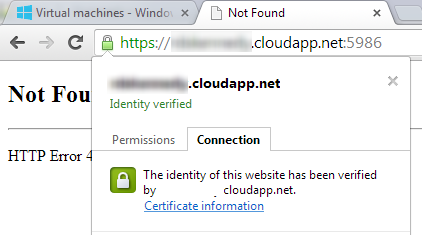
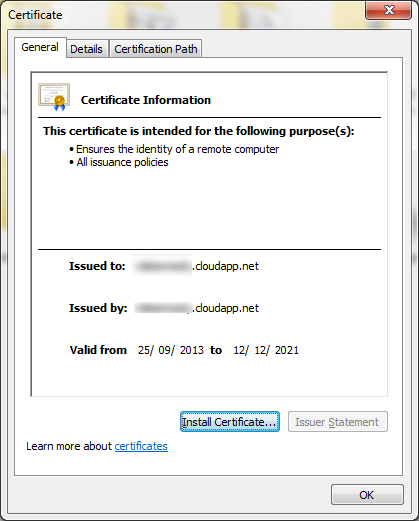
  • Get the server's certificate (PowerShell needs this for remote commands). You can get the server certificate by going to your domains' URL: https://yourdomain.cloudapp.net:12345 (where :12345 is the port that PowerShell uses).
  • Export the SSL certificate of the site as a .CER file and install it on your local machine.
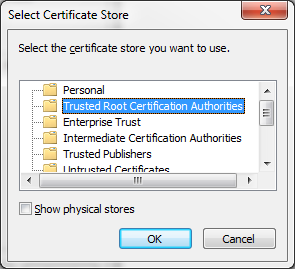
  • Save it to the "Trusted Root Certification Authorities" store on your machine.
  • Open PowerShell with administrative privileges on your local machine and type:
    Enter-PSSession -ComputerName yourdomain.cloudapp.net -Port 5986 -Credential YourUserName -UseSSL
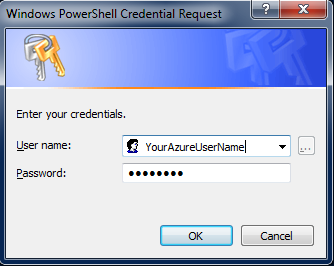
  • A login popup will appear, enter your VM's login credentials here.
  • You will now be able to execute commands against the Azure VM. In Seán's case, he ran
    netsh advfirewall firewall set rule group="remote desktop" new enable=Yes
    and exited the PowerShell session and was able to remotely connect to my machine.

Long Detailed Version with Screenshots

Long version with screenshots:

Make sure PowerShell is publically accessible in the 'endpoints' section of the Azure portal.

 01 - VM Endpoints

Get the server's certificate (PowerShell needs this for establishing a remote session). You can get the server certificate by going to your domains' URL: https://yourdomain.cloudapp.net:5986 (where :5986 is the port that PowerShell uses).

 image

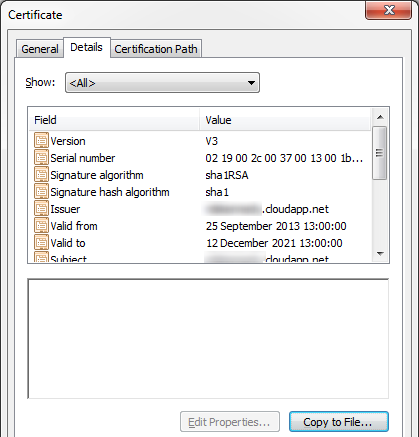
Go to the Details tab and click Copy to File...

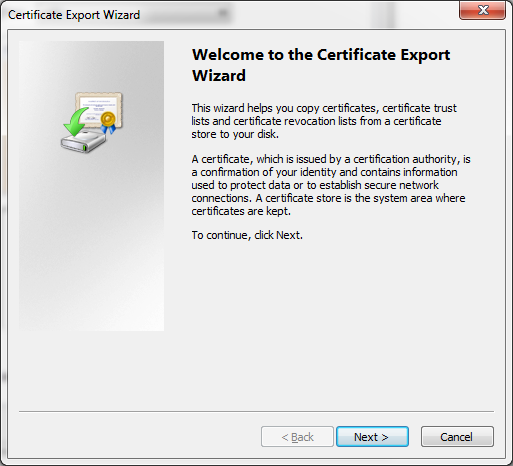
 03 - Certificate Export

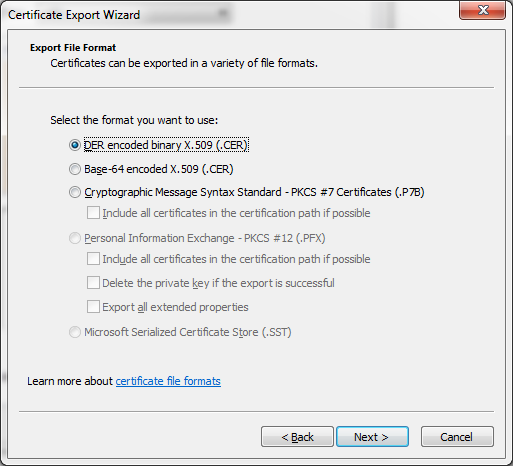
Leave the first option selected and save the file to a local drive. 

 04 - Certificate Export

05 - Certificate Export

Once the file is generated and saved locally, install the certificate by double clicking on the certificate-name.cer file.

 06 - Certificate Install

Install the certificate in the following store:

cert install

Open up PowerShell with administrative privileges and execute the following command (replacing the domain name and username with your own one):

 08 - Remote PowerShell Session

A logon credential popup should appear where you will need to enter your VM's username and password:

07 - Remote PowerShell Session

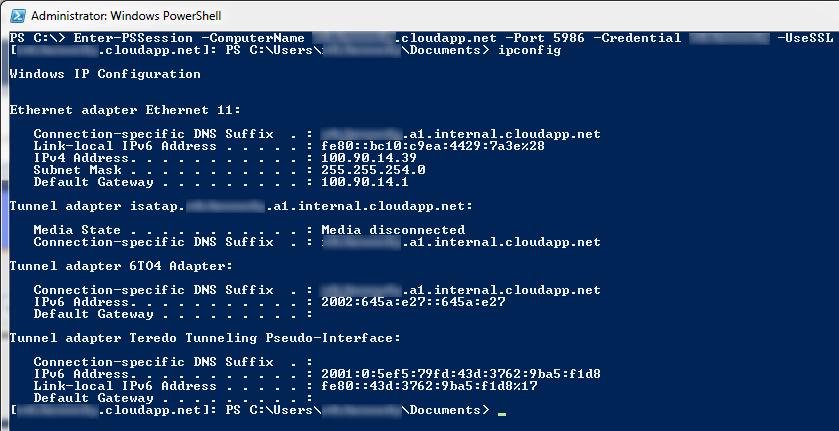
If successful, it should be pretty obvious that you have successfully initiated a remote session with the VM.

Enter-PSSession -ComputerName yourdomain.cloudapp.net -Port 5986 -Credential YourUserName -UseSSL

09 - Remote PowerShell Session Verification

To open re-enable the firewall rule you issue the command:

netsh advfirewall firewall set rule group="remote desktop" new enable=Yes  

 10 - Remote PowerShell Session Firewall Rule Update

The final step was to quit the PowerShell session and RDC to the VM. Success! 

I hope this write-up helps other people as well. Thanks Seán for a great question and for sharing the screenshot of your experience!


Sponsor: Thanks to Red Gate for sponsoring the feed this week! Check out a simpler way to deploy with Red Gate’s Deployment Manager. It can deploy your .NET apps, services, and databases in a single, repeatable process. Get your free Starter edition now.


© 2013 Scott Hanselman. All rights reserved.
     
11 Oct 20:10

Would You Secure Personal Data With DRM Tools?

by Soulskill
museumpeace writes "From its own EmTech conference, Technology Review reports on a privacy strategy from Microsoft's Craig Mundie: When sharing music online took off in the 1990s, many companies turned to digital rights management (DRM) software as a way to restrict what could be done with MP3s and other music files — only to give up after the approach proved ineffective and widely unpopular. Today Craig Mundie, senior advisor to the CEO at Microsoft, resurrected the idea, proposing that a form of DRM could be used to prevent personal data from being misused." Mundie also thinks it should be a felony to misuse that data. He thinks larger penalties would help deter shady organizations from harvesting data the user isn't even aware of. "More and more, the data that you should be worried about, you don’t even know about."

Share on Google+

Read more of this story at Slashdot.


11 Oct 18:53

In-Memory OLTP: How Durability is Achieved for Memory-Optimized Tables

by SQL Server Team

In-memory OLTP provides full durability for memory-optimized tables. When a transaction that has made changes to memory-optimized table commits, SQL Server, just like it does for disk-based tables, guarantees that the changes are permanent and can survive the database restart provided the underlying storage is available.

There are two key components of durability. First is the transaction logging and the second is persisting changes to data to on-disk storage. Let us look at each of these in the context of disk-based and memory-optimized tables.

Transaction Logging: All changes made to disk-based tables or durable memory-optimized tables are captured in one or more transaction log records. When a transaction commits, SQL Server flushes all the log records associated with the transaction to disk before sending communicating to the application or user session that the transaction has committed. This guarantees that the changes done on behalf of transaction are durable. The transaction logging for memory-optimized tables is somewhat different than disk-based tables with the key differences described below.

  • Transaction log records are generated only after a transaction begins the process of committing This provides for efficient logging as there is no need to log any information should the transaction needs to be rolled back. In other words, there is no UNDO log information logged for memory-optimized tables
  • Changes to indexes on memory-optimized tables are not logged. These indexes are only kept in-memory and are not persisted and are re-generated at the database restart.  This can potentially reduce the transaction log overhead significantly.
  • Multiple changes are grouped into one large log record (max size 24 KB at this time and is subject to change in the future).  For example, if the transaction has inserted 1000 rows and 50 rows can fit into a large log record, there will be total of 20 log records generated for memory-optimized tables. Contrast this to disk-based tables, which would have generated 2000 log records just for data rows alone. Fewer number of log records minimize the log-header overhead and effectively reduce the contention for inserting into log-buffer

These differences make logging for memory-optimized table more efficient while still guaranteeing the full durability.

Persisting changes to storage: The transaction log records all the changes that ever happened in a database starting from the database was created and can used to re-construct the database assuming the transaction log was truncated. However, this would be very inefficient as SQL Server will need to apply all the transaction log records sequentially since the database was created thereby making recovery time (RTO) unacceptably high. To avoid this, SQL Server and other database systems, take periodic checkpoints that flush operations to durable storage and allow log truncation to reduce the amount of transaction log that must be replayed after a crash.  Before describing how data is persisted for memory-optimized tables, let us first look at how data is persisted for disk-based tables and what are the performance implications.

  • Disk-Based Tables:  Traditional relational database servers in use today were designed at a time when the size of memory was much smaller than the size of the database.  In this architecture, the data is organized into multiple pages and these pages are the unit of IO. SQL Server uses a page size of 8KB. Each table has its own set of data and index pages and these pages are not shared with other tables. When a change is made to some row, it is first logged and then the data and/or index page is updated. SQL Server enforces write-ahead logging (WAL) to make sure that the log record is persisted before the data or index page. Without WAL, there will be no way to UNDO changes to a page if needed. Over time, as transactions commit, the list of dirty pages in the buffer pool may grow depending upon the memory available. Periodically, there is automatic checkpoint operation done that flushes all the dirty pages to the disk. The checkpoint operation ensures that data/index pages containing changes from all the transactions before the checkpoint operation was started are persisted to the data storage disk. The checkpoint operation also trims the ‘active’ portion of the transaction log, the part of the log that needs to be applied when the database is restarted.

Performance Bottleneck: The access to data/index pages generates random IO thereby reducing the IOPS available from rotating media. Also, the checkpoint operation can potentially cause significantly high IO activity that can impact the production workload negatively. With Indirect-checkpoint feature available as part of SQL Server 2012, the amount of IO done as part of checkpoint is reduced but still the fact remains that the IO is random.

  • Memory-Optimized Tables:  The data in memory-optimized tables is stored as free-form data rows that are linked through one or more in-memory indexes. There are no page structures for data rows like we have for disk-based tables. When a change is made to some row(s) as part of a transaction, a new row version(s) is created but no transaction log records are generated at this time. There is no issue with WAL as the in-memory data will be lost when database is re-started. When the application signals to commit the transaction, the in-memory OLTP engine validates that the transaction can be committed (i.e. there are no validation failures) and then generates the log records for the transaction. At this time, the changes for the committed transaction only exist in the transaction log records.

The persistence of memory-optimized tables is done with a set of data and delta files using a background thread (described later). These files are located in one or more containers leveraging the same mechanism as used for FILESTREAM data. These containers are mapped to a new type of filegroup, called Memory_Optimized filegroup. For example, the following command adds a memory_optimized filegroup with one container to the database ContosoOLTP.

CREATE DATABASE ContosoOLTP
on PRIMARY (NAME = [contoso_data], FILENAME = 'C:\data\contoso_data.mdf', SIZE=100mb)
LOG ON (name = [contoso_log], Filename='C:\data\contoso_log.ldf', size=100MB)

----- Enable database for memory optimized tab--les
-- add memory_optimized_data filegroup
ALTER DATABASE ContosoOLTP
ADD FILEGROUP contoso_mod CONTAINS MEMORY_OPTIMIZED_DATA

-- add container to the filegroup
ALTER DATABASE ContosoOLTP
ADD FILE (NAME='contoso_mod', FILENAME='c:\data\contoso_mod')
TO FILEGROUP contoso_mod

As indicated earlier, there are two kinds of files as follows

Data File

A data file contains rows from one or more memory-optimized tables inserted by multiple transactions as part of INSERT or UPDATE operation. For example, one row can be from memory_optimized table T1 and the next row can be from table T2. Each data file is sized approximately to 128MB.  The rows only appended to the data file exploiting the sequential IO.  Once the data file is full, the rows inserted by new transactions are stored in another data file. Over time, the rows from durable memory-optimized tables are stored across one of more data files and each data file containing rows from a disjoint but contiguous range of transactions. For example a data file with transaction commit timestamp in the range of (100, 200) has all the rows inserted by transactions that have commit timestamp in in this range.  The commit timestamp is a monotonically increasing number assigned to a transaction when it is ready to commit. Each transaction has a unique commit timestamp.

When a row is deleted or updated by a future transaction, the rows is not removed or changed in-place in the data file but the deleted rows are tracked in another type of file ‘delta’ file. Update operations are processed as delete/insert of the row.  This eliminates random IO on the data file.

Delta File

Each data file is paired with a delta file that has the same transaction range and tracks the deleted rows inserted by transactions in the transaction range.  For example, a delta file corresponding to transaction range (100, 200) will store deleted rows that were inserted by transactions in the range (100, 200). Like data files, the delta file is accessed sequentially.

Populating the Data and Delta files

The user transactions don’t actually append to data or delta file. This is done by a background thread, called offline checkpoint worker. This thread reads the transaction log records generated by committed transactions on memory-optimized tables and appends inserted and deleted rows into appropriate data and delta files. Unlike disk-based tables where data/index pages are flushed with random IO when checkpoint is done, the persistence of memory-optimized table is continuous background operation.

Checkpoint for Memory-Optimized Tables

The checkpoint for memory –optimized tables is done when the transaction log grows larger than an internal threshold (currently set to 1GB) since the last checkpoint. The checkpoint operation is completed with the following steps

    • All buffered writes are flushed to the data and delta files.
    • A checkpoint inventory is constructed that includes descriptors for all files from the previous checkpoint plus any files added by the current checkpoint. The inventory is hardened to durable storage.
    • The location of the inventory is stored in the transaction log so that it is available at recovery time

During crash recovery, SQL Server locates the last completed checkpoint from the transaction log, loads the data and delta files and then applies the active part of the transaction log to bring memory-optimized tables to the current point-in-time.

For more information, download SQL Server CTP1 and get started today, or see more blogs in the series introduction and index here.

11 Oct 18:53

Want To Hijack a Domain? Just Get a Fax Machine

by Soulskill
msm1267 writes "Metasploit's HD Moore says hackers sent a spoofed DNS change request via fax to Register.com that the registrar accepted, leading to a DNS hijacking attack against the Metasploit and Rapid7 websites. The two respective homepages were defaced with a message left by the same hacker collective that claimed responsibility for a similar DNS attack against Network Solutions. Rapid7 said the two sites' DNS records have been locked down and they are investigating."

Share on Google+

Read more of this story at Slashdot.


11 Oct 17:23

Stealing Silicon Valley

by Soulskill
pacopico writes "A series of robberies in Silicon Valley have start-ups feeling nervous. According to this report in Businessweek, a couple of networking companies were burgled recently with attempts made to steal their source code. The fear is that virtual attacks have now turned physical and that espionage in the area is on the rise. As a result, companies are now doing more physical penetration testing, including one case in which a guy was mailed in a FedEx box in a bid to try and break into a start-up."

Share on Google+

Read more of this story at Slashdot.


11 Oct 17:02

With public or private cloud, always check the meter

by Mark Twomey
EMC logo

One of axioms we’re supposed to accept in the absence of any supporting data is that public cloud is cheaper than doing it yourself, always and forever.

This is a myth which is passed off like it’s a law akin to the conservation of energy.

It’s more accurate to say that one type of cloud, be it public or private, can be cheaper than the other in specific cases.

I can understand why start ups jump on the public cloud, were I one I would too.

I see the quickest way to burn precious VC cash is to write a check to a server/storage/networking vendor when instead I could rent all of that by the drop and hire a few more coders to actually build something which will start generating cash for me.

Then there’s the added upside that new services are made available providing extended functionality, so the longer I stay the more new infrastructure options I get.

But as this Gigaom article discussing the topic with people who been there and back again shows, there could come a time where it no longer makes sense for you to carry on where you started.

This also applies to workloads you might always have been running internally, it could hit a threshold where it makes economic sense to eject it out into the public cloud from now until eternity.

If you work in IT it is your job to always get the most out of every dollar spent regardless of where you’re going to spend it. That means it’s up to you to get into the weeds on the numbers. Not somebody else or the CFO, you.

Are there massive cost saving to be made in shared architectures operated at scale? Absolutely. But that goes for the public and the private cloud. And lets not forget that in the private cloud those savings are passed directly on to you and aren’t skimmed off the top as healthy provider margins.

Kids of the public cloud folks aren’t going to school without shoes on their feet. If you think you’re getting anything cheap from a public cloud you can be damn sure it’s cost them a hell of a lot less than they’re selling it to you for, because if it doesn’t they’ll be dead soon. (Nirvanix)

But it doesn’t matter where you’re running your workload, always check the meter and if the meter is running consistently on the high side you can probably do it cheaper somewhere else.

If there’s a universal law in any of this that’s probably it.

10 Oct 23:19

Moving Files across the network…for 2000 machines – Part II

by Laerte Junior

In my previous post, I showed how we solved a problem to move files for 2000 machines using a community function called Split-Job, that runs using runspaces.

I was talking with  the PowerShell Jedi Johan Akerstrom , and another approach could be used as well. In this case, not running in asynchronous mode, but in parallel using workflows. This approach only works in PowerShell 3.0 and 4.0, instead of using Split-Job, that will works in Posh 2.0,3.0 and 4.0.

Workflows implicit works with PowerShell Remoting, and in the environment  of my friend, it was disabled. But in his case we are using the shared path to perform the operation in the machine, so I will not need to use remoting in the machines.

The code is

Workflow Move-LargeFiles {
    Param(
        [String[]] $Computername
    )

    Parallel {

        foreach -parallel ($Computers in $Computername) {
            inlinescript {
                Write-Verbose -message “Processing Computer $($using:computers)”
                Get-ChildItem “\\$using:computers\X$\foo\foo1\” -file |
                Where { ($_.Length/1MB) -gt X } |
                Move-Item  -destination \\FixedPath\foo\LargeFiles
                Write-Verbose -message “Computer $($using:computers) Finished”

            }

        }
    }
}

Move-LargeFiles -Computername (get-content c:\temp\servers.txt) –Verbose

To be honest I don’t know the difference in time between the two approaches, but both certainly are better than sequentially :)

In this case we are only  using workflow to have the feature of run in parallel

As Johan says, there is more than one way to skin a cat :)


10 Oct 23:16

My First PowerShell Pinvoke –Lock-MyWorkstation

by Laerte Junior

Yesterday I watched the amazing webcast from PowerShell Jedi Adam Driscoll about the fantastic world of Win32 Subsystem and ..oh boy.. I got a new purpose in my life LOL.

Adam showed to me a new world, full of possibilities and challengers. To start my day (a few hours before start my trip to USA and Summit 2013), I tried my first code : A just lock workstation using Win32 interop.I know, it is simple and ridiculous , but it is my first stuff ever with that, so I am proud of myself :)

I am a novice in C# , C++ and whatever  , so with some help of another Jedi, Mladen Prajdic that helped me , after almost 2 hours trying, he showed me what was going wrong. I was defining the class Public with P in uppercase and it is in lowercase.

Crap..but shit happens.

Also I had some ideas from the another Jedi (yeahh I am claiming for the Force with the Jedi Council)  Trevor Sullivan –> PowerShell: Disable CapsLock , my final code is :


Function Lock-MyWorkstation {
    $PoshLockWorkStation = @”

using System;
using System.Runtime.InteropServices;
using System.ComponentModel;

public static class PoshLockWorkStation
{
    [DllImport("user32.dll", SetLastError = true)]
        static extern bool LockWorkStation();
    public static void LockItPlease()
    {
        bool result = LockWorkStation();
        if( result == false )
        {
            throw new Win32Exception( Marshal.GetLastWin32Error() );
        }
    }
}
“@
    if (-not $PoshLockWorkStation) {
        Add-Type $PoshLockWorkStation  -ReferencedAssemblies System.Runtime.InteropServices
    }

    [PoshLockWorkStation]::LockItPlease()
}

Lock-MyWorkstation


HA..and it worked !!!! .

I just ordered some books. Windows Internals 6th Part 1 and 2, PowerShell Deep Dives and in the process of get a pluralsight account to learn C#.

It seems that, as Adam said, my end of the year will be with pain, but a good and pleasurable pain


10 Oct 23:16

Wait Statistics in SQL Server

by kevin

CB033389

When it comes to troubleshooting in relational databases, there’s no better place to start than wait statistics.  In a nutshell, a wait statistic is an internal counter that tells you how long the database spent waiting for a particular resource, activity, or process.  Since wait statistics are categorized by type, one look will quickly tell the variety of problem that needs your attention, assuming you know meaning for Microsoft’s lingo for each wait type.

(As an aside, wait stats were implemented in the earliest days of relational database computing because the early RDBMSes ran on multiple operating systems. So the database vendors needed a reliable method of troubleshooting database performance which was independent of the OS).

Wait stats help you clue in to the best approach and path for troubleshooting.  For example, if your top wait stat showed a lot of time spent on acquiring locks, you could pretty well rest assured that trying to tune networking latency would be a total waste of your time.  Conversely, wait stats could also help you understand that perhaps the ‘usual suspects’ of poor database performance (IO, CPU, etc) weren’t actually worth consideration.

Because wait statistics are broad, they’re typically where you start your troubleshooting process but not where it ends.  That’s because wait statistics don’t actually point to the smoking gun that’s causing the true performance problem.  For example, let’s say your SQL Server is experiencing an unusually high amount of RESOURCE_SEMAPHORE waits.  Resource semaphores relate to query compilation and reserving memory for queries as they’re being compiled.  But on a busy system,WHICH of your queries are contributing to this wait?  It can require a lot more investigation to figure that part out.  (I’ve considered spending some more time in future posts walking through the entire troubleshooting process. If you’re interested let me know in the comments).

Now, in SQL Server, it is possible to determine the wait stats accrued by a given thread or even a specific query or transaction.  But this information is only retained by SQL Server while “in flight”.  Long-term retention of wait stat information is only for the broad categories.

WAIT STATS THEN…

For some historical perspective, you have to go back to the white paper SQL Server 2005 Waits and Queues (By Tom Davidson) to see where it all began for SQL Server.  (http://download.microsoft.com/download/4/7/a/47a548b9-249e-484c-abd7-29f31282b04d/Performance_Tuning_Waits_Queues.doc)

Prior to SQL Server 2005, wait stats of a sort where identifiable using the DBCC SQLPERF(UMSSTATS) and DBCC SQLPERF(WAITSTATS).  These commands are still around, btw.  You can see these early indications of UMSStats (User Mode Scheduler) and wait stats in Microsoft KB articles like Description of WAITTYPE and LASTWAITTYPE (http://support.microsoft.com/kb/822101) and other early blog posts.

Wait Stats started to come into major prominence when folks like Joe Sack (blog | twitter)
(http://blogs.msdn.com/jimmymay/archive/2009/04/27/wait-stats-by-joe-sack.aspx) and Jimmy May (blog | twitter)  started to write about them (http://blogs.msdn.com/b/jimmymay/archive/2009/04/26/wait-stats-introductory-references.aspx)

And if you didn’t get them then, you definitely need the SQL Server Diagnostic Queries by Glenn Berry (blogtwitter) , which have a number of wait stat queries already written for you.  Glenn started this collection of queries back in 2005 and has kept it up to date ever since.  The latest version of queries are at http://sqlserverperformance.wordpress.com/2012/07/08/sql-server-2012-diagnostic-information-queries-july-2012/.

I also started to put a lot of attention on them, such as when MCM and UK MVP Christian Bolton (Blog | Twitter) and I did the webcast The 5-Minute SQL Server Health Check (http://sqlblogcasts.com/blogs/christian/archive/2009/11/16/webcast-now-on-demand-the-5-minute-sql-server-healthcheck.aspx).

…AND WAIT STATS NOW

Nowadays, wait stats are quite well documented.  You can get a great review of all of the wait stats for SQL Server simply by looking at the Books Online (BOL) topic (http://msdn.microsoft.com/en-us/library/ms179984.aspx).

The downside of Microsoft’s documentation in BOL is that it tells you a nice bit of info about each of the wait stats, but not how to remediate them if they are turning into a problem on your SQL Server.  But times have changed – there’s so much good information that all you need (most of the time) is to perform an internet search for ‘SQL Server my_problem_wait_stat’ and you’ll probably get at least one good hit by Microsoft customer support or an MVP blogger.  All you need to do before the search is to find the type of wait stat that’s causing the problem.


These days, all you need to

solve a wait stat problem is an

internet search for ‘SQL Server

 my_problem_wait_stat’


There are also a couple good books and eBooks on the topic.  Kalen Delaney’s Inside SQL Server books, especially Chapter 2 in the edition sitting on my shelf, are outstanding.  Joes2Pros also has a nice, succinct book on wait stats here (http://joes2pros.com/?wpsc-product=sql-wait-stats-joes-2-pros).

Jonathan Kehayias (blog | twitter), of SQLSkills.com, has a great eBook in short form for free and a longer, more comprehensive version for a small fee. (https://www.simple-talk.com/books/sql-books/troubleshooting-sql-server-a-guide-for-the-accidental-dba/) at Simple-Talk.


What are your favorite wait stat resources? Have you written a blog post that broadens or deepens our knowledge of wait stats in SQL Server? If so, I’d love for you to post a comment here with a link back to your article!  Let me know what you think.  Thanks,

-Kevin

-Follow me on Twitter!
-Google Author

10 Oct 23:16

SQL Server – Automatic Page Repair in Database Mirroring

by Kanchan Bhattacharyya

Dear Friends,


Automatic page repair is one of the cool features of database mirroring which helps us to replace the corrupt page by requesting a readable copy from the partner database. Today, I’ll simulate a page corruption and show how this feature is helpful to recover damaged page.

For this demonstration, I’ve used database mirroring setup in my LAB environment on AdventureWorks2012 database.

Database Mirroring

In order to corrupting the page, I’ll have to offline my database hence I’ll have to remove database mirroring as mirrored database cannot be offline. Once I’m done with corrupting the page mirroring can be re-established. I picked up HumanResources.JobCandidate table and decided to corrupt Index Page 1057. I went ahead and corrupted the page. You can read my earlier blog post here to know how we can corrupt a page definitely in a controlled LAB environment. Time to run CHECKDB;

DBCC CHECKDB(AdventureWorks2012) WITH NO_INFOMSGS

Msg 8976, Level 16, State 1, Line 1

Table error: Object ID 1589580701, index ID 1, partition ID 72057594045399040, alloc unit ID 72057594051100672 (type In-row data). Index node page (0:0), slot 0 refers to child page (1:1057) and previous child (0:0), but they were not encountered.

So, I corrupted page 1057 and now we can re-instate database mirroring and check how database looks post corruption. I went ahead and reestablished database mirroring then ran DBCC CHECKDB;

Successful DBCC

Yes, you guessed it right corrupted page is automatically replaced from partner so CHECKDB reported clean. There is a DMV called sys.dm_db_mirroring_auto_page_repair so let’s query this and find out how it looks;

dm_db_mirroring_auto_page_repair

As can be seen that error_type shown 2 and page_status is 5 i.e. there was a bad checksum on this database and automatic page repair succeeded. To know more on sys.dm_db_mirroring_auto_page_repair you can read here. I had a check on error log and it also recorded useful information as shown below;

Errorlog

To give you more details, on SQL Server Enterprise and Developer editions database mirroring can automatically correct 823, 824 error caused by data cyclic redundancy check errors when the server is attempting to read a page. When mirroring partner cannot read a page, it asynchronously requests a copy from the partner; if the requested page is successfully applied the page repair is reported as successful. Actual data is preserved during restore however it does not repair allocation pages and control type pages. Repair operation varies if principal or mirror is requesting the page and discussed following; 

When Principal Request a Page

When principal identifies a page read error, it marks the page with an 829 error i.e. RestorePending and inserts a row into the suspect_pages table in MSDB with the error status then requests the page from the partner. If the mirror is successful in reading the page it returns the page to the principal who then applies it. After the page is repaired the principal marks the page as restored i.e. event_type =5 in the suspect_pages table. Then any deferred transactions associated are resolved accordingly.

When Mirror Request a Page

When mirror identifies a page read error, marks the page with an 829 error i.e. RestorePending and inserts a row into the suspect_pages table in MSDB with the error status information. It requests the page from the principal and sets the mirror session in SUSPENDED state. If the principal is successful in reading the page it returns the page to the mirror. Once the pages applied at the mirror the mirror resumes the data mirroring session and marks the page as restored in the suspect_pages table with event_type = 5.


You can refer to my earlier blog post here to know more about RestorePending.

Please note not all pages can be repaired and you can read here to know further.


If you liked the post, do like us on Facebook at http://www.FaceBook.com/SQLServerGeeks

Have a SQL Server question? Join the fastest growing SQL Server Facebook group at: http://www.facebook.com/groups/458103987564477/


Regards,

Kanchan

10 Oct 23:15

Wait Statistics in Microsoft SQL Server

by KKline
When it comes to troubleshooting in relational databases, there's no better place to start than wait statistics. In a nutshell, a wait statistic is an internal counter that tells you how long the database spent waiting for a particular resource, activity, or process. Since wait statistics are categorized by type, one look will quickly tell the variety of problem that needs your attention, assuming you know meaning for Microsoft's lingo for each wait type....(read more)
10 Oct 23:14

Troubleshooting Common Performance Problems with Memory-Optimized Hash Indexes

by SQL Server Team

In-Memory OLTP introduces a new type of index for memory-optimized tables in SQL Server 2014: the hash index. This new index type is optimized for index seek operations, i.e. finding the rows corresponding to a given set of equality predicates; for example, ‘o_id=8 AND od_id=4’. The underlying data structure of a hash index is a hash table, which is quite different from the B-tree data structure underlying the traditional (non)clustered indexes for disk-based tables.

In this post we will not describe the hash index structures in details; more information can be found in the Books Online topic on In-Memory OLTP. Instead, we focus on troubleshooting two common issues we have seen with customers using hash indexes. For each of the common issues we describe how to troubleshoot and how to work around the issue. Future blog posts will address further common performance problems.

Hash index bucket count too low

Issue: If the bucket count is significantly lower (think 10X) than the number of unique index keys, there will be many buckets that have multiple index keys. This degrades performance of most DML operations, in particular point lookups, i.e. lookups of individual index keys.

Symptom: A performance degradation of queries that rely on lookups or inserts into the hash index. For example, SELECT queries and UPDATE/DELETE operations with equality predicates matching the index key columns in the WHERE clause.

How to troubleshoot: In some cases the problem is obvious from the index definition and the table data. For example, if the PRIMARY KEY has a HASH index with bucket_count 10,000, and the table has 1,000,000 rows, the bucket count is too low and will need to be changed.

In addition to inspecting table schema and data, you can use the DMV sys.dm_db_xtp_hash_index_stats. You can use the following query to obtain statistics concerning the buckets, and the row chains hanging off the buckets:

SELECT hs.object_id, object_name(hs.object_id) AS 'object name', i.name as 'index name', hs.*
FROM sys.dm_db_xtp_hash_index_stats AS hs
JOIN sys.indexes AS i ON hs.object_id=i.object_id AND hs.index_id=i.index_id;

A large average chain length indicates that many rows are hashed to the same bucket. If, in addition, the number of empty buckets is low or the average and maximum chain lengths are similar, it is likely that the total bucket count is too low. In this case, you need to increase the bucket_count. Typically, you would want the bucket_count to be between 1 and 2 times the number of unique index key values. Note that the bucket_count is automatically rounded up to the nearest power of 2.

 Search requires a subset of hash index key columns

Issue: Hash indexes require values for all index key columns in order to compute the hash value, and locate the corresponding rows in the hash table. Therefore, if a query includes equality predicates for only a subset of the index keys in the WHERE clause, SQL Server cannot use an index seek to locate the rows corresponding to the predicates in the WHERE clause.

In contrast, ordered indexes like the traditional disk-based (non)clustered indexes and the new memory-optimized nonclustered indexes (to be introduced in CTP2) support index seek on a subset of the index key columns, as long as they are the leading columns.

Symptom: This results in a performance degradation, as SQL Server will need to execute full table scans, rather than an index seek, which is typically a far cheaper operation. 

How to troubleshoot: Besides the performance degradation, inspection of the query plans will also show a scan instead of an index seek. If the query is fairly simple, inspection of the query text and index definition will also show whether the search requires a subset of the index key columns.

Consider the following table and query:

create table dbo.od
( o_id int not null,
od_id int not null,
p_id int not null,

constraint PK_od primary key
nonclustered hash (o_id,od_id) with (bucket_count=10000)
) with (memory_optimized=on)

select p_id
from dbo.od
where o_id=1

 The table has a hash index on the two columns (o_id, od_id), while the query has an equality predicate on (o_id). As the query has equality predicates on only a subset of the index key columns, SQL Server cannot perform an index seek operation using PK_od; instead, SQL Server has to revert to a full index scan, as shown in the following query plan visualization:

query plan visualization

Workarounds: There are a number of possible workarounds. For example:

  • Re-create the index as type ‘nonclustered’ [available in CTP2] instead of ‘nonclustered hash’. The memory-optimized nonclustered index is ordered, and thus SQL Server can perform an index seek on the leading index key columns. The resulting primary key definition for the example would be:
constraint PK_od primary key nonclustered
  • Change the current index key to match the columns in the WHERE clause.
  • Add a new hash index that matches with the columns in the WHERE clause of the query. In the example, the resulting table definition would look at follows:
create table dbo.od
( o_id int not null,
od_id int not null,
p_id int not null,

constraint PK_od primary key
nonclustered hash (o_id,od_id) with (bucket_count=10000),

index ix_o_id nonclustered hash (o_id) with (bucket_count=10000)

) with (memory_optimized=on)

Note that memory-optimized hash indexes do not perform optimally if there are a lot of duplicate rows for a given index key value: in the example, if the number of unique values for the column o_id is much smaller than the number of rows in the table, it would not be optimal to add an index on (o_id); instead, changing the type of the index PK_od from hash to nonclustered would be the better solution.

For more information, download SQL Server CTP1 and get started today, or see more blogs in the series introduction and index here.


10 Oct 20:15

What Developers Can Learn From Healthcare.gov

by Soulskill
An anonymous reader writes "Soured by his attempt to acquire a quote from healthcare.gov, James Turner compiled a short list of things developers can learn from the experience: 'The first highly visible component of the Affordable Health Care Act launched this week, in the form of the healthcare.gov site. Theoretically, it allows citizens, who live in any of the states that have chosen not to implement their own portal, to get quotes and sign up for coverage. I say theoretically because I've been trying to get a quote out of it since it launched on Tuesday, and I'm still trying. Every time I think I've gotten past the last glitch, a new one shows up further down the line. While it's easy to write it off as yet another example of how the government (under any administration) seems to be incapable of delivering large software projects, there are some specific lessons that developers can take away. 1) Load testing is your friend.'"

Share on Google+

Read more of this story at Slashdot.


10 Oct 18:21

MasterCard Joining Push For Fingerprint ID Standard

by timothy
schwit1 writes with this selection from a story at USA Today: "MasterCard is joining the FIDO Alliance, signaling that the payment network is getting interested in using fingerprints and other biometric data to identify people for online payments. MasterCard will be the first major payment network to join FIDO. The Alliance is developing an open industry standard for biometric data such as fingerprints to be used for identification online. The goal is to replace clunky passwords and take friction out of logging on and purchasing using mobile devices. FIDO is trying to standardize lots of different ways of identifying people online, not just through biometric methods."

Share on Google+

Read more of this story at Slashdot.


10 Oct 18:17

Sorm: Russia Intends To Monitor "All Communications" At Sochi Olympics

by timothy
dryriver writes with this excerpt from The Guardian: "Athletes and spectators attending the Winter Olympics in Sochi in February will face some of the most invasive and systematic spying and surveillance in the history of the Games, documents shared with the Guardian show. Russia's powerful FSB security service plans to ensure that no communication by competitors or spectators goes unmonitored during the event, according to a dossier compiled by a team of Russian investigative journalists looking into preparations for the 2014 Games. The journalists ... found that major amendments have been made to telephone and Wi-Fi networks in the Black Sea resort to ensure extensive and all-permeating monitoring and filtering of all traffic, using Sorm, Russia's system for intercepting phone and internet communications. Ron Deibert, a professor at the University of Toronto and director of Citizen Lab, which co-operated with the Sochi research, describes the Sorm amendments as "Prism on steroids", referring to the programme used by the NSA in the US and revealed to the Guardian by the whistleblower Edward Snowden."

Share on Google+

Read more of this story at Slashdot.


10 Oct 17:54

All Your Child's Data Are Belong To InBloom

by timothy
theodp writes "Q. What do you get when Bill Gates and Rupert Murdoch put their heads together? A. inBloom (aka SLC), the Gates Foundation-bankrolled and News Corp. subsidiary-implemented collaboration whose stated mission is to 'inform and involve each student and teacher with data and tools designed to personalize learning.' It's noble enough sounding, but as the NY Times reports, the devil is in the details when it comes to deciding who sees students' academic and behavioral data. inBloom execs maintain their service has been unfairly maligned, saying it is entirely up to school districts or states to decide which details about students to store in the system and with whom to share them. However, a video on inBloom's Web site suggesting what this techno-utopia might look like may give readers of 1984 some pause. In one scene, a teacher with a tablet crouches next to a second-grader evaluating how many words per minute he can read: 55 words read; 43 correctly. Later, she moves to a student named Tyler and selects an e-book 'for at-risk students' for his further reading. The video follows Tyler home, where his mom logs into a parent portal for an update on his status — attendance, 86%; performance, 72% — and taps a button to send the e-book to play on the family TV. And another scene shows a geometry teacher reassigning students' seating assignments based on their 'character strengths', moving a green-coded female student ('actively participates: 98%') next to a red-and-yellow coded boy ('shows enthusiasm: 67%'). The NYT also mentions a parent's concern that school officials hoping to receive hefty Gates Foundation Grants may not think an agreement with the Gates-backed inBloom completely through."

Share on Google+

Read more of this story at Slashdot.


10 Oct 17:52

Ask Professor Kevin Fu About Medical Device Security

by samzenpus
Kevin Fu is a professor of electrical engineering and computer science at the University of Michigan. He heads a research group on medical-device security, Archimedes, that works to find vulnerabilities in medical equipment. WattsUpDoc, a system that can detect malware on medical devices by monitoring changes in power consumption, is based on his work. Professor Fu has agreed to put down the pacemakers for a moment and answer your questions about his work and medical device security in general. As usual, ask as many as you'd like, but please, one question per post.

Share on Google+

Read more of this story at Slashdot.


10 Oct 17:50

UK Minister: British Cabinet Was Told Nothing About GCHQ/NSA Spying Programs

by samzenpus
dryriver writes "From the Guardian: 'Cabinet ministers and members of the national security council were told nothing about the existence and scale of the vast data-gathering programs run by British and American intelligence agencies, a former member of the government has revealed. Chris Huhne, who was in the cabinet for two years until 2012, said ministers were in "utter ignorance" of the two biggest covert operations, Prism and Tempora. The former Liberal Democrat MP admitted he was shocked and mystified by the surveillance capabilities disclosed by the Guardian from files leaked by the whistleblower Edward Snowden. "The revelations put a giant question mark into the middle of our surveillance state," he said. "The state should not feel itself entitled to know, see and memorize everything that the private citizen communicates. The state is our servant." Huhne also questioned whether the Home Office had deliberately misled parliament about the need for the communications data bill when GCHQ, the government's eavesdropping headquarters, already had remarkable and extensive snooping capabilities. He said this lack of information and accountability showed "the supervisory arrangements for our intelligence services need as much updating as their bugging techniques."'"

Share on Google+

Read more of this story at Slashdot.


10 Oct 17:34

The Linux Backdoor Attempt of 2003

by Unknown Lamer
Hugh Pickens DOT Com writes "Ed Felton writes about an incident, in 2003, in which someone tried to backdoor the Linux kernel. Back in 2003 Linux used BitKeeper to store the master copy of the Linux source code. If a developer wanted to propose a modification to the Linux code, they would submit their proposed change, and it would go through an organized approval process to decide whether the change would be accepted into the master code. But some people didn't like BitKeeper, so a second copy of the source code was kept in CVS. On November 5, 2003, Larry McAvoy noticed that there was a code change in the CVS copy that did not have a pointer to a record of approval. Investigation showed that the change had never been approved and, stranger yet, that this change did not appear in the primary BitKeeper repository at all. Further investigation determined that someone had apparently broken in electronically to the CVS server and inserted a small change to wait4: 'if ((options == (__WCLONE|__WALL)) && (current->uid = 0)) ...' A casual reading makes it look like innocuous error-checking code, but a careful reader would notice that, near the end of the first line, it said '= 0' rather than '== 0' so the effect of this code is to give root privileges to any piece of software that called wait4 in a particular way that is supposed to be invalid. In other words it's a classic backdoor. We don't know who it was that made the attempt—and we probably never will. But the attempt didn't work, because the Linux team was careful enough to notice that that this code was in the CVS repository without having gone through the normal approval process. 'Could this have been an NSA attack? Maybe. But there were many others who had the skill and motivation to carry out this attack,' writes Felton. 'Unless somebody confesses, or a smoking-gun document turns up, we'll never know.'"

Share on Google+

Read more of this story at Slashdot.


09 Oct 00:43

An IDE Impostor

by Dan Adams-Jacobson

Despite having written code for twenty years before he'd even turned thirty, Jim couldn't help feeling like a bit of an impostor. He wasn't suffering from the Capgras delusion, though. He felt the way many of us feel when presented with a new job using new technology - in this case, the .NET framework and C# - that surely he couldn't be good enough at this to keep the job for very long. Surely his peers would find him wanting. While Jim struggled with his own self-worth, one thing he didn't struggle with was choice of IDE: Visual Studio. Intellisense, one-click refactoring, and a host of other features allowed him to fake it till he could make it. As far as Jim could tell, there was no reason to use anything else when developing a .NET solution.

Jim's first assignment was to work on a codebase created by Biff. Biff was a Something-Something-Level 3, so Jim was ready to learn a few new things when he fired up Visual Studio and opened Biff's solution. And learn he did. For example, he learned that VS marks syntax errors with a red, squiggly underline, much like Microsoft Word does with spelling and grammar mistakes. Biff's code lit up like a first-grader's essay about summer vacation, loaded as it was with misspelled identifiers, missing semicolons, and AWOL closing braces. Jim would have wondered if Biff had ever tried to compile the mess, but he was too busy wondering if the senior developer made a habit of typing with his eyes closed, since Visual Studio would have helpfully pointed out these sorts of mistakes as he made them.

Not wanting to scream "WTF?!" at a senior colleague he'd just met, Jim drafted the most diplomatic email he could, requesting that Biff provide input on the worst bits before Jim started making changes. After all, he explained, he didn't want to change something Biff intended to be there.

Biff made some changes, and when he emailed them back (Jim hadn't heard mention of source control since his job interview) Jim noticed two things right away: first, every class was declared in a single file, contravening the extremely common .NET convention. Second, and what prompted Jim to pick up the phone, the file's extension was .docx.

"Yeah, Biff? Jim here. I just got these updates you sent, but I think something's wrong with the attachment. Says it's a Word doc."

"Oh yeah," Biff chuckled. "I use Word to write all my code."

Jim tried to think of something, anything, to say in response. "You... what?"

"Word is where it's at! Way more control over formatting than that Visual Studio. I mean, what's with that fixed-width font? And in Word you can highlight things. This is Microsoft's best kept secret in software development, Jimbo. Swing by sometime and I'll show you what you're missing."

Jim hung up the phone and stared at his monitor, looking back and forth between his co-worker's IDE of choice and his own. It was clear that feeling underqualified was going to be the least of his problems.


Image from this prank application.
[Advertisement] Make your team a DevOps team with BuildMaster. Pairing an easy-to-use web UI with a free base platform, BuildMaster gets you started in minutes. See how Allrecipes.com and others use BuildMaster to automate their software delivery.
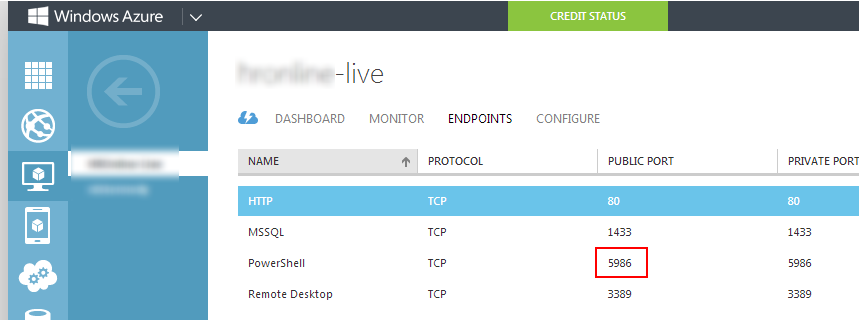
08 Oct 20:44

Tape – the Death Watch..

by Martin Glassborow
EMC logo

Watching the Spectralogic announcements from a far and getting involved in a conversation about tape on Twitter has really brought home the ambivalent relationship I have with tape; it is a huge part of my professional life but if it could be removed my environment, I’d be more than happy.

Ragging on the tape vendors does at times feel like kicking a kitten but ultimately tape sucks as a medium; it’s fundamental problem is that it is a sequential medium in a random world.

If you are happy to write your data away and only ever access it in truly predictable fashions; it is potentially fantastic but unfortunately much of business is not like this. People talk about tape as being the best possible medium for cold storage and that is true, as long as you never want to thaw large quantities quickly. If you only ever want to thaw a small amount and in relatively predictable manner; you’ll be fine with tape. Well, in the short term anyway.

And getting IT to look at an horizon which more than one refresh generation away is extremely tough.

Of course, replacing tape with disk is not yet economic over the short-term views that we generally take; the cost of disk is still high when compared to tape; disk’s environmental footprint is still pretty poor when compared to tape and from a sheer density point of view, tape still has a huge way to go…even if we start factor in upcoming technologies such as shingled disks.

So for long-term archives; disk will continue to struggle against tape…however does that means we are doomed to live with tape for years to come? Well SSDs are going to take 5-7 years to hit parity with disk prices; which means that they are not going to hit parity with tape for some time.

Yet I think the logical long-term replacement for tape at present is SSDs in some form or another; I fully expect the Facebooks and the Googles of this world to start to look at the ways of building mass archives on SSD in an economic fashion. They have massive data requirements and as they grow to maturity as businesses; the age of that data is increasing…their users do very little in the way of curation, so that data is going to grow forever and it probably has fairly random access patterns.

You don’t know when someone is going to start going through someone’s pictures, videos and timelines; so that cold data could warm pretty quickly.  So having to recall it from tape is not going to be fun; the contention issues for starters and unless you come up with ways of colocating all of an individual’s data on a single tape; a simple trawl could send a tape-robot into melt down. Now perhaps you could do some big data analytics and start recalling data based on timelines; employ a bunch of actuaries to analyse the data and recall data based on actuarial analysis.

The various news organisations already do this to a certain extent and have obits prepared for most major world figures. But this would be at another scale entirely.

So funnily enough…tape, the medium that wouldn’t die could be kiboshed by death. And if the hyper-scale companies can come up with an economic model which replaces tape…I’ll raise a glass to good time and mourn it little..

And with that cheerful note…I’ll close..


07 Oct 20:34

Think Before Starting a Community

by mjb

“Let’s start a user group!” or “We should start a new meetup.com!” or “This would be an incredible new space on the EMC Community Network!”

These are the phrases of good intentions that I finally have the right metaphor to convey what I see in it.

It’s like saying “Let’s get a puppy!” 


Anyone who’s heard this proposition first hand knows that sense of angst that comes to mind. There are a number of questions you have to be ready to answer:

  • Am I prepared to commit to this decision from this point forward?
  • Am I considering the responsibility that comes with the decision?
  • What are other consequences have I not considered?

Here’s the moment when you’d still be bound to hear “but I really want one!” 


And I don’t disagree with the value to be had! It’s incredible to be a community leader. The reward of being part of the EMC Community Network and the EMC Elect in particular is a real honor. Commitments, though, are rarely just positive or negative, no matter how dreamy-eyed we may start out.

Brace Rennels began this train of thought by saying “Communities are like puppies: everyone wants one, but most aren’t prepared to take care of it.”

That’s the moment when it clicked. What is it about communities that people underestimate at first glance?

The analogy began to flow and I came up with this SlideShare that walks through both the negative and the positive of investing in a community.

The ends are clear: there is great reward to reap. No one here is going to disagree with that conclusion.

What is up for debate is how much time is spent considering your responsibility that will follow before your community is right in front of you, expecting you to lead, taking up your time, peeing on your carpet and eating your shoes.

07 Oct 20:34

Hashtagger’s Dilemma: What the Prisoner’s Dilemma Teaches You About Hashtags

by mjb

Amy Lewis and I had a great argument on hashtag strategy during Geek Whisperers. It came down to whether we use one unique hashtag, like #CiscoVMworld, versus using multiple hashtags, like #Cisco #VMworld.

Let’s Get Hypothetical

You’re looking to amplify your message online. Twitter is your target and you’re familiar enough to know hashtags can catapult you in as a trending topic.

This is the moment that you can learn a whole lot from a convicted felon.

Prisoner's_Dilemma

There is a mind hack you can ask yourself before you get down to the conversation on what hashtag is best. It begins in the prisoner’s dilemma.

Take a look at our two felons above. If you quickly review how much time they will spend in jail, you’ll find the difficulty.

  • The best option is no time at all. The risk with going after no time would be that if your partner in crime does the same, you both get 5 years
  • Now you have the inverse, where you could get hit with 20 years!
  • There rests the last choice: both felons stay quiet, leaving you both with 1 year

brain-exit

There are plenty of blogs that dig into more details of the decision, and I recommend you google if you’re curious.

All I care for you to notice right now is that working together works best for both of you.

I’ll make a comparison with EMC & Cisco for example since Amy and I started this talk. 

Back to our first train of thought - I want to make the biggest splash at an event! 

Queue the Hashtagger’s Dilemma: Do I create my own unique hashtag or do I leverage someone else’s?

Hashtaggers-dilemma

Option 1 – Make Your Own

Based on real numbers provided by an example above, you can see this doesn’t work well for adoption. My former colleague hilariously calls this choice smashtag, which he shows as ineffective here. 

Option 2 – Leverage Someone Else’s

You can see again from real numbers that these hashtags are utilized quite a bit. The added bonus is that using the event-specific hashtag gives us access to potentially 44,000 more tweets with a big audience behind it.

Think about the show floor of Oracle OpenWorld. Oracle paid well to grow the #OOW13 adoption. It was everywhere in San Francisco! Why not leverage their uplift for your audience acquisition as well?

The Rhetorical Questions Answered

I talk with colleagues about hashtag adoption on a regular basis, and the conversation leads me back here: Do I find a hashtag aligned enough with my business goals that I can leverage there audience as well as mine? Or do I go rogue, building a conversation around my new hashtag?

With both anecdotal and quantifiable answers behind me, I’m confident that you should almost always let someone else get the hashtag conversation started to succeed in audience acquisition.


05 Oct 00:47

10 Tips to Master the Mysterious Developer Interview

by Jonathan Rozenblit

I know every time I had to go for a developer job interview, I had a heck of a time preparing myself. I guess I just didn’t know HOW to prepare. If I were to go for another developer role right now, I think these 10 tips would definitely help.

Guest Post by Abhishek De, Staffing Consultant @ Microsoft.


Are you a self-professed geek looking to land that elusive developer role in your dream tech company? Most product-development companies look for driven individuals who have the raw smarts along with exceptional problem-solving skills to join them as developers.

Even if you use the “right” resume catch phrases: “multi-threaded programming,” “design patterns,” and “architecture,” the lingo alone won’t get you there.

Here’s what will:

  1. Practice. Writing code on paper helps in getting syntax right. Your thinking becomes clearer and the ability to spot a bug during a dry run of code improves. Time yourself. Because interviews are for a limited duration, one needs to be reasonably quick at churning out code. Even if you already write code by the bucketful in your current job, you still need the practice.
  2. Nail the programming fundamentals. Most coding interviews focus on how well candidates are able to write tight, bug-free code on paper and are able to walk the interviewer through the logic of the solution. Writing clean, structured, production-level, syntactically correct code that addresses all corner cases is key.
  3. Know your data structures. When you are approaching a problem, or applying simple operations to data structures, like cloning a linked list or sorting an array, you want to show you are able to use adequate data structure. Be fluent in trees, hash-tables, arrays, strings, linked lists, and so on.
  4. Ask clarifying questions. Whenever you get stuck, use the knowledge of the interviewer to your advantage.
  5. Prepare for puzzles and problem solving. How many cars are there in Hyderabad? These types of questions aren’t typical problems you would encounter in the workplace. You may have solved some when you were a university student. Careercup.com, quora.com, and glassdoor.com offer exhaustive lists of such potential questions.
  6. Show your design skills. For more senior roles, the ability to architect a design solution in an ambiguous setting is what is typically evaluated. We want to see the novelty of the design, the focus on the customer’s needs, and the ability to stitch together smaller components for a holistic solution.
  7. Understand the technology. Candidates need to be able to get into technical details of products or modules they have built, in terms of the architecture, tech stack, user base, etc. Understand how scalable, distributed systems work. If someone has worked in Java, and doesn’t know either struts or servlets, it is definitely a red flag.
  8. Be sure your resume reflects real experience. Do not mention things just to look cool. If you don’t know how MapReduce works in depth, do not put that in, just because you have attended a course on Coursera.
  9. Give yourself time. This is not something you can master in a couple of weeks. Set yourself a realistic target of a month and a half. Remove the cobwebs from the fundamentals, sharpen the coding saw. Connect with friends in the company and get pointers on preparation and sample questions.
  10. Believe in yourself. If you don’t get an offer, take the learnings and start afresh, and one day the dream of working in that elusive company will be a reality.


Join the Conversation

As you prepare for developer interviews, do you do anything specific to prepare? Do you have any tips that you could share? Join the conversation in the Canadian Developer Connection LinkedIn group.

Abhishek De is a Staffing Consultant for Microsoft. You can find more articles like this on the Microsoft Jobs Blog. Find out what’s it’s really like to work at Microsoft as well as other tips, tricks, news, and job posts on the Microsoft Jobs Twitter.

Image credit: juhansonin