


Read more of this story at Slashdot.

Read more of this story at Slashdot.
Read more of this story at Slashdot.

Read more of this story at Slashdot.

 |
If you went to EMCworld last year and watched Brian Gallagher’s keynote on Transforming Enterprise Storage to Create Business Value, you were one of the many that got a sneak peak of the prototype of the EMC vFridge. (If you didn’t watch it, here it is… skip to 38 minutes in) The vFridge was so popular in it’s initial appearance that it made another appearance at VMworld in The small fridge in a stylish VMAX shell was such a huge hit at both conferences that EMC engineers decided to make it “Enterprise Ready” and made it full size. Here are the features of the vFridge: Key features:
I’m thinking I need one of these for my home lab so I can keep all of my mission critical beers cold. Here is the link to the official vFridge page on the EMC store. The post The Coolest Storage: EMC vFridge appeared first on Rob Steele. |

|
StarWind Software is a leader in storage management and SAN software for small and midsize companies. StarWind's flagship product is iSCSI SAN software that turns a Windows Server into a fault-tolerant, fail-safe iSCSI SAN. It is designed for use as networked storage and has been qualified to support VMware, Microsoft and Hyper-V environments, Linux & Unix. StarWind Software is focused on providing affordable, high availability, technology which was previously only available in high-end storage products. Advanced, enterprise-class features include Automated Failover and Failback, Remote Replication across a WAN, Continuous Data Protection (CDP) , Snapshots, Thin Provisioning and Virtual Tape Library management. What’s New in StarWind SAN V8 Beta 3LSFS is a specialized file system that stores multiple files of virtual devices and ensures high performance during writing operations with a random access pattern. This file system resolves the problem of slow disk operation and writes data at the speed that can be achieved by the underlying storage during sequential writes. Use the LSFS virtual device type when thin provisioning and snapshots features are needed. LSFS device:• Correct processing of device size parameters and usage of available storage of underlying disk. • Fixed he issue which led to disk write errors (when certain amount of data was written on the device and device files multiplied). Synchronous replication for LSFS device:• Fixed snapshot management functionality: creation and deletion of snapshots now works correctly. • Fixed the issue, where the state of HA node changed to “unsynchronized ” without any reason. VSS providers:• Hardware VSS provider is now available for LSFS devices and LSFS devices with synchronous replication. • Software VSS Provider is now available for LSFS devices. Asynchronous replication:• Replication on very slow channels is now possible. • Mounting of snapshot fixed. • Replication algorithm fixed. Minor fixes to the VAAI commands processing implemented.
There are many more improvements and fixes. Just Sign up for their public beta-testing program and try new features of the software-defined storage. They will appreciate it if you Leave your feedback and help them improve the software. For more information on StarWind Software Inc., visit: www.starwindsoftware.com |

|
While virtualisation has introduced additional complexities into our lives from a backup perspective, you can’t argue with the benefits it has brought. A decade or more ago when I’d talk to customers about test environments for backups, I’d usually get a slightly shocked response. It was one thing to spend money on backup infrastructure, but spending it on test backup infrastructure seemed to many like I’d descended into madness. Yet just like any other aspect of production systems, a backup environment is something you need to be able to test. At minimum you need to be able to test:
In the above, I’m not referencing your normal testing (periodic recoveries, media verification, etc.) That sort of testing goes without saying, and for the most part will operate using your production backups. As a backup administrator though, you’ll periodically need to conduct tests that don’t interfere with the production backup environment. Sometimes if you’re in a big enough organisation you may very well have some physical hardware to do that on (e.g., previous generation models of libraries or storage that have been decommissioned and replaced). For the most part, you’ll likely be resorting to a virtualised environment. So, what do you have to do that sort of testing on? What’s your backup test lab look like? Here’s mine:
That’s Linux top-heavy of course, but I don’t have access to a Microsoft volume license or anything that makes deployment of a lot of Windows VMs easy (and legal). Not all VMs are ever active at once – generally speaking at most I’ll have 12-16 running at any point, and that’ll depend on which ones are running. The basic Linux clients are usually configured with just 128MB of RAM so it’s easy to have all 12 running at once. The Linux machine running Oracle on the other hand needs 2 CPUs and 4GB of RAM, so it tends to hog resources a bit more. Overall it’s not meant to be about providing super-quick performance, just a testing platform. New NetWorker versions? NetWorker upgrade techniques? NetWorker disaster recovery testing? NetWorker platform migrations? They’re the sort of things I use my virtual lab to test with. What’s your virtual backup lab? And what do you test in it? |

|
On Friday, HP announced that it would no longer provide firmware updates for Where did HP go wrong? Well for starters pretending like you are doing your customers a favor with this change. Unfortunately you have to realize that your customers are not dumb, and since most of us work in technology we see right though this. Second I do not consider firmware updates “intellectual property” – I consider firmware updates bugs you should have fixed before taking my money! If you want to charge me for major operating system updates, for example on your network devices, I’d actually be okay with that. So long as the last major version I had support for continued to be provided bug fixes, whether or not I had an active contract. I wonder how many customers walk over this change? I for one need a switch in my home lab and I had been looking at using an HP but now that will be a Dell. I’m done with you HP, consider this my breakup letter. Related PostsHP messed up bad with their Customers for Life theory @HP #NewDellCustomer |

|
“Here’s what you’re doing wrong, here’s how to fix it, and here’s how it makes you a better player.” What do coaching youth sports and managing a successful big data initiative have in common? SAM! No, it’s not some person, but S.A.M. ensures that your Big Data initiative, much like coaching youth sports, is focused on delivering significant strategic capabilities that are actionable and have a material impact on performance. When coaching young athletes—and likely also when instructing them in academic subjects, music, dance, or acting—it is best to be as direct as possible in helping the athletes know what they are doing wrong, understanding what they need to do to fix it, and how that might benefit them by making them a better athlete or performer. That’s where SAM comes in. Let’s review each of the components of SAM in a bit more detail. Significant (Strategic)Giving advice to youth athletes needs to focus on developing those skills and capabilities that are most significant for the sport in which they are participating and the position that they are playing. If you’re working with a baseball batter, then it’s important to work on hand-eye coordination and building strength and balance on the swing. If you’re working with a basketball player, then quickness, stamina, and jumping ability are important capabilities to develop. These are areas that will significantly and strategically enhance the athlete’s abilities and ultimate success. Likewise, a Big Data initiative should be focused on improving an organization’s significant or strategic business-enabling capabilities. This could include:
ActionableWhen coaching youth athletics, coaches needs to be precise and clear with respect to the changes in skills, performance or behaviors that they are seeking. Working harder or “throwing strikes” just isn’t clear and actionable enough for the youth. If the coaching isn’t actionable, then frustration will result for both sides—the coach doesn’t understand why the athlete’s performance doesn’t improve, and the athletes don’t understand what they need to do to improve performance. The coaching advice needs to be actionable. The same holds true for a Big Data initiative. The Big Data initiative needs to deliver results or insights that are actionable for your targeted users: insights or recommendations that are clear and concise with respect to the actions or decisions that the initiative is going to impact. This could include the following:
MaterialWhen dealing with youth athletics, coaches need to make sure that they are focused on developing those skills and capabilities that are of material importance to that player. The coach needs to focus on the skill development where the expected improvement in performance greatly outweighs the effort to development that skill. You wouldn’t focus your post development efforts on improving their ball handling or passing as much as you’d focus on their rebounding (blocking out, getting around blocks, footwork around the basket) and ability to score around the basket (jump hooks, hook shots, turnaround jumpers). The same holds true with Big Data. The expected return on investment (ROI) from the Big Data initiative must outweigh the expected cost of doing the work if we’re to gain the business and corporate buy-in necessary for success. A 10 to 20 percent ROI is likely not sufficient, as the perceived risks associated with a Big Data project are likely significant. Instead, we should be targeting returns that are material to the business, projects with 2x to 5x ROIs. SummaryWhen deciding how to proceed with a big data initiative, use SAM to help make the determination as to which big data opportunities are significant (strategic), actionable and material. There are likely more areas where big data can be applied than can be managed, so focus is the key. Use SAM help you find that right use case upon which to focus. |

|
Visit me on linkedin. Not many organizations have the ability to implement a software only data center. This can be for various reasons that range from application requirements, legacy platform support, cost and the maturity of the technology and service offerings. However, one thing has been certain for a few years now. Organizations no longer look to traditional physical solutions first. Most organizations have adopted a virtual first strategy. Some organizations such as in the case of the US government have gone as far to adopt a cloud first initiative. The virtual first movement may not be as ambitious as the software defined movement, but it has practical impacts on how you approach IT infrastructure. The most obvious example of this is the network. With more virtual network ports than physical ports, most organizations need to consider the impact on network management, capability and tools for the virtual first infrastructure. The drivers for a virtual first network are a bit different than a physical first network. The portability of enterprise production workloads from one physical switch to another physical switch is a challenge that is much more common in the virtual first data center vs. the physical datacenter. This is just one small example of the challenges that software defined networking solves for the virtual first data center. Similar challenges exist for the storage infrastructure. A virtual first infrastructure should shape and mold your design and purchasing decisions for your data center. Follow me on twitter @virtualizedgeek  
|

|
VMware are pleased to announce the General Availability of VMware vCloud Connector 2.6.What’s vCloud® Connector™? vCloud Connector extends the boundaries of customer’s data center by connecting vSphere or vCloud Director based private and public clouds with a single interface. Customers can transfer virtual machines, vApps, and templates from one VMware cloud to another, stop and start virtual machines and check performance using vCloud Connector. Customers can also set up a Content Library to distribute and synchronize templates across clouds and extend a single Layer 2 network from their private datacenter to a public cloud with Datacenter Extension. vCloud Connector is an on-boarding vehicle for vCloud Hyrbid Service enabling customers to bring their workload into the cloud. Key updates in vCloud® Connector™ 2.6
Resources:
Requirements: vSphere 4.0 or later Note: vCloud Hybrid Service operations will roll out the upgrade of vCloud Connector nodes over the weekend Feb 15-16th across all the regions. In the interim, customers can download 2.6 for their on-prem set up and use the product for vCHS resources, as 2.6 is backward compatible with 2.5.
|

Last week someone sent Kimberly an email asking what the read_microsec column in the sys.dm_os_buffer_descriptors DMV in SQL Server 2012 showed. The email was passed around our team and to be honest it was the first time I’d even heard of the column existing. The questioner also wanted to know if/how the read_microsec column be used. The Books Online topic for sys.dm_os_buffer_descriptors defines this column as, “The actual time (in microseconds) required to read the page into the buffer. This number is reset when the buffer is reused.”
This would make you think that the counter is per-page in the buffer pool, but I wanted to see what exactly it correlates to, and the results aren’t quite as straightforward as the Books Online description might seem. The read_microsec column isn’t the time required to read a single page in microseconds – it’s the time taken to complete reading into the buffer pool the original I/O block that the page was part of – whether that block was a single 8KB page or a much larger I/O. This is a completely different meaning when you think about the different sizes of I/O that SQL Server can potentially do.
To look at this further, the first thing to do is identify the Page ID for a specific row in a database that we can use for tracking the I/O associated with bringing that page into the buffer pool. To do this, we can use the fn_PhysLocFormatter function and %%physloc%% as shown by Paul in his blog post, SQL Server 2008: New (undocumented) physical row locator function.
SELECT TOP 1
	sys.fn_PhysLocFormatter(%%physloc%%) AS [Physical_Loc],
	*
FROM AdventureWorks2012_Slow.Production.Product
ORDER BY ProductID;

%%PhysLoc%% formatted results
In my copy of AdventureWorks2012, this returns Page ID 791, as shown in the screenshot above. Using this Page ID we can clear the buffer pool with DBCC DROPCLEANBUFFERS and then rerun our query to read the page back into the buffer pool from disk. However, since we want to track what the meaning of the new column in sys.dm_os_buffer_descriptors is, first let’s create an Extended Events session to track the physical I/O operations and memory operations associated with the session_id that we are running our queries on.
CREATE EVENT SESSION [PageIOLatency]
ON SERVER
    ADD EVENT sqlos.async_io_completed
        (WHERE (sqlserver.session_id=55)),
    ADD EVENT sqlos.async_io_requested
        (WHERE (sqlserver.session_id=55)),
    ADD EVENT sqlos.page_allocated
        (WHERE (sqlserver.session_id=55)),
    ADD EVENT sqlos.page_freed
        (WHERE (sqlserver.session_id=55)),
    ADD EVENT sqlserver.file_read
        (WHERE (sqlserver.session_id=55)),
    ADD EVENT sqlserver.file_read_completed
        (WHERE (sqlserver.session_id=55)),
    ADD EVENT sqlserver.physical_page_read
        (WHERE (sqlserver.session_id=55)),
    ADD EVENT sqlserver.sql_statement_completed
        (WHERE (sqlserver.session_id=55)),
    ADD EVENT sqlserver.sql_statement_starting
        (WHERE (sqlserver.session_id=55))
    ADD TARGET package0.event_file
        (SET filename=N'PageIOLatency.xel')
WITH (TRACK_CAUSALITY=ON);
Now we can clear the buffer pool, start the event session, query the row from the Production.Product table, and then stop the event session and review the information contained in the event_file target. Specifically we want to look at the I/O operations for page_id 791 and what the duration was for reading the page.

Highlighted results for page_id 791
Here I’ve highlighted the async_io_requested event and the last physical_page_read event associated with the I/O for page_id 791. If we look at the duration of the file_read_completed event, which is in milliseconds, we can see from the image above that it took 10 milliseconds to perform the read operation. The read_microsec column in sys.dm_os_buffer_descriptors is in microseconds, so this may only loosely correlate to the value showing for page_id 791 when we query dm_os_buffer_descriptors.
SELECT
	obd.file_id,
	obd.page_id,
	obd.page_level,
	obd.row_count,
	obd.free_space_in_bytes,
	obd.is_modified,
	obd.numa_node,
	obd.read_microsec
FROM sys.dm_os_buffer_descriptors AS obd
WHERE database_id = DB_ID('AdventureWorks2012_Slow')  AND
	obd.page_id = 791;

page_id 791 buffer_descriptor
If we look at the timestamps for the async_io_requested and async_io_completed events in the event_file output, we can calculate out the delta in microseconds between the I/O request posting and the completing:
2014-02-05 08:37:40.0419342 — async_io_completion timestamp
2014-02-05 08:37:40.0309362 — async_io_requested timestamp
010998 — delta in microseconds
This is an exact match to the read_microsec in sys.dm_os_buffer_descriptors, which proves that the column provides the actual I/O time associated with that page being read into the buffer pool.
However, it is not actually that simple…
If we go back to the event_file results, we’ll notice that we didn’t just read one page into the buffer pool with our request, we read an entire extent, 8 pages, into the buffer pool with our I/O operation. So if we modify our query against sys.dm_os_buffer_descriptors to show all of the pages for the AdventureWorks2012_Slow database, we’ll see that all 8 of the pages that were read in a single read, have the same read_microsec value.
SELECT
	o.name,
	obd.file_id,
	obd.page_id,
	obd.page_level,
	obd.row_count,
	obd.free_space_in_bytes,
	obd.is_modified,
	obd.numa_node,
	obd.read_microsec
FROM sys.dm_os_buffer_descriptors AS obd
JOIN AdventureWorks2012_Slow.sys.allocation_units AS au
	ON obd.allocation_unit_id = au.allocation_unit_id
JOIN AdventureWorks2012_Slow.sys.partitions AS p
	ON au.container_id = p.partition_id
JOIN AdventureWorks2012_Slow.sys.objects AS o
	ON p.object_id = o.object_id
WHERE database_id = DB_ID('AdventureWorks2012_Slow')  AND
	o.is_ms_shipped = 0
ORDER BY obd.page_id, o.name, obd.read_microsec;

All pages read in buffer_descriptors
So for a single page, unless it is a single 8KB read that occurred, the read_microsec column doesn’t necessarily show an I/O related problem. We’d have to know the size of the original I/O block that read the page into the buffer pool to know if the amount of read_microsec is actually a problem. The reason for this is that with I/O latency, the size of the I/O operation performed matters. Larger block I/Os take longer to complete than smaller blocks. To demonstrate this, we can perform a query that would perform larger read-ahead reads from the data file and look at the impact to the read_microsec column for the pages that are read in the larger block I/O.
To do this, I used the sys.fn_PhysLocCracker() TVF in a CROSS APPLY against the Sales.SalesOrderDetail table to find the first set of contiguous rows in the table. Using the query below, this happened to be the TOP 2866 in my AdventureWorks2012_Slow database which covered 32 pages contiguously or 256KB starting at page_id 10672 and ending at page_id 10703.
SELECT *
FROM AdventureWorks2012_Slow.Sales.SalesOrderDetail
CROSS APPLY sys.fn_PhysLocCracker(%%physloc%%);
So if we start the event session again, clear the buffer pool, and read the TOP 2866 rows from the Sales.SalesOrderDetail table, the event data will show that all 32 pages were read with a single 256KB read-ahead read, and the duration for the file_read_completed event is 51ms.

256KB read-ahead read
If we look at the information in the read_microsec column for the 32 pages in sys.dm_os_buffer_descriptors after reading the table, we’ll see again that all of the pages have the same value.
SELECT
	obd.file_id,
	obd.page_id,
	obd.page_level,
	obd.row_count,
	obd.free_space_in_bytes,
	obd.is_modified,
	obd.numa_node,
	obd.read_microsec
FROM sys.dm_os_buffer_descriptors AS obd
WHERE database_id = DB_ID('AdventureWorks2012_Slow')  AND
	obd.page_id BETWEEN 10672 AND 10703
ORDER BY page_id

All pages have the same read_microsec value
The read_microsec column of sys.dm_os_buffer_descriptors wouldn’t be my first go-to metric for looking at I/O latency or page-read issues in SQL Server. While the screenshots in this blog post showed that consecutive page_ids retrieved by a single I/O operation have the same read_microsec value, the testing was done on a SQL Server with no other load and doesn’t mimic production activity in any way. In a production server, you can’t rely on looking at consecutive pages in the output of sys.dm_os_buffer_descriptors to correlate whether or not the pages were all read at the same time in most cases. This is especially true if the server has experienced buffer pool memory pressure or has been active for a long period of time, since pages that aren’t actively being used may be removed to make space for new pages being read into the buffer pool, and a single page within a larger block of pages may remain in the buffer pool longer than the pages around it.
For troubleshooting I/O latency problems, I’d recommend reading Erin’s blog post on Monitoring Disk I/O from our Accidental DBA series, which covers other methods for looking at I/O latency including sys.dm_io_virtual_file_stats and the Physical Disk performance counters.
The post Looking at read_microsec in sys.dm_os_buffer_descriptors in SQL Server 2012 appeared first on Jonathan Kehayias.
Back in 2012 I blogged about using fn_dblog and fn_dump_dblog to figure out the point at which something occurred that you’d like to restore to just before (e.g. a table drop). I also mentioned that you can use the SUSER_SNAME () function on on the [Transaction SID] column for the LOP_BEGIN_XACT log record of the operation to find out who performed the operation.
Yesterday in our IE2 Performance Tuning class in Tampa, someone asked me what the [Transaction SID] column would show if someone had run EXECUTE AS. As I wasn’t 100% certain, I decided to test and write a quick blog post.
First off I’ll set up a database and table to use:
USE [master];
GO
CREATE DATABASE [Test];
GO
ALTER DATABASE [Test] SET RECOVERY SIMPLE;
GO
USE [Test];
GO
CREATE TABLE [TestTable] ([c1] INT IDENTITY);
GO
INSERT INTO [TestTable] DEFAULT VALUES;
GO 5
Next I’ll create a Kimberly user for a SQL login, and a Katelyn user for a Windows login:
-- Create Kimberly login and user
CREATE LOGIN [KimberlyLogin] WITH PASSWORD = 'NiceWife';
CREATE USER [KimberlyUser] FOR LOGIN [KimberlyLogin];
EXEC sp_addrolemember N'db_owner', N'KimberlyUser';
GO

-- Create Katelyn user
CREATE USER [KatelynUser] FOR LOGIN [APPLECROSS\Katelyn];
EXEC sp_addrolemember N'db_owner', N'KatelynUser';
GO
Now I’ll delete a single row as me and each of the users and logins:
-- Delete as me
DELETE FROM [TestTable] WHERE [c1] = 1;
GO

-- Now delete as Kimberly user
EXECUTE AS USER = N'KimberlyUser';
DELETE FROM [TestTable] WHERE [c1] = 2;
REVERT;
GO

-- Now delete as Kimberly login
EXECUTE AS LOGIN = N'KimberlyLogin';
DELETE FROM [TestTable] WHERE [c1] = 3;
REVERT;
GO

-- Now delete as Katelyn user
EXECUTE AS USER = N'KatelynUser';
DELETE FROM [TestTable] WHERE [c1] = 4;
REVERT;
GO

-- Now delete as Katelyn login
EXECUTE AS LOGIN = N'APPLECROSS\Katelyn';
DELETE FROM [TestTable] WHERE [c1] = 5;
REVERT;
GO
Finally I’ll pull the [Transaction SID] for each of the delete operations and pass it into SUSER_SNAME ():
SELECT
	[Operation], [Transaction Name], [Transaction SID],
	SUSER_SNAME ([Transaction SID]) AS [WhoDidIt?]
FROM fn_dblog (NULL, NULL)
WHERE [Operation] = N'LOP_BEGIN_XACT'
AND [Transaction Name] = 'DELETE';
GO
Operation       Transaction Name  Transaction SID                                             WhoDidIt?
--------------- ----------------- ----------------------------------------------------------- -------------------
LOP_BEGIN_XACT  DELETE            0x0105000000000005150000003A5014D05A957BF8F5C8882EE8030000  APPLECROSS\paul
LOP_BEGIN_XACT  DELETE            0x9A9A69BEACF67E4994E2F2DEE35BC02F                          KimberlyLogin
LOP_BEGIN_XACT  DELETE            0x9A9A69BEACF67E4994E2F2DEE35BC02F                          KimberlyLogin
LOP_BEGIN_XACT  DELETE            0x0105000000000005150000003A5014D05A957BF8F5C8882EFE030000  APPLECROSS\Katelyn
LOP_BEGIN_XACT  DELETE            0x0105000000000005150000003A5014D05A957BF8F5C8882EFE030000  APPLECROSS\Katelyn
So the answer is that the log record contains the SID of who you’re executing as. The only way to tell who is really running the code would be through auditing.
Enjoy!
The post More on using Transaction SID from the transaction log appeared first on Paul S. Randal.
I have been an independent consultant (IC) for quite a while now. In an amazing number of coincidences, or just plain fate, in a matter of 17 days I went from hearing about a job opening at Microsoft to accepting their offer. It all started when a friend of mine at Microsoft called and said “We have a job opening at Microsoft I think you would be good for, but it would require a move to NYC. I know it’s unlikely but any chance you would consider?”.
Well, it turns out my wife and I have been thinking of moving back east for a while, as our youngest child will be graduating high school in a few months, leaving us free to move anywhere. Since I was born in NY, have two sisters who live in NYC, have many relatives there, and had a desire for a place that had a true change of seasons, NY made a lot of sense. Then add the fact that during my talks with Microsoft about the job, my son was accepted to SUNY New Paltz where he will play college soccer and study computer science (New Paltz is about an hour-and-a-half bus ride to Manhattan), which made it even more desirable for us to move to NY.
The job is for a PDW TSP for the North East region. Microsoft has lots of TLA (Three Letter Acronyms): PDW stands for Parallel Data Warehouse, and TSP stands for Technology Solution Professional or just Technology Specialist. Basically, the job entails presenting, demoing, and educating companies about PDW and its benefits, and making sure it is a good fit for the client. Further along will be architecting, designing and modeling, and doing POC’s (proof-of-concept) which will involve working with a PDW Center of Excellence (CoE) Architect. I will work closely with a Solution Sales Professional (SSP), also called a Solution Specialist, who finds opportunities with customers. A TSP is about 75% technical and 25% sales. Although it’s for the North East region, most of my time will be spent in NYC, with a few trips outside of NY to places like Boston.
Once I heard about the job I started writing a list of the pros and cons of taking the job:
Pros:

Cons:
As you can see the pros far outweighed the cons, so the decision became easy, especially with our desire to move to NY.
In the end I am extremely excited about the position and looking forward to getting started on Feb 18th. I will be traveling every other week to NYC until we move their permanently around June. I will continue my normal blogging of two posts a week, and will continue to attend the major conferences (hopefully attending even more conferences than normal).
And if your company if interested in finding out more about PDW, email me and I’d be happy to do a presentation for you!
Call it Adware, Malware, Spyware, Crapware, it's simply unwanted. Every non-technical relative I've ever talked to has toolbars they apparently can't see, apps running in the background, browser home pages set to Russian Google clones, and they have no idea how it got that way.
Here's how they get that way.
You go to download something reasonable. I wanted to download a Skype Recorder, so I went here. (Yes, I linked here to the URL because they don't need Google Juice from me.)
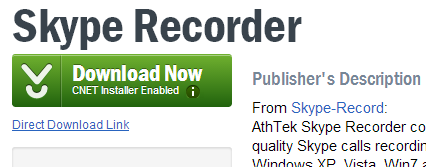
OK at this point I'm screwed. The green button CLEARLY desperately wants me to click on it. I totally ignore the tiny "Direct Download Link" below the friendly button. I have no idea what that glyph icon means, but it's pointing down, so that must mean download.
Welcome to the Download.com installer! How helpful!
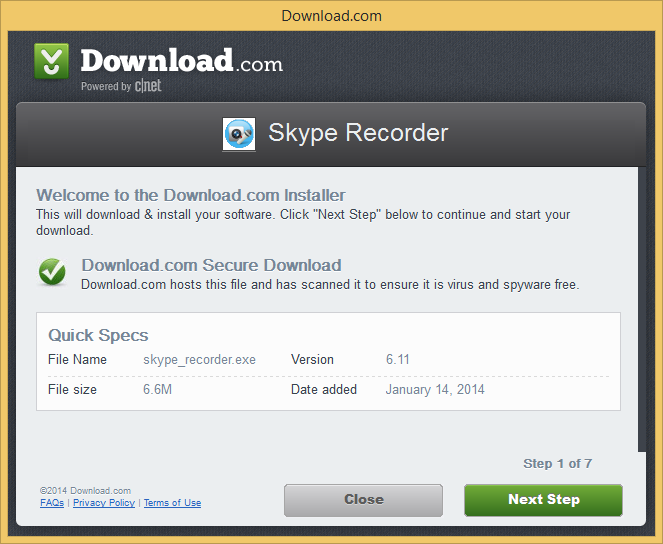
More green buttons, awesome. Let's go!
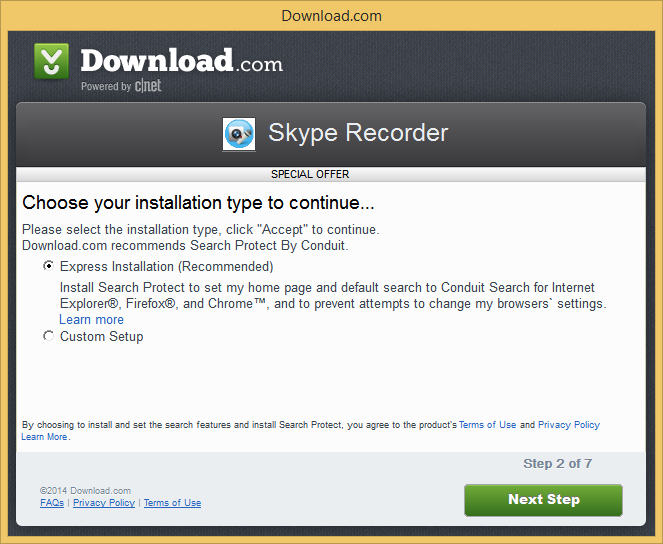
Pre-selected Express installation? Super helpful, I love that. Ah, and next to it there's text in the same font size and color that I totally won't read that says:
Install Search Protect to set [CHANGE] my home page and [TOTALLY MESS UP] default search to Conduit Search [THAT I HAVE NEVER HEARD OF AND NEITHER DO YOU] and [NOW THIS IS AUDACIOUS...] prevent attempts to change my browser settings.
In other words, we, Download.com, are going to totally change the way you use you computer and browser the way and prevent you from easily changing it back. We're going to do it now, when you press Next, and oh, by the way, we have Admin on your computer because just a moment ago you pressed YES on the Windows Warning that we could mess things up, because everyone ignores that.
Or, you can click Custom, because non-technical relative ALWAYS clicks Custom. NO. They don't. Technical people ALWAYS press Custom. ALWAYS. Always. Other people? Never.
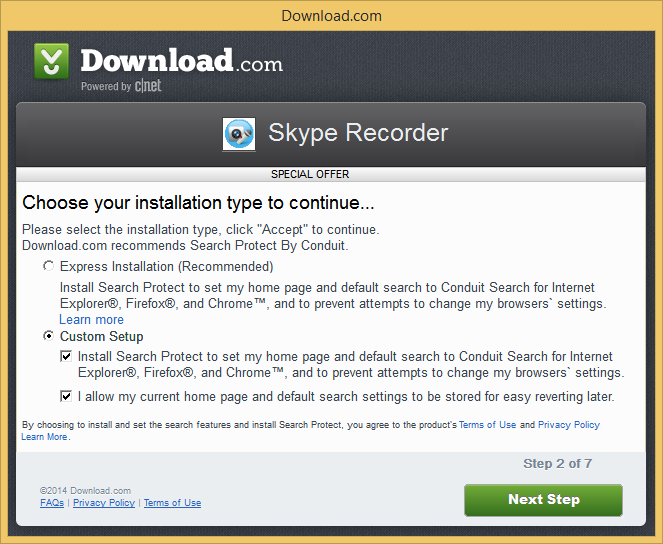
Ah, nice, when I press Custom it's set to...wait for it...the same stuff that was gonna happen if you pressed Express.
AND WE ARE ONLY ON STEP 2. What ever happened to clicking just once and getting what I needed?
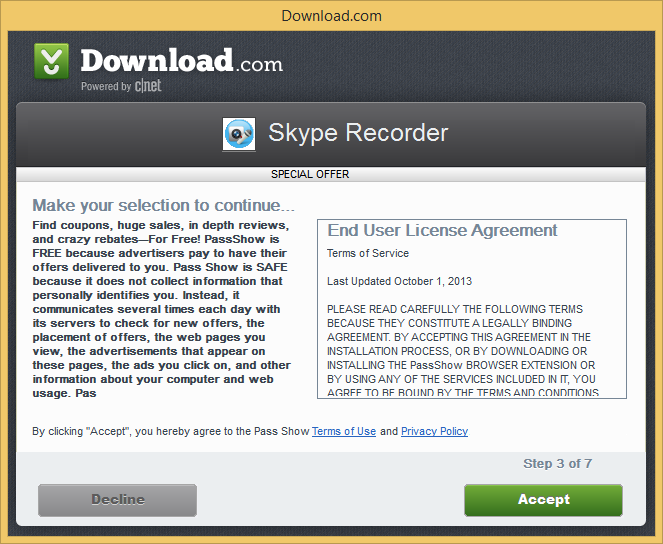
OMG "It communicates several times a day with servers to check for new offers and change ads on my computer?" I totally want that. Thanks Green Button!
I'm sure that if I press Decline here that it will mess up my installation of the original thing I wanted to install...I have forgotten what that was, but I'll just keep going.
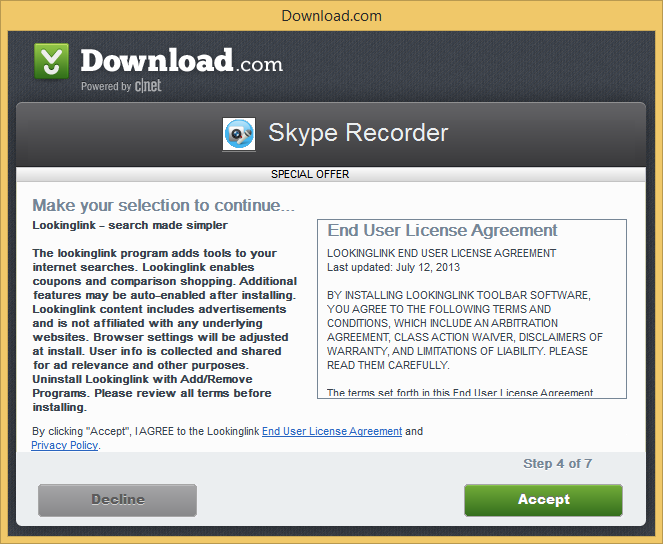
Weird. I thought I was already here. I'm sure I want this also.
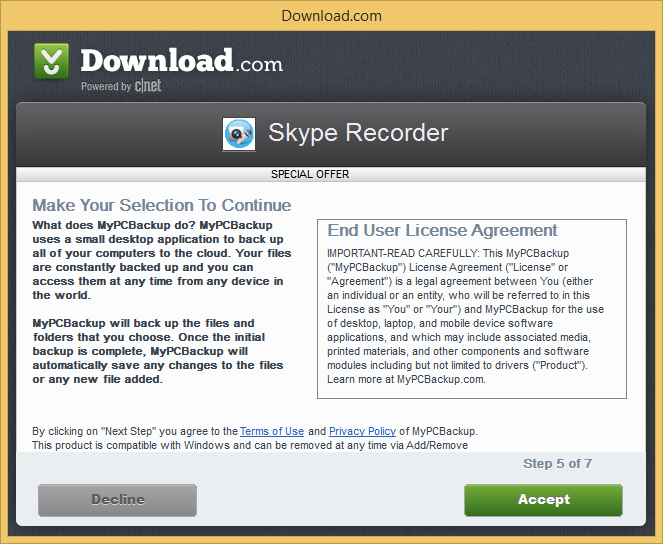
Huh. Does my Mouse not work? I'll click it again. Backing up my files without asking seems legit.
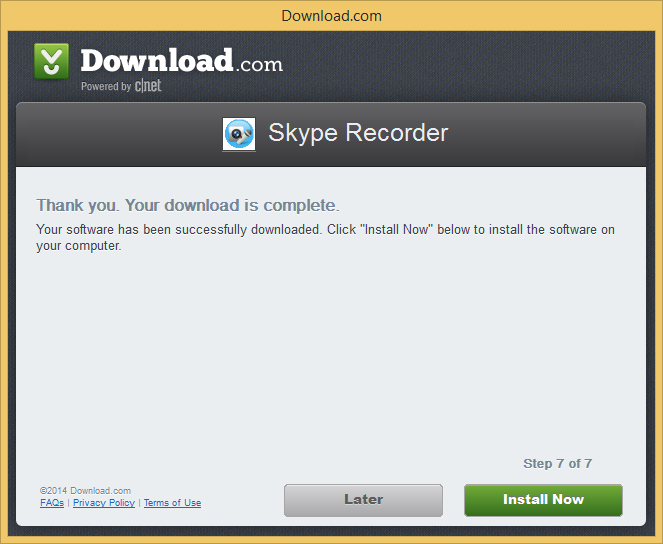
Install Now? What have we been doing all this time?
I am disappointed in us, Internet, that this is a business. Someone wrote this, for their job, directed by their middle manager, who was directed by their rich boss. There was a meeting (there's always a meeting) where it was discussed on how we could most effectively fool non-technical relatives into installing crap.
These are Dark UI Patterns.
A Dark Pattern is a type of user interface that appears to have been carefully crafted to trick users into doing things, such as buying insurance with their purchase or signing up for recurring bills.
This isn't cool and it needs to stop. I won't be visiting Download.com anymore.
I'll only install software from Vendors I trust, like Oracle...
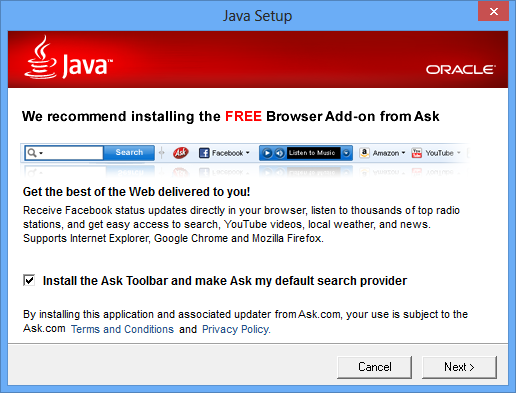
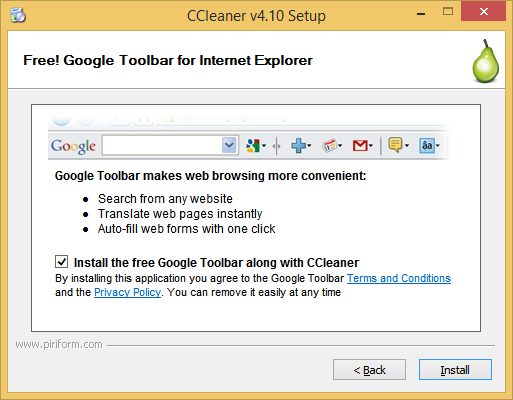
Gosh, maybe I need to install that "Crap Cleaner" everyone talks about so I can remove these unwanted toolbars.
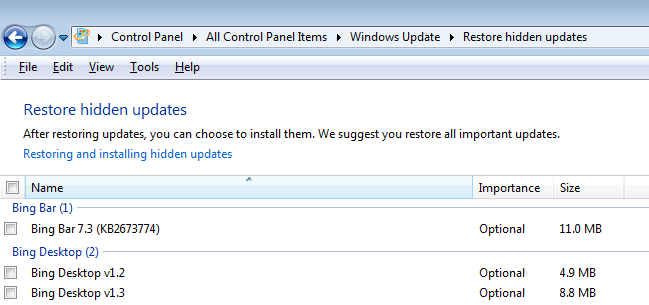
Ok, forgot it. I'll just stick with the official Windows Updates because I'm sure I want all those.
So, um. Yeah.

Sound off in the comments.


E. T. wrote to tell us of a support tale from days long gone by at a company long since acquired by a much larger behemoth. A customer had called in, entered all of his information, but hung up before a human got on the line. The support system generated a nameless ticket which got randomly assigned to one of the support folks. Then the customer called back, entered all of his information again, and got E. T.
The customer wanted to delete slice 0 on his system. For those of you not familiar with this, in *nix, slice 0 is the root of the file system and basically points to where everything on the disk is located. Deleting slice 0 is the equivalent of deleting everything on the entire hard disk. While there are the occasional disk corruptions that require this action, they are exceedingly rare, and once done, you are forced to reinitialize and re-install the operating system.
E. T. told him that he didn't want to do that because it would wipe out the entire file system. The customer persisted, insisting that he wanted to free up the precious GB of disk space that this unnecessary file system was consuming. He insisted that he did not install whatever was on this file system, and that it didn't belong there, so he was going to delete it, and needed instructions on how to get it done.
Since E. T. was obligated to help the customer, he finally went over to the software guys, and asked one: Do you know how to delete slice 0? Naturally, the software guy replied: You don't want to do that... E. T. continued: I know, but this guy is insisting that he didn't install anything on that partition, and he wants to reclaim the space. I know it's stupid, but "The customer is always right" and all that; we're obligated to support him and answer his question! The software guy told E. T. to Talk to Bob.
E. T. hunted down Bob and asked: Hey, Bob, do you know how to delete slice 0? Of course, Bob replied: You don't want to do that...
This went on with several people, until finally E. T. got someone who told him how to do it.
As E. T. was headed back to his desk, the guy next to him asked: Hey is that F.P. Dingbat at XYZ company?
Yeah why?
Because when he originally called and hung up, his case was assigned to me; if you have him I'll just close it out.
E. T. decided there was a better way to handle this situation: No don't. He is about to do something above and beyond stupid (little did E. T. know the true scale of Epic Stupidity™ that the customer was about to commit). So let's give him 1/2 an hour to hang himself, then you call back so we can see what happened.
E. T. got back on the phone and told the guy how to delete the file system, but again, advised him that what he was about to do was evil, bad, would make his life Hell-on-Earth, and that he should absolutely, positively, not do it. Of course, the customer got all snooty at being told he was making a mistake, and barked back: See, you CAN do it!, and hung up.
A half hour later, the other support guy calls the customer back to see if he could help him with his original issue.
Did the guy delete slice 0? Yes but in a far more destructive way than one might imagine. It turned out that he had issued a command to SU on every machine in his company and execute the command sequence to remove slice 0. Then he executed the commands on his own box. He took the whole place down!
The customer asked the support guy: I only entered the one command; what the fsck did I just do?
 [Advertisement] BuildMaster 4.0 is here! Check out the brand-new UI and see how you can deploy directly from TeamCity (and other CI) to your own servers, the cloud, and more.
See that guy there? He’s not winning. This picture was taken in July of 2013, and at that exact moment, that guy was not winning that race. He was also not winning at work. He was not winning as a leader, a mentor, a manager, or anything else in his job description that required getting along with coworkers. He was miserable, his team was miserable, and things were at a breaking point. Luckily, he found a book, and he read that book, and it changed the game…
Yes, yes, I know, this is supposed to be a blog dedicated to SQL Server, but too bad. It’s my blog and I’ll write about what I want to write about. I’ve found it to be quite therapeutic to write about the “soft” challenges that I face in my job. In the end, it all helps me to be a better DBA, a better professional, and a better person. Maybe it will help somebody else too.
 If you’ve followed the blog for a while, you know that I had a tough year last year. Not just me, but my whole team, infrastructure and DBA alike. Put simply, it sucked to go to work. As in so many other places, the classic “us versus them” war was waging between the operations team (us) and development (them). We were outnumbered, outgunned, and morale could not have been worse. I was ready to walk away, as were many others, but something in the universe aligned and an email arrived in my inbox, unsolicited, introducing me to a book entitled Winning from Within: A Breakthrough Method for Leading, Living, and Lasting Change. I read the book, and it was exactly what I needed at exactly the right time – it changed the game for me.
The book centers around the concept that you are not just one “you”. You are made up of several different “people”. There’s the no-nonsense, charge ahead and get things done you. There’s the hand-holding, cuddling with kittens you. There’s the let’s stop and think about what that fifth slice of pizza is going to do to your blood pressure you. Yeah, it’s one of those touchy-feely self-introspection books, but it works. I found it helpful to “geek it up”, and I’ll give my review from that geeky perspective.
As I said, the book splits “you” into seven different people, and shows you how one or two of those people are calling the shots. The rest of the crew never gets a vote, never gets to express an opinion, and that is likely causing you problems. Here are the seven different people:
Early in the book, the claim is made that most of us don’t utilize our full crew. We let one or two officers run the ship, ignoring the advice and warnings of the others on the bridge. As you progress through the book, you’re presented with various scenarios and assessments to help you figure out which of your crew members are sitting in the big chair. Overwhelmingly, the book showed me that my Kirk is in charge, maybe occasionally listening to Spock or Scotty, but not often. That explains why I spent much of 2013 bruised, bloodied, wearing torn shirts and wondering what the hell just happened.

Once you’ve figured out who is in charge, the book then helps you to devise ways to start including the rest of the crew in the voyage. That email that you just read and are angry-typing a response to? Why not take a minute to check the ship’s sensors? Is the core overheating? Scotty, you have three seconds – I need warp 11 now or, oh, wait, hold on, McCoy is saying something. Ohhh, so that ugly monster isn’t threatening us just because it’s an ugly monster? It’s wounded and defending its eggs? Oh, well don’t I feel like an ass. Ok, disarm the torpedoes, come down from red alert. Somebody find me some thermo-concrete, I’ll go try to make friends with it.
It works. I literally have started running through the crew in my head with every interaction that I have with someone:
Factoring in all of those things, I’ll plot a course of action and set the helm. Sometimes it is necessary to fire the phasers, but sometimes just reversing course and going a different way is a better decision. It’s not an easy habit to start, but it REALLY works. Just ask yourself, “What would Kirk/Spock/Scott/McCoy do?”. It gets easier and faster each time you do it.
This book, and this new (new for me) way of thinking has seriously changed the world for me. I no longer come home from worked pissed off EVERY SINGLE DAY. I no longer dread going in to the office each morning. I’m having real, genuine interactions with people outside of the operations team. One particular person who I could have labeled a “mortal enemy” is actually starting to become a friend.
This book works. Buy it, read it, go through its assessments and exercises honestly. And then ask yourself – in this situation, what would Kirk do?

With the In-Memory OLTP feature in SQL Server 2014 we introduce two new types of indexes for memory-optimized tables: the memory-optimized NONCLUSTERED indexes, and the memory-optimized HASH indexes.
Memory-optimized NONCLUSTERED indexes behave similar to traditional NONCLUSTERED indexes from an application point-of-view. The main difference being that memory-optimized indexes are always covering (i.e. all columns are virtually included), while with traditional disk-based NONCLUSTERED indexes you need to specify which column you want to include alongside the index key columns.
Memory-optimized HASH indexes behave different from NONCLUSTERED indexes. They are optimized for point-lookup operations, and do not support ordered scans or inequality seek operations. In addition, you need to specify a BUCKET_COUNT when creating the index, and you need to pick the right value in order for the index to perform optimally. In earlier posts we covered the following three index troubleshooting aspects:
All that said, it seems that HASH indexes have quite a few limitations, compared with NONCLUSTERED indexes. For that reason, it is usually a safer bet to start with NONCLUSTERED indexes, both for new applications and when migrating existing disk-based tables to memory-optimized. You can then use HASH indexes to further optimize the workload. Indeed, HASH indexes are the most efficient index for equality search (point lookup) and full table scan operations.
In the remainder of this post we:
The DMV sys.dm_db_xtp_index_stats shows statistics for index operations performed by the in-memory storage engine. The index contains stats about the usage of the index since its creation in memory – note that memory-optimized indexes are always recreated on database restart. You can use the following query to retrieve key statistics about the usage of indexes on your table:
SELECT ix.index_id, ix.name, scans_started, rows_returned
FROM sys.dm_db_xtp_index_stats ixs JOIN sys.indexes ix ON
ix.object_id=ixs.object_id AND ix.index_id=ixs.index_id
WHERE ix.object_id=object_id('<table name>')
For troubleshooting indexes, the columns ‘scans_started’ and ‘rows_returned’ contain key information:
If the number of rows_returned is significantly larger than the scans_started, this is an indication that, on average, index operations scan a large part of the index. If all index operations are expected to be point lookups, this could be an indication of one of the earlier-mentioned problems where the query calls for an operation to be supported by the index, thus causing a revert to full index scan, such as: search requires a subset of hash index key columns or search on inequality predicates with a hash index.
The scans_started being larger than rows_returned is an indication that the workload is insert-heavy, or that a lot of point lookups failed to locate a row.
Issue: Index keys with many duplicate values can cause performance problems. If each index key has 5 duplicates this is usually not a problem, but if the discrepancy between the number of unique index keys and the number of rows in the tables becomes very large – more than 10X – this can become problematic.
All rows with the same index key end up in the same duplicate chain. For hash indexes this can create a lot of overhead in case of hash collisions: if multiple index keys end up in the same bucket due to a hash collision, index scanners always need to scan the full duplicate chain for the first value before they can locate the first row corresponding to the second value. For nonclustered indexes this causes additional overhead for garbage collection.
Symptom: For hash indexes the performance of DML operations degrades and CPU utilization increases. In addition, there is an increase in CPU utilization during database startup, and a potential increase in recovery time. This becomes especially clear when inserting a large number of rows.
For nonclustered indexes garbage collection will start to consume more resources, resulting in an overall increased CPU utilization in the system. The problem does not affect DML operations directly,[1] but it does put more overall pressure on system resources.
How to troubleshoot: The average number of duplicate rows for a given index key can be obtained using T-SQL queries. First determine the row count of the table, then determine the number of unique index key values. Divide the row count by the number of unique index keys to obtain the average number of duplicates.
To determine the row count for the table use the following query:
select count(*) as 'Row count' from <tableName>
To determine the number of unique index key values use the following query:
select count(*) as 'Distinct index key values' from (select distinct <indexKeyColumns> from <tableName>) a
For hash indexes specifically, you can also troubleshoot using the hash index stats DMV. Use the following query:
SELECT hs.object_id, object_name(hs.object_id) AS 'object name', i.name as 'index name', hs.*
FROM sys.dm_db_xtp_hash_index_stats AS hs
JOIN sys.indexes AS i ON hs.object_id=i.object_id AND hs.index_id=i.index_id;
If the average chain length is high and the number of empty buckets is high, it is likely that there are many rows with duplicate index key values or there is a skew in the key values.
Workaround: First, evaluate if the index is truly needed. The index may have been added in the past to support queries that are no longer part of the workload.
For HASH indexes there are two ways to work around the issue of many duplicates:
For NONCLUSTERED indexes with a lot of duplicates, consider adding additional columns to the index key. For example, you can add the primary key columns to the index key to make it unique, in other words to uniquify the index.
Adding columns to the index key does come with a performance penalty for DML operations. Therefore, it is important to test the new uniquified index under production load, and compare the performance with the old index. Consider the overall throughput of the system, query performance, and also the overall resource utilization, especially CPU.
[1] In SQL 2014 CTP2 user transactions could be affected, due to garbage collection performed at commit time. This issue will be resolved in SQL 2014 RTM: garbage collection no longer directly affects user transactions.
I’ve been using Parallels Desktop for Mac ever since I purchased my MacBook Air a couple of years a go. This virtualization software lets me run Windows on my Mac so that I can use all the data modeling and database tools I need.
Just this week, Parallels asked if I wanted to try out a new product, Parallels Access. (So as to not confuse this with Microsoft Access, I’m going to use the full name of the product in this post.) This product lets me use desktop applications as if they were built for the iPad. It works by installing an app on my iPad, plus a service on my desktops (Windows or Mac). Then when I want to run a “real” application from one of my computers, I can fire up the app on my iPad and start using it. And it pretty much works.
I’m hosting a contest to give away five, yes FIVE, subscriptions for this product. Details at the bottom of this post.
I’m betting right now you’re thinking: “I have RDP or some other remote app and I can use that, but it’s a real pain to navigate around on an iPad.” Yes, yes it is. I’ve tried several remoting apps over the last few years. I usually use them when I am out of my office and have to grab a file or fix something without having to find a computer to use a real keyboard and mouse. And it’s painful. Very painful.
What’s different about Parallels Access is that they’ve added iOS-like gestures and interactions to make it feel like the application you are running is a native iPad app. Instead of telling you about it, let me show you a few:
Today I used Parallels access to work with some Excel spreadsheets, which I have done in the past with either iPad apps or via remoting in to a desktop. Both ways are painful. It’s almost impossible to widen a column or cut and paste data in Excel using the iPad and the iPad apps don’t always support all the features I need. I won’t be using this as my main method for working with Excel, database or data modeling tools. But having the ability to pinch to zoom in applications is very nice. In ERwin Data Modeler, I was even able to reposition entities and fine tune relationship lines. That just doesn’t work using a basic Remote Desktop tool. Heck, it doesn’t even work as well on my touch screen desktop.
I also love that the keyboard is an iPad keyboard that features a Windows Key when you are on a Windows desktop and a Mac one when you are on a Mac. That’s how keyboards should work.
I’ll post a more detailed review of how I am using Access to work with my desktop applications in the future. For now, some gratuitous screen shots.


There’s a 14-day trial for Parallels Access available, but I have a better deal for you: enter to win one of FIVE one-year subscriptions (worth $4.99 a month or $49 a year) I have to give away via Twitter. Here’s what you need to do:
I’ll pick 4 random winners from the tweets and one special one chosen as the best tweet. Just make sure you mention me (include @datachick in your tweet) and the product (Parallels Access) so I see your entry.
Rules:
Good luck and get touching and tweeting!
 In mid-January I came across a link to a story about a new book by Random House called Barbie I Can Be…A Computer Engineer. As you know, I travel with a Computer Engineer Barbie (@data_model) and Venus Barbie (@venusbarbie) in my work advocating that girls take more STEM courses. So let’s say I have a strong interest in making sure my wonder girl Barbie has a great book.
But the story said that the book actually put Barbie in not so great place. So I bought the book and read it. And it made me cringe. I read it a few times and decided it needed to be fixed. Or in Computer Engineering terms, it need to be refactored.
So that’s what I’ve done. In this review of Barbie I Can Be…A Computer Engineer, I will point out the parts that set a lousy role model for girls and offer suggestions on how it can be refactored to make it better. Just like in software refactoring, I’m not going to change the functionality of the book, but I’m going to improve the code words to leave it better.
And to make it easy for you to fix you copy, I’ve included a Refactoring Computer Engineer Barbie PDF. You are welcome.
Barbie is working on a design for a new puppy computer game when her laptop catches a virus. Luckily, she wears a heart USB drive around her neck and has backups of her files. So she uses her little sister’s (Skipper) laptop to try to retrieve the files. Oh, CURSORS! she has infected Skipper’s laptop, too. She promises to make it all right and rushes off to school to ask her computer teacher (who is a female!) how to fix it. Her teacher gives her some tips and Barbie heads to the library to get get both her data and Skipper’s data back. She gets two friends to help and they get it done. Skipper, with her restored data, makes an excellent presentation in her class where she says that Barbie is the person she most admires. Cue tears. Barbie presents her game in computer class. She does such a wonderful job, her teacher even gives her extra credit.
The End.
Sounds like a great story with good female leadership, doesn’t it? Female teacher, Barbie and friends fix the problem, Skipper and Barbie give great presentations. We need more great females to speak, right? Well, just like in database design, the Devil is in the details.
Unfortunately, some of the details really make it look like Barbie is more of a Booth Babe than a Computer Engineer. This is making the IT community cringe. Twitter is blowing up with campaigns to get the book removed from shelves or to get Random House to fix it. Well, I’m going to save Random-House the effort by fixing refactoring it for them. It’s one thing to raise the issue, but as a designer-architect-project manager-methodologist-computer engineer, I just want to FIX it.
Let’s start with the first troublesome passage:

"I’m designing a game that shows kids how computers work", explains Barbie. "You can make a robot puppy do cute tricks by matching up a color blocks!"
"Your robot puppy is so sweet," says Skipper. "Can I play your game?"
"I’m only creating the design ideas," Barbie says, laughing. "I’ll need Steven’s and Brian’s help to turn it into a real game."
That last line is a problem. First, saying “I’m only” makes it look like design work is some how lesser than building. I know there are some techs out there that would agree with that, but it’s still not true. In fact, in technical professions, the designer / architect is the senior position on the project. Secondly, she is laughing this line, as if it is hilarious to think that Barbie can build something. Finally, Steven and Brian are recurring characters throughout the I Can Be… book series. They are friends and friends help each other. But this passage seems to reinforce a position that boys build, girls draw.
So I’ve refactored this passage by changing out that line with this one:
"Not yet," explains Barbie. "I need to finish the design then work with Steven and Brian to turn it into a game."
See how that says basically the same thing, but it doesn’t devalue Barbie’s design work? It also reinforces the more realistic situation that teams work together to make a product. Barbie doesn’t “need help”; she is part of a team to get it done.

After class Barbie meets with Steven and Brian in the library.
"Hi guys!" says Barbie. "I tried to send you my designs but I ended up crashing my laptop and Skipper’s, too. I need to get back to lost files and repair both of our laptops."
"It will go faster if Brian and I help," offers Steven.
This last line could be interpreted that Steven and Brian, not Barbie, can get this done faster. I realize this is just one interpretation and the intention could be that if everyone works together, we can get it done faster. We know in software engineering this may or may not be true – in form of the Mythical Man Month. But in general, three people fixing two laptops might make this all go faster – debugging, troubleshooting, copying files and those sorts of things typically do turn out better with more people at the desk.
But I’m still concerned about the fact that the less generous interpretation could be that boys can fix things; girls just come to them with their problems. So I’ve refactored this to say:
"We can all work on this together; it will be faster," says Steven.
The work continues with this on the next page:
"I got Skipper’s assignment from the hard drive!" exclaimed Steven.
"Fantastic!" says Barbie. "And her other files as well?"
"I got everything," says Steven. "Now let’s retrieve the files from your hard drive. Both laptops will be good is new in no time!"
It’s here where the dialogue really makes it look like Steven did all the work and Barbie waited anxiously for the results of his work. So I’ve refactored these to show Barbie being more engaged in the process. Not just the Holder of the Compact Disc.
"We’ve got Skipper’s assignment from the hard drive!" exclaimed Steven.
"Fantastic!" says Barbie. "Let me get her other files as well!"
"Great! Now we’ve got everything," says Steven.
See how Barbie has a more engaged role here? No confusion about her fixing this problem, too.
One of the key things that an engineer should do when disasters happen is to ensure that it never happens again. One of the steps missing from this story is making sure Barbie and Skipper’s laptops are safe from future viruses. So I’ve added a new line to a passage:
The next morning Barbie gives her sister a big surprise. Skipper turns on your laptop – and it works!
"My lost assignment! cries Skipper. "You are just too cool, Barbie. You fixed my computer and saved my homework!
"I set up new security software on both laptops to make sure this doesn’t happen again," exclaims Barbie.
Skipper gives Barbie a huge hug.
You can’t just retrieve the files; you have to ensure those pesky viruses don’t come back.

I fixed my copy by refactoring the printed pages. You can do that, too. I’m sharing the Refactoring Computer Engineer Barbie PDF I created with the refactored dialogue. Just print it on sticker paper and cut out the revised sections to update your copy of the book. You might also want to head over to read that open letter to Random House, too.
I love my Technical Barbies and I want girls (and their parents) to have great role models in real life, not just with dolls action figures. So books like this need the Best Practices in their writing. I hope you do, too.
I have another post coming about the computer security parts of this story. But for now, go fix your copy of this book. Don’t leave it sitting around in production, waiting for someone to read it when it’s wrong. Love your Data and Love your @Data_Model.
As a software developer, there are a ton of different ways to develop new and exciting code. You can use open source tools, tools directly from the vendor, or a combination thereof. More importantly, thanks to the rise of the internet and source control, most software development doesn’t require the developer physically be in a certain place to actually write the software, that development can be done from anywhere. This is one of the major reasons why development is offshored, outsourced, and/or contracted out. You can make the creation and maintenance of software as distributed as the Internet that it runs on.
That’s all fine and good but what system should you, as a developer, actually develop on. This isn’t a blog about Mac vs. Window vs. Linux vs. Punch Card. Instead, I’d like to discuss the merits of doing development within the confines of a Virtual Machine (VM) versus using a local machine. (By local machine, I mean a single operating system running on the bare hardware that is physically with you in space and time.) There are several inherent tradeoffs that come from developing locally versus in a VM.
If you’ve ever seen the movie It’s a Wonderful Life, you likely remember the scene where George is standing on the bridge ready to give up on his life and commit suicide. This is a lot like developing on a local machine (stay with me). Sooner or later, that machine is going to need to be upgraded or replaced, especially if it’s a laptop. Like death and taxes, it’s just a fact of life. Unless all of your source code and all of your applications and the configuration elements for all of those items are in the cloud or somewhere else outside of your local machine, chances are that you’re going to have the new machine hiccups for a couple of days.
The new machine hiccups are where you get a new machine and have to install and configure it exactly how you wanted it. No matter how careful you are, you’re still likely to miss something at a crucial moment that will sap your productivity for the next 5-10 minutes while you fix it (i.e. a hiccup).
Anyway, if you’re using a VM, getting a new local machine doesn’t matter. You just copy the VM to the new machine, start it up, and it’s like nothing ever happened. If you’re one of the lucky few who has a cloud-hosted VM, you don’t even need to move the VM to the new machine. You just open your favorite remote desktop application and carry on. The immediate productivity bonus here related to using a VM cannot be understated, especially if you’re persnickety about your setup.
This is more of a corollary to the point above, but I think it deserves its own point as well. Along with moving to a new environment, if your current machine suffers a colossal meltdown, with a VM you can restore the underlying physical hardware and operating system/hypervisor and not notice nearly as much downtime as you’d face with setting up that new environment from scratch. This is another huge advantage of using VMs.
Along with the fact that everything is self-contained so you can restore from backup, everything is self-contained so you can share the VM with the rest of your team in an instant. I can’t count how many times I’ve built a VM for someone. There’s no worry about reimaging a machine or installing lots of licensed software and finding license keys either.
Lastly, it’s a great way to keep clients self-contained. I’ve routinely come across cases where a client will provide a license key to a specific piece of software. If I used that software for other projects for other clients, I’d be breaching a bunch of contracts. So it’s sometimes best to have a VM per client or project along with a core VM that you use to clone from when you start a new project.
The last major advantage of developing on a VM over a local machine are system requirements. I don’t know many developers who have server operating systems installed on their local machine. Server software just isn’t designed to be used as an end-user system. It’s also incredibly expensive when installed on a physical machine. There are a lot of applications out there that need to be installed on server operating systems (I’m looking at you SharePoint!). While it might be technically possible to install server-class software on an end-user machine, it’s not a good idea. Typically the software is crippled in some way or it won’t even install if it sees the wrong configuration settings. Therefore, it’s best to read the system requirements for the software and install it on an operating system that isn’t your local machine’s. In this case, the only option is to use a VM.
Conversely, if you’re developing an application that doesn’t require server software, it’s much easier to just install all of that software locally and be done with it. You don’t have to fuss with fighting your hypervisor for memory or remembering to back up your VM locally.
All of the above being said, there are also significant advantages that a local machine provides. The biggest one, though this is being narrowed with each passing year, is speed. There’s no comparison between the speed of software running in a local machine versus software running virtualized. The local software is always going to run faster than the virtualized software. So if you don’t have a very powerful development machine or speed is of paramount importance, it’s probably not your best move to use a VM for development unless your VM is in the cloud.
Another major reason you would want to stick with local machine development is virtualization software. If you don’t know what you’re doing, you can easily hobble your VM by setting it up the wrong way or failing to enable all of the virtualization features of your machine in the BIOS. A scalpel in the hands of someone who isn’t trained how to use it might as well be a machete. So if you don’t really know how to use your virtualization software to get the maximum performance out of a VM, enable copy-paste across a VM and your local machine, or set up an internal network between VMs and your local machine, then look it up or perhaps virtualization isn’t for you.
In my old job, I had a machine that was relatively underpowered by the time I was due for a replacement. Before the upgrade, I had no choice but to virtualize my development because I was developing in SharePoint, but, at the same time, I didn’t have a whole lot of power to virtualize with. I did a bunch of research to figure out how best to leverage the virtualization features and functionality my machine did have. Most of my VMs ran faster on my machine than coworker’s VMs did on their brand new machines with 4 times the amount of RAM I had because I knew what I was doing.
There are plenty of merits to developing locally versus in a VM. As I said, at my previous company, I exclusively used a VM for development and it was wonderful. Here at Clarity, the majority of us develop on local machines and that’s not so bad either. It’s mostly a question of developer preference. So if you’re a developer and you’re trying to decide between local vs. VM I hope I’ve provided some insight and things to think about. If you’re a manager or decision maker trying to decide what you’d like to favor, I hope that this blog has been insightful. What gotchas have you faced when you moved between the two or what did I miss when describing the trade-offs?
FEATURED POST BY: Quentin Clark, Corporate Vice President, The Data Platform Group, Microsoft Corporation

If you follow Microsoft’s data platform work, you have probably observed some changes over the last year or so in our product approach and in how we talk about our products. After the delivery of Microsoft SQL Server 2012 and Office 2013, we ramped-up our energy and sharpened our focus on the opportunities of cloud computing. These opportunities stem from technical innovation, the nature of cloud computing, and from an understanding of our customers.
In my role at Microsoft, I lead the team that is responsible for the engineering direction of our data platform technologies. These technologies help our customers derive important insights from their data and make critical business decisions. I meet with customers regularly to talk about their businesses and about what’s possible with modern data-intensive applications. Here and in later posts, I will share some key points from those discussions to provide you with insight into our data platform approach, roadmap, and key technology releases.
Microsoft has made significant investments on the opportunities of cloud computing. In today’s IT landscape, it’s clear that the enterprise platform business is shifting to embrace the benefits of cloud computing—accessibility to scale, increased agility, diversity of data, lowered TCO and more. This shift will be as significant as the move from the mainframe/mini era to the microprocessor era. And, due to this shift, the shape and role of data in the enterprise will change as applications evolve to new environments.
Today’s economy is built on the data platform that emerged with the microprocessor era—effectively, transactional SQL databases, relational data warehousing and operational BI. An entire cycle of business growth was led by the emergence of patterns around Systems of Record, everything from ERP applications to Point of Sale systems. The shift to cloud computing is bringing with it a new set of application patterns, which I sometimes refer to as Systems of Observation (SoO). There are several forms of these new application patterns: the Internet of Things (IoT), generally; solutions being built around application and customer analytics; and, consumer personalization scenarios. And, we are just beginning this journey!
These new application patterns stem from the power of cloud computing—nearly infinite scale, more powerful data analytics and machine learning, new techniques on more kinds of data, a whole host of new information that impacts modern business, and ubiquitous infrastructure that allows the flow of information like never before. What is being done today by a small number of large-scale Internet companies to harness the power of available information will become possible to apply to any business problem.
To provide a framework for how we think applications and the information they generate or manage will change—and how that might affect those of us who develop and use those applications—consider these characteristics:
Data types are diverse. Applications will generate, consume and manipulate data in many forms: transactional records, structured streamed data, truly unstructured data, etc. Examples include the rise of JSON, the embracing of Hadoop by enterprises, and the new kinds of information generated by a wide variety of newly connected devices (IoT).
Relevant data is not just from inside the enterprise. Cross-enterprise data, data from other industries and institutions, and information from the Web are all starting to factor into how businesses and the economy function in a big way. Consider the small business loan extension that accounts for package shipping information as a criteria; or, companies that now embrace the use of social media signals.
Analytics usage is broadening. Customer behavior, application telemetry, and business trends are just a few examples of the kinds of data that are being analyzed differently than before. Deep analytics and automated techniques, like machine learning, are being used more often. And, modern architectures (cloud-scale, in-memory) are enabling new value in real-time, highly-interactive data analysis.
Data by-products are being turned into value. Data that were once considered as by-products of a core business are now valuable across (and outside of) the industries that generate this data; for example, consider the expanding uses of search term data. Perhaps uniquely, Microsoft has very promising data sets that could impact many different businesses.
With these characteristics in mind, our vision is to provide a great platform and solutions for our customers to realize the new value of information and to empower new experiences with data. This platform needs to span across the cloud and the enterprise – where so much key information and business processes exist. We want to deliver Big Data solutions to the masses through the power of SQL Server and related products, Windows Azure data services, and the BI capabilities of Microsoft Office. To do this, we are taking steps to ensure our data platform meets the demands of today’s modern business.
Modern Transaction Processing—The data services that modern applications need are broader now than traditional RDBMS. Yes, this too needs to become a cloud asset, and our investments in Windows Azure SQL Database reflect that effort. We recognize that other forms of data storage are essential, including Windows Azure Storage and Tables, and we need to think about new capabilities as we develop applications in cloud-first patterns. These cloud platform services need to be low friction, easy to incorporate, and operate seamlessly at scale—and have built-in fundamental features like high availability and regulatory compliance. We also need to incorporate technical shifts like large memory and high-speed low latency networking—in our on-premises and cloud products.
Modern Data Warehousing—Hadoop brought flexibility to what is typically done with data warehousing: storing and performing operational and ad-hoc analysis across large datasets. Traditional data warehousing products are scaling up, and the worlds of Hadoop and relational data models are coming together. Importantly, enterprise data needs broad availability so that business can find and leverage information from everywhere and for every purpose—and this data will live both in the cloud and in the enterprise datacenter. We are hearing about customers who now compose meaningful insights from data across Windows Azure SQL Database and Windows Azure Storage processed with Windows Azure HDInsight, our Hadoop-based big data solution. Customers are leveraging the same pattern of relational + Hadoop in our Parallel Data Warehouse appliance product in the enterprise.
Modern Business Intelligence—Making sense of data signals to gain strategic insight for business will become commonplace. Information will be more discoverable; not just raw datasets, but those facets of the data that can be most relevant—and the kinds of analytics, including machine learning, that can be applied—will be more readily available. Power BI for Office 365, our new BI solution, enables balance between self-service BI and IT operations—which is a key accelerant for adoption. With Power BI for Office 365, data from Windows Azure, Office, and on-premises data sources comes together in modern, accessible BI experiences.
Over the coming months, we are going to publish regular posts to encourage discussions about data and insights and the world of modernized data. We will talk more about the trends, the patterns, the technology, and our products, and we’ll explore together how the new world of data is taking shape. I hope you will engage in this conversation with us; tell us what you think; tell us whether you agree with the trends we think we see—and with the implications of those trends for the modern data platform.
If you’d like more information about our data platform technologies, visit www.microsoft.com/bigdata and follow @SQLServer on Twitter for the latest updates.
Author: Sanjay Mishra
Contributors: Piyush Ranjan, Steven Schneider
Reviewers: Ed Muth, Chuck Heinzelman, Silvano Coriani, Rama Ramani, Juergen Thomas, Cephas Lin, Lori Clark, Luis Carlos Vargas Herring
Once you have created AlwaysOn Availability Groups in Windows Azure VM (tutorial) and created the Availability Group Listener (tutorial), it is important to know how the applications will connect to it.
Depending upon the location of the client application, the connection string will vary based on:
Let’s consider 3 distinct scenarios:

Figure 1: The Client joined to the same AD Domain as SQL Server
As illustrated in Figure 1, the client is joined to the same domain as the SQL Server VMs. If the client application runs in a Windows Azure VM, then it is easy to join that VM to the domain. If the client application is in a PaaS role instance, it is possible to join the Pass role VMs to the domain (how to achieve this is outside the scope of this article).
Irrespective of whether the client is an Azure VM (or an on-premises machine joined to the same AD domain through site-to-site VPN) or a Pass role instance, it can perform name resolution to the AG Listener, because the AG Listener is a virtual name registered in the DNS.
Of the 3 scenarios discussed here, this is the only scenario that allows clients to connect to SQL Server using Windows authentication. So, you can have a connection string that looks like:
Data Source="ListenerTestAG,98765";Initial Catalog=AdventureWorks; Integrated Security=True;…
In this example, ListenerTestAG is the name of the AG Listener. The Listener is running on port 98765. If the Listener is not running on the default SQL Server port 1433, you must specify the port number in the connection string as shown in the example.

Figure 2: The Client is in the same VNET, but NOT joined to the AD Domain
This is very similar to the previous scenario, except that the client is not joined to the AD domain that SQL Server VMs are part of. The Client is still part of the same VNET.
If the client runs in an Azure VM, while provisioning the VM, place it in the same VNET as the SQL Server VMs. One thing to note here is that before you provision the client VM(s), make sure a properly configured DNS Server is listed in the VNET on the portal, as shown in Figure 3:

Figure 3: Specify DNS information in the VNET configuration
A common mistake is forgetting to register a DNS Server with the VNET, leading to failure of name resolution queries. Once the DNS is listed in the VNET definition, new VMs provisioned in this VNET will be aware of the DNS and can perform name resolution to the Availability Group Listener.
However, unlike scenario 1, the application must use SQL Server authentication rather than Windows authentication to connect to SQL server. The connection string will look like:
Data Source="ListenerTestAG.TestDomain.com,98765";Initial Catalog=AdventureWorks; User ID=<sqluser>;Password=<sqluserpw>;…
Compared to the connection string of scenario 1, two differences should be noted:
Unless the client is in the same VNET or in the same domain as the SQL Server VMs, name resolution cannot be performed to the AG Listener or to the individual SQL Server instances. Whether the client is inside Windows Azure but outside the specific VNET (Figure 4), or the client is outside Azure (Figure 5), it does not make any difference from the perspective of connectivity options.

Figure 4: The Client is in Azure, but outside the specific VNET

Figure 5: The Client is outside Azure
The clients in Figures 4 and 5 have no access to the DNS Server configured in the VNet that hosts the SQL Server instances and the AG Listener. Such a client, therefore, cannot perform name resolution for the AG Listener or the individual SQL Server instances. However, the Cloud Service hosting the SQL Server instances has a publicly visible name (with a public IP address) and can be reached from anywhere with public Internet access.
For the same reason as scenario 2, the client cannot use Windows authentication, but needs to use SQL Server authentication. The connection string will look like:
Data Source="TestAGcs.cloudapp.net,98765";Initial Catalog=AdventureWorks; User ID=<sqluser>;Password=<sqluserpw>;…
The significant difference compared to scenario 1 and 2 is that this connection string uses the cloud service name (TestAGcs) instead of the AG Listener name. It is worth mentioning that you can use the cloud service name in the connection string for scenario 2 as well.
As mentioned earlier, the cloud service is a public name with a public IP address. Moreover, the AG Listener is implemented using the cloud service external endpoint in Windows Azure. Exposing SQL Server to connect through the public endpoints can be a security concern.
ACLs (http://msdn.microsoft.com/en-us/library/windowsazure/dn376541.aspx) must be used to protect the publicly visible AG Listener endpoints. Use of ACLs on the AG Listener endpoints, enables one to selectively permit or deny connections to SQL Server from specific clients.
 I was surprised again last night by another news report that yet another company has joined the long list of companies whom have had data compromised. The short list of companies includes names that many of us know. I even know people personally who have gone out and canceled credit cards just to decrease the odds they will be impacted. What surprises me the most is how companies are reacting or not reacting to the recent security breaches. I hope that there are many companies looking at the list and are terrified they are next. Each time I hear of a new security breach I can’t help but to think of a couple key points.
Are we seeing just the smash and grab jobs? Consider this, say you owned a large retail store, let’s say one that sells just about everything under the sun. If you had 300,000 products in your store, would you notice if 4 or 5 went missing? What if of those 300,000 products 3,000 of them were televisions? Would you notice 4 or 5 T.V.’s missing? Chances are you wouldn’t, and if you did, how long would it take you to discover them missing? Now what if those T.V.’s were magic T.V.’s, the kind that you could copy? If someone made a copy of the T.V. and walked out the door would you, the store owner, ever know? I ask these questions because it appears to me that no one notices data is missing until large groups of data are compromised. One could argue that the large numbers come from data that is at risk and that it may not have been lost at all. There was a movie a number of years ago, I think it was Swordfish or something like it. Anyway, the way the thief would get away with the crime was to take just small amounts of money from many people, rather than a large amount from a few. The idea is that an individual may not miss a penny or two, but when removed from millions of transactions the pennies are well worth it. If we are only hearing about the smash and grabs on the news, how much is happening we don’t know about?
Security is a Puzzle. A few years ago I had to pass a security certification for a position I was in with the US government. One of the principle points I learned was that, as a whole, security is a puzzle. To someone who wants the data on the other side, the security we have in place is nothing more than an elaborate puzzle they need to get through. If you were a hacker, what information do you need to know to start? Sure you need the skills that it requires, but there is more. What if I were a cat burglar? If I wanted to bypass an alarm system at the museum, wouldn’t it help if I knew what kind of alarm it was? If I know the maker of the alarm, would the model number help me? Each piece of information that I have as a cat burglar is one more variable I can remove and, as I remove variables, the puzzle solution becomes just that much easier. We have to identify all the places where we are giving the keys to the bad guys. To log on to a system you need at least a couple pieces of information, a user account and a password. Is the user account on the screen, is the password on a sticky note? When you go to a web page and there is an error in the code, does it tell you the company is running mysql, or that the web server is apache?
Take a look around, how can you help remove the pieces of the puzzles your organization is willing to share?


It felt a bit like ‘As The World Turns’ as I unraveled how the following worked so the title is a bit of a tribute to my grandmother. She could not miss here ‘stories’ in the afternoon.
Proximity
Before I dive into the details I would like to talk about NUMA node proximity. The idea of proximity is how close is one NUMA Node to another based on the memory layout of the system.
For example Node 00 is 0 steps from itself. However, it is 3 steps from Node 03. Node 01 is 2 steps from Node 3 and so forth.
| Node | 00 | 01 | 02 | 03 |
| 00 | 00 | 01 | 02 | 03 |
| 01 | 01 | 00 | 01 | 02 |
| 02 | 02 | 01 | 00 | 01 |
| 03 | 03 | 02 | 01 | 00 |
K-Group (Processor Group)
Windows attempts to gather the nodes, based on proximity, into the same K-Group
Examples
Here is a snippet from the SQL Server error log, 128 CPU, 8 Node system.
Notice nodes 0,1,2 and 3 are aligned to K-Group = 0.

Notice the change in node to group alignment on this same system.
So What Does This Mean?
For this specific system the second configuration, aligning nodes 0,1,4 and 5 is not optimal. This system’s true (SRAT) proximity is the layout from the first example. Nodes 4,5,6 and 7 are in a separate blade, using NUMA node glue based architecture. Memory accesses between the hardware blades can be slower then local blade access.
The SRAT table provided by the hardware level, BIOS contains the proximity information. Prior to Windows 2012 Server the Windows memory manager performs memory access tests, attempting to determine optimal proximity responsiveness and can override the SRAT information.
The second example is after the machine had a hardware failure on nodes 2 and 3. The nodes were taken offline and Windows adjusted. However, once the problem was corrected the system maintained the adjusted proximity layout.
The hardware manufactures are aware of this behavior and have specific tuning instructions per system, CPU type, memory layout, etc… that establishes the appropriate override of the Windows Server behavior using the Group Affinity registry key: http://support.microsoft.com/kb/2506384
These advanced configurations can involve additional processor groups to further sub-divide the current SRAT layout in order to obtain optimal performance.
For SQL Server installations, running on NUMA hardware I recommend you contact your hardware manufacture and obtain the optimal proximity settings.
Reference: CoreInfo.exe http://technet.microsoft.com/en-us/sysinternals/cc835722.aspx
Bob Dorr - Principal SQL Server Escalation Engineer
Author: Sanjay Mishra
Reviewers: David P. Smith (Active Network), Mike Ruthruff (Bungie Studios), Matt Neerincx, Luis Carlos Vargas Herring, Piyush Ranjan, Steven Schneider
My job provides me opportunity to work across different sections of customers – some customers who like all defaults (default instances, default port numbers, etc.), and some customers who don't like defaults at all. Customers who don't like defaults want full control over naming instances and choosing the port number the SQL Server service listens on.
As you know, one can have a Default SQL Server instance (MSSQLSERVER) or a named SQL Server instance. The Default SQL Server instance listens on port 1433, by default. Some customers don't like the port number to be known to the whole world, and may like their Default instance listen on a different custom port number.
A named SQL Server instance listens on a dynamic port, by default. The dynamic port is selected by the operating system, and therefore, may or may not meet the corporate policies of some customers, who may want specific applications use specific ports. In these cases, you may like to explicitly specify which port your SQL Server instance listens on. You can do this using the SQL Server Configuration Manager (http://technet.microsoft.com/en-us/library/ms177440.aspx), as shown in Figure 1.

Figure 1: Specifying a static port number for a SQL Server instance
More information on this in the KB article: http://support.microsoft.com/kb/823938.
When you specify a non-default static port number for a SQL Server instance, as in Figure 1, the connection string must specify the port number (assuming SQL Server Browser is not running, more on this a bit later), for example, port 54145 below:
Data Source="MyServer1\TESTSQL,54145";Initial Catalog=AdventureWorks; Integrated Security=True; ...
If you don't want to specify the port number in the application connection string, you can use SQL Server aliases on the client.
It is important to note that, if you have a Windows firewall on the SQL Server machine, you must open the corresponding port for inbound connections.
Another alternative to specifying port number in the client connection string is the SQL Server Browser service (http://technet.microsoft.com/en-us/library/ms181087(v=SQL.105).aspx). SQL Server Browser service is running, the client can connect to the SQL Server instance without specifying the port number, such as:
Data Source="MyServer1\TESTSQL";Initial Catalog=AdventureWorks;Integrated Security=True; ...
It is important to note that, the SQL Server Browser service runs on the UDP port 1434, and if you have a Windows firewall on the SQL Server machine, you must open the UDP port 1434 for inbound connections. That is one more port to open in the firewall, and one more well-known port number.
The port assignments become a bit involved with AlwaysOn Availability Groups, because, you now deal with port numbers for multiple instances of SQL Server (AG primary and AG secondaries), as well as a port number for the AG Listener (Figure 2).

Figure 2: Specifying a port number for an AG Listener
You can choose the port numbers in many different ways.
The following examples illustrate the above scenarios. In each of the following examples, we have a 3-node Availability Group – each machine running a named SQL Server instance, and each machine has Windows firewall enabled.
Figure 3 shows a SQL Server AlwaysOn AG deployment for High Availability and Disaster Recovery. Each of the three SQL Server instances are listening on different ports (12345, 23456, 34567 respectively), and the AG Listener is listening on port 98765.

Figure 3: SQL Server AlwaysOn AG HADR configuration, with different port numbers for each instance and a different port number for the AG Listener
In this case, if you have a Windows firewall on the SQL Server machines, you will need to allow two ports on each machine – the port on which the SQL Server instance is running (12345, 23456, 34567 respectively), as well as the port 98765 through the firewall on each machine. The application needs to specify the AG Listener port number while connecting to the Listener. For example, the connection string will look like:
Data Source="TestAGListen,98765";Initial Catalog=AdventureWorks; Integrated Security=True;…
Unlike connecting to a SQL Server instance, if you are connecting to the AG Listener, the SQL Server Browser doesn't help you omit the port number in the connection string. For the remaining examples, we will ignore the SQL Server Browser.
Figure 4 shows a SQL Server AlwaysOn AG deployment for High Availability and Disaster Recovery. Each of the three SQL Server instances are listening on port 12345, and the AG Listener is listening on port 98765.
The client connection string for Figure 4 will be similar to the client connection string for Figure 3.

Figure 4: SQL Server AlwaysOn AG HADR configuration, with the same port number for all the SQL instances, and a different port number for the AG Listener
Some customers use the same port number for the SQL Server instances as well as for the Listener (Figure 5, so that they need to allow only one port through the firewall.

Figure 5: SQL Server AlwaysOn AG HADR configuration with the same (non-default) port number for SQL Server instances and the AG Listener
In Figure 5, all the instances as well as the Listener use the same non-default port number (12345). Figure 6 shows an example where all the instances as well as the Listener use the same default port number (1433). In the example of Figure 6, the clients don't need to specify port number in their connection strings.
Data Source=TestAGListen;Initial Catalog=AdventureWorks; Integrated Security=True;…

Figure 6: SQL Server AlwaysOn AG HADR configuration with the same port number (1433) for SQL Server instances and the AG Listener
Since the SQL Server Browser doesn't help in the case of connecting to the AG Listener, some customers follow the following practice (Figure 5):
This practice may or may not work for all customers, but maintains consistency of the connection strings with or without the SQL Server Browser, with default or non-default port numbers, or whether connecting to the SQL Server instance or the AG Listener.
The following post is from Mark Penn, Executive Vice President, Advertising and Strategy
As Microsoft undergoes transformation in our organization, our products, and our relationship with consumers, it's important to state that our values of using technology to change lives and empower people around the globe remain unchanged -- and are even reaffirmed.
That's why this year we decided to tell the story of how peoples’ lives are changed through our technology with a Super Bowl ad. This one-minute ad celebrates what technology can do, and is narrated by Steve Gleason, former NFL player and post-Katrina hero of the New Orleans Saints, now living with ALS. Steve narrates the spot in the same way he communicates daily -- using his Surface Pro to speak, via eye tracking technology.
Other stories featured in the spot include: how doctors use Kinect technology in the operating room, how Skype brings children around the world together to learn, how physically challenged people can continue to pursue their passions in life with the help of technology, and the particularly moving story of a mother gaining the ability to hear for the first time. These are real people telling their own stories in their own words and we hope you feel as inspired by them as we do. Details of these stories are here.
The ad is a celebration of the great work done by our amazing engineering teams and the difference it makes in peoples’ lives.
In addition to the ad, you can take a look at the other inspiring stories of individuals who have been empowered by Microsoft technology.
The memory-optimized tables are backed up as part of regular database backups so you don’t need to do anything special to manage backups on databases with memory-optimized tables. Like for disk-based tables, the CHECKSUM of data/delta files is validated as part of database backup to proactively detect any storage corruption. However, as described in the blog storage allocation and management, the storage used by memory-optimized tables can be much larger than its footprint in the memory. A full backup of a database with one or more memory-optimized tables consist of the allocated storage for disk-based tables, active transaction log and the data/delta file pairs (i.e. checkpoint file pairs) for memory-optimized tables. This blog focuses on the size of database backups that you can expect in database with memory-optimized tables.
For the discussion here, we will focus on the database backups for databases with just durable memory-optimized tables because the backup part for the disk-based tables is the same irrespective of the existence of memory-optimized tables. The data/delta file pairs, also referred to as Checkpoint File Pairs or CFPs residing in the filegroup could be in various states at a given time. Please refer to merge-operation-in-memory-optimized-tables for details. The table below describes what part of the files is backed up both in CTP2 and in RTM.
|
CFP State |
Backup in CTP2 |
Backup in RTM |
|
PRECREATED |
File metadata only |
File metadata only |
|
UNDER CONSTRUCTION |
File metadata + allocated bytes |
File metadata only |
|
ACTIVE |
File metadata + allocated bytes |
File metadata + used bytes |
|
MERGE SOURCE |
File metadata + allocated bytes |
File metadata + used bytes |
|
MERGE TARGET |
File metadata + allocated bytes |
File metadata only |
|
REQUIRED FOR BACKUP/HA |
File metadata + allocated bytes |
File metadata + used bytes |
|
IN TRANSITION TO TOMBSTONE |
File metadata + allocated bytes |
File metadata only |
|
TOMBSTONE |
File metadata + allocated bytes |
File metadata only |
Table - 1: CFP and Database Backup
You will find that the size of database backup in SQL Server 2014 RTMis relatively smaller than what you had in CTP2.
Let us walk through a few examples to show the size of the backups. All these examples are based on the following database and the table schema using pre-RTM bits. The state of checkpoint file pairs (i.e. CFPs) in the example here please refer to the blog state-transition-of-checkpoint-files-in-databases-with-memory-optimized-tables.
CREATE DATABASE imoltp
GO
ALTER DATABASE imoltp ADD FILEGROUP imoltp_mod CONTAINS MEMORY_OPTIMIZED_DATA
ALTER DATABASE imoltp ADD FILE (name='imoltp_mod', filename='c:\data\imoltp_mod') TO FILEGROUP imoltp_mod
GO
use imoltp
go
-- create the table with each row around 8K
CREATE TABLE dbo.t_memopt (
c1 int NOT NULL,
c2 char(40) NOT NULL,
c3 char(8000) NOT NULL,
CONSTRAINT [pk_t_memopt_c1] PRIMARY KEY NONCLUSTERED HASH (c1)
WITH (BUCKET_COUNT = 100000)
) WITH (MEMORY_OPTIMIZED = ON, DURABILITY = SCHEMA_AND_DATA)
Go
We will use the following query to look at the states of CFPs
select file_type_desc, state, state_desc, internal_storage_slot,file_size_in_bytes, file_size_used_in_bytes, inserted_row_count, deleted_row_count, lower_bound_tsn, upper_bound_tsn
from sys.dm_db_xtp_checkpoint_files
order by file_type_desc, upper_bound_tsn
BACKUP DATABASE [imoltp] TO DISK = N'C:\data\imoltp-empty-data.bak'
WITH NOFORMAT, INIT, NAME = N'imoltp-Full Database Backup', SKIP, NOREWIND, NOUNLOAD,STATS = 10
-- load 8000 rows. This should use 5 16MB files
declare @i int = 0
while (@i < 8000)
begin
insert t_memopt values (@i, 'a', replicate ('b', 8000))
set @i += 1;
end
Checkpoint files: Besides 8 CFPs in ‘PRECREATED’, there are now 5 CFPs ‘UNDER CONSTRUCTION’, each storing up to 1870 rows, to contain the 8000 data rows just inserted. Please refer to blog state-transition-of-checkpoint-files-in-databases-with-memory-optimized-tables.
BACKUP DATABASE [imoltp] TO DISK = N'C:\data\imoltp-full-data.bak'
WITH NOFORMAT, INIT, NAME = N'imoltp-Full Database Backup', SKIP, NOREWIND, NOUNLOAD, STATS = 10
Processed 304 pages for database 'imoltp', file 'imoltp' on file 1.
Processed 0 pages for database 'imoltp', file 'imoltp_mod' on file 1.
10 percent processed.
20 percent processed.
Processed543 pages for database 'imoltp', file 'imoltp_log' on file 1.
100 percent processed.
BACKUP DATABASE successfully processed 8847 pages in 1.191 seconds (58.027 MB/sec).
-- do an manual checkpoint
checkpoint
-- the backup will include full log and the data. So the size is double - 138MB
BACKUP DATABASE [imoltp] TO DISK = N'C:\data\imoltp-full-data-chkpt.bak'
WITH NOFORMAT, INIT, NAME = N'imoltp-Full Database Backup', SKIP, NOREWIND, NOUNLOAD, STATS = 10
GO
Processed 304 pages for database 'imoltp', file 'imoltp' on file 1.
10 percent processed.
20 percent processed.
Processed 8064 pages for database 'imoltp', file 'imoltp_mod' on file 1.
30 percent processed.
40 percent processed.
Processed 8548 pages for database 'imoltp', file 'imoltp_log' on file 1.
100 percent processed.
BACKUP DATABASE successfully processed 16916 pages in 1.872 seconds (70.594 MB/sec).
-- now delete 50% rows
declare @i int = 0
while (@i <= 8000)
begin
delete t_memopt where c1 = @i
set @i += 2;
end
checkpoint
-- Do the manual merge. It generates merge-target and other files stay as regular files
-- The transaction range here is picked up by querying the DMV
-- sys.dm_db_xtp_checkpoint_files. Please find the appropriate range for your test.
--
exec sys.sp_xtp_merge_checkpoint_files 'imoltp', 1877, 12004
go
-- This installs the merge leading to 5 CFPs as MERGE SOURCE and the merge target
-- transitions to ACTIVE state
Checkpoint
go
BACKUP DATABASE [imoltp]
TO DISK = N'C:\data\imoltp-full-data-chkpt-del50-merge-chkpt.bak'
WITH NOFORMAT, INIT, NAME = N'imoltp-Full Database Backup', SKIP, NOREWIND, NOUNLOAD, STATS = 10
GO
-- the backup will include full log and the data.
BACKUP DATABASE [imoltp] TO DISK = N'C:\data\imoltp-full-data-chkpt.bak'
WITH NOFORMAT, INIT, NAME = N'imoltp-Full Database Backup', SKIP, NOREWIND, NOUNLOAD, STATS = 10
GO
Processed 304 pages for database 'imoltp', file 'imoltp' on file 1.
10 percent processed.
20 percent processed.
Processed 12143 pages for database 'imoltp', file 'imoltp_mod' on file 1.
30 percent processed.
40 percent processed.
Processed 8815 pages for database 'imoltp', file 'imoltp_log' on file 1.
100 percent processed.
BACKUP DATABASE successfully processed 21262 pages in 1.794 seconds (92.588 MB/sec).
checkpoint
go
-- Do the log backup. This log backup is around 71MB
BACKUP LOG [imoltp] TO DISK = N'C:\data\imoltp-log-1.bak'
WITH NOFORMAT, INIT, NAME = N'imoltp-log Database Backup', SKIP, NOREWIND, NOUNLOAD, STATS = 10
GO
checkpoint
go
-- Do one more log backup. This backup reduces active transaction log size
-- to 7MB
BACKUP LOG [imoltp] TO DISK = N'C:\data\imoltp-log-2.bak'
WITH NOFORMAT, INIT, NAME = N'imoltp-log Database Backup', SKIP, NOREWIND, NOUNLOAD, STATS = 10
GO
checkpoint
go
-- do one more log backup
BACKUP LOG [imoltp] TO DISK = N'C:\data\imoltp-log-3.bak'
WITH NOFORMAT, INIT, NAME = N'imoltp-log Database Backup', SKIP, NOREWIND, NOUNLOAD, STATS = 10
GO
Since the CFPs are converted to either TOMBSTONE or are in transition to it, the size of database backup is now 38MB (only 1 copy of data as transaction log has been backed up and freed)
BACKUP DATABASE [imoltp]
TO DISK = N'C:\data\imoltp-full-data-chkpt-del50-merge-chkpt-logbkup3.bak'
WITH NOFORMAT, INIT, NAME = N'imoltp-Full Database Backup', SKIP, NOREWIND, NOUNLOAD, STATS = 10
GO
Processed 288 pages for database 'imoltp', file 'imoltp' on file 1.
10 percent processed.
Processed 4128 pages for database 'imoltp', file 'imoltp_mod' on file 1.
Processed 23 pages for database 'imoltp', file 'imoltp_log' on file 1.
100 percent processed.
BACKUP DATABASE successfully processed 4439 pages in 0.394 seconds (88.012 MB/sec).
The size of backup of databases with one or more memory-optimized tables is typically bigger than the in-memory size of memory-optimized tables but smaller than the on-disk storage. The extra size will depend upon number of Checkpoint File Pairs (i.e. CFPs) in the states ‘MERGE SOURCE’ and ‘REQUIRED FOR BACKUP/HA’ which indirectly depends upon the workload.
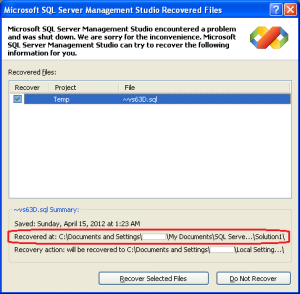
Uh oh!
So you’re plugging along in SQL Server Management Studio (SSMS) when it suddenly goes belly up. Now you’re staring at various dialog boxes telling you that SSMS crashed. Usually the first dialog box you get will ask you if you’d like to close OR the program. If you choose to close the program, you’ll be presented with the opportunity to recover your lost SQL scripts once you reopen SSMS, as shown above. (Image above courtesy of Aalam Rangi).
But let’s say that closing the program represents a big issue for you due to lost time, productivity, etc. You want to go the other route – you want to DEBUG! So, what’s the easiest way to get a crash dump or to debug SSMS from this state?
In my personal experience, the natural choice and the only choice I’m ever presented is to debug in Visual Studio. But I’m not really a Visual Studio guy. And I find that those times I’ve attempted to follow the debug route have left me with very little useful information.
But it turns out that, with a little earlier preparation, you can get a postmortem crash dump using a very nicely detailed set of steps detailed at at http://www.codeproject.com/KB/debug/automemorydump.aspx. In a nutshell, you’ll use the Microsoft debugger WinDBG and, along with a few setting changes, configure your workstation to automatically take a memory dump when SSMS crashes.
Once you’ve got your workstation set up to automatically grab a memory dump upon a crash, you have to interpret the results. I’m not going to duplicate excellent guidance provided by Microsoft at the CSS SQL Server Engineering Blog. So be sure to give that post a read to flesh out your understanding of taking and reading memory dumps.
Equipped with this information and a few steps of preparatory work, and you’re now ready to conquer SQL Server memory dumps!
Have you every had a crash in SSMS? How did you troubleshoot and resolve the problem? Let me know what you think.
Thanks,
-Kevin
-Follow me on Twitter!
-Google Author
The post One Preparation that makes SSMS Crash Dumps Easy to Survive appeared first on Kevin Kline.
Author: Sanjay Mishra
Contributors: Piyush Ranjan, Steven Schneider
Reviewers: Cephas Lin, Lori Clark, Shep Sheppard, Prem Mehra, Juergen Thomas, Luis Carlos Vargas Herring, Alexei Khalyako
AlwaysOn Availability Groups provides an effective solution for high availability for SQL Server in on-premises deployments as well as for Windows Azure VM deployments. Whether deployed on-premises or in Windows Azure VM, AlwaysOn Availability Groups fundamentally works the same way. However, if you are familiar with on-premises deployments of AlwaysOn Availability Groups, you may find some differences while deploying in Azure VMs, due to the differences in the way clustering and networking infrastructure works in Azure. In this article we call out these differences.
Whether deploying on-premises or in Azure, AlwaysOn AG requires a domain controller (for the Windows Cluster). The difference is that, for on-premises deployments, you very likely have domain controllers, Active Directory and DNS already deployed. If you are deploying AlwaysOn AG in Azure for the first time, or creating a new Azure environment for application, you will need to setup the domain controller, Active Directory, DNS, etc.
A Windows Server Failover Cluster (WSFC) is the foundation for the AlwaysOn AG. Therefore, you need a WSFC whether you are deploying on-premises or in Azure. The difference is how to create the cluster. It is common to use the Failover Cluster Manager GUI to create the cluster for on-premises deployments. If you use the Failover Cluster Manager GUI to create the cluster in Azure, you may run into a few issues and the cluster may not come online. The reason is that Azure's DHCP assigns a duplicate IP to the cluster network name (CNN), and that can cause cluster communication issues. AlwaysOn AG doesn't use the CNN, therefore the workaround is to temporarily assign a link-local IP (e.g. 169.254.1.1) to the cluster network name during the cluster creation. These tasks have been wrapped in a Powershell script available for download (http://gallery.technet.microsoft.com/scriptcenter/Create-WSFC-Cluster-for-7c207d3a). Use this script to create the WSFC needed for AlwaysOn AG in Azure.
If you have used one of the gallery images for creating the Azure SQL Server VMs, you may find that the SQL Server login for [NT AUTHORITY\SYSTEM] doesn't exist, or the account lacks the necessary permissions to create the AlwaysOn Availability Group. Potentially, this may happen in on-premises deployments as well, depending upon your particular SQL Server install, however, we have seen this happen more often in Azure deployments. The solution is described in the KB article: http://support.microsoft.com/kb/2847723, and is integrated into the Tutorial (http://msdn.microsoft.com/en-us/library/jj870963.aspx).
If you have used one of the gallery images for creating the Azure SQL Server VMs, you may find that the SQL Server service is running under a built-in account [NT Service\MSSQLSERVER]. You may like to change the SQL Server service account to an appropriate domain account. This is optional, however, be aware that if the SQL Server service account is a built-in account, you will need to use certificates for endpoint authentication (http://technet.microsoft.com/en-us/library/ff878308.aspx#Accounts).
Availability Group Listener is implemented differently in Azure compared to on-premises. In Azure the AG Listener is implemented using the Cloud Service. The VMs participating in an AG are in a cloud service – the cloud service has a public name and a public IP address. The process for creating the AG Listener in Azure (Tutorial: http://msdn.microsoft.com/en-us/library/dn376546.aspx) is very different from how you create the AG Listener for on-premises deployments. Due to the differences in implementation, AG Listener in Azure has some limitations compared to on-premises:
Since the AG Listener is implemented using the cloud service, you can have only one AG per set of VMs participating in a cloud service. For on-premises deployments, some customers deploy multiple AGs across the same set of machines.

Figure 1: Possible on-premises AG configuration whether using AG Listener or not

Figure 2: Windows Azure AG configuration when using AG Listener
Because the AG Listener uses DirectServerReturn on the cloud service endpoint, you can't connect to the AG Listener from the VM(s) in the AG secondary role. In Figure 2, if Machine1 is AG primary and Machine2 is AG secondary, you will get a successful connection to the AG Listener from machine1:
C:\Machine1>hostname
Machine1
C:\Users\sqlsvc> sqlcmd -E -S Listener_1
1> select @@servername
2> go
------------------------------------------------
Machine1
But you will get a connection failure if you attempt to connect to the AG Listener from Machine2:
C:\Machine2>hostname
Machine2
C:\Machine2>sqlcmd -E -S Listener_1
Sqlcmd: Error: Microsoft ODBC Driver 11 for SQL Server: TCP Provider: A connection attempt failed because the connected party did not properly respond after a period of time, or established connection failed because connected host has failed to respond.
Sqlcmd: Error: Microsoft ODBC Driver 11 for SQL Server: Login timeout expired.
. . .
Since the AG Listener uses a public endpoint on the cloud service, it is strongly recommended to use ACL (http://msdn.microsoft.com/en-us/library/windowsazure/dn376541.aspx) on the endpoint.
Using ACL has a side effect on how you specify port numbers for the SQL Server instances and for the AG Listener endpoint. For on-premises deployments, you could specify the same port number for the SQL Server instances participating in an AG, as well as for the AG Listener (http://blogs.msdn.com/b/sqlcat/archive/2014/02/03/alwayson-availability-groups-listener-named-instances-port-numbers-etc.aspx). However, when using ACL on an AG Listener in Azure, that is not an option. The port number for the SQL Server endpoint, and the port number used for the AG Listener must be different.
This blog describes how differential database backup is taken on database with one or more memory-optimized tables. For full database backups, please refer to Database Backup with Memory-Optimized Tables for the details and Creating and Managing Storage for Memory-Optimized Objects to get more in-depth understanding of data/delta files referenced later in the section below.
For disk-based tables, the differential database backup includes only the pages that have changed since the last full database backup. SQL Server 2014 supports differential backup on databases with memory-optimized tables. The differential backup of a database with memory-optimized tables contains the following data
Note, this optimization is only available in RTM. In CTP2, the differential database backup included all data/delta files just like in full database backup.
Let us walk through an example showing the difference in size of full database backup and a differential database backup. The example is based on the following database and the table schema. Please refer to blog State-transition-of-checkpoint-files-in-databases-with-memory-optimized-tables for details on the state of CFPs in the following examples.
CREATE DATABASE imoltp
GO
ALTER DATABASE imoltp ADD FILEGROUP imoltp_mod CONTAINS MEMORY_OPTIMIZED_DATA
ALTER DATABASE imoltp ADD FILE (name='imoltp_mod', filename='c:\data\imoltp_mod') TO FILEGROUP imoltp_mod
GO
use imoltp
go
-- create the table with each row around 8K
CREATE TABLE dbo.t_memopt (
c1 int NOT NULL,
c2 char(40) NOT NULL,
c3 char(8000) NOT NULL,
CONSTRAINT [pk_t_memopt_c1] PRIMARY KEY NONCLUSTERED HASH (c1)
WITH (BUCKET_COUNT = 100000)
) WITH (MEMORY_OPTIMIZED = ON, DURABILITY = SCHEMA_AND_DATA)
go
-- load 8000 rows. This should load 5 16MB files
declare @i int = 0
while (@i < 8000)
begin
insert t_memopt values (@i, 'a', replicate ('b', 8000))
set @i += 1;
end
-- Do Manual checkpoint
Checkpoint
BACKUP DATABASE [imoltp] TO DISK = N'C:\data\imoltp-full-data.bak'
WITH NOFORMAT, INIT, NAME = N'imoltp-Full Database Backup', SKIP, NOREWIND, NOUNLOAD, STATS = 10
Processed 304 pages for database 'imoltp', file 'imoltp' on file 1.
10 percent processed.
20 percent processed.
Processed 8064 pages for database 'imoltp', file 'imoltp_mod' on file 1.
30 percent processed.
40 percent processed.
Processed 8612 pages for database 'imoltp', file 'imoltp_log' on file 1.
100 percent processed.
BACKUP DATABASE successfully processed 16980 pages in 1.592 seconds (83.323 MB/sec).
BACKUP DATABASE [imoltp] TO
DISK = N'C:\data\imoltp-diff-data.bak' WITH DIFFERENTIAL, NOFORMAT, INIT,
NAME = N'imoltp-diff Database Backup', SKIP, NOREWIND, NOUNLOAD, STATS = 10
GO
Processed 48 pages for database 'imoltp', file 'imoltp' on file 1.
Processed 0 pages for database 'imoltp', file 'imoltp_mod' on file 1.
10 percent processed.
20 percent processed.
30 percent processed.
40 percent processed.
51 percent processed.
60 percent processed.
71 percent processed.
81 percent processed.
91 percent processed.
Processed 8613 pages for database 'imoltp', file 'imoltp_log' on file 1.
100 percent processed.
BACKUP DATABASE WITH DIFFERENTIAL successfully processed 8661 pages in 0.760 seconds (89.031 MB/sec).
-- now delete 50% rows
declare @i int = 0
while (@i <= 8000)
begin
delete t_memopt where c1 = @i
set @i += 2;
end
go
checkpoint
go
-- do the differential database backup
BACKUP DATABASE [imoltp] TO
DISK = N'C:\data\imoltp-diff-data-del50-chkpt.bak' WITH DIFFERENTIAL , NOFORMAT, INIT,
NAME = N'imoltp-diff Database Backup', SKIP, NOREWIND, NOUNLOAD, STATS = 10
GO
Processed 88 pages for database 'imoltp', file 'imoltp' on file 1.
Processed 47 pages for database 'imoltp', file 'imoltp_mod' on file 1.
10 percent processed.
20 percent processed.
30 percent processed.
40 percent processed.
50 percent processed.
60 percent processed.
Processed 8845 pages for database 'imoltp', file 'imoltp_log' on file 1.
100 percent processed.
BACKUP DATABASE WITH DIFFERENTIAL successfully processed 8980 pages in 0.941 seconds (74.552 MB/sec).


