Shared posts

18 Jan 21:46

Choosing a Reporting Tool

by Prologika - Teo Lachev

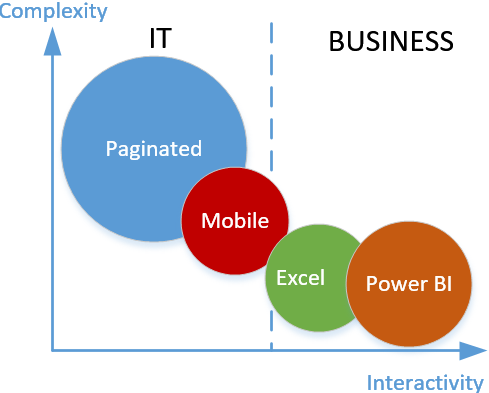
Next to the question “How do I offload reporting effort from IT?” is “Which MS reporting tool should my users use?”. Granted, Microsoft BI is not shy of reporting tools and they number is increasing! And with Power BI reports soon to be available in SSRS, the choice is getting even more difficult. The following diagram illustrates how I position reporting tools. The Y-axis represents complexity which measures the skills required to author different report types. The X-axis is for interactivity that is related to how well the tool supports interactive data exploration. The size of the bubble represents features supported by the tool – the bigger the bubble, the more features the tool supports. Of course, “features” are subjective. For example, if you care about ability to use custom visualizations, then Power BI reports should be very appealing to you (SSRS also supports custom visuals but you have to code them in .NET). The dividing dotted line denotes who typically creates and owns the report type: IT or Business.

reporttools

SSRS traditional (now called paginated) reports are the Jupiter in the MS BI Report Tools galaxy. You can rarely have a requirement that you can’t meet with SSRS reports because they are highly customizable. While they exceed in customization, paginated (also referred to as canned) reports lack in interactivity. They are typically authored and owned by IT. However, I have customers where business users have adopted Report Builder to create basic tabular and chart reports. So, don’t rule out this scenario although it requires a steeper learning curve than using Excel or Power BI Desktop for example.

As I mentioned a while back when I had a first look at the new mobile reports (they came from the Datazen acquisition), I have a positioning problem with mobile reports that debuted in SSRS 2016. That’s even more true given that that SSRS will soon support Power BI reports that can be optimized for mobile devices too. Chris Finlan (Senior Program Manager at Microsoft) is more excited about mobile reports and he listed some good usage scenarios. The problem is that in my opinion this report type is neither interactive enough nor feature-rich enough. Because of its reliance on SSRS datasets, mobile reports are typically owned by IT (at least setting up the data) and its primary usage is creating semi-interactive reports that render well on mobile device. If you’re familiar with RoamBI or former PushBI (now a part of Tibco), this is the Microsoft competing reporting technology.

Excel reports are easy to position since many business users live and die by Excel. If pivot reports are good enough for your users, look no further then Excel. The problem with Excel reports though is that they are not supported by SSRS yet (rendering Excel reports online in SSRS is on the roadmap). You can deploy Excel reports with imported data, such as in Power Pivot model, to Power BI Service (powerbi.com). However, Excel reports connected to external data sources, such as Analysis Services, are not supported in Power BI or SharePoint Online (currently, the only choice for online rendering of Excel reports connected to SSAS is deploying them to on-premises SharePoint Server).

If your users are interested in interactive analysis and data exploration, the easy choice is Power BI reports considering all the investment Microsoft is making in Power BI.

This is the Microsoft competing report tool to Tableau, Qlik, etc. These reports can be shared online by publishing them to the cloud (Power BI Service) and soon to on-premises SSRS in native mode (currently you can publish them to SSRS 2016 in native mode but users have to download and open them in Power BI Desktop).

Finally, as any other reporting tool on the market, there isn’t a Microsoft reporting tool that does it all. Most customers use multiple tools. My high-level advice is to have a limited number of strategic SSRS paginated reports and use Excel and/or Power BI for self-service interactive reports.

Remember, data integration first, then data quality, then visualizations.

12 Nov 05:53

A SNOBOL's Chance

by snoofle

We’ve all inherited legacy systems. You know the sort; 20 years old, more than 50,000 lines of code, poorly designed - even for its time, completely undocumented externally and useless code comments within, mangled beyond recognition due to countless developers making myriad ad-hoc changes upon changes and so-on. Now imagine such a system written in a tool that’s been around for nearly half a century, but rarely used for the intended purpose of the application.

A group of people rolling a snowball taller than any of them

Reg worked for a firm that built space-rocket related applications; specifically an Ada compiler, written in SNOBOL, for a 15+ years obsolete legacy processor used in the rocket. The system itself consisted of more than 100 SPITBOL (a speedier compiler of SNOBOL) programs, most of which were written by one guy nearly four decades ago, Barry. Barry was a former sixties hippie-turned-coder. Though long since retired, he had been called back to active duty to try and help decipher what this thing does.

The code is full of comments explaining what each block does, but not why. Nor were the comments up to date with what the code actually did, which was one set of “bugs”, in addition to the more normal set of errors. Of course, in those days, nobody wrote unit tests (was it even possible to write test suites for SNOBOL?) Some of the more interesting phenomena included mangled memory addresses, incorrect hex/decimal conversions, offsets disappearing, seemingly random mangling/unmangling/remangling of variable names, etc.

Reg’s ongoing project was to replace this mess with a shiny new Ada compiler written in Python.

Along the way, Reg had to deal with all the control flow of SNOBOL (e.g.: goto’s), on-the-fly execution of strings containing arbitrary SNOBOL code, the immediate-value-assignment operators (‘.’ and ‘$’) and pattern matching that would reduce a regex-wizard to a quivering mass of Jello.

Even Barry, the tie-dyed, retired, hippie could no longer decipher what the internals were doing. Maybe he’d just fried too many neurons. Reg couldn’t get any further- maybe he just wasn’t smoking enough marijuana to understand what the hippie had done. Reg decided to simply try to replicate the output of the legacy system. This was accomplished by running both systems on the same input and doing diffs.

This project started long before Reg joined the firm, and will probably be going strong long after he’s gone.

Reg got the number of diffs on the output down to less than 1,000. That might not sound great, but almost all of them were caused by bugs in the legacy code.

Now his toughest job begins: explaining to management why success must be defined as about 1,000 differences in the output between the legacy and replacement systems, and, more importantly, determining whether correcting the output of the previous systems will cause the rocket to act in an undesirable manner. Like exploding.

[Advertisement] Manage IT infrastructure as code across all environments with Puppet. Puppet Enterprise now offers more control and insight, with role-based access control, activity logging and all-new Puppet Apps. Start your free trial today!
12 Nov 05:16

CodeSOD: Repeat Delete

by Ellis Morning

Kneaded eraser

Once upon a time, a client contacted Trick R. and asked him to figure out why files were disappearing from their website.

The seemingly innocent task proved to be a swan-dive into a sewer of bad PHP, unsanitized user input, and plain-text passwords stored in the database, among other vulnerabilities. However, the following conditional took the cake for awfulness. What better way to ensure a record is really gone than by running the DELETE query a bunch of times?


if( $_REQUEST['task'] == "delete_single" && preg_match("/^([0-9]+)$/", $_REQUEST['id'], $reg) ) {
         $qry = " delete from department where id=".$_REQUEST['id'];
                mysql_query( $qry );
                 $qry = " delete from department where id=".$_REQUEST['id'];
        mysql_query( $qry );
                $qry = " delete from department where id=".$_REQUEST['id'];
        mysql_query( $qry );
                 $qry = " delete from department where id=".$_REQUEST['id'];
        mysql_query( $qry );
                 $qry = " delete from department where id=".$_REQUEST['id'];
        mysql_query($qry);
                 $qry1="select * from department where id ='".$_REQUEST['id']."'";
                $query=mysql_query($qry1);
         while($data=mysql_fetch_array($query)){ 
         $qry = "delete from department where id=".$data['id'];
        mysql_query( $qry );
         
                 $qry = " delete from department where id=".$data['id'];
        mysql_query( $qry );
                 }
                  $qry = " delete from department where id='".$_REQUEST['id']."'";
        mysql_query( $qry );


     $qry2="select * from department_login where pid ='".$_REQUEST['id']."'";
                $query=mysql_query($qry2);
         while($data=mysql_fetch_array($query)){ 
          $qry = "delete from department_login where pid=".$data['id'];
        mysql_query( $qry );
         
                  $qry = " delete from department_login where pid=".$data['id'];
        mysql_query( $qry );
                 }
                  $qry = " delete from department_login where pid='".$_REQUEST['id']."'";
        mysql_query( $qry );

$qry3="select * from files where pid ='".$_REQUEST['id']."'";
                $query=mysql_query($qry3);
         while($data=mysql_fetch_array($query)){ 
          $qry = "delete from files where pid=".$data['id'];
        mysql_query( $qry );
         
                  $qry = " delete from files where pid=".$data['id'];
        mysql_query( $qry );
                 }
                  $qry = " delete from files where pid='".$_REQUEST['id']."'";
        mysql_query( $qry );

$qry4="select * from pdf where pid ='".$_REQUEST['id']."'";
                $query=mysql_query($qry4);
         while($data=mysql_fetch_array($query)){ 
          $qry = "delete from pdf where pid=".$data['id'];
        mysql_query( $qry );
         
                  $qry = " delete from pdf where pid=".$data['id'];
        mysql_query( $qry );
                 }
                  $qry = " delete from pdf where pid='".$_REQUEST['id']."'";
        mysql_query( $qry );

       
        $errorMsg = "
Record deleted successfully !!
"; }
[Advertisement] Infrastructure as Code built from the start with first-class Windows functionality and an intuitive, visual user interface. Download Otter today!
12 Nov 05:15

Exceptional Handling

by Jane Bailey

Sonic 2006

Enterprise Resource Planning software, or ERP for short, is crucial to the operation of many large businesses. Several popular ERP systems have plugin-friendly architecture, the better to sell upgrades their customers will never want or use. This software is primarily aimed at businesses with too many complex process flows to manage by hand—making it the perfect domain for a small, lean startup with 3 developers and 1 customer.

Ethan and Roland were brand-new developers, fresh out of college and ready to take on the world. Patrick, a consultant, was more experienced, though still fairly early in his career. They worked in C# with the Visual Studio ecosystem, and their boss had bestowed just one instruction as to how their culture should be formed:

"Picture a scale from 1 to 10, with 1 being fast and 10 being scalability and code quality and all that crap. I want you to aim for a 2."

Visual Studio is a great tool for beginning developers who need to work fast. It makes scaffolding the code simple and efficient, and allows for a drag-and-drop visual design that lets you rapidly prototype your screens. Couple that with great intellisense, and the team was confident they could deliver their addon as promised.

That said, Visual Studio is also a complex piece of software, with many of its best features hidden inside a labyrinthine menu system and/or optional settings deep in a configuration file. It works better if you have time to learn how to use it. Unfortunately, our ERP team did not have that kind of time, and they missed a few key features. For example, out of the box, Visual Studio won't step into a catch block while debugging. You can debug catch blocks, but you have to explicitly set a breakpoint in them or they will be skipped entirely. There's an option to turn this behavior off, but it's hidden deep in the menus.

Ethan and Roland developed a workaround for this behavior that let them continue working: they would comment out catch blocks surrounding code they were actively debugging, then restore the commented-out code afterward. But this took time and effort, and often multiple cuss-filled executions as they realized the exception was handled at a higher or lower level than they'd originally anticipated and they had to comment out more code. Finally, Patrick came up with a more creative solution: pre-emptively comment out all try-catch blocks in the entire solution, and stop adding more.

"There's no time for exception handling," he scoffed. "We have to move fast or we won't hit our street date."

Ethan was concerned by this solution. He'd already caught himself forgetting to un-comment catch blocks using their old strategy. Wasn't this infinitely more risky? And how would they know their catch blocks were written correctly? What about testing the error messages they were meant to display to the users? Still, he was brand new, and Patrick had industry experience, so he was overruled.

The weeks wore on, and development moved at blazing speed. The developers did their own unit tests, and from time to time, their BA would perform manual tests of the addon installed in the ERP system. It mostly crashed, but it was early yet. There was time to figure it out. Still, blazing isn't quite lightspeed, and the BA kept finding more and more crucial functionality that would be required if anyone was going to be interested in purchasing the thing. The general feeling of the project team matched the immortal words of Sonic the Hedgehog: "We're not going to make it. Let's speed up!"

The team took on more developers in an effort to increase overall velocity. One of these was Alex, a contractor with 30 years of experience handling IT projects. Alex rapidly emerged as the clear leader of the entire team; his age and experience dethroned even Patrick. He spent increasing amounts of time sequestered with the boss, talking through everything from planned features to plugin architecture to the speed of development, which the boss felt was responsible for their missed milestones. Not because the code quality was crappy and therefore more time was spent fixing bugs, but because developers "weren't coding fast enough."

The codebase had grown from a few hundred lines to several thousand. Ethan had found the magic toggle for Visual Studio that made it step into catch blocks, much to his relief. He reported this to the boss, and the ban on exception handling was (begrudgingly) lifted. Ethan adjusted rapidly, but many of the other developers still blamed exception handling for the slowness of coding. Often the addon would crash due to an incorrect cast or bad index. However, handling exceptions was seen as wasted time, so many developers refused to do it.

Upon overhearing the boss and Alex discussing the matter, Ethan threw in his two cents. "We're nearing release. We should really start adding exception handling to all new code. Then we should do a final round of testing to make sure nothing breaks."

This didn't go over well with the boss. The solution was simple to him. "Just don't use any exception handling. Remove all of it. Then we won't have to test anything extra, and we might even make our deadline."

Ethan, after retrieving his jaw from the floor, protested violently. "Who's gonna pay for a system that crashes the moment you look at it wrong? What about data integrity? If bad data is persisted to the database, it'll fill up with garbage—and then the application will throw even more exceptions!"

"I know it's not ideal," said the boss, "but there's no time. Remember the scale: we need to be at a 2, and you're at like a 6 right now. This is industry standard stuff. Trust me on this, okay?"

Time marched on. The company doubled in size, adding more developers who were forbidden from using exception handling. They moved even faster now, approaching the final ship date—well, the new final ship date, anyway.

One day, while debugging, Ethan noticed that the addon didn't crash anymore, but did log an error to the console. "Wait, what? Where was that handled?"

Concerned, he dug through the code. Most of his exception handling had been removed or commented out; he couldn't find a single catch block in the whole module he was working on. Finally, he found it: at the very top level, someone had put a try-catch block around the entry point to swallow any exceptions that were thrown.

Ethan asked Alex about it the next time he caught him in the hallway.

"Yeah, we can't have the addon crashing all the time, you know?" Alex shrugged.

Another junior developer poked his head out of a nearby cubicle. "It turns out, in C#, if you have an exception, the entire application crashes! Crazy, right? I found that out last week, and I told Alex about it, so we decided to implement exception handling."

Ethan had no words at first. He just cradled his forehead in the palm of his hand. Finally, he tried one last time to explain. "Look. Exception handling is a good idea. But this is going to swallow all the errors, so debugging will be impossible. At the very least, let's put a catch block around each module so we know which one failed. And stop removing my catch blocks!"

Alex shook his head. "You just have to do it right. All of you," he added, raising his voice so the others could hear. "If you just code it right from the start, there won't be exceptions, and handling them won't be necessary!"

Ethan learned a valuable lesson that day: why exactly it was that startup developers tended to congregate in bars and debate the merits of various fine liquors online. It wasn't that people who liked alcohol were drawn to software development. Working at places like this drove developers to drink.

[Advertisement] Universal Package Manager - ProGet easily integrates with your favorite Continuous Integration and Build Tools, acting as the central hub to all your essential components. Learn more today!
12 Nov 05:09

Great news - MVP Reconnect has been announced

by Damian

The official announcement can be found at https://blogs.msdn.microsoft.com/stevengu/2016/11/03/announcing-the-mvp-reconnect-program-the-2016-mvp-global-summit/

What is MVP Reconnect?

  • MVP Reconnect is Microsoft’s way of keeping former MVPs in touch with Microsoft and each other.
  • The idea behind the program can be best described with an analogy from another industry; The Oscars are one of the most well recognized and prestigious awards in the film industry. From the moment someone wins their first Oscar, they become part of a very special community – that of Academy Award Winners – and they belong to this community forever, even if they don’t win an award every year. The same is true for MVPs: once an MVP, always part of the MVP community! 

Why is this program being launched?

  • Over the years, Microsoft has received feedback from former MVPs that they were looking for ways to stay in touch with the program and with their peers. This program is an extension of Microsoft’s commitment to the MVP program and another way to recognize the expertise and engagement that folks contribute to technical communities.

Why should you join?

  • MVP Reconnect allows members to stay connected to other community leaders and Microsoft. If your contributions to the technical community slow down temporarily, staying connected means that you maintain a good position for future recognition as an MVP. If you have a long history with the MVP program, you’ll be able to share your experiences and coach others to take full advantage of all the opportunities that the MVP award can provide.
  • Benefits include networking opportunities, recognition, and engagement offerings like invitations to community events. 

Who is eligible for the program? What are the requirements for membership?

  • All former MVPs with a minimum award period of one year who ended their tenure “in good standing” are eligible to join. “Good standing” means that an MVP must not have been retired due to an NDA or Code of Conduct violation. There are no limitations based on technical expertise or award category!

Where can you find more information about the program?

How can you join?

  • In the future, MVPs who reach the end of their award tenure will be invited automatically. 
  • Former MVPs can request to join by filling out the form at https://mvp.microsoft.com/en-us/Pages/reconnect-requestform. After validating the request, Microsoft will send an official email invitation. 
  • Please note that the validation process is made easier by providing more information on the form. Specifically, supplying your MVP ID and primary email used as an MVP will help expedite the process.


Cheers

Damian

12 Nov 05:08

How I prepare for a presentation

by Rob Farley

Some people say I talk a lot – but I guess it depends on the context.

Certainly, for many years, I’ve been fairly comfortable about standing up in front of people and explaining things. Whether it’s teaching a course, leading a workshop, presenting at a conference, or preaching at a church, it all has that same “I’m talking, and people are looking at me” feeling. I totally understand why people get nervous about it, and still have a certain about of terror that I suffer from before getting up to present. It doesn’t stop me doing it – I would happily present all the time, despite the fear factor.

It’s almost a cliché, but the biggest advice I have for new speakers is to realise that the people in the room do actually want to hear what you have to say. They don’t want you to fail.

…but there’s more to it than that.

I can present on just about any topic, so long as I have time to prepare. That preparation time is NOT in creating an effective talk (although that’s part of it) – it’s in getting to know the subject matter well.

Suppose I’m giving a talk about Columnstore indexes, like I just did at the PASS Summit. By all means, I want to craft a story for my presentation, and be able to work out which things I want to communicate through that story. If slides will work, then I’ll need to create them. If demos will work, then I’ll need to plan them too. But most of all, I want to get myself deep into Columnstore. I want to read everything there is on the subject. I want to create them, alter them, explore the DMVs about them, find ways to break them, and generally immerse myself in them. That way, I can speak confidently on the topic, knowing that I’m quite probably the most qualified person in the room to be up the front. I want to be explaining concepts that I know intimately.

When people ask questions, there’s no guarantee that I’ll know the answer. At the end of my talk at the PASS Summit, someone asked me if I’d tried using columnstore indexes in a particular way, and I had to say no. She went on to tell me what she’d found, and it was interesting and piqued my curiosity for an area I hadn’t explored. Would I have been thrown if she’d asked me during the session, in front of everyone else? No – not at all. Because I felt comfortable with the depth of my knowledge.

This applies just the same if I’m preaching in a church. If I’m preaching on a section of Galatians, I want to know that section backwards. I want to know the rest of the chapter, the rest of the book, what the rest of the Bible says on the matter, how it has applied in my own life, and what other people say on it too. I want to have a thorough picture of what God is saying to me, and to the rest of the church, through that passage.

When I get stuck in my words, and stumble in some way, I need to know the topic well. I will have a bunch of sound bites that I’ve rehearsed, and expect to explain things using particular phrases. But those are the things that can disappear from my head when the nerves strike. My safety net is the deep knowledge of the subject, so that I can find a different way of explaining it.

I don’t like giving word-perfect speeches. The idea of talking from a script that I need to stick to exactly doesn’t work for me – I get too nervous and wouldn’t be able to pull it off (although one day I will give stand-up comedy a try, which means having well-crafted jokes that need to be word-perfect to work). Knowing the material is way better than knowing the words, and for me is way less stressful.

My advice to anyone is to get into public speaking. It’s a great way of stretching yourself. But do get into your topic as deeply as you can. If you’ve looked at something from a variety of angles, you will be able to explain to anyone.

Big thanks to Andy Yun (@sqlbek) for hosting this month’s T-SQL Tuesday.

TSQL2sDay150x150

@rob_farley

12 Nov 05:08

PASS Summit Announcements: SQL DW free trial

by James Serra

Microsoft usually has some interesting announcements at the PASS Summit, and this year was no exception.  I’m writing a set of blogs covering the major announcements.  Next up is the free trial of Azure SQL Data Warehouse (SQL DW).

Azure SQL Data Warehouse is an enterprise-class, massively parallel processing (MPP) distributed database capable of processing petabyte volumes of both relational and non-relational data.  It is the industry’s first cloud data warehouse capable of grow, shrink, and pause-in-seconds capabilities with proven SQL functionality and if you’ve not yet tested it out you can now; for free.

You can use this one month free trial to do POCs and try out SQL DW up to 200 DWU and 2TB of data.  You must sign up by December 31st 2016.  Please note that once the one month free trial is over, you will start getting billed at general availability pricing rates.  For more information on the free trial, and to sign up, go here.

This is a great promotion as without it, you can get a free $200 credit for Azure, but you will quickly hit that limit when use SQL DW.

For an excellent 5-part overview of SQL DW, check out Azure SQL Data Warehouse

More info:

One Month Free Trial for Azure Data Warehouse

12 Nov 05:08

Qlik and the United Nations Partner to Bring Data Analytics to Humanitarian Missions

by A.R. Guess

by Angela Guess According to a recent press release out of the company, “Qlik, a leader in visual analytics today announced a strong, strategic partnership with the United Nations bringing the power of data analytics to global humanitarian efforts to impact efficiency and efficacy. The United Nations, through the Office of Information and Communications Technology […]

The post Qlik and the United Nations Partner to Bring Data Analytics to Humanitarian Missions appeared first on DATAVERSITY.

12 Nov 05:08

Can comments hamper stored procedure performance?

by Aaron Bertrand

Every once in a while, a conversation crops up where people are convinced that comments either do or don't have an impact on performance.

In general, I will say that, no, comments do not impact performance, but there is always room for an "it depends" disclaimer. Let's create a sample database and a table full of junk:

CREATE DATABASE CommentTesting;
GO
USE CommentTesting;
GO
SELECT TOP (1000) n = NEWID(), * INTO dbo.SampleTable 
  FROM sys.all_columns ORDER BY NEWID();
GO
CREATE UNIQUE CLUSTERED INDEX x ON dbo.SampleTable(n);
GO

Now, I want to create four stored procedures – one with 20 characters of comments, one with 2000, one with 20,000, and one with 200,000. And I want to do that again where the comments are embedded *within* a query statement within the procedure, as opposed to being independent (which will have an effect on the plan XML). Finally, I repeated the process adding OPTION (RECOMPILE) to the query.

DECLARE @comments nvarchar(max) = N'', 
        @basesql  nvarchar(max),
        @sql      nvarchar(max);
 
SELECT TOP (5000) -- * 40 character strings
  @comments += N'--' + RTRIM(NEWID()) + CHAR(13) + CHAR(10)
FROM sys.all_columns;
 
SET @basesql = N'CREATE PROCEDURE dbo.$name$
AS
BEGIN
  SET NOCOUNT ON;
 
  /* $comments1$ */
 
  DECLARE @x int;
  SELECT @x = COUNT(*) /* $comments2$ */ FROM dbo.SampleTable OPTION (RECOMPILE);
END';
 
SET @sql = REPLACE(REPLACE(@basesql, N'$name$', N'Small_Separate'),      N'$comments1$', LEFT(@comments, 20));
EXEC sys.sp_executesql @sql;
 
SET @sql = REPLACE(REPLACE(@basesql, N'$name$', N'Medium_Separate'),     N'$comments1$', LEFT(@comments, 2000));
EXEC sys.sp_executesql @sql;
 
SET @sql = REPLACE(REPLACE(@basesql, N'$name$', N'Large_Separate'),      N'$comments1$', LEFT(@comments, 20000));
EXEC sys.sp_executesql @sql;
 
SET @sql = REPLACE(REPLACE(@basesql, N'$name$', N'ExtraLarge_Separate'), N'$comments1$', LEFT(@comments, 200000));
EXEC sys.sp_executesql @sql;
 
SET @sql = REPLACE(REPLACE(@basesql, N'$name$', N'Small_Embedded'),      N'$comments2$', LEFT(@comments, 20));
EXEC sys.sp_executesql @sql;
 
SET @sql = REPLACE(REPLACE(@basesql, N'$name$', N'Medium_Embedded'),     N'$comments2$', LEFT(@comments, 2000));
EXEC sys.sp_executesql @sql;
 
SET @sql = REPLACE(REPLACE(@basesql, N'$name$', N'Large_Embedded'),      N'$comments2$', LEFT(@comments, 20000));
EXEC sys.sp_executesql @sql;
 
SET @sql = REPLACE(REPLACE(@basesql, N'$name$', N'ExtraLarge_Embedded'), N'$comments2$', LEFT(@comments, 200000));
EXEC sys.sp_executesql @sql;

Now, I needed to generate the code to run each procedure 100,000 times, measure the duration from sys.dm_exec_procedure_stats, and also check the size of the plan in cache.

DECLARE @hammer nvarchar(max) = N'';
 
SELECT @hammer += N'
DBCC FREEPROCCACHE;
DBCC DROPCLEANBUFFERS;
GO
EXEC dbo.' + [name] + N';
GO 100000
 
SELECT [size of ' + [name] + ' (b)] = DATALENGTH(definition)
  FROM sys.sql_modules
  WHERE [object_id] = ' + CONVERT(varchar(32),([object_id])) + N';
 
SELECT [size of ' + [name] + ' (b)] = size_in_bytes
  FROM sys.dm_exec_cached_plans AS p
  CROSS APPLY sys.dm_exec_sql_text(p.plan_handle) AS t
  WHERE t.objectid = ' + CONVERT(varchar(32),([object_id])) + N';
 
SELECT N''' + [name] + N''', 
  avg_dur = total_elapsed_time*1.0/execution_count
  FROM sys.dm_exec_procedure_stats
  WHERE [object_id] = ' + CONVERT(varchar(32),([object_id])) + N';'
FROM sys.procedures
WHERE [name] LIKE N'%[_]Separate' OR [name] LIKE N'%[_]Embedded';
 
PRINT @hammer;

First, let's look at the size of the procedure bodies. No surprises here, just confirming that my construction code above generated the expected size of comments in each procedure:

Procedure Size (bytes)
Small_Separate / Small_Embedded 378
Medium_Separate / Medium_Embedded 4,340
Large_Separate / Large_Separate 40,338
ExtraLarge_Separate / ExtraLarge_Separate 400,348

 
Next, how large were the plans in the cache?

Procedure Size (bytes)
Small_Separate / Small_Embedded 40,360
Medium_Separate / Medium_Embedded 40,360
Large_Separate / Large_Separate 40,360
ExtraLarge_Separate / ExtraLarge_Separate 40,360

 
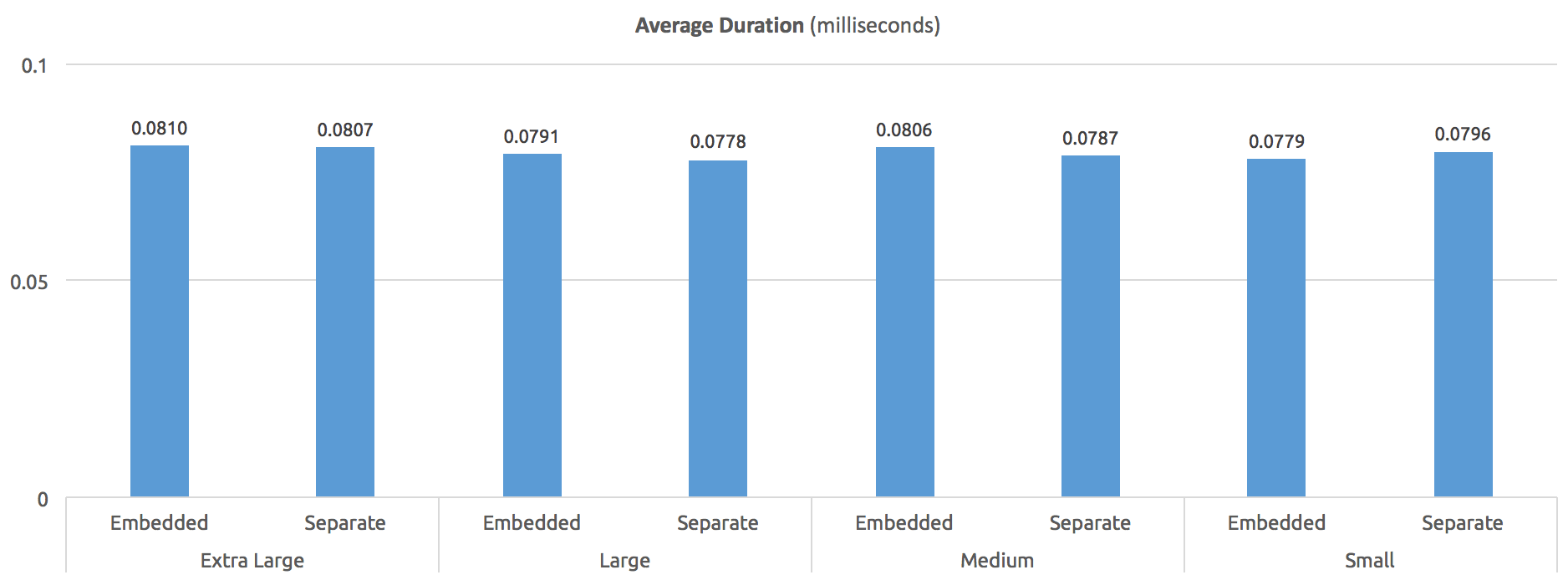
Finally, what was the performance like? Without OPTION (RECOMPILE), here is the average execution time, in milliseconds – pretty consistent across all procedures:

Average duration (milliseconds) - without OPTION (RECOMPILE)
Average duration (milliseconds) – without OPTION (RECOMPILE)

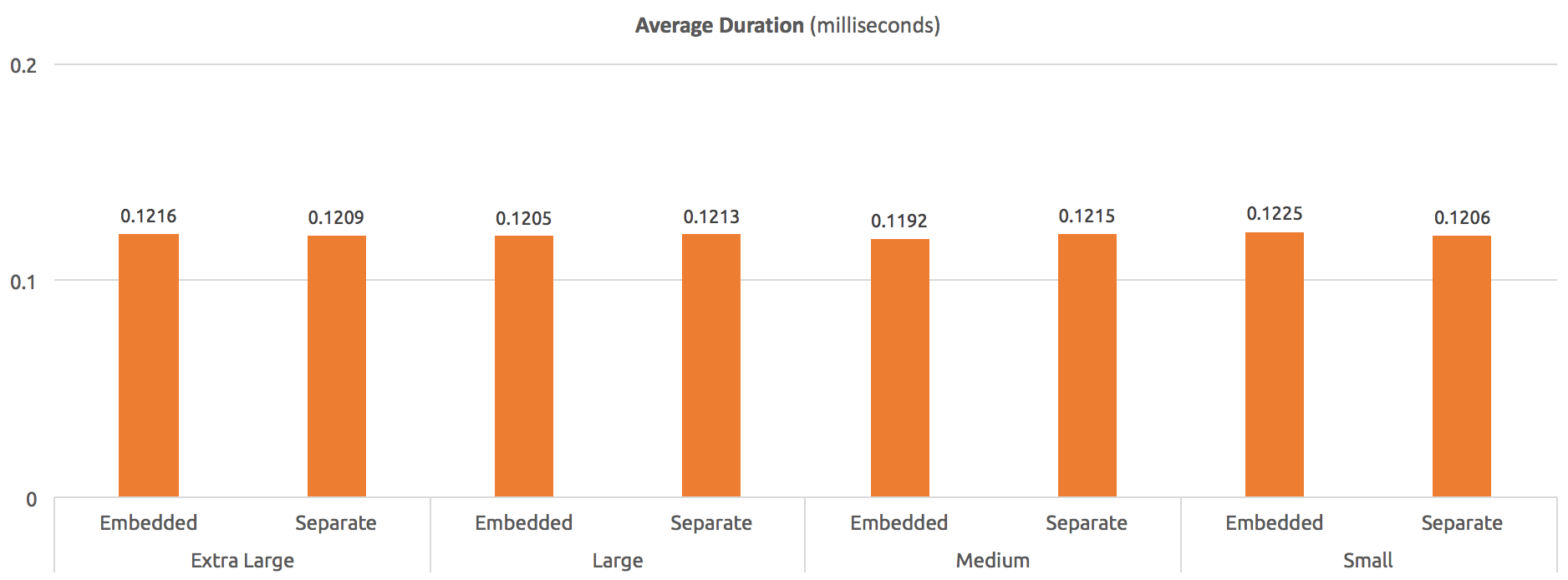
With statement-level OPTION (RECOMPILE), we can see about a 50% hit in average duration across the board compared to no recompilation, but still pretty even:

Average duration (milliseconds) - with OPTION (RECOMPILE)
Average duration (milliseconds) – with OPTION (RECOMPILE)

In both cases, while the OPTION (RECOMPILE) version generally ran slower, there was virtually ZERO difference in runtime, regardless of comment size in the procedure body.

What about higher compilation costs?

Next, I wanted to see if these large comments would have a huge impact on compile costs, for example if the procedures were created WITH RECOMPILE. The construction code above was easy to change to account for this. But in this case, I couldn't rely on sys.dm_exec_procedure_stats, because this doesn't work for procedures WITH RECOMPILE. So my generation code for the test was a little different, since I'd have to track average duration manually:

DECLARE @hammer nvarchar(max) = N'';
 
SELECT @hammer += N'
DBCC FREEPROCCACHE;
DBCC DROPCLEANBUFFERS;
SELECT SYSDATETIME();
GO
EXEC dbo.' + [name] + N';
GO 100000
SELECT SYSDATETIME();';
 
PRINT @hammer;

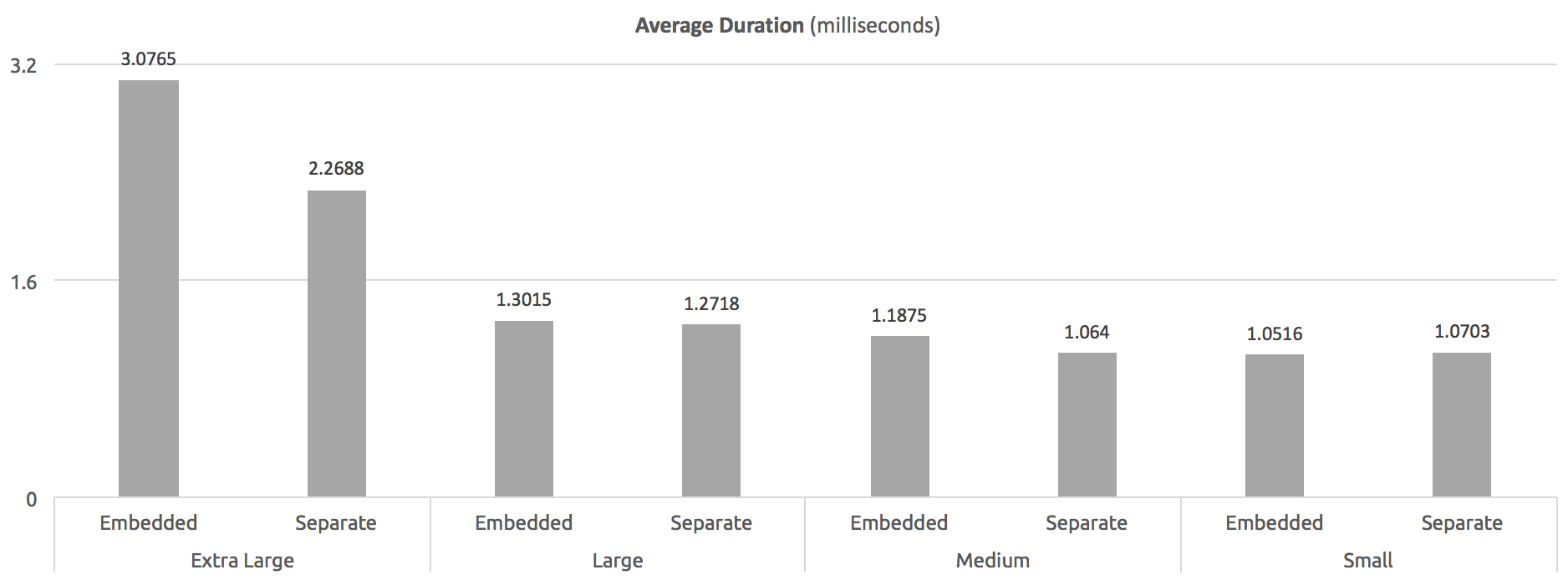
In this case, I couldn't check the size of the plans in cache, but I was able to determine average runtime of the procedures, and there was a difference based on comment size (or, perhaps, just procedure body size):

Average duration (milliseconds) - WITH RECOMPILE at procedure level
Average duration (milliseconds) – WITH RECOMPILE at procedure level

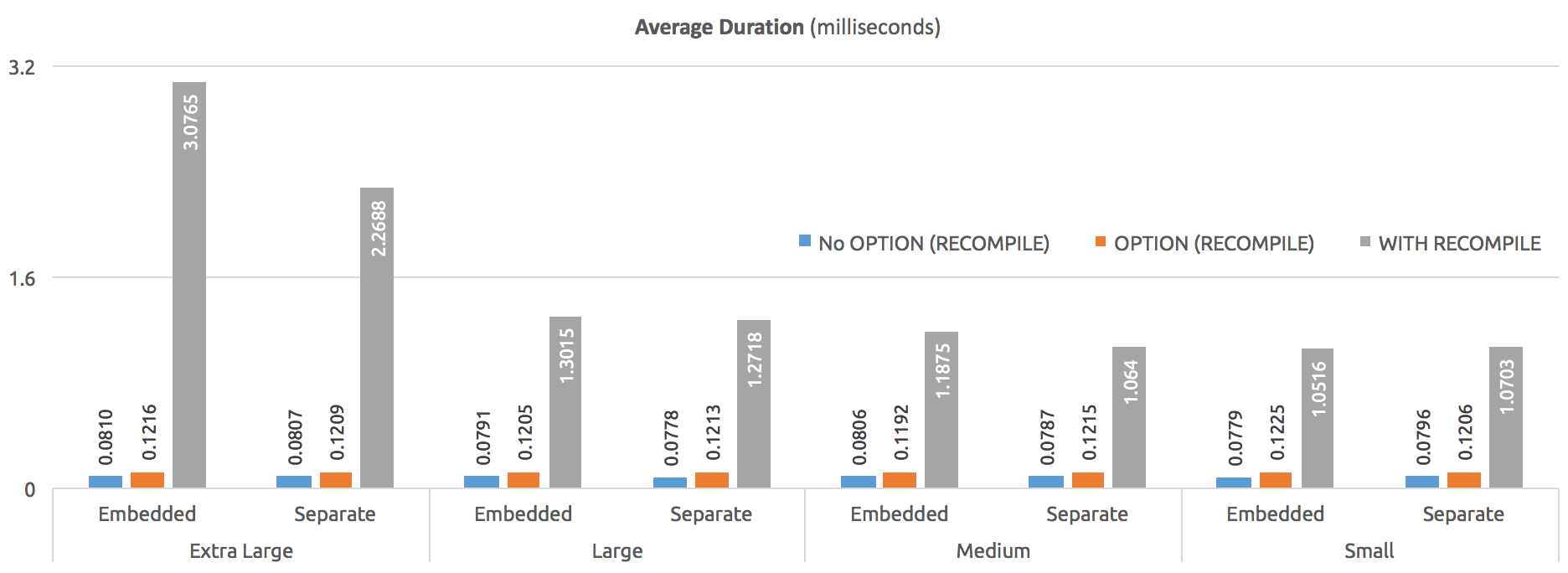
If we put them all together on a graph, it's clear how much more expensive the WITH RECOMPILE usage can be:

Average duration (milliseconds) - comparing all three methods
Average duration (milliseconds) – comparing all three methods

I will probably take a closer look at this at a later time to see exactly where that hockey stick comes into play – I envision testing in 10,000-character increments. For now, though, I'm pretty satisfied that I have answered the question.

Summary

Comments seem to be completely unrelated to actual, observable stored procedure performance, except in the case where the procedure is defined WITH RECOMPILE. Personally, I don't see this being used in the wild anymore, but YMMV. For the subtle differences between this option and statement-level OPTION (RECOMPILE), see Paul White's article, "Parameter Sniffing, Embedding, and the RECOMPILE Options."

Personally, I think comments can be extremely valuable for anyone who has to review, maintain, or troubleshoot your code. This includes future you. I highly recommend against worrying about the performance impact of a reasonable amount of comments, and instead focus on prioritizing the usefulness of context that the comments provide. As someone on Twitter said, there is a limit. If your comments amount to the abridged version of War and Peace, you might consider – at the risk of decoupling the code from its documentation – putting that documentation elsewhere, and reference the link in the procedure body comments.

To minimize the risk of decoupling, or the documentation and code otherwise becoming out of sync over time, you could create a second procedure, with the suffix _documentation or _comments, and putting the comments (or a commented version of the code) there. Maybe put it in a different schema to keep it out of the main sort lists. At least the documentation stays with the database wherever it goes, though it doesn't guarantee it will be maintained. It's unfortunate that a normal procedure can't be created WITH SCHEMABINDING, in which case you could explicitly tie the comment procedure to the source.

The post Can comments hamper stored procedure performance? appeared first on SQLPerformance.com.

12 Nov 05:07

79% of US Consumers Want “Artificial Intelligence” to Know the Limits

by A.R. Guess

by Angela Guess A recent press release reports, “Ahead of the opening of the world’s largest international trade fair for the electronics industry in Munich, Electronica reveals its trend index 2020, an international survey highlighting how people see their future lives with electronic devices. In the US, 1,000 consumers took part in the survey, which […]

The post 79% of US Consumers Want “Artificial Intelligence” to Know the Limits appeared first on DATAVERSITY.

12 Nov 05:07

In-Memory Computing Planet Website Launched to Encourage Information Sharing

by A.R. Guess

by Angela Guess A new press release reports, “GridGain Systems, provider of enterprise-grade in-memory computing solutions based on Apache Ignite, today announced the launch of the In-Memory Computing Planet (IMCPlanet.org) website, a moderated community portal designed to encourage information sharing within the in-memory computing industry. The IMCPlanet.org website consolidates in-memory computing blogs and events from […]

The post In-Memory Computing Planet Website Launched to Encourage Information Sharing appeared first on DATAVERSITY.

12 Nov 05:07

Azure SQL Server 2016 VM

by James Serra

With Windows Server 2016 just been released, now is the perfect time to build an Azure VM with SQL Server 2016 on Windows Server 2016.  In a matter of minutes you can be playing and learning both platforms.  Below I will document the steps I took to build the VM along with the additional software I installed.  This is a fully-loaded VM that I use for demo’s and to build small projects:

(Software updates as of 11/4/2016)

  1. Go to the Azure Portal, choose “New”, type in “SQL Server 2016”, and choose “SQL Server 2016 RTM Enterprise on Windows Server 2016”.  This will install SQL Server 2016 CU2 (13.0.2164.0)
  2. Follow the prompts to enter the info needed to build the VM.  I kept the default Azure “Resource Manager” (ARM) deployment model.  I chose the “East US” region, picked “Standard DS3” for the virtual machine size, created a resource group called “SQLServer”, used an existing storage account I called “serrastoragessd” which is premium-LRS and located in the East US region, enabled R Services, and created one data disk (under “Storage configuration” in SQL Server settings – create more disks for faster performance – please read Storage configuration for SQL Server VMs)
  3. After about 5 minutes your new VM will be ready.  I then connect to the VM and check for windows updates and install them
  4. On the Azure Portal, click on the VM and under “Support + Troubleshooting” you will see “Boot diagnostics”.  This will show you the boot screen of the VM so you can see if it is still performing windows updates
  5. I then login to SSMS and for the server properties change the server authentication to “SQL Server and Windows Authentication mode”.  I then create a SQL login with sysadmin server role
  6. Install the latest CU if needed: see SQL Server 2016 build numbers
  7. Get the latest SSMS version if needed: see Download SQL Server Management Studio (SSMS).  Latest is 16.5 (13.0.16000.28)
  8. Install Visual Studio Enterprise 2015 with Update 3 (14.0.25424.00 Update 3)
  9. Install SQL Server Data Tools (SSDT) 2015 GA for VS 2015 (14.0.61021.0)
  10. Install Office Professional Plus 2016 (make sure to choose 64-bit version)
  11. Install Visio Professional 2016 (make sure to choose 64-bit version)
  12. Install Chrome (Version 53.0.2785.143)
  13. Install Adobe Reader (Version 2015.020.20039)
  14. Install Java 8 (Update 111)
  15. Install Azure Data Lake Tools for Visual Studio (Version 2.2.21)
  16. Install Power BI Desktop (October update)
  17. Install Microsoft Data Migration Assistant (Version 2.0)
  18. Install Microsoft Database Experimentation Assistant Technical Preview (Version 1.0)
  19. Install Azure Storage Explorer (Version 0.8.5).  I use a Shared Access Signature to connect to my Azure storage
  20. Install Roboform (Version 7.9.22)
  21. Install DocumentDB Studio (Version 0.71)
  22. Install DocumentDB Data Migration Tool (Version 1.7)
  23. Install Data Warehouse Migration Utility Preview (Version 1)
  24. Install Azure SDK for .NET VS 2015 (Version 2.9.5)
  25. Install Microsoft Data Management Gateway (Version 2.4.6137.1)
  26. Install Red Gate Azure Explorer (Version 1.1.0.43)
  27. Install Chrome Postman (Version 4.8.1)
  28. Install Fiddler (Version 4.6.3.44034)
  29. Install Narratives for Power BI
  30. Install ZoomIt (Version 4.5)
  31. Install Microsoft R Open (Version 3.3.1).  Installs RGui
  32. Install RStudio (Version 1.0.44)

  33. Install R Tools for Visual Studio 2015 (RTVS) (Version 0.5)
  34. Download and restore the Wide-World-Importers sample databases (Version 1.0)
  35. Download and restore the AdventureWorks Sample Databases and Scripts for SQL Server 2016 CTP3
  36. Download and restore the Northwind database
  37. Download and restore samples databases from SQLskills
  38. Use Site Recovery to backup your VM daily
  39. When not is use, manually stop your VM, or use an Azure Marketplace solution or a graphical runbook (both use Azure Automation) to save money.  Note you will still be charged for storage if you created a data disk (see Azure Storage Pricing)
12 Nov 05:07

Oops Recovery with Temporal Tables

by Dimitri Furman


Reviewed by: Kun Cheng, John Hoang, Sanjay Mishra, Borko Novakovic, Denzil Ribeiro, Murshed Zaman

Have you ever got that sinking feeling after hitting the Execute button in SSMS, thinking “I should not have done that”? DML statements with the missing WHERE clause, DROP statements accidentally targeting slightly mistyped (but existing) tables or databases, RESTORE statements overwriting databases with new data that haven’t been backed up, are all examples of actions prompting an “Oops…” (or worse) shortly thereafter. “Oops recovery” is the term that became popular to describe the process of fixing the consequences.

For most of these scenarios, the usual, and often the only, recovery mechanism is to restore the database from backup to a point in time just before the “oops”, known as point-in-time recovery (PITR). Even though PITR remains the most general and the most effective recovery mechanism, it does have some drawbacks and limitations: the recovery process requires a full database restore, taking the time proportional to the size of the database; a sequence of restores may be needed if multiple “oops” transactions have occurred; in the general case, there will be difficulties reconciling recovered data with data modified after the “oops” point in time, etc. Nevertheless, PITR remains the most widely applicable recovery method for SQL Server databases, both on-premises and in the cloud.

In this article, we would like to discuss another option that became recently available, that can greatly simplify some recovery scenarios. We will discuss recovering from an “oops” using temporal tables, available in SQL Server 2016 and in Azure SQL Database. The linked documentation provides a detailed description of this new feature. As a quick introduction, a temporal table keeps a record of all data changes by saving versions of rows in a separate history table, with a validity period attached to each version. T-SQL language has been extended to simplify querying of current and historical data. In terms of performance overhead, there is none for INSERT and SELECT statements on the current data. The overhead of other statements is similar to that incurred by maintaining an additional index, and is in any case less than the overhead of other solutions for keeping history, such as triggers or CDC.

From the outset, we need to say that this method is applicable to a rather narrow subset of scenarios, considering all the possibilities for an “oops”. It also requires advance preparation, i.e. modifying table schema to add temporal period columns, and explicitly enabling system versioning. But for those specific scenarios, it allows a much simpler recovery process than PITR, and is therefore worth considering in detail.

To explain the recovery process with a temporal table, let’s consider an example (based on a true story).

In this example, an application uses a SQL Server table as a queue. Messages are generated by multiple application processes, and for each message, a row is inserted into this table. A separate process retrieves these messages from the queue, i.e. executes a single row SELECT statement against the table, processes message payload, and then deletes the processed message row from the table. (As an aside, this is not the most optimal way to implement a queue using a table. It would be better to dequeue messages using a DELETE statement with an OUTPUT clause.)

A new code release introduces a bug where rows are selected, and then deleted immediately, without calling the code to process the message. This is not noticed until 7000 messages are deleted without having been processed, while the rest of the workload continues to run and modify data in the database.

To recover from this using the traditional point-in-time recovery, it would have been necessary to perform 7000 precise point-in-time restores, which is not feasible for most applications. Another possible option is to reconstruct the data from the transaction log, however there are no documented or supported ways to do that, and it may be extremely complex or not even possible in the general case.

Now let’s consider what would happen if the queue table in this example were a temporal table.

CREATE TABLE dbo.WorkQueue
(
WorkQueueId int NOT NULL,
MessagePayload nvarchar(max) NOT NULL,
SysStartDateTime datetime2 GENERATED ALWAYS AS ROW START HIDDEN NOT NULL,
SysEndDateTime datetime2 GENERATED ALWAYS AS ROW END HIDDEN NOT NULL,
PERIOD FOR SYSTEM_TIME (SysStartDateTime, SysEndDateTime),
CONSTRAINT PK_WorkQueue PRIMARY KEY (WorkQueueId)
)
;

Compared to a regular table, there are two new columns added here, SysStartDateTime and SysEndDateTime. The values for these columns are automatically generated by SQL Server when rows are inserted, updated, and deleted. Note that in this example, the columns are hidden. While making these columns hidden is optional, it may be useful to avoid impacting the application. If the application code does not follow the best practice of always explicitly listing column names, e.g. if it uses SELECT *, or INSERT statements without target column list, then the addition of new columns can break it. Making the period columns hidden avoids this problem. Note that even if the columns are hidden, it is still possible to see column values if they are explicitly included in the SELECT column list.

If you are familiar with temporal tables, you may have noticed that something is missing from the CREATE TABLE statement above. Specifically, this statement only creates the current table, and there is no mention of the history table. The history table is where older row versions are saved when UPDATE, DELETE, and MERGE statements modify rows in the current table.

In this example, we intentionally do not create the history table right away. If we did, it would start immediately accumulating row versions. For a queue table, it means that every message placed on the queue would effectively remain in the database, potentially using a significant amount of storage. Whether that makes sense depends on the specific application context. If the choice is to have the system versioning enabled at all times, then using a Clustered Columnstore Index for the system table would reduce storage overhead. An example is provided in Creating a temporal table with a user-defined history table.

In this example, we assume that the oops protection provided by temporal tables is only needed during some critical phases of application lifecycle, i.e. during a new code release.

Just prior to the release, we go ahead and enable protection by turning on system versioning:

ALTER TABLE dbo.WorkQueue SET
(SYSTEM_VERSIONING = ON (HISTORY_TABLE = dbo.WorkQueueHistory))
;

Note that the dbo.WorkQueueHistory history table referenced in the above statement does not have to be created explicitly. It will be automatically created by SQL Server as a part of the ALTER TABLE statement above, based on the schema of the dbo.WorkQueue table.

From this point on, whenever a row in the dbo.WorkQueue table is updated or deleted, the version of the row as it existed immediately prior to the update or delete will be inserted in the dbo.WorkQueueHistory table.

Next, the application code (with the disastrous bug) is deployed. Before allowing the application to use the database, we note the exact time of the release (as an aside, this is a best practice for any critical change):

SELECT SYSUTCDATETIME() AS ReleaseDateTime;
-- 2016-11-03 17:07:21.5027748

The application is brought online, messages are added to the queue, and, due to the bug, are deleted right away:

INSERT INTO dbo.WorkQueue (WorkQueueId, MessagePayload)
VALUES (1, 'Message1');

DELETE dbo.WorkQueue
WHERE WorkQueueId = 1;

INSERT INTO dbo.WorkQueue (WorkQueueId, MessagePayload)
VALUES (2, 'Message2');

DELETE dbo.WorkQueue
WHERE WorkQueueId = 2;

INSERT INTO dbo.WorkQueue (WorkQueueId, MessagePayload)
VALUES (3, 'Message3');

DELETE dbo.WorkQueue
WHERE WorkQueueId = 3;

A few minutes later, or a few hours later if we are unlucky, the oops moment arrives, and the problem is noticed. The application is taken offline, and developers start working on a fix. At this point, we note the time when the “bad” workload stops:

SELECT SYSUTCDATETIME() AS WorkloadStopDateTime;
-- 2016-11-03 17:07:40.0709518

In the meantime, the queue table is empty:

SELECT WorkQueueId,
       MessagePayload
FROM dbo.WorkQueue
;

(0 row(s) affected)

The immediate question is whether anything can be done to bring back message data that wasn’t processed while the code with the bug was deployed. Luckily, because we enabled system versioning prior to the release, we can indeed do it, using a single TSQL statement:

WITH LatestVersion AS
(
SELECT WorkQueueId,
       MessagePayload,
       ROW_NUMBER() OVER (PARTITION BY WorkQueueId ORDER BY SysEndDateTime DESC) AS VersionNumber
FROM dbo.WorkQueueHistory
WHERE -- restrict to rows created after the release ...
      SysStartDateTime >= '2016-11-03 17:07:21.5027748'
      AND
      -- ... and rows deleted before the fix went in
      SysEndDateTime < '2016-11-03 17:07:40.0709518'
)
INSERT INTO dbo.WorkQueue
(
WorkQueueId,
MessagePayload
)
SELECT WorkQueueId,
       MessagePayload
FROM LatestVersion
WHERE VersionNumber = 1
;

In this statement, we start with a query to retrieve all row versions from the dbo.WorkQueueHistory history table that have their validity period starting on or after the release time, and ending before the application went offline. This is the query within the LatestVersion CTE. In that query, we use the ROW_NUMBER() window function to number row versions for each PK value (i.e. for each WorkQueueId) in chronologically descending order, so that the latest version becomes version number one. In our specific example, there happens to be only one version, because only one DML statement (the erroneous DELETE) affected each row. In a more general case though (e.g. if a row was updated before having been deleted), multiple versions could exist, therefore we need to determine which version is the latest, which is achieved by numbering versions using ROW_NUMBER(). Then, we restrict this result set to filter out all versions but the latest, which is the version of the row just before it was erroneously deleted. Then, we insert these deleted rows back into the dbo.WorkQueue table, effectively recovering from the oops.

We can see that the unprocessed messages are back in the queue table:

SELECT WorkQueueId,
       MessagePayload
FROM dbo.WorkQueue
;

(3 row(s) affected)

There are two important caveats to note here.

If you are familiar with temporal tables, you may be wondering why we used the history table directly, instead of using one of the new FOR SYSTEM_TIME temporal clauses in the FROM clause of the query. The reason is that FOR SYSTEM_TIME filters out row versions with the same validity start and end times, as noted here. In our scenario, the INSERT and DELETE statements can happen so quickly one after the other, that the system clock resolution is insufficient for the timestamps to be different. In that case, had we used FOR SYSTEM_TIME, some of the row versions from the history table that we need for data recovery would be filtered out.

Careful readers may also notice that while the recovery statement above works as expected for the current example, it may be problematic in a more general case, specifically when multiple versions of a given row exist in the history table. That will happen if a row in the current table is updated at least once after having been inserted. In that case, there is no guarantee that the validity periods of multiple versions of the same row will be different. For example, if all changes happen in a transaction, then the validity period for every version created in the transaction will be the same, as documented here. This can also happen if, as mentioned earlier, the system clock does not change between very short DML statements. But in the above statement, we order row versions using the SysEndDateTime period column to determine the latest version! Therefore, if there is more than one row with the same SysEndDateTime, the result of the sort will be non-deterministic, and the row version inserted into the current table may not be the latest.

In most cases, there is a simple solution for this problem. Instead of using a period column to determine the latest row version, we can add a rowversion column to the current table, and use it for ordering versions in the history table. A rowversion column is automatically generated and incremented on each update, therefore the latest version of a row in the history table will have the highest rowversion value for the PK value of the row. We say “in most cases”, because today rowversion columns are not supported in memory-optimized tables.

Once the fixed code is deployed, and the application is working again, we turn off system versioning to avoid accumulating queue row versions in the database, until the next release:

ALTER TABLE dbo.WorkQueue SET (SYSTEM_VERSIONING = OFF);

In this simple example, we have shown how using a temporal table provides a simple way to recover from accidental data loss. The approach is also documented more generically in Repairing Row-Level Data Corruption. This is not by any means a universally applicable method; after all, for most databases, it would not be practical to make every table in the database a temporal table, not to mention that many data loss scenarios are much more complex than this example. However, if you have some tables containing critically important data, and/or data that is at high risk of accidental and erroneous changes, then using a temporal table provides a simple way to recover from an oops, keeping the database online, and avoiding a much heavier PITR process.
12 Nov 05:07

Data-Ed Slides: Best Practices in Data Stewardship (Technical)

by Anita Kress

Data-Ed Slides: Best Practices in Data Stewardship (Technical) from DATAVERSITY To view the On Demand recording of this presentation, click HERE>> About the Webinar In order to find value in your organization’s data assets, heroic data stewards are tasked with saving the day- every single day! These heroes adhere to a data governance framework and […]

The post Data-Ed Slides: Best Practices in Data Stewardship (Technical) appeared first on DATAVERSITY.

12 Nov 05:06

Database Mirroring in Is It SQL

by Bill Graziano

Release 1.0.22 is out and available at the Is It SQL home page.  The biggest feature here is database mirroring. 

There are two ways to see database mirroring.  The first is on a server page it will show the databases that are mirrored.  There is also a global database mirroring page that shows all mirrored databases.  There’s an added column named “priority” that highlights databases that aren’t connected and synchronized.  It also shows shows databases that have send or receive queues.  Since the column is sortable it should always show databases with “stuff” going on at the top.

Please note that you’ll need to sign up for the newsletter for instructions on how to enable the beta features.  You can find the link on Is It SQL page.

Data that is pulled from servers when the page is refreshed is now identified with a little lightning bolt.  Most data is cached every minute but some data refreshes with each page load.  This helps identify which is which.  The basic rule of thumb is that everything is cached except what has the lightning bolt.

12 Nov 05:06

How Agile Startups Have an Evolutionary Approach to Data Analytics

by Stefan Groschupf

Click to learn more about video blogger Stefan Groschupf. Introducing the Big Data & Brews video blog series presented by Stefan Groschupf, CEO of Datameer. The series will touch on hot topics within the business of Machine Learning, Big Data, Analytics, Internet of Things, Cloud Computing, Modern BI, NoSQL and Next Generation Technologies. In today’s video […]

The post How Agile Startups Have an Evolutionary Approach to Data Analytics appeared first on DATAVERSITY.

12 Nov 05:06

Coming Soon: A Command-Line Interface for Managing SSIS Catalogs

by andyleonard
I’m excited to announce CatCompare – a command-line interface (CLI) for SSIS Catalog Compare – is in pre-release testing. I plan to release the next update of SSIS Catalog Compare with an option to purchase the GUI product stand-alone or the GUI + CLI...(read more)
12 Nov 05:04

Cloud Platform Release Announcements for November 9, 2016

by Cloud Platform Team

This is a blog post of a new ongoing series of consolidated updates from the Cloud Platform team.

In today’s mobile first, cloud first world, Microsoft provides the technologies and tools to enable enterprises to embrace a cloud culture. Our differentiated innovations, comprehensive mobile solutions and developer tools help all of our customers realize the true potential of the cloud-first era.

You expect cloud-speed innovation from us, and we’re delivering across the breadth of our Cloud Platform product portfolio. Below is a consolidated list of our latest releases to help you stay current, with links to additional details if you’d like more information. In this update:

  • Azure Container Service Upgrade | Public
  • Azure SQL DB scales on the fly | In-Memory OLTP (Premium) GA
  • Cognitive Services | Content Moderator
  • Cognitive Services | Face API Person Group
  • Azure Service Bus | Public preview – Hybrid connections

Azure Container Service Upgrade | Public

Try Azure Container Service, the cloud’s most open option for containers.

We are announcing a series of updates to Azure Container Service (ACS) that continue to demonstrate ACS is the most streamlined, open and flexible way to run your container applications in the cloud. The updates include:

  • Kubernetes support in Azure Container Service (in preview)
  • DC/OS Upgrade to 1.8.4
  • Open Source Azure Container Service Engine
  • Azure Container Registry (in preview)
  • Continuous integration and deployment to Azure Container Service (in preview)

For more information, please see our announcement on the Azure Container Service blog post.

Azure SQL DB scales on the fly | In-Memory OLTP (Premium) GA

In-Memory OLTP for Azure SQL Database generally available

You can use In-Memory OLTP, a feature of Azure SQL Database, to achieve incredible performance gains (up to 30 times) for transaction processing and data ingestion in your Premium databases, with no or minimal changes to the application. Memory-optimized tables, memory-optimized table types, and natively compiled T-SQL modules are now available in all Premium databases, including databases in Premium elastic pools.

Consider using In-Memory OLTP for the following scenarios:

For more information, please read the In-Memory OLTP Azure blog post.

To complement the transaction-processing benefits of In-Memory OLTP, SQL Database also supports columnstore indexes to improve the performance of reporting and analytics workloads.

To get started with In-Memory OLTP and Columnstore indexes, please visit the Get Started with In-Memory in SQL Database documentation webpage.

Cognitive Services | Content Moderator

Microsoft Cognitive Services: Content Moderator now in public preview

Website | Pricing

Microsoft Cognitive Services are a collection of APIs which enable developers to tap into high-quality vision, speech, language, knowledge and search technologies, developed with decades of Microsoft research to build intelligent apps.

We’re excited to announce that Microsoft Content Moderator is now available starting November 3, as a public preview service in the Azure portal.

Powered by intelligent machine learning, Microsoft Content Moderator automatically filters out offensive content in text, image, and video across platforms, and includes human review tools for more nuanced cases:

  • With Image moderation, easily evaluate images for offensive and unwanted content. It also includes optical character recognition (OCR) and face detection to improve the chances of detecting unwanted or exploitive content.
  • With Text moderation, detect profanity in more than 100 languages and match text against your custom lists. The service also checks for malware and phishing URLS, and personally identifiable information (PII).

Content Moderator is also offering Video moderation – to proactively detect offensive and unwanted content in videos – through Azure Media Services.

Content Moderator public preview pricing went into effect on November 3, 2016.

Cognitive Services | Face API Person Group

Website | Pricing

Microsoft Cognitive Services are a collection of APIs which enable developers to tap into high-quality vision, speech, language, knowledge and search technologies, developed with decades of Microsoft research to build intelligent apps.

We’re excited to announce an update to the Face API to allow developers to store up to 100,000 Persons by purchasing additional Person Faces. The quota for stored Person Groups is now 1,000, with up to 1,000 Persons per Person Group.

Please refer to the pricing page for more information.

Azure Service Bus | Public preview, Hybrid connections

Hybrid connections feature of Azure Service Bus is now in public preview

Azure Service Bus Hybrid Connections feature allows you to securely access existing assets, wherever they are, without a complex firewall, network or VPN configuration. These services provide enhanced authentication and connectivity through the cloud with the added benefits of visibility and monitoring. With the new hybrid connections agent, you can keep your data where it is, while enabling access from the cloud or on-premises. Learn more about the new hybrid connections agent here and please refer to the pricing details on this page.

03 Nov 16:30

Cisco Announces New Storage Building Blocks — UCS S3260

by Dave Henry
EMC logo

Today, Cisco made some storage-related announcements that may have sounded confusing. On a first read, you might think that Cisco is attempting to re-enter the storage market. Personally, I view their announcement as wanting to ensure that they become — and remain — “storage adjacent”…

I’ll walk through things and hopefully clear up any confusion below.

Some Background

Those of you who follow the industry will likely remember that Cisco actually attempted to enter the storage market a while back.

The timing was particularly interesting. Pretty much right after VMware announced NSX, their network virtualization product, Cisco announced a storage acquisition. From the outside, it looked like it might have been intended as a warning shot across the bow of the EMC/VMware ship — a sort of “you’re going to enter the networking market? Fine. We’ll enter the storage market.”

The acquisition was the all-Flash storage startup, WhipTail.

To me, WhipTail was yet another dual-controller, scale-up storage solution that handled all-Flash by substituting SSD for HDD. I didn’t really see anything in WhipTail that differentiated it from other Flash solutions available at the time.

Cisco said they weren’t actually planning to sell the storage platform, but were looking to use the intellectual property to produce their own Flash-based performance acceleration for their UCS server line.

WhipTail was re-branded as “Invicta” (which I always thought sounded too close to “Invista” — another failed storage product). Despite anything Cisco had said, their first Invicta offerings were bundles consisting of Cisco UCS servers plus an Invicta array.

Soon afterwards, some troubles began to surface. Cisco suspended sales of new Invicta units over “scaling issues”. It seems that growing the array to full capacity didn’t work exactly as advertised, and Cisco felt it was better to stop sales of the product until they could fix the issues.

Eventually, sales resumed  without my being sure that the scaling issues had been fully resolved. Not too long after sales of Invicta resumed, Cisco decided to take a step back and give up on Invicta. The product line was discontinued and (almost) everyone in the Invicta product division was laid off.

All that is a long way of saying: “When Cisco makes a storage-related announcement, I’m simultaneously listening closely because I’m curious, and scratching my head wondering why…”

What It Sounds Like Cisco Announced

If you skim through the announcement materials, it really does seem like Cisco may be entering the storage market. You’ll pick up on some particular key points in the announcement, like:

  • Scale-out storage
  • Object, file, and/or block storage
  • 600TB in 4U of rack space
  • Scale to petabytes in minutes
  • A larger message of Cisco providing customers choice on how they prefer their storage

I’ll address the other points below, but let me expand on the last one first. With this announcement, Cisco offers customers choices around how they’d prefer to purchase their storage:

  • Pre-Engineered for Enterprise
    aka Integrated and Converged Infrastructure
    By this, Cisco is referring to fully-integrated rack-level solutions they’d worked on with storage vendor partners, and the 100+ Cisco-validated designs available. Things like the Dell EMC VCE Vblock (I think that’s the current branding…), NetApp FlexPod, and bundled solutions with Pure Storage.
  • Appliance Simplicity
    aka Hyperconverged Infrastructure
    By this, Cisco is, of course, referring to HyperFlex.
  • Versitility
    aka Bare Metal
    By this, Cisco is referring to using their UCS C-Series and S-Series servers as building blocks for scale-out storage. That is what this announcement is actually about, focusing on the S-Series.

What Cisco Actually Announced

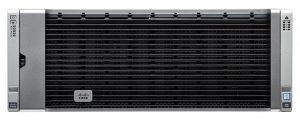
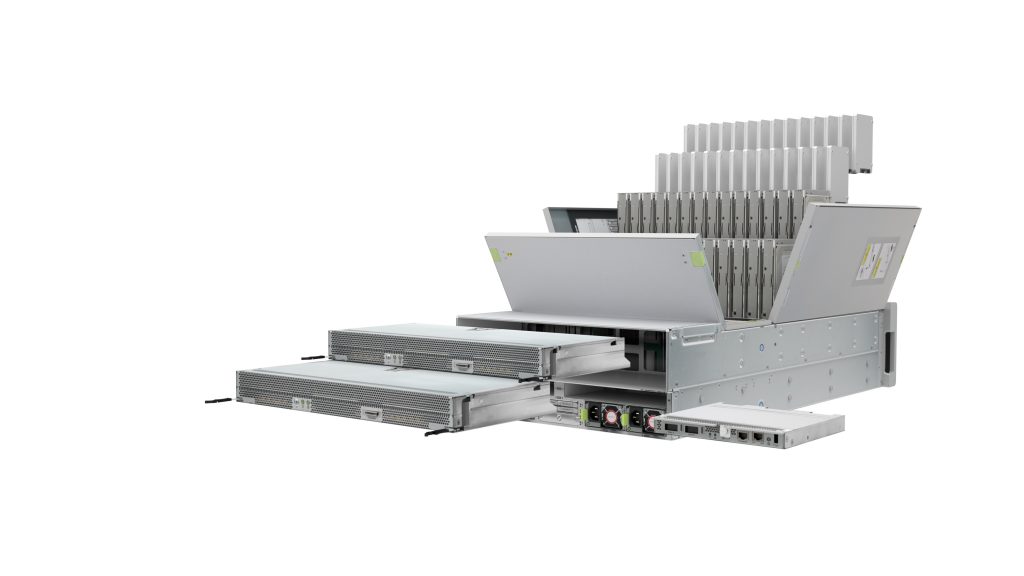
ucs-s3260-bezelAt the core of today’s Cisco announcement is the upgrades to the UCS S3260 server line, and new messaging and market opportunity for it.

The UCS S3260 is now available with bigger and faster drives. It now works with a wider variety of I/O modules and Flash-based NVMe PCI add-on cards.

And, lastly, the UCS S3260 is now (finally!) fully supported by UCS Manager, allowing administrator to manage several servers from a single interface, to speed configuration and provisioning through the use of customer-defined storage profiles, and multiple servers to be easily connected through Cisco fabric layer.

You’ll notice that nowhere in the three paragraphs above where the words “storage solution” mentioned even once.

What Cisco is actually proposing is that the newly-upgraded UCS S3260 is the ideal hardware platform for customers to use with the software-defined storage (SDS) offering of their choice. Those SDS licenses are not included, and would need to be purchased separately from the Cisco hardware.

Specs

In this section, I’ll go through the UCS S3260 hardware and other specifications. I’ll divide them up by:

  • Qualified OS List
  • Drive Options
  • Data Protection Options
  • I/O Module Options
  • General Configuration Options

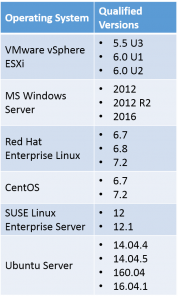
Qualified OS List

The table below shows the current list of operating systems that have been qualified to run on the UCS S3260.

ucs-s3260-oses

There are three caveats with this table:

  1. VMware vSphere and vSAN (yes, that’s the new correct way to capitalize that) are not supported with the 512e or 4K HDD or SSDs. (See Drive Options below)
  2. Microsoft Storage Spaces are not currently qualified.
  3. MS Windows Server 2016 qualification is expected to be on target with Microsoft’s GA of that version.

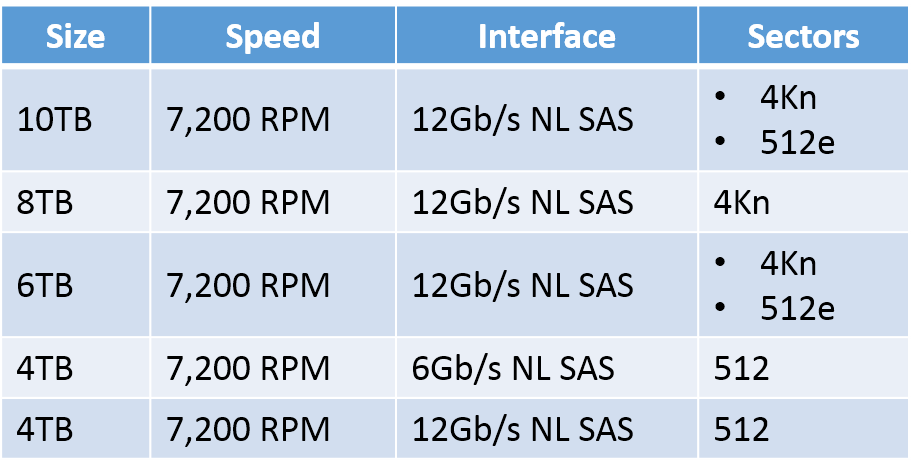
Drive Options

ucs-s3260-open

The table below shows the supported HDD options for the UCS S3260.

ucs-s3260-hdd-options

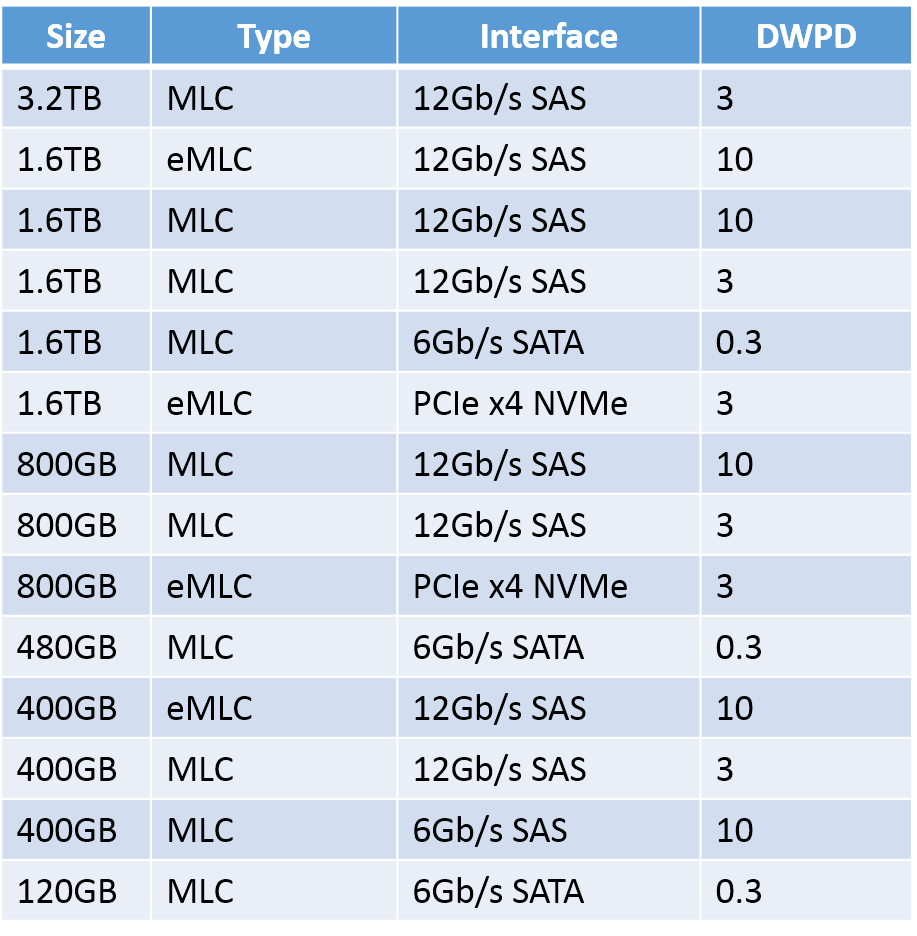
The table below shows the supported SSD options for the UCS S3260.

ucs-s3260-ssd-options

DWPD stands for Drive Writes Per Day, a common endurance rating that manufacturers of Flash provide to their customers. A higher rating means a longer-lasting drive.

There are currently no Self-Encrypting Drive (SED) options supported for the UCS S3260.

Data Protection Options

Unless you’re running other software to manage the storage, your options for data protection are all RAID-based and include RAID 0, 1, 10, 5, 6, 50, 60, and 00.

I’d never heard of that last one before, but if you understand that RAID 10 is really RAID 1+0, i.e.: data striped (RAID 0) across multiple pairs of mirrored drives (RAID 1), you’ll get the idea.

RAID 00 means you set up some RAID 0 sets of drives, then stripe data (RAID 0 style) across those sets, hence 0+0.

Obviously, the RAID 0 and 00 options provide no protection against drive failure.

I/O Module Options

I/O options for the UCS S3260 include:

  • QSFP 40Gb/4 X 10Gb/10GB Ethernet and FCoE
  • 2/4/8/16Gb Fibre Channel (requires additional PCIe card)
  • 1/10Gb Ethernet (requires additional PCIe card)

Additional options may be made available in the future, based on add-on PCIe cards.

General Configuration Options

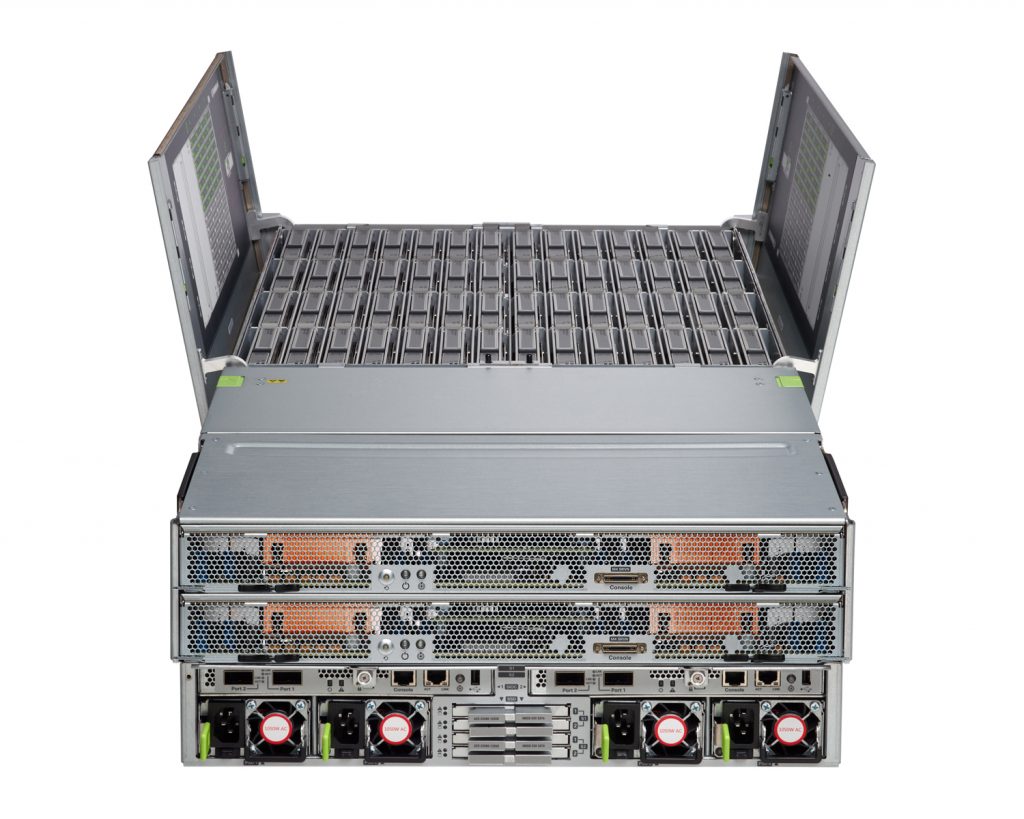
ucs-s3260-expanded

The UCS S3260 can be purchased in the number of configurations including:

  • Single Server Node
  • Dual Server Node
  • Single Server Node with IO Expander — provides two NVMe SSD cards, 40 PCIe 3.0 lanes to Server Node, and two half-height, half-length 8x PCIe 3.0 card slots
  • Single Server Node with Disk Expander — allows for the addition of four more 3.5″ HDDs, bringing the total to 60 drives

Availability

The Cisco UCS S3260 is orderable today.

General Availability of the UCS S3260 begins 7 November

GeekFluent’s Thoughts

I’m all over the place on this one. My thoughts, in no particular order, are:

  • This looks like some sweet hardware I’d love to get my hands on.
  • When Cisco first introduced the UCS, everyone said “but they’re a network company, not a server company…” Today, Cisco UCS is one of the top players in the enterprise server marketplace.
  • That said, Cisco is NOT a storage company. They don’t really know how to talk about storage well, or handle storage messaging. (Although if they’re interested in fixing up that messaging, I know a blog writer who has very reasonable consulting rates. Call me, Cisco!) Examples:
    • The “600TB in 4U” they message is raw space, not usable. They offer no usable space info since they don’t know which RAID options customers will choose, or what SDS software they’ll run. Still, it would have been nice to include an “up to X GB usable”…
    • The data sheets all seem to imply that this product will be scale-out storage for file, block, and object right out of the box. It won’t. You’d need to purchase, install, and configure the software to provide any of those services. This is just the hardware.
    • The “scales to petabytes in minutes” means that you can rapidly provision additional UCS S3260 servers with UCS Manager. That doesn’t mean additional storage space would actually become accessible to your users — that will depend entirely on what you’re running on top of the UCS.
    • The tag line for this announcement is, well, it’s bad. Maybe horrible.
      “Data. Unstored.”
      I mean, I get what they’re driving for. They want customers to know that they don’t need huge expensive storage arrays — they can just put their data on UCS Servers. However, it reads like “we’re not actually going to store your data”, and no customer, even the least storage-savvy, will think that not actually storing data is a good idea. The Tech Marketers at Cisco put too much marketing and not enough tech into that slogan.
  • The TCO modeling Cisco did to show how the UCS S3260 compares very favorably to AWS pricing is impressive, but it leaves a few things out. I think it would still show greater cost-effectiveness over AWS if they’d included these things, but it’s incomplete as it stands.
    • It doesn’t include the AWS “bandwidth out” costs — which would make the comparison even more impressive.
    • It doesn’t include any cost for the customer’s network links.
    • It doesn’t include the license cost of any operating systems or software-defined storage products a customer might use.
  • It’s still really sweet hardware, and I’d love to get my hands on one.

What are your thoughts on the announcement? Let me know in the Comments below.

Facebooktwittergoogle_plusredditpinterestlinkedinmail
03 Nov 16:30

Public cloud IaaS: is it really that cheap?

by Jon Klaus
EMC logo

A long, long time ago when public cloud IaaS (Infrastructure as a Service) was still relatively new I was doing some contract work for a big international company. One of the tasks for the department was an IaaS proof of concept: does offloading servers to the public cloud result in cost savings? Long story short: the PoC … Continue reading "Public cloud IaaS: is it really that cheap?"

The post Public cloud IaaS: is it really that cheap? appeared first on FastStorage.

03 Nov 16:30

Your Digital Pinball Machine

by Jeff Atwood

I've had something of an obsession with digital pinball for years now. That recently culminated in me buying a Virtuapin Mini.

OK, yes, it's an extravagance. There's no question. But in my defense, it is a minor extravagance relative to a real pinball machine.

The mini is much smaller than a normal pinball machine, so it's easier to move around, takes up less space, and is less expensive. Plus you can emulate every pinball machine, ever! The Virtuapin Mini is a custom $3k build centered around three screens:

  • 27" main playfield (HDMI)
  • 23" backglass (DVI)
  • 8" digital matrix (USB LCD)

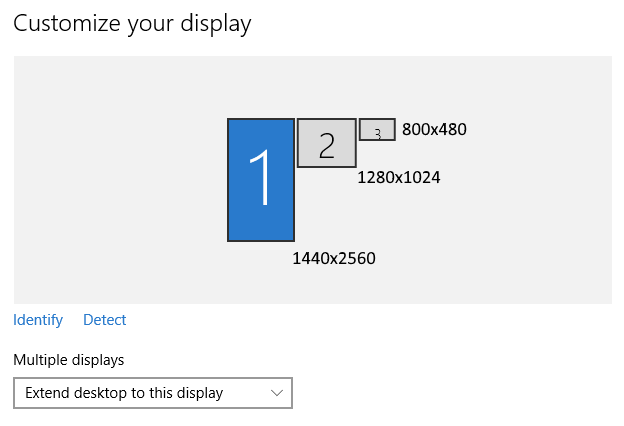
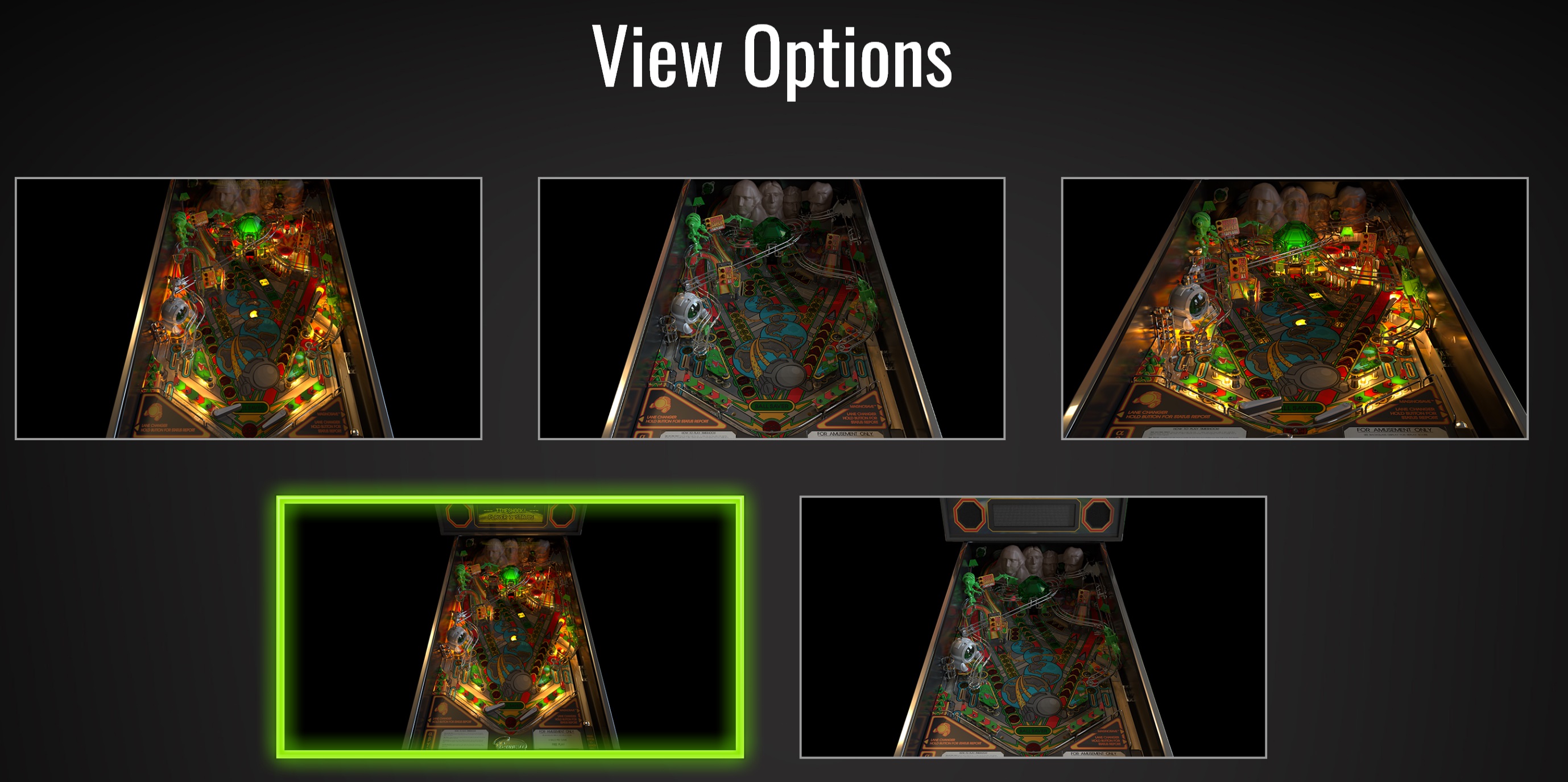
Most of the magic is in those screens, and whether the pinball sim in question allows you to arrange the three screens in its advanced settings, usually by enabling a "cabinet" mode.

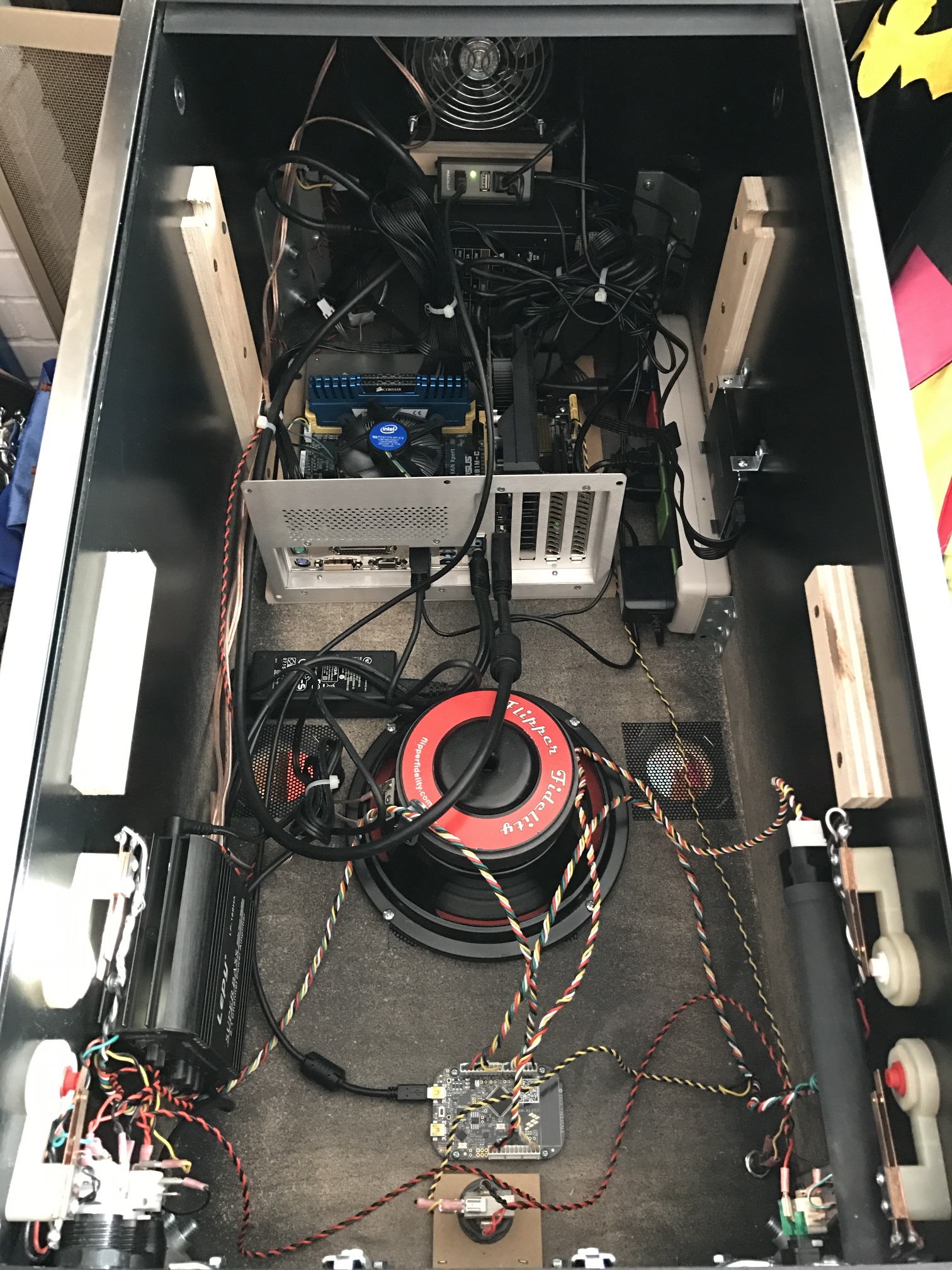
Let me give you an internal tour. Open the front coin door and detach the two internal nuts for the front bolts, which are finger tight. Then remove the metal lockdown bar and slide the tempered glass out.

The most uniquely pinball item in the case is right at the front. This Digital Plunger Kit connects the 8 buttons (2 on each side, 3 on the front, 1 on the bottom) and includes an analog tilt sensor and analog plunger sensor. All of which shows up as a standard game controller in Windows.

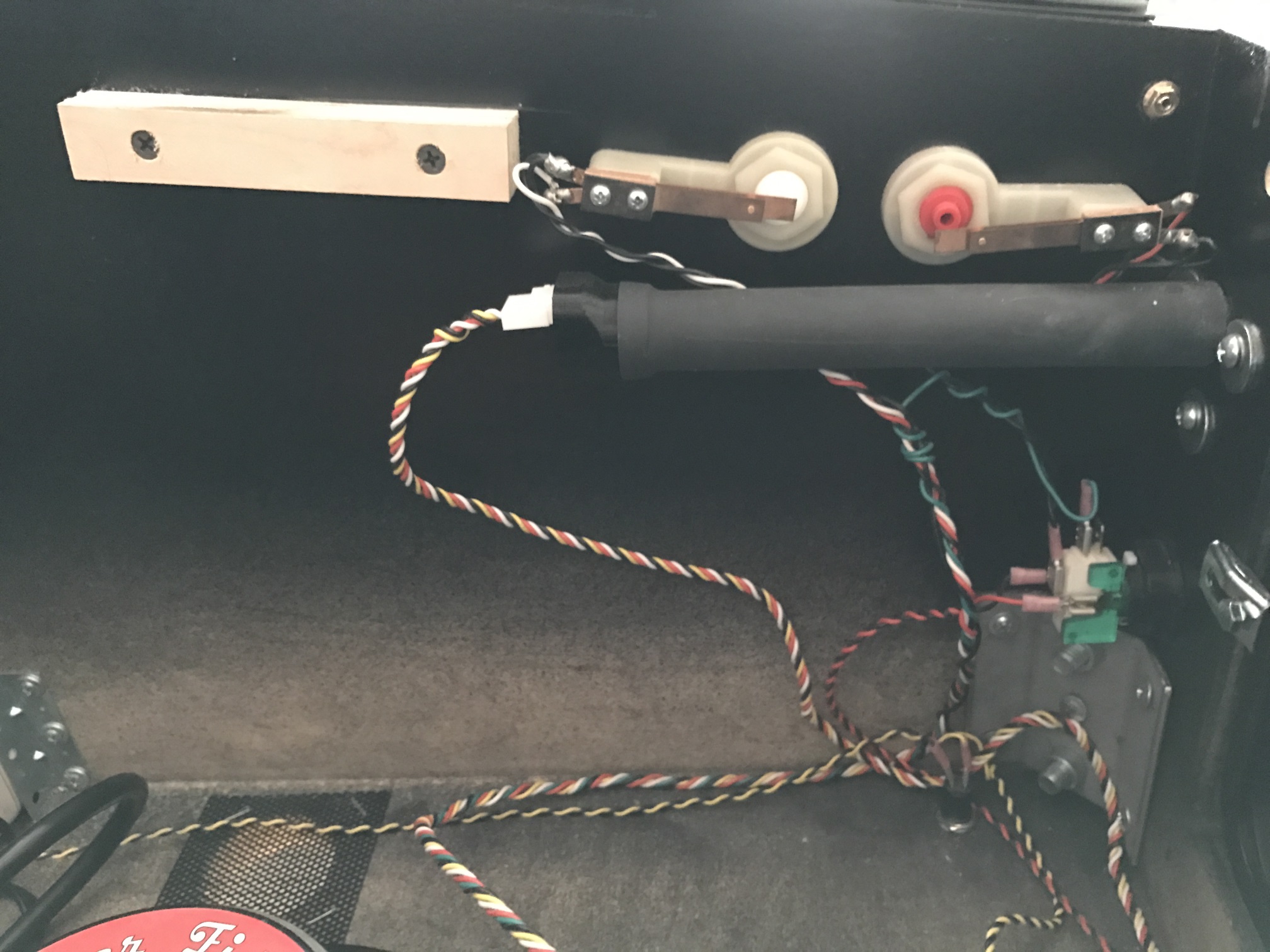
On the left front side, the audio amplifier and left buttons.

On the right front side, the digital plunger and right buttons.

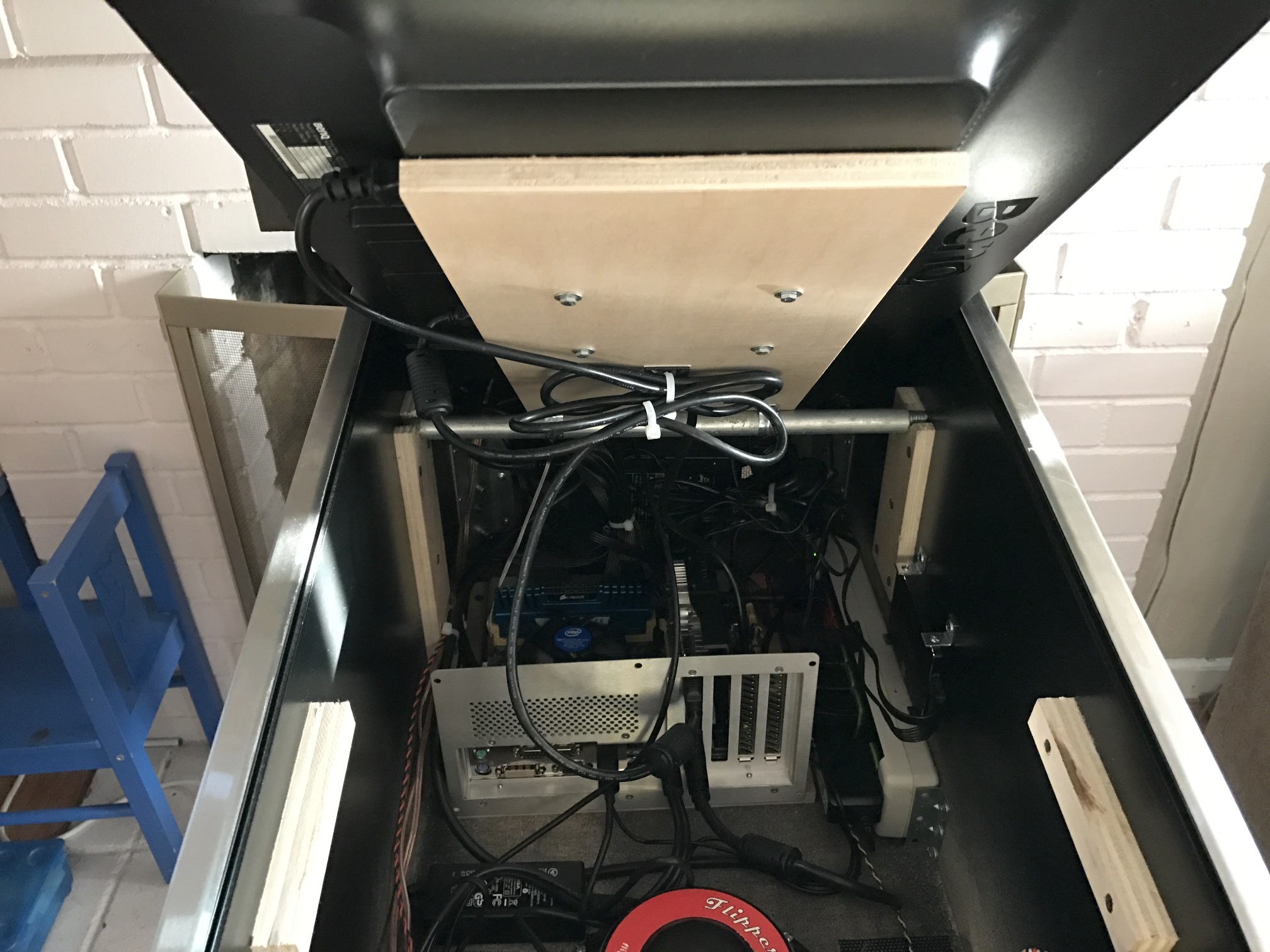
The 27" playfield monitor is mounted using a clever rod assembly to the standard VESA mount on the back, so we can easily rotate it up to work on the inside as needed.

To remove the playfield, disconnect the power cord and the HDMI connector. Then lift it up and out, and you now have complete access to the interior.

Notice the large down-firing subwoofer mounted in the middle of the body, as well as the ventilation holes. The PC "case" is just a back panel, and the power strip is the Smart Strip kind where it auto-powers everything based on the PC being powered on or off. The actual power switch is on the bottom front right of the case.

Powering it up and getting all three screens configured in the pinball sim of your choice results in … magic.

It is a thoroughly professional build, as you'd expect from a company that has been building these pinball rigs for the last decade. It uses real wood (not MDF), tempered glass, and authentic metal pinball parts throughout.

I was truly impressed by the build quality of this machine. Paul of Virtuapin said they're on roughly version four of the machine and it shows. It's over 100 pounds fully assembled and arrives on a shipping pallet. I can only imagine how heavy the full size version would be!

That said, I do have some tweaks I recommend:

  • Make absolutely sure you get an IPS panel as your 27" playfield monitor. As arrived, mine had a TN panel and while it was playable if you stood directly in front of the machine, playfield visibility was pretty dire outside that narrow range. I dropped in the BenQ GW2765HT to replace the GL2760H that was in there, and I was golden. If you plan to order, I would definitely talk to Paul at VirtuaPin and specify that you want this IPS display even if it costs a little more. The 23" backglass monitor is also TN but the viewing angles are reasonable-ish in that orientation and the backglass is mostly for decoration anyway.

  • The improved display has a 1440p resolution compared to the 1080p originally shipped, so you might want to upgrade from the GeForce 750 Ti video card to the just-released 1050 Ti. This is not strictly required, as I found the 750 Ti an excellent performer even at the higher resolution, but I plan to play only fully 3D pinball sims and the 1050 Ti gets excellent reviews for $140, so I went for it.

  • Internally everything is exceptionally well laid out, the only very minor improvement I'd recommend is connecting the rear exhaust fan to the motherboard header so its fan speed can be dynamically controlled by the computer rather than being at full power all the time.

  • On the Virtuapin website order form the PC they provide sounds quite outdated, but don't sweat it: I picked the lowest options thinking I would have to replace it all, and they shipped me a Haswell based quad-core PC with 8GB RAM and a 256GB SSD, even though those options weren't even on the order form.

I realize $3k (plus palletized shipping) is a lot of money, but I estimate it would cost you at least $1500 in parts to build this machine, plus a month of personal labor. Provided you get the IPS playfield monitor, this is a solidly constructed "real" pinball machine, and if you're into digital pinball like I am, it's an absolute joy to play and a good deal for what you actually get. As Ferris Bueller once said:

If you'd like to experiment with this and don't have three grand burning a hole in your pocket, 90% of digital pinball simulation is a widescreen display in portrait mode. Rotate one of your monitors, add another monitor if you're feeling extra fancy, and give it a go.

As for software, most people talk about Visual Pinball for these machines, and it works. But the combination of janky hacked-together 2D bitmap technology used in the gameplay, and the fact that all those designs are ripoffs that pay nothing in licensing back to the original pinball manufacturers really bothers me.

I prefer Pinball Arcade in DirectX 11 mode, which is downright beautiful, easily (and legally!) obtainable via Steam and offers a stable of 60+ incredible officially licensed classic pinball tables to choose from, all meticulously recreated in high resolution 3D with excellent physics.

As for getting pinball simulations running on your three monitor setup, if you're lucky the game will have a cabinet mode you can turn on. Unfortunately, this can be weird due to … licensing issues. Apparently building a pinball sim on the computer requires entirely different licensing than placing it inside a full-blown pinball cabinet.

Pinball Arcade has a nifty camera hack someone built that lets you position three cameras as needed to get the three displays. You will also need the excellent x360ce program to dynamically map joystick events and buttons to a simulated Xbox 360 controller.

Pinball FX2 added a cabinet mode about a year ago, but turning it on requires a special code and you have to send them a picture of your cabinet (!) to get that code. I did, and the cabinet mode works great; just enter your code, specify the coordinates of each screen in the settings and you are good to go. While these tables definitely have arcadey physics, I find them great fun and there are a ton to choose from.

Pro Pinball Timeshock Ultra is unique because it's originally from 1997 and was one of the first "simulation" level pinball games. The current rebooted version is still pre-rendered graphics rather than 3D, but the client downloads the necessary gigabytes of pre-rendered content at your exact screen resolution and it looks amazing.

Timeshock has explicit cabinet support in the settings and via command line tweaks. Also, in cabinet mode, when choosing table view, you want the bottom left one. Trust me on this! It supports maximum height for portrait cabinet mode.

Position each window as necessary, then enable fullscreen for each one and it'll snap to the monitor you placed it on. It's "only" one table, but arguably the most classic of all pinball sims. I sincerely hope they continue to reboot the rest of the Pro Pinball series, including Big Race USA which is my favorite.

I've always loved pinball machines, even though they struggled to keep up with digital arcade games. In some ways I view my current project, Discourse, as a similarly analog experience attempting to bridge the gap to the modern digital world:

The fantastic 60 minute documentary Tilt: The Battle to Save Pinball has so many parallels with what we're trying to do for forum software.

Pinball is threatened by Video Games, in the same way that Forums are threatened by Facebook and Twitter and Tumblr and Snapchat. They're considered old and archaic technology. They've stopped being sexy and interesting relative to what else is available.

Pinball was forced to reinvent itself several times throughout the years, from mechanical, to solid state, to computerized. And the defining characteristic of each "era" of pinball is that the new tables, once you played them, made all the previous pinball games seem immediately obsolete because of all the new technology.

The Pinball 2000 project was an attempt to invent the next generation of pinball machines:

It wasn't a new feature, a new hardware set, it was everything new. We have to get everything right. We thought that we had reinvented the wheel. And in many respects, we had.

This is exactly what we want to do with Discourse – build a forum experience so advanced that playing will make all previous forum software seem immediately obsolete.

Discourse aims to save forums and make them relevant and useful to a whole new generation.

So if I seem a little more nostalgic than most about pinball, perhaps a little too nostalgic at times, maybe that's why.

[advertisement] Building out your tech team? Stack Overflow Careers helps you hire from the largest community for programmers on the planet. We built our site with developers like you in mind.

03 Nov 16:10

Datadog Announces Machine-Learning Based Anomaly Detection For Cloud Applications

by A.R. Guess

by Angela Guess According to a recent press release, “Datadog, the essential monitoring service for modern cloud environments, today announced the release of a new machine-learning based feature called Anomaly Detection. This will allow engineering teams to quickly identify abnormal behavior within rapidly changing cloud environments, based on historical patterns that are impossible to track […]

The post Datadog Announces Machine-Learning Based Anomaly Detection For Cloud Applications appeared first on DATAVERSITY.

03 Nov 16:10

Role Based Access Control in Azure

by John Paul Cook
From talking to customers and people new to Azure SQL Database, it is apparent that many people are unaware of how Role Based Access Control (RBAC) in Azure affects Azure SQL Database. Last week I gave a presentation on this at SQL Saturday and discussed...(read more)
03 Nov 16:10

SQL Updates and More

by Andrew Kelly
  A good friend of mine (Fany Carolina Vargas) from Microsoft puts together a fantastic blog post each month which shows a whole host of goodies related to SQL Server which include but are not limited to the following: Recent Releases and Announcements...(read more)
03 Nov 16:09

PASS Summit Announcements: Azure Analysis Services

by James Serra

Microsoft usually has some interesting announcements at the PASS Summit, and this year was no exception.  I’m writing a set of blogs covering the major announcements.  Perhaps the biggest one is the introduction of the Azure Analysis Services Public Preview (OLAP).

This is a PaaS for SQL Server Analysis Services (SSAS).  So it’s PaaS SSAS 🙂  Read the official announcement.

It is based on the analytics engine in SSAS,  For those not familiar with SSAS, it is an OLAP engine and BI modeling platform that enables developers and BI professionals to create BI Semantic Models that can power highly interactive and rich analytical experiences in BI tools (such as Power BI and Excel) and custom applications.  It allows for much faster query and reporting processing compared to going directly against a database or data warehouse.  It also creates a semantic model over the raw data to make it much easier for business users to explore the data.

Some of the main points:

  • Developers can create a server in seconds, choosing from the Developer (D1) or Standard (S1, S2, S4) service tiers.  Each tier comes with fixed capacity in terms of query processing units and model cache.  The developer tier (D1) supports up to 3GB model cache and the largest tier (S4) supports up to 100GB
  • The Standard tiers offer dedicated capacity for predictable performance and are recommended for production workloads.  The Developer tier is recommended for proof-of-concept, development, and test workloads
  • Administrators can pause and resume the server at any time.  No charges are incurred when the server is paused.  On the roadmap is to offer administrators the ability to scale up and down a server between the Standard tiers (not available currently)
  • Developers can use Azure Active Directory to manage user identity and role based security for their models
  • The service is currently available in the South-Central US and West Europe regions.  More regions will be added during the preview

Similarities with SSAS:

  • Developers can use SQL Server Data Tools (SSDT) in Visual Studio for creating models and deploying them to the service.  Administrators can manage the models using SQL Server Management Studio (SSMS) and investigate issues using SQL Server Profiler
  • Business users can consume the models in any major BI tool.  Supported Microsoft tools include Power BI, Excel, and SQL Server Reporting Services.  Other MDX compliant BI tools can also be used, after downloading and installing the latest drivers
  • The service currently supports tabular models (compatibility level 1200 only).  Support for multidimensional models will be considered for a future release, based on customer demand
  • Models can consume data from a variety of sources in Azure (e.g. Azure SQL Database, Azure SQL Data Warehouse) and on-premises (e.g. SQL Server, Oracle, Teradata).  Access to on-premises sources is made available through the on-premises data gateway
  • Models can be cached in a highly optimized in-memory engine to provide fast responses to interactive BI tools.  Alternatively, models can query the source directly using DirectQuery, thereby leveraging the performance and scalability of the underlying database or big data engine

Check out the pricing, the documentation, tutorial videos, and the top-rated feature requests.

Get started with the Azure Analysis Services preview by simply provisioning a resource in the Azure Portal or using Azure Resource Manager templates, and using that server name in your Visual Studio project.

as

More info:

Learn more about Azure Analysis Services

First Thoughts On Azure Analysis Services

Creating your first data model in Azure Analysis Services

Why a Semantic Layer Like Azure Analysis Services is Relevant (Part 1)

03 Nov 16:09

New Server Timings features in DAX Studio 2.5.0 #dax #powerbi #ssas #tabular

by Marco Russo (SQLBI)

Last week, a new version of DAX Studio (2.5.0) has been released. You can find a summary of the new features in the blog post from Darren Gosbell - thanks Darren for your wonderful job with this tool!

My small contribution to this tool is mainly in the area of performance analysis. In the last few months, I worked on implementing a support for DirectQuery, which I described in the article Analyze DirectQuery requests using DAX Studio on SQLBI. I also fixed a few bugs in the xmSQL formatting code (we clean up a number of verbose information, but sometimes we still cut too much from xmSQL, expect more fixes in upcoming releases). But I also added a small feature that will help to save a lot of time in performance analysis.

The server timings tab has two new columns, Rows and KB, that have the following meaning:

  • Rows: it is the number of rows that have been estimated by the query engine as a result of the query. This number is important to get an idea of the cardinality of the result. However, be careful: this is an estimation, and the actual result could be different, but in general the order of magnitude provided is relevant. When you spot one or more storage engine queries returning more rows than the result of the entire query, you know that such a materialization will be filtered or aggregated by the formula engine, which is not efficient in doing that as the storage engine. In other words, a large number of rows in a storage engine query could be indirectly responsible of a bottleneck recognized in the formula engine.
  • KB: it is the estimated size in memory (measured in KB) of the result of the storage engine query (this result is also called data cache). Usually this size is related to the number of rows, but when you materialize an entire table instead of a few columns, the KB number will be very high compared to the Rows. By identifying the storage engine queries with the larger KB size, it should be easier to identify which part of the DAX code is responsible for that. Classical examples of that are filters based on a tables instead of one or two columns only, and context transition iterating a table without a primary key (typical in fact tables) instead of iterating just the values of a single column.

These two columns are populated only when you connect DAX Studio to Power BI, or Excel 2016, or Analysis Services 2016 (if you connect to previous versions, you will see these columns empty). The reason is that we simply parse the text of the storage engine query, and in these products at the end of the query text there is an estimation of rows and memory used, which we simply copy in the properties of the events captured in the trace session, as you see in the following screenshot.

image

This feature is particularly useful when you have many storage engine queries for a single MDX or DAX query, and you want to identify potential bottlenecks in both the storage engine (complex queries in SQL)  and the formula engine (which does not cache its results, and usually iterates all the rows of the data cache).

03 Nov 16:09

After PASS Summit 2016 Recap (As seen by me!)

by drsql
In my last blog entry , I promised to blog about the PASS Summit each night when I got back to the room. This was a failure for two reasons. 1. I was always out at night and then exhausted. 2. I forgot the keyboard to my Surface Pro. I tweeted about it,...(read more)
03 Nov 16:09

Misconceptions on parameter sniffing

by Hugo Kornelis
This blog has moved! You can find this content at the following new location: https://SQLServerFast.com/blog/hugo/2016/11/misconceptions-on-parameter-sniffing/...(read more)
03 Nov 16:09

IDERA Drives Business-Driven Data Architecture

by Jennifer Zaino

Today’s enterprise IT environment most likely consists of a plethora of different database platforms, all of which must be supported across the lifecycle. How to streamline managing every aspect of the multi-platform database ecosystem? IDERA’s answer is to let it help out. Its acquisition last fall of Embarcadero Technologies’ ER/Studio Data Architecture solution and DB […]

The post IDERA Drives Business-Driven Data Architecture appeared first on DATAVERSITY.

03 Nov 16:09

PASS Summit Announcements: Power BI reports on-prem in SSRS

by James Serra

Microsoft usually has some interesting announcements at the PASS Summit, and this year was no exception.  I’m writing a set of blogs covering the major announcements.  Next up is the technical Preview for Power BI reports on-prem in SSRS.

The Technical Preview is a pre-configured Virtual Machine in the Azure Marketplace that includes everything you need to get started, even sample reports and data.  With this update, you can visually explore data and create an interactive report using Power BI Desktop, and then publish that report to an on-premises report server (SQL Server Reporting Services).  You can then share the report with your coworkers so they can view and interact with it in their web browsers.

Check out the Official announcement.  Get it now in the Azure Marketplace.  An excellent step-by-step tutorial is at Technical Preview of Power BI reports in SQL Server Reporting Services now available and Create Power BI reports in the SQL Server Reporting Services Technical Preview.  Post questions in the Reporting Services forum.  For users who would prefer to run this technical preview on an on-premises server, you can provision a virtual machine and then download the image as a .vhd file and use Hyper-V functionality to do so (see How to run the Technical Preview of Power BI Reports in SQL Server Reporting Services on-prem using Hyper-V).

image_thumb826

Previously you would use Power BI Desktop to build reports and you would publish them to the Power BI Service in the cloud.  This is a solution for those that do not want to publish their reports to the cloud.

This preview supports Power BI reports that connect “live” to Analysis Services models – both Tabular and Multidimensional (cubes).  Additional data sources will be added in a future preview.  There is a new feature in this version: the ability to add comments to reports.  Make sure to check out Ten things you might have missed in the Technical Preview of Power BI Reports in SQL Server Reporting Services.

pbix-in-ssrs_thumb1

Microsoft plans to release the production-ready version in the next SQL Server release wave.  They won’t be releasing it in a Service Pack, Cumulative Update, or other form of update for SSRS 2016.  The Technical Preview is effectively a pre-release of SSRS vNext.

More info:

First thoughts on Power BI on premises

Power BI Reports in SSRS Techinical Preview

Power BI reports in SQL Server Reporting Services: Feedback on the Technical Preview