With DirectCU H2O cooler
Shared posts
14 Nov 10:24
Asus announces new GTX 980 Poseidon Platinum
by document.write(['bobo','fudzilla.com'].join('@')) (Slobodan Simic)
14 Nov 10:24
JPR: Nvidia grabs market share from AMD
by document.write(['peter','fudzilla.com'].join('@')) (Peter Scott)
AMD GPU shipments down 7%
13 Nov 14:01

Meizu MX4, Galaxy Note 4 and Galaxy Alpha lead AnTuTu chart
AnTuTu has posted a chart with the top 10 best performing smartphones throughout the Q3 this year. The king of the chart is Meizu MX4, while the runner-ups are the Samsung Galaxy Note 4 and Samsung Galaxy Alpha. The Galaxy Note 4 and the Galaxy Alpha are just a whisker below the Meizu MX4, while the rest of the devices are noticeably slower. All scores were calculated by the average of all user submitted scores. Meizu MX 4 is based on the MediaTek's top-notch MT6595 chip with quad-core Cortex-A17 @ 2.2GHz and quad-core Cortex-A7 @ 1.7GHz plus the PowerVR G6200 GPU. The Galaxy Note 4 runs on the Snapdragon 805 chipset with a quad-core Krait 450 @ 2.7GHz and Adreno 420 GPU, while the Alpha uses company's proprietary Exynos platform with a quad-core Cortex-A15 @ 1.8GHz, quad-core Cortex-A7 @ 1.3GHz and Mali-T628MP6 GPU. AnTuTu revealed the most popular smartphones for the Q3, 2014 in some countries. The Galaxy S5 is the most benchmarked phone in the USA, HTC One (M8) in Taiwan, Xiaomi Mi 3 - in China, Xiaomi Redmi Note in Hong Kong, LG Nexus 5 - in Russia and LG G3 in South Korea. You can check detailed graphs with the top 10 devices for each market right here. Thanks for the tip,...
13 Nov 14:00
Windows 10 Technical Preview First Impressions: The Return Of The Desktop
by Brett Howse
Windows 10 is ditching the “One Interface to Rule them All” mentality, and moving to a more user friendly model of a single store across all platforms, and multiple interfaces to the same OS depending on the current usage model. We take a look at many of the new features in Windows 10 announced and previewed so far. This preview will be updated over the next several months, and a good portion of the initial preview is aimed at business users.
13 Nov 10:04
The Nexus 6 Review
by Brandon Chester
When consumers think of Google's Nexus devices, they think about the promise of receiving the latest updates for Android essentially as soon as they release. They also think about the value proposition that Nexus devices provide by giving good hardware at a price significantly lower than other smartphones. However, this was not always the case. The Nexus One, Nexus S, and Galaxy Nexus were all priced at the same level as other flagship smartphones. It was only with the launch of the Nexus 7 at $199 that we began to see a trend of inexpensive but still high quality devices coming from Google. That hasn't changed at all in the past few weeks. The Nexus 5 and Nexus 7 are both still available, and they still provide a very high quality experience, arguably better than some other smartphones that are both newer and more expensive. But Google's newest devices take aim directly at other flagship devices with both their specs and their prices. At $399 the Nexus 9 positions itself against Apple's iPad Mini 3, while the Nexus 6 at $649 goes up against essentially every other flagship smartphone. Read on for our full review of Google's Nexus 6.
13 Nov 10:04
Windows 10 Technical Preview Gets Version Bump And New Features
by Brett Howse

Just three weeks ago, the Windows 10 Technical Preview got its first new build available to members of the Windows Insider program, and today we are seeing another version bump adding some new features and changes to the preview. As part of last month’s update, Microsoft enabled preview users to choose either the Fast or Slow lane for future updates. If you have selected Fast, you will be getting this build from Windows Update immediately, or if you do not want to wait you can go to Update and Recovery and check for a new build now. People who opted for the Slow release cycle can wait for the bugs to be worked out first.
There are just a couple of important changes with this go build, which is now 9879. The first involves the Task View and Search buttons on the task bar. Many people, especially those with limited task bar space, did not appreciate having two additional buttons on the task bar with no way to remove them, so with build 9879 there is now the option to remove one, or both. This was a feedback driven change, so it is minor, but nice to see them listening to feedback.
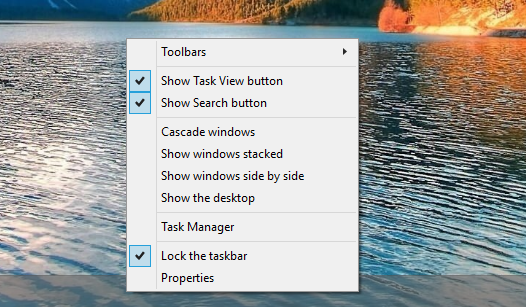
Another minor change which was just added last month was new animations for minimize and restore. Feedback on these animations was that they were too jarring, so they have been updated to be a bit less, well, animated.
As part of the removal of the Charms menu, app commands such as the Share charm and App settings was accessed through an ellipsis in the title bar, which many people found difficult to discover. The ellipsis has now been changed to the familiar hamburger menu button that has gained popularity in the mobile space, which should help with discoverability.
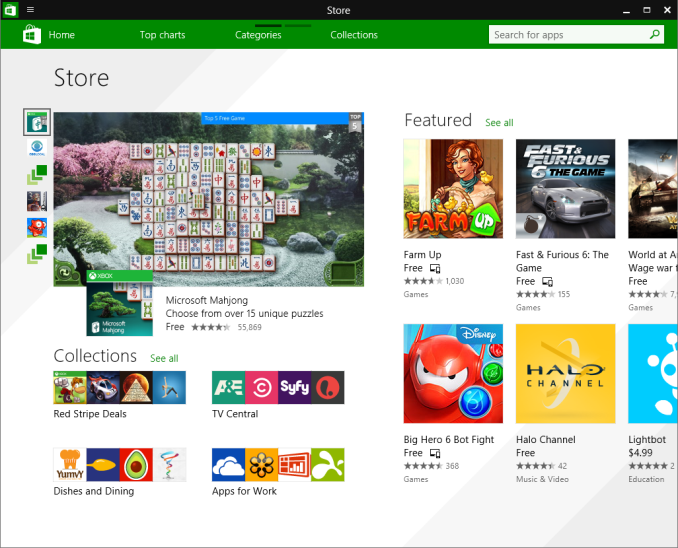
As for all new features, previewed last week at TechEd Europe were new trackpad gestures, and these are now available in the latest build:
- 3 finger up -> Task View
- 3 finger down -> Show Desktop
- 3 finger flick to left or right -> switches to previous app (go back 1)
- 3 finger move left or right -> Alt-Tab (Task View) pops up and you can select the app you want (remove fingers to select)
- 3 finger tap -> Search
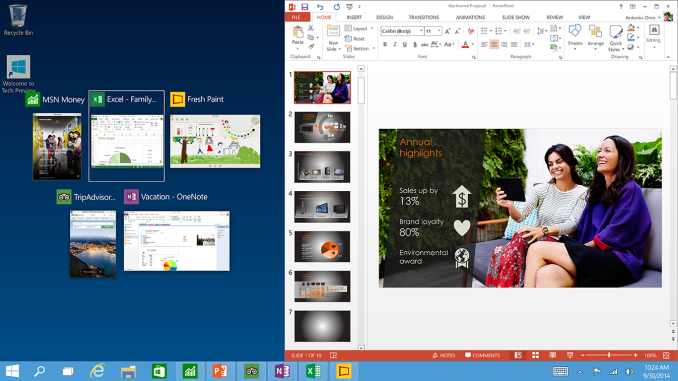
As well, the new Snap Assist can now help when snapping apps across multiple monitors. As I just have Windows 10 in a VM, I can’t show a screenshot of this change other than the original snap assist shown here.
One of the bigger fundamental changes being introduced this month is a change to how OneDrive syncs on Windows 10. Users of Windows 8.1 will be aware of OneDrive using placeholders for files, and in File Explorer, it will say if the file is available offline or available online only. Any file you open would automatically download and stay synced on that PC unless you manually made it online only. This also worked with folders, allowing you to fairly easily specify if a folder should be synced to any particular PC. With OneDrive now offering unlimited storage, you can see that this is very important especially with the lowest cost devices coming with small amounts of usable storage. However Microsoft is saying that this confused people, because in File Explorer it would display files that were not on the device. Customers would then go somewhere with no connectivity assuming they had access to their files only to discover that they were set to online only. Starting with this build, OneDrive will now use selective sync, and the user can specify what they want synced. What you see in File Explorer will only be the files that are on that particular PC. Personally I really liked the placeholder approach from Windows 8.1, so I am disappointed in this change. For me, it was nice to see all of my files and easily download those I wanted to without having to go into any system menus. The files are clearly labeled as to whether they are available offline, so this is a bit of a shame. I will have to spend some time with the new method to see if I like it or not.
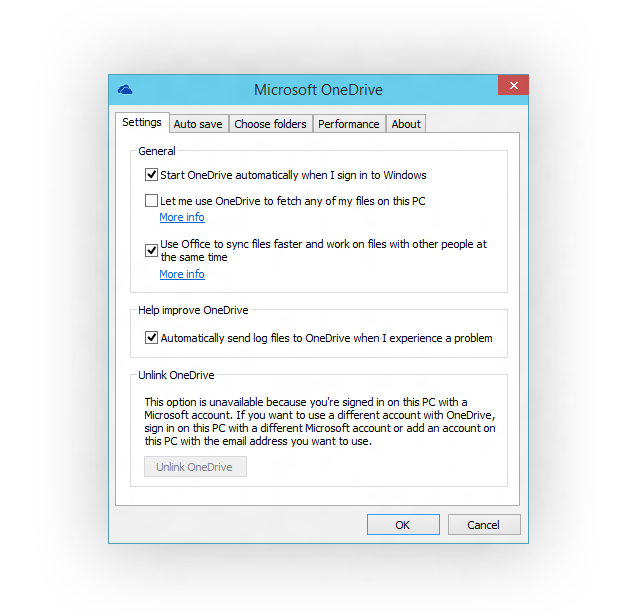
Another change to OneDrive is how to access it. In Windows 8.1, OneDrive was available as both a modern app, and an extension in File Explorer. This also caused some confusion apparently, since people would have multiple places to find their files. As a change for Windows 10, File Explorer will be the only way to access OneDrive files without using the web version I would assume. Although I understand Windows 10 is aimed at the desktop user, I am a bit confused as to what this means for the tablet user since using file explorer with Touch is fairly frustrating. Perhaps there will be a new touch based version of File Explorer presented when in Tablet mode.
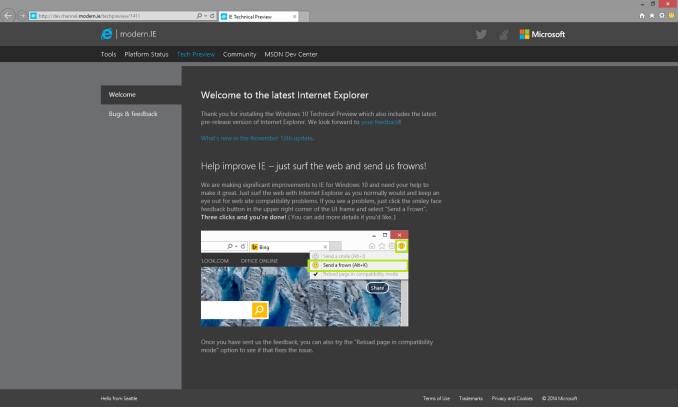
Internet Explorer is getting some updates in this build as well, at least for some users. Ten percent of Insider participants will get the new Edge rendering engine available for them. To make it easy to offer direct feedback on this change, IE will have a emoticon in the upper right corner which a person can click to say that whatever site they are on is not rendering perfectly.
In the last build, MKV support was added, and in the new build they are completing this by having MKV files play directly in Windows Media Player and other desktop and modern apps. MKV will now display thumbnails and metadata in File Explorer, and DLNA/Play To support has been added. In addition, H.265 HEVC support has been added to the platform.
Finally, some rather minor changes have been made such as the ability to pin your favorite folders to Home, and a few new icons are inbound.
Just like the last build, this new build requires a re-provisioning of existing user accounts, so the install process is a bit longer than the normal patch/reboot that most people are accustomed to.
There are some good changes here, and some that I am not so sure about. Time with the build will be the only way to see if the changes work for me or not. If you are interested in trying out the Windows 10 Technical Preivew, check out http://preview.windows.com
Source: Windows Blog
13 Nov 10:03
What Is Nvidia’s #Greenbox?
by Ryan Leiserowitz

Nvidia (NASDAQ:NVDA) released a tweet today that had a pixelated image of what appears to be a Shield Tablet with 3 different game images and a Shield wireless controller. The tag on the picture says “What is GreenBox”, and it looks like there will be a Valve game package coming to your Shield devices soon.
What Do You Think GreenBox Is?
What do you think #GreenBox is? http://t.co/GCAnLqptbm pic.twitter.com/aelLAXf9uU
— NVIDIA (@nvidia) November 11, 2014
Today Nvidia made a tweet today with the pixelated image of a Shield Tablet and what appears to be the art of three games on the screen. A link takes you to the Nvidia Shield website and has the same image as the Twitter post, and has text that reads “What is GreenBox”. The image also has text encouraging people to tell them what they thing Green Box is via the Twitter hashtag #GreenBox. If you are a gamer you can probably notice that two of the images are likely Portal and Half-Life 2. The name GreenBox is very obvious that it is the none to clever attempt to copy The Orange Box name. The Orange Box was a release of three Valve games in one package. The games in the package were Team Fortress 2, Half-Life 2, Half-Life 2 Episode 1, Half-Life 2 Episode 2, and Portal.


Could this mean that we should expect to see the release of Team Fortress 2 for Android? Another possibility is that Half -Life Episode 1 is about to be released. While one might hope that Team Fortress 2 will be the next game the fact is that a multiplayer game is likely going to be a lot more work than a single player game. The other two games, Portal and Half-Life 2 are already available for Android. Those games were released by Nvidia Tegra Partners on the Play Store and have gotten rave reviews.
What we can gain from the teaser is that this should be a package with 3 games from Valve, two of which are Portal and Half-Life 2. It is likely the next chosen game will be just as big of a hit as the current games. Either way this is good news for those who game on Android and those with Nvidia Shield devices.
The post What Is Nvidia’s #Greenbox? appeared first on Bright Side of News*.
13 Nov 10:03
Téli álcát öltött az ASUS TUF SaberTooth Z97 Mark S alaplap
Szdani88tavasszal meg lehet cserélni
Fehér NYÁK-ra és téli terepmintás páncélra alapoz a limitált kiadású deszka
13 Nov 10:02
Nvidia GeForce GTX 980M im Test
Mit GeForce GTX 970M und GeForce GTX 980M bietet Nvidia Maxwell 2.0 für Notebooks an. Nach der kleineren Variante testet ComputerBase auch das Topmodell. Das Schenker XMG P504 Pro muss sich dabei auch gegen ausgewachsene Desktop-Grafikkarten beweisen.
12 Nov 12:07
Megint itt a legjobb iPad, kár, hogy bárki kettétörheti
Vékonyabb, gyorsabb és könnyebb és bla bla bla - írják a gyanúsan lelkes tesztelők. Pedig tavalyi megoldások vannak benne, és néhány hibáról egyszerűen nem is ír senki.
11 Nov 22:58
NVIDIA VXGI Apollo 11 Demo Available
by Jarred Walton
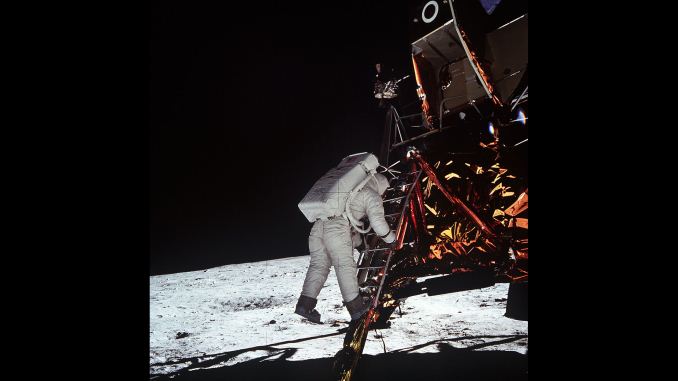
When NVIDIA held their press briefing on the upcoming GM204 Maxwell GPUs back in September, one of the big new features for Maxwell 2.0 was VXGI – Voxel Global Illumination. As part of the presentation, NVIDIA did their best to recreate the famous photo from the lunar landing that took place 45 years ago, and in the process they hoped to debunk some of the "inconsistencies" that conspiracy theorists have been going on about for decades.
Today, on 11/11, the Apollo 11 demo is now available to the public. Of course it's doubtful anyone that believes in the conspiracy theories will change their mind thanks to the NVIDIA demo, but it's at least a demonstration of VXGI that end users can run. Among other things, you can adjust camera exposure, sun position, and toggle Neil Armstrong on/off (he had to be outside the lunar module to take the photo after all), all of which affect the scene rendering in real time.
Since the Apollo 11 demo uses VXGI, it does require NVIDIA's latest GM204 GPUs in order to run – Radeon and older GeForce users need not apply. I tested it with a GTX 970 and it ran "okay" (15~35 FPS, depending on the view), indicating as we suspected that you'll need a whole lot of GPU power if you want to do this level of VXGI in a real-time game. The demo also appears to be locked to a resolution of 1920x1080, or at least there's no feature to change the resolution within the demo itself. Considering the frame rates are already a bit low, however, trying to render VXGI at 2560x1440 would really require at least two GPUs to do it justice. [Update: reader fallaha56 passed along information below: from the command line you can use "-ResX [width] -ResY [height] -Fullscreen" to set a custom resolution; 4K support appears to require too much memory, but performance at 2560x1440 is quite choppy with a single GPU, as expected.]
Below is a gallery of screenshots from the demo, and if nothing else it's a sign of things to come with global illumination. Real-time path tracing is still a long ways off for consumer hardware, but VXGI provides a better approximation of path tracing compared to existing algorithms and we could see the technology start showing up in games within the next year or two. The demo was built using Unreal Engine 4 as well, and Tim Sweeney has talked about voxel-based lighting in the past, which means there's a good chance VXGI support could end up widely adopted by UE4-based games. In the famous words of Captain Picard, "Make it so!"
Gallery: NVIDIA VXGI Apollo 11 Demo Available


11 Nov 22:51
Íme Kyrat, a Far Cry 4 helyszíne
A Ubisoft nyilvánosságra hozta Kyrat részletes térképét.
11 Nov 22:46

Windows 95 Installed On Apple iPhone 6 Plus Smartphone
by Julian Horsey
 |
Here on Geeky Gadgets we have featured many different devices loaded with a variety of unusual software and operating systems which they were not built to do, but not so many on the new Apple iPhone 6 smartphone. Now one skilled Chinese programmer has released images of the old Windows 95 operating system installed on the […] |
|
(C) Copyright 2007-2014 Geeky Gadgets. Republishing of this feed is forbidden without our written permission.
11 Nov 19:19
Magyar feje lehet az online drogpiacnak
A több országot érintő november eleji akcióban a terrorelhárítók lecsaptak a Hydra üzemeltetőjére.
11 Nov 12:10
Nvidia SHIELD Tablet Features in Steve Aoki, will.i.am Music Video
by Anshel Sag

In Steve Aoki’s latest music video, which features will.i.am, also has a few notable supporting actors including Verne Troyer also known as Mini Me from the Austin Powers movies. In the music video, you can see that they use the Nvidia (NASDAQ: NVDA) SHIELD Tablet and SHIELD Controller to control a computer generated interface for turning humans into “wild” since the song is called “Born to Get Wild.”
If you want to watch the video and see the SHIELD Tablet and SHIELD controller in action, then you should skip ahead to 1:12 or click on this link. Other than that, it isn’t too big of a deal, but still very cool to see that current and modern technology is being used by artists as ‘future’ technology because it looks so futuristic. Interesting that they chose to go with a SHIELD Tablet rather than an iPad or something more recognizable, this could potentially help spur Nvidia’s sales of the SHIELD Tablet, which they said during their earnings call was already doing pretty well.
In fact, this is probably one of the first music video we’ve seen from a major artist that was also shot in 4K, if you didn’t notice. So, if you’ve got a very high resolution screen or a 4K display, or just want a very high bitrate, you should check out this video in the 2160p setting just to see that Nvidia SHIELD Tablet in all its glory.
The post Nvidia SHIELD Tablet Features in Steve Aoki, will.i.am Music Video appeared first on Bright Side of News*.
11 Nov 07:11

Motorola Droid Turbo review: Power robot
Motorola Droid Turbo for Verizon Wireless is the latest product of a long and prolific partnership between the storied manufacturer and the largest wireless carrier in the United States. Over the years, Motorola and Verizon have released a number of groundbreaking...
10 Nov 13:55
Gyere, blogolj, írj nálunk!
by Adam Kovacs
Szdani88ennél több helyen nem tudom megosztani xd

A Tech2.hu közel három éve van jelen a magyar tech blogok között kiemelkedő sikerrel. Ezen idő alatt több, mint 10 000 cikket és 4 000 videót készítettünk el.
Szeretnénk az oldal tartalmát még jobban feldobni, ezért új, lelkes, fiatal szerkesztőket keresünk az oldalra. A napi tech tartalom összeállítására keresünk fiatalokat, akik kellően nagy lelkesedést éreznek ahhoz, hogy napi szinten minőségi tartalmat publikáljanak a nagyvilág számára.
Jelenleg elsősorban a következő témakörökre keresünk szerkesztőket:
- IT (hardverek, processzorok, alaplapok, videokártyák, stb)
- Okostelefonok
- Tabletek
- Notebookok, ultrabookok, 2-in-1-ok
- Gaming, játékok
- Tévék, multimédia
- Fotózás
- Microsoft, Windows 10, Windows 10 Mobile
- How-to jellegű tippek-trükkök cikkek
10 Nov 10:26
Kamerákkal figyelték a lógást a Harvardon
A diákoknak elfelejtettek szólni a rendszerről, ami a padsorokat fotózta üres helyek után kutatva.
09 Nov 12:56

Windows 10 Build 9879 Screenshots Show New Details: Taskbar Changes, File Explorer, More
by James A.
Windows 10 Build 9879 has leaked in a few screenshots and they reveal some of the new features and changes. This means that this build includes pretty much what we can expect from the Windows Technical Preview that will come soon.

The Build 9879 was compiled in early November and includes some enhancements over the last public Technical preview build (9860). One of the new options is the ability to hide the Search and Task View buttons on the taskbar. You can trigger that ability by right clicking the taskbar. The Home area in File Explorer comes with extra changes, allowing one to pin things to the Home area. There’s also some action going on in the Internet Explorer front.
IE11 has the feedback features in the top right hand corner of the window, which can send feedback straight back to Microsoft. The Modern UI apps also bring changes, as the charm bar button drop down menu that was in the top left has turned into a hamburger style button instead of 3 dots. The functionality is the same, but the look is different. Build 9879 isn’t coming to the public anytime soon, but since it’s a pretty stable release, its features may make it to the next public preview.

Related posts:
09 Nov 11:07
Weekly poll: Apple iPhone 6 Plus vs Samsung Galaxy Note 4
by Vince
The Samsung Galaxy Note 4 is the company’s best effort in the smartphone segment, but in the face of the Apple iPhone 6 Plus, it faces a competition like never before. Apple’s first entry into the phablet realm carries the unique touch of its creators and is ready to show how iOS does on a [...]
07 Nov 10:36
Frostbite tech demo running on iOS
by document.write(['david','fudzilla.com'].join('@')) (David Stellmack)
Testing the engine’s abilities on Metal
07 Nov 08:27
NVIDIA FY 2015 Q3 Financial Results: Record Revenue For Quarter And Year To Date
by Brett Howse
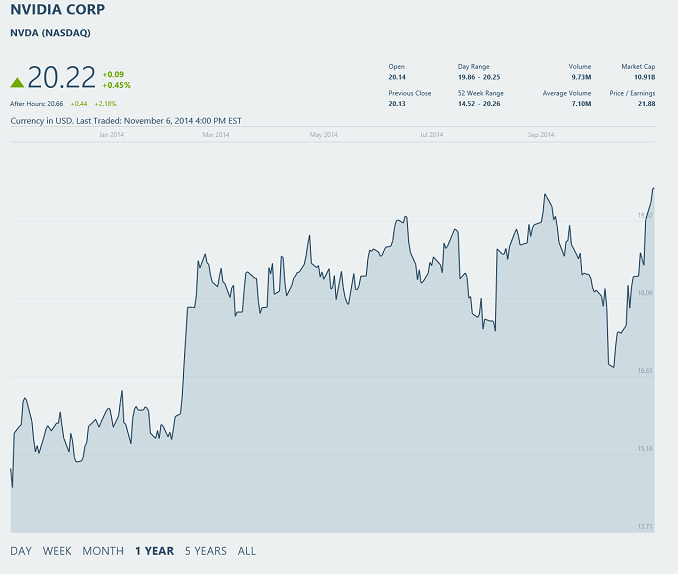
This afternoon NVIDIA announced record revenue for their fiscal year 2015 quarter three, which ended October 26th of this year. For those that do not follow financial data, fiscal years and calendar years are only the same in that they have twelve months. NVIDIA has the fiscal year that is the most out of sync with the calendar year of the tech companies we cover. With that housekeeping out of the way, we can get to the meat of the data. NVIDIA has had a very strong Fiscal Year (FY) 2015 so far, with a Q3 revenue of $1.23 billion, which is up 16% year-over-year. Revenue for the FY so far is also a record at $3.43 billion, up 15% over the end of Q3 last year.
Gross margin for Q3 was 55.2%, down 0.2% from last year and 0.9% since last quarter. Operating expenses were up 5% at $463 million, and net income was up significantly at $173 million. The net income gains are 35% sequentially, and 45% year-over-year. Earnings per share came in at $0.31, up 41% from last quarter and 55% from last year. The beat analyst’s expectations of $0.29 per share.
| NVIDIA Q3 2015 Financial Results (GAAP) | |||||
| In millions except EPS | Q3'2015 | Q2'2015 | Q3'2014 | Q/Q | Y/Y |
| Revenue | $1225 | $1103 | $1054 | +11% | +16% |
| Gross Margin | 55.5% | 56.4% | 55.7% | -0.9% | -0.2% |
| Operating Expenses | $463 | $456 | $443 | +2% | +5% |
| Net Income | $173 | $128 | $119 | +35% | +45% |
| EPS | $0.31 | $0.22 | $0.20 | +41% | +55% |
During Q3, NVIDIA paid $46 million in cash dividends, and purchased back 16.8 million shares under a $310 million repurchasing agreement. NVIDA has paid $140 million in dividends so far this fiscal year, and repurchased 44.2 million shares, which results in $950 million returned to shareholders through the first three quarters of FY 2015. They stated their intention is to return an additional $600 million in FY 2016.
For shareholders on record as of November 21st, NVIDIA will pay a quarterly dividend of $0.085 per share on December 15th.
| NVIDIA Quarterly Revenue Comparison (GAAP) | |||||
| In millions | Q3'2015 | Q2'2015 | Q3'2014 | Q/Q | Y/Y |
| GPU | $991 | $878 | $877 | +13% | +13% |
| Tegra Processor | $168 | $159 | $111 | +6% | +51% |
| Other | $66 | $66 | $66 | flat | flat |
NVIDIA launched the new Maxwell based GeForce GTX GPUs during the last quarter, which have proven to be a solid performer in our testing. GPUs continue to be the largest revenue generator for NVIDIA, and with the latest product launches revenue for the GPU unit is up 13% year-over-year and quarter-over-quarter. GeForce branded GPU revenue was up 36% based on the continued strength of PC gaming. Within the gaming segment, gaming notebook sales with NVIDIA inside more than doubled as compared to a year ago. Also in the GPU segment is the Tesla GPUs and GRID for high performance computing and datacenter GPU functions, and while exact numbers were not released, NVIDIA stated they had strong grown in this sector, with another record quarter for revenue for Tesla driven by “large project wins with cloud service providers and government customers.” The final piece of the GPU pie is Quadro. Once again, they do not break down the individual GPU segment numbers, but NVIDIA stated Quadro revenue remained strong for the quarter.
Tegra processors sales grew 51% year-over-year, which design wins in automotive infotainment being a strong part of this. NVIDIA said that over six million vehicles on the road have infotainment systems that are powered by NVIDIA processors. Automotive infotainment system revenue nearly doubled year-over-year. On the mobile side, they have also launched the K1 for tablets including the NVIDIA SHIELD and the just released Google Nexus 9. Chromebooks are also finding use for the K1.
The final piece of revenue for NVIDIA is a $66 million licensing agreement with Intel.
For Q4 2015, the outlook is revenue of $1.20 billion, plus or minus 2%. Margins are expected to come in between 55.2% and 55.5%, plus or minus 50 basis points. Operating expenses will be approximately $470 million (GAAP), and a tax rate for Q4 at about 18% plus or minus 1%.
This has been a great year for NVIDIA, with their diversification into mobile starting to get them some product wins, but more importantly for their bottom line they have seen an explosion of growth in the automotive sector. The GPU business also has a great lineup at the moment, especially with the Maxwell GTX lines. The doubling of gaming laptop sales is also great for the PC industry, and helps us understand why we have seen a plethora of new devices announced. Assuming NVIDIA keeps up its record pace for Q4, FY 2015 will be a benchmark for them in the future.
Source: NVIDIA
07 Nov 08:12
A szerelő lopta szét az autómat
Szdani88megbízható szakmunkás xd
Eddig 5 milliót költött el a tulajdonos, de nem kapott semmit. A szerelő nem dolgozik, nem fizet, néha nem veszi a telefont, de meg tudja magyarázni.
06 Nov 21:44
Battlefield 4-et az iOS-re!
Szdani88nem mondom h ez meglepő, sőt inkább várható volt
A Frostbite Team érdekes projektbe kezdett, amely megalapozhatja a mobil játékok jövőjét.
06 Nov 13:19
Magyar módszerrel tüntetnek Amerikában
Fej fölé tartott mobillal világítanak, hogy fényt vessenek a szövetségi kormány korrupciójára.
06 Nov 10:57
Sapphire ships new 8GB R9 290X Vapor-X OC graphics card
by document.write(['bobo','fudzilla.com'].join('@')) (Slobodan Simic)
Vapor-Chamber Tri-X cooler and 8GB of GDDR5 memory
05 Nov 13:54
Unofficial Windows 98 Second Edition Service Pack 3.36
Szdani88xd
Microsoft has never released a service pack for Windows98 SE. But the author made a Service Pack for Windows98 SE users. It contains all Windows98 SE updates from Windows Update site and more. ... [License: Freeware | Requires:
Win 9x | Size: 82.5 MB ]
05 Nov 11:47
Olcsó az a mobilhálózat, ami nincs is
A briteknél olcsó a mobilozás, de az ország ötödén nincs lefedettség, egymillió ember szenved ettől.
05 Nov 11:46
13 évesen kapott befektetést az Inteltől
Látássérülteknek készített olcsó Braille-nyomtatót a középiskolás Shubham Banerjee.