We're just a few days away from the long-awaited fourth season of Arrested Development, one of the most high-profile Netflix original series to be released. Ted Sarandos, the man behind the company's ever-burgeoning original content strategy, just sat down with The Hollywood Reporter to talk about Netflix' strategy and what you can expect in the coming year in terms of new material. When asked what "phase two" of its original content strategy would look like, Sarandos said "it's feasible that we would double the load that we did this year."
Given that there are at least five shows lined up for this year, it's conceivable that we'll see Netflix hit double digits on its original series next year. It's not clear what those new shows will...
Amazon has opened pre-orders for its Kindle Fire tablets in over 170 countries and expanded its Android Appstore in nearly 200 regions . It's the biggest device rollout the company has embarked on since it entered the tablet market, and sees it take on Apple in terms of availability and distribution. Before today, the Kindle Fire was available in only seven countries — including the US, UK, Germany, France, Italy, Spain, and Japan.
If you own a smartphone, you've more likely than not used Shazam. The app, which identifies songs by "listening" to their audio fingerprint, was one of the earliest and best ways to wow friends in the days when iPhones were still new to the mobile market. These days Shazam contains a hodgepodge of features. Tagging a song can quickly pull up a YouTube video, for instance. And if you happen to tag a TV show? You'll see what music is playing, cast and crew information, and other details that save you a trip to IMDB.
The new Shazam is always listening
Today, Shazam is putting renewed focus on tablets with the launch of a revamped iPad app that brings with it some exclusive features. One of those is continuous tagging. No longer do you...
While the United States Government paints Kim Dotcom as some kind of international super criminal, the Megaupload founder sees himself rather differently.
Continually over the past year and half, and particularly since his January 2012 arrest in New Zealand, the German-born entrepreneur has described himself as an innovator, someone who creates rather than destroys as the U.S. would have people believe.
Dotcom’s achievements are many and his cloud storage companies past and present have certainly generated hundreds of headlines. However, it seems that the New Zealand resident’s creative mind was already working overtime more than 15 years ago to come up with an idea that is now gaining serious traction online.
Two-step authentication is a system designed to prevent unauthorized access to online accounts. If a user logs into a service from an unusual device or location, the service sends a message containing a password to a trusted device such as a cellphone. This enables the service to authenticate the access and allow the log in.
Just hours ago Twitter implemented the system but it’s already in use by companies such as Google and Facebook.
In fact, according to Kim Dotcom there are more than a billion uses of the system every single week and he’s got good reason to be interested. The businessman says he invented it, and to back up his claim he’s just posted his patent to Twitter.
The patent, US6078908 titled Method for authorizing in data transmission systems, was filed way back in April 1998 and published in June 2000 under Dotcom’s birth name of Kim Schmitz. There can be little doubt from the patent’s abstract that it does indeed describe a two-step verification system.
“Google, Facebook, Twitter, Citibank, etc. offer Two-Step-Authentication,” writes Dotcom. “Massive IP infringement by U.S. companies. My innovation. My patent.”
It’s fairly apparent that none of these corporations are paying Dotcom for the use of his invention but as usual he’s approaching the matter in his own style, with a carrot in one hand and a stick in the other.
“I never sued them. I believe in sharing knowledge & ideas for the good of society. But I might sue them now cause of what the U.S. did to me,” he declares.
Of course, Dotcom has a problem. He’s up to his neck in legal action across several jurisdictions and has a legal bill set to top $50m. In realistic terms the last thing he needs is another legal front, however there might be other options for solving the problem, including partnership with those companies allegedly infringing his patent rights.
“Google, Facebook, Twitter, I ask you for help. We are all in the same DMCA boat. Use my patent for free. But please help funding my defense,” said Dotcom this morning.
It seems unlikely that any of the above companies would consider donating to Dotcom’s fighting fund in any direct manner. However, one or all of their hands might be forced by the Mega.co.nz chief’s latest announcement.
“Want to buy the worldwide license to my two-factor-authentication patent? (13 countries incl. US & China) Email: twitter@kim.com,” he concludes.
Asking price $50m? We’ll let the lawyers argue over that.
Google is going a little nuts with the card UI updates today – first Drive, and now Play Magazines. Today's update brings Google's magazine-reader to version 2.0, and makes it overall easier to use and nicer to look at – both welcome additions to an already-good app. Besides the new Card UI that replaced the terrible rolodex style called StackView, Magazines followed suit and adopted the new slide-out navigation drawer that we first saw in Google Earth and Shopper.
Other than the pretty factor, this version contains some "bug fixes"... and not much else. Of course, considering the app is designed purely for reading/looking at, aesthetics are key, so that makes sense.
Here's a very short and snappy explanation for why so much of the UK's government IT infrastructure is so fantastically, awfully bad: it's an RFP from a Northern Irish government business development fund for a "Content Management System to manage all Invest NI websites and intranets." Here's how they express their priorities:
IV.2.1)Award criteria The most economically advantageous tender in terms of
Apple has updated an earlier lawsuit filed against Samsung with claims that the Galaxy S4 and its Google Now feature violate two Apple patents covering functions of its own virtual personal assistant, Siri. Florian Mueller of FOSS Patents relayed news of the updated complaint on Wednesday, and he noted that two of the patents — U.S. Patent 8,086,604, and U.S. Patent 6,846,959 — cover technologies related to Siri. Both filings describe a "universal interface for retrieval of information in a computer system." Apple also added three more patents to its earlier complaint that are not related to Siri, according to the report.
Glenn Greenwald in a NYT op-ed: "The administration of Barack Obama has prosecuted more accused leakers under "espionage" statutes than all prior administrations combined -- in fact, double the number of all prior such prosecutions.
When Google Keep launched, it never got the fanfare it deserved. The people that did review it compared it to all the wrong apps, like Evernote or Microsoft OneNote. That's a shame, because a surprisingly good note taking app went under the radar, underrated for coming up short against contenders it wasn't designed to face. It's about time to give Google Keep a fair shake, see where it shines, and how it fits in with the competition.
Simply, Google Keep is a syncing notepad that connects to Google Drive. It also supports photo notes, voice notes, and checklists. We covered it when it launched, but the short version is that Google Keep lets you quickly take and save those notes, photos, voice memos, and checklists to Google Drive, and then access them again on any other web-connected device you use. It's ideal for quick note-taking on the go, anyone who appreciates simple, fast note-taking tools or to-do apps, or for saving notes on the desktop that you know you'll need on your Android phone, like shopping lists, addresses, phone numbers, checklists and to-do lists, or conference call codes. Keep even supports Google Apps accounts, so you can use it with your own domain or a business account.
The interface is colorful and easy to use. Those colors are actually organization tools that make it easy to tell your personal notes apart from your work-related ones, or your family-related ones, and so on. Google Keep's shallow learning curve, the Android app, the web interface, and the the Google Keep Chrome App all make getting it into your regular workflow easy, regardless of whether you prefer taking notes on the desktop or on your Android phone or tablet. Bottom line? If you're not using a syncing note-taking app yet, you love Android, and Google Chrome is your default browser, Keep could be the productivity and organizational tool for you. Let's take a look at some of its best features and how to apply them.
The Features that Make Google Keep A Great Note-Taking App
Between voice notes, image notes, and text, Google Keep has a number of features to help you stay organized that you may not be aware of (or be using in another app already). Here are a few examples:
Google Keep is fast. Google Keep is really fast, even on older devices. The app itself requires Android 4.0.3 (Ice Cream Sandwich) or higher, but even older devices that have been upgrades don't have a problem with the app. Adding quick-notes is as simple as tapping the text box at the top of the Keep window and typing—it's best for those times when someone's giving you a phone number or address that you want to remember but tapping a half-dozen times just to start typing makes you wish you had pen and paper. Just below the quick note field are the individual buttons for text notes, checklists, voice notes, and images, and adding each of them is just as quick. You don't have to tap around or switch views just to add different types of notes, and you don't have to switch views to see different types of notes, either.
Google Keep's voice notes are better than the competition. Adding voice notes in Google Keep is as simple as tapping the microphone and speaking. Once you're finished speaking, the app converts your speech to text, but it also attaches the original voice recording to the note so you can play it back and hear yourself. The last time we saw a feature like this so well integrated with a simple note-taking app (especially one that also supports to-do lists) was in the (now defunct) ReQall, and Keep does it much better. ReQall's banner feature was quickly-transcribed voice notes, and since it all but died, no other to-do app has really stepped up (and the ones that have offer terrible transcription). Fans of the also-defunct Jott know what I mean. Making quick recordings to yourself in the car on the commute home saves you from typing while driving, and honestly, sometimes it's just easier to talk than it is to type. Google already knows how to do speech-to-text well, so it's no surprise it's implemented well in Keep.
Google Drive syncing means your data is portable (and you own it). Regardless of whether you think Keep is around to stay (personally, I think it is—it's likely destined to be a core feature of Android, and will probably be more closely integrated when Key Lime Pie arrives), Google Drive definitely is. Since Keep is so closely integrated with Drive, everything you store will be available in Drive within seconds. Plus, it doesn't matter whether you're making your notes on the web or on your Android phone—it's all there in moments.
Google Keep's webapp is fast, minimal, and functional. Most of us, when we get to work or sit down at our desks, want to put our phones down, dock them, charge them, and get to work on our computers. Just because you're working on a computer doesn't mean you have to use a different to-do or note-taking app. Keep's Chrome App and even the web interface make it easy to continue using the service from your computer the moment you put your phone down. Plus, Google Keep was actually designed to function well both on Android and the web. Many of our favorite to-do apps work great on your smartphone, but suck on the desktop—if they're available via the web at all.
Search and archive make organization crazy simple. Keep brings some of that old Gmail magic to a note-taking app. Instead of just deleting your checklists when you're finished with them, or deleting photos you've saved when you buy the item you snapped a pic of, archive them instead. They'll be easily searchable if you ever want to find them again, and yes—if you didn't know, Google Keep does have universal search, not just for titles, but for note contents as well.
Google Keep's home screen widget is awesome. Google Keep isn't the first app to feature a home screen widget that works well for to-dos, but since Keep's widget combines your notes and the ability to quickly add new notes without opening the app first, you'll want to make room on a home screen for it.
Google Keep isn't perfect. If you're not an Android user, the webapp is good, but it's not as robust as it could be, and it's missing the ability to add voice notes (although color-coding, photos, and checklists are still there). Still, it's a far sight better than the web versions of some other to-do apps we've seen. If you're an iOS user though, you're out in the cold, at least for now. If you don't like Google Drive, you can't move your notes to another service like Dropbox or Box.net. Keep is also missing tags, and even though the built-in search is great, tags and categories would be a welcome addition to keep everything neatly organized. Even so, it's seriously fast, completely free, and a strong contender...when compared against the right alternatives.
How Google Keep Fits Into the Online Note-Taking Arena
Much of the launch coverage around Google Keep compared it to tools like Evernote or Microsoft OneNote, which makes sense since they're the juggernauts of the category, but Google Keep isn't really designed to compete with them. Plus, Google isn't trying to lure Evernote, OneNote, or Springpad users away from their preferred apps to Google Keep instead—it won't work. Their goal is to give every Android user a simple syncing notepad with their Android phones that they can also use on the desktop.
Google Keep Isn't Evernote
Former Lifehacker editor (and occasional contributor) Kevin Purdy put it nicely in this column at IT World, where he ponders the same question I asked when Keep launched; "Why are people miffed that Google finally added a notepad feature to Android?"
Google Keep is not Evernote. It is not, at least at this point, a robust tool meant to fit into a total Google workflow. It is the equivalent of Notes on the iPhone: a space in which to write quickly, with online backup and access as the only real feature. If you put the Keep widget on your home screen—or, on phones running the relatively new Android 4.2 or later versions, on your lock screen—then you can very, very quickly record a voice transcription, snap a photo, or jot out a quick list. It's accessible through Google Drive, and you can read and edit through a full browser, but Keep is mostly a phone tool. It will likely be standard on future Android phones, and it will only grow features at a slow pace.
Comparing Google Keep to those Evernote is a bit like comparing a screwdriver to your favorite cordless drill. One is a generic, basic tool that can be used in multiple ways, but has its limits. The latter is a tool that can be used in place of the former, has a broader set of use cases, and is admittedly more powerful. Even so, your cordless drill needs to be charged regularly, properly stored, and you need to put a little effort into fetching it and using it, while your screwdriver is probably in your desk drawer already.
Similarly, Google Keep is designed to sit quietly on your Android phone and in Chrome, waiting for you to need it and then use it. To the contrary, a tool like Evernote requires you be invested in using it, and already know how it works best for you. They can exist side-by-side, or you can use one over the other depending on the job in question, and your personal preference. Regardless of your preference though, they're not playing in the same field.
Google Keep Is a Strong Alternative to the Simple Syncing Note-Taking Apps
If you're using one of these syncing note-takers to keep your to-do list organized, keep a running grocery list, or organize your to-dos in simple lists and plain text, Google Keep can offer those features (assuming you're invested in Android and Google Chrome, and don't prefer iOS or another browser) and then some. Those are the apps Google is gunning for. More importantly, the features that Google Keep offers—and the ones we'll see added to Keep as it evolves—are the basic tools Google wants to add to Drive, Android, Chrome, and eventually, Chrome OS.
Ever wonder what the world is searching for? With Google Trends, you can see what's hot right now, and also explore the history and geography of a topic as it evolves. Today you'll find new charts of the most-searched people, places and things in more than 40 categories, from movies to sports teams to tourist attractions. You'll also find a new colorful visualization of real-time Hot Searches.
Top Charts—a new monthly "spirit of the times"
Top Charts are lists of real-world people, places and things ranked by search interest. They show information similar to our Year-End Zeitgeist, but updated monthly and going back to 2004. To check them out, go to Google Trends and click "Top Charts" on the left-hand side. For example, you can see the 10 most-searched cities, movies and scientists in April:
Top Charts includes more than 40 top 10 lists and more than 140 time periods. Hover on a chart for links to embed the chart in your own page or share on social media.
Top Charts is built on the Knowledge Graph, so the data shows interest in real-world things, not just keywords. When you look at a chart of sports teams and you see the Golden State Warriors, those rankings are based on many different related searches, like [gs warriors], [golden state bball] and [warriors basketball]. That way you see which topics are most popular on Google Search, however people search for them. Top Charts provide our most accurate search volume rankings, but no algorithm is perfect, so on rare occasion you may find anomalies in the data. You can learn more about Top Charts in our Help Center.
Hot Searches, now in hot colors
In addition to Top Charts, now there's a vibrant new way to visualize trending searches as they happen. On the Trends homepage in the left-hand panel, you'll find a new link to "Visualize Hot Searches in full-screen." You’ll see the latest trending topics appear in a colorful display:
You can customize the layout by clicking the icon in the upper-left corner and expanding it to see as many as 25 searches at a time. You can also pick any region currently supported by Hot Searches. Use fullscreen mode in your browser for the biggest, purest eye candy.
...and a few design updates
We’re also continuing to spruce up our site. Among other things, now the homepage shows you more interesting stuff up front, and the search box is always available at the top:
The new Trends homepage shows a list of today's Hot Searches. Enter search terms at the top to see search interest over time and by geography.
We hope you enjoy bringing new stories to life with Google Trends. We love feedback, so please feel free to let us know what you think by posting online or by clicking "Send Feedback" at the bottom of any page in Google Trends.
One of the best parts of Google's search engine is its ability to plot trends: sometimes for practical reasons, like the search-based Flu Trends map, and sometimes for clever snapshots like its year-end Zeitgeist of top searches. Google Trends, likewise, allows you to check the popularity of a search term over time or see what's showing up most frequently in people's searches. Now, Google has expanded Trends with some fresh organization tools. The new "Top Charts" section will give users a billboard ranking of many, many subjects, from celebrities to planets.
Each chart tracks a specific category month by month, showing what's in the public eye based on search terms. Various terms (like Selena Gomez for "Actors") get a numerical ranking...
Chrome 27 for the desktop arrived yesterday and today, Google updatedChrome for Android to version 27 as well. While the desktop update mostly focused on improved speed, the Android version actually includes a number of new features. The most important of these is probably the new fullscreen mode for phones. Just like in the iPhone app (or in the old stock Android browser), the toolbar will now disappear as you scroll down.
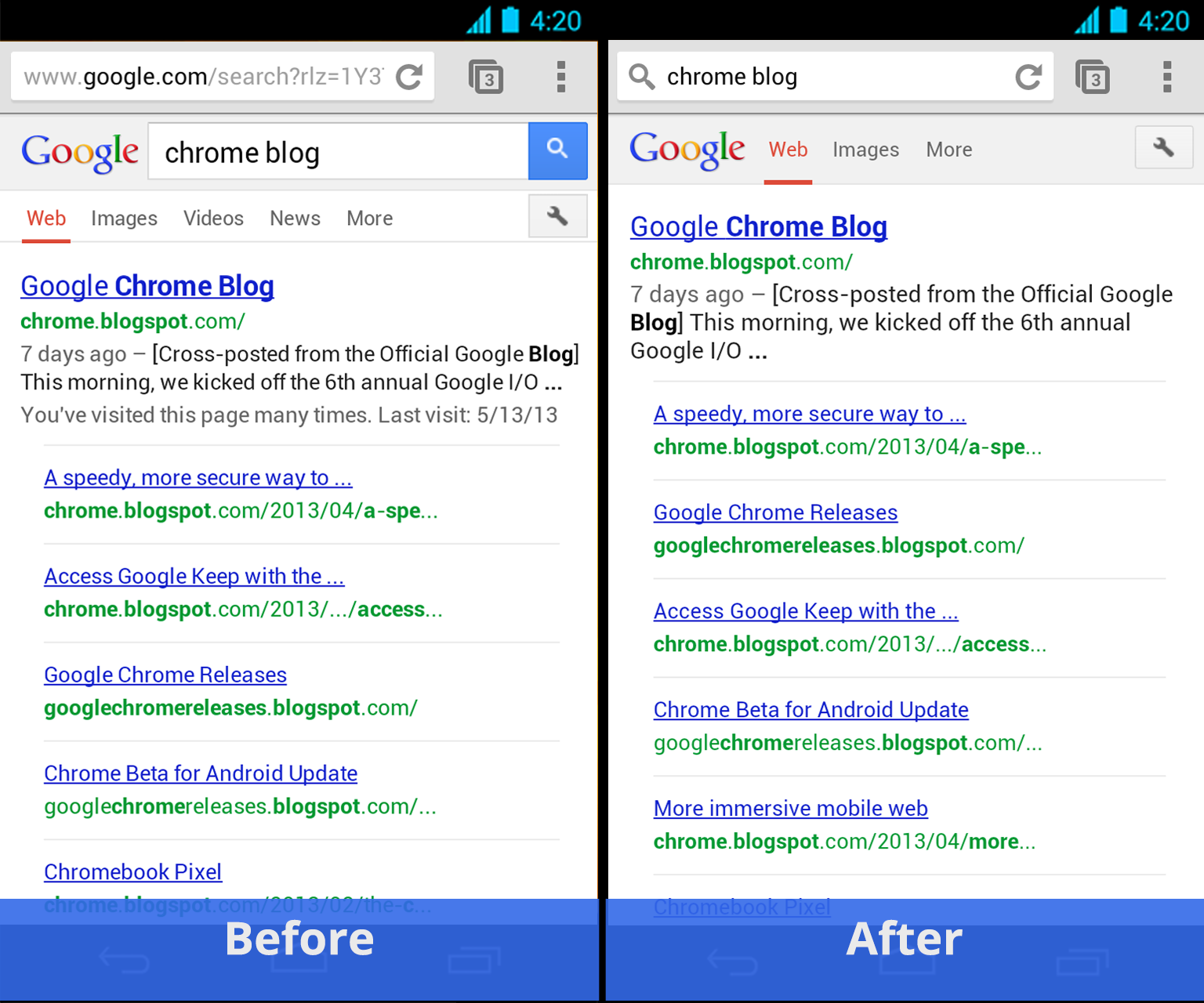
Also new in this version is a somewhat simplified search experience: searching from the omnibox, Google says, will “keep your search query visible in the omnibox, making it easier to edit, and show more on your search result page.”
The company has been experimenting with a similar feature in the desktop version of Chrome. It essentially turns the omnibox into the Google.com search form instead of switching to the URL for your search and then replicating the search interface it on the search results page. On the desktop, this always throws me for a loop, but given the space constraints on a smaller screen, this will probably allow for a few more lines of search results to show without the need to scroll down.
Other new features in this update include support for client-side certificates (something that’s often needed to connect to enterprise intranets) and tab history support for tablets (so you can use a long press on the back button to bring up your tab history.
What About iOS?
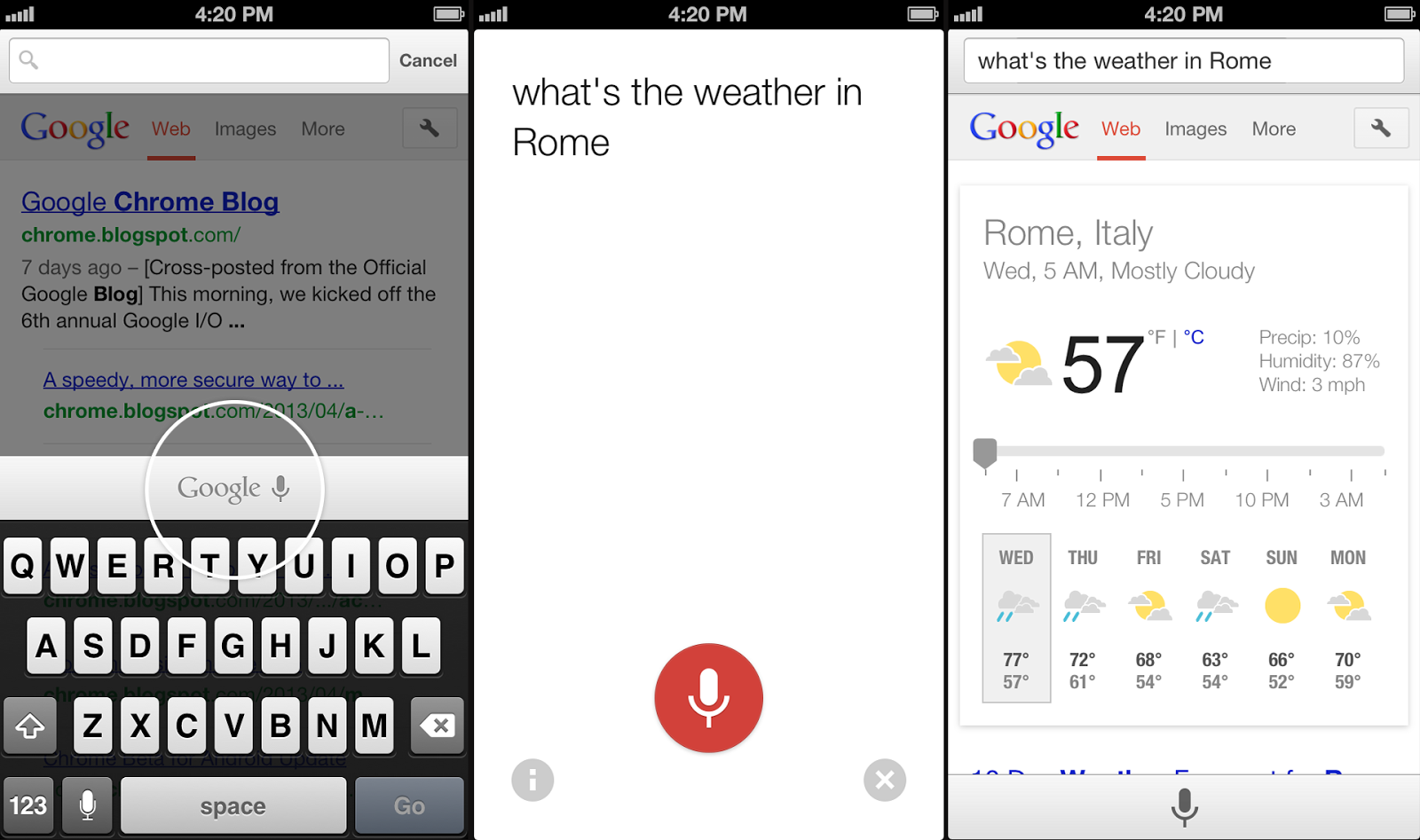
The iPhone and iPad versions of Chrome, the company today announced, will also soon get voice search. This update should launch in the next few days and will allow users to ask questions like “what’s the weather in Rome?” or “How many miles from San Antonio to Dallas?”
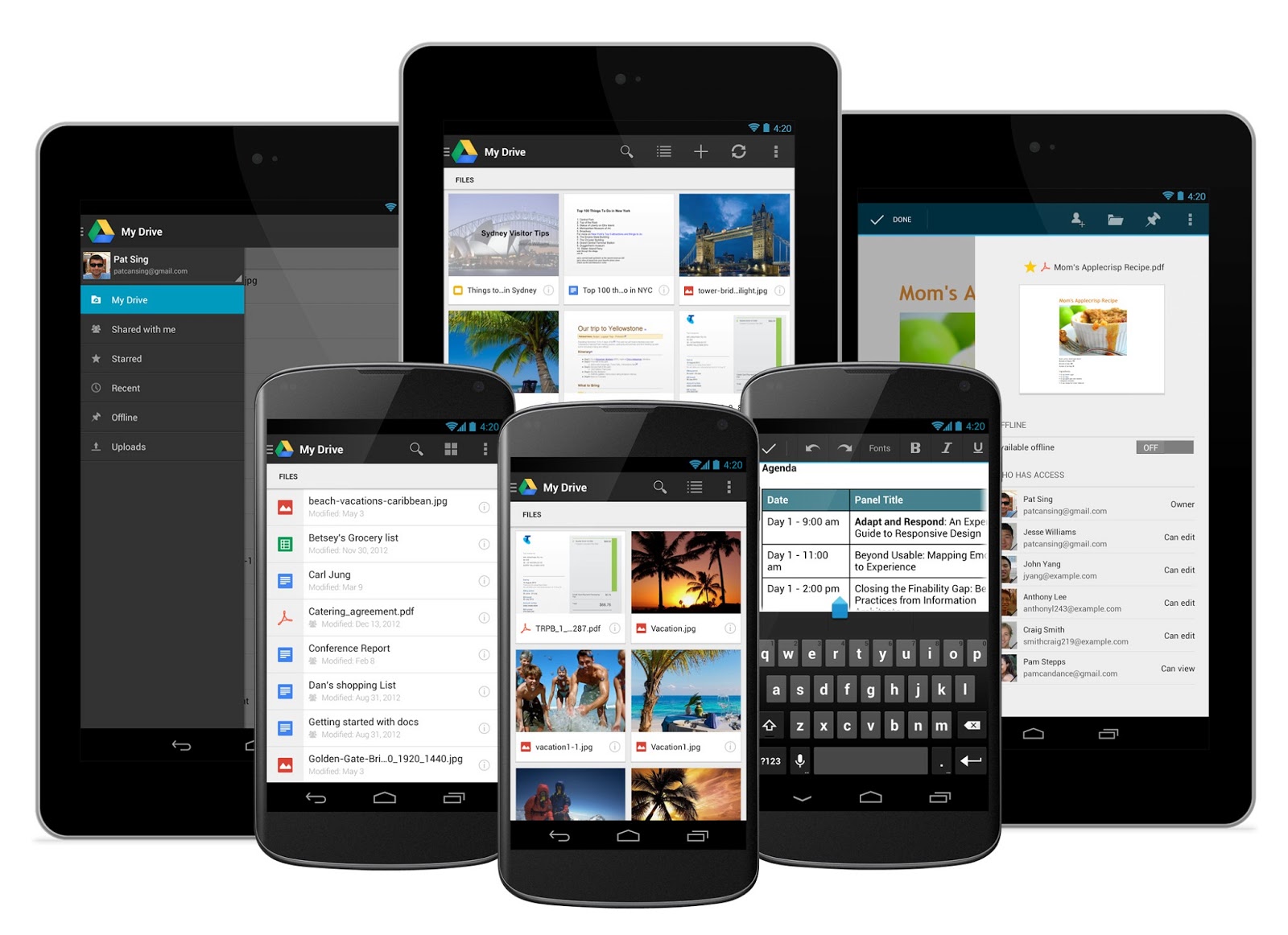
Google’s Drive app for Android just got a major redesign that brings the Google Now-like card-style look the company introduced with Google Now to its mobile productivity app.
This new look, which Google says is cleaner and simpler than the previews design, will likely be the first thing users notice, but the company has also added a number of new features to the app. Most of these are small, such as the ability to download copies of your files to your Android device, but the new document-scanning features open up a whole new range of use cases for Drive.
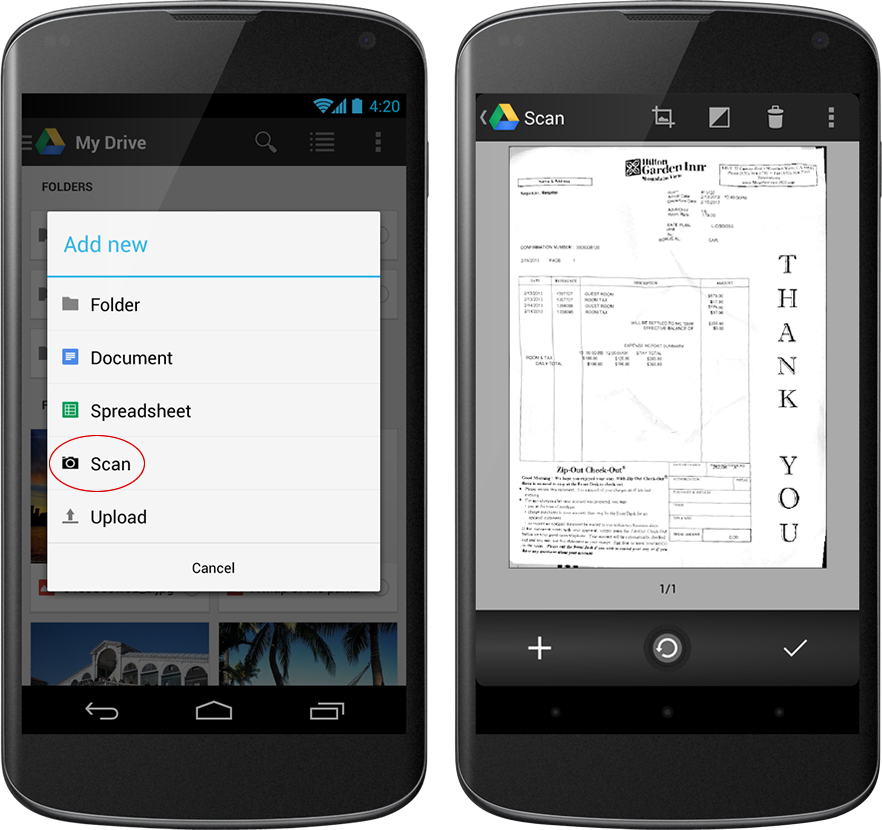
The scanner tool, for example, which you can now find under the “Add New” menu, allows you to easily turn paper documents like receipts, letter and billing statements into PDFs. Thanks to Google’s advanced optical character-recognition technology, you can also easily search them later on. This definitely feels a bit like Evernote and it’ll be interesting to see if Google will continue to go down this path in the future updates to the app.
Also new in this version is an updated editing experience for Google Sheets spreadsheets. Users can now adjust font types and sizes for their spreadsheets and change cell text colors and cell alignment right from the application. The app now also finally supports Google’s Cloud Print.
After scores of accounts were potentially compromised a few months ago, Twitter today launched two-factor authentication through SMS to protect people from hacks and phishing scams on the web. Unfortunately, it may not help shared accounts like big brands and news agencies where multiple people need to be able to log in and out but only one phone number can get the login verification codes.
Following the Twitter security incident in February where hundreds of thousands of accounts had to have their credentials reset, the tech world demanded Twitter offer two-factor authentication. Wired’s Mat Honan reported last month that Twitter was internally testing the feature. But since then, several prominent accounts including the Associated Press had been hacked through phishing tricks that the security feature could have prevented. With two-factor authentication now in place, we’ll hopefully see fewer compromised individual accounts.
However the brands and news outlets whose accounts are the most valuable to hackers may not benefit from the feature. They can only set one phone number as the recipient of the two-factor authentication codes, but may have several staff members who need to access the account. If they enabled it, whoever carried the phone registered with Twitter would have to relay the code to all the other staffers to get it to whoever needed it. That hassle might prevent shared accounts from turning on login verifications, and so the hackings may continue.
Hopefully the fact that Twitter labeled its security blog post “Getting Started With Login Verification” means more advancements are on the way that might protect shared accounts. Twitter’s product security team member Jim O’Leary writes “much of the server-side engineering work required to ship this feature has cleared the way for us to deliver more account security enhancements in the future. Stay tuned.”
How Twitter Two-Factor Works
The feature is rolling out now. If you don’t see it in your account settings, you should soon. To enable two-factor authentication, check the box next to Account Security that explains “Require a verification code when I sign in.” You’ll need to enter your phone number if you haven’t already saved it with Twitter. Once you receive a confirmation SMS on your phone you can complete activation of the security feature.
From then on when you enter your name and password to log in on Twitter.com, you’ll get a text message with a verification code you need to enter to prove you’re the account owner. The idea is that if someone steals your name and password, they probably don’t have your phone, too, and they need both to login as you. Twitter’s “login verification” doesn’t work with its mobile apps, though, so you’ll need to use temporary app passwords to stay safe when logging in on your small screen.
You can watch a video here or below to learn how to use Twitter’s two-factor authentication. You can also check out its help center documentation.
Vodafone UK will wait until September to launch its 4G LTE services, according to reports. British national newspaper The Guardian reports that Voda will miss the originally-targeted summer launch window for its LTE network, which runs on 800MHz and 2600MHz airwaves purchased as part of the recent 4G spectrum auction.
The Guardian quotes Vodafone chief executive Vittorio Colao as saying "We want to be able to launch it when it's really ready. End of the summer means when there is going to be a good commercial window for launching it." That likely means the operator is waiting for refreshed iPhone hardware from Apple. The current iPhone 5 model sold in Europe supports LTE on 1800MHz, the frequencies used by rival EE, but not the 800MHz and 2600MHz that Vodafone will be using. (Most 4G Android phones sold in the UK support all three bands.)
As for rival networks, O2 is said to be targeting summer "at the earliest" for its 4G switch-on. Three UK has built its "Ultrafast" brand around DC-HSDPA and its upcoming LTE offering, but says it's in "no rush" to launch the latter, which it's currently targeting for switch-on in Q4.
Sometimes a writer creates a universe so compelling that others feel the need to join and help flesh out that world with their own tribute fiction. And sometimes you make something crappy like Gossip Girl and loads of people want to write using those characters and that world anyway. Now Amazon is introducing a way to let writers profit from their fan fiction, via “Kindle Worlds.”
Worlds joins Kindle Singles and Kindle Serials as a way for authors to earn money from digital publishing, and the best part is that in this case you don’t even have to be all that creative – the idea is to let fans create stories around original properties from other authors, offering them up for purchase on the Kindle book store. Amazon then pays out royalties to both the original rights holder, as well as to the fan fiction author, with the author making around 35 percent of all net revenue for works over 10,000 words.
There’s also a new revenue model aimed at shorter works, which would be between 5,000 and 10,000 words and will typically sell for under a dollar. Under this scheme, the author’s cut will be a digital royalty of 20 percent.
Fanfic writers can sign up now at the official Amazon Kindle Worlds website, and the company expects to launch the Worlds storefront in June. There will be over 50 commissioned works included in the store at launch, Amazon says, and then it’ll be launching its self-serve submission platform for all authors to add their own completed works for consideration.
This is a very shrewd business move on the part of Amazon, since it leverages existing popular properties in a way that would never be possible with just one series author (or even a small list of a few running a title), and since it taps into the existing massive market for fan-created fiction that already exists on the net. Heck, I’ve still got an extremely bad and extremely long Star Wars extended universe manuscript hidden in a closet somewhere. If I can find that, read my childish scrawl well enough to transcribe it, and if Amazon ever secured those rights from Disney, I’d consider throwing it up on Worlds for some easy cash.
Amazon says it’s in the process of securing licensing deals from a variety of sources, including TV, movie, books, games and music properties. The only question I really have about this to be honest is why did this take so long to happen? If you want a near-bottomless supply of written content, fanfic is where it’s at.
The Verge has learned that HTC's Chief Product Officer, Kouji Kodera, left the company last week. Kodera was responsible for HTC's overall product strategy, which makes the departure especially notable on the heels of the global launch of the make-or-break One.
It's not just Kodera. In the past three-odd months, HTC has lost a number of employees in rapid succession — most recently Jason Gordon, the company's vice president of global communications. Other fresh departures include global retail marketing manager Rebecca Rowland, director of digital marketing John Starkweather, and product strategy manager Eric Lin.
It's not a coordinated poaching effort that's draining HTC's Seattle-based North American operations....
After several moody, tonally Terrence Malick-style teases for Man Of Steel, and then that impressive, grandiose effort more recently, things kick up a notch further on the action stakes with this combat-laden new trailer. There’s a greater chance for big moments (fights, not plot) to be spoiled, so take care, but otherwise… enjoy.
Launched with another message from Michael “I WILL FIND HIM!” Shannon’s General Zod as he demands that we Earthlings tell him where Kal-El is hiding, it then segues into a blistering barrage of action scenes as Superman (Henry Cavill) faces off against Zod and, in particular in this one, Antje Traue’s Faora, who delivers a chilling threat to our hero: “For every human you save, we will kill a million more…” So if you were wondering whether Zod and Faora would be basically decent types, there’s your answer. Those two (and the Kryptonians they brought with them) are not messing around.
Man Of Steel will also find Kal-El trying to find his place in the world, living on a planet of people who are nowhere near as powerful as he. From the looks of this, he’ll end up having to protect us from some very angry, highly destructive Kryptonians.
Laurence Fishburne, Amy Adams, Kevin Costner, Diane Lane, Russell Crowe, Ayelet Zurer and Christopher Meloni all feature in this one, which arrives on June 14. We have to admit we’re excited to see some of those set piece moments on the biggest screen we can find. For more on the movie, check out the latest Empire, which features Supes or Zod as cover choices and plenty of coverage within. You can also read our interview with David Goyer on the film and our chat with score maestro Hans Zimmer.
Matthew says: "For several weeks, a fourth-grade girl was relentlessly harassing a classmate's choice of clothing. As punishment, the girl's stepmother spent about $50 at a thrift store and forced her to wear poorly-fitting and embarrassing clothing to school."
Google Now voice search goes live in the latest Chrome desktop builds
Ladies and gents, it's time to upgrade your Chrome browser. Google Now style voice search has just went live in the latest Chrome stable version for the desktop (Version 27.0.1453.93). As far as we can tell from playing around testing things, the full contextual search isn't running like we saw in the demo during the Google I/O keynote, but the basic voice search and response is ready to go.
To get the latest update is easy. Open the settings in the Chrome browser, and click the Help line entry. Give it a second or two to start checking, and when it tells you to restart Chrome, just restart your whole browser session. When things come back, head to www.google.com and click the microphone in the search box.
You have to give permission (look for the bar across the top of the window) to listen to your voice, then start asking questions. Welcome to the future! We've got a couple screenshots after the break just in case you're not able to update or don't use Chrome.
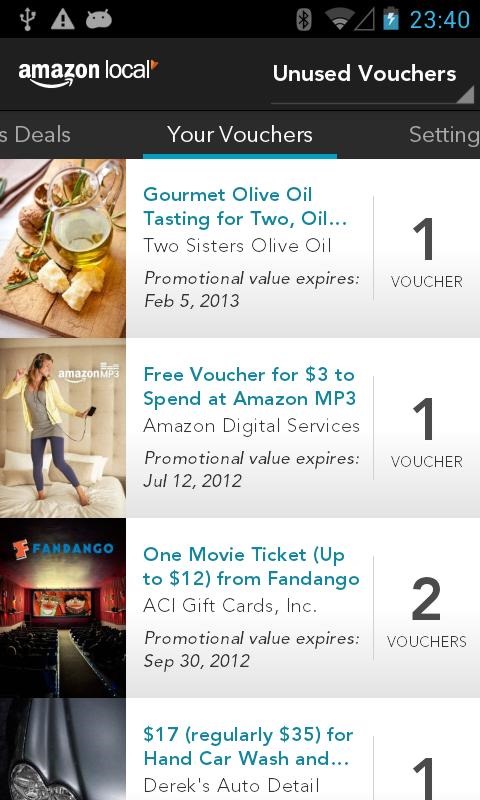
As part of Amazon's overarching goal to be the center of your shipping life, the company debuted an aggregator of daily deal services (think Groupon and Living Social) 2 years ago. The initial launch was limited to the United States, but Amazon Local has since expanded to foreign shores; last year, Amazon rolled it out in the UK. Now, the company's making Local's companion Android app compatible with UK deals.
In addition to UK availability, the updated Amazon Local app fixes bugs and improves the user experience. Amazon hasn't officially announced when we might expect rollout to other countries, but hopefully that happens sooner rather than later.
Virtual private networking is a great way to accomplish a number of things, including making sure that your secrets stay your own, protecting against malware attacks, and getting around the geoblocking of audio and video content from networks, labels and basically anyone who wants to restrict your sweet, sweet access. It’s understandable, then, that as computing increasingly goes mobile, VPN would get more popular on mobile, too.
Hotspot Shield, a free VPN from leading provider AnchorFree, has just announced that it has crossed 10 million total downloads on Android and iOS, with a growth rate of around 1.5 million new downloads per month. Hotspot Shield is a top productivity app on iOS, and on Android, it has already grown faster than its iOS counterpart in the Android ecosystem since its launch last year, and now around two-thirds of new users come from Android.
The growth has come on strong very recently, with the app seeing its active user base double between now and the beginning of 2013. The company says it has managed to prevent 28.6 billion malware threats since its debut, and has also saved over 102 million MB of data via its compression algorithms. For paranoid and thrifty travellers, it’s a way to both add an extra layer of security at open public Wi-Fi hotspots like those you’ll often find in airports, and conserve data on tight roaming plans, too.
What’s extra funny about the growth is that there’s a huge elephant in the room and AnchoFree is barely talking about it. In a release announcing the news, they offered this choice tidbit:
Hotspot Shield is also used by travelers to access US content while abroad.
Just that line, on its own, amid a sea of text emphasizing the data savings and security benefits of VPN. Which is probably because it’s unlikely content providers like thinking too much about the other, extremely useful benefit of VPNs: namely allowing you to sidestep geographic restrictions.
If you want Spotify and you live in a country where it isn’t available yet, for instance, you could use a VPN to make it appear as though you’re based in the U.S., no matter where you actually are. Using it if you’re a U.S. citizen travelling abroad rides the fair side of the line, but that’s not how most are employing that particular tech. Beyond U.S. borders, there’s a strong and pervasive appetite for U.S. film and video content, the likes of which you can find on Hulu, for example, but not once you exit U.S. territories.
AnchorFree isn’t playing up that angle, but I’ll bet it’s responsible for driving a fair amount of those 10 million downloads. So as long as some content is restricted in terms of where you can watch, it’s likely growth isn’t going to slow down anytime soon.
Microsoft has just announced a new expansion of the Halo universe — a live-action TV series will be coming to Xbox Live, and Steven Spielberg will be involved in an as-yet undefined role. "Halo has always been more than a game," said Bonnie Ross from 343 Industries when she announced the show. "The Halo universe is an amazing opportunity to be at that intersection where technology and myth-making meet to produce something truly groundbreaking," Spielberg said on a pre-recorded video. There's no word yet on when this show will debut, or where we'll be able to watch it beyond Xbox Live.
Update: Microsoft has clarified that Steven Spielberg will be the executive producer of the new Halo TV series. There's no other news on other creative...
Flexible displays are set to become the next big thing in mobile technology. LG previously confirmed that it will release a smartphone with a flexible display later this year, while unbreakable handsets from Samsung and Motorola are also said to be in the pipeline. LG on Monday announced that it plans to demo a 5-inch flexible and unbreakable OLED display for the first time this week at the Society for Information Display's (SID) annual trade show. The company will also showcase a new 5-inch HD display with a 1mm wide bezel, which will allow for the "production of borderless smartphones that are lightweight and emit significantly less heat." LG plans to release a smartphone with a flexible OLED display in the fourth quarter of 2013. The company's press release follows below.
A teenager from Saratoga, California took home one of the top prizes at the Intel International Science and Engineering Fair late last week after showing off her invention, which can fully charge a cell phone in 30 seconds or less. Eesha Khare was given the Intel Foundation Young Scientist Award and a $50,000 prize for being runner-up in the competition, which was won by a 19-year-old who unveiled a new spin on self-driving car technology. Khare's battery technology requires a new component to be installed inside the phone battery itself, and Intel notes that it also has potential applications for car batteries.
The Senate Judiciary Committee voted today in favor of an amendment to an immigration reform bill that would require officials at US airports to collect fingerprints or hand prints of all foreign travelers leaving the country. The amendment, which was proposed by Senator Orrin Hatch (R-Utah), passed 13-5, along with another amendment from Senator Charles Schumer (D-NY), calling for a study on the costs of implementing such a fingerprinting system.
Scientists believe they have finally identified the pathogen that caused the Irish potato famine. BBC News reports a research team led by The Sainsbury Laboratory in Norwich, England, used dried leaf cuttings — some of which are nearly 170 years old — to reconstruct the spread of the HERB-1 strain of Phytophthora infestans, a fungal disease that came to Ireland via Mexico in 1845. The disease destroyed potato crops and caused the deaths of a million people.
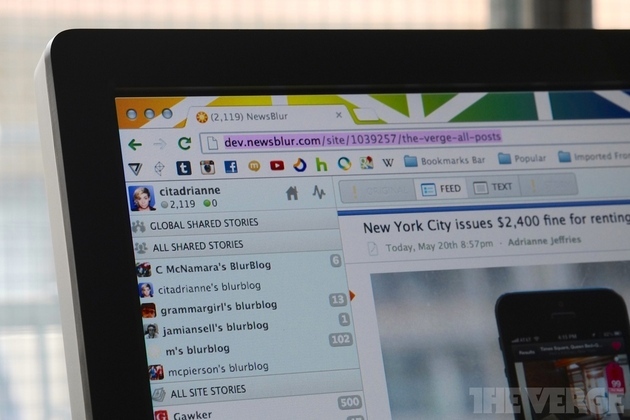
The independent RSS reader NewsBlur, popular with power users, is getting a major facelift two months after the announcement of the Google Reader shutdown. While NewsBlur is one of the most powerful RSS readers available, it’s not known for being the prettiest — and its hefty feature set made for some tradeoff in usability.
The redesign has been available for beta testers to try out, but today it will roll out to all users. The new NewsBlur is faster and includes a number of user interface tweaks such as a unified notifications popover and a new list view for brisk scanning. The iOS and Android apps also got a refresh.
While the redesign looks slightly better, the reasons for using NewsBlur are the same. It fetches feeds quickly,...
Google Checkout is being sunsetted as the company focuses on shaping Google Wallet into a viable PayPal rival. Google Commerce announced today that Google Checkouts will be retired on November 20.
Google suggests that merchants who do not have their own payment processing transition to Braintree, Shopify or Freshbooks, which are offering discounted rates for Google Checkout users. U.S. merchants who do have their own payment processing can apply for Google Wallet Instant Buy. Developers selling through Google properties will automatically transition to the Google Wallet Merchant Center in the next few weeks.
News of Google Checkout’s demise comes a week after several major updates to Google Wallet, all designed to attack PayPal’s dominance from different angles by leveraging several of Google’s properties.
These include storing payment credentials in Chrome to make it easier for consumers to checkout and reduce shopping cart abandonment; making Google Wallet available in the desktop version of Gmail; the Instant Buy API, which is designed to streamline transactions for merchants selling physical goods and services; and the Wallet Objects API for merchants offering loyalty programs.
Michael Gove is the UK Secretary of State for Education, the subject of a vote of no confidence from the nation's head teacher's conference that ran 99% opposed to his ideas for educational reform. The major motif of Gove's reforms is an emphasis on rote memorisation and linear learning. Gove insists that he loves creativity, but says that creativity is only possible once you've mastered the basics ("You cannot be creative unless you understand how sentences are constructed, what words mean and how to use grammar.")
Writing in the Guardian, Ken Robinson thoroughly and blazingly rebuts this proposition, and presents a stirring manifesto for embracing creativity in education:
First, creativity, like learning in general, is a highly personal process. We all have different talents and aptitudes and different ways of getting to understand things. Raising achievement in schools means leaving room for these differences and not prescribing a standard steeplechase for everyone to complete at the same time and in the same way.
Second, creativity is not a linear process, in which you have to learn all the necessary skills before you get started. It is true that creative work in any field involves a growing mastery of skills and concepts. It is not true that they have to be mastered before the creative work can begin. Focusing on skills in isolation can kill interest in any discipline. Many people have been put off mathematics for life by endless rote tasks that did nothing to inspire them with the beauty of numbers. Many have spent years grudgingly practicing scales for music examinations only to abandon the instrument altogether once they've made the grade.
The real driver of creativity is an appetite for discovery and a passion for the work itself. When students are motivated to learn, they naturally acquire the skills they need to get the work done. Their mastery of them grows as their creative ambitions expand. You'll find evidence of this process in great teaching in every discipline from football to chemistry.
Third, facilitating this process takes connoisseurship, judgment – and, yes, creativity, on the part of teachers. One concern about the revised national curriculum is that it will be too linear and prescriptive. For creativity to flourish, schools have to feel free to innovate without the constant fear of being penalised for not keeping with the programme. Too much prescription is a dead hand on the creative pulse of teachers and students alike.


 While the United States Government paints Kim Dotcom as some kind of international super criminal, the Megaupload founder sees himself rather differently.










 Matthew says: "For several weeks, a fourth-grade girl was relentlessly harassing a classmate's choice of clothing. As punishment, the girl's stepmother spent about $50 at a thrift store and