Bcstevieb
Shared posts
20 Feb 17:50


Ukraine burns
by Rob Beschizza
 An aerial view shows Independence Square during clashes between anti-government protesters and Interior Ministry members and riot police in central Kiev February 19, 2014. Ukrainian President Viktor Yanukovich warned his opponents on Wednesday that he could deploy force against them after what he called their attempt to "seize power" by means of "arson and murder". REUTERS/Olga Yakimovich
Reports from Kiev, where police attacks on anti-government demonstrators have left many of them dead, are grim. Kiev’s Brief Truce Shatters in Bursts of Gunfire, reports The New York Times.
Ukraine’s descent into a spiral of violence accelerated on Thursday as protesters and riot police officers used firearms in a clash as opposition members sought to reclaim areas of Independence Square, the symbolic central plaza in the capital that had been taken by the police two days before.
Vice News sent a reporter to the barricades.
As the social unrest spreads across the country, its first post-Soviet President, Leonid Kravchuk, has gone as far as to warn that Ukraine is on the brink of civil war. Dozens of people have lost their lives in just the last two days of violence.
    
|
20 Feb 13:58


Fresh Meat: 10 new Android apps worth checking out
by Steve Raycraft
New apps need lovin’ too, right? Every day there are thousands of additions to the Google Play Store, but many go unnoticed and never receive the attention they deserve. We’ve shown in the past that this community can discover great apps and propel them to new heights. Our weekly Fresh Meat column highlights new apps with fewer than 100,000 installs. Browse our new Android app picks below and let us know which ones you enjoy.
VH1

Description: Watch VH1 shows from your favorite Android device. Just sign in with your TV provider to watch recent episodes from select VH1 series anytime and anywhere. Access is included with your TV subscription to participating providers. If your provider isn’t listed, don’t panic. We are working hard to get all TV providers to participate.
LocalCast Videos 2 ChromeCast

Description: Built upon the CastVideos-android sample app. Streams some video formats from your device to Chromecast.
Dormi – Baby Monitor

Description: The baby monitor for the smartphone age. Includes all standard features of a hardware baby monitor and some surprising extras. Works at any distance. Dormi can use any available route to connect parent and child units (WiFi, mobile data), and can work even when Internet is not available (WiFi Direct, HotSpot/AP).
Holofication Nation

Description: This is the official Holofication Nation app. In it you can find information, screenshots and downloads for our Holofied apps. Enjoy!
The Tonight Show: Jimmy Fallon

Description: The Tonight Show Starring Jimmy Fallon app is the ultimate way to interact with the show. Ready to tweet your Tonight Show #hashtags or submit your videos for the latest challenge? Looking for free games that are as silly as they are addicting? Wonder who will be on the show tonight? The official app is something no FalPal should be without.
MultiMuze

Description: Can’t decide which Muzei plugin you like best? You don’t have to anymore! MultiMuze is the only Muzei plugin that lets you cycle through your other installed Muzei sources.
Meet Me Halfway

Description: With Meet Me Halfway, you can find the halfway point and from there find places of interest near there such as cafes, restaurants, hotels and more! You can input full addresses, zip codes or even names of locations along with their street and city/state!
AlarmPad Free

Description: AlarmPad brings context to your alarms. Set an alarm and see right away the weather forecast and your calendar appointments for the day and time following your alarm.
Piper Mobile

Description: Piper is the first all-in-one home automation and security system in a smart, elegant package that lets you monitor what’s important in your life, all from your Android device with zero monthly fees.
Cast for Muzei

Description: Enjoy all of the beautiful wallpapers from Chromecast directly on your Android phone via Cast for Muzei! This extension pulls directly from the feed that the Google Chromecast pulls from when it updates its wallpapers.
20 Feb 13:54

Bloomberg: HTC Working On 3 Wearables, Including Google Now Smartwatch & Music-Playing Bangle
by Natasha Lomas
HTC is working on three wearables which it’s planning to preview privately to carriers at next week’s Mobile World Congress tradeshow in Barcelona, according to a report in Bloomberg.
The three devices are said to consist of two smartwatches, one focusing on Google Now’s cards based recommendations feature, and another device based on Qualcomm’s Toq smartwatch, which was really just a hardware showcase for OEMs. (The Toq link tallies with a January report by ReadWrite’s Dan Rowinski that reported HTC had licensed Qualcomm’s Toq hardware and designs.)
The third wearable HTC is working on is apparently an “electronic bracelet that plays music”. Teenagers on buses are going to get considerably more irritating if the latter device becomes a successful commercial reality.
The news agency said the device details come from “a person with direct knowledge of the plans” — and that person also told it HTC has not decided if it will publicly demo any of these wearables next week, or simply allow carriers to have a sniff.
HTC declined to comment on the report when contacted by TechCrunch.
The mobile maker has been fighting sliding marketshare in the smartphone space for more than a year — so it’s likely viewing the rise of wearables, and the opportunity a nascent device space provides, as a potential lifeline for its business, over and above its stated aim of making more affordably priced phone slabs, targeting the $150 to $300 price range.
Earlier this month chairman, Cher Wang, told Bloomberg HTC would release its first wearable device by Christmas, although she did not provide details on exactly what form the device would take — so today’s report puts some more meat on those bones.
She did say HTC has spent ”years” on wearable development and tackling technical challenges such as ensuring a smartwatch has long enough battery life to be useful.
“Many years ago we started looking at smartwatches and wearables, but we believe that we really have to solve the battery problems and the LCD light problems,” she told the news agency. “These are customer-centric problems.”
These latest wearable hints follow some leaks around HTC’s forthcoming new smartphones. Yesterday a leaked image of an update to HTC’s flagship One was tweeted by the @evleaks Twitter account — sporting a new gold colourway (with silver and grey named as the other colour options for the flagship), and with camera enhancements apparently on board.
@evleaks has since tweeted an image of the charcoal grey version of the handset — along with specs for what sounds like a more mid-range forthcoming HTC smartphone, painted in a range of brighter colours:
HTC A5: MSM8928 (1.6GHz x4), 5.5" 720p SuperLCD2, 1.5GB/8GB (+microSD), 13MP/5MP, Sense 6.0, BoomSound, black/white/red/yellow/purple.—
@evleaks (@evleaks) February 20, 2014
20 Feb 13:51

Finding bliss in things that fit inside other things
by Aaron Souppouris
We never expected to find happiness in a film case, but a Tumblr from artist Michael Johansson has shown us the light. Thing Fitting Perfectly Into Other Things is an exploration of the unexpected physical correlation between unrelated objects. Through a variety of static images and animated GIFs, it'll take you on a cathartic journey where cherry tomatoes and avocados are intertwined, USB drives join in perfect union, and Snapple bottles are swallowed by Pringles cans. There are too many entries to recount, but its curator has neatly organized them into four categories of descending excellence: Platinum, Gold, Silver, and Bronze.
19 Feb 22:52


Facebook to acquire WhatsApp for $16 billion
by Andrew Martonik

Company to continue to run independently, CEO to take seat on Facebook board of directors
Facebook has announced that it will buy cross-platform messaging service WhatsApp for a total of $16 billion, split between cash and stock. The deal was announced today by Facebook as a definitive agreement, with the messaging service receiving $4 billion in cash and aonther $12 billion in Facebook stock, with the option for another $3 billion in restricted stock units also available to be vested in four years. If for some reason the deal is cancelled due to regulatory issues, Facebook will pay a breakup fee of $2 billion split between cash and stock to Whatsapp.
WhatsApp, which has over 450 million monthly active users, is one of the biggest players in the messaging wars today. Facebook quotes some statistics, stating that WhatsApp is adding one million users to its service every day, with a total message volume on the network approaching that of global SMS traffic.
As was the case with Instagram, WhatsApp will continue to operate as a separate company and keep its branding in tact. Co-founder and CEO Jan Koum will remain at the company, but will also take a seat on the Facebook board of directors. In a post on its company blog, WhatsApp reiterates that nothing will change from a user perspective after the buyout, and the word "partnership" is being regularly thrown around from both companies.
|
|
19 Feb 21:06


Google Currents Is Officially Dead With Latest Update, Transitions Users To Play Newsstand And Disappears For Good
by Cody Toombs

We've known the day was coming for a while. The Currents app has finally hit the end of the road. An update to version 2.3 is rolling out through the Play Store that officially closes up shop and points users in the direction of Google Play Newsstand. Subscriptions are automatically transferred over to Newsstand and the old Currents app disables itself after users tap through for the first time.
Done With This Post? You Might Also Like These:
- Google Play Newsstand Is Live, Officially Combines Currents And Play Magazines
- [APK Teardown] Play Store 4.4.21: Google Play Newsstand Adopts Purple Brand Color, Set To Replace Play Magazines
- [APK Teardown] Play Store 4.4 Suggests Google Is Getting Ready To Release Google Play Newsstand
- Revised Google Newsstand Icon Makes Cameo Appearance In KitKat Quick Start Guide
Google Currents Is Officially Dead With Latest Update, Transitions Users To Play Newsstand And Disappears For Good was written by the awesome team at Android Police.
|
|
19 Feb 19:29


Survivors of the Florida School for Boys return to the site of legal kidnapping, torture and murder of children
by Cory Doctorow

Mother Jones has published a heartbreaking story about the survivors of the Florida School for Boys; children who were, basically, kidnapped by southern cops and sent to a hellhole where backbreaking labor, torture, and murder were the order of the day. A state court has finally given the go-ahead to exhume the graves of the children who were killed and buried in anonymous, unmarked graves by their jailers. The survivors returned for a press-conference, but found themselves with almost no press to speak to.
Mike Mechanic writes, "Johnny Gaddy, 68, still doesn't understand how he landed at Florida's Dozier reform school. When he was 11, the police showed up at his front door. 'They told me the judge wanted to talk to me,' he recalls. 'I'll never forget it as long as I live. I was watching 'The Lone Ranger' on TV. My mama said, 'The officer going to take you down, the judge going to talk to you.' I said, 'Mama, why's he going to talk to me?' She said, 'Go ahead.' He took me to the police station, told me to get in a cell. I never saw a judge. I wasn't sentenced for anything as far as I know. I was handcuffed all the way to Marianna.'
There's been a lot of press about the alleged horrors that took place at the Florida School for Boys, a.k.a. the Arthur G. Dozier reform school, but not a lot about how blacks and whites were treated differently on the campus, which was segregated until 1967. Last August, around the time of a state hearing that granted scientists permission to exhume dozens of graves on the grounds to find out what had happened to those boys, five elderly black men returned to the site of their nightmares with photographer Nina Berman. This multimedia story chronicles their visit back, and some of what they experienced at the school.
"It Was Kind of Like Slavery" [Nina Berman and Michael Mechanic/Mother Jones]
(Photo: Nina Berman) 
|
|
19 Feb 19:27

Which Browser Is Better for Privacy?
by Alan Henry

Dear Lifehacker,
With Firefox getting ads and Chrome extensions spying on me, is there really one browser that's better than the others when it comes to privacy? Does it matter if I use something like Opera or Safari instead? Is my browser watching what I'm doing and reporting back?
Sincerely,
Concerned Browser
Dear Concerned Browser,
That's a great question, and the answer isn't as clear cut as you might think. Different browsers handle user data in different ways, and when you toss add-ons and extensions into the mix, the picture changes even more. Let's take a look at some of the most popular browsers from a privacy angle, and see who has your back when it comes to tracking—or not tracking—what you do online.
Chrome, and Google's Position on Browser Privacy

Google Chrome, being the dominant web browser in most of the world, has taken a few hits lately in the privacy department. Between adware-filled extensions and microphone-listening exploits, It might look like Chrome has privacy problems. However, both of those issues are third parties using a combination of built-in features and user trust to spy on them—it has nothing to do with the browser itself. We'll get to how third parties play into things a little bit later, but first, let’s talk about Chrome on its own.
Like most browsers, Chrome has useful features that phone home to Google or use Google services. If you sign in to Chrome with your Google account, you can make use of Chrome Sync, which lets you sync your bookmarks, passwords, and tabs for later or to use on other devices. Logging in to Chrome also lets you use Chrome Apps, and while you don't have to sign in to install add-ons, Google definitely encourages it.
Chrome has discrete privacy settings, where you can enable or disable services like URL prediction, page pre-rendering, spelling correction, and usage statistics and crash reports. By default, most are turned on, but they're all under chrome://settings and "Show advanced settings." This is also the place you can enable Do Not Track, which, as long as sites honor it, also also helps protect your privacy. To their credit, Google has an entire privacy policy breakdown just for Chrome, where they explain exactly what information they get and what they do with that information.
The amount of information Google gets varies depending the features you use. If you use conversational search or voice search, a recording of your audio, the URL requesting speech input, and the grammar settings of the page you're visiting are all sent to Google's servers, but all of that is required for the feature to work. If you use spell check, any text you type in Chrome is sent to check for spelling mistakes or errors. If you have usage statistics and bug reporting enabled, additional information is included. It's a lot of data, but Google is absolutely clear: none of it is personally identifying.

That said, Google doesn't say how long they store that information or how easy it would be to build a personal profile based on all of that non-personally identifiable information. We spoke to Google about their approach to privacy, and they replied in no uncertain terms: Privacy and security is a top priority. They cited their background fighting for internet privacy and against governments and companies that want to harvest data. Indeed, Google is leading the charge for transparancy in government data requests, and recently publisehd their first government transparency report.
Google reps also pointed to Chrome's safety record, their monetary rewards for bug reports, and their Pwnium contests, which encourage hackers to beat on Chrome and Chrome OS until they find vulnerabilities. Finally, since most of Chrome is open source, users can visit Chromium.org to look under the hood (emphasis on most of, as the issue of how open Chrome is, versus Chromium is a hotly debated ongoing issue.) Google also noted that Chrome was one of the first browsers to incorporate sandboxing as a security measure. When asked specifically about Chrome Sync, Google explained that sync data is always encrypted. As for the adware add-on debacle in recent weeks, Google explained to us that developers who inject ads are in violation of their upcoming policy change that demand that extensions be "simple and single-purpose." That policy change is due to take effect in June 2014, although they're enforcing it to some degree now. Google said they were looking into it, and recommend users report offending add-ons in the Chrome Web Store and they'll review them. That's a change of tone compared to when ArsTechnica and How-To Geek brought up the adware extension issue a few weeks ago. Back then, Google made it clear that the issue wasn't really their problem, and users should be careful what they install.
We talked to the Electronic Frontier Foundation for a second opinion, and while they noted that Chrome does give users control over their privacy, they explained that between NSA spying allegations and the fact that Google makes a significant amount of money from advertising—targeted advertising at that—it's difficult to believe that privacy is as paramount as they say. They pointed to the mobile side of things, where Google notoriously pulled ad-blockers from Google Play and refused to open APIs for mobile developers as examples of Google keeping the doors shut to indepedent review. They also noted that while Chrome on the desktop does offer privacy controls, it still restricts users to a subset of what's available with other browsers (like the Tor Browser Bundle, which runs on Firefox.)
So bottom line: Google is confident in Chrome's overall security and its privacy protection features. Independent privacy advocates aren't so convinced, and note that Google is walking a line between dictating how much privacy their users get and giving them control over it themselves, which is a difficult place to be since they also make money off of user data. Debate aside, one thing is clear: Google obtains a great deal of information about you, but Chrome isn't a primary source of any of it. Gmail, your Google Search history, your YouTube account, your Google+ account, the files you store on Google Drive, and other browser-independent features are where your data really comes from, and in all of those cases, it doesn't matter what browser you use.
Firefox, and the Mozilla Foundation

Firefox has long been touted as the best browser for privacy. It's open source, managed by the non-profit Mozilla Foundation (of which, it should be noted, Google is an investor), and is at the core of most privacy-focused browsers (like the previously mentioned Tor Browser Bundle). Even on the mobile side, Firefox for Android is open source and its code available to anyone who wants it. By most accounts, Mozilla is completely above board with what Firefox does, and the Foundation doesn't trade in user data, so there's no reason for them to harvest it.
Firefox does collect some information though. Firefox Sync uses your tab, password, bookmark, and other browser information to sync across devices, but that data is, like Chrome, encrypted. Firefox's privacy settings are easy to get to, and while they're not as granular as Chrome's, that's largely because there isn't as much to manage. All add-ons for Mozilla browsers are—unlike Chrome—reviewed before they're posted (although some are labeled "experimental" until they're tested.) This approach has helped them largely avoid the adware problem Chrome is suffering, although not completely. Some adware extensions for Firefox were identified, and others are just up front with what they do with your information.
Mozilla has a privacy policy for Firefox that explains what information is collected based on the features you use. it mostly involves sync, Personas, use of Mozilla Add-ons, crash and usage statistics, and so on. In most cases, unless you're part of Mozilla's Test Pilot or beta testing program, you're not sending much. Even the features that do send information, like Personas and Panorama, are so lightly used by most people that it's a non-issue. The message from Firefox's privacy policy is clear: All of the information sent is opt-in, not opt-out, and none of it is personally identifiable, although some of it may contain things like URLs you've visited, your IP address, and so on. The privacy policy also includes information about what Mozilla shares with third parties upon request.

We reached out to the Mozilla Foundation for their input on this piece, but despite lead time, multiple follow-ups, and repeated requests, they declined to comment, and wouldn't even direct us to documents publicly available about their own commitment to privacy. Regardless, Mozilla has its own privacy woes as of late. Recently Mozilla announced that they are planning to introduce ads in Firefox in the form of "sponsored tiles." In short, the first time you open Firefox after a fresh install, the "speed dial" you see will be pre-populated with sites relevant to your location or sponsored by Mozilla. It's resulted in a bit of backlash. Some people have said the move will alienate new users by shoving ads in their face as soon as they install, and SiliconAngle said Mozilla "sold its soul." Mitchell Baker, Chair of the Mozilla Foundation, recently stepped up to defend the move on her blog. In any event, for a privacy-forward browser, it's a bold move.
We asked the EFF about Firefox's privacy stance and the decision to venture into contextual advertising, and while they said it was a bit soon to have an official opinion on the latter, they did praise the former. Everyone agrees that Mozilla on the whole has a more privacy-friendly and user-focused track record than its competition. They pointed out that Firefox's open APIs give developers leeway to build add-ons that protect user privacy beyond what the browser already does, and the fact that Firefox is open source means there's a community of developers sifting through the code, reporting issues, and submitting fixes. That also means it's easier to trust that Firefox isn't doing anything shady in the background, as someone would have called it out by now. Firefox's user community is its real strength, even in spite of the Mozilla Foundation itself.
What About Opera, Safari, and Internet Explorer?

So if you don't use Firefox or Chrome, where does that leave you? We asked the EFF, but none of their experts had any knowledge when it came to browsers that weren't Chrome or Firefox. They did, however, note that privacy advocates generally prefer open source browsers like over closed-source, proprietary ones like Apple's Safari and Microsoft's Internet Explorer. The EFF praised both however for pioneering their own privacy features, like Safari's 3rd party cookie blocking and IE's Tracking Protection Lists. Still, the fact that you can't see under the hood and that neither have developer APIs makes them tough to analyze.
Apple has a global privacy policy, as well as a commitment to customer privacy that actually gets them in trouble with advertisers. Microsoft issues a new privacy statement with each version of IE. Here's the one for Internet Explorer 11. Their closed-source approach may be the reason why security issues in Safari and IE, when they're discovered, make bigger headlines than other browsers. Both Apple and Microsoft have bug bounty programs, and they pay out for reported issues. There's nothing about either that indicates they inherently compromise your privacy, harvest your data, or send data anywhere it doesn't need to go based on the features you're using.
Opera is more interesting. When Opera ditched its priorietary engine for Blink, the same engine in Chrome, they switched to a semi-open source platform. Still, the rest of Opera is not open, and Opera is in the middle of a massive transition. For its part however, Opera's statement on privacy in its browser is short, to the point, and very reassuring. They collect very little information and all of it is stored as aggregate. If that's not enough for you, How-To Geek has a great guide for optimizing Opera's privacy settings.
The Bottom Line: No, Your Browser Doesn’t Make a Huge Difference

So where does that leave us? Well, your browser is probably sending some information back to the company that created it, but that information is explicitly used to support the features you have turned on. As long as you trust the developer behind your favorite browser, this isn't an issue. Bonus: there's nothing dangerous or invasive about using Chrome sync or Firefox sync.
However, what we learned underscores a few things. First, it's critical that you get familiar with your privacy settings. Look at the features you have enabled, and what information is required for them to work. Remember, that's the key to trading privacy for services—being aware of what you give up for the services you get. Remember, "non-personally identifiable" data often really isn't at all. "Aggregate and anonymous" isn't a credible defense, especially with advertisers and government knocking on the doors of these developers, begging for a peek at that "anonymous, aggregate" data.
Also, the real privacy problems don't come from the browser itself, but from the third-party tools and sites you visit. Google has other ways to obtain the data they want—they have Gmail, your Google Search history, YouTube, Android app install history, and anything else you can see on the Google Dashboard. Most web companies use persistent tracking cookies to collect information about you, which is far more efficient. Sure, browser developers could do more to protect your privacy and security, but no amount of sandboxing or add-on review will stop users from being the weak link in the security chain, or stop disreputable developers who use TOS loopholes to publish adware in the first place.
As always, we recommend that you get the best privacy-protecting add-ons for your preferred browser to keep your data safe while you surf the web, and to pay attention to the permissions of the add-ons you install before you install them to make sure they match up with the features you expect. If we had to give any kind of edge to anyone here, it would have to be to Mozilla—they do have a slightly better track record when it comes to privacy than all of the others, and the fact that Firefox is open source means their promises can be verified. Given where Google makes its money, their commitment to privacy and security isn't in doubt, but it is slightly less believable. Apple and Microsoft are in a similar position to Google, just with the gates more firmly closed. In any case, if you're worried about your privacy, your browser is less of a problem than where you use it to go on the web, the things you download through it, and what services you sign into with it.
Sincerely,
Lifehacker
Have a question or suggestion for Ask Lifehacker? Send it to tips+asklh@lifehacker.com.
Photos by ahmad faizal yahya (Shutterstock), Gil C (Shutterstock), and Kostenko Maxim (Shutterstock).
19 Feb 19:23


Meizu and BQ announced as Ubuntu smartphone partners
by Jerry Hildenbrand

More devices from other 'household names' to come in 2015
Canonical, the folks behind the Ubuntu project, has announced their initial hardware partners for the Ubuntu smartphone launch. BQ of Spain and the Chinese giant Meizu have signed on, and will both be delivering products running Ubuntu in 2014.
In a live-broadcast event this morning, Ubuntu founder Mark Shuttleworth made it clear that they wanted their initial partners to be specialists at penetrating the emerging markets. That means low-cost handsets are the goal, and while we don't know much about what BQ will be offering we do know that Meizu plans to build an Ubuntu version of the MX3 — which currently runs Android. He went on to say that both BQ and Meizu are a perfect match for Ubuntu
These are two great companies. Two Fiesty companies. Two companies that are great for Ubuntu
We have no details on availibility or pricing, or where these phones will be sold. Shuttleworth has spoken before that Canonical has excellent carrier support and backing, and that he wants Ubuntu smartphones available everywhere. We're going to catch up with Canonical at MWC, and see what else we can learn.
More: Ubuntu
|
|
19 Feb 19:22
Thank you, and welcome to the new Google Maps
by Emily Wood
Over the coming weeks the new Google Maps will make its way onto desktops around the world. Many of you have been previewing it since its debut last May, and thanks to your helpful feedback we’re ready to make the new Maps even more widely available.
It’s now even easier to plan your next trip, check live traffic conditions, discover what’s happening around town, and learn about a new area—with Pegman’s help if needed. Here’s a quick refresher on what to expect in the new Google Maps:
Here’s to many more years of mapping together!
Posted by Brian McClendon, VP of Google Maps
It’s now even easier to plan your next trip, check live traffic conditions, discover what’s happening around town, and learn about a new area—with Pegman’s help if needed. Here’s a quick refresher on what to expect in the new Google Maps:
-
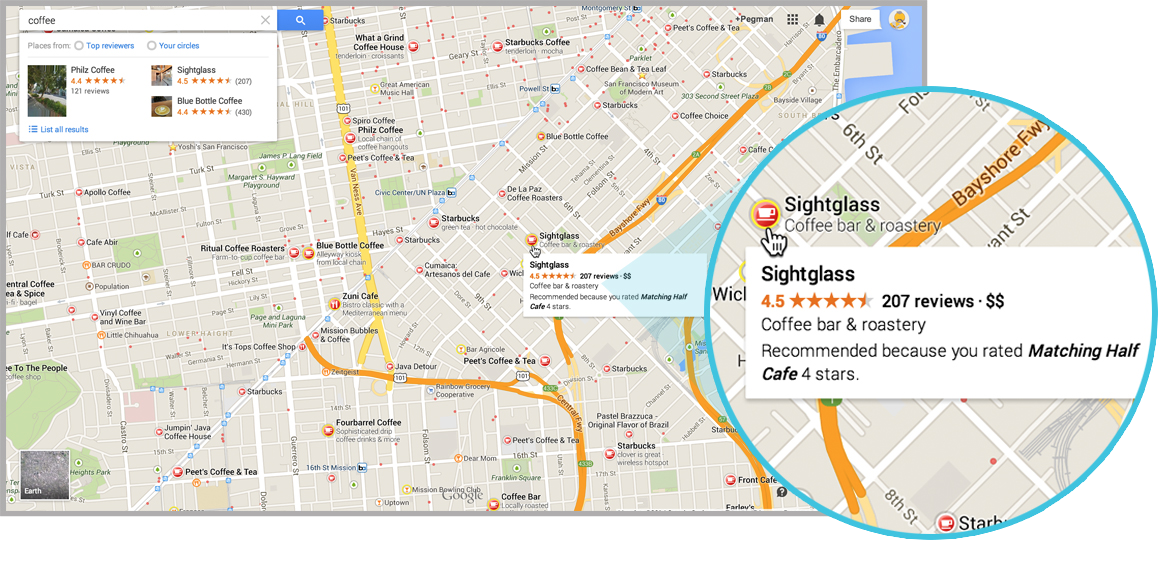
Make smarter decisions. Simply search for “coffee” in your neighborhood, and you’ll be able to see results and snippets right on the map. When you click on a cafe, the map will suggest related results that you may not have known about.
-
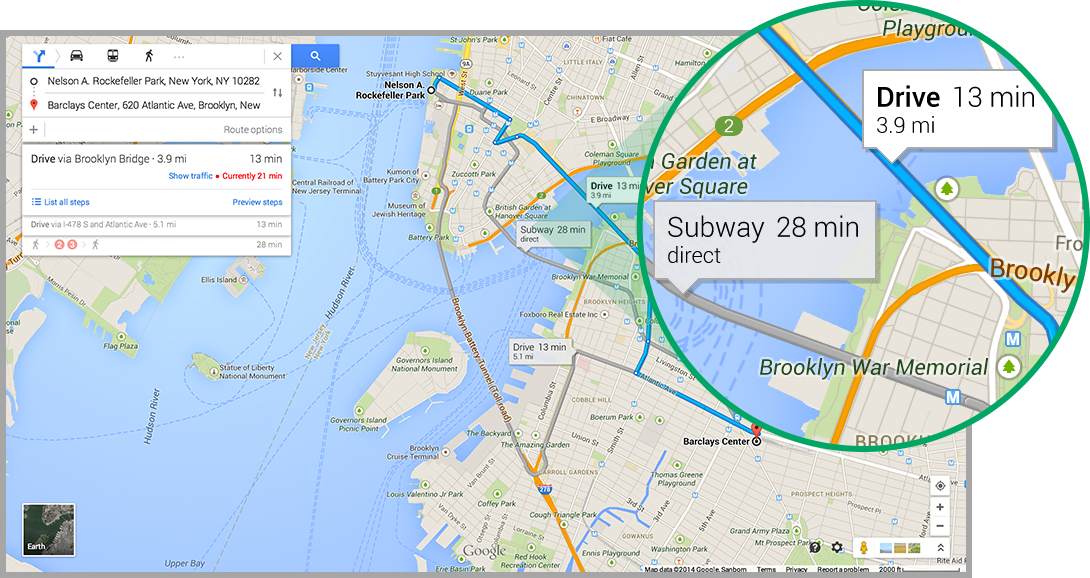
Get where you're going, faster. Car? Bike? Train? Find the most efficient route for you, with your best options laid out on the map, including the time and distance for each route. And with the new real-time traffic reports and Street View previews, you’ll become a commuting ninja.
-
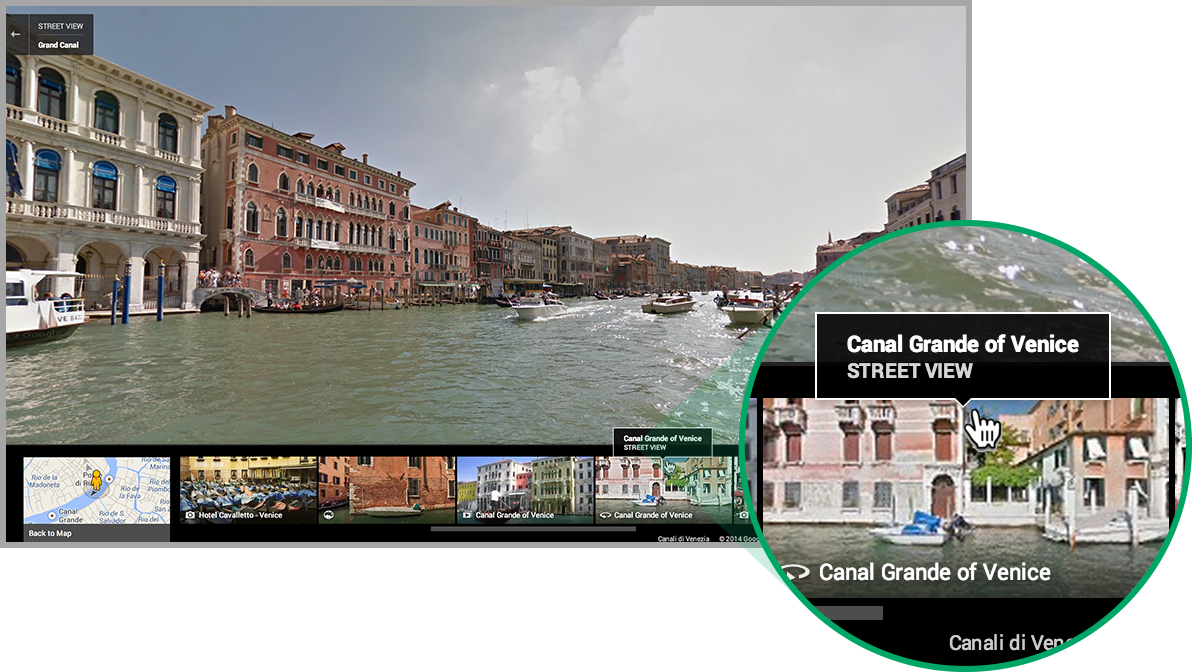
See the world from every angle. Rich imagery takes you to notable landmarks, sends you flying above mountains in 3D, and gives you a sneak peek of businesses you plan to visit. The new “carousel” at the bottom of the map makes all this imagery easy to access, so you can explore the world with a click.
Posted by Brian McClendon, VP of Google Maps
Randy Belk likes this
19 Feb 19:17

The FCC has a plan to save net neutrality, but no one likes it
by Adi Robertson
The FCC has announced its intention to pursue a new version of the Open Internet order that was struck down by a judge last month. In a statement, agency chair Tom Wheeler says that he will begin taking public input on an updated set of net neutrality rules. The FCC will not pursue an appeal in the case it lost against Verizon in January, opting instead to use the authority that the court granted in its decision. "Preserving the internet as an open platform for innovation and expression while providing certainty and predictability in the marketplace is an important responsibility of this agency," says Wheeler.
19 Feb 15:54

Amazon Coins Come To Android Users In U.S., U.K. & Germany
by Sarah Perez
Amazon Coins, the virtual currency introduced by the e-commerce giant last spring, are now available on Android devices, including both smartphones and tablets, in the U.S., U.K. and Germany. This is the first time the Coins have been offered outside Kindle Fire tablets, which is where they first launched.
The goal of Coins to date has been multi-fold: to encourage developers to build for the Amazon Kindle platform, to reduce the “sticker shock” of paying for things in dollars (something which Android users seem especially sensitive to in comparison with their iOS counterparts), and to increase the revenue generating opportunities for both developers and Amazon.
The idea is to get consumers to think of paying for purchases not as “99 cent” downloads, but rather a number of Coins which they deduct from a bigger stockpile. It’s an idea that’s a holdover from console and PC gaming platforms, but one which is not offered today on either Apple or Google’s official app stores.
Customers can earn Coins by shopping for their apps from Amazon’s Appstore, earning achievements in select titles (currently over 3800 apps are listed), and they can buy them directly at a 10% discount. The more Coins you buy, the larger the discount, which encourages users to purchase the currency in bigger quantities. (100 Coins are worth $1).
The Coins can be used to buy games and apps, purchase extra features within apps, like extra lives in “Candy Crush,” unlock new levels, and more.
Developers continue to receive a 70% revenue share whether the customer spends Coins or dollars, Amazon notes.
In order for Android users to take advantage of Coins, they’ll need to install or update their version of the Amazon Appstore client on their device, which can be done from here: www.amazon.com/getappstore.
19 Feb 14:24

New 2014 HTC One Leaked In Gold With Dual Camera And Twin Flash
by Darrell Etherington
HTC is set to unveil its next-generation flagship phone, and all indications are that it will continue what it has accomplished with last year’s HTC One, but with some tweaks and enhancements to push things forward. A new leaked image from @evleaks today reveals that the new One could be very similar indeed to the old One on the outside, albeit with improvements to the camera system.
The press shot depicts an HTC One that looks like the aluminum device HTC released last year, but with a gold tint (it’s said to be launching in gold, silver and gray). Also noteworthy are the twin camera lenses on the back of the device, which include the larger primary one found on current models and the smaller one at the top of the case. There’s also a dual LED flash next to the main lens, which you might recognize from the similar setup on Apple’s own iPhone 5s, and more rounded corners, plus what looks like a wraparound metallic bezel, as compared to the plastic edging on the existing HTC One.
Rumors suggest that the new One will have dual camera sensors, to offer focus that can be changed after the fact and selective deletion of objects from photos, which explains the twin lenses. Based on what’s been making the rounds so far, HTC will be focusing on camera quality this time around, in a bid to give it something that clearly differentiates it from other Android OEMs.
Another feature of this leak is the prominence of HTC’s Sense UI on the home screen, where it seems to take over entirely. The interface resembles Windows Phone 8′s UI to some extent, with information pulled from feeds displayed on live tiles, which extend behind the Android home icon dock.
Personally, I’m excited to see what HTC comes up with to follow the extremely solid HTC One. It’s still among my favorite Android phones, right up there with the Nexus 5. My only concern is that HTC takes its positive critical reception as an excuse to coast this time around – that’s bound to fail in the highly competitive Android smartphone market, regardless of how good the original was.
19 Feb 14:22

The full trailer for Marvel's 'Guardians of the Galaxy' is here
by Bryan Bishop
This morning we got a brief, 15-second glimpse at Marvel's upcoming film Guardians of the Galaxy, but now it's time to see the first full trailer in all its glory. Chris Pratt (Parks and Recreation) stars as a pilot that finds himself working with a ragtag team of alien adventurers that include Zoe Saldana (Star Trek Into Darkness), Bradley Cooper as a raccoon named Rocket, and Vin Diesel as a tree-like creature called Groot.
Written and directed by James Gunn, the film looks like it lands on the lighter side of the Marvel spectrum, and while the title may be familiar to comic fans it's certainly not as well-known to mainstream audiences as Iron Man or The Incredible Hulk (next year Edgar Wright's Ant-Man will also dive deeper into the...
19 Feb 14:22

Microsoft OneDrive launches with Dropbox-like bonus storage and new Android app
by Tom Warren
Microsoft unveiled its replacement name for SkyDrive just a few weeks ago, and the company is now ready to fully rebrand its cloud storage service to OneDrive today. If you’re an existing SkyDrive user then this won’t mean a whole lot. SkyDrive is being automatically upgraded to OneDrive, and existing apps will continue to work with the service. Microsoft will rebrand its Windows 8, Windows Vista, and Mac apps today, alongside its mobile and Xbox versions. Windows 8.1 and Office 2013 won’t be rebranded immediately, but both will continue to work with the new OneDrive service.
19 Feb 14:17

Lose yourself to dance with this 'Happy' and 'Get Lucky' mashup
by Vlad Savov
Mashing up Pharrell Williams' "Happy" and "Get Lucky," music-making duo Pomplamoose has come up with one of the more original music videos we've seen. Shot in a single take and employing just one projector, the video uses a variety of surfaces and objects in the 3D world as a stage for a series of fun and complex projections. What's remarkable about it is the apparent seamlessness of the entire process, with moving images appearing at various depths, upon a variety of moving platforms, and all in time with the music. The song and the video took the same amount of time to complete — three days each — and the authors have even waded into the YouTube comments to answer questions about their work process and inspiration.
18 Feb 20:36


American citizen and EFF sue Ethiopian government for installing British spyware on laptop
by Cory Doctorow

The victim of the attack -- who is being called "Mr. Kidane" in order to protect his family in Ethiopia -- is suing the Ethiopian government in a US court, and is represented by the Electronic Frontier Foundation.
"We have clear evidence of a foreign government secretly infiltrating an American's computer in America, listening to his calls, and obtaining access to a wide swath of his private life," said EFF Staff Attorney Nate Cardozo. "The current Ethiopian government has a well-documented history of human rights violations against anyone it sees as political opponents. Here, it wiretapped a United States citizen on United States soil in an apparent attempt to obtain information about members of the Ethiopian diaspora who have been critical of their former government. U.S. laws protect Americans from this type of unauthorized electronic spying, regardless of who is responsible."
A forensic examination of Mr. Kidane's computer showed that the device had been infected when he opened a Microsoft Word document that contained hidden malware. The document had been an attachment to an email message sent by agents of the Ethiopian government and forwarded to Mr. Kidane. The spyware contained in the attachment was a program called FinSpy, a suite of surveillance software marketed exclusively to governments by the Gamma Group of Companies. In the several months FinSpy was on Mr. Kidane's computer, it recorded a vast array of activities conducted by users of the machine. Traces of the spyware inadvertently left on his computer show that information – including recordings of dozens of Skype phone calls – was surreptitiously sent to a secret control server located in Ethiopia and controlled by the Ethiopian government.
American Sues Ethiopian Government for Spyware Infection 
|
|
18 Feb 20:34

The Best (and Worst) Foods to Help You Recover When You're Sick
by Melanie Pinola

When you've got a cold (very popular around this time of year!) or stomach problems, eating might be the last thing you feel like doing. To recover as fast as possible, though, you need to nourish your body even more than when you're healthy. To that end, Greatist has compiled a list of the best and worst foods for when you're sick.
The article breaks down the best items by category: cold-like symptoms and stomach problems. You've no doubt already know about chicken soup and hot tea, but as with their guide to the best drinks for every occasion, Greatist offers the research behind each food. For example:
Citrus Fruits
It's a myth that vitamin C can cure the common cold, and there isn't actually much scientific evidence behind the theory that it'll reduce the length or severity of colds, either [5]. However, while citrus fruits might not be a cure-all, the soft white layer of skin found on oranges, lemons, grapefruits, and limes does contain flavonoids, which can help boost the immune system and are great for speeding recovery [6].
Popsicles
Staying properly hydrated while sick with a chest cold can keep mucus thin and help lessen congestion. While it's generally better to eat fruit rather than drink it,popsicles are great as a different way to hydrate and are especially easy on the throat. Bonus points if they're 100 percent fruit juice, or made from whole fruit!
Spicy Foods
Spicy foods can make our noses run and our eyes water, but they're alsoeffective natural decongestants. Eating chili peppers, wasabi, or horseradish can help relieve the symptoms of congestion [7] [8].
Perhaps even more important, Greatist advises us to stick to a regular eating schedule even when you're sick, because you need those calories to get better. Try eating smaller portions throughout the day if a big meal turns you off.
Check out the full list of nourishing foods at the post below.
The Best and Worst Foods to Eat When You're Sick | Greatist
Photo by mmmarilyn.
18 Feb 20:33

New Bing apps sync between Windows Phone and Windows 8
by Tom Warren
Microsoft is rolling out a set of updates to its Windows Phone Bing apps today to allow them to sync with their Windows 8 equivalents. Bing News, Finance, Weather, and Sports are all being updated, and Microsoft is also introducing new Food & Drink, Travel, and Health & Fitness apps. Each app includes a new option to sign-in with a Microsoft account and sync information and data between the Windows Phone and Windows 8 versions.
Seven Bing apps now work across Windows and Windows Phone
In the News app, sources of news can be customized and synced across Windows 8 and Windows Phone, while the Sports app will sync favorite teams across Windows devices. Some of Microsoft’s Bing apps have been available since August, but today’s sync...
18 Feb 20:32

If portrait video is wrong, these artists don't want to be right
by Josh Lowensohn
Portrait videos are a touchy subject. As the logic goes, our eyes are side by side, not stacked on top of one another, making tall and skinny videos something subconsciously unsettling. In a very popular YouTube video two years ago, puppet comedy group Glove and Boots went so far as to call anything shot vertically "crap," while referring to frequent portrait shooters as sufferers of "vertical video syndrome."
But in Europe, a group of filmmakers have rejected that notion, and are using the...
18 Feb 20:30
Opera Opens Pre-Registration For Its Data-Savings Android App
by Frederic Lardinois
Last December, Opera announced Max, a free app that would use Opera’s servers to compress all the non-encrypted data to your Android device. At the time, it opened up sign-ups for a small private alpha test, but starting today, it will take sign-ups for its soon-to-launch Max beta.
Max will compress all data sent to your phone, including text, photos and video (which tends to take up quite a bit of mobile bandwidth). Depending on how you use your phone, this could save you quite a bit of bandwidth and — if you’re on a limited plan — a few dollars, too.
This technology isn’t anything new for Opera, of course. While Google only started rolling out its data-saving proxy for Chrome mobile very recently, Opera has long offered its so-called “Turbo” mode on the desktop, and some of its mobile browsers rely solely on getting compressed data from Opera’s servers. Indeed, that’s how Opera was able to get its iPhone app approved without having to rely on Apple’s built-in browser engine.
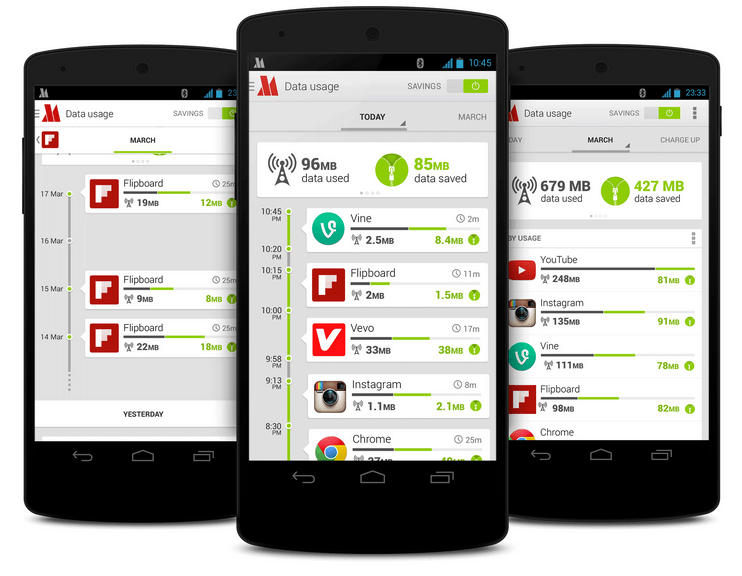
While details about Opera’s technology behind Max remain sparse, the company says it decided to extend this compression technology for the browser to all of your phone’s apps. Some apps like Facebook always encrypt all of your data, and those connections will always bypass Opera’s proxies. Judging from Opera’s screenshots, though, image-heavy apps like Instagram, Flipboard and Vine will greatly benefit from this tool.
In return, though, all your data will flow through Opera’s servers. Whether you want to use the tool will likely depend on how much you trust the company with your data. It also remains to be seen whether using Opera’s proxies adds a lot of lag or ends up pixelating images too much in an effort to conserve bandwidth.
The app is already available in Google’s Play store, and installing it will allow you to get in line for the beta. For now, the tool will only be available in the U.S. and Western Europe.
18 Feb 20:29

Google Explains How Not To Be A Glasshole
by Matt Burns
Here are the do’s and don’ts of wearing Google Glass. Right from Google.
Apparently — and I know this might be a shocker — you’re not supposed to stand in the corner of the room and record people with Google Glass. That would make you a glasshole, according to this list.
At this point, Google’s challenge is not building the Glass platform, but training the general public to welcome Glass wearers into society. Glass’s future rests largely on the public’s acceptance of the technology. If, like Bluetooth headsets, it’s deemed nerdy or, worse, if Glass is lumped in with the NSA privacy scandle, the technology will be an also-ran. A lot is riding on Google Glass Explorers.
Google introduced Glass with a bang, but the company has not advertised the technology to the general public. For most people, their only interaction with the device is with a random person wearing Google Glass. These so-called Explorers, for better or worse, are Glass advocates. The “no glass allowed” campaigns clearly state that these advocates are not putting Glass in the best light.
As the last point in this do’s and don’ts list states:
Don’t Be creepy or rude (aka, a “Glasshole”). Respect others and if they have questions about Glass don’t get snappy. Be polite and explain what Glass does and remember, a quick demo can go a long way. In places where cell phone cameras aren’t allowed, the same rules will apply to Glass. If you’re asked to turn your phone off, turn Glass off as well. Breaking the rules or being rude will not get businesses excited about Glass and will ruin it for other Explorers.
18 Feb 17:45


Opera Max Leaves Opt-In Beta, Now Ready To Compress Data For One And All [Update: There's A Waiting List]
by Ryan Whitwam
 Update: While the app is no longer behind the Play Store beta wall, Opera is apparently waiting before they throw the switch. The Opera blog post said access to the general public was first come, first serve, but there's a waiting list in the app right now. Opera is allowing everyone access, but it's happening slowly, probably to manage server load.
Unlimited data is becoming a rarity these days, so you might need to watch your usage more closely.
Done With This Post? You Might Also Like These:
- Opera Wants To Help You Save Data And Money With Opera Max, A New App That Optimizes Most Mobile Network Traffic
- Completely Redesigned Opera Browser Exits Beta, Now Available In The Play Store
- [New App] Original Opera Mobile For Android Re-Released For Those Who Appreciate The Classics
- Opera Gets Into The Android Web Apps Game With Opera Mobile Store
Opera Max Leaves Opt-In Beta, Now Ready To Compress Data For One And All [Update: There's A Waiting List] was written by the awesome team at Android Police.
|
|
18 Feb 16:14


[New App] AlarmPad Brings Some Context To Your Alarms, Makes Waking Up Slightly Less Terrible
by Ryan Whitwam
 Being woken from a deep sleep by an intrusive sound is never fun, so it's easy to grow resentful of your alarm app. It's a necessary evil, right? AlarmPad is a new beta alarm app that tries to add some context to your alarms to make itself useful beyond just waking you up from a restful sleep. You may not love it, but you might respect it.


It only takes a few taps to set an alarm in AlarmPad, and it ties into your calendar appointments and the weather forecast automatically.
Done With This Post? You Might Also Like These:
- WakeVoice: Make Your Alarm Intelligent And Enlightening
- [Hands-On] doubleTwist Alarm Clock Is Probably The Best-Looking Way To Get Woken Up Way Too Early
- Chronus, Previously Known As The CyanogenMod cLock Widget, Is Now Available In The Play Store
- WakeVoice Is A Brilliant Alarm Clock - And 20 Lucky Readers Can Win A Free Copy
[New App] AlarmPad Brings Some Context To Your Alarms, Makes Waking Up Slightly Less Terrible was written by the awesome team at Android Police.
|
|
18 Feb 16:13


Samsung lays out which devices will get Android 4.4.2 KitKat
by Phil Nickinson

Samsung this morning announced which of its devices are planned to receive an update to Android 4.4.2 KitKat. The list doesn't appear to contain any real surprises, but it's good to have some confirmation.
Here's how it breaks down for devices in the U.S.:
|
|
18 Feb 16:13
 Believe it or not, one tiny fruit could change consumer technology forever — and no, fanboys, we're not talking about Apple. It turns out that the pomegranate, which is quite trendy right now for everything from flavoring drinks to scenting shampoos and candles, is also the inspiration for new lithium-ion battery technology that may feature dramatically improved battery performance and longevity.
Continue reading...
How a delicious fruit could change tech forever
by Zach Epstein
Believe it or not, one tiny fruit could change consumer technology forever — and no, fanboys, we're not talking about Apple. It turns out that the pomegranate, which is quite trendy right now for everything from flavoring drinks to scenting shampoos and candles, is also the inspiration for new lithium-ion battery technology that may feature dramatically improved battery performance and longevity.Continue reading...
18 Feb 16:10

Watch the first teaser for Marvel's 'Guardians of the Galaxy'
by Andrew Webster
Guardians of the Galaxy is Marvel's next franchise to make the jump to film, and you can catch a brief glimpse of the movie in action in the new teaser below. The 15-second spot doesn't show much — you'll only get a small glance of Vin Diesel playing a sentient tree, for instance — but it's enough to give you a taste for the film's look and feel. The movie also stars Parks and Recreation's Chris Pratt, Avatar's Zoe Saldana, and Bradley Cooper voicing a genetically engineered raccoon. It looks to be much lighter fare when compared to Marvel properties like Captain America or Thor, and it's due to hit theaters on August 1st.
18 Feb 13:05


London Heathrow customs agent interrogates Edward Snowden's attorney Jesselyn Radack
by Xeni Jardin
I'm fine. Heathrow's Border Force was just trying to intimidate me. "Who is Edward Snowden?" "Do you know him?" "Where is Bradley Manning?"
— Jesselyn Radack (@JesselynRadack) February 16, 2014
Jesselyn Radack, an attorney who represents NSA whistleblower Edward Snowden, was detained and interrogated while transiting customs at Heathrow airport in London. Kevin Gosztola reports:
Jesselyn Radack told Firedoglake she was directed to a specific Heathrow Border Force agent. He “didn’t seem interested” in her passport. She was then subjected to “very hostile questioning.” As Radack recalled, she was asked why she was here. “To see friends,” she answered. “Who will you be seeing?” She answered, “A group called Sam Adams Associates.”The agent wanted to know who was in the group. “Ray McGovern, Annie Machon, Thomas Drake, Craig Murray,” she answered. She said she is part of the group as well.
“Where will you meet?” Radack answered, “At the Ecuadorian Embassy.” Then, the agent asked, “With Julian Assange?” Radack said yes.
The interrogation continued, “Why have you gone to Russia twice in three months?” Radack said she had a client in the country. “Who?” She answered, “Edward Snowden.”
"‘Why Have You Gone to Russia Two Times in Three Months?’—Heathrow Customs Agent Interrogates Snowden Lawyer" [firedoglake]
.@ABAesq Please put out a statement that it is unacceptable for the US (or any) government to monitor, harass, or intimidate attorneys.
— Jesselyn Radack (@JesselynRadack) February 16, 2014
|
|
18 Feb 13:02

15+ Awesome Google+ Tricks You Might Not Know About
by Melanie Pinola

Google is slowly but surely improving Google+ and trying to bring the social network to the masses. Yet some of Google+'s best features are less than obvious for both avid Google Plussers and those who are still wondering what the point of it is. Here are some of the more interesting or at least useful tips for getting the most out of Google+.
Sharing and Saving

1. Control who sees your posts
While this isn't an advanced feature, it's arguably one of the best things about Google+: You can easily have a private conversation with one or more people, share posts publicly or to certain groups, and even share them with people who aren't on Google+ (no need for them to sign up just to see your update, unlike Facebook). It's also a feature that seems to be the most confusing to newbies. The short of it is:
- To share a post privately, delete everything in the To: box and add the name of one or more people. You can also enter an email address.
- To share a post with your circles (groups of your connections on Google+) or everyone, enter the name(s) of the circles or Public.
- To mention a person in your post, regardless of your sharing settings—and also send them a notification to get the person's attention—write their name with a + or @ sign in front of it in the "Share what's new" box.
ProTip #1: Click the right dropdown box at the top of your post after you've sent it and select "Disable reshares" for an extra (albeit, not foolproof) measure of privacy on any post.
ProTip #2: You can create a circle with just one person (e.g., your significant other) for easy sharing of stuff without cluttering each other's inboxes. [h/t Kari Coad]
That's the gist of it, but you might want to check out our guide to Google+ privacy for fine-tuning what you share and with whom.
2. Format your posts
Another nice thing about Google+ is you can write as little or as much as you like in your post. For long rants, especially, Google+'s unique formatting capabilities make your post more readable:
- Bold a word or phrase with astericks: *bold*
- Italicize with underscores: _italics_
-
Strikethroughsomething with hypens: -correction-
This cheatsheet could help you remember these and a few other handy tips.
3. Use keyboard shortcuts
As with other Google products, Google+ is friendly to keyboard ninjas. Type a question mark (?) to see a list of all available keyboard shortcuts, which Google updated not too long ago.

4. See who's shared your posts
Data/analytics nerds might loves this: Google+ Ripples shows you how many public shares any particular post has gotten, how it's been reshared over time, and other statistics about your posts. To see the visualization and details, click on the drop-down box on the top right of any post and select "View Ripples."

5. Create a poll
Via Web Designer Depot, this is a pretty smart—and easy—way to do a poll in Google+: Ask people to vote with a +1. You write the options in the comments, then choose "Disable comments" from the post dropdown menu so your post is solely a poll. There's no way to disable voting for multiple options here, but it's still a nice way to get feedback and encourage interactivity.

6. Save posts to empty circles for future reference
Circles don't have to have anyone in them. Create one or more empty circles that you can share posts to for easy bookmarking. For example, you can create ones like "ProTips" or "Photos" for your favorite finds, "Drafts" for those Google+ posts that start to turn into more blog-length updates, or "Note" for simply sending yourself stuff.
Similarly, you can create an Evernote or Pocket circle with just the email address those services give you to send stuff for saving—so you can easily save Google+ posts to those services. [h/t Ryan Gibson]
7. Create an RSS feed from a Google+ page or profile
Google doesn't have an RSS feed built in, but there are several tools to create a RSS feed from a Google+ page or profile. Feed+ for Chrome and Google+ to RSS both create feeds only for public posts, however.
8. Share your circles with others
Part of networking and joining in a community is connecting people together. You can do that by sharing specific circles with others. Go to People in the left menu, Your Circles, and then click on the circle you want to share. Under the Actions menu, click "Share this circle." As Kari Coad notes, it's probably best to give a heads up to people in that circle you're sharing. (If you have a collection of celebrities or influencers in circles, though, or there's a public circle, like our Lifehacker one, probably not a big deal.)
Photos

Google+'s built-in photo editing tools, auto enhancement features, and easy sharing of sets of photos makes it a pretty inspiring place for everyone who loves photography.
9. Create a photo slideshow for your profile
Did you know that on your profile page, your avatar photo links to an entire photo album—not just your profile photo. With this album, you could showcase your creative work, a series of images, whatever you want everyone to see. Click on the left menu and select Profile. Then under the Photos menu, scroll down to Profile Photos, and in the dropdown menu, select "Add photos."
10. Use a GIF as your profile pic or cover photo
Better yet, you can even use an animated GIF as your profile photo and/or your cover photo. (Google+ is the only social network to let you use animated GIFs in your updates as well as your profile.)
11. Auto backup photos from Android or iPhone
Google+'s automatic backups of your mobile photos is by no means a secret feature, but it is one of the most useful and perhaps underutilized features. Google gives you unlimited storage for standard size photos (up to a tablet-friendly 2048px resolution) you upload, with full resolution photos counting towards your Google Drive's storage space (which comes with a default of 15GB). Turn on the auto upload feature in your Google+ mobile app, where you can set the photo size for the backups.
12. Search animated photos
I have to admit, I really dig Google+'s Auto Awesome photos and mobies creation. They're like unexpected presents in your inbox. If you want so see all of the animated photos Google made for you and people in your circles, head to https://plus.google.com/photos/search/... (or search for "motion" in the Photos tab). [h/t Amit Agarwal]
This even includes photos Google might have animated for you from your old photos you uploaded to Picasa Web Albums, now that "Google+ is the new home for your photos" (i.e., Google+ has all but replaced the old Picasa Web Albums). Just search for words like "motion," "mix," or "hdr."
Hangouts

Finally, let's talk Hangouts, Google+'s way of having you chill out (or talk seriously) online with your friends and complete strangers.
13. Use Hangouts apps to enhance your hangouts
Hangouts already comes with several cool tools built-in, including voice calls from the desktop, remote desktops, screen sharing and Google Drive support, and SMS support and location sharing, to name a few. Several third-party tools add even more capabilities, such as learning Spanish phrases in real-time with people in your circles, playing multiplayer games, and using whiteboards together.
14. Use the Lower Thirds tool to add more personal information on the Hangouts screen
Lower Thirds is part of Hangout Toolbox, and it puts a message at the bottom of your screen (like the title of your Hangout or your name or other branding) while you're in Hangouts. The free plugin also provides volume adjustments, comment tracking, and, very importantly, meme faces.
15. Schedule a Hangout on the Air
There's an easy way to add a Google+ hangout to a calendar event in Google+ by creating an event (in the left menu of Google+, then the "Plan a Hangout" button. You can invite people to this scheduled hangout, add details, and so on.
For a Hangout on the Air (your broadcast-to-the-world stream), you'll need to do a bit of a workaround, according to this Google+ Hangout tip sheet:
The best way to do this is to create a Google Plus Event, without adding a Google Hangout. Then, at the time of the event, start a Hangout on the Air. Then edit the Google Plus event and paste the YouTube link and the hangout link into the YouTube URL and Link URL sections of the event, respectively. Here's a post with more info on this.
Bonus: Easter Eggs
Last but not least, how about some fun/stupid tricks? When using Hangouts to chat with others, try typing in "/pitchforks" or "/shydino". The first will make an angry mob run across the chat window, while the latter will bring up a shy dinosaur. You can add "/ponies" or try the Konami cheat code to change the chat window background into a picture. See this helpful Google+ shortcuts post at Hongkiat.com for more tricks.
For further reading, see our previous posts on useful Google+ add-ons, as well as Gizmodo's own collection of Google+ tricks.
Photos by Oleksiy Mark (Shuttterstock).