Shared posts

12 Mar 13:57

Canada and South Korea manage a free trade agreement without crazy copyright provisions

by Cory Doctorow

Michael Geist writes, "Canada and South Korea announced agreement on a comprehensive trade agreement earlier today. The focus is understandably on tariff issues, but the agreement also contains a full chapter on intellectual property (note that the governments have only released summaries of the agreement, not the full text, which is still being drafted). The IP chapter is significant for what it does not include. Unlike many other trade deals - particularly those involving the U.S., European Union, and Australia - the Canada-South Korea deal is content to leave domestic intellectual property rules largely untouched. The approach is to reaffirm the importance of intellectual property and ensure that both countries meet their international obligations, but not to use trade agreements as a backdoor mechanism to increase IP protections."

The decision to maintain existing domestic laws without pressuring the other country to conform to its approach illustrates that claims of the necessity for harmonized IP rules in trade agreement are simply untrue. A far more appropriate approach is to require consistency with international obligations.

In fact, the Canada - South Korea agreement may provide a model for many other countries that wish to include intellectual property provisions in their trade agreements but are content to require each party to meet international standards rather than the domestic rules of one of the parties. The U.S. and E.U. approach has been to export their rules to other countries, but Canada and South Korea have demonstrated that respect for domestic choices and compliance international obligations is a better alternative.

Canada - South Korea Trade Agreement Demonstrates Deals Possible Without Increasing IP Protections


11 Mar 23:51

Get Buttons Back in iOS 7

by Adam Dachis

iOS 7 confused and frustrated some of us due to a lack of actual buttons in many parts of the interface. Instead, Apple opted for only text that wasn't always an obvious tapping point and was sometimes difficult to touch accurately. In iOS 7.1, you can bring buttons back and save your fingers some trouble.

As YouTuber iTwe4kz points out in the video above (at 2:24, specifically), you just need to take the following simple steps:

  1. Open the Settings app.
  2. Tap General.
  3. Tap Accessibility.
  4. Switch the "Button Shapes" toggle to on.

Once you do that, you'll have your precious buttons back!

What's new in iOS 7.1? Safe for Jailbreak? New Features! | YouTube via MacRumors

11 Mar 23:49

Sinatra Bobby Soxers: clip from Teenage

by Mark Frauenfelder

The documentary Teenage, about the history of the concept of teenagers, will open in theaters on March 14th, 2014. Above, an exclusive clip from the movie about Frank Sinatra bobby soxers.

Teenagers didn't always exist. They had to be invented. As the cultural landscape around the world was thrown into turmoil during the industrial revolution, and with a chasm erupting between adults and youth, the concept of a new generation took shape. Whether in America, England, or Germany, whether party-crazed Flappers or hip Swing Kids, zealous Nazi Youth or frenzied Sub-Debs, it didn't matter - this was a new idea of youth. They were all "Teenagers."

A hypnotic rumination on the genesis of youth culture from the end of the 19th century to the first half of the 20th, Matt Wolf's Teenage is a living collage of rare archival material, filmed portraits, and diary entries read by Jena Malone, Ben Whishaw, and others. Inspired by Jon Savage's book and set to a shimmering contemporary score by Bradford Cox (Deerhunter / Atlas Sound), Teenage is a mesmerizing trip into the past and a riveting look at the very idea of "coming-of-age."

Teenage, a film by Matt Wolf


11 Mar 21:02

Canadian Movie & Music Pirates to Be ‘Fined’ Without Court Orders

by Andy

Despite clear indications that the best way to discourage people away from pirate sources is by offering legitimate content at a fair price, this carrot is still being rejected in favor of the stick.

Companies such as Voltage Pictures favor very big sticks indeed, suing tens of thousands of file-sharers for thousands of dollars each, both in the United States and Canada.

US-based Rightscorp, on the other hand, favor a smaller stick, sending settlement demands to alleged file-sharers for relatively smaller amounts per infringement. Until recently they were confined to the United States, but all that is about to change.

In a move to expand its business model north of the border, Rightscorp has retained Susan Abramovitch, a partner at Gowling Lafleur Henderson LLP, one of Canada’s largest lawfirms. Based in the company’s Toronto office, Abramovitch is described as a leading entertainment lawyer covering disputes in the music, film, television and videogaming industries, among others.

Rightscorp says that Canada represents a new market for its business model and an important step in the company’s international expansion plans. Implying that settlements are now accepted practice in Canada, the company references the recent Voltage Pictures case involving Teksavvy, which saw the ISP ordered to hand over the details of 2,000 alleged file-sharers.

However, while the Voltage case resulted in protracted legal argument and was ultimately subjected to court-ordered constraints, Rightscorp’s settlement demands are designed to circumvent controversial disclosure issues. Alleged infringers are reached via settlement notices attached to regular DMCA-style notices forwarded to them by their ISPs.

In the US, Charter Communications passes on Rightscorp cash demands, but Comcast does not. Will Canadian ISPs comply?

To get a broader idea of how this kind of business model might play out in Canada, TorrentFreak spoke with Canadian law professor Michael Geist.

geist“Canada has established a notice-and-notice system that allows rights holders to have their notices forwarded to subscribers. However, that system has yet to take effect,” Geist told TF.

“At the moment, there would be no legal obligation on the ISP to forward the notice to the subscriber, though that is likely to change in the coming months.”

When that notice-and-notice system does take effect, Geist says that Canadian law may specify the form notice letters must take.

“The law already identifies specific information to be included in the notice. There is no reference to settlement information or legal demands. If the Canadian government objects to [Rightscorp's] approach, it could use regulations to stop the inclusion of settlement demands in notice letters,” Geist explains.

“Even if it doesn’t, there will be a question of whether the notices are in the proper form if they include information beyond that found in the statute.”

Since local ISP Teksavvy is at the core of the Canadian Voltage Pictures case, TorrentFreak spoke with the company to gauge its reaction to the news that Rightscorp might soon come knocking. Stopping short of an official comment on the business model, the ISP essentially echoed Michael Geist’s sentiments.

“TekSavvy would be within its rights to insist, and would insist, that any notice conform with Canadian law and not over reach the stated guidelines,” the ISP told TF.

rightscorp-realClearly, the main idea of the Rightscorp notices is to generate revenue for both the company and rightsholders, but in passing the notices on ISPs are also incurring costs, which raises other issues.

“The notice-and-notice law permits the government to set a fee for sending a notice that an ISP can charge. At the moment, it does not look like the government will establish a fee, preferring to wait to see how the system develops. Were this [business model] to come to Canada, the government might face increased pressure from ISPs to allow them to charge for their participation in the process,” Geist concludes.

TF approached Rightscorp lawyer Susan Abramovitch who did not immediately respond to our request for comment. The signs are, however, that she could be busy with this work during the months to come.

Photo: Michael Theis

Source: TorrentFreak, for the latest info on copyright, file-sharing and VPN services.

11 Mar 20:53

Google's Add-on store for Docs and Sheets could close the Office gap

by Valentina Palladino

Google launched the Add-on store today for Docs and Sheets, which basically gives you apps for your documents. The Add-on store has tools made by third-party developers (and a few Google originals) that you can install to add features to documents and spreadsheets that weren't available before, like creating labels or sending customized emails. The feature resembles the Google Play Store and currently features about 30 add-ons.

This is a way for Google to enhance Docs and Sheets with some of the features that are mainstays in Microsoft's Word and Excel programs. One of the launches is an add-on from Avery Label Merge, which lets you merge data from a Google spreadsheet into Avery address labels. Mailchimp's add-on lets you choose...

Continue reading…

11 Mar 14:36

Jawbone UP24 now works with Android

by Phil Nickinson

The Android wearables market isn't going to shrink anytime soon, and in fact today it got a great new addition with the Jawbone UP24. The $149 bracelet has been around for a few months but shunned the world's most popular operating system until today. 

So what's it do? Oh, just track your physical activity and sleep patterns, set alarms and reminders to get you to move, log your food and drink intake and get tips on how to improve your existence. And it does it all in one of the smaller, more comfortable form factors available.

If you've got a Jawbone UP24, you can snag the new Android app (never mind the date on the app listing) at the link above. For more on the Jawbone UP24, hit the link below.

Source: Jawbone press release (pdf); More: Jawbone


11 Mar 14:35

Netflix service speeds up after company agrees to pay Comcast ‘ransom’

by Zach Epstein
Netflix Speed Test

Following news that Comcast and Netflix had reached a deal whereby Netflix would pay the Internet Service Provider a fee in order to ensure Netflix subscribers have a smooth viewing experience, people panicked and cried that net neutrality was dead. While that's not entirely true, what is now a matter of fact is that Netflix service performance on Comcast's network has improved fairly substantially since the company ponied up what many refer to as a "ransom."

Continue reading...

11 Mar 14:35

The New HTC One’s Dual Camera Explained: Post-Shot Focus Selection And 3D Image Effects

by Darrell Etherington
HTC’s new One smartphone is the worst-kept secret of the season, with leaks in abundance and even official teasers that are being more forward about unannounced product than you might expect. Today, another piece of the puzzle falls into place with a leaked print ad for Australian carrier Telstra (via GSMArena) that details why the smartphone has two cameras on the back. The so-called… Read More
11 Mar 12:49

UK Piracy Blocklist Expands With Megashare, Viooz, Watch32 and Zmovie

by Ernesto

stop-blockedThe list of websites that are blocked in the UK for facilitating copyright infringement is getting longer and longer.

This week a new High Court ruling orders BT, Sky, Virgin Media, O2, EE and TalkTalk to block access to Megashare, Viooz, Watch32 and Zmovie.

Through the sites users can stream Hollywood movies directly, or via links to third-party sites such as Vidspace or Videohub. Viooz is the largest of the quartet and is listed among the 500 most visited sites in the UK.

The ruling comes after Hollywood studios filed a complaint that remained uncontested by the ISPs. Because the ISPs have given up on defending their position in court, it is now a mere formality for copyright holders to have a pirate site banned.

Represented by FACT and the Motion Picture Association, several major movie studios decided to ask for the blockades after their inquiries to the owners of the sites remained unanswered.

“FACT and the Motion Picture Association (MPA) wrote to four websites asking them to stop infringing creative content. Collectively, these sites provide access to an enormous collection of films with no permission from the copyright owners. FACT, supported by the MPA, therefore took this court action,” FACT told TF.

viooz

The court order, which has yet to be made public, is believed to be similar to the orders against Firstrow, Solarmovie and Tubeplus which were handed down last year.

In that verdict the Court clarified that even when a website uses external “hosts” for the infringing content, the linking sites could still be guilty of making content available.

“Even where the content could be accessed from the host sites, the Websites make it much easier for members of the public to find what they want. Viewed from the perspective of the user, the Websites do in a very real sense make the content available to the public,” Justice Arnold wrote.

Virgin Media confirmed that their received the court order which they will implement in the near future. “We obey court orders when addressed to the company.” spokesperson Emma Hutchinson told us.

The MPA told Recombu that the new Megashare, Viooz, Watch32 and Zmovie blockades are expected to go into effect this week. Speaking with TorrentFreak, FACT says that the aim is to steer more people towards legal options, if those are available.

“The growth of the legal online market is held back by illegitimate sites,” a FACT spokesperson told TF.

“We want an internet that works for everyone, where the creative property of artists and creators is protected along with the privacy and security of all users. The internet must be a place for investment, innovation and creativity and today’s verdict represents a step towards realizing this,” FACT concludes.

Whether the present blocks will be more than a drop in the ocean has yet to be seen. There are many other streaming portals that are still available, which means that the movie studios will probably be back in court later this year.

—-

The full list of sites that are currently blocked in the UK is as follows:

Megashare, Viooz, Watch32, Zmovie, Solarmovie, Tubeplus, Primewire, Vodly, Watchfreemovies, Project-Free TV, Yify-Torrents, 1337x, Bitsnoop, Extratorrent, Monova, Torrentcrazy, Torrentdownloads, Torrentreactor, Torrentz, Ambp3, Beemp3, Bomb-mp3, Eemp3world, Filecrop, Filestube, Mp3juices, Mp3lemon, Mp3raid, Mp3skull, Newalbumreleases, Rapidlibrary, EZTV, FirstRowSports, Download4all, Movie2K, KickAssTorrents, Fenopy, H33T and The Pirate Bay.

Source: TorrentFreak, for the latest info on copyright, file-sharing and VPN services.

11 Mar 12:47

New Featurette For The Raid 2 Slams In

New Featurette For The Raid 2 Slams In

Take that, internet

Subtitled 'Berandal', or 'hooligans' in Indonesian, The Raid 2 is actually a much more sophisticated brew than the word implies. Far from just a brawny Iko Uwais punch-up, Gareth Evans' follow-up to his much-loved movie sets the action - and there's plenty of it - against a gangland backdrop with shades of Hamlet, The Godfather and the yakuza flicks of Takeshi Kitano and Kinji Fukasaku. This new behind-the-scenes piece, fresh in via Vimeo, tells it straight from the horse's mouth.


Picking up the story hours after The Raid left it, bruised and battered, the sequel broadens out the world of Jakarta cop Rama (Uwais) to encompass the Bangun crime family. It's into this den of nastiness, led by crooked but essentially honourable patriarch (Tio Pakusadewo) and his grasping young son Uco (Arifin Putra), that Rama must disappear when he's sent uncover to root out the bent cops in cohoots with Bangun. Surely the poor guy is due some annual leave?

Joining Uwais in the ensuing carnage are Julie Estelle, Alex Abbad, Mathias Muchus, Marsha Timothy, Cecep Arif Rahman, Matsuda Ryuhei, Endo Kenichi and Kitamura Kazuki. Secure any loose items and then head here for the latest trailer. {New Raid 2 Stills} The Raid 2 arrives in the UK on April 11.


11 Mar 12:44

12+ Tips and Tricks to Work Faster in Microsoft Outlook

by Melanie Pinola

12+ Tips and Tricks to Work Faster in Microsoft Outlook

Love it or hate it, Microsoft Outlook is still the de facto email client at many offices. It's been a while since we took a look at good old Outlook, so here are some of our favorite tricks well worth revisiting to increase your productivity in this all-in-one email, calendar, tasks, and notes program.

The instructions and details in this post are based on Outlook 2010, but they should work with both earlier and later versions of Outlook, except where otherwise noted.

General Shortcuts

The shortcuts below work across the whole program, so you can get more done whether you're reading emails or adding meeting events to your calendar.

1. Learn Outlook's keyboard shortcuts. Like Microsoft Word , Excel , and other Office apps, Outlook has unique keyboard shortcuts so you don't have to waste time moving your mouse around or drilling down through menus. Learn the ones you use most and you'll speed through your Outlook tasks. MakeUseOf has a handy Outlook keyboard shortcuts cheat sheet you can download or print out. Among the most useful:

  • Ctrl+R: reply to email
  • Alt+R: reply to all in email or switch to the work week calendar view
  • Alt+W: forward email or switch to the weekly calendar view
  • Ctrl+M: F9 to Send/Receive all
  • Alt+S: Send email
  • Ctrl+G: open the "Go to date" dialog to jump to any date in the calendar

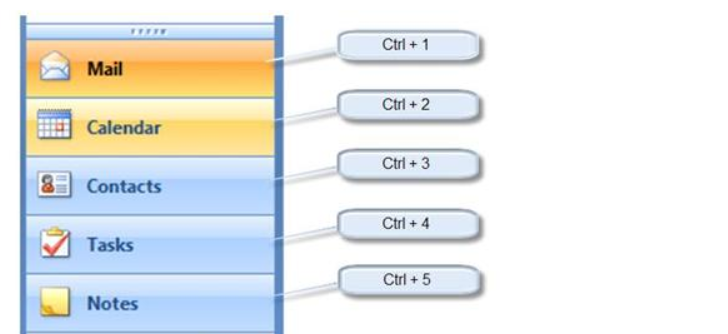
You can also switch between mail, calendar, contacts, and other items in the navigation pane by hitting Ctrl + [the place number of the item], e.g.:

12+ Tips and Tricks to Work Faster in Microsoft Outlook

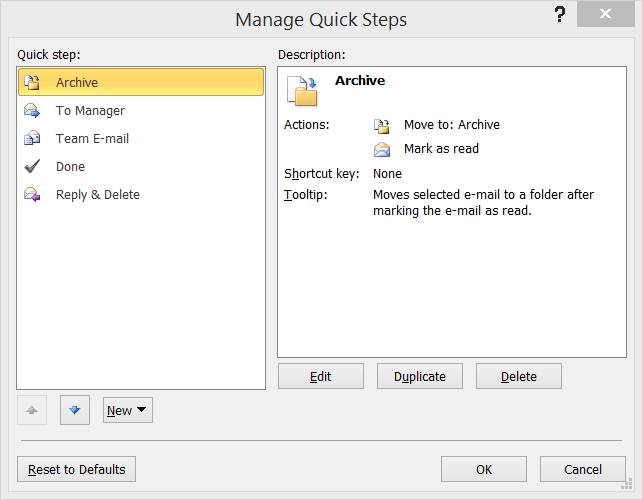
2. Take advantage of Outlook's Quick Steps. For those unfamiliar, Quick Steps is the killer feature Microsoft introduced with Outlook 2010. They're shortcuts to any multi-step action you can think of, such as moving emails to a specific folder and marking them as read or forwarding an email to your team and flagging it at the same time. It makes short work of repetitive tasks, and you can create your own Quick Step actions.

12+ Tips and Tricks to Work Faster in Microsoft Outlook

3. Create a new item from your clipboard. Hat tip to fellow Lifehacker Walter Glenn for this tip (and others in this piece):

Copy any text to your clipboard, then in Outlook press Ctrl-V. Outlook creates a new message (or note or whatever item, depending on the folder you're viewing) with the text already pasted.

So instead of creating a new item in Outlook, and then copying and pasting text in, you do both in one step.

Email Shortcuts

Even though Gmail and other webmail services are quite capable, Outlook is no slouch when it comes to sorting, filtering, categorizing, and otherwise wrangling your inbox to your needs.

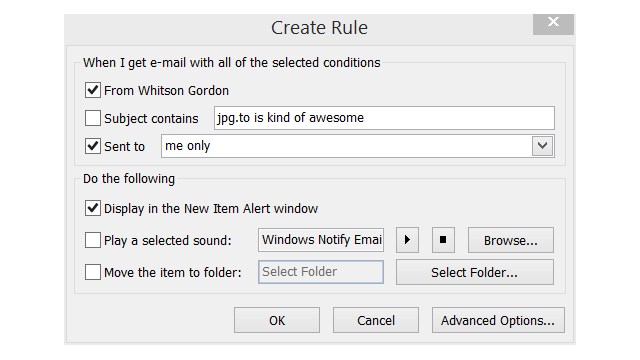
4. Limit desktop notifications to only the most important emails. It's terribly distracting to constantly be told "you've got mail!" but you still want to get notified for the most important alerts . In Outlook, set desktop notifications only for those VIP messages. Canadian legal magazine Slaw offers a detailed tutorial for how to do this, but, essentially, first you'll turn off all desktop alerts under the Mail Options, then create an Outlook rule to display alerts for messages from specific people sent only to you. For example:

12+ Tips and Tricks to Work Faster in Microsoft Outlook

5. Flag messages—fast. With a message or two selected, jut hit the insert key to toggle the flag on or mark it done.

6. Get emails that aren't sent directly to you out of your inbox. In an old post (still worth looking at if you're using Outlook), Scott Hanselman details his GTD organization method for Outlook. One of the best tips is to use a special "Inbox – CC" folder to gather all the emails that aren't sent directly to you; that way, the inbox is focused on only the most important emails. To set this up, go to Rules > New Rules…. Then click the "Advanced Options" button. In the Rules Wizard, select "where my name is not in the To box" and then in the next screen, "move it to the specified folder." (Alternatively, set up a VIP email folder and move "emails sent only to me" into that special folder.)

7. Use email templates to never write the same email twice. Tired of sounding like a broken record? For those emails you send often, such as requests for information or reminders of due invoices, save the email as a template via File > Save As… > Outlook template. Then, to use the template, go to New Items > Choose Form… and look in your "User Templates in File System" to browse for the template you saved. Or, even quicker, double-click the OFT file from Windows Explorer to create a new message from that template. You can also use text expansion to accomplish this across any program on your computer.

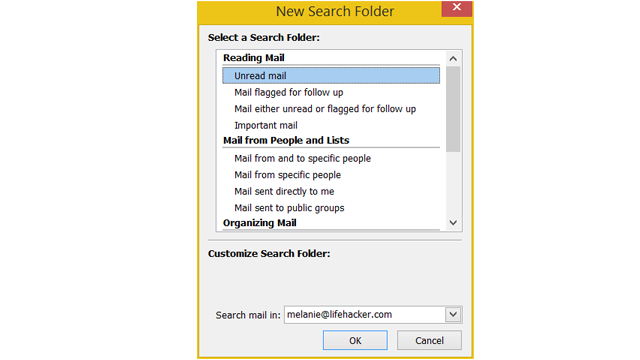
8. Create search folders for your most important emails. What are your most frequently accessed emails? Maybe they're emails from your boss or certain subjects (now where's that TPS report?). For any search you perform often, just save the search for quick access. Click on Search Folders in the left navigation menu, select "New Search Folder," and then either use the wizards or manually customize the search to your specifications.

12+ Tips and Tricks to Work Faster in Microsoft Outlook

9. Quickly save emails as files. If you want to save certain emails for posterity, you have a few methods at your disposal. While you can individually save any email through the File > Save As... menu (options: text, HTML, Outlook Message format or .msg, HTML, .mht), it's far faster to save emails by dragging them to the desktop or Windows Explorer. This will save them in Outlook's proprietary .msg format, with the subject as the file name.

You could also use VBA scripts like this and these to automatically (or semi-automatically) save emails to your local hard drive as individual messages, freeing them from the .PST or .OST file Outlook keeps them in.

Tasks, Calendar, Notes, and Journal

Outlook isn't just an email client. It's a full-fledged Personal Information Manager. Having everything in one place has its advantages, but there are still ways to use all these features more effectively.

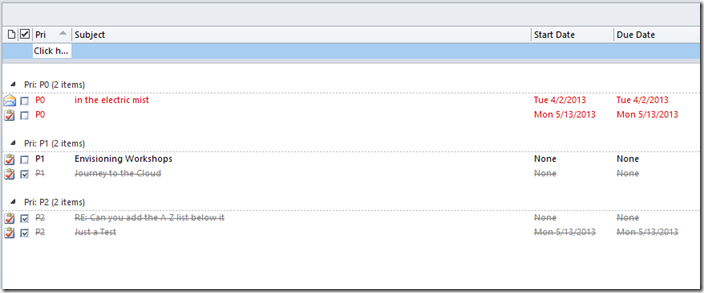
10. Group tasks by custom priority. If you want to use Outlook as your to-do manager too, MSDN's JD Meier suggests this organizational structure: In addition to adding a start date to each of your tasks, add a custom priority field (such as P0, P1, and P2). Then you can group your tasks by that custom field so you can see at a glance which ones to work on at the right time. For example:

12+ Tips and Tricks to Work Faster in Microsoft Outlook

This method might also work well with productivity techniques like working on tasks in batches—such as the Workstation Popcorn way of working productively from home—or if you want to organize your tasks by the amount of time they take.

11.. Use natural language to create a calendar event. Don't waste time scrolling through the monthly date picker to find the exact date for an appointment or meeting. In the date field, type naturally "Independence Day," "three days from tomorrow," and so on.

12. Save Outlook notes, events, and any other item to the desktop for quick access. It's not just emails you can save to your computer outside of Outlook: calendar events, notes, contacts, and everything else can be dragged to the desktop or a Windows folder as individual items for quick access later. Double-click the item—even if Outlook isn't open—and it'll open right away in Outlook.

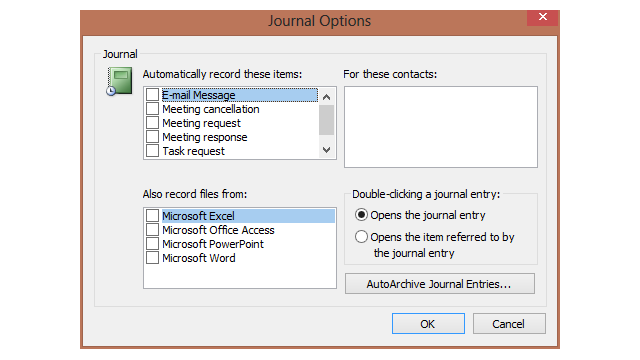
Bonus (for Outlook 2010 and earlier): Use Outlook as an automatic time tracking tool. This one's been deprecated in Office 2013, but if you have an earlier version of Outlook, you can use the Journal to automatically log your tasks, time, Office documents usage, and so on. You have to click on the left navigation pane's "More" button to find the Journal icon and then enable the Journal to track messages from specific contacts, meeting requests, and time spend in other office programs.

12+ Tips and Tricks to Work Faster in Microsoft Outlook

You'll then see a timeline and detailed log of all these events, which is great for those of us who have to keep timesheets, invoice clients, or just want to jog their memories about where the time really went.

These are all just scratching the surface of Outlook's capabilities. Loaded with options and features, as well as VBA scripts you can install or write yourself, Outlook is a powerful tool for organizing your daily life. For more tips and tricks, see our previous collection of Outlook tips or share your favorites here.

11 Mar 12:43

24 Best (And 2 WTF) New Android Apps From The Last 2 Weeks (2/25/14 - 3/10/14)

by Michael Crider

roundup_icon_largeWelcome to the roundup of the best new Android applications, games, and live wallpapers that went live in the Play Store or were spotted by us in the previous 2 weeks or so.

Please wait for this page to load in full in order to see the widgets, which include ratings and pricing info.

Looking for the previous roundup editions? Find them here.

Featured App

DigiCal Calendar & Widgets

Today's roundup is presented by DigiCal Calendar & Widgets from Digibites.

Done With This Post? You Might Also Like These:

24 Best (And 2 WTF) New Android Apps From The Last 2 Weeks (2/25/14 - 3/10/14) was written by the awesome team at Android Police.


11 Mar 12:38

Flypay Raises £1M To Make Settling Your Restaurant Bill “Waiter-Free”

by Steve O'Hear
Never mind poor service or the food itself, the experience of actually paying the bill at the end of a meal is often cited as the biggest pain-point for restaurant goes. Or so says Flypay, a new UK startup whose app wants to make settling the bill "waiter-free" and a lot speedier in the process. Read More
11 Mar 12:37

BBC Rolls Out New iPlayer ‘Rebuilt For The Multiscreen World’, Plans Online Only Channel For BBC3

by Ingrid Lunden
Today BBC took the covers off a new version of its on-demand iPlayer, the first time that it has been rebuilt since 2011 (it was launched in 2007) -- with improved search, responsive design and more iPlayer-exclusive content. The web and TV versions are going live today. The iPlayer mobile and tablet apps will be updated with the new interface in the coming months, Dan Taylor, head of iPlayer,… Read More
10 Mar 22:03

U.S. Court Orders Seizure of “DVD Ripping” Software Domains and Funds

by Ernesto

dvdfablogoAACS, the decryption licensing outfit founded by a group of movie studios and technology partners including Warner Bros, Disney, Microsoft and Intel, has launched a crackdown on DRM-circumvention software.

In an effort to limit the availability of so-called DVD ripping software, AACS has sued the company behind the popular DVD ripping software DVDFab.

Under U.S. law it’s forbidden to distribute software with the primary intention of circumventing copyright protection. In its complaint, AACS accuses the “DVDFab Group” of violating the DMCA’s anti-circumvention clause by selling tools that can bypass their DVD encryption.

“The DVDFab Group openly touts these illegal circumvention attributes of the DVDFab Software on the DVDFab Websites, advertising that, among other things, its software products ‘remove all Blu-ray copy protections,’ and ‘can remove … all known AACS copy protections’,” AACS writes in its complaint.

To stop the Chinese-based DVDFab from distributing its software in public, AACS moved for a preliminary injunction. After DVDFab failed to respond in court the request was granted by New York Federal Judge Vernon Broderick. TF has obtained a copy of the order.

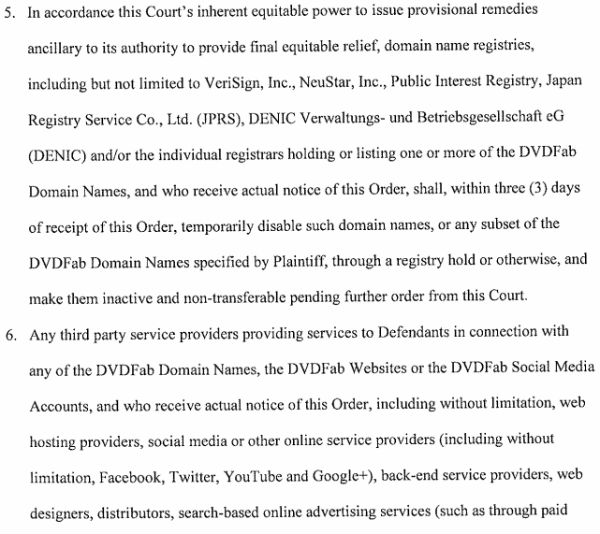
dvdfab

The broad injunction is unique in its scope, ordering several domain registrars to disable all domains associated with the DVDFab group. This includes DVDFab.com, DVDFab.net, DVDidle.com, 3d-videoconverters.com, 3dBluRay-ripper.com, Blu-Ray-ripper.us, Blu-Ray-Software.us, BluRayripper.jp, BluRaysbs3d.com, BluRaysoft.jp, CopyBiuRay.us, DVDFab.jp, DVDFab9.com and DVDvideosoft.jp.

At the time of writing none of the above domains can be reached.

Besides the domain names, DVDFab’s hosting providers are also ordered to stop servicing the company, as are other online services including Facebook, Twitter and Google+. Whether AACS has asked for the closure of DVDFab’s social media accounts is unclear, as they remain active for now.

Adding to DVDFab’s troubles, Judge Broderick also ordered several banks and payment providers to freeze or stop processing the company’s funds. This includes PayPal, Amazon Payments, Visa and MasterCard.

The injunction
dvdfab-order

In summary, the order grants AACS the power to completely wipe all traces of DVDFab from the Internet, and make it hard for the company to resurface elsewhere. At least, that was the plan.

The Chinese software vendor is not giving up easily, and is already making a comeback.

“Existing bookmarks for either site may not work from some locations, so temporary sites for both are being prepared and will be online shortly,” a company spokesman says, pointing users to dvdfab.jp.

Quite how long this domain and associated payment services can remain functional remains to be seen.

In any case, AACS and the movie industry will be encouraged by this broad injunction, and it wouldn’t be a big surprise if we see this strategy being repeated against other piracy-related targets in the near future.

Source: TorrentFreak, for the latest info on copyright, file-sharing and VPN services.

10 Mar 21:47

Murder machines: why cars will kill 30,000 Americans this year

by Mark Frauenfelder

Ben Marks of Collectors Weekly says, "We just published a piece about how streets came to be the exclusive domain of automobiles (spoiler alert: they didn't start out that way). Among other sources, we interviewed Peter Norton, author of Fighting Traffic, and Ben Fried, the New York editor of Streetsblog."

In 1924, recognizing the crisis on America’s streets, President Herbert Hoover launched the National Conference on Street and Highway Safety. Any organizations interested or invested in transportation planning were invited to discuss street safety and help establish standardized traffic regulations that could be implemented across the country. Since the conference’s biggest players all represented the auto industry, the group’s recommendations prioritized private motor vehicles over all other transit modes.

Norton suggests that the most important outcome of this meeting was a model municipal traffic ordinance, which was released in 1927 and provided a framework for cities writing their own street regulations. This model ordinance was the first to officially deprive pedestrians access to public streets. “Pedestrians could cross at crosswalks. They could also cross when traffic permitted, or in other words, when there was no traffic,” explains Norton. “But other than that, the streets were now for cars. That model was presented to the cities of America by the U.S. Department of Commerce, which gave it the stamp of official government recommendation, and it was very successful and widely adopted.” By the 1930s, this legislation represented the new rule of the road, making it more difficult to take legal recourse against drivers.

Meanwhile, the auto industry continued to improve its public image by encouraging licensing to give drivers legitimacy, even though most early licenses required no testing. Norton explains that in addition to the revenue it generated, the driver’s license “would exonerate the average motorist in the public eye, so that driving itself wouldn’t be considered dangerous, and you could direct blame at the reckless minority.” Working with local police and civic groups like the Boy Scouts, auto clubs pushed to socialize new pedestrian behavior, often by shaming or ostracizing people who entered the street on foot. Part of this effort was the adoption of the term “jaywalker,” which originally referred to a clueless person unaccustomed to busy city life (“jay” was slang for a hayseed or country bumpkin).

“Drivers first used the word ‘jaywalker’ to criticize pedestrians,” says Norton, “and eventually, it became an organized campaign by auto dealers and auto clubs to change attitudes about walking in the street wherever you wanted to. They had people dressed up like idiots with sandwich board signs that said ‘jaywalker’ or men wearing women’s dresses pretending to be jaywalkers. They even had a parade where a clown was hit by a Model T over and over again in front of the crowd. Of course, the message was that you’re stupid if you walk in the street.” Eventually, cities began adopting laws against jaywalking of their own accord.

Murder machines: why cars will kill 30,000 Americans this year


10 Mar 20:59

Elephants can decipher human voices better than we can

by Arielle Duhaime-Ross

Humans can tell a lot about one another just by listening to a voice. Age and gender are among the first pieces of information we pick up on when listening to a stranger speak, and studies have even shown that humans can determine a person's physical strength by listening to a recording of their voice. This ability is incredibly useful, because it can help us determine whether someone poses a threat without ever having to see them. Other animals can do this too, and have also been known to analyze sounds made by their predators. But African elephants may have taken this ability to the next level, as a new study suggests that elephants might be even better at decoding human voices than we are.

Continue reading…

10 Mar 20:19

Top 10 most popular Android apps from last week: QuizUp, Milk Music, iM5

by Steve Raycraft

Every week we cover new Android apps with Fresh Meat on Wednesday, followed by Android Gaming on Thursday and Top 10 App Updates on Friday. When Monday rolls around, we look back to see which apps were the most appealing to our audience. Read on for the 10 most popular Android apps among your peers from last week.

1. iM5

IM5

App info: iM5 is a new social network designed to inspire real-life action through the sharing of ideas.


2. Long Shadows Clock – UCCW Skin

Long Shadows Clock UCCW

App info: This UCCW skin is a great companion for those using Long Shadow Icons.


3. Google Now Launcher

Google Now Launcher

App info: Google Now Launcher makes it easy to access your Google Now cards with one quick swipe.


4. Milk Music™

Milk Music

App info: Milk Music is the new streaming radio from Samsung. Customize the dial to display only content you are interested in hearing.


5. QuizUp

QuizUp

App info: The popular quiz app comes to Android bringing over 200,000 questions in 400+ categories.


6. UCCW – Flat Sense

UCCW Flat Sense

App info: This UCCW skin gives you a flat version of the HTC Sense Clock widget.


7. White Line Go Apex Nova Theme*

White Line Theme

App info: White Line is another choice for those looking to utilize white icons on their Android device.


8. Solid Explorer Cast Plugin

Solid Explorer Cast

App info: This plugin lets you cast local media to your Chromecast device.


9. PushOn Icon Pack

PushOn Icons

App info: The icons itself are transparent and the impressed effects of the icons should appear on all backgrounds besides on pitch black or dark black backgrounds.


10. LagFix (fstrim) Free

Lagfix

App info: LagFix is a user-friendly implementation of fstrim utility. It allows you to select which partitions to trim (you should leave defaults unless you know what you are doing) and run the process easily.


Note:  To ensure that all apps receive a fair chance to make the list, we will retire any app that has made the list for three consecutive weeks and will place it in our Android and Me App Hall of Fame. We will post this Hall of Fame list in a dedicated series.

Any app with * next to the title indicates it will now be added to our Hall of Fame list and will no longer be listed in this article.

10 Mar 17:54

Sean Bean's Macbeth Gets A Concept Trailer

Sean Bean's Macbeth Gets A Concept Trailer

With Rupert Grint in the Kickstarter project

The Kickstarter bug is catching on both side of the Atlantic. Giving the Zach Braffs and Veronica Marses of the crowdsourcing world a glint of British steel is a new adaptation of Macbeth, Enemy Of Man, starring Sean Bean as the Scottish prince whose name cannot be mentioned - oops! - and Jason Flemyng as MacDuff. The project has a 'concept' trailer to help sell its wares to potential investors. Watch it below.


Also aboard on this new take on William Shakepeare's great tragedy are Cloud Atlas's James D'Arcy as Banquo, Charles Dance as Duncan, Rupert Grint as PJ Rosse - the 'beth's cousin - and Flemyng as the defiant figure of Macduff. Don't confuse this with the Michael Fassbender fronted Macbeth currently in full swing.

Runs the synopsis: "The Enemy Of Man will have a unique cinematic quality, stripping back the dialogue and cranking up the action. It traverses a bleak, frozen landscape of shattered castles and pillaged towns, rendering the interior world that clouds Macbeth and Lady Macbeth’s addled minds, as they sink deeper into their heart of darkness. A timeless masterpiece of war, ambition, betrayal, murder and ultimately, revenge."

It's the handiwork of 300 and Troy actor Vincent Regan, a debut director who also turned out a script based on the Bard's play. The early promo has a distinct Game Of Thrones feel, not least for sharing two key cast members, and the filmmakers are even offering prospective Kickstarterers the chance to take a piece of the project away with them. Head over to the official website for all the information.


10 Mar 17:52

Download leaked wallpapers from the all new HTC One

by Nick Gray

The all new HTC One will be unveiled on March 25 in London and New York and rumor has it that you’ll be able to buy it in early April. We know that a lot of people are excited about the new flagship Android phone, but we do have a consolation prize for those who want the phone but don’t have the money to buy it on day one – the HTC Sense 6 wallpaper collection from the all new HTC One.

We expect HTC to update the 2013 HTC One to Sense 6 sometime this summer, but with the wallpapers from the all new HTC One, you can make your old device look new again. We also promise to not tell anyone if you download the wallpapers on a non-HTC device.

Check out the gallery below to download the full resolution wallpapers from HTC Sense 6.

Gallery

all-new-htc-one-m8-wallpaper (1) all-new-htc-one-m8-wallpaper (2) all-new-htc-one-m8-wallpaper (3) all-new-htc-one-m8-wallpaper (4) all-new-htc-one-m8-wallpaper (5) all-new-htc-one-m8-wallpaper (6) all-new-htc-one-m8-wallpaper (7) all-new-htc-one-m8-wallpaper (8) all-new-htc-one-m8-wallpaper (9) all-new-htc-one-m8-wallpaper (10) all-new-htc-one-m8-wallpaper (11) all-new-htc-one-m8-wallpaper (12) all-new-htc-one-m8-wallpaper (13) all-new-htc-one-m8-wallpaper (14) all-new-htc-one-m8-wallpaper (15) all-new-htc-one-m8-wallpaper (16) all-new-htc-one-m8-wallpaper (17) all-new-htc-one-m8-wallpaper (18) htc-one-2014-wallpaper-collage

10 Mar 17:40

We really... REALLY... want this phone: All-New HTC One leaks yet again in video 'review'

by Brad Reed
All New HTC One Review

Whatever scary threats HTC has been sending to people who have received developer editions of The All-New HTC One, it clearly isn't working. While there are still two weeks to go before its official launch, The All-New HTC One has leaked yet again in a short video "review" of the device that shows off its basic build.

Continue reading...

10 Mar 17:38

Snowden: We Have More To Fear From Government Surveillance Than Google

by Gregory Ferenstein
Whistleblower Edward Snowden gave a rare public interview today at the technology mega-conference, SXSW. When asked whether we should fear surveillance from government or Google more, Snowden argued that the government is unequivocally a bigger threat. “The government has the ability to deprive you of rights,” he said in a live Interview with the ACLU, streamed through several… Read More
10 Mar 17:37

Alzheimer's can be predicted three years in advance with new blood test

by Arielle Duhaime-Ross

All it takes to predict an individual's likelihood of developing Alzheimer's disease within the next two to three years is a blood test, according to a study published yesterday in Nature Medicine. The test, New Scientist reports, detects the concentrations of 10 chemicals that are associated with the disease — and the resulting diagnosis is 96 percent accurate.

Continue reading…

10 Mar 14:58

BBC Releases 30th Anniversary Edition Of The Hitchhiker’s Guide To The Galaxy Text Adventure Game. You Have Died (And Gone To Gaming Heaven)

by John Biggs
You are on a blog. The latest news is at the top and scrolls down infinitely. The first story is about the 30th Anniversary Edition of Infocom's Hitchhiker's Guide To The Galaxy text adventure game. There is also a story about Kantar here. > READ STORY Read More
10 Mar 14:05

Samsung official hands-on with the Gear 2 and Gear Fit

by Adam Zeis

If our own hands-on with the upcoming Gear 2, Gear 2 Neo and Gear Fit wasn't enough to satisfy you, Samsung has done some video work of their own as well. They've posted up an official hands-on with the Gear 2 and Gear Fit, giving a near ten-minute look at the goods. There's nothing terribly new buried within, but we do get a good overview of the features and specs across all the devices.

The video shows off some of the notifications and other features such as answering a call or replying to a text message. There's a great look at the heart-rate sensor and activity features as well. 

We're getting excited to go all out with the Gear devices, so thankfully just a few more weeks and we can do just that. Stay tuned!

09 Mar 20:05

Google is finally getting serious about wearables

by Dieter Bohn

Speaking today at the SXSW conference, Google's SVP of Android and Chrome Sundar Pichai said that in two weeks, Google will be releasing a developer SDK that will make it easier for companies to create wearable devices that run on Android. Pichai didn't drop any hints as to whether or not Google itself was working on any devices, but instead said that when it comes to wearables, he thinks about it "at a platform level." That means that Google is focusing on the low-level operating system hooks that are necessary for the sensors in a wearable device to talk to the Android operating system. Focusing on the "platform" is a clever way for Pichai to position Android as a real player in wearables without committing Google to building them...

Continue reading…

09 Mar 15:28

Kapow: Marvel adds sound to comics

by Adrianne Jeffries
09 Mar 15:28

Five Best Home Wi-Fi Routers

by Alan Henry

Five Best Home Wi-Fi Routers

A good Wi-Fi router is essential for any solid home network. The best ones get great range and can serve all of the computers in your home, offer tons of management features so you can control your network, focus on speedy communication, and others even have advanced features like NAS support, printer sharing, traffic shaping, and more. This week, we're looking at five of the best on the market right now.

Earlier in the week, we asked you which Wi-Fi routers you thought were the best . If this post looks familiar at all, it's because we've updated it with your top five from this week, booting out the older routers from several years ago. We figured it was time to take a fresh look! Some of the old standbys that made the list last time are either no longer available, painfully old, or at the very least, have been eclipsed by superior options, now that 802.11ac is available in more phones and computers than before .

You offered a great selection—more than we have room to highlight—including some hacker-friendly routers and crowdfunded models that aren't on the market just yet, but here are the five that rose above the rest:

ASUS RT-AC66U Dual-Band Wireless-AC1750 Gigabit Router

Five Best Home Wi-Fi Routers

The ASUS RT-AC66U is the successor to some of the RT models that made the roundup last time we looked at the best routers. This one comes to the market packing 802.11ac, incredible range and signal power, and performance that can punch through walls and other obstacles to connect devices around your home. The antennae on the back are adjustable and detachable in case you want to add bigger ones or signal boosters, and the RT-AC66U packs NVIDIA's GameStream technology for gamers who use NVIDIA products and GPUs. The router also packs four gigabit Ethernet ports for wired connections, two built-in USB ports for printer or drive sharing with your network (not to mention remote management, remote downloading, and other devices you may want to be always on and always connected), and dual-band transmitters to help balance out tons of devices or connect ones that may be farther from the router. If you're interested, it'll set you back about $180 from Amazon.

Those of you who praised the RT-AC66U noted that it's super-easy to set up, with a built-in connection wizard that's easy enough to configure and will have you and your devices connected in minutes. You also noted that the router's built-in software, while not perfect, does pack a lot of management tools and advanced configuration options so you can monitor your traffic, prioritize applications and devices, and secure everything. Speaking of security, the router has a built-in VPN, so you can connect securely anywhere. Oh, and did we mention that it gracefully supports the DD-WRT and Tomato custom firmwares if you want to install them? You can read more about it—and its Wireless-N predecessor, the ASUS RT-N66U ($125 at Amazon)—in the nominations thread here .


Netgear AC1900 Nighthawk Smart WiFi Router (R7000)

Five Best Home Wi-Fi Routers

The Netgear AC1900 kind of looks like a stealth fighter, which may or may not be an awesome thing to you. Its design is actually supposed to boost signal, and the three external antennae are adjustable and designed to help deliver 802.11ac wireless signal to all corners of your home, connecting all of your devices. The Nighthawk is a dual-band router, perfect for connecting lots of devices or devices with varying ranges, and is heavily marketed to gamers, thanks in no small part to support for NVIDIA's GameStream technology. It also packs four gigabit Ethernet ports for wired connectivity, two USB ports (one of which is USB 3.0) for device sharing, including always-on downloading, printer sharing, NAS or hard drive sharing, and more. The router even supports Apple AirPlay and Time Machine backups right to connected drives. The Nighthawk packs a built-in VPN, guest networking, parental controls, and more security and configuration features that you probably need, and can also handle useful network management tasks like QoS, traffic shaping, and application prioritization. If you're interested in one, you can pick it up for $190 at Amazon.

Those of you who nominated the Nighthawk praised its sleek design and appearance, incredible range, and its reliability, noting that 802.11ac is amazing when you have devices to support it, and the Nighthawk is a rock once it's set up and configured. Best of all, it's DD-WRT compatible, and easy to customize on your own if you want total and complete control over its features and power. Even if you don't, you noted that it's easy enough to set up that anyone can do it. Read more in its nomination thread here .


Apple Airport Extreme/Airport Time Capsule

Five Best Home Wi-Fi Routers

Apple's Airport Extreme and Airport Time Capsule both pack 802.11ac wireless into small routers that can fit just about anywhere, set up easily, and can be remotely managed by iOS devices if you have one. Both devices support printer and hard drive sharing, and the ability to connect other devices via USB and share them with other computers, or to share a printer wirelessly with everything on your network. Both models also feature three gigabit Ethernet ports for wired connections. While the Airport Time Capsule is essentially a NAS and router combination, the Airport Extreme is more of a pure router - although the TIme Capsule is pretty much an Airport Extreme with drives and drive management features. They're both pricey though—the Airport Extreme will set you back $199, and the Airport Time Capsule will set you back $299 or $399, depending on whether you want the model that offers 2TB or 3TB.

Those of you who nominated both devices—and there were enough of you to make each of them their own separate nominee, to be sure—praised the fact that both devices are essentially plug in and walk away—setup so simple that you won't need to spend more than a few minutes getting your network configured and all of your devices connected. In addition to ease-of-use, those of you who nominated them noted their solid performance if you're vested in the OS X and iOS ecosystems, despite their high price tags—if the price tags get you down, you noted the Airport Express is a $99 802.11n base station that can also get the job done. Read more in the nominations threads here and here .


Buffalo Technology AirStation N600 Gigabit Dual Band DD-WRT Wireless Router

Five Best Home Wi-Fi Routers

Its name may be a mouthful, but the Buffalo N600 comes in a couple of flavors—the one we're highlighting, and the one you nominated, is the one that ships with DD-WRT already on-board, offering you unprecedented control over the router's features, the ability to get under the hood and really manage your router and your network and set everything up the way you like, and more. Of course, the router itself is no slouch—it's a dual-band 802.11n router with great range and signal strength, so if you're not looking for 802.11ac like some of the other models in the roundup, but you are looking for DD-WRT compatibility, this one might be a good option. It packs four gigabit Ethernet ports in the back and a single USB port for connected devices and device sharing, extendable antennae from the chassis for a little signal boost, and it can be configured as an access point or as a wireless bridge that can extend your current network's reach. They're pretty affordable, too—it'll only set you back $87 at Amazon if you want one.

Those of you who nominated the N600 praised Buffalo's DD-WRT support and compatibility, and the router's own reliability. A number of you pointed to it as a logical upgrade from the old Linksys WRT54G, especially one that won't break the bank if you're looking for a cheap network upgrade without giving up control over your network or dealing with a UI you don't like or admin tools that don't give you the options you want. You also praised the N600 for handling all of the great things that DD-WRT can do, including built-in VPN via OpenVPN, Dynamic DNS, traffic shaping and QoS, NAS and wireless printing support, device sharing, and more. Check out the nomination thread to read more.
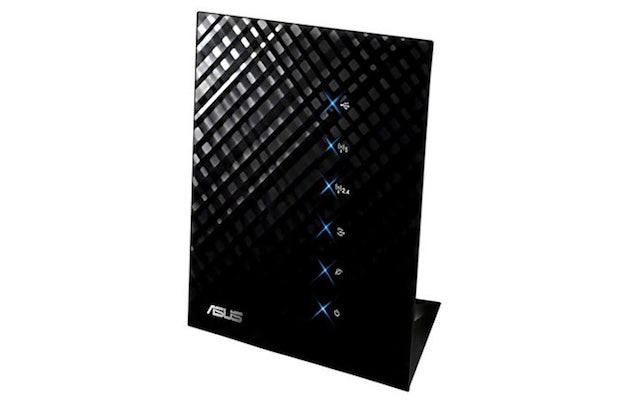

Asus RT-N56U Dual-Band Wireless-N600 Gigabit Router

Five Best Home Wi-Fi Routers

The ASUS RT-56U earned more than a few nominations of its own, even considering its higher-end Wireless-N sibling, the N66U was mentioned along with its Wireless-AC successor, the RT-AC66U, both earlier in the roundup. Still, there was a lot of love for the RT-N56U, especially from those of you who wanted a fast, flexible router with internal anntennae that could be mounted anywhere, was powerful enough to serve an entire household with great signal, packed dual-band 802.11n so you could connect all of your devices, and still packed in features like NVIDIA's GameStream, twin USB 2.0 ports on the back for device sharing, wireless printing, and more, and the four wired gigabit ethernet ports that the router offers. It's a snap to set up, it looks great, and it's rock solid—a great router for someone who wants a device to connect to the internet, not necessarily manage a network. If you want one, $88 will get you one at Amazon, although if you shop around, you can probably find it for less than that.

Those of you who nominated the RT-N56U praised its reliability and performance, noting that many of you have had one for years and they're rock solid. You noted that you can't really ask for 5GHz, dual band performance and gigabit Ethernet in a consumer router at such a low price point, and almost all of you who commented on it noted that it's one of the few routers you can own and completely forget its there—you don't have to reboot it every few days. You can read more in the nominations thread here .


Now that you've seen the top five, it's time to put them to an all-out vote to determine the winner.

Honorable mentions this week go out to the venerable Linksys WRT54G, which earned a place in the top five the last time we looked at the best routers, but is positively ancient by comparison to almost everything else on the market today. It's an incredible router—rock solid and built like a truck, a router that in many cases simply hasn't needed to be upgraded in the 10-plus years since it was introduced. It's the gold standard for customizable, hackable, and reconfigurable routers, and supports both the DD-WRT and Tomato custom firmwares easily. It is, however, showing its age, supporting only 802.11a/b/g networking while the rest of the world has moved on to dual band networking, Wireless-N and now AC, and more advanced connectivity needs.

Its spiritual successor, the upcoming Linksys WRT1900AC seeks to reclaim some of the WRT54Gs former glory by packing in Wireless-AC, quad antennae, amazing cooling, open-source firmware, DD-WRT compatibility, tons of advanced networking features, the same customizability we all remember, and much much more. When it's out, it'll be interesting, to say the least. It's scheduled for release in April 2014 for $299. This video from Tekzilla will help you get excited for it.

Want to make the case for your personal favorite, even if it wasn't included in the list? Remember, the top five are based on your most popular nominations from the call for contenders thread from earlier in the week . Don't just complain about the top five, let us know what your preferred alternative is—and make your case for it—in the discussions below.

The Hive Five is based on reader nominations. As with most Hive Five posts, if your favorite was left out, it didn't get the nominations required in the call for contenders post to make the top five. We understand it's a bit of a popularity contest. Have a suggestion for the Hive Five? Send us an email at tips+hivefive@lifehacker.com!

Photo by Danny Choo.

09 Mar 15:27

VPN Providers Ban BitTorrent Traffic Over Piracy Concerns

by Ernesto

stop-blockedBitTorrent is a great technology to share large files with a massive audience, but it’s also one of the least private tools for communicating on the Internet.

It therefore makes sense for frequent BitTorrent users to use anonymity services such as VPNs and proxies. But those who sign up with a VPN should take a good look at the fine print, as not all VPN providers allow BitTorrent traffic across their entire network.

TF is currently compiling our latest overview of logging policies at various VPN providers, and by popular demand we also asked whether these services allow BitTorrent and other file-sharing traffic. The responses received thus far confirm that BitTorrent traffic is not welcome everywhere.

While all VPN providers we surveyed have BitTorrent-friendly servers, many have chosen to block file-sharing traffic on U.S. and U.K. servers. The main reason for these policies is piracy related.

VPNs Blocking File-sharing traffic

It appears that companies who offer VPN services in the US are often flooded with DMCA notices. This causes issues with the ISPs, as Unspyable explains.

“The issue is simply that the U.S. ISPs forward all the DMCA complaints to us. This forces us to deal with them which wastes time and effort, as we do have to send them a response,” Unspyable says.

“Since we don’t track anything we have nothing to give them in the response to the DMCA. However, many times that is not sufficient and we have had ISPs shut down our servers several times. This results in having to find new ISPs and the expense of setting up new servers,” the company adds.

NexTGenVPN notes that they block file-sharing traffic in the U.S. and U.K. because of bandwidth restrictions. The company also mentions that banning this type of traffic helps them to prevent being flooded with DMCA requests.

“The reason is quite simple actually. UK and U.S. are the only two locations where our bandwidth allocation is not really extendable at the moment, and we cannot accommodate massive transfers speeds there. Also, this prevents us from being flooded with DMCA complaints. Not that we really care, but it gets annoying in the end,” NexTGenVPN explains.

HideIPVPN also prohibits file-sharing traffic on some servers. The company notes that downloading copyrighted content is prohibited by law in the US, UK and Canada, so has decided to block both legal and unauthorized BitTorrent traffic on these servers.

“As you know uploads and downloads of copyrighted content via P2P and torrent networks is considered illegal in the U.S. With that in mind and also the fact that we do not wish to monitor traffic and data exchanged by our users, the simplest solution was to ban such traffic on some servers,” HideIPVPN tells TF.

While unauthorized file-sharing is against the law in most countries, rightsholders mostly send their takedown notices to U.S. ISPs. This is one of the main reasons why several VPN providers block BitTorrent traffic there.

NordVPN provides a similar explanation. The company currently blocks all file-sharing in several places.

“We only allow P2P traffic on servers that are located in the countries where there are no restrictions on the content downloaded via BitTorrent or other file-sharing applications,” NordVPN informed us.

File-sharing traffic is a no-go on EarthVPN‘s U.S. servers as well. The company mentions the DMCA as the main reason for this decision.

“Torrent and other file-sharing traffic is only allowed on Canada, Panama, Netherlands, Germany, Sweden, Luxembourg and Romania locations as of now due to the DMCA,” the company explains.

PureVPN takes it a step further. In addition to blocking file-sharing traffic on their servers in the United Kingdom, United States, Canada, Australia and elsewhere, they also block various torrent sites on these connections.

“We have blocked torrents on some of our servers. If users want to use BitTorrent, they can connect to our servers in Turkey, Sweden, Romania, Luxembourg, the Netherlands, Germany (Frankfurt only) or Russia and enjoy P2P/file-sharing there.

Non-blocking ISPs

Not all VPN providers are blocking file-sharing traffic in the U.S. and elsewhere though. Private Internet Access, for example, prides itself on providing unrestricted access to the Internet on all servers.

“We do not discriminate against any kind of traffic/protocol on any of our servers, period. We believe in a free, open, and uncensored internet,” PIA notes.

Ipredator, the VPN that was launched by a founder of The Pirate Bay, doesn’t have any file-sharing restrictions either.

“Besides filtering SMTP on port 25 we do not impose any restrictions on protocols our users can use on the VPN, quite on the contrary. We believe our role is to provide a net-neutral access,” the company told us.

The same is true for BlackVPN, Mullvad, Proxy.sh, VikingVPN and many others.

TF’s full report on the BitTorrent and logging policies of several dozen VPN providers will be published next week.

Source: TorrentFreak, for the latest info on copyright, file-sharing and VPN services.

09 Mar 10:11

Classic 'Star Trek' episode revisited as a comic book using original script

by Andrew Webster

One of the most beloved episodes of the original Star Trek series is getting a remake — only this time, it'll be a comic book. The award-winning episode "City on the Edge of Forever," written by Harlan Ellison, originally debuted on April 6th, 1967, but the show that aired was very different from the script that was written. Now comic publisher IDW is trying to bring that original vision to life.

Continue reading…