Jennifer Jenkins writes, "What could have been entering the public domain in the US on January 1, 2015? Under the law that existed until 1978 -- Works from 1958. The films 'Attack of the 50 Foot Woman,' 'Cat on a Hot Tin Roof,' and 'Gigi,' the books 'Our Man in Havana,' 'The Once and Future King,' and 'Things Fall Apart,' the songs 'All I Have to Do Is Dream' and 'Yakety Yak,' and more -- What is entering the public domain this January 1? Not a single published work."
Read the rest
At the end of every year, we take a look back at our most popular posts to reminisce (and to help you catch any stuff you might have missed). Here's one last look at our best posts in 2014.
We cover a lot of things here at Lifehacker, but we love nothing more than a good step-by-step guide. Here are our best how-tos from the year, from tech to life skills and everything in between.
If there is one thing everybody loves, it's food—and it's been a great year for food hacks here at Lifehacker. Here are our best tips and tricks for whatever you're cooking up. You better be hungry!
We love good DIY projects at Lifehacker, but they can be easy to miss if you're not planning a project at the moment. From computers to the household, these are the most popular DIY projects we featured this year.
Money: If you need it, you don't have it. If you have it, you need more of it. Or maybe that's something else. In any case, everyone needs help managing, saving, and investing their money. Here are the best tips we had this year for keeping your financial house in order.
The Hive Five series is one of our most popular, and this year was a great year for it. We rounded up the best options in just about every possible category, from hardware to software to gadgets and peripherals. Here's a look at our best from the past year.
Each year, we discover new downloads for Windows and highlight the tips and guides that can help you make the most of your system. Here were our most popular Windows posts this year.
The Mac saw a new (free!) operating system this year alongside all kinds of great other apps. Let's take a look back at our biggest and best Mac posts of the last year.
Lollipop. Material Design. Android Wear. 2014 has been a huge year for Google's favorite OS. That gives us plenty of new stuff to tinker with. Here are some of our best posts on the topic from the past year.
The iPhone saw all kinds of big news this year, from the release of iOS 8, to jailbreak apps and tweaks. Let's take a look back on the year's best posts.
Chrome quickly skyrocketed from a Google pet project to the most popular browser in the world. Here are some of our most popular Chrome extensions and guides from Lifehacker in 2014.
Firefox may not be as popular as it once was, but we still love it here at Lifehacker. Here were the most popular Firefox extensions and guides we featured in 2014.
Every week, we feature customized desktops and home screens submitted by readers that show off beautiful wallpapers and great customization and UI tweaks. Sometimes they're fun, sometimes they're functional, and sometimes they're both, but 2014 was a great year for all of them. Here's a look at the most popular ones.
Every week, we highlight interesting workspaces as well as what's in others' everyday carry bags. Here are the most popular featured bag and featured workspace posts of the year.
We're lucky to feature a wide variety of writers from all around the web here on Lifehacker, dolling out career advice, how-to tutorials, life lessons, and more. Here are some of the best guest posts from the past year.
In between tips and how-tos, we also often do "explainers," where we break down complicated topics into simple language. Our goal is to help you understand how these difficult topics work, and show you what you can do with the knowledge. Here are our best from the past year.
This was a great year for being clever and coming up with different tricks you can do with things around the house. The right tools should be used for the right job, but sometimes being creative is better than any tool out there.
Every week we have the pleasure of highlighting some of our productivity heroes, from company CEOs to artists and writers who manage to accomplish more than any reasonable human being should. Let's look back at some of our most popular interviews of 2014.
We pride ourselves on how-tos and explainers at Lifehacker, but some articles don't quite fit into either category. Perhaps they're personal accounts of life lessons, or maybe they're rants about a popular issue of the day. Here are some of the year's best features and essays along those lines.
Every day at Lifehacker we share new tips and tricks to help you live life better, but it isn't easy keeping up with all of them. That's where our weekly roundup of our favorite tips comes in handy. Here are the most popular top 10 lists of 2014.
Want to catch up on the best posts of past years? See our roundups for 2013, 2012, 2011, 2010, 2009, 2008, and 2007.
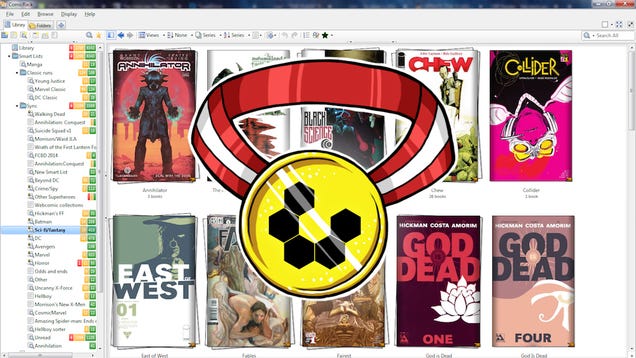
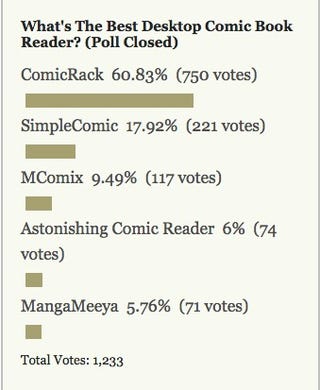
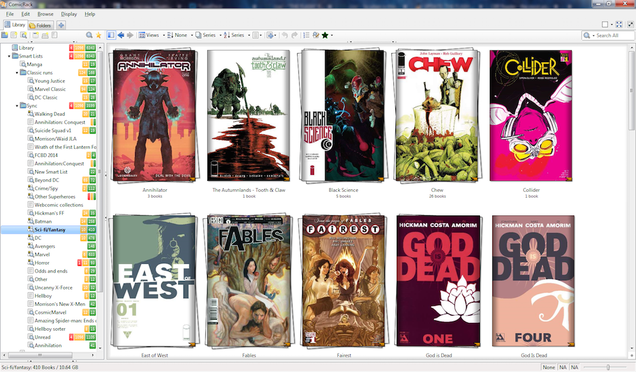
for Windows took the top spot, thanks to its rich library management features and its great reading tools, all bundled together into a great, free, lightweight comic book reader. It took away over 60% of the overall vote, and soared to first place.
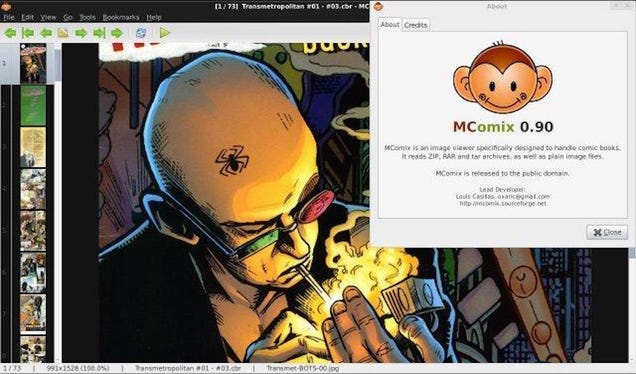
Hot on its heels in second however was the equally free and equally lightweight SimpleComic for OS X, an open-source comic book reader that's speedy and simple, without a ton of unnecessary frills. It picked up close to 18% of the votes cast. Third place went to MComix, an updated fork of the now-abandoned Comix project for Windows and Linux, also open-source and also free. It earned just shy of 10% of the votes cast. Astonishing Comic Reader, a Chrome extension and Windows 8 app with a companion Android app to boot, took fourth place with over 6% of the vote. MangaMeeya, an old Windows reader that hasn't been updated in a while but is still well-loved by its users, brought up the rear in fifth with close to 6%, trailing fourth place by only a couple of votes.
To read more about each of these and the honorable mentions not listed here, make sure to head back to the full Hive Five feature to read more.
The Hive Five is based on reader nominations. As with most Hive Five posts, if your favorite was left out, it didn't get the nominations required in the call for contenders post to make the top five. We understand it's a bit of a popularity contest. Have a suggestion for the Hive Five? Send us an email at tips+hivefive@lifehacker.com!
Last week, eager Christmas celebrators across the world hooked up their brand new Xboxes and PlayStations only to find that both online networks were down, leaving countless new games totally unplayable.
It was a particularly large piece of coal in gamers' stockings, and while Microsoft's service recovered after 24 hours, the PlayStation Network suffered a prolonged outage that lasted two full days. Even today we're still feeling the effects; almost a week later, PSN's service remains
intermittent thanks to what Sony said this weekend was a Distributed Denial of Service (DDoS) attack—an intentional flood of traffic designed to cripple a network's servers.
A group called Lizard Squad has claimed responsibility for the attack, though the "who" doesn't seem as important as the how: Just how did this happen? What knocked the PlayStation Network offline for so long? Why was Sony so unprepared? How can they prevent this from happening again?
Though Sony has not responded to repeated requests for comment over the past week, I spoke to two cybersecurity analysts in an attempt to at least make an educated guess as to how this could have happened. And although it's hard to parse the specifics of this particular attack without hearing directly from Sony, those analysts made one thing very clear: Today, it's harder than ever to stop these sort of attacks.
"There are a few reasons why DDoS attacks are bigger, more frequent, and in some cases more difficult to stop than they were in the past," said Dan Shugrue, director of product marketing at the cloud service provider Akamai Technologies. Though Shugrue couldn't comment on the specifics of the PlayStation Network attack, as Sony is an Akamai client, he said there are increasingly powerful tools that anyone can download and use to trigger denials of service.
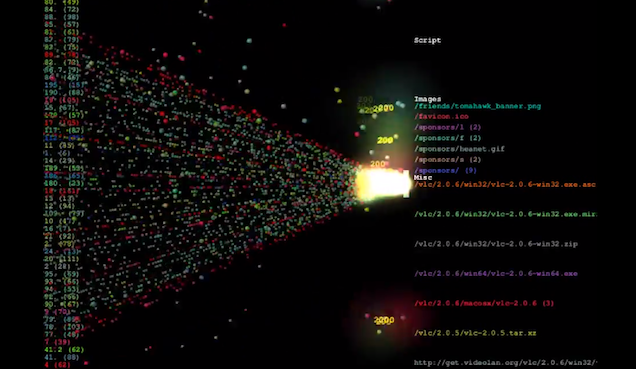
For example: the High Orbit Ion Cannon (HOIC), a free piece of software that allows anyone to flood a website with overwhelming amounts of dummy traffic created by custom scripts. Anyone with a computer can download this program, type in the URL of a website, and watch the HOIC generate fake user after fake user in hopes of overloading that site's servers and bringing it down. And when multiple people use the HOIC at once on the same target, the damage can grow exponentially higher.
Taking on a multi-billion-dollar corporation like Sony requires more sophisticated methods, though. David Larson, CTO of the cybersecurity firm Corero Network Security, said he suspects that this PSN attack was the result of some sort of combination of DDoS tools that may have included botnets—collections of computer servers designed to connect and perform a unified action. Anyone can rent a botnet, Larson said—and combining botnets and Ion Cannon-like flooding programs can cause a lot of devastation across the web.
Just picture it: a thousand computers all using the same DDoS tools to generate countless fake accounts, all flooding the same website or server with thousands of gigabytes of data per second. "It's tremendously easy," Larson told me on the phone this afternoon. "Anybody can afford it; anybody can do it."
Larson also pointed out that if the attackers specifically went after the PlayStation Network's login servers—the ones that recognize and accept usernames and passwords—rather than the servers that host PSN's content, it might have been easier to overload Sony's network with fake requests. To do this, the attackers may have manipulated outside Domain Name System (DNS) servers—the servers that translate domain names into IP addresses—into barraging the PlayStation Network with data. The internet is full of these servers, many of which are easy to target and use for malfeasance.
"It's tremendously easy. Anybody can afford it; anybody can do it."
"You can download freeware tools that are basically a database of known vulnerable DNS servers on the internet," Larson said. "I can send a request, a very small packet request to a vulnerable DNS server. I can say, 'Hello vulnerable DNS server, I am the PlayStation login server—please send me a record.' And that record may be several kilobytes long. So with one smaller 64-byte packet, I can request several tens of thousands of bytes of information, and that server will respond as if I was the Sony site, and it will send that packet at Sony."
Imagine this happening hundreds or thousands or millions of times in a second and you can immediately see the problem here: even the most sophisticated servers can only deal with so much traffic at a time. Overloading a computer with requests can slow it down or even cripple it entirely, and it can be very difficult for a machine to parse the real traffic from the fake, especially when attackers are using some combination of botnets and fake IPs.
"For someone who knows how to get those tools and use them, you can hide on a small bandwidth connection and create tens of gigabytes of traffic," Larson said.
But Sony has been down this road before. In fact, as Larson points out, networks like Xbox Live and PSN are likely hit by attempted DDoS attacks every few months at the very least. So how did they not thwart this one?
"Without the specific details, and not knowing specifically how this attack was done, since we're not at Sony, it seems to me that you could do this with a lot of requests that actually don't occupy a lot of bandwidth if what you're attacking is the login servers," Larson said. "If all you're trying to do is prevent access to the login server, that kind of a starvation or occupation attack in either a spoofed way or botnet-driven or any other way is a relatively low-bandwidth thing that can have a massive outage across a large-scale network like the PlayStation Network or Xbox Live.
"There's no size network that cannot be overrun—you can basically overrun any size network you want."
Sony is no stranger to high-profile security breaches, most recently in the wake of this attack and the Sony Pictures leak in early December, but spanning as far back as 2011, when the PlayStation Network suffered a major hack that exposed user data for millions of its customers. So it almost seems hard to believe that they weren't prepared for what happened last week. (Of course, it's worth noting, a DDoS attack is not a security breach—it's simply a flood of traffic.)
But as Larson explains, these attacks have grown increasingly sophisticated over the past few months, to the point where security methods installed as recently as 2012 or 2013 might no longer be effective.
"One of the historical ways that people have handled these attacks is they notice that the spike is occurring against them and they're seeing an outage, and then they work with their providers to do something called 'blackholing,'" Larson said. "Meaning as they're sending [fake traffic] you just wanna throw it into the ground, you wanna throw it away.
"The tools are much more dynamic now. Humans and human processes are not fast enough to keep up with the change."
"A year and a half ago, DDoS attacks were the kind of things that happened against you—you noticed there was a DDoS attack, and then you blackholed and moved on. The tools are much more dynamic now. Humans and human processes are not fast enough to keep up with the change—you need a machine system that's basically looking for and identifying the attacks in real time, then taking action against them immediately."
OK. So how do companies like Sony stop attacks like this today, as we enter 2015?
"The best defense is to have plan," said Shugrue. "Companies need runbooks for DDoS attacks, they need to practice DoS drills, and of course they need to investigate DDoS mitigation provider options before the attack takes place. If there is no defense in place it is very difficult to restore functionality to servers until such time as the attacker decide to let up the pressure."
Larson suggests that anyone who runs a network use several safeguards both to identify unusual traffic patterns and to mitigate the damage. He also recommends that companies use cloud services that can offload excessive traffic while DDoS attacks are happening, therefore preventing those companies' networks from having to deal with the overload.
"We recommend people take the steps of protecting on their premises," Larson said. "Meaning any DDoS traffic that makes it into their data center, they should be able to deal with it on the very edge of their network immediately. They should be able to utilize a cloud solution so in the event of these large-scale attacks, these massive supersaturation events, you need to find a place that has the bandwidth to absorb that, get rid of it, and pass good traffic onto you."
It's unclear just what solutions Sony was using, and it's unlikely we'll hear clarification from them about what kind of attack this was and what safeguards they had in place, but it's become clear that cyberwarfare is just getting more powerful. DDoS attacks are growing more sophisticated with every passing month, and
one security firm recently estimated that there are some 28 of these large-scale attacks per hour. The future is scary.
"This is a class of security threat to the Internet generally that needs to be taken seriously with specific proactive defenses because it's just growing," Larson said. "You see DDoS in the news associated with everything, not just PlayStation and Xbox—nation states, other forms of mischief against any number of brands. What we're seeing is DDoS being used more and more as a tool for any kind of exploit activity."
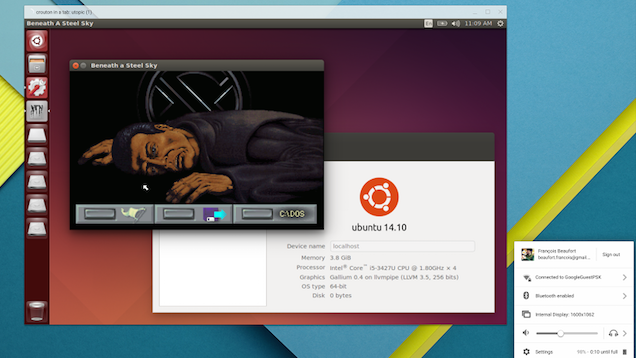
Chrome: You've been able to install and run Linux on Chromebooks for a while, but a new Chrome extension allows you to run it inside a window, without switching back and forth.
The extension, Crouton Integration, still requires you to enable developer mode and install Crouton, but allows you to run Linux right in a window instead of as a full desktop. If you've already installed Crouton, the process to run Linux in a window is easy and detailed over on Googler François Beaufort's Google+ profile. If you haven't installed Linux yet, our guide will get you started.
Zen is a branch of Buddhism that came about in China during the 6th century. So it has been around for a little while. Many of the teachings and quotes find their way into things, but they sometimes come across as nonsensical phrases meant to sound obscure. There is meaning behind the quotes, however, and many of the lessons are still useful today.
"Before enlightenment, chop wood, carry water. After enlightenment, chop wood, carry water."
Many of us get caught up in the end results of what we're working toward or the way things will be when we finally achieve something. But the truth is that getting to where you want to go or being successful doesn't mean that the work that lead you there goes away. Achieving your version of "enlightenment" is not an endpoint in and of itself. You'll need to do the same things after in order to keep moving forward. There's a Zen philosophy that says the way a person does one thing is the way they do everything, and whether you agree with it or not, the message is clear. If you can't take on the simple tasks as best as you can, how could you conquer the big things? As Tom Barrett explains on his blog Interlude Retreat, it's all about being in the moment:
When we are able to be in the moment, we no longer feel compelled to watch the clock. Whatever your work might be, bring all of yourself to it. When you are fully present, you may find that your labor is no longer a burden. Wood is chopped. Water is carried. Life happens.
No matter how menial the task may seem, practicing mindfulness and focusing on the present work at hand will help you develop a habit of always doing your best. And once you finally achieve "enlightenment" you still must chop wood and carry water. Do your work, do it well, and when you find success, do it again.
"Sitting quietly, doing nothing, spring comes, and grass grows by itself."
As strange as it sounds, sometimes it's better to just do nothing. In our busy lives, we become focused on action and productivity, as if our world would stop moving if we stopped moving. The world goes on fine without your actions, and it goes on fine without you. Instead, think of ways to react to the world around you, or if you're tired, do nothing at all. You can end up wasting all of your energy running around trying to find things to do. Stop banging your head against a keyboard and remember that sometimes it's about letting things happen, not making them happen. As another Zen proverb explains, "the quieter you become, the more you are able to hear."
You might think that you have to be the one to do this or that, or that you're the only one capable of handling things, but if you kicked the bucket, somebody else would fill your shoes. The grass grows by itself.
"If you walk, just walk. If you sit, just sit; but whatever you do, don't wobble."
The advice from this saying is sound and simple to understand, yet difficult to put into practice. This day and age our attention is constantly being pulled a thousand different directions, with our focus going by the wayside. Not only is it important to be present in the moment when you do something, but it's also important that you zone in as much as you can. If it's time to work, just work. Empty your mind of the past of present and think about what needs to be done right then and there. Develop monk-like focus and eliminate distractions that may cause you to wobble. Give weight to your intentions and do exactly what you need to do.
"When hungry, eat your rice; when tired close your eyes. Fools may laugh at me, but wise men will know what I mean."
Indeed, this saying does seem comical, but its simplicity is powerful. In our day to day lives we find a way to complicate everything. The food we eat, the work we do, the way we talk, the way we walk; everything has to "mean" something. Life would be much easier if you just responded to things appropriately. If you're hungry, eat something. If you're tired, get some rest. If you have work to complete, do your work. Stop wondering why you're hungry, why you're tired, or what the best way to do your work is and take a page out of Nike's book. Just do it. It's possible that your life could be much simpler than you make it out to be.
The intentions of these lessons hold up for the most part, but these can still be up to interpretation. Obviously life isn't the same as it was when these sayings came about, so how you apply them to your own life is up to you. The wisest of lessons stand the test of time.
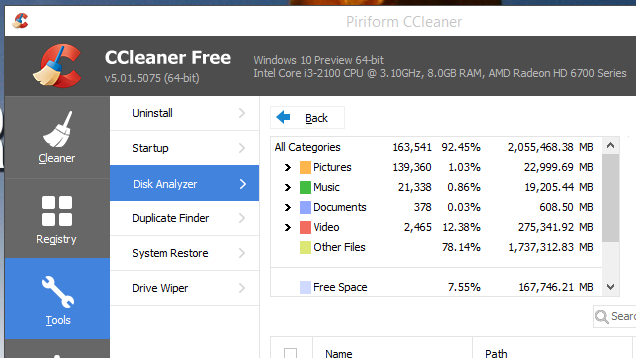
Windows: CCleaner is easily one of our favorite utilities and now it's updated to version 5.0 and learned a sweet new trick: analyzing your hard drive to find which files are taking up the most space.
We've featured other disk analyzers before (and we even have a favorite), but CCleaner can now do it without installing a separate utility. The app will analyze your hard drives and show you which types of files take up the most space, as well as provide a list of the biggest files you can remove. It doesn't have all the bells and whistles of an app like WinDirStat, but it's handy nonetheless.
The new version also comes with a flatter interface, plus some improvements to how it cleans up after Firefox 34 and Opera History. You can download it from the link below, or check for updates in the app itself if you already have it installed.
A major UK bank's concern over data collected by Apple Pay is reportedly stalling negotiations to launch the mobile payments service in the country by "the first half of 2015." The Telegraph reports that "at least one" of the UK’s biggest banks is "uncomfortable with the amount of personal and financial information Apple wants to collect about its customers."
Apple has been adamant about its approach to collecting users data via Apple Pay. "We are not in the business of collecting your data," said Apple exec Eddy Cue when introducing the service in September. "So when you go to a physical business and use Apple Pay, Apple doesn’t know what you bought, where you bought it, or how much you paid for it. The transaction is between you, the...
Twitter outages are becoming much less common these days. In fact, there was a time not that long ago that the fail whale was an almost daily sight. Twitter is going back to its roots this evening with an authentication outage that's been dragging on for several hours already. So if you're unable to log in, don't worry, it's not a problem on your end.
Many users are reporting that they've been logged out of their accounts on Android and the web, then unable to log back in.
Gmail has been comprehensively blocked in China six months after government censors first began disrupting access to the service. Google’s Transparency Report shows Gmail traffic falling dramatically in the country on the night of December 25th, and while Chinese officials have not claimed responsibility, a Singapore-based spokesperson for Google told Reuters: "We've checked and there's nothing wrong on our end."
Chinese censors began disrupting Gmail access in May this year
China already blocks an array of Google services including its main search site, Google Maps, Google Docs, and Google Drive. The country began making access to Gmail more difficult in the run up to the 25th anniversary of the 1989 June 4th Tiananmen Square...
This long holiday weekend hasn't been a good one for gamers. Both Xbox Live and PlayStation Network were taken offline over Christmas, just as hundreds of thousands unwrapped their new consoles and plugged them in for the first time. But now, nearly three days after both services went offline, gamers are now free to play online once again.
PSN was down for the count
PlayStation Network engineers brought the service back online on Saturday, and Microsoft had Xbox Live back up and running on Friday. Sony has confirmed in a blog post that its network was victim to a distributed denial of service attack (DDoS), which overwhelmed its servers with "artificial," or junk traffic. It's believed Xbox Live was subjected to the same attack.
Reading paper comics is fun, but if you want to take a ton of great reads with you on your laptop, or read your favorite titles on your computer's huge display, you need a solid comic reader. This week we're looking at five of the best, based on your nominations.
Earlier this week we asked you to tell us which comic book readers you thought were the best, since our previous picks were getting a little out of date (and our previous champion, CDisplayEx, apparently is bundled with a boatload of malware that many of you have written in to complain about.) You offered up tons of great nominations—and defenses of CDisplayEx—but we only have room for your top five. Here they are, in no particular order:
ComicRack is a free, feature-packed comic reader for Windows. It made the roundup the last time we looked at your favorite desktop comic readers, and it was a popular nominee this time around as well. The app supports and can export almost any comic book file, and also supports image viewing through ZIP, RAR, and 7z archives so you don't have to unpack them first. The app has a customizable, three-paned interface to let you navigate through files and folders inside the app, browse your comics in one pane, and read pages in another. You can even full-screen the app to read in a more immersive view. Another feature that makes ComicRack stand out is that you can collect your favorite comics together in collections, pack them up as a CBZ file, and export the archive so its readable on other devices. ComicRack even allows you to share your comic library over your home network so you can go to another room and pick up where you left off.
Those of you who nominated ComicRack praised it for its library management features, which make organizing and collecting your comics as easy as reading them. The reader can also be used to catalog your paper comic collection, can sync with its Android or iOS apps for on-the-go comic reading, and more. You can read more praise in its nomination thread here.
SimpleComic is a free, simple option for OS X that's easy to install, lightweight, and easy to use. If you're looking for an incredibly simple comic reader that supports both windowed and full-screen comic views, this is your reader. The app scales your pages to the size of the window when not in full-screen, supports quick look in OS X, so you can peek through the comic before you settle in to read it, automatically saves your place when you stop reading, and more. The app also supports translation and other notes left in the metadata, and is completely open source. The app also supports just about any comic book archive format you can think of, along with ZIP, RAR, and 7z archives. You also get translation notes and text notes, and more. It's also open source, so you can contribute and get involved with the project yourself at its GitHub page.
Those of you who nominated and supported the SimpleComic nomination pointed out that it's a dead simple comic reader for Mac, with an easy to use interface, no bloat or unnecessary features. You also noted that the QuickLook plugin that lets you peek through the comic before you read it just by pressing the Space bar is an excellent feature, and the fact that the app has been largely functional and feature-strong for the past several years—without the temptation to add adware or bloat to the app—is a great thing. Read more in its nomination thread here.
MComix is an updated fork of the Comix project, a comic reader that made the top five the last time we looked at the best desktop comic readers. Comix stopped development a few years back, and MComix has been updated with a few new tricks, bug fixes, and stability improvements. It still supports ZIP, RAR, 7Zip, LHA or tar/gz/bz2 archives (as well as any old folder full of plain image files), and it brings tons of great features to the table. The reader was designed to handle sequential images in a simple interface that works really well for comic books. All of the pages run down the left side of the screen, and a large pane on the right shows you the current page. MComix is lightweight, free, open-source, and gets the job done. Comix does require Python, PyGTK+ (or another GTK+ framework), and the Python Imaging Library (PIL) installed on your system before it'll run. Some package managers already include Comix, so installing it may be a terminal command away on your Linux system. Windows users can just fire up the installer and go.
MComix was a pretty popular nominee, with a few of you highlighting the fact that it's the natural continuation of one of the best comic readers available, and it's a great image viewer for other types of files and folders as well. Simple and lightweight, and multifunctional, so you can use it even when you're not reading comics. You can read more in its nomination thread here.
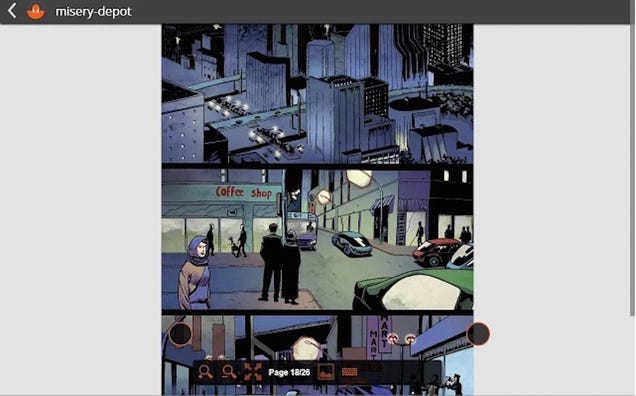
The only Chome app in the roundup, Astonishing Comic Reader is actually cross-platform and works just about everywhere Chrome does. There's also a Windows 8 app, but those of you who nominated Astonishing Comic Reader specifically called out the Chrome app. The reader supports CBZ and CBR comics, there's a beta version in testing in the Google+ community right now that supports PDF comics, a night mode for reading in the dark, offline support (so just because it's a Chrome app doesn't mean you have to be online all the time), and a simpler user interface that lets you use Chrome to read your comics the same way you would use it to browse the web. Astonishing Comic Reader also has an Android app, which also has Chromecast support so you can read your comics on virtually any screen, large or small. Plus, it's completely free, and ad-free.
Those of you who nominated Astonishing Comic Reader specifically highlighted the fact that it's ideal if you want to read comics on a computer where you can't install anything, like a work computer or you're using a locked-down account, but a Chrome extension is okay. One of you specifically mentioned that you carry your comics on a USB drive and like to read at work, but can't install a heavier comic reader. Also, the developer is exceptionally responsive to comments and feature requests, and the app's Google+ community is busy and bustling with users sharing experiences and talking to the developer. You also mentioned that both apps remember your place, and can open comics stored in cloud storage services or on local media. Read more praise in its nomination thread.
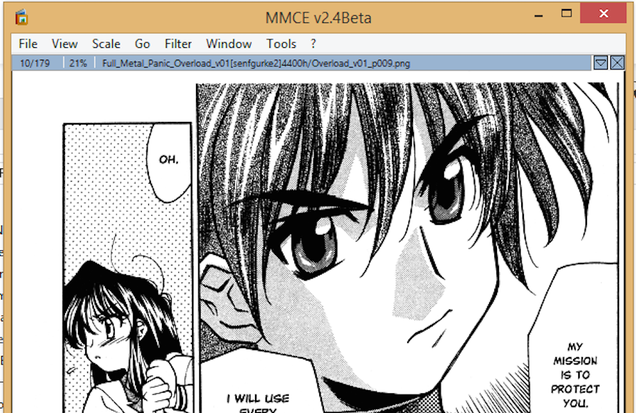
MangaMeeya hasn't been updated in a while, but it's still a great option for Windows users looking for a great comic reader. The reader is (and has been) maintained by fans at Manga Underground, although its origins are a little mysterious. Regardless of where the original utility was born, the program works especially well for manga fans, who often have to deal with translation notes and often read from right to left (the way the original manga is published). That isn't to imply that MangaMeeya is only good for manga. The app is a great comic reader and image viewer for all images, and allows you to read multiple pages at once, customize key commands to browse images, and works just fine as a sequential image viewer even if you're not reading comics or manga. MangaMeeya also supports image browsing through RAR and ZIP archives, and can unpack them to a folder as well.
In its nomination thread, some of you noted that MangaMeeya is super-fast, super-lightweight, and runs on just about anything you throw it on. Whether you're reading manga or regular comics, it has all the right features like support for image archives and Unicode support. It's missing library management features, but you noted that it's extremely stable and reliable, and super fast to make up for it. Similarly, even though the app claims to only work in XP and Windows 7, all versions run in Windows 8+ as well, and you can choose from the light version or the "ultra-light" version. Read more in its nomination thread here.
Now that you've seen the top five, it's time to put them all to a flat out vote to determine the community favorite:
This week's honorable mention actually goes right back out to our previous champ, CDisplay/CDisplayEx. Many of you rallied to its defense when we mentioned that we couldn't recommend it anymore—you said that its installer does try and trick you into installing adware, but if you're careful with it, you can avoid it entirely (something we've mentioned in previous posts about it), and that if you download the app from a trustworthy source, you won't get an installer bundled with malware. Similarly, others of you pointed out that you've had the app forever and just never updated it, so it works just fine, gets the job done, and is still one of the best options out there for reading comics in Windows.
We completely agree, and even though we can't put it in the top five anymore, it's definitely a solid, feature-rich option that you should check out if you're a smart and savvy user who can clear that minefield with ease.
Have something to say about one of the contenders? Want to make the case for your personal favorite, even if it wasn't included in the list? Remember, the top five are based on your most popular nominations from the call for contenders thread from earlier in the week. Don't just complain about the top five, let us know what your preferred alternative is—and make your case for it—in the discussions below.
The Hive Five is based on reader nominations. As with most Hive Five posts, if your favorite was left out, it didn't get the nominations required in the call for contenders post to make the top five. We understand it's a bit of a popularity contest. Have a suggestion for the Hive Five? Send us an email at tips+hivefive@lifehacker.com!
Typically, when most people are on a de-clutter mission, they start in one room. If that approach isn't working for you, try to start with a category of stuff in your house or apartment.
People who get stuck halfway usually do so because they start with the things that are hardest to make decisions about. Things that bring back memories,
such as photos, are not the place for beginners to start. Not only is the sheer volume of items in this category usually greater than that of any other, but it is also far harder to make a decision about whether or not to keep them.
Start with a category without a big emotional attachment (she suggests clothes). Go room by room and focus on getting rid of extra clothes. Focus your clean-up on categories you'll make easy decisions about. If you come across another category of stuff like pictures, put them aside and save it for another time.
Shift. Photo filters. Pick one, customize it. Need I explain more? *Eye roll* Alright alright, I will. So you know how most photography apps offer a list of preset filters that are supposed to make your images pretty? Or artful maybe? If you ever wanted more freedom over these filters, Shift could be your solution.
The app, which started out on iOS, has just been released on Android — a Christmas gift of sorts from the team.
Courtesy of the European Space Agency, here's the best Christmas light display I've seen all year: a time lapse of more than 12,000 images taken by German astronaut Alexander Gerst, while he was on the International Space Station for six months. If you like the aurora borealis, very clear views of stars, or a look at our cities' lights from space, you're in luck.
This isn't the first beautiful ISS timelapse. If you find yourself hungry for more, check out Knate Myers' video from 2012.
It's getting to be that time again. Yes, time for developers to get into the holiday spirit and drop their prices. You can pick up a ton of great stuff for not a ton of money. Just head past the break and see what we've got.
In an abrupt turnaround, Sony Pictures Entertainment released its controversial film "The Interview" on a number of streaming sites at 10am Pacific Time this morning. The film is now available as a paid rental on YouTube, Google Play, Xbox Video and a Stripe-affiliated site called seetheinterview.com. Renting the film will set you back $5.99; many sites will also sell it to you for $14.99.
The online release follows the epic hack of Sony's internal computer system, after which the cybercriminals widely disseminated embarrassing emails, personnel records and other documents. The FBI recently concluded that North Korea was behind the attack, although some security experts remain skeptical.
"The Interview" caused a furor because the hackers echoed North Korean denunciations of the film, which depicts a fictional assassination of dictator Kim Jong-un. The hackers also threatened unspecified violence if Sony released the movie on Christmas Day as planned, after which several major theater chains backed away from the film, leading Sony to cancel its release.
After a public outcry over Sony's apparent willingness to cave to vague threats, the studio began to reverse course. It first agreed to a limited theatrical release and is now making "The Interview" widely available online.
One place you won't find the movie is iTunes. The New York Times reports that Apple was not interested in making the movie available on such a short timetable.
"Sony and Google agreed that we could not sit on the sidelines and allow a handful of people to determine the limits of free speech in another country (however silly the content might be)," said Google chief legal officer David Drummond in the company's blog announcement.
Lead image courtesy of Sony Pictures Entertainment
Amazon is always responsible for delivering a lot of presents at Christmas, but its holiday deals are something else. This year the retailer’s two-day discounting spree includes a free app bundle worth $220 (although two items make up almost half that cost). There’s great mix of games and utilities, including Sonic the Hedgehog 2 ($2.99), Plex ($4.99), Terraria ($4.99), Five Nights at Freddy's ($2.99), The Oxford Advanced Learner’s Dictionary ($30.99), and a bunch of image editors — all available for the tempting price of zero dollars and zero cents.
You can install the apps on non-Amazon devices too but it takes a bit more effort
Other discounts in the wider sale include reductions on Kindle ebooks, Amazon Instant Video titles, and...
Baltimore's WBFF -- a Fox affiliate -- edited protests of an anti-police-violence protest to make it sound like the protesters were chanting "kill a cop."
Read the rest
Welcome to the roundup of the best new Android applications, games, and live wallpapers from the previous 2 weeks or so.
Please wait for this page to load in full in order to see the widgets, which include ratings and pricing info.
Looking for the previous roundup editions? Find them here.
Featured App
Swish
This week's roundup is brought to you by Swish from developer Devionix. This free physics game stars a pair of space aliens with an inexplicable love of basketball.
The movie industry sees the illegal recording of movies as one of the biggest piracy threats and for years has gone to extremes to stop it.
It started well over a decade ago when visitors began sneaking handheld camcorders into theaters. These big clunkers were easy to spot, but as time passed the recording devices became smaller and easier to hide.
While recording a movie for strictly personal use is not illegal in UK cinemas (despite industry efforts to have the law changed), theaters continue to outlaw the use of recording devices. Most recently, Google Glass was banned, and phones and tablets need to be switched off as well.
In a code of conduct the movie industry and cinemas have agreed that employees will take immediate action when they spot someone with a recording device, but some cinema staff take these obligations way too far.
At a Cineworld cinema in Brighton Marina, UK, employees dialed the national 999 emergency number after they spotted a group of 12-year-old girls with iPhones and iPads at a showing of The Hunger Games.
The girls, accused of recording parts of the movie, were hauled outside where two police cars rushed towards the scene with flashing lights.
Although recording movies is not a crime in the UK (as long as there’s no intent to distribute), the officers still carefully inspected the devices for ‘bootleg’ material. After their search turned up nothing the girls were allowed back in. However, the teens decided to wait outside, reportedly in tears, until their parents came to pick them up.
Louise Lawrence, the mother of one of the girls, is outraged by the treatment. Not just the false piracy accusation, but also the fact that they were left out in the cold afterwards.
“Our girls were falsely accused, had the police called on them and then just left in tears. It’s outrageous. If they have done this to our children they will do it again,” she says.
A Cineworld spokesperson stresses that they apologized to the parents for the mistake, adding that it’s common procedure to take these actions.
“While we regret that the customers felt distressed, we are confident that the correct procedures were followed. If our staff see such behavior we expect them to notify the cinema management immediately and to call the police. However, we have taken on board the concerns expressed by the parents and we are reviewing how the policy is applied to younger customers,” she adds.
While movie theater staff could indeed call the police if they suspect that a commercial pirate is in their midst, a group of 12-year-old girls with iPhones hardly falls into the category.
And calling the national emergency number certainly seems to be taking things too far.
Sweeping changes to EU tax law could see the price of apps, ebooks, and MP3s raised throughout Europe by an average of 6.5 percent. The new legislation — known as Directive 2008/8/EC — comes into force on January 1st and is intended to shut down a tax loophole being used by big firms to charge less VAT (value added tax) on digital goods. Although not many individuals will be happy about the prospect of paying more for their games and movies, proponents of the bill say it will level the playing field between small and large companies and create a fairer market. Critics reply that the compliance costs will ruin small businesses.
Android: One of the coolest new features of Android Lollipop is the ability to unlock your phone with a Bluetooth device. Until 5.0 rolls out to more than almost zero people, most people can't use it. Unless you have Smart Unlock.
The app works on Android 4.0 and up (nearly 90% of active devices, as opposed to the less than 1% that have 5.0). It will ask for permission to be a device administrator. Once you grant access, it will allow you to add specific devices—such as a Bluetooth watch, headset, or car—as "trusted." As long as your phone has a connection to those devices, your lock screen will be disabled.
You can also set it to disable your lock screen when you're connected to your home Wi-Fi, when you're inside a specific physical area, or when it's touched by an NFC chip. The app does not require root. The free version works for 7 days, after which you will be prompted to pay $0.99 to unlock the full version.
Apple has issued its first ever automatic security update for Macs computers, fixing a security flaw that the company felt was too dangerous to wait for users to patch. "The update is seamless," Apple spokesperson Bill Evans told Reuters. "It doesn’t even require a restart."
the vulnerability was announced by the US Department of Homeland Security
The vulnerability that the update fixes is found in a common software component known as NTP or network time protocol. NTP is used for synchronizing clocks between computer systems and across the global internet, and has previously been exploited by hackers to pull off substantial attacks on other systems. The flaw was identified by Carnegie Mellon University’s Software Engineering Institute...
Chrome quickly skyrocketed from a Google pet project to the most popular browser in the world. Here are some of our most popular Chrome extensions and guides from Lifehacker in 2014.
Google's Chrome browser is packed full of an incredible amount of extensions that add all sorts of functionality. It's tough to sift through the store to find what's useful though, so let us save you some time with this collection of the best Chrome extensions.
Regardless of which end of whatever pond you're on, region blocked content is annoying. Whether you're an ex-pat looking to watch reruns of The Wonder Years, or you're hankering for a dose of Dr. Who, here's the best (and easiest) way to get that content.
Google recently rolled out an update that added Google Now support to its Chrome browser on both Windows and Mac. That's great if you use Google services. If you don't, it tends to just repeatedly tell you the current weather. Here's how to disable it.
Around a month ago, Google finally released the Chromecast SDK. What this meant for us is that shiny new Chromecast apps would be coming down the pipe. And pipes they most certainly have come down! Here are some of the best (and most essential) apps for your Chromecast.
Recently, Google made the first batch of Android apps available for Chrome. It was only a matter of time before some clever users gave that power to everyone. Now that time has come. Here's how to install (nearly) any Android app on any operating system.
Android: Chrome is one of our favorite Android browsers, but it can be a little sluggish sometimes. This settings tweak, thanks to Redditor erythrocytes64, may give you a tidy speed boost, depending on your device.
Chrome: Flix Plus, a new extension from us at Lifehacker, adds new features and tweaks to Netflix.com, letting you filter its recommendations, remove spoilers, use keyboard shortcuts, and a whole lot more.
Google and Dropbox have some ridiculously low-priced 1TB storage options. With so much space for so little money, what could you do with it? Well, for starters, you could turn them into your own personal media servers.
Amazon is the undisputed king of online retail, but that doesn't mean it's perfect. The site has a pretty utilitarian interface that can be clunky at times. Fortunately, browser extensions can add functionality and make a few tasks easier, making shopping on the world's biggest internet store even more awesome.
Netflix is one of the few internet services that is hard to improve upon. For a small fee you can binge watch a huge library of movies and television shows in a slick interface on just about any device you own. This won't stop us from trying, though. Here are some of the best ways to improve on an already great Netflix experience.
The internet is filled with great apps and services to help you get things done. Alone, those services are powerful—but with a few choice add-ons, they're unstoppable. Here are ten services you can power up with extensions, scripts, and other apps.
Not every app has a Settings menu that's easily accessible. Sometimes, developers hide away debug menus, secret settings, and more. With them, you can unlock additional features or just get some crazy stats. Let's take a look at some of the most useful among them.
Dropbox is easily the internet's favorite cloud storage provider—at the very least it's our favorite. There are plenty of clever things you can do with it right out of the box (get it?). However, there's also no shortage of apps and extensions you can get to make using Dropbox itself even easier.
Pushbullet, the service that acts as a bridge between your mobile and desktop OSes, sets the gold standard for developer updates. If you haven't used it recently (or ever), this is a great time to check out all the cool stuff it can do.
With Firefox getting ads and Chrome extensions spying on me, is there really one browser that's better than the others when it comes to privacy? Does it matter if I use something like Opera or Safari instead? Is my browser watching what I'm doing and reporting back?
Google Maps is easily one of the most popular and powerful mapping tools on the internet. It doesn't have to do all the legwork alone, though. Here are some of the best extensions you can add to your browser to make Google Maps that much more awesome.
Some sites aren't exactly easy to read, especially on mobile devices. Chrome for Android now has a hidden "reader" mode that will strip the page of annoying formatting so you can get to the good stuff.
Almost three years ago, New Zealand police carried out a spectacular and aggressive armed raid against individuals accused only of copyright infringement.
Acting on allegations from the United States government and its Hollywood partners, officers of STG, New Zealand’s elite counter-terrorist force, raided Kim Dotcom’s mansion. The German-born businessman was detained along with his wife Mona and their children.
Mid 2012, a High Court judge found that the warrants used in the raid were overbroad and therefore illegal, but a February 2014 Court of Appeal reached a different conclusion.
While acknowledging that the warrants contained flaws, a panel of three judges at the Court of Appeal found that overall the warrants were legal.
Dissatisfied with the ruling, Dotcom took the case all the way to the Supreme Court complaining that the warrants were overbroad and lacked detail. The verdict was handed down today.
In another disappointing ruling for the Megaupload founder, this morning the Supreme Court found that the 2012 raids on Dotcom’s home were carried out legally.
The raids on Kim Dotcom’s mansion. Legal, says Supreme Court
Four Justices – John McGrath, William Young, Susan Glazebrook and Terence Arnold – dismissed Dotcom’s appeal while agreeing that the 2012 warrants were not unreasonably vague and general. Chief Justice Dame Sian Elias dissented, but her determination that there had been a miscarriage of justice was overruled.
One judge aside, the Court acknowledged that while the original search warrants were indeed deficient when detailing the alleged offenses, those shortcomings did not result in damage for Dotcom and his associates.
“The majority of the Court has decided that, although the search warrants were deficient in their description of the offenses to which they related, these defects did not result in any miscarriage of justice to the appellants,” the Court wrote in its summary.
“While the search warrants did not specify that the offenses were against United States law, or that the offenses were punishable by two or more years’ imprisonment, this did not cause any significant prejudice to the appellants.”
When taking all circumstances into account, including the explanations given to Dotcom by police carrying out the raid, the Court found that Dotcom (and fellow claimants Finn Batato, Mathias Ortmann and Bram Van Der Kolk) were given enough detail about the alleged offenses to which the search warrants related.
Dotcom, who along with his co-appellants will have to pay court costs of $35,000, aired his disappointment on Twitter.
“New Zealand Chief Justice Dame Elias got it right in both Supreme Court decisions in my case. She must be as frustrated as I am,” Dotcom wrote.



























 Twitter outages are becoming much less common these days. In fact, there was a time not that long ago that the fail whale was an almost daily sight. Twitter is going back to its roots this evening with an authentication outage that's been dragging on for several hours already. So if you're unable to log in, don't worry, it's not a problem on your end.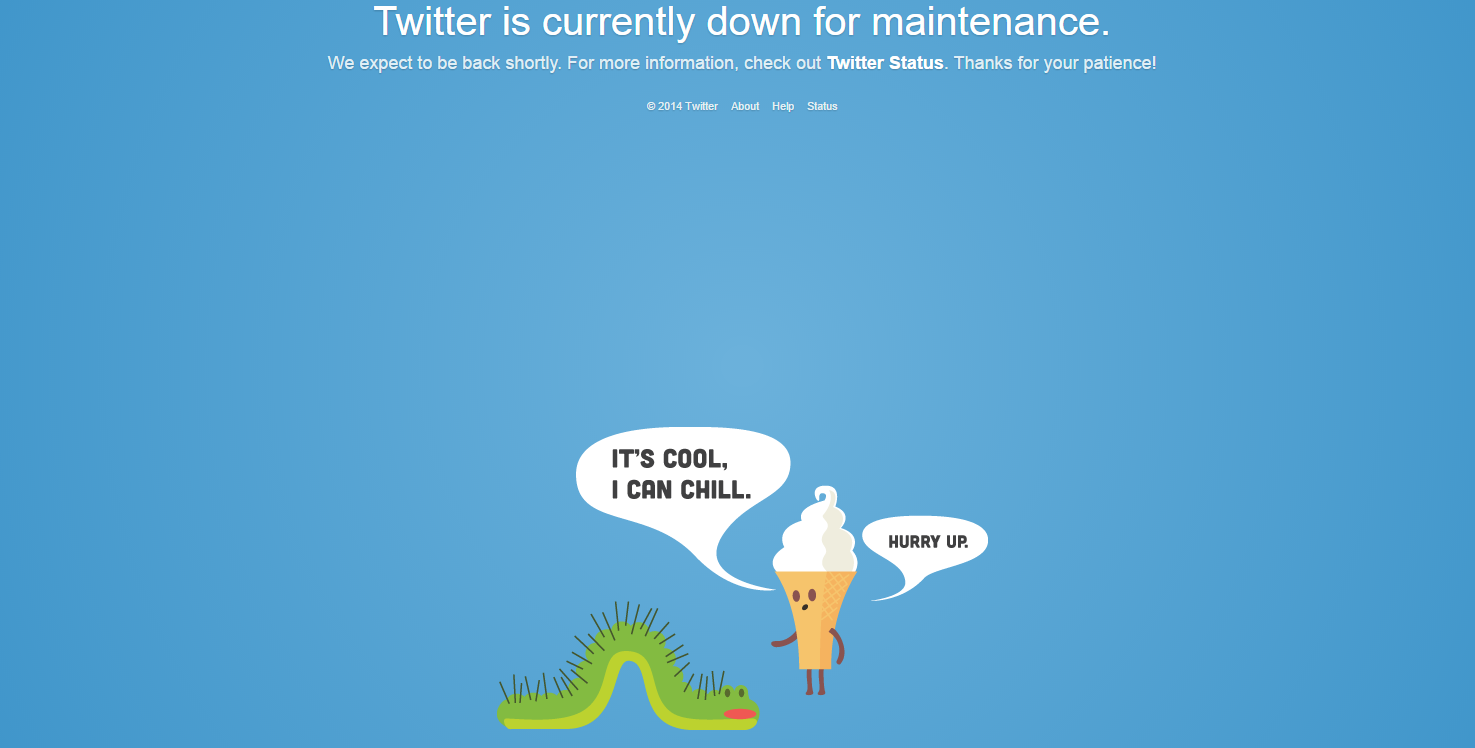



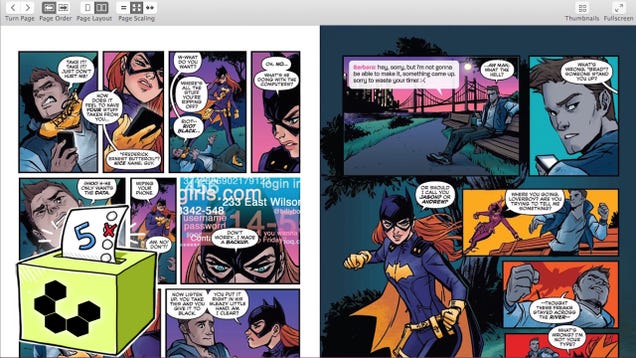








 It's getting to be that time again. Yes, time for developers to get into the holiday spirit and drop their prices. You can pick up a ton of great stuff for not a ton of money. Just head past the break and see what we've got.



 An exhibit at the Japanese American National Museum showcases the beloved 40-year-old British girl known as Hello Kitty Read the rest


 Welcome to the roundup of the best new Android applications, games, and live wallpapers from the previous 2 weeks or so.


 The movie industry sees the illegal recording of movies as one of the biggest piracy threats and for years has gone to extremes to stop it.





 Almost three years ago, New Zealand police carried out a spectacular and aggressive armed raid against individuals accused only of copyright infringement.