Shared posts

14 Mar 21:19

The best photo sync services for Android

by Phil Nickinson

There's more than one way to make sure you never lose a photo again. And these are some of the best.

It's 2015. There's absolutely no reason to ever lose a photo that you've taken on your smartphone. If anything, the bigger problem should be that you're saving too many pictures and have to cull them from time to time. (That's another post for another day, though.)

Then question, then, is how to best sync your pictures from your phone to ze olde cloud. And forget plugging in. This is the future, folks.

So here, now, is our take on the best photo sync services for Android. We're not talking social sharing, we're talking shoot, upload and worry no more.

14 Mar 11:38

Twitter cuts Meerkat off from its social graph just as SXSW gets started

by Dieter Bohn

Every year at South by Southwest Interactive, there's a small competition to be the "it" app of the show. Although such buzz has dubious long-term value (cf Highlight), it's still a fun game to play. This year, the app everybody assumed would take the mantle is Meerkat, the live video streaming service that piggybacks off of Twitter so you can automatically have a ready-made social group within the app. And just as SXSW is getting started, Twitter is cutting off Meerkat's automatic access to that social graph, Buzzfeed reports.

"We are limiting their access to Twitter’s social graph, consistent with our internal policy," a Twitter spokesperson told Buzzfeed. "Their users will still be able to distribute videos on Twitter and log in with...

Continue reading…

13 Mar 20:24

Wi-Fi hotspots are a threat to my sanity

by Chris Ziegler

I'm walking through Midtown Manhattan, likely one of the most RF-saturated plots of real estate on the planet. During a workday, AT&T LTE isn't fast around here — I don't think any network is — but after years of tweaking and building out, it's consistent and reliable, at least. It gets the job done.

Then, the nightmare: the "LTE" symbol in my iPhone's status bar is replaced by three arcs, signifying that I've glommed onto Wi-Fi somewhere.

Everything stops loading. My phone, just moments ago a glorious node on the information superhighway and my irreplaceable connection to the world around me, has been reduced to a voice calling box no more advanced than a Motorola DynaTAC circa 1985. Tweets won't load; the dream of snapping and...

Continue reading…

13 Mar 20:23

[Mind Blown] YouTube Now Supports 360-Degree Videos, And You Can Watch Them On Android

by Ryan Whitwam

Youtube-ThumbWe spotted some references to 360-degree videos in a YouTube APK Teardown last month, and now it's live. Google has highlighted several channels that have already published the first 360-degree videos, which are essentially moving Photospheres. They work on desktop Chrome and in the Android app. Check out the playlist below.

The first few videos with support for 360-degree views come from the likes of Red Bull and the TomorrowWorld music festival. You can load the videos up on Android, and pan around simply by moving the device.

Read More

[Mind Blown] YouTube Now Supports 360-Degree Videos, And You Can Watch Them On Android was written by the awesome team at Android Police.


13 Mar 20:20

The Restaurants That Go Above and Beyond With Nutrition Calculators

by Beth Skwarecki

The Restaurants That Go Above and Beyond With Nutrition Calculators

All large restaurants are required to provide nutrition information for their menu, which you can find on their web sites. But some go the extra mile, providing calculators so you can know exactly what you're eating, right down to the sides and toppings.

Chipotle's calculator is a perfect translation of its simple-but-customizable menu: just check off the boxes for what you put on your burrito. The result: not only a total for the calories and nutrients for the whole enchilada (so to speak) but also an itemized list of the numbers for each component. Subway takes a similar approach, but without itemizing: choose a sandwich, hit the "customize yours" button, and the nutrition info will update with the options you've checked.

McDonald's Meal Builder has a clunkier interface, but it can add up the nutrition information for a whole meal: burger, fries, and an apple pie, let's say. You can remove toppings (that's how I know I'd save 90 calories by holding the Big Mac sauce, not that any human would ever do that), but there's no way to add extras. Not every fast-food restaurant has a detailed nutrition calculator, but if you'd just like to add up the components of your meal, try the Fast Food Nutrition website, which has cobbled together calculators for most of the major burger joints.

In the pizza world, Domino's Cal-O-Meter does a great job of calculating calories, but doesn't give the rest of the info like carbs, protein, and so on. It can take multiple meal items into account, but its major flaw is giving calories per slice. So my double-cheese pineapple pizza looks like it's 435 calories, but if I eat three slices I'll actually break 1300.

Did we miss your favorite restaurant's calculator? Tell us in the comments!


Vitals is a new blog from Lifehacker all about health and fitness. Follow us on Twitter here.

13 Mar 17:46

Chrome v42 Automatically Includes A Screenshot When You Share A Webpage

by Ryan Whitwam

ChromeBetaThumbNewGoogle rolled Chrome v42 out to the beta channel a few days ago with website notifications, but there's another interesting feature hiding in there. Sharing has been improved in a neat way—it will automatically include a screenshot when you share to a number of apps.

2015-03-13 10.08.20 2015-03-13 10.07.50

This will work when sharing through Gmail, Hangouts and other apps. So you get the URL and a screenshot of your device, but there's no way to turn this off.

Read More

Chrome v42 Automatically Includes A Screenshot When You Share A Webpage was written by the awesome team at Android Police.


13 Mar 17:46

Android 5.1's 'Google VPN' could protect your data on open Wifi networks

by Alex Dobie

Hiding behind the scenes in Android 5.1 but nonfunctional at present, a Google-run VPN might keep your data secure on public Wifi networks.

With Android 5.1 Lollipop now out in the wild, Android enthusiasts are starting to dig into the latest firmware for Nexus devices and see what's new. One interesting addition, first spotted by Pocketables, presents the possibility of Google operating its own VPN service to keep Android users' data secure over public Wifi networks.


13 Mar 17:42

Twitter Confirms Periscope Acquisition, And Here’s How The Livestreaming App Works

by Josh Constine
periscope-twitter Today Twitter officially announced its January acquisition of livestreaming app Periscope. According to several sources, it will be launched as a separate app from Twitter with the ability to watch both live and previously broadcasted mobile video streams. That lack of ephemerality is the first of many differences between Periscope and Meerkat, the livestreaming app that recently launched… Read More
13 Mar 15:44

Microsoft's Cortana is coming to iOS and Android

by Tom Warren

Microsoft is planning to bring its Cortana digital assistant to iOS and Android as a standalone app. While the software maker has previously confirmed Cortana would come to additional operating systems, Reuters reports that the standalone app will be available on phones and tablets running iOS and Android. Microsoft is currently building Cortana into Windows 10, which is set to debut later this year, and it’s likely that the digital assistant will make its way on to Android and iOS alongside its PC expansion.

Continue reading…

13 Mar 15:40

NYPD caught wikiwashing Wikipedia entries on police brutality

by Cory Doctorow


Anonymous users from NYPD's IP block have made questionable edits to the Wikipedia entries on high-profile police brutality victims including Eric Garner, Sean Bell, and Amadou Diallo. Read the rest

13 Mar 15:32

Terry Pratchett

Thank you for teaching us how big our world is by sharing so many of your own.
12 Mar 20:15

Disney Officially Announces Frozen 2

Disney Officially Announces Frozen 2

The Mouse House will let it go on

Frozen-2-official

In what could easily compete for Least Shocking News Announcement Of The Year, Disney has made plans to work on a sequel to Frozen official, signalling that the studio isn’t finished exploring the world of Elsa, Anna, Kristoff, Olaf and Sven. You may commence your tirade of “saw that coming!” remarks in 3…2…1… 

John Lasseter, chief creative officer at Pixar, Walt Disney Animation Studios and DisneyToon Studios, joined Disney chief Bob Iger to confirm what had long been suspected at a shareholders meeting in San Francisco, with the first film’s co-directors Chris Buck and Jennifer Lee and producer Peter Del Vecho shouldering the task of following up the company’s biggest smash and marketing monolith, with more than $1.2 billion in the bank to date.

This is a marked change from what the directors told Buzzfeed recently. “It’s been in the press that we are doing it, and we would ask each other, ‘Are we?’” Buck said. “They’d have a date and they’d have a cast and it was like, OK…” “It all comes down to the story,” Lee adds. “Like with the short, it was so daunting until we found the story. Then it was all of the things it usually is and we were thinking of every emotion and moment and feeling. I think that’s all we can do. Until we find our way into what’s next, emotionally, it will feel too big. We don’t really know what it’s like to stop for a minute and think about what we want to do next.” Sneaky blighters, the both of them.

 The pair has already re-visited Arendelle for the new short Frozen Fever, which will debut in UK cinemas in front of Cinderella on March 27.


12 Mar 20:12

Best photo editing apps for Android

by Alex Dobie

Once you take the photo, what do you do with it before sharing? You edit it!

Choosing a phone with a great camera is only part of the equation, though. The apps you use with it — and after the fact, by enhancing your photos — are equally important.

But once you've taken the photo, how do you make it better? These are the best apps that help you get the most out of your photographs.

Google Photos
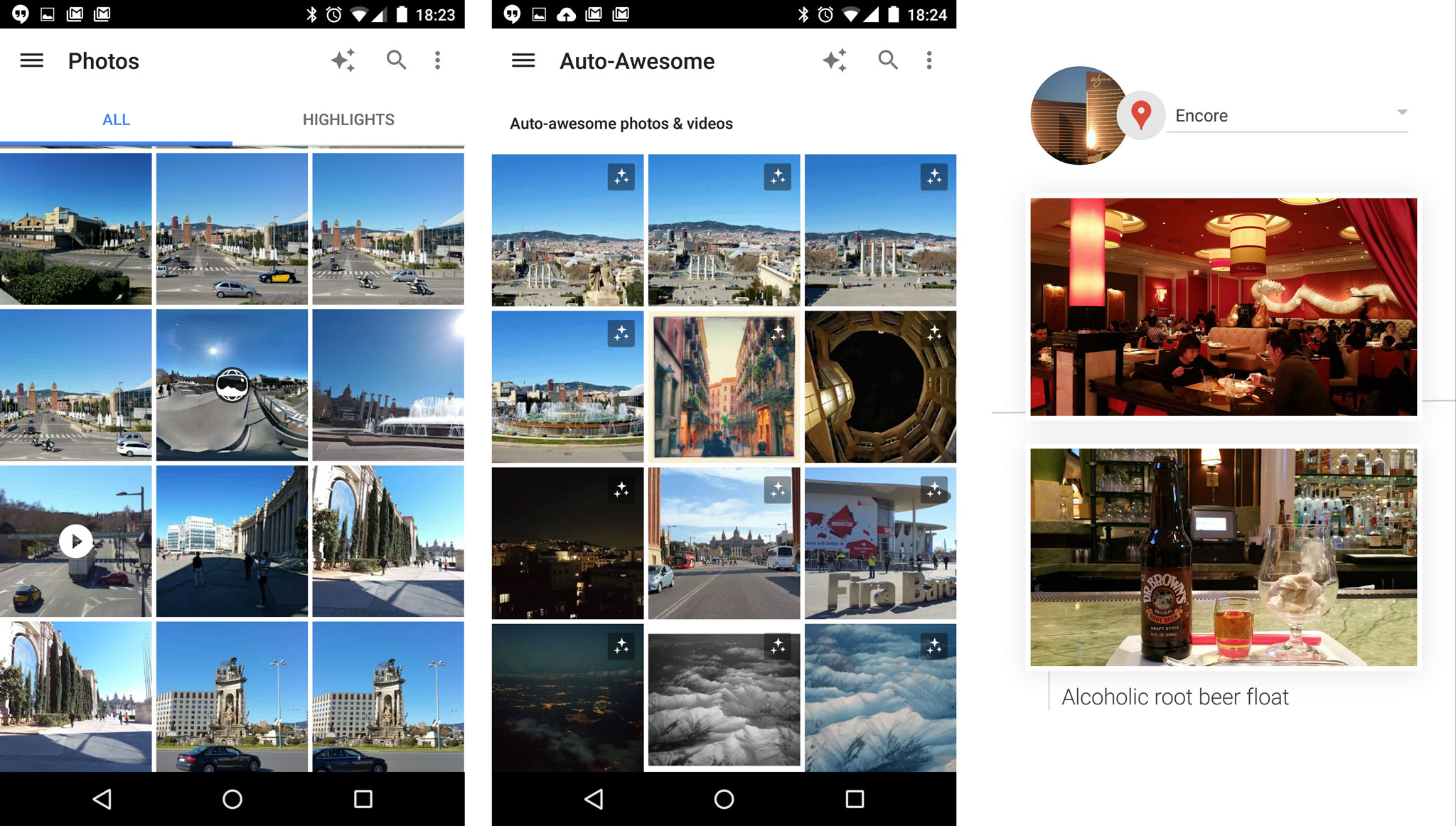
Google Photos is probably the best overall photo app on Android. You can automatically backup your photos and videos to Google's cloud, making them available on every device you own — including the web — and view highlights of each day, so you don't need to scroll through all your photos to find the best ones. This means that for folks who don't have a ton of storage on their phone, they can ensure that a photo is never lost or deleted accidentally. And because Photos has unlimited storage, you can feel safe deleting pics from your phone to free up that space.

Google Photos is full of great features to make storing and accessing your photos easier than ever

One of Google Photos' best features is Auto Awesome. Take a bunch of photos and it'll periodically "gift" you enhanced versions of them to sit alongside the originals in your collections — think animated GIFs if you've taken a burst shot, Instagram-style filters and contrast-boosted versions of washed-out shots. Take a series of images from different perspectives and you might even end up with an auto-generated Panorama based on these pics.

The Auto Awesome feature also lets you create video highlights reels based on a series of images and videos. And if you're going on vacation, Photos can sort your images and videos into a chronological story book of your trip, ideal for sharing on social networks. Photos even includes some of Snapseed's photo editing and filtering capabilities through its "edit" button, which is useful if you just want to tweak your shots or add filters without downloading a separate app.

Of course, Google makes editing photos a breeze — the app has a number of non-descructive (meaning you can undo them if you don't want them) tools so you can quickly and easily make changes and share them to various social networks.

Download: Google Photos

Instagram
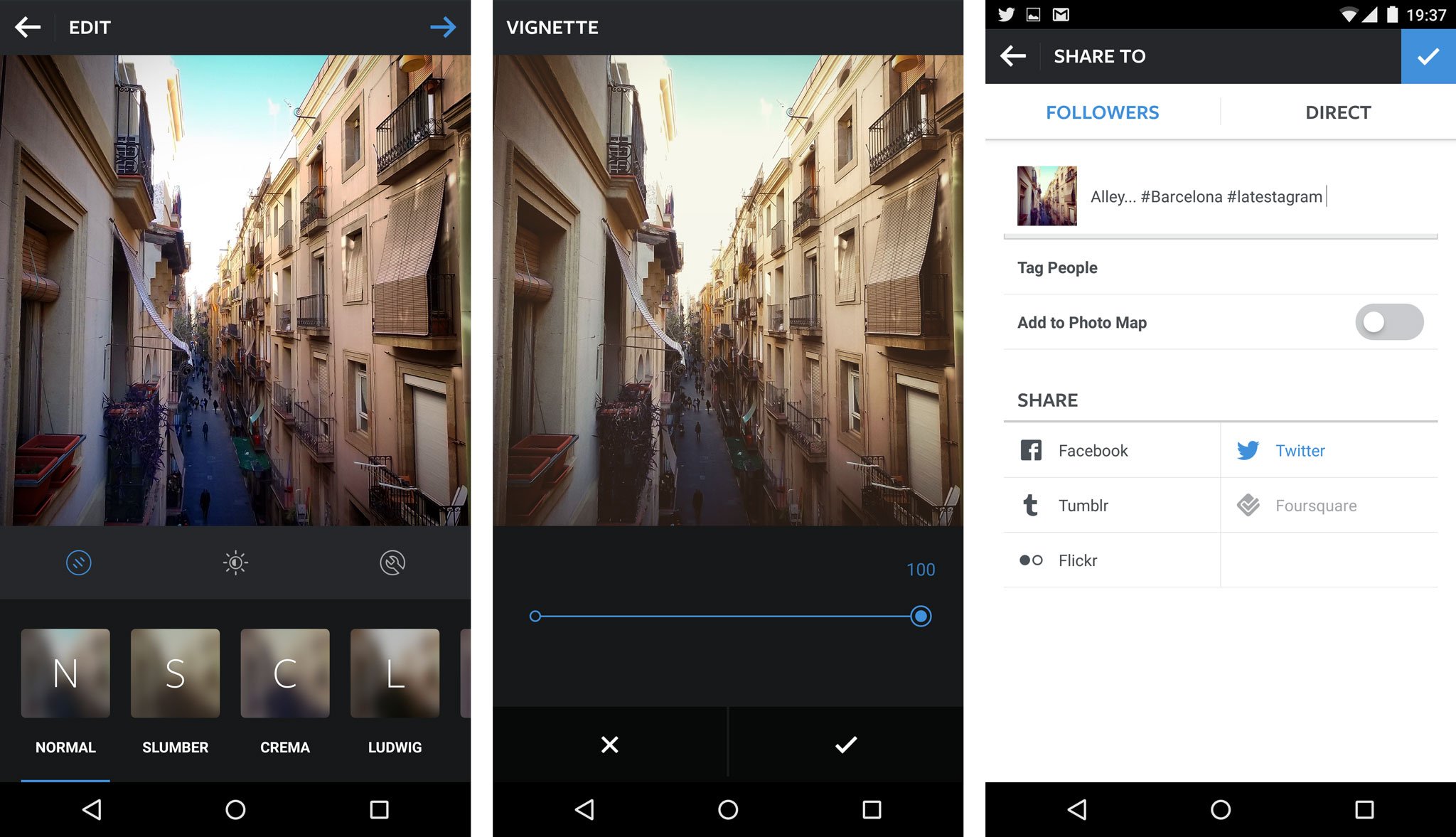
Instagram is the original filtered photo-sharing app, now owned by Facebook and pretty much synonymous with smartphone photography. It's also come a long, long, long, way since it was first introduced to users. They've added some excellent features that make sharing photos, and videos, an easier and more enjoyable process.

Instagram is pretty much synonymous with mobile photography.

New filters are being added all the time, and for the most part they do a good job of giving photos character without stomping all over them. In addition to controlling lux and the level of filtering, you can tweak photos' color temperatures, adjust highlight and shadow brightness, add a vignette, sharpen and even introduce tilt-shift effects. There is also video integration, so that you can take and share videos with your followers, and if you have a particular photo or video you want all of your followers to see, you can add it to your story as a pinned post of sorts. Of course, there's also Stories, a Snapchat clone that has proven an extremely popular way to share snippets of your day — if you're into that.

Download: Instagram

VSCO Cam
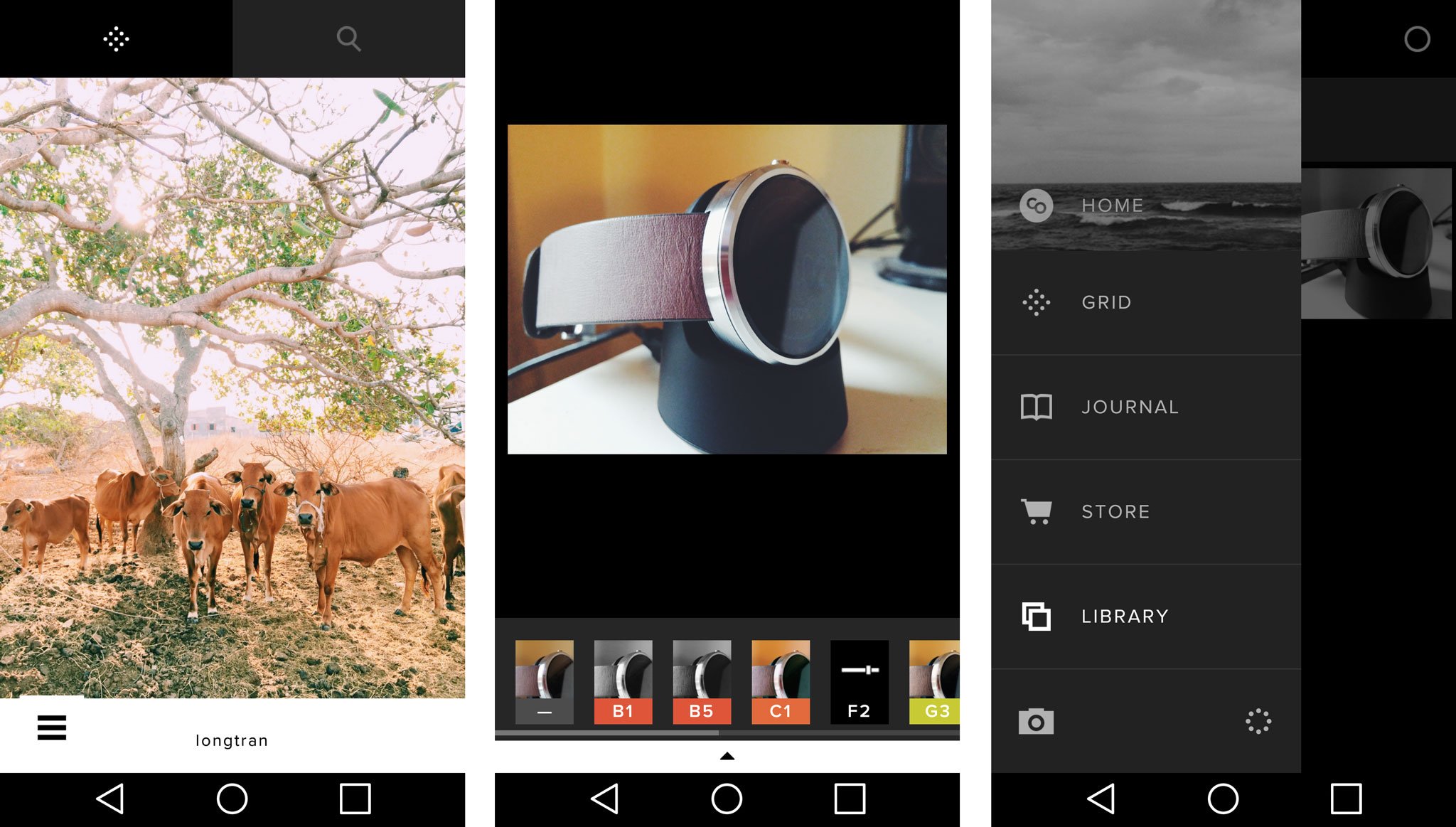
Popular on iOS before making its way to Android, VSCO Cam aims to be your one-stop shop for photography and image editing on your Android phone. VSCO lets you capture images, tweak and tune them to your liking, sync them across devices and share them with the world. You can even discover the best original photography from other VSCO users through the Grid feature.

Like the rest of VSCO, the built-in camera app is relatively simple, offering basic controls including grid lines and flash toggles. When it comes time to enhance your photo, the app brings an assortment of filters to the table, along with the option to buy even more through in-app purchases. That's on top of the usual combination of dials to adjust brightness, contrast, saturation and other properties. There is also the ability to copy/paste batch photo editing as well.

VSCO has a fairly minimalist look when scrolling through photos that others have posted, showing you only the photo and the username of the photographer. This minimalism also translated over to the camera and editing functions. This makes it easier to concentrate on what you're working on without lots of extraneous things getting in your way.

Download: VSCO Cam

Snapseed
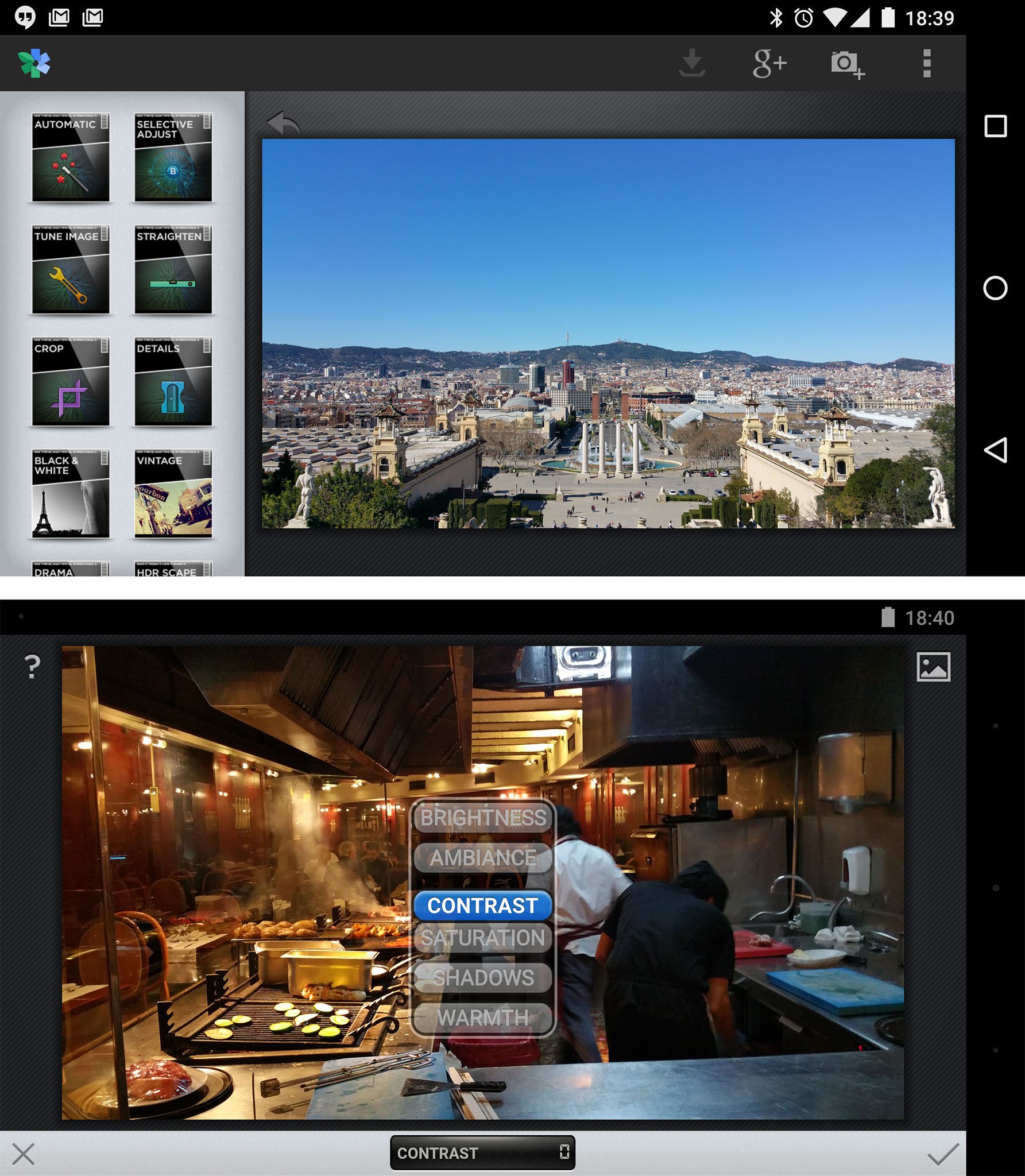
Google's Snapseed is one of the most accessible photo editing apps for Android, with a wide range of features for experienced users and newcomers alike. At its most basic level, Snapseed lets you scroll vertically through image enhancement options, then drag horizontally to control the intensity of the effect.

The range of features is pretty diverse: everything from basic automatic color and contrast enhancement to cropping and sharpening, to selectively adjusting color properties within a particular radius. And of course it wouldn't be a photo editing app without the obligatory filters and frames, which are controlled by swiping, just like Snapseed's image tuning features.

If you're after a photo editing app that's powerful yet simple to learn, Snapseed strikes a great balance between the two.

Download: Snapseed

PicsArt Photo Studio and Collage
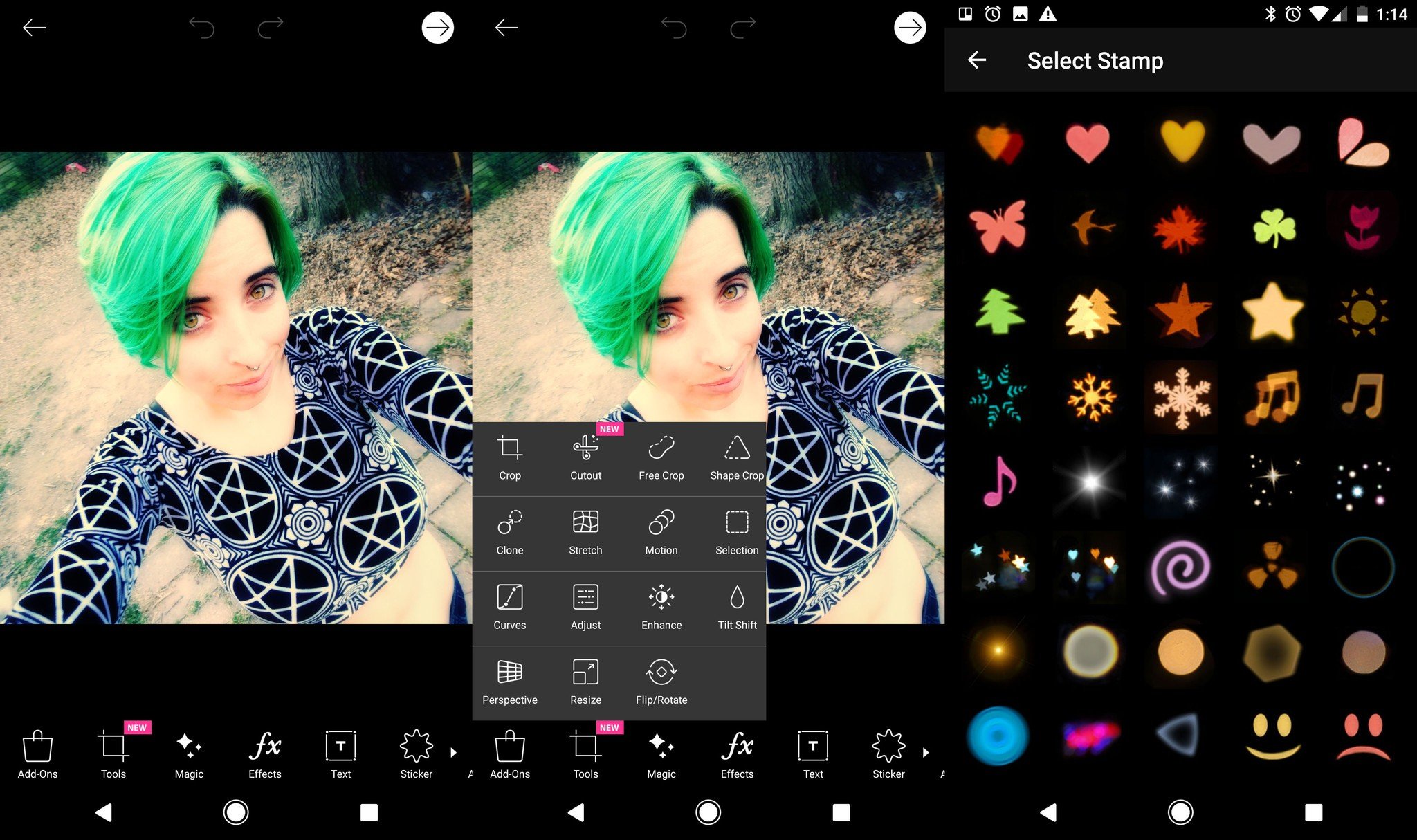
PicsArt is its own tiny social media network that includes a robust photo editor. It includes the usual tools, allowing you to adjust white balance, tone, cropping, and more. PicsArt goes a big step further though. You can purchase sticker packs to adorn your photos, add adjustable lens flares, access to filters, and even use what it calls 'magic' to apply Prisma-like features to transform your photos.

While some of the cooler features do require in-app purchases in order to use them, you still get tons of fun stuff to edit and share your photos with friends. When you're done editing your app you can save the photo privately, or share it on PicsArt. You can also make the photo free to edit, if you want to let strangers tweak your photos into something strange and new.

Download: PicsArt

Adobe Photoshop Lightroom CC
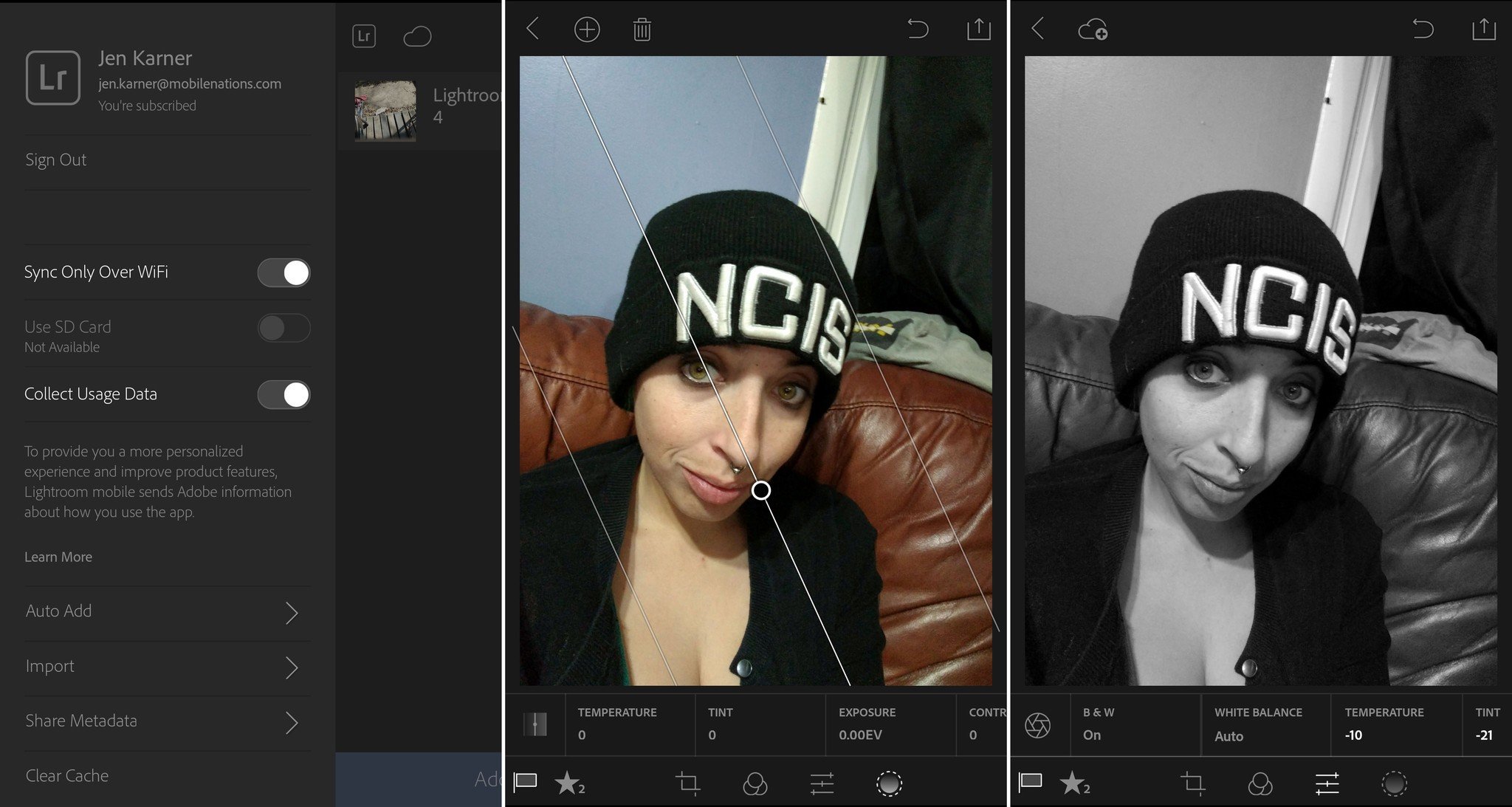
Lightroom is the photo editing software from Adobe Creative Cloud, and now it's available on Android. If you don't already have a Creative Cloud account, you can try out the trial version of Lightroom for free, but if you already pay for the service, all you need to do is sign into your account and you'll be good to go. Using Lightroom Mobile can take a few minutes to get used to, but after you figure out where everything is, it's a breeze to edit your photos wherever you are.

Lightroom Mobile also lets you take photos using the app

You're able to add photos to Lightroom so long as it's a photo saved on your phone. Once you've imported the photo that needs adjusting, just tap on it an the editing menu will open up. At the bottom of the screen, you'll see a bar that has settings that can be applied with a tap. You just need to select the category of tool that you want to use from adjusting the look of the photo itself, to cropping it or adding a gradient. This includes white balance, auto tone, and black and white mode. You can also easily adjust the temperature, tint, contrast, and exposure.

Lightroom Mobile also lets you take photos using the app. You can shoot in Auto, Professional, or HDR modes. Select phones can also capture and edit in RAW. There are a ton of features packed into Lightroom's shooting mode from adjusting the ratio, to including a grid when shooting, to geotagging your photos, and plenty more to boot.

When you're done adjusting your photo, it's also easy to save your edits and share it, You can save to your gallery if it's a personal photo, or share to your social media network of choice without any further hassle.

Download Lightroom Mobile

What are your favorite apps for Android photography?

There are tons of great apps on Android that can help you take and tweak photos of the people, places, and things that you love. Did we miss an amazing app that deserves to be here? What is your favorite photography app? Be sure to let us know in the comments below!

November 2017: We've updated this post to reflect the best photography apps currently available on Android!

12 Mar 20:10

Watch Tony Stark Deliver A Real Bionic Arm To A Happy Fan

by John Biggs
Screen Shot 2015-03-12 at 3.13.13 PM The real Tony Stark AKA Robert Downey Jr. in conjunction with EnablingTheFuture delivered a real bionic prosthesis to a young fan, Alex, who was born without most of his right arm. The project, led by Albert Manero, aims to make low-cost 3D-printed arms for the disabled and Alex’s looks so much like a real Iron Man arm that even Stark was jealous. It’s wonderful to see these sorts… Read More

12 Mar 17:58

8 of History's Greatest Cat Ladies

by Bill Crider
12 Mar 17:58

26 Discworld Quotes About Life, The Universe, And Everything

by Bill Crider
12 Mar 17:57

RIP, Terry Pratchett

by Cory Doctorow

Terry Pratchett, a treasure of a writer, a gem of a human being, and a credit to our species, has died, far too soon, at the age of 66. Read the rest

12 Mar 17:56

WATCH: Japanese people who live in Internet cafes because they can't afford apartments

by Mark Frauenfelder

This short documentary is from a three-part series, "Japan's Disposable Workers." Read the rest

12 Mar 17:53

U.K. Parliamentary Inquiry Calls For New Legal Framework To Govern Spy Agencies

by Natasha Lomas
houses of parliament In a report published today, the U.K. parliament’s Intelligence and Security Committee has called for a new single act of Parliament to govern how domestic spy agencies operate with the aim of improving transparency and public trust. It dubs its report “an important first step towards greater transparency”. Read More
12 Mar 17:52

Protecting people across the web with Google Safe Browsing

by Google Blogs
Online security is on everybody's minds these days, so we want to give you updates about various ways Google keeps you safe online. Today, on the web’s birthday, we’re highlighting recent improvements to Safe Browsing, technology that protects more than 1.1 billion people all over the world. -Ed.

As the web continues to evolve, it’s important that user protections develop in lockstep so that people stay safe online. Our Safe Browsing technology may not be quite as old as the web—which celebrates its 26th birthday today—but ever since Safe Browsing launched nearly eight years ago, it’s continually adapted to protect web users, everywhere.
Safe Browsing gives users—both on Google and across on the web—information they need to steer clear of danger. The dangerous sites detected by Safe Browsing generally fall into two categories: sites that attack users intentionally with either malware, phishing, or unwanted software that is deceptive or hard to uninstall, or sites that attack users unintentionally because they have been compromised, often without the site’s owner realizing this has happened.

Once we detect these sites, Safe Browsing warns people about them in a variety of ways. You’ve probably come across a warning like this in Chrome, Firefox or Safari; it’s powered by Safe Browsing:
Today, Safe Browsing shows people more than 5 million warnings per day for all sorts of malicious sites and unwanted software, and discovers more than 50,000 malware sites and more than 90,000 phishing sites every month. If you’re interested, you can see information about the dangerous sites that are detected by this technology anytime in our Safe Browsing Transparency Report.

We also use Safe Browsing technology to warn website owners or operators about issues with their sites so they can quickly fix them. We provide basic site maintenance tips, as well as specific Safe Browsing notifications in Webmaster Tools and Google Analytics. Often site owners don’t realize there are issues with their sites until they get these notifications.

Recent developments
Since its earliest days, Safe Browsing has been widely available, and free—for users, site owners, and other companies—to use and integrate into their own products. In the early days, we focused on detecting dangerous sites and then showing people warnings:

An early Safe Browsing notification, c. 2007. These would appear in the top right corner of people’s web browsers when they visited a site that had been flagged by Safe Browsing as potentially dangerous.

But, just as attacks become more sophisticated, we’ve made sure our own technologies have kept up. Over the years, we’ve built Safe Browsing into other Google products to help protect people in more places:

  • Safe Browsing API: We already make Safe Browsing data available for free to developers. This week we’re adding information about sites that host unwanted software, allowing developers to better protect their users as well.
  • Chrome: Before people visit a site delivering unwanted software, or try to download some of it, we show them a clear warning.
  • Google Analytics: We recently integrated Safe Browsing notifications into Google Analytics, so site owners can quickly take action to protect their users if there are issues with their websites. Previously, we’d only provided these warnings via our Webmaster Tools service.
  • Ads: We’ve also recently begun to identify ads that target people with unwanted software.

As the web grows up, Safe Browsing technology will, too. We’re looking forward to protecting the web, and its users, for many birthdays to come.

Posted by Panayiotis Mavrommatis, Safe Browsing Team
12 Mar 17:52

Google releases Chrome extension that replaces blank tabs with works of art

by Jacob Kastrenakes

Tired of staring at a white screen every time you open a blank tab in Chrome? Google has released a new extension that replaces Chrome's utilitarian new tab screen with classic works of art. The extension can either be set to give you a new artwork each day or a new artwork each time you open a tab, all displayed in a way that covers the entirety of the screen. The results are really nice — at least, so long as you're into the art that Chrome's showing you. That'll include works from van Gogh, Seurat, Cézanne, and a pretty wide variety of other artists. They're sourced from a number of different museums, all brought together by Google's Cultural Institute, which is something of an online history and art museum. As Engadget points out,...

Continue reading…

12 Mar 15:29

Discworld author Terry Pratchett is dead at 66

by Russell Brandom

Beloved fantasy author Terry Pratchett has died at the age of 66, according to a message from his publishers. Best known for the Discworld novels, Pratchett wrote more than 70 books, blending fantasy elements with cutting and human satire. Pratchett was diagnosed with an aggressive form of Alzheimer's Disease in 2007, and had struggled publicly with the disease for years while continuing to write and publish. "The world has lost one of its brightest, sharpest minds," said Larry Finlay, who worked with Pratchett at Finlay Publishers. "My sympathies go out to Terry's wife Lyn, their daughter Rhianna, to his close friend Rob Wilkins, and to all closest to him." The family has set up a page for donations in Pratchett's memory, raising funds...

Continue reading…

12 Mar 15:22

How Harper's "anti-terror" bill ends privacy in Canada

by Cory Doctorow


Michael Geist writes, "Canadian Prime Minister Stephen Harper is fast-tracking a bill that eviscerates privacy protections within the public sector that represents the most significant reduction in public sector privacy protection in Canadian history -- he' blocking the Privacy Commissioner of Canada from appearing as a witness at the committee studying the bill." Read the rest

12 Mar 15:21

In Bid To Get British Kids Coding, BBC To Give Away 1 Million ‘Micro Bit’ Computers

by Steve O'Hear
Micro Bit In a move that will bring a nostalgic smile to some British kids (and teachers) of the 80s, the BBC has announced that it is to produce a new educational mini-computer — codenamed the ‘Micro Bit’, a play on the broadcaster’s original ‘BBC Micro‘ computer — and will give away 1 million devices to British school kids aged 11. It will be distributed… Read More
12 Mar 14:02

Golf course home to mighty gators

by David Pescovitz
11046724_1022937087734800_3847119884712300909_n

The Myakka Pines Golf Course in Englewood, Florida is home to massive alligators. This one is apparently 12 to 13 feet long. Read the rest

12 Mar 14:01

Angry Birds Stella POP! takes the birds into bubble shooters

by Ara Wagoner

Rovio, makers of the classic Angry Birds franchise, are introducing the latest flinging game in their series heads into new territory: the bubble shooter, or rather the bubble flinger.


12 Mar 14:00

Purchase the LG G Flex 2 with Vodafone and get the G Watch R for free

by Rich Edmonds

LG's G Flex 2 is now available through Vodafone in the UK. The mobile operator today announced the smartphone on its Red 4G plans, throwing in a free LG G Watch R for those who make the purchase.


12 Mar 13:58

SteamOS Hits Major Milestone

by Matt Burns
streaming_launch Steam now boasts more than 1,000 gaming titles for Linux, and therefore, SteamOS. Everything from indie games to AAA titles are available from the service. Best yet, even more titles are regularly popping up, with 14 games launching this week alone. Read More
12 Mar 13:56

Eyefi's Mobi Pro card can wirelessly sync all your RAW photos

by Jacob Kastrenakes

Eyefi is releasing a new Wi-Fi-enabled SD card today that's meant to make transferring RAW photos from a card to a computer more convenient for photographers. The new card is called the Mobi Pro, and it'll be the first in Eyefi's Mobi line that's capable of handling RAW files and connecting to local Wi-Fi networks. Earlier Eyefi cards were also capable of those feats, but Eyefi is now bringing those abilities to the Mobi line, which is supposed to be easier to set up than its other cards.

Continue reading…

12 Mar 13:56

UK's online spying habits are legal but require overhaul, says government

by James Vincent

An inquiry by the UK government into the bulk interception of communications data has cleared the country's spy agencies of wrong-doing. The report by the Intelligence and Security Committee (ISC) said that the UK's spies "do not seek to circumvent the law," and that their activities do not constitute "blanket surveillance" or "indiscriminate surveillance." However, the report condemns the legal framework surrounding digital surveillance in the UK, saying it is "unnecessarily complicated and – crucially – lacks transparency."

"The current, overly complicated, legislation."

The inquiry by the ISC was launched in 2013 after leaks by former NSA contractor Edward Snowden revealed the extent of online surveillance by both the US and UK. "In...

Continue reading…