Shared posts

22 Jun 19:25

Swarm taps into Foursquare's roots, rolls out Mayorships again

by Jared DiPane

Swarm, the check-in app from Foursquare, has just reintroduced a feature that many have missed since its release, Mayorships.

Part of what made Foursquare so much fun, aside from telling everyone where you were, was the ability to claim Mayorship of a specific location, and that has come back to its Swarm app. People would fight over Mayorships, everyone wanted to be Mayor of all the places they visited, and now users can get back to fighting the good fight.


22 Jun 16:07

Android Wear: New watch faces from around the world

by Unknown
Ever wish you could change your look throughout the day? With Android Wear, fashion is equal parts physical and digital. Now, in addition to our growing collection of watches, you can also pick from 1500+ downloadable watch faces to match any outfit, mood, or occasion.
Today, we’re showcasing 17 new watch faces from all over the globe—from the adorable characters of Angry Birds, Hello Kitty, and Moomin, to the elegant accessories of Cynthia Rowley, Lulu Frost, and Triwa, to eye-catching brands and artists like Bang & Olufsen, Muji, and Kevin Tong.

So whether you’re into games or glamour, you’re sure to find a watch face that lets you wear what you want.


Posted by Feng Yuan Xu, Product Marketing Manager, Android Wear 
22 Jun 15:57

Australia's own Immortan Joe turns off the water, I mean, Internet

by Cory Doctorow
Tony Abbott, current Prime Minister of Australia, announced his new Internet censorship plan by warning Aussies, "Do not, my friends, become addicted to the Web." Read the rest
22 Jun 15:55

Introducing the News Lab

by Google Blogs
It’s hard to think of a more important source of information in the world than quality journalism. At its best, news communicates truth to power, keeps societies free and open, and leads to more informed decision-making by people and leaders. In the past decade, better technology and an open Internet have led to a revolution in how news is created, distributed, and consumed. And given Google’s mission to ensure quality information is accessible and useful everywhere, we want to help ensure that innovation in news leads to a more informed, more democratic world.

That’s why we’ve created the News Lab, a new effort at Google to empower innovation at the intersection of technology and media. Our mission is to collaborate with journalists and entrepreneurs to help build the future of media. And we’re tackling this in three ways: though ensuring our tools are made available to journalists around the world (and that newsrooms know how to use them); by getting helpful Google data sets in the hands of journalists everywhere; and through programs designed to build on some of the biggest opportunities that exist in the media industry today.

Tools for better reporting
From Maps to YouTube to Fusion Tables to Earth to Search, we offer many tools that newsrooms can use in their reporting and storytelling. Now, journalists around the world can access tutorials on these products created specifically for newsrooms, at g.co/newslab. We’ll post short written and video tutorials and case studies that highlight best practices from top newsrooms around the world. As Google develops new products that help journalists, we’ll update these resources regularly. You can also get updates by following us on Twitter and Google+, and by subscribing to our YouTube channel.
Data for more insightful storytelling
There’s a revolution in data journalism happening in newsrooms today, as more data sets and more tools for analysis are allowing journalists to create insights that were never before possible. To help journalists use our data to offer a unique window to the world, last week we announced an update to our Google Trends platform. The new Google Trends provides journalists with deeper, broader, and real-time data, and incorporates feedback we collected from newsrooms and data journalists around the world. We’re also helping newsrooms around the world tell stories using data, with a daily feed of curated Google Trends based on the headlines of the day, and through partnerships with newsrooms on specific data experiments.

Programs focused on the future of media
We’re also working with partners to build a series of programs focused on imagining the future of news and information, as well as on empowering new voices in media. One of the opportunities we’re focused on is increasing the number of media startups in the marketplace. We’ve launched partnerships with Matter, a media accelerator in San Francisco, and Hacks/Hackers, a global community group for developers and journalists, to provide financial support and mentorship from Google engineers that will help these organizations expand their impact to more startups around the world. We’re also holding a series of TechRaking summits with the Center for Investigative Reporting: hackathons focused on developing new investigative tools such as drones, online databases, and more.

Another area we’ve focused our programs on is citizen reporting. Now that mobile technology allows anyone to be a reporter, we want to do our part to ensure that user-generated news content is a positive and game-changing force in media. We’re doing that with three projectsFirst Draft, the WITNESS Media Lab, and the YouTube Newswire—each of which aims to make YouTube and other open platforms more useful places for first-hand news content from citizen reporters around the world.

The News Lab is a global effort, with teams in the U.S., U.K., France, and Germany to start—and we’re also powering the training and research arm of Google’s Digital News Initiative in Europe.

Google has created many technologies and platforms that have engaged the media industry. As both the media landscape and technology continue to evolve, we believe we can create a more informed world if technologists and journalists work together—and we’re excited to be part of the effort.

Posted by Steve Grove, Director, News Lab
22 Jun 15:52

Google Launches A New Home For Journalists With “News Lab”

by Sarah Perez
news-lab Google today announced the launch of a new site called News Lab, a destination that aims to connect journalists with programs, data and other resources to aid in their reporting. The site will feature a number of tools for newsrooms, including tutorials and best practices on how to use Google products in reporting, as well as provide access to the recently updated Google Trends service, and more. Read More
22 Jun 12:14

Eddy Cue called Taylor Swift tonight to announce Apple Music would pay artists during free trials

by Recode Staff

Apple's Eddy Cue says that Taylor Swift’s letter, coupled with complaints from other artists, did prompt its decision to pay musicians for the first three months of Apple Music's free trial. He said he discussed it with Apple CEO Tim Cook today. “It’s something we worked on together. Ultimately we both wanted to make the change.”

Continue reading…

21 Jun 19:51

Ultimate t-shirt for trolling science fiction fans

by Cory Doctorow
21 Jun 19:50

Microsoft made a better YouTube search engine than Google

by Dante D'Orazio

YouTube might never be dethroned as the king of online video, but Microsoft has just made a compelling case for visiting Bing before you watch anything on YouTube.

Microsoft gave a much-needed makeover to its Bing video search feature this week, and the final product is pretty good. It features larger, easier-to-identify video thumbnails, and you can even preview videos straight from the results to get an idea of what you're looking at. Just hover your cursor over a result to watch a small bit of the video.

Microsoft tries to make Bing your video destination

Bing now shows additional information on each result, as well, to bring it up to par with YouTube. Specifically, you can now see the view count, upload date, and uploader before...

Continue reading…

21 Jun 14:57

EU set to kill street photography

by Cory Doctorow


The "Freedom of Panorama" is the right to take pictures in public spaces, even if you incidentally capture copyrighted works, from building facades to public sculptures to images on t-shirts and ads -- and on July 9, the EU will vote whether to abolish it. Read the rest

21 Jun 11:12

Publishing’s Kickstarter Moment

by John Biggs
publishingoldnew First, some ranting: getting an Indie book reviewed is almost impossible. It took a publisher’s backing to make the The Martian a hit and Hugh Howey had to create his own publisher, Broad Reach to get official attention on the NYT bestseller rankings. In fact, the New York Times Book Review, arguably the only book review that matters these days, doesn’t publish… Read More
20 Jun 21:59

Test Your Hearing with These Mobile Apps

by Thorin Klosowski

Test Your Hearing with These Mobile Apps

Worried your hearing might be getting bad but don’t want to see a doctor about it just yet? You can give yourself a preliminary test using mobile apps to see where you stand.

BBC Future recommends a couple of different apps, Hearing Test for Android and UHear for iPhone. You can also test your hearing age using Mimi Test for iPhone (this video also works). Both will give you an idea of how your hearing is doing so you can make the choice of whether or not it’s worth seeing a doctor.

Are you damaging your hearing without realising it? | BBC Future

20 Jun 19:15

Unarmed man flags down LAPD seeking help. They shoot him in the head.

by Lars Forseti
Video of this incident is making the rounds online, and is extremely graphic. Read the rest
20 Jun 19:15

115-year-old woman tells us how she does it: 6 tips for happiness and longevity

by Carla Sinclair
Besides being a woman (90% of people who live past 100 are women), and besides good genes, here are 6 other lifestyle choices that may have spurred Jones' longevity. Read the rest
20 Jun 16:28

Twitter wants you to shop on its new dedicated ‘product pages’

by Lizzie Plaugic

Twitter is continuing to experiment with commerce. The company has started rolling out product and place pages that allows users to discover and purchase items within the service, Twitter said in a blog post Friday.

The new pages will organize related tweets about products and brands on dedicated pages. If you look at a product page, you'll see other users' tweets about that product, prices, and, sometimes, a buy button. As you can see in the image below, if you were to look at the publishing company Penguin Random House's Twitter profile, you could redirect to a product page for Andy Weir's novel The Martian. You could then read what other people were tweeting about the book, and decide if you wanted to buy it, which you could do...

Continue reading…

20 Jun 16:27

Schneier: China and Russia probably did get the Snowden leaks -- by hacking the NSA

by Cory Doctorow

Bruce Schneier weighs in on last week's ridiculous UK government talking points memo that Murdoch's Sunday Times dutifully published as front-page news. Read the rest

20 Jun 13:03

Or Maybe You Did

by Bill Crider
20 Jun 10:53

Recursive sidewalk sale sign

by David Pescovitz
azoKDOS

Such a great deal, I should buy ∞ of them! (more…)

20 Jun 10:53

UK High Court's insane ruling: ripping CDs is illegal again

by Cory Doctorow

The Court interpreted the even loonier European Copyright Directive to say that the government couldn't legalise CD ripping without imposing a levy on the public. Read the rest

20 Jun 10:53

When Piracy Gets Too Easy, Expect a Big Response

by Andy

moviesAfter one and a half decades of mainstream file-sharing, millions of people now have little trouble finding and consuming unauthorized content online.

For many the process is no more difficult than browsing the web but due to its technical nature the majority still find it bewildering. Then along came Popcorn Time, software that turned viewing movies into child’s play for anyone with a PC, tablet or phone.

But the idea behind Popcorn Time isn’t new. Advanced users of the popular Kodi software (previously known as XBMC) have been enjoying a super-charged Popcorn Time rival for many years. However, that largely requires the mastering of an often confusing third-party addon system. Inevitably, of course, that became streamlined too.

Just as Popcorn Time works out of the box, custom installations of Kodi do too. These installers make the previously complex setup process a breeze and in doing so introduce a whole new audience of novices to piracy, just like Popcorn Time has.

Of course, this simplicity hasn’t gone unnoticed by anti-piracy outfits. Legal action against Popcorn Time was common in 2014 and continued in 2015. No surprise then that those peddling ‘pirate’ Kodi variants (which have nothing to do with the team behind the project) are now getting more attention.

The problem is availability and ease of use. Sold pre-configured in Android set-top box form on both eBay and Amazon, the devices are essentially a one-stop shop for not only pirate movies and TV shows, but also a streaming hub for live sports and PPV. Anyone can have one of these devices delivered next day and learn how to use it in under an hour. Oh, and they run Popcorn Time too. And Showbox.

As a result, piracy has never been easier and anti-piracy groups are scrambling to stem the tide. Just last week a seller of ‘pirate’ Android boxes was raided by police in the UK and just days ago Amazon overreacted by banning the entirely legal Kodi software itself, presumably after a copyright holder complaint.

Other attacks have been more targeted. Last year the Federation Against Copyright Theft filed a complaint against a popular live sports plugin for Kodi known as Sports Devil. But according to FACT, this was just the beginning of their crackdown on these piracy platforms.

“Those engaged in piracy have always been quick to take advantage of technological advances to create new methods to profit from delivering stolen content to a wider audience. The proliferation of IPTV and set-top boxes which can stream content is no exception,” the anti-piracy group told TF.

“We are working with our members and partners in law enforcement on addressing these threats and significant measures are being taken by all parties, including online market places, to address the availability of these devices, as well as the apps and add ons that facilitate illegal streams, and bring those responsible to account.”

The ‘custom Kodi’ epidemic hasn’t gone unnoticed in the Netherlands either. Dutch anti-piracy group BREIN is currently engaged in legal action against Filmspeler.nl, a seller of “fully loaded” (a euphemism for “piracy configured”) Android boxes.

In fact, BREIN is so serious about ending the problem that the case is being sent to the European Court of Justice so that an opinion can be gained on whether streaming from illegal sources represents a breach of EU law. If BREIN wins it won’t end the problem, but it will draw a line in the sand in terms of how such products can be advertised and sold.

“We will always look at any system that is aimed at providing access to copyrighted content without consent of the right holders and by doing so is causing damage to the earning potential of right holders and licensed platforms,” BREIN chief Tim Kuik told TorrentFreak.

Finally, since these devices are increasingly being targeted at the non-tech savvy, is it possible that buyers are naive to the point that they don’t appreciate their dubious legal standing? Kuik thinks not.

“We see that people using such systems tend to be aware they are getting access to unauthorized content even if they don’t know how it works technically,” the BREIN chief concludes.

The big question now is what comes next, and what will be the industry’s response? That will become clear in the months and years to come but rest assured, the easier piracy becomes, the more vigorous the response will be.

Source: TorrentFreak, for the latest info on copyright, file-sharing, torrent sites and the best VPN services.

19 Jun 22:44

Kitten-cam captures sleepy kittens exiting their cute little house, one by one

by Xeni Jardin

Big Kitten is watching you.

(more…)

19 Jun 22:03

The moment this Corgi suddenly realized that a rock was in fact a turtle

by Xeni Jardin

“Caught the moment when my dog realized he wasn't laying next to a rock,” says Redditor Muffinlette. (more…)

19 Jun 20:39

Photo gallery of people living in tiny rooms in Tokyo

by Mark Frauenfelder

Photographer Won Kim (Instagram) took these photos of people living in a "downscale version" of a Japanese capsule hotel. They are basically sleeping / privacy burrows for urban dwellers. I wonder how much they pay in rent? Read the rest

19 Jun 18:52

The Post Office launches its own affordable mobile network in the UK

by Rich Edmonds

The mobile network battleground in the UK is a confusing one, especially for consumers. The Post Office has decided to make things that much more puzzling by launching its own virtual network.

19 Jun 18:46

Facebook's new photo app won't launch in Europe because of facial recognition

by James Vincent

Earlier this week, Facebook launched Moments, a new photo-sharing app that uses facial recognition technology to dig up forgotten snaps of friends from your camera roll. It's a neat trick, but not one that Facebook's European users will be able to try out: the social network has said that Moments won't launch on the continent due to worries that European regulators will object to its use of facial recognition.

Continue reading…

19 Jun 18:44

The Psychological Impulses That Make Us Want to Spend Money

by Kristin Wong on Two Cents, shared by Andy Orin to Lifehacker

The Psychological Impulses That Make Us Want to Spend Money

It’s always interesting to learn how our shopping behaviors are influenced. Sure, advertisers manipulate our habits, but our brains go with it, because deep down, we have a desire to consume. There are a few natural impulses that make us want to spend more.

Over at Business Insider, writer Antonia Farzan cites a book that deals with this topic: Cool: How the Brain’s Hidden Quest for Cool Drives Our Economy and Shapes Our World. The book says there are three main impulses that urge us to consume.

Survival: Our survival instinct leads us to want to take what’s in front of us, the authors say. They point to a study, published in American Economic Review, that found people are willing to pay more for something when it is physically present in front of them. And the difference is pretty substantial. In one study, they showed some people a photo of potato chips and asked them how much they’d pay for them. They showed another group a bag of potato chips right in front of them, asking the same question. Researchers reported that “subjects’ willingness-to-pay for snacks increased by 61 percent when they were presented with the real items as opposed to text or image displays.”

Maybe something to keep in mind next time your grocer gives out samples.

Habits: Our natural inclination for habits is what makes it so hard to give up something we’re used to spending money on. We value the routine rather than the outcome. So even if it comes at the cost of our savings goals, it’s hard to break a spending habit. Consider the notorious latte example.

Goals: At the same time, the authors explain that we have a psychological instinct to create goals, too. But sometimes, we can overthink and get lost in the details. They write:

“At the supermarket, your Goal pleasure machine is the one that has made a list at home and then deliberately seeks those items within your budget. But if you’ve ever grocery shopped with someone who takes ten minutes to decide on what kind of salad dressing to get — muttering on and on about the pros and cons of various types and brands — you’ve seen the Goal pleasure machine in action.”

Of course, there’s nothing wrong with these instincts. But it helps to understand the role they play in our consumerism. When we’re aware, we can make better spending decisions. To read more, head to the link below.

Neuroscientists pinpoint 3 irresistible impulses that influence everything we buy | Business Insider

Photo by jarmoluk.

19 Jun 18:44

Lifehacker Faceoff: Google Photos vs. Flickr

by Melanie Pinola

Lifehacker Faceoff: Google Photos vs. Flickr

Last month, both Google and Yahoo introduced big changes to their photo storage services, Google Photos and Flickr (4.0), respectively. Both offer identical, useful features: automatic photo backups, intelligent organization, online editing tools, and sharing capabilities. So which one should you use?

Back in January, we asked readers for their votes on the best image hosting sites, and Google+ Photos (from which the new Google Photos is spun off) came out on top. But it was a close race against Flickr, which garnered just 67 fewer votes. A lot has happened since then. Google ditched the Google+ tie and introduced free, unlimited standard-resolution photo and video storage, and Flickr rolled out auto uploading and intelligent photo organization features. Let’s take a look at how these two popular services now compare.

The Basics: Storage Space, File Formats, and Cost

Lifehacker Faceoff: Google Photos vs. Flickr

Google Photos: Unlimited backup, but not at full resolution. Google will back up each and every one of your photos and videos—as long as they are under 16 megapixels or 1080p HD video. If you choose this unlimited storage space option, Google will compress any higher-resolution images and videos to fit these maximum requirements. Want to keep the original full resolution quality? You can do that too, but will be limited to the amount of storage you have in your Google account (which is shared with Google Drive and Gmail). For most people, this is 15GB of free storage, with the option to pay for more space if you need it.

Google Photos also supports more file formats, including RAW images. However, if you use the unlimited storage option, Google will compress your RAW photos, which defeats the purpose a little.

Flickr: Simply 1TB of free storage. With Flickr you get a set, free 1TB of storage space with no limitations on resolution. However, there are file size limits: individual photos can be up to 200MB and videos can be up to 1GB in size. Video playback is also constrained to the first 3 minutes. Also, besides a paid monthly plan to remove ads, Flickr has no option to get more storage space (Grandfathered Flickr Pro users, however, continue to enjoy unlimited storage at full resolution for a paid subscription). 1TB of space at full resolution, however, would likely be enough for most people’s photo storage needs—enough to store over 500,000 photos in original quality, according to PC Magazine.

Winner: Tie. This one’s a toss-up depending on how many photos you have to store, whether you want unlimited video storage, if you need RAW support, or want a true backup of your photos in their original quality. If you don’t want your photos to be compressed and want a backup of your photos in their original resolution, Flickr is the better option. You’ll get more free space for your full-res photos.

However, Google Photos is better for backing up videos, since there’s no length limitation. And, for most people who tend to take photos on their phones, view photos on a screen, and print at typical photo sizes, Google Photos’ “high quality” unlimited option should be good enough. (But you should still back up your photos to at least two other places, such as a local external drive and an online backup service!) It’s nice that Google has options to increase your storage space if needed, and professional/serious photographers will likely appreciate the support for RAW image files.

Getting Your Photos There and Back Again: Uploading and Downloading

Lifehacker Faceoff: Google Photos vs. Flickr

When you’ve amassed a lifetime of photos you don’t want to lose, it’s pretty important to have a reliable and easy service for backing them all up—and downloading them quickly when needed. Both Google Photos and Flickr can automatically upload your photos and videos via mobile apps or desktop uploaders. These are pain-free ways to make sure you have copies of your photos stored in the cloud, but there are subtle differences to how the uploaders work.

Google Photos: Good photo upload control. Google Photos’ desktop uploader has more options than Flickr’s uploader does, such as automatically uploading photos and videos from external media, uploading RAW files, and choosing between standard and full photo resolution. The mobile apps’ settings also include features like removing your geolocation from photos that you share, auto-grouping photos by facial recognition, and selecting specific folders on your phone to back up.

Flickr: Simple but does the job (if slowly). Flickr’s uploaders are more basic. On the desktop, you select the folders you want and let it do its thing. On mobile, your options are to use Wi-Fi only or cellular/Wi-Fi. That’s about it.

I found Google Photos’ desktop uploader to be much faster than Flickr’s, uploading 39,000 photo files in a few hours, compared to Flickr’s 2-day project. That, however, is likely because Google compressed the photos before transit while Flickr preserved all of the photos’ resolution. Flickr’s mobile auto-uploader also ran very slowly (as I write this, it’s been stuck on uploading 1 of 45 photos from my Android phone for the last two hours). Also, while these uploaders work basically the same way, Windows’ Task Manager tells me that Flickr uses about 8 times the memory of Google Photos (49MB vs 5.9MB) just running in the background.

Downloading photos reveals some other differences. To download all of your Google Photos, you can use Google Takeout and get a zipped file of all your photo albums. If you have Google Drive syncing on your computer, you’ll also have easy access to all your photos there. Alternatively, you can download individual albums or the collections Google Photo creates for you. On Flickr, you only have the option to select the photos you want to download or individual albums as a zipped file—there’s no simple “download all” option. On the other hand, it is much easier to select multiple photos on Flickr than it is on Google Photos, which lacks a “select all” feature.

Winner: Google Photos. Google Photos offers more control over uploading, is faster (because of the compression), and is easier to download your backed up photos at once.

Viewing Your Photo Collection: “Magic” Organization and Powerful Search

Having a copy of your photos online is great for backup purposes, but you probably also want to view and enjoy them easily without spending the rest of your life organizing your photos into different albums. That’s where these apps’ smart organization and display features come in. The biggest difference between these two services is how they present your photos.

Google Photos: Smart search, intelligent photo recognition, and automatic albums. Unsurprisingly, Google Photos is great at searching your photos. When I type in “beagle,” for example, all the photos look like this:

Lifehacker Faceoff: Google Photos vs. Flickr

(Photo de-duplication is supposedly available on Google Photos, but doesn’t seem to be working yet for me.)

You can even refine your search with terms like “playground AZ” or “playground NY” to quickly get to the photos you’re looking for. Google Photos’ search isn’t perfect, however. For example, there are beagle photos I know I have on the service missing from my search results, donkeys that showed up under “dogs,” and pools misidentified as beaches. But still, the initial results are pretty impressive.

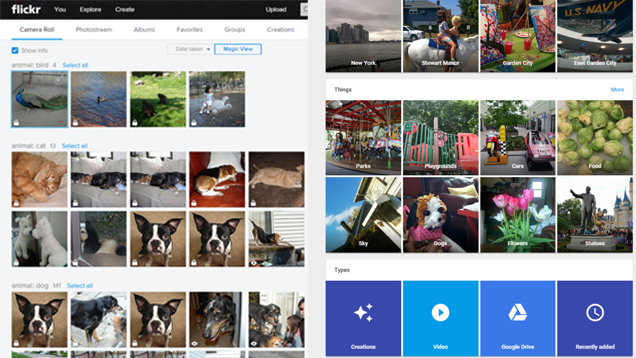
Google also automatically categorizes your photos into People, Places, and Things. (You have to put the mouse cursor into the search bar to bring it up, though, which is not very intuitive.) As with Google’s Picasa desktop photo app, the facial recognition is stellar. Although you can’t tag photos with people’s names, clicking on a face brings up most, if not all, of the photos Google finds that face in (even when the face is super tiny, blurred, and in the background!). The Things category brings up a wide variety of subjects, from “parks” and “concerts” to “statues” and “ships,” depending on your photos.

Google Photos also automatically groups your photos into collections (automatic albums) based on their dates and locations, so you’ll easily see all your vacation or event photos in one place without having to do any work. The Google Photos Assistant creates entertaining animations and slideshows for you automatically as well.

Unfortunately, however, Google Photos doesn’t preserve your file folder structure. So if you organize your photos meticulously by year and month or with specific folder names on your computer, you won’t find that mirrored in Google Photos. It just flattens everything into one huge “folder” online. You can manually add photos to an album in the Google Photos apps, but that’s a waste of time if you’ve already done it on your desktop.

Flickr: Smart photo filtering and multiple views. Flickr also recently added an automatic categorizing feature, grouping your photos by subject. Like Google Photos, this is quirky at times, with dogs placed in the cat category and children labeled as birds. A few of the nice things about Flickr’s presentation, though: It tells you the number of photos in each category, shows you the privacy settings at a glance (and lets you change them in one click), and allows you to sort by date taken, date uploaded, and privacy setting.

Lifehacker Faceoff: Google Photos vs. Flickr

Flickr also preserves your local folder structure in the Albums view, which makes it easier to browse photos if you have a specific way of organizing them. You can also easily add tags to photos en masse and associate photos with other Flickr users.

Photo search, however, isn’t as smart in Flickr compared to Google Photos. Flickr couldn’t find any match for “beagle,” although it did identify a few “dog” photos and pulled in over 6 million dog photos from other Flickr users. (I’m not sure if that’s a helpful thing or not.) You can, however, filter by photo qualities like color, size, orientation, and date taken.

Winner: Tie. I like Flickr’s better sorting and filtering options, but Google Photos’ search and photo identification are more precise. Flickr might be better at organizing your photos, since you can view your photos in albums like the ones you’ve created on your computer or add tags to your photos and filter them in multiple ways. Google Photos is better at finding specific photos in your vast collection. Take your pick at which is more important to you or what best matches your style of photo perusing.

Sprucing Up Your Photos: Online Editing Tools

Both Google Photos and Flickr don’t just store and show your photos, they also help you easily tweak them, with editing tools for cropping, rotating, applying filters, and more.

Google Photos: Fine editing controls for the most basic functions. Sadly, when Google moved its photo app from Google+ to Google Photos, it ditched the awesome Snapseed editing capabilities. This makes Google Photos more accessible to non-Chrome users (since the web-based editing tool previously required Chrome), but now the online photo editing isn’t as sophisticated. Before, for example, you could selectively adjust specific areas of a photo and access a ton of tweaking tools (e.g., tilt-shift and HDR), but now the tools offer just the basics: Slider adjustments for light, color, pop, vignettes, cropping, and filters, as well as a simple but handy auto-enhancement option.

Lifehacker Faceoff: Google Photos vs. Flickr

Flickr: More advanced editing options. Although not as sophisticated as Snapseed’s photo editing was, Flickr’s photo editor, powered by Aviary, does more than just the basics. In addition to the usual filters and brightness controls, you can add stickers or text and drawing overlays to photos, quickly whiten teeth and fix red eye photos, adjust warmth, fine-tune focus, and more.

Lifehacker Faceoff: Google Photos vs. Flickr

In addition, in Flickr’s new camera roll section, you can select multiple photos and batch process them to change sharing permissions, copyright protection, dates, photo titles and descriptions, and tags. You can’t edit metadata in Google Photos.

Winner: Flickr. Google Photos meets the most common editing needs, but on both the web and mobile, Flickr’s editors offer more.

Posting Your Photos for the Public: Photo Sharing

Google and Yahoo both know that most people aren’t saving photos just for their own eyes, but for their friends, family, and perhaps the internet at large. They both make it easy to send your photos elsewhere, but Flickr is much more of a community of photo-sharers than Google Photos is.

Google Photos: Basic sharing. Select a photo, group of photos, or album and you can quickly share to Google+, Facebook, or Twitter, or get a link to share via email or elsewhere. Google Photos also shows a list of the links you’ve shared so you can re-share or delete the link, but otherwise, there’s not much else to do here when it comes to sharing.

Lifehacker Faceoff: Google Photos vs. Flickr

Flickr: Built around photo sharing. Since launching in 2004, Flickr has been about showing off your photos and videos. In addition to a shareable link for photos and albums, Flickr lets you control groups of people who can view your photos, and enables others with access to comment on your photos, star them, and/or follow you to get updates on your photo uploads. You can share your photos to Facebook, Twitter, and Tumbler, and also connect Flickr to third-party apps to get more out of your account. You can set the attribution rights to your photos and see how many views they’ve gotten.

Lifehacker Faceoff: Google Photos vs. Flickr

Winner: Flickr. Flickr has such a robust community of users, comprised of both professional and everyday photographers. The community features are one of the service’s strongest selling points.

Bonus: Unique Features and Other Options
Lifehacker Faceoff: Google Photos vs. Flickr

With Google Photos and Flickr sharing so many features in common, it’s the small differences that might make you choose one or the other. A quick summary:

Google Photos auto-creates albums, slideshows, and collages for you. It also lets you create your own animations and awesome photos. (Also, as mentioned above, it supports RAW images and offers virtually unlimited storage.) Google Photos is like having a personal assistant mine through your photos and highlight the best ones into digital collections. It’s best for exploring your photos.

Flickr offers a printing service so you can quickly turn a photo into canvas wall art or photos into a photobook. It offers more ways to view, edit, and share your photos. Flickr is like having a user-friendly interface to your photos database, giving you control over how to present and share photos from that database.

These aren’t the only two options for storing and sharing your photos online, of course. For comparison, some of the more popular tools include:

  • Amazon Prime Photos: You get free, unlimited storage with no resolution restrictions on Amazon if you’re an Amazon Prime user, but there are fewer features here and it’s not as intuitive to use as other services. The desktop upload app didn’t work for me (I gave up after a few stalled hours with no progress), but if you’re a Prime user, you might want to check it out for the unlimited full-resolution storage—a unique offering.
  • Apple iCloud Photo Stream and Photo Library: These apps and services are purely for Apple users, but with them you can sync iOS device photos to the new Mac OS X Photos app and store 30 days’ worth of photos for free.
  • Dropbox + Carousel: If you have enough space to store your photos on Dropbox, the service’s Carousel app offers a nice way to browse all your photos. It’s not really a great value, though, with only 2GB of free space and 1TB storage costing $10/month.
  • Microsoft OneDrive: Microsoft offers a generous 30GB of free online storage for photos and other files. OneDrive groups photos automatically into categories and has a decent web-based display of your albums, but there are no editing tools and, like the other alternatives in this section, photos don’t seem to be much of a priority for the service.

Right now, I’m using both Google Photos and Flickr, since I don’t think there’s such a thing as having too many backups of your photos. I think of Flickr as more of a true backup for my photos (and I’ve still got 963GB of free space to use up), while Google Photos is a better way for me to “discover” old photos buried in my decades of photo-taking. In the end, as usual, choosing between these services depends on your usage needs. There’s a lot to love about both of them, and a lot to look forward to in future versions of these apps.

Illustration by Tina Mailhot-Roberge.


19 Jun 18:42

31 Mystical Night Photography Images

by Darlene Hildebrandt

There is something magical, mystical about the night, and night photography. Things you can’t see with the human eye, a certain peacefulness.

Here on dPS night photography is a popular topic, with many articles to choose from if you want to learn how to do it.

In this collection let’s look at some stunning examples of night photography done well:

The post 31 Mystical Night Photography Images by Darlene Hildebrandt appeared first on Digital Photography School.

19 Jun 18:38

I'm Sure You'll All Agree

by Bill Crider
19 Jun 18:35

LED cloud lights

by Cory Doctorow


The battery-powered LED cloud is handmade in Australia and projects a moon and stars on the ceiling above. (more…)

19 Jun 17:51

UK’s Legalization of CD Ripping is Unlawful, Court Rules

by Ernesto

uk-flagLate last year the UK Government legalized copying for private use, a practice which many citizens already believed to be legal.

However, until last October, anyone who transferred music from a purchased CD to an MP3 player was committing an offense.

The change was “in the best interest” of consumers, the Government reasoned, but several music industry organizations disagreed.

In November the Musicians’ Union (MU), the British Academy of Songwriters, Composers and Authors (BASCA) and UK Music applied for a judicial review of the new legislation.

While the groups are not against private copying exceptions, they disagreed with the Government’s conclusion that the change would cause no financial harm to the music industry.

Instead of keeping copies free, they suggested that a tax should be applied to blank media including blank CDs, hard drives, memory sticks and other blank media. This money would then be shared among rightsholders, a mechanism already operating in other European countries.

Today the High Court largely agreed with the music industry groups. The Government’s conclusion that copyright holders will not suffer any significant harm was based on inadequate evidence, Mr Justice Green ruled.

“In conclusion, the decision to introduce section 28B [private copying] in the absence of a compensation mechanism is unlawful,” the Judge writes.

The Judge didn’t agree with all claims from the music groups. For example, he rejected the allegation that the Government had unlawfully predetermined the outcome of the private copying consultation.

Nonetheless, the application for a judicial review succeeded meaning that the private copying exceptions are now deemed unlawful. As a result, the Government will likely have to amend the legislation, which took roughly half a decade to implement.

The UK music groups are happy with the outcome and are eager to discuss possible changes with lawmakers.

“The High Court agreed with us that Government acted unlawfully. It is vitally important that fairness for songwriters, composers and performers is written into the law,” UK Music CEO Jo Dipple commented on the ruling.

“Changes to copyright law that affect such a vital part of the creative economy, which supports one in twelve jobs, must only be introduced if there is a robust evidential basis for doing so,” Dipple added.

The High Court scheduled a new hearing next month to decide what action should be taken in response to the judgment, including whether the private copying exceptions should be scrapped from law.

Source: TorrentFreak, for the latest info on copyright, file-sharing, torrent sites and anonymous VPN services.