Shared posts

09 Jul 22:25

Keep Your Home Tidy with the "Complete the Cycle" Cleaning Method

by Patrick Allan

Keep Your Home Tidy with the "Complete the Cycle" Cleaning Method

Keeping a clean home comes down to developing good habits. The “complete the cycle” cleaning method helps you build the habits you need to keep your home from becoming a cluttered mess.

Clutter builds up when things don’t get put away, and things don’t get put away because you tell yourself that you’ll do it later. To avoid that, Shifrah Combiths at Apartment Therapy suggests you always think of a way to “complete the cycle” whenever you do anything at home:

Completing the cycle is a synergistic mix of Leaving Things As You Found Them and Not Leaving Things That Can Be Done Now For Later.

Essentially, you should think of every thing you do in your home as having multiple parts. The most important part being putting things away. For example, if you cook up a dinner, doing the dishes and putting them away completes the cycle. If you start your laundry, complete the cycle by putting your clothes away. You can even complete the cycle to keep your car clean by always forcing yourself to leave your car with whatever you took in with you. As you go about your daily activities at home, always ask yourself, “what would complete the cycle?” Don’t just put things down, put them away.

Try “Complete the Cycle” and See How Much Less You Have to Pick Up | Apartment Therapy

Photo by Ryo Chijiiwa.

09 Jul 22:21

[Android M Feature Spotlight] Dev Preview 2 Launcher Changes: Landscape Mode On Phones, App Drawer No Longer Broken Up By Letters, And Fast Scrolling In Widget Picker

by Ryan Whitwam

Android MWe're playing around with the new Android M preview today, and it looks like there are several notable changes to the launcher (i.e. the Google app). The new app drawer is no longer broken up by letter and the widget picker has a fast scroll bar. If that's not good enough, you can view the whole launcher in landscape mode after toggling a setting. Cool, no?

nexus2cee_2015-05-28-16.05.21 Screenshot_20150709-124730

Left: old, Right: new

One of the more surprising tweaks in the first version of the M preview was the move back to a vertical scrolling app drawer, which Google abandoned years ago.

Read More

[Android M Feature Spotlight] Dev Preview 2 Launcher Changes: Landscape Mode On Phones, App Drawer No Longer Broken Up By Letters, And Fast Scrolling In Widget Picker was written by the awesome team at Android Police.


09 Jul 19:58

The mail you want, not the spam you don’t

by The Gmail Team
Posted by Sri Harsha Somanchi, Product Manager

The Gmail team is always working hard to make sure that every message you care about arrives in your inbox, and all the spam you don’t want remains out of sight. In fact, less than 0.1% of email in the average Gmail inbox is spam, and the amount of wanted mail landing in the spam folder is even lower, at under 0.05%.

Even still, Gmail spam detection isn’t perfect. So today we’re sharing some of the new ways we are supporting the senders of wanted mail, and using the latest Google smarts to filter out spam.

Getting the mail you do want with Gmail Postmaster Tools
Gmail users get lots of important email from companies like banks and airlines—from monthly statements to ticket receipts—but sometimes these wanted messages are mistakenly classified as spam. When this happens, you might have to wade through your spam folder to find that one important email (yuck!). We can help senders to do better, so today we’re launching the Gmail Postmaster Tools.

The Gmail Postmaster Tools help qualified high-volume senders analyze their email, including data on delivery errors, spam reports, and reputation. This way they can diagnose any hiccups, study best practices, and help Gmail route their messages to the right place. For you, this means no more dumpster diving for that confirmation code ;-)

Google smarts for less spam
Since the beginning, machine learning has helped make the Gmail spam filter more awesome. When you click the “Report spam” and “Not spam” buttons, you’re not only improving your Gmail experience right then and there, you’re also training Gmail’s filters to identify spam vs. wanted mail in the future. Now, we are bringing the same intelligence developed for Google Search and Google Now to make the spam filter smarter in a number of ways.

  • For starters, the spam filter now uses an artificial neural network to detect and block the especially sneaky spam—the kind that could actually pass for wanted mail.
  • We also recognize that not all inboxes are alike. So while your neighbor may love weekly email newsletters, you may loathe them. With advances in machine learning, the spam filter can now reflect these individual preferences.
  • Finally, the spam filter is better than ever at rooting out email impersonation—that nasty source of most phishing scams. Thanks to new machine learning signals, Gmail can now figure out whether a message actually came from its sender, and keep bogus email at bay.

Ultimately, we aspire to a spam-free Gmail experience. So please keep those spam reports coming, and if you’re a company that sends email, then check out our new Postmaster Tools. Together we can get the wanted mail to the right place, and keep the spam where it belongs.
09 Jul 19:57

Up close with the new Batman, Superman, and Wonder Woman costumes

by Bryan Bishop

If there are two titans at this year's San Diego Comic-Con, it's Star Wars: The Force Awakens and Batman v. Superman: Dawn of Justice. On the show floor, the costumes for the second film are on full display — Ben Affleck's Batman, Henry Cavill's Superman, and Gal Gadot's Wonder Woman.

Fans are congregating around the cases to take a look, take a picture, and offer their opinions (after looking at the Batman costume, one fan exclaimed, "He's wearing an athletic supporter!"). It's just a taste of what's to come during Saturday's Warner Bros. panel, with the full cast of Justice expected to attend. And given that it's Comic-Con, we wouldn't be surprised if Aqua-Man and maybe even Green Lantern showed up as well.

Continue reading…

09 Jul 19:56

BlackBerry and Google announce new partnership for Android in business [Updated]

by Joseph Keller

BlackBerry and Google have announced a new, enterprise-focused partnership. The two companies are working together to marry BlackBerry's BES12 enterprise device deployment service and new security features in Android 5.0 Lollipop for increased mobile security, better device management, and easier deployment of enterprise apps for Android devices.

09 Jul 19:56

Google adds machine learning smarts to Gmail's spam filter

by Dan Thorp-Lancaster

Google took to a blog post today to talk about some improvements that it is bringing to its spam-fighting engine in Gmail. The company says that the improvements largely rely on applying the same machine learning from Google Search and Google Now to the Gmail spam filter.

09 Jul 19:52

How to hang sweaters so they don’t get shoulder bumps

by Mark Frauenfelder

One useful tip of many from this list.

09 Jul 16:28

Sunrise Calendar Now Has Full Integration With Office 365 Accounts, Outlook.com Is Mostly Supported

by Jacob Long

Sunrise-Thumb

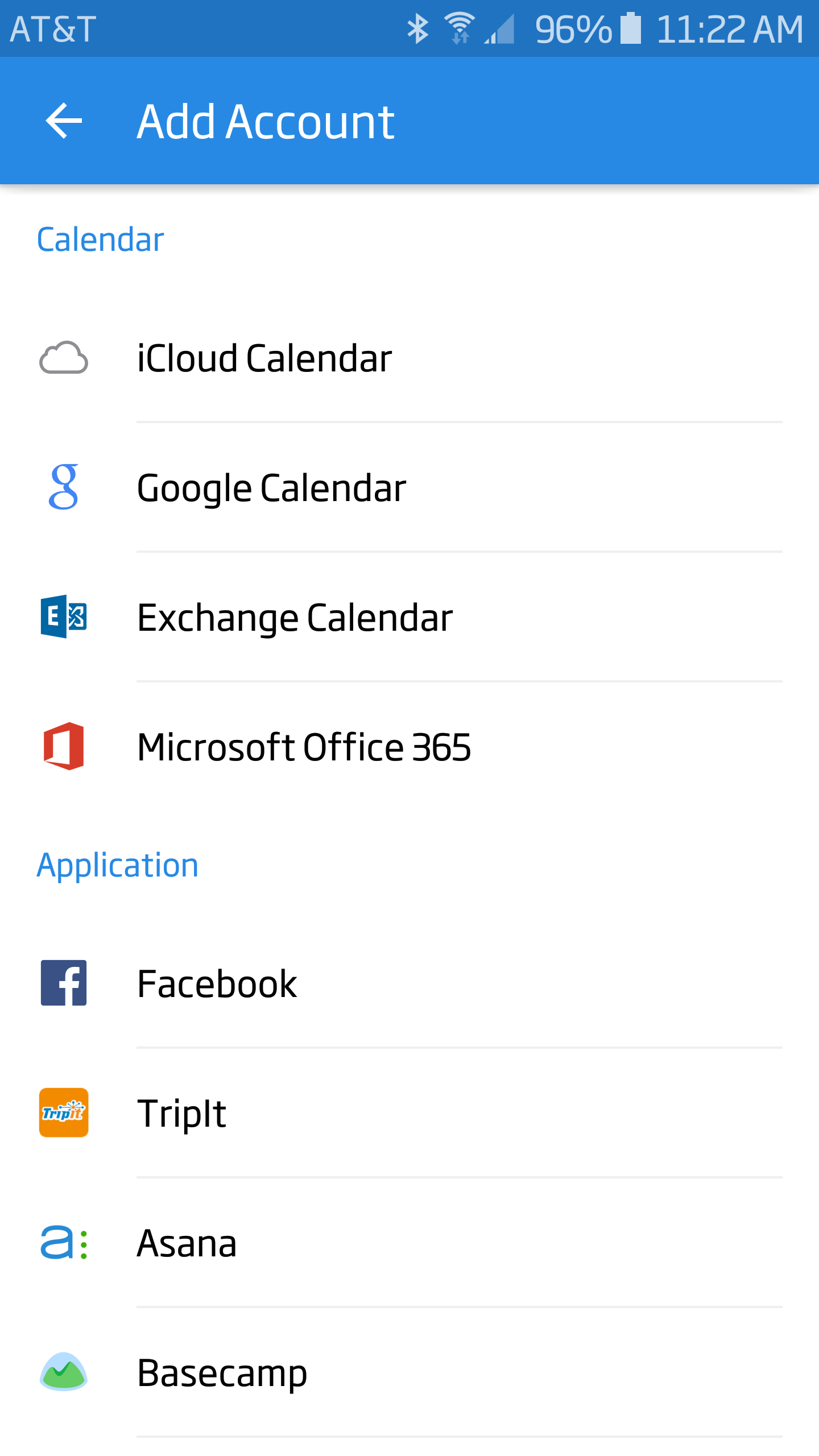
In a move that isn't all that surprising, Sunrise Calendar now offers full support for Office 365 accounts. Considering that Microsoft bought Sunrise a few months ago, it was no great leap to expect better integration into that ecosystem. We already saw Wunderlist support added shortly after Microsoft bought them, too. Office 365 joins a hefty list of providers you can use with Sunrise.

Screenshot_2015-07-09-11-22-08

There are many more that I couldn't include in the screenshot above, including another full screen of "application" providers and both Google and Wunderlist, which are already a part of my account.

Read More

Sunrise Calendar Now Has Full Integration With Office 365 Accounts, Outlook.com Is Mostly Supported was written by the awesome team at Android Police.


09 Jul 15:37

The Quickstart Guide to Decluttering Your Home

by Leo Babuata

The Quickstart Guide to Decluttering Your Home

One of my favorite habits that I’ve created since I changed my life nine years ago is having a decluttered home. I now realize that I always disliked the clutter, but I put off thinking about it because it was unpleasant. The thought of having to deal with all that clutter was overwhelming, and I had too much to do, or I was too tired, so I procrastinated.

This post originally appeared on Zen Habits.

Clutter, it turns out, is procrastination.

But I learned to deal with that procrastination one small chunk at a time, and I cleared it out. That was truly amazing.

Amazing because I didn’t really believe I could do it until I did it. I didn’t believe in myself. And amazing because when it was done, there was a background noise that was removed from my life, a distraction, an irritation.

Decluttering my home has meant a more peaceful, minimal life. It’s meant I spend less time cleaning, maintaining my stuff, looking for things. Less money buying things, storing things. Less emotional attachment to things.

For anyone looking to begin decluttering, I’d like to offer a short guide on getting started. Know that this guide isn’t comprehensive, and it can take months to really get down to a decluttered home… but if you do it right, the process is fun and liberating and empowering, each step of the way.

1. Start small. Clutter can be overwhelming, and so we put it off. The best thing I did was to just focus one one small space to start with. A kitchen counter (just part of it) is a good example. Or a dining table, or a shelf. Clear everything off that space, and only put back what you really need. Put it back neatly. Get rid of the rest—give it away, sell it on Craigslist, donate it, recycle it. The clearing and sorting will take 10 minutes, while you can give stuff away later when you have the time.http://lifehacker.com/5981335/the-co...

2. Work in chunks. If you start small, you’ll feel good about it, but there’s still a whole home full of stuff to deal with. How do you eat an elephant? One bite at a time. (Not literally—I’m vegan.) So just like you did one small area to start with, keep doing that, just 10 minutes a day, maybe more if you feel really enthusiastic. If you have a free day on the weekend, spend an afternoon doing a huge chunk. Spend the whole weekend if you feel like it. Or just do one small piece at a time—there’s no need to rush, but keep the progress going.

3. Follow a simple method. For each small chunk you do, clear out the area in question and put everything in one pile. Pick up the first thing off the pile (no putting it aside to decide later) and force yourself to make a decision. Ask yourself: do I love and use this? If not, get rid of it. If the answer is yes, find a place for it—I call it a “home”. If you really love and use something, it deserves a home that you designate and where you put it back each time you’re done with it. Then go to the next thing and make the same decision. Working quickly and making quick decisions, you can sort through a pile in about 10 minutes (depending on the size of the pile).http://lifehacker.com/5957609/how-to...

4. Put stuff in your trunk. Once you’ve collected stuff to donate or give away, put them in boxes or grocery bags and put them in the trunk of your car (if you don’t have a car, somewhere near the door). Choose a time to deliver them. Enjoy getting them out of your life.

5. Talk to anyone involved. If you have a significant other, kids, or other people living with you, they’ll be affected if you start decluttering the home. You should talk to them now, before you get started, so they’ll understand why you want to do this, and get them involved in the decision-making process. Ask them what they think of this. Send them this article to consider. Ask if they can support you wanting to declutter, at least your own stuff or some of the kitchen or living room, to see what it’s like. Don’t be pushy, don’t try to force, but have the conversation. Be okay if they resist. Try to change the things that you can control (your personal possessions, for example) and see if that example doesn’t inspire them to consider further change.

6. Notice your resistance. There will be a lot of items that you either don’t want to get rid of (even if you don’t really use them), or you don’t feel like tackling. This resistance is important to watch—it’s your mind wanting to run from discomfort or rationalize things. You can give in to the resistance, but at least pay attention to it. See it happening. The truth is, we put a lot of emotional attachment into objects. A photo of a loved one, a gift from a family member, a memento from a wedding or travel, a treasured item from a dead grandfather. These items don’t actually contain the memories or love that we think are in them, and practicing letting go of the items while holding onto the love is a good practice. And practicing tackling clutter that you dread tackling is also an amazing practice.

7. Enjoy the process. The danger is to start seeing decluttering as yet another chore on your to-do list. Once you start doing that, it becomes something you’ll put off. Instead, reframe it to a liberating practice of mindfulness. Smile as you do it. Focus on your breathe, on your body, on the motions of moving items around, on your feelings about the objects. This is a beautiful practice, and I recommend it.

These steps won’t get your home decluttered in a weekend. But you can enjoy the first step, and then the second, and before you know it you’ve taken 30 steps and your home is transformed. You’ll love this change as much as I have.

The Quickstart Guide to a Decluttered Home | Zen Habits


Leo Babauta is the creator and writer of Zen Habits. He’s married with six kids, lives in San Francisco (previously Guam), and is a runner and a vegan. Read more about him: My Story.

Image by red-feniks (Shutterstock).

09 Jul 13:00

I Can Has New CEO? Cheezburger’s Ben Huh Steps Down After 8 Years

by Drew Olanoff
4059113868_88c6710239_b After acquiring a tiny little site called I Can Has Cheezburger? in 2007, Ben Huh took it to levels that went way further than the internet. The site, and at one time Huh himself, were a bit of a household name. Today, he has announced that he’s stepping down as CEO, to be replaced by its President and COO Scott Moore. Before there was Buzzfeed, before there was every Huffington Post… Read More

09 Jul 13:00

LG Announces The G4 Beat, A Mid-Range Version Of Its Flagship G4 Smartphone

by Jon Russell
g4 beat In a bid to appeal to different segments of the global smartphone market, LG has released another new version of its flagship G4 device. Following on from on from phablet and budget models unveiled in May, the Korean company today announced the G4 Beat, a mid-range incarnation. Read More
09 Jul 12:59

Barnes & Noble Closes International Nook Store

by John Biggs
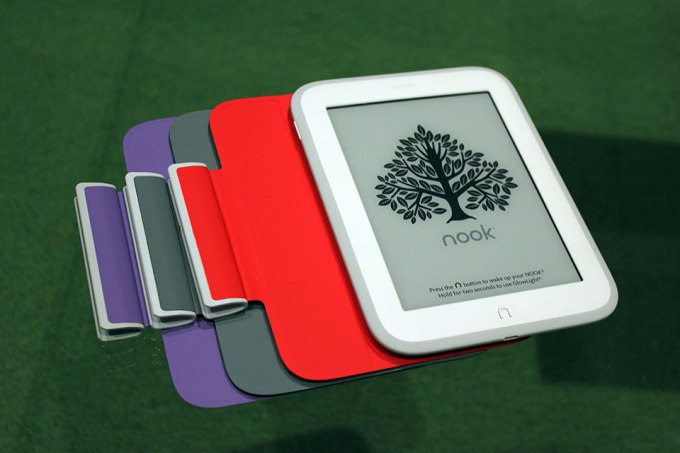
nook-glowlight-3 The Digital Reader found an interesting email sent to international Nook users about the Nook app for Windows. Essentially it informs international Nook users outside the US or the UK that their content will be removed from Windows machines and their money refunded. “We recently announced that Barnes & Noble and Microsoft have agreed to terminate their commercial… Read More
09 Jul 12:58

BBC teases new Sherlock with Victorian Benedict Cumberbatch and a bushy mustache

by Rich McCormick

Benedict Cumberbatch's Sherlock is coming back to TV later this year for a special episode, but as a new teaser image shown off by the BBC last night shows, the master sleuth has changed a bit. The one-off special is set in Victorian England, and both Cumberbatch and sidekick Watson have dressed appropriately, sporting three-piece suits and slicked-down hair. Martin Freeman's Watson, in particular, has gone full Victorian, sporting a neatly curled mustache.

The picture was released ahead of today's Sherlock panel at San Diego's Comic-Con, which is set to feature executive producers Steven Moffat and Sue Vertue, as well as actor Rupert Graves, who plays DI Lestrade. While we already know Sherlock and Watson are going back a hundred-plus...

Continue reading…

09 Jul 12:54

Bulldog puppies explore a slide for the first time and fail adorably

by Xeni Jardin

A slobbering Sisyphus.

(more…)

09 Jul 12:52

NZ's anti-troll law: gift to trolls, bad for free speech

by Cory Doctorow


If you set out to create the platonic ideal of a badly considered anti-trolling bill that made a bunch of ineffectual gestures at ending harassment without regard to the collateral damage on everything else on the Internet, well, you'd be New Zealand's Parliament, apparently. Read the rest

09 Jul 12:46

Udacity Now Refunds Half Your Tuition When You Graduate Any Nanodegree

by Eric Ravenscraft

Udacity Now Refunds Half Your Tuition When You Graduate Any Nanodegree

Recently, online learning site Udacity offered a brief deal where you could get an Android development education from Google and get a refund for half your tuition when you graduate. Now, the company is making that offer permanent for all of their Nanodegree programs.

If you haven’t heard of Udacity’s Nanodegree programs, they’re pretty great: tech companies like Google and Facebook work with Udacity to put together the curriculum based on the current needs of the tech industry. The courses are aimed at giving you marketable skills that tech companies want.

While much of Udacity’s instructional content is free to watch on the site, you can enroll in the Nanodegree program that includes feedback on projects, career coaching, and credentials when you graduate. These programs cost $200/month (with courses ranging anywhere from 4 to 12 months, depending on the subject and how fast you work through them). However, with the now-permanent refund offer, that drops to $100/month if you graduate within 12 months.

Signing up for a Udacity Nanodegree probably isn’t for everyone. If you’re just casually interested in learning a new skill, you should probably stick to perusing whatever videos and exercises are freely available. However, if you’re serious about pursuing a career in tech, the tuition refund makes Udacity a pretty tempting deal.

Get Half Your Tuition Back When You Graduate | Udacity Blog

08 Jul 21:59

16GB Wi-Fi Nexus 9 discounted to £200 at Amazon UK

by Dan Thorp-Lancaster

If you've been holding out on a Nexus 9 and happen to live in the UK, you may be interested Amazon's latest deal. The online retailer has cut the price of the 16GB Wi-Fi version of the tablet to £200 — a full £119 off of its list price.

08 Jul 17:13

Argentine police raid programmer who discovered fatal e-voting flaws

by Cory Doctorow


Joaquín Sorianello found the defects in MSA, manufacturer of the Vot.ar e-voting system, and the next he heard about it was when the police came to his house, seized every piece of electronic equipment. Read the rest

08 Jul 16:39

Spotify urges iPhone customers to stop paying through Apple's App Store

by Chris Welch

Spotify is trying to raise awareness around the fact that it's cheaper to subscribe on the web instead of through Apple's App Store. The leading subscription music service plans to email iPhone customers the below note encouraging them, if they haven't already, to start paying at Spotify.com and save a few dollars. "In case you didn’t know, the normal Premium price is only $9.99, but Apple charges 30 percent on all payments made through iTunes," the email blast reads. "You can get the exact same Spotify for only $9.99/month, and it’s super simple."

The message is followed with a step-by-step tutorial that explains how to shut off auto-renew through iTunes (so Apple won't keep charging you the higher $12.99-per-month rate) and transfer...

Continue reading…

08 Jul 16:21

Flash is killing Chrome this week — so let's disable Flash in Chrome

by Phil Nickinson

Enough is enough. After years of dealing with Adobe Flash — be it performance issues or repeated security issues, with the latest zero-day fix dropping today in response to Sunday's "Hacking Team" revelation — it's time to disable Flash in Chrome. You can kill it with fire and just disable it altogether, or set Flash to run only when you explicitly tell it to. But either way, it's time to take back the desktop browser.

08 Jul 12:13

Computer scientists on the excruciating stupidity of banning crypto

by Cory Doctorow

A paper from some of the most important names in crypto/security history scorchingly condemns plans by the US and UK governments to ban "strong" (e.g. "working") crypto. Read the rest

08 Jul 12:11

Ghostbusters director Paul Feig shows off the new Ecto-1 car

by Rich McCormick

Ghostbusters director Paul Feig continues to drip feed pieces of information from the set of the reboot to fans. First Feig provided a German Ghostbusters fan account with a too-detailed breakdown of the movie's proton pack props; now he's showing the world the latest version of the iconic Ecto-1 car. Feig tweeted a picture of the vehicle today, shortly after news came out that the new movie, which features an all-female squad of 'busters, had added The Wire's Michael K. Williams and Andy Garcia to the cast. Neil Casey is reportedly set to play the movie's villain.

The first Ghostbusters' Ecto-1 borrowed the flowing, organic-looking chassis of a 1959 Cadillac Professional. The new vehicle looks boxier than that original, losing the...

Continue reading…

08 Jul 12:11

This is the tiny computer the BBC is giving to a million kids

by Rich McCormick

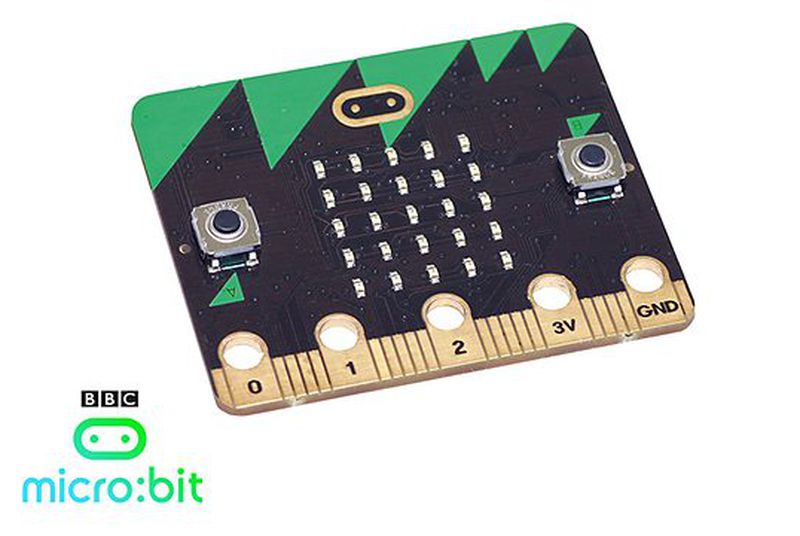
Earlier this year the BBC announced that it planned to give one million students across the UK a programmable microcomputer, called the BBC Micro Bit, to help them learn the basics of coding. Now four months later, the design of the device has been finalized, ahead of its scheduled rollout date in October. The Micro Bit features two buttons, an array of programmable LED lights, and an in-built motion sensor. Users can connect their microcomputer to bigger devices by Bluetooth or USB, or to the similarly tiny Raspberry Pi through it's input-output rings.

Continue reading…

07 Jul 19:08

Action Launcher Updated To v3.5 With New Customizable Quickbar Feature

by Ryan Whitwam

ActionLauncher3Action Launcher is getting an update as we speak with a completely new feature. It's called the Quickbar, and it finally puts that search bar on the home screen to good use. In v3.5 you can add your own shortcuts and custom actions to the bar for easy access.

The launcher comes with a variety of presets for the Quickbar, but you can change it up however you want. The Quick Bar can just keep a few app shortcuts, or you can have actions to call certain contacts.

Read More

Action Launcher Updated To v3.5 With New Customizable Quickbar Feature was written by the awesome team at Android Police.


07 Jul 19:04

The hack that took down a global spyware vendor

by Russell Brandom

At the end of last month, Hacking Team seemed untouchable. The company occupied a controversial niche in the security space, contracting out surveillance software to law enforcement agencies around the world. If your phone got stuck with a wiretapping implant, there's a good chance it came from them. That made them notorious among the security community — they were exploiting the same flaws that coders were working to close — but their law enforcement ties made them hard to prosecute. They only sold to police and governments, even if the governments were some of the most corrupt and repressive in the world. When researchers caught them spying on journalists in Ethiopia, the fallout was minimal at best. There was every indication they...

Continue reading…

07 Jul 19:03

L.A. plans to build massive skyscrapers over fault line

by Carla Sinclair

Capitol_Records_Building_Hollywood

Looks like developers win again. Aw, but what do geologists know about fault lines anyway? Read the rest

07 Jul 19:02

Hooks, The App That Lets You Get A Notification For Almost Anything, Lands On Android And Apple Watch

by Steve O'Hear
Hooks-android4 Hooks, the app that sends you push notifications triggered by things that are important to you, has a new version for Android, as well the now almost obligatory Apple Watch app. Previously, the latest version of Hooks was iOS only. Read More
07 Jul 14:52

Nest Cam now available in the UK for £159

by Jared DiPane

The Nest Cam has made its way across the pond, and is now available to be purchased in the UK for £159. Customers who purchase the new camera before August 4 will get a 60 day trial of Nest Aware as well.

07 Jul 12:29

Dune, 50 years on

by Bill Crider
07 Jul 11:54

Truecaller Wants To Make SMS Smart And Social With New Android Messaging App

by Jon Russell
Cover photo Truecaller, the company behind the intelligent phone app of the same name which has raised over $80 million, has launched a new service aimed at cutting out spam via SMS. Read More