Danny and Derek return with the news roundup. This week: a Gaza update (0:35), three countries recognize Palestine (10:47), the ICC pursues arrest warrants (14:17), and an ICJ hearing wraps up (18:07); Yemeni Ansar Allah / Houthi forces down two US drones, plus the US admits its bombing campaigns have been futile (20:19); the death of Iranian president Embrahim Raisi (25:16); Taiwan inaugurates a new president and sees protests at the parliament while China conducts military drills nearby (27:38); protests and riots in France’s New Caledonia colony territory, prompting a visit from Macron (29:49); the US finally sets a date for withdrawing troops from Niger (33:52); Kenya’s William Ruto visits the US, with the former country’s mission to Haiti starting soon (34:40); an update on the Kharkiv offensive in Ukraine (36:58); and the UK schedules an election for July 4 (39:22).
Tom Roche
Shared posts
News - Death of Ebrahim Raisi, Rafah Offensive in Gaza, Unrest in New Caledonia
Tom Rocheglobal roundup EXCELLENT as usual
Angleton and the "Israeli Account" (DCC31 - Audio)
Tom RocheVERY EXCELLENT
Aaron and David speak to Jefferson Morley about the recently released, newly less-redacted version of the James Angleton’s executive session testimony of to the Church Committee in 1975. Morley is a Washington-based author and veteran journalist whose novelistic non-fiction books explore untold chapters in the history of the American nation. Most relevant to today’s discussion, he is the author of 'The Ghost: The Secret Life of CIA Spymaster James Jesus Angleton'.
Please check out Jeff Morley’s excellent website, JFK Facts. Subscribe if are able and would like access to some of the very best reporting and analysis on the JFK case!
Special thanks to:
Dana Chavarria, production
Casey Moore, graphics
Michelle Boley, animated intro
Mock Orange, music
Why Palestinian Liberation Threatens the US Imperialist Order, w/ Bikrum Gill
Tom Rocheexcellent
The struggle for justice in Palestine isn’t just a fight against the settler colonial Zionist project. It’s a struggle against US imperialism itself. To discuss this and more, Rania Khalek was joined by Bikrum Gill, a political scientist and author of the forthcoming book “The Political Ecology of Colonial Capitalism: Race, Nature, and Accumulation.”
This is just part of this episode. The full interview is available for Breakthrough News Members only. Become a member at https://www.Patreon.com/BreakthroughNews to access the full episode and other exclusive content.
Past episodes with Bikrum:
https://youtu.be/F8GMyxAWjYk?si=4a2X1CWUNhn4Cq3O
https://youtu.be/3OV31mk8rns?si=-Ho7-sJQdPtmr9E3
835 - O-H-F-U feat. DJ Byrnes (5/23/24)
Tom RocheEXCELLENT analysis, jokes, and japes as DJ Byrnes from [The Rooster](https://www.rooster.info/) joins (not much) Felix, (mostly) Will and Chris to discuss the massive and thoroughgoing corruption of Ohio politics. Topics (in ~order of discussion) include
* the massive [H.B. 6 nuclear-bribery scandal](http://web.archive.org/web/20240404084239/https://www.nytimes.com/2024/01/25/magazine/ohio-bribery-politics.html), and scumbags including Larry Householder, legendary suicide Neil 'A Sicilian Never Forgets' Clark, much-less-legendary suicide Sam Randazzo, megatons-o'-corruption-vehicle FirstEnergy and kingpin Chuck Jones, Naples (Florida), governor/T-shirt-provider [Mike DeWine](http://web.archive.org/web/20240524221659/https://www.rooster.info/p/mike-dewine-is-guilty-as-hell), dark-money-provider Generation Now, the Ohio State Legislature,
* Ohio public's {resignation to, acceptance of} massive corruption
* Ohio politicians profit from {growing information deserts, declining local journalism}
* Cincinnati corruption, including
***** (former) City Councilman and (still) black Republican Jeff Pastor
***** (former) City Councilman and (still) white Democrat--and Chris Wade's former student body president--P.G. Sittenfeld
* Ohio pols vs public education, including
***** [Electronic Classroom of Tomorrow](http://web.archive.org/web/20240114131454/https://ohiocapitaljournal.com/2022/07/07/ecot-owes-ohio-117-million-what-are-we-going-to-do-about-it/): for-profit, all-online, totally-corrupt debacle
***** Columbus scam artist, quango sinecure, and School Board member [Brandon Simmons](http://web.archive.org/web/20240524234741/https://www.rooster.info/p/brandon-simmons-columbus-city-schools) (better images @ original article) vs teachers' union
* Ohio Democrats esp Columbus
* yet more Ohio (sex) scandals inc
***** "family-values" Republican [Wes Goodman](http://web.archive.org/web/20210303114526/https://www.upi.com/Top_News/US/2017/11/19/Anti-gay-Ohio-state-rep-resigns-after-inappropriate-behavior-with-man/4561511138430/) was Schlapp-ing hard (i.e., gay AF)
***** former Ohio House speaker (who proceeded Householder, above) and still-half-Korean-but-all-Republican [Cliff Rosenberger](https://web.archive.org/web/20180418032131/https://www.mydaytondailynews.com/news/the-fast-and-furious-fall-ohio-house-speaker-cliff-rosenberger/QXZ8NkzAJdNVJxDFWzfnGO/), who Byrnes reports is now living as out-gay
***** former Columbus mayor (and very beige Democrat) [Michael B. Coleman](http://web.archive.org/web/20240524225949/https://www.rooster.info/p/which-ohio-mayor-banged-a-chinese) gets his fingers in a honeypot
***** sleazy car-salesman turned pro-Trump (federal) Senate candidate Bernie Moreno [gay sex ad](https://archive.ph/hiQpM)
We’re joined by DJ Byrnes of the independent news outlet The Rooster to take a look at the politics of OHIO, the most normal state in the union. With a trillion dollar nuclear energy scandal that led to multiple suicides, mayors entrapped by a Chinese spy honeypot operation, bribe-addicted polyamorous atheist city councilmen, charter school ponzi schemes, and FBI arrests, indictments and convictions of dozens of members of state and local government…extremely normal.
Find DJ’s chronicles of Ohio depravity at the Rooster: https://www.rooster.info/
And if you’re in New York, consider coming out to the Antics magazine fundraising party this Saturday, May 25th at Baby’s All Right: https://www.seetickets.us/event/antics-fundraising-party/601579
Get bonus content on PatreonHosted on Acast. See acast.com/privacy for more information.
Dead Ringers - 26th April
Tom RocheVERY EXCELLENT, funnier than usual Dead Ringers
The Rwanda bill passes through parliament so will Rishi call an election? Who is really behind the rumours about Angela Rayner? Will Rylan and Stacey Solomon manage to say anything sensible? All questions answered.
The series writers include: Nev Fountain & Tom Jamieson, Ed Amsden & Tom Coles, Laurence Howarth, Rob Darke, Edward Tew, Sophie Dixon, Sarah Campbell, Toussaint Douglass, Cody Dahler, Joe Topping, Alex Bertulis-Fernandes, Angela Channell, Lizzy Mansfield, Christina Riggs, Peter Tellouche, Rachel Thorne, and Sarah Dempster.
Exec: James Robinson Sound Design: Rich Evans Prod Co-Ordinator: Dan Marchini Producer: Bill Dare
Episode 134:
Tom Roche"After a 27-month hiatus, [Afripod has] returned!"
Neo Lekgotla laga Ramoupi (History, University of the Free State) on his new book, Cultural Resistance on Robben Island: Songs of Struggle and Liberation in South Africa (Skotaville 2024). After discussing the genesis of his scholarly interests, Dr. Ramoupi describes prisoners’ music— instruments, genres, styles—and its impact on surviving apartheid’s harshest prison. He then reflects on the relationship between prisoners and guards, and changes in Robben Island prison culture over time. The interview closes with Ramoupi’s reflections on the film, Amandla! A Revolution in Four-Part Harmony, and a preview of his new Mellon Foundation-funded research project.
#525 - Freedom and Freedonia
Tom RocheWill and Luke VERY EXCELLENT as usual, starting with
1. Antony Blinken musical and moral fail playing (just the chorus of) 'Keep on Rockin' in the Free World' in Kiev
2. Will's excellent collection of very-non-standard comics (esp from publishers 'Dell Comics' and its partner 'Gold Key Comics'), including those lines focused on Jerry Lewis, the 3 Stooges, and esp "educational"/biographical comics devoted to JFK, Eisenhower, ... and Adlai Stevenson !?! and Pope John Paul II ?!?
3. Luke's current researches into {older, longer-running} Canadian magazines (e.g. 'Canadian Forum') and Canadian highbrow politics/culture esp c1950-1980 (and CBC in that era)
4. North American culture wars esp
***** Canadian MP jihad vs Tim Horton's paper coffee lids
***** US/Canada rightwing YouTube/TikTok culture, esp Pierre Poilievre's embrace thereof
5. 2024 Biden-Trump debates announced
... before beginning the 'Duck Soup' main event (exploring the Marx Brothers as ideology and texts, Anglophone (condescending) views of "peripheral Europe," meatheads comparing Rufus T. Firefly to Trump, and much, /much/ more) starting ~19:12 in the audio.
MM21: Sables From Heaven: Written by Dennis Potter feat. Jools Duane
Tom RocheEXCELLENT as usual: guest Jools Duane esp knowledgeable regarding the great Dennis Potter
Hosted on Acast. See acast.com/privacy for more information.
834 - Weakness Will Get You Nowhere feat. Pendejo Time (5/20/24)
Tom RocheFelix+Will+Tejano bros Jake and Thomas from Pendejo Time deliver amusing analysis+bant on topics including
* US Zionists vs ICC vs Israel
* Israel-based stupidity, including krav maga and 'Isreal Cool' [sic] animation
* Red Lobster debacle, esp the consensus stupidity (pushed by US corporate-funded media) blaming 'endless shrimp', when actually this is yet another case of ...
* US predatory capitalism (Red Lobster as just another bust-out)
* US culture wars, inc
***** Harrison Butker commencement speech
***** Biden commencement speech
***** Valentina Gomez vs weak and gay
* lowerclass rightwing Latino (esp Tejano) culture
* Greg Abbott as evil and gay (vs Rick Perry and George W. Bush, who were just evil)
* many threads of the great tapestry that is Stupid Online Culture
* Diddy's downfall
The Pendejo boys are back ostensibly to cover some new Greg Abbott shenanigans out of Texas, but we also look at the ICC seeking arrest warrants for Netanyahu and Yoav Gallant, the collapse of Red Lobster, a GOP candidate out of Missouri literally running against being “weak and gay,” and Chiefs’ kicker Harrison Butker’s redpilled address to Benedictine graduates.
Find Pendejo Time wherever you get podcasts, and subscribe to their patreon here: https://www.patreon.com/pendejotime
Also check out the Pendejo Time album here: https://pendejotime.bandcamp.com/album/pendejo-time
Get bonus content on PatreonHosted on Acast. See acast.com/privacy for more information.
Anti-Colonial Activist Aliyev (Feat: Milo Edwards)
Tom RocheCiarán+Nick+Milo Edwards (from Trashfuture et al) do mostly bant on /many/ mostly Europe-and-adjacent topics, including
* European TV, esp Austria and UK
* OJ Simpson
* Berlin Zionists attempt to own Hamas by creating terrorist funpark
***** ... and Our Boys on how to do better terrorist funparks
* UK royals esp KC3 vs William vs Harry
* yanked Dublin-NYC portal
* weird German FDP politician does ...
* ... more shit-related stupidity, which often intersects with ...
* ... school-related stupidity
* yet more German Zionist insanity
* Azerbaijan+New Caledonia vs France+Armenia
***** Macron Bonapartism as latest French Empire wannabe
***** France vs Russia esp Niger and Armenia
* weird Turkish politician hots/nots on Eurovision-winner Nemo
* extended (and libelous-but-hilarious) riffs on Turkiye culture (and Italy, and Germany ... Our Boys do equal-opportunity slurs)
We have on returning Corner Späti champion, Milo Edwards, to chat the news and how, in an odd turn of events, Azerbaijan has attempted to become the face of French decolonization. Yes, it has something to do with Armenia.
HOW TO SUPPORT US:
https://www.patreon.com/cornerspaeti
HOW TO REACH US:
Corner Späti https://twitter.com/cornerspaeti
Instagram https://www.instagram.com/cornerspaeti/
Julia https://twitter.com/KMarxiana
Rob https://twitter.com/leninkraft
Nick
Uma https://twitter.com/umawrnkl
Ciarán https://twitter.com/Ciaranxo
Special Guest: Milo Edwards.
MM20: 90’s Neo-Noirs feat. Hit Factory Podcast
Tom RocheMovie Mindset excellent as usual
Will & Hesse are joined by Aaron & Carlee of the Hit Factory Podcast to discuss two neo-noirs, 1991’s One False Move directed by Carl Franklin, and 1994’s The Last Seduction directed by John Dahl. Both explore the classic noir themes of evil, greed, lust & betrayal, with One False Move exploring the dark brutality of the genre, and The Last Seduction having sexy fun with it. Enjoy the 90’s Bills quadruple feature of Paxton, Pullman, Bob Thornton & Buffalo. Also, Linda Fiorentino 🔥🔥🔥🥵.
Find Hit Factory wherever you get podcasts, and subscribe here: https://www.patreon.com/hitfactorypod
Get bonus content on PatreonHosted on Acast. See acast.com/privacy for more information.
US Without a Strategy in Ukraine? - Stephen Bryen, Alexander Mercouris & Glenn Diesen
Tom RocheVERY EXCELLENT
Special - The Death of Ebrahim Raisi w/ Sina Toossi
Tom Roche4:04 teaser
Danny and Derek chat with AP Iran expert Sina Toossi, senior non-resident fellow at the Center for International Policy, about the late Iranian president Ebrahim Raisi, who was killed in a helicopter crash on Sunday along with foreign minister Hossein Amir-Abdollahian. The group delves into Raisi’s background and ideology, the next steps to find a new p…
Bonus - The History of Brazil, Ep. 4 w/ Bryan Pitts
Tom Roche4:55 teaser
Danny and Derek are once again joined by Bryan Pitts, assistant director of the Latin American Institute at UCLA, to discuss the history of Brazil. This episode starts in the late 19th century with Brazil’s “racial democracy”, exploring the rise of rubber as a primary commodity, industrialization, the abolition of slavery, Getúlio Vargas and the Revolut…
Michael Spicer: No Room – Pink
Tom Rocheamusing short bits
A long overdue enquiry into an ill advised away-day. Episode 5 in the original series. May contain strong language.
No Room features an up to the minute take on current events, alongside character-filled sketches which brilliantly capture everything that provokes us - culture, politics, work...and other people.
Michael is famous for his Room Next Door government advisor character whose withering take downs of politicians have amassed more than 100 million views and helped keep his audience sane in fractured times.
Writer, Performer and Co-Editor: Michael Spicer
Composer and Sound Designer: Augustin Bousfield
Producer: Matt Tiller
RIP Steve Albini
Tom RocheVERY EXCELLENT, not just as a remembrance of Steve Albini (1962-2024), but ("verily" !-) as a contribution to the remembrance genre. Plus some insights into mostly-US alternative-music mostly-c1980-c2000 ... but mostly, this is ~50 min (54:48 including ads and outro) of two intelligent, likable dudes elevating a very intelligent, very important, but not-so-likable dude. YOU MUST LISTEN (except to the ads).
In this bonus episode, Jim and Greg pay tribute to musician, recording engineer, writer and Chicago legend Steve Albini, who died May 7 at the age of 61. They're also joined by their production staff to discuss Albini's cultural legacy.
Become a member on Patreon: https://bit.ly/3slWZvc
Sign up for our newsletter: https://bit.ly/3eEvRnG
Make a donation via PayPal: https://bit.ly/3dmt9lU
Send us a Voice Memo: Desktop: bit.ly/2RyD5Ah Mobile: sayhi.chat/soundops
Join our Facebook Group: https://bit.ly/3sivr9T
See Privacy Policy at https://art19.com/privacy and California Privacy Notice at https://art19.com/privacy#do-not-sell-my-info.
Special - Biden Admin Report on Israeli Human Rights Violations w/ Akbar Shahid Ahmed
Tom Rochecompletely paywalled
Danny and Derk once again chat with Akbar Shahid Ahmed, senior foreign affairs reporter at HuffPost, this time about his recent piece “Biden Administration: 'Reasonable' To Say Israel Is Violating International Law, But U.S. Aid Can Continue”.
The Now Show - 19th April
Tom RocheI've always been more of a 'News Quiz' fan, since I've always (certainly during the Jeremy Hardy--rest in power!--years) found it more consistently /funny/ as opposed to merely amusing ... but have nevertheless been downloading 'Now Show' for 20-ish years, mostly for the comic songs which I WILL MISS . This final (!) 'Now Show' is, un/fortunately, no great departure from past form--generally amusing, some klunkers, but as usual a /great/ closing song. In order of (dis)appearance:
~ ehh 1st Punt-and-Dennis set, on events of the (final! still seems odd) week preceding 19 Apr 2024
~ ehh Glenn Moore set on ... nothing much, but a few good jokes
+ EXCELLENT 2nd Punt-and-Dennis set (11:43-22:04), surveying (all-too-briefly/superficially) Now Show's history 1998-2024
~ ehh Harriet Kemsley on divorce, marriage, relationships ... not /bad/, but nothing special (good Elvis joke, though)
~ ehh audience poll (possibly a /bit/ better than usual, but this has always been the weakest part of the Show)
+ VERY EXCELLENT Jazz Emu closing song ('our final ever musical act' 28:31-32:30) on Our Bleak Future, but with some /great/ jokes (as well as musical excellence)
~ ... and just an ehh closer ... oh well ... at least we can look forward to the next News Quiz ...
The Now Show first aired on BBC Radio 4 in September 1998 and this week sees its last ever episode. Steve Punt and Hugh Dennis take a look back over the last 25 years, with help from the voices of Gemma Arrowsmith and Rory Bremner.
They are joined by Glenn Moore investigating the Beijing Half Marathon scandal and Harriet Kemsley on the law firm who accidentally divorced the wrong couple. Plus, Jazz Emu looks to the future with an original song accompanied by his band Matt Hutson, Luke Bainbridge and Tom Marlow.
The show was written by the cast with additional material from Mike Shephard, Cameron Loxdale, Carl Carzana and Christina Riggs.
Producer: Sasha Bobak Executive Producer: Rich Morris Production Coordinator: Caroline Barlow
A BBC Studios Production for Radio 4.
Radio War Nerd EP 444 — Battle of Kursk, Pt. 3: Myths & Memory, feat. Annibale
Tom RocheEXCELLENT conclusion to this mighty 3-parter on the 1943 Kursk campaign
833 - Fruit Brute feat. Bryan Quinby (5/16/24)
Tom RocheFelix+Will+Quinby amusingly (and without repetition!) trash Jerry Seinfeld as comic, director, and human being, while remaining compassionate toward many (but not all!) of the usually-funny people soiled by the flopsweat dripping off 'Unfrosted'
We’re joined by Bryan Quinby to review Jerry Seinfeld’s new Netflix film Unfrosted, about the invention of Pop Tarts. We dive into this bizarre & joyless cultural artifact which is a parade of humiliation for the numerous comedians featured in it, and a window into the seemingly bottomless well of misanthropy underneath Seinfeld’s banal observational humor. A romp!
Find Bryan’s podcast GUYS, a podcast about guys, wherever you get podcasts, and subscribe here: https://www.patreon.com/MurderXBryan/posts
Get bonus content on PatreonHosted on Acast. See acast.com/privacy for more information.
How CO2 warms Earth through the greenhouse effect and why CO2 is not ‘saturated’ in Earth’s atmosphere
Tom RocheDarrik Burns (apparently "just" a science writer) has [here](https://climatefeedback.org/how-co2-warms-earth-through-greenhouse-effect-why-co2-not-saturated-earth-atmosphere/) (archived [here](https://web.archive.org/web/20240514153848/https://climatefeedback.org/how-co2-warms-earth-through-greenhouse-effect-why-co2-not-saturated-earth-atmosphere/)) done a SINGULAR summary of the science underlying radiative forcing by CO2, particularly regarding "saturation."
A particular excellence, often overlooked in popular treatments of the topic, is Burns' discussion of forcing via kinetic-energy transfer (2nd half of [Figure 3](https://climatefeedback.org/wp-content/uploads/2024/05/Fig3_may-1.jpeg), archived [here](http://web.archive.org/web/20240514155536/https://climatefeedback.org/wp-content/uploads/2024/05/Fig3_may-1.jpeg)) as well as radiative-energy transfer (upper-right quarter of same diagram).
Burns' (I will /not/ say 'Mr Burns' :-) article also includes the importance of altitude and atmospheric layering WRT, though his caption to Figure 7 (~2/3 into the article) unfortunately merely asserts
> CO2 in the outer layers of Earth’s atmosphere radiates heat to space causing cooling, while CO2 in lower layers traps heat and raises global temperatures.
without much explaining the dynamics.
A more glaring flaw (IMHO), at least for use with/by a general audience, immediately precedes this--unfortunately also in the section (subtitle='Unequivocal evidence for radiative forcing from atmospheric CO2, driving global warming; no evidence showing that this effect is saturated') which most directly addresses the saturation hoax. The problem is that Burns' /text/ refers to spectrographic bands (more particularly their centers) as /wavelengths/ (esp, for CO2, 15 μm and 10 μm), but the infographic ([Figure 6](https://climatefeedback.org/wp-content/uploads/2024/05/Fig6_may.png), archived [here](http://web.archive.org/web/20240514161128/https://climatefeedback.org/wp-content/uploads/2024/05/Fig6_may.png)) which the text surrounds, and which "makes visible" the text, shows the spectrography in /wavenumbers/.
This may seem trivial, as anyone with much background in the field knows that wavelength and wavenumber are inverses:
* a wavelength has length dimension: e.g. 10 μm
* a wavenumbers have reciprocal-length dimension: spectroscopy conventionally uses 1/cm, so 10 μm == 1000/cm == 1000 cm^-1
* ... and similarly that 15 μm ~= 667 cm^-1, etc
But, again, I suspect that a significant part of a general audience exposed to the combination of this (important section of the) text and (potentially quite useful) figure will be confused.
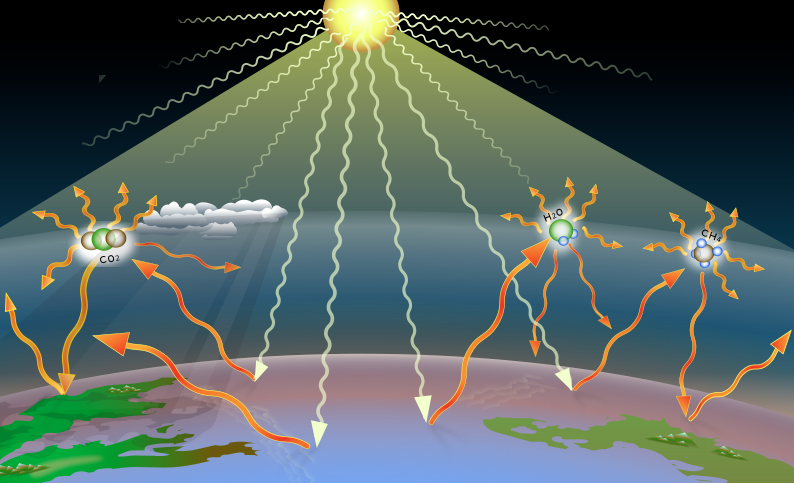
There is no doubt about it – climate science can be complex. But sometimes this complexity is mistaken for uncertainty. A recurring example is our scientific understanding of carbon dioxide’s (CO2) effects as a greenhouse gas[2]. However, the evidence for CO2 as a greenhouse gas is well-established and is built on a body of scientific evidence that started around 1856 and has been growing for over a century.
Given the complexity of this subject, pieces of the ‘puzzle’ are often taken out of context to support misleading and incorrect conclusions denying CO2’s influence on global temperatures. For example, on 24 April 2024, an article was posted on The Daily Sceptic claiming that CO2 emissions can’t warm the atmosphere because it is “saturated”. Given the recurring nature of this claim, below we will explain how CO2 functions as a greenhouse gas, then use scientific evidence to investigate recent claims about ‘CO2 saturation’.
A brief history of studying CO2 as a greenhouse gas
While remaining in the atmosphere, CO2 prevents heat from escaping and consequently warms the surface of Earth – a concept that is popularly known as the greenhouse effect (described in greater detail in the next section). Below we will highlight some key historical findings that laid the foundation for understanding CO2’s effects as a greenhouse gas. As you will see, this is not a new area of study, but rather a subject that has been studied and discussed for over 100 years. This distinction will be important later when investigating claims regarding ‘CO2 saturation’, which were addressed by scientists decades ago. Below is a timeline summarizing how scientists developed an understanding* of CO2’s properties and the greenhouse effect:
- 1760: The beginning of the industrial revolution. Atmospheric CO2 levels were around 280 parts per million (ppm)[1] – current levels are at 425 ppm as of May 2024.
- 1827: Fourier, French mathematician, determined that almost all heat lost from a planet is through infrared radiation (this was later important to our understanding of the greenhouse effect).
- 1856: Eunice Foote, American scientist, discovered that sunlight heats up air containing water vapor and CO2 (i.e., certain gases trap heat).
- 1859: John Tyndall, Irish physicist, discovered that CO2, water vapor, and ozone effectively trap heat even in relatively small quantities, while other atmospheric gases have little heat-trapping effect by comparison.
- 1896: Svante Arrhenius, Swedish scientist, quantified the warming from carbon dioxide’s greenhouse effect.
- 1938: Guy S. Callendar, English engineer, published a paper suggesting that human CO2 emissions were increasing temperatures on Earth.
- 1955: Gilbert Plass, Canadian physicist, calculated the effect of added CO2 on Earth’s radiation balance.
- 1958: Charles Keeling, American scientist, began collecting daily CO2 measurements in the air above Mauna Loa, Hawaii, and measurements have continued to the present day.
- 1967: Manabe and Wetherald calculated a predicted temperature rise based on a doubling of CO2 by creating one of the world’s first accurate computer models of Earth’s climate.
- 1990: Publication of the Intergovernmental Panel on Climate Change (IPCC) First Assessment Report with evidence linking rising CO2 levels to observed global temperature rise.
- 1990-2024**: A vast number of studies collected evidence linking rising CO2 to increasing global temperatures – including models with improved accuracy, paleoclimate studies, satellite data, and instrumental temperature records[2-7] (detailed in sections below).
*Please note that the older/foundational studies and papers do not represent the current state of climate science knowledge, but are listed above to show that some aspects of climate science have been long-established (e.g., the greenhouse effect).
**For the sake of brevity, we mainly listed earlier studies to demonstrate how long scientists have studied CO2 as a greenhouse gas. However, for clarity, we would like to note that the strongest scientific evidence has been found in the last few decades.
How rising atmospheric CO2 concentrations are increasing global temperatures through the greenhouse effect
To describe how atmospheric CO2 warms Earth, we will start at a zoomed out scale – looking at the Sun, Earth, and space – then zoom in to explain what’s happening on a molecular scale. Understanding what occurs at both scales helps paint a clearer picture of the greenhouse effect and CO2’s role therein.
When we zoom out, we see that nearly all of Earth’s incoming energy comes from the Sun, and all of its lost energy goes back out to space. And it’s the balance between these gains and losses that changes Earth’s temperatures. When the amount of incoming solar energy is different from the amount going back out to space, our climate can be described as imbalanced; if incoming energy is greater, Earth warms, and if outgoing is greater, Earth cools. As this energy is trapped, it is also stored in different parts of Earth’s climate system including oceans, land, ice, and atmosphere. This energy balance is illustrated in Figure 1 below.
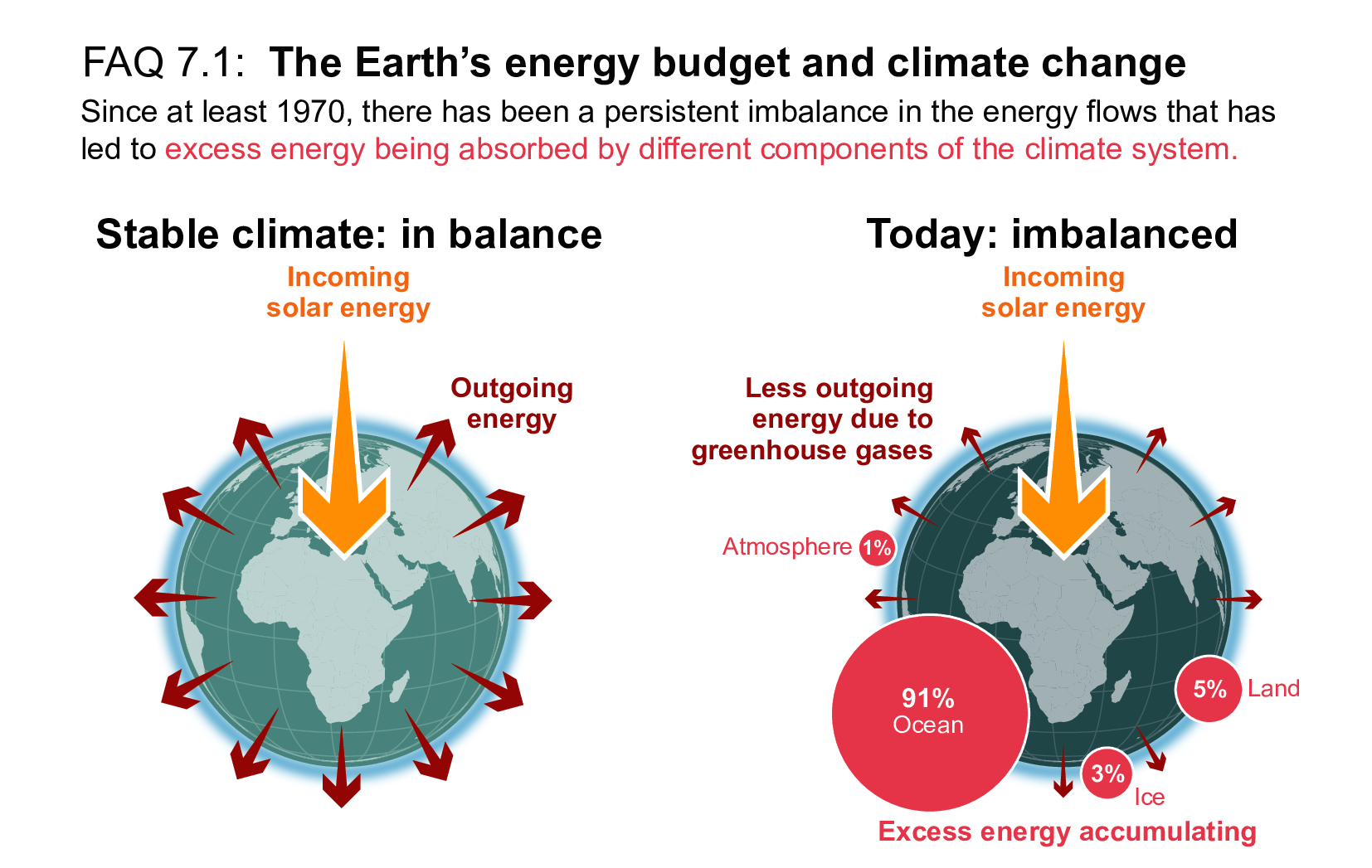
Figure 1 – Earth’s energy budget showing a balanced climate on the left (balanced incoming and outgoing energy), and an imbalance climate on the right (incoming energy greater than outgoing energy) where excess energy is being stored in components of Earth’s climate system (e.g., oceans, ice, land, and atmosphere). Source: IPCC Sixth Assessment Report[2]
This explains how Earth warms, but now we must zoom in to the molecular scale to understand why this occurs. Afterall, given that the frigid vacuum of space is around -455° Farenheit (-270°C), why wouldn’t Earth quickly lose its incoming energy from the Sun? The key is the composition of our atmosphere – namely, the presence of greenhouse gases, such as CO2, which help trap heat. As explained in the timeline from our first section, the relationship between CO2 and global warming was discovered in the mid-19th century. Around that time, scientists discovered that certain molecules (greenhouse gases) absorb and re-emit infrared (IR) radiation (i.e., longwave radiation), while others allow it to pass right through – characteristics described as opaque and transparent, respectively[3,4]. This is important because, while these molecules do not absorb sunlight (shortwave radiation), Earth’s surface does. And in response, it emits IR radiation back towards the atmosphere where it is absorbed by CO2, then re-emitted in all directions, with some going back to Earth and some escaping to space[3]. The IR radiation that travels back to Earth’s surface raises its temperatures, while that which is lost to space lowers its temperatures – part of the energy balance mentioned earlier. Below are two figures showing this process at different scales. Figure 2 shows this process at a zoomed out scale (i.e., showing incoming and outgoing radiation), with yellow arrows representing solar radiation (shortwave) and orange arrows representing IR radiation (longwave). Note that the greenhouse gases act as barriers, intercepting and redistributing outgoing radiation as heat. Without greenhouse gases, IR radiation (heat) emitted from the Earth would simply escape to the cold vacuum of space. Figure 3 shows what is occurring at a molecular scale as greenhouse gases interact with IR radiation (shown as orange arrows in Figure 2).
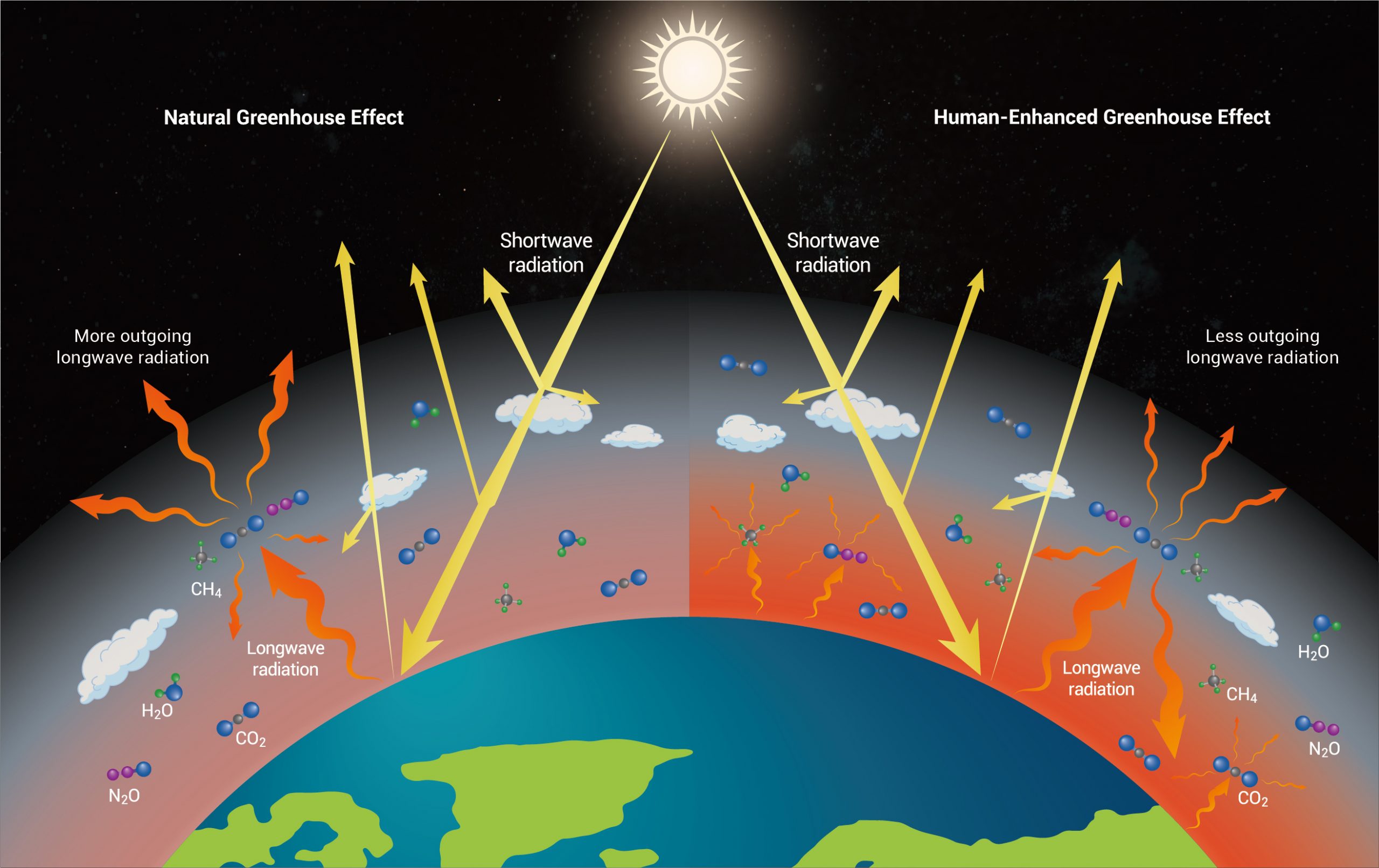
Figure 2 – Illustration of the incoming and outgoing energy as affected by the natural greenhouse effect (left) and the enhanced greenhouse effect (right). Water vapor (H2O) plays an important role in maintaining the natural greenhouse effect, while rising CO2 is driving the human-enhanced greenhouse effect. Incoming solar shortwave radiation is represented by the yellow arrows and outgoing terrestrial longwave radiation is represented by the orange arrows. Source: Climate change: Strategies for mitigation and adaptation[8]
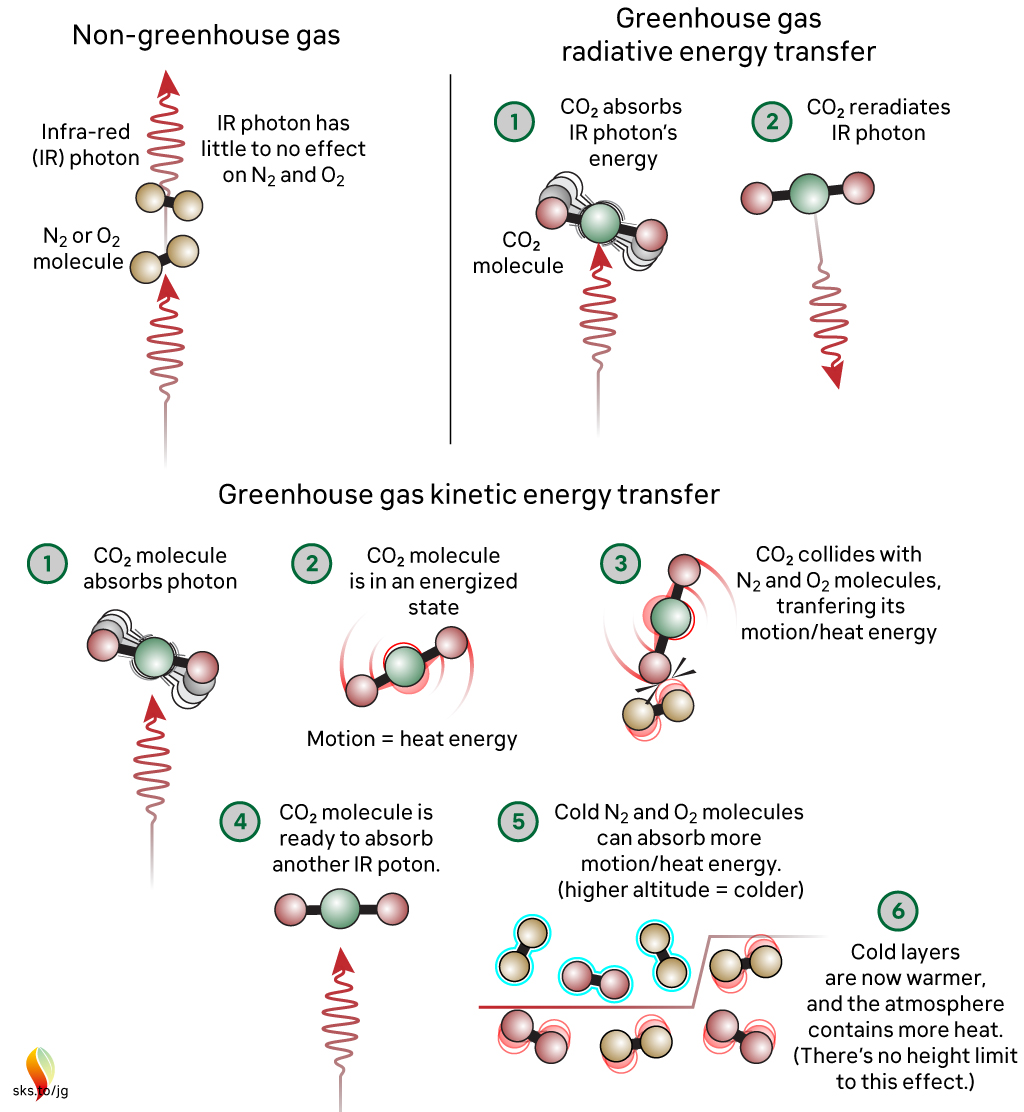
Figure 3 – Radiative and kinetic energy transfer in greenhouse gases vs. non-greenhouse gases in response to IR radiation. Note that greenhouse gases absorb IR radiation and transfer the energy through motion or re-emission, while non-greenhouse gases have little to no interaction with IR radiation. Source: Skeptical Science/John Garrett
The interactions at a molecular scale are important because they explain why CO2 is able to drive global warming[2], despite being a lower percentage of Earth’s atmosphere than nitrogen (N2) and oxygen (O2), for example; CO2 absorbs and re-emits IR radiation, while N2 and O2 do not in Earth-like conditions[4] (Figure 3). Early experiments revealed this property of CO2 and the theory of the greenhouse effect, but it wasn’t until later that scientists found unequivocal evidence that rising CO2 is driving modern global warming. Much of this evidence was collected from 1990-2024, as noted by the placeholder from the timeline in our first section. Science Feedback has summarized some of this evidence in several past reviews, which are linked below:
- Review 1: Link between CO2 and Earth’s temperature is well-established, despite claims on Fox News
- Review 2: Video of Ian Plimer incorrectly states that human CO2 emissions are not responsible for increased atmospheric CO2 concentrations and global warming
- Review 3: CO2 caused warming during past climate changes, notably as a feedback amplifying other factors
The key takeaway from these past reviews is that scientists have found overwhelming evidence linking rising CO2 to increasing global temperatures in modern times. For example, scientists found that in modern times, greenhouse gases overall cause the most global warming of all the climate change drivers, and CO2 causes the most global warming of all the greenhouse gases (Figure 4).

Figure 4 – The contributions of different drivers to global warming from the present time period (2010-2019) relative to the time period of 1850-1900. The estimates of warming (red) and cooling (blue) from radiative forcing studies (panel (c)) are based on both direct emissions into the atmosphere and their effect, if any, on other climate drivers. Source: IPCC (2021)[2]
Evidence also shows that global temperatures increase logarithmically as atmospheric CO2 concentrations rise, with a 20-year lag response[3,9](Figure 5).
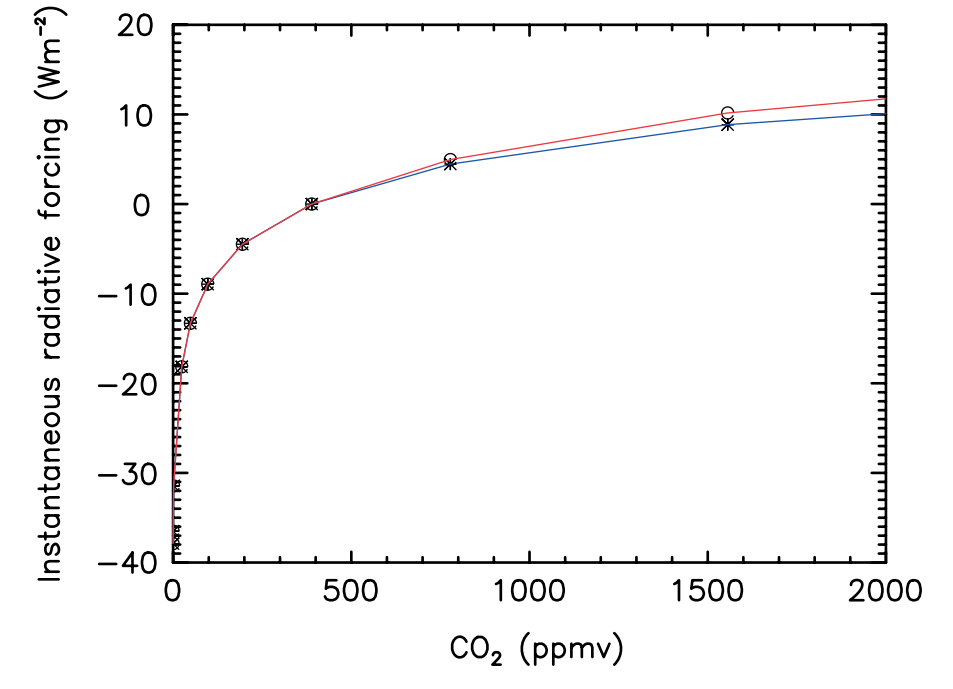
Figure 5 – Radiative forcing of CO2 (relative to the atmospheric CO2 concentration of 389 ppm–the concentration at the time of the study). Source: Zhong and Haigh (2013)[3]
This finding is particularly important because it shows that although additional radiative forcing lessens gradually with increasing CO2 concentrations, it remains positive (i.e., temperature does not stop rising)[3]. This is clearly visible in Figure 5, where radiative forcing continues to rise with CO2 concentrations. It is worth noting that although the slope becomes more gradual, the resulting global warming is still predicted to have negative consequences for humans and ecosystems. As explained by the IPCC, “risks and projected adverse impacts and related losses and damages from climate change escalate with every increment of global warming.”[2] Zhong and Haigh (2013) concluded that as CO2 increases in the atmosphere, there is no saturation point at which it will no longer cause radiative forcing – therefore, it will continue to be a factor in global warming[3].
The vast body of evidence for CO2’s climate effects lead the IPCC, the world’s leading authority on climate science, to state that “the evidence is clear that carbon dioxide (CO2) is the main driver of climate change”. However, despite a vast body of evidence and overwhelming consensus among climate scientists[2,10], claims questioning CO2’s radiative forcing capabilities still arise. These claims often mischaracterize and oversimply more complex aspects of CO2 radiative forcing (e.g., physics of IR radiation absorption) to support their argument. For this reason, in the next section we will delve one layer deeper into radiative forcing to investigate these claims, and we will conclude with comments from climate science experts to offer additional insight.
Unequivocal evidence for radiative forcing from atmospheric CO2, driving global warming; no evidence showing that this effect is saturated
So far we have discussed the historical and scientific evidence of CO2’s effects as a greenhouse gas. Based on this information, the science behind the greenhouse effect – and CO2’s contribution to it – are well-established. But how do scientists know that radiative forcing from CO2 is ongoing, and has not reached an upper limit?
As previously mentioned, people continue to make claims questioning CO2’s ongoing capacity to function as a greenhouse gas – namely, that it can ‘no longer warm Earth’s atmosphere because CO2 is saturated’. However, this claim is far from being new. In fact, it originated in the early 20th century when the study of the greenhouse effect (prior to be coined as such) was in its infancy. From the timeline we shared earlier, you will recall that in 1896, Svante Arrhenius quantified the warming effect from increasing atmospheric CO2. In 1900, Knut Ångström, Swedish physicist, used experimental data – later found to be inaccurate[4] – to claim that CO2 is unable to affect Earth’s climate because of saturation of the center of the absorption band (around 15 nanometers) and overlap between the absorption bands of CO2 and water vapor. Despite being debunked decades ago (as will be explained below), people continue to share these claims. Below we will explain why these claims are incorrect based on available evidence.
The first recurring claim is that there is ‘saturation of the center of the absorption band for CO2, so it can no longer cause warming’. However, there are several issues with this claim that make it misleading and inaccurate, as detailed below. The first reason this is inaccurate can be explained by an excerpt from Zhong and Haigh (2013): “while the centre of the 15μm band becomes saturated, the band wings and, especially, the 10μm bands become dominant in determining the radiative effects – and these are nowhere near saturation”[3]. They further explain: “We conclude that as the concentration of CO2 in the Earth’s atmosphere continues to rise there will be no saturation in its absorption of radiation and thus there can be no complacency with regards to its potential to further warm the climate.”
It’s worth taking a brief aside here to describe why greenhouse gas molecules absorb infrared radiation. Earlier, when we introduced the concept of greenhouse gases, we mentioned the terms opaque and transparent. Normally these words are used to describe materials that either allow light to pass through (transparent) or be blocked (opaque). This occurs because the material either absorbs the wavelengths of light or allows it to pass through. Absorption bands – mentioned in the claim and our cited quote above – refers to wavelengths at which a molecule absorbs radiation. Molecules can therefore be either transparent or opaque to certain wavelengths of radiation. In the case of CO2, for example, it is transparent to sunlight but opaque to IR radiation, thus absorbing and re-emitting it. And as explained in the quote from Zhong and Haigh (2013), there are still regions of the absorption bands where CO2 is opaque. They reference the 15μm band (which is the center band mentioned in the ‘saturation’ claim) and the 10μm bands which are “nowhere near saturation”. Other studies have shown similar findings. For example, Figure 6 below from Pierrehumbert (2011) shows the absorption bands for H2O and CO2, respectively, with regions that do not totally overlap. Note that current and projected atmospheric CO2 concentrations fall within the range (e.g., 300 ppm to 1200 ppm) where the ‘band wings’ become dominant in determining radiative forcing, as explained in the earlier quote by Zhong and Haigh (2013).
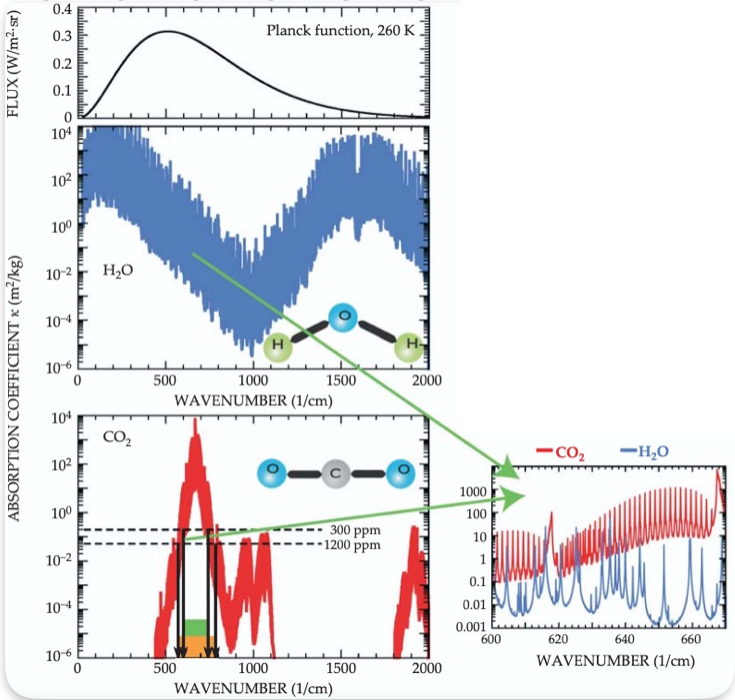
Figure 6 – Absorption coefficients for CO2 (red) and H2O (blue) as a function of wavenumber. The top graph is a plot of the Planck function which shows how different spectral regions (i.e., ranges of wave numbers) affect Earth’s energy balance (i.e., flux of energy leaving Earth). The dashed horizontal lines show where CO2 strongly absorbs for atmospheric CO2 concentrations of 300 ppm to 1200 ppm (current concentrations are at 425 ppm in May 2024). The inset graph on the right shows a region of overlap between absorption of IR radiation for H2O and CO2. The green rectangle represents the range of the spectrum where IR radiation is absorbed at low CO2 concentrations, while the orange rectangle represents the expanded absorption range occurring at higher concentrations. Source: Pierrehumbert (2011)[4]
Claiming that ‘CO2 is saturated’ is also misleading due to its imprecision; it does not specify what altitude or region CO2 is becoming saturated, which treats the atmosphere as a single, homogeneous unit where all CO2 is saturated by IR radiation. But in reality, Earth’s atmosphere is stratified; different altitudes have different physical conditions (e.g., pressures, temperatures, and chemical compositions) (Figure 7). The type and amount of absorbed radiation can vary by altitude, and thus have different implications for global warming. For example, there is far more water vapor near Earth’s surface than in the upper atmosphere – where Earth’s heat is lost – and therefore lower competition between CO2 and H2O at higher altitudes[4].
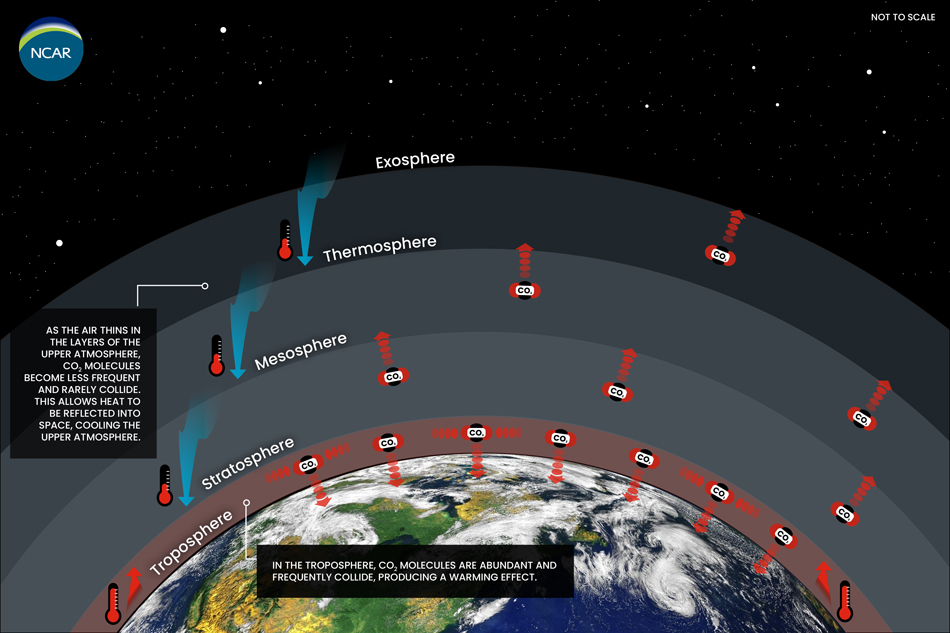
Figure 7 – Different layers of Earth’s atmosphere (not to scale) including, from closest to farthest from Earth’s surface, the troposphere, stratosphere, mesosphere, thermosphere, and exosphere. The red arrows indicate the main/net directions of re-emitted radiation after absorption; CO2 in the outer layers of Earth’s atmosphere radiates heat to space causing cooling, while CO2 in lower layers traps heat and raises global temperatures. Source: NCAR/NSF
This distinction is important to understand why the ‘CO2 saturation’ and the ‘competing H2O-CO2 absorption’ claims are incorrect. As explained in Pierrehumbert (2011):
“A related saturation fallacy, also popularized by Ångström, is that CO2 could have no influence on radiation balance because water vapor already absorbs all the IR that CO2 would absorb. Earth’s very moist, near-surface tropical atmosphere is nearly saturated in that sense, but the flaw in Ångström’s argument is that radiation in the portion of the spectrum affected by CO2 escapes to space from the cold, dry upper portions of the atmosphere, not from the warm, moist lower portions.”[4]
The paper also explains that the inset of Figure 6 above shows that:
“the individual water-vapor and CO2 spectral lines interleave but do not totally overlap. That structure limits the competition between CO2 and water vapor.”
As we’ve shown, climate scientists have found overwhelming evidence that CO2 raises global temperatures through radiative forcing. However, scientists long had trouble collecting one of the final pieces of evidence: high-quality, continuous satellite observations of outgoing IR radiation. But things changed in 2023 when a new study reported their findings after analyzing IR satellite measurements from 2003-2021. Raghuraman et al. (2023) explained that “these unprecedented observations provide measurements of Earth’s emitted thermal heat at fine-scale wavelengths, that is, the infrared spectrum, allowing us to pinpoint the effect of greenhouse gas concentration increases on Earth’s climate. We find large increases in the heat trapped by CO2, CH4, and N2O”[7]. Outgoing radiation is a critical part of the energy balance model we discussed earlier (i.e., incoming vs. outgoing energy). The benefit of collecting these data via satellite is that they show the final ‘signature’ of outgoing radiation – the end result of the complex radiative transfers occurring on Earth.
In summary, claims regarding CO2 saturation are nothing new, and proven to be inaccurate by several decades of scientific evidence. In recent times, new forms of scientific evidence, such as satellite observations of outgoing radiation[7], have only further shown that CO2 is not saturated and is still driving radiative forcing. Despite this, people still make these claims, as evidenced in The Daily Sceptic article posted on 24 April 2024. To supplement our investigation of general claims regarding CO2 saturation, we invited climate science experts to provide comments on The Daily Sceptic article and the following claims made within:
Claim 1: “Scientific evidence has emerged to suggest that the Earth’s atmosphere is ‘saturated’ with carbon dioxide, meaning that at higher levels the ‘greenhouse’ gas will not cause temperatures to rise” (referencing Kubicki et al. 2024)
Claim 2: “climate modellers and scientists in the anthropogenic camp are no nearer putting a temperature rise on a doubling of CO2 in the atmosphere. Estimates from 0.5°C up to around 6°C, with some outliers as high as 10°C, are little more than guesses”
Below is the feedback we received from climate science experts.
SCIENTISTS’ FEEDBACK
Paulo Ceppi, Lecturer, Imperial College London:
The claims are completely unfounded. On the first point: there is scientific consensus that the Earth’s atmosphere is far from being saturated with CO2, in terms of its radiative impact. Hence as long as CO2 concentration increases, the greenhouse effect strengthens and thus global temperatures rise. Our best estimate is that global-mean temperature increases approximately linearly with cumulative CO2 emissions (see e.g. the IPCC 6th Assessment Report)[2], and logarithmically with CO2 concentration.
On the second point: our best estimate of the global-mean temperature change for a doubling of CO2 is 3°C (at equilibrium, so this is a long-term response), with a 90% range of 2-5°C. This is again summarised in the 6th Assessment Report of the IPCC, Working Group 1.[2]
Ralph Keeling, Professor, Scripps Institution of Oceanography:
The impact of CO2 on climate does not saturate in the way the Kubicki article implies. It’s true that CO2 becomes less potent as a greenhouse gas as levels continue to rise, due to an effect known as ‘band saturation’. But there is no hard stop, and this saturation effect, which is well understood, is built into our understanding of climate change.
Raymond Pierrehumbert, Professor, University of Oxford:
[In response to Ralph Keeling’s comment:] Yes, that’s right, and covers the situation up to any concentration of CO2 the Earth has had in the past three billion years or so. However, even after all bands are ‘saturated’ relative to transmission from the surface to space, adding more CO2 continues to provide warming, since adding more CO2 raises the altitude of the level from which radiation escapes to space, and it becomes colder relative to the ground temperature because of the temperature profile in optically thick atmospheres. That’s how Venus gets so hot. The whole ‘CO2 saturation’ myth is just obfuscation.
Joanna Haigh, Emeritus Professor, Imperial College London:
The main points made by Kubicki with respect to saturation of the CO2 15 micron band are correct – viz [namely] as the centre of the band saturates more absorption occurs in the wings. However, his analysis is oversimplistic. The variation of radiative forcing with increasing concentration is shown in the paper attached which takes account of spectrally resolved absorption right across a wide spectral range and concludes that the band is nowhere near saturated. See Figs 5&6 [from Zhong and Haigh (2013)].
The current estimate for equilibrium climate sensitivity is “likely in the range 2.5°C to 4.0°C, and very likely between 2.0°C and 5.0°C” (IPCC AR6)[2]. The gratuitous statement that these are “little more than guesses” couldn’t be further from the truth. They are the result of extremely careful analysis of data from a range of sources including records of historical surface temperatures such as those deduced from ice cores over 100,000’s years and instrumental records since 1850. It is also estimated through computer model simulations ranging from simple energy balance models to more complex global climate models. The wide range results from uncertainties in details of how the climate modifies the impact, through, for example, changes in humidity, clouds and ice.
Ella Gilbert, Research Scientist, British Antarctic Survey:
Climate sensitivity (the temperature change associated with a doubling of atmospheric CO2) is a stubborn number to pin down. Estimates haven’t changed much in the decades since it was first introduced as a concept, and the most recent IPCC report pegs it at 2.5-4 C:
“equilibrium climate sensitivity (ECS) is likely in the range 2.5°C to 4.0°C, and very likely between 2.0°C and 5.0°C.”[2] (IPCC WG1 AR6 report, chapter 7. See also: Figure 1.16 AR6 WG1 Chapter 1).
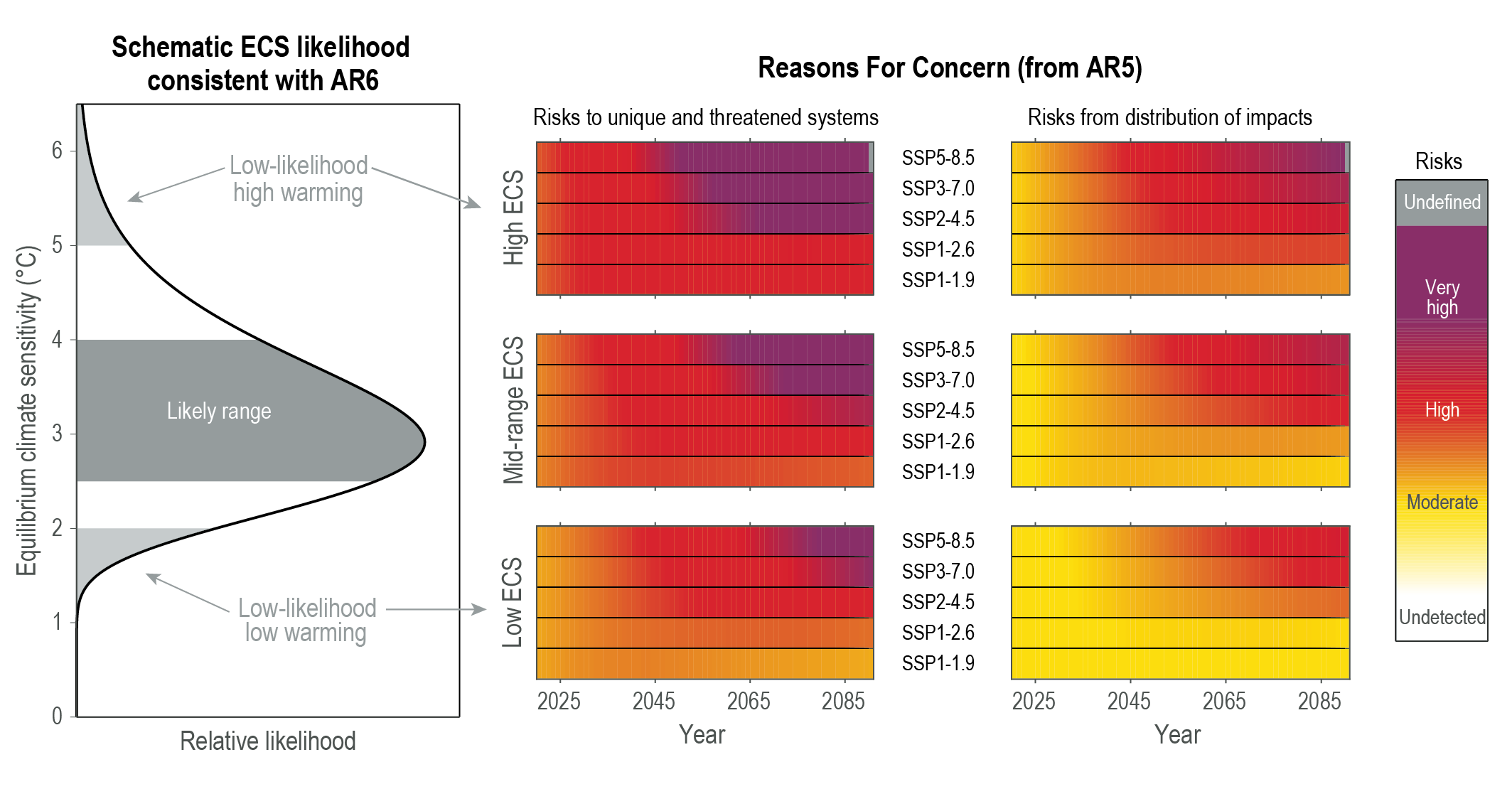
Figure 8 – Equilibrium climate sensitivity outcomes showing likely range and low-likelihood outcomes. Source: IPCC Sixth Assessment Report[2]
This isn’t so very different from the range reported in the first real attempt to quantify it by Charney and colleagues in 1979: 1.5-4.5 C (Charney et al., 1979).
This is because of the complexity of the processes involved and the question marks that remain about important feedbacks in the climate system, especially relating to clouds and cloud feedbacks. We are still learning more about these feedbacks, and about how they may change. Numerous scientists have noted how difficult it is to narrow down the climate sensitivity (e.g. Sherwood et al., 2020; Sherwood & Forest, 2024)[12,13].
However, while scientists may disagree about exactly where in (or indeed above) this range the value of climate sensitivity lies, that doesn’t matter for refuting the central tenet of this article: that greenhouse gas emissions do not warm the atmosphere. This argument wilfully misunderstands the greenhouse effect.
Atmospheric greenhouse gases do not have a finite energy absorption capacity – rather, molecules of CO2 are constantly emitting and absorbing energy. Hence the idea that the atmosphere is ‘saturated’ with respect to CO2 is incorrect. There’s a much more eloquent rebuttal of this on skeptical science: https://skepticalscience.com/saturated-co2-effect.htm
More simply, climate sensitivity is positive, meaning that greenhouse gas emissions increase global average temperatures. This has been established using many lines of evidence, including historical observational data, proxies from much longer time periods (over tens or hundreds of thousands, or millions of years) and model simulations[13,2].
As an aside: one should also always be wary of climate science papers published in journals specialising in fields outside of climate science. For instance, the paper this claim hinges on is published in an engineering journal that has no reputation within the climate sciences. It’s highly unlikely this paper would have even made it past the editor of any well-regarded journal in the field.
REFERENCES:
- 1 – IPCC (2014). Fifth Assessment Report.
- 2 – IPCC (2021). Sixth Assessment Report.
- 3 – Zhong and Haigh (2013) The greenhouse effect and carbon dioxide. Royal Meteorological Society Weather.
- 4 – Pierrehumbert (2011) Infrared radiation and planetary temperature. Physics Today.
- 5 – Kaufman et al. (2020) Holocene global mean surface temperature, a multi-method reconstruction approach. Nature.
- 6 – PAGES 2K Consortium (2019) Consistent multidecadal variability in global temperature reconstructions and simulations over the Common Era. Nature Geoscience.
- 7 – Raghuraman et al. (2023) Greenhouse Gas Forcing and Climate Feedback Signatures Identified in Hyperspectral Infrared Satellite Observations. Geophysical Research Letters.
- 8 – Wang et al. (2023) Climate change: Strategies for mitigation and adaptation. The Innovation Geoscience.
- 9 – Huang and Shahabadi (2004) Why logarithmic? A note on the dependence of radiative forcing on gas concentration. Journal of Geophysical Research: Atmospheres.
- 10 – Anderegg et al. (2010) Expert credibility in climate change. Proceedings of the National Academy of Sciences.
- 12 – Sherwood et al. (2020) An Assessment of Earth’s Climate Sensitivity Using Multiple Lines of Evidence. Review of Geophysics.
- 13 – Sherwood and Forest (2024) Opinion: Can uncertainty in climate sensitivity be narrowed further?. European Geoscience Union.
Note: Scientists comments were lightly edited for clarity (i.e., information was added in brackets for context and minor punctuation changes were made).
832 - Real World Blues feat. Alex Nichols (5/13/24)
Tom RocheFelix+Will+Nichols hilarious as usual
Alex is on today as we catch up with the weekend’s drama over the 2024 Eurovision song contest and ask which is more real, twitter or Eurovision (those are the only two options). Then, some disastrous new polls for the Biden campaign, Trump searches for a VP and praises Hannibal Lecter, and Bret Stephens & Gail Collins search for the true value of a commencement speech and decide it’s about telling kids to get off their damn phones.
Check out WFYM radio: https://chapofym.podbean.com/
Get bonus content on PatreonHosted on Acast. See acast.com/privacy for more information.
831 - Fan Gruel feat. David J. Roth (5/9/24)
Tom RocheEXCELLENT amusement+analysis
David Roth joins us for a look at sports gambling’s rapid rise and infiltration of every institution of professional sports. We look at how it developed, who’s affected, the insidious exploitation of gambling addiction, and how the permissibility of gambling has extended to players in the leagues themselves. We also discuss RFK Jr.’s brain worm, and the crypto bracelet entrepreneur who gave the worst commencement speech of all time at Ohio State.
Subscribe for David’s work at the Defector here: https://defector.com/
Corbin Smith’s Defector piece on sports gambling mentioned in the ep: https://defector.com/sports-is-betting-it-all-on-gambling
Get bonus content on PatreonHosted on Acast. See acast.com/privacy for more information.
Bonus: Inside Higher Ed
Tom RocheVERY EXCELLENT, very informative (just analysis, no jokes)
Hosted on Acast. See acast.com/privacy for more information.
Free Bonus - The War in Sudan w/ Khalid Medani
Tom RocheEXCELLENT, very informative
Danny and Derek welcome to the podcast Khalid Medani—associate professor of political science, director of the Institute of Islamic Studies, and chair of the African Studies Program at McGill University—for a deep dive into the conflict that has engulfed Sudan since last Spring. They delve into its roots going back to the 1989 coup, break down the makeup of the primary combatants (the Sudanese Armed Forces and the paramilitary Rapid Support Forces), how these groups are able to continue recruiting and maintain support networks, the conflict’s catastrophic humanitarian crisis and regional effects, foreign mercenaries and whether it has become a proxy war, efforts of local civil leaders to quell the fighting, and what things might look like moving forward.
As Khalid noted, two places to which he recommends you donate are the Sudanese Doctors Union or the Sudan Solidarity Collective.
Some of Khalid’s recent work:
“The Struggle for Sudan” from Middle East Report’s Spring 2024 issue is a primer on Sudan.
Middle East Research and Information Project’s Spring 2024 issue has multiple contributors, including Khalid, writing about the conflict.
His book Black Markets and Militants: Informal Networks in the Middle East and Africa, which is free via Open Access.
“Opinion: The brutal conflict in Sudan is not a civil war. It’s a war on civilians” from The Globe and Mail.
5/13/24: Israel Freaks As Egypt Joins ICJ Genocide Case, Blinken Says Israel Committed War Crimes But It's Okay
Tom Rocheboth segments VERY EXCELLENT (minus the beginning, ending, and in-between ads) ... but somewhat odd that 2nd/last segment, which very much wants to call out Zionist political power in the US (and Saagar does) still can't actually /name/ the author (Haim Saban) of the unhinged rant which Krystal reads (near end of segment/audio).
Krystal and Saagar discuss Israel freaks as Egypt joins ICJ genocide case, Blinken admits Israel war crimes says it's okay.
To become a Breaking Points Premium Member and watch/listen to the show AD FREE, uncut and 1 hour early visit: https://breakingpoints.supercast.com/
Merch Store: https://shop.breakingpoints.com/
See omnystudio.com/listener for privacy information.
Bonus - All Hailbag the Mailbag 8: Mayday
Tom Roche4:32 teaser only
The AP trifecta once again reunites to answer your thoughts, queries, and, in one case, riddles. This edition broaches such topics as which nations would respectively sanction Jake and Derek, how Danny maintains such a prolific output, whether we’re already in a regional war in the Middle East, Kurt Cobain as a proxy for the end of history, and more.
Tha…
5/9/24: Glenn Greenwald Vs Ilya Shapiro On Campus Crackdowns - CounterPoints Debate
Tom Rochesurprisingly listenable
Ryan and Emily host a debate on free speech at college campus protests between Glenn Greenwald and Ilya Shapiro.
Glenn Greenwald: https://twitter.com/ggreenwald
Ilya Shapiro: https://twitter.com/ishapiro
To become a Breaking Points Premium Member and watch/listen to the show AD FREE, uncut and 1 hour early visit: https://breakingpoints.supercast.com/
Merch Store: https://shop.breakingpoints.com/
See omnystudio.com/listener for privacy information.
Tunnels, Weapons and Guerrilla Tactics: How Palestine’s Armed Forces Survived
Tom RocheVERY EXCELLENT (unfortunately truncated on freefeed) overview of the 2 main anti-Zionist militaries and their genocidal opponents:
* bit about tactics, mostly about weapons
* Gaza: almost all about Qassam Brigades (QB)
***** QB weapons production: quantity, quality, R&D
***** Israel military and hasbara failing in Gaza
***** but Israel warcrimes continue toward Greatest Of All Time
* Lebanon/Hezbollah:
***** Hezbollah weapons quantity and quality make it Israel peer
***** Hezbollah+Iran R&D, logistics
Rania Khalek was joined by Jon Elmer, a contributing editor at The Electronic Intifada, to discuss the battles, tactics and weapons of the Palestinian resistance groups.
This is just part of this episode. The full interview is available for Breakthrough News Members only. Become a member at Patreon.com/BreakthroughNews to access the full episode and other exclusive content.
Karthik Chikmagalur: The Emacs Window Management Almanac
Tom Rochenote: I have not yet read this post, which is the longest I've ever seen on Planet Emacs. Truly, it is more a dissertation on how Emacs does screen layout, and how it connects these views to underlying content. Contains not /merely/ many explanatory diagrams, but /12/--count 'em, 12--explanatory /videos/. (Likely) a masterwork (but I won't actually know until I set aside enough time to actually read this).
Window management in Emacs gets a bad rap.
Some of this is deserved, but mostly this is a consequence of combining a very flexible and granular layout system with rather coarse controls. This leaves the door open to creating and using tools for handling windows that employ and provide better metaphors and affordances.
As someone who’s spent an unnecessary amount of time trying different approaches to window management in Emacs over the decades, I decided to summarize them here. Almanac might be overstating it a bit – this is a primer to and a collection of window management resources and tips.
Window management in Emacs bleeds into buffer, state, workspace and frame management, so it’s difficult to contain the scope of any article that aims to be comprehensive. To that end,
- this write-up assumes that you’ve finished at least the Emacs tutorial and are familiar with basic Emacs terminology (what’s a buffer, window and a frame) and with window actions: splitting windows, deleting them or deleting other windows, and switching focus.
- There are only a few brief mentions of tabs, as they are primarily a tool for workspace management, as opposed to window management.
- I’m focusing on window/buffer management within an Emacs frame. Many of the below tools work across frames just as well, but you’ll have to find the right switches to flip to enable cross-frame support.
- Finally, this is more my almanac than a wiki: It covers only tools or ideas I’ve personally explored over the years, with brief mentions of potentially useful packages that I haven’t tried. Any omissions are not value judgments, please let me know if I miss something useful.
At some point this transitions from listing well known tools to tips, then hacks, and finally unvarnished opinions. It’s front-loaded: the first chunk of the write-up gives you a 70% solution. If you are new to Emacs, feel free to stop at 30%. If you are an old hand, feel free to skip the first 30%. It also lists substitutes: several ways to do the same things, so you can pick just one method and ignore the rest. Things get progressively more opinionated and idiosyncratic in the second half.
If you are reading this in the future, this write-up is probably out of date. The Emacs core is very stable, but the package ecosystem tends to drift around as packages are developed and abandoned. The built-in solutions will still be around, but there are no guarantees on the third-party packages! That said, the longer a package has been around the more likely it’s going to stick around in a functional state – even if only as a frozen entry in the Emacs Orphanage.
As new ideas emerge, there will be new approaches to window management that aren’t covered here. These innovations don’t need to happen in the Emacs sphere – Emacs likes to steal reinvent ideas that originate elsewhere, much as other applications rediscover ideas that Emacs introduced in the 1990s. So this topic might be worth revisiting afresh in a few years.
What we mean by “window management”
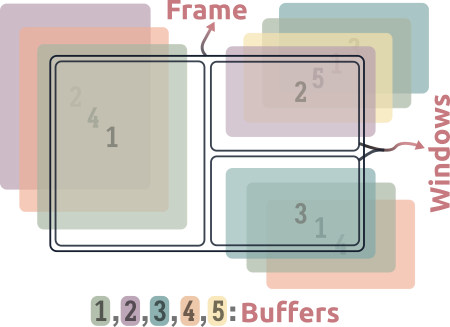
Emacs separates the idea of a window (a “viewport” or “pane” in the frame) from the buffer, a contiguous chunk of text that may or may not be the contents of a file. These concepts are usually fused in IDEs and text editors – this reduces the cognitive load of using the application, but closes the door on more flexible behavior and free-form arrangments. For example, many editors don’t let you have two views of the same file, which is trivial in Emacs. They’re often uncomfortable even with the idea of a dissociated buffer – a buffer that does not represent the (possibly edited) contents of a file. Reified concepts like Emacs’ indirect buffers are completely foreign to them Unfortunately for Emacs, its current design rules out some clever ideas that other editors have implemented. One example of this is the 4coder’s yeetsheet or Dion systems’ views: You can have buffers whose contents are “live” substrings of multiple other buffers, i.e. you can mix and match pieces of buffers. In Emacs the most you can have is indirect buffers, i.e. full “live” copies of a buffer. .
Emacs allows you to do a lot more, but users have to contend with this cognitive cost. New users pay thrice: they have to deal with getting windows into the right places in the frame, getting buffers into the right windows, and they miss out on the upside because they don’t yet realize what this decoupling makes possible. Hopefully this write-up can address two of these costs.
For reference in the rest of this article, here’s a non-exploded schematic of an Emacs frame, with the left window selected:
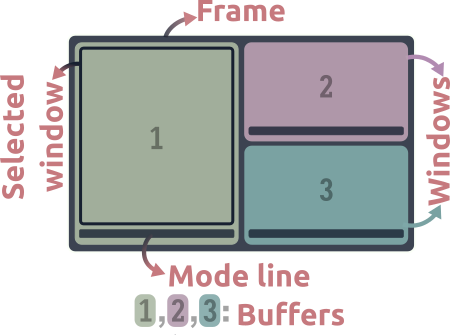
- Each colored block is a window, the numbers represent buffers being shown in them.
- The active window is the one with a black border.
This article is not about…
Since actions with or on windows in Emacs are primitive, common and unavoidable operations at any level of Emacs usage, this topic is suprisingly subtle, broad and deep, and there’s only so much I can explore in 15,000 words. So we begin with some disambiguation and a narrowing of focus. This article is not about the following things.
Rules for displaying buffersEmacs keeps popping up windows in the wrong places and destroying my window arrangement!
The situation is… less than ideal. Displaying buffers in the right windows automagically is generally possible but this configuration is involved and requires knowledge of minutiae of the Emacs API, like window-parameters, slots and dedicated windows. the display-buffer API is so involved that describing it takes up a big chunk of the Elisp manual, and even that concludes by saying “just go with it”.
And this is the one aimed at developers using elisp. It’s not even the Emacs user manual!
I mention automatic window management briefly towards the end, but this article is not about reining in the behavior of display-buffer. I recommend Mickey Peterson’s article on demystifying the window manager for this, this video by Protesilaos Stavrou, or the manual if you’ve got the stomach for it.
I want Emacs to group together windows for a given task and persist them across sessions!
Two common factors affecting Emacs use:
- Emacs sessions tend to be long lasting, and
- its gravity pulls users into using it for an increasing number of tasks.
The result is that you end up with hundreds of buffers and start looking for ways to group them, isolate the groups and then preserve them. This is tied to window management, but only in the sense that your arrangement of windows is part of the state you want to preserve. This is a finicky and complex subject, and well beyond the scope of this write-up. Take your pick: between tab-bar, tabspaces, eyebrowse, tab-bookmark, desktop.el, persp-mode.el, perspective, project-tab-groups, beframe and activities.el there is no paucity of projects to help you do this.
Why is window placement in Emacs so capricious? Tiling window managers solved this problem ages ago!
Some packages provide all-encompassing, radical solutions to window arrangment and management – essentially, they are window managers for Emacs. For example, Edwina modifies Emacs’ manual window-tree based behavior to enforce a master-and-stack DWM-style auto-tiling layout, with a complete suite of accompanying window management commands. HyControl provides a control panel for window layout actions and can display windows in a uniform grid on the frame, among other features. Apologies for the terse and possibly inaccurate descriptions, I have only brief experience with these. .
In my experience “complete” solutions like these are great when you start using them, but eventually cause more friction than elation. This is the case the more you customize Emacs, as the abstractions they build on top of the Emacs API end up limiting, as opposed to liberating you in the long run.
So what’s left? In this article, we mean window management in the manual and mundane sense: switching window focus, moving buffers around windows, splitting or closing them and so on. Even if you’ve got display-buffer all sorted out and your windows grouped into workspaces, these are the kinds of things you have to do with windows – repeatedly and often – in the course of minute-to-minute, regular editing.
Let’s address a couple of common concerns and dismissals before we get started in earnest.
The two-window perspectiveThis palaver is pointless, I need two windows at most.
Correction: You need at most two windows at a time. And that’s partly because corralling windows is a mess in Emacs. Except during bursts of writing or coding, chances are you need easy access to more than one buffer – for reference material or look-ups, search and compilation results, file access, shells and REPLs, table of contents and so on. Whether these are on screen in windows all the time or easily displayed on demand is a matter of screen size and preference, but both involve interacting with windows and buffers manually. Both approaches are thus under the purview of “window management”, and addressed in this article.
Just use the mouse? This isn’t even an issue in most software.
The mouse is indeed the most natural way to navigate windows. Without stepping into contentious discussions on economy of motion, RSI trouble or personal preferences, the main problem with the mouse approach is that the lack of a learning curve (relative to the keyboard) is balanced by the lack of expressivity (relative to the keyboard).
Even so, you can squeeze a lot more expressivity out of the mouse in Emacs than you can in most other applications The ACME editor might be the most notable exception. . I use the mouse for managing windows in Emacs often – but only in certain contexts, see Mousing around.
Warming up
Our appetizer: a short run-through of the most popular and commonly recommended window management options. These cover changing the focused window, moving windows around and undoing oopsies, with a side of buffer management and bespoke window actions This is the part you can skip if you’ve been around the block a few times. Jump ahead to digging in. .
other-window and the “next window” (built-in)
other-window offers: selecting windows
The other-window (C-x o) command is the baseline window switching experience. It’s what the Emacs tutorial teaches you, and it works well enough when you have a small number of windows:
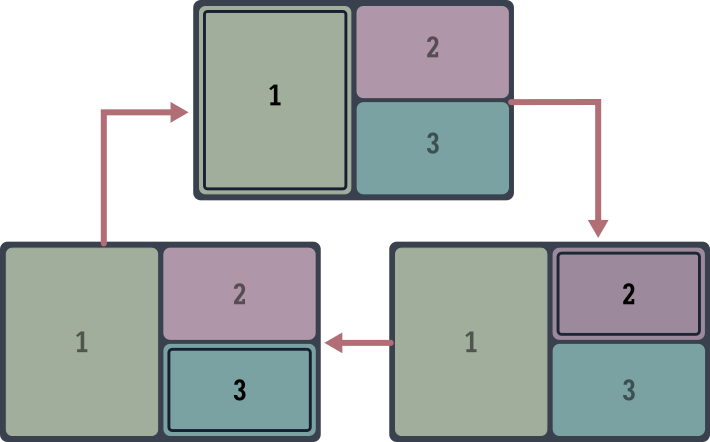
The window selection cycles (roughly) clockwise across the frame. The advantage of this approach is simplicity – it’s a single command and keybinding. As you might expect or have experienced, it takes progressively more invocations to get somewhere as you accumulate more windows, and works best if you rarely have more than two windows showing at once.
 Basic
Basic other-window tips and tweaks
- It’s possibly one of the most used Emacs commands – bind it to a more convenient key like
M-o. - You can use digit arguments to skip windows or to cycle windows backwards.
M-3 M-owill select three windows ahead, andM-- M-2 M-otwo windows back. Unfortunately this requires a visual understanding of the order in which the cycling happens. It’s not obvious which window is three windows away in more complex window layouts. - Turn on
repeat-mode(M-x repeat-mode) to continue switching windows with justoand (backwards)O.C-x o o o o...orM-o o o o...is faster thanC-x o C-x o C-x o....

other-window hacks
You can make other-window skip over a window by setting its no-other-window window parameter. A window parameter is a property of Emacs’ window data structure, and there are Elisp functions to set them. This is usually something you’d specify in advance for certain classes of buffers in display-buffer-alist, not a manual toggle. If you’ve ever wondered why other-window does not select the windows of fancy file-manager listings (like dired-sidebar or dirvish-side), this is it.
If you only ever have two windows showing in Emacs, or if you don’t mind punching o a few extra times, you can stop here. The rest is just varying degrees of optimization applied to a problem that you probably (and perhaps realistically) don’t believe needs solving!
Understanding the “next window”
The “next window” is the window that other-window selects, usually clockwise from the current one. You can access it in elisp by calling the next-window function. With daily usage, you automatically develop intuition for the clockwise ordering of windows in an Emacs frame – in the sense that you know instead of think. This is handy, because the notion of the next window is useful for more than just window selection. There are better ways to select windows, or there wouldn’t be much to this write-up! The next window is the default window for commands that operate in another window, like scroll-other-window. See Do you need to switch windows?
windmove (built-in)
windmove offers: selecting windows, swapping buffers in windows, deleting them
Windmove is a built-in Emacs library for moving the focus across windows – and for moving buffers across windows – by direction. Vim users, this is what you expected. evil-mode users, you already use Windmove, you just don’t know it.
If other-window is the alt-tab of Emacs, Windmove is the tiling window manager equivalent. It makes the spatial arrangement of windows in the frame relevant to the selection, which I imagine is the most natural way to do it short of using the mouse.
Using Windmove is simple: bind windmove-left (resp -right, -up and -down) to a modifier or leader key plus whatever keys you associate with directions: WASD, HJKL or the arrow keys perhaps.
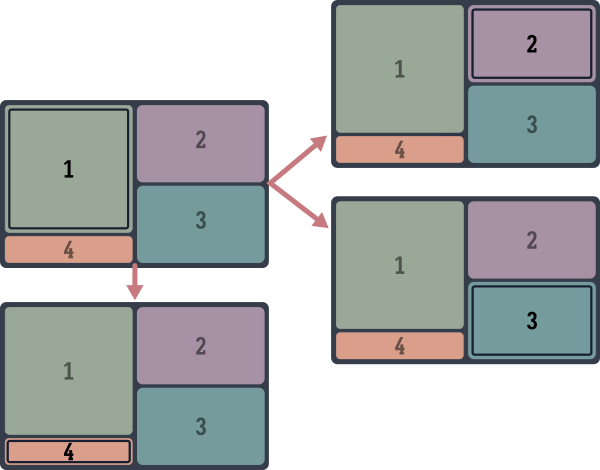
The fork: movement to the right in this schematic depends on what window is exactly to the right of the cursor. Calling windmove-right from near the top of buffer 1 moves the focus to buffer 2, starting near the bottom moves the focus to 3.
You can also swap the buffers of windows directionally with Windmove, a handy way of rearranging windows on the frame
Again, Windmove is how evil-mode does this.
. The relevant commands are windmove-swap-states-left, -right, -up and -down.
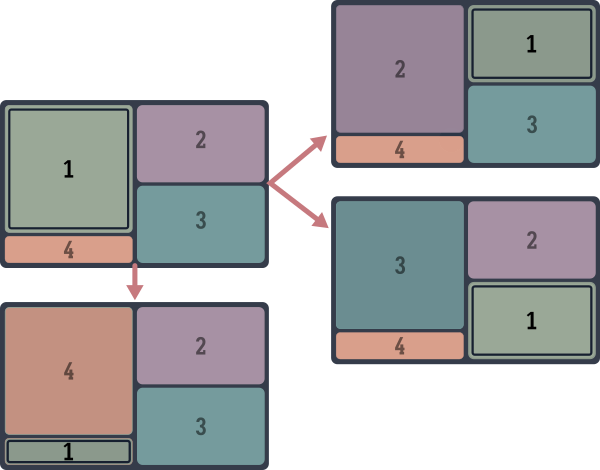
Note that the focus moves along with the buffer when you do this.
There’s more yet to Windmove, you can delete the window next along any direction with windmove-delete-*, for example. But we cover better ways to do this below.
Tiling manager integration
If you use Emacs in a tiling environment, you’ve got a nested tiling window manager situation – it might be desirable to integrate the two so you can (wind)move seamlessly across Emacs windows and OS windows with the same keys. (Vim+tmux users should be familiar with this.) It takes a bit of work but is quite doable: Pavel Korytov has an i3 integration description for Emacs+i3wm (and possibly Sway), and I wrote one for the qtile window manager. I discuss this project in more detail below.
frames-only-mode
frames-only-mode offers: to leave Emacs window handling to the OS.
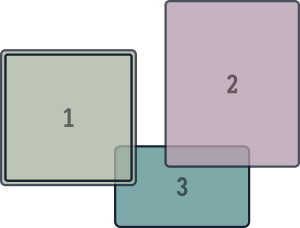
While we’re on the subject of tiling, another resolution to the nested window manager situation – Emacs inside a tiling WM – is to simply not bother with Emacs’ window management. Opening every buffer in a new frame instead of window makes corralling them the window manager’s job. This puts Emacs buffers on par with OS windows, and you can manage both with the same keys.
Most other commands described in this write-up (such as Avy, winum, ace-window or scroll-other-window) can work across frames just as easily as windows, meaning that you can have the best of both approaches. There are bound to be edge cases with other Emacs commands though – many of them make assumptions about being able to split the frame at will
This is especially true of org-mode commands! Thankfully the Org situation is slowly improving.
.
For Linux users:
I haven’t tried frames-only-mode with Wayland compositors yet.
winum-mode
winum offers: Selecting and deleting windows
Winum is next in the natural progression of the effort to switch between n windows: From O(n) (other-window) to O(√n) (windmove) to O(1). It adds window numbers to the mode-line so you can select windows by number:
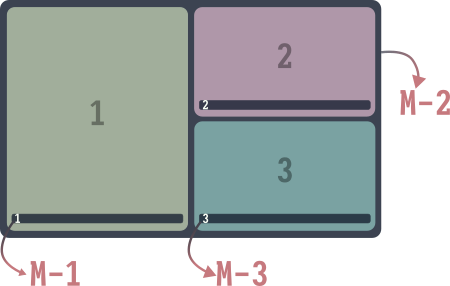
There are two convenient bonus features:
- Invoking the command to switch to a window with a negative prefix argument deletes the window, and
- when the minibuffer is active, it is always assigned the number 0.
It’s simple and short, and works across Emacs frames. winum-mode is the method I use the most for switching windows.
Speeding up window access with winum
The default keybinding (C-x w <n> to select window n) is too verbose for my liking, as is any other two step keybinding. If you don’t mind losing access to digit arguments with M-0 through M-9, you can use them to select windows instead:
(defvar-keymap winum-keymap
  :doc "Keymap for winum-mode actions."
  "M-0" 'winum-select-window-0-or-10
  "M-1" 'winum-select-window-1
  "M-2" 'winum-select-window-2
  "M-3" 'winum-select-window-3
  "M-4" 'winum-select-window-4
  "M-5" 'winum-select-window-5
  "M-6" 'winum-select-window-6
  "M-7" 'winum-select-window-7
  "M-8" 'winum-select-window-8
  "M-9" 'winum-select-window-9)
(require 'winum)
(winum-mode)
While it is possible to extend winum-mode to include other actions on windows (or on buffers displayed in them) besides switching to or deleting them, there’s little reason to, thanks to the existence of…
ace-window
Offers: Any window or buffer management action
ace-window is the endgame for keyboard-driven Emacs window control.
The ace-window command places “hints” at the top of each window, and typing in the key switches focus to the corresponding one:
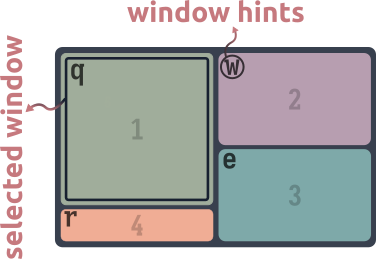
So far it’s a slightly slower, two-stage version of winum. You can turn on ace-window-display-mode to have the hints always showing in the mode-line like winum’s window numbers, which speeds up the process a bit:
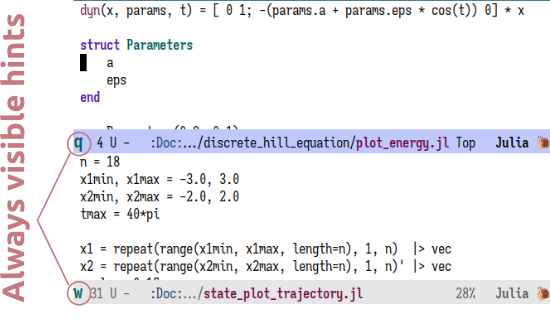
ace-window is to windows what Avy is to characters on screen The similar design is not a coincidence. They’re both authored by Oleh Krehel. . But jumping to a character on screen is the least useful of the many things you can do with Avy. Similarly, if all ace-window could do was switch windows, there wouldn’t be much to recommend it. Instead, it offers a generic method to “pick” a window, across all visible Emacs frames if necessary. What you do with this window is up to you. Similar to Avy, ace-window can dispatch actions on any window on the screen. So you can delete windows, move or swap them around, split them, show buffers in them and more – without moving away from your selected window. These are just the built-in actions, provided as part of ace-window:
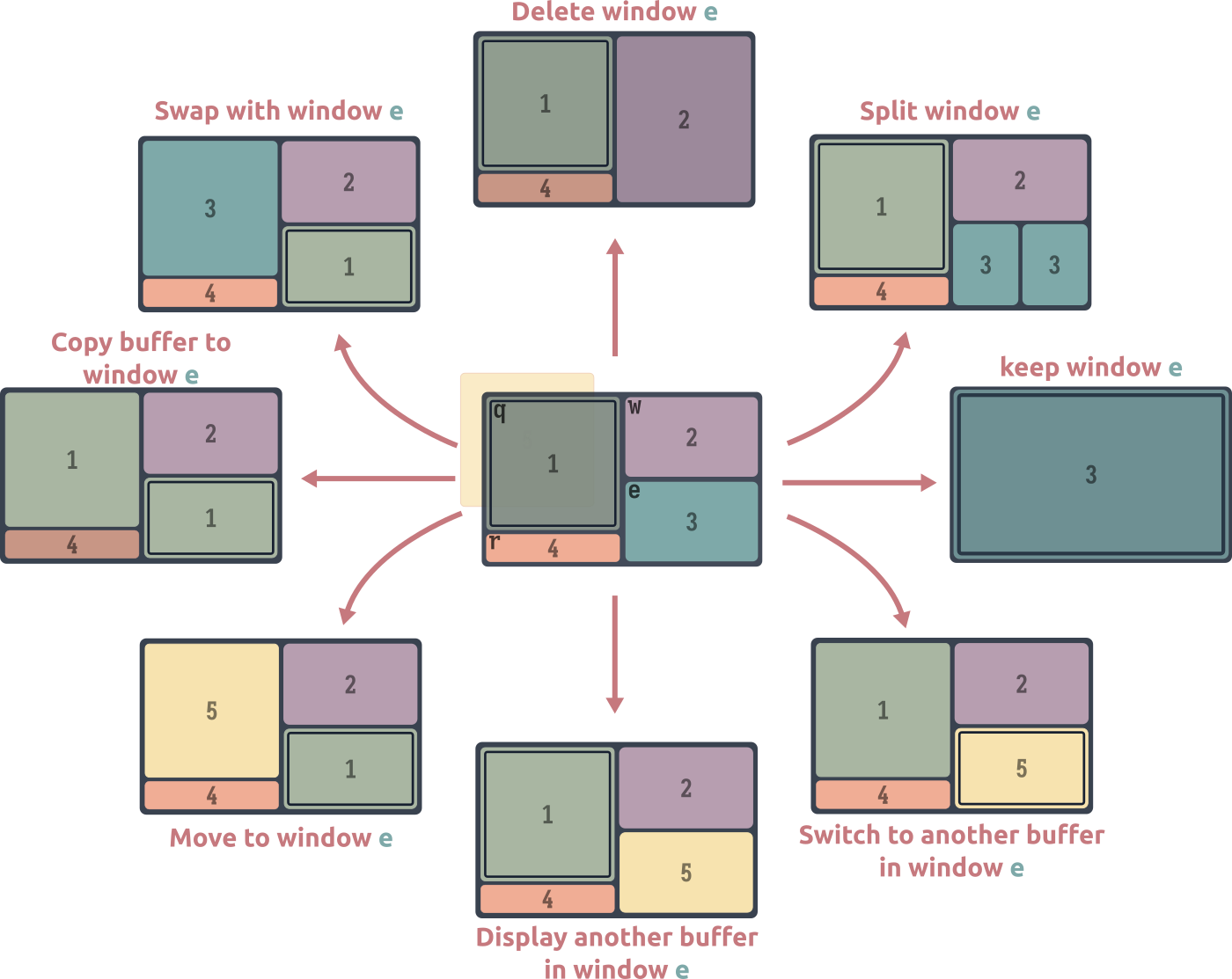
Pressing ? when using ace-window brings up the dispatch menu
See Fifteen ways to use Embark for further explorations of this idea.
.
- With two or more windows open, call
ace-window. (For two windows or fewer, you will need to ensure that the variableaw-dispatch-alwaysis set tot.) - Press
?to bring up the dispatch menu. - Press the dispatch key to split a window horizontally (
vin my video) - Press the ace-window key corresponding to the buffer you want to split (
ein my video) - Repeat steps 1 and 2
- Press the dispatch key to split a window vertically (
sin my video) - Press the ace-window key corresponding to the buffer you want to split (
win my video)
Mousing around (built-in)
The mouse offers: Any window or buffer management action
So, the pointer. Finally.
The advantanges of using the mouse for window management are immediate and obvious. Window selection is a natural extension of basic mouse usage. Resizing windows is a snap. Context (right-click) menus and drag and drop support, which improve with each new Emacs release, are very intuitive
See context-menu-mode. Also, while not limited to window management, discoverability via Emacs’ menu-bar is surprisingly good.
. Unfortunately, I have to address the rodent in the room before we can talk about mitigating the disadvantages, since Emacs users tend to be very opinionated about mouse usage.
I never use the mouse in Emacs… until I’m already using the mouse for something else. Then driving Emacs with the mouse is actually the path of least resistance. If your hand’s already off the keyboard, it’s pretty easy to drive Emacs with the mouse:
Play by playThis demo showcases the use of mouse gestures to do the following:
- Split the frame vertically and horizontally
- Delete windows
- Cycle through buffers in windows
- Swap windows to the right and left
- Toggle between the last two buffers shown in a window
You may want to turn on focus-follows-mouse behavior:
;; Consider setting this to a negative number
(setq mouse-autoselect-window t)
transpose-frame (rotation, flip and flop)
transpose-frame offers: easy window layout transformations.
What it says on the tin: transpose-frame offers commands to rotate or mirror the window layout on the frame. I found myself using these often enough to bind rotate-frame, flip-frame and flop-frame to suitable keys. Ironically, the transpose-frame command itself is rarely useful – it transposes along the main diagonal of the frame.
rotate-frame
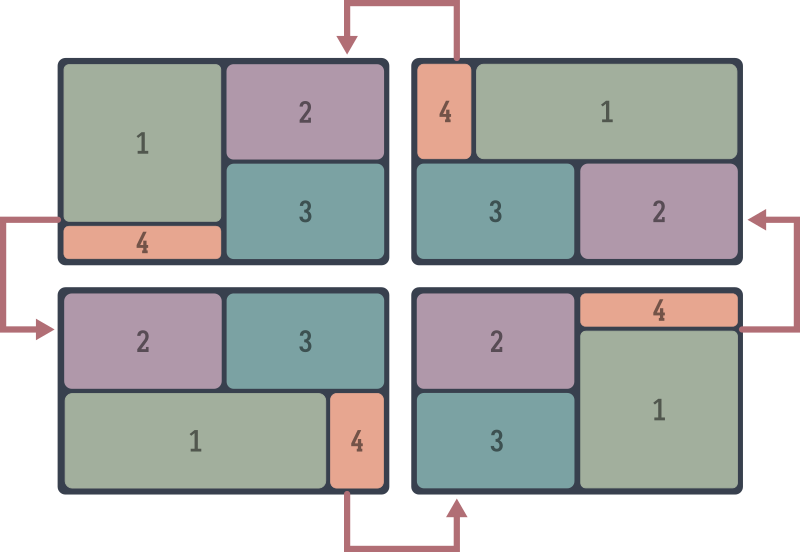
flip-frame
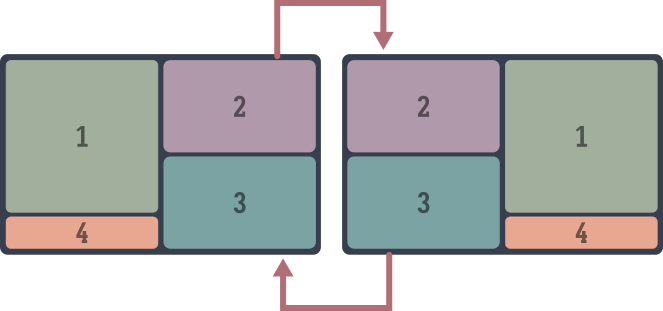
flop-frame
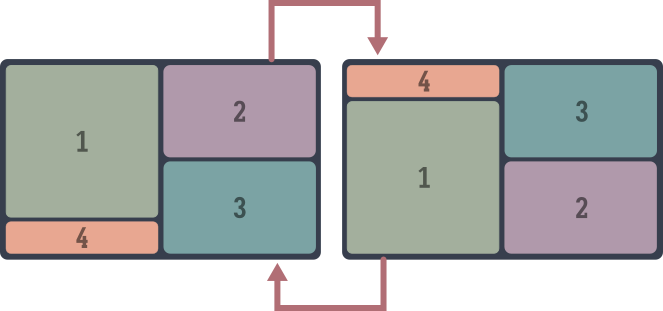
The window-prefix-map (built-in)
window-prefix-map offers: Bespoke window management commands
The window-prefix-map, bound to C-x w by default in Emacs, collects a few useful window-management commands:
split-root-window-right and split-root-window-below
Split the root window of the frame. Better illustrated than explained:
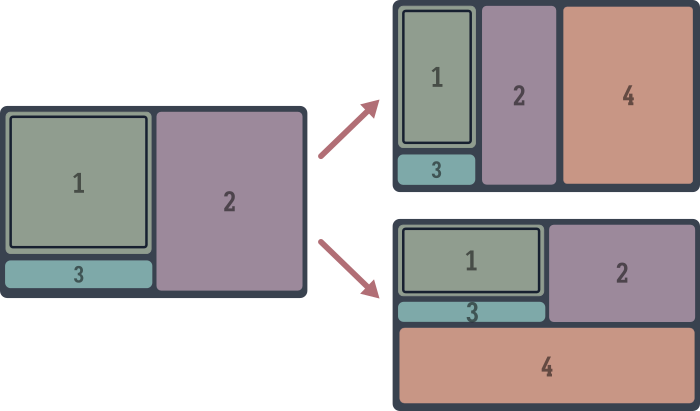
These are bound to C-x w 3 and C-x w 2 respectively.
The window tree
This is a good time to mention that windows in Emacs are arranged in a tree, with all “real” windows as leaves. Each splitting action turns a leaf node into a parent of two windows: the window that was split and the new one. This is very similar to the window arrangement in manual tiling window managers like i3 or bspwm, leading to a redundancy we seek to patch over.
These are the only built-in Emacs commands, to my knowledge, that allow you to modify the tree structure at a non-leaf level that doesn’t just clear the whole tree (as delete-other-windows does). Practically speaking, these are often useful to create a space for a logically separate task in the frame – the default splitting commands only further dice up existing windows.
Getting to grips with the tree arrangment should make a lot more fine-grained control available, but the tooling isn’t there yet – see below for a proposal.
tab-window-detach and tear-off-window
Handy commands to move a window into a new tab or a new frame.
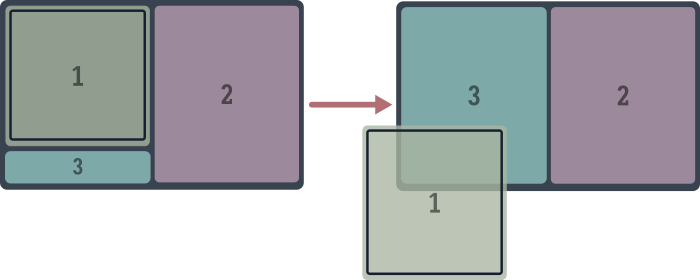
Like splitting the root window, these are quite handy for logical window management: grab a window and move it into a new tab or frame to start a new task.
These are bound to C-x w ^ t and C-x w ^ f, which sheesh. You can do these as ace-window dispatch actions instead, since you can do anything with ace-window. Alternatively you can rebind these to the slightly saner C-x w t and C-x w f, which are currently unbound. I prefer to just use the mouse when I need to tear off a window:
;; mouse-9 is the "forward" button on my mousee
(keymap-global-set "M-<mouse-9>" 'tear-off-window)
The other-window-prefix (built-in)
other-window-prefix offers a method to decouple window selection from buffer display, and solves three window-related annoyances.
Annoyance I
Many Emacs commands tightly couple a primary action, a buffer and a window. For example, running find-file involves selecting a file, creating a buffer and displaying it in the current window. If you want to decouple the choice of window from the command, you have to pick one of several alternate commands: find-file-other-window, find-file-other-tab or find-file-other-frame, each with its own keybinding. If you want to open the file in read-only mode, you’ve got find-file-read-only, find-file-read-only-other-window, find-file-read-only-other-tab and find-file-read-only-other-frame. More keybindings.
Want the same choices when selecting a buffer? You’ve got switch-to-buffer-⋆, another constellation of commands. Opening a bookmark with bookmark-jump? Pick one of several bookmark-jump-* commands. This is the road to insanity.
The problem is the coupling: picking a window to display a buffer should be a separable action from the command’s primary function: opening a file, in this example. The solution is to call other-window-prefix, bound to (C-x 4 4). This makes it so that the next command – any command that involves displaying a buffer in a window – is shown in the next window, creating one if necessary. Now you only need find-file, find-file-read-only and switch-to-buffer, and can use the prefix to redirect the resulting buffer to another window when required:
- Call
other-window-prefix(C-x 4 4) - Call
find-file,find-file-read-only,switch-to-buffer,bookmark-jump, or any command that shows a buffer. - Result: the buffer is shown in the next window.
In a past write-up I’ve mentioned Embark as the way. Indeed, Embark solves this problem more elegantly than the built-in other-window-prefix. But avoiding command proliferation is only the first of three problems other-window-prefix solves.
Annoyance II
In the above examples, we at least have the choice of calling *command*-other-window instead of *command*. There are just too many options. More often there are none, and we’re at the mercy of fixed, undesirable behavior. This is typically the case when activating a link-like object. In this example (from the Forge package), pressing RET on an issue title opens the issue in the current buffer:
This is a list of issues from a code repository, as displayed by the Forge package.
- Press
RETon an issue. - It opens in the current window, denying us the Listing & Item pattern: a simultaneous view of the full listing and the selected issue.
Forge provides no way, as of this writing, to “open a link” in another window. other-window-prefix to the rescue:
- Call
other-window-prefix, viaC-x 4 4 - Press
RETon the issue. It opens in the “next window” – there isn’t one so a new window is created.
Annoyance III
The third problem it solves is the combination of the first two. Consider: Magit, the sibling package to Forge, does provide a way to do this. It generally opens “links” in the next window if you use a universal arg (C-u) before RET. Org mode, Notmuch, Elfeed and EWW all provide either no way or mutually distinct ways of opening links in a different window. If Forge did provide a way, it would actually make things worse in a sense. With other-window-prefix, you’re blessedly free from having to customize or conform to each package author’s idea of how this should work. Run other-window-prefix, then activate the “link” object – click on it with the mouse if you’d like. It’s going to uniformly open in the next window.
See also: same-window-prefix (C-x 4 1), which forces the next command’s buffer (if there is one) to use the current window, and other-frame-prefix (C-x 5 5) and other-tab-prefix (C-x t t), which open the next command’s buffer in a new frame and tab respectively.
What’s with these keybindings?
There is a method to the seeming madness of keybindings like C-x 4 4, C-x 4 1 and C-x 5 5.
Keybindings involving specific window actions are grouped into prefixes, like a menu. C-x 4, the ctl-x-4-map broadly contains commands that use the other-window. For instance, C-x 4 . jumps to the definition of the thing at point (like the default M-.), but in the other-window. Most commands in the ctl-x-5-map create a new frame. Tab-bar actions are grouped under C-x t.
The final “base” key in each map follows a consistent pattern: f opens files, r opens things in read-only mode, b switches to buffers and so on. The final 4, 5 and t in C-x 4 4, C-x 5 5 and C-x t t reinforce the idea that the next buffer action is going to be redirected to another window, a new frame and tab respectively.
Further below we take this approach to its logical extreme with (what else) ace-window, redirecting the next command’s buffer to any window, including ones we create just-in-time.
Saving and restoring window configurations
window-configuration-to-register is a bit of a blunt instrument, but perfect as a big red reset button, especially if you’re new to Emacs. At any point, you can save the current window configuration to a register
A register is a named bucket that can hold many kinds of data. Each register is assigned to a character (like a through z), and operations on register are available under the C-x r prefix.
with this command, bound to C-x r w by default. After Emacs predictably messes up the frame, you can restore your saved configuration with jump-to-register (C-x r j). That’s it.
Persisting window configurations across restarts
The elisp version of window-configuration-to-register is the function current-window-configuration, whose return value you can bind to a variable, and apply to the frame with set-window-configuration. Coupled with a way to persist this lisp object data to disk, such as with prin1 or via a library like persist or multisession, we have the seed of a state restoration feature that works across Emacs sessions. Needless to say, this approach is rudimentary and you’re better off using one of the many packages listed above in window configuration persistence.
One issue with this method is that it restores the window arrangement down to each window’s cursor position, which is rarely what you want.
Another problem is that it requires an unreasonable level of foresight to remember to save window configurations at appropriate times. If only Emacs could do this automatically for us every time the window configuration changed…
The “oops” options
…which of course it can. You can ask Emacs to maintain a stack of your past window arrangements, and cycle through them as you would through changes in a buffer with undo/redo. You’ve got three minor-modes depending on how you use Emacs, and you can turn them on independently.
winner-mode- If you don’t use tabs. Call
winner-undoandwinner-redoto undo/redo window configuration changes. It maintains a separate window configuration history for each frame. tab-bar-history-mode- If you use tabs. Each tab gets its own history stack. The relevant commands are
tab-bar-history-backandtab-bar-history-forward. -
undelete-frame-modeandtab-undo - If you use create and delete frames or tabs all the time. If you close a frame by accident, you can call
undelete-frame, bound toC-x 5 u. Dittotab-undo, bound toC-x t u.
These options are handy for going on excursions, such as when you want to maximize the selected window temporarily before reverting to the previous arrangement.
But winner-mode & co are also frequently recommended as a band-aid for when Emacs messes up your careful manual window arrangement, for instance by popping up windows in the wrong places, or resizing your window splits. I think of this as an antipattern. If you find yourself using winner-undo (or equivalent) all the time to fix Emacs’ behavior, the problem is Emacs displaying buffers in the wrong windows in the first place, a result of frustrating defaults. See the whack-a-mole problem.
Digging in
With our appetite whetted, we can move onto our main course: Tweaks, customization and variations of the above tools that I’ve found to work better.
Emacs can be frustrating on two levels. It’s frustrating at first because you don’t know your way around the place, the keybindings and terminology are obtuse, and nothing works the way it does in other software. Your attempts at mitigating its perceived shortcomings by installing packages leads to mysterious, cryptic errors. The single-threadedness makes it too easy to accidentally slow things down to a crawl. The garbage collector fires at the worst times. Things that should just work, don’t. The perceived shortcomings of Emacs are frustrating: Window management shouldn’t be this complicated!
Over time (years, decades?) you can develop a better mental model of what’s happening under the hood: how Emacs’ event loop works, the anatomy of buffers, windows, keymaps, text properties and overlays – the data structures Emacs is built on. Perhaps you even steal some sneaking glances at the lumbering behemoth that is redisplay. You’re familiar with common Elisp idioms and macros, as well as the common traps. Now the actual shortcomings of Emacs’ API are frustrating: Window management shouldn’t be this complicated!
Oops.
So here we are. The rest of this write-up is aimed at someone in between these two kinds of frustration. It’s mostly me throwing out suggestions, many of them mutually exclusive, that might give you ideas of your own to work with windows. Implementing these ideas will require a little tweaking, copying code verbatim might not give you the results you expect. For this reason, I suggest coming back here with a little more Emacs mileage if you’re new to Emacs.
The back-and-forth method
Offers: Quick window selection
An observation: no matter how many simultaneous windows you have or require on screen, most of the time you only need to switch between two of them. Examples include the Code & REPL setup, the Code & Grep (search results) setup, and the Prose & Notes setup. The Listing & Item pattern is an example outside of programming or prose: this includes a calendar or agenda window with an expanded entry window, or an email inbox window with an opened email.
The other windows on screen usually show useful information – documentation, debugging info, messages, logs or command output, table of contents, a file explorer, document previews – things you glance at often but switch to rarely.
Usually major-modes provide semi-consistent keybindings to switch back and forth between two associated windows – a common example is C-c C-z, used by several programming modes in Emacs to switch between a code window and an associated REPL
This works for Org-babel blocks too via org-babel-switch-to-session, bound via org-babel-map to the slightly different C-c C-v C-z.
.
But we can generalize the idea and provide a command to switch between any pair of windows:
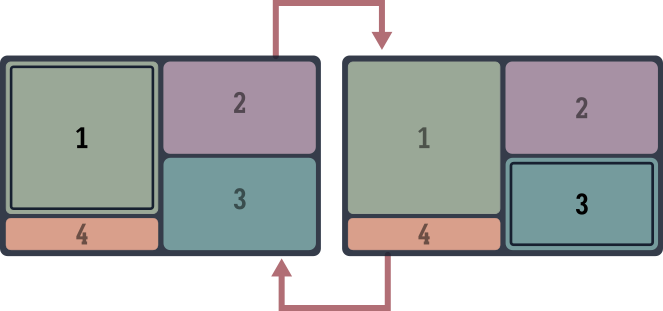
(defun other-window-mru ()
  "Select the most recently used window on this frame."
  (interactive)
  (when-let ((mru-window
              (get-mru-window
               nil nil 'not-this-one-dummy)))
    (select-window mru-window)))

(keymap-global-set "M-o" 'other-window-mru)
It doesn’t matter how you select the second window for the back-and-forth – you could use the mouse, ace-window, winum or any other method. other-window-mru’s got you covered from then on.
Improving other-window
We can retain the basic idea of other-window – move between windows in the frame in some cyclic ordering – but improve the ordering to be more of a DWIM affair
Do-What-I-Mean
.
other-window is a simple idea – the simplest you’ll find in this write-up – but you can play around with the order in which windows are selected to better fit how you work.
Double duty
First, you could make other-window split the frame when there’s only one window, giving the command a use when it has none.
(advice-add 'other-window :before
            (defun other-window-split-if-single (&rest _)
              "Split the frame if there is a single window."
              (when (one-window-p) (split-window-sensibly))))
switchy-window
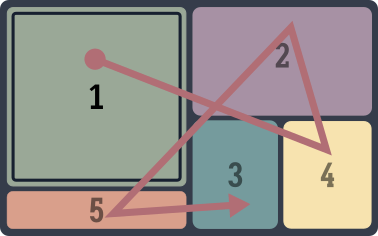
Another modification that you might find intuitive is to cycle through windows in order of last use instead of in clockwise spatial order, similar to alt-tab or how some web browsers cycle through tabs. This is possible with some elbow grease, but this work has been done for us by the switchy-window package, which provides a switchy-window substitute command for other-window.
When cycling through windows, switchy-window waits for a window to stay selected for a couple of seconds before marking it as used and updating the recency list. In practice this works quite seamlessly – calling switchy-window moves you to to where you need to be most of the time.
That said, I usually prefer the simpler variant described in the back-and-forth method.
other-window-alternating
And speaking of back-and-forth, here’s another other-window variant – it might sound confusing at first, but turns out to be a pleasingly DWIM affair. Except when chaining other-window, reverse the window-switching direction after each call. With just two windows, this makes no difference. With more, this makes alternating between two windows natural, even when the windows are not adjacent in the cyclic ordering.
(defalias 'other-window-alternating
    (let ((direction 1))
      (lambda (&optional arg)
        "Call `other-window', switching directions each time."
        (interactive)
        (if (equal last-command 'other-window-alternating)
            (other-window (* direction (or arg 1)))
          (setq direction (- direction))
          (other-window (* direction (or arg 1)))))))

(keymap-global-set "M-o" 'other-window-alternating)

;; repeat-mode integration
(put 'other-window-alternating 'repeat-map 'other-window-repeat-map)
(keymap-set other-window-repeat-map "o" 'other-window-alternating)
Window magic with ace-window dispatch
ace-window is to windows what completing-read is to lists of strings, or Avy to characters on screen. This makes it ideal as the first two of a three-step process to invoke any action on any window: the filter and selection steps:
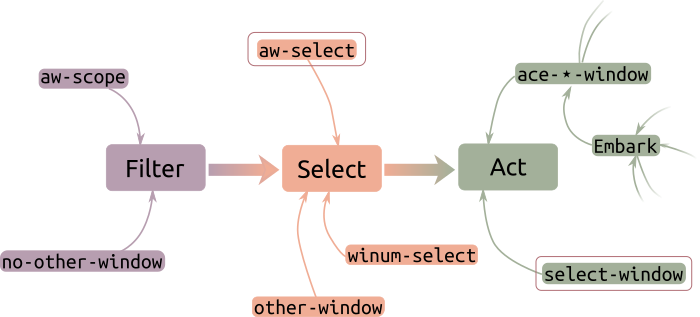
aw-select, the completing-read for Emacs windows
The way ace-window is designed to be extended is by defining an “ace-window action” and adding a binding for it in aw-dispatch-alist
It ships with several predefined actions, captured in this schematic above.
. This function accepts a window and does something useful with it. The ace-window command acts as the entry point:
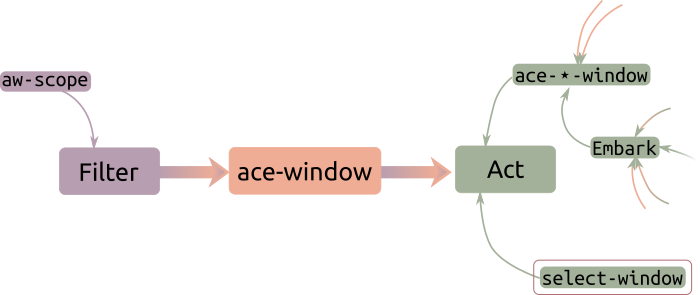
This control flow is generally similar to how Avy works. But as a completing-read alternative, this is somewhat lacking – we’d like to flip the pattern around and use ace-window’s selection method in our commands. Conveniently, aw-select does exactly that.
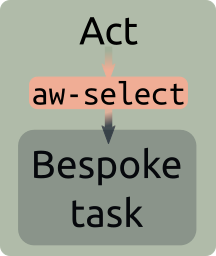
The basic pattern is very simple: the call (aw-select nil)
The argument to aw-select is for adding a message to the mode-line during the selection process, we don’t bother with that.
returns the window we select, which we can use for our task. One example of such a task is to set the window that scroll-other-window should scroll. Here are a couple more, but don’t try them just yet! We’re going to generalize the idea a little further below.
tear-off-window or tab-window-detach
Every interactive window command in Emacs acts on the current window. Here we make a couple of commands in the window-prefix-map (C-x w) something you can apply interactively to any window.
(defun ace-tear-off-window ()
  "Select a window with ace-window and tear it off the frame.

This displays the window in a new frame, see `tear-off-window'."
  (interactive)
  (when-let ((win (aw-select " ACE"))
             (buf (window-buffer win))
             (frame (make-frame)))
    (select-frame frame)
    (pop-to-buffer-same-window buf)
    (delete-window win)))

(defun ace-tab-window-detach ()
  "Select a window with ace-window and move it to a new tab."
  (interactive)
  (when-let ((win (aw-select " ACE")))
    (with-selected-window win
      (tab-window-detach))))
Of course, defining one ace-window-based command for each action isn’t a scalable or useful way to go about this. It would be preferable to decouple the window selection step from the action step and generalize the latter. We explore two distinct approaches to do this, starting with…
ace-window-one-command: Any command with ace-window
Generalizing the above examples gives us a pretty good idea of what the flipped ace-window pattern should look like. The most general and composable version would be the following:
- Call
aw-selectto pick a window (thecompleting-readstep) - Run any action in this window
- Switch back to the original window.
We can do this by simulating Emacs’ event loop, but in the chosen window: Switch windows, then read any key sequence and execute it before switching back.
(defun ace-window-one-command ()
  (interactive)
  (let ((win (aw-select " ACE")))
    (when (windowp win)
      (with-selected-window win
        (let* ((command (key-binding
                         (read-key-sequence
                          (format "Run in %s..." (buffer-name)))))
               (this-command command))
          (call-interactively command))))))

(keymap-global-set "C-x O" 'ace-window-one-command)
In a demo, this looks the same as ace-window, except that you select the window before executing the action. The win here is the action: it works with any simple command, there is no need to pre-configure actions in aw-dispatch-alist. There’s nothing to set up or memorize. In this demo I use ace-window-run-command to shrink an unselected window with C-x - (the descriptively named shrink-window-if-larger-than-buffer)
- Pulse the line to show which window is active.
- Call
ace-window-one-actionand select the Occur buffer to the top left. Emacs waits for you to execute any single command. - Run
shrink-window-if-larger-than-buffer, usingC-x -. This shrinks the Occur buffer, our cursor position and window is unchanged.
ace-window-one-command is a convenient way to quickly run any command in a different window, an idea we explore in more detail below.
Embark much?
This reversal of Emacs’ (and ace-window’s) usual paradigm of action → selection is at the heart of Embark, as covered in my write-up on ways to use Embark. Of course, this “object-first” approach is only one way to look at it – Embark has many hearts.
A window-prefix command for ace-window
Handy as it is, the other-window-prefix system has the same problem as the other-window command: it enforces a rigid cyclic ordering on the window it will pick, and about the most we can consistently expect is that the active window will not be taken over by the next command. We can do better.
aw-select gives us a bespoke solution with more control: we select the window that should be used if the next command involves displaying a buffer in a window. In this example, we explicitly pick a window to show a man page in, since the “next window” is not where we want it:
- Pulse the line to indicate the active window (lower left)
- Run
ace-window-dispatch(C-x 4 o), thenM-x manand choosecurl(1). Emacs waits for us to pick a window. - Pick the window on the right with “e”. The Man page is displayed in that window.
Note that the Man elisp library actually offers a suite of options to customize where it should be displayed, in the fiddly way typical of all things Emacs. We can sidestep that whole undertaking here.
Here’s the example from above of viewing a Forge link in a busy frame with many windows. We compare the result of using other-window-prefix, where a random window is chosen, to using ace-window-prefix, where we can pick a specific window:
In this frame, the window “next” to the Forge topics window (the bottome one) is the one window at the top left.
- Move down to the last listed topic and pulse the line (so you can find the active window)
- Call
other-window-prefix(C-x 4 4) and pressRETon the “link”. It opens in the top left window, not where we’d like to see it. - Call
tab-bar-history-backto restore the previous window configuration. - Call
ace-window-prefix(C-x 4 o) instead, and pressRET. Emacs waits for us to pick a window to show the resulting buffer in. - Pick the window on the right with “r”. Forge shows the link contents in that window.
ace-window works across visible frames, so we can pick any Emacs window on our screen. Even better, we can use ace-window actions to create new windows on the fly and use them instead. Here I use an ace-window action to create a new window to be used by the next command:
Normally, activating an Org mode link opens it in the current window or the next one, depending on your Org settings. We want something different.
- Press
RETon the link to open the image in the next window. - Press
qto quit and return to the Org buffer. - Call
ace-window-prefixand pressRETon the link. Emacs waits for us to pick a window to show the linked file in. - Use an
ace-windowaction to split a window and select the split. The action now finishes and the linked image is shown in that window.
The implementation of ace-window-prefix is actually simpler than other-window-prefix:
(defun ace-window-prefix ()
  "Use `ace-window' to display the buffer of the next command.
The next buffer is the buffer displayed by the next command invoked
immediately after this command (ignoring reading from the minibuffer).
Creates a new window before displaying the buffer.
When `switch-to-buffer-obey-display-actions' is non-nil,
`switch-to-buffer' commands are also supported."
  (interactive)
  (display-buffer-override-next-command
   (lambda (buffer _)
     (let (window type)
       (setq
        window (aw-select (propertize " ACE" 'face 'mode-line-highlight))
        type 'reuse)
       (cons window type)))
   nil "[ace-window]")
  (message "Use `ace-window' to display next command buffer..."))
In keeping with the keybinding pattern for the ⋆-window-prefix commands, we bind it to C-x 4 o
(keymap-global-set "C-x 4 o" 'ace-window-prefix)
Do you need to switch windows?
Let’s pause for a moment to ask a basic question: why do you need to switch windows in the first place? A little reductive thinking distills the answer down to two – and only two – possibilities:
- Switch and stay: To work persistently in the destination window, for some measure of “work”: this covers text editing in all its forms. In this event the window we switch to becomes our primary work area.
- Switch and return: To interact with the window or its contents briefly. Perhaps we want to scroll through, or copy some text before moving back, or to delete the window. In this event the window is a temporary destination, for auxiliary purposes.
In either case, switching windows is a cost, not our objective. Ideally this should happen automatically as part of our editing process. So why not just “fold” this little chore into our primary editing action?
Switch and stay: Avy as a window switcher
Eventually any kind of navigation in Emacs comes down to Avy. If you are switching windows to edit (or select) text, you intend to move to a specific point on the screen. Getting the cursor there is a two step process: switch windows, move the cursor to the right location. Avy short-circuits this process into a single action. It treats the frame as a single pool of jump locations: in helping you jump to any character(s) on the screen, it moves you across windows seamlessly:
Play by play- Call
avy-goto-char-timer - Type in “se”. This shows hints for all matches with “se”, including “sentence”.
- Type in the hint char corresponding to “sentence”, which is
ghere.
With a slight mental shift you can stop thinking of windows as distinct objects entirely, at least for the purposes of navigation. Any character(s) – across all visible Emacs windows and frames – is a couple of keypresses away. And it’s not the only way to jump across windows: you can jump back to your starting point (switching windows in the process) with pop-global-mark, for instance:
- Call
avy-goto-char-timer - Type in “demo”. There is only one candidate for this string, so Avy jumps to the other window.
- Type in “jump”. This shows hints for all matches with “jump”.
- Pick one of the matches. Avy jumps again, this time to the third window.
- Call
pop-global-mark(C-x C-SPC) to jump back to the previous location. (Details below) - Call
pop-global-mark(C-x C-SPC) again to jump back to the previous location.
Making Avy window-agnostic
If Avy does not move you across windows and frames, you probably need to customize avy-all-windows.
While we’re here, consider customizing avy-style, there’s more than one way to jump with Avy!
Of course, this only scratches the surface of what you can do with Avy, but that’s well tread ground at this point.
Switch and return: Actions in other windows
And here’s the other case. Often the reason you switch windows is to run a single logical action – perhaps a compound action like isearching to focus the view somewhere, before switching back to your main buffer. This is the switch → act → switch-back dance.
We’re going to automate this dance away in steps, working through solutions obvious and specific, through to repeatable and general, ending at the abstract and generic.
The obvious first: if you find yourself performing this dance repeatedly, you can automate it with a keyboard macro (left as an exercise for the reader). If the action is something you do all the time, you can go a step further and write a general-purpose command. ace-window-one-command above would be one way to do it. Emacs paves the way for us with…
scroll-other-window (built-in)
scroll-other-window and scroll-other-window-down have been part of Emacs for ages, perhaps because it fits neatly into the two-window paradigm that Emacs’ default settings are suited for: editing in one window while using the contents of the other one as a reference. You can scroll up and down in the other window without leaving this one. Note that this works with any number of windows: the window that is scrolled is the “next window”, clockwise from the current one. In this schematic, the selected window is the one with the border, the one that scroll-other-window scrolls is the one with the arrows:
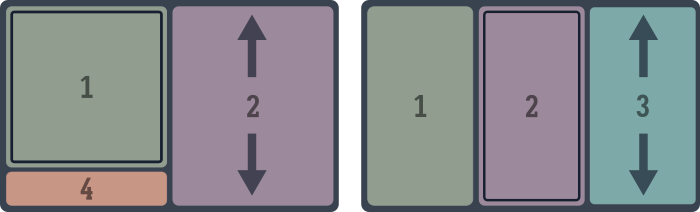
With more than two windows this requires careful placement of windows to work as expected. For instance, you cannot have three side-by-side buffers (1-3 above) and use 1 as a reference when working in both 2 and 3, since scroll-other-window in 2 will scroll 3. Thankfully, we can specify the rule by which to select the window for scrolling. One option is
(setq other-window-scroll-default #'get-lru-window)
which will always scroll the least-recently-used window, since you won’t be wading into buffer 1 – the reference – often. Alternatively, you might want scroll-other-window in buffers 2 and 3 to scroll each other as you switch between them and ignore buffer 1. You’d then use the most-recently-used window:
(setq other-window-scroll-default
      (lambda ()
        (or (get-mru-window nil nil 'not-this-one-dummy)
            (next-window)               ;fall back to next window
            (next-window nil nil 'visible))))
This works great with The back-and-forth method.
Setting the window to scroll
There is another way to change the window that is scrolled instead: by setting a variable (other-window-scroll-buffer), you can specify the buffer whose window should be scrolled instead of the next window. But this is mostly an option for package authors. To do it on the fly, we’d need to write another elisp command, something like
(defun ace-set-other-window ()
  "Select a window with ace-window and set it as the \"other
window\" for the current one."
  (when-let* ((win (aw-select " ACE"))
              (buf (window-buffer buf)))
    (setq-local other-window-scroll-buffer buf)))
This is only useful if we want this association to be persistent. Otherwise the LRU/MRU method does what we need most of the time. See also master-mode below.
Scrolling other windows: minutiae
-
The viability of the default bindings for
scroll-other-window(C-M-vandC-M-S-v) depends on your tolerance for modifiers. A good candidate for remapping, especially if you use a modal input method.C-M-vcan be invoked asESC C-valready, I bind the other one toESC M-v. -
scroll-other-windowworks from the minibuffer too. The window scrolled is usually the one that the minibuffer-using command was invoked from, and can be set explicitly as the value ofminibuffer-scroll-window. -
From Emacs 29 onwards,
scroll-other-windowis better at handling non-text buffers like PDFs, where scrolling is handled by special functions. It now calls whatever the standard scrolling commands (scroll-up-commandandscroll-down-command) are bound to. To scroll PDF buffers managed by the pdf-tools package in the “next window” position, for instance:(with-eval-after-load 'pdf-tools (keymap-set pdf-view-mode-map "<remap> <scroll-up-command>" #'pdf-view-scroll-up-or-next-page) (keymap-set pdf-view-mode-map "<remap> <scroll-down-command>" #'pdf-view-scroll-down-or-previous-page))Another example: after rebinding the regular paging commands via
pixel-scroll-precision-mode,scroll-other-windowwill smooth-scroll the other window:
isearch-other-window
Continuing with the idea of using a buffer in another window as a reference, a straightforward extension of scroll-other-window is to search the “next window” instead
isearch is a fantastic navigational tool.
. We make sure to search in the same window that we’ve configured to scroll with scroll-other-window above.
(defun isearch-other-window (regexp-p)
    "Function to isearch-forward in the next window.

With prefix arg REGEXP-P, perform a regular expression search."
    (interactive "P")
    (unless (one-window-p)
      (with-selected-window (other-window-for-scrolling)
        (isearch-forward regexp-p))))

(keymap-global-set "C-M-s" #'isearch-other-window)
The function other-window-for-scrolling returns a suitable window, respecting our choice of other-window-scroll-default above.
Here’s an example of using isearch-other-window to work in a shell and a documentation (Man) buffer together:
- Type in a partial Curl command
- Invoke
isearch-other-window(C-M-shere), which starts searching the Man buffer - Search for
--ssl revoke, which finds the option we’re looking for. (This special matching behavior is from settingisearch-whitespace-regexp.) - Pressing
RETends isearch and we’re back in the shell. - Scroll the other window with
scroll-other-window, then usehippie-expandto type in the argument we want.
The keybinding C-M-s is already bound to isearch-forward-regexp, but there are many other ways to call that command: via a prefix arg to isearch-forward (C-u C-s), or by toggling regexp search with M-r when isearching, for instance.
Performing actions in other windows
There are two simple ways to temporarily switch to another window in elisp: (save-window-excursion (select-window somewin) ...) and (with-selected-window somewin ...).
For our purposes, the difference between them is that the former restores the window configuration at the time it was executed, which includes the buffer positions relative to the windows and the values of (point) in the buffer. The latter persists changes across the frame, and is typically what we want. If the changes were not persistent, there would be no point to this exercise!
Switch buffers in the next window.
You can have hundreds of buffers in Emacs but only a handful of windows. This is, in fact, the source of the window management problem. So any comprehensive solution has to involve changing buffers shown in existing windows. The ace-window dispatch system is one solution. But the built-in next-buffer and previous-buffer commands offer another easy 80% solution to changing buffers shown in other windows: we just automate away the window switching dance. We don’t need a dedicated next-buffer-other-window command for this – we can just replace next-buffer with the new function.
(defun my/next-buffer (&optional arg)
  "Switch to the next ARGth buffer.

With a universal prefix arg, run in the next window."
  (interactive "P")
  (if-let (((equal arg '(4)))
           (win (other-window-for-scrolling)))
      (with-selected-window win
        (next-buffer)
        (setq prefix-arg current-prefix-arg))
    (next-buffer arg)))

(