Coming in Q3 2015?
Shared posts
06 Oct 09:04
AMD Amur ARM processor could target tablets
by document.write(['peter','fudzilla.com'].join('@')) (Peter Scott)
06 Oct 09:01

Unreal Engine 4.5 Preview Notes Unveiled, 40 New Features Thanks To The Community
by Julian Horsey
 |
Today Unreal has released more details about the upcoming release of their new Unreal Engine 4.5 Preview which brings with it a wealth of new features for developers and designers to use within their projects. New features within the Unreal Engine 4.5 software include animation retargeting, automatic C++ hot reload, light map UV generation and […] |
|
(C) Copyright 2007-2014%% BLOGLINK%%. Republishing of this feed is forbidden without our written permission.
06 Oct 08:59
Yes, Samsung Gear Live can run Windows 95
by Stefan
In case you wondered, Samsung Gear Live can boot Microsoft Windows 95. A crafty user managed to install Redmond’s classic desktop OS on the Android Wear smartwatch.
05 Oct 21:31
Magyar iPhone-játékért őrül meg Kína
A Bugs vs. Aliens pár hét alatt 130 millió forintos bevételt produkált. Amiből a fejlesztők egy fillért se láttak.
05 Oct 21:27
Xiaomi Redmi Note battery life test
by Kyle
Our review of Xiaomi Redmi Note is live at our homepage and it’s time we share the full breakdown of its battery test. The Redmi Note is a dual-SIM smartphone with a massive 5.5″ IPS display and a huge 3,200 mAh battery. The great standby score and the amazing call test result helped the Xiaomi [...]
04 Oct 17:31
Vettel és a Ferrari mattot adott Alonsónak
Szdani88így kicsit ciki a tegnapi kijelentése alonsonak h valogathat XD
más lett aki válogatott xd fail
A szombati bejelentés után, hogy Vettel elhagyja a Red Bullt, és minden bizonnyal Maranellóba igazol, Alonsónak már akkor sincs választása, ha netán maradni szeretne a Ferrarinál. Hogyan tovább? A Forma-1-es pilótapiac hosszú évek óta nem állt így fejre.
04 Oct 17:30
AMD enthüllt leise den FX-8310 für AM3+
Szdani888310 de amugy meg a spec alapjan 8330E lenne ez talan, tényleg nem lehet rendesen számozni?
Mit dem FX-8310 rollt AMD ein Update-Modell der FX-Familie aus, welches nach den von einem ersten Händler veröffentlichten Spezifikationen den bisher dem OEM-Sektor vorbehaltene FX-8300 mit 95 Watt ablöst. Ab sofort ist der für den Sockel AM3+ konzipierte Acht-Kern-Prozessor ab 125 US-Dollar lieferbar.
04 Oct 17:29
Feltörték a JPMorgan Chase informatikai rendszerét
by SG.hu
Szdani88kinos ilyen helyen xd nem gy fappening jellegű
83 millió ügyfél adata kerülhet illetlen kezekbe az elmúlt időszak legnagyobb bank ellen elkövetett hekker támadásában.
04 Oct 12:23
K|ngp|n getting close to 2.2GHz on EVGA GTX 980 Classified
by document.write(['bobo','fudzilla.com'].join('@')) (Slobodan Simic)
Szdani88megyeget
Custom PCB makes it quite an overclocker
04 Oct 11:49
Markttag: Fünf GeForce GTX 970 bleiben begehrt
Szdani88xd
Samstag ist Markttag. ComputerBase wirft einen Blick auf wesentliche Entwicklungen auf dem Markt für IT- und CE-Produkte der 40. Kalenderwoche 2014. Diese Produkte haben ComputerBase-Leser im Preisvergleich in den letzten sieben Tagen am meisten interessiert.
04 Oct 09:34
Sony Xperia Z3 battery life test
by Kyle
We gave you our in-depth review of the Sony Xperia Z3 and now we are ready to share the full breakdown of its battery life test. And if you absolutely must extract the longest endurance out of your new Sony smartphone, you should check out the Stamina mode. It helps extend your battery life by [...]
03 Oct 16:33
A tájfun miatt előrehozhatják a Japán Nagydíj rajtját
Egyre biztosabb, hogy vasárnap eléri Szuzuka területét a Phanfone tájfun, ami nem csupán a Japán, de a jövő heti Orosz Nagydíj megrendezését is fenyegeti. A Honda megvétózta a futam szombati megtartását, de az lehetséges, hogy vasárnap a tervezettnél korábban rajtol az F1 mezőnye.
03 Oct 16:32
Sniper Elite III gets AMD Mantle API support
by document.write(['bobo','fudzilla.com'].join('@')) (Slobodan Simic)
Better performance and lower CPU overhead
03 Oct 16:32
A Google-t perlik a Fappening áldozatai?
Szdani88azért elég vicces xd
A fappeninges képeken szereplő híres hölgyek egy részét képviselő ügyvédek a Google-től kérnek kártérítést.
03 Oct 16:07
Alien:Isolation тест GPU
by gamegpu@mail.ru (svl)
 |
Действие триллера Alien: Isolation разворачивается спустя пятнадцать лет после событий оригинальной кинокартины Ридли Скотта «Чужой». И теперь уже дочери Эллен Рипли, Аманде, предстоит столкнуться с ужасом из космических глубин в попытке выяснить всю правду об исчезновении матери. |
03 Oct 09:06
Hamilton az élen, Ricciardo bukott
A Japán Nagydíj péntek délutáni szabadedzésén a Mercedes versenyzői a délelőttihez képest helyet cseréltek a tabellán. A zűrzavaros másfél órában többen kicsúsztak, köztük Ricciardo is, aki már korán a falnak csapódva fejezte be a napot.
03 Oct 06:17
Rosberg gyorsabb volt Hamiltonnál a szuzukai nyitóedzésen
A Japán Nagydíj péntek délelőtti szabadedzését egyelőre elkerülte a rossz idő. A két Mercedes mögött Fernando Alonso és Valtteri Bottas végzett, a 17 éves Max Verstappen bemutatkozása jól sikerült, de rossz véget ért: Toro Rossójában elromlott a motor.
03 Oct 06:16
Vettel ChampCar-tesztjétől az anyuka Subarujáig…
by info@motorsportal.hu (Telesport)
Mit vezettek a mezőny tagjai Verstappen korában?

02 Oct 22:57
Akkor most tényleg telefonnal fogunk fizetni?
Szdani88mintha nem tudnak ezt a droidok egy ideje
Kit érdekel, hogy meghajlik-e a zsebben az iPhone 6, amikor az Apple titokban be akarja kebelezni vele az egész hitelkártyapiacot? Az Apple Pay vagy forradalmat hoz, vagy az évtized blöffje.
02 Oct 13:42
Eurofighter: ötvenmilliárdba nem fért bele a hibamentesség
A német és a brit légierő is megfelezte a repülhető órákat, mert gyártási hibás a gép törzsének hátulja.
02 Oct 12:37
Gainward GTX 970 Phantom previewed
by document.write(['sanjin','fudzilla.com'].join('@')) (Sanjin Rados)
Szdani88ez is siman jo 6+6on ls az oc se rossz
Preview: Quiet operation at the higher clocks
02 Oct 11:48
TSMC und ARM: 10-nm-SoCs mit Tape-out Ende 2015
TSMC und ARM haben heute eine ambitionierte Roadmap für die kommenden Jahre vorgelegt. Aufgrund der bisherigen Erfahrungen sowie der Zusammenarbeit wird auch in Zukunft TSMC einer der wichtigsten Auftragsfertiger für ARM-Produkte bleiben, was man mit 10-nm-Chips und einem Tape-out-Termin Ende 2015 beweisen will.
02 Oct 10:46
Vettel: A különbség köztem és Verstappen között? Nekem volt jogosítványom!
by info@motorsportal.hu (Telesport)
Szdani88xd
„Időt kell adnunk neki”

02 Oct 10:45

Two million iPhone 6 reservations placed in the first 6 hours in China
Szdani88lol
Apple has officially announced the pricing and availability for the iPhone 6 and iPhone 6 Plus just two days ago. The smartphone duo will kick off on October 17, while the online pre-orders start a week earlier - on October 10. Apple Retail pickups will be available as well, the official store reservations begin on October 14. Quite expectedly other official Apple partners - both retail stores and major carriers - have already begun taking reservations for the iPhone 6. The latest reports claims 2,000,000 reservations have been placed just in the first 6 hours of their opening. And this number is not the final one, because of inconclusive statistics. Keep in mind though that you don't need to leave a deposit or anything for those reservations so it's unclear how many of those will transfer to actual sales. According to the report, most of the reservations are for the 64GB versions of the iPhone 6 and iPhone 6 Plus - CNY 6,088 (780) and CNY 6,888 (883) respectively. It's to be expected since a 16GB iPhone is rather unusable in the days of 1080p@60fps video and gigabyte-large apps. So, even with iOS problems, bending issues, even more expensive price tag, the new iPhone 6 generation may turn out the most successful one to date. We are yet to see if Chinese sales will set some new record for Apple once they kick off. Source |...
02 Oct 10:45
ASUS MeMo Pad 7 (ME176C) - a hét slágere
Kedvező árú táblagépet teszteltünk le, amely 64 bites Intel rendszerchippel kíván az alsó-középkategóriának odapirítani.
Apuci3x likes this
02 Oct 07:56
Az egykori 95/98 miatt lett 10-es az új Windows?
Sokféle ötletet hallottunk már arra vonatkozóan, hogy miért ugrotta át a 9-es sorszámot a Microsoft. Itt a legjobb.
01 Oct 12:50
AMD Tonga GPU packs 384-bit memory interface
by document.write(['bobo','fudzilla.com'].join('@')) (Slobodan Simic)
Szdani88nagyon hajszál lehet az a 256 bit az 1700nak ha a 2000nek 384et szántak
2048 GCN 1.2 Stream Processors
01 Oct 09:07
AMD demonstrates Hadoop on Cortex-A57 part
by document.write(['staff','fudzilla.com'].join('@')) (Fudzilla staff)
Opteron A-series coming together
01 Oct 06:19
A New Windows - Windows 10 Announced By Microsoft
by Brett Howse

It was only two years ago that Windows 8 was unleashed on the world. Microsoft tried to usher in an era of “Touch First” applications with a new look and feel for Windows. To say that Windows 8 was unsuccessful would be an understatement, and from both Microsoft’s and user’s perspectives, it was certainly a failure. Two years in, Windows 8 and its 8.1 derivative have struggled to gain market share over Windows 7 and XP, which still command the lion’s share of the desktop OS pie. A new interface, unfamiliar to users, did little to sway their wallets, and other market factors have come in to play as well.
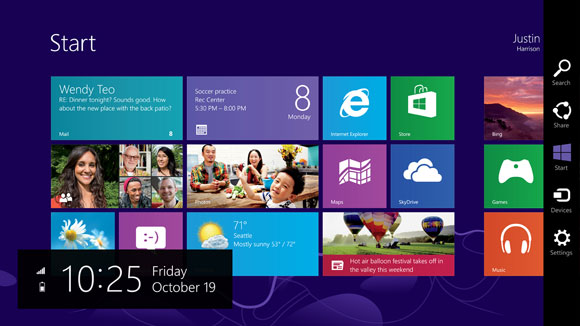
Looking back at Windows 8, it was a big change from a company that traditionally has been called too conservative. Gone was the familiar start menu, replaced with a full screen version. Gone was the ability to move and resize applications into “windows” and instead it was replaced with full screen apps that take command of your desktop. Gone was a lot of what made Windows, well Windows. Add in the fact that Windows 8 at its launch was only half complete, and it is not surprising that the market did not buy into the new world. There were two disjointed interfaces, but one person had to interact with both no matter what form factor they were on. If you are on a touch based tablet, much of the settings and controls were still found in the old Control Panel applets. The file explorer was on the desktop, which was difficult to use with touch. On the other side of the coin, traditional desktop PC users also had to learn the new Start Screen, charms, and other controls which were clearly made for “touch first” and not the mouse and keyboard. Within weeks of the Windows 8 launch, major players in its creation were let go, or given new duties.
Since the day one release of Windows 8, Microsoft has been trying to fix many of the issues people have with the new version of their operating system, and Windows 8.1 was a step in the right direction, fixing interfaces for both the touch interface and the desktop. Windows 8.1 Update, announced at BUILD earlier this year, was a truly desktop-centric update with new keyboard and mouse controls for use in the touch environment, and the ability to control Windows Store apps with a title bar. It was a big help, but also showed off at BUILD were features coming in a later version of Windows, and that version has now come.
Windows 10 is as dramatic a shift from Windows 8 as Windows 8 was to Windows 7. Gone is the start screen for the desktop, with the familiar start menu back. Gone is the full screen applications taking over your computer, with those applications now being relegated to windows as before. Gone is the touch first interface on top of an operating system primarily used with a keyboard and mouse. However this is not Windows 7.1, and nor should it be. Windows 8 certainly had its faults, but not everything about Windows 8 needed to be thrown out.
Windows 10 starts its journey as the Windows Technical Preview for Enterprises. Microsoft’s core customer base is the enterprise, and this is important that they are starting the discussion with this market group this time around. Beginning tomorrow, people can join the Windows Insider Program and download and install the latest version of Windows for themselves. Microsoft has made it clear though that this preview is actually a preview, and not meant for general availability. Expect some rough edges, and some bugs, which should be worked out by the time the OS ships. As for the consumer side of the story, Microsoft is planning to announce more on that front in early 2015, and for developers, BUILD will be coming sometime after that. The actual Windows 10 launch is listed as “later in the year” with the year being 2015.
There is a lot to go over, and once we get our hands on the preview build we can dig into the new OS and give a full breakdown on what is new. One of the biggest complaints about Windows 8 and 8.1, is that real people do not want a single interface on every device they own. They want a User Interface which is tailored to the usage model. With Windows 10, Microsoft promises to address this.
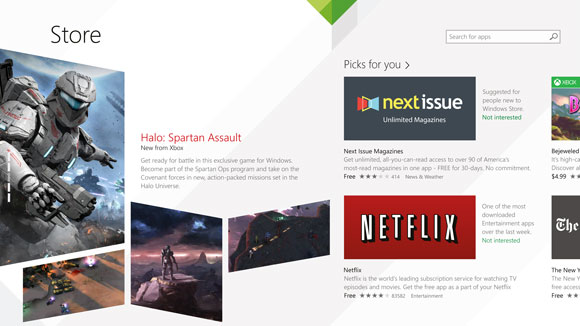
Before we can talk about Windows though, we need to briefly discuss the Windows Store. Windows Store apps are executed in WinRT, which is the Windows RunTime, replacing the old Win32 runtime. WinRT has some advantages as a new framework, with the ability to be resolution independent natively, and support the Windows contracts such as Share. At BUILD in 2014, Microsoft announced Universal Apps, which are a key feature of the Windows store that is not available on any other platform. There is a lot of confusion as to what a Universal App is, and what it is not is a single application that runs on a phone, PC, tablet, and console. A Universal App leverages the common WinRT framework available in Windows, Xbox One, and Windows Phone, to allow a developer to share a common code base, but use a suitable UI for each system, and have all of it available on all platforms seamlessly through the Windows Store. It is certainly a lofty idea, and one that has gained a bit of traction in the store. With Windows 10 though, the concept of a Universal App allows a developer to target a phone, Xbox, tablet, and desktop. If anything is the killer feature of Windows 10, this could be it. Time will tell of course and developers need to buy into WinRT for this to be a reality. Today’s announcement is not developer focused, so we will expect more news on the WinRT API updates later on, at the BUILD conference.
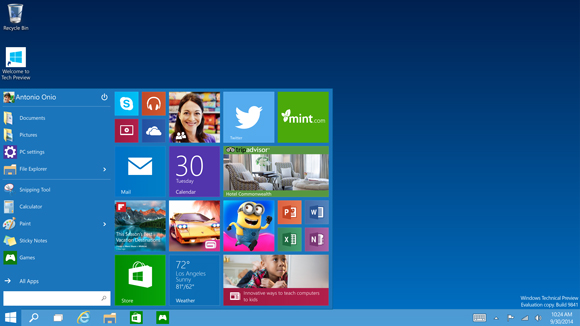
The first place to start, is going to be Start. On Windows 7, clicking the Start button brought up the Start Menu. Windows 8 dropped the start button altogether, but 8.1 brought it back even though it opened the Start Screen. On tablets, the start screen was fine, but on a desktop, it could be unwieldy. It interrupted your workflow to bring you into a new environment, where you can find the application you want and launch it. Windows 10 brings back the Start Menu, but with a twist. Rather than just the traditional start menu of Windows 7, a familiar start menu can now also be populated with Live Tiles from the Windows Store apps. But this is only on the desktop. Tablets will get a different interface, as will the phone. To quote Microsoft: “We’re not talking about one UI to rule them all – we’re talking about one product family, with a tailored experience for each device.”
If Windows 10 is going to be successful, the tailored experience for each device is the key. The new start menu is just the first step towards that, and is especially important for the enterprise and desktop user.
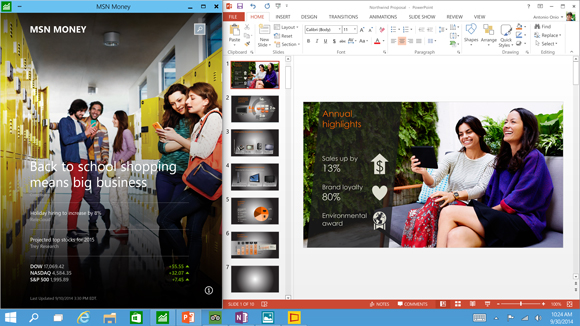
The next interface change, was also announced at BUILD, and that is the ability to run Windows Store apps within a window on the desktop. This is a big change for two reasons. First, on a desktop, full screen Windows Store apps are less useful. Generally you have multiple things going on at once, and to have a single app take over the screen is generally not ideal. The usefulness of Windows Store apps has instantly been increased. The other reason it is important is for developer buy-in. Even though Windows 8 did not light the world on fire as far as unit sales, it is still on hundreds of millions of devices. However the majority of those devices are going to be traditional desktops. Writing an application for the Windows Store practically precluded use by the majority of the user base. By putting these apps on the desktop, it opens up a much larger potential audience. Microsoft needs the Windows Store to be kick-started, and this is one way they can advance that goal.
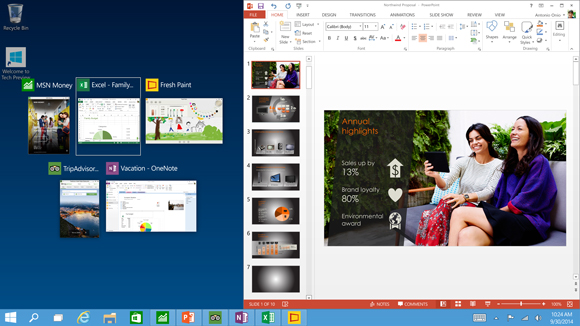
Windows Snap was also debuted in Windows 8, and it allowed two Windows Store apps to be snapped open, with one taking about 70% of the screen and the other using 30%. For multitasking, it was certainly better than other mobile operating systems from 2012, but it was a long way from Windows 7. Windows 8.1 improved Snap, and allows more than two apps to be snapped open on the screen at any one time, and for the snap percentage to be changed. Windows 10 is now offering another update on Snap. Apps can now be snapped to all four corners, giving more real estate to each app than before. Snap was a good feature, and this is a further improvement on it.
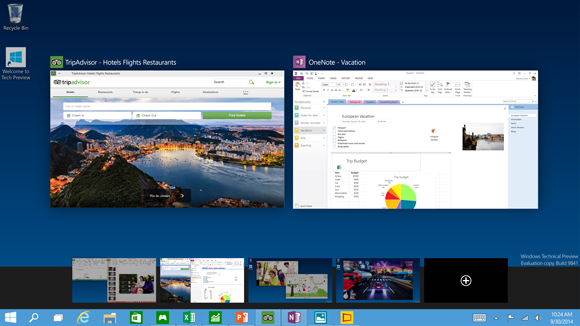
Another long requested feature is now coming to Windows 10 – multiple desktops. Desktops can be designated for different purposes, and users will be able to easily switch among them. There is a small but vocal group who have been asking for this for a long time, and they have finally been rewarded.
Sticking with the enterprise features, data security is always a big concern. Multifactor authentication based on smart cards or tokens is now built right into the OS. Bitlocker is still around, offering full device encryption, but Windows 10 now offers application and file level data separation, which can enable data protection even if that data leaves the device. Though they have not gone into a lot of detail as to how that is done, it likely leverages some of Microsoft’s other technologies such as Active Directory Rights Management Services.
Future updates to Windows should be easier for IT workers as well due to a new in-place upgrade option. And to go along with that, businesses will be able to choose whether to jump on the fast update consumer track, or lock down the updates to only deliver critical security patches, or somewhere in the middle. And this approach does not need to be at the enterprise level – different groups of machines can follow different update patterns depending on how critical the infrastructure is.
Windows 10 also supports Mobile Device Management (MDM) tools, as well as the traditional Active Directory and System Center approach to device management. This should be a boon to any small to mid-sized business who does not want to invest in a comprehensive solution.
Finally, the new Windows Store will allow volume license purchasing from within the store. Companies can re-claim licenses, and re-issue them to new devices. They can also create a custom store for their own computers which can include Windows Store and company-owned apps in the same interface.
Microsoft is trying hard to win back the Enterprise customers who have been turned off by Windows 8. Obviously we will have to wait and see if they are successful, but there is a lot to like in this new release. The “one UI to rule them all” model of Windows 8 has been put out to pasture, and instead replaced with a single platform, with a UI to suit the device it is running on.
Not all was bad about Windows 8, and it is good to see that some of the good ideas have been taken and molded into the new OS, but also tweaked at the same time to make them work better for the device they are on. The Universal App is a powerful idea, and one that has yet to make a big splash so far, but if the WinRT framework can be updated to make it more powerful, then it would certainly add a lot of power to Windows 10. Unlike Win32, WinRT apps support high DPI by default, which is more and more important as we move to higher resolution displays on all sizes of devices. The ability to log in to any Windows PC and get your own custom look and feel, including all of your applications, and data, is a powerful feeling. They have all of the tools they need to do this across all devices now, and it is exciting to see a glimpse at what the future may hold.
Once we get the actual install files for Windows 10, we will be able to provide more coverage on this major release of Windows.
01 Oct 06:13
Middle-earth Shadow of Mordor тест GPU
by gamegpu@mail.ru (svl)
 |
Middle-earth Shadow of Mordor является неплохой игрой, как в качестве самого игрового процесса, так и в плане реализации графической составляющей. По сути, на данный момент это одна из самых красивых игр, воссозданная по вселенной "Властелина колец". |