Shared posts

09 Jan 16:04

Black Guns Matter to Sponsor SHOT Show 2018

by S.H. Blannelberry

In a world filled with armchair activists and keyboard commandos, Maj Toure of Black Guns Matter stands out. He stands out because he is neither. He is a boots-on-the-ground, not-afraid-to-get-my-hands-dirty 2A revolutionary.

The post Black Guns Matter to Sponsor SHOT Show 2018 appeared first on GunsAmerica Digest.

08 Jan 15:46

Paribus Can Save You Money When Shopping Online

by Ben Stegner

Have you ever made a purchase online and found that the item went on sale just days later? This is frustrating, because if you had waited, you could have saved money. But did you know that many stores offer a price guarantee? This means that if a product you buy drops in price shortly after you purchase it, you can get a refund for the difference. Yet it’s a hassle to monitor all your purchases and contact the store if this happens. That’s where the incredibly useful service called Paribus comes in. It takes the headache out of getting the refunds...

Read the full article: Paribus Can Save You Money When Shopping Online

08 Jan 15:00

Tropical Winter Escapes: Trending Beach Destinations Around The World

by Monica Houghton, Women@Forbes
More and more people are searching to travel to these ten beaches around the world.
08 Jan 14:55

Every Automotive Emblem, Explained

Every emblem has a story, and we're telling the history and evolution of these iconic brand badges.

08 Jan 14:38

Locals Share Tips On How To Drink Like A Local, Part I

by Megy Karydes, Contributor
We often seek the advice of what to do and see from friends or locals when traveling to new cities. Rather than relying on guidebooks, we asked locals from Argentina to Thailand for their insider advice on how to order a drink like a local.
08 Jan 14:38

Locals Share Tips On How To Drink Like A Local, Part II

by Megy Karydes, Contributor
In the first part of our two-part series, we shared tips on how to drink like a local from Argentina to Jamaica. Part II shares how to drink like a local from Lexington, Kentucky, to Thailand. Should you order mint julep in Lexington, Kentucky? Ready to get Saskatoon’ed?
08 Jan 12:59

Visiting Chile? Don't Miss Valparaiso's Most Interesting Creatures

by Gerald Eskenazi, Contributor
There are, strangely, tens of thousands of stray dogs roaming around the grand Chilean city of Valparaiso. They don't present a danger, appear friendly, even orderly, and they are surprisingly decently groomed--the locals routinely feed them.
04 Jan 15:22

How to Simultaneously Preview Multiple Lightroom Presets

by Saikat Basu
lightroom-mistakes

Adobe Lightroom is the Swiss knife for every photographer. Lightroom Presets are the easiest multi-tools for automatic tweaks to your photos, and there are many ways to use them. But what if you want to see how the same photo looks after different presets are applied — at the same time? Well, you can make several copies of the same image and apply different presets to them, but I am sure you will agree that it’s a chore and a waste of space for your hard drive. The solution we want should have three qualities: It should be the exact copy of the original image....

Read the full article: How to Simultaneously Preview Multiple Lightroom Presets

04 Jan 15:20

5 Free Online Photo Collage Makers to Turn Pictures Into Memories

by Sandy Stachowiak
online-photo-collage-makers

A photo collage can be a great way to view a collection of pictures and also a ton of fun to create. For holidays like Christmas, you can use photos of your family, Christmas tree, and holidays gifts. For birthdays, add pictures of your loved one as a baby, at graduation, and at their wedding. Image Credit: Tan4ikk/Depositphotos You can find plenty of mobile apps for creating a photo collage, but sometimes it’s easier and more effective to use your computer’s large screen. Instead of downloading special software, try one of these free online photo collage makers to create, save,...

Read the full article: 5 Free Online Photo Collage Makers to Turn Pictures Into Memories

04 Jan 15:20

Eat Like a Local in Raleigh

by Liz Mitchum

In 1999 when Cheetie Kumar’s musician husband, Paul Siler, opened Kings, a hip performance venue in downtown Raleigh, North Carolina, she would cook for the bands who came to play. It was a natural progression from the couple’s time spent on the road in their own band, when Kumar would pore over cookbooks between gigs. The marriage of food and music has molded her life from her childhood in Chandigarh, India, through her adolescence in the Bronx, to a stint in radio and music management during college in Amherst, Massachusetts. Now, the James Beard semifinalist co-owns two Raleigh music venues and a restaurant, Garland, all while continuing to play guitar in her band, Birds of Avalon.

photo: Courtesy of Cheetie Kumar

Chef Cheetie Kumar.

At Garland, Kumar’s innovative menu is inspired by the spice route with influences from China, Southeast Asia, India, and the Middle East, filtered through a North Carolina lens. “It’s an immigrant’s perspective on Southern food,” Kumar says. And Raleigh, she adds, is the perfect place for it: the people are warm, the food culture is ethnically diverse, the music scene is ripe, and there’s a palpable sense of adventure. “Raleigh has a rebellious spirit,” Kumar says. “But it also feels homey, similar to my childhood home of Chandigarh.” When she’s not in the kitchen or on the road with her band, here are a few of her favorite spots.


Poole’s Diner
426 S. McDowell Street, Raleigh

“Poole’s has been the touchstone for everything culinary in this area for the last ten years. Ashley [Christensen] made it okay to have a voice in the food world. This restaurant was opened by a woman, and run by a woman, and became the anchor for everything else in Raleigh—and it’s delicious.”
ac-restaurants.com/pooles

photo: PETER YANG

The mac and cheese at Poole’s Diner.


Udupi Cafe
590 E. Chatham Street, Suite 112 & 114, Cary 

“This place is a vegetarian, Southern, South Indian restaurant. It’s been here and consistently good for fifteen years. It has a killer Paper Masala Dosai—the best I’ve ever had. It’s basically a fermented rice and lentil crepe that’s at least a yard long. Three feet! It’s shatteringly crisp and light and tangy, and the chutneys they pair with it are spot-on. My mouth’s watering now.” sriudupicafe.com

photo: COURTESY OF Udupi

An assorted appetizer platter at Udupi Cafe.


Szechuan Taste
6404 Tryon Road, Cary

“Everything they serve is spiced boldly with so much balance. It’s very authentic, super fresh, and has great service. They have this toothpick lamb, which is basically bite-sized pieces of lamb on toothpicks—but they’re in a deep bowl with a ridiculous amount of dried chilies, as if they were peas in a stew. It’s a fun presentation. But it’s really hard to go wrong with anything on their menu.”

photo: COURTESY OF Szechuan Taste

Szechuan Taste.


St. Roch Fine Oysters + Bar
223 S. Wilmington Street, Raleigh

“This is Sunny Gerhart’s excellent new spot a block away from us. It’s a creative and delicious Cajun-inspired oyster bar and restaurant from a chef who grew up in the St. Roch neighborhood of New Orleans.” strochraleigh.com

photo: MIKE MCDONALD

Oysters at St. Roch.


Stanbury
938 N. Blount Street, Raleigh

“Stanbury is operated by friends in a very friendly way. But it’s also very rebellious. It’s in our neighborhood so we walk there on Monday nights when we don’t have to work. It’s a Southern restaurant but they take chances with their flavors, which I love.” stanburyraleigh.com

photo: Lisa Gotwals

Cocktails at the Stanbury Bar.


The Fiction Kitchen
428 S. Dawson Street, Raleigh

Bida Manda
222 S. Blount Street, Raleigh

Centro
106 S. Wilmington Street, Raleigh

“Can I do a tie? I really can’t choose just one more. All three are owned and operated and led by Raleigh people. They’re invaluable to the downtown food community. One’s vegetarian, one’s Laotian, one’s Mexican. These restaurants make up our little community of daring people and make our neighborhoods vibrant and delicious.”

thefictionkitchen.com | bidamanda.com | centroraleigh.com

photo: Lisa Gotwals

Bida Manda’s Pork Belly Soup.

The post Eat Like a Local in Raleigh appeared first on Garden & Gun.

04 Jan 15:13

Tasty Twists on Peas and Greens for New Year’s

by Chris Kraft

Dearly beloved, we gather here today to say goodbye to 2017, the year that’s sort of like the neighbors you’re not sorry are moving to Utah—it was great knowing them, but let’s get some fresh faces up in here. To help you put 2017 in the rearview mirror in style, we’ve prepared a Shot of the finest good luck, goodbyes, and good vibes from around the South. See you in 2018!

Lighten Your Lucky

The genius of Southern traditions is that you can eat nearly all of them, including the New Year’s Day menu of black-eyed peas and collard greens for good luck and good fortune. But instead of the usual pot of peas and greens, we’ve got two updates on the classics. Alex Harrell, owner and executive chef at Angeline in New Orleans, serves his tasty collard slaw on a fried pork chop sandwich, but you can add it to any New Year’s plate for freshness and crunch. And by way of the famous tailgates at the Grove at Ole Miss, Mary Allyn Hedges, the director of Visit Oxford, has a pass-me-down black-eyed pea dip to freshen up your pea game. Both recipes are just as lucky as Meemaw’s, but sporty enough to serve during a bowl game on New Year’s, and whose team doesn’t need luck in a bowl game on New Year’s?

photo: Courtesy of Courtesy of Alex Harrell

Chef Alex Harrell tops fried pork chop sandwiches with his collard slaw.

ALEX HARRELL’S COLLARD SLAW

Ingredients
1 lb. green cabbage, thinly sliced
1 lb. collards, washed and thinly sliced
1½ tbsp. kosher salt
1½ tbsp. sugar
1 tbsp. celery seed
1½ cups mayonnaise
¼ cup red wine vinegar

Preparation
In a large mixing bowl, combine the collards, cabbage, salt, and sugar and toss until well mixed.
Let the mixture sit for 10 minutes until the cabbage and collards begin to release liquid.
Add celery seed, mayonnaise, and red wine vinegar. Toss to combine.

photo: Courtesy of Visit Oxford

The black-eyed pea dip is a hand-me-down at the Grove.

OXFORD BLACK-EYED PEA DIP

Ingredients
2 15 oz. cans black-eyed peas, drained and rinsed
1 large tomato, diced
½ large red onion, diced
1 small or ½ large red, yellow, or orange bell pepper, diced
1 jalapeno, diced
4 green onions, sliced
1/3 cup cilantro, chopped
¼ cup rice wine vinegar (unseasoned)
2 tbsp. canola oil
½ tsp. organic cane sugar
Salt and freshly ground black pepper, to taste

Preparation
Toss to combine black-eyed peas, tomato, red onion, pepper, jalapeno, and green onion in a large bowl.
In a small bowl, dissolve sugar in vinegar. Whisk in oil. Season with salt and pepper.
Pour dressing over bean mixture. Toss to coat. Stir in cilantro and season to taste with salt and pepper. Refrigerate until ready to serve (the longer it sits the better the flavor will be). Serve with tortilla chips or dip vehicle of your choice.

Thank You, Mama

photo: Courtesy of Marshside Mama's

Marshside Mama’s has been a Daufuskie staple for more than two decades.

January 1 is the first day of 2018, but it’s also the last day of service at Marshside Mama’s, the much-loved waterside original on South Carolina’s Daufuskie Island that Beth Shipman started twenty-one years ago. Although Daufuskie has seen substantial development in recent years, Marshside Mama’s has been a constant on the island, which can only be accessed by private boat or public ferry. For anyone seaworthy enough to tie up at the local dock, the reward was Shipman’s menu, which changed with the tides, plus concrete floors, terrific bands, and the kind of laid-back vibe that only comes from feeling like you’re a thousand miles from nowhere.

Shipman tells G&G she started Marshside Mama’s because it had been a dream to own a restaurant. In the years that followed, it became part honky tonk, part beach bar, part family supper destination. Shipman says she’s not sure what’s next. “After 21 years of so much fun, friends, music, and all-around shenanigans, I have decided to move on toward another life adventure,” she writes on Facebook. “I don’t know what that adventure will be, but it’s out there and there’s probably shenanigans involved!” And while Shipman can’t pick favorite customers from over the years (“everybody became family”), she says hosting Curtis Stone for Beach Eats USA ranks up there as a personal highlight. “We had a ball together.” She says she’ll miss the staff and regular musicians, and the fun she’s had every step of the way. We’ll miss you, too, Mama.

Decorate, Rejoice, Treecycle

Anyone who has trimmed a Christmas tree knows it’s a lot more fun going up than coming down. But instead of just kicking your Christmas to the curb, you have options, as states and cities across the South are making it easier than ever to rejoice and recycle your tree. Kentucky, West Virginia, and Alabama all have state-run tree recycling programs to re-use discarded Christmas trees as fish habitat in lakes and reservoirs (genius). Keep Georgia Beautiful is sponsoring “Bring One for the Chipper” drop-off sites across the state, while cities in South Carolina are sponsoring “Grinding of the Greens” days for you to drop off your tree to make especially merry mulch. Sponsors remind you to undress your tree completely before you send it to its new home—and of course, real trees only.

HBD, NOLA!

photo: Lars Plougmann / Flickr

New Orleans has big things planned for 2018.

After hosting too many birthdays, bachelorette weekends, and Sugar Bowls to count, it’s finally New Orleans’s turn to have a party of its own in 2018, when the Big Easy will turn the big 3-0-0. It should come as no surprise that New Orleans has been pre-partying since September, with a full cultural calendar of tricentennial events to recognize the milestone, but the main event starts at midnight on New Year’s Eve, as 2018 arrives. Highlights of the year will include the Tricentennial Mardi Gras, Tobasco: A Burlesque Opera from the New Orleans Opera, a tall ships parade, and a week-long international party in April. Along with tributes from the incomparable makers, bakers, creatives, and artists in the city, we fully trust New Orleans to throw itself a party worthy of one the country’s most beautiful and unique jewels.

Parting Shots

This week, the team at The Shot is: Skipping dinner after discovering the horrifying culprit behind the French Quarter’s unsavory stench. NOLA.com did a deep dive into stink, and we warn you, it includes the term “grey peanut butter.” … Retaking the SAT in hopes that we can go to Harvard the next time around. The Ivy League powerhouse has just wrapped up its first semester offering a course on the Gullah language, a first of its kind, taught by Charleston artist and activist Sunn m’Cheaux. …Still wiping away tears after this story about a mom and her son, who has cerebral palsy, who graduated together last week from Middle Tennessee State University. … And finally, we’re saying goodbye to the famous Jackson Magnolia that has been growing on the South Lawn of the White House since 1828. Scientists from the National Arboretum have been trying for decades to save the failing tree with a complex series of cables and supports, but declared this week it’s time for the famous tree to come down. But because we refuse to end the year on a low note, we’re happy to share CNN’s reporting that, knowing of the tree’s poor health, arborists have been cultivating a sapling from the tree, which has grown to between eight and ten feet tall. The baby tree will be planted where its ancestor grew, and the Jackson Magnolia will live on.

The post Tasty Twists on Peas and Greens for New Year’s appeared first on Garden & Gun.

04 Jan 14:47

Annuities Explained (In Plain English)

by Bob MacDonald, CommunityVoice
When you think about building your retirement plan, think of it as similar to building your dream home. The plan needs to be well thought out, solid and strong, because it is going to have to last for the rest of your life.
03 Jan 15:02

3 Types of Excel Lists to Ease Data Entry

by Lori Kaufman
excel-lists

Do you need a list that’s based on spreadsheet data? Excel is your friend! An Excel list makes it easier to enter and track your data. Today we’ll cover three different types of lists you can add to your Excel worksheets: custom lists, dropdown lists, and checklists. 1. Custom Lists If you frequently use the same sets of data in your worksheets, you can create custom lists for them. Custom lists can include sets of data like department names, clients, and age ranges. Once you’ve added a custom list to a specific workbook, it’s also available in all new and...

Read the full article: 3 Types of Excel Lists to Ease Data Entry

03 Jan 15:02

Finally Convert to an Adjustable Standing Desk in 2018

by Joel Lee
adjustable-standing-desk

The research is clear: sedentary lifestyles are killing us, and office workstations play a huge role in that. Sitting for too long can significantly increase your risk of cancer, heart disease, diabetes, and perhaps most obvious, obesity. Over the years, you’ll also run into issues of ruined posture. It happens to pretty much all of us, which is why people are literally dying for advice on posture and back pain. Long story short: changing how you use the computer can improve your health and even help you sleep better. If you’re on the computer for hours at a time on...

Read the full article: Finally Convert to an Adjustable Standing Desk in 2018

03 Jan 15:02

How to Set Up and Use Your Chromecast

by Khamosh Pathak
setup-chromecast

The 2nd generation Chromecast is a simple, plug-and-play internet streaming stick. Unlike rivals such as the Roku Streaming Stick, Amazon Fire Stick, or Apple TV, it doesn’t come with a remote or even an interface of its own. When Chromecast is enabled and connected, all you’ll see on your TV is a slideshow of some amazing pictures from around the world. To do anything with the Chromecast, you need to use another device. Your Android phone, iPhone, or a PC will do just fine (nowadays, you can even use your Google Home to control your Chromecast). By default, the Chromecast doesn’t...

Read the full article: How to Set Up and Use Your Chromecast

03 Jan 15:01

Adobe Photoshop Keyboard Shortcuts 101

by Christian Bonilla
photoshop-shortcuts

You can always tell an Adobe Photoshop professional by how little they touch their mouse. You may know everything there is to know about Photoshop’s UI. Yet, if you’re not at least a little familiar with the hundreds of Photoshop keyboard commands sitting just beyond your fingertips, you’ll always fall short.

The following is a list of Photoshop keyboard commands you absolutely have to know. No one’s saying you have to memorize all of the Photoshop hotkeys, mind you. Practice regularly and you’ll learn them faster. And bookmark this page so you can always come back quickly when you need a refresher.

What follows are the Adobe Photoshop keyboard shortcuts you need to know.

Note: You can download these keyboard shortcuts as a PDF below.

Basic Command Shortcuts for Adobe Photoshop

essential adobe photoshop keyboard shortcuts

Basic commands allow users to fix simple mistakes quickly.

To undo a single action within your project:

  • Ctrl + Z (Windows)
  • Cmd + Z (macOS)

essential adobe photoshop keyboard shortcuts

To undo multiple actions within your project:

  • Ctrl + Alt + Z (Windows)
  • Cmd + Z repeatedly (macOS)

Z: Access the Zoom tool by using the Photoshop Zoom shortcut.

To deselect a Photoshop selection:

  • Ctrl + D (Windows)
  • Cmd + D (macOS)

UI Command Shortcuts for Adobe Photoshop

essential adobe photoshop keyboard shortcuts

User interface (UI) commands affect Photoshop’s interface and window listing. To remove all dialog boxes from your Photoshop window:

  • Tab (Windows)
  • Tab (macOS)

You can also toggle between different screen sizes by pressing the F key on both macOS and Windows.

Right-click [workspace background]: This changes the default workspace background on both macOS and Windows. Right-click the background and select one of the options that follow (Dark Gray is the default).

essential adobe photoshop keyboard shortcuts

In a dialog window, holding down Alt will change your Cancel option to a Reset option on Windows. On macOS, holding down Option will do the same thing.

Click on the Reset option to reset any changes you made within the window.

essential adobe photoshop keyboard shortcuts

To quickly select an item from a tool submenu on your toolbar (i.e. Eraser vs. Background Eraser), hold Shift and press a tool’s hotkey on either Windows or macOS.

essential adobe photoshop keyboard shortcuts

To scroll left on your art board:

  • Hold down Ctrl + Scroll Up [mouse wheel] for Windows.
  • Hold down Cmd + Scroll Up [mouse wheel] for macOS.

To scroll right on your art board:

  • Hold down Ctrl + Scroll Down [mouse wheel] for Windows.
  • Hold down Cmd + Scroll Down [mouse wheel] for macOS.

essential adobe photoshop keyboard shortcuts

Ctrl + Tab: This command cycles through tabs from left to right for both Windows or macOS.

essential adobe photoshop keyboard shortcuts

To cycle right-to-left, press Ctrl + Shift + Tab on either Windows or macOS. It’s just like moving between tabs in your browser.

Brush Command Shortcuts for Adobe Photoshop

essential adobe photoshop keyboard shortcuts

Brush commands allow users to modify various brush aspects quickly. Don’t forget that you can create your own Photoshop brushes too, for maximum customizability.

[ or ]: Shrinks or enlarges brush size with the brush size shortcut (Windows or macOS).

essential adobe photoshop keyboard shortcuts

{ or }: Increases or decreases brush hardness for both Windows or macOS.

essential adobe photoshop keyboard shortcuts

Caps Lock: Using this command on Windows or macOS will change your brush’s cursor from a brush preview to a crosshair.

Color Command Shortcuts for Adobe Photoshop

essential adobe photoshop keyboard shortcuts

Color commands allow users to implement colors into their artwork using their keyboards.

D: Sets the foreground and background colors to default (black and white) on either Windows or macOS.

essential adobe photoshop keyboard shortcuts

To fill selections or a layer with a foreground color:

  • Alt + Backspace (Windows)
  • Option + Delete (macOS)

essential adobe photoshop keyboard shortcuts

To fill selections or a layer with a background color:

  • Ctrl + Backspace (Windows)
  • Cmd + Delete (macOS)

essential adobe photoshop keyboard shortcuts

X (Windows or macOS): Switches between foreground and background colors.

Layer Command Shortcuts for Adobe Photoshop

essential adobe photoshop keyboard shortcuts

Layering is one of the most important—if not the most important—aspect of Photoshop. Which is why these Photoshop keyboard shortcuts are some of the most useful.

Number keys (1, 2, 3…): Selecting a particular layer and pressing a number button (either on Windows or macOS) will automatically adjust the opacity of that layer. So “1” = 10% opacity, “2” = 20%, “3” = 30%, and so on.

Quickly selecting two numbers will change a layer’s opacity to the percentage pressed (3 and 4 will give you an opacity of 34%).

Shift + Click [Layers panel]: To select multiple layers in your Layers panel (either on Windows or macOS), select a single layer, hold the Shift key, and select another layer.

This “select all command” will select every layer in between the first and second layers selected.

essential adobe photoshop keyboard shortcuts

To select more than one layer in your Layers panel, but not all of them:

  • Press and hold the Ctrl key while clicking individual layers on Windows.
  • Press and hold the Cmd key while clicking individual layers on macOS.

essential adobe photoshop keyboard shortcuts

To duplicate a layer in your Layers panel:

  • Select the layer and press Ctrl + J on your keyboard for Windows.
  • Select the layer and press Cmd + J on your keyboard for macOS.

essential adobe photoshop keyboard shortcuts

To add a new layer in Photoshop underneath the currently selected layer:

  • Hold Ctrl and click on your New Layer button on Windows.
  • Hold Cmd and click on your New Layer button on macOS.

essential adobe photoshop keyboard shortcuts

To add a new layer above the currently selected layer, hold Shift and click on your New Layer button on both macOS and Windows.

essential adobe photoshop keyboard shortcuts

To copy and paste all visible elements on your art board into a new layer:

  • Ctrl + Shift + Alt + E (Windows)
  • Cmd + Shift + Option + E (macOS)

essential adobe photoshop keyboard shortcuts

To select a layer’s borders automatically:

  • Hold Ctrl and click on a layer’s thumbnail in your Layers panel on Windows.
  • Hold Cmd and click on a layer’s thumbnail in your Layers panel on macOS.

essential adobe photoshop keyboard shortcuts

Shift + “+” or “-” [Layers Panel]: This toggles through blending modes in your Layers Panel for both Windows and macOS.

Transform Command Shortcuts for Adobe Photoshop

essential adobe photoshop keyboard shortcuts

The transform tool allows users to resize and skew layers at will.

To select your layer image and allow you to resize your image:

  • Ctrl + T on Windows.
  • Cmd + T on macOS.

To distort instead of resize, hold down Ctrl (Windows) or Cmd (macOS) after your image has been selected. Drag the encircling square markers.

essential adobe photoshop keyboard shortcuts

To resize an image while centered:

  • Alt + Shift + Drag (Windows)
  • Option + Shift + Drag (macOS)

essential adobe photoshop keyboard shortcuts

To resize an image with preserved size ratio:

  • Shift + Drag [Transform tool] on Windows.
  • Option + Drag [Transform tool] on macOS.

FREE DOWNLOAD: This cheat sheet is available as a downloadable PDF from our distribution partner, TradePub. You will have to complete a short form to access it for the first time only. Download The Adobe Photoshop Keyboard Shortcuts Cheat Sheet.

The Adobe Photoshop Keyboard Shortcuts Cheat Sheet

Shortcut (Mac) Shortcut (Windows) Action
Basic Command Shortcuts
Cmd + Z Ctrl + Z Undo a single action within your project
Cmd + Z (repeatedly) Ctrl + Alt + Z Undo multiple actions within your project
Z Z Zoom tool
Cmd + "+" Ctrl + "+" Zoom in
Cmd + "-" Ctrl + "-" Zoom out
Cmd + D Ctrl + D Deselect a Photoshop selection
H H Hand tool
S S Color Sampler tool
C C Crop tool
G G Graduated Filter tool
T T Text Tool
UI Command Shortcuts
Tab Tab Remove all dialog boxes from your Photoshop window
F F Toggle between screen sizes
Right-click on workspace background Right-click on workspace background Change the default workspace background
Option Alt Reset in a Dialogue Window
Shift + Tool hotkey Shift + Tool hotkey Select an item from a tool submenu in your toolbar
Cmd + Scroll Up Ctrl + Scroll Up Scroll left on artboard
Cmd + Scroll Down Cmd + Scroll Down Scroll right on artboard
Ctrl + Tab Ctrl + Tab Cycle through tabs
Ctrl + Shift + Tab Ctrl + Shift + Tab Cycle right-to-left through tabs
Brush Command Shortcuts
[ [ Shrink brush
] ] Enlarge brush
{ or } { or } Increase or decrease brush hardness
Caps Lock Caps Lock Change brush preview to crosshair
Eyedropper tool + Option + Click Eyedropper tool + Alt + Click Select Background color
Shift + Option + R Shift + Alt + R Clear brush tool
Option + Click brush Alt + Click brush Delete brush
Double-click brush name Double-click brush name Rename brush
Color Command Shortcuts
D D Set foreground and background colors to default
Option + Delete Alt + Backspace Fill selections or a layer with a foreground color
Cmd + Delete Ctrl + Backspace Fill selections or a layer with a background color
X X Switch between foreground and background colors
Control + Click Color Bar Right-click Color Bar Display Color Bar
Layer Command Shortcuts
Select a layer and press a number key (1-9) Select a layer and press a number key (1-9) Adjust the opacity of a layer
Shift + Click in Layers panel Shift + Click in Layers panel Select multiple layers in your Layers panel within a set range
Press and hold Cmd key while clicking individual layers Press and hold Ctrl key while clicking individual layers Select multiple, individual layers within your layers panel
Cmd + J Ctrl + J Duplicate a layer
Hold Cmd and click on your New Layer button Hold Cmd and click on your New Layer button Add a new layer underneath the currently selected layer
Hold Shift and click on your New Layer button Hold Shift and click on your New Layer button Add new layer above currently selected layer
Cmd + Shift + Option + E Ctrl + Shift + Alt + E Copy and paste all visible elements into a new layer
Hold Cmd and click on thumbnail in Layers Panel Hold Ctrl and click on thumbnail in Layers Panel Selects a layer's borders automatically
Shift + "+" or "-" in Layers panel Shift + "+" or "-" in Layers panel Toggle through blending modes in Layers panel
Cmd + Shift + N Ctrl + Shift + N New layer
Cmd + G Ctrl + G Group layers
Cmd + Shift + G Ctrl + Shift + G Ungroup layers
Cmd + Option + A Ctrl + Option + A Select all layers
Cmd + Shift + E Ctrl + Shift + E Merge visible layers
Transform Command Shortcuts
Cmd + T Ctrl + T Select a layer image to resize it
Hold Cmd and drag square markers Hold Ctrl and drag square markers Distort an image instead of resizing it after the image has been selected
Option + Shift + Drag Alt + Shift + Drag Resize an image while centered
Option + Drag Shift + Drag Resize an image while preserving size ratio

Photoshop Keyboard Shortcuts Give You the Power

Practice these Photoshop keyboard shortcuts once, then again, then again. That’s the only way you’ll remember them all (and start to understand the basics of Photoshop). This is just a small selection of the available shortcuts—check the official Adobe Photoshop keyboard shortcuts if you don’t believe us.

The best thing about working through these Photoshop keyboard shortcuts though is that because Adobe software works in tandem with one another, you’ll be able to use most of these keyboard commands (where they apply) with other Adobe software.

There’s almost no limit to what you can do with Photoshop. Even if you’ve mastered multiple tutorials, learning Photoshop’s keyboard shortcuts will save you time. Better yet, it’ll save you from having to find your way around Photoshop’s cavernous UI. Try these out, and give your mouse a break.

Image Credit: Yaruta/Depositphotos

Read the full article: Adobe Photoshop Keyboard Shortcuts 101

03 Jan 13:26

What Actually Is Bitcoin? Princeton’s Free Course “Bitcoin and Currency Technologies” Provides Much-Needed Answers

by Colin Marshall

"Don't Understand Bitcoin?" asked the headline of a recent video from Clickhole, the Onion's viral-media parody site. "This Man Will Mumble an Explanation at You." The inexplicable hilarity of the mumbling man and his 72-second explanation of Bitcoin contains, like all good humor, a solid truth: most of us don't understand Bitcoin, and the simplistic information we seek out, for all we grasp of it, might as well be delivered unintelligibly. A few years ago we featured a much clearer three-minute explanation of that best-known form of cryptocurrency here on Open Culture, but how to gain a deeper understanding of this technology that, in one form or another, so many of us will eventually use?

Consider joining "Bitcoin and Currency Technologies," a free course from Coursera taught by several professors from Princeton University, including computer scientist Arvind Narayanan, whose Princeton Bitcoin Textbook we featured last year. The eleven-week online course (classroom versions of whose lectures you can check out here) just began, but you can still easily join and learn the answers to questions like the following: "How does Bitcoin work? What makes Bitcoin different? How secure are your Bitcoins? How anonymous are Bitcoin users? What determines the price of Bitcoins? Can cryptocurrencies be regulated? What might the future hold?" All of those, you'll notice, have been raised more and more often in the media lately, but seldom satisfactorily addressed.

"Real understanding of the economic issues underlying the cryptocurrency is almost nonexistent," writes Nobel-winning economist Robert J. Shiller in a recent New York Times piece on Bitcoin. "It is not just that very few people really comprehend the technology behind Bitcoin. It is that no one can attach objective probabilities to the various possible outcomes of the current Bitcoin enthusiasm." Take Princeton's course, then, and you'll pull way ahead of many others interested in Bitcoin, even allowing for all the still-unknowable unknowns that have caused such thrilling and shocking fluctuations in the digital currency's eight years of existence so far. All of it has culminated in the current craze Shiller calls "a marvelous case study in ambiguity and animal spirits," and where ambiguity and animal spirits rule, a little intellectual understanding certainly never hurts.

Enroll free in "Bitcoin and Currency Technologies" here.

Related Content:

Bitcoin, the New Decentralized Digital Currency, Demystified in a Three Minute Video

The Princeton Bitcoin Textbook Is Now Free Online

Why Economics is for Everyone!, Explained in a New RSA Animated Video

Free Online Economics Courses

Based in Seoul, Colin Marshall writes and broadcasts on cities and culture. His projects include the book The Stateless City: a Walk through 21st-Century Los Angeles and the video series The City in Cinema. Follow him on Twitter at @colinmarshall or on Facebook.

What Actually Is Bitcoin? Princeton’s Free Course “Bitcoin and Currency Technologies” Provides Much-Needed Answers is a post from: Open Culture. Follow us on Facebook, Twitter, and Google Plus, or get our Daily Email. And don't miss our big collections of Free Online Courses, Free Online Movies, Free eBooksFree Audio Books, Free Foreign Language Lessons, and MOOCs.

03 Jan 13:13

Jaguar Land Rover’s Restoration Shop Is What Vintage Car Dreams Are Made Of

Any owner can send their 10-year-old-plus car in for thoroughly modern service.

Read More
03 Jan 13:10

'Darkest Hour' Screenwriter Anthony McCarten On How A Leader's Words Can Change The World

by Carmine Gallo, Contributor
The power of words can, and do, shape society.
28 Dec 20:29

Here’s How Santa Claus Came To Be

by Joshua Gill
'A visit from St. Nicholas'
21 Dec 14:18

Ten Charitable Contributions Worth Your Time And Money During The Holidays

by John Anderson, CommunityVoice
Not all charitable organizations are equal, and it’s important to know how your dollars are being used.
21 Dec 14:18

Secret Facts About Movie Theaters

by Miss Cellania

When I was a child, the movie theater was a magical place you went to at twice a week, because that's how often the movie changed. Then I made friends with the grandchildren of the theater owner, and not only gave up paying to see a movie, but also learned more than I should have about the local theater business. But things have changed in the past 50 years, and so has the movie theater business. Theaters are opened by chains and have multiple screens and digital equipment. But the popcorn tastes pretty much the same.


Find out what movie theater employees don't have the time to tell you. See 22 of these illustrated facts about movie theaters at TVOM.

20 Dec 18:41

Commutes Getting LONGER...


Commutes Getting LONGER...


(First column, 12th story, link)


20 Dec 18:16

Photos of the Beautiful Vaulted Halls of Grundtvig’s Church in Denmark

by Michael Zhang

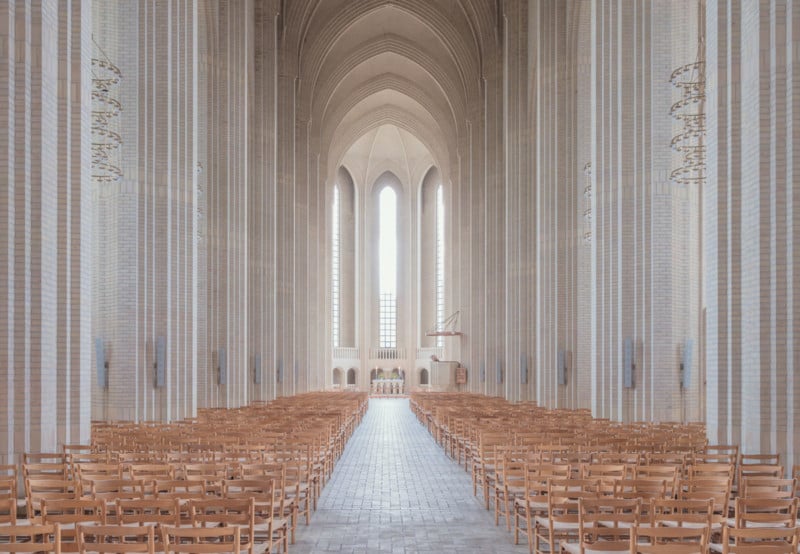
Grundtvig’s Church is a famous church in Copenhagen, Denmark, that’s known as a rare example of expressionist church architecture. French photographer Ludwig Favre shot a series of photos that capture the beautiful lines of the giant vaulted ceilings.

The church was built after World War I between the years 1921 and 1940. It was designed by Danish architect Peder Vilhelm Jensen-Klint, who studied village churches in his country before merging the concepts of Brick Expressionism (modern geometric forms) with Gothic architecture (classic verticals).

The hall church has three aisles and measures 259 feet long (76m), 115 feet wide (35m), and 72 feet tall (22m).

You can find more of Favre’s work on his website, Behance, Instagram, and Twitter.

(via Ludwig Favre via Colossal)

19 Dec 18:49

Mojave Lava Tube in California

Inside the lava tube.

Though people typically associate volcanoes with high angular peaks, sometimes their most wondrous geological contributions lie hidden below our feet. Proof of this can be found at this subterranean site in the Mojave National Preserve, where a trail that traverses black, tar-like rocks leads to a lava tube.

A set of metal steps leads down into the tunnel formed by molten lava. After descending, explorers will find themselves in a dark cavern. Dust glints in the beams of light that spill through the holes in the ceiling. These natural skylights form spotlights that illuminate the quiet, shaded space.

Entering the lava tube allows for an up-close encounter with a fascinating volcanic phenomenon. If you touch the walls, you’ll feel the lava that cooled and hardened to form the tunnel; a tactile reminder of the natural region’s volatile past.

The lava tube formed when molten basaltic lava coursed across the landscape, oozing outward and spreading like melting butter. Though the top hardened as it cooled, lava continued moving beneath, carving tunnels as it churned along. Eventually, after the volcanic eruption ceased, the lava flowed out the end of the tunnel and left a hollow tube in its wake.

The Mojave National Preserve has an expansive history of volcanic activity. It’s been about 7.6 million years since the first cinder cones burst upward from the Earth’s crust, and the lava didn’t stop flowing until only 10,000 years ago.

19 Dec 18:48

Adobe Just Released the Final Standalone Version of Lightroom

by Michael Zhang

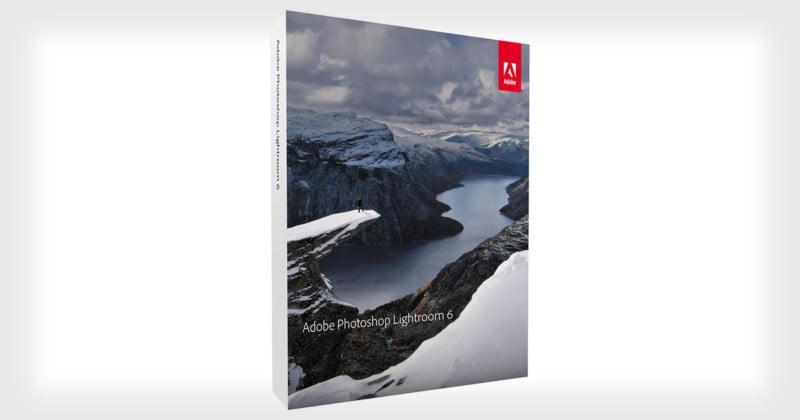
Adobe just released the final standalone version of Lightroom. With the new 6.14 update, the era of new non-subscription versions of Lightroom has come to an end.

Lightroom 6.14 doesn’t bring any new major features. Instead, it improves camera and lens compatibility as well as fix some bugs that existed.

“The goal of this release is to provide perpetual customers additional camera raw support, lens profile support and address bugs that were introduced in previous releases of Lightroom,” Adobe says.

As Adobe announced in October, this version is the final update Lightroom 6 will ever receive, and Lightroom 6 is the final standalone version of Lightroom that Adobe will be releasing.

Lightroom 6 may not be compatible with future cameras’ raw files. If you’re intent on sticking with Lightroom 6, though, there’s a path forward for you: future cameras will be supported for Lightroom 6 and other legacy Adobe software using the free Adobe DNG converter.

For the latest in Lightroom features and functionality, you’ll need to start paying for a subscription through Adobe’s Creative Cloud. The Photography Plan currently costs $10 per month.

(via Adobe via DPReview)

14 Dec 18:49

35 DIY Gifts for Men [Updated for 2017!]

by AoM Team

Anyone can open their wallet and plop down cash for a nice present. But the gifts that mean the most are the ones people make for you; knowing someone spent their time crafting something just for you is truly special.

Plus, in a very consumeristic culture, many homemade gifts can be made on the cheap and help you cross numerous people off your list without going into debt.

Over the years we’ve published many guides on how to make various items that are not only fun to use yourself, but would also be great Christmas presents. Below, we’ve gathered the best ones into one big list. These DIY gifts are things that men will enjoy both making and receiving. Some of these homemade gifts are really easy and inexpensive to make, while others require a bit more skill, time, and investment in materials. We’ve made sure to indicate the difficulty level, time required, and cost on each one so you can gauge whether a project will fit in your wheelhouse, schedule, and budget. (Numbers are rough estimates and will depend on what materials and tools you already have on hand and your skill level.)

There are many more DIY projects and crafts we hope to get to this coming year, and the years after that. So each holiday season we’ll update and republish this list with links to more ideas!
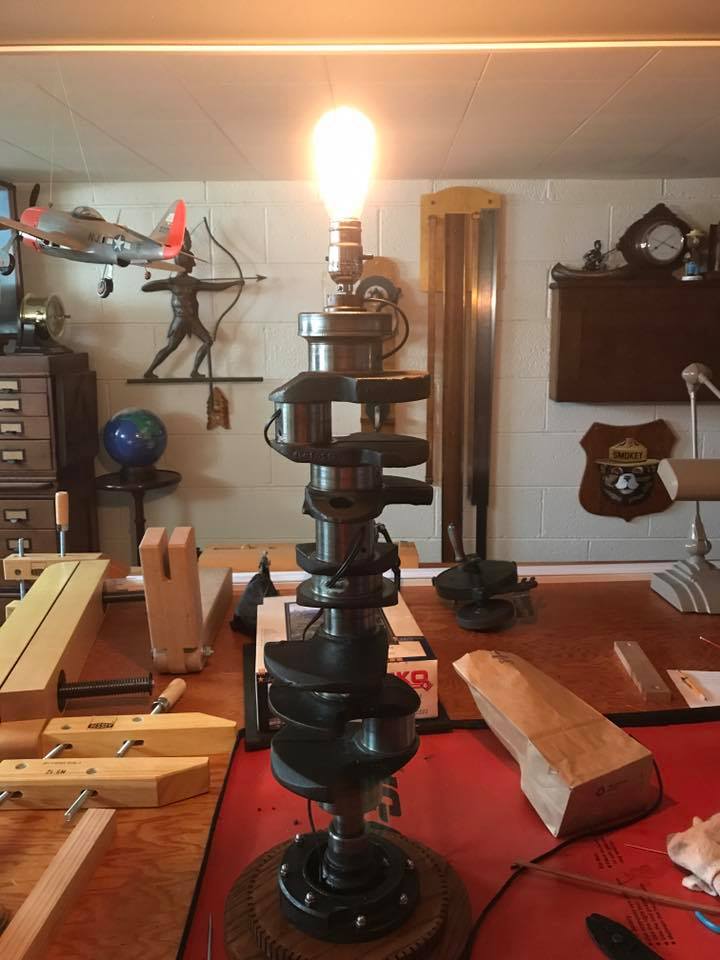
Crankshaft Lamp

The crankshaft is an integral part of a car’s engine. It also makes for a sweet benchtop light for the automobile enthusiast in your life. You can add some virility to a garage, workshop, or man room by making a lamp out of old car parts. 

Although the basic idea is straightforward, there are a ton of ways to customize this project to fit the space and style of the lamp’s recipient. Use this example as a guideline, and alter as you see fit. 

  • Difficulty: Hard
  • Time: One weekend
  • Cost: $100

Homebrewed Beer

  • Difficulty: Intermediate 
  • Time: ~8 hours active; 2-4 weeks fermentation time
  • Cost: ~$50 

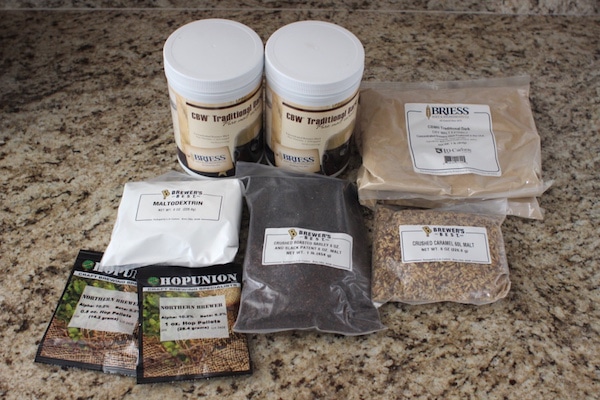
Small batch craft beer has enjoyed tremendous cultural popularity in the last several years, both in the commercial and DIY realms. If you already have a homebrew setup, $50 will get you a kit that will make about 50 bottles of beer, which translates to about 8 6-packs to gift to friends, coworkers, and/or family members. Take it up a notch by having your own labels printed; there are a number of options online, just Google it. If you don’t have the homebrew equipment, that’ll set ya back about $100, but will last many years. 
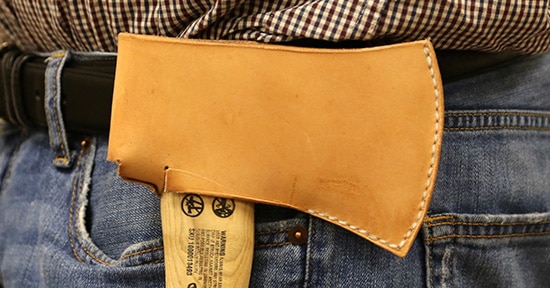
Leather Hatchet Sheath

  • Difficulty: Intermediate 
  • Time: ~4 hours 
  • Cost: $50 

Few tools are as versatile as the hatchet. While there are a number of modifications that could be made to personalize this leather hip sheath, this tutorial is intended to keep everything as straightforward and simple as possible so that someone who has only minimal experience working with leather can still be successful. 
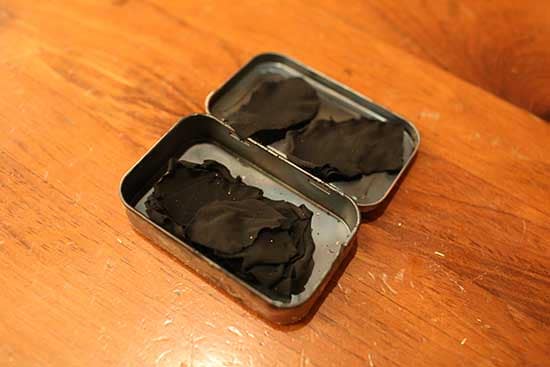
Char Cloth

charcloth

  • Difficulty: Easy 
  • Time: ~1 hour 
  • Cost: ~$5, you likely have all supplies on hand

Char cloth has been used to make fires for centuries, and for good reason — it’s lightweight, compact, easy to make, and highly effective in igniting tinder. Just a single spark or point of heat can start it burning. Char cloth can thus be a life-saver in survival situations and makes an excellent addition to one’s camping supplies or bug out bag. And outside its fire-making benefits, making some is actually a pretty fun little science experiment! This project makes for a great stocking stuffer for the camping/outdoors aficionado in your life.
DIY Spice Blends

spices

  • Difficulty: Easy 
  • Time: ~1 hour 
  • Cost: $10, you may have some of the raw supplies handy

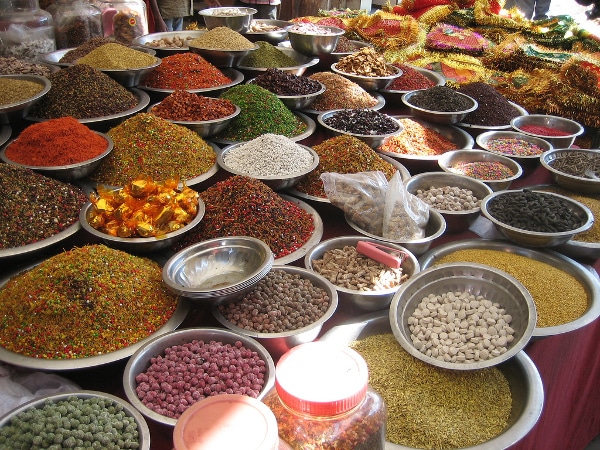
Cooking outside is one of the great pleasures in life — especially when your grub turns out savory and delicious. While salt and pepper are often all you need to grill a great meat, you can enhance the outdoor cooking experience by using personally created spice blends that will become signature flavor profiles in your home. If your friends have praised your dishes before, and wanted to know your secret recipe, gift it to them for Christmas.
Pocket Notebooks

IMG_3409

  • Difficulty: Easy 
  • Time: ~1 hour 
  • Cost: the price of a six-pack

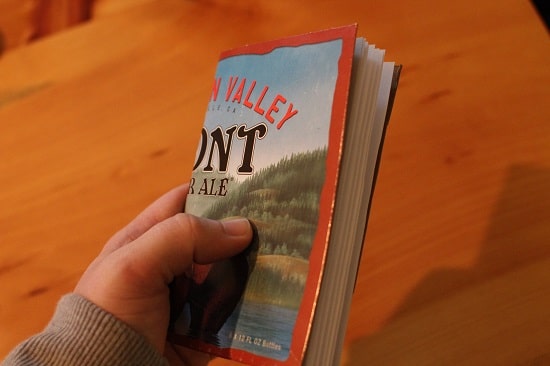
The benefits of a pocket notebook are numerous, as are the number of great men who’ve utilized them. This project is cost-effective, only takes about 20 minutes, and allows for ample personalization for the fellow you’re making these for. Pick his favorite brew or craft soda, and turn it into a handy-dandy notebook he can take with him anywhere.
Pyrography Project

woodburning complete

  • Difficulty: Intermediate 
  • Time: 1-2 hours, depending on project 
  • Cost: $30

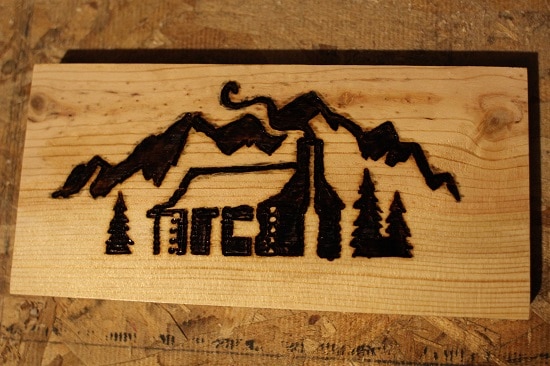
If you’d like to try your hand at a woodworking project for a loved one, pyrography — aka woodburning — is a great way to get introduced. You’re working with wood, but with minimal measuring and cutting; you’re simply using a hot pen to burn an artistic design into a piece of wood. It carries a distinct masculine vibe, and the possibilities for personalization are endless. Use a rustic cabin scene (as pictured above), go with a sports logo, or even burn a favorite manly quote. The tools are affordable, and once bought, will last years and years, meaning after your start-up costs, all you really need is scrap wood to make new gifts each Christmas.
Homemade Bacon

13-Cutting ends

  • Difficulty: Advanced 
  • Time: 6 hours active, weekend for whole process 
  • Cost: $50

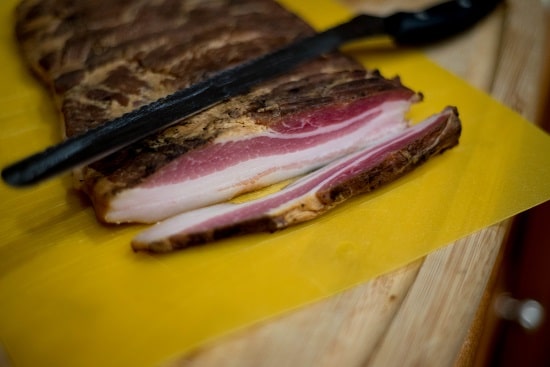
Every man loves bacon. That’s just science. Before now, though, you were resigned to buying it in a store. Little did you know, bacon can be a homemade delicacy. Making your own bacon is fun while also a bit challenging; most of all it takes a bit of elbow grease and patience. In the end, however, you have a product that’s better than anything store-bought. It makes for an excellent gift, just don’t keep it under the tree for too long.
Plyometrics Box

howtoscrew

  • Difficulty: Intermediate 
  • Time: 2-3 hours 
  • Cost: $30

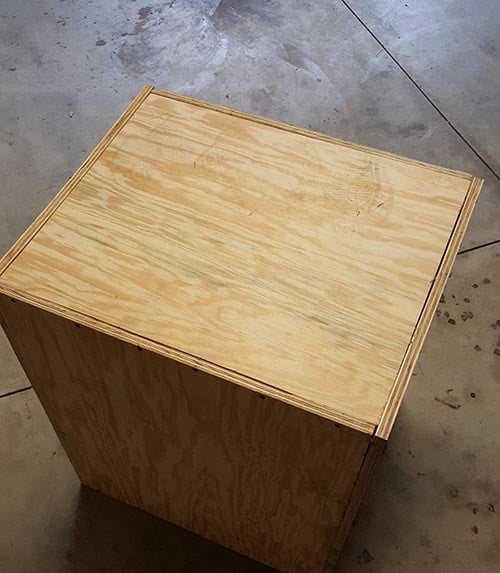
Plyometric exercises are designed to increase speed, power, and explosiveness and are a great supplement to a regular strength training routine. Gym-goers likely have access to plyo boxes, but if working out in your garage, getting your hands on a box from one of the many fitness companies out there is going to cost a pretty penny. An unassembled box can cost you $125 plus $20 in shipping. And you still have to put the thing together when it gets to you! Sheesh. Thankfully, Jerred Moon from End of Three Fitness (who previously showed us how to make a DIY Prowler Sled) showed me how to make my very own plyo box for a fraction of that. For the fitness buff in your life, this gift is a must.
Pocket Square

diy pocket square with suit jacket hem tape

  • Difficulty: Easy 
  • Time: 1 hour 
  • Cost: $5; you may have all the supplies at home

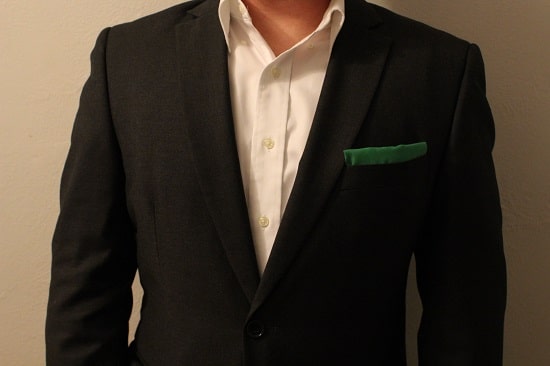
Every suit needs a pocket square. It helps a gentleman stand out and actually have some personality with his style. They can get expensive, though, costing anywhere from $10-$30. Isn’t it just a piece of fabric? Indeed it is! Which is why you can make your own handsome pocket square for a fraction of that.

After first attempting multiple methods, I came to the conclusion that there would be just one I’d recommend: hem tape. With some cheap hem tape and an iron, turn any square of fabric into a pocket square for the dapper gent in your life.
Container Candle

IMG_3554

  • Difficulty: Intermediate 
  • Time: 1-3 hours, a few more hours for wax to fully settle 
  • Cost: $40-$50, but that cost will get you up to 10 candles

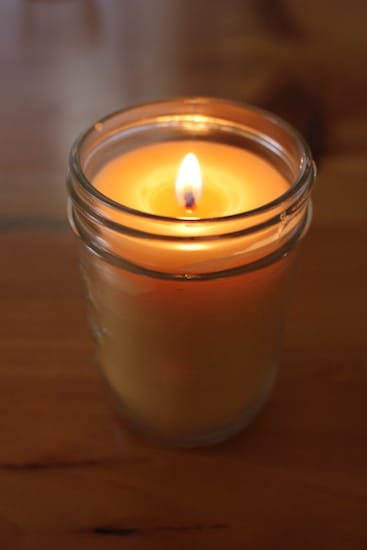
Candles can add a masculine or romantic ambiance (depending on what you’re going for) to any room, and can truly be very meditative and thought-provoking. The downside, though, is that they’re dang expensive. A high-quality 6oz candle can run you $20-$30, and even more if it has a luxury brand name attached to it.

Turns out homemade candles cost just a few bucks each, smell and burn just as well as the expensive ones, and make for a fairly easy project that won’t take you more than a couple hours. They make for great additions to a workspace or den, and will fit nicely into any stocking!
Book Clock

clock11

  • Difficulty: Easy
  • Time: ~1 hour
  • Cost: $10-$15

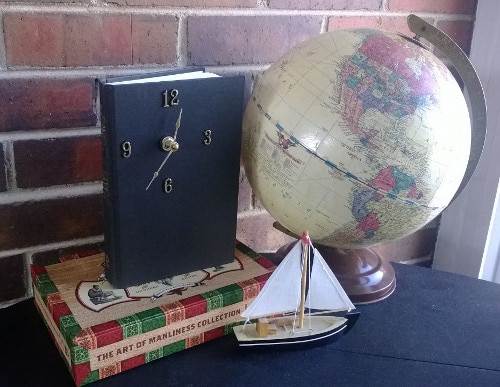
From pocket watches to grandfather clocks, men have long held a fascination with keeping time in stylish and classic ways. What better way to do so than turning a handsome hardcover book into a working clock? This project is similar to what Brett did a couple years back with turning a hardcover book into a secret safe. Instead of stashing this on a bookshelf and hoping it’s not seen, however, this project is meant to be proudly displayed in your home or workplace. Coming in at around $10 and a few hours of your time at the most, this makes for a great DIY Christmas gift for your fella to decorate an apartment or man room.
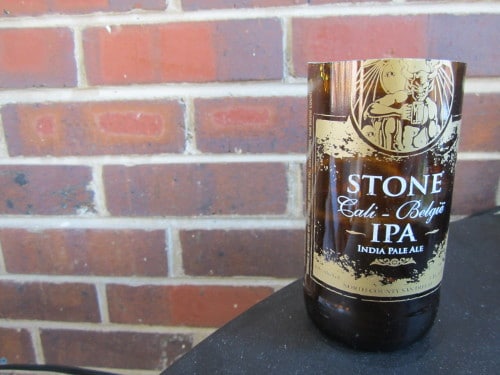
Bottle Drinking Glass

bottle18

Difficulty: Easy
Time: <1 hour
Cost: Most people have all the supplies handy, otherwise ~$15

If you enjoy craft beer, what better way to imbibe than out of a drinking glass made from your favorite brew bottle? What’s great about this project is how versatile it is. Use 12oz bottles to create a set of tasting glasses, use 22oz bottles to make more of a standard tumbler, or even use mini bottles as shot glasses. It’s cheap, fast, and uses items that can be found in most households. And did I mention you get to play with fire?
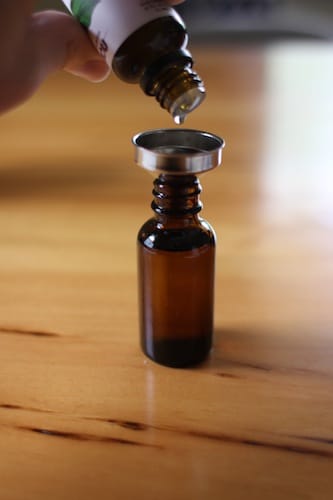
Beard Oil

IMG_3189

Difficulty: Easy
Time: 30 minutes
Cost: $20-$30 for starter supplies, which will make over a dozen bottles

Just as the hair on one’s head needs to be taken care of, so does the hair on one’s face. While beard oil is making a comeback in many men’s shops and retail websites, it’s spendy. You’re looking at paying between $10-$20 for a 1-2 oz. bottle (you only use a few drops at a time). While that amount will last awhile, you can make it on your own a little more cost effectively, and even concoct your own holiday-themed recipes. While the startup costs are similar to buying a bottle or two, you’ll get at least a dozen bottles from your DIY supplies, and get to easily cross off the names of all your bearded brethren from your shopping list.
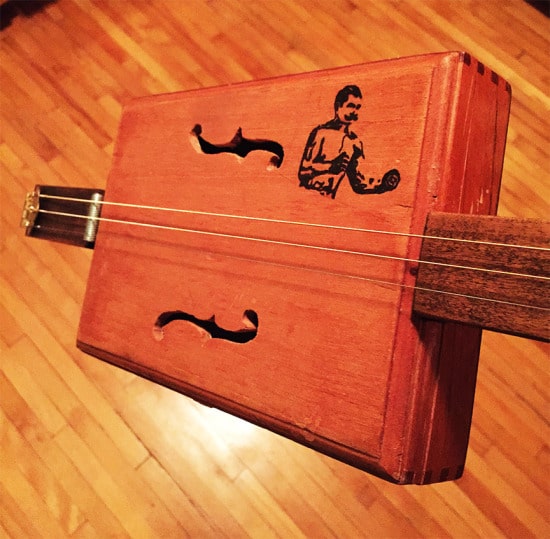
Cigar Box Guitar

finished-1

Difficulty: Advanced
Time: 1-2 days
Cost: $30 (just for parts; does not include tools required)

The cigar box guitar has a long history of providing rich entertainment to those who were musically inclined but didn’t have the funds to buy nice instruments. Recreate this old musical tradition for Christmas for your loved one. Sure, it’s a complex task for those with no woodworking experience, but it provides a fulfilling endeavor for those willing to give it a shot.
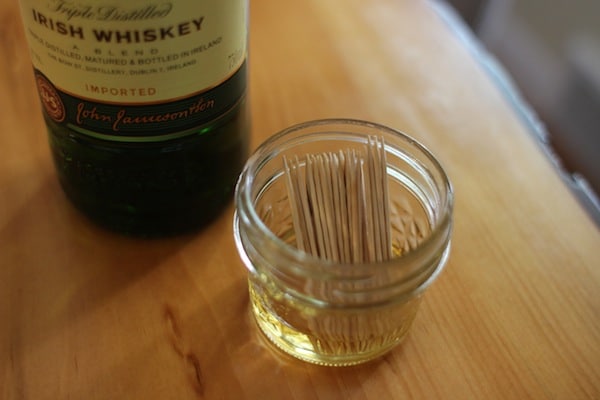
Flavored Toothpicks

jameson

Difficulty: Easy
Time: 5 minutes to prep, ~48 hours to “marinate”
Cost: $15 (for toothpicks and a couple bottles of essential oils)

While chewing on toothpicks is enjoyable on its own, you can make it an even better experience by flavoring them. While flavored toothpicks have started to show up in retail environments, they’re going to be far more expensive than just making them at home. As a bonus, the cost estimate will yield at least a few batches, so you can make these for multiple gentlemen.
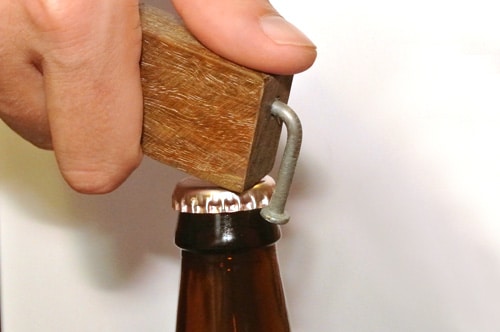
Wooden Bottle Opener

  • Difficultly: Intermediate
  • Time: About an hour
  • Cost: $5

These handsome and rustic handmade bottle openers make great gifts for the craft beer or soda connoisseur in your life. Not only do they open bottles, they even catch your bottle cap as you remove it and stick to your fridge for easy access. You could easily make one out of scrap wood that you have lying around the garage or shop — this is a truly frugal crowd-pleaser.
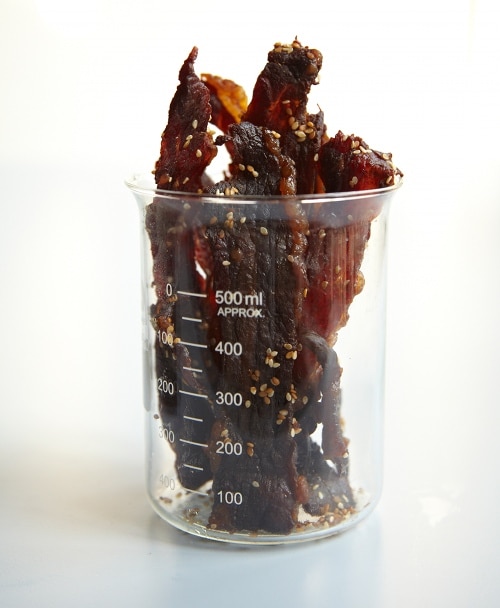
Beef Jerky

  • Difficulty: Easy
  • Time: 15 minutes plus 24 hours for marinating and up to 24 hours for drying and cooling
  • Cost: Varies

Beef jerky is a great manly stocking stuffer. Homemade beef jerky is even better. Check out this recipe from Tim Ferriss on how to make the best beef jerky in the world. Experiment with different spices to create a unique flavor perfect for your recipient’s palate.
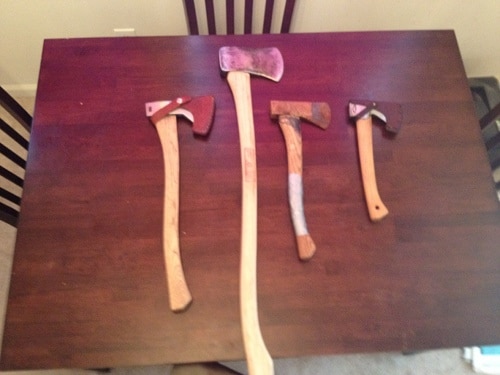
Restore an Heirloom Axe

  • Difficulty: Intermediate
  • Time: Varies
  • Cost: $10-$20

Heirloom axes are all the rage these days, but buying a new one can set you back more than 200 smackaroos. Yeesh. So why not restore an old one to be like new instead? With a bit of elbow grease and time, you can give someone a handsome and fully functional heirloom quality axe for less than $20. This is the perfect gift for a suburban man with an inner Paul Bunyan.
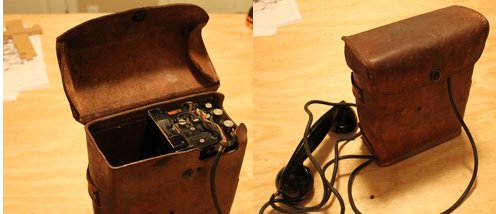
WWII Field Phone Bluetooth Receiver

  • Difficulty: Hard
  • Time: 4 hours to several days, depending on skill level
  • Cost: $50-$150

Perfect for the World War II buff in your life. Pick up an old WWII surplus field phone on eBay and turn it into a bluetooth handset that can be used to make and receive calls. Your recipient will feel like Eisenhower commanding the troops on D-Day whenever he’s calling Terminix to reschedule his extermination service. This project requires moderate soldering skills and some rudimentary knowledge of electronics, hence the “Hard” difficulty rating.
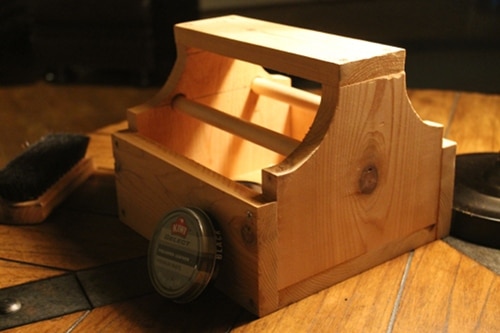
Shoe Shine Box

  • Difficulty: Easy
  • Time: About an hour
  • Cost: $10

Every man needs a shoe shine box. If you know a gent without one, make him this nifty shine box based off a design from a 1950s Popular Mechanics article. This shoe shine box is pretty simple. What makes it “nifty” is the two free-turning dowels placed inside the box. After you’ve given your shoes a good polishing, the dowels serve as rollers for your polish cloth for buffing your shoes to a mirror shine. This is a cheap and easy project to try. I’ve had several readers send me pics of their finished shoe shine boxes and they all look great. If you decide to do this project, send me a pic via Instagram or Twitter. I’d love to see it. (That goes for these other projects too!)
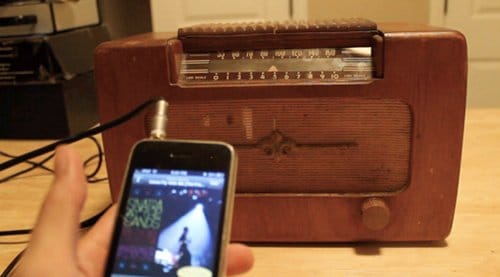
Turn an Old-Time Radio Into an iPhone Speaker

  • Difficulty: Intermediate
  • Time: Hours to weeks, depending on skill level
  • Cost: $30-$100

Old-time radios are cool, but they often only play AM radio, and of course can’t play digital tunes, which limits their use. Give an old-time radio new life by modding it into an iPhone speaker; the result is an audio device with 1940s charm and 21st century technology. If you’re new to electrical tinkering, this project may take you a bit longer. But I’m not kidding when I say this: if you’ve never done any type of electrical projects, you can do this. Give it a go and you’ll end up with a truly one-of-a-kind gift.
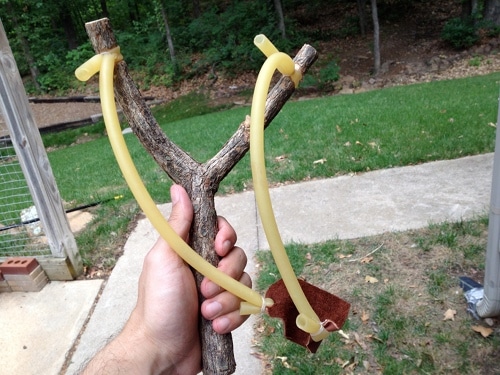
Slingshot

  • Difficulty: Easy
  • Time: About an hour
  • Cost: $5

A great gift for kids and big kids (i.e., grown men) alike. This sling shot costs less than $5 to make and takes just an hour of your time. You’ll get serious “Cool Uncle” points if you make this for your nephew or niece.
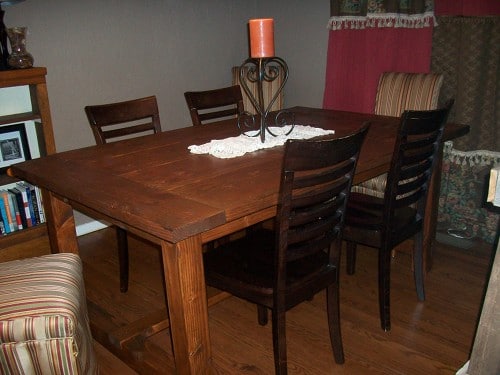
Dining Room Table

  • Difficulty: Hard
  • Time: Two weeks
  • Cost: $125-$200

Want to really impress your wife this Christmas? Make her a dining room table with your own two hands!

A few years ago, AoM reader and fellow Okie, Tuck Oden showed us how to do just that. I have been surprised and delighted by the number of men who actually took action on that article and made this table. I still get emails from folks showing off the manly fruits of their labors. Tuck’s total cost for wood, hardware, and stain was less than $200, and that included the chairs he bought for it.
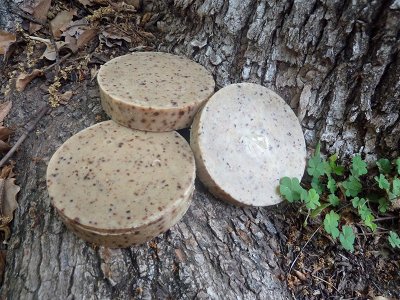
A Manly Bar of Soap

  • Difficulty: Intermediate
  • Time: It takes about two hours to make a batch, but you’ll then need to let them “rest” for four weeks so saponification can occur
  • Cost: 75 cents a bar

Instead of forking over $9 for a bar of “artisanal” soap, make a big batch of your own for less than $.75 a bar. Former AoM contributor Bryan Schatz showed us how to create a manly bar of soap filled with coffee grounds and walnuts — it smells good and can easily clean off whatever gunk you get on your hands.

If you’ve seen the movie Fight Club, you’ll know that soap making is a dangerous and volatile process. So take your time and use adequate protection while making your manly, coffee-scented soap.
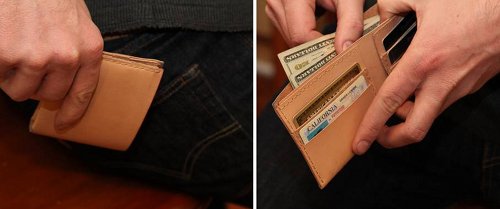
Leather Wallet

  • Difficulty: Intermediate
  • Time: 2-3 hours
  • Cost: Varies

Wallets have been popular Christmas gifts for men for a century. Instead of buying an expensive one from the wallet rack at some department store that will wear out in a few years, make someone a wallet that will last their whole lives. The fine gents at Ezra Arthur gave us step-by-step instructions on how to make a handsome and incredibly durable wallet. They even provide a printable blueprint that you can use to measure and cut your leather.
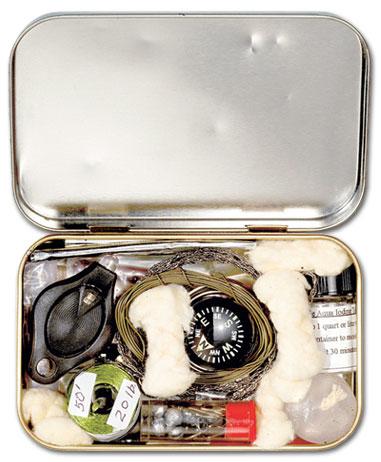
Altoids Tin Kits

  • Difficulty: Easy
  • Time: Varies
  • Cost: Varies

The draw of the transformed Altoids tin is hard to put your finger on. Part of it is the satisfying challenge of fitting as much as possible into a small space. Part of it is the delight of being able to carry something cool in your pocket. But any way you slice it, an Altoids tin that’s been converted into something new is a true crowd-pleaser; the post we did on 22 Manly Ways to Re-Use an Altoids Tin has become one of our most popular posts of all time. Any of the kits on that list would make an awesome gift or stocking stuffer. My favorite is the survival kit pictured above, but the games chest, s’mores kit, mini flashlight, first aid kit…well, yeah, truly any of them would make a super cool present for family and friends. And many only require assembly — no skill needed!
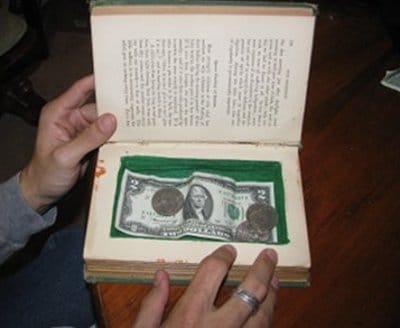
Secret Book Safe

  • Difficulty: Easy
  • Time: 2.5 hours
  • Cost: $5-$10

Make somebody feel like a spy with a secret book safe. This is one of my favorite projects that we’ve done on AoM. I still use the book safe that I made a few years ago for the original post. Creating a secret book safe only costs a few bucks and takes a couple of hours. Select a book to use that reminds you of the recipient, and this gift is bound to delight.
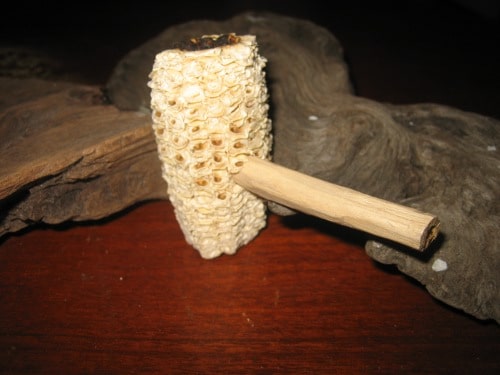
Corn Cob Pipe

  • Difficulty: Easy
  • Time: If you use artificial ways to dry out the corn cob, it can take about a week for the cob to fully dry. After drying out the cob, expect to spend two hours fashioning together the other parts of the pipe.
  • Cost: $1

If you know a man who smokes an occasional pipe, help him get into the spirit of the season by fashioning him the same kind of pipe that old Frosty the Snowman used. All that’s needed to make a genuine corn cob pipe is an ear of corn, a branch, a pocket knife, and a drill. Shouldn’t require more than a single buck and a few hours to make.
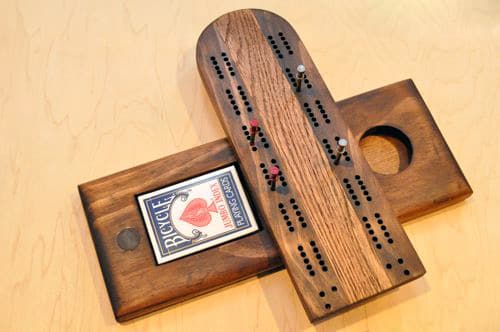
Cribbage Board

  • Difficulty: Hard
  • Time: 5-10 hours, depending on your skill level

Cribbage has a storied and manly history, and it’s the perfect game to play on a cold and snowy Christmas evening. Help another person carry on this manly tradition by making a handsome cribbage board for them. Ethan from One Project Closer showed us how in this step-by-step guide.
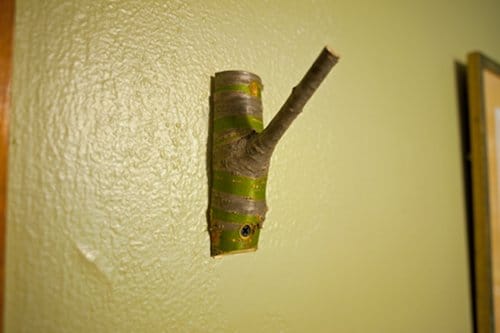
Tree Branch Coat Hook

hook_mounted

  • Difficulty: Easy
  • Time: An hour
  • Cost: Nil – just your tree branch!

This gift is rugged, manly, and as a bonus, costs nothing but a trip into your backyard! If you get a branch that’s 1-3″ in diameter, with the smaller “hook” branch being 1/2″ or so, it’ll have plenty of strength to hold hats, coats, and whatever else needs hanging. If you’re really feeling crazy, you can line up a few of these on a board and make a whole coat rack.
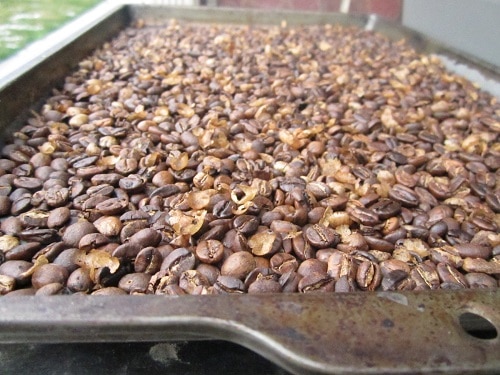
Roasted Coffee

IMG_0915

  • Difficulty: Easy
  • Time: 15-20 min
  • Cost: $6-$10 per pound of coffee

I (Jeremy) may be biased, because I roast my coffee fresh each week, but this is one of the best gifts you can give. It’s cheap, fast, easy, and almost everyone drinks coffee. Buying some green beans from a local roastery (check out Kaladi Coffee Roasters if you’re in the Denver area) or online is the same price, if not cheaper, than buying coffee at the grocery store — unless you’re buying Folgers, which you shouldn’t be doing. I guarantee this is the best coffee you’ll ever drink, so take the plunge and fire up that grill.
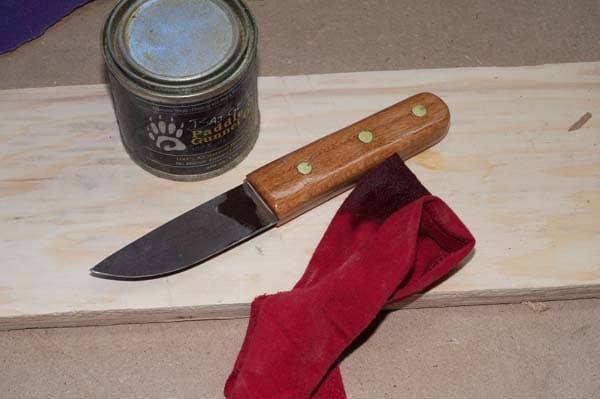
Saw Blade Knife

  • Difficulty: Hard
  • Time: A few hours, depending on skill level
  • Cost: Varies

Are you feeling ambitious? If so, this project is for you. First, you need to find an old saw blade. Start with the antique store, then try your elderly neighbors. Next, you’ll need some basic metalworking skills that Darren Bush thankfully outlines in the post. It may take you a while, but when you end up with a beautiful handmade knife, you’ll know it was well worth the effort.
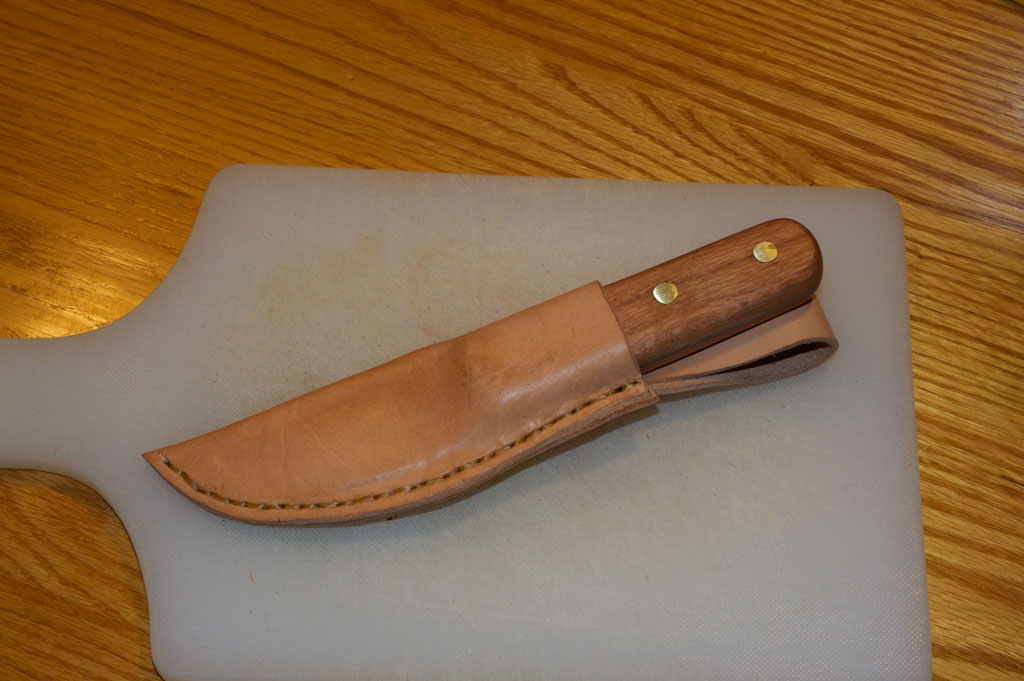
Leather Sheath

DSC_6339

  • Difficulty: Intermediate
  • Time: 1-2 hours
  • Cost: $10-$20

While this piece was written up with the saw blade knife (above) in mind, this leather sheath can be made for really any object. If you’re new to leatherworking, this is a great starter project, as it doesn’t require much in the way of a previously learned skillset. With a piece of leather, patience, and some basic stitching skills, you’ll have yourself a handsome sheath in no time.
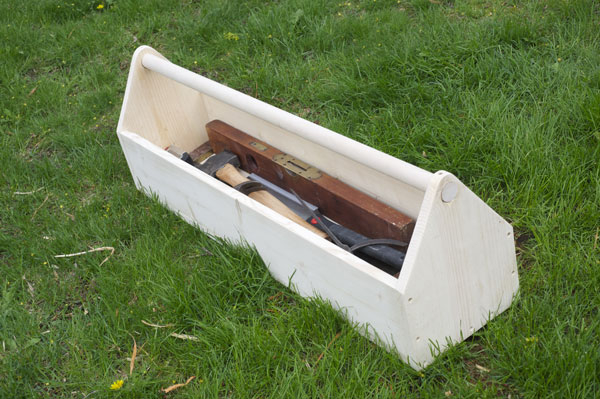
Wooden Tool Carrier

finished

  • Difficulty: Easy-Intermediate
  • Time: 1-2 hours
  • Cost: $10

Do you often find random tools scattered about the yard, house, and garage? If so, this is the project for you. Most toolboxes/carriers these days are cheap, plastic, and molded for specific brands of tools. This sturdy and rugged tool carrier will last decades, is universally handy, and can even be jazzed up with a stain or a coat of paint.

The post 35 DIY Gifts for Men [Updated for 2017!] appeared first on The Art of Manliness.

14 Dec 14:36

How Do New Synapses Form In The Brain?

by Quora, Contributor
In neuroscience, based on what principle are new synapses formed in the brain, or do neurons grow randomly until they bump into other neurons to form a synapse? This question was originally answered on Quora by Paul King.
14 Dec 13:19

The Best Deals On The Best Days Of the Year To Buy A New Car Or Truck

by Jim Gorzelany, Contributor
It’s beginning to look a lot like Christmas, and so holiday-season new-vehicle promotions are in full swing, and you'll all but be assured of getting the best deals of the year if you know exactly when to shop.
14 Dec 13:11

Driving With Muhammad Ali And General Chuck Yeager--It's My Job

by Gerald Eskenazi, Contributor
To get that story from Muhammad Ali, or the man who broke the sound barrier, or the fastest guy on earth, sometimes you have to go with them on a road trip. By trains, planes, and automobiles--how I got that story.