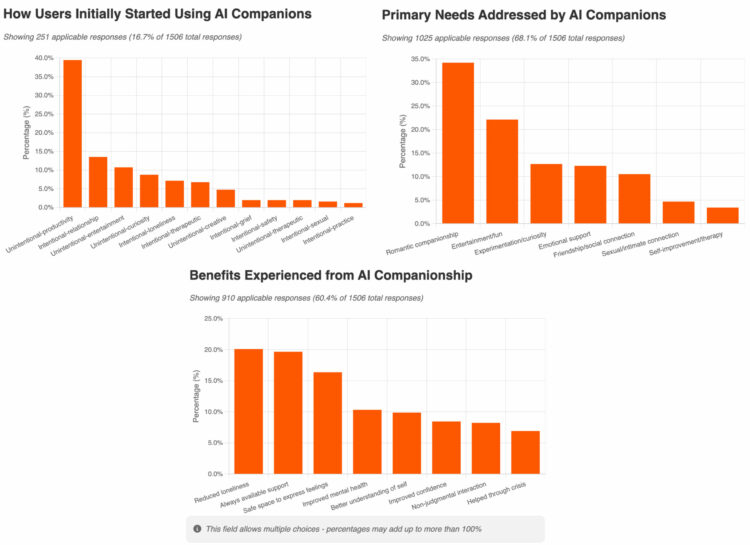
Researchers from the MIT Media Lab studied posts to r/MyBoyfriendIsAI on Reddit. While using AI chatbots for relationship stand-ins is still niche, interest seems to be growing. On the reported benefits:
Reported benefits centered on addressing social isolation and emotional needs. Users frequently cited reduced loneliness (12.2%) and always-available support (11.9%) as primary advantages, emphasizing the temporal accessibility that distinguishes AI from human relationships. The provision of a safe space for emotional expression (9.9%) and non-judgmental interaction (5.0%) highlighted the psychological safety users experienced. Mental health improvements were explicitly reported by 6.2% of users, with 4.2% crediting AI companions with helping them through crises. Additionally, 6.0% reported better self-understanding through AI interactions, suggesting these relationships facilitate introspection and personal growth. These findings indicate that companion AI systems serve complex psychological and social functions, often addressing unmet needs in users’ human relationships while providing unique affordances unavailable in traditional social contexts.
I’m not sure what to make of this. If the alternative is loneliness, then maybe it’s okay as a temporary band-aid, but marrying a large language model can’t be good long-term, right?
Many people still think of AI-generated speech as sounding "fake" or unconvincing and easily told apart from human voices. But new research from Queen Mary University of London shows that AI voice technology has now reached a stage where it can create "voice clones" or deepfakes which sound just as realistic as human recordings.
L’Union européenne a inauguré en République tchèque son deuxième ordinateur quantique. Baptisé VLQ, ce nouveau venu marque une étape clé dans la stratégie européenne, qui vise, à terme, la mise en place d'une constellation de six ordinateurs quantiques sur le continent.
Oui, enfin, on a une IA médicale française, développée par Synapse Medicine une startup bordelaise, qui va pouvoir confirmer que votre petit mal de tête est bien un cancer du cerveau en phase terminale, exactement comme vous l’aviez lu sur Doctissimo à 3h ce matin après avoir cliqué sur 47 pages de forums où “MoiMêmeJeSais” raconte qu’elle a failli mourir avec les mêmes symptômes.
Cela s’appelle
MedGPT
et attention, avant que vous ne commenciez à lui demander si votre bubon de sorcière sur le nez est un mélanome, sachez que cet outil est réservé aux professionnels de santé. Médecins généralistes, spécialistes, pharmaciens, infirmiers, sages-femmes… Bref, tous ceux qui ont encore la chance d’avoir un boulot dans notre beau pays riche et développé où
87% du territoire est considéré comme un désert médical
.
Hé oui les parisiens, il y a environ 6 millions de Français qui n’ont pas de médecin traitant et dans certaines régions, il faut attendre jusqu’à 1 an pour voir un spécialiste. Du coup, on en est réduit à faire du diagnostic sauvage sur internet ou à prendre un vol Ryanair pour se faire soigner en Belgique ou en Roumanie où ils ont encore des médecins disponibles. Mais bon, revenons à nos moutons numériques…
Selon les concepteurs de MedGPT
, leur IA s’appuie sur plus de 50 sources officielles françaises : la Haute Autorité de Santé, l’ANSM, la base Thériaque… Contrairement à ChatGPT qui pourrait vous conseiller de prendre de l’hydroxychloroquine / Ivermectine / azithromycine pour soigner votre Covid parce qu’il est complétement con, MedGPT, lui, utilise uniquement des données médicales françaises validées par la science et les professionnels de santé.
Ils lui ont même fait passer l’ECN 2023 (le concours de médecine) et MedGPT a réussi à se classer dans
le top 500
, alors que ChatGPT végète autour de la 2000ème place… Bon, ça reste moins bien qu’un vrai étudiant en médecine (quoique pour les internes aux urgences, j’suis moyen sûr), mais c’est déjà mieux que la moitié des candidats humains.
Et rassurez-vous, less données sont hébergées en France, respectent le RGPD et les normes HDS (Hébergement de Données de Santé). Quand on sait que 66% des médecins américains et 20% des britanniques
utilisent déjà ChatGPT pour leur boulot
, malgré les risques de fuites de données et de recommandations foireuses… J’suis content que les Français qui étaient coincés entre utiliser un truc pas adapté ou se passer de l’IA, ont maintenant leur solution souveraine.
Alors pour l’instant, MedGPT est en bêta gratuite et limitée à 5 questions par jour. Oui, 5 questions, c’est le nombre de symptômes différents que vous pouvez googler avant de vous convaincre que vous avez la peste bubonique mais bon, après avec un petit VPN, vous pouvez contourner la limite. Notez aussi que l’IA peut faire également des erreurs, donc fiez-vous toujours à votre jugement, à la science et à votre médecin.
C’est gratuit pour le moment, alors autant en profiter avant que ça devienne payant comme tout le reste et qui sait, peut-être qu’un jour on aura une IA capable de faire les ordonnances directement… Woohoo \o/.
Bon, je vous laisse, je vais aller vérifier sur Doctissimo si ma fatigue après avoir écrit cet article n’est pas un symptôme lié à une “dermatite irritative de la région périnéale” ^^.
Merci à Lorenper pour m’avoir fait découvrir cette pépite !
A few weeks back, we reported on a research group that figured out how to measure heartrate using perturbations in WiFi signals. [Nick Bild] was interested in this so-called “Pulse-Fi” technique, but noted the paper explaining it was behind a paywall. Thus, he worked to recreate the technology himself so he could publish the results openly for anyone eager to learn.
[Nick] paid for the research paper, and noted that it was short on a few of the finer details and didn’t come with any code or data from the original research team. He thus was left to figure out the finer details of how to measure heart rate via WiFi in his own way, though he believes his method is quite close to the original work.
The basic concept is simple enough. One ESP32 is set up to transmit a stream of Channel State Information packets to another ESP32, with a person standing in between. As the person’s heart beats, it changes the way the radio waves propagate from the transmitting unit to the receiver. These changes can be read from the packets, and processed to estimate the person’s heart rate. [Nick] explains the various data-massaging steps involved to go from this raw radio data to a usable heart rate readout.
It’s a great effort from [Nick] to recreate this research all on his own in his home lab. Files are on GitHub for the curious. If you’re eager to learn more about these innovative measurement techniques, you might like to read our prior reporting on the tech. Also, it’s worth remembering—don’t use your homebrew prototypes for any serious healthcare purposes.
La Chine a annoncé ce 22 septembre 2025 le lancement d'une nouvelle campagne de surveillance d’Internet. Officiellement, il s’agit de lutter contre les contenus qui « attisent des émotions négatives » et « sèment le pessimisme ». Mais en pratique, le texte vise aussi ceux qui critiquent la situation économique du pays : chômage, ralentissement, coût de la vie.
OpenAI prépare une offensive dans le marché des appareils connectés. Depuis plusieurs mois des rumeurs circulent autour de ce projet top-secret. Et pour le mener à bien, le créateur de ChatGPT compte sur les fournisseurs et d’anciens talents de chez… Apple !
Les organoïdes cérébraux, des petites structures cultivées à partir de cellules souches, sont souvent décrits comme des modèles simplifiés du cerveau humain. Ils ne possèdent pas la...
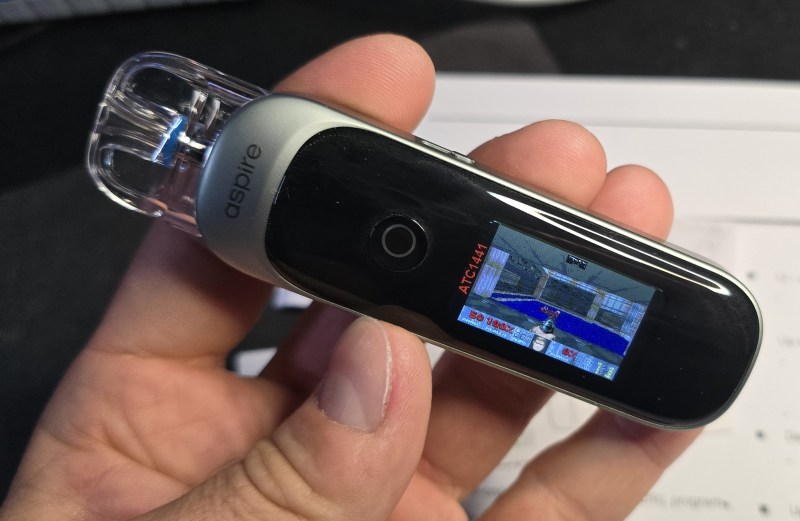
The PIXO Aspire is a roughly $35 USD vape that can almost play DOOM, with [Aaron Christophel] finding that the only thing that realistically stops it from doing so is that the Cortex-M4-based Puya PY32F403XC MCU only has 64 kB of SRAM. CPU-wise it would be more than capable, with a roomy 16 MB of external SPI Flash and a 323×173 pixel LC touch screen display covering the other needs. It even has a vibration motor to give you some force feedback. Interestingly, this vape has a Bluetooth Low-Energy chip built-in, but this does not seem to be used by the original Aspire firmware.
What [Aaron] did to still get some DOOM vapors on the device was to implement a screenshare firmware, allowing a PC to use the device as a secondary display via its USB interface. This way you can use the regular PC mouse and keyboard inputs to play DOOM, while squinting at the small screen.
Although not as completely overpowered as a recent Anker charging station that [Aaron] played DOOM on, we fully expect vapes in a few years to be perfectly usable for some casual gaming, with this potentially even becoming an original manufacturer’s function, if it isn’t already.
Non, c’est pas de la sauce au poivre pour manger avec leurs steaks de kangourou… Non, ce qui leur manque vraiment c’est plus d’eau !
Hé oui, sur ce continent-île de 25 millions d’habitants, cerné par trois océans, les habitants trouvent qu’il n’a pas assez d’eau, ce qui est vrai surtout au centre du pays. Du coup, depuis plus d’un siècle, certains rêvent d’un projet complètement dingue : créer une mer artificielle en plein milieu du désert. Un fantasme qui resurgit régulièrement, même si aucun projet concret n’existe aujourd’hui.
Car il y a 110 à 140 millions d’années, l’outback australien était recouvert par la mer Eromanga, une mer intérieure bien tranquille qui s’étendait sur un tiers du continent. Puis la nature a fait son truc, la mer s’est barrée, et hop, désert aride à perte de vue. Sauf que certains visionnaires ont remarqué un détail intéressant… Lake Eyre, au centre du pays, est situé 13 mètres plus bas que le niveau de la mer. En gros, c’est comme une baignoire géante qui n’attend qu’à être remplie.
Aperçu de la taille de la mer Eromanga
Les Hollandais depuis des siècles, volent de la terre à la mer avec leurs polders, vivant courageusement sous le niveau de l’eau et certains Australiens, eux, rêvent de faire exactement l’inverse : voler de la mer à la terre. C’est le polder inversé, version XXL avec supplément koala.
Depuis 1883, diverses propositions ont émergé. La plus ancienne ? Creuser un canal de 320 à 400 kilomètres depuis Spencer Gulf jusqu’à Lake Eyre. Coût estimé par une étude de 2011 : environ 50 milliards de dollars américains. Plus récemment, des variantes modernes ont été imaginées avec des pipelines et de l’énergie solaire - certains parlent même de 200 milliards de dollars pour les versions les plus ambitieuses, mais ces chiffres restent purement théoriques.
Le hic c’est qu’après l’introduction de l’eau de mer, les terres seraient complètement salinisées. Adieu l’agriculture, bonjour un écosystème marin en plein désert. C’est donc mort pour y faire pousser des tomates, mais certains y voient une opportunité pour l’aquaculture ou le tourisme.
Ce délire n’est pas nouveau. Dans les années 1930-1940, un ingénieur du nom de
John Bradfield
(celui qui a conçu le Sydney Harbour Bridge) avait proposé le Bradfield Scheme, un projet pour détourner les rivières du nord Queensland vers l’intérieur. Le projet n’a jamais vu le jour, et
les études récentes du CSIRO
(2020-2021) montrent que même si c’était techniquement faisable, économiquement c’était du suicide. Les revenus agricoles ne couvriraient jamais les coûts d’infrastructure.
Mais avec le changement climatique qui transforme l’outback en four géant, l’idée refait surface périodiquement dans les médias et sur les réseaux sociaux. Car les températures grimpent très fort, la survie devient de plus en plus difficile, et soudain, l’idée de créer une mer artificielle séduit certains rêveurs. Enfin, c’est toujours complètement fou, mais c’est le genre de folie qui fait débat sur Facebook quand votre pays brûle six mois par an.
Un tel projet serait un genre de Tamagotchi géologique : créer un écosystème artificiel qu’il faudrait nourrir en permanence avec de l’eau de mer pompée à des centaines de kilomètres. Car avec l’évaporation intense du désert australien (10 fois supérieure aux précipitations), c’est une mer entière qui risquerait de s’évaporer si on arrêtait de la nourrir. On se retrouverait avec une nouvelle mer morte…
Contrairement à ce que certains articles sensationnalistes laissent entendre, il n’y a pas de projet officiel en cours. Quelques politiciens marginaux comme Bob Katter continuent de promouvoir l’idée, et des groupes Facebook en discutent régulièrement, mais aucun gouvernement australien n’envisage sérieusement de dépenser des dizaines (voire centaines) de milliards de
dollarydoos
pour un projet qui pourrait transformer leur désert en marais salé géant.
Après, si vous aviez vraiment des milliards à claquer, les experts suggèrent plutôt de commencer par quelque chose de plus simple et efficace, genre des usines de dessalement (comme celle en cours de développement dans le Spencer Gulf pour les mines de cuivre). Mais bon, c’est sûr, ça fait moins rêver qu’une mer artificielle avec des crocodiles marins en plein désert, on est d’accord.
Note : Cet article compile diverses propositions théoriques et historiques. Aucun projet de mer intérieure artificielle n’est actuellement en développement en Australie, malgré ce que certaines sources peuvent suggérer.
Alors que l’Australie attend des sous-marins nucléaires américains à l’horizon 2032-2040 dans le cadre de l’accord Aukus signé il y a 4 ans, les progrès fulgurants de Pékin en matière de détection sous-marine menacent déjà de rendre le pacte obsolète.
Two of the Kremlin’s most active hacking units recently were spotted collaborating in malware attacks that compromise high-value devices located in Ukraine, security researchers said Friday.
One of the groups is Turla, which is easily one of the world’s most sophisticated advanced persistent threats (well-organized and well-funded hacking groups, many backed by nation states, that target specific adversaries for years at a time). Researchers from multiple security firms largely agree that Turla was behind breaches of the US Department of Defense in 2008, and more recently, the German Foreign Office and France's military. The group has also been known for unleashing stealthy Linux malware and using satellite-based Internet links to maintain the stealth of its operations. The group conducts narrowly targeted attacks on high-value targets and keeps a low profile.
Gamaredon, meanwhile, is a separate APT known for conducting much wider-scale operations, often targeting organizations in Ukraine. Whereas Turla takes pains to fly under the radar, Gamaredon doesn’t seem to care about being detected and linked to the Russian government. Its malware generally aims to collect as much information from targets as possible over a short period of time. Both Turla and Gamaredon are widely assessed to be units of Russia’s Russian Federal Security Service (FSB), the country’s chief security agency and successor of the Soviet Union’s KGB.
J’adresse aujourd’hui mes félicitations à Samsung qui vient de disrupter le concept du “payer pour se faire emmerder” car
selon Android Authority
, l’entreprise coréenne lance un programme pilote pour afficher des publicités sur ses frigos connectés Family Hub. Oui, ces machins qui coûtent entre 1800 et 3500 dollars pour des options inutiles. Car oui, visiblement, dépenser le prix d’une bagnole d’occasion pour ranger ses légumes dans le bac à bière, c’est pas assez rentable pour les gens de Samsung.
Bref, vous venez de claquer 3000 balles dans un frigo qui a plus d’options qu’une Tesla, vous vous rendez en slip dans la cuisine à 3h du mat’ pour boire un verre d’eau et là, BOUM BADABOUM, une grosse publicité pour des somnifères ou de la camomille sur l’écran de votre frigo. Parce que oui, Samsung sait que si vous êtes debout à cette heure-là, c’est que vous dormez mal…
Samsung justifie cette merveille technologique en expliquant que, je cite, ça “renforce la valeur” pour les clients. Renforcer la valeur. Genre tu paies 3000€ et on te rajoute des pubs gratos pour que tu en aies plus pour ton argent. C’est comme si Ferrari te disait “on va mettre des stickers Carrefour sur ta voiture pour améliorer ton expérience de conduite”.
Le plus drôle, c’est qu’en avril dernier,
The Verge rapporte
que Jeong Seung Moon, le responsable R&D des appareils numériques chez Samsung, avait affirmé qu’ils n’avaient “aucun plan” pour mettre des pubs. Et nous voilà 5 mois plus tard avec Ô surprise, les pubs aqui rrivent. C’est ce qu’on appelle du marketing agile. Ou du foutage de gueule, selon votre religion.
Les pubs s’affichent uniquement quand l’écran est inactif (pour le moment) par contre, si vous mettez le mode Art ou vos photos de famille, y’aura pas de pub. Bien sûr, vous pouvez les fermer, mais vous ne pouvez pas les désactiver complètement. Snif…
Bref, aujourd’hui j’ai une petite pensée pour tous les pimpims qui ont acheté ces frigos en pensant impressionner leurs invités. “Regardez très cher, mon réfrigérateur new génération dispose d’un écran tactile de bonne facture !” “Cool, ça sert à quoi ?” “Hé bien, voyez-vous, c’est pour afficher de la réclame pour du dentifrice pendant que je cherche le beurre salé”
Ouais c’est la classe internationale, j’avoue.
Perso, je suis pas contre la pub sur le réfrigérateur mais seulement si la bouffe qui se trouve dedans est offerte en échange par Samsung. Là je serais OK. Mais si j’ai payé le matos, je vois pas pourquoi je me taperais ça. Après peut-être que Samsung a remarqué que Microsoft faisait la même sur Windows et que personne ne se plaignait. Allez savoir…
Bref, cette innovation Samsung, personne n’en voulait mais vous l’aurez quand même… et attendez un peu qu’il verrouille la porte vous obligeant à mater 3 pubs avant de vous donner l’accès au reste du rosbeef… Tout est possible…
Voilà, alors pour le moment, c’est un programme pilote qui durera plusieurs mois et si ça marche, ils étendront le système à toute la gamme… Donc brûlez votre frigo les gens, vous êtes notre dernier rempart !
Bon, moi je retourne à mon vieux frigo qui fait du bruit mais qui a l’immense avantage de ne pas essayer de me lobotomiser pour des trucs inutiles. Il garde mes bières au frais et ferme sa gueule, c’est tout ce que je lui demande !
L’entreprise de cybersécurité PRODAFT révèle les dessous d’une vaste opération de cyberespionnage visant le secteur des télécommunications et attribuée à des hackers iraniens. Au moins une entreprise française ferait partie des victimes de cette campagne, menée à l’aide de faux profils RH créés sur LinkedIn.
Now that it's looking like Chrome will remain in the Google fold, the browser is undergoing a Gemini-infused rebirth. Google claims the browser will see its most significant upgrade ever in the next few weeks as AI permeates every part of the experience. For people who use AI tools, some of these additions might actually be helpful, and for everyone else, well, Firefox still exists.
The most prominent change, and one that AI subscribers may have already seen, is the addition of a Gemini button on the desktop browser. This button opens a popup where you can ask questions about—and get summaries of—content in your open tabs. Android phones already have Gemini operating at the system level to accomplish similar tasks, but Google says the iOS Gemini app will soon be built into Chrome for Apple devices.
Brain-computer interfaces (BCIs) are commercializing rapidly in 2025.
BCIs, which interpret neural activity to enable direct communication between the brain and external systems like computers or robotic limbs, have attracted record investment this year. Funding tripled to $867M from 2024, driven largely by Neuralink‘s $650M Series E round at a $9.7B valuation.
Clinical validation is also gaining momentum, with over 70 clinical studies using BCIs currently recruiting patients. Adding to this progress, Precision Neuroscience received the first FDA clearance in March 2025 for BCI use in brain-mapping during neurosurgery, marking an early regulatory breakthrough.
Today at Meta Connect,Meta announced the Ray-Ban Meta Display glasses, its first smartglasses with a display. And I’ve managed to go hands-on with them on the same day, so I could give you my first impressions very quickly!
I’ve also shot a video soon after the test with my first impressions, if you prefer seeing my pretty face to reading text
Trying the Ray-Ban Meta Display
Before delving into my actual review, I must issue a disclaimer regarding the demo I experienced. I think that the demo experience of the Ray-Ban Meta Display that Meta provided to us attendees was not ideal, so you have to take this first impression article with a grain of salt.
The first problem was that I had to wait 2 hours in line to try the glasses. 2 hours is a lot of time, and even if I spent the time talking with friends, I arrived at the demo experience that I was very tired and irritated. Not the ideal state of mind to review a new device.
Then, notwithstanding the long wait time, the demo was super-rushed and lasted something like 7 minutes. There was a Meta employee following us: she made us enter a room, then she said “ok, this is the feature, you can activate it this way. Now do that. Done? Ok, let’s go to the next room!”, rinse and repeat for like 5 rooms. There was no time to explore the functionalities of the device, no time to adapt to the monocular display, no time to learn how to properly use the wristband. I even had no time to shoot proper pictures of the device!
The time and the structure of the demo were absolutely insufficient to understand the potentialities of this headset. I will try to write a review where I go beyond these demo limitations, but it is objectively hard to give a reliable first impression on these glasses just by the demo I was able to try.
Wearing the devices and their comfort
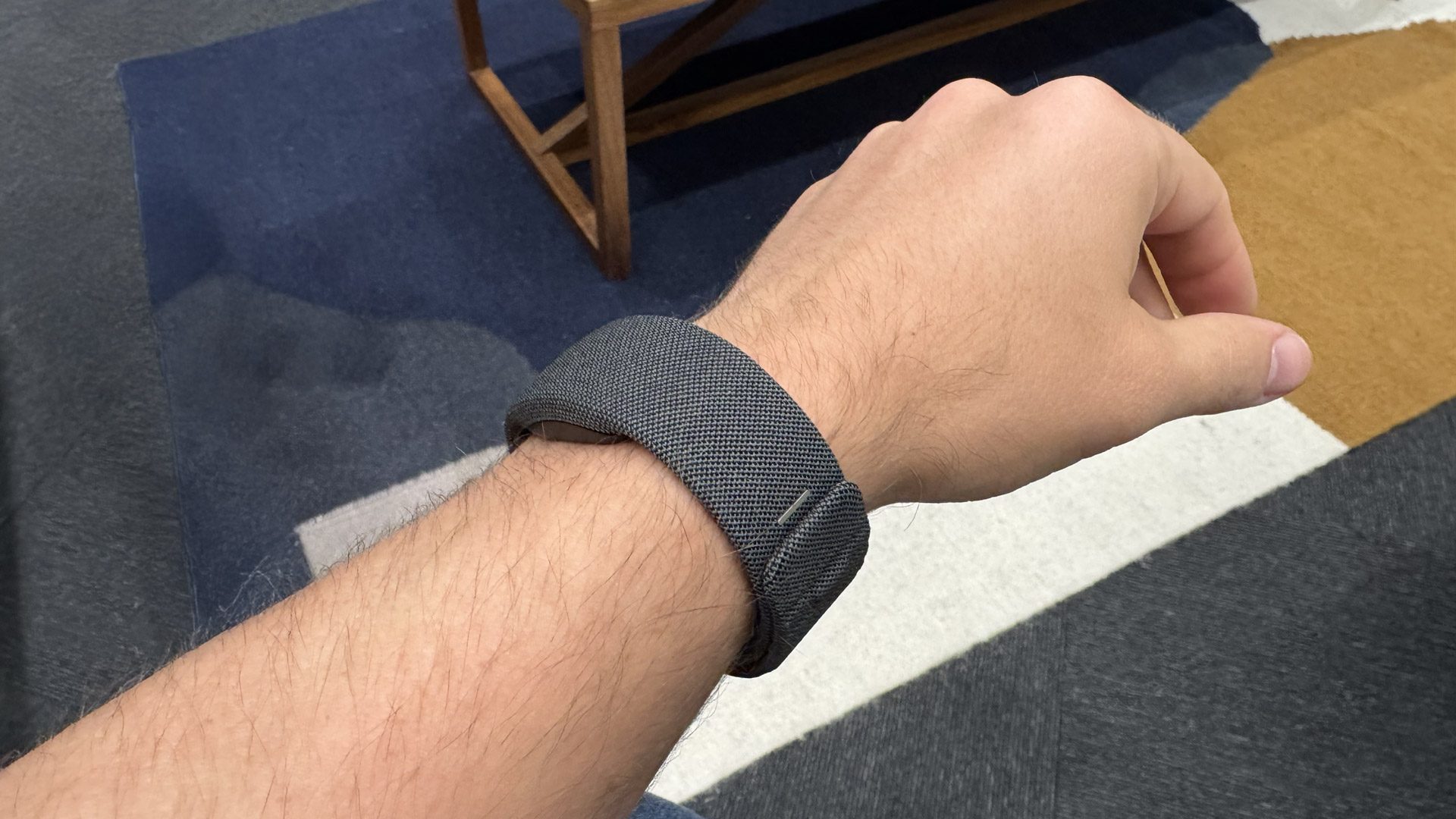
While I was still in line, a Meta employee quickly measured the diameter of my wrist and determined that my correct size was “2”. This is because the bracelet comes in different sizes. This is good to guarantee the optimal comfort of different users with different arm widths.
The bracelet was closed around my wrist a bit like how you close a belt or certain types of watches. The employee closed it very tightly, so it was not very comfortable to wear, because it hurt a bit. I guess if it could have been me to properly fit it, I probably would have had a better experience. During my tests, I had no particular concern with the weight of the neural wristband, so on that side, I can say it was pretty comfortable.
UPDATE: A friend of mine told me that he tried to loosen up the bracelet, and the gestures’ detection quality dropped a lot. So maybe in this moment, the bracelet must be so tight to work properly.
As for the glasses, wearing them just meant putting them on my face like a pair of standard glasses. The glasses are lightweight, and they resemble standard glasses like the original Ray-Ban Meta, but wearing them, I had the sensation they were heavier than they should have been. For instance, I could feel a little discomfort due to the weight of the glasses on my nose. It was a slight sensation, but it was there. Anyway, since the demo was only five minutes, I can’t tell if, in the long term, you just get used to them, or if the sensation of their weight is going to accumulate until the glasses feel too uncomfortable.
Design
A quick video shot I managed to make of the glasses from all angles
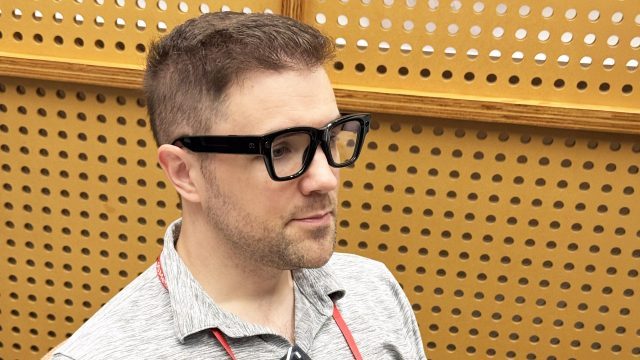
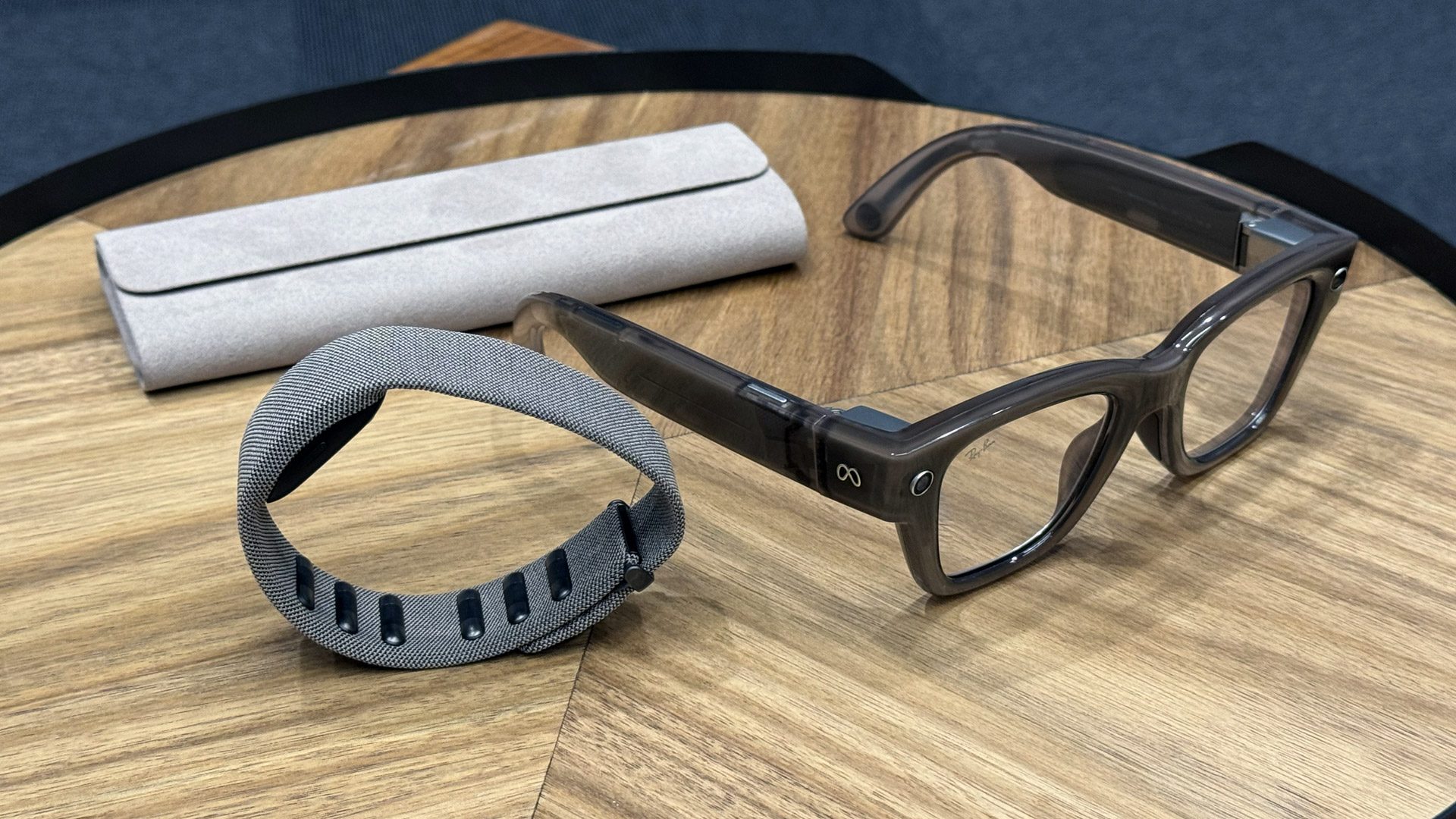
Both the glasses and the neural wristband have a classy design. The glasses are made by Ray-Ban, so of course, they look cool. But the fact that they need to be bulkier than the standard Ray-Ban to accommodate the display technology also has an impact on the final look. The frames are thicker, and the glasses are, in general, bigger than they should be, impacting their aesthetics. I’ve found to look cooler with the original Ray-Ban Meta than with these ones.
I think they look slightly bulky on my face
Visuals
The Ray-Ban Meta Display has a display on the right lens. The fact that the display is monocular heavily impacted my experience. Our brain is meant to reconstruct the world using the views from both eyes, and when something is present only in front of one eye, it becomes a bit confused. I’ve found it a bit uncomfortable to just have one display; I could also feel the eye strain from having to focus on the display with just one eye. Probably, this is something you can get used to with time, but in the five minutes of the demo, I absolutely found it uncomfortable.
Meta claims a 600×600 pixels, 20° FOVdisplay, and in fact, the information window that you see is pretty tiny, and it is big enough only to accommodate a few buttons of a menu, or a few lines of text, for the live captioning. This is still acceptable given the current status of the technology. The display is, anyway, not in the center of the vision, but it is slightly moved outside of it on the right, so that it doesn’t appear in front of what you are looking at in the real world. This is a good thing not to disturb the user.
This is where I saw the display while wearing the glasses. The fingers also try to show the FOV
Meta claims that the display is bright and that it can be used outdoors thanks to its 5000 nits. In my tests, I wouldn’t define it as “bright”… most of the things I’ve seen inside it looked semitransparent, and the colors didn’t look vibrant to me. Anyway, thanks to the 5000 nits, I could put the display info over a not-so-strong light, and I could still read its text. But if I put it in front of a strong artificial light, like the big screen of the DJ during the party, I still had a hard time reading its content.
Anyway, even if the display is tiny, I’ve found the text inside it very readable. The text must be small, so my mother probably couldn’t read it, but it was definitely readable for me.
This is how the main menu of the glasses appears through-the-lens (zoomed in)
Since I like to do crazy tests, I also started shaking my head left-right while wearing the glasses, and all the visuals of the display separated into red-green-blue components in a crazy way until my head was still again. These glasses are not meant for fast movements yet.
One thing that I found cool about the display is that, looking at it from the outside, I couldn’t see that some content was playing on the lenses… there were no bright spots whatsoever. Meta said to Road To VR that the outward light leakage is only around 2%. It means that if you are using these devices on the street, you don’t look like a weirdo with a display in your eye, but you just look like a man wearing standard glasses. This is the feature that probably impressed me the most. You can see it in this video I shot while using the glasses: you have no clue from the outside that I’m looking at a display.
The display information is made to just appear for a few seconds in front of the user, and then the glasses hide it until the user requests to show it again. This has a double purpose: not cluttering the view of the user when not needed, and saving the battery.
Audio
Our tests were mostly visual, and there were just a couple of moments when we could hear any audio. I can say it worked, but I can not judge the quality or the volume.
The Meta employee told us that there are a lot of microphones on the device so that it is able to capture not only the voice of the user, but also the voices of the people around him/her, and also able to filter out the background noise.
Interactions
The neural wristband. You can see from the ones in the upper part of the image that, in the interior of the bracelet, there are various sensors
You interact with the glasses using the Neural Wristband. The wristband can detect your fingers’ gestures by intercepting the electrical impulses that your brain is sending to your fingers. I can say from my tests that it is fairly accurate: apart from a couple of misdetections, it always worked. And while we tended naturally to keep our hands in front of us, actually, it worked very well also with the arm fully relaxed along the body, which is much more comfortable than doing the air-tap in front of you with the Vision Pro. When you perform some gestures, like the clicks, the Wristband vibrates to give you feedback that it understood the gesture.
What was puzzling during the demo was learning all the different commands. If I remember well:
The double-tap of the thumb with the middle finger opened the menu
The single tap of the thumb with the middle finger went back
The single tap of the thumb with the index finger was to confirm
The small swipe of the thumb on the index finger was able to go up-down left-right
Sometimes you could also pretend you were grabbing a knob with the thumb and the index finger, and rotate your hand to make this imaginary knob rotate and select a different value. This way, you could, for instance, select the zoom of the picture to take
These interactions are all very new, and they require some time for the user to learn them. Five minutes are definitely not enough to do that, so we were all very confused about how to interact with the UI, and we continuously made mistakes like using the index finger instead of the middle one and vice versa. My impression was that the interface is not natural and should be learned. It doesn’t seem very complex to learn… it is just that five minutes is literally too little.
It was pretty disappointing that they did not let us try writing with the wristband: it is the thing that made me curious the most, and that can potentially be a game-changer for text input in XR. Zuck showed it on stage, but we have no clue about how it happened.
Mark Zuckerberg writing with the neural wristband on stage
Applications
In our short time with the device, we were able to try:
The main menu, which is a grid of like 6×2 rounded-rectangular buttons that you can navigate with the swipe gesture
A very simple 2D minigame, where we could move a ball on a grid to make it enter a hole. I played it for like 15 seconds, so I can’t say much about it. It seemed very basic, made only to showcase that some entertainment content on these glasses is possible
Meta AI, that we could activate and ask it either to open an app (e.g., saying to take a picture) or to do something contextual to what we had in front of us (e.g., explaining a picture, or restyling the world in front of us)
In this part of the demo, we had to ask the AI to restyle this part of the world in front of us. To me it cartoonized what I was seeing. In this image, you can also see that the display is quite tiny
An application to listen to some music, which played the audio via the speakers, while showing simple controls to play/stop/pause/change volume
The ability to take a picture. We could see a tiny preview of what we were taking the picture of, then change the zoom with the “knob gesture”, and then finally take the picture
The “photo app” with a preview of the photo you are taking
The live captioning feature. The Meta employees were speaking in front of us, and we could read what they were saying, transcribed by the AI in a little bubble in front of our eyes. It worked fairly well, the transcription was quite accurate, and the text was readable.
Live captioning worked well
Price and availability
This is what Meta says about the availability of the device:
Starting at $799 USD, which includes both the glasses and Meta Neural Band, Meta Ray-Ban Display will let you experience, learn about, and interact with the world in a totally new way. It hits shelves September 30 at limited brick-and-mortar retailers in the US, including Best Buy, LensCrafters, Sunglass Hut and Ray-Ban Stores. Availability in select Verizon stores will follow soon after. Expansion to Canada, France, Italy, and the UK is planned for early 2026. We’re starting with select retailers and regions to make sure customers get the glasses and band that’s perfect for them, and we’ll expand buying options over time.
Final impressions
The glasses
You know, I’m not the “enthusiast” guy, so I did not come out of this demo thinking that this is a mind-blowing device. It is not the first time that I try a bracelet that can detect my input finger: Doublepoint can already detect a click using a smartwatch. And it is not the first time that I try smartglasses with color display: TCL RayNeo already has it, and it is even binocular, which is much more comfortable for my eyes. So I can’t say that Ray-Ban Meta Display is mindblowing or unique. Probably its point of strength is that it puts in a single polished package many interesting features found in other glasses. And the neural wristband is something original, but I think it still has to unleash its full potential. In the end, Ray-Ban Meta display is an interesting device that marks a step forward that Meta is taking from audio-only smartglasses to full AR glasses.
I think the glasses are well-made, and their interface is pretty neat. They seem pretty comfortable to wear for short to medium periods of time. The display is pretty readable, but it is tiny, and the choice of going monocular is a big no from me. The neural wristband does its job, and its interface can be learned with time. I also think that an open SDK for this wristband would allow us developers to create with it a lot of applications.
The wristband
Ray-Ban Meta Display can be an interesting gadget for the tech enthusiast or the developer who wants to create applications for it. At $800, and with the limitations it has, I’m not completely sold that they are ready for mainstream adoption. I think the average user can go with the standard Ray-Ban Meta.
But they are an interesting step forward, and if the next iterations of them can be cheaper and have a bigger, binocular display, then they could become something interesting also for the more average user. Having a display is a game-changer because audio-only is very limited, so this is for sure the direction to take for smartglasses.
I stayed awake until 3.30 am to write this article to inform you about this new device… so if you want to reward my hard work, consider subscribing to my newsletter or resharing this post on your social media channels!
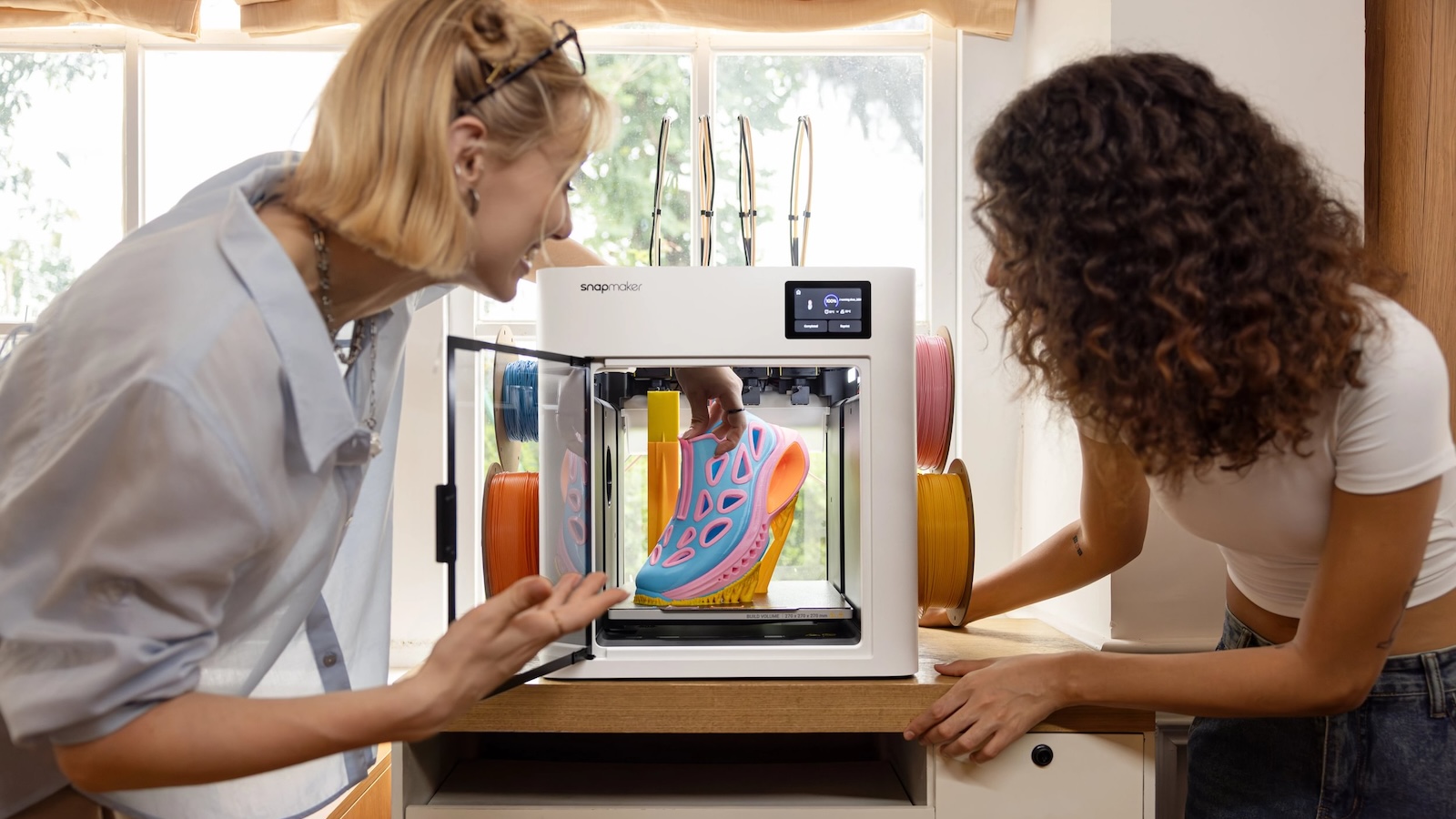
Let’s kick this off with something you don’t see every day in the 3D printing world: record-breaking success. In just 42 hours, the Snapmaker U1 Color 3D Printer became the most-funded 3D printing project in Kickstarter’s Technology → 3D Printing category. By the 48-hour mark, over $9.22 million poured in from more than 10,000 backers—and honestly, we didn’t mean to almost crash Kickstarter’s servers, but the sheer excitement was just that massive.
This isn’t hype. It’s proof that the 3D printing community was more than ready for a real solution to the long-standing frustrations of multi-material and multi-color printing. And after my colleague Karina’s firsthand notes from IFA 2025, it’s crystal clear why.
Snapmaker
Why The U1 Is a Game-Changer
If you’ve spent time tinkering with multi-material or multi-color printing, you already know the drill: endless purging cycles, wasted filament, painfully slow swaps, and prints that should take hours instead drag on all day. The Snapmaker U1 doesn’t just address these problems—it blows them out of the water.
At its core, the U1 is built around four independent toolheads and the ingenious SnapSwap system, which makes swapping toolheads a matter of five seconds—not two agonizing minutes. Each toolhead comes preloaded and preheated with its own filament, so your printer goes from PLA to TPU to ABS in a snap, literally.
What used to be a tedious, wasteful, and time-consuming process is now seamless, efficient, and—dare I say—fun. Karina’s notes couldn’t stop raving about how the U1 skips excessive filament purging, only clearing the degraded bits when absolutely needed, slashing waste by up to 80%.
Built for Precision and Speed
Forget the stereotype that fast equals sloppy. The U1 doesn’t make you choose between speed and quality. Its CoreXY motion system and carbon fiber X-axis rails deliver precise, high-speed moves up to 500 mm/s without sacrificing accuracy.
The system’s built-in compensation algorithms keep every toolhead locked in sync, dampen vibrations, and adjust extrusion timing with pinpoint accuracy. Thanks to Input Shaping, it prevents ghosting and ripples, while Pressure Advance handles quick moves and sharp corners without a hitch.
Automatic XYZ alignment keeps toolhead offsets within a crazy tight 0.04 mm tolerance, so whether you’re printing a complex multi-color model or blending flexible TPU with rigid PLA, your results are always crisp and on point.
Multi-Material, Multi-Color Freedom—Finally Done Right
The U1 doesn’t just do multi-color—it does it right. With four independent extruders, you’re free to mix materials in ways most printers wouldn’t dare attempt. Carve out rigid structural parts from PLA, use TPU for flexible joints, and switch to PVA for easy-to-remove supports—all without the usual drama.
Karina noted that the U1’s automatic mesh bed leveling locks in a grippy, even first layer every single time. That’s a relief when working with tricky material combos that require precise adhesion.
Plus, the automatic filament system handles up to four spools on standby. It detects low filament, handles loading, and keeps your print running without manual intervention. In other words: no more mid-print spool swapping panic.
Snapmaker
Less Waste, More Savings
The environmental and financial perks of the U1 are hard to ignore. Unlike traditional systems that purge entire color lines (wasting filament and time), the U1 purges only what’s actually degraded. Snapmaker claims up to 80% less filament waste per print, and honestly, that adds up fast over the year.
Karina’s notes made it clear this isn’t just greenwashing—it’s real savings. Less waste, fewer failed prints, and a cleaner workflow. Bonus points for anyone who’s tired of throwing away filament they just bought.
Smart Control & Safety
Managing prints is refreshingly simple thanks to the Snapmaker App and Orca Slicer software. Start, monitor, and control your prints from anywhere. Capture time-lapse videos to watch your creation come to life, or get alerts straight to your phone if something goes wrong.
Speaking of alerts, the U1’s built-in chamber camera isn’t just for show. An OTA firmware update scheduled for December 2025 will add AI-powered detection to spot spaghetti disasters and workspace obstructions automatically, so you’re warned before your print turns into a filament mess.
Built Like a Tank
Snapmaker’s reputation for rock-solid reliability shows here. The toolheads use steel-ball kinematic couplings—no screws, no magnets, no extra motors. Just a click, a lock, and rock-solid performance.
Professional testers didn’t hold back. Maurizio ran over 10,000 tool changes without a single hiccup, and DukeDoks built multi-color RC car models and declared it a “game-changer.” The U1 has passed the stress test and then some.
Who’s the U1 For?
Let’s be clear: this isn’t a printer for casual hobbyists who occasionally print a Benchy or a phone stand. The U1 is designed for creators who want speed, precision, and multi-material freedom without the usual headaches.
Whether you’re prototyping product designs, crafting multi-color models, or building complex functional parts, the U1 feels like an investment in sanity. Plus, it’s a sustainable choice for anyone who cares about reducing waste while maximizing output.
Final Verdict: Worth Every Penny
Here’s the bottom line: The Snapmaker U1 Color 3D Printer is more than just a clever piece of hardware. It’s a statement that multi-color and multi-material 3D printing don’t have to be complicated, wasteful, or slow.
With record-breaking success on Kickstarter, backed by thousands of enthusiastic creators, and real-world performance that doesn’t disappoint, the U1 proves it’s not just another printer—it’s a pioneer. Whether you want flawless precision, massive speed, or serious material freedom, this machine delivers.
The future of 3D printing is smarter, faster, and far less wasteful. Thanks to the U1, it’s already here.
Undoubtedly the smart glasses headliner of Meta Connect this year was the new $800 Meta Ray-Ban Display Glasses, which pack in a single display into a familiar Wayfarer-style package. Alongside it though, Meta showed off two new smart glasses: the Oakley Meta Vanguard and next generation of Ray-Ban Meta.
Oakley Meta Vanguard – $499 (available Oct 21)
Oakley Meta Vanguard | Image courtesy Meta
Before Meta and Essilor Luxottica released Oakley Meta HSTN in July, we were definitely envisioning something more like the new Oakley Meta Vanguard. But it’s better late than never, as Meta has just unveiled its sleek, blade-like frames they say are “built for high-intensity sports.”
Rated at IP67 dust and water resistance, Meta Oakley Vanguard is supposedly durable enough for sweaty workouts or rainy rides, with it targeting sports like cycling, snowboarding, and running.
Oakley Meta Vanguard | Image courtesy Meta
Notably, like many of its traditional specs, the new smart glasses use Oakley’s Three-Point Fit system, which includes three interchangeable nose pads for a more secure fit, with Meta noting the frames are optimized for use with cycling helmets and hats.
They also include an onboard 12MP, 122° wide-angle camera sensor for capturing video up to 3K resolution, with modes including Slow Motion, Hyperlapse, and adjustable image stabilization.
And just like Ray-Ban Meta, it features open-ear speakers, notably rated at six decibels louder than previous Meta Oakley HSTN models, including a wind-optimized five-mic array to provide clear audio for taking calls, using voice commands, or listening to music while training.
The newest Oakley’s also integrate with Garmin, Strava, Apple Health, and Android Health Connect, delivering post-workout summaries and real-time stats through Meta AI. Athletes can check heart rate, progress, or other data hands-free with voice prompts.
Oakley Meta Vanguard | Image courtesy Meta
Available in four frame/lens color combinations, the glasses weigh 66g and offer up to nine hours of mixed use (or six hours of music) on a single charge, with an additional 36 hours via the charging case. Quick charging is said to bring the glasses to 50% in just 20 minutes, Meta says.
Like all of the other Meta smart glasses on offer, they include 32GB of storage for over 1,000 photos or 100 short videos, the company says.
Since it’s built for high-intensity sports, it also means the company is introducing replaceable lenses, starting at $85. Here are all four models available for pre-order, including the lenses you’ll be able to mix and match later.
Oakley Meta Vanguard Black with PRIZMTM 24K
Oakley Meta Vanguard White with PRIZMTM Black
Oakley Meta Vanguard Black with PRIZMTM Road
Oakley Meta Vanguard White with PRIZMTM Sapphire
Oakley Meta Vanguard is now available for pre-order through Meta or Oakley, priced at $499 and launching October 21st.
They’ll be available in the US, Canada, UK, Ireland, France, Italy, Spain, Austria, Belgium, Australia, Germany, Sweden, Norway, Finland, Denmark, Switzerland, and the Netherlands. Meta says they should also eventually launch in Mexico, India, Brazil, and the United Arab Emirates later this year.
Ray-Ban Meta (Gen 2) – Starting at $379 (Now Available)
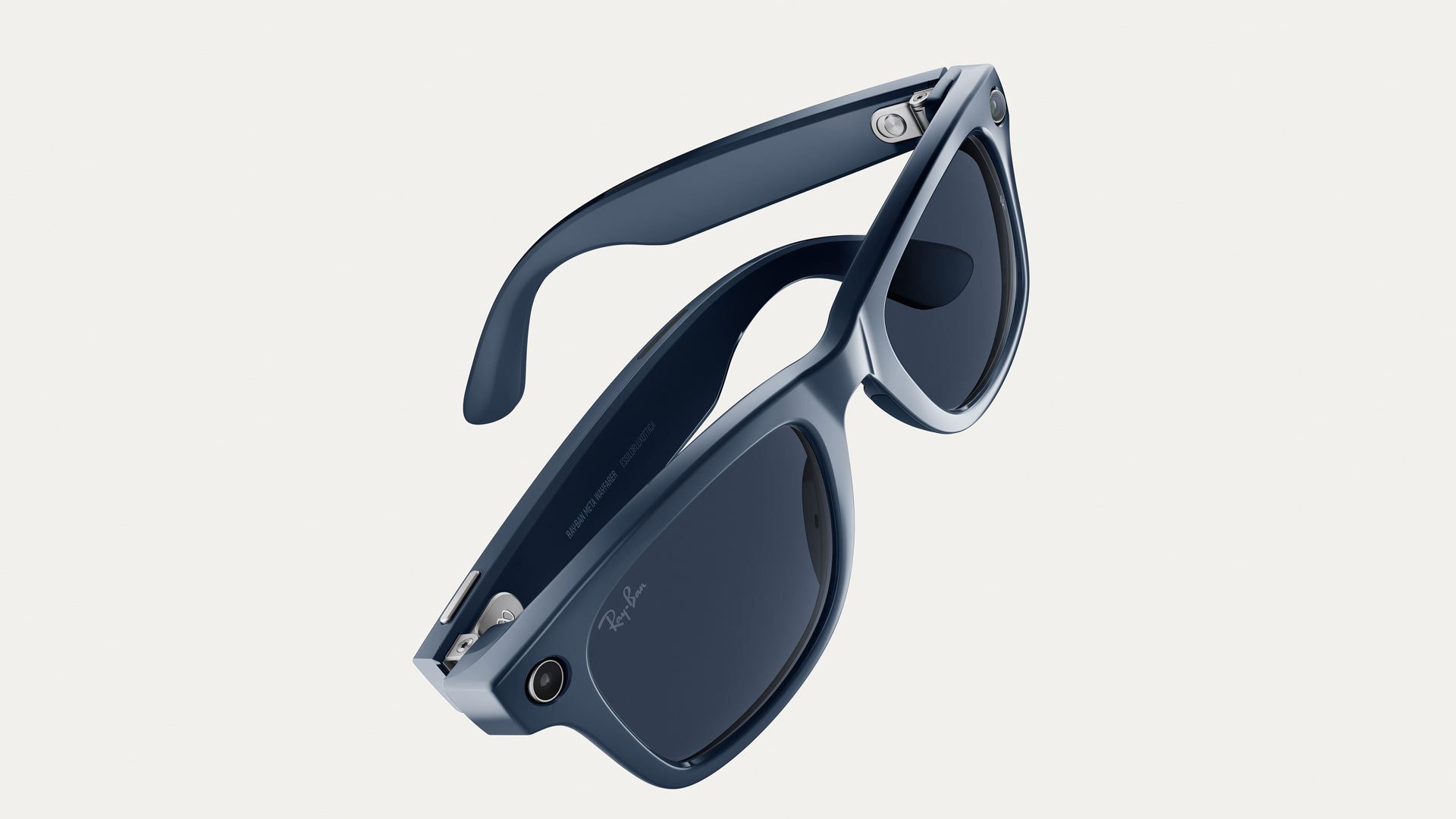
Ray-Ban Meta Wayfarer (Gen 2) | Image courtesy Meta
While the company considers its next Ray-Ban Meta Glasses “Gen 2”, they’re technically the third generation following the release of Ray-Ban Facebook Stories in 2021 and Ray-Ban Meta in 2023.
Naming scheme aside, the latest Ray-Ban Meta smart glasses are delivering the same improvements seen in Oakley Meta HSTN, and essentially the same base functionality. While it can play music, do real-time translation, and hands-free calls, it also offers better photo and video capture than its predecessor.
Its ultrawide 12MP camera sensor is rated for photo capture up to 3,024 × 4032 pixels and video from 1200p at 60 FPS 1440p at 30 FPS, and 3K at 30 FPS—all of which are up to three minutes in length.
Ray-Ban Meta Wayfarer (Gen 2) | Image courtesy Meta
Like Oakley Meta HSTN, Ray-Ban Meta (Gen 2) boasts up to eight hours of continuous use and an additional 48 hours from the charging case, plus quick charge to 50% in 20 minutes in the charging case.
And it probably goes without saying, but all of Meta’s smart glasses make heavy use of its own Meta AI, which includes things like voice search queries (“Hey Meta!”), reading QR codes, suggesting recipes, saving notes, etc.
Ray-Ban Meta Skyler (Gen 2) | Image courtesy Meta
Additionally, the device includes Bluetooth 5.3, Wi-Fi 6, 32GB of storage, and an IPX4 water-resistance rating for light rain or splashes.
And like the 2023 model, the new Ray-Ban Meta smart glasses offer gads of frame and lens combinations: 27 in total across its Wayfarer and Skyler models, which include options for large or low nose bridges.
It is also getting a price bump over the first-gen, which were launched in 2023 for $299. Ray-Ban Meta (Gen 2) starts at $379 for standard lens options, and will be available with polarized lenses ($409), transitions lenses ($459), and prescription lenses (pricing varies).
You can find all of those models and lens combinations starting today over at Meta and Ray-Ban.com.
We’re currently on the ground at Meta Connect this year, so check back soon for all things XR.
At the Connect developer conference today, Meta officially unveiled its next generation of smart glasses built with Essilor Luxottica, essentially confirming yesterday’s big leak, which includes the long-rumored pair with a single heads-up display.
Meta CEO Mark Zuckerberg showed off three new base models during the Connect keynote, which includes a curious switcheroo on the naming scheme for its most expensive yet, the ‘Meta Ray-Ban Display Glasses’.
That name change isn’t coming to the rest of the lineup, as the company additionally announced the sport-focused Oakley Meta Vanguard and new Ray-Ban Meta Gen 2 glasses, which were hyped alongside the previously released Oakley Meta HSTN released back in July.
Here’s everything we know about the new Meta Ray-Ban Display Glasses announced today:
Meta Ray-Ban Display Glasses – $799
Priced at $799, Meta Ray-Ban Display glasses include all of the usuals: voice control, photo/video capture, capture LED, five microphones, dual off-ear speakers, and 12MP camera. It’s also running the same chipset as Ray-Ban Meta and the rest of the new lineup, the Qualcomm Snapdragon AR1 Gen 1.
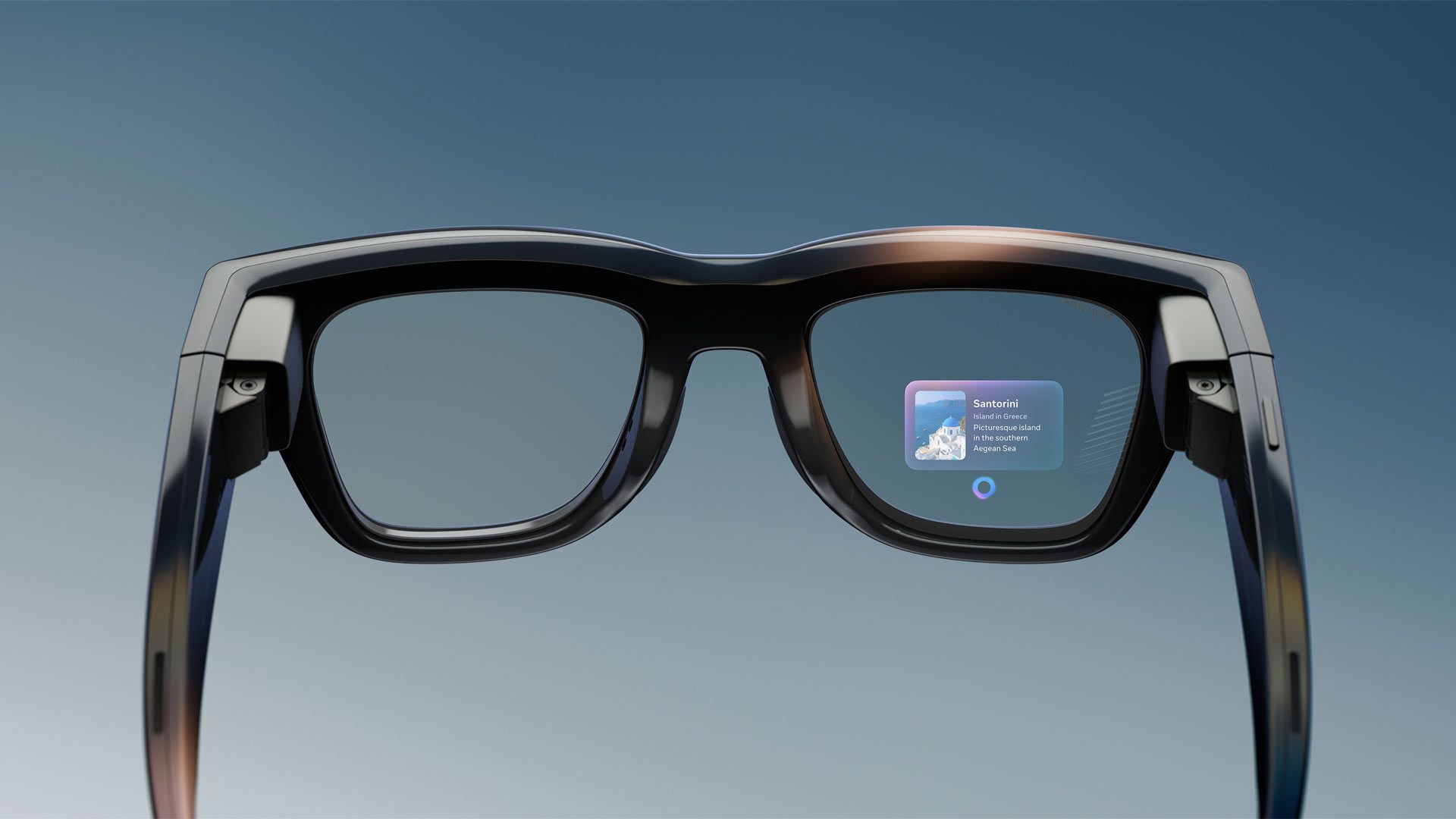
For the first time though, Meta’s smart glasses are adding in a full-color monocular display in the right eye that leverages onboard AI in new and interesting ways beyond the audio chats of previous generations.
Meta says the 600 × 600 pixel display serves up a 20-degree field of view (FOV) at 42 pixels per degree (PPD). The display is clocked at 90Hz refresh, with content refreshing at 30Hz. Brightness is said to range from 30 – 5,000 nits, and includes UV detection to automatically know when to turn up the display.
Meta Ray-Ban Display Glasses | Image courtesy Meta
The display is also private, allowing for less than 2% light leakage, Meta says, meaning people probably won’t be able to see what you’re looking at.
And with the included surface electromyography (sEMG)-based ‘Meta Neural Band’, they probably won’t know what app you’re using either. The Meta Neural band is supposed to provide all-day wear, with up to 18 hours of battery life and an IPX7 water rating, and do things that optical sensor-based hand tracking simply can’t—haptic feedback included.
Using sEMG, the Neural Band can detect the faint electrical signals from the muscles in your forearm as you move your fingers and hands, letting you do things like swipe left and right with your thumb to navigate music, or pinch your fingers and rotate your wrist to turn the volume. Meta says it’s also currently working on an update to allow for EMG-based handwriting.
Meta Neural Band | Image courtesy Meta
Combining visual and hand input unlocks a host of new abilities, Meta says, like being able to privately view and reply to messages from Whatsapp, Messenger, and Instagram, as well as native messaging on iOS and Android. That includes live video calls too, so you can see the other person while they catch a stream of your POV.
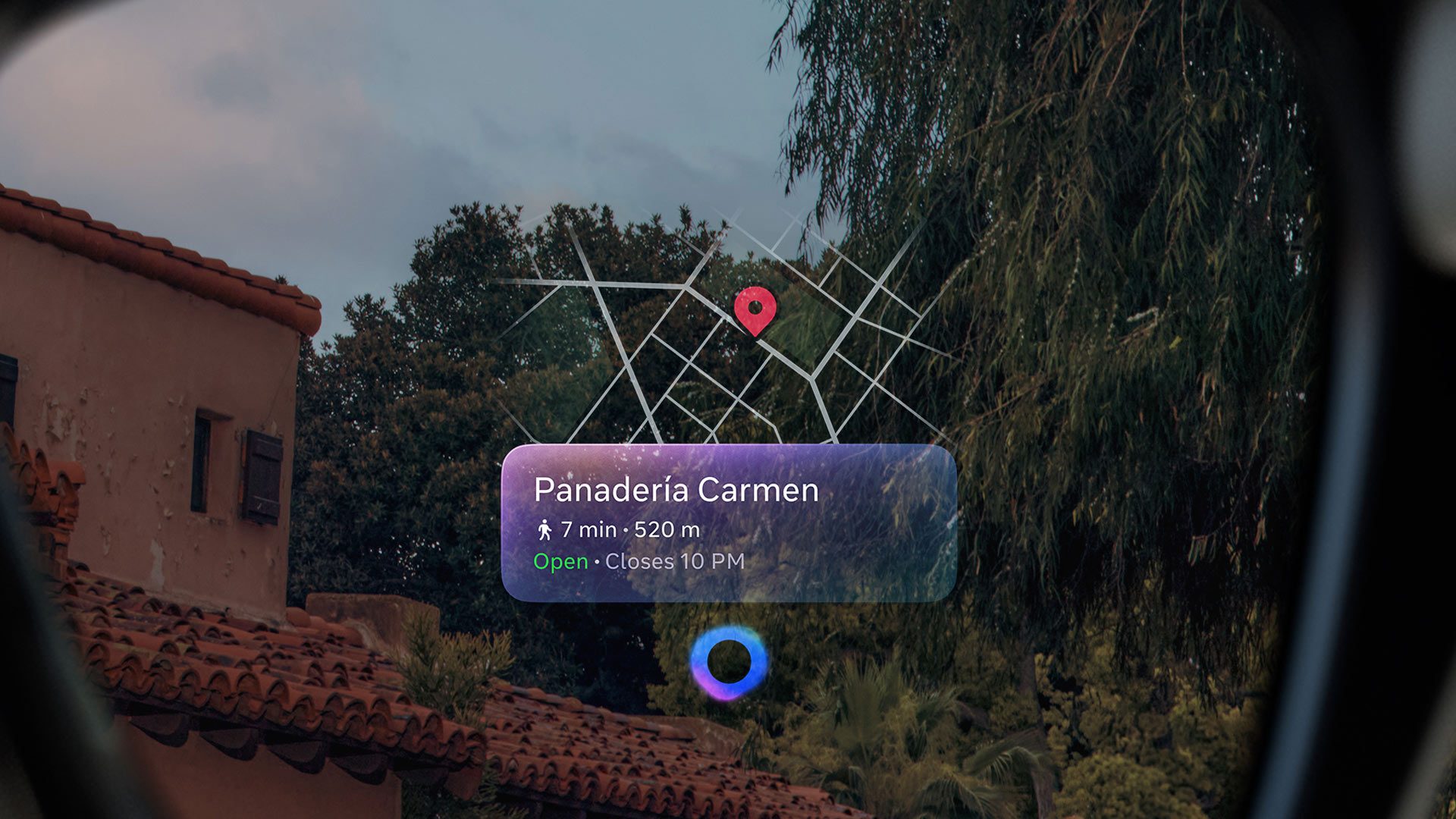
It also unlocks turn-by-turn walking directions with a visual map of the area shown on the in-lens display, which Meta says will be available in beta across select cities, with more added over time.
Turn-by-turn Directions in Meta Ray-Ban Display | Image courtesy Meta
What’s more, the display also works as a viewfinder for the glasses’ 12MP camera with 3× digital zoom, letting you preview shots before you take them, capture images and videos and review and share right from the glasses. The device’s photo capture default is 3,024 × 4,032 pixels, while videos capture is 1080p at 30fps (1,440 × 1,920 pixels).
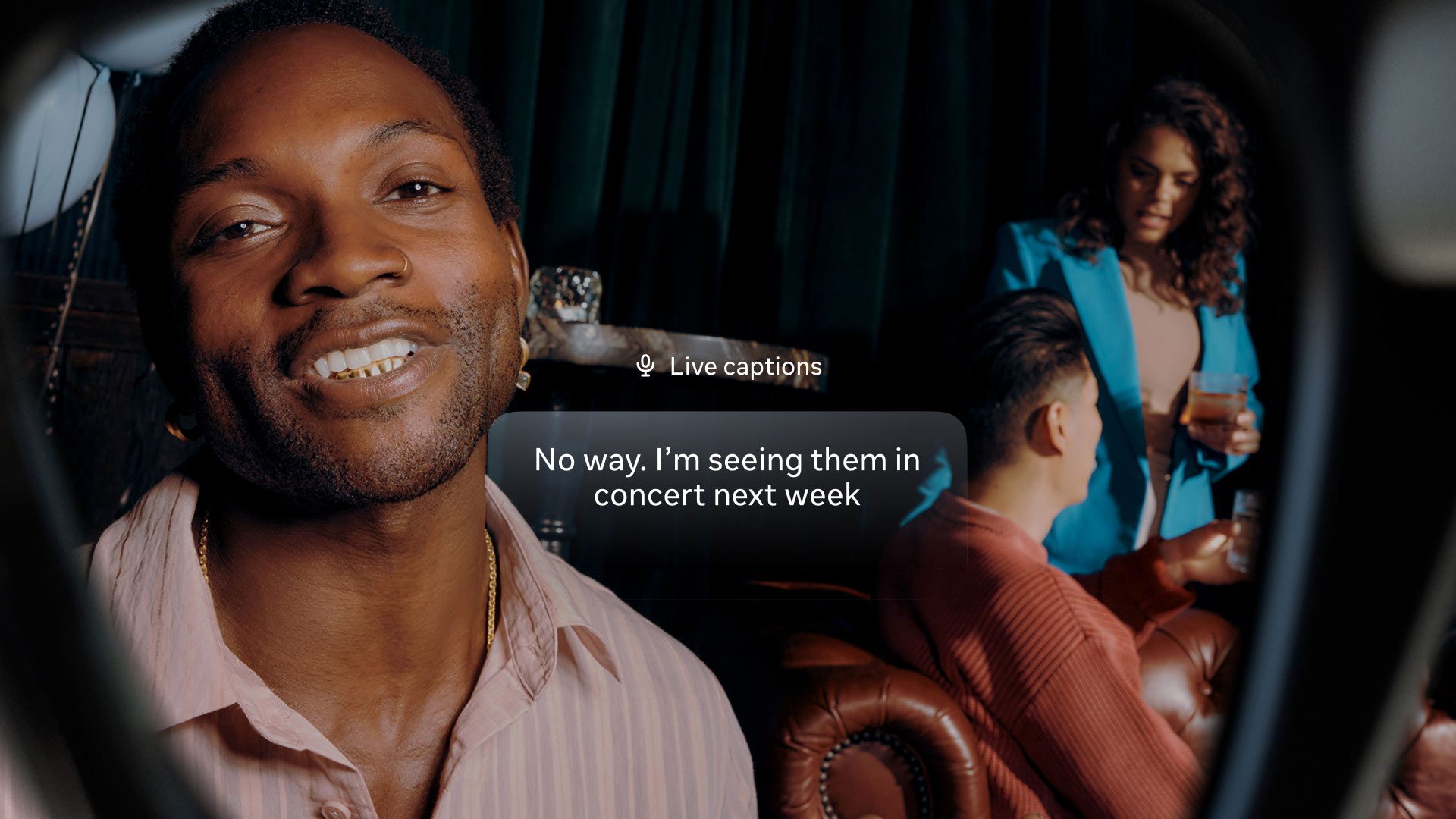
Meta Ray-Ban Display Glasses also boast the ability to display real-time captions and foreign language translation, essentially providing subtitles to any conversation.
Live Captions in Meta Ray-Ban Display Glasses | Image courtesy Meta
The glasses are set to include transitions lenses by default, and are said to last up to six hours of mixed-use battery life, and up to 30 hours of battery life total thanks to the portable charging case, which is also collapsible. Meta says users can charge the glasses to 50% in just 20 minutes while in the case.
It also supports prescriptions ranging from -4.00 to +4.00, although the company hasn’t detailed precisely how at this point. We’re still learning about Meta Ray-Ban Display Glasses, and we’ll fill you in as soon as we know.
Meta is pitching its display glasses and the included Neural Band in two colorways: Shiny Black and Shiny Sand. Two frame sizes will also be available, standard and large, with the Neural Band arriving in three sizes.
Meta Ray-Ban Display Glasses (Sand) | Image courtesy Meta
Since users will need to be fitted for both the glasses and wristband, they’re initially only set to be available for purchase in-person at limited brick-and-mortar retailers in the US, starting September 30th.
Those physical retailers include Best Buy, Lenscrafters, Sunglass Hut, and Ray-Ban stores. Select Verizon stores in the US will follow soon after, Meta says.
Global expansion is however set for Canada, France, Italy, and the UK for early 2026, although Meta says they’ll expand more buying options over time.
We’re currently at Meta Connect this week, and are reporting on all things XR, so make sure to check back soon.
The newly announced Meta Ray-Ban Display glasses, and the ‘Neural Band’ input device that comes with them, are still far from proper augmented reality. But Meta has made several clever design choices that will pay dividends once their true AR glasses are ready for the masses.
The Ray-Ban Display glasses are a new category for Meta. Previous products communicated to the user purely through audio. Now, a small, static monocular display adds quite a bit of functionality to the glasses. Check out the full announcement of the Meta Ray-Ban Display glasses here for all the details, and read on for my hands-on impressions of the device.
A Small Display Makes a Big Difference
Meta Ray-Ban Display Glasses | Image courtesy Meta
A 20° monocular display isn’t remotely sufficient for proper AR (where virtual content floats in the world around you), but it adds a lot of new functionality to Meta’s smart glasses.
For instance, imagine you want to ask Meta AI for a recipe for teriyaki chicken. On the non-display models, you could definitely ask the question and get a response. But after the AI reads it out to you, how do you continue to reference the recipe? Well, you could either keep asking the glasses over and-over, or you could pull your phone out of your pocket and use the Meta AI companion app (at which point, why not just pull the recipe up on your phone in the first place?).
Now with the Meta Ray-Ban Display glasses, you can actually see the recipe instructions as text in a small heads-up display, and glance at them whenever you need.
In the same way, almost everything you could previously do with the non-display Meta Ray-Ban glasses is enhanced by having a display.
Now you can see a whole thread of messages instead of just hearing one read through your ear. And when you reply you can actually read the input as it appears in real-time to make sure it’s correct instead of needing to simply hear it played back to you.
When capturing photos and videos you now see a real-time viewfinder to ensure you’re framing the scene exactly as you want it. Want to check your texts without needing to talk out loud to your glasses? Easy peasy.
And the real-time translation feature becomes more useful too. In current Meta glasses you have to listen to two overlapping audio streams at once. The first is the voice of the speaker and the second is the voice in your ear translating into your language, which can make it harder to focus on the translation. With the Ray-Ban Display glasses, now the translation can appear as a stream of text, which is much easier to process while listening to the person speaking in the background.
It should be noted that Meta has designed the screen in the Ray-Ban Display glasses to be off most of the time. The screen is set off and to the right of your central vision, making it more of a glanceable display than something that’s right in the middle of your field-of-view. At any time you can turn the display on or off with a double-tap of your thumb and middle finger.
Technically, the display is a 0.36MP (600 × 600) full-color LCoS display with a reflective waveguide. Even though the resolution is “low,” it’s plenty sharp across the small 20° field-of-view. Because it’s monocular, it does have a ghostly look to it (because only one eye can see it). This doesn’t hamper the functionality of the glasses, but aesthetically it’s not ideal.
Meta hasn’t said if they designed the waveguide in-house or are working with a partner. I suspect the latter, and if I had to guess, Lumus would be the likely supplier. Meta says the display can output up to 5,000 nits brightness, which is enough to make the display readily usable even in full daylight (the included Transitions also help).
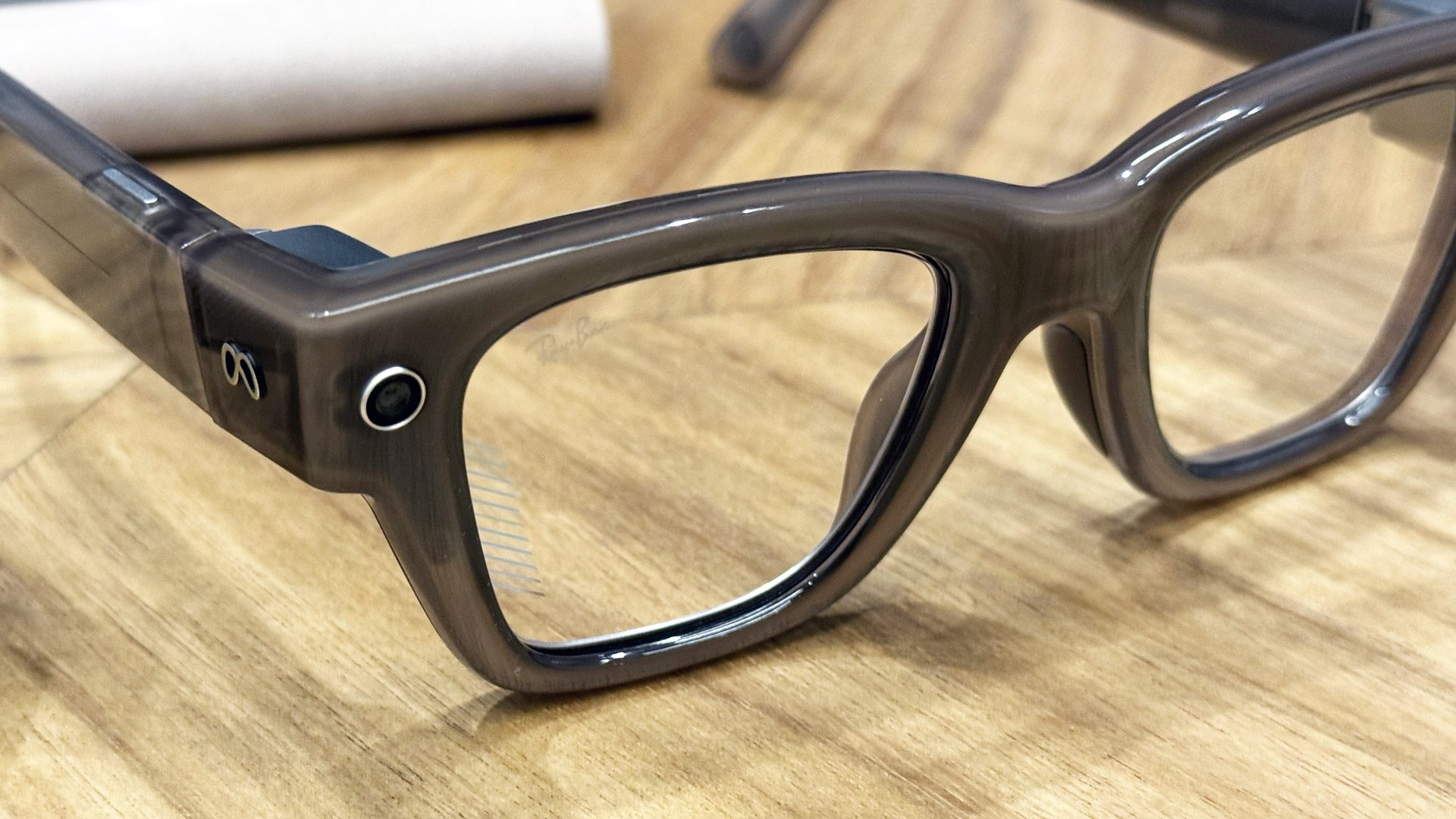
From the outside, the waveguide is hardly visible in the lens. The most prominent feature is some small diagonal markings toward the temple-side of the headset.
Photo by Road to VR
Meanwhile, the final output structures are very transparent. Even when the display is turned on, it’s nearly impossible to see a glint from the display in a normally lit room. Meta said the outward light-leakage is around 2%, which I am very impressed by.
The waveguide is extremely subtle within the lens | Photo by Road to VR
Aside from the glasses being a little chonkier than normal glasses, the social acceptability here is very high—even more so because you don’t need to constantly talk to the glasses to use them, or even hold your hand up to tap the temple. Instead, the so-called Neural Band (based on EMG sensing), allows you to make subtle inputs while your hand is down at your side.
The Neural Band is an Essential Piece to the Input Puzzle
Photo by Road to VR
The included Neural Band is just as important to these new glasses as the display itself—and it’s clear that this will be equally important to future AR glasses.
To date, controlling XR devices has been done with controllers, hand-tracking, or voice input. All of these have their pros and cons, but none are particularly fitting for glasses that you’d wear around in public; controllers are too cumbersome, hand-tracking requires line of sight which means you need to hold your hands awkwardly out in front of you, and voice is problematic both for privacy and certain social settings where talking isn’t appropriate.
The Neural Band, on the other hand, feels like the perfect input device for all-day wearable glasses. Because it’s detecting muscle activity (instead of visually looking for your fingers) no line-of-sight is needed. You can have your arm completely to your side (or even behind your back) and you’ll still be able to control the content on the display.
The Neural Band offers several ways to navigate the UI of the Ray-Ban Display glasses. You can pinch your thumb and index finger together to ‘select’; pinch your thumb and middle finger to ‘go back’; and swipe your thumb across the side of your finger to make up, down, left, and right selections. There are a few other inputs too, like double-tapping fingers or pinching and rotating your hand.
As of now, you navigate the Ray-Ban Display glasses mostly by swiping around the interface and selecting. In the future, having eye-tracking on-board will make navigation even more seamless, by allowing you to simply look and pinch to select what you want. The look-and-pinch method, combined with eye-tracking, already works great on Vision Pro. But it still misses your pinches sometimes if your hand isn’t in the right spot, because the cameras can’t always see your hands at quite the right angle. If I could use the Neural Band for pinch detection on Vision Pro, I absolutely would—that’s how well it seems to work already.
While it’s easy enough to swipe and select your way around the Ray-Ban Display interface, the Neural Band has the same downside that all the aforementioned input methods have: text input. But maybe not for long.
In my hands-on with the Ray-Ban Display, the device was still limited to dictation input. So replying to a message or searching for a point of interest still means talking out loud to the headset.
However, Meta showed me a demo (that I didn’t get to try myself) of being able to ‘write’ using your finger against a surface like a table or your leg. It’s not going to be nearly as fast as a keyboard (or dictation, for that matter), but private text input is an important feature. After all, if you’re out in public, you probably don’t want to be speaking all of your message replies out loud.
The ‘writing’ input method is said to be a forthcoming feature, though I didn’t catch whether they expected it to be available at launch or sometime after.
On the whole, the Neural Band seems like a real win for Meta. Not just for making the Ray-Ban display more useful, but it seems like the ideal input method for future glasses with full input capabilities.
Photo by Road to VR
And it’s easy to see a future where the Neural Band becomes even more useful by evolving to include smartwatch and fitness tracking functions. I already wear a smartwatch most of the day anyway… making it my input device for a pair of smart glasses (or AR glasses in the future) is a smart approach.
Little Details Add Up
One thing I was not expecting to be impressed by was the charging case of the Ray-Ban Display glasses. Compared to the bulky charging cases of all of Meta’s other smart glasses, this clever origami-like case folds down flat to take up less space when you aren’t using it. It goes from being big enough to accommodate a charging battery and the glasses themselves, down to something that can easily go in a back pocket or slide into a small pocket in a bag.
This might not seem directly relevant to augmented reality, but it’s actually more important than you might think. It’s not like Meta invented a folding glasses case, but it shows that the company is really thinking about how this kind of device will fit into people’s lives. An analog to this for their MR headsets would be including a charging dock with every headset—something they’ve yet to do.
Now with a display on-board, Meta is also repurposing the real-time translation feature as a sort of ‘closed captioning’. Instead of translating to another language, you can turn on the feature and see a real-time text stream of the person in front of you, even if they’re already speaking your native language. That’s an awesome capability for those that are hard-of-hearing.
Live Captions in Meta Ray-Ban Display Glasses | Image courtesy Meta
And even for those that aren’t, you might still find it useful… Meta says the beam-forming microphones in the Ray-Ban Display can focus on the person you’re looking at while ignoring other nearby voices. They showed me a demo of this in action in a room with one person speaking to me and three others having a conversation nearby to my left. It worked relatively well, but it remains to be seen if it will work in louder environments like a noisy restaurant or a club with thumping music.
Meta wants to eventually pack full AR capabilities into glasses of a similar size. And even if they aren’t there yet, getting something out the door like the Ray-Ban Display gives them the opportunity to explore, iterate—and hopefully perfect—many of the key ‘lifestyle’ factors that need to be in place for AR glasses to really take off.
Disclosure: Meta covered lodging for one Road to VR correspondent to attend an event where information for this article was gathered.
Text on display for illustration only (not an actual photo)
WeAct Display FS is an inexpensive 0.96-inch USB display dongle designed to add an information display or a tiny secondary display to your computer or SBC.
We’ve seen this type of information display with products such as the Turing Smart Screen, a larger 3.5-inch color display, or small OLEDs integrated into cases such as the Pironman 5 Max to disable text. The WeAct Display FS V1 may be tiny, but it’s also a full-color 160×80 resolution display that can be customized with software provided by WeAct.
Text and image on display for illustration only. Not an actual photo, as I could not find any with the display connected to a host
WeAct Display FS V1 specifications:
Display – 0.96-inch RGB565 display with 160×80 resolution
Host interface – “Reversible” USB 2.0 Type-A Full Speed (FS) port showing as a CDC device
Dimensions – 43 x 14.5 mm
Since you wouldn’t want to get a display only for it to face the wrong direction, for instance, the desk or the wall, the company made the USB-A port reversible, and the user only needs to install one of the two provided pads on the unused side of the port to avoid short circuits.
WeAct provides two programs for it. The first one is the WeAct Studio System Monitor based on a fork of Matthieu Houdebine’s Turing Smart Screen Python project. This allows users to create UIs/themes with text, images, weather, and other features… WeAct says the little device only works on Windows, but the open-source project is supposed to also work on macOS, Linux (including Raspberry Pi OS), and essentially any operating system with support for Python 3.9+.
WeAct Studio System Monitor
The second program is called WeAct Studio Screen Projection, and as I understand it, it emulates an actual display, so you could move any window/program to the USB display. I’m just not sure how a desktop OS like Windows will handle a tiny 160×80 “monitor”… I suppose it could be used to play a full-screen YouTube video or display photos for whatever reason. That one only works on Windows, and there’s no source code.
Luxury conglomerate LVMH has partnered with financial technology platform Adyen, with the aim of unifying payment systems across all of its brands.
The system aims to allow LVMH to leverage its most effective initiatives at scale, while also preserving the unique identity of each of its separate brands.
Adyen says it can provide a “high end customer experience” thanks to its frictionless payments in store with mobile terminals and tap-to-pay technology.
LVMH will roll out the technology to more than 1,000 stores worldwide, giving all geographies and methods a single payment partner.
“This project is part of our broader ambition to deliver a flawless customer experience, reflecting the quality of our products and the craftsmanship of our Maisons,” says Arnaud Bodzon, Group Payment Director at LVMH.
“This applies not only to end customers but also to the sales advisors using the solutions. They can now focus fully on their core role - advising and supporting our clients - without having to worry about payment processing.
“Hands-on support is a key success factor when managing integration projects in a group like LVMH. Adyen’s expertise has enabled them to meet and adapt to our specific needs.”
Adyen says the unification will provide an “elegant, efficient, and truly global” payment experience.
“Our partnership with LVMH reflects a shared vision: creating meaningful and effortless experiences for customers in the world of high-end retail," adds Ethan Tandowsky, CFO at Adyen.
"Beyond facilitating Financial services, we’re working together to elevate every touchpoint across LVMH’s Maisons to make sure shoppers have an experience which matches the luxury goods they are purchasing. I cannot wait to see what we can achieve together with LVMH in this next chapter."
The news follows shortly after Adyen partnered with Dobbies Garden Centres on a project covering payments in-store and online, supporting retail, restaurants and experiences.
The awards. which are now open for entries, celebrate global tech innovation in a fast moving omnichannel world.
Our 2024 hall of fame entrants were revealed during an event which took place at RIBA’s 66 Portland Place HQ in Central London on 21st November, and consisted of a drinks reception, three course meal, and awards ceremony presided over by comedian Lucy Porter.
In his welcome speech, Scott Thompson, Founder and Editor, RTIH, said: “The event is now into its sixth year and what a journey it has been. The awards started life as an online only affair during the Covid outbreak, before launching as a small scale in real life event and growing year on year to the point where we’re now selling out this fine, historic venue.”
He added: “Congratulations to all of our finalists. Many submissions did not make it through to the final stage, and getting to this point is no mean feat. Checkout-free stores, automated supply chains, immersive experiences, on-demand delivery, next generation loyalty offerings, inclusive retail, green technology. We’ve got all the cool stuff covered this evening.”
“But just importantly we’ve got lots of great examples of companies taking innovative tech and making it usable in everyday operations - resulting in more efficiency and profitability in all areas.”
Congratulations to our 2024 winners, and a big thank you to our sponsors, judging panel, the legend that is Lucy Porter, and all those who attended November's gathering.
For further information on the 2025 RTIH Innovation Awards, please fill in the below form and we will get back to you asap.
Name
*
First Name
Last Name
Email
*
Subject
*
Message
*
New Black, a contextual commerce platform, has won the Best Seamless Unified Retail award at NRF 2025: Retail’s Big Show Europe, which is taking place this week in Paris.
The event is the European edition of the National Retail Federation’s flagship New York gathering. Its awards highlight international retail innovation across eight categories, with 100+ candidates competing this year.
“We don’t build for trophies, so this feels like a meaningful signal and appreciation for what we have done as a company,” comments Lub Ten Napel, Chief Information Officer at New Black.
“It is recognition for holding our line and vision of choosing the best of technology over complex best-of-breed architectures. From our founding until today, we have believed that legacy systems are holding retail back, preventing it from becoming adaptive to change.”
New Black’s EVA platform was recognised for streamlining consumer engagement by combining pricing, inventory, tax, loyalty, returns, OMS, PoS, in-store operations and more functions within a single platform.
EVA also allows in store and digital teams to tailor experiences, creating the best possible customer experience.
“That is why our approach is different,” adds Pim Vijftigschild, CCO at New Black. “We don’t believe in selling the next piece of software. We work together with our customers to rethink their architecture, helping them embrace a transformative mindset.”
The awards. which are now open for entries, celebrate global tech innovation in a fast moving omnichannel world.
Our 2024 hall of fame entrants were revealed during an event which took place at RIBA’s 66 Portland Place HQ in Central London on 21st November, and consisted of a drinks reception, three course meal, and awards ceremony presided over by comedian Lucy Porter.
In his welcome speech, Scott Thompson, Founder and Editor, RTIH, said: “The event is now into its sixth year and what a journey it has been. The awards started life as an online only affair during the Covid outbreak, before launching as a small scale in real life event and growing year on year to the point where we’re now selling out this fine, historic venue.”
He added: “Congratulations to all of our finalists. Many submissions did not make it through to the final stage, and getting to this point is no mean feat. Checkout-free stores, automated supply chains, immersive experiences, on-demand delivery, next generation loyalty offerings, inclusive retail, green technology. We’ve got all the cool stuff covered this evening.”
“But just importantly we’ve got lots of great examples of companies taking innovative tech and making it usable in everyday operations - resulting in more efficiency and profitability in all areas.”
Congratulations to our 2024 winners, and a big thank you to our sponsors, judging panel, the legend that is Lucy Porter, and all those who attended November's gathering.
For further information on the 2025 RTIH Innovation Awards, please fill in the below form and we will get back to you asap.
Name
*
First Name
Last Name
Email
*
Subject
*
Message
*
À l'occasion du NRF 2025 Retail Big Show Europe, KPMG en France et la Fédération de l'e-commerce et de la vente à distance (Fevad) ont publié la 9e édition de leur étude sur l'innovation dans le secteur de l'e-commerce. Intitulée "L'ère de l'hyperpersonnalisation : transformation de l'expérience client dans l'e-commerce", cette étude souligne une croissance solide du secteur en 2024, tout en plaçant l'hyperpersonnalisation au coeur de l'avenir du commerce en ligne.
Just a short note today. I’m in the middle of my trip, which will end in Eindhoven next week (see notice at the end of this article), when I heard that Meta had leaked a video on YouTube of its Monocular AR glasses, which are expected to be disclosed at Meta Connect tomorrow, September 17th at 5 PM PST, at Mark Zuckerberg’s Keynote. Although the original leaked video on YouTube has been removed, multiple copies were captured before it was taken down.
This blog reported on May 11, 2025, that it was likely that Meta was using a Lumus waveguide for their upcoming AR glasses product codenamed Hypernova (see: Meta’s Hypernova Optics – Likely a Lumus Z-Lens Variant). While the codename for the AR glasses was Hypernova, the product is expected to be named Celest. Bloomberg has reported that the Celest AR glasses are supposed to cost about $800 for the base model without prescription correction.
Evidence of Lumus Z-Like Waveguide in the Video
Below left is a still frame I captured from the video, which shows the diagonal “slats” that form part of Lumus 2-D pupil expansion. This video appears to be a rotating 3-D model, so I was a bit surprised that they showed the slate details.
The 3-D model makes them appear much more visible than they appear in real life. On May 21, 2025, I identified similar pupil expansion slats in Rivet’s AR glasses in “Exclusive: Rivet Industries Using Lumus Waveguides for Military & Industrial AR.” The images above, middle and far right, compare the Rivet AR glasses to a Lumus Z-Lens waveguide. There is clear evidence that Lumus is being utilized in both Meta’s first AR consumer product and Rivet’s military AR glasses.
In Closing: Be Looking for the Lumus Waveguide in Mark Zuckerberg’s Meta Connect Keynote
I’m likely to be able to see when Zuckerberg gives his live presentation on the 17th. It is assumed that he will showcase the Celest glasses. Hopefully, you will be able to spot the Lumus waveguides when he puts the glasses on.
MicroLED-AR/VR Connect In Eindhoven, Netherlands, September 23-25
I’ve been asked to speak at and partner with the joint MicroLED and AR/VR Connect conference and exhibition in Eindhoven, the Netherlands, on September 23-25, 2025. The Conference operates like a single conference with two tracks, so attendees attend presentations from both. The first day, September 23, is Master Classes and Tours of some Local Labs. The conference proper is on September 24-25th. I’m speaking at 5:20 PM on the 24th.
MicroLED and AR/VR Connect have a 12-month pass program that offers a “Virtual Pass,” which allows attendees unlimited 12-month access to recorded presentations at both the virtual (March) and physical (September) conferences, as well as other materials outlined below. The “Hybrid Pass” includes everything from the Virtual Pass, plus attending the physical Conference in person. The lists below outline the two passes in more detail:
MicroLED and AR/VR Connect Hybrid Annual Pass
Admission to the full Conference and exhibition MicroLED Connect event in Eindhoven (Netherlands), including food & beverages
On-site drinks & networking receptions
All online MicroLED Connect events or online versions of onsite events for 12 months
Entire online masterclass portfolio for 12 months (optional)
Year-round platform, including networking and business development tools, for 12 months
A growing library of microLED Connect on-demand library of content for 12 months
Virtual Annual Pass
All online MicroLED Connect events or online versions of onsite events
Entire online masterclass portfolio
Year-round platform, including networking and business development tools
A growing library of on-demand content
Upgrade to an on-site/hybrid pass, offsetting the remaining credit
Hopefully, I will have the opportunity to meet more readers in Eindhoven in September (please send meeting requests to meet@kgontech.com).
Trois espaces dédiés à l'innovation dans le retail, des start-ups en nombre et des parcours d'initiation aux grands sujets de rupture actuels dans l'industrie. La NRF Europe met cette année l'accent sur l'innovation dans le retail.
A new viral video shows a kickboxing humanoid robot shrugging off a flying dropkick from a human being.
“OK, should we start worrying?” one user asked on the r/singularity subreddit in response to the video.
“It looks like it doesn’t like falling,” another user added.
The research behind the stunt was conducted by scientists at the Active Intelligent Systems (ACT) Lab at the Southern University of Science and Technology (SUSTech) in Shenzhen, China, using Unitree’s popular G1 robot.
The robot’s incredible agility highlights how far the tech has come in a matter of years. Chinese robot manufacturer Unitree’s G1, in particular, has quickly turned into a popular test bed for reinforcement learning techniques, allowing it to pick up new skills very quickly.
In fact, the only thing that even came close to defeating the robot in the video was a loose tile that tripped it up — and even in that case, it made an impressive recovery, jumping right back up to fight some more in less than a second.
Testing Humanoid Robots to the Limit
Professor He Kong's team from the Active Intelligent Systems (ACT) Lab at the Southern University of Science and Technology (SUSTech) in Shenzhen, China, has released a video showcasing a "violence test" designed to challenge the limits of… https://t.co/B01K1ez8g6pic.twitter.com/97161kcnHh
We’ve already seen the G1 show off its martial arts prowess several times, from punching the air and delivering a swooping roundhouse kick to two of the bots facing off in a kickboxing showdown event at the World AI Conference in Shanghai last month.
However, things can still go off the rails — with alarming results. A video of a failed test run by robot combat company REK in July showed a G1 flailing its arms and legs, seemingly trying to break free of a harness.
Others are using the robot for dramatically different purposes as well. Case in point, a cowboy hat-toting bipedal robot, dubbed “Jake the Rizzbot,” has been wandering the streets of several US cities this summer, turning heads and flinging compliments — instead of punches and kicks — at passersby.













 Credit:
Google
Credit:
Google



 system, which makes swapping toolheads a matter of five seconds—not two agonizing minutes. Each toolhead comes preloaded and preheated with its own filament, so your printer goes from PLA to TPU to ABS in a snap, literally.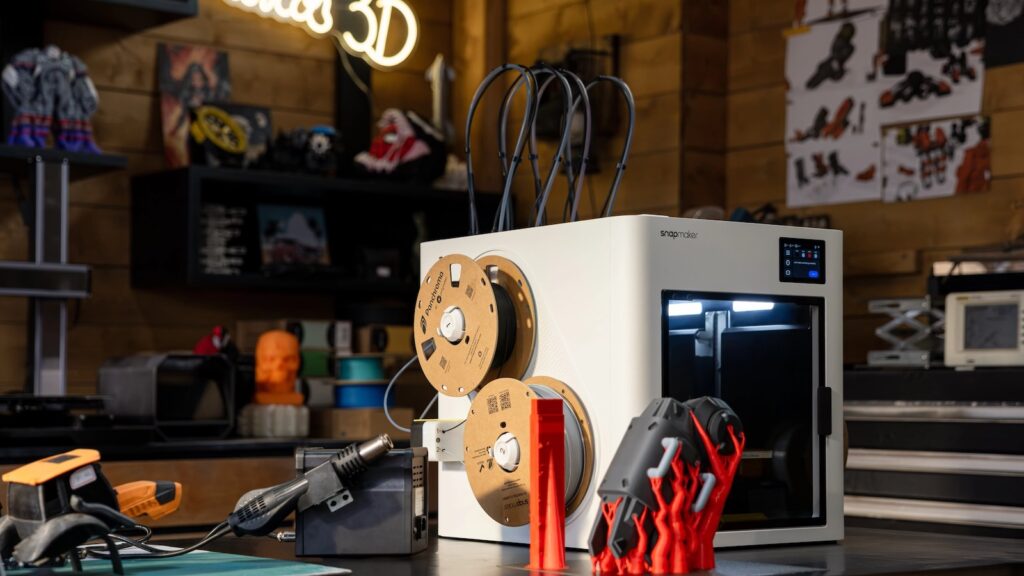
















 (@XRoboHub)