Shared posts

11 May 10:31

Berberina y Cómo Tomarla: Control de Glucosa, Síndrome Metabólico, Pérdida de Peso…

by Marcos - Fitness Revolucionario

Se habla de la berberina como la metformina natural, o un equivalente de los fármacos agonistas de GLP-1… Y aunque ...

The post Berberina y Cómo Tomarla: Control de Glucosa, Síndrome Metabólico, Pérdida de Peso… appeared first on Fitness Revolucionario.

28 Apr 12:55

Instalar Firefox Beta en #openSUSE

by victorhck

Veamos cómo añadir el repositorio oficial de Firefox para instalar la versión Beta del navegador Firefox

Imagen con los distintos logotipos del navegador Firefox según sea la versión final, la beta, Nightly

En un artículo anterior, ya publiqué cómo poder instalar Firefox versión Nightly en openSUSE, mediante el repositorio oficial que mantiene Mozilla en el que se pone a disposición de los usuarios esta versión del navegador.

Ahora, también han creado un repositorio oficial desde el que podremos instalar Firefox Beta. Estas versiones experimentales del navegador Firefox se pueden tener instaladas junto con la versión estable y convivir sin problemas. Esto nos servirá para probar las novedades de este navegador.

Veamos cómo añadir el repositorio de Mozilla para instalar Firefox Beta en openSUSE. Si ya tienes configurado el repositorio RPM de Mozilla, puedes instalar Firefox Beta mediante zypper. Si no, sigue estos pasos.

Al instalar Firefox beta desde los repositorios oficiales de Mozilla, esto nos ofrece:

  • Mejor rendimiento gracias a las optimizaciones oficiales avanzadas basadas en compiladores
  • Las actualizaciones son más rápidas porque la gestión.rpm está integrada en el proceso de lanzamiento de Firefox
  • Binarios reforzados con todas las configuraciones de seguridad activadas durante la compilación
  • No hace falta crear tu propio archivo.desktop.

Vamos a añadir la firma de seguridad y el repositorio correspondiente. Para ello abrimos una terminal y ejecutamos los siguiente comandos:

sudo rpm --import https://packages.mozilla.org/rpm/firefox/signing-key.gpg
sudo zypper ar --gpgcheck-allow-unsigned-repo https://packages.mozilla.org/rpm/firefox mozilla
sudo zypper refresh
sudo zypper install firefox-beta

El paquete del idioma se tendría que seleccionar automáticamente como dependencia.

Te vuelvo a recordar que puedes tener instaladas las tres versiones del navegador Firefox en tu equipo sin problema y utilizar una u otra cuando los desees, para probar novedades, reportar problemas, o lo que quieras.

Enlaces de interés

24 Apr 12:11

La app oficial de Jellyfin llega a Samsung Smart TV

El blog de Lázaro

Por: Carlos M.
Publicado el 23 de marzo de 2026

Olvídate de Tizen Studio y los certificados. Jellyfin ya tiene aplicación nativa en la tienda de Samsung. Te enseño cómo instalarla y configurarla en tu televisor fácilmente.

Continuar leyendo →

#Jellyfin #Docker

24 Apr 08:54

Horacio esquiador: remake para GNU/Linux

by Jesús B.L.

Hace tiempo Luis L. García Ventura hizo un simpático remake de Horacio Esquiador para GNU/Linux, el conocido juego en ordenadores de 8 bits.


Para quien lo quiera probar solo tiene que:

  1. Descargarlo.
  2. Descomprimirlo en tu carpeta preferida.
    tar zxvf horacio_linux.tar.gz
  3. Dar permisos de ejecución y ejecutar:
    chmod +x horacio_static
    ./horacio_static

Otro juego sencillo que despertará una sonrisa a más de un nostálgico. :D 

09 Apr 07:44

GNOME 50: Adiós a X11, hola waylad

by Profe Carlos Leal

¿Indignado por el adiós de X11 en GNOME 50 "Tokyo"? En esta clase, el Profe Carlos Leal analiza a fondo por qué este cambio es una evolución forzosa pero necesaria. Recordamos la histórica y polémica transición de GNOME 2 a GNOME 3 para entender que el progreso siempre trae resistencia.

Exploramos las novedades reales en rendimiento:
✅ Archivos (Nautilus): Rediseño interno masivo y mayor velocidad.
✅ Soporte NVIDIA: Aceleración por hardware real y adiós al lag.
✅ HDR y VRR: La experiencia visual definitiva en Linux.
✅ Alternativas reales: Si no te gusta Wayland, ¿es mejor MATE o XFCE?

Prepárate para la llegada de Ubuntu 26.04 LTS y Fedora 44 con esta guía completa sobre el futuro del escritorio Linux.

✅ Asegúrate de suscribirte a mi canal para más tutoriales y trucos sobre Administración de Servidores con Linux y con Windows y Seguridad Informática.

🔥 ¡Déjame tus comentarios y preguntas! Estoy aquí para ayudarte en temas de Administración de Servidores con Windows y con Linux así como también temas de Seguridad Informática: https://www.youtube.com/@ProfeCarlosLeal

☕ ¿Te gustaría invitarme a un café? Puedes hacerlo apoyándome en...
Patreon https://www.patreon.com/user?u=45035807
ko-fi https://ko-fi.com/profecarlosleal

🐧 Únete a mis grupos de WhatsApp y Telegram y sígueme en redes sociales
https://linktr.ee/profecarlosleal
08 Apr 11:42

Guía para comprender a las inteligencias artificiales | Video 1

by Entropía binaria

**** Redes del canal ****
Sitio web: https://entropiabinaria.org/
Telegram: https://t.me/grupo_entropiabinaria
Blog: https://entropiabinaria.blogspot.com/
CodeBerg: https://codeberg.org/entropiabinaria
Donaciones PayPal: https://www.paypal.com/donate/?hosted_button_id=CTXPW2JA56BCA

**** Software que utilizamos (100% Software Libre) ****
- Sistemas operativos: Artix (XLibre-openrc-XFCE), Void (IceWM-MuslLibC), Void (XFCE-GLibC), AthenaOS, con el esquema de particionado "GPT" con las 5 particiones que siempre mantuvimos y recomendamos.
- SimpleScreenRecorder para grabar el escritorio.
- Borderless WebCam (o ffmpeg) para capturar la cámara.
- KDEnLive para procesar los videos.
- KolourPaint y GIMP para crear y retocar imágenes.
- Tenacity y Sneedacity para editar audio.
- Navegadores Firefox como primario, Chromium como secundario.
- Terminal de XFCE y Konsole como terminales principales.
- KWrite/Kate para programar y como "bloc de notas".
- "nano" para editar archivos de texto plano.
- qemu y VirtualBox para virtualizar sistemas operativos.

**** Hardware que utilizamos ****
- Procesadores AMD, gráficas AMD/Radeon, cámaras Razer, micrófono Hyperx, tarjeta de sonido externa Focusrite, memorias Kingston o Corsair, teclado mecánico (Cougar, Corsair) ratón ergonómico, parlantes Edifier. A nuestras torres las armamos nosotros mismos desde hace muchos años, con 100% de partes compradas a Banifox: https://www.banifox.com/
07 Apr 20:49

Debian o Ubuntu Server? La decisión que salvará (o destruirá) tu servidor

by Profe Carlos Leal

¿Debian o Ubuntu Server? Es la pregunta del millón para cualquier Sysadmin o desarrollador. En esta clase, el Profe Carlos Leal te explica por qué instalar Linux Mint en un servidor industrial (como un Dell PowerEdge) es un error de principiante y cómo decidir correctamente entre las dos distribuciones más importantes del mundo .deb.
Analizamos: ✅ ¿Qué es el Kernel, LTS y APT? ✅ Debian 13: La roca de la estabilidad (Soporte hasta 2035). ✅ Ubuntu Server 24.04/26.04: Conveniencia, Snaps y Soporte empresarial. ✅ Comparativa de recursos: ¿Cuánto consume realmente cada uno? ✅ Docker y Contenedores: El Santo Grial del despliegue moderno.


✅ Asegúrate de suscribirte a mi canal para más tutoriales y trucos sobre Administración de Servidores con Linux y con Windows y Seguridad Informática.

🔥 ¡Déjame tus comentarios y preguntas! Estoy aquí para ayudarte en temas de Administración de Servidores con Windows y con Linux así como también temas de Seguridad Informática: https://www.youtube.com/@ProfeCarlosLeal

☕ ¿Te gustaría invitarme a un café? Puedes hacerlo apoyándome en...
Patreon https://www.patreon.com/user?u=45035807
ko-fi https://ko-fi.com/profecarlosleal

🐧 Únete a mis grupos de WhatsApp y Telegram y sígueme en redes sociales
https://linktr.ee/profecarlosleal
05 Apr 16:34

Proxmox: Tipos de CPU y flags de seguridad explicados

by Tecnocrática

En este vídeo explicamos en detalle una de las opciones más ignoradas al crear una máquina virtual en Proxmox: el tipo de CPU. Veremos qué instrucciones como AES-NI, AVX y AVX2 aportan al rendimiento, repasaremos todos los tipos de CPU disponibles en QEMU/KVM de peor a mejor, y entraremos en profundidad en los flags de seguridad (pcid, spec-ctrl, ssbd, ibpb, md-clear y más), qué vulnerabilidades mitigan y qué ocurre si decides no activarlos.
Qué es la ejecución especulativa y por qué importa
AES-NI, AVX y AVX2: qué mejoran y en qué aplicaciones se nota
kvm64, x86-64-v2-AES, v3, host: cuál elegir según tu caso
Spectre, Meltdown, ZombieLoad: las vulnerabilidades que originaron los flags
Qué pasa realmente si no activas las mitigaciones en tu VM
Recomendaciones concretas para Intel y AMD
05 Apr 14:13

FOSDEM 2026 Update

The April 2025 community update banner

Table of contents


Housekeeping

Hey everyone! So long no talk. It’s been a long time since a proper community update, but rest assured a “full size update” update is coming sometime in April (Charlie the Pinecorn returns!).

We are still planning to migrate to Codeberg for primary git hosting and committing to the move from mediawiki to our documentation site created by community member Funeral. We hope to make this happen sometime this year.

And a message to the team over at Genode, yes I did read your book :) - Caffeine

What happened at FOSDEM 2026

FOSDEM 2026 was a very productive meetup for members of the PINE64 Community, aside from the occasional shenanigans. We had the opportunity to work on the PineVoice (formally PineVox) and PineTime Pro in person which helped push forward bring-up. There were additional discussions on potential new products and the effect of the DRAM chip shortage.

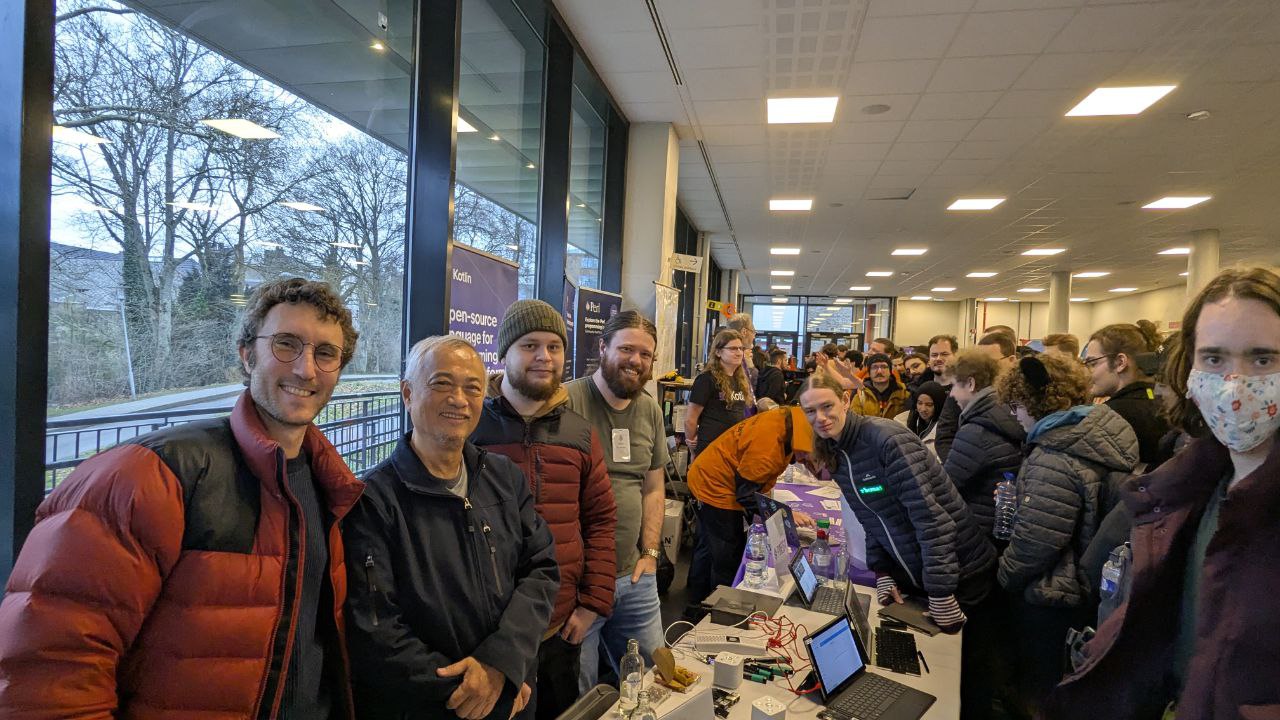
The group of peeps that went to FOSDEM

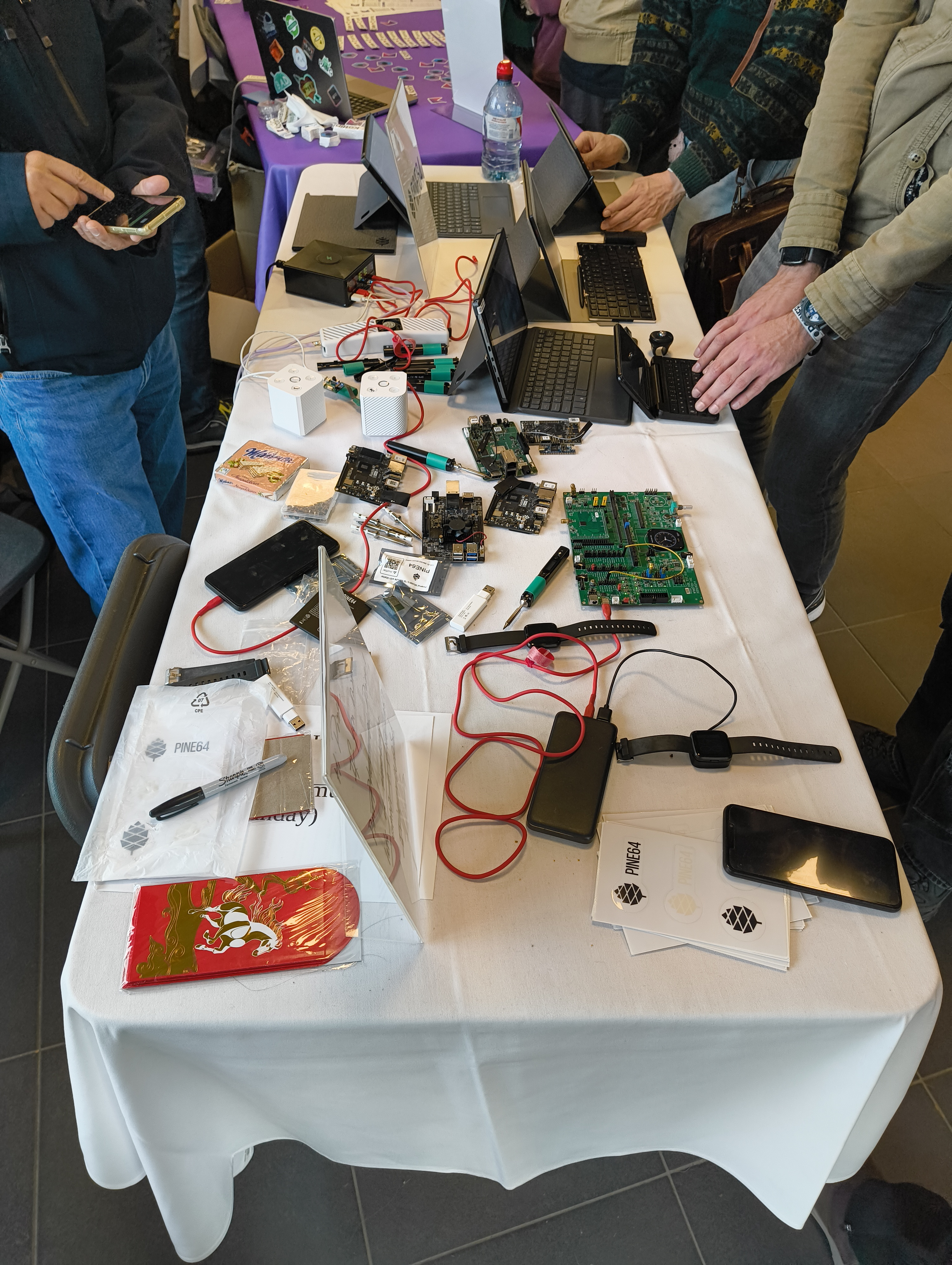
Top view of the Pine64 stand

Demos

PineNote

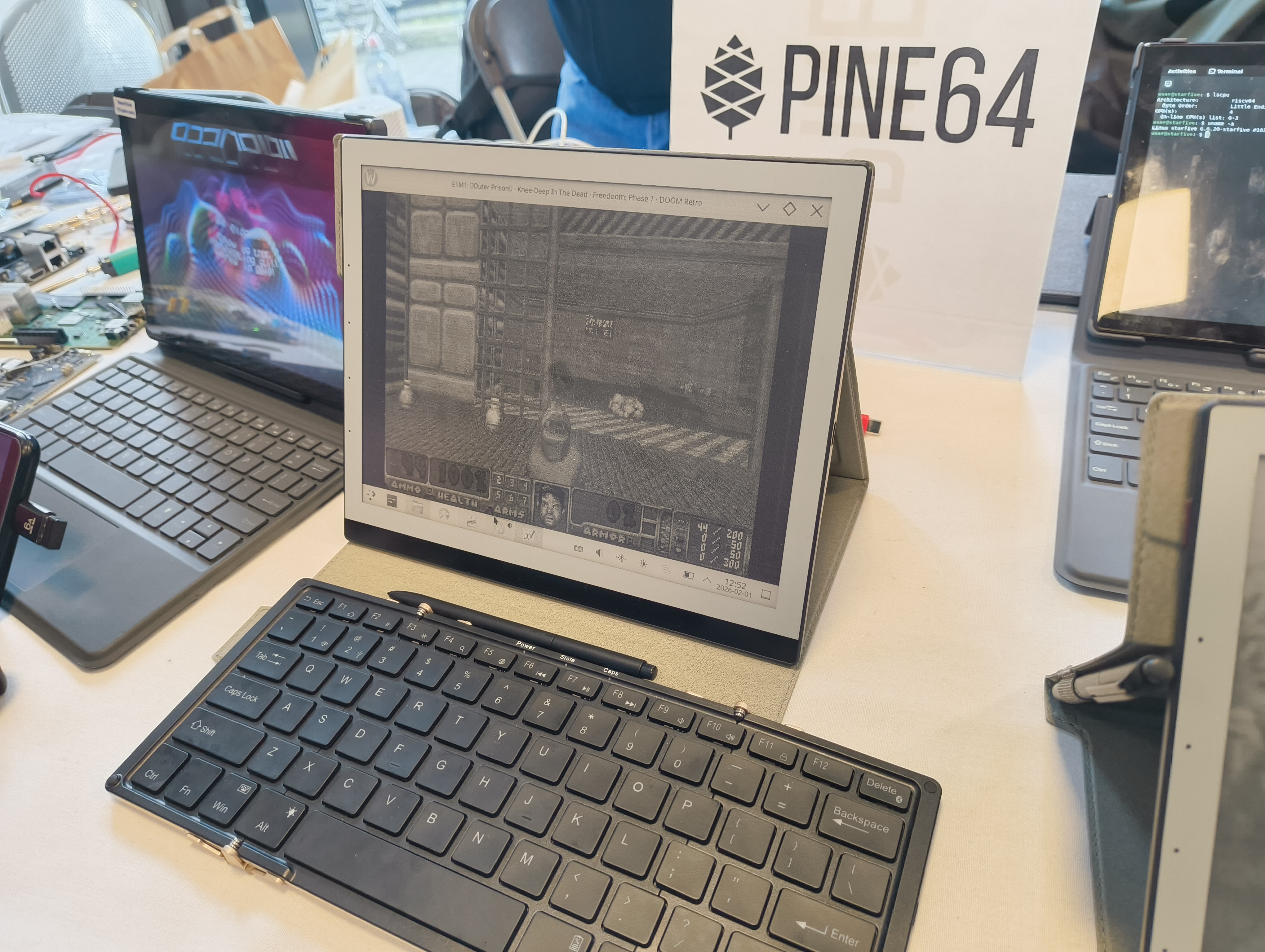
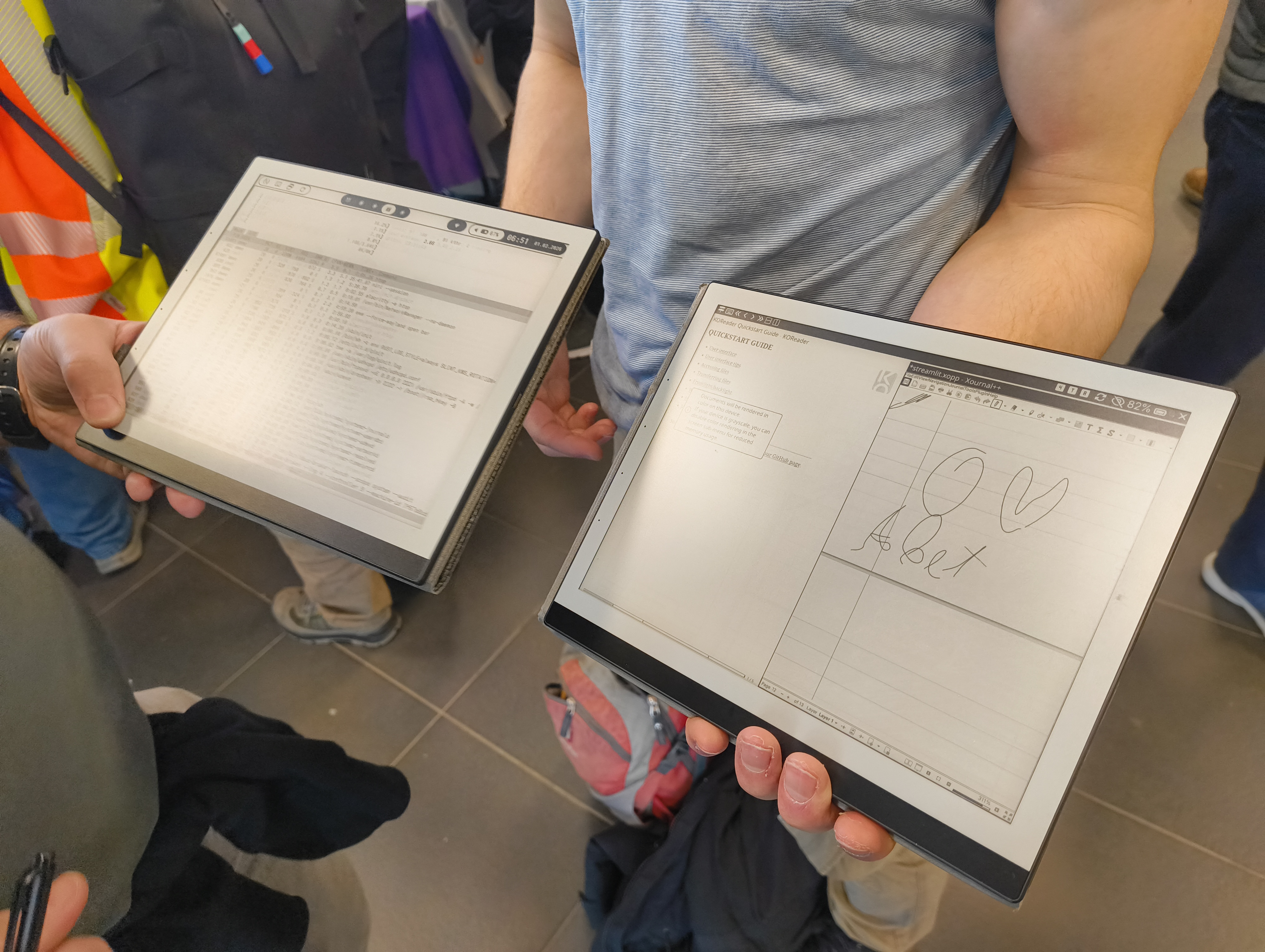
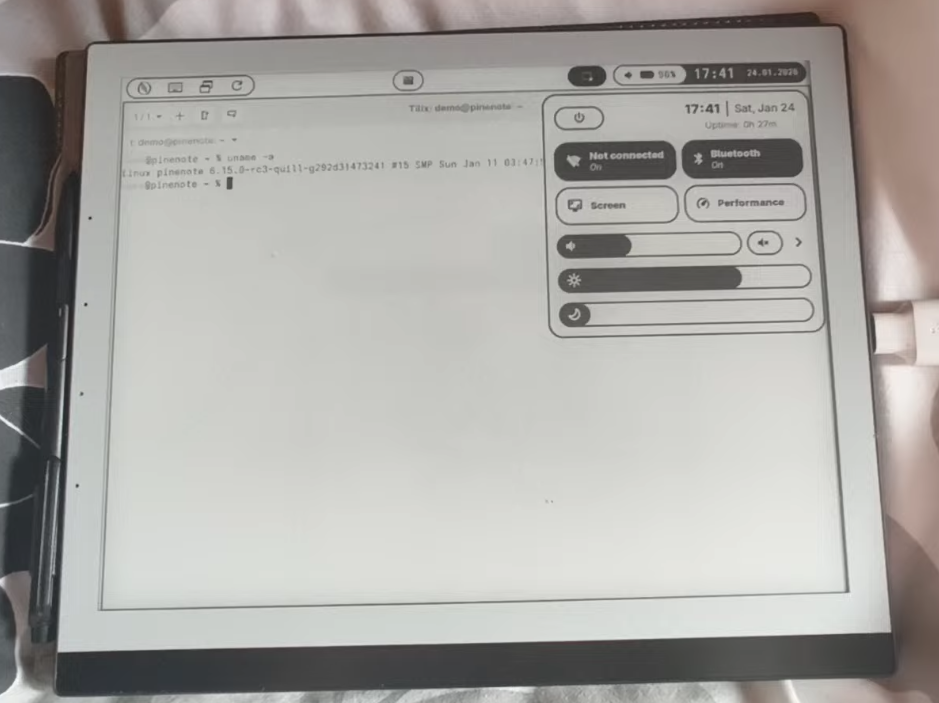
The PineNote was shown off at FOSDEM with a few demos featuring hrdl’s Arch image and a pre-release image of QuillOS using hrdl’s kernel tree. With a massive thanks to Tom.K, Phantomas and hrdl for staying around and helping demo with his PineNote. Some demos included smoothly playing videos, playing doom (you had to be there to believe it!) along with its capabilities as an actual ebook reader.

Photo of PineNote and PineTab2

Photo of two PineNotes, one running Arch and one running QuillOS

PineTab 2

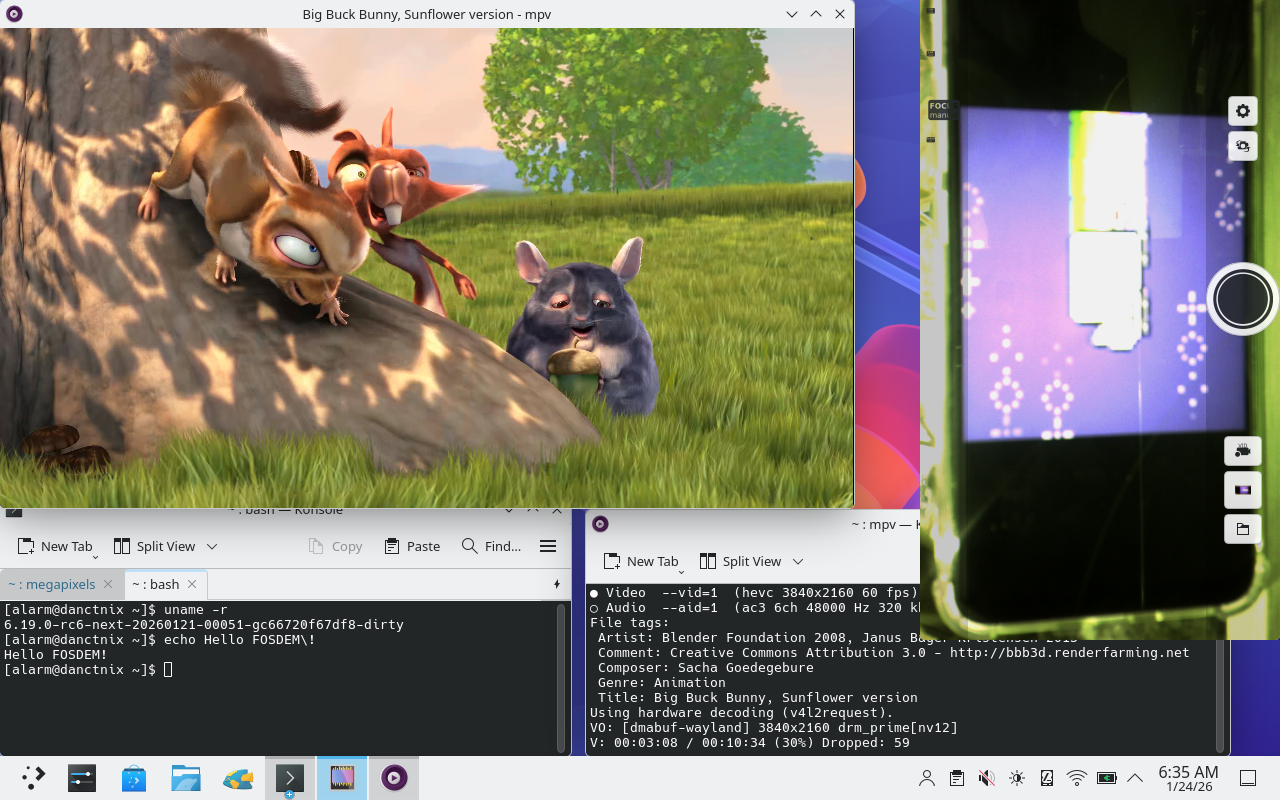
Danct12 put together an image for FOSDEM with camera and support for h264 video decoding. The demo also included a copy of big buck bunny and a razor1911 demo.

DRAM shortage impact

Currently the DRAM shortage will impact the production of devices like the Pinetab2, PineNote and PinePhone. PineStore founder TL Lim has stated that he doesn’t wish to increase the price of hardware significantly so production is halted for the time being. Any remaining stock will be sold and that will be it for now.

This will not impact devices such as the PineTime, PineBuds, Pinecil or PineVoice.

PineTime Pro

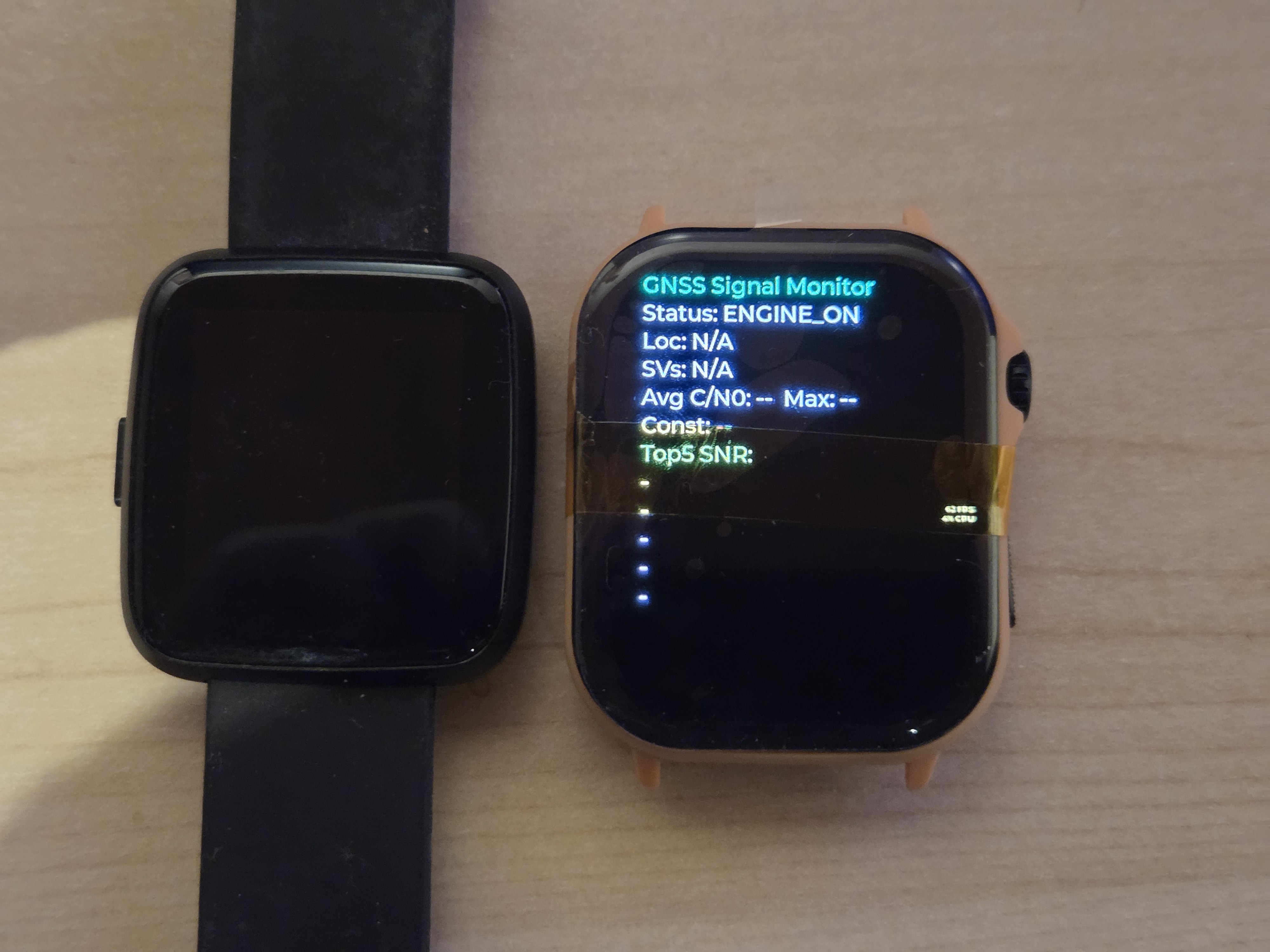
The new device is an improvement on the original with an AMOLED display, GPS, a custom chip, a digital crown which also features an extra button and new sensors including a blood oxygen sensor. Power to individual components can be cut unlike the non pro watch which will improve battery life.

There has been discussion on if we do fund raising by baking in a small offset cost into the devices; or if we do a service with costs for fund raising. This decision has not been made yet.

More information to come!

Future of community editions

Discussions were had concerning compensation and payment for work of developers working on PineStore devices.

Why can’t community editions exist for already released devices?

Creating a community edition device requires PineStore to create a new SKU for a device, this means that the community needs to agree on purchasing a device at an extra cost as the price of the device will go up (which represents the portion that is going to be donated).

Devices like the PineNote or PineTab 2 are likely not going to get community editions due to this, and we’re very much at PineStores discretion in this regard. As long as a price is organized before a new device reaches production, it is okay. But this process can be difficult if a bulk of the development happens after release hardware production begins.

Challenges

Donations are messy, sending money overseas is messy, deciding who gets how much is messy. It’s a mess.

  • Tax: Taxes can significantly reduce the amount of funds developers end up receiving. Which makes everyone unhappy.
  • Donations to groups of individuals rather than projects: For the PinePhone community edition devices donations were sent to projects. In the case for some devices where the factory firmware was made possible by the contributions of a number of individuals (not under a project), the problem arises of where to send donation funds.
    • Fund allocation: How are funds shared between individuals and who actually gets a share (the people who worked on the shipped firmware, what about the people who worked on components like the kernel that the firmware relies upon?). In this situation the individuals would have to agree on how funds are split.

Where is the PinePhone 2?

The PinePhone 2 is a common topic within the community and was a hot discussion at FOSDEM in 2026. Aside from the current chip shortage, PineStore has determined that it is too high of a financial risk to release another phone. This is because the interest of the mobile Linux community has shifted to porting cheaper and more powerful Android devices to mobile Linux projects such as Sailfish and PostmarketOS.

This will inevitably create a gap in the Linux phone space as the PinePhone is one of the few devices that a user can flash their own bootloader and modem firmware.

However, potential components for another phone were discussed during the trip. A RK3572/6 as a potential SOC and a RedCap 5G modem which has an identical command set to the Quectel EG25-G modem found in the PinePhone/Pro. Though note none of these components are locked in for an actual device.

So to conclude, the PinePhone 2 is currently in limbo for a number of reasons (financial riskiness, DRAM shortage, old Android devices make cheaper and more powerful Linux phones). But hopefully PineStore will eventually bring out another model.

To conclude

FOSDEM was a great turnout this year and we had a lot of fun meeting and catching up with people in the FOSS space. Thanks to everyone who came to FOSDEM and to those who came to say hi at our stand. Thanks to those who stuck around the stand with us, it made it a lot more enjoyable having you guys around. And of course, A special thanks to TL Lim from PineStore for sponsoring a group of our community members to visit FOSDEM.

If all things go alright (touch wood), a full community update should be out sometime in April (time/motivation permitting :P). See you in a tick!

Fosdem at night

Do you have something to share?

Do you have news to share with the community? You can have your news posted on this blog by heading over to this tutorial and following the template. All community updates are written in markdown which you can learn how to write here.

If you get stuck, feel free to ask the folks in chat by finding your respective chat platform at https://pine64.org/community/.

Contact

Community

Feel free to contact me if you have any concerns about community related topics. This can be about getting project support, sharing project updates, concern about prolonged wait times for support from PineStore (anything after 1-2 weeks) and any general feedback that could help improve the community.

Community manager: camden.b@pine64.org

PineStore

If you have quality control issues with your device once you receive it, don’t wait, contact PineStore support.

05 Apr 14:13

Introduction to the PineTime Pro

The PineTimePro announcement banner

Table of contents


Introducing the PineTime Pro

The PineTime Pro was officially announced at FOSDEM26 on the Pine64 stand. The demo was a bit modest (more on that later on), but we were delighted to showcase the first prototype of the “next generation PineTime” along with a demo running on a development board!
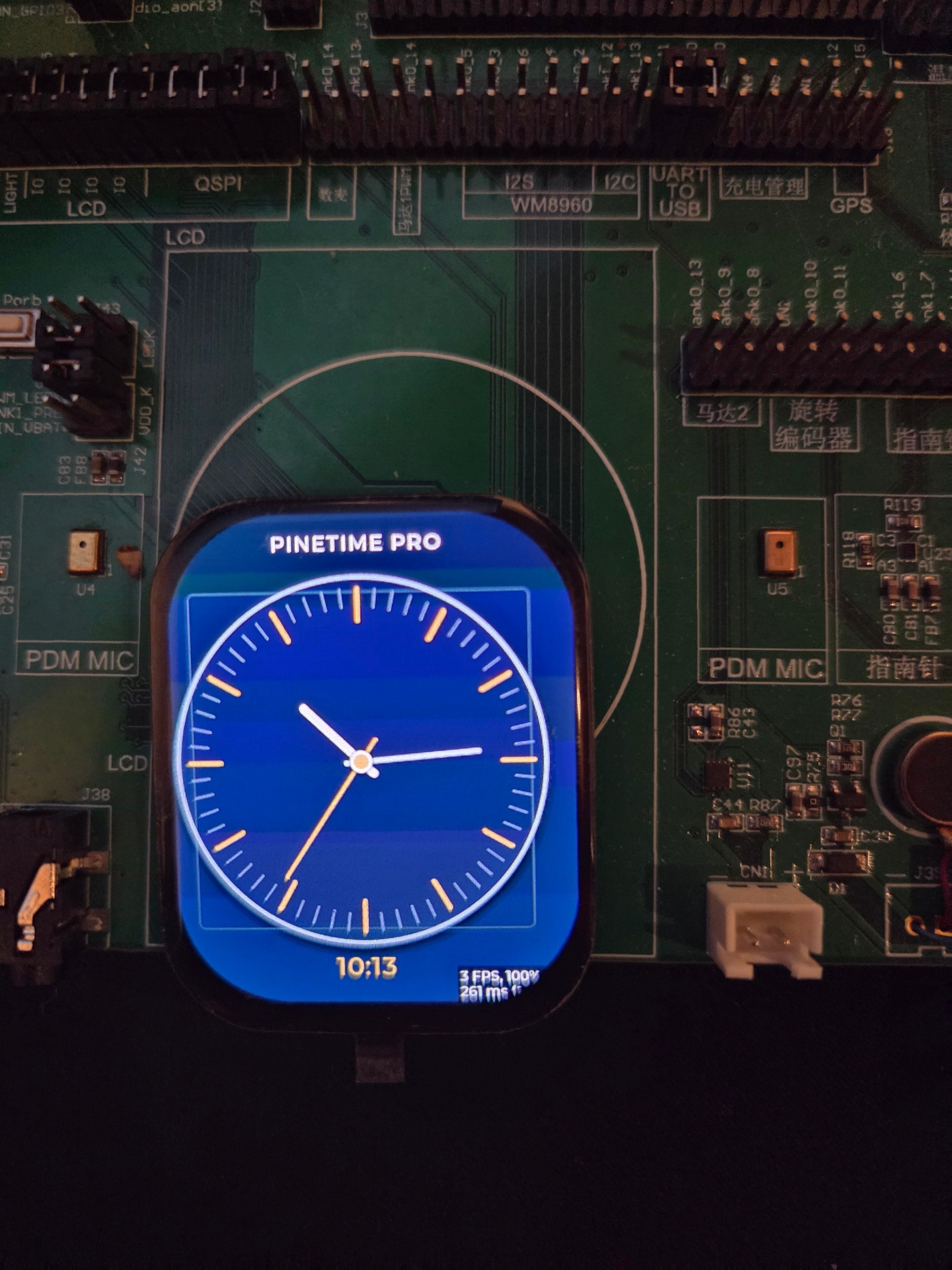
PineTime Pro devboard

We also mentioned the PineTime Pro in the FOSDEM 2026 Update blog post. In this blog post, we would like to provide a more in-depth look at the PineTime Pro.

Why “Pro” and not “PineTime 2”

The PineTime project started in October 2019, that’s more than 6 years ago! Needless to say, the PineTime has been a great success. The community has been very active in developing firmware for the device, companion apps, tools and more. And, according to PineStore, it sells very well.

The reason the PineTime Pro isn’t called the PineTime 2 is because it’s not meant to replace the original PineTime. The original watch still has a lot going for it: it is simple, hackable, efficient and already supported by great community projects like InfiniTime and WaspOS. It will continue production alongside this new model.

The PineTime Pro should be seen as a more powerful, more feature-rich sibling rather than a direct successor. If the original PineTime is a solid open smartwatch platform, the PineTime Pro is our attempt to push that idea much further with new and improved components.

What makes it “Pro”

Compared to the “OG” PineTime, the PineTime Pro brings a significant hardware upgrade.

At its core is a dual-core Cortex-M33 SoC, with one application core running at up to 200 MHz and a dedicated Bluetooth core. It also comes with 800 KB of internal SRAM and 8 MB of PSRAM.

Around that MCU, the hardware currently includes:

  • Bluetooth 5.2 - Classic (BR/EDR) & Low Energy
  • A 410×502 AMOLED display with touch support
  • A digital crown that also acts as an extra button
  • GPS
  • A heart rate sensor with blood oxygen measurement capability
  • Improved accelerometer -> full 6D Interial Measurement Unit
  • An I²C battery charger, which can be configured and monitored by the MCU
  • External QSPI 8MB flash memory
  • Microphone and speaker
  • A vibration motor
  • A 4-pin connector for power and debug/programming, with configurable pins for serial output or SWD

Yes, it’s still an embedded platform, but much more powerful. Here is a quick comparison between the PineTime and the PineTime Pro:

OG PineTime PineTimePro
MCU 1x ARM Cortex-M4 core 2x ARM Cortex-M33 cores
RAM 64 KB SRAM 800KB SRAM + 8MB PSRAM
Flash 512KB internal + 4MB SPI 8MB SQPI
Display 240x240px, 1.3" 410x502px, 2.13"
Sensors Heart rate + accelerometer heart rate + blood oxygen sensor, 6D IMU
GPS No Yes
Debug port Internal Available on external pin

Altogether, this opens the door to much more ambitious software (like PebbleOS ;) ) and use cases than what is practical on the original PineTime: fast, smooth and rich UI, fitness tracker, localization and tracking, external apps and watch faces and more!
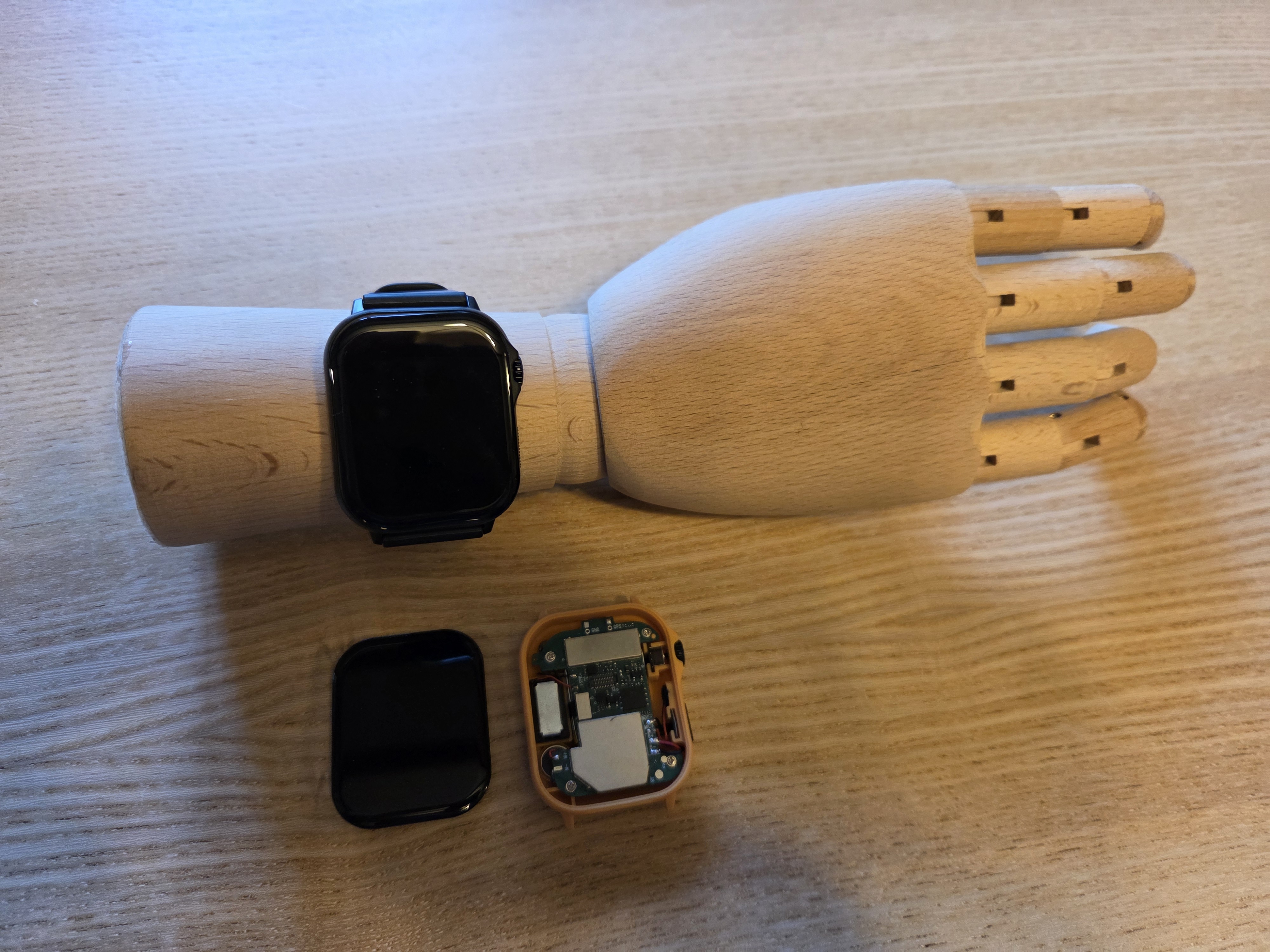
What the PineTime Pro looks like on an ARM

A long road to get here

The PineTime Pro has been in discussion for quite a while. Community members including JF, Gamiee and Ralim have been exploring the idea for a long time, and from the beginning, one thing was clear: choosing the right MCU would make or break the project.

Earlier iterations were based on a RISC-V MCU. In fact, the demo shown at FOSDEM 2024 was based on that platform. While the idea was exciting, we ultimately ran into issues with power consumption along with the quality of the available documentation and SDK. Those limitations made it difficult to see a good long-term path forward.

Things became much more concrete when PineStore started collaborating with a large smartwatch manufacturer in China that had developed its own chip. That collaboration has been very valuable so far: PineStore and the community have been working together on the hardware design, and documentation and SDK materials have been shared to help software development move forward. All of these resources will also be available to the community once the device enters production.

Along the way, we explored a few extra ideas too. For example, we looked at adding LoRa, but that introduced major challenges in terms of PCB space and RF design. A light sensor was also considered, but dropped it for similar reasons. On the other hand, adding a speaker and microphone turned out to be relatively easy, so those ended up becoming a nice bonus.

Recent progress

During FOSDEM 2025, we received the first two development boards based on the new Cortex-M33 platform. Throughout 2025, PineStore and community members, especially Gamiee and Ralim, continued reviewing the hardware design while JF was experimenting with the development board and the SDK.

Toward the end of 2025, the first two actual watch prototypes were sent to Gamiee and JF. Unfortunately, those boards had hardware issues that left the SWD port (the programming and debugging port) non-functional, which made software bring-up much more difficult than expected.

A second batch of prototypes arrived just before FOSDEM this year. We had hoped to show them running on the Pine64 stand, but another hardware issue got in the way: the flash memory was not working properly, so the demo had to run on the development board instead of the actual watch hardware.

That said, progress is still very real. After several rounds of review between PineStore and the community, a third hardware revision is expected at the beginning of April. We’re optimistic that this revision will finally resolve the remaining blockers and let software development ramp up properly.
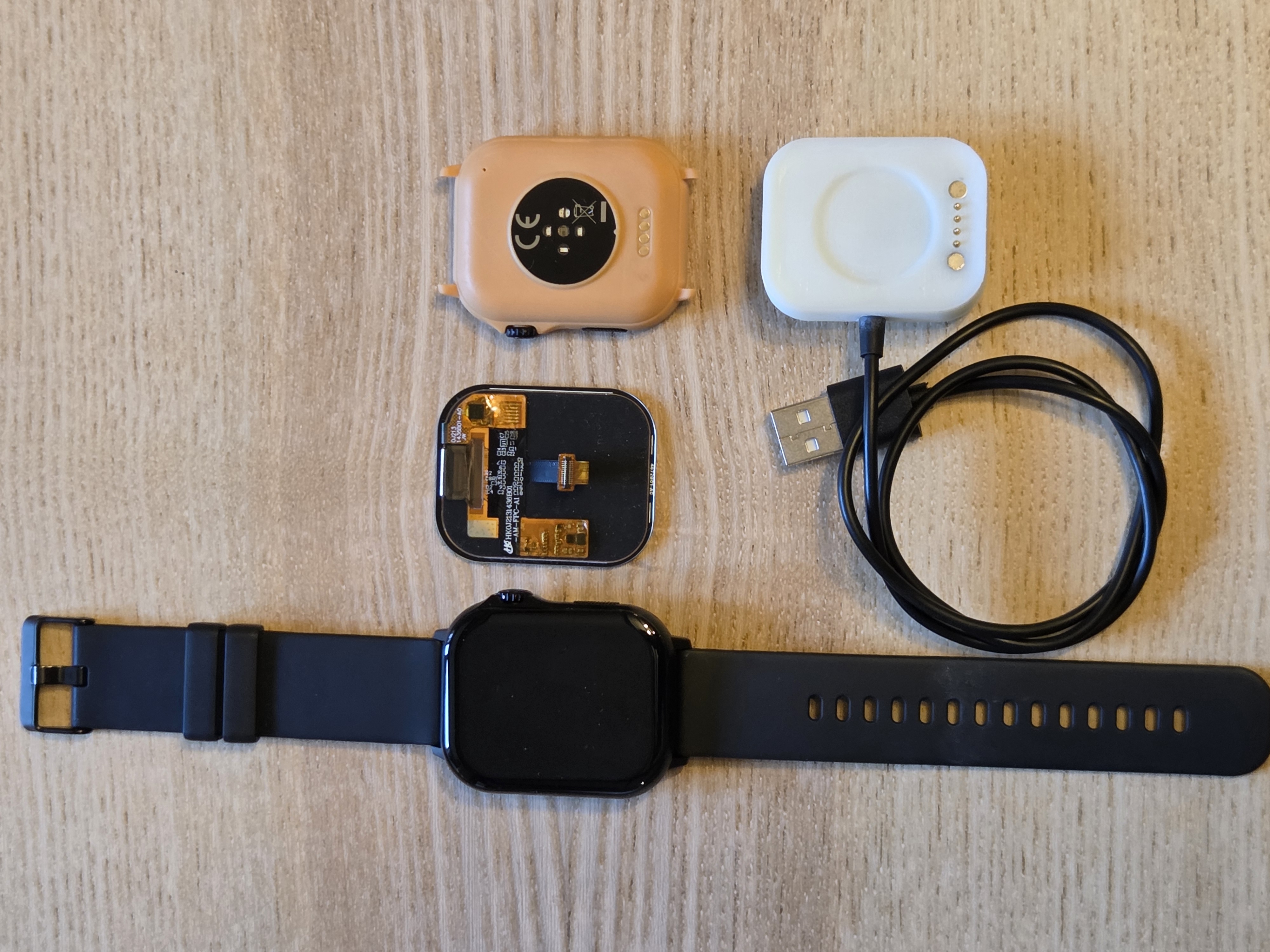
PineTime devkit

What about software?

Just like the original PineTime, we expect the community to enjoy this new device and develop many projects on top of it!

The good news is that developers from both InfiniTime and WaspOS are already involved, which gives the platform a strong starting point. The PineTime Pro is exciting not just because it is new hardware, but because it offers much more room for experimentation. Features that are extremely challenging to fit into the original PineTime due to resource constraints may become practical here.

Can it run Doom? Most probably, and I guess someone will take the challenge and make it happen!

On the InfiniTime side, the original PineTime is not being abandoned. InfiniTime is already a fairly mature project, and it will continue to exist. And I guess the same is true for Wasp-OS.

But realistically, the PineTime Pro is likely to keep developers busy for quite some time, simply because it creates so many new possibilities.

Right now, JF is mostly focused on low-level experiments and validation, with the goal of getting basic drivers and a demo application working as soon as possible. Gamiee is also expected to help with OpenOCD integration once he wraps up work on the PineVoice.

What happens next?

The next major milestone is simple: get the new hardware revision in hand, confirm that the remaining issues are solved, and continue pushing software bring-up forward.

There is still work ahead, and we are not pretending otherwise. But after a long period of exploration and hardware iteration, the PineTime Pro is finally starting to feel real.

We’re looking forward to sharing more as development continues.

Do you have something to share?

Do you have news to share with the community? You can have your news posted on this blog by heading over to this tutorial and following the template. All community updates are written in markdown which you can learn how to write here.

If you get stuck, feel free to ask the folks in chat by finding your respective chat platform at https://pine64.org/community/.

Contact

Community

Feel free to contact me if you have any concerns about community related topics. This can be about getting project support, sharing project updates, concern about prolonged wait times for support from PineStore (anything after 1-2 weeks) and any general feedback that could help improve the community.

Community manager: camden.b@pine64.org

PineStore

If you have quality control issues with your device once you receive it, don’t wait, contact PineStore support.

04 Apr 11:30

Charla de 24H24L, Psicología y Linux

by 24H24L

Charla sobre Linux de aquello que no se suele hablar,

Hablaremos sobre:
▪️La comunidad que rodea Linux
▪️Las sensaciones al usarlo
▪️La libertad y lo que realmente significa
▪️La filosofía del software libre.
▪️Y mucho más...

Inivitados.

- Alexia(chica de sistema).
- David Marzal (KDE Hispano)
- Marina, usuarios de Linux y psicologa.


Canal “Aplicaciones de Linux”: descubrimos una app nueva cada semana.
https://t.me/UnDiaUnaAplicacionCanal

Si te gusta el contenido y quieres que sigamos haciendo directos como este, puedes apoyar el proyecto:
Donación en PayPal
https://paypal.me/JosAJimenez

Comprando en Amazon con mi enlace referido
https://amzn.to/3DV9fy3

Contacto
Web https://24h24l.org
Mastodon https://mastodon.online/@24h24l
03 Apr 16:04

antiX 26 súper ligero | Debian GNU/Linux 13 Trixie!

by Locos por Linux

Comienza tu SERVIDOR KVM o WEB HOSTING con Hostinger 👉 https://hostinger.com/locosporlinux
💥 ¡Usa el cupón de descuento LOCOSPORLINUX para obtener un 10% de DESCUENTO!

antixlinux.com

Instagram: https://www.instagram.com/nicolaslongardi/
GRUPO de Loc-OS (Signal): https://signal.group/#CjQKIFpeW4u6-wUj77vVPasE67ei1584iPtiPYXZ3g5WxuznEhANYSt0HuhrK43ePRS7lC-z

#antix #linux #debian13
03 Apr 15:13

Patch el comando olvidado

by Linux con Last Dragon

Aplica parches de seguridad a las aplicaciones con código vulnerable o actualiza a una nueva versión de forma rapida

Video relacionado:
Parchar un modulo de kernel linux sin reiniciar
https://www.youtube.com/watch?v=YFtLpjQpXj4&t=7s

Blog https://www.lastdragon.net/
Foro del canal https://foro.lastdragon.net
Twitter https://twitter.com/LastDragonMX
Patreon https://www.patreon.com/lastdragon
Link de grupo a Telegram https://t.me/lastdragonmex

#linux #debian13
03 Apr 08:50

Nico Responde, después de 10000 años!!

by Locos por Linux

Comienza tu SERVIDOR KVM o WEB HOSTING con Hostinger 👉 https://hostinger.com/locosporlinux
💥 ¡Usa el cupón de descuento LOCOSPORLINUX para obtener un 10% de DESCUENTO!


Instagram: https://www.instagram.com/nicolaslongardi/
GRUPO de Loc-OS (Signal): https://signal.group/#CjQKIFpeW4u6-wUj77vVPasE67ei1584iPtiPYXZ3g5WxuznEhANYSt0HuhrK43ePRS7lC-z
CANAL de Loc-OS (Telegram): https://t.me/locoslinux
02 Apr 20:13

En vivo - 21 de Marzo del 2026 POWERED BY AV1

by Linux con Last Dragon
29 Mar 10:16

CUANDO EL PODER CAMBIA DE ESTILO: DE M.J. MONTERO A C. CUERPO

by Jose Luis Martín Ovejero
29 Mar 09:23

🔴 LOS MINUTOS DEL ODIO - Semana 13 de 2026

by Fabián C. Barrio

En el actual marco de reconfiguración transversal de las dinámicas socioproductivas, resulta imprescindible articular una narrativa de consenso que, sin renunciar a la complejidad inherente del momento, permita vehicular una gobernanza líquida basada en indicadores prospectivos y no en inercias estructurales. La ciudadanía, en este sentido, demanda menos soluciones cerradas y más procesos abiertos que faciliten la co-creación de escenarios adaptativos dentro de un ecosistema regulatorio suficientemente elástico.

Asimismo, la implementación de palancas transformadoras debe abordarse desde una lógica de interseccionalidad operativa, donde los distintos vectores de cambio no compitan entre sí, sino que se integren en una arquitectura de decisiones multinivel orientada a maximizar impactos sinérgicos. Esto implica abandonar enfoques lineales y apostar por una gestión iterativa del disenso, capaz de convertir tensiones latentes en oportunidades estratégicas mediante marcos de interlocución resilientes y modulables.

Por último, no podemos obviar que cualquier hoja de ruta que aspire a perdurar en el tiempo ha de sustentarse en un equilibrio dinámico entre legitimidad institucional y permeabilidad social. Solo a través de una escucha activa que trascienda los canales tradicionales será posible consolidar un contrato colectivo en constante revisión, donde la incertidumbre deje de percibirse como amenaza y pase a constituir el principal activo de una ciudadanía empoderada y corresponsable.
26 Mar 20:04

Side loading 24h

by danigm

https://lwn.net/Articles/1063735

Los pasos:

  • Enable developer options by tapping the software build number in About Phone seven times
  • In Settings > System, open Developer Options and scroll down to “Allow Unverified Packages.”
  • Flip the toggle and tap to confirm you are not being coerced
  • Enter device unlock code
  • Restart your device
  • Wait 24 hours
  • Return to the unverified packages menu at the end of the security delay
  • Scroll past additional warnings and select either “Allow temporarily” (seven days) or “Allow indefinitely.”
  • Check the box confirming you understand the risks.
  • You can now install unverified packages on the device by tapping the “Install anyway” option in the package manager.

La entrada Side loading 24h se publicó primero en Linux Hispano.

26 Mar 20:02

🟢 El talento de Mr. Ripley, de Patricia Highsmith - Análisis - Club de los lectores muermos

by Fabián C. Barrio

Hay novelas que se limitan a entretener, y otras que te obligan a mirarte de reojo mientras avanzas por sus páginas. En este vídeo nos adentramos en El talento de Mr. Ripley, de Patricia Highsmith, una historia que se cuela dentro de la mente de un impostor hasta el punto de hacerte cómplice de su ascenso. A través de Ripley aparecen temas que siguen latiendo con una incomodidad muy actual: la obsesión por la identidad, el deseo de convertirse en otro, la seducción del lujo como forma de legitimidad y la facilidad con la que las relaciones humanas se sostienen sobre apariencias frágiles. Lo inquietante no es lo que hace Ripley, sino lo fácil que resulta entender por qué lo hace.

El análisis recorre también el contexto histórico de una Europa de posguerra convertida en refugio para jóvenes americanos en busca de una vida más intensa, un escenario perfecto para que alguien sin raíces sólidas pueda reinventarse sin demasiadas preguntas. Highsmith, con su mirada fría y casi clínica, construye un personaje que no necesita grandes discursos morales para avanzar: le basta con una lógica interna impecable y una capacidad extraordinaria para justificarse. Y ahí es donde la novela deja de ser un simple thriller para convertirse en algo más incómodo, casi un experimento psicológico. Porque cuando terminas de escuchar esta historia, queda flotando una sensación difícil de esquivar: Ripley no está tan lejos como nos gustaría pensar.
26 Mar 08:56

No somos naide

by El canal de Korah
25 Mar 17:31

Bloquear el acceso a las IAs a vuestro contenido

by Eduardo Collado

Me han preguntado alguna vez que como se puede bloquear el acceso a vuestras páginas web en un servidor Apache a las IAs, y aunque bueno, teniendo en cuenta que los crawlers de IA son lo más desagradecido y busco del Mundo podemos pedirlo educadamente y luego bloquear por el user agent, de todos modos ya os digo que en un Mundo sin moral, muchos crawlers de IA deleznables se identifican simplemente como firefox, lamentable.

De todos modos os paso el contenido:

en robots.txt (para pedirlo educadamente)

# ── Crawlers de IA / LLM ─────────────────────────────────

# OpenAI
User-agent: GPTBot
Disallow: /

User-agent: ChatGPT-User
Disallow: /

User-agent: OAI-SearchBot
Disallow: /

# Anthropic
User-agent: anthropic-ai
Disallow: /

User-agent: ClaudeBot
Disallow: /

User-agent: Claude-Web
Disallow: /

# Google IA (Gemini / Bard training)
User-agent: Google-Extended
Disallow: /

# Meta
User-agent: FacebookBot
Disallow: /

# Perplexity
User-agent: PerplexityBot
Disallow: /

# You.com
User-agent: YouBot
Disallow: /

# Common Crawl (usado para entrenar LLMs)
User-agent: CCBot
Disallow: /

# Cohere
User-agent: cohere-ai
Disallow: /

# Diffbot
User-agent: Diffbot
Disallow: /

# ByteDance / TikTok
User-agent: Bytespider
Disallow: /

# Apple
User-agent: Applebot-Extended
Disallow: /

# Otros scrapers conocidos
User-agent: ImagesiftBot
Disallow: /

User-agent: magpie-crawler
Disallow: /

User-agent: DataForSeoBot
Disallow: /

User-agent: AI2Bot
Disallow: /

User-agent: Omgilibot
Disallow: /

User-agent: Timpibot
Disallow: /

User-agent: FriendlyCrawler
Disallow: /

En el .htaccess (para bloquear esos .user-agents)

<IfModule mod_rewrite.c>
RewriteCond %{HTTP_USER_AGENT} (GPTBot|ChatGPT-User|OAI-SearchBot|anthropic-ai|ClaudeBot|Claude-Web|Google-Extended|FacebookBot|PerplexityBot|YouBot|CCBot|cohere-ai|Diffbot|Bytespider|Applebot-Extended|ImagesiftBot|magpie-crawler|DataForSeoBot|AI2Bot|Omgilibot|Timpibot|FriendlyCrawler) [NC]
RewriteRule .* - [F,L]
</IfModule>

Foto de Markus Spiske: https://www.pexels.com/es-es/foto/hombre-policia-uniforme-de-espaldas-4682719/

25 Mar 17:14

Convierte tu debían a inmutable

by Linux con Last Dragon

Configura cualquier distro de Linux a inmutable con overlay

Vídeo relacionado:
OverlayFS | Como usar los Overlay en Linux

https://www.youtube.com/watch?v=0fBd1zDcMzg

Blog https://www.lastdragon.net/
Foro del canal https://foro.lastdragon.net
Twitter https://twitter.com/LastDragonMX
Patreon https://www.patreon.com/lastdragon
Link de grupo a Telegram https://t.me/lastdragonmex

#silverblue #debian13 #bazzite
24 Mar 19:48

Bizcocho: 10 errores que evitar al prepararlo y una receta que funciona | EL COMIDISTA

by El Comidista en EL PAÍS

El bizcocho es de 1ª de repostería, pero que esté buenísimo o regular depende de algunas normas. Esta es una guía para no cometer los fallos más comunes.

El bizcocho es un básico de la repostería, y para preparar uno más o menos comestible no necesitas ser Jordi Roca, Eva Arguiñano o Paco Torreblanca. Ahora bien, si alguna vez has horneado uno, es posible que se te haya hundido, te haya quedado algo crudo o reseco, o su densidad se haya acercado a la del núcleo terrestre. Todas hemos probado bizcochos excelentes y otros más cercanos al ladrillo dulce, porque como en todas las elaboraciones esenciales, el diablo está en los detalles.

Después de examinar los posibles fallos en la elaboración de un gazpacho o una tortilla de patatas, el equipo de detección de errores de El Comidista ha analizado los más habituales en esta preparación. Y como siempre, también ofrecemos una receta que funciona: está basada en el clásico cuatro cuartos y con ella sale un bizcocho tierno y jugoso. Para aprender a hacerla y evitar fallos, mira el vídeo de arriba.

Ingredientes (para un bizcocho de 1 kilo aproximadamente)
- 4 huevos a temperatura ambiente
- Mismo peso de mantequilla a temperatura ambiente
- Mismo peso de harina
- Mismo peso de azúcar
- 1 cucharada rasa de levadura química
- Ralladura de medio limón
- Ralladura de media naranja
- Sal fina

#bizcocho #recetas #receta #postres

Suscríbete a nuestro canal: www.youtube.com/c/ElComidistaenELPAÍS
Visita: https://elcomidista.elpais.com
Síguenos en Facebook: https://www.facebook.com/elcomidista
Síguenos en Twitter: https://twitter.com/ElComidista Síguenos en Instagram:
https://www.instagram.com/elcomidista
23 Mar 19:24

21x28 Alerta Coronavirus - Pablo Fuente - 20 años no son nada - #CuartoMilenio

by Canal Iker Jiménez

💬 | Cuarto Milenio: programas completos disponibles en Cuatro y Mediaset Infinity.
https://www.cuatro.com/cuarto-milenio/alacarta/
https://www.mediasetinfinity.es/programas-tv/cuarto-milenio/

🔴 REDES OFICIALES y WEB de LA NAVE DEL MISTERIO

➡️ Página web ikerjimenez.com (https://www.ikerjimenez.com/)
➡️ Instagram (https://www.instagram.com/navedelmisterio_/)
➡️ X (Twitter) (https://x.com/navedelmisterio/)
➡️ YouTube (https://www.youtube.com/@iker-jimenez)
➡️ Facebook (https://www.facebook.com/navedelmisterio)
➡️ TikTok (https://www.tiktok.com/@navedelmisterio)
➡️ Telegram (https://t.me/navedelmisterio)
➡️ WhatsApp (https://whatsapp.com/channel/0029Va8nTGHGk1G0ZhCi4i39)
23 Mar 09:58

¡URGENTE! La venta de SUSE: ¿El fin de openSUSE y un peligro para Europa?

by Profe Carlos Leal

¿Qué pasa cuando la empresa que sostiene tu sistema operativo favorito cambia de manos? Analizamos la posible venta de SUSE por 6,000 millones de dólares y el riesgo para la comunidad de openSUSE. ¿Está en peligro la independencia tecnológica de España y Latinoamérica? El Profe Carlos Leal te explica por qué la soberanía digital europea es una mentira si no salvan al camaleón.

Contenido de la clase
0:00 Intro y saludo
2:12 Conceptos clave
2:21 ¿Qué es el GDPR?
2:50 Soberanía de datos
3:02 Backdoors
3:17 Firma de capital privado
3:38 ¿Qué es un fork?
3:59 El contexto de la compra/venta de opensuse
8:23 El peligro para europa - soberanía digital
10:00 El rescate de la Unión Europea
12:30 Impacto en el usuario común
14:55 Resumen de la clase

✅ Asegúrate de suscribirte a mi canal para más tutoriales y trucos sobre Administración de Servidores con Linux y con Windows y Seguridad Informática.

🔥 ¡Déjame tus comentarios y preguntas! Estoy aquí para ayudarte en temas de Administración de Servidores con Windows y con Linux así como también temas de Seguridad Informática: https://www.youtube.com/@ProfeCarlosLeal

☕ ¿Te gustaría invitarme a un café? Puedes hacerlo apoyándome en...
Patreon https://www.patreon.com/user?u=45035807
ko-fi https://ko-fi.com/profecarlosleal

🐧 Únete a mis grupos de WhatsApp y Telegram y sígueme en redes sociales
https://linktr.ee/profecarlosleal
22 Mar 12:46

Tengo algo importante que decirles: ¡Gracias por esperarme ! Testimonio de recuperación

by Profe Carlos Leal

✅ Asegúrate de suscribirte a mi canal para más tutoriales y trucos sobre Administración de Servidores con Linux y con Windows y Seguridad Informática.

🔥 ¡Déjame tus comentarios y preguntas! Estoy aquí para ayudarte en temas de Administración de Servidores con Windows y con Linux así como también temas de Seguridad Informática: https://www.youtube.com/@profecarlosleal

☕ ¿Te gustaría invitarme a un café? Puedes hacerlo apoyándome en...
Patreon https://www.patreon.com/user?u=45035807
ko-fi https://ko-fi.com/profecarlosleal

🐧 Únete a mis grupos de WhatsApp y Telegram y sígueme en redes sociales
https://linktr.ee/profecarlosleal
22 Mar 09:31

LOS MINUTOS DEL ODIO - Semana 12 de 2026

by Fabián C. Barrio

En el marco de una gobernanza interseccional orientada a la redistribución afectiva del tejido social, se hace imprescindible articular dinámicas de cohabitación simbólica que trasciendan las lógicas productivistas heredadas. No se trata únicamente de repensar los márgenes de la inclusividad normativa, sino de activar dispositivos de resignificación colectiva que permitan habitar la diferencia desde una perspectiva ecoemocional. La ciudadanía, entendida como sujeto fluido en constante devenir, debe participar en procesos deliberativos que desborden las estructuras tradicionales, generando espacios seguros donde la diversidad no sea tolerada, sino performativamente celebrada.

Asimismo, la implementación de políticas públicas con enfoque decolonial exige una relectura crítica de los marcos epistémicos que han sostenido las asimetrías históricas. Es necesario avanzar hacia una institucionalidad permeable que incorpore narrativas subalternas en la toma de decisiones, habilitando mecanismos de corresponsabilidad horizontal. Solo así podremos consolidar un horizonte de justicia social que no se limite a la redistribución material, sino que abrace la reparación simbólica y el reconocimiento pleno de las identidades múltiples que configuran el ecosistema democrático contemporáneo.
21 Mar 18:24

Mucha gente piensa que entrenar para perder grasa o ganar músculo es muy distinto. Pero no es así.

by Fitness Revolucionario
21 Mar 18:20

Convierte tu procesador Core I en Ultra y M4 con Linux

by Linux con Last Dragon
Bolly

Apagar hilos de la cpu

23 echo "off" > /sys/devices/system/cpu/smt/control
24 htop
25 echo "on" > /sys/devices/system/cpu/smt/control
26 htop
27 echo "off" > /sys/devices/system/cpu/smt/control
28 nproc
29 echo "on" > /sys/devices/system/cpu/smt/control
30 nproc
31 echo "off" > /sys/devices/system/cpu/smt/control
32 lscpu -e
33 echo "on" > /sys/devices/system/cpu/smt/control
34 lscpu -e
35 echo "off" > /sys/devices/system/cpu/smt/control

stopo

2014 sudo apt install hwloc
2015 lstopo-no-graphics
2016 sudo lstopo-no-graphics
2017 sudo lstopo
2018 lscpu
2019 sudo lstopo
2020 history

En este vídeo se explica el uso de CPU y como aprovecharlo al maximo con GNU Linux

Vídeo relacionado
RealTime
https://www.youtube.com/watch?v=Lj4v9p8PQFc

Blog https://www.lastdragon.net/
Foro del canal https://foro.lastdragon.net
Twitter https://twitter.com/LastDragonMX
Patreon https://www.patreon.com/lastdragon
Link de grupo a Telegram https://t.me/lastdragonmex

#intel #amd #linux
21 Mar 09:51

Coliflor gratinada, la receta fácil y cremosa sin bechamel | EL COMIDISTA

by El Comidista en EL PAÍS

Rápida, cremosa y sin posibilidad de fallo: así es nuestra fórmula renovada de un clásico de la comida reconfortante

La coliflor siempre ha sido una hortaliza complicada para muchas personas. Castigada durante siglos por largas cocciones que sacaban lo peor de ella –el olor a pedo en la cocción, entre otras cosas–, ha sufrido un rechazo hasta cierto punto comprensible. Sin embargo, cuando está cocinada en su punto y acompañada por ingredientes que suavicen sus aromas más difíciles, puede ser una de las verduras de invierno más satisfactorias. Bañar la coliflor en bechamel y rematarla con queso ha servido desde tiempo inmemorial para convencer a niños y adultos de las bondades de esta crucífera. Nuestra versión de la coliflor gratinada evita el engorro de preparar la salsa francesa, sustituyéndola por una crema aromatizada con ajo, chalotas y romero de preparación más sencilla (y resultado un pelín más ligero). El plato es puro placer: si quieres disfrutarlo, mira el vídeo de arriba.

Ingredientes (para 4 personas)
-800 g de coliflor
-8 chalotas
-200 ml de nata líquida (35 MG)
-300 ml de leche entera
-Entre 100 y 150 g de queso gruyere o emmental rallado
-1 rama de romero
-1 diente de ajo
-1 cucharadita de maicena
-Pimienta negra
-Sal

#recetas #recetasfaciles #comida #gastronomia

Suscríbete a nuestro canal: www.youtube.com/c/ElComidistaenELPAÍS
Visita: https://elcomidista.elpais.com
Síguenos en Facebook: https://www.facebook.com/elcomidista
Síguenos en Twitter: https://twitter.com/ElComidista Síguenos en Instagram:
https://www.instagram.com/elcomidista