After some (apparently obligatory) banter (Warhol legacy, and the Paul-Tyson "fight"), Will and Luke deliver another EXCELLENT (and funny) demolition of yet another entry in the canon of America's definitely-not-greatest living documentarian, Alexandra Pelosi.
With America suddenly lurching to the right on immigration, we checked to see where one prominent Democrat documentarian stood circa 2011. In CITIZEN USA: A 50 STATE ROAD TRIP (2011), our old friend Alexandra Pelosi travels to all 50 states, flattening all of them into the same paste. PLUS: Andy Warhol, Paul/Tyson, and the real legacy of Obama's 2008 campaign.
If you absolutely must watch Citizen USA, you can rent it here - https://www.youtube.com/watch?v=R3CYtUBofJk&ab_channel=YouTubeMovies
Remember how, when you first started using Emacs, there were all those strange defaults that just didn’t seem right. The worst one, for me, was scrolling. I hated the way the screen would jump when you got near the top or bottom. That feature alone caused me to abandon Emacs more than once.
Of course, like everything in Emacs, that’s configurable but it’s hard for n00bs to know what to do about such things. Sooner or later we all discovered the magic spells to get things more to our liking.
There’s also a section on getting rid of the common annoyances such as having to type “yes” instead of simply “y”, making tabs sane, getting rid of the bell and tool bar, and—for those of you who love controversy—ending sentences with a period and single space.
There’s also a section on some useful modes that you can enable, such as winner-mode, global-hl-line-mode, desktop-save-mode, and help-window-select. I didn’t know about that last one but I’ve frequently been annoyed that I have to switch over to the Help window so it seems useful.
There are a few more useful tweaks that you may or may not want. I found it surprising how closely Emacs Cat’s choices echoed mine. We don’t agree on everything but it’s surprising how much we do agree on. In any event, take a look and see if there’s an answer to a problem you’re having.
On election day 2024, Matt and Daniel are joined by Zach Foster of Palestine Nexus to discuss Bill Clinton's pronunciation of the word kibbutzim, the Israel vibes of comedian Iliza Schlesinger, and 3 cantons that aren't in Ohio.
VERY EXCELLENT (and surprisingly amusing!) deepdive into the geo/politics of Sakartvelo (i.e., the nation whose largest ethnic group calls it that, but which Angloids confusingly call "Georgia")
Master of Guys Bryan Quinby joins us to break down the conclusion of Tulsa King Season 2. We examine the frictionless and always-triumphant world of Dwight "The General" Manfredi, his rainbow coalition of criminal miscreants, easily vanquished villains, and discuss why Tulsa King is indeed the perfect show for the Second Trump era.
Uma and Nick were live at the Occupation Against Occupation and Ciarán is projected on the side of the Bundestag. We talk about some ghouls in the German landscape
Arjun Singh's interview of Krystal Ball is quite good, but nothing a /BreakingPoints/ listener hasn't heard many times. OTOH, David Sirota's interview (20:35-55:10) of Jeff Weaver (chief advisor for both Bernie Sanders' presidential campaigns) is VERY EXCELLENT.
Donald Trump easily won reelection with the help of voters who were once considered bedrocks of the Democratic base. In this election, the former president managed to win over more working-class voters than in his 2016 campaign and made historic inroads with nonwhite voters. Why did this happen — and how can Democrats win them back?
Today on Lever Time, senior podcast producer Arjun Singh sits down with political analyst Krystal Ball, host of the show Breaking Points, to discuss why Trump’s authoritarian, populist rhetoric may have struck a chord with voters. Then David Sirota speaks with Jeff Weaver, architect of Sen. Bernie Sanders’ (I-Vt.) two presidential runs, to hear how Sanders built a similar multiracial coalition of working class voters during his campaigns and why those voters may have now migrated to Trump.
Have a comment or a pitch about the show? Reach out to Arjun directly at asingh@levernews.com or follow him on X and Instagram at lever_singh.
Bessner and (mostly) Davison week-in-review EXCELLENT as usual
One more news episode before us Yankees have a holiday. Note: Although we will not have a news roundup next week, we'll have other new content.
This week: In Israel-Palestine, the ICC issues arrest warrants for Netanyahu and Gallant (0:56) and the US vetoes another ceasefire resolution (6:11); US envoy Amos Hochstein is working on a ceasefire in Lebanon (8:50); in Sri Lanka, the leftist coalition wins a parliamentary majority (12:26); in Sudan, the RSF commits new atrocities (14:12) and Russia vetoes a ceasefire (16:33); in Russia-Ukraine, Biden gives Ukraine permission to use long-range US weapons in Russia (18:29), while Reuters reports that Putin is open to peace negotiations (23:19); the US recognizes opposition leader Edmundo Gonzalez as president of Venezuela (24:55); a new armed group wreaks violence in Port-au-Prince, Haiti (27:09); and we have a New Cold War update featuring the final Biden-Xi meeting (29:10) and Biden’s last G20 summit (31:06).
Watch the new documentary from Al-Jazeera's Fault Lines program, "All That Remains", which follows a 13-year-old amputee from Gaza named Leyan as she seeks treatment in the United States.
Bessner and (mostly) Davison week-in-review EXCELLENT as usual
Your weekly news roundup from two happy warriors. This week: struggles at the UN COP29 climate change conference (1:48), not the least of which is the incoming climate denier president of the US (5:45); in Israel-Palestine, the US shockingly doesn't follow through on its 30-day humanitarian aid deadline (7:57), Trump appointments signal imminent formal annexation of Palestinian territories (12:24), and Qatar withdraws from ceasefire talks (16:48); in Lebanon, Israel is working on a ceasefire as a "gift" for Trump (18:33); Xi and Biden to meet in China (21:35); the Japanese government survives a confirmation vote (23: 45); a new report on horrifying death toll figures in the Sudan war (25:48); in Russia-Ukraine, Russia pushers to retake Kursk (28:01) while Europe and Ukraine show new flexibility to exchange land for a peace deal (30:25); Germany prepares for a snap election in February in the wake of the government coalition collapsing (32:38); in Haiti, the transitional council fires the PM (34:44) while the US bans flights there (36:15); and Trump announces a number of new appointments for his second term (37:35).
Investigative journalist & author of One Nation Under Blackmail Whitney Webb joins Bad Faith to talk about the recent Trump cabinet picks, the dominant role tech CEOs & the deep state are playing in American "democracy," Jeffery Epstein and Israel's grip on American politics and more. She has an encyclopedic knowledge of subjects deemed too conspiratorial for the mainstream press, and too important to ignore.
Krystal and Emily discuss the end of MSNBC, Cenk destroys Lichtman keys to his face, Rand Paul slams Trump military deportation plot, junk food industry war on RFK Jr, ICC issues arrest warrant for Bibi, Biden team secretly sabotaged Kamala, AOC war with Nancy Mace on trans bathroom debate.
To become a Breaking Points Premium Member and watch/listen to the show AD FREE, uncut and 1 hour early visit:www.breakingpoints.com
excellent short (~22 min, minus pre- and post-episode ads--this is not a full-show SUGG) interview with Jeremy Loffredo (@ Grayzone) on his experience with Israel's war on journalism and how Biden regime provides US assistance/cover
American journalist Jeremy Loffredo discusses his detention and imprisonment in Israel for reporting and warns of the dangers facing journalists in the region.
Danny and Derek welcome back to the program Stephen Wertheim, senior fellow in the American Statecraft Program at the Carnegie Endowment for International Peace, this time to talk about foreign policy and the election. They discuss the professionalization of the Democrats, the Harris campaign's decision to ally themselves with the likes of the Cheney family, national security FP, Trump as the "peace candidate", how defense spending might exceed $1 trillion going forward, the fate of Ukraine, Israel/Palestine/Lebanon, and more.
On the plus side: Ryan Grim closes this episode (starting 57:33 in the audio) with an excellent ~15-min radar on Why the Corporate Democrats Lost (on 5 Nov 2024), which he and Emily Jankowski subsequently discuss (until outro discussion and closing ads)
On the /very minus/ side: most of the episode (2:20-55:05, including ads) is a very-skippable interview with hardcore-Zionazi Haviv Rettig Gur (@ Times of Israel), who is apparently sufficiently heterodox to warrant the attention of the /CounterPoints/ audience because HRG believes Netanyahu isn't prosecuting genocide competently enough. HRG is also /very/ pro war-with-Iran, which ... again, not sure why RG+EJ decided to interview this guy, since mainstream US corporate-funded media (USCFM) is just /crawling/ with these kinda Zionazis.
Net: skip to 57:33 unless you need something to test your mindfulness against.
Ryan and Emily discuss Ryan presses Israeli journalist on endless war in Gaza, the real reason Kamala lost to Trump.
To become a Breaking Points Premium Member and watch/listen to the show AD FREE, uncut and 1 hour early visit:www.breakingpoints.com
Excellent compared to most Anglophone "popular history" on WW2, but has the (probably inevitable, given this is UK-produced and BBC-adjacent) pro-Churchill bias, esp complete unwillingness to notice that Churchill was totally focused on resuming ASAP the Global Class War on Communism which Hitler had so rudely forced him to temporarily interrupt. (This is, by the way, one of the many reasons why Churchill et al were so infatuated with Mussolini--until BM decided to back the Nazis all-the-way: UK Tories esp the Churchill Church totally wanted to ally with BM against the Soviets and Yugoslavs.) OTOH, this interview is one of the few times I've heard Churchill's "Operation Unthinkable" even /mentioned/, so that's definitely points for Dimbleby. (OU unfortunately remains /very/ underdocumented, and what's available tends to be NATOstani--see [this UK piece](https://media.nationalarchives.gov.uk/index.php/operation-unthinkable-churchills-plan-world-war-three/) for an example.)
In June 1944 Allied armies landed in force in northern France, and the liberation of western Europe began. But, the battle that really sealed Hitler's fate was taking place in the east, as the Red Army prepared an almighty assault against the war-weary Wehrmacht. Speaking to Rob Attar, broadcaster and military historian Jonathan Dimbleby tells the story of this crucial year in the outcome of the Second World War and reveals how it was pivotal in outlining the future shape of Europe.
(Ad) Jonathan Dimbleby is the author of Endgame 1944: How Stalin Won The War (Viking, 2024). Buy it now from Amazon: https://www.amazon.co.uk/Endgame-1944-How-Stalin-Won/dp/0241536715/?tag=bbchistory045-21&ascsubtag=historyextra-social-histboty.
The HistoryExtra podcast is produced by the team behind BBC History Magazine.
Ryan and Emily discuss Trump taps Dr Oz and Linda McMahon for admin jobs, MTG threatens blackmail war with GOP to protect Gaetz, Morning Joe ratings collapse, Laken Riley trial ramps up.
To become a Breaking Points Premium Member and watch/listen to the show AD FREE, uncut and 1 hour early visit:www.breakingpoints.com
EXCELLENT: note also that this is the Jamaal Bowman interview quoted by Krystal Ball in her recent /Breaking Points/ radar (IIRC, 2nd half of the M 18 Nov 2024 /BP/). Unfortunately, this gets truncated (free feed) right where Rania asks JB, given what he has said previously in the interview about the US Democratic Party, why he remains a Democrat.
Congressional Rep Jamaal Bowman joined Rania Khalek to discuss the bipartisan AIPAC-funded campaign to push him out of office, his evolution on Palestine, his views on the Biden administration and what comes next.
This is just part of this episode. The full interview is available for Breakthrough News Members only. Become a member at https://www.Patreon.com/BreakthroughNews to access the full episode and other exclusive content.
On this week's Deconstructed, the Drop Site News team gathered to discuss what we know about how Donald Trump might handle Israel and what that will mean for war with Iran; who might lead the State Department; and the broader dynamics of the Middle East.
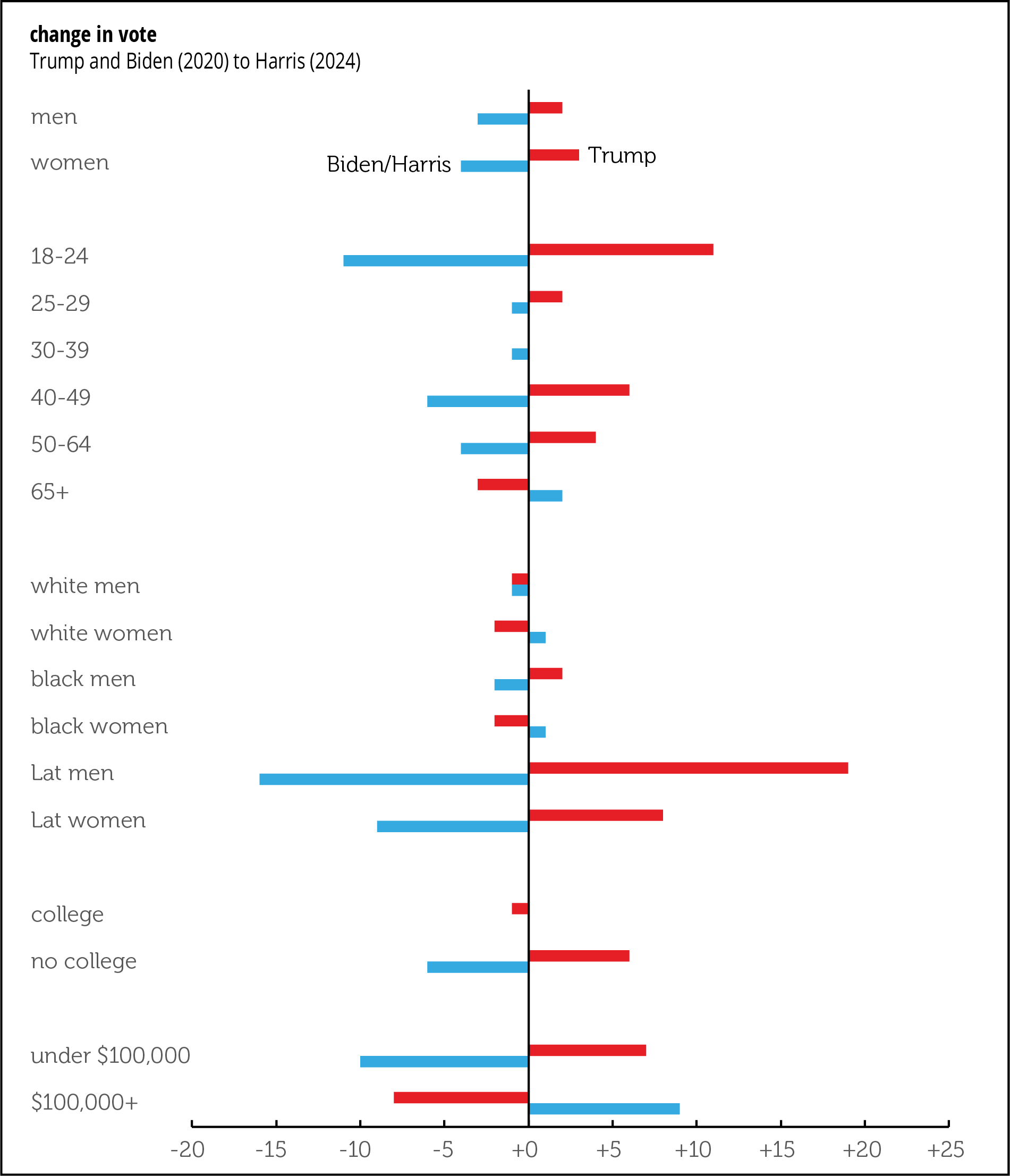
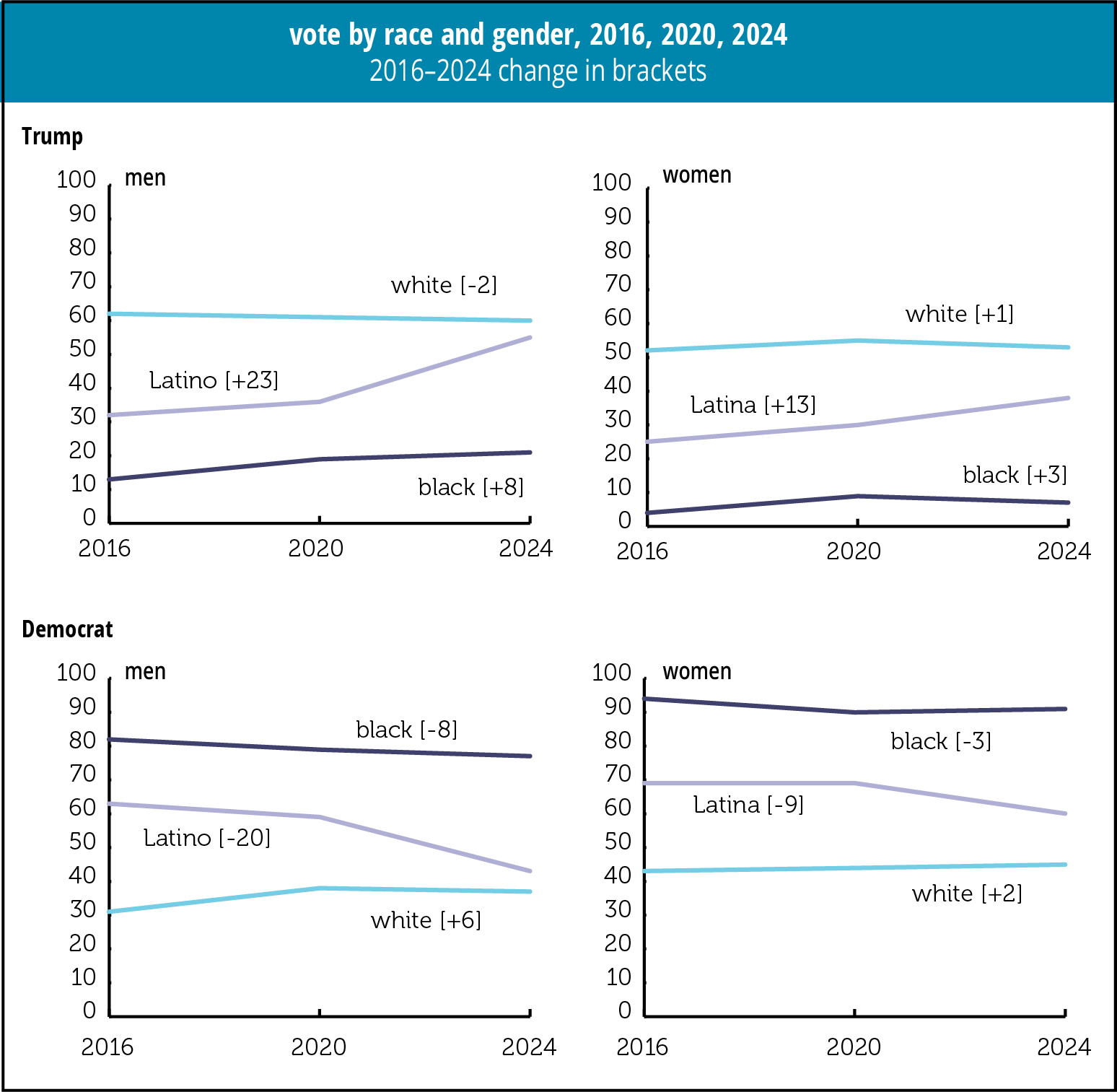
If you listen to some liberals—I’m too discreet to name names, but you might know whom I have in mind—Trump’s election was the reflection of a resurgent hegemony of white patriarchy. These arguments are typically made without any supporting evidence, because there isn’t much of that. Here’s some complicating data drawn from exit polls (sources: 2016, 2020, 2024).
First, the swing between 2020 and 2024. The only demographic groups in the graph below to shift significantly towards the Democrat between 2020 and 2024 were over-65s and those with incomes over $100,000. Over-65s, often maligned as a bunch of wealth-hoarding reactionaries, went from favoring Trump by 5 points in 2020 to breaking even in 2024. (They favored Trump by 7 in 2016, though this isn’t graphed.) Over $100,000 voters went from favoring Trump by 12 in 2020 to favoring Harris by 5. (Data note: you’d need an income of $121,200 today to match one of $100,000 in November 2020, so this is only a rough comparison.)
Viewed as swings, as in the graph below, the youngest voters shifted hard from D to R (by 11 points, to be precise), as did voters without a college degree (by 6 points). Latinos shifted even harder, especially men (19 points for them, though the 8-point shift among women wasn’t trivial). Whites of both sexes shifted some away from Trump, and white women, in small numbers, towards Harris.
Changes from 2016 are also interesting, and also not what you’d guess from the standard liberal whining. The share of white men voting for Trump fell by a percentage point in 2020 and again in 2024; white women were little changed. Black men shifted 8 points in Trump’s direction over those eight years; black women, moved 3 points towards Trump. The most striking changes were among Latina women, 13 points towards Trump, and especially Latino men, 23 points. Over half of Latino men, 55%, voted for Trump last week, just 5 points short of white men’s vote. The bottom two graphs show the moves towards and away from the Dems; those are close to mirror images, but since exit polls are rough estimates and there are always candidates other than the two biggies, the inversion isn’t perfect.
Obviously there’s still plenty of racism and patriarchy in the USA, and racists and patriarchs are an important part of the Trump base. It would be otherworldly to deny either. But to claim that some joint outbreak of both explains the election result requires ignoring some actual data. What needs to be explained are the shifts among formerly reliable Democratic voting blocs, notably the young, nonwhite, and lower income.
And the argument that demographic changes in the US—notably the decline of the white population share—would guarantee a Democratic majority in the coming decades now looks very wrong. Curiously, one of the analysts most associated with that argument is now a fellow at the right-wing American Enterprise Institute.
We review the various freaks, toadies, goons, and TV personalities that Trump has tapped to build his second cabinet, and speculate how much damage Vivek & Elon can actually do with their kids-table DOGE advisory board. We also discuss the coalescing view among the pundit class that the Democrats need to abandon their various activist groups, as espoused in today’s reading series by Adam Jentleson. Finally, a new (hopefully semi-regular) feature from Matt. Get bonus content on Patreon
Pulitzer Prize-winning journalist and ordained minister Chris Hedges returns to Bad Fatih for a left-focused deep dive into what happened on election night, what's next for the left, and the role spirituality may play in creating a sense of community that some currently find in the Joe Rogan media environment.
scroll to 'Technical Notes for Running the Workshop'
The world of academic workshops and conferences is changing. Constrained budgets for meeting organizers and attendees, postpandemic reluctance to travel, concerns about environmental footprints, and the need to be more inclusive are all motivating efforts, including in the sciences, to find workable alternatives to in-person gatherings [Kremser et al., 2024; Fraser and Mancl, 2024]. Meanwhile, widespread access to improved communication technology and the availability of an ever-growing set of online tools are increasingly making remote workshops more viable and effective than in the recent past.
Online events are particularly attractive for geographically dispersed groups of participants and for meeting organizers facing tight constraints on the lead time available for planning.
Online events are particularly attractive for geographically dispersed groups of participants and—because there is no need to work out location-based logistics—for meeting organizers facing tight constraints on the lead time available for planning. Online events, though they have their own challenges, can also minimize the time commitment for attendees and can enable inclusion of a broader group of perspectives, including in multidisciplinary workshops bringing together experts from different fields.
We are a group of Earth scientists, including modelers and observationalists, interested in quantifying and understanding the impacts of the increasing volumes of meltwater flowing into the ocean from the Greenland and Antarctic ice sheets. This meltwater affects the ocean through sea level and density changes, which can have wider impacts on the climate through ocean temperatures and sea ice changes. Data on these fluxes will be an important input for climate models, such as those used in the Coupled Model Intercomparison Project (CMIP), a vital source of input for international and national climate assessments.
In late 2023, with a looming deadline for submitting input data for the next round of CMIP, we recognized the need for a rapid coordinated global effort to produce datasets characterizing historical freshwater fluxes to support these models. (The deadline was originally in April 2024, although it was subsequently pushed back.) In response, we organized a virtual workshop, held 11–13 February 2024, to gather contributions from a global group of experts. The novel format offered many benefits and was successful, although participant feedback pointed to possible improvements.
Topic, Scope, Format, and Scheduling
The scientific literature is increasingly mentioning effects of meltwater from the Greenland and Antarctic ice sheets. Accurately quantifying meltwater fluxes is important for matching observed and modeled surface temperature and sea ice trends in the Southern Ocean. These fluxes have also been implicated in changes in salinity and temperature in the North Atlantic and tropical east Pacific [Dukhovskoy et al., 2019; Dong et al., 2022].
Recent studies have suggested that these fluxes need to be represented in climate model simulations, either by including dynamic ice sheets or by adding freshwater as an external driver, to improve the models’ skill in reproducing observations [Pauling et al., 2016; Schmidt et al., 2023; Li et al., 2023; Roach et al., 2023].
In addition to simplifying planning and its flexibility for participants, the virtual workshop format had financial cost benefits because it eliminated travel expenses and used only preexisting resources.
To address this need, we set three goals for our recent workshop: to develop a community of observationalists and modelers to collate and document the required datasets, to recommend methods for implementing this freshwater flux in climate models, and to publish the methodology in time for it to be incorporated into the next round of CMIP simulations.
Given this scope and the short timeline we had to work with, we developed a virtual workshop format. In addition to simplifying planning (it took less than 4 months from conception to execution) and its flexibility for participants, this format had financial cost benefits because it eliminated travel expenses and used only preexisting resources.
The conference organizing committee canvassed for potential presenters across the range of topics to be discussed, from ice sheet observations to ocean modeling and preliminary results from coupled systems. We requested that speakers prerecord a focused talk of up to 15 minutes and upload their video and slides to a shared Google Drive folder at least a week before the conference. This format mitigated the usual limitations on speaking time at meetings, so invitations to speak were sent to all of the initially proposed presenters and to others suggested during the organizing process. Not all speakers had experience with self-recording talks, so we provided guidance on useful techniques and software alternatives.
In total, 30 recorded talks with accompanying slides were made available to workshop participants about a week before it started. Attendees who provided feedback after the meeting universally praised this aspect of the workshop, although some expressed frustration that not all speakers kept to the 15-minute limit. Other respondents said they would have preferred more lead time to view the talks in advance. Additional prompting by organizers to encourage participants to watch the talks ahead of the discussion sessions likely would have also helped.
To attract participants on short notice, we promoted the workshop heavily through standard approaches such as mailing lists, word of mouth, and advertising at other meetings. We also spread the word with frequent messaging on social media platforms widely used by scientists—notably X (formerly Twitter) and Bluesky—and we specifically targeted social media accounts that reach underrepresented communities (e.g., @BlkinGeoscience).
We identified a 1-hour time block that minimized the collective inconvenience for participants and chose that time block to host daily “global Zoom” sessions.
Approximately 160 people registered for the workshop. Registrants were based around the world, including in (starting at the International Date Line) New Zealand, Australia, Japan, China, India, eastern Europe, central Europe, the United Kingdom, locations across the contiguous United States, and Hawaii. Some were also on ships at sea or in field camps in Antarctica (and connected via Starlink). Using an online multitime zone meeting planner, we quickly assessed which blocks of time were within (or close to) the working day for four representative zones: the Australian East Coast, central Europe, the U.S. East Coast, and the U.S. Pacific coast.
No time blocks were ideal for all participants, but we identified a 1-hour block (beginning at 20:00 UTC) that minimized the collective inconvenience. We thus chose that time block to host daily “global Zoom” sessions that covered welcoming remarks, summaries of prior sessions, and concluding statements. We also defined three or four 2-hour discussion blocks per day, each of which was convenient for participants in a subset of time zones. (For example, a block from 13:00 to 15:00 UTC was considered convenient for people in Europe and on the U.S. East Coast.) The whole workshop took place over 49 hours.
Immediately after the workshop, all participants were asked to provide feedback on any or all aspects of the format; 16% of the signed-up participants responded.
An Abundance of Information
Zoom sessions during the meeting were all recorded, and those recordings were posted to the shared Google Drive as soon as they were available. In addition, each session had a facilitator and rapporteur whose notes were visible (and editable) on the Google Drive in real time. (See the sidebar for more information on the tools used and other technical considerations for this meeting.)
Survey respondents mostly reported that they at least skimmed the notes from sessions they missed, but few felt they had enough time to review the Zoom session videos. In fact, 50% of respondents did not think the session recordings were useful, whereas 75% thought the notes were more useful. We realized in retrospect that the combination of trying to catch up on both relevant presentations and meeting discussions they’d missed was too much for many participants. (We return to this point below.)
The rolling format was successful overall and helped to foster the intensity and focus of an in-person workshop.
Up to 60 participants at a time attended the regionally specific Zooms, which supported a rolling discussion of important topics, such as modeling strategies and sources of observational data. The rolling format, designed to keep conversations moving and effectively tap the collective intelligence of a large group, was successful overall and helped to foster the intensity and focus of an in-person workshop.
However, a limitation of this approach for our event was that in some sessions, few or none of the relevant experts on the particular topic of focus could attend because of inconvenient timing, which limited the depth of discussion slightly. Other criticisms of these sessions related to facilitators not adequately including all participants and an occasional lack of focus in discussions, but most respondents reported that they were able to engage in and follow the conversations.
For questions and answers on the talks and technical discussions, we set up a GitHub repository accessible to all participants with facilities for uploading data and code. The repository also featured flexible discussion boards [Braga et al., 2023] tailored to the session topics, technical issues such as dataset formats, and the broader philosophy of model coupling. Most of the survey respondents (74%) said they appreciated having the discussion boards, and even months later, the boards are still in use.
Feedback and Future Improvements
From our perspective as organizers, this global, virtual workshop developed on relatively short notice was a success. Fulfilling our first goal, it indeed brought together a community of researchers to focus on the representation of freshwater fluxes in climate models—and it did so with no dedicated funding and zero travel-related carbon emissions.
Our experience running the recent meeting and the participant feedback we received offer useful lessons for future efforts.
Large majorities of survey respondents reported that they were very or extremely satisfied with the format (72%) and that they would attend another similar event (84%). They appreciated the time, energy, and money they saved compared to attending an in-person event, and most said they would prefer this format over others, such as multiregion hub meetings or hybrid options for standard workshops.
An additional demonstration of the meeting’s success will come with the timely delivery of the new collated datasets, the guidance on implementing these fluxes in models that emerged from the meeting, and the paper documenting the implementation process, all of which are in progress.
A Google Drive folder with more than 10 gigabytes of available storage was used to store prerecorded presentations. Access was granted only to workshop participants (i.e., it was not publicly accessible for uploads).
Converting speakers’ videos to other formats was sometimes required to ensure that the videos would stream within attendees’ browsers and to avoid the need for manual download.
Zoom Pro video conference software (provided via a university affiliation) allowed unlimited meeting time, cohosting capabilities, and both local and cloud-based video conversion to produce session recordings. We found that the cloud-based conversion functionality was not reliably fast enough, so we subsequently used local conversions. Recordings could be initiated only by the host institution or an assigned host from within the meeting, and handovers between hosts were needed to ensure recordings were made in different time zones.
Note-taking during sessions was done using Google Docs, accessible through the shared Google Drive.
Notes, videos, and presentation slides were archived from the Google Drive to Zenodo.
Speaker question and answer sessions and discussions were hosted on GitHub, for which participants either had to use an existing account or had to create one for this project.
Drafting of the workshop report is being done in Overleaf, a collaborative online LaTeX platform.
Our experience running the recent meeting and the participant feedback we received offer useful lessons for future efforts. Suggestions for improving the experience focused on slowing things down. Specifically, people requested that the prerecorded talks be made available further in advance of the workshop. They also requested more time between sessions for breaks, to catch up on prior conversations, or to prepare for upcoming discussions.
We therefore recommend that organizers maximize the time available for attendees to view the uploaded videos beforehand; ideally, it should be at least 2 weeks. Also, considering that people cannot necessarily devote many hours a day to a remote workshop, such events should be spread over a longer period than would be normal for an in-person event. We recommend at least a week or possibly two, instead of just a few days. Further, although rolling discussions can work well, organizers should build in open time between sessions to allow people to catch up.
The format of our workshop fostered inclusivity of a geographically dispersed community, but organizers should also make sure that a broad range of voices and persons with relevant expertise participate in and are called upon in online sessions. In our case, prepolling to gauge attendance in each regional session and adjusting topics if needed would have been useful. Finally, many participants in this event were unfamiliar with some aspects of the tools being used, so offering training and advice before the event starts is likely to be worthwhile.
Given the benefits outlined above, we strongly encourage other workshop organizers to consider this online meeting format, albeit with some fine-tuning, for future events. Clearly, scientists no longer need to be tied to a specific place, time zone, or modality to foster community and advance important research.
References
Braga, P. H. P., et al. (2023), Not just for programmers: How GitHub can accelerate collaborative and reproducible research in ecology and evolution, Methods Ecol. Evol., 14(6), 1,364–1,380, https://doi.org/10.1111/2041-210X.14108.
Dong, Y., et al. (2022), Antarctic ice‐sheet meltwater reduces transient warming and climate sensitivity through the sea‐surface temperature pattern effect, Geophys. Res. Lett., 49(24), e2022GL101249, https://doi.org/10.1029/2022GL101249.
Dukhovskoy, D. S., et al. (2019), Role of Greenland freshwater anomaly in the recent freshening of the subpolar North Atlantic, J. Geophys. Res. Oceans, 124(5), 3,333–3,360, https://doi.org/10.1029/2018JC014686.
Fraser, S., and D. Mancl (2024), Virtual and the future of conferences, Commun. ACM, 67, 32–34, https://doi.org/10.1145/3624638.
Kremser, S., et al. (2024), Decarbonizing conference travel: Testing a multi-hub approach, Bull. Am. Meteorol. Soc., 105(1), E21–E31, https://doi.org/10.1175/BAMS-D-23-0160.1.
Pauling, A. G., et al. (2016), The response of the Southern Ocean and Antarctic sea ice to freshwater from ice shelves in an Earth system model, J. Clim., 29, 1,655–1,672, https://doi.org/10.1175/JCLI-D-15-0501.1.
Roach, L. A., et al. (2023), Winds and meltwater together lead to Southern Ocean surface cooling and sea ice expansion, Geophys. Res. Lett., 50(24), e2023GL105948, https://doi.org/10.1029/2023GL105948.
Schmidt, G. A., et al. (2023), Anomalous meltwater from ice sheets and ice shelves is a historical forcing, Geophys. Res. Lett., 50(24), e2023GL106530, https://doi.org/10.1029/2023GL106530.
Author Information
Gavin A. Schmidt (gavin.a.schmidt@nasa.gov), NASA Goddard Institute for Space Studies, New York; Julie Arblaster, Securing Antarctica’s Environmental Future, School of Earth, Atmosphere and Environment, Monash University, Melbourne, Vic., Australia; Kenneth D. Mankoff, Autonomic Integra LLC, New York; also at NASA Goddard Institute for Space Studies, New York; Andrew Pauling, University of Otago, Dunedin, New Zealand; and Qian Li, Massachusetts Institute of Technology, Cambridge
Citation: Schmidt, G. A., J. Arblaster, K. D. Mankoff, A. Pauling, and Q. Li (2024), Lessons learned from running a virtual global workshop, Eos, 105, https://doi.org/10.1029/2024EO240514. Published on 18 November 2024.
It's another edition of the bi-monthly collaboration between AP and Nonzero Newsletter continues! For the full version of this episode, subscribe now at Supporting Cast, where you'll also get a discounted subscription for Nonzero Newsletter!
excellent deepdive into Sudan politics (not so much geopolitics, though Bessner forces the topic near end of audio)
Danny and Derek welcome back to the podcast Khalid Medani, associate professor of political science, director of the Institute of Islamic Studies, and chair of the African Studies Program at McGill University, to talk about the state of play in Sudan's civil war. They delve into the military stalemate between the Sudanese Army and Rapid Support Forces (RSF), the humanitarian crisis reaching 13 million displaced and 26 million on the brink of starvation, involvement from outside actors including Egypt and the UAE, the strategic importance of the besieged city El Fasher in Darfur, the defection of the RSF’s Gezira commander, Abuagla Keikal, over to the Sudanese military, and more.
DR register their take on the 5 Nov 2024 US elections and ... it's just not as good as last week. While they retain what may be the best available Elon Musk impression, and they do Trump very well, their main attack on Trump is just reheating the old, cold "Putin's puppet" bit, which stopped working ~2018. The UK-politics skits /do/ work, however, so this ep is still (IMHO) net worth a listen.
What really swung it for Donald Trump and how did Joe Biden really react to the result? Kemi Badenoch’s first decision as Tory leader, and Nigel Farage’s Trump victory podcast.
This week's impressionists are Jon Culshaw, Jan Ravens, Lewis MacLeod, Jess Robinson and Duncan Wisbey.
The episode was written by: Tom Jamieson and Nev Fountain, Laurence Howarth, Ed Amsden and Tom Coles, Rob Darke, Edward Tew, Cody Dahler, Joe Topping, Peter Tellouche, Duncan Wisbey with additional material by Jennifer Walker and Vicky Richards.
Song lyrics by Bill Dare and Duncan Wisbey
Music by Duncan Wisbey
Executive Producer: James Robinson
Produced and created by Bill Dare
Production Co-ordinator: Caroline Barlow