Shared posts

13 Aug 15:58

David Oyelowo will be the first black James Bond in the next 007 audiobook

by Kwame Opam

Acclaimed actor David Oyelowo will soon be the first black actor to play James Bond — in audiobook form at least. The Guardian reports that the English actor has been tapped to play 007 in Trigger Mortis, the next official book in the series.

Oyelowo received a personal invitation from the estate of Ian Fleming, the author of the original Bond spy novels, and claimed he was "very honored" at the opportunity, telling The Guardian, "I am officially the only person on planet Earth who can legitimately say: ‘I am the new James Bond.’"

Continue reading…

13 Aug 15:56

Samsung officially unveils Galaxy Note 5 and Galaxy S6 edge+, pre-orders begin today

by Andrew Martonik

Both new phones go up for pre-order starting today, with full retail availability on August 21.

In conjunction with its Galaxy Unpacked event in New York City, Samsung today officially announced the Galaxy Note 5 and Galaxy S6 edge+. The two phones fall into the same family as the previously-announced Galaxy S6 and S6 edge, with very familiar designs and lots of shared internal components.


13 Aug 13:15

Google creates Android Security Updates Google Group for more transparency

by Jerry Hildenbrand

One of the big takeaways from the recent Black Hat security conference was Google announcing plans to issue monthly security updates, and that it would strive to keep us all better informed.

Lead engineer for Android security at Google Adrian Ludwig has announced a big step in the right direction with the creation of the Android Security Updates Google Group. The focus of the group is to provide more information about security issues and bulletins, and the first post details exactly what's in the current update for Nexus devices.

13 Aug 13:12

Start10 brings the old Windows 7 Start menu back to Windows 10

by Tom Warren

Stardock made a name for itself in the ‘90s by providing skinning software to change the look of Windows. While most people have stopped applying ugly themes to Windows these days, Stardock's software now aims to improve Windows by providing some customization features that Microsoft has left out. Stardock started that in a big way with Windows 8 by reintroducing the Start menu and windowing for "Metro-style" apps, and it's continuing this week with a new app called Start10.

Like the name implies, Start10 brings some changes to the Start menu inside Windows 10. Microsoft has transformed its Windows 10 Start menu into a mix of Windows 7 and Windows 8, but Start10 returns it firmly to the days of Windows 7. If you're not a fan of Live...

Continue reading…

13 Aug 13:09

Video: Rare white humpback whale sighting

by Andrea James

Humpback whales with albinism are extremely rare, so it was a real treat when one appeared off the coast of Australia this week. Read the rest

13 Aug 13:08

Dad's Army Teaser Marches In

Dad's Army Teaser Marches In

Bovine panic!

We’ve seen the images of the cast. We’ve had the poster. You know what follows next… That’s right, the first teaser trailer for the Dad’s Army film has come striding in like Captain Mainwaring and his less-than-elite squad in the end credits of the series.

From the looks of this, the film has captured the spirit of the show with its bumbling Home Guard patrol forever doing their best to keep wartime Britain safe while never quite getting it right. The big test, of course, will be the film itself, but there’s certainly decent signs here, with Jones in particular finding a take on Mainwaring that doesn’t copy Arthur Lowe’s impeccable original, but echoes it.

Oliver Parker is directing the remake of the classic Jimmy Perry/David Croft sitcom, which features a wide array of big British talent including Toby Jones (as Captain George Mainwaring himself), Bill Nighy (as Sergeant Arthur Wilson), Michael Gambon (as Private Godfrey), Tom Courtenay (as Corporal Jones), Bill Paterson (as Private Frazer), Daniel Mays, (as Private Walker) and Blake Harrison (as Private Pike). The cast also includes the likes of Catherine Zeta-Jones, Sarah Lancashire, Alison Steadman and Mark Gatiss. 

Dad’s Army will be in UK cinemas next year. 


12 Aug 22:12

Bubble Cloud Widget + Wear brings a stylish launcher to your Smartwatch

by Jen Karner

Convenience is the name of the game when it comes to Smartwatches, but at times getting to the app you need quickly can be a hassle in Android Wear. Bubble Cloud Widgets + Wear is a launcher that brings you gorgeous icons for all of your apps within swiping range. You've also got tons of options, and choices to personalize how everything looks and behaves.

If you haven't seen it yet, check it out below.

Bubble Cloud Widgets + Wear for Android Wear is available for free on the Google Play Store, with an option to purchase the premium version of the app for $2.49. When it first opens up on your watch, you'll see all of your apps arrayed with an icon for each in a colored bubble. You'll also see indicators for the date, battery power on both your phone and watch, and current internet signal. In the middle of all of this, is a clock.

If you swipe to the left, you'll get a second screen. This is dominated by a yellow bubble, which when tapped will bring you into settings. It's surrounded by more of your apps, depending on how many you have installed.

12 Aug 19:24

Dropbox adds support for USB security keys when using Chrome

by Joseph Keller

Dropbox has announced that it will now offer support for USB security keys for logging in via the service's website. Dropbox already supports two-factor authentication for its site and apps sending one-time codes either through SMS or authenticator apps. USB keys, also known as Universal 2nd Factor or U2F, add a new, physical dimension to securing your Dropbox account.

12 Aug 19:23

Twitter finally drops the 140-character limit from direct messages

by Casey Newton

Twitter's 140-character limit is going away, at least for the private messages you send on the service. As promised, the company said today that it will now allow messages of up to 10,000 characters in its mobile apps, desktop apps, and the web. It will also work in third-party apps, such as Tweetbot, the company says. "It's the No. 1 request we get from folks," said Sachin Agarwal, product manager for DMs, in an interview. "They want to be able to say what's on their mind and be themselves."

Continue reading…

12 Aug 19:18

Best way to deal with parking spot stealers

by Mark Frauenfelder

park

The driver of a yellow jeep was waiting patiently for a silver car to back out of a parking spot so he could park there, but a jerk driving a purple car swooped in and stole his spot. The driver of the yellow jeep corrected the situation beautifully. Read the rest

12 Aug 19:17

Why modern phones are so awful

by Rob Beschizza

Just today, I endured a typical 2015 phone call. My caller's voice was a warbling digital mess that cut in and out.

Read the rest
12 Aug 16:30

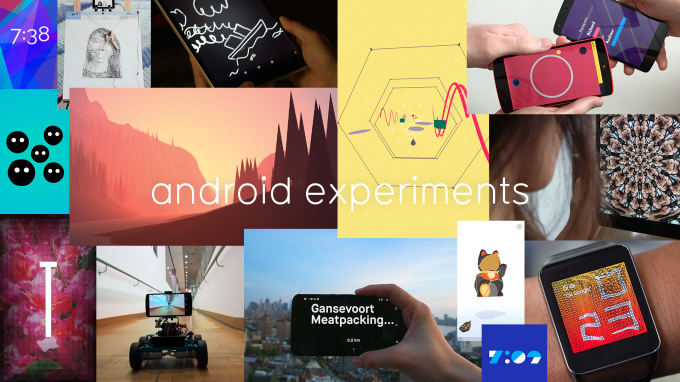
Google Launches New Site To Showcase Experimental Open Source Apps For Android And Android Wear

by Frederic Lardinois
AndroidExperiment-collage Google launched Android Experiments today, the mobile apps counterpart to its Chrome Experiments site. Just like with Chrome Experiments, the idea behind Android experiments is to showcase apps that use new and cutting-edge technology, aesthetics and interfaces. All of the apps in the Android Experiments Gallery will be open source so other developers can see how they were made. Read More
12 Aug 12:01

Open Windows Explorer at "This PC" Instead of Quick Access

by Eric Ravenscraft

Open Windows Explorer at "This PC" Instead of Quick Access

Windows 10: In the new version of Windows, Explorer has a section called Quick Access. This includes your frequent folders and recent files. Explorer defaults to opening this page when you open a new window. If you’d rather open the usual This PC, with links to your drives and library folders, here’s how.

Like most things in Windows, there’s a simple setting to change this, but it’s buried in some menus. To change the default Explorer page to This PC, follow these steps:

  1. Open a new Explorer window.
  2. Click View in the ribbon.
  3. Click Options.
  4. Under General, next to “Open File Explorer to:” choose “This PC.”
  5. Click OK.

Now, when you launch a new Explorer window, you’ll start at This PC, which you’re probably used to from past versions.

Scott Hanselman | Twitter

11 Aug 20:11

Get Rid of Windows 10's Default Apps with PowerShell

by Melanie Pinola

Get Rid of Windows 10's Default Apps with PowerShell

Windows 10 comes with several apps installed by default, some which you might never use, like the Xbox app or Phone Companion. Here’s how to remove those apps.

You’ll need to run PowerShell as an administrator, but after that all you have to do is copy and paste the code Thomas Vanhoutte has posted on his blog.

The apps you can remove with PowerShell are: 3D; Camera; Mail and Calendar; Money, Sports, News, and Weather; Groove Music and Film & TV; People; Phone Companion; Photos; Solitaire Collection; Voice Recorder; and Xbox.

According to some reports on the interwebs, removing the Xbox app could improve gameplay on Windows 10.

Annoyed by other minor things in Windows 10? You can tweak them away too.

Remove default Apps from Windows 10 | Thomas Vanhoutte

11 Aug 20:11

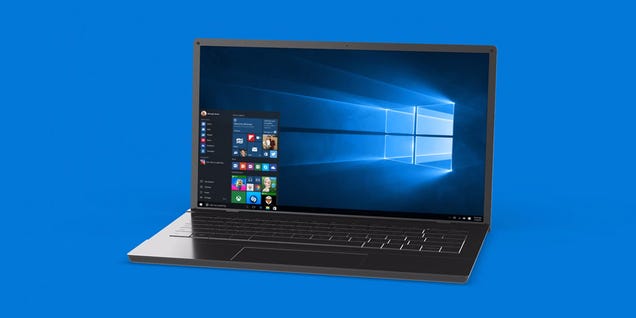
The Worst Bugs in Windows 10 and How to Fix Them

by David Nield on Field Guide, shared by Whitson Gordon to Lifehacker

The Worst Bugs in Windows 10 and How to Fix Them

If you dived in the Windows 10 deep end, you might not have a smooth and seamless experience. Nowadays every piece of software seems to be a work-in-progress, and Microsoft’s newest operating system is no different.

That’s not to say Windows 10 has been a total disaster—plenty of people have upgraded with no problems at all—but for those of you who are getting a rough ride, the tips below should help. Of course you may have to adapt them slightly to fit the idiosyncrasies and configuration of your own system setup.

Here are the most common problems with troubleshooting ideas for tackling them.

Battery life

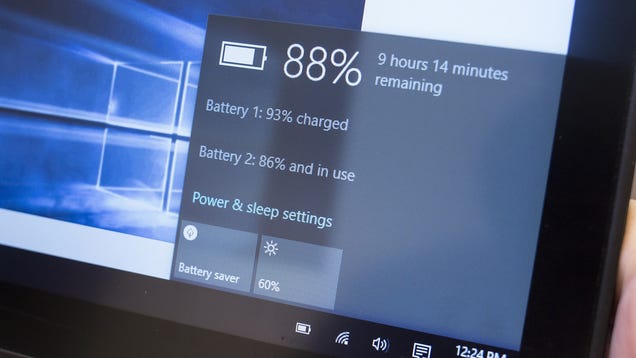
Battery life is usually an issue whenever there’s a new OS update in town, but this doesn’t seem to have been a huge problem with Windows 10. If you are seeing faster drains on your hardware, check with the manufacturer to see if there’s a firmware or driver fix available that better optimizes the hardware to match the demands of Windows 10.

The Worst Bugs in Windows 10 and How to Fix Them

Based on our testing, the regular updates that Windows 10 downloads and installs in the background can have a detrimental effect on battery life: If the charge level seems to be falling fast, updates may be to blame, so if you ride out the initial flurry of patches then you might find that battery life gets better rather than worse.

Default apps

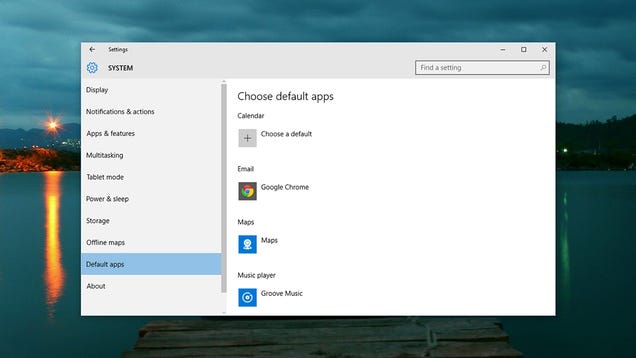
One of the issues we’ve seen with our own eyes is Windows 10 removing the default file associations that we painstakingly put in place in Windows 8.1, so double-clicking on a picture file opens up Windows’ own image application rather than something a lot more useful. This seems to happen even if you tell the upgrade installer to leave them alone.

The Worst Bugs in Windows 10 and How to Fix Them

It’s an annoyance but it’s not hard to fix: Launch the Settings app from the taskbar, click System and then choose Default apps. Alternatively, right-click on a file in File Explorer, choose Open with and then Choose another app. Tick the box marked Always use this app as you pick out a new program.

Buggy or broken software

Windows 10 has been in its testing phase for a long, long time now, but there are still some applications that won’t like working with it (particularly older ones). If this applies to you, your best bet is to keep checking for updates to the program in question until a fix rolls out—try checking the app forums or contacting the developer directly.

The Worst Bugs in Windows 10 and How to Fix Them

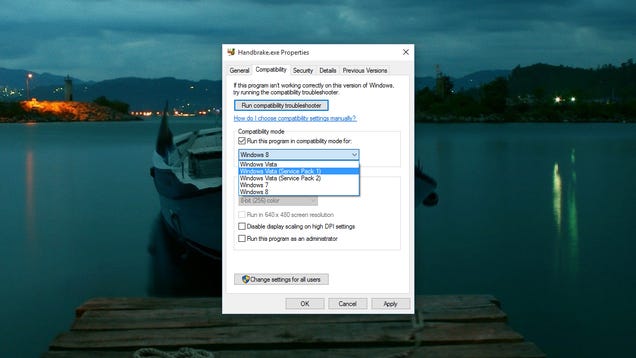
Compatibility Mode is still present and correct in Windows 10, so you can try that too: Right-click on an executable, choose Properties and open the Compatibility tab. From there, you’re able to get the program in question running as if it were using a different version of Windows. It’s not guaranteed to work but it might help.

Touchpad woes

Other issues we’ve had first-hand experience of relate to trackpads, which isn’t altogether unexpected: The delicate calibration of this input device is always likely to get thrown off by a major OS update. Unfortunately, there’s not much you can do until your laptop maker or Microsoft gets around to issuing a patch.

The Worst Bugs in Windows 10 and How to Fix Them

Heading to the forums of the manufacturer in question and venting your frustration may get the process moving a little faster and has the added benefit of letting others know that they’re not alone. Uninstalling and reinstalling the current touchpad drivers (via Device Manager in Control Panel) may also help get the device working again.

Reboot loops after updating

One of the most recent updates pushed out by Microsoft caused a large proportion of users to get stuck in a reboot loop—it seems that Microsoft hasn’t quite perfected the update and patch process yet. If you’re comfortably hacking around in the registry, there is a method for fixing it and getting your computer working again.

The Worst Bugs in Windows 10 and How to Fix Them

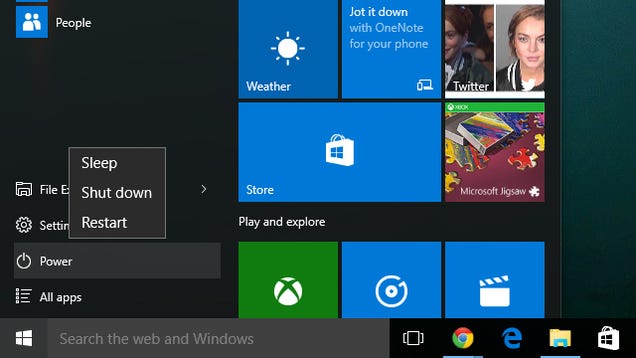
For the rest of us, it’s just a question of being patient until Microsoft’s engineers can solve the problem on their end—you can expect more of these kind of problems in the future, especially in the early days of Windows 10. If you want to disable mandatory updates for Windows 10 then there is a way, but it’s not particularly pretty.

Dealing with other problems

With so many different configurations of hardware and software out there, it’s hard to provide specific troubleshooting advice, but uninstalling and reinstalling apps and devices works as well as it ever has—it forces Windows to start from scratch with your programs and peripherals. New updates for Windows 10 are rolling out every day, so it may just be a question of waiting for the right patch or driver update to appear.

The Worst Bugs in Windows 10 and How to Fix Them

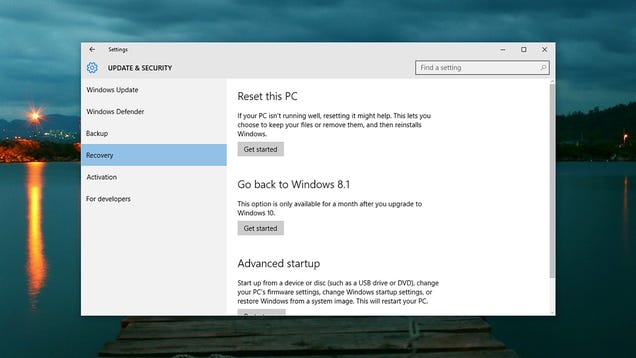
The main recovery options haven’t changed very much from Windows 8.1: From the Settings app go to Update & security and then Recovery. Under Reset this PC you can restore Windows 10 back to its original settings while keeping or erasing your files, while the full reinstall option is under Advanced startup. For a month after you upgrade there’s an option to go back to your previous version of Windows too.

11 Aug 20:10

This is why chameleons are so amazing

by David Pescovitz

National Geograph explores the magic and mystery. Read the rest

11 Aug 15:36

Teen claims world record for kicking oneself in head

by Rob Beschizza

By kicking himself 134 times in the head in 60 seconds, Nepalese teen Puskar Nepal has booted the previous champion from the record books.

Read the rest
11 Aug 13:57

There is nothing more purple than McLaren's 'Mauvine Blue' 570S supercar

by Chris Ziegler

Earlier this week, McLaren laid out its plans for this weekend's Pebble Beach Concours d'Elegance — one of the most opulent, indulgent celebrations of fancy cars on the planet — and one car in particular caught my eye. What you're looking at here is a McLaren Special Operations (MSO) 570S customized with "Mauvine Blue" paint. (MSO is the division of McLaren that specializes in all of the company's coolest activities: taking care of aging F1s, making bespoke vehicles to customers' specifications, and maintaining hardcore P1 GTRs on behalf of ultra-wealthy racing fans, as Ferrari does with the FXX K.)

I'm not sure I'd describe this as a shade of blue, though, because it's definitely purple. There's a possibility that the car's unique...

Continue reading…

11 Aug 13:57

Pushbullet Now Supports End-To-End Encryption For Notification Mirroring, SMS, And Copy-Paste Sync

by Ryan Whitwam

splash

You can't deny that Pushbullet is insanely useful, and it gets more so with each update. However, Pushbullet does see a lot of your data in plain text, and there's been growing demand for better security. As of today, Pushbullet supports end-to-end encryption for SMS, notification mirroring, and universal copy-paste.

In a recent conversation on Reddit, Pushbullet's lead developer dug into the issue with users. Pushbullet has always used https to secure connections, but the Pushbullet servers still see all your data in plain text.

Read More

Pushbullet Now Supports End-To-End Encryption For Notification Mirroring, SMS, And Copy-Paste Sync was written by the awesome team at Android Police.


11 Aug 12:33

Five Basic Hand Stitches You Should Know for Repairing Your Own Clothes

by Patrick Allan

Five Basic Hand Stitches You Should Know for Repairing Your Own Clothes

There’s no need to spend money when you can fix something yourself. If you’ve popped a button on your shirt, worn down a hem on your pants, or busted a seam in your dress, these five hand sewing techniques can help you fix things in snap.

Running Stitch

The running stitch is the most basic of all hand sewing stitches and it’s what all other forms of sewing are based off of. In the video above, Lauren Bradley from the expertvillage YouTube channel explains the easiest way to join two pieces of fabric. While running stitches running stitches may seem simple, they can still be incredibly effective for repairing clothing. This stitch can be used to:

  • Sew patches onto clothing (like when the knees go out in your pants)
  • Repair a hem at the end of a pant leg or the arm of a jacket
  • Re-attach a strap or other piece of fabric back to the main piece

All you need is a needle and some thread. Once you have your needle double threaded, be sure to knot the end and you’re ready to sew. When you’re done, a running stitch will have the same appearance on both sides of the joined fabrics.

Back Stitch

The back stitch is an advanced variation of the simple running stitch where you constantly take one step back and two steps forward along your stitch line. As Dawn Anderson explains in the video above from the MonkeySee YouTube channel, the back stitch is very strong and flexible stitch for repairing areas of high wear and tear. A back stitch is ideal for:

  • Re-attaching zippers where the seam has come undone
  • Repairing tears or places where the fabric is starting to unravel

Generally, anywhere a running stitch would do the job, a back stitch can be used. It’s stronger and will probably last longer, but it takes longer to sew (especially if you’re new to sewing). With a back stitch, one side will look like a simple running stitch, but the other will have a line of overlapping stitches.

Whip Stitch

The whip stitch is a little more complicated, but may be even more useful than the simple running stitch. In the video above, YouTuber Wendi Gratz demonstrates a whip stitch on a small stuffed pillow, but the technique can be used to fix other things like:

  • Busted seams on pants, shirts, and jackets
  • Pockets that have split open
  • Hems that have split open at the bottom (not at the actual hem stitch)

Of course, as demonstrated in the video, you can also use the whip stitch to fix pillows, pillow cases, couch cushions, and any other item that’s busted open at the seams. Again, all you need is a needle and some thread, but it’s best if the thread’s color matches the fabric you’re sewing into because the thread will be visible.

Slip Stitch

The slip stitch can close up seams and holes just like a whip stitch, but the stitch itself won’t be visible. Unfortunately, it’s also the toughest stitch to master on this list. In the video above, YouTuber Professor Pincushion demonstrates the slip stitch method while explaining the finesse the procedure requires. This type of stitch is useful for repairing holes in more visible areas where the thread of a whip stitch would be too apparent. Keep in mind, however, that it’s also not going to be as strong as a whip stitch, so it should only be used to repair small holes and tears. Also, it’s best if you use a thread that’s colored to match the fabric you’re working with. If you have the patience to develop your skill, the slip stitch can make clothing issues literally disappear.

Sewing on a Button

Last, but not least, knowing how to sew a button back on, or add an additional button, can be pretty handy. We’ve featured it before, but this video from the ThreadBanger YouTube channel explains the process in the simplest way possible. It doesn’t take long to learn, and once you know how, it will stick with you. If you’re having trouble with it, you can use a toothpick to help you sit the button properly. Now there’s no need to go buy new clothes because you know how to replace buttons on your clothing and jackets, fix undone hems, and repair tears or busted seams.

11 Aug 12:31

19 New And Notable (And 1 WTF) Android Apps From The Last 2 Weeks (7/28/15 - 8/10/15)

by Michael Crider

roundup_icon_largeWelcome to the roundup of the best new Android applications, games, and live wallpapers that went live in the Play Store or were spotted by us in the previous 2 weeks or so.

Please wait for this page to load in full in order to see the widgets, which include ratings and pricing info.

Looking for the previous roundup editions? Find them here.

Featured App

Email for Exchange Mail Apps +

This week's roundup is brought to you by Email for Exchange Mail Apps + by Mail Wise.

Read More

19 New And Notable (And 1 WTF) Android Apps From The Last 2 Weeks (7/28/15 - 8/10/15) was written by the awesome team at Android Police.


11 Aug 12:30

We talked briefly with the poor guy who owns the @alphabet Twitter handle

by Russell Holly

Chris Andrikanich is an iPhone 6-wielding guy who found his fairly average Twitter account completely overrun with seemingly random messages of congratulations and suggestions that he was about to come into big money. Why, you ask? Mr. Andrikanich is known as @alphabet on Twitter, and after Google's big restructuring announcement earlier today lots of folks on the Internet assumed Google would want to move in to this newly coveted handle.

Despite the chaos that had befallen his Twitter account, Chris was able to talk to us for a few minutes.

Curiously, Google's new parent company never reached out to Mr. Andrikanich to acquire the Twitter handle.

At around 4:30 this afternoon, Chris got the first random mention congratulating him on something. By the time he found a link explaining why it was people were blowing up mentions on his Mac, the stream had become constant. During the 40 minute drive to go pick up his kid, Chris told us he'd received 996 mentions, and hours later there was no sign this was going to let up anytime soon. He's probably going to disable mentions entirely for a while, but for tonight he's just going to rely on Do Not Disturb to keep his phone from buzzing all night long.

11 Aug 12:29

G is for Google

by noreply@blogger.com (Google Blogs)
As Sergey and I wrote in the original founders letter 11 years ago, “Google is not a conventional company. We do not intend to become one.” As part of that, we also said that you could expect us to make “smaller bets in areas that might seem very speculative or even strange when compared to our current businesses.” From the start, we’ve always strived to do more, and to do important and meaningful things with the resources we have.

We did a lot of things that seemed crazy at the time. Many of those crazy things now have over a billion users, like Google Maps, YouTube, Chrome, and Android. And we haven’t stopped there. We are still trying to do things other people think are crazy but we are super excited about.

We’ve long believed that over time companies tend to get comfortable doing the same thing, just making incremental changes. But in the technology industry, where revolutionary ideas drive the next big growth areas, you need to be a bit uncomfortable to stay relevant.

Our company is operating well today, but we think we can make it cleaner and more accountable. So we are creating a new company, called Alphabet (http://abc.xyz). I am really excited to be running Alphabet as CEO with help from my capable partner, Sergey, as President.

What is Alphabet? Alphabet is mostly a collection of companies. The largest of which, of course, is Google. This newer Google is a bit slimmed down, with the companies that are pretty far afield of our main Internet products contained in Alphabet instead. What do we mean by far afield? Good examples are our health efforts: Life Sciences (that works on the glucose-sensing contact lens), and Calico (focused on longevity). Fundamentally, we believe this allows us more management scale, as we can run things independently that aren’t very related. Alphabet is about businesses prospering through strong leaders and independence. In general, our model is to have a strong CEO who runs each business, with Sergey and me in service to them as needed. We will rigorously handle capital allocation and work to make sure each business is executing well. We'll also make sure we have a great CEO for each business, and we’ll determine their compensation. In addition, with this new structure we plan to implement segment reporting for our Q4 results, where Google financials will be provided separately than those for the rest of Alphabet businesses as a whole.

This new structure will allow us to keep tremendous focus on the extraordinary opportunities we have inside of Google. A key part of this is Sundar Pichai. Sundar has been saying the things I would have said (and sometimes better!) for quite some time now, and I’ve been tremendously enjoying our work together. He has really stepped up since October of last year, when he took on product and engineering responsibility for our Internet businesses. Sergey and I have been super excited about his progress and dedication to the company. And it is clear to us and our board that it is time for Sundar to be CEO of Google. I feel very fortunate to have someone as talented as he is to run the slightly slimmed down Google and this frees up time for me to continue to scale our aspirations. I have been spending quite a bit of time with Sundar, helping him and the company in any way I can, and I will of course continue to do that. Google itself is also making all sorts of new products, and I know Sundar will always be focused on innovation -- continuing to stretch boundaries. I know he deeply cares that we can continue to make big strides on our core mission to organize the world's information. Recent launches like Google Photos and Google Now using machine learning are amazing progress. Google also has some services that are run with their own identity, like YouTube. Susan is doing a great job as CEO, running a strong brand and driving incredible growth.

Sergey and I are seriously in the business of starting new things. Alphabet will also include our X lab, which incubates new efforts like Wing, our drone delivery effort. We are also stoked about growing our investment arms, Ventures and Capital, as part of this new structure.

Alphabet Inc. will replace Google Inc. as the publicly-traded entity and all shares of Google will automatically convert into the same number of shares of Alphabet, with all of the same rights. Google will become a wholly-owned subsidiary of Alphabet. Our two classes of shares will continue to trade on Nasdaq as GOOGL and GOOG.

For Sergey and me this is a very exciting new chapter in the life of Google -- the birth of Alphabet. We liked the name Alphabet because it means a collection of letters that represent language, one of humanity's most important innovations, and is the core of how we index with Google search! We also like that it means alpha-bet (Alpha is investment return above benchmark), which we strive for! I should add that we are not intending for this to be a big consumer brand with related products--the whole point is that Alphabet companies should have independence and develop their own brands.

We are excited about…
  • Getting more ambitious things done. 
  • Taking the long-term view. 
  • Empowering great entrepreneurs and companies to flourish. 
  • Investing at the scale of the opportunities and resources we see. 
  • Improving the transparency and oversight of what we’re doing. 
  • Making Google even better through greater focus. 
  • And hopefully...as a result of all this, improving the lives of as many people as we can.
What could be better? No wonder we are excited to get to work with everyone in the Alphabet family. Don’t worry, we’re still getting used to the name too!

Posted by Larry Page, CEO

Alphabet is mostly a collection of companies. The largest of which, of course, is Google.

11 Aug 12:25

Why Google's Alphabet shakeup makes sense

by Russell Brandom

Yesterday, Google caught the tech world off-guard with a major reorganization. In the months to come, what we now know as Google will become Alphabet, with "Google" now referring to just the core businesses of Search, Android, YouTube, and a handful of others, overseen by new Google CEO Sundar Pichai. From AT&T to IBM to GE to Microsoft, tech companies have always searched for a way to avoid becoming the next incumbent that gets complacent and then disrupted. Google tried X, now it’s trying Alphabet.

On the surface, the only difference is the name. The core business is still targeted advertising, and those profits are still funneled into a web of experimental schemes that may not ever turn a profit. But the new division between Google...

Continue reading…

11 Aug 12:24

The Tech Behind Each Letter In Google’s Alphabet

by Josh Constine
10 Aug 22:33

Bookmark it: abc.xyz is the online home of the new Alphabet

by Phil Nickinson

Along with the rebirth of Google and the formation of its new parent, Alphabet (if you ever wanted to understand just how unconventional things can get in Mountain View, read that sentence again) comes, of course, a new website.

Welcome abc.xyz, the online home of the new umbrella company for all things Android. And Google. And YouTube. And, well, everything that was, and will be, and has been. Google-owned businesses that already are separate from the core company "will be managed separately from the Google business," the company said in an SEC filing. That includes things like Nest, Google Fiber and Google Ventures. And as expected, chaos abounds. The "Alphabet" Twitter handle is already taken by one Chris Andrikanich of Cleveland, Ohio, a "self-proclaimed geek who fires off regular gibberish, gobblety-gook abotu sports, tech, CLE and whatever ..."

Well, that was an interesting way to end a Monday...

— Chris Andrikanich (@alphabet) August 10, 2015

That's putting it mildly.

Alphabet.com, meanwhile, apparently is owned by the one and only Bayerische Motoren Werke AG — BMW.

10 Aug 22:33

Sundar Pichai now CEO of Google

by Phil Nickinson

It's not a huge surprise if you stop for a second to think about it. But Sundar Pichai, who rose from the ranks of the Chrome team to lead both it and Android as senior vice president of Products, will be CEO of Google — now a technical subsidiary of the umbrella "Alphabet" corporation. (Or, rather, it will be once the moves are finalized later this year.)

"It is clear to us and our board that it is time for Sundar to be CEO of Google," Alphabet co-CEO Larry Page wrote in the letter announcing the creation of Alphabet. And to be sure, Pichai has very much been the public face of Google the past few years at the Google I/O developer conference, as well as other events throughout the year.

And it's not just about keeping the ship upright, Page said. Pichai will very much be growing Google's portfolio.

"Google itself is also making all sorts of new products," Page said in the letter, "and I know Sundar will always be focused on innovation—continuing to stretch boundaries. I know he deeply cares that we can continue to make big strides on our core mission to organize the world's information."

And Google will still be Google, Page wrote. One Alphabet company may well be vastly different from the next.

"The whole point is that Alphabet companies should have independence and develop their own brands."

10 Aug 22:33

Huge inside shakeup as Google creates 'Alphabet' umbrella company

by John Callaham

Let it never be said that Google is boring. Co-founder Larry Page today announced the creation of "Alphabet," a new corporation that will comprise Google and other previously Google-held properties to better allow them to act and grow independently. The change was announced across Google's collection of blog sites, as well as at the new (and cleverly domained) site abc.xyz.

10 Aug 17:59

Google Hangouts: now simpler, faster, more beautiful

by noreply@blogger.com (Google Blogs)
The best conversations just flow: you barely have to think about what to say. With Hangouts, we want to help you stay in the moment, no matter what device you’re using or how you’re getting your voice across, from texting to talking to video. So we’ve been hard at work on big improvements to make Hangouts faster, simpler, and easier on the eyes.

Today, we’re releasing Google Hangouts 4.0 for Android, with a fresh new look, improved speed, and features that make it even easier to reach people the way you want to reach them.

New ways to compose, attach and use your watch make Hangouts simpler than ever
Here's what’s new:
  • Hangouts is sleeker. Now updated with material design, Hangouts has a new look and feel: items respond to your touch in more intuitive ways and transitions between tasks are more fluid. 
  • Hangouts is simpler. The new Compose button makes it easier for you to start a new group or conversation. Our streamlined contacts list helps you find the right person quickly. And attachments have been revamped and simplified, so sharing—of emoji, GIFs, your location, even multiple photos at once—is a snap. 
  • Hangouts is faster. Whether you’re sending a quick message or video chatting with family, you don’t want hold-ups. We’ve been obsessively fixing bugs and speeding up message delivery to make Hangouts faster and more reliable. Bonus: less battery consumption.

And more…
Make affordable calls from the Hangouts Dialer, now with Outbound Caller ID (so your friends won’t get any more calls from the great “Unknown”). Receive and reply to group MMS messages in Hangouts using Google Voice. Use Hangouts on Android Wear when you really have an eye on the time (just say, “Ok Google, send a Hangouts message,” into your watch). And if you’re not around but want friends to know what’s on your mind? Custom status messages are back.

The new Hangouts starts rolling out to Android users today and will be available in the Play Store (iOS users recently got many of the same updates). We hope you enjoy the new look and feel. And we look forward to keeping the conversation flowing!

Posted by Amit Fulay, Product Manager, Communications

With Hangouts, we want to help you stay in the moment, no matter what device you’re using or how you’re getting your voice across, from texting to talking to video.

10 Aug 17:56

Climate change may mean vanishing act for UK butterflies

by Arielle Duhaime-Ross

Climate change could mean fewer butterfly species in the UK, according to a study published in Nature Climate Change today. As extreme droughts become more frequent, local populations of butterflies in the UK will die out, researchers say; even the most optimistic climate change scenarios shows species of butterflies being wiped out.

Continue reading…