Shared posts

21 Aug 19:54

Pebble Time update brings enhanced notification support to Android users

by Jared DiPane

The Pebble Time app for Android has been updated with some enhanced support for notifications. With this update, Pebble has added a notifications app which allows you to act on any notification that has not been dismissed from your paired phone. Additionally, notifications dismissed on your phone will now dismiss on your watch.

21 Aug 19:53

Amazon Echo scores support for SmartThings hardware

by Dan Thorp-Lancaster

Amazon has updated the Amazon Echo with some more new features today, this time bringing along support for Samsung's SmartThings, allowing you to control just about anything in your house with just your voice.

21 Aug 19:52

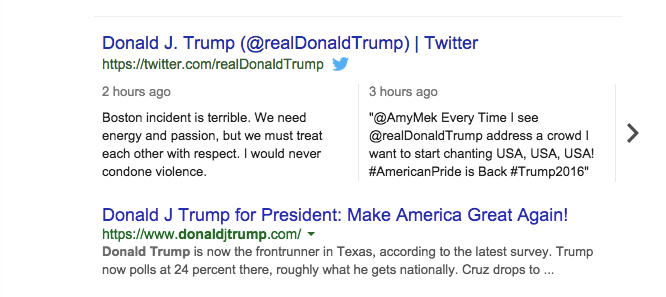
Google Brings Tweets To Desktop Search Results

by Drew Olanoff
Screen Shot 2015-08-21 at 11.27.22 AM Back in May, Google and Twitter partnered to bring tweets into mobile search results. It was, and is, a pretty big deal for both companies. The relationship is apparently going well, as Google announced in a short update on its original blog post that it’d be including tweets within search results on desktop as well. Read More
21 Aug 19:49

Look at the size of this grizzly bear paw

by Mark Frauenfelder

From West Coast Native News: "This is how big a grizzly bears paw is – by the way, the bear is sedated and about to be tagged."

21 Aug 19:49

Regal promises security-theater bag-searches in America's largest cinema chain

by Cory Doctorow


Going to the movies is getting airportified: your knapsacks, bags and purses will be searched on the way in to stop you from carrying in guns that you don't stick in your waistband or in a shoulder-holster. Read the rest

21 Aug 19:49

Free six-part course on encrypting email and securing your network sessions against snooping

by Cory Doctorow


Jeff sez, "Tuts+ has made my six part introduction to PGP encryption, email and networking privacy available to readers for free." Read the rest

21 Aug 16:24

Google confirms Life Sciences as the first new company under the umbrella of Alphabet

by Ben Popper

Google co-founder and Alphabet president Sergey Brin published a blog post this morning announcing Life Sciences as the first new company created under the Alphabet umbrella. The move was expected, as Alphabet CEO Larry Page wrote during the announcement of the new holding company that this area of focus was the perfect example of why Google needed to restructure itself. It's a bold bet with an enormous potential reward, but one that is far removed from Google's core business, and not likely to be financially self-sustaining anytime soon.

There are a number of already public projects that will be rolled up into life sciences:

Smart contact lenses that can monitor the blood sugar levels of diabetics

Nanoparticles that can be used to...

Continue reading…

21 Aug 16:23

Cat poses next to its own "missing cat" poster

by Mark Frauenfelder

Brian M. Cassidy snapped this photo of a cat peering through a window with a poster announcing that it was missing.

Read the rest
21 Aug 12:35

Kitchen Tips

Household tip: Tired of buying so much toilet paper? Try unspooling the paper from the roll before using it. A single roll can last for multiple days that way, and it's much easier on your plumbing.
20 Aug 23:44

Twitter shares have tumbled back to their original IPO price

by Ben Popper

Twitter's stock price continues to slide, closing today at the $26 strike price at which it went public. It closed its first day of trading around $45, a mark it has not matched since May of this year. While the company has continued to grow its revenue at a healthy pace, it has struggled to turn a substantial profit and frightened investors with its lack of user growth. CEO Dick Costolo stepped down earlier this year, and has been replaced by co-founder and former CEO Jack Dorsey. But it's unclear if Dorsey will stay on as the permanent chief, adding to overall worries about the company's health.

Continue reading…

20 Aug 20:09

Penny Tracks Your Spending and Walks You Through Your Budget

by Kristin Wong on Two Cents, shared by Andy Orin to Lifehacker

Penny Tracks Your Spending and Walks You Through Your Budget

There are plenty of budgeting tools out there, like Mint, that help you keep track of every penny and analyze your spending in a number of different ways. But if you’re new to budgeting, or you just like to keep things simple, it’s nice to have a basic view of your habits. Penny’s easy-to-read interface can help with that.

It works like a texting app. The character, “Penny,” guides you through the entire process. First, you set up your accounts. Unfortunately, it’s currently limited to a handful of banks and credit card issuers, but the major ones (Chase, Bank of America, Wells Fargo, to name a few) are covered. Once you link your account, the app will give you a simplified view of what your spending looks like.

It organizes everything into five basic categories: food, transportation, bills, income, and other purchases. You can always look at your spending in these categories, but rather than explore trends on your own, you’ll have a few options to choose from in the texting interface:

  • How’s [current month] going?
  • My account activity
  • Breakdown by category

Let’s say you choose breakdown by category. Penny will reply with a simplified diagram of your total spending in each category in the last thirty days. She’ll then show you each category, compared monthly.

Penny Tracks Your Spending and Walks You Through Your Budget

It’s not a great tool for deep-diving into your budget. For example, with Mint, you can look at specific tags and subcategories of spending on your own. This app holds your hand through the process, but if you’re new to budgeting, that can be helpful.

Of course, you need your banking login to use the app, but they don’t store your credentials. Via their privacy policy:

Though we collect credentials to login to your bank accounts, we never save your credentials anywhere in our system—we use them to connect to your bank account, then forget them. Besides your personal information, we also track and store your usage of the app for internal analytics purposes. Finally, we store the transaction and balance information retrieved from your bank account. We only collect information when we think it would truly benefit your experience. We prefer to not know more about you unless we have to, since it makes our lives easier too! We protect the personal information you provide us by using industry-standard security practices such as encryption, firewalls, and access controls. We take security very seriously and have secured financial systems in past professional roles.

You can read their full policy here, and check the app out for yourself at the link below.

Penny | Apple Store

Penny | Google Play Store

20 Aug 20:09

How to Completely Uninstall OneDrive in Windows 10

by Melanie Pinola

How to Completely Uninstall OneDrive in Windows 10

OneDrive comes installed with Windows 10 and is enabled by default if you sign on with a Microsoft account. If you don’t use OneDrive, however, and don’t want it running in the background, there are some hoops you can jump through to disable it or get rid of it everywhere in Windows 10.

We’ve shown you how to get rid of the OneDrive icon in File Explorer with a registry hack, but that doesn’t uninstall OneDrive and it will still show up elsewhere. Although Microsoft doesn’t provide an easy way to remove OneDrive, you can disable it everywhere in Windows 10 or manually uninstall it.

Disabling OneDrive will prevent it from running as well as remove it from File Explorer, and you can easily re-enable it later if you want to. Unfortunately Windows 10 Home users don’t have access to the group policy editor, so they won’t have this option. But if you’re running Pro or another version of Windows 10, go to the Group Policy Editor (type in “gpedit.msc” in the search box) and go to Local Computer Policy > Computer Configuration > Administrative Templates > Windows Components > OneDrive. Then enable the “Prevent the usage of OneDrive for file storage” setting.

To completely uninstall OneDrive:

  1. Open Command Prompt in Administrator mode: Right-click on the Windows icon in the taskbar and select Command Prompt (Admin).
  2. Type in taskkill /f /im OneDrive.exe to terminate any OneDrive processes and hit Enter.
  3. Then type in either %SystemRoot%\System32\OneDriveSetup.exe /uninstall if you’re using 32-bit Windows 10 or %SystemRoot%\SysWOW64\OneDriveSetup.exe /uninstall if you’re using 64-bit Windows 10 and hit Enter.

You won’t see a confirmation dialog or progress bar when you do this, but if you try searching for OneDrive, the app will no longer be found. Your OneDrive folder and files, however, will still be available.

If you do want to remove the OneDrive related folders and their contents, head to TechJourney for additional commands to run as well as orphaned registry keys to clean up.

Should you change your mind and want to reinstall OneDrive, head to the “%SystemRoot%\SysWOW64\” folder in File Explorer and run the OneDriveSetup.exe program.

Disable or Uninstall OneDrive Completely in Windows 10 | TechJourney

20 Aug 20:02

I'm Sure You'll All Agree

by Bill Crider
20 Aug 17:23

UK regulator orders Google to pull 'right to be forgotten' removal stories

by Jacob Kastrenakes

Google and European regulators continue to fight over which links ought to be removed under the controversial "right to be forgotten." In an order this week, regulators have taken issue over a decision by Google not to remove nine links, which the company argued were newsworthy. It's among the more complicated situations that have come up: the links are to articles about the right to be forgotten, but they reference a specific person who successfully had Google remove results about an old crime. Google says the results are of significant public importance and ought to be presented; regulators argue that they undermine the right to be forgotten by surfacing search results that aren't relevant to that person.

Continue reading…

20 Aug 17:21

Android Wear: Stay connected with interactive watch faces

by Unknown
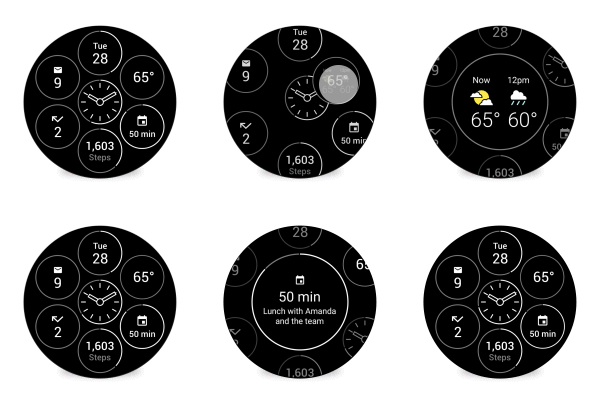
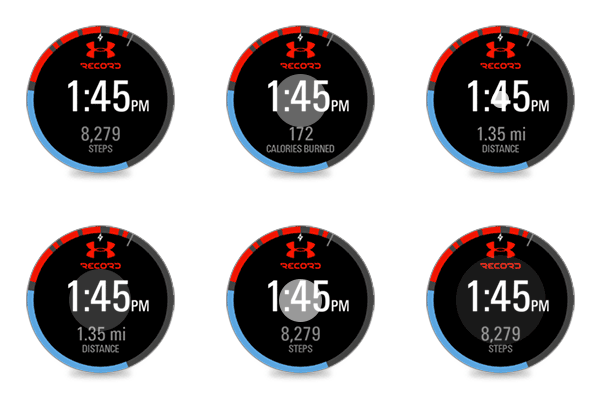
Wearing a watch lets you tell time with just a glance. Android Wear has expanded this at-a-glance experience to other useful info like your next meeting, daily step count, or messages. Today, we’re launching interactive watch faces, making it easier (and more fun) to stay connected, right from your wrist. Now, with just a tap, your watch face can change its design, reveal more information, or even launch a specific app.

Bits: Choose the info you want at a glance—from weather, to unread mail, to upcoming meetings. Want to know this afternoon’s weather forecast? Just tap on the weather complication.
Under Armour: Stay motivated with fitness stats on your wrist. Tap the watch face to see your step count, calories burned, and distance.
Together: Android Wear’s Together Watch Face lets two people stay close throughout the day by turning the entire watch face into a space for sharing. Once you’ve paired your watch face with a partner’s, you’ll be able to share things like photos and emoji, as well as your activities (like if you’re working out, on the phone, or stuck in traffic).
Today’s updates are rolling out to all Android Wear watches in the coming weeks. So pick your favorite watch face, or pair up with your favorite person, and start wearing what you want.

Posted by Flavio Lerda, Software Engineer, Android Wear 
20 Aug 17:20

Android Wear gets interactive watch faces to make it easier to stay connected on-the-go

by Jared DiPane

The latest Android Wear update brings along with it interactive watch faces, which will make it even easier to stay connected on the go. Currently, users have to fumble around with their watch to try and see what the next event in their calendar is, or to launch an app, but that is all changing.

With the new functionality, developers can add additional information to watch faces that can be revealed with just a single tap.

20 Aug 16:37

Petrified pooch overcomes his fear of crossing lines

by Heather Johanssen

Dog logic! Good boy, Artie.

20 Aug 13:40

Bing for Android Adds Google On Tap-Style Contextual Search Cards

by Eric Ravenscraft

Android: Google Now on Tap was easily the coolest feature announced at Google I/O this year. However, you still can’t use it yet. If you want to get an idea of how it works, though, Microsoft has gone ahead and added it to their Bing app.

The feature allows you to scan whatever page you’re currently reading and get search results and or links to other apps (like IMDb or Wikipedia) to take action. In my brief tests the feature seemed a little rough around the edges. Some contexts that seemed like they should’ve at least been able to pick up some proper nouns didn’t return any results. Microsoft has also announced that they’re making an API available to developers, but it’s not clear how many third-party devs are actually plugging into the feature to improve it. While there’s still room to improve, this one is actually available, while Now on Tap won’t arrive until Android Marshmallow finally drops.

Bing Search | Google Play Store via Microsoft News

20 Aug 13:35

Sony's SmartBand 2 will monitor your heart rate and field your calls

by James Vincent

Sony has officially unveiled its SmartBand 2 after accidentally publishing details about the activity tracker earlier this year. As the leak had suggested, the SmartBand 2's biggest upgrade is a heart rate monitor, which will augment the device's ability to track users' fitness. Like the original SmartBand, it also functions as a sort of triage system for notifications, connecting to users' Android and iOS smartphones and vibrating to let them know about incoming calls, texts, and emails.

Unlike the SmartBand Talk with its 1.4-inch e-paper display, the SmartBand 2 has no screen and instead relies on vibrations and LEDs to get its messages across. It also functions as a music remote and has a smart alarm clock feature that monitors...

Continue reading…

19 Aug 15:29

Firenadoes!

by Rob Beschizza

It's exactly what it seems to be: a twister formed over a fire's intense heat, drawing the blaze hundreds of feet into their air.

Read the rest
19 Aug 15:29

Planthopper nymphs

by Heather Johanssen
These amazing guys look like living snowflakes!
19 Aug 15:27

Cute hamster in hammock enjoying a sweet treat

by David Pescovitz

That's the life. (more…)

19 Aug 15:24

The Future Of The Web Is All About Context

by Falon Fatemi
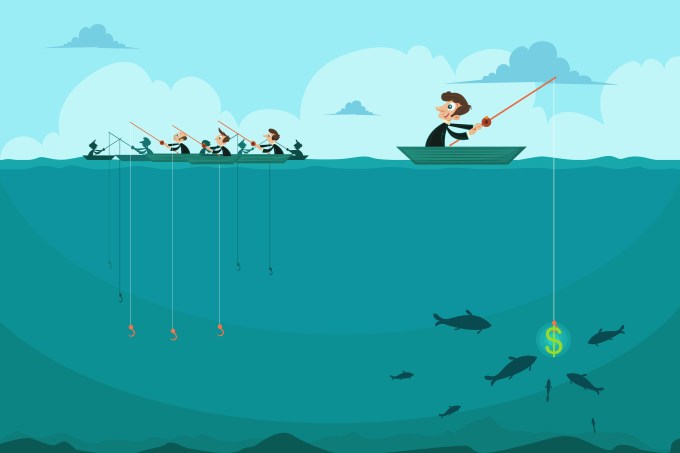
fishing Imagine a world where search engines proactively send recommended articles, people and companies to their users — and all of these recommendations are extremely helpful and relevant. This is an example of using context for discovery, and it’s the future of the Internet. Unfortunately, today’s search engines aren’t mind readers. Not even close. It’s not until the… Read More
18 Aug 23:19

Get Your Coworkers to Help You More with This Simple Persuasion Method

by Patrick Allan

Get Your Coworkers to Help You More with This Simple Persuasion Method

People will always be more willing to help when they feel like they owe it to you. This classic persuasion method requires a little pre-work, but can make it much easier for you to convince others to lend you a hand when you need it.http://lifehacker.com/5911280/how-to...

The goal is reciprocity, and that requires you helping them out too. Robert Cialdini, the author of Influence: The Psychology of Persuasion, suggests that helping others to advance their goals first is the key. The trick, however, lies in how you go about it. He explains to Harvard Business Review:

Get in the habit of helping people out, and—this part’s really important—don’t wave it away when people thank you. Don’t say, “Oh, no big deal.” We’re given serious persuasive power immediately after someone thanks us. So say something like “Of course; it’s what partners do for each other”—label what happened an act of partnership.

Don’t wait to be asked to help with something, just help. Then make it count by explaining why you’re willing to help. Tell them, “that’s what friends do for each other,” or “anything for a team member.” The next time you need help from them, you’ll probably get it.

The Uses (and Abuses) of Influence | Harvard Business Review

Photo by Betsy Weber.

18 Aug 21:17

Moto X Play now available from Moto Maker in the UK starting at £279

by Jared DiPane

Motorola is now taking orders of the Moto X Play from customers in the UK through its Moto Maker service, with prices starting at £279 for a custom 16GB version. The Moto X Play was announced during Motorola's July event, and will be the little brother to the Moto X Style, but won't make its way to the US.

18 Aug 21:14

Meet OnHub: a new router for a new way to Wi-Fi

by noreply@blogger.com (Google Blogs)
Ugh...not again. You get home at the end of the day, and sit down to stream a new movie or upload vacation photos — and your Wi-Fi slows to a crawl or just stops working. Instead of relaxing in front of the screen or sharing those photos with friends, you spend it unplugging and re-plugging cords, trying to decipher blinking lights, or contemplating a call to customer support.

While we count on Wi-Fi more than ever to be entertained, productive, and stay connected, we’re streaming and sharing in new ways our old routers were never built to handle. So today, with our partner TP-LINK, we’re launching OnHub, a different kind of router for a new way to Wi-Fi. Instead of headaches and spotty connections, OnHub gives you Wi-Fi that’s fast, secure, and easy to use.


Designed for the Home
Many of us keep our router on the floor and out of sight, where it doesn’t work as well. We replaced unruly cords and blinking lights with internal antennas and subtle, useful lighting, so you’ll be happy placing OnHub out in the open, where your router performs its best.

Starts Fast, Stays Fast
During setup, OnHub searches the airwaves and selects the best channel for the fastest connection. A unique antenna design and smart software keep working in the background, automatically adjusting OnHub to avoid interference and keep your network at peak performance. You can even prioritize a device, so that your most important activity — like streaming your favorite show — gets the fastest speed.

A simple mobile app
OnHub makes it simple to set up and manage your Wi-Fi, all from the Google On app, available on Android or iOS. The Google On app tells you how much bandwidth your devices are using, lets you run a network check, and if there’s an issue with your Wi-Fi, the app offers suggestions to help. And, instead of lost passwords and sticky notes, it even reveals your password with a single tap and lets you text or email it to friends.

Just gets better
OnHub automatically updates with new features and the latest security upgrades, without interrupting your connection. In the future, OnHub can support smart devices that you bring into your home, whether they use Bluetooth® Smart Ready, Weave, or 802.15.4. We also plan to design new OnHub devices with other hardware partners in the future. Stay tuned for news from our second partner, ASUS, later this year.

Starting today, OnHub is available for pre-order for $199.99 from online retailers in the U.S. including the Google Store, Amazon, and Walmart.com. It will be available for sale in retail stores in the U.S. and in Canada in the coming weeks.

At the end of the day, we want our Wi-Fi to just work, so that we can do all the things we love to do online. Here’s to Wi-Fi with the reliability, speed, and security you want at home, without the frustrations you don’t.

Posted by Trond Wuellner, Group Product Manager


Instead of headaches and spotty connections, OnHub gives you Wi-Fi that’s fast, secure, and easy to use.
18 Aug 21:13

Nuance’s new Dragon Anywhere app will transcribe for as long as you can speak

by Jacob Kastrenakes

With voice dictation built right into the keyboard of most smartphones, dictation apps have become a hard sell. But now Nuance, arguably the leader in speech to text, thinks it has a good reason for people to start paying for one: it's coming out with a new app called Dragon Anywhere that's supposed to be far more powerful at dictation than anything Apple or Google can offer.

Continue reading…

18 Aug 21:11

This is Fossil’s Android Wear smartwatch

by Chris Welch

Fossil, the watchmaker that's carved out a home at Macy's, JCPenney, and other retailers, is getting into the smartwatch game. The company previously signaled plans to release an Android Wear device, and today Fossil showed off its upcoming products. Yes, "products" because there's more than just a smartwatch headed to retail; Fossil is also working on a connected band and another, connected watch that's not quite as high functioning as a full-on smartwatch.

But the Android Wear timepiece is definitely the most interesting thing here. Fossil didn't offer a long glimpse, but you can see the watch's silver finish, leather straps, and yes — it's got the same black bar / "flat tire" look as Motorola's Moto 360.

Fossil and Intel's...

Continue reading…

18 Aug 14:59

Piracy vs the MPAA: yet another box-office record smashed

by Cory Doctorow

The movie studios continue to demand Lord High Internet Executioner status because "piracy is destroying the film industry," even as box office records are smashed anew: Straight Outta Compton broke $2B in record time.

18 Aug 14:56

WATCH: Remarkable 4K timelapse of glow worm cave in NZ

by Andrea James

New Zealand's Waitomo Glowworm Caves shimmer with a constellation of glow worms, and Jordan and Jenna from Stoked for Saturday got this gorgeous footage after a lot of trial and error. Read the rest