Moleskine’s notebooks are some of your favorites, and today the company is taking the wraps off of “Moleskine Pro,” a reboot of the original with some added features designed for productivity. The new notebooks feature detachable to-do lists, adhesive tabs for organization, numbered pages and a table of contents, and more.http://lifehacker.com/five-best-pape...
The new notebooks are part notebook and part planner, and have pages and sections designed to be used for things like meeting notes, brainstorming suggestions, meeting minutes and people in attendance, next actions, and so on. The new notebooks also have numbered pages, and a table of contents that can be filled out as the notebook is filled out, which makes it easy to flip through to find something you need without having to remember by feel how thick the notebook was when you wrote something down you want to find again.
Additionally, the Pro line included adhesive stick notes you can use as section tabs, just to keep everything neatly organized, extra large workbooks for larger projects, drawings and sketches, or anything that needs more space, and even a portfolio notebook with an accordion file, if that’s how you like to roll—with space to carry handouts or other documents. There’s even a notebook “tool belt” that you can attach to the cover of a notebook that—after much demand—can hold small accessories, pens, and other things.
Of course, if you prefer the empty freedom of the original Moleskine notebooks, they’re available too—but the new line is geared right for office workers and creative pros who need to take tons of notes, but also want to stay organized. The new notebooks, for what it’s worth, also fit nicely with the Bullet Journal productivity method. Hit the link below to check them out.http://lifehacker.com/the-bullet-jou...
When you wear something every day, you want to be sure it really works for you. That’s why Android Wear offers countless design choices, so you can find the watch that fits your style. Want a round watch with a more classic look? Feel like a new watch band? How about changing things up every day with watch faces from artists and designers? With Android Wear you can do all of that. And now, Android Wear watches work with iPhones.
Android Wear for iOS is rolling out today. Just pair your iPhone (iPhone 5, 5c, 5s, 6, or 6 Plus running iOS 8.2+) with an Android Wear watch to bring simple and helpful information right to your wrist:
Get your info at a glance: Check important info like phone calls, messages, and notifications from your favorite apps. Android Wear features always-on displays, so you’ll never have to move your wrist to wake up your watch.
Follow your fitness: Set fitness goals, and get daily and weekly views of your progress. Your watch automatically tracks walking and running, and even measures your heart rate.
Save time with smart help: Receive timely tips like when to leave for appointments, current traffic info, and flight status. Just say “Ok Google” to ask questions like “Is it going to rain in London tomorrow?” or create to-dos with “Remind me to pack an umbrella.”
Today, Android Wear for iOS works with the LG Watch Urbane. All future Android Wear watches, including those from Huawei (pictured above), ASUS, and Motorola will also support iOS, so stay tuned for more.
Dr. Seuss once said: “Today you are You, that is truer than true. There is no one alive who is Youer than You.” We agree. So whoever You are, and whatever You like—Android Wear lets you wear what you want.
Posted by David Singleton, Director of Engineering, Android Wear
LG has announced that the company will be showcasing the latest smart home technology and products at this year's IFA 2015. The new announcements will include the SmartThinQ Sensor, which can be attached to existing home appliances, including refrigerators and washing machines, as well as the Smart Lightwave Oven and Smart Air Conditioner with support for AllJoyn.
The latest product to hit First Flight, Sony's own crowdfunding platform in Japan, is a smartwatch called the "Wena Wrist." What's a Wena? It stands for "wear electronics naturally," apparently, and takes the form of a fairly traditional-looking watch. The Wena Wrist focuses on three main features — an NFC wallet compatible with the Japanese Felica standard; notifications through vibration and a customizable LED light on the band; and activity tracking, which seems to work the way you'd expect except that the app is only for iOS.
The "Chronograph" model tells time with three separate hands and dials for hours, minutes, and seconds, while the "Three Hands" model just has a regular watch face. Both models are 42mm across; the Three Hands...
By now, you should have a pretty good idea of what Sony's next smartphones will look like, after photos leaked last week allegedly showed three variants of Sony's Xperia Z5 — the standard Z5, the Z5 Compact, and the Z5 Premium. But just in case you weren't sure, a new video has appeared online that appears to show the three phones in action. In an interview with a French journalist, Sony Mobile Communications' director of marketing, Olivier Terme, uses handsets that he identifies as Z5 models, describing features that last week's leaks indicated the smartphones would have.
The interview appears to confirm that all three Z5 phones will all feature a 23-megapixel camera, fingerprint sensors on the side, and a dust- and water-proof design....
The lowly router is a necessary evil. It’s a device we can’t live without, but often feels like an arcane relic from an era when boxy tube monitors and dial-up modems ruled. The router is the gateway to high-speed internet in our homes, and it enables us to wirelessly connect countless gadgets — smartphones, laptops, TVs, thermostats, speakers, coffee makers, game consoles, the list goes on — to the internet. It’s only going to get more important as more and more appliances rely on Wi-Fi connectivity for modern conveniences.
As important as they are, routers are equally notorious for being unattractive, difficult to set up, unreliable, and generally unpleasant to use. Most people use the router provided to them by their internet...
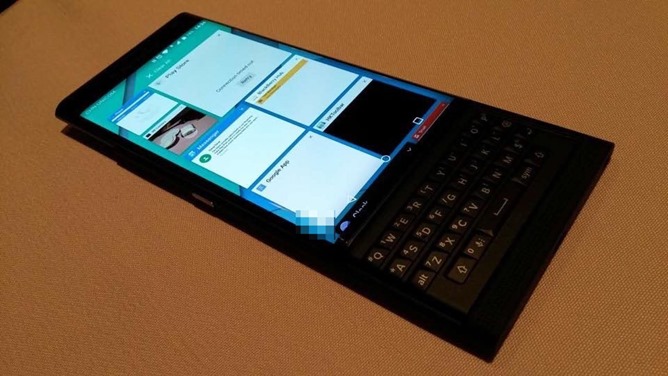
While the rumors surrounding the BlackBerry 'Venice' slider continue to swirl, the device has now appeared once again in some new, clearer images which are pretty on par with everything we've seen thus far. As mentioned previously, there's still a lot of things up in the air surrounding this device and BlackBerry has yet to announce anything officially but judging from these images, the Venice is as was expected, running a customized version of Android Lollipop that brings along with it some BlackBerry 10 influence.
A small and vocal element of the Android community have been begging for a decent QWERTY phone ever since the original Motorola DROID was retired, and a huge and vocal part of BlackBerry's userbase has been clamoring for the company to switch to Android OS before it goes the ignominious way of Palm and Nokia. So the BlackBerry Venice, which has been leaked six ways from Sunday, is a welcome if late addition to the struggling company's lineup.
The slow cooker (or crock pot) is a wonderful appliance for hands-off cooking, but the gentle, slow heating process can also be used for other things unrelated to food. Such as these ten things.
Many of these projects are crafty, and you might want a dedicated second slow cooker (perhaps picked up at a garage sale) for these purposes, such as the soap-making one. Others, however, you can just whip out your slow cooker to accomplish, clean, and then use for slow cooking food. It’s a wonderfully multi-purpose tool.
10. Make Soap
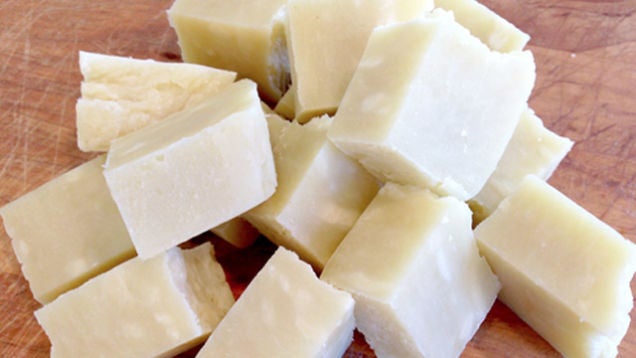
Homemade soap is wonderful because you can customize your soap bars with the scents and ingredients you prefer. This project requires just water, olive oil, coconut oil, and lye (which you have to handle carefully). An hour in the slow cooker, though, and you’ve made your own soap.
Dyeing fibers is easy in the slow cooker because you don’t have to watch over it. The slow cooker pot acts as both a dye bath container and a heat source to help fabrics and other materials absorb the dye. Knit Picks offers instructions for dyeing yarn and folk artist Susan Hemann shows us how to dye fabric. (I heard you can also dye paper in the slow cooker, but was unable to find a tutorial for this. Feel free to experiment!)
7. Make Potpourri
If you don’t have one of those small simmering potpourri things, your slow cooker can fill in for the job. After all, slow cookers are known for creating intoxicating smells as they simmer foods. This time, fill up your slow cooker with spices, fruits, and other ingredients that will scent your home throughout the day. This seems particularly fitting over the holidays, as in this combination of cloves, oranges, allspice, and cinnamon at Heathers Dish.
6. Make Candles
Homemade candles make a great gift, but dealing with the wax is a pain. If you use a slow cooker, though, you’ll avoid the mess of double-boiling and pouring. Just put the containers in your crockpot, fill with wax shreddings, and let the slow cooker do the work. You can also combine bits and pieces of crayons in the same manner.
5. Make Play Dough
This one’s for the kids…or maybe yourself. Just as you can make bread in the slow cooker you can make play dough. Repeat Crafter Me has the instructions for doing this. You only need a few pantry items and about half an hour of “cooking” time.
4. Freshen (or De-Stink) a Room
Baking powder is a powerful weapon against bad odors and a generally stale smell. Put it in a slow cooker with some water, and you can freshen up any room of your home, even musty basements.
3. Use It as a Humidifier
An old slow cooker filled with water can add moisture to the air, much like a rice cooker can—no need for a dedicated humidifier. As Crock Pot Recipe Exchange explains, fill the pot with water three quarters of a way up and let it heat up on high. Then remove the lids and let the moisture escape into the air.
2. Clean Jewelry
Whether your jewelry is tarnished or could just use a good cleaning, your slow cooker is your friend. Make your own all-natural jeweler’s pickle (an acidic solution that removes oxidation and flux from soldered metal) and clean jewelry in the slow cooker, with The Artisan Life’s directions. Clinton Kelly offers a simpler formula that involves just white vinegar and salt to clean jewelry in the slow cooker.
1. Clean Animal Bones/Skulls
Finally, if you have animal skulls or bones that need cleaning, the long slow simmer of a slow cooker will work better than boiling. We’re serious! Our own Vitals writer Beth Skwarecki shared this tip with us and I couldn’t help but make it the top tip. Many people use animal skulls for decoration or artwork (c.f. Georgia O’Keeffe, photo above courtesy of The Metropolitan Museum of Art via Studio 360).
The last of the major trade shows of the year is upon us as we pack our bags and head for the German capital.
The IFA conference takes place every September in Berlin, and in past years has been the home of some huge Android announcements. The big elephant in the room was always the traditional announcement of the Galaxy Note at the pre-show press day. But with that out of the way already, you might think it's set to be a little quieter this year.
How wrong you'd be. Here's a look at what's going down at this years show.
It's time to pit two smartphones we love against each other. We've picked out four categories — things we think every phone (Android or otherwise) needs to get right before we can recommend them — and squared off the Alcatel Idol 3 against the Moto G 2015.
This is a tough one. Both are great phones, and neither one is the wrong choice. But it's human nature to find the "best" and we're going to dive in and make that hard decision.
The Amazon Echo can now play both audiobooks and music from multiple Amazon accounts, and switching between them is as easy as a voice command. Getting set up for the new functionality is simple as well, just head to the Settings in the Alexa app and add another Amazon user to the household. Switching between the two profiles is as simple as saying "Alexa, switch accounts."
Google’s Chrome web browser keeps getting better. According to a new post on Google+, the company says that, starting on September 1st, Chrome will begin to pause many Flash ads by default in order to improve performance for its users. This change was first announced in June, and initially rolled out to the beta version of the Chrome desktop web browser. At the time, Google noted that… Read More
In an apparent effort to boost app discoverability and engagement, it looks like Google is rolling out a beautiful new layout for "apps" search results on mobile. Doing a quick search for pretty much anything followed by the word "apps" will get you a grid of app results above the normal search results, each block colored according to the app's icon. Clicking the "expand" button opens up the grid, with more results smoothly flowing in.
We’ve all been there: you’re exploring the vast interwebs, opening tabs rapid fire like the middle-clickin’ master you are. Suddenly one of the zillion tabs you’ve got open in the background starts autoplaying some terrible ad — now your laptop is yelling to your entire office about man part pills or free ipads or something.
Google wants to end this. Read More
Two-and-a-half years ago, Rose Broome had a moment that most San Franciscans are all too familiar with. She passed a homeless woman on the streets, but didn’t know what the best way to help her would be. Most people might brush that thought aside, but Broome didn’t.
“People are frustrated and confused. Then people who are homeless feel invisible or they feel like people… Read More
Instagram has added support for showing landscape and portrait images and videos in its popular photo sharing app. This will offer users a couple of extra options to show off their images and clips besides the current square format.
Microsoft is preparing to launch two new Lumia flagship devices at an event in October. While we've seen some images emerge along with full specifications, Evan Blass (Evleaks) has published what appears to be official press renders for both devices. Codenamed Cityman and Talkman, Microsoft is expected to name its new devices the Lumia 950 (Talkman) and Lumia 950 XL (Cityman). The leaked images show both devices, with a slight hump for the camera at the rear. Both sport a simple Windows logo at the back, and a mostly square look. Microsoft's Cityman is the cyan colored handset, while the smaller (5.2-inch) Talkman is shown in black.
Microsoft's Cityman is the larger of the two devices, with a 5.7-inch WQHD display...
LG just announced the "Rolly," a Bluetooth keyboard that folds up along the four rows of keys to create a wand-like device that can be tossed in a purse or pocket. LG is hardly the first electronics company to introduce a foldable, ultra-portable wireless keyboard — or even the first to introduce a gadget called the Rolly — but it might be the first to market either as a stick for your pocket.
Unlike ultra-flexible foldable keyboards, the Rolly is made of solid plastic, which gives it a more tactile feel, LG claims; it's also supposedly more comfortable because it's just shy of the 18mm key pitch found on most desktop keyboards. Two tiny plastic arms fold out from the end of the keyboard to support a tablet or smartphone, and it can...
If you use your Raspberry Pi as a regular computer a lot, you might be looking for a more permanent case for it. Adafruit has put together a guide for a premium case that packs in the monitor and all the components.
This case is expensive to build, but that’s kind of the point. It looks nice and works great, while being portable to boot. To build it, you’ll need a 10” HDMI display, a Raspberry Pi 2, a set of batteries, audio amplifier, and a few cables. You’ll also need to 3D print the case, which you can outsource without buying a 3D printer. The end result is a very sleek looking little all-in-one case that should make toting the Raspberry Pi around pretty easy.
In advance of IFA, Samsung is promoting a new set of wireless speakers they will show off there. Adding to their product lineup called Wireless Audio 360, this might signal a bit more seriousness on Samsung's part in terms of competing in the consumer speaker market. The R1, R3, and R5 join the R6 and R7, which were announced last year and look like eggs.
Samsung boasts about the design that blasts sound out in every direction, which addresses a fairly common shortcoming for consumer speakers.
Something strange is going on with the rollout of Android Pay. Google's own partners are under the belief that the company's second take at a mobile wallet, unveiled earlier this year, is available to consumers right now. McDonald's recently sent around an internal memo signaling it would launch today, and when I walked over to Subway for lunch moments ago (I know, I know), the above sticker was right on the front door. The Consumerist recently noted that Subway's website also indicates it's already supporting Android Pay. One of the biggest fast food chains in the United States is advertising for a service that no one can use — yet. Count Duane Reade among other retailers that've apparently missed the memo about Android Pay not being...
At the Yahoo Mobile Developer Conference in New York Wednesday, the company announced the arrival of in-app sharing. The new framework aims to make it easier to share photos, videos, links and other media to Tumblr with one tap.
The update, integrated into the Flurry software development kit, follows reports earlier this year that Yahoo would focus more on its Tumblr social arm, which it acquired in 2013 for $1.1 billion. With this change, users will be able to send a photo, video, link or any type of content to Tumblr from whatever app they happen to be running at the time.
Of course, it's up to developers to support the feature. The company has been courting app makers more heavily this year, and some of these current announcements look like natural extensions of those plans. Along with Tumblr in-app sharing, Yahoo also offers real-time analytics and native video ad integration, to help tempt developers into the fold.
How Tumblr's In-App Sharing Works
The idea is for users to "create anywhere, discover in Tumblr," said Yahoo's Simon Khalaf on stage. He noted that downloading and installing the Tumblr app will be a "seamless" part of the process, if required.
Mobile photo editing and sharing tool PicsArt was announced as one of the first partners for in-app sharing on Tumblr.
"We are thrilled to be using Tumblr in-app sharing to allow our community to easily distribute their creative work made with PicsArt," said Kriegel. "Tumblr and PicsArt both attract creative people who love to make and share content. This integration will help users drive discovery through both communities."
Crucially, Tumblr is promoting the feature as a two-way street, where the originating platform gets a deep link or app link back in return.
In other words, if a Tumblr user takes an interest in the shared post, that person can follow the link back to the app from which it originated.
Sweetening The Deal For Devs
App developers using the Yahoo Mobile Developers Suite will also be able to see engagement numbers for Tumblr shares originating from their sites or apps (for reblogs, clicks, likes and so on).
Billing it as "real-time metrics," Yahoo further announced that it's offering app analytics that update automatically every 15 seconds for free, courtesy of Flurry Analytics. Developers of all sizes should be able to use the tool, whether they have a hundred, a thousand or a billion users.
And finally, the company once again courted developers with the promise of making money. Its most favored approach: Ads. Yahoo now offers native video ads for publishers, plugging them as additional monetization opportunities.
The announcements should bring more content and variety to Tumblr, while developers get more eyeballs and more traffic back to their app (at least in theory).
"We're excited to see more great original content flow into Tumblr," said Tumblr CEO David Karp at the event.
A Peek At Flurry's Mobile Numbers
Khalaf also shared a long succession of statistics and metrics about mobile device usage in the U.S. over the last 12 months.
American consumers are now spending an average of 3 hours 40 minutes per day on their smartphones and tablets, a rise of 35 percent over the same quarter in 2014. Only 10 percent of that time is in the mobile browser compared with 14 percent the year before.
Social, messaging and entertainment apps (including YouTube) accounted for 51 percent of the time spent on mobile in the last quarter.
The major loser was gaming, which Khalaf chalked up to a lack of big name hits, plus a switch to paying to progress, rather than grinding through levels (and spending less time in games as a result). Watching others play games has also taken away some of the time actually playing games, he noted.





 Google’s Chrome web browser keeps getting better. According to a new post on Google+, the company says that, starting on September 1st, Chrome will begin to pause many Flash ads by default in order to improve performance for its users. This change was first announced in June, and initially rolled out to the beta version of the Chrome desktop web browser. At the time, Google noted that…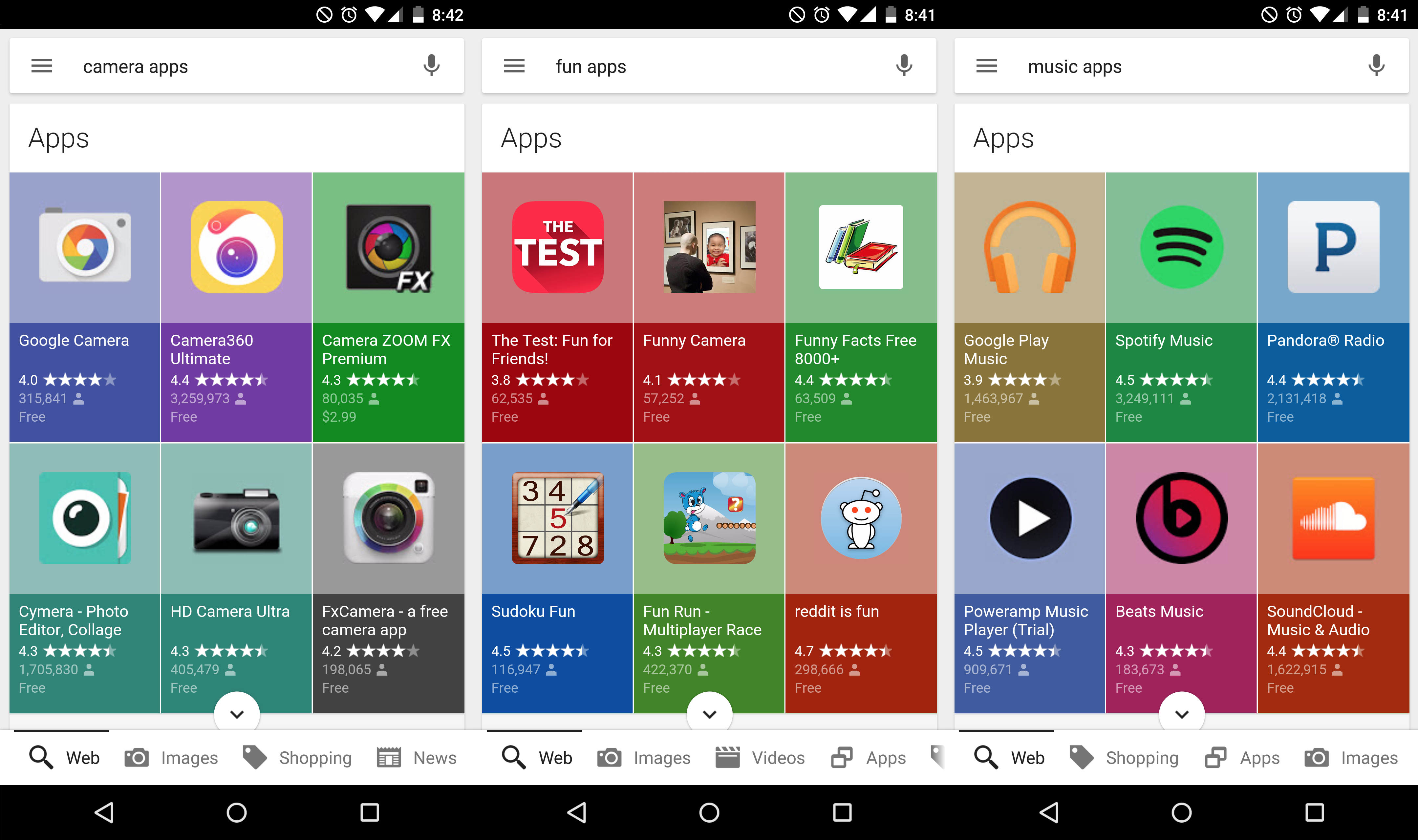

 We’ve all been there: you’re exploring the vast interwebs, opening tabs rapid fire like the middle-clickin’ master you are. Suddenly one of the zillion tabs you’ve got open in the background starts autoplaying some terrible ad — now your laptop is yelling to your entire office about man part pills or free ipads or something.
Google wants to end this.
We’ve all been there: you’re exploring the vast interwebs, opening tabs rapid fire like the middle-clickin’ master you are. Suddenly one of the zillion tabs you’ve got open in the background starts autoplaying some terrible ad — now your laptop is yelling to your entire office about man part pills or free ipads or something.
Google wants to end this. 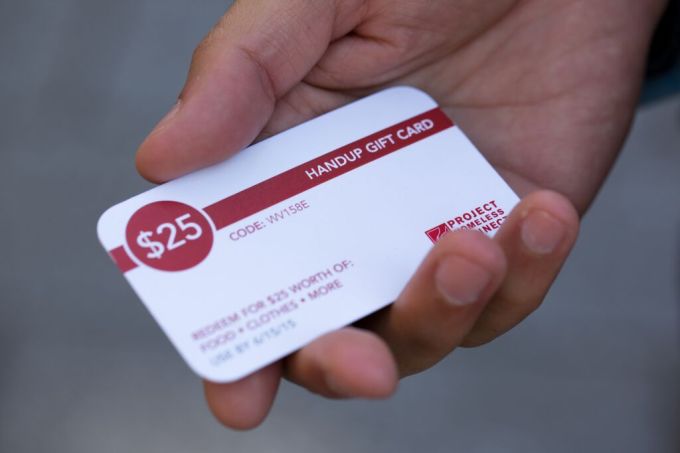 Two-and-a-half years ago, Rose Broome had a moment that most San Franciscans are all too familiar with. She passed a homeless woman on the streets, but didn’t know what the best way to help her would be. Most people might brush that thought aside, but Broome didn’t.
“People are frustrated and confused. Then people who are homeless feel invisible or they feel like people…
Two-and-a-half years ago, Rose Broome had a moment that most San Franciscans are all too familiar with. She passed a homeless woman on the streets, but didn’t know what the best way to help her would be. Most people might brush that thought aside, but Broome didn’t.
“People are frustrated and confused. Then people who are homeless feel invisible or they feel like people… 


