Shared posts

07 Sep 18:53

Swivel Locks Android’s Screen Orientation for Individual Apps

by Mihir Patkar

Swivel Locks Android’s Screen Orientation for Individual Apps

Android (4.0+): Some apps work better in portrait mode, and others work better in landscape. Swivel lets you set a permanent orientation for any app on your Android phone.

YouTube, for instance, is almost always better in landscape mode. By default, Android only lets you set your phone to auto-rotate or not. You can customize your phone’s orientation or even get some, admittedly complex, control over individual apps. But those aren’t good solutions.

Instead, Swivel lets you set a preferred orientation for each app. Not just portrait and landscape, you can even specify the direction. In fact, you could even set your phone to not auto-rotate, but still set some apps to auto-rotate and override your settings. Neat!

Swivel ($0.99) | Google Play Store via Product Hunt

07 Sep 18:52

Man shows gorilla photos to gorilla at zoo

by Mark Frauenfelder

A man showed photos of gorillas to a gorilla at a zoo, and the gorilla was interested.

06 Sep 16:21

26 State Fair Foods From 2015 That Will Blow Your Mind

by Bill Crider
05 Sep 16:19

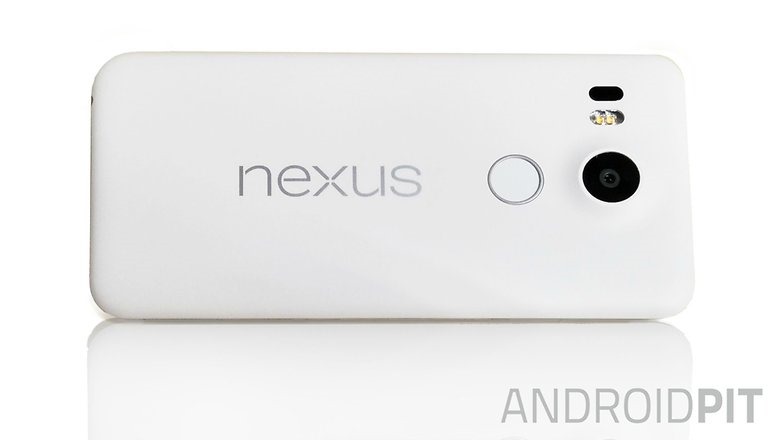
Best Leaked Image Of LG "Nexus 5" (2015) Yet Appears To Show Near-Final Hardware In White, With Fingerprint Scanner

by David Ruddock

AndroidPIT-Nexus-5-2015-final-w782

The image you're seeing above is the LG "Nexus 5" (Nexus 5X is in the running for the retail name), leaked by AndroidPIT this morning. We can confirm the image is legitimate.

The only detail I'd note that might be wrong on this image is that we'd previously seen an LG logo along the bottom of the device (below the Nexus logo), though it's possible this will only appear in some markets or that it was removed from the final design of the device.

Read More

Best Leaked Image Of LG "Nexus 5" (2015) Yet Appears To Show Near-Final Hardware In White, With Fingerprint Scanner was written by the awesome team at Android Police.


05 Sep 11:43

How to Maximize Battery Life on Windows 10

by David Nield on Field Guide, shared by Whitson Gordon to Lifehacker

How to Maximize Battery Life on Windows 10

Whether you’ve upgraded to Windows 10 on your laptop or bought a brand new machine, you’re going to want to eke out as much battery juice as you can while you’re on the go. Microsoft’s shiny new OS includes a new native battery saver feature — and there are a few other tricks you can pull to make sure your laptop lasts until you can find a power socket.

The Windows 10 Battery Saver

Let’s start with the obvious one: The new Battery saver tool baked right into Windows 10 itself. From the Settings app choose System and then Battery saver to find it—it’s set to kick in when you’re down to 20 percent of battery life but you can change this level if you want, or turn it on manually at any time.

How to Maximize Battery Life on Windows 10

The same screen gives you an estimate of how long you’ve got left before your laptop or tablet dies (or how much time is left until you’ll reach a full charge). You can also make certain apps exempt from the Battery saver rules and check which apps are the worst offenders when it comes to draining power.

Check Your Power Plan

The old reliable battery-saving method for those that know their way around Microsoft’s operating system, the Windows 10 power plan interface is available through Power & sleep under System in Settings. The lower these screen and sleep times are, the more battery life you’re going to save between charges.

How to Maximize Battery Life on Windows 10

Click or tap Additional power settings to get to the Control Panel power plan interface used by previous versions of Windows. Here it’s possible to set up a bunch of additional variables—like when the hard drive and your peripheral devices go to sleep—and configure several individual power plans that you can switch between as required. Screen brightness can be adjusted from here as well.

Wifi, Bluetooth and Other Settings

Most people with a smartphone know you can turn off wifi and Bluetooth to save some juice, and it’s the same in Windows 10 (this is assuming you don’t need the internet or can get it via a plugged-in cable). The easiest way to switch both off at the same time is via the Airplane mode (or Flight mode) pane under Network & internet in Settings.

How to Maximize Battery Life on Windows 10

The screen brightness is another setting that’s familiar to anyone who’s ever tried to get the last drips of battery life out of a device: In Windows 10 you can find it under Display in the System section of Settings. Turn off the auto-adjust option to prevent Windows from overruling your tweaks.

Update Windows While Charging

You don’t get much control over Windows updates in the latest version of the OS, but based on our testing the process of downloading and installing them has a significant impact on battery life—try leaving your computer on for a few hours (or overnight) before you head out. The previously managed airplane mode can temporarily pause updates if required.

How to Maximize Battery Life on Windows 10

Updates for your peripherals and internal components are worth mentioning too: Check through the websites of the relevant manufacturers to see if any Windows 10 updates are available, as they’ll often improve efficiency, reduce power drain and increase battery life on your Windows 10 device.

Turn Down the Volume

The volume of your laptop (or tablet) has more of an impact on battery life than you might think—pumping out those tunes uses a substantial amount of energy. Try turning down the volume while watching videos and listening to music, or switch to headphones if you can; ideally, mute your device completely.

How to Maximize Battery Life on Windows 10

The master volume control and several of the other settings we’ve mentioned so far can be accessed through the Windows Mobility Center, still present and correct in Windows 10. Just run a search from the taskbar for “mobility center” and click on the first result that appears to bring it up on screen.

Unplug Unnecessary Peripherals

Microsoft itself recommends unplugging any peripherals you aren’t using if you want to save battery power, so ditch those external hard drives, inkjet printers, memory sticks and USB-powered mug warmers until you can get to a charging point. Even having a memory card inserted in your laptop can drain a tiny bit of extra power.

How to Maximize Battery Life on Windows 10

If you’re using an external mouse, for example, you could switch to trackpad or touchscreen input to save some battery juice. Even if your Windows 10 experience suffers as a result, you have the consolation of getting more life from your laptop or tablet while you’re away from a power connection.

05 Sep 11:42

Alcatel announces 4G Car Wifi and Music Box at IFA

by Alex Dobie

Alcatel OneTouch has rounded out its mammoth IFA 2015 announcements with the arrival of two new connected devices — an in-car 4G LTE hotspot, and a new Wifi-connected music box with Qualcomm AllPlay support.

04 Sep 22:34

You can now spy on the giant tortoises from the Galapagos Islands on Google Street View

by Jared DiPane

Google recently launched a standalone Street View app for mobile phones, and now you can keep up with the giant tortoises of the Galapagos Islands. There are tons of places you can check out with the app, in full 360-degree glory, but why not see what some huge tortoises are up to, right?

04 Sep 22:34

Possibly drunk or high bear tries to scratch back on tree, misses repeatedly, is hilarious

by Xeni Jardin
We'll have what he's having. Read the rest
04 Sep 19:56

[Game Roundup] Our Top Seven Picks For The Best New Games Of August 2015

by Michael Crider

nexusae0_Game-Roundup-HeroIf you're a console gamer, you know that late summer is something of a dead zone for major game releases, as all the big studios gear up for blockbusters in October and November. Mobile gaming isn't following that trend at all: we had some fantastic releases in August, servicing every niche from casual to hardcore. We've got big franchise releases from Fallout and Pac-Man, and more interesting indie releases like Card Crawl.

Read More

[Game Roundup] Our Top Seven Picks For The Best New Games Of August 2015 was written by the awesome team at Android Police.


04 Sep 19:56

[App Roundup] Our Top Seven Picks For The Best New Apps Of August 2015

by Michael Crider

nexusae0_apps-roundup-heroAugust was light on new Android apps, but there's one new arrival that might change things in a big way: Amazon Underground. Aside from that, Google's new push towards streaming games and a new translator service from Microsoft make up the more interesting apps from the big publishers. That said, there are a few indie gems in both our primary lineup and the Honorable Mentions sections, so check them out below.

Read More

[App Roundup] Our Top Seven Picks For The Best New Apps Of August 2015 was written by the awesome team at Android Police.


04 Sep 19:53

This is how blue the skies were when Beijing banned 2.5 million cars for two weeks

by Xeni Jardin
150904021650-beijing-parade-blue-before-after-exlarge-169

In Beijing, China banned 2.5 million cars from driving for 2 weeks to get this beautiful blue sky for a World War II commemorative parade. As soon as the parade was over, the ban was lifted, and the blue vanished within 24 hours. Read the rest

04 Sep 17:19

Raccoon doesn't like his friend swimming

by Heather Johanssen

Wayland appears to be a bit of a wet blanket when it comes to having fun.

04 Sep 16:33

Watch a drone flyby of Apple's gigantic spaceship campus

by Nick Statt

Apple's new donut-shaped campus will house 13,000 employees scattered about a mind-boggling 2.8 million square feet, a nearly 230 percent bump over the company's current HQ at 1 Infinite Loop. And that doesn't include the 1,000-seat auditorium, nor the 300,000 square feet dedicated solely to R&D facilities. To help you conceptualize a facility of that magnitude, drone pilot and photographer Duncan Sinfield has released a video showing an aerial view of the site under construction.

176 acres and $5 billion later

Using narration from former Apple CEO Steve Jobs' remarks at a Cupertino City Council meeting about the construction project, Sinfield's drone fly-by does a neat job of showing you what has been accomplished in the past 31 days...

Continue reading…

04 Sep 16:30

Here are the phones that are compatible with the Samsung Gear S2

by Dan Thorp-Lancaster

One of the big pieces of news to come along with Samsung's Gear S2 announcement was that it will be compatible with non-Samsung smartphones. There are some restrictions however, as Samsung notes that the Gear S2 requires a paired smartphone with Android 4.4 and higher and more than 1.5GB of RAM.

04 Sep 16:27

32 Majestic Landscape Photos to Inspire Your Wanderlust

by Darlene Hildebrandt

2-for-1 special

As part of Landscape Photography Week here on dPS, we’re offering TWO for the price of ONE on our best-selling Living & Loving Landscape Photography ebooks!

Click here to take advantage of this offer.


This week is a deep dive into landscape photography here on dPS. Continuing on that theme I’ve selected a set of images that I hope will inspire you to get out into nature and do your own photography.

If you can’t travel far, you may want to consider a cow safari closer to home for a fun afternoon. Enjoy!


Here on dPS it is landscape week. You can see the previous ones listed below. Watch for a new article (or two) on landscape photography daily for the next week.

The post 32 Majestic Landscape Photos to Inspire Your Wanderlust by Darlene Hildebrandt appeared first on Digital Photography School.

04 Sep 16:22

Kittens stacked in Ikea organizer

by Heather Johanssen

Not sure about this new adaptation of J.G. Ballard's High Rise.

03 Sep 23:08

Bulldog likes going on the boat, but absolutely hates his life-vest

by Xeni Jardin
8ebc6dbb1e

That thing where he slaps his fat belly on the floor in disgust. (more…)

03 Sep 20:12

Barnes & Noble Brings Back The Nook As A Branded Version Of Samsung's 8-Inch Galaxy Tab S2

by Michael Crider

9781400697588_p0_v1_s192x300

Ah, the Nook Color. I have fond memories of Barnes & Noble's don't-call-it-a-tablet tablet, if only because that early hardware was a gateway drug to custom ROMs and root modifications. The Nook brand eventually crashed and burned against the twin onslaughts of cheap Android tablets and Amazon's unstoppable Kindle e-readers, but there are still at least a few B&N product managers who want to keep the hardware kicking, as evidenced by "Nook" versions of Samsung tablets.

Read More

Barnes & Noble Brings Back The Nook As A Branded Version Of Samsung's 8-Inch Galaxy Tab S2 was written by the awesome team at Android Police.


03 Sep 20:11

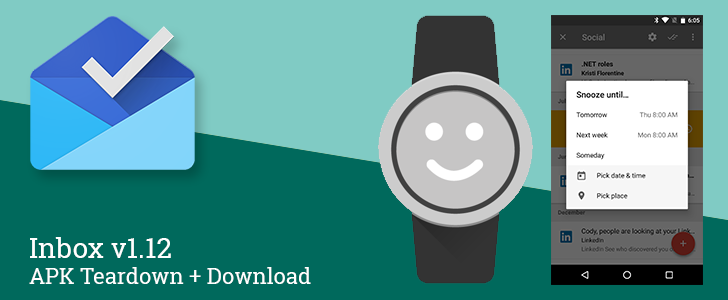
Inbox v1.12 Shows Signs Of New Snooze Options, Contact Tags, And Its Own App For Android Wear [APK Teardown + Download]

by Cody Toombs

Inbox.v1.12

Inbox for Gmail continues to stack on new features and refine its existing capabilities. While it may never fit the needs of many Gmail users, it has earned a strong following of fans that couldn't live without it. The latest release doesn't appear to add anything to the user experience, but a teardown shows a few of the changes that may be on the horizon.

Teardown

Disclaimer: Teardowns are necessarily speculative and usually based on incomplete evidence.
Read More

Inbox v1.12 Shows Signs Of New Snooze Options, Contact Tags, And Its Own App For Android Wear [APK Teardown + Download] was written by the awesome team at Android Police.


03 Sep 20:11

Increase Cable Durability with DIY Nylon Wrapping

by Walter Glenn

Increase Cable Durability with DIY Nylon Wrapping

Charging cables break often enough, it seems they should just go ahead and make them a subscription service. But with a bit of mild DIY, you can boost the durability of your cables with a nylon wrap and give them a distinctive look at the same time.

I don’t know about your family, but around here broken charging cables seem like a weekly occurrence. Even the more expensive braided cables don’t seem to last long. But as Instructables user Alaric Loftus shows us, you can make your own super-durable nylon-wrapped cables with just a bit of diamond-braid poly rope, some heat shrink tubing, and a bit of electrical tape.

No Solder Nylon Wrapped Phone Cable! | Instructables

03 Sep 20:07

Google now helps you easily look up details for 900 illnesses

by Loren Grush

A new Google search feature is making it easier to find details on more than 900 different health conditions. These include everything from common conditions like pink eye to tropical diseases like dengue fever.

Continue reading…

03 Sep 20:06

Chrome improvements for a faster and more efficient web

by Google Chrome Blog
Speed is one of the founding principles of Chrome. As the web evolves and sites take advantage of increasing capabilities, Chrome’s performance—how fast pages load, how smooth scrolling is, how much memory is consumed, and how long your battery lasts—becomes even more important. So in the latest release of Chrome we’ve included a ton of improvements to make your browsing use less memory and power.

Chrome has long had the option to “continue where you left off” by restoring tabs when you relaunch Chrome. Now, Chrome is smarter about restoring your tabs more efficiently. Tabs are restored from most to least recently viewed, so you get to see the most important tabs faster. And Chrome will now detect if your computer is running low on resources and stop restoring the rest of your tabs to save you precious memory. You can always click to restore them if you'd like to access them later.

We’ve also introduced another memory-saving technique. Chrome can now detect when a webpage isn't busy with some other task, and use the free time to aggressively clean up old, unused memory. In practice we found that this reduced website memory usage by 10% on average, but the effect is even more dramatic on complex web apps. With Gmail, for example, we can free up nearly a quarter of the memory used by the tab.


After being idle for a short time, Chrome 45 (right) frees up nearly a quarter of the memory it was using for Gmail, a significant improvement compared to Chrome 43 (left). Video is sped up 8x.

We’ve also made changes to Chrome to improve power usage. A new setting introduced in June will auto-pause Flash content that's not central to a website. Our testing has shown that turning on this setting makes your battery last up to 15% longer depending on your operating system, so over the next few weeks we'll begin turning on this feature by default for all users. 

This latest version of Chrome includes the most recent wave of performance updates, but there's much more in the works for upcoming versions of Chrome. So get ready for faster, even more powerful browsing!

Posted by Ryan Schoen, Product Manager and Performance Promoter
03 Sep 17:07

Gorgeous drone footage of Fall farm harvest in County Tipperary, Ireland

by Xeni Jardin
Right now, in Ireland, it's silage time. Read the rest
03 Sep 17:06

Adorable puppies playing in a tub filled with empty water bottles

by Heather Johanssen

Thursday is for environmentally-conscious puppies only.

03 Sep 17:00

UK Police Arrest Prolific Pirate Bay Uploader

by Andy

cityoflondonpoliceWhile BitTorrent can be used to distribute files as small as a single image, the protocol is much better suited to shifting larger files, video in particular.

Nevertheless, millions of music tracks are shared every week across hundreds of torrent sites, mainly in full album form. Of course, due to its efficiency, entire discographies are easy to find too, as are weekly packs of the Billboard Top 100 and the UK’s Top 40.

However, following action by police in the UK today, those in the music industry will be hoping that these large packs will be harder to find.

According to news just in from the UK’s Police Intellectual Property Crime Unit (PIPCU) their officers were in action early this morning taking down what they believe to be a prolific music pirate.

Following a joint investigation with licensing outfit PRS for Music, officers from PIPCU and Merseyside police raided an address in Everton, Liverpool. Their target was a 38-year-old man believed to be involved in the unlawful distribution of music online.

In addition to uploading the UK’s Top 40 Singles to various torrent sites on a weekly basis, police say the man also ran his own website offering not only regular tracks but also acapella versions. Police claim there was a commercial motivation, with the man generating “significant” advertising revenue from his endeavors.

“Today’s operation in Liverpool demonstrates how PIPCU are prepared to travel nationwide in the pursuit of those suspected of being involved in the illegal distribution of content online,” said City of London Police Detective Inspector, Mick Dodge.

“This is a crime that is costing the UK creative industry hundreds of millions of pounds, money that not only supports the artists but the thousands of technical and support staff working in this sector, and PIPCU is committed to working with partners nationally and internationally to target those involved.”

Simon Bourn, Head of Litigation, Enforcement and Anti-Piracy at PRS for Music, said that music piracy continues to have an impact on those who contribute to the creative economy.

“We’re committed to partnering with PIPCU to enforce against illegal services that are not willing to work with us towards a legitimate licensed model, and which continue to exploit our members’ work without permission,” Bourn said.

At this stage police have not named the arrested individual but sources familiar with the situation have informed TF that the man is a regular uploader to KickassTorrents and The Pirate Bay and has uploaded hundreds of torrents in the past five years.

Further investigation by TorrentFreak led us to a website offering acapella content as described by FACT, linked to a man in the Liverpool area.

It certainly doesn’t look like a huge operation but PIPCU claim the man’s actions “could be costing the music industry millions of pounds”.

The man is currently being questioned at a local police station. Several computers have been seized.

Breaking, more information as we have it

Source: TorrentFreak, for the latest info on copyright, file-sharing, torrent sites and ANONYMOUS VPN services.

03 Sep 16:55

BB-8 by Sphero is every Star Wars fan's dream robot

by Russell Holly

When the first trailer for Star Wars: The Force Awakens was revealed to the world, a whole lot of people had the same thought about one of the little robots in the trailer. It looked suspiciously like a giant Sphero robot with a little floating head on top, so naturally a ton of people asked Orbotix if they would be able to make a version of their popular Sphero robot to look like this thing from the trailer. Not long after, the world learned that not only was Orbotix capable of making a small version of that BB-8 droid, but was the company responsible for making the big one being used in the movie.

Today, BB-8 be Sphero is finally a real product you'll soon be able to buy for yourself, and it's shaping up to be the toy every Star Wars fan is going to want to own.

03 Sep 16:55

Google introduces new Street View app to let you tour and capture locations in 360-degrees

by Jared DiPane

Google has announced a standalone Street View app, outside of Google Maps, which now allows you to both explore and capture 360-degree views of your favorite places. Previously, Street View was a part of Google Maps, but this new release brings it out on its own.

02 Sep 22:02

Android Wear: New watch styles and sizes

by Unknown

As the season turns, it's the perfect time to update your look: out with swimsuits and flip flops, and in with scarves and Fall coats! Regardless of where your wardrobe lands, today's new Android Wear watches let you express your style—whether you rock Android or iPhone.
  • Get the Huawei Watch in six different designs with silver, gold, and black metal finishes. With an ultra-high resolution display, you’ll get a crystal clear view of all 40+ built-in watch faces. The watch’s sensors let you track not only running and walking, but also stair climbing.
  • Choose between the small or large ASUS ZenWatch 2, starting at $129. Both come in silver, rose gold, and gunmetal finishes with bands of different styles and materials. Get instant access to agenda and email with the built-in productivity app as well as fitness reminders with the wellness app. 
  • Check out four new Moto 360 watches: Moto 360 for Women, Moto 360 in two different sizes, and Moto 360 Sport. Pick among rose gold, gold, silver, and black metal finishes for Moto 360 and a variety of stainless steel and leather bands. Want to go on a run without your phone? The Moto 360 Sport features built-in GPS and a display that’s easy to read outdoors. 
All of today's watches also include improved battery life, always-on displays, and quick-release bands, so it's even easier to glance at your important info, and make your watch your own.

The Huawei Watch, Moto 360 for Women, and new Moto 360 are available for pre-order today. And all other watches will go on sale in the coming weeks. So choose the watch that fits your style and wear exactly what you want!

Posted by Ryan Barnett, Partner Technology Manager, Android Wear
02 Sep 19:15

Hands-on with the Moto 360 (2015)

by Russell Holly

One of the most popular first-gen Android Wear watches has finally gotten the refresh it so desperately needed.

Plans for a refresh to the Moto 360 have leaked from every possible direction over the last couple of weeks, but today Motorola has made its new Android Wear lineup official. Instead of one watch, we now have four — a 46mm and 42mm Mens duo, a 42mm Womens Edition, and the Moto 360 Sport.

Motorola isn't quite ready to show off working versions of the Moto 360 sport, but we've got plenty to talk about now that we've had the other three on our wrists for a bit.

02 Sep 19:12

Unrelated strangers look like identical twins

by Mark Frauenfelder

twins

Ambra, 23, of Fayetteville, North Carolina, and Jennifer, 33, of Spring, Texas were brought together as part of the Twin Strangers project. "I did not want to take my eyes off her," said Ambra.