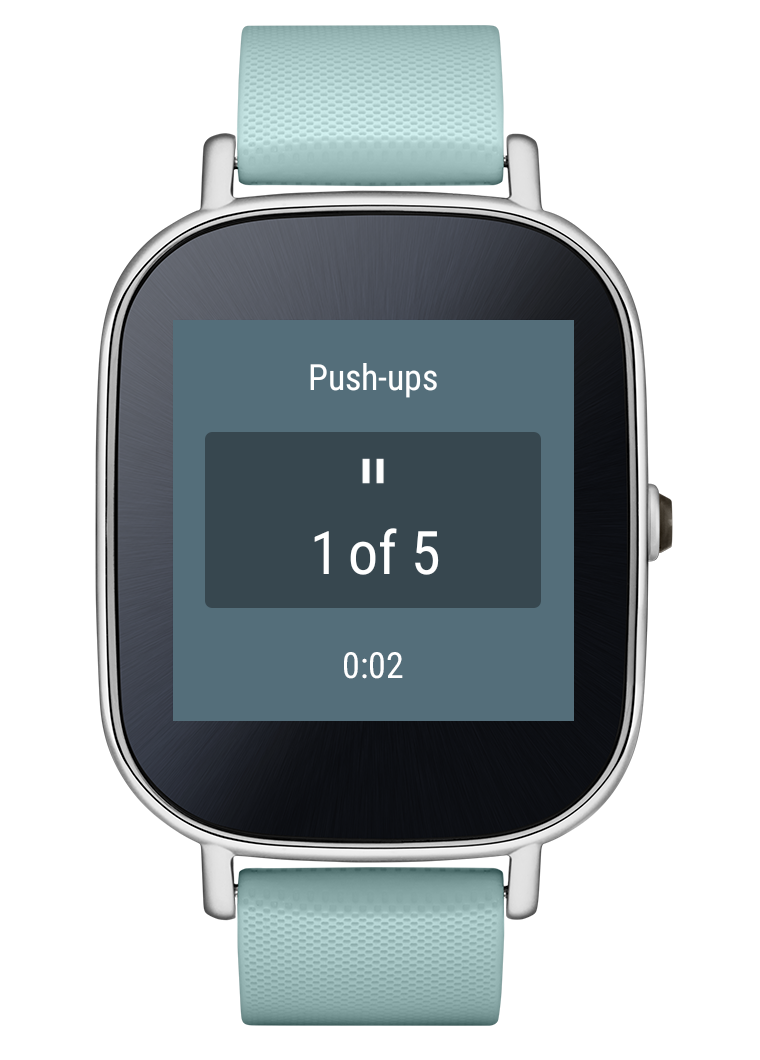
Withings Activité Pop is a wearable device that offers fitness and sleep tracking, Bluetooth LE connectivity and eight-month battery life in a form factor that's akin to traditional timepieces. The watch debuted earlier this year for £119 in the UK, and Amazon is now running a deal through which you can snag the smartwatch for £74.
Bcstevieb
Shared posts
From the Editor's Desk: The audacity of Facebook
I love the audacity of Facebook, the company. It rightly (yet so wrongly) operates under the assumption that you're using Facebook (you probably are), you'll continue to use Facebook (you probably will) and that there's absolutely no way you'll ever quit Facebook (ever). Consider a couple recent examples:
Activist tricked into 6-year relationship with undercover cop tells her story

It's been five years since the first cases of UK undercover police officers infiltrating environmental groups and tricking activists into having sex with them surfaced, and now, one of the survivors of the practice, "Lisa," has granted her first-ever interview. (more…)
Porcelain figurines transformed into creepy-cute insects

Judith (AKA Miss Mantis) remakes kitschy-sweet porcelain figurines, transforming them with polymer clay, flocking and paint into statuettes of anthropomorphic insects going about their weird, daily business:. Some favorites: Bee Lady "Mìfēng", Fancy Dancing Mantis Gentleman, Bee Lady "Alice", Little Praying Mantis Boy, and Scandalous Mantis Dancer. (more…)
Help a blind girl find her cat in a world where you see without eyes

I watched the Bob Ross marathon on Twitch recently, where a whole new generation got to discover the magic that emerges from his brushes: how you can turn away for a moment and turn back to find a whole new world materializing across a blank canvas. The game Beyond Eyes can feel a little bit like that too.
You play as Rae, a young girl who lost her sight in an accident. After her cat Nani goes missing, she opens the gate to that leads beyond her garden and adventures forth to find her friend. Since she's blind, she—and you—have to rely on touch, sound and memory to paint a picture of the world in the blank spaces of the unknown.
If a bird sings in the distance, it'll light up a small area in the vast whiteness that cloaks the path ahead—at least until you draw closer. Gates, bushes and other obstacles often spring up in front of you suddenly, since you don't know where they are until you run into them. The world paints itself into being around you, in ways that are beautiful and surprising. Grass grows beneath your feet as you move, flowers bloom, bridges leap across rivers. https://youtu.be/gmmo_2llJp4
But things aren't always what they seem: what sounds (and therefore looks) like a sparkling fountain might turn out to be water pouring through a rusty sewer grate. What you thought was your cat rustling around in the bushes might turn out to be some local wildlife. Your other senses can help you paint an imaginative picture of the world around you, but until you actually touch it, you never quite know for sure.
The phrase "walking simulator" has become something of a pejorative in certain circles, but that's exactly what Beyond Eyes is. This is a game where almost all you do is wander, imagine, and watch the world unfold. But what ultimately makes it pleasurable is what makes so many "walking simulators" worthwhile: the chance to move through a different world in a different way, and perhaps to remember that not everyone walks through the world in the same way as us.
Developed by the Tiger and Squid, Beyond Eyes is available for Mac, PC, Linux, PS4 and Xbox One.
Yahoo blocks some users from accessing email until they turn off ad-blocking

The company says it's not policy to do this -- yet -- but they're testing locking Yahoo Mail users out of their accounts unless they turn off ad-blocking. (more…)
Sony confirms it’s working on PS2 emulation for the PS4
What exactly is Sony up to with emulating PlayStation 2 games on the PS4? A report this week from Wired confirmed that the company is, in its own words, "working on utilizing PS2 emulation technology to bring PS2 games forward to the current generation," but it seems that the PlayStation 4 already has this capability (at least in part), and Sony has done nothing to publicize it.
France moves to tighten security at the expense of freedom
French authorities are still working to piece together the events and oversights that led to last week's terrorist attacks in Paris, which left 129 dead and 352 injured. But lawmakers are already looking to prevent future attacks with a familiar recipe: tougher security measures and curtailed civil liberties.
On Thursday, France's lower house of parliament nearly unanimously voted to extend the country's current state of emergency by three months. The state of emergency grants expanded powers to French security forces, including the ability to immediately place suspects under house arrest, conduct warrantless searches, and copy data from suspects' phones and computers. Lawmakers also passed an amendment that makes it easier for the...
LG cancels launch of Watch Urbane 2nd Edition LTE

Less than a week after finally releasing the Watch Urbane 2nd Edition LTE, LG has halted the launch of the watch. In an email sent to Android Central from an LG representative, it was explained that during some quality assurance testing the company found an unnamed "hardware issue" that was deemed important enough to halt the launch of the watch.
The word "cancel" was specifically used in relation to the launch of the Watch Urbane 2nd Edition LTE, which is a bit shocking considering that AT&T and Verizon are both already selling the first LTE-enabled Android Wear device. Whether or not the watch will at some point in the future be re-released is still up in the air, according to LG.
AT&T has confirmed to Android Central that anyone who already purchased a Watch Urbane 2nd Edition LTE from the carrier will be notified of the issue, and is entitled to a full refund or replacement for another connected watch — which in this case would be the Gear S2. An AT&T company memo sent to us by an anonymous tipster also shows details given to employees, indicating that all devices must be removed from the store immediately and returned to the manufacturer.
24 Easy Breezy Images that Represent Wind
Wind is an interesting subject to try and photograph because you can’t see it. So how do you capture a photo of air or a feeling like wind?
Let’s see how these 24 photographers did it:
The post 24 Easy Breezy Images that Represent Wind by Darlene Hildebrandt appeared first on Digital Photography School.
Enable This Setting to Make Windows 10 Boot Up Faster

Windows 10 came with no shortage of performance improvements, but one of the neatest is its fast boot times. If your machine is taking too long to boot up, ensure this setting is enabled to speed things along.
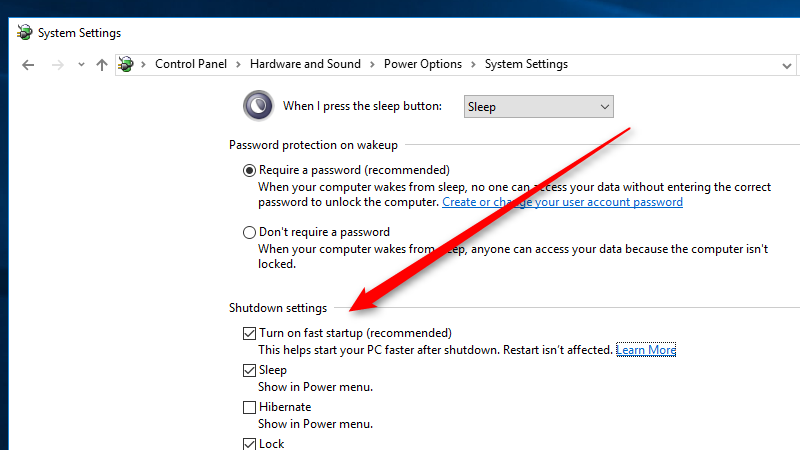
The feature in question is called Fast Startup. The way it works is when you shutdown your computer, rather than just dumping everything in RAM, Windows will save an image of your loaded kernel and drivers in something called the hiberfile. This way, when the system boots up again, it simply reloads this file, making boot times much faster. To enable this, follow these steps:
- Search for and open “Power options” in the Start Menu.
- Click “Choose what the power buttons do” on the left side of the window.
- Click “Change settings that are currently unavailable.”
- Under “Shutdown settings” make sure “Turn on fast startup” is enabled.
On a clean install, this setting should be enabled by default, however if you’re upgrading from a previous install with tweaked power settings, it might not be. When I checked my own machine, this feature was not enabled. Either way, once it’s turned on, you should notice considerably faster boot times.
How to Improve Windows 10 Startup Time | Make Tech Easier
Best Calendar Apps for Android 2017
A calendar app can help keep track of your busy schedule.
With a busy, awesome life full of parties, appointments, and work deadlines, keeping track of everything on your schedule can seem almost impossible. Unless of course, you've got a handy calendar app in your pocket to help ensure you don't accidentally overbook yourself or miss your niece's recital. With that in mind, we've put together our favorite calendar apps for android.
Check out our picks here!
Google Calendar
Google's own calendar app has been refined over the years to a point where it's both elegant and functional. And it's not just for Google stored calendars, either, with support for "all calendars on your phone, including Exchange."
Some of the nifty features on hand include a schedule view with photos and maps of places you'll be heading to, smart suggestions on places, people and the ability to create calendar events based on reservations for things like flights and restaurants that appear in your Gmail inbox.
Sometimes stock is more than enough. Google's calendar app is more than capable to handle all your scheduling needs while keeping things simple and clean. With the power of Google behind it, this app is smart enough to suggest titles, contacts, and places as you type in your event information. It will also automatically scan your Gmail and add reservations for flights, restaurants and more if you allow permission for it. Essentially, if you've enjoyed using other Google products and apps, you'll be more than happy with everything that Google has included here.
If it didn't already come pre-loaded on your phone, you can get it for free. Additionally, Google Calendar also works with Google Assistant. So you can ask your Assistant to add an item to your calendar and be done with it! With the latest update, you can now drag and drop events within your calendar as well, making it easy to reschedule an event without taking too much time to do it.
Microsoft Outlook
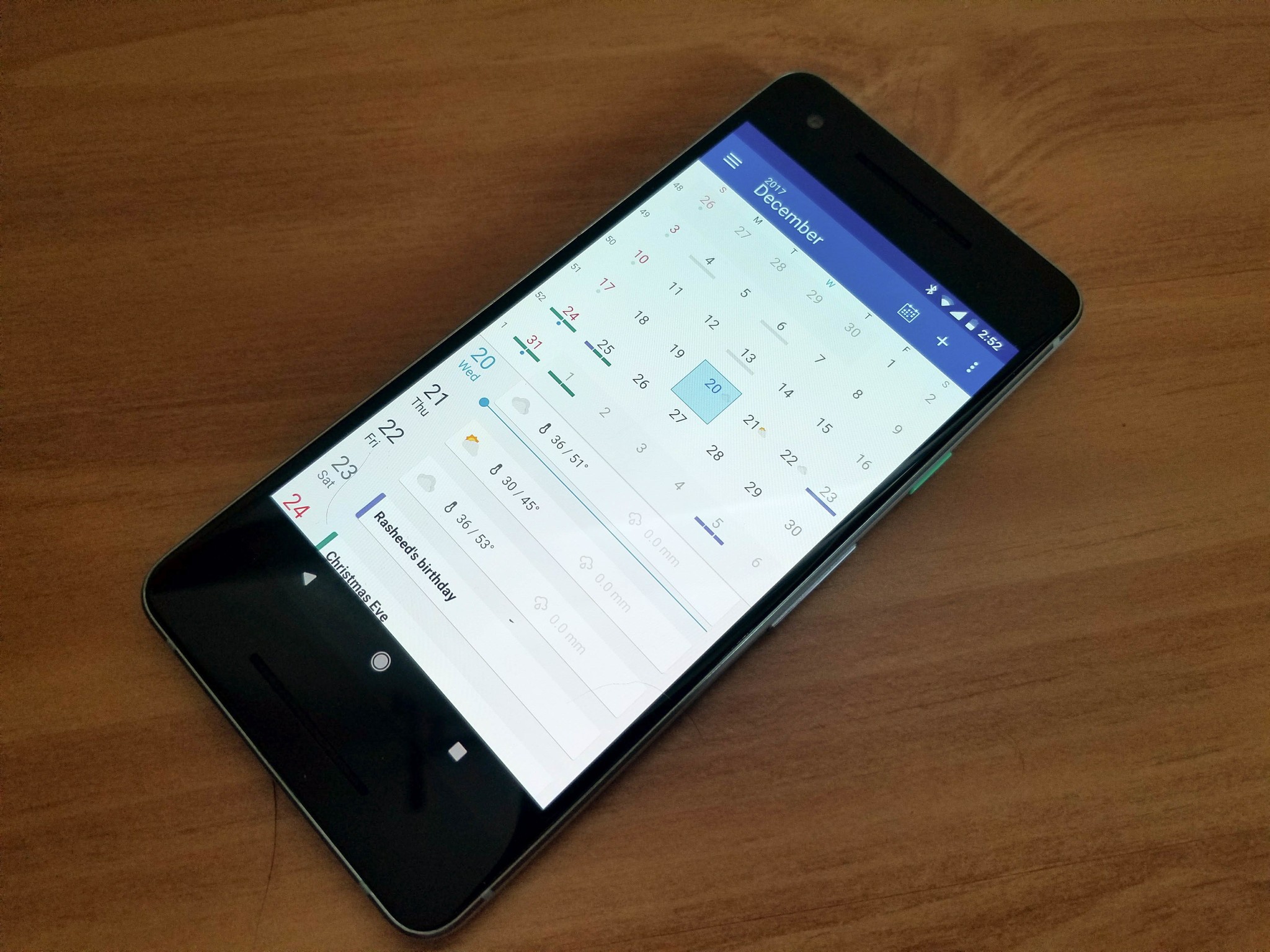
Not the first app you might think of when looking for a calendar, but the truth is that Microsoft Outlook on Android is really good. It combines your email, including Gmail, and calendars, including Google, inside one app so you can manage both in one hit.
Microsoft Outlook is a good option if you want to access your email and calendar all in one place, with access to great features. Event icons are just one of the features that the Sunrise team has brought into the fold. Try typing "coffee" or "lunch" the next time you create an event and just see what happens in your agenda view. Outlook gets regular patches to streamline the user process, and recently they added functionality for 10 new languages including Uzbek and Bosnian Latin.
Download: Microsoft Outlook (free)
DigiCal Calendar
Being able to personalize not just the content of your calendar, but also the way it looks and acts is a perk that just about everyone would like to take advantage of. That's also exactly what DigiCal does. You can switch between nine different themes, color code events, and even view multiple agendas all at once.
There are six different widgets you can use to keep an eye on your calendar from your home screen, and you also get access to the weather profile so that you can plan your day accordingly. If you like to color code things in order to keep better track, there are 42 different colors available for you to use.
Download: DigiCal Calendar (free)
How do you keep track?
There are plenty of excellent calendar apps out there but these are our pics for the best of the best. Do you have a favorite calendar app that ought to have been on our list? Let us know about it in the comments below!
December 2017: We've updated this post with new updates for Google Calendar and Microsoft Outlook, as well as replacing Sol Calendar with DigiCal!
How a paid FBI informant created a terror plot that sent an activist to jail for 9 years

Eric McDavid, a 26-year-old, nonviolent anarchist activist, was sentenced to 20 years in prison after a paid FBI informant promised to have sex with him if he'd help her bomb some unspecified targets in Northern California. She provided the money, transport, a cabin HQ (filled with hidden CCTVs), and the bomb recipe. Then she helped federal prosecutors illegally withhold 2,500 pages worth of evidence that eventually exonerated McDavid, after nine years in prison. (more…)
Amazon Studios Launches Amazon Storywriter, Free Cloud Software For Screenwriters
In an effort to expand its original video content, including movies and TV series, Amazon announced this morning the launch of a free, cloud-based screenwriting software program called Amazon Storywriter. In addition, the company says it’s expanding to include drama submissions, and will no longer take a free option on scripts submitted to the Amazon Studios website, allowing WGA members… Read More
Google Fit: Step up your fitness
Instant insights. See real-time stats for your runs, walks and rides on your phone. Google Fit will record your speed, pace, route, elevation, and more so you can stay motivated and on track.
The Sioeye Iris4G is the first action camera built for live streaming
The action camera market is top-heavy, to say the least. GoPro has dominated for years, and its closest competitors — Sony, Garmin, and TomTom — are no slouches, either. So if you're going to enter it as a startup, you better have a unique take on the idea of an action camera. A new company called Sioeye is doing just that in the form of what it's calling the Iris4G: the world's first Android-based action camera that can live stream over LTE.
The camera looks like an all-black version of a GoPro Hero 4, and is just a little bit bigger. But that's where the similarities end. It has a narrower (but still relatively wide) field of view of 150 degrees, it doesn't have nearly the same accessory ecosystem, and — of course — there's the live...
Google Play Store in 2016 will tell you whether any app has ads
Android developers today are being notified that they need to declare by Jan. 11, 2016, whether their applications have ads in them or not. This currently is a requirement only for apps that want to be included in Google's "Designed for Families" category in Google Play. But starting early next year all applications will have to declare whether they include advertising.
Where things start to get a little interesting is when you talk about what an ad is. For these purposes, Google's including "ads delivered through third-party ad networks, display ads, native ads, and/or banner ads." And for the most part we all know what those look like. Sponsored articles also fall under the ads umbrella, Google says, as do "ads within a feed" and other kinds of native ads.
And Google will be doing some checking on this. If you attempt to say that your app doesn't contain ads, Google runs a quick check of SDKs included in your app and will nudge you appropriately.
It'll be interesting to see how users take to this, and whether install rates drop because of it. The Android Central app, for example, doesn't really have what we'd consider to be ads. It occasionally has webviews with display ads, though (though that's not the norm), and there occasionally are forms of native content. But if you asked me whether our app "has ads," I'd probably say no — because it doesn't in the traditional sense. But by Google's standards here, it does.
All of Google's Confusing, Intertwined Music Services Explained

Last week, Google launched YouTube Music to a few cheers, a few groans, and a lot of “don’t they already have a music service?” In fact, they have several: Google Play Music and YouTube Red, for starters. But don’t be fooled—they seem separate, but they actually complement one another.
http://lifehacker.com/youtube-music-...
Between the new YouTube Music, recently-unveiled YouTube Red, Google Play Music, and the Google Play Store, no one could blame you for being a little confused about where you should listen to your music and where you should spend your money. Toss the old names for some of these services into the mix, like “YouTube Music Key” (now YouTube Red) and “Google Play Music All Access” (now just Google Play Music and both great examples of how badly Google sucks at naming things) and it’s no wonder people are confused.
http://lifehacker.com/google-sucks-a...
Even so, take another look at the big four there and you’ll see they really fall into two categories: YouTube and Google Play. The real question is where you like to get your music and how you like to listen to it. That’ll decide which of these two is best for you. Bonus: If you sign up for one, you get the other included in your subscription.
YouTube Red and YouTube Music: A Match Made for Niche Music Lovers

YouTube Red, the $10/month subscription service, and YouTube Music, the free playlist streaming app, actually compliment each other. Think of YouTube Red as an umbrella service: One that removes ads (and supports content creators, to an extent) and, in the future, will offer exclusive videos to subscribers.
http://lifehacker.com/i-paid-to-get-...
YouTube Music on the other hand, is the music-focused, mobile app component of YouTube Red, built specifically for those people who use YouTube as a jukebox for remixes, niche music, or playlists. It offers a way listen audio-only, stream those playlists and generate new ones, seeded from a song or artist you like, on the go. Plus, you don’t need to subscribe to YouTube Red to enjoy YouTube Music. A subscription gets you ad-free listening, offline listening, and background streaming, all of which are nice, but not essential.
YouTube Music is for the people who use YouTube as a music service already—and there are a lot of people out there who do. They’ve already crafted playlists based on their favorite genres or artists, but they’ve done it by hand. There’s a whole side of YouTube that’s entirely dedicated to music, and not just popular videos posted by VEVO or other official artist accounts. You may have seen what I’m talking about—remix communities like OCRemix who post tracks behind a screen-saver-like animation, whole music-based channels like Artzie Music and electronica powerhouses like ApproachingNirvana and ENM that feature music from various artists, and then the myriad individual bands, DJs, and remix artists who post their work to YouTube directly. Currently, you just listen, make your own playlist, or use someone else’s. YouTube Music makes it easy to discover these and more, just by seeding a song or musician you already love. Plus, since the app is mobile only, it brings that playlist-focused experience to your phone that the YouTube app doesn’t.
While the two services fit nicely, the YouTube Music app needs work. It’s new, so it’ll improve, but it’s missing some features, and it needs to stand out a bit more from the YouTube app itself. I enjoy using it, and I love the playlists it generates and songs it finds, but a cleaner, more discovery focused interface would be nice. YouTube will probably sweeten the pot in the future though, since they essentially give you 14 free days of YouTube Red just for trying out the YouTube Music app.
http://gizmodo.com/youtube-music-...
Google Play Music and the Google Play Store: Stream, Own, or Upload Your Own Library and Listen Anywhere

While YouTube Music and YouTube Red are designed specifically for the streaming-only crowd, Google Play Music and the Google Play Store are for people who prefer to own (at least in part) their songs, and for whom interest-based radio is an occasional perk, not a passion. They’re also for people who have their own music libraries already and want to take it with them on the go.
The relationship between Google Play Music and the Google Play Store is a bit more clear because they’ve been around a lot longer. Google Play Music is the umbrella music service. Google Play Music’s banner feature is its 30 million song catalog (and growing), and its ability to play host to up to 50,000 of your own songs. It’s a free, cloud-based music locker you use to take the music you own with you—all without paying for or buying a thing. The Play Store is where you buy songs or download the music you get with an optional $10/month subscription to Google Play. There’s even a free, ad-supported version of Play Music’s radio, which incorporates songs available in the Play Store that you can purchase a la carte, much like Pandora or Spotify’s Radio.By linking Play Music and the Play Store so closely, Google wants you to upload the songs you want to take with you, listen to them anytime, and buy new ones from the Play Store with a single tap. If you subscribe, you get offline listening, not to mention ad-free radio seeded by artist, song, or mood.
http://lifehacker.com/5882992/how-to...
Considering how easy it is to to make Google Play Music a media player for all of your music, both owned and streaming, new and old, it’s primarily for acquiring, listening to, and managing music, with discovering new music (a la YouTube Music) as a feature, not a focus.
So Which Fits Your Music-Listening Style Best?
That brings us back to our two big choices: Do you sign up for YouTube Red (and download YouTube Music,) or Google Play Music (and buy from the Play Store?) You don’t need to decide, because if you pay for one, you get the other for free.
If you’re wondering when you’d use Google Play Music and when you’d use YouTube Music though, here’s a breakdown:
- If you like Pandora, you’ll like YouTube Music (and maybe YouTube Red). Comparing YouTube Music and Pandora is the easy thing to do, since both features lead with the ability to seed “stations” with a song or artist you like. Just tell it what you like and sit back while the service weaves a tapestry of tracks you’ll enjoy, right? Both are even free and ad-supported, unless you pony up and pay to get rid of them (in Pandora’s case, that’s Pandora One, and YouTube’s case, YouTube Red.) The real difference here though is in the types of music you’ll get. Pandora is infamous for repetitive stations and a catalog that relies on its relationship with labels. YouTube has to deal with those same relationships, but its library knows only the bounds of what YouTubers upload—meaning it’s likely you’ll find more niche genres, remixes, musicians who aren’t on Pandora, and more through YouTube Music. The only problem is you have to deal with the sound quality at YouTube (which can sometimes be pretty bad), an algorithm that’s more designed to push popular tracks than learn from your tastes, and no audio-only or background play unless you pay up.
- If you like Spotify, you’ll like Google Play Music and the Play Store. Google Music is already a mature, popular music service, and a direct Spotify competitor in features and in price. They’re not strictly equal, but they’re aimed at the same people. If your preferred listening experience involves a mix of songs you own, songs you want to own, and searching for new music to add to your library, Google Play Music is going to offer you more of what you’re looking for. If you have a subscription, you can listen to anything in the Play Store you want. If you stick to a free account and listen to your own music, you have the option to buy from the Play Store when you want to. Plus, if you listen to music on the desktop, Google Play Music’s webapp makes it a better fit for you than YouTube Music, which (right now anyway) is mobile only. In fact, if you’re already a Spotify user, here’s a blow-by-blow comparison, so you can see what we mean.
http://lifehacker.com/google-music-a...
Put simply, if you already subscribe to a music service, is it more like Pandora or Spotify? Do you prefer more of a hands-on or a lean-back-and-listen experience? Do you prefer niche stuff and remixes, or are you into bigger names? Do you stream only, or prefer to own and listen offline sometimes?
Each service has their own place, and fills specific needs. For music nerds like me, I see both services working for me at different times or different moods, but the bonus there is that subscribing to one gets you access to the other. In any case, you can’t really go wrong with either. Just keep in mind each service’s strengths, weaknesses, and more importantly, how you enjoy your favorite tunes.
This Chart Tells You When to Use Ice or Heat for Pain
When you’ve got a headache, a sprained ankle, or some other pain, should you ice it or apply heat? Consult this handy reference chart for the solution.
In addition to telling you whether heat or cold is best for different types of pain, the graphic below also advises using ice for injuries under 6 weeks old and heat for injuries that have lasted longer.
Check out Cleveland Clinic’s blog post for more pain relief advice.
Should You Use Ice or Heat for Pain? (Infographic) | Cleveland Clinic

Google Search Now Surfaces App-Only Content, Streams Apps From The Cloud When Not Installed On Your Phone
Google today is making a big change in terms of its ability to surface the content found in mobile applications through Google search: it’s no longer requiring that apps have matching web content in order to be indexed through Google’s search engine. In addition, when Google finds in-app content that points to a mobile app you don’t already have installed on your… Read More
YouTube Kids heads to Australia, Canada, Ireland, New Zealand and the UK
Seven months after making its debut in the US, YouTube's kid-friendly service is now available in Australia, Canada, Ireland, New Zealand and the United Kingdom. The app comes with a filtered selection of channels and videos that are appropriate for children. Ability to upload videos or comment is also absent from the app, and there's a timer function built-in that allows parents to specify the amount of usage.
Oak Labs, With $4.1M In Seed, Launches A Smart Fitting Room Mirror
Though the world of fashion is trying desperately to catch up to the digital age, retail is still fundamentally unchanged. Oak Labs is looking to shake things up with a smart mirror to be placed in the fitting room of clothing stores and boutiques. The company just raised $4.1 million in seed funding led by Wing Venture Capital, and is piloting the software with Ralph Lauren in its Polo… Read More

Hasbro's new robotic cats will make you feel a little less alone, and a little more alone
Sometimes, the crushing weight of existence, day in and day out, fueled only by the dizzying monotony of each passing hour, becomes almost unmanageable. Unfortunately, loneliness only seems to get worse as you age, until your body is just a foreign object attached to a brain housing memories that serve only to prove your best years are behind you. Maybe you'll be lucky enough to have a trusty dog or an iguana, or maybe the children you spent most of your life caring for will no longer trust you to take care of a living thing. That's where Hasbro's new Joy for All companion pets come in, a line of robotic cats that meow, purr, and respond to touch. They're just like actual cats, except you never have to feed them or clean their litterbox...