 According to a report by Variety, and confirmation by Yahoo, Yahoo Screen has closed its doors with its content being split among its various magazine properties. Screen launched in 2013 as a place to house Yahoo’s original content, which the company has since backed away from (remember the $42 million write-down?). From bringing back the show “Community” to airing an… Read More
Bcstevieb
Shared posts
04 Jan 21:04
According to a report by Variety, and confirmation by Yahoo, Yahoo Screen has closed its doors with its content being split among its various magazine properties. Screen launched in 2013 as a place to house Yahoo’s original content, which the company has since backed away from (remember the $42 million write-down?). From bringing back the show “Community” to airing an… Read More
Yahoo Shuts Down Yahoo Screen, Its Home For Original Content Like “Community”
by Drew Olanoff
According to a report by Variety, and confirmation by Yahoo, Yahoo Screen has closed its doors with its content being split among its various magazine properties. Screen launched in 2013 as a place to house Yahoo’s original content, which the company has since backed away from (remember the $42 million write-down?). From bringing back the show “Community” to airing an… Read More
04 Jan 21:03
Factory images with January security patch now available for Nexus devices
by Jared DiPane

If you own a Nexus phone or tablet, and don't like to wait for the OTA release, you can now download the latest factory image from Google and flash it yourself. The update is still Android 6.0.1, but carries a different version number depending which phone or tablet you are using.
04 Jan 21:02
The Acer Iconia One 8 Android tablet is made for families and priced at just $100
by John Callaham


04 Jan 21:01


11 New And Notable Android Games From The Last 2 Weeks (12/22/15 - 1/4/16)
by Michael Crider
 Welcome to the roundup of the best new Android applications, games, and live wallpapers that went live in the Play Store or were spotted by us in the previous 2 weeks or so.
Please wait for this page to load in full in order to see the widgets, which include ratings and pricing info.
Looking for the previous roundup editions? Find them here.
Games
Blown Away: First Try
Blown Away is an interesting little platforming game.
Read More11 New And Notable Android Games From The Last 2 Weeks (12/22/15 - 1/4/16) was written by the awesome team at Android Police.
04 Jan 21:00

London: the urban explorer/jewel thief's guide
by Cory Doctorow

In April, Geoff "BLDGBLOG" Manaugh will publish A Burglar's Guide to the City, a new book about London's rich history of heists and the network of tunnels, catacombs, sewers, and caves that London such a paradise for would-be superthieves. (more…)
04 Jan 20:59

TPP vs Canada: a parade of horribles
by Cory Doctorow

Michael Geist has rung in the new year with the first in a series of posts that set out, in eye-watering detail, the bowel-loosening terror of the effects that the secretly negotiated Trans Pacific Partnership would have on Canada if the country ratifies it. (more…)
04 Jan 18:15


Anti-Piracy Education Enters UK Classrooms
by Andy
It took an awful long time to arrive but late 2014 the movie and music industries eventually reached agreement with the UK’s leading ISPs to send warnings to subscribers suspected of downloading content from file-sharing networks.
The warning scheme (which is currently notable only by its absence) is part of the Creative Content UK (CCUK) initiative which marries the ‘stick’ of direct-to-door warnings with a broader educational campaign focused on deterrence.
As previously reported the first campaign titled “Get It Right from a Genuine Site” used a colorful cartoon to encourage viewers to boycott ‘pirate’ sites in favor of those which pay licensing fees supporting the entertainment industries.
And now, at the start of a new year, CCUK’s latest initiative can be found on the Intellectual Property Office’s education site, which was launched under the ‘Cracking Ideas‘ brand last November.
Fronted by clay animation stars Wallace and Gromit, ‘Cracking Ideas’ is offering a lesson plan which asks 14-19 year old students to consider “the impact and ethics of film piracy, the consequences of downloading a film illegally and the impact of film piracy on the creative industries.”
Produced by education charity Into Film in partnership with The Industry Trust, The Intellectual Property Office and the Federation Against Copyright Theft, the lesson (titled “Vin Diesel’s Socks”) is built around a student-created anti-piracy PSA of the same name which questions who will fund the action star’s footwear if people pirate rather pay.
When placed side-by-side with ‘classics’ such as “You Wouldn’t Download a Car“, the change of tone is notable.
The lesson is centered around 18 slides with accompanying notes encouraging teachers and other educators to question students on issues including illegal uploading.
“Why do you think people distribute and upload films illegally? What do you think are the consequences of this activity?” one slide asks. Students are given time to think but are then offered these reasons.
Slide

It’s no real surprise that cash is put forward as the prime motivator, even though the country’s most recently jailed pirates made not a single penny from their activities. It is interesting, however, that the slide balances this with the honest statement that pirates often beat legitimate providers to the market, with pricing and availability.
Mirroring similar campaigns underway in the United States, the lesson also reinforces the notion that ‘pirate’ sites are dangerous places. It also falls back on the controversial ‘disappearing money’ argument that money not outlaid on movies is somehow not spent elsewhere in the economy.
But credit where it’s due. A later slide concedes that people who pirate content online are often the same people who pay to visit the cinema, buy DVDs and stream content from legitimate sources.
Slide
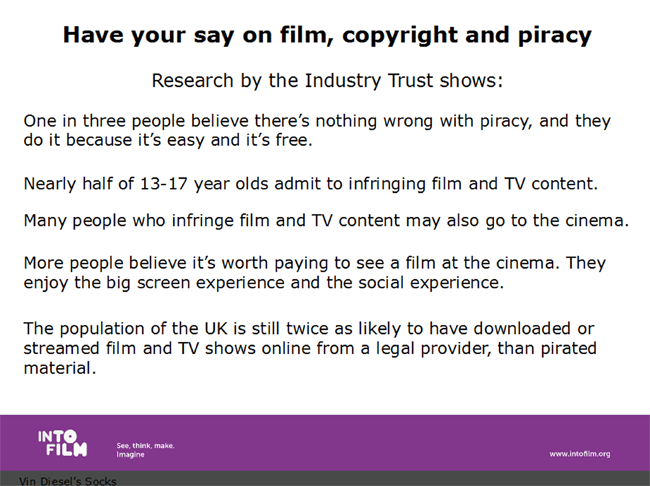
Later, students are asked to consider “Should things that are online be free?” and “Should you do things just because they are technologically possible?”
But what if students believe that piracy generates free buzz, that if they download something and rave about it to their friends, that will boost sales? The lesson’s covering notes provide guidance for teachers on how to respond.
“You may like to explain that creators of films, music or any other product should be in control of how they distribute their product. If they want to share it for free that is their choice, but illegal distribution removes that choice from the creator,” the notes suggest.
And, if students think that plenty of people still go to the cinema and film companies continue to make lots of money, the suggested response is as follows.
“You can suggest that it can take a long time for many films to make a profit and that unless people pay for the film at the cinema, online, on DVD etc, films will not cover their costs or make a profit, this will affect the quality and range of films that are made, and the career opportunities available in the film industry.”
But what if students get really tricky by suggesting that the film industry “is behind the times” by not serving those who want to watch movies as soon as they become available?
“You can suggest to students that some films are available online and on DVD at the same time as they are in the cinema, but that watching a film in the cinema is a different experience to watching it at home and many filmmakers and studios want their films to be an experience, and viewed in the optimum conditions. How a film is released and how much the creators charge for their product is their choice.”
In a later slide students are advised about being monitored online by copyright holders and the subsequent ISP warnings their activity might generate. Notably there is no mention of any punishments or references to breaking the law. The warnings are mentioned solely as a way to direct alleged infringers to legitimate content. This is a big change from past campaigns.
Finally, students are shown slides detailing the work of the Federation Against Copyright Theft but again there is little for them to feel threatened over. Instead, teachers are encouraged to explain that even pirates love movies.
“Explain that many people who access pirated film actually love film and want the industry to continue making great movies. If students love film, they should look for legal providers through Find Any Film next time. Play the Moments Worth Paying For/Star Wars: The Force Awakens trailer and ask students why they think film is worth paying for,” the notes to teachers conclude.
The Vin Diesel’s Socks lesson plan can be downloaded here.
This article has been updated to reflect that the lesson plan was produced by IntoFilm.
Source: TorrentFreak, for the latest info on copyright, file-sharing, torrent sites and ANONYMOUS VPN services.
04 Jan 18:12

Avoid Financial Pitfalls by Finding Your Blind Spots
by Kristin Wong on Two Cents, shared by Alan Henry to Lifehacker

Money can be an overwhelming thing to manage, so most of us try to avoid certain aspects of our finances altogether. Maybe it’s a fear of investing. Maybe it’s impulsive spending. Whatever your blind spot, pinpointing it is the key to moving past it.
When you can recognize and admit what your issues with money are, you have a much better chance of figuring out what’s going wrong if your finances seem out of control. Over at Psychology Today, psychologist Alice Boyes recommends asking yourself a few questions to find your own blind spots:
What do you put in your “too hard basket?”
We all have things that are more within / outside our comfort zone. What do you avoid doing when it comes to money because you find it intimidating?Inertia
Our behavioral biases are what marketers count on, particularly that we tend to repeat behavior we’ve done before. In what areas is inertia costing you money?The Minimizing Error
In what areas of your life do you underestimate how much you spend? Common examples might be food shopping, alcohol, insurances, or recurring fees and subscriptions (such as credit card fees, ATM fees, magazines, Netflix.)
Figuring out these spots is a crucial first step many of us don’t take in trying to deal with money. The good news is, it’s easy enough to figure out what they are. For more detail, head to the full post at the link below.
Uncover Your Money Blindspots | Psychology Today
Photo by stevepb.
04 Jan 18:12

11 More Awesome Spotify Tips and Tricks You're Probably Not Using
by Patrick Allan

Even if you listen to Spotify every day, there are tons of features you may not know about. Whether you want to show off the songs you’re listening to, hide your listening activity completely, or get the most out of new additions like Discover Weekly, here are some great Spotify features that are right under your nose.
http://lifehacker.com/the-best-spoti...
Listen to (and Archive) Spotify’s Discover Weekly Playlist

Spotify made a huge splash last year with the Discover Weekly playlist. Every Monday morning, a playlist of songs tailored to your listening preferences will automatically pop up in your list of playlists, no sign ups or additional actions required. Essentially, it’s like a friend that knows your music tastes taking the time to make you a mixtape every week. Its creator, Matthew Ogle, recently explained how it all works to Stuff:
There’s two parts to it. First, we look at all the music you’ve been playing on Spotify but we give more emphasis to the stuff you’ve been jamming on recently. Something that you played yesterday is probably more interesting to you than something you played six months ago. But the real core of it is looking at the relationships between songs based on what other users are playlisting around the songs that you’ve been listening to and essentially finding the missing ones – the ones you haven’t heard yet, or maybe haven’t heard much.
Spotify interactive Running playlists, or their sort-of-gimmicky Year In Music, but Discover Weekly is actually worth paying attention to. A lot of people, myself included, have been amazed at how well it works. According to Spotify, more than 1 billion songs have been streamed through Discover Weekly playlists, and more than 70% of listeners saved at least one track to their own playlists over the past 10 weeks. If you haven’t given it a chance yet, you absolutely should.
There is a small catch, however. Your Discover Weekly playlist gets wiped and refreshed with new songs every Monday. If you had a busy week or forgot to check it out, you could miss out on hearing your new favorite song. Fortunately, this IFTTT recipe from user xxnu will automatically move your Discover Weekly songs into a separate playlist every week so you never miss a tune.
http://lifehacker.com/5842307/how-to...
View Your History and Add Great Songs You Missed
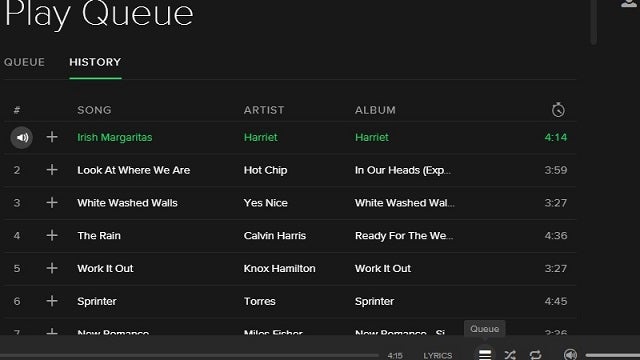
Have you ever been bopping along to a great radio station or someone else’s playlist, heard an awesome song, got sidetracked, and completely forgot what it was? Me too. It’s okay, we don’t have to be sad because we missed out on adding it to our own playlists.
Open the Spotify desktop app, then click the hamburger icon in the lower right-hand corner to open up your play queue. Once there, you can see what songs are going to play next, and more importantly, every song you’ve already listened to. Your play history is synced up across your account, so it even includes songs you listened to on your phone, in the browser at work, or on your video game console. If you’re having a hard time finding an awesome song you heard earlier, this is a great place to start.
Instantly Add Tracks to Spotify from Shazam for iPhone or Android
The Shazam app is great for identifying that funky fresh song playing way too loudly in Urban Outfitters or Forever 21. It’s even better if you connect your Spotify account to Shazam. Once they’re synced up, and Shazam has identified the song you’re listening to, hit the tiny arrow next to the play button. You’ll see a drop down menu with a Spotify option listed. When you start to play it in Spotify, you can then add it to your own library with just a few taps.
Drag and Drop Song Links Anywhere

Spotify lets you share tracks via URL links and HTML embed code, but you can also share track links simply by dragging them from your desktop app. Click and drag the song you want to share into any text field and Spotify will automatically create a link for the song with the song’s title and recording artist. This makes sharing songs with someone over email or Facebook message a piece of cake, and it looks nice too.
Use Private Listening Sessions to Hide Your Activity
Spotify’s community mentality is great for sharing music, but sometimes it would be nice to listen without all of your Spotify and Facebook friends knowing. We’ve talked about how you can completely hide your activity and playlists before, but what if you’re active in the Spotify community and just want a temporary smoke screen? All you need to do is start a private session.
Go to the File menu, then click “Private Session” in the dropdown menu. Now you can listen to whatever you want without anyone knowing, until you either restart the client or disable private listening. Now you can practice your karaoke cover of the Backstreet Boys’ “I Want It That Way” without showing the whole world you played that song 38 times in a row. If you want to hide all of your activity from Spotify and Facebook friends for good, open up the desktop app, head to Edit, then click Preferences. In the “Social” section, toggle off everything you see there and disconnect your Facebook profile if it’s connected.
Tap to Preview Albums and Playlists in iOS

If you have the Spotify app on your iPhone, iPad, or iPod Touch, you don’t need to open a playlist just to see what songs are on it. Tap and hold the playlist title and you’ll see the album artwork to the first five songs in that playlist. As you hold your finger down and slide over each image, you’ll get a quick preview of each song.
You can do the same thing with albums, or Spotify’s own pre-made playlists. It may not seem like a huge time-saver, but when you have several similarly-named playlists like “New Tunes 3” (like I do), it helps you search and decide what to listen to quickly.
Master Spotify’s Keyboard Shortcuts
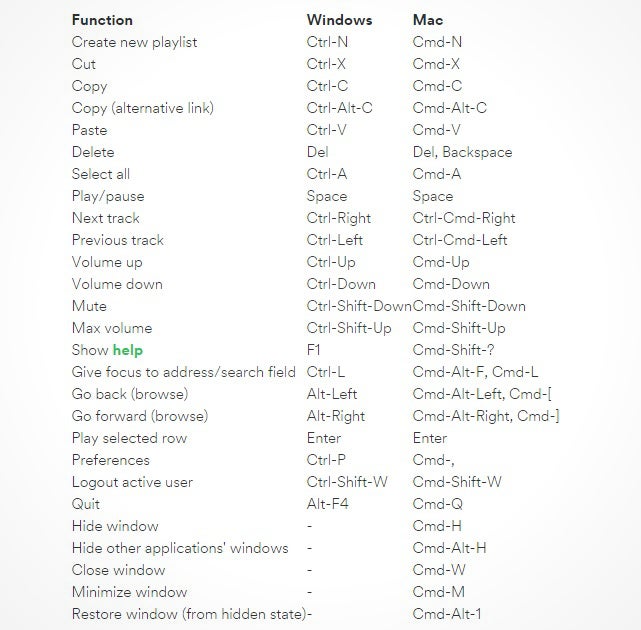
You may not know it, but Spotify can be controlled entirely with keyboard shortcuts. For example, you can skip and play previous tracks with CTRL + Right Arrow and CTRL + Left Arrow on Windows, or CTRL + CMD + Right Arrow and CTRL + CMD + Right Arrow on OS X. Or you can maximize the in-app volume with CTRL + Shift + Up Arrow on Windows, or CMD + Shift + Up Arrow on OS X.
Recover a Deleted Playlist
If you can’t find one of your playlists, accidentally deleted one, or just want to bring an old friend back from the dead, Spotify holds onto deleted playlists for a long time. To recover a deleted playlist, head to your account page in a web browser, and find the “Recover Playlists” option on the left-hand side. Once there, look for the playlist you want to resurrect, and click the “restore” button. Like magic, it will reappear in your Spotify apps again.
http://lifehacker.com/recover-lost-s...
Find “Clean” or “Explicit” Versions of Specific Albums

It can be annoyingly difficult to track down the “explicit” or “clean” versions of songs and albums, meaning you’re stuck listening to the radio version of your favorite track when you really want the original, unedited one . It seems that Spotify deems one version to be the “popular” version, making your search for the other version a bit of a wild goose chase. Here’s what to do instead: The next time you land on an album’s page in the desktop app and you’re after the alternative version—either clean or explicit—scroll down and look for the “1 More Release” button. When you click it, you’ll see the alternate version so you can choose whicher one you please.
Listen to Your Spotify Music In Your Uber Ride
Starting this past November, Spotify and Uber teamed up so you can listen to your playlists through your driver’s sound system. To set it up, open the Uber app on your phone, and head to your profile settings. Scroll to the bottom and tap “Connect Spotify.” Enter your Spotify credentials and you’re ready to hail a ride. When a Spotify-enabled driver gets assigned to you, you’ll see a small icon next to their driver profile in the Uber app. From there, you can decide what playlist to listen to once your ride starts.
Keep in mind, however, that not all drivers have Spotify enabled, and service is only available to Spotify premium users. Also, the option was only available in London, Los Angeles, Mexico City, Nashville, New York, San Francisco, Singapore, Stockholm, Toronto, and Sydney upon release, but the service has been rolling out to more cities over the last few months. The only way to know if it’s available for you is to check your Uber app.
http://lifehacker.com/how-to-be-a-fi...
Turn the Spotify Desktop App Into a Karaoke Machine

The Spotify can also turn any computer into a karaoke machine at the press of button. Start playing the song you want to sing, then find the “Lyrics” button in the bottom right-hand corner of the window. Once you click it, you’ll have scrolling lyrics for almost every song in Spotify’s massive library. You can also adjust the size of the lyrics, or choose to see the entirety of the songs lyrics all at once.
Showing song lyrics used to require a third party app, but Spotify did away with apps and rolled this feature into the service natively. The lyrics section also lets you search for other songs by their lyrics in the upper right-hand corner. Instead of bouncing from Google to Spotify to find “that one song that kind of goes like this,” you can do it all through the desktop app now.
Illustration by Sam Woolley.
04 Jan 18:09
ASUS ZenFone Zoom finally launching in February for $399
by Phil Nickinson

The year-long wait for ASUS' camera-centric smartphone will "redefine your expectations of smartphone photography" on top of Android 5.X Lollipop.
We freely admit that those who live and breathe smartphones are not the most patient bunch. But few can argue that the ASUS ZenFone Zoom has taken its sweet time, having first shown its face some 364 days ago. And today at CES 2016 in Las Vegas the company has finally given word: The ZenFone Zoom with its 13-megapixel sensor at 10-element Hoya lens will be available in the United States starting in early February, and starting at $399.
04 Jan 13:59
Acer announces new Chromebase 24 with sleek design, Intel Core processors
by Andrew Martonik

Chromebases haven't seen the same number of models hit the market as Chromebooks have, but Acer's new Chromebase 24 is a fresh option to replace its current model. The screen size is bumped up now to 23.8 inches diagonally, the biggest of any current Chromebase, and it also has a sleek new design with a tilting display that can move from five to 30 degrees.
04 Jan 13:54

There's a new type of Wi-Fi, and it's designed to connect your smart home
by Jacob Kastrenakes
It seems obvious: Wi-Fi already connects most gadgets in your home. So why wouldn't it connect your smart home gadgets, too?
But while it sounds obvious, the companies making these connected gadgets have been reluctant to use Wi-Fi. That's because Wi-Fi requires a lot of power, and that's a huge problem for any device that needs to be tiny, cheap, and able to run on a single charge for months or even years at a time.
03 Jan 23:59
Vilmos Zsigmond, R. I. P.
by Bill Crider
Filmmaker Magazine: Legendary cinematographer Vilmos Zsigmond, who shot a string of iconic pictures for Robert Altman, Steven Spielberg, Michael Cimino and Brian DePalma, among others, died January 1, Variety reports. Hungarian-born, Los Angeles-residing, Zsigmond was a steadfast proponent of shooting on film his entire life, and he was known for innovative techniques — such as flashing the stock on films like McCabe and Mrs. Miller — and his ability to create unique looks for his various movies. His work encompassed rugged styles in films like Deliverance or The Sugarland Express to composed, dense, painterly work in Heaven’s Gate. He won an Oscar for Spielberg’s Close Encounters of the Third Kind.
03 Jan 20:48
 Just five years ago the world was a very different place. In 2010, the iPad had just made its debut, Kickstarter was introducing a new form of venture capitalism that would change the face of fundraising and Square was letting vendors of any size accept payment with a swipe of a card on a mobile device. And we haven’t looked back. The next five years will no doubt unleash products and… Read More
5 Things That Will Disappear In 5 Years
by Tom Gonser
Just five years ago the world was a very different place. In 2010, the iPad had just made its debut, Kickstarter was introducing a new form of venture capitalism that would change the face of fundraising and Square was letting vendors of any size accept payment with a swipe of a card on a mobile device. And we haven’t looked back. The next five years will no doubt unleash products and… Read More
03 Jan 20:47


Dropbox Scores Patent for Peer-to-Peer Syncing
by Ernesto
 There are dozens of sync and backup services available on the Internet, but most have a major drawback. They rely on external cloud-based hosting.
This may work well for smaller files, but when large videos have to be distributed among several devices people may run into trouble. This is one of the reasons why BitTorrent Sync has become quite popular.
Dropbox, one of the leading cloud syncing services, also appears to realize that there’s an opportunity here. Behind the scenes the company has been working on a technology that allows users to share files across different devices through secure P2P transfers.
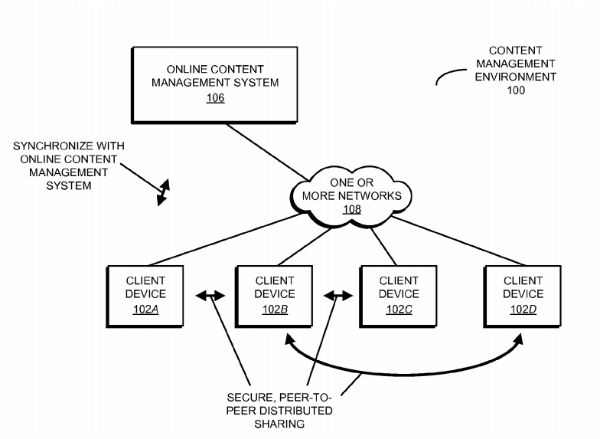
This month the company scored a patent for a secure peer-to-peer synchronization system through which users can quickly share and collaborate on files without uploading them to Dropbox’s servers.
“Peer-to-peer distributed sharing of the content items in such an online content management system can eliminate bottlenecks, thereby increasing the speed at which the content items can be shared among the individuals,” Dropbox explains
“In particular, in peer-to-peer distributed sharing, the individuals can directly transfer the content items from one computer or electronic device to another, instead of uploading and downloading the content items to and from remote storage in the online content management system,” they add.
Dropbox’ P2P synchronization
This type of peer-to-peer sharing is useful for groups of people who require access to the same files, especially if they are large. In addition, the technology could also help to quickly share the files of one person between different devices.
However, P2P syncing can also lead to all kinds of conflicts and errors, in particular when more people are working on the same file at the same time. After all, the system must know what files are the most recent and how to properly distribute them.
To address this Dropbox’s system will allow users to provide a cryptographic key to a server. This signals what version of the file they have and how it should be synchronized across the other devices.
“…the recipients can use the cryptographic key during peer-to-peer distributed sharing of the version of the content item among the user and the recipients in a shared network (intranet or Internet) without synchronization conflicts …,” the patent reads.
The patent is an interesting development. If Dropbox goes ahead and implements a form of peer-to-peer syncing then this would greatly increase the appeal to users who share large data files, such as editors and graphic designers.
In a way it’s framed as a competitor for BitTorrent Sync, which specifically targets this niche. Launched in 2013, BitTorrent Sync allows users to become their own cloud and share massive files without storing them on external central servers.
BitTorrent Sync previously announced that it was seven times faster than Dropbox, which may have prompted the cloud syncing service to follow BitTorrent’s peer-to-peer lead.
Source: TorrentFreak, for the latest info on copyright, file-sharing, torrent sites and ANONYMOUS VPN services.
03 Jan 14:40

Hong Kong's dissident publishing workers are disappearing, possibly kidnapped to mainland
by Cory Doctorow

Five employees of the publisher Mighty Current and its retail arm, Causeway Bay Bookstore, have disappeared from Hong Kong, and pro-democracy leaders say that they were kidnapped to the mainland by PRC security forces in retaliation for publishing books critical of the Chinese government. (more…)
03 Jan 13:43
 The standard sets of stock headphones being shipped by companies like Apple and Samsung are, by in large, garbage. For consumers looking to achieve more of a high-end audio experience, their best bet is traditionally in securing a new pair of cans. A new company, BoomCloud 360, is looking to help consumers boost audio quality more easily with their first portable product offering. The… Read More
The BoomStick Gives Your Stock Earbuds A Major Sound Quality Boost
by Lucas Matney
The standard sets of stock headphones being shipped by companies like Apple and Samsung are, by in large, garbage. For consumers looking to achieve more of a high-end audio experience, their best bet is traditionally in securing a new pair of cans. A new company, BoomCloud 360, is looking to help consumers boost audio quality more easily with their first portable product offering. The… Read More
02 Jan 22:36


Top 10 Most Popular Torrent Sites of 2016
by Ernesto
 Most file-sharers are creatures of habit, but when their favorite site disappears they gladly hop over to the next one.
This is also reflected in our annual top 10 which sees the usual names on top but also features some dubious newcomers.
One of the major changes came with the hostile takeover of the popular TV-torrent site EZTV. This prompted the popular TV-torrent distribution group to shut down last May. Another group took over the popular brand and continued with their own ‘unofficial’ EZTV releases. We therefore marked the site as a newcomer.
Something similar happened to YIFY’s YTS website, when the Australian admin ran into legal trouble. The official YTS website shut down but it was quickly replaced by the “unofficial” YTS.ag, which gathered a large user-base over the past two months.
Apparently, most torrent users are happy as long as they can get their fix, no matter what the source is.
KickassTorrents (KAT) remains the most visited torrent site and continues to grow. The Pirate Bay is listed in second place and made a strong comeback after nearly two months of downtime spanning the turn of the year. Since the site has been operating from several domain names until a few days ago, we chose not to list an Alexa rank.
Finally, it’s worth noting that Rutracker would have made it into the top five based on the number of visitors. However, we choose to only include English language content sites.
Below is the full list of the top 10 most-visited torrent sites at the start of the new year. The list is based on various traffic reports and we display the Alexa rank for each. In addition, we include last year’s ranking for each of the 10 sites.
1. KickassTorrents
KickassTorrents was founded in 2009 and surpassed The Pirate Bay in traffic last year. Battling various censorship efforts the site has burned through a few different domain names over the years. Most recently it switched to a Costa Rican .cr domain after it lost its Somalian .so address.
Alexa Rank: 85 / Last year #1
2. The Pirate Bay
The Pirate Bay is one of the main piracy icons. The torrent site wasn’t online at the beginning of 2015 and had to deal with a staff revolt. However, it quickly regained millions of users after a successful comeback operating from a hydra of domain names until last week.
Alexa Rank: NA / Compete Rank: NA / Last year #4
3. ExtraTorrent
ExtraTorrent continues to gain more traffic and has become one of the most active torrent communities. The site is also the home of the popular ETTV and ETRG release groups.
Alexa Rank: 342 / Last year #3
4. Torrentz
Torrentz has been the leading BitTorrent meta-search engine for many years. Unlike the other sites featured in the list Torrentz does not host any torrent files or magnet links, but redirects visitors to other places on the web. The site uses several domain names with .eu being the most popular.
Alexa Rank: 351 / Last year #2
5. RARBG
RARBG, which started out as a Bulgarian tracker, was last year’s newcomer and continues to rake in more visitors. The site was blocked by UK ISPs last year, which put it on par with most other sites in the top 10.
Alexa Rank: 1,101 / Last year #7
6. 1337x
1337x has traditionally been a community driven torrent site but several weeks ago most of the admins and moderators abandoned ship over security concerns. The coming year it will become clear whether 1337x can keep its popular status.
Alexa Rank: 1,249 / Last year #9
7. EZTV.ag
TV-torrent distribution group EZTV shut down earlier this year after a hostile takeover. The site continued to operate under new ownership and releases its own torrents now. In solidarity with the original owners several large torrent sites have banned these ‘new’ releases from their sites.
Alexa Rank: 1,373 / Last year #NA
8. TorrentHound
TorrentHound has been around since the last decade but is a newcomer in the top 10. It has also been on the radar of copyright holders this year. The torrent site is blocked in several countries and was reported as a piracy haven to the U.S. government, alongside many other sites in this list.
Alexa Rank: 2,239 / Last year #NA
9. YTS.ag
YTS.ag has nothing to do with the original YTS or YIFY group, but aims to take its place. As with the new EZTV, several large torrent sites are not allowing the group to use the YIFY or YTS brands on their sites.
Alexa Rank: 740 / Compete Rank: 4,271 / Last year #NA
10. TorrentDownloads
TorrentDownloads has been around for several years. The torrent site regained a spot in the top 10 this year after it was featured for the last time in 2011. It’s a no-nonsense index that provides torrents to millions of users each month.
Alexa Rank: 2,969 / Last year #NA
Disclaimer: Yes, we know that Alexa isn’t perfect and that Compete has plenty of flaws, but when combined both do a pretty good job at comparing sites that operate in a similar niche.
Source: TorrentFreak, for the latest info on copyright, file-sharing, torrent sites and ANONYMOUS VPN services.
Pedro Rocha, Muniak.julien likes this
02 Jan 20:23

Pianu Teaches You to Play the Piano, Right In Your Web Browser
by Alan Henry
If you’ve ever wanted to learn to play the piano, Pianu can help. All you need is a web browser, and an internet connection—whether you’re on a PC using a mouse and keyboard, a tablet or smartphone, or actually have a keyboard to plug into your computer.
Pianu has two big features: First, the song directory, which is a list of songs ranging in difficulty from beginner to expert, progressing in difficulty. The directory itself is free, and you can play any of the songs in it, but you don’t get guided instruction or anything there. The songs work a bit like playing Rockband—the keys you should press come down from the top of your screen, and when they land on the key, you should press it and hold until the next note comes down. For advanced songs, you’ll have to manage multiple keys at the same time, timing, and so on. It’s actually a lot of fun, and you can go experiment with the songs in the directory right now.
The second big feature is the Pianu Academy, which is a paid service and how the site makes money. That’s where you’ll get interactive lessons, and a lesson plan that’ll start you off at learning the basics of the piano all the way up to playing complex pieces, step by step, to learn and follow at your own pace. The Academy also teaches you how to read sheet music, play chords, learn meter, and more. The full package is only $35, but if you just want to learn sheet music or learn chords, it’s $19 for either segment. You can even try the first lesson for free.
http://lifehacker.com/simply-piano-t...
Pianu also has a keyboard directory, where you can get tips to help connect the keyboard you have to your computer, or links to buy portable, roll-up keyboards that work well with your PC, or a full-sized keyboards that are easy to connect as well. While the service doesn’t listen to you play the way previously mentioned Simply Piano does, it does work on any device with a web browser, and if you’re okay with self-directed learning, it’s completely free. Hit the link below to check it out, or try a lesson.
Ricardo Aranda likes this
02 Jan 10:50

Neko Atsume: the game of passivity
by Elizabeth Lopatto
I have played Neko Atsume for several months now. First, I renamed every new cat I saw, so my menagerie was entirely personal essayists and fictional characters. Then I waited.
02 Jan 10:49

How to be a cat: Ask Lumpy
by Elizabeth Lopatto
Leah Reich was one of the first internet advice columnists. Her column "Ask Leah" ran on IGN, where she gave advice to gamers for two and a half years. Lumpy is Leah's cat, and he is working on giving advice just like his mom. (During the day, Leah is Slack’s user researcher, but her views do not represent her employer. You can write to her at askleah@theverge.com and read How to be Human here.)
Dear Lumpy,
I am a young, hungry feline, hoping to up my social media presence. What's the best way for me to improve my social media profile?
Yours,
Cashless Catte
Dear Cashless,
Love,
Lumpy.
Dear Lumpy,
The human has allowed a cardboard box in the house and I don't know what to do? It could attack and hurt everybody....
01 Jan 23:20

Why We Like the Smell of Our Own Farts
by Stephanie Lee on Vitals, shared by Alan Henry to Lifehacker
Farts are weird. It seems perfectly fine when we let one rip, despite the stink bomb it may be. We can tolerate our own, but if someone else cuts the cheese? Aw, heck no. Theirs is unbearable.
Okay, we know what you’re thinking: “Gross, this is science?” and “Shoot, how did they know?” Yes, and we just do because we’ve all been there. Farting is a perfectly normal (and necessary) function of our glorious human bodies. Gas builds up in our intestines for a number of reasons. It could be from inadvertently swallowing too much air, the by-products of bacteria that live in our gut and help us digest food, or chemical reactions in the gut. All of that gas has to be let out somehow. Basically, it’d be weird if you didn’t pass gas at all!
http://lifehacker.com/how-to-fart-in...
Leave it to AsapSCEINCE to help answer some of life’s most pressing questions in a way that doesn’t stink. In the video, they suggest that we may “prefer” the smell of our own farts because it’s both familiar and contains a genetic signature that is unique to each of us. Interestingly, your tolerance to farts in general are based on other factors such as age, culture, and personality as well. Check out AsapSCIENCE’s video above for more.
Why Do We Like Our Own Farts? | AsapSCIENCE
Stephanie Lee is a wandering health and fitness writer. You can follow her shenanigans on Twitter or on her YouTube channel.
31 Dec 23:50
Android Central 2015 Readers' Choice Awards
by Derek Kessler


This is the best of 2015, as determined by you, our readers.
Thousands of you weighed in over a couple of week on what's changed how you work and play. These are what replaced the devices on your wrists, in your pocket, on your laps or desks, and in your living rooms. They're what dictates the look of your home screens and our docks.
They're the devices and features, gear and accessories, and apps and games that filled us all with surprise and delight, got us to forget what came before, and made it impossible for us to imagine how we ever lived without them.
They're your 2015 Android Central Readers' Choice Award winners!
Devices
Android Smartphone of the Year: Nexus 6P

No real surprise here, and it won by a large margin. You can argue whether the Nexus 6P truly is the best phone around — the Note 5 certainly should be a close second, and LG's definitely in the conversation. But for most folks who frequent this site and chime in on the year-end awards, the Nexus 6P certainly is the phone of choice. And for once we've got a Nexus phone that absolutely can hold its own in that argument.
Runner-up: Galaxy Note 5
31 Dec 22:32
Artist paints people to look like paintings
by Mark Frauenfelder

“Unlike a traditional Trompe-L’oeil painting which tricks the eye into thinking a 2D canvas might be a real 3D space,” says Los Angeles artist Alexa Meade “I do the opposite: I take the 3D world and create the illusion that it is a 2D painting.”
[via]
31 Dec 22:32

Mesmerizing time-lapse of crowd control at Tokyo comic convention
by Mark Frauenfelder

After watching this video, you'll probably want to play this.
[via]Comiket which is the world's largest self publishing comic book fair that is held twice a year in Tokyo.
The Convention draws crowds over 500,000 attendees and they use strict crowd control to easily manage the amount of people that attend.
The footage, which was compiled from photographs taken at intervals of 5 seconds, was filmed on the last day of Comiket from around 1:30 AM to 2:30 PM from the balcony of the nearby Washington Hotel.
31 Dec 22:29

Happy public domain day: here's what copyright term extension stole from you in 2015
by Cory Doctorow

When Congress amended US copyright law in 1976, they extended the copyrights on works whose creators had produced them with the promise of not more than 56 years. Since then, almost nothing has entered the US public domain. (more…)
31 Dec 22:28

This Is the Best of Lifehacker 2015
by Whitson Gordon

At the end of every year, we take a look back at our most popular posts to reminisce (and to help you catch any stuff you might have missed). Here’s one last look at our best posts in 2015.
Most Popular How-To Guides of 2015

Step-by-step guides are our bread and butter here at Lifehacker, and you seem to enjoy reading them as much as we enjoy writing them. Here are the best how-to guides of the year.
Most Popular Food Hacks of 2015

Cooking tips aren’t just for foodies. We all eat every day (unless you’re a robot), and better cooking means healthier food, more delicious meals, and possibly even saving some cash. here were our best food hacks and tips from 2015.
Most Popular DIY Projects of 2015

We’re always looking for the best DIY tips at Lifehacker, and this year there was certainly no shortage of them. Here are some of the best DIY tips for when you want to tackle projects all on your own.
Most Popular Personal Finance Posts of 2015

Getting your money in order is no easy task, and most of us need all the help we can get. Here are some of our best money guides, explainers, and tips from 2015.
Most Popular Health and Fitness Posts of 2015

For something so important, there’s an awful lot of confusion over health and nutrition. This year, we covered more health and fitness than ever before, in an effort to dispel that confusion. Here were our best health-related posts of 2015.
Most Popular Windows Downloads and Posts of 2015

Windows 10 made huge waves this year, adding a ton of new improvements, cleaning up a lot of old features, and did we mention it’s free? Here are our best Windows posts from one the platform’s biggest years in history.
Most Popular Mac Downloads and Posts of 2015

It’s been another year, which means yet another iteration on OS X. While Apple didn’t make any major moves with the Mac this year, there was still plenty to talk about. Here are our best Mac posts from this past year.
Most Popular Explainers of 2015

In between tips and how-tos, we also often do “explainers,” where we break down complicated topics into simple language. Our goal is to help you understand how these difficult topics work, and show you what you can do with the knowledge. Here are our best from the past year.
Most Popular Featured Desktops and Home Screens of 2015

Every week, we feature customized desktops and home screens submitted by readers that show off beautiful wallpapers and great customization and UI tweaks. Sometimes they’re fun, sometimes they’re functional, and sometimes they’re both, but 2015 was a great year for all of them. Here’s a look at your favorite ones.
Most Popular Featured Bags and Workspaces of 2015

Each week, we showcase what’s in other people’s everyday carry bags as well others’ workspace setups. Take a look back at your favorite ones from this year.
Most Popular Android Downloads and Posts of 2015

This year, Android got even sweeter. Marshmallow built on the already-awesome foundation Lollipop laid the year before, plus we got two new Nexus phones, and a bunch of improved apps. Here are our best Android posts this year.
Most Popular iOS Downloads and Posts of 2015

iOS had a big year with iOS 9, new iPhones, and a fancy new iPad Pro. Let’s take a look back on the year with some of our biggest, most popular posts about Apple’s mobile operating system.
Most Popular Clever Uses and MacGyver Tips of 2015

If you’re clever enough, anything can be a tool. This year we saw a ton of clever tips and tricks than any “MacGyver wannabe” would be proud of, but only a select few stood out as the best.
Most Popular Interviews of 2015

Face it: Most of us don’t know what we’re doing. We’re making it up as we go along, and any guidance offered by more experienced people is useful. We’ll take any help we can get. That’s why, every week, we ask notable people how they work.
Want to catch up on the best posts of past years? See our roundups for 2014, 2013, 2012, 2011, 2010, 2009, 2008, and 2007.