Shared posts

27 Jan 12:20

Firefox can now send push notifications just like Safari and Chrome

by James Vincent

The latest version of Mozilla's Firefox browser has a trick up its sleeve that could save you time and battery: push notifications. This means, with your permission, that websites can send messages that appear directly on your desktop — even if you don't have that site open. This lets you close unnecessary tabs, saving you processing power and battery life, and could be especially useful for the likes of Facebook, Twitter, and Gmail, where you want to keep an eye on incoming messages. Mozilla says that as with geolocation and webcams, users will specifically have to grant access to websites that want to send them notifications, and can revoke them at any time.

A push notification on Firefox.

A website...

Continue reading…

26 Jan 22:35

Apple reports a quarterly profit of $18.4 billion, the largest in history

by Ben Popper

Apple's profits typically skyrocket during the fourth quarter, when new models of the iPhone often arrive and shiny new devices are purchased as holiday gifts. Last year Apple notched a record $18 billion in profit during this period, the largest ever recorded by a single public corporation. This year the company topped that, generating a profit of $18.4 billion on $75.9 billion in revenue during the last three months of 2015.

But, the company also predicted the revenue for the second quarter of 2016, which for Apple is the first three months of this year, would come in between $50 and $53 billion. That is down from the $58 billion it earned during the second quarter of 2015, and would mark the first year-over-year revenue decline for...

Continue reading…

26 Jan 22:34

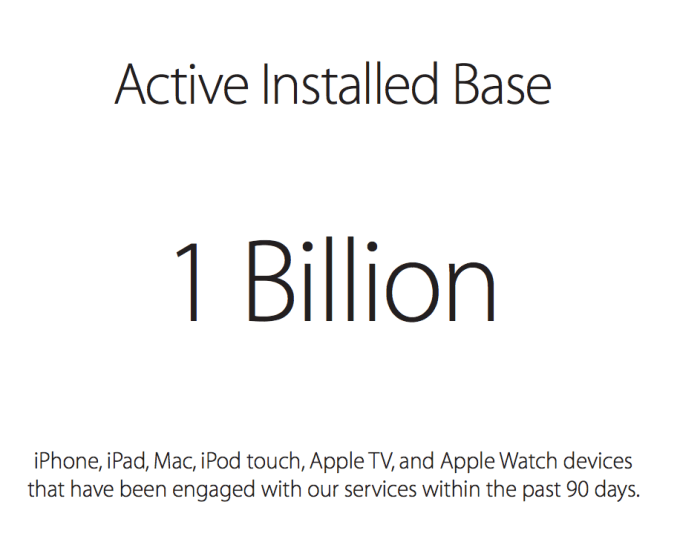
Apple Reports 1 Billion “Active” Devices

by Sarah Perez
Screen Shot 2016-01-26 at 4.43.55 PM In Apple’s Q1 ’16 “Earnings Supplemental Material” – documentation added to today’s earnings primarily to highlight how foreign exchange rates are impacting revenue – there was another notable figure revealed: Apple says now its “active” install base has reached 1 billion devices. (Actually, it has surpassed it, says CEO Tim Cook.) That… Read More
26 Jan 17:54

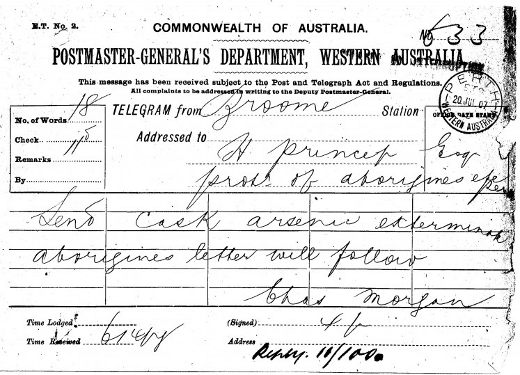
1907 telegram: "Send arsenic...exterminate aborigines"

by Cory Doctorow

4441007218_03bc82798b_o

In 1907, Charles Morgan of Broome Station sent this telegram to Henry Prinsep, the Chief Protector of Aborigines for Western Australia, in Perth: "Send cask arsenic exterminate aborigines letter will follow." (more…)

26 Jan 14:13

You Can't Earn Your Way Out of a Spending Problem

by Eric Ravenscraft

You Can't Earn Your Way Out of a Spending Problem

You have a spending problem, but you don’t really want to stop. Maybe if you just earned a little more, you’d be able to save and that would fix your problem, right? Chances are, no it won’t.

As personal finance site The Micawber Principle explains, hoping to earn your way out of a spending problem is a common psychological trap many of us fall into. It’s tempting to think that the problem isn’t really with the things you spend money on (and, consequently, the lifestyle you live), but rather with how much money you already make. There just isn’t enough of it, darn it! If that were true, though, surely people with high incomes wouldn’t have spending problems. Except they frequently do:

Increasing your income is a worthy goal. For the poor it is essential and for the rest of us it is desirable. However, unless you also consider the spending side of the equation an increase in income will not solve your financial problems. As Keynes, lottery winners, and pro athletes have discovered, you can’t earn your way out of a spending problem.

Of course, as the site rightly proclaims, there are certainly situations where your income really is too low to be sustainable. It’s equally true that you can’t just save your way out of poverty. Earning more is essential to digging out of that hole. But even for those who are well off, making more money won’t fix bad spending habits. In fact, without some discipline, it could make spending worse.

Can You Earn Your Way Out of a Spending Problem? | The Micawber Principle via Rockstar Finance

Photo by Lars Plougmann.

26 Jan 14:11

Negative Publicity: a book of paraphernalia from state kidnappings

by Cory Doctorow

2negative_publicity_cover

Crofton Black is a British counterterrorism investigator who has spent years tracking down the detritus of extraordinary rendition -- a polite euphemism for the government practice of snatching people, flying them to a distant country, and torturing them. (more…)

26 Jan 14:09

GoPro Integrates With Periscope

by Katie Roof
unspecified Action camera maker GoPro is integrating with Periscope, the livestreaming app from Twitter. Owners of the GoPro HERO4 cameras will be able to broadcast their adventures directly to Periscope. As soon as the GoPro is paired to an iPhone, it will recognize the Periscope app and let users record and share their surroundings with a live audience. (The GoPro will still be able to record the videos… Read More
26 Jan 14:00

Brian Wilson is touring classic Beach Boys album Pet Sounds for the final time

by Sam Byford

Beach Boys leader and songwriter Brian Wilson is taking Pet Sounds, one of the most universally loved albums of all time, out on the road for a final tour. The upcoming dates span Europe, Asia, Australasia, and several venues in the US, and will mark the last times that Wilson plays the record in full, according to Pitchfork.

"It's really been a trip to sit here and think about releasing Pet Sounds 50 years ago," Wilson says in a statement. "I love performing this album with my band and look forward to playing it for fans all across the world."

One of the greatest shows I ever saw was in early 2004, where Wilson performed his revisited version of Smile, the long-lost Pet Sounds follow-up, for the first time in public. Although I now...

Continue reading…

26 Jan 13:59

Sony merges PlayStation businesses into US-based Sony Interactive Entertainment

by Sam Byford

Sony has merged the entire PlayStation business into one new company called Sony Interactive Entertainment. As of April 1st, SIE's president and CEO will be Andrew House, and the business will be run out of San Mateo, California. SIE essentially brings the hardware and software units of the soon-to-be-former Sony Computer Entertainment and the PlayStation Network services run by Sony Network Entertainment International under one roof in the US. There will also be local arms set up in Tokyo and London.

"By integrating the strengths of PlayStation's hardware, software, content and network operations, SIE will become an even stronger entity, with a clear objective to further accelerate the growth of the PlayStation® business," says House...

Continue reading…

26 Jan 00:11

15 New And Notable Android Apps And Live Wallpapers From The Last 2 Weeks (1/12/16 - 1/25/16)

by Michael Crider

roundup_icon_largeWelcome to the roundup of the best new Android applications, games, and live wallpapers that went live in the Play Store or were spotted by us in the previous 2 weeks or so.

Please wait for this page to load in full in order to see the widgets, which include ratings and pricing info.

Looking for the previous roundup editions? Find them here.

Featured App

Password Locker

This week's roundup is brought to you by Password Locker from HandyApps.

Read More

15 New And Notable Android Apps And Live Wallpapers From The Last 2 Weeks (1/12/16 - 1/25/16) was written by the awesome team at Android Police.


25 Jan 18:17

Happy Monday: stare at a time-lapse video of the Earth’s surface

by Loren Grush

Earth is perhaps the biggest cosmic celebrity. Our planet gets its picture taken pretty frequently over the course of a single day, thanks to the efforts of the astronauts who are in orbit and numerous monitoring satellites. Now, the photos from one of those probes — the Japanese Himawari 8 satellite — have been strung together into a stunning 12-second video, giving us a peak at how one portion of the globe looks over a 24-hour period. And it's completely mesmerizing.

Continue reading…

25 Jan 18:11

The fantastical world of Bobby Love

by Jason Weisberger

1

I've been a fan since I first saw photographs of Bobby Love's stunning costume designs! Images of his work fill several of my friends Facebook feeds, and I had to learn more about him! I hope you enjoy these photos, and his story, as much as I do! -- Jason

"Fantasy couture designer Bobby Love lives in a fantastical world populated by circus performers, artists and other worldly creatures. His whimsical fashion and costume designs featured here are influenced by legendary Art Deco master Erte, whom he names all his parrots after.

2

3

4

Born in Hong Kong, Bobby Love attended Chapman University at age 16 (youngest in his class), and went on to earn post graduate degrees in Business Administration and Psychology from USC. Through his first job working graveyard shift at a psychiatric hospital for 3 years, he learned to think quickly on his feet and handle unpredictable situations. The ability to empathize and be a good listener would be important skills he acquired.

5

6

Arriving in Hollywood at age 20, Bobby Love worked diligently and achieved a successful business career. However, he also knew he needed an outlet to express his artistic creativity. Bobby started his hobby of sketching fashion designs at age 14. This is a passion which led to him meeting many artists and performers, ultimately inspiring him to create the many fantastical fantasy couture wardrobe we see today.

7

8

Designing between 20 to 30 "suites" a year using only his free time on weekends, each "suite" represents a different fantasy/mythical theme and may include a coat, vest, matching pants, hat and accessories. Traveling to Hong Kong twice yearly with exotic fabrics and trims during family visits, his resourceful tailor Simpson turns these detailed sketches into whimsical fantasy wardrobe which Bobby debuts at West Coast fantasy events and conventions. He is best known for bringing multiple elaborate costume changes to each event, is popular with photographers and usually wows everyone with their originality and sense of playfulness.

9

10

Bobby Love's fantasy couture photos have been featured in LA Weekly, OC Weekly, TwoMaverix.com among many other magazine, photography and cosplay websites. He also collaborates with local artists Christopher and Shannon Hoage to create his unique hats as wearable art. Although this is strictly a hobby and not a business, Bobby appears to have found his true passion and happiness. With the increasing popularity of fantasy and sci-fi themes in movies, television and the explosive growth of cosplay conventions both domestically and overseas, Bobby Love's imaginative fantasy designs are quite timely indeed.

11

Below are a few recent comments regarding Bobby Love’s couture designs from his appreciative audience:

“Vibrance personified!!”

“THAT HAT!!!!!!! I absolutely call dibs should you EVER decide to part with it. #WearableArt”

“A moment of personified fantasy, immortalized on film! Thx 4 this”

“You never fail to make me smile!”

12

13

14

The photos featured in this article are from Bobby Love's two recent design collections - "Alice in Wonderland" and "Venice Carnevale", and include the lyrical Cinderella Golden Pumpkin Carriage hat and the Circus Wedding Cake hat. Many of these fantastical photos are taken by the talented Star Foreman, contributing photographer of LA Weekly and OC Weekly Magazine. They feature popular performers including Bobby's second family and muse the fabulous Flying Morgans - Gary, Suzy, Molly and Bonnie Morgan, and their photogenic parrot Picasso. Bobby shares his whimsical creations with friends via the photography website www.HappyPlaceDesignStudio.com."

16

15

17

25 Jan 18:10

Ecuadorian police help struggling sloth

by Jason Weisberger

12509251_1256469607700215_6381419283846037060_n

12523161_1256469424366900_154769699841262478_n

Seems the little guy tried to cross the road...

Via the Comisión de Tránsito del Ecuador Facebook page.

25 Jan 13:49

These floating bonsai trees are a moment of sci-fi zen

by James Vincent

Levitating speakers and lightbulbs are so passé: when it comes to floating household items, this year it's all about vegetation. Kicking off this definite new trend (which is definitely going to happen) is the Air Bonsai — a floating bonsai tree that levitates with the help of a magnetic base. The product is currently in the middle of a Kickstarter campaign, and has already raised more than $150,000 of its original $80,000 goal.

Continue reading…

25 Jan 13:48

Uptown Funk as a mashup of 66 classic movie dance routines

by Cory Doctorow
animation (1)

Bruno Mars's ubiquitous, kicky song-of-the summer is even better when it's interpreted through 66 classic cinematic dance numbers. Watch it now, before it is crushed in the remorseless maw of some joyless Vichy nerd’s copyright bot. (via Metafilter)

25 Jan 13:40

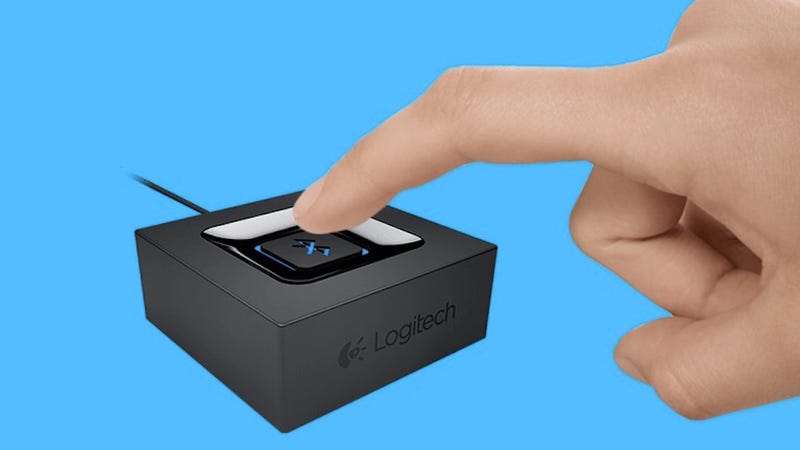
Logitech's Bluetooth Audio Adapter Turns Any Pair of Speakers into Wireless Ones

by Alan Henry

Logitech's Bluetooth Audio Adapter Turns Any Pair of Speakers into Wireless Ones

If you have a great pair of bookshelf speakers or even computer speakers, but wish you could stream music from a phone, a laptop, or another device without rearranging wires, Logitech’s Bluetooth Audio Adapter is for you. It’s tiny, affordable, and makes any set of speakers you plug it into Bluetooth and wireless.

For about $27 at Amazon, Logitech’s Bluetooth Audio Adapter can turn just about any set of speakers into Bluetooth ones. That’s a huge deal if you have an audio setup that you love, or invested good money into, but you want the good sound your quality speakers offer but have laptops, tablets, smartphones, and other audio sources in your home that aren’t connected to them. Just connect the audio adapter to your receiver (if your speakers aren’t powered) or your speakers via 3.5mm or RCA, power it up, and you have a new Bluetooth audio device in your home.

Put the adapter into pairing mode, and pair it with any other Bluetooth devices—your laptop that’s not connected to your stereo, your iPad or Android tablet, your friend’s phone (who’s over to visit and wants to play you his new favorite track), your spouse’s computer, whatever you want. Think of it as a more universal approach to technologies like AirPlay, Google Cast, or even a non-geeky approach to DLNA. Pretty much everyone understands Bluetooth, and you don’t need to download a special app or use a special tool to make this puppy work.

Of course, if you’re already a DLNA master and don’t need another gadget, or you’d prefer a Chromecast audio for your in-home streaming needs, you may not need something like this—but even for the money, the convenience, simplicity, and broad cross-platform, cross-device support just can’t be beat.

Bluetooth Audio Adapter | Logitech

http://www.amazon.com/Logitech-980-0...

25 Jan 13:39

The Toshiba FlashAir Makes Adding Wi-Fi to Your Camera Dead Simple

by Thorin Klosowski

The Toshiba FlashAir Makes Adding Wi-Fi to Your Camera Dead Simple

Wi-Fi SD cards have been around for quite a long time, but they didn’t really work that well. After digging around, I decided to try out Toshiba’s 32 GB FlashAir Wi-Fi card, and to my surprise, it works well, as long as you keep your expectations in check.

I’ve been hesitant about Wi-Fi SD cards because they sound like witchcraft. I tried one of the original Eyefi cards back around 2008 and hated the entire experience. I hadn’t looked back until I recently, when I decided adding Wi-Fi to my camera would make transferring photos to my phone a little easier. After all, these things had to work better by now, right? The FlashAir is the cheapest name brand option right now, with the 32GB card regularly going for around $30 compared to the Eyefi’s $90 and Transcend’s $60. So, after testing out the latest Eyefi for comparison’s sake and deciding the extra features weren’t enough for me, I went with the FlashAir.

How the FlashAir Works

The Toshiba FlashAir Makes Adding Wi-Fi to Your Camera Dead Simple

Using the FlashAir is pretty simple once you understand exactly what it does. In the case of the Toshiba FlashAir, you plug the card into an SD slot, and the card then broadcasts a Wi-Fi signal that you can connect to from an app on your phone or computer. You can even connect directly to the card using a special URL (because it’s also a tiny server.) Essentially, the FlashAir is just a hot spot that sits inside your camera but happens to also be an SD card.

Most people use these kinds of cards to add Wi-Fi photo transfers to an older camera. Here’s how it works:

  1. Turn on your camera with the Toshiba FlashAir inside of it. The card automatically starts broadcasting a Wi-Fi signal.
  2. Go to your phone or computer’s Wi-Fi settings and connect to the Wi-Fi network from your card (for the FlashAir, the default is flashair_randomalphanumericstring).
  3. Open up the Android, iOS or desktop app, and download your pictures.

By default, the Wi-Fi signal broadcasts for five minutes, but your camera’s battery powers the Wi-Fi, so when your camera shuts down, it’ll take the card (and the Wi-Fi) with it. This also means the SD card eats a bit of your battery power, though I didn’t notice that big of a difference in battery life.

It’s worth pointing out that the Toshiba FlashAir III works a little differently than the far more popular (and much pricier) Eyefi Mobi Pro line of cards. The Eyefi card can either create a direct connection by making its own Wi-Fi network like the FlashAir, or it can connect to your home Wi-Fi network to automatically upload photos to a cloud service or other device. Depending on what you what from your device, this is an important distinction to make. The FlashAir cannot connect to your home Wi-Fi network, so the process of getting photos to another device is never automatic.

Where It Excels

I found the FlashAir best suited for one thing: getting photos from my camera to my phone. To this end, it does the job wonderfully. It’s also a perfectly acceptable SD card, with class 10 read/write speeds that allow for snapping RAW images and recording HD video without hiccups.

And honestly, that’s all I want. I barely trusted this technology to begin with, so the fact that it actually works as advertised and lets me pull photos off my camera and onto my phone over Wi-Fi is enough to impress me here. There’s a part of me that wishes the FlashAir would connect to my home network and automatically upload images to my computer when I walked in the door, but I’d probably never trust that feature and I’d do it manually anyway.

The FlashAir app for importing photos is also nice and simple. You can import photos, change some settings (like the SSID and password) on the card itself, and that’s pretty much it. This is probably a drawback for some people, but honestly, there are millions of excellent photo editing and management apps on iOS and Android, and I guarantee whatever Toshiba tried to make would pale in comparison to third-party offerings. It’s also nice that you don’t have to register with another service to use the apps (like you do with the Eyefi). Plus, if you hate apps (or don’t have an Android or iOS device), the FlashAir is also functions as a little server that displays your photos at flashair.com so you can access them from any browser.

Where It Falls Short

The Toshiba FlashAir Makes Adding Wi-Fi to Your Camera Dead Simple

As you can see from the image above, the documentation that comes with the FlashAir is laughably oversimplified and borderline insane. That image is the entire manual, that’s it. So, you’ll need to figure out how to use the FlashAir on your own without a lot of help. The manual doesn’t tell you how to connect your phone to the SD card, it doesn’t tell you the default password for the hotspot it creates (hint, it’s 12345678), and it doesn’t even bother to explain how the thing actually works. Sure, it’s pretty easy if you’re tech-minded, but if you’re not, Toshiba’s manual is a befuddling masterwork of nonsense.

It’s also worth remembering the range of the Wi-Fi signal is about as far as you’d expect from this hacked together ramshackle technology. I couldn’t get it to work reliably beyond a few feet, and the transfer speed is around 2MB/s, so don’t expect crazy fast transfers. The range is so bad that it’s pretty useless if you want to transfer photos to your PC because by the time you get within range you might as well just pull the card out of the camera and plug it into your computer. The Eyefi card has much better range, so if that’s what you’re looking for, that card is more up your alley.

There’s also an internet passthrough mode that allows you to access both the Wi-Fi card and another Wi-Fi network at the same time, though it was unreliable for me. I also couldn’t for the life of me figure out why on earth I’d need to ever use the feature to begin with. If that’s a feature you need, you’ll probably want to look elsewhere.

While I personally didn’t struggle with how the whole hotspot photo transfer system worked, Wired described this process as a “cumbersome deal-breaker.” It takes about 10 seconds worth of your time, which is a far cry from cumbersome if you ask me. If that sounds like too much effort, then stay away from the FlashAir.

The Bottom Line: It’s Good for Transferring Photos to Your Phone, but Not Much Else

I bought the FlashAir III because I didn’t feel like shelling out the extra cash on a new camera when all I really wanted was Wi-Fi. To that end, it’s terrific for me. I’ve always been hesitant about Wi-FI SD cards because the reviews have been all over the place, but I think a lot of that has to do with expectation more than anything else (though the shoddy documentation certainly explains a lot of people’s struggles too). If you’re worried about the card not working, Toshiba does have a list of compatible cameras, though it covers pretty much every camera from the last decade. For what it’s worth, I tested it in a Sony RX100 and a Fuji X100.

I’ve already said this, but just so we’re all clear here: I think the FlashAir is a fantastic card if all you want is a simple way to transfer photos from your camera to your phone when you’re on the go. I’ve been using this as an easy way to pull stuff off my SD card and upload it to my cloud storage or social networks when I’m nowhere near home and it does a great job at that. If you’re looking for something that’ll automatically upload your photos to your computer when you walk in the door, look elsewhere.

25 Jan 13:34

Bill Gates and UK government pledge $4 billion to combat malaria

by Amar Toor

Bill Gates and British Chancellor George Osborne have pledged £3 billion ($4.3 billion) to eradicate malaria, a mosquito-borne disease that killed an estimated 438,000 people last year. Gates and Osborne announced the funding in a piece for The Times of London on Monday, saying the sum will go toward research and other eradication efforts over the next five years.

"When it comes to human tragedy, no creature comes close to the devastation caused by the mosquito," Gates and Osborne wrote. “We both believe that a malaria-free world has to be one of the highest global health priorities."

Continue reading…

25 Jan 13:33

Spotify video is reportedly launching this week

by James Vincent

Spotify is launching video content on its Android app this week, says The Wall Street Journal, with the update reportedly coming to iOS users by the end of next week. Spotify announced it would be expanding into video in May last year, but the service has been a long time coming. The company has been beta testing the mobile-only content in its four launch markets (the US, UK, Germany, and Sweden), with Spotify's vice president of product, Shiva Rajaraman, telling the WSJ that the company has now reached "the end of a journey of testing."

Continue reading…

24 Jan 17:22

Majority of UK booze-industry revenues come from problem drinkers

by Cory Doctorow

PostcardAHappyNewYear1912

69% of the alcohol sold in the UK is sold to "harmful," "hazardous" or "increasing risk" drinkers, accounting for more than 60% of the industry's revenues. The number of alcohol-related hospitalisations in the UK has doubled in the past ten years, to more than 1m/year. (more…)

24 Jan 17:22

Google Streamlines Play Games API: Allows Automatic Sign-In And Only Shows A Prompt When Google+ Access Is Requested

by Cody Toombs

hero

If you're an avid gamer on Android, get ready to see quite a bit fewer of those pesky Google+ sign-in prompts. Google is rearranging things a bit in the Games API to cut back on permission dialogs and authorization requests so users have an easier time getting straight into the action. The changes should also allow game developers to take advantage of Google's Games API and services like cloud sync without asking users to trust them with account details and potentially sensitive information.

Read More

Google Streamlines Play Games API: Allows Automatic Sign-In And Only Shows A Prompt When Google+ Access Is Requested was written by the awesome team at Android Police.


24 Jan 00:31

Panda frolicking in snow at DC's National Zoo is all of us in #Blizzard2016

by Xeni Jardin

pandaaaa

de4a0a8250

Panda. Snow. Floof-play. Didn't take long on #Blizzard2016 weekend for this video to go viral.

Tian Tian, an adult giant panda bear who lives at Smithsonian's National Zoo in Washington, DC enjoys rolling around in the snow after a winter storm dumped nearly two feet of the white stuff in the region.

Video: YouTube | Twitter.

(more…)

23 Jan 18:07

Top 10 Tricks to Get the Most Out of Your Caffeine Hit

by Melanie Pinola

Top 10 Tricks to Get the Most Out of Your Caffeine Hit

Coffee, tea, and other caffeinated beverages are enjoyable for the taste alone, but sometimes you might be thinking about their caffeine content more than the flavor. Here are the top 10 things you should know about this wonderful drug and how to use caffeine more efficiently.

Understand How Caffeine Works

Step one to making the most of anything is to understand how it works. That’s what the video above is for. In a nutshell, caffeine can give you a mental boost and a buzz, making you more alert, but its positive and negative effects will vary by person—and how you take your caffeine. Much more detail on this here.

Drink Caffeine Before Your Workout

Top 10 Tricks to Get the Most Out of Your Caffeine Hit

Caffeine doesn’t just help overcome your brain’s morning grogginess, it can help boost your physical performance too. Researchers have found that caffeine improves athletic performance—a cup or more of coffee or caffeine pills can help you on the day of a big race. Even for non-athletes, a cup of coffee before exercising could motivate us to stay the course and go further during workouts.

Drink Coffee Before a Nap

Top 10 Tricks to Get the Most Out of Your Caffeine Hit

Think of caffeine as a multi-purpose tool. In addition to making you alert and boosting your athletic performance, it can help you have the best nap ever. Take a caffeine nap, in which you drink a cup of coffee before a short afternoon nap, and you’ll get all the brain-boosting benefits of a nap while being energized as soon as you wake up.

Don’t Drink Coffee Late at Night—If You’re a Morning Person

Top 10 Tricks to Get the Most Out of Your Caffeine Hit

Many people avoid coffee or tea past the afternoon for fear they’ll be up all night. That’s generally good advice because caffeine can mess with your body’s natural sleep rhythms and levels of awakeness, but it’s also possible that this mostly affects morning people rather than night owls. As with any drug, know what works for you personally.

Get the Most Caffeine Buzz for Your Buck

Top 10 Tricks to Get the Most Out of Your Caffeine Hit

Let’s say you’re only interested in coffee, tea, energy drinks, or soda for the alertness factor. (I know a couple of ER doctors who live on Mountain Dew.) What’s the most cost-effective way to get that caffeine kick? It’s probably not a drink. And you might be surprised that some types and brands of tea pack more caffeine per ounce than certain types of coffee.

Adjust Your Tea Steeping Time for More or Less Caffeine

Top 10 Tricks to Get the Most Out of Your Caffeine Hit

The caffeine in tea affects us differently than the caffeine in coffee: It helps us get alert but without the caffeine crash. That said, if you’re looking to reduce the amount of caffeine you take in, you can cut about 80% of it from tea with a brief steep of the tea bag, dumping that brew, and then resteeping the same tea leaves. Conversely, if you want more caffeine from your cuppa, brew it for less time.

Choose the Right Coffee Beans for More or Less Caffeine

Top 10 Tricks to Get the Most Out of Your Caffeine Hit

You might think stronger-tasting coffee drinks like espresso pack the most caffeine, but it’s actually not true. The degree of roast also doesn’t really matter when it comes to amount of caffeine either. What does matter? Drinking Arabica versus Robusta (Robusta has twice the caffeine content) and the bean’s cultivar.

Time Your Coffee Fix

The best time to drink your first cup of coffee is not when you wake up. Scientifically speaking, the most effective time to have a cup of coffee is between 9:30 am and 11:30 am. Here’s why.

Know How to Reduce or Improve Your Caffeine Tolerance

Top 10 Tricks to Get the Most Out of Your Caffeine Hit

If you struggle with caffeine withdrawal and want to cut back on a caffeine addiction—while still enjoying your daily coffee—there are several things you can try. You could switch to half-caf or to tea, for example. Whatever you do, cut back slowly. On the other hand, if you find you’re not getting as much of that feel-good buzz from caffeinated drinks anymore, try cycling your caffeine intake—briefly not drinking any caffeine for a month—to reset your sensitivity to caffeine.

Aim for Small, Regular Doses of Caffeine for the Biggest Mental Boost

Top 10 Tricks to Get the Most Out of Your Caffeine Hit

Finally, if you want the optimal mental boost from your caffeinated drink, try small or moderate doses throughout the day—of about 20 to 200mg of caffeine per hour, so about one cup of coffee per hour. There you go: An excuse to make a whole pot of coffee for yourself (just don’t drink it all at once.)

Illustration by Nick Criscuolo. Photos by Jennie Faber, silver-john (Shutterstock), ynse, David Joyce, Markus Genn (Shutterstock), Szymon Apanowicz (Shutterstock), Colin and Sarah Northway.


Lifehacker’s Weekend Roundup gathers our best guides, explainers, and other posts on a certain subject so you can tackle big projects with ease. For more, check out our Weekend Roundup andTop 10 tags.

23 Jan 13:39

The Site Lifting the Veil on Netflix’s Geo-Restrictions

by Andy

Netflix has just announced its expansion into 130 more countries around the globe but the company’s penetration hasn’t always been so deep. Millions of potential customers outside the United States have had to wait for the service to land on their shores to become a customer – well that was the theory at least.
An open secret for years and common knowledge during the past couple of weeks, it’s possible – and easy – to be a customer of Netflix in one country and gain access to it from another.

Before the service landed on their shores last year this meant that Australians with no official access to the service have been able to view using a VPN. Equally, users with limited local libraries have been able to fool Netflix into thinking they’re American – with all the riches that provides.

Last week Netflix announced that it had begun cracking down on these content-tourists (or VPN pirates as they’re sometimes called) in order to appease rightsholders but for those who can still beat the system, what are they enjoying? The answer to that question and more can be found by visiting the ‘unofficial Netflix online Global Search’ or uNoGS for short.

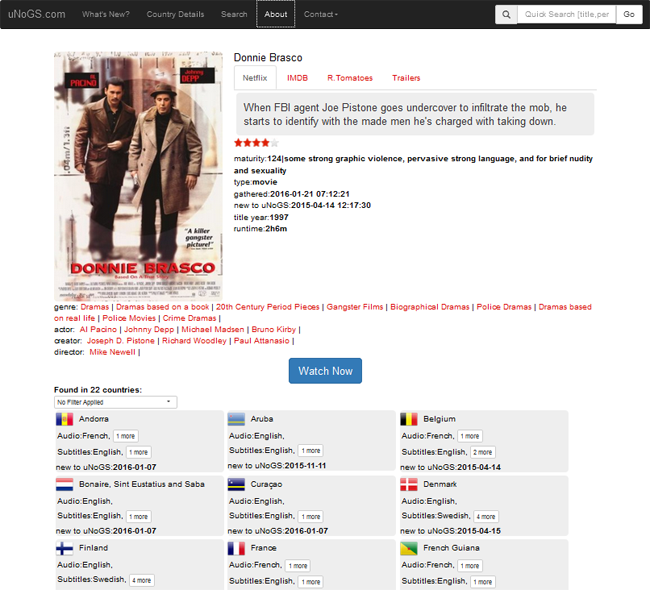
uNoGS is essentially a searchable database which allows users to see which content is available on Netflix in any given area in the world. For instance, when Netflix unceremoniously curtailed my viewing of Donnie Brasco in the UK earlier this month, a search on uNoGS revealed the movie was still on the service and accessible from 22 other countries.

unog-1

This means that by using a VPN to switch countries I was able to continue viewing, but uNoGS actually goes a step further by providing details on which VPN, proxy or DNS providers can provide access on a movie-by-movie basis.

For example, selecting TorGuard reveals options in Belgium, Denmark, Finland, France, Netherlands, Norway, Sweden and Switzerland.

Selecting Private Internet Access reveals five usable servers located in Finland, France, Netherlands, Sweden and Switzerland. Since the language is also displayed by uNoGS, those seeking English audio are able to rule out the second and fourth options.

unogs-2

Interested by the project, TorrentFreak caught up with uNoGS operator Brian to find out more about his baby.

“uNoGS is very much a one man show juggled as a hobby between work and family life. I initially built the site just for myself because the few sites that were providing a service like this were extremely limited in terms of search functionality,” Brian says.

“I wanted to be able to see what was available in every country, when it was added, when it was supposed to expire and when it actually expired. Once I completed the initial build for myself I decided to share it with everyone and uNoGS went live in early May 2015.”

Brian says the site’s aim is to provide an overview of what’s on in every country served by Netflix globally and to provide users with advanced search functionality to find titles by name as well as a variety of specific parameters. In addition to dates of availability, uNoGS provides details on audio tracks and subtitling. It also offers TV series data plus iMDb and Rotten Tomatoes listings.

Also available are total movie and TV show counts for each country. Found here, the table reveals the United States as the best Netflix region by far, with ‘French Southern Territories’ the most under-served.

In total, uNoGS indexes content available on Netflix in 243 territories and updates the same on a daily basis, but Brian suggests that in an ideal world his service wouldn’t be needed.

“Traditional media outlets like cable, satellite and terrestrial tv are dead but they haven’t fully realized this yet. Most of them are trying to hang on to their lucrative commercial models which they love but consumers hate,” he explains.

“At the moment these different providers have enough money to buy up the rights to a variety of shows making the geo-restrictions necessary. In time, this will change as more and more viewers go to disruptive services which charge a fair monthly fee and allow users to watch titles on their own terms. With the moves that Netflix is currently making, hopefully these changes will come sooner rather than later.”

In the meantime Netflix is in the clutches of copyright holders who it admits trying to appease with its recent VPN clampdown. TorrentFreak began speaking with uNoGS early January before that particular news broke but in our conversations back then, Brian made an accurate prediction.

“In the future with the advent of tools like Smartflix and search engines like uNoGS, I think [region switching] will become more mainstream and eventually upset the content providers enough to push Netflix to take action. I think this will be a shame but most likely inevitable,” he correctly concluded.

“Overall I think the VPN/DNS switchers are a good thing and most likely keep people from obtaining media through less official methods.”

uNoGS can be found here, complete with API access for those interested.

Source: TF, for the latest info on copyright, file-sharing, torrent sites and ANONYMOUS VPN services.

22 Jan 17:55

Bad supercar driver compilation

by Mark Frauenfelder
gJpoWZ

Millions of dollars went into the making of this supercut, starring Bentleys, Lamborghinis, Maseratis, Ferraris, and their terrible drivers.

22 Jan 14:31

Google Reportedly Paid Apple $1B In 2014 To Remain Default Search Engine On iOS

by Jon Russell
Sundar Pichai There’s always been plenty of speculation around how much Google pays Apple to include its search services inside iOS devices, and we finally have some clarity over that figure. Information raised as part of an ongoing legal case between Oracle and Google shows the search firm compensated Apple to the tune of $1 billion in 2014. Read More
22 Jan 14:30

Skype helps users avoid harassment by hiding IP addresses

by Tom Warren

Microsoft is finally making IP addresses hidden by default on Skype. Reports surfaced around four years ago noting that a flaw in Skype allowed malicious users to obtain IP addresses through the service. While Microsoft recently introduced the ability to hide your IP address in Skype, this is now being made default with the latest update released today.

Continue reading…

22 Jan 14:30

Netflix fires first shot in battle with VPNs

by James Vincent

A cat and mouse game between Netflix and its users over geo-blocked content has begun in Australia. Last week, Netflix announced it would be cracking down on customers who use software to watch content only available outside their own country, blocking proxies and virtual private networks (VPNs). Now, an Australian VPN named uFlix says that the video streaming service has indeed started blocking some of its users, with Netflix apparently delivering this message to infringing customers: "You seem to be using an unblocker or proxy. Please turn off any of these services and try again."

Continue reading…

22 Jan 14:29

Amazon UK has £10 off any order of £50 and above for one day only

by Harish Jonnalagadda

For one day only, Amazon UK is offering £10 off any order of £50 and above. All you need to do to avail the discount is add products totaling £50 or above to your cart, and use the promo code BIGTHANKS at checkout.

The retailer is offering the promotion after coming out on top in the UK's customer satisfaction survey for January. The only limitations to the deal include digital items — such as Audible audiobooks, mobile apps, digital game codes — baby formula, and gift cards. The offer is valid until 23:59 BST.

Amazon UK

22 Jan 00:51

Spruce Up a Room In No Time With the Speed Decluttering Game

by Patrick Allan

Spruce Up a Room In No Time With the Speed Decluttering Game

Decluttering your entire home can take awhile. If you’re pressed for time, but still want to give a room a quick tidying up, the speed decluttering game can help keep the mess at bay.

As Erin Boyle at Food52 explains, decluttering doesn’t have to be an all or nothing proposition. It can be like speed dating, where you get rid of the stuff you know you don’t want first, then take a little time to decide whether you’re ready for a long-term relationship with the rest of it. Boyle suggests you grab a timer, set it for 20 minutes, and pick a room you want to declutter:

Stand in the middle of the room and spend ten minutes identifying the things within view that are more trash than treasure. These might be things that are literally expendable: catalogs and junk mail and empty bottles (why?!). Trash might also be things that are already gone in the practical sense, but still lingering around... valueless to you and in need of removal. At the end of ten minutes, you’ll easily have a pile of things... Make the one pile three: things to throw away, to recycle, and to give away. Spend another five minutes packing up your piles and making a plan for getting them out the door.

Timing yourself forces you to make quick decisions about what you want to keep around. It also forces you to finally acknowledge the feelings you’ve been harboring for some items. You probably already know what junk you’ve been keeping around, but speed decluttering gives you a starting point for actually addressing it.

http://lifehacker.com/5957609/how-to...

Speed Decluttering: How to Clean Out in a Heartbeat | Food 52

Photo by eyeliam.