*DOPE MANSION ALERT* ... courtesy of NBA superstar DeAndre Jordan -- who's selling his massive Pacific Palisades estate which comes with a basketball court and indoor, outdoor hot tubs! The place is awesome ... 7 bedrooms, 10 bathrooms ...…
Paul Thompson
Shared posts
18 Oct 17:21
DeAndre Jordan -- Lists Insane $12 Mil L.A. Mansion ... Indoor Hot Tub?? (PHOTO GALLERY)
by TMZ Staff
17 Oct 14:53
‘Simple Gifts’ focuses on the beauty of the little things in life
by Ryan Stotts For the Tribune
The old hymn “Simple Gifts” has staying power.

26 Sep 14:57
Au pairs are a culturally diverse option for childcare
by Emily Pyrek emily.pyrek@lee.net
Ten years ago, Clare Wight was 20 years old, out of high school, and unsure of her next step in life. Unable to afford college and looking to travel, she turned to a popular option for young Brazilian women like…

15 Sep 18:16
Canon announces EF-M 18-150mm F3.5-6.3 STM and EF 70-300 F4.5-5.6 IS II USM lenses
Canon has announced two new lenses ahead of Photokina, unveiling an updated EF 70-300mm with an LCD panel and a versatile EF-M 18-150mm for its mirrorless line.
The EF 70-300mm F4.5-5.6 IS II USM updates a lens from 2005 with a Nano USM motor, offering USM motor focusing for stills and a quieter STM stepping motor for video AF. It's the second Canon lens to offer this type of motor; the first was the 18-135mm F3.5-5.6 IS USM introduced in February.
The 70-300mm II's information panel can be used to display focusing distance, focal length and 'shake amount'. The lens claims four stops of shake correction, uses one UD element to reduce chromatic aberration and offers a close focusing distance of about 1.2m/4ft.
The EF-M 18-150mm F3.5-6.3 IS brings a 29-240mm equivalent zoom to Canon's mirrorless system. Its image stabilization also claims 4 stops of shake correction.
The Canon EF 70-300mm F4.5-5.6 IS II USM will go on sale in November for $550. The Canon EF-M 18-150mm F3.5-6.3 IS STM will sell for $500 in December in graphite and silver.
Press release
CAPTURE HIGH-QUALITY ACTION SHOTS AND VIDEO FROM AFAR WITH THE NEW CANON EF 70-300mm f/4.5-5.6 IS II USM lens
Affordable Lens Features NANO USM Technology, Enhanced Image Stabilizer and Information Display
MELVILLE, N.Y., September 15, 2016 – Having the right tool for the job has long been the mantra for professional photographers and hobbyists alike. Canon’s wide array of lenses provide users with a variety of creative options to help capture dynamic photos and videos with their DSLR cameras. Canon U.S.A., Inc., a leader in digital imaging solutions, announced today the new Canon EF 70-300mm f/4.5-5.6 IS II USM lens featuring NANO USM technology for high-speed and near-silent focusing in both still and video modes. The lens also features a new LCD information display and four-stop* image stabilization.
“To help photographers that are striving to create the most amazing pictures and videos possible, Canon is dedicated to developing the best tools to help them with their goal,” said Yuichi Ishizuka, president and COO, Canon U.S.A., Inc. “Having this new EF 70-300mm f/4.5-5.6 IS II USM lens in a photographer’s camera bag will surely help them achieve their creative vision.”
Designed with the user in mind, this affordable new lens includes technology to spark creativity and deliver excellent image and video quality from afar. This is the second Canon lens equipped with NANO USM technology, a focusing motor that combines the benefits of a ring USM (ultrasonic motor) for high-speed AF during still photo shooting and lead-screw type STM (stepping motor) for smooth and quiet video autofocusing (AF)
Features for the Canon EF 70-300mm f/4.5-5.6 IS II USM lens include:
- High-speed autofocus for shooting stills and smooth, near-silent autofocus when shooting video is achieved by incorporating NANO USM technology.
- New Lens Information Display shows focusing distance, focal length and shake amount.
- One UD Lens helps reduce chromatic aberration and delivers outstanding high resolution and high-contrast results.
- Image Stabilizer effect at up-to-4* stops of shake correction helps capture sharp images.
- Circular aperture (9 blades) helps deliver beautiful, soft backgrounds.
- Full-time manual focus allows manual focus adjustment while in AF Mode.
The Canon EF 70-300mm F/4.5-5.6 IS II USM lens is scheduled to be available in November 2016, for an estimated retail price of $549.99**. For more information: http://www.usa.canon.com/
* Based on CIPA (Camera & Imaging Products Association) standards. Testing performed using the EOS-1D X digital SLR camera at a focal length of 300mm.
** Availability, specifications and price are subject to change without notice. Actual prices are set by individual dealers and may vary.
Key Features of the Canon EF-M 18-150mm f/3.5-6.3 IS STM Lens Include:
- Canon’s first EF-M high-zoom power lens covering a broad range of shooting scenes with a high-zoom ratio of up to 8.3x (29–240mm equivalent).
- Compact and lightweight design allows for easy portability.
- Optical design helps provide excellent image quality across a broad zoom range comparable to the EF-S 18–135mm f/3.5–5.6 IS USM lens.
- Maximum magnification of 0.31x at focal length 150mm.
- Image Stabilizer effect at up to 4 stops of shake correction helps capture sharp images.
Canon EF 70-300 F4-5.6 IS II USM / EF-M 18-150mm F3.5-6.3 IS STM specifications
| Canon EF 70-300 F4-5.6 IS II USM | Canon EF-M 18-150mm F3.5-6.3 IS STM | |
|---|---|---|
| Principal specifications | ||
| Lens type | Zoom lens | |
| Max Format size | 35mm FF | APS-C / DX |
| Focal length | 70–300 mm | 18–150 mm |
| Image stabilization | Yes (4 stops) | |
| Lens mount | Canon EF | Canon EF-M |
| Aperture | ||
| Maximum aperture | F4–5.6 | F3.5–6.3 |
| Minimum aperture | F32–45 | F22–40 |
| Aperture ring | No | |
| Number of diaphragm blades | 9 | 7 |
| Optics | ||
| Elements | 17 | |
| Groups | 12 | 13 |
| Special elements / coatings | UD element | 2 aspherical + 1 UD element |
| Focus | ||
| Minimum focus | 1.20 m (47.24″) | 0.25 m (9.84″) |
| Maximum magnification | 0.25× | 0.31× |
| Autofocus | Yes | |
| Motor type | Nano ultrasonic | Stepper motor |
| Full time manual | Yes | |
| Focus method | Rear | |
| Focus notes | Nano USM motor combines best of STM and ring-type USM | |
| Distance scale | No | |
| DoF scale | No | |
| Physical | ||
| Weight | 710 g (1.57 lb) | 300 g (0.66 lb) |
| Diameter | 80 mm (3.15″) | 61 mm (2.4″) |
| Length | 146 mm (5.75″) | 87 mm (3.43″) |
| Sealing | No | |
| Colour | Black | Graphite or silver |
| Zoom method | Rotary (extending) | |
| Power zoom | No | |
| Zoom lock | Yes | No |
| Filter thread | 67.0 mm | 55.0 mm |
| Hood supplied | No | |
| Tripod collar | No | |
| Other | ||
| Notes | Lens Information Display shows focusing distance, focal length and shake amount. | |
31 Aug 13:24
(FT5) Leaked image of the new Panasonic HC-X1 4K camcorder
by Andreapazzo

Today Panasonic will not announce any new MFT camera or lens. Instead they will announce the new Panasonic HC-X1 4K camcorder. I got that image from a source. Thanks!
Keep in mind Panasonic has a big announcement on September 19! GH5 and G8x coming!!!!!!!!!!!
rnss
 8
8 9
9 2
2 2
2 2
2 9
9 Share on Facebook
 Share on Twitter
 Share on Whatsapp
The post (FT5) Leaked image of the new Panasonic HC-X1 4K camcorder appeared first on 43 Rumors.
24 Aug 12:23
Ryan Lochte -- Phelps Got a 6-Month Suspension ... And He Could Have Killed Someone
by TMZ Staff
Ryan Lochte is going to get punished by the USOC ... but sources connected with the 4 swimmers don't think it's fair for the organization to annihilate them to appease those who are out for blood. Lochte's lawyer, Jeff Ostrow, tells TMZ he has…
24 Aug 12:22
DJI opens drone flying and training arena in South Korea
 |
Chinese drone manufacturer DJI has opened a new facility in South Korea that allows drone owners to learn more about flying their craft. The DJI Arena offers 1395 square meters/15016 square feet of dedicated space for education as well as obstacle courses for those wanting to show off and practice their aerial navigation skills. Situated in Yongin 20 miles south of Seoul, the arena will host an academy for pilots between the ages of 8 and 16, as well as individual and group sessions for adults, schools and businesses.
 |
DJI claims it wants to ‘make aerial technology more accessible, reliable and easier to use for anyone who wants to use it’ and to ‘play an important role in building a healthy UAV ecosystem in Korea.’ The company provides drones for those on education programs while others will need to bring their own. Members of the public can book three-hours sessions that cost the equivalent of $13.50 per person.
 |
For more information see a translated version of the DJI Arena website.
Press release:
DJI Arena Officially Opens in Korea
Providing a safe and fun environment for new pilots and aerial enthusiasts DJI, the world leader in unmanned aerial vehicle technology, officially opened its first DJI Arena in Korea to the public today. The facility aims to provide a gathering place for aerial enthusiasts as well as a practice venue for those who are learning about aerial technology such as first time pilots.
“The DJI Arena will help foster the local drone culture and play an important role in building a healthy UAV ecosystem in Korea,” said DJI Korea Country Manager Moon Tae-hyun. “
He continued, “The opening of the DJI Arena is our commitment to the development of the local UAV market. There is huge potential in how UAV technologies can change the way people see the world and create positive impact to people's lives. Our goal is to make aerial technology more accessible, reliable and easier to use for anyone who wants to use it.”
The 1,395-square-meter arena offers an adjustable LED-lit circuit for pilots who want to test their skills, LCD TVs that show spectators the first-person view from the drone, and a maintenance room equipped with charging docks and workstation for minor repairs.
Details on the Different Programs, Fees and Availability:
* Individual & Group Booking: Visitors are required to make reservations via an online application form (http://blog.naver.com/djiarenakorea). For those visiting from outside of Korea, reservations can be made via djiarena.kr@dji.com by including their full name, expected date and time of arrival, and number of participants. The reservation will be confirmed upon confirmation of the venue’s availability. Each booking session is for three hours and the entrance fee is 15,000 KRW (USD 13.50) per person per session. The maximum capacity of each session is 12 people and will be given on a first come first serve basis. The availability of individual and group booking is 7pm to 10pm on weekdays and 10am to 8pm on weekends.
* Corporate Event Rental: Rental for corporate and special events is available between 10am-8pm all week. The minimum venue rental fee is 500,000 KRW (USD 452) for 30 people and 30,000 KRW (USD 27) per additional participant. Booking must be made two weeks in advanced.
* Flying Academy: Children between ages 8 to 16 can also learn about DJI’s aerial technologies and become a skilled pilot. As part of the program, participants will learn the features of the Phantom 4, safety tips and best practices, and complete a total of eight practice sessions during the course of one month. The Flying Academy will commence later in September.
* Private Training: DJI’s professional pilot will be available for 1:1 training if participants prefer a more tailored program. To start, participants will learn how to fly the Phantom 4, one of the most intelligent and easy-to-fly consumer drone with features such as ActiveTrack, TapFly, Obstacle Avoidance and a Sport Mode.
* School Tours: DJI Arena is the perfect place for students to learn about UAV technologies and a great venue if schools are looking for an educational and fun experience for their students’ next field trip. The program can be tailored for the school with booking done in advance. Each session usually runs for two to three hours depending on the number of participants.
Visitors are required to bring their own drones for individual and group bookings while DJI will provide the Phantom 4 for participants in the educational programs. For corporate events and activities that require special set-up, please contact djiarena.kr@dji.com for more information and availability.
The DJI Arena is located at 441 Mabuk-dong, Giheung-gu, Yongin City, Gyeonggi Province, South Korea. The venue will be open for public tours between 5pm - 9pm this Thu Aug 18 and Fri Aug 19.
For more info or reservations, please email djiarena.kr@dji.com or visit http://blog.naver.com/djiarenakorea.
DJI expanded its retail business in Korea just earlier this year with the launch of its first overseas flagship store in Hongdae, Seoul. The Korea Flagship store has become a gathering place for aerial enthusiasts across different demographics, from recreational users to those seeking to start their own business using DJI’s platforms to retirees looking for their next hobby.
23 Aug 12:35
Weeklong Bliss Road closure begins today
by jourdan.vian@lee.net (Jourdan Vian)
Bliss Road will be closed to all traffic, including pedestrian and bicycle traffic, beginning 8 a.m. Monday through Friday, while the city of La Crosse repairs eroded areas on the hill below the road.
22 Aug 12:32
We built a pool! Publishing animating Motion textures to Final Cut Pro X
by avpost@sight-creations.com (Fox Mahoney)

Want moving textures in Final Cut Pro X? Plugin building expert Fox Mahoney shows us how to construct a moving water texture in Motion and publish it to FCPX. Great knowledge that will extend the capabilities of 3D text even further. Link to the free finished moving water texture generator plugin also included!
29 Jul 14:16
 Popular third-party chat app WhatsApp is leaving a "forensic trace" of every supposedly deleted chat log, meaning anyone with access to your smartphone -- or another device connected through the cloud -- could potentially access data from the app. The discovery comes from iOS researcher Jonathan Zdziarski, who shared the information in a blog post after discovering the potential security flaw in the latest version of WhatsApp (via The Verge).
Zdziarski tested out his theory by beginning a few chat threads, then archiving, clearing, and deleting them, but found that none of the app's deletion methods, even Clear All Chats, "made any difference in how deleted records were preserved." The central flaw appeared to be in the app's SQLite records, which retained the deleted chats in its database that could be accessed by a harmful individual with the right "popular forensics tools."
In his post, Zdziarski mentioned that the problem isn't unique to WhatsApp, and has even gone into detail about "forensic trace leakage" in Messages on iOS and OS X, and ways Apple could address such privacy issues, in a separate blog post. He explained succinctly that short-lived chats between friends and family using these apps are "not ephemeral on disk," which not only could be a cause for concern with users, but could allow law enforcement legal access to thought-to-be-deleted WhatsApp messages thanks to the lack of encrypted communication between WhatsApp and iCloud.
Earlier in the year, Apple reiterated its intent to double down on user privacy and safety within its iCloud platform. Currently, encrypted data saved in iCloud is accessible by Apple with a key, which grants it access to accounts for assistive purposes, like if someone forgets their password. However, with the steadily growing data amassing in users' iCloud accounts -- from texts to pictures and personal health data -- Apple is looking to provide end-to-end encryption in its cloud-based storage platform, meaning not even the company itself could gain access to the accounts of its users even if it wanted to.
Check out Zdziarski's blog post for more details on the issue.
Discuss this article in our forums


WhatsApp Security Flaw Leaves 'Trace of All Your Chats' Even After Deletion
by Mitchel Broussard
Popular third-party chat app WhatsApp is leaving a "forensic trace" of every supposedly deleted chat log, meaning anyone with access to your smartphone -- or another device connected through the cloud -- could potentially access data from the app. The discovery comes from iOS researcher Jonathan Zdziarski, who shared the information in a blog post after discovering the potential security flaw in the latest version of WhatsApp (via The Verge).
Zdziarski tested out his theory by beginning a few chat threads, then archiving, clearing, and deleting them, but found that none of the app's deletion methods, even Clear All Chats, "made any difference in how deleted records were preserved." The central flaw appeared to be in the app's SQLite records, which retained the deleted chats in its database that could be accessed by a harmful individual with the right "popular forensics tools."
In his post, Zdziarski mentioned that the problem isn't unique to WhatsApp, and has even gone into detail about "forensic trace leakage" in Messages on iOS and OS X, and ways Apple could address such privacy issues, in a separate blog post. He explained succinctly that short-lived chats between friends and family using these apps are "not ephemeral on disk," which not only could be a cause for concern with users, but could allow law enforcement legal access to thought-to-be-deleted WhatsApp messages thanks to the lack of encrypted communication between WhatsApp and iCloud.
The core issue here is that ephemeral communication is not ephemeral on disk. This is a problem that Apple has struggled with as well, which I’ve explained and made design recommendations recently in this blog post.All the same, Zdziarski caps his post by mentioning there's no reason for widespread panic to ignite because of the WhatsApp security flaw, mainly due to the fact that someone with malicious intent would need to jump through so many hoops to finally access the deleted messages. The iOS researcher stated that his purpose was for users to simply "be aware of WhatsApp’s footprint." He also gives a few options for users looking to mitigate the issue, including periodically deleting WhatsApp "to flush out the database," disabling iCloud backups, and avoiding the storage of backup passwords in Apple's keychain.
Apple’s iMessage has this problem and it’s just as bad, if not worse. Your SMS.db is stored in an iCloud backup, but copies of it also exist on your iPad, your desktop, and anywhere else you receive iMessages. Deleted content also suffers the same fate.
Earlier in the year, Apple reiterated its intent to double down on user privacy and safety within its iCloud platform. Currently, encrypted data saved in iCloud is accessible by Apple with a key, which grants it access to accounts for assistive purposes, like if someone forgets their password. However, with the steadily growing data amassing in users' iCloud accounts -- from texts to pictures and personal health data -- Apple is looking to provide end-to-end encryption in its cloud-based storage platform, meaning not even the company itself could gain access to the accounts of its users even if it wanted to.
Check out Zdziarski's blog post for more details on the issue.
Tag: WhatsApp
Discuss this article in our forums
27 Jul 15:35
Podcast 030 | Away
by Joshua Fields Millburn & Ryan Nicodemus
By Joshua Fields Millburn & Ryan Nicodemus · Follow: Twitter, Facebook, Instagram
In this episode of The Minimalists Podcast, Joshua Fields Millburn & Ryan Nicodemus discuss letting go and the willingness to walk away from anything.
Stream
Subscribe
iTunes · Stitcher · Soundcloud · YouTube · MP3 Download
Mentioned in This Episode
- Book: Essential
- Book: Everything That Remains
- Book: How to Be Here
- Book: Minimalism: Live a Meaningful Life
- Class: How to Write Better
- Essay: The Things We Are Prepared to Walk Away From
- Essay: How to Start a Successful Blog Today
- Essay: Need, Want, Like
- Own: Minimalism Film
- Podcast: Debt
- Podcast: Passion
- Podcast: Sam Harris
- Soundtrack: Minimalism Film
- Tour: Minimalism Film
- Watch: A Rich Life with Less Stuff
- Watch: Minimalism Film
This episode was produced by Shawn Harding. Our theme music was written and performed by Peter Doran. Our podcasts are completely free, so if you found value in this episode, and you’d like to help us produce more, please consider donating a dollar to The Minimalists. Your donations help keep this podcast 100% advertisement-free (because advertisements suck).
If you’d like to comment on the podcast, you can leave a review on iTunes. Not only do we read every review, but your positive, creative reviews also help our simple-living message reach more ears.
If you have a question for The Minimalists you’d like us to answer on our podcast, please leave a message on our voicemail at 406-219-7839. We’ll also answer some questions from Facebook, Instagram, and Twitter on our podcast: #AskTheMinimalists.
Subscribe to The Minimalists via email.
25 Jul 18:00
Apple Maps Expands Transit Data to San Diego and British Columbia
by Juli Clover
Apple recently updated its Maps app to include transit information in San Diego, California and British Columbia, Canada allowing iOS users in those locations to incorporate public transportation options when seeking directions through the Apple Maps app.
In San Diego, Apple Maps will now offer up routes that include transportation by the city's Trolley, which connects the east and south counties with the Downtown area. The Trolley is San Diego's light rail system and sole public transportation option besides buses.
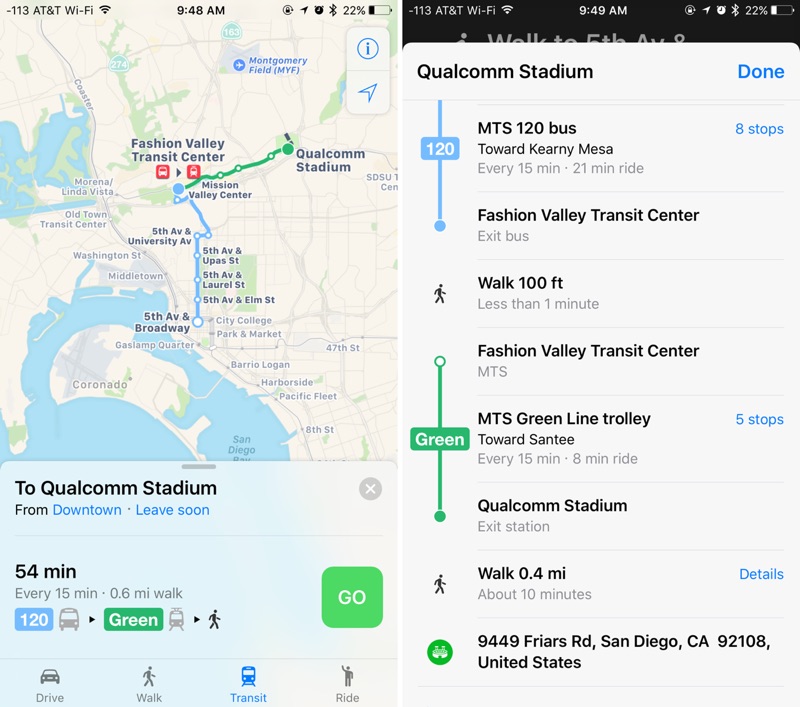
In Vancouver, Victoria, and other cities in British Columbia, Canada, Apple Maps directions now incorporate the SkyTrain and other rail lines. Transit directions should be a welcome addition in Vancouver, which is Canada's third-largest metropolitan area.
Transit directions were first added to Apple Maps in 2015 as part of iOS 9. At launch, transit information was only available in a handful of cities, but Apple has been working hard to expand the feature to additional locations.
Transit data is now available in more than 20 cities around the world, along with dozens of cities in China.
Discuss this article in our forums

In San Diego, Apple Maps will now offer up routes that include transportation by the city's Trolley, which connects the east and south counties with the Downtown area. The Trolley is San Diego's light rail system and sole public transportation option besides buses.
In Vancouver, Victoria, and other cities in British Columbia, Canada, Apple Maps directions now incorporate the SkyTrain and other rail lines. Transit directions should be a welcome addition in Vancouver, which is Canada's third-largest metropolitan area.
Transit directions were first added to Apple Maps in 2015 as part of iOS 9. At launch, transit information was only available in a handful of cities, but Apple has been working hard to expand the feature to additional locations.
Transit data is now available in more than 20 cities around the world, along with dozens of cities in China.
Tag: Apple Maps
Discuss this article in our forums
14 Jul 14:08
Exposing some limitations
A photographer's intro to the world of video
It took me a long time to recognize the appeal of video shooting. Even in a job where I have to use a camera’s video features, it was only fairly recently that I moved beyond just taking short clips (essentially stills with a little bit of movement in them) and started to think in terms of using video and editing to tell stories.
Given that most modern cameras offer at least rudimentary video tools, I wanted to share my experiences and perhaps encourage others to start thinking about shooting at 24 or more frames per second.
The good news is that a lot of the things you learn as a photographer are immediately useful as you take your first steps in video shooting. But, as I discovered, at almost every stage I encountered differences and additional factors to consider. Many of which I wished someone had told me when I started…
Stop shaking the camera, you’re making me feel sick
The first thing that became apparent when shooting video for the first time was the need to keep the camera steady. I remember my Dad teaching me how to keep my camera steady and be aware of my breathing when shooting relatively long exposures, but no amount of good breathing technique or bracing the camera against a pillar is enough to give steady video.
 |
| Even if your camera is hand-holdable, don't expect that to mean you'll shoot it hand-held. |
This makes sense, of course: most stills shooting only requires you to hold your camera steady for fractions of a second whereas video lets the viewer see how steady you’ve been for seconds or minutes at a time.
What I've learned is that in-camera stabilization can be enough to stop your footage looking unwatchably juddery, but unless you’re aiming for a ‘run-and-gun’ aesthetic, you’ll need to use a tripod or some sort of stabilization rig.
Exposing some limitations
Exposure is another area where the lessons I’d learned from stills photography are useful but incomplete. You still get to control the same variables, but the range of control you have is somewhat restricted. It’s still a question of managing light, but with a greater risk of finding yourself with too much of the stuff.
For me it’s a question of shutter speed, which has a more obvious impact on the appearance of your footage than is usually the case in stills shooting. A fast shutter speed in stills photography will freeze motion, a slow one will allow the subject to blur but there’s often a large range in between these two extremes. In video, there’s a narrower range before the viewer starts to notice the difference.
The 180 degree shutter ‘rule,’ where you use a shutter speed that’s half the duration of each frame (so 1/48th seconds for 24 fps shooting) isn’t an inviolable law, but the further you stray from it, the more jarring or muddled your footage will look. This can be a creative choice, of course, but only counts as such if you've consciously made it.
This made me think back to when I was first experimenting with stills photography, and getting a feel for the boundaries set by the longest shutter speed I could hand-hold, the widest aperture I had available and the highest ISO setting I found acceptable. Once I was familiar with these, one of the first purchases I made was a faster lens (that’s right: a 50mm F1.8) to get more light to extend these capabilities.
With stills shooting, one of the first things you buy is a bright lens to get more light, with video it’s an ND filter, to get rid of it.
With video and the further restriction over the fastest shutter speed I’m willing to use, it’s a decent ND filter I need to buy, to reduce the light level to fit your boundaries.
 |
| A neutral density (ND) filter allows you to use use wide apertures and the relatively slow shutter speeds that a lot of videographers favor. An adjustable ND filter provides even more flexibility. |
A return to JPEGs
Added to these exposure limitations has been another throw-back to my first days as a photographer: having to revert to an 8-bit, compressed shooting format. Having spent some time learning the distinctions between video file formats, the main lesson has been that none of the ones I'm likely to encounter are anything like Raw.
Once you've been spoiled by the seemingly endless dynamic range that can fit in a 14-bit Raw file and the ability to set and adjust the white balance at the ending stage, it's a shock to go back to having to get exposure and white balance perfect when you shoot.
Flat tone curves and Log profiles provide a means of squeezing a bit more useable DR into those 8-bit files, but this can make it even harder to judge correct exposure. I'd highly recommend shooting some test footage and trying to grade it back into something useful, before committing yourself to the flattest tone curve you can find.
14 Jul 12:57
Lil Wayne's Young Money Sports -- Nabs Another One ... Signs Teenage NBA Prospect (PHOTOS)
by TMZ Staff
We might be waiting forever for "Tha Carter V" ... but Lil Wayne isn't waiting to become a major force in the athletic world ... signing another big named prospect to his Young Money Sports empire. Sources at YMS tell us Wayne and the crew have…
06 Jul 13:26
Why Every Service Business Needs a Growth Plan:
by Chris Johnson
I’m in year 6 of my company. And in this entire time, we’ve had more good times than bad times.
But we’ve had tough times for sure. All of our wounds were self inflicted, due to us not having a growth plan (or a pricing strategy.)
This post covers both.
Times where we had to surf the payables. Times when had to take a few jobs that we didn’t like. Times where we couldn’t support our friends the way that we’d like. Times where we had to start working with someone that we thought may not be a great fit, but had no choice.
Sure, we wanted to get big, but we were doing it haphazardly. Opportunistically. Taking big chances by accepting proposals, and then hoping it worked out. It worked out a lot.
This is what I wish someone had told me when I started. That fast and sustainable growth is possible. That you can do it and stay sane and stable. This plan is made for service businesses & freelancers are between $60,000 a year and $2mm. Above that you have a different type of organization, and a different set of needs.
Another caveat. My friend Paul Jarvis talks about how you want to design your life first. And let the amount you want to work drive growth, and not just grow for its own sake. Take that advice (a good summary is here.
The Consequences of Uneven Growth: Staffing, Client Selection & Cash Flow
The big issue was that we had to staff with a gun to our head. And when we have 45 days to deliver something, we weren’t in position to be selective with the design talent that came in.
Perfectly good designers aren’t always a fit at any given company. Morton’s Steakhouse is a well admired company. So is In and Out Burger. Chances are not a lot of operators would be able to be interchangeable, even if the salary was the same. Realize that someone being “not a fit” isn’t a value judgement on them and we’ll get a lot farther.
Plus, it takes time to learn if someone is good at designing, or good at interviewing. Agency services (24 Seven, Creative Circle TCG etc) sent abysmal, unqualified and inept candidates that “checked the box,” but consumed management hours and were well versed and prepared to chew up clock time without producing deliverables. Example: One guy was waiting on assets and didn’t tell us that he didn’t have them for a few hours of billable time. Technically our fault. But still.
Our second consequence was that when you grow you always have to front money before you get a return. Sometimes there would be a long gap. And so we’d have to take other work with inappropriate clients. People that were demanding, or people that didn’t have an interesting product.
This put pressure on cash flow. You had to sell to make things work to fund your obligations, both past and present. It was easy to get out of balance because entrepreneurs are, by definition optimistic.
Without a rubric, it’s easy to get out of whack.
Is Your Business An Inadvertent Ponzi Scheme?
This imbalance can happen easily. Without malice or bad intentions it’s easy to become an Inadvertent Ponzi Scheme. How?
Simple. When you need new cash to meet past delivery obligations – you are a Ponzi Scheme. Now, every business goes through a Ponzi Period. That generally happens at an early stage, when a business is new and only making $10-20k per month in revenue. That’s the gap that you have to bridge with every enterprise.
At that point, the risk is low because it’s fairly simple to cover gaps with personal resources, and there isn’t a situation where a minor event can create a domino chain of death spiral.
When you get bigger the risk becomes much more pronounced. When you’re doing $80k or $100k, personal resources can’t generally close the gap (nor should they). So you become a Ponzi Scheme.
How To Create a Growth Plan For Your Service Business
So let’s say you want your business to have more revenue, and to grow consistently. You have to plan for it to keep yourself on a good path. You want to grow:
- Without overwhelming stress.
- Without ever letting your service standards slip (hopefully by using new people to increase them)
- With a plan to build a company that creates and stores wealth and value.
- Without having to kill yourself to do it.
To do that, you have to plan for growth and not just be haphazard about your future. A growth plan needs to be in place to make this work. Here’s how.
Step 1: Assess Your Delivery Capacity. It’s Everything.
The first thing you have to do is assess your capacity with your current team. How much can you deliver? I mean perfectly with a perfect process that is impeccable in every area. That increases your Net Promoter Score, and makes people become raving fans.
Hopefully it’s more than how much you can easily sell. However, if you have more capacity than ability to sell, in a lot of ways, that’s even better, because your engine won’t be flooded.
Exactly how many units can you deliver and wow every customer without having any stress or friction internally? That’s your current capacity.
Step 2: Schedule Deliveries & Productize Your Service
The next step is to schedule your deliveries. On a calendar. This will have deep business ramifications because it allows you to sell “slots” which make a service business act like a brick-and-mortar with actual inventory. It doesn’t really matter if you have 2 or 20 slots per month. Putting them on a calendar is the thing that matters because they somehow become “real.”
Defining your service-based offerings is making your business into a “product.” Depending on the complexity, we’ll probably want to tighten up the rules a little bit here for what’s offered and what’s not.
Simplifilm currently delivers six projects a month. Three “mid-month” and three “end of month.” This will keep cohorts in rhythm and save us time. This will also benefit our clients because we’ll be able to deliver a coherent (and, we hope, excellent) experience.
Step 3: Create Margins
One of the biggest mistakes we made was a forgivable reliance on “optimum” conditions for delivery. Everyone will do it. Because founders are gung ho about what we’re doing. And because we always believe things will go well.
Margins are vital. Because you can make mistakes. Because you aren’t reliant on perfect conditions. Because there will be both sick days and vacation days that you have to work with. In our case 6 projects per month is right. It allows room for error, and we’re not overly reliant on luck, good fortune, or good clients to deliver. And, if we WANT TO, and if things are smooth, we can consider selling another slot (we won’t for a while).
You need two types of margins. Money margins and time margins. The time margin is more important than the money margin.
Step 4: Increase Prices on A Schedule
Currently, our average ticket is around $11,000 per project, depending on style. Some clients pay less, many clients pay more, but that’s a good working estimate for us. We will soon publish current pricing and talk about how and when we will increase it as we move towards transparency.
But, before you grow your units-per-month you want to grow your prices.
Some targets:
Design Businesses: 50% gross margins.
Consulting Businesses: 75% Gross Margins.
Professional Services Firms: 45% Gross Margins (less if you’re big).
Development Shops: 50% gross margins.
Milage may vary depending on the type of business you are, but in general you want higher gross margins than your industry average because margins are the store of value and source of stability.
Remember, you are talking about the per job gross margins here. You would consider the following costs:
- Labor (and founder labor counts, within reason.)
- Merchant Services. (Square, Paypal, Stripe, etc).
- Production Expenses (i.e. stock art, a design library, a plugin).
- Cost of sale: commissions to sales reps, referral fees, some marketing budget share.
- Omnibus Delivery fee: we now charge $350 (internally) per project to cover things we purchase like subscription services. This is charged to “overhead,’ but it’s a real thing. This isn’t seen by the customers as they don’t like complex invoices.
I would raise prices (and service levels) until our margin is exceeding our industry norms by about 10%.
How do you know when to raise prices? That’s the part that this system makes simple. In step 3 we have scheduled our deliveries and productized our service. We have slots on paper 6 months into the future at any given time.
When they are sold 90 days out – we raise our prices by 10-20%. A 5% raise isn’t meaningful enough to bother with, there generally won’t be much resistance. There may be a gap between intake and getting around to this.
Depending on your market, you may want to go through a couple cycles of this before you increase capacity. My bias is to use Net Promoter Score of +50 as a rubric to determine if we’re OK to grow units or not.
There are more sophisticated pricing models. And maybe you could convince me that one would be helpful. But this is what to do.
Step 5: Add Capacity (Or Increase Service Level & Price)
Finally, you’ll add capacity (units) or increase services (offering & price). Adding capacity is simple for us: we just increase adding the # of units we’re doing, and staffing to that goal.
I would recommend keeping the growth at about 20%, or 2 hires per cycle. Generally- whichever is less. Early stage startups may be different. I’d also bring people in understanding that for a 3-6 month period they are going to be making a smaller contribution than they will in the future, so we want to rely on new hires as .5 or .6 of the capacity of a normal hire as they learn the process and systems that you need to be successful.
Finally. Putting It All Together
The net-net bottom line for a growth plan is that it has to fit with what you want for your business. There is risk – both in too many or too few units per month. On our end, we won’t work when any given client is more than 25% of our total revenue, even though it temporarily curtails our growth.
Now let’s also consider what’s possible. On this program, we can grow about 20% per quarter. That means every 3 quarters we effectively double in size (if we want to). That’s fast enough to be a great growth company, especially for a service business.
The other way we grow is via recurring revenue.
For Other Reading:
Low Quality Clients – Jim’s Marketing Blog
Service Business Growth: Entrepreneur Magazine
How Agencies Can Grow- A well reasoned counterpoint to this piece.
The post Why Every Service Business Needs a Growth Plan: appeared first on Product Demo Videos, Premium Explainer Videos & Book Trailers.
01 Jul 12:53
Phillips among top prospect performers Thursday
by William Boor
Rhys Hoskins and Dylan Cozens were among the top prospect performers in the Minors on Thursday.
23 Jun 14:46
Amber Heard -- Miraculous Weight Gain? (VIDEO)
by TMZ Staff
Amber Heard arrived back in L.A. after getting fitted for her "Justice League" costume in London ... exactly one week after the fitting was supposedly cancelled because she was 20 lbs underweight. TMZ broke the story ... Johnny Depp's team…
07 Jun 14:38
Microsoft and Xamarin Plan WWDC Afterparty to Discuss Development of iOS Apps
by Mitchel Broussard
Microsoft recently announced that it will be holding an afterparty at WWDC this year, taking place next week on Monday, June 13 following Apple's State of the Union keynote (via WinBeta). In partnership with its software-focused company Xamarin, Microsoft's party is centered around "The Future of Apps," and is confirmed to last from 5 PM to 8:30 PM PDT, located in Twitter's headquarters near the Bill Graham Civic Auditorium.

Any iOS and OS X developer is welcome to attend Microsoft's party, even if you aren't directly attending WWDC, and the company is also giving anyone who checks in a chance to win either an Apple Watch Sport or Xbox One every hour. Microsoft hopes to discuss the latest iOS apps and updates created by the company at the event -- everything from Outlook to Excel and SwiftKey apps for iPhone and iPad devices -- including their future on the platform.
Likewise, Xamarin's inclusion in the afterparty will generate some talk surrounding its Test Cloud platform, which lets developers run and test every feature of their apps "on more than a thousand devices," without having to worry about inconsistencies fragmenting data due to different smartphone designs and OS interfaces. The company's tools in the past have helped developers design apps for iOS, Android, and Windows platforms.
Discuss this article in our forums

Any iOS and OS X developer is welcome to attend Microsoft's party, even if you aren't directly attending WWDC, and the company is also giving anyone who checks in a chance to win either an Apple Watch Sport or Xbox One every hour. Microsoft hopes to discuss the latest iOS apps and updates created by the company at the event -- everything from Outlook to Excel and SwiftKey apps for iPhone and iPad devices -- including their future on the platform.
Likewise, Xamarin's inclusion in the afterparty will generate some talk surrounding its Test Cloud platform, which lets developers run and test every feature of their apps "on more than a thousand devices," without having to worry about inconsistencies fragmenting data due to different smartphone designs and OS interfaces. The company's tools in the past have helped developers design apps for iOS, Android, and Windows platforms.
Xamarin Test Cloud lets teams test every feature on more than a thousand devices and on every commit. Catching bugs before release shortens development cycles and allows more time for innovation. We'll also be offering exclusive one-on-one time with a Xamarin Test Cloud Engineer to walk you through the best way to automate testing on your apps.Any developer interested in attending Microsoft and Xamarin's WWDC afterparty can RSVP to the event here.
Discuss this article in our forums
02 Jun 20:48
7 Rivers cardiac group to donate AEDs to 4 nonprofits
by mtighe@lacrossetribune.com (Mike Tighe)
The Seven Rivers Chapter of the Sudden Cardiac Arrest Association is donating automated external defibrillators to four nonprofits in the Coulee Region.
25 May 18:33
(FT5) Amazon China leaks the Olympus 30mm macro lens info
by Andreapazzo

The full Olympus 30mm macro lens details just leaked via Amazon China:
- 1.25X image magnification
- 7 lens elements in 6 groups
- Closest focus distance is 0.095 meters
- 40 degree angle of view
- Aperture range f3.5 to f22
The official announcement is imminent. It’s unclear if Olypus will also announce the E-PL8 too.
–
via Digicameinfo.
24 May 14:00
Eva Longoria -- Fully Loaded Wedding Pics (PHOTOS)
by TMZ Staff
Eva Longoria's nuptials to Mexican media mogul Jose Baston was no shotgun wedding ... but it was stocked with plenty of semi-automatic assault rifles. Eva and Jose got married Saturday, about 90 minutes outside of Mexico City ... and…
24 May 13:51
 Woooo! This Wednesday, at 9:30-11:30 PM EST, we are recording Punknews Podcast #300! We're going to have a lot of cool guests and musical performances. Here's where you come in: we'll be taking calls from YOU, the listeners and readers, while we record. If you want to call into Punknews Podcast #300, please e-mail podcast@punknews.org today or Monday so we can get it set up. We're looking forward to hearing from you!
Call into Punknews Podcast #300!
by johng@nospam.punknews.org (johng)
Woooo! This Wednesday, at 9:30-11:30 PM EST, we are recording Punknews Podcast #300! We're going to have a lot of cool guests and musical performances. Here's where you come in: we'll be taking calls from YOU, the listeners and readers, while we record. If you want to call into Punknews Podcast #300, please e-mail podcast@punknews.org today or Monday so we can get it set up. We're looking forward to hearing from you!
23 May 14:55

Deals: Our pick for the best GPS running watch, the Garmin Forerunner 230, is down to $200 (from $250)
by WC Staff
Best Deals: Our pick for the best GPS running watch, the Garmin Forerunner 230, is down to $200 (from $250) [Amazon]
11 May 12:24
WhatsApp Launches Desktop App for Mac OS X
by Husain Sumra
Facebook-owned WhatsApp today announced the launch of a desktop app for Mac OS X, allowing users to easily carry on their conversations from their computers natively. The move comes several months after debuting a web version of its popular chat service.

To download the free app, WhatsApp users have to go to whatsapp.com/download from their desktop browser. Once the app is downloaded, users will be presented with a QR code. To scan the code, users will have to use the WhatsApp app on their phone, going into the app's settings and clicking "WhatsApp Web" to activate the QR code scanner.
Discuss this article in our forums

Today we're introducing a desktop app so you have a new way to stay in touch anytime and anywhere - whether on your phone or computer at home or work. Like WhatsApp Web, our desktop app is simply an extension of your phone: the app mirrors conversations and messages from your mobile device.The new desktop app is available for Mac OS 10.9 and above and Windows 8 and supports native desktop notifications, keyboard shortcuts and more. The app also syncs to users' mobile devices, which means that notifications and conversations are mirrored in the desktop app.
To download the free app, WhatsApp users have to go to whatsapp.com/download from their desktop browser. Once the app is downloaded, users will be presented with a QR code. To scan the code, users will have to use the WhatsApp app on their phone, going into the app's settings and clicking "WhatsApp Web" to activate the QR code scanner.
Tag: WhatsApp
Discuss this article in our forums
05 May 18:25
The first FCP Tour takes place in Madrid 6th May 2016
by forum@fcp.co (Peter Wiggins)

On the eve of the first FCP Tour in Madrid (6th May 2016) Jesús Pérez-Miranda takes us on his journey from Avid, through FCP 6&7 and on to Final Cut Pro X.
05 May 12:22
Live Video Broadcast App Periscope Gets Permanent Save Feature
by Tim Hardwick
Live video streaming iOS app Periscope has gained a new feature that lets users save their broadcasts forever.
Users of the Twitter-owned app are now able to permanently save replays of their videos simply by including the hashtag #save in the title, with the option remaining to delete the broadcast at a later time. The new feature puts it on a level footing with Facebook Live, which touts the same facility to make videos permanent.

The new feature was announced last night via Periscope by CEO Kayvon Beykpour, who described the feature as a "public beta" and part of an upcoming "holistic solution" that will let users control how broadcasts stay on the platform, including when to keep broadcasts for longer than the default 24-hour window and when to have them deleted more quickly.
Comments and hearts are saved with broadcasts that use the new #save hashtag and there is no limit to the number of videos a user can save. Broadcasts with the hashtag will be visible in a user's profile, as well as anywhere else they show up, while links shared externally such as via Twitter will remain permanently active.
Periscope also bid a fond farewell to Katch, a third-party tool for saving Periscope videos and sharing them elsewhere. The startup shut down last month after running out of funding, reports TechCrunch.
Periscope users need not update their app to see the change come into effect, but should instead sign up for the Periscope Beta Program.
Periscope is a free download on the App Store available for iPhone and iPad. [Direct Link] A separate Apple TV app is also available on the Apple TV App Store.
Discuss this article in our forums

Users of the Twitter-owned app are now able to permanently save replays of their videos simply by including the hashtag #save in the title, with the option remaining to delete the broadcast at a later time. The new feature puts it on a level footing with Facebook Live, which touts the same facility to make videos permanent.
The new feature was announced last night via Periscope by CEO Kayvon Beykpour, who described the feature as a "public beta" and part of an upcoming "holistic solution" that will let users control how broadcasts stay on the platform, including when to keep broadcasts for longer than the default 24-hour window and when to have them deleted more quickly.
Comments and hearts are saved with broadcasts that use the new #save hashtag and there is no limit to the number of videos a user can save. Broadcasts with the hashtag will be visible in a user's profile, as well as anywhere else they show up, while links shared externally such as via Twitter will remain permanently active.
Periscope also bid a fond farewell to Katch, a third-party tool for saving Periscope videos and sharing them elsewhere. The startup shut down last month after running out of funding, reports TechCrunch.
Periscope users need not update their app to see the change come into effect, but should instead sign up for the Periscope Beta Program.
Periscope is a free download on the App Store available for iPhone and iPad. [Direct Link] A separate Apple TV app is also available on the Apple TV App Store.
Tag: Periscope
Discuss this article in our forums
04 May 17:33
'L.A. Law' Star Corbin Bernsen -- Moving In, Moving Out ... Unloading House for $1.5 Million (PHOTOS)
by TMZ Staff
Corbin Bernsen and his actress wife, Amanda Pays, clearly aren't nesters ... 'cause they're putting their Sherman Oaks home on the market less than a year after buying it. Amanda and Corbin -- best known for "L.A. Law" and the 'Major…
21 Apr 16:59
Politics Doesn’t Have To Be About Attacks
by Chris Johnson
We live in politically interesting times. My experience with the book 5 Easy Theses feels like a return to a different era of debate and discourse. Something sort of old-fashioned […]
The post Politics Doesn’t Have To Be About Attacks appeared first on Simplifilm.
20 Apr 21:05
Deals: The Sennheiser GAME ONE headset is down to $128 (from $150)
by WC Staff
Best Deals: The upgrade pick in our guide on the best gaming headset, the Sennheiser GAME ONE, is down to $128 (from $150). [Newegg]
04 Apr 16:31
Minimalism Poster and Wallpaper Contest
by Joshua Fields Millburn & Ryan Nicodemus
By Joshua Fields Millburn & Ryan Nicodemus · Follow: Twitter, Facebook, Instagram
Our film, Minimalism: A Documentary About the Important Things, hits U.S. theaters next month (international details coming soon). We hope you’re as excited as we are! If so, we’d love to get you involved: today, April 4, 2016, marks the start of our Minimalism Poster and Wallpaper Contest, which runs until release day, May 24, 2016.
Here’s how it works:
Step 1. Download and print the film’s poster (below), and then write the city, theater, and date of your nearest screening on the poster.
Step 2. Hang the poster somewhere interesting in the real world (example). The more imaginative, the better. (Note: you can “hang” it somewhere unique in the digital world, too, if you’d prefer.)
Step 3. Post a photo of your poster(s) on Facebook, Twitter, or Instagram with the #MinimalismFilm hashtag. If you post more than one poster, each poster will count as one entry into the contest (so post as many as you’d like).
Winners. Every week we’ll select three winners based on our favorite postings. Each winner will receive autographed copies of all three of our books. We’ll also repost a few of our favorites—the most creative—on social media.
Wallpapers. Oh, and by the way, this contest is not limited only to posters—we’ve also created free wallpapers for your phone and desktop using our simple minus logo (download links below). If you post a screenshot of your minimalist phone or desktop setup with this wallpaper on Facebook, Twitter, or Instagram with the #MinimalismFilm hashtag, you’ll automatically be entered into the contest.
Ready? Set. Go!
Download Links
 Minimalism Poster
Download: Small (8.5×11) | Large (11×17)
 Phone Wallpaper
Download

 Desktop Wallpaper
Download
